suspension AUDI Q7 2018 Owner´s Manual
[x] Cancel search | Manufacturer: AUDI, Model Year: 2018, Model line: Q7, Model: AUDI Q7 2018Pages: 398, PDF Size: 185.58 MB
Page 21 of 398
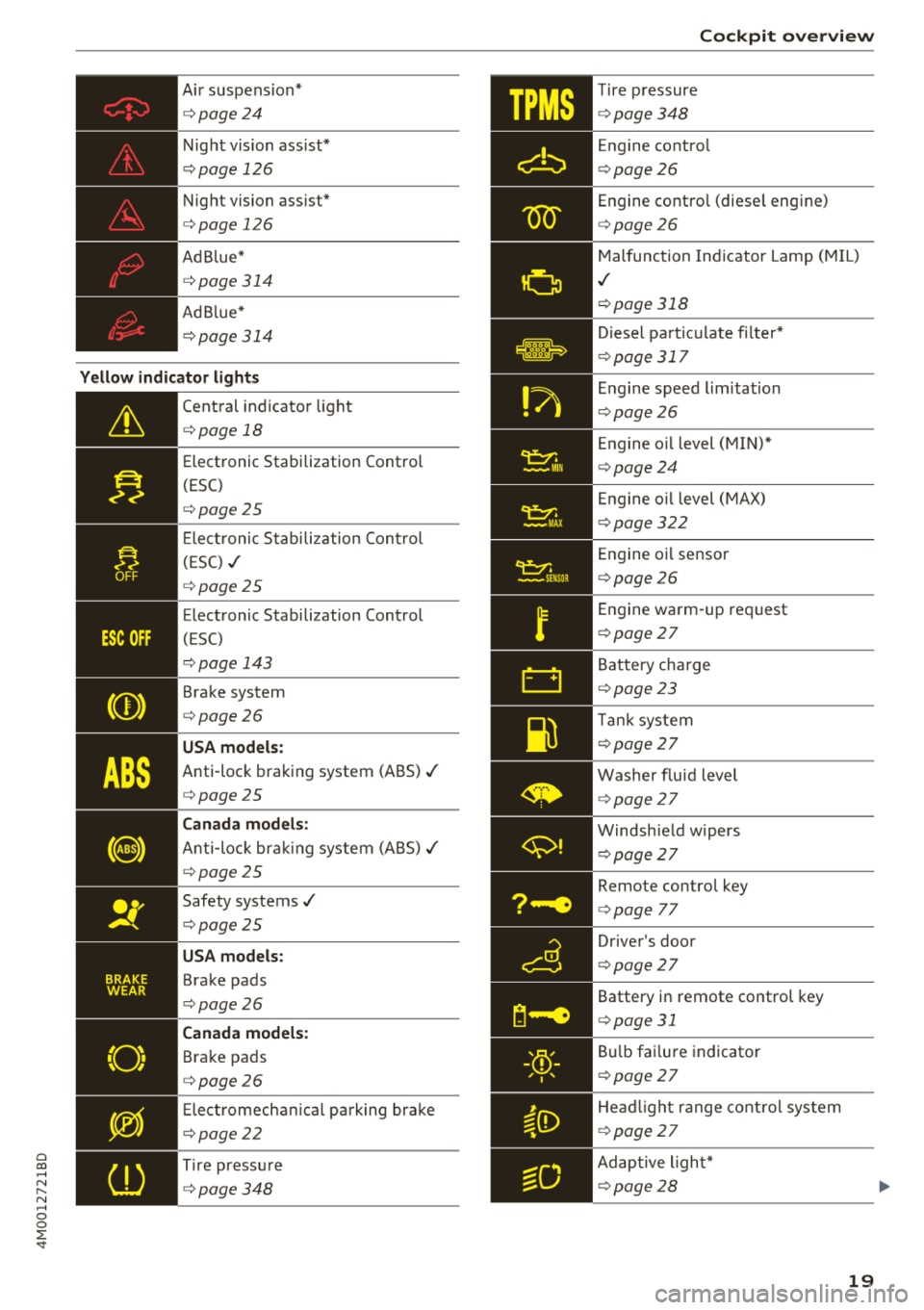
Cl a:, ...... N
" N ...... 0
0
::r '
c> page24
Night vision ass ist*
c> page 126
Night vision ass ist*
c> page 126
Ad Blue*
c> page 314
Ad Blue*
c>page 314
Yellow indicator lights
--------------
Central indicator light
c>page 18
Electronic Stabilization Control
(ESC)
c>page25
Ele ctr onic Stabi lization Cont rol
( E SC) ,/
c>page 25
Electronic Stabilization Control
(E SC)
c> page 143
Brake system
c>page26
USA models :
Anti-lock braking system (ABS)./
c>page25
Canada models :
Anti-loc k bra king system (ABS) ,/
c>page 25
Safety systems,/
c>page25
USA models :
Brake pads
c>page26
Canada models :
Brake pads
c>page26
Elect romecha nical pa rk ing bra ke
c>page22
T ire press ure
c>page348
Coc kpit o ver view
- '
Tire p ressure
_ c>page348
--------------
Engine contro l
c>page 26
Engine contro l (diese l engine)
c> page 26
Malfunc tion Ind icator Lamp (M IL)
,I
c> page 318
Diesel pa rtic ulate fi lter*
c> page 317
En gine speed limitation
c> page26
En gine o il level (MIN) *
c>page 24
Engine o il level (MAX)
c> page 322
Engine o il sensor
c> page 26
Engine wa rm-up request
c> page 27
Battery cha rge
c> page 23
Tan k system
c> page 27
Washer flu id leve l
c>page 27
Windsh ield w ipers
c> page27
Remote control key
c>page 77
Driver 's door
c> page 27
Battery in remote control key
c>page 31
Bulb fai lu re indicator
c> page 27
He ad light range cont ro l sys tem
c> page 27
Ad aptive ligh t*
c> page28
19
Page 22 of 398
Cockpit overv ie w
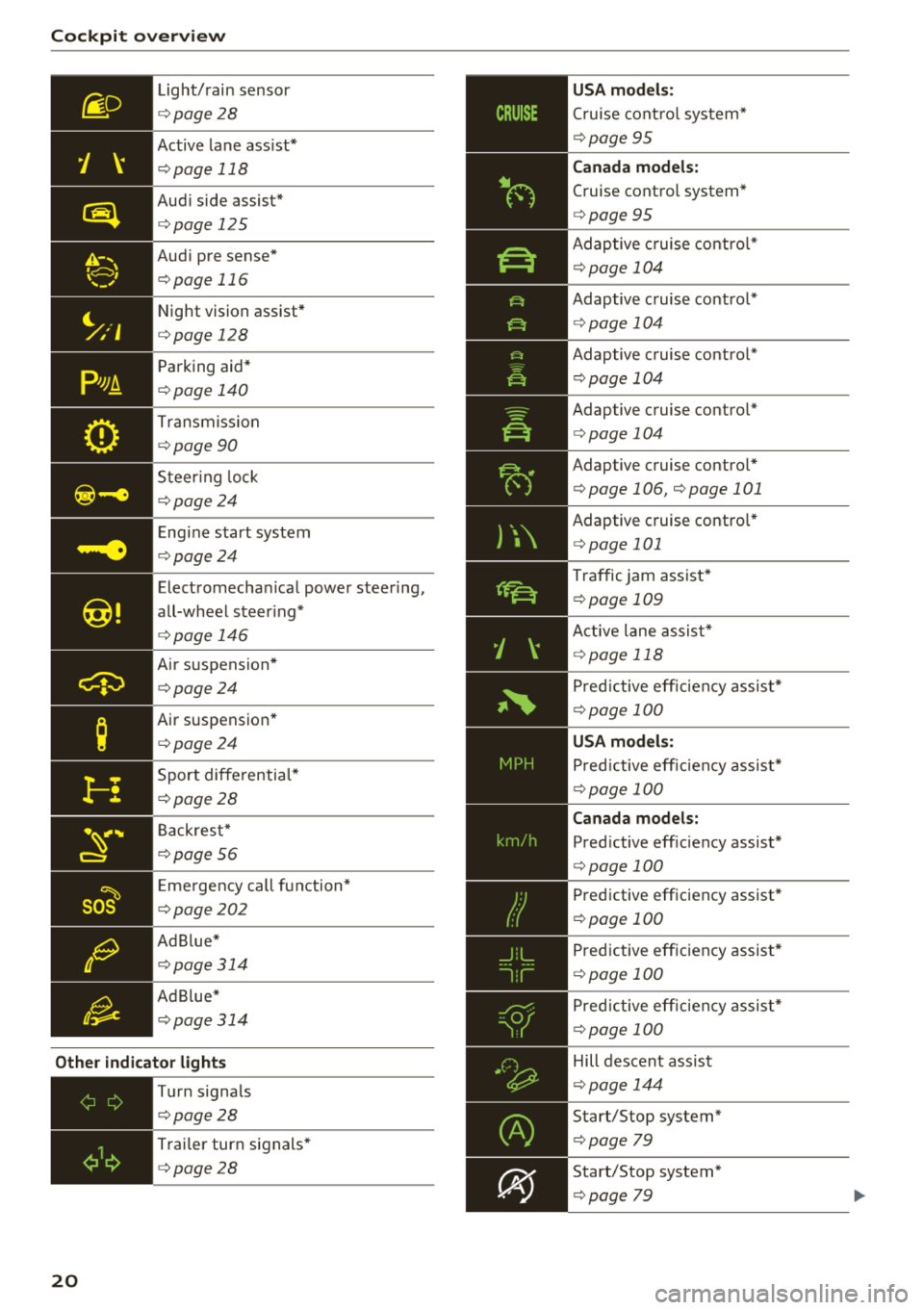
Light/ rain sensor
¢ page 28
Active lane assist*
¢ page 118
Audi side assist*
¢page 125
Audi pre sense*
¢page 116
Night vision assist*
¢page 128
Parking aid*
¢page 140
Transmiss ion
¢ page90
Steer ing lock
¢ page24
Eng ine start system
¢ page24
Electromechan ical power steering,
all-wheel steer ing*
¢ page 146
Air suspension*
¢page24
Air suspension *
¢page24
Sport differentia l*
¢ page28
Back res t*
¢page56
E me rgency call fu nction*
¢page202
Ad Blue *
¢page314
Ad B lue*
¢ page314
Other indicator lights
20
,=------------
Turn signals
¢page28
Trai ler turn signals*
¢page28
US A mod els:
Cruise cont rol system*
¢page 95
Canada model s:
Cruise contro l system*
¢ page 95
Adaptive c ruise contro l*
¢page 104
Adaptive c ruise contro l*
¢ page 104
Adaptive cruise control*
¢page 104
Adaptive cruise contro l*
¢ page 104
Adaptive cruise contro l*
¢ page 106, ¢page 101
Adaptive cruise contro l*
¢ page 101
Traffic jam assist*
¢page 109
Active lane assis t*
~ page 118
Pred ictive eff ic iency assist*
¢ page 100
Pred ictive eff ic iency assist*
¢ page 100
Canad a models:
Pred ictive efficiency assist*
¢page 100
Predictive efficiency assist*
¢page 100
Pred ictive eff iciency assist*
¢ page 100
Pred ictive eff ic iency assist*
¢ page 100
Hill descent assist
¢page 144
Start/Stop system*
¢page 79
Start/Stop system*
¢page 79
Page 23 of 398

Cl a:, ...... N
" N ...... 0
0
::r '
c:> page 79
Ad Blue *
c:>page 314
Transmission
c:>page90
Air suspension*
c:> page 131
Adaptive cruise control*
c:> page 106,
Traffic jam assist*
c:> page 110
Traffic jam assist*
c:>page 110
Audi p re sense*
c:> page 116
USA models:
Elect romecha nica l pa rk ing bra ke
c:>page 22
Canada mod els :
Electromechan ical park ing brake
c:> page 22
Hill descent assist
c:> page 144
Child safety lock
c:>page 38
USA models :
Speed warning system *
c:>page 95
Canada mod els :
Speed warn ing system*
c:>page 95
Active lane ass ist*
c:> page 118
Aud i side assist *
c:> page 125
Camera-based traffic sign recogni
tion*
c:> page 98
Nig ht vision ass ist*
c:> page 128
Cockpit o ver view
Hig h beam ass istant *
c:>page 44
High beams
c:> page 44,
High beam ass istant*
c:> page 44
BRAKE/((D) Brake system
If this indica to r li ght tur ns on, t here is a malf unc
t ion in the br ake system .
1111 (USA model s) I. (Canada model s)
Brakes : stop vehicle and ch eck brake fluid level
Stop the vehicle and check the brake fluid level.
See a n author ized Audi dealer or author ized Audi
Service Facility for assistance if necessa ry .
1111 (USA models ) I. ( Canada models )
Brakes: malfunction! Stop vehicle safely
If the indicato r light turns on and this message
appears, there is a ma lf u nction in the brake
booster.
If the ABS indicator light~ (USA mo dels) /
iiJ (Canada models), the ESC indicator light Bl
and the brake system indicator light 1111 (USA
models) /. (Canada models) all turn o n and
t hi s message appears, then the ABS, ESC and
brak ing d istr ibut ion are ma lfunctioning
c:> ,&. .
Do not continue dr iving . See an author ized Audi
dealer or authorized Audi Service Fac ility for as
s istance
c:> ,&. .
1111 (USA models )~ (Canada models) Park
ing brake : malfunction! Safely stop vehicle. See
owner's manual
- If the indicator light and the message appear
when the vehicle is stationary or after switch ·
ing the ignition on ,
check if you can re lease the
park ing brake. If you cannot release the pa rk
ing brake, see an author ized Audi dealer or au
thorized Audi Service Fac il ity . If you can release
the parking b rake and the message st ill ap
pea rs , see a n author ized Audi dealer or author
i z e d Au di S ervice Fac ility immediately to have
t he ma lfu nction correc ted. ..,
21
Page 26 of 398

Cockpit overv ie w
Stop the engine and do not continue driving.
Check the engine oil leve l¢
page 322.
- If the engi ne oil leve l is too low, add engine o il
r:!> page 322. On ly cont inue driv ing once the in
dicator light turns
off.
- If the engi ne oil level is cor rect and t he i nd ica
tor lig ht st ill tur ns on, tur n the eng ine
off a nd
do no t continue driving. See an authorized Audi
dealer or authori zed A udi Se rvice Fac ility for as
sistance .
(D Tips
The oil pressu re warning is not an o il level in
dicator. Always check the o il level reg ularly .
'1'.::r,. Engine oil level (MIN)
Applies to: vehicles with oil level warning
• Please add oil immediately .
Add engine oil immed iate ly r:!> page 322.
Ill Plea se add ma x. x qt (l) oil. You can contin
u e dri ving
Add the maximum amoun t of oil indicated in the
d isplay as soon as possible ¢
page 322 .
@-Steering lock
• Steering: malfunction! Please stop vehicle
There is a malfunction in the electronic steering
lock . You cannot turn the ignition on .
Do
not tow your vehicle because it cannot be
steered. See an authorized Audi dealer or author
ized Audi Service Fac ility for assistance.
!\II Steering lock: malfunct ion! Please contact
Service
There is a malfunc tion in the elec tronic stee ring
loc k.
Dr ive to an a uth o rized Aud i dea le r or a uth o rized
Aud i Serv ice Fac ility immediately to have the
malfun ct io n corre cte d.
24
A WARNING
Do not tow your vehicle when there is a mal
function in the electron ic steer ing lock -thi s
i ncreases the risk of an acc ident.
-e Engine start system
• Engin e start sy st e m: malfunction! Plea se
contact Service
Do not sw itch the ignition off because you may
not be able to switch it on again .
Drive to an authorized Audi dealer or authorized
Audi Service Facility immediate ly to have the
malfunction corrected .
=:3 Engine start system: malfunct ion! Please
conta ct Ser vice
-
There is a ma lf u nction in the engine star ting sys
tem.
D rive to an author ized A udi dealer or au tho riz ed
A udi Se rvice Fac ility immed iate ly to have the
malfunction correc ted.
~ Hood
• Warning! Hood i s not locked . Stop vehicle
and che ck the lock
If the indicato r light turns on and the message
appears, the hood locking mechanism is not en
gaged correctly .
Stop immediately and close t he hood
¢ page 32 0.
0 /Q Air suspension
Applies to: vehicles with air suspension
• Air suspension: malfunction. Safel y stop ve
hicle. Steering and ground clearance limited
D ue to a sys tem m alfu nct ion, yo ur vehicle's
ground clearance is very low at the front or rear
axle* (in vehicles with all-wheel steering) . Be
ca use of this, the w heels no long er have enoug h
clearance to steer correctly.
See an author ized Audi dealer or au thori zed A udi
Service Facility for assistance.
...
Page 27 of 398

• Air suspension: malfunction! You can con
tinue driving slowly. Speed limited to max.
35 mph (60 km/h )
There is a malfunc tion that can result in restrict
ed driving stability . The speed is limited to a
maximum of 35 mph (60 km/h).
Dri ve to an autho rized Aud i dea le r or authorized
Aud i Service Facility immedia tely to have the
mal funct ion corrected.
• Air suspension: malfunction! You may con
tinue driving slowly at max. 35 mph (60 km/h)
There is a malfunction that can result in restrict
ed driving stability.
Drive to an authorized Aud i dea ler or aut horized
Aud i Service Facility immediately at a maximum
speed of 35 mph (60 km/h) to have the malfunc
tion cor rected.
• Air suspension: service mode. Vehicle can be
moved but handling may be impaired
Carefu lly drive to an authorized Audi dealer or
author ized Audi Service Facility immed iate ly to
have the serv ice mode deactivated.
II Air suspension: malfunction! Please contact
Service
There is a system malfunct ion that can result in
restricted driving stability or reduced ground
clearance.
Dri ve to an autho rized Aud i dea le r or authorized
Aud i Service Facility im media tely to have the
mal funct ion corrected.
II Air suspension: vehicle too low. Limited
ground clearance
The ground clearance is very low due to a system
malfunction . Wait until the air suspens ion sys
tem has restored normal ground clearance. Oth
e rw ise, conditions such as an uneven road sur face
can lead to veh icle damage.
B Suspension: malfunction! You may continue
driving
Cl a:, ;::j There is a suspension control malfunction.
" N ,-1 0
0
::r '
Drive to an authorized Audi dealer or authorized
Audi Service Facility immediate ly to have the
malfunction corrected.
nl & Electronic Stabilization Control (ESC)
If the bl ind icator light blinks while driv ing, the
ESC or ASR (Anti-Slip Regulation) is act ively regu
lating .
If the DJ indicator light turns on, the system has
switched the ESC off. In t his case, you can switch
the ignit io n off and then on to switch the ESC on
again. The ind icator light turns off when the sys
tem is functioning fully.
If the II ind icator light turns on, ESC was
switched off using the
l~Offl button c> page 142.
Stabilization control (ESC/ ABS): malfunction!
See owner's manual
If the bl indicator light and the~ (USA mod
els);tiJ (Canada mode ls) ABS indicator light turn
on and the message appears, there is a malfunc
t ion in the ABS or the e lectron ic differentia l lock .
This also causes the ESC to malfunction. The
brakes still function with their normal power, but
ABS is not active .
Drive to an authorized Audi dealer or authorized
Audi Service Facility immed iate ly to have the
malfunction corrected.
(D Tips
For additional informat ion on ESC and ABS,
see
c> page 142.
!I..' Safety systems
The E,I indicator light mon itors the safety sys
tems .
If them indicator light turns on or blinks, there
is a ma lfunction in a safety system.
Drive to an authorized Audi dealer or authorized
Audi Service Facility immed iate ly to have the
malfunction corrected.
25
Page 87 of 398
Difficult terrain and off-road
When driving in unfamiliar areas and offroad,
drive slowly and keep on the watch for unexpect
ed obstacles (such as potholes, rocks, tree
stumps, etc.).
To prevent the vehicle from bottoming out and to
reduce the risk of underbody damage, you should
drive across uneven ground on only one side of
the vehicle so that only two of your wheels cross
the uneven area, instead of driving across the
center of the uneven area with all four wheels.
Drive quickly through sandy or marshy off-road
sections and do not stop , if at all possible.
Driving through water
Also read the information found in r=;, page 74.
Driving on a slope
If you are ever unable to drive up a hill, do not try
to turn around . Drive back down in
reverse in
stead . Otherwise you run the risk of t ipping over.
If the vehicle threatens to tip over when driving
across a slope, you must immediately steer
downhill in the direction of the slope.
Do not park your vehicle on steep hills .
To reduce the r isk of tipping over, drive on hills in
the direction of the downward slope (fa ll line) -
never crosswise.
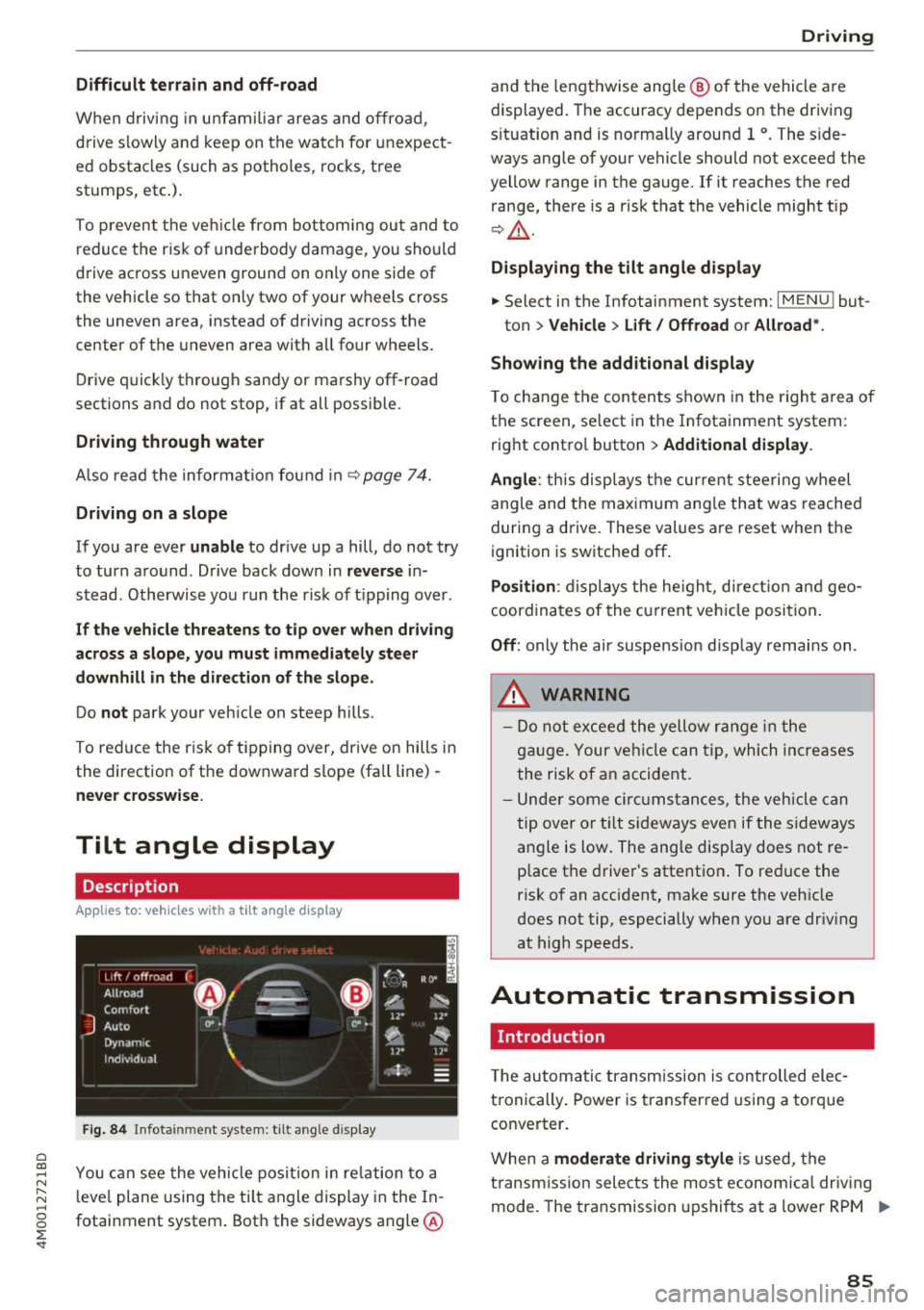
Tilt angle display
Description
Applies to: vehicles wit h a tilt ang le display
110 · I l 1ft / offrnortr1 ( ~ ....
All road
!r
-
Q
l " __,.._
Comfort 4 ~
J
ll" 11• Auto O" •
Dynamic
~ ~
Individual 11• I/"
~t-;s
Fig. 84 Infotainment system : tilt angle d isplay
a
~ You can see the vehicle position in relation to a N
~ leve l plane using the tilt angle display in the In-~
g fotainment system . Both the sideways angle @
:E '
and the lengthwise ang le @ of the vehicle are
displayed. The accuracy depends on the driving
s ituation and is norma lly around 1
°. The side
ways angle of your vehicle should not exceed the
yellow range in the gauge. If it reaches the red
range, there is a risk that the vehicle might tip
r=;,_& .
Displaying the tilt angle display
.. Select in the Infotainment system: I MENU ! but-
ton>
Vehicle > Lift/ Offroad or Allroad*.
Showing the additional display
To change the contents shown in the right area of
the screen, se lect in the Infotainment system:
right control button>
Additional display.
Angle :
this disp lays the current steering wheel
angle and the maximum angle that was reached
during a drive . These values are reset when the
ignition is switched off .
Position: displays the height, direct ion and geo
coordinates of the current vehicle posit ion.
Off : only the air suspension display remains on .
.&_ WARNING
- Do not exceed the yellow range in the
gauge. Your vehicle can tip, which increases
the risk of an accident.
- Under some circumstances , the vehicle can
tip over or tilt sideways even if the sideways
angle is low. The angle display does not re
p lace the driver's attention . To reduce the
risk of an accident, make sure the vehicle
does not tip, especially when you are driv ing
at high speeds.
Automatic transmission
Introduction
T he automatic transmission is controlled elec
tronically . Power is transferred using a torque
converter.
When a
moderate driving style is used, the
transmission selects the most economical driving
mode. The transmission upshifts at a lower RPM .,.
85
Page 95 of 398
Cl a:, ...... N
" N ...... 0
0
::r '
The maximum permitt ed tongue weight of the
trailer drawbar on the trailer hitch ball head may
not be exceeded .
If the tongue we ight is too low, this affects the
trailer's handling . For driv in g safety, we recom
mend to always utilize the maximum permitted
tongue weight, but not exceed it. You can reach
it, for example , by distributing the cargo in the
trailer correctly.
You can determine the tongue weight, for exam
ple, with a bathroom scale or a public weigh sta
tion .
The permitted tongue weight of your veh icle can
be found in the vehicle documentation or in
¢page 376.
Load distribution
Poor cargo load and distribution can negatively
i mpact ve hicle handl ing.
- Store objects preferably in the vehicle luggage
compartment . The vehicle shou ld always carry
the heaviest possible load and the trailer
shou ld have the lightest possible load.
- Distribute the load in the tra iler so that the
heavy objects are as close to the axle as possi
ble.
- Secure objects from slid ing out of p lace.
- Utilize the maximum permitted tongue weight
if possible .
Tires
Set the tire pressure on your vehicle for a "full
load"; see the t ire pressure sticker¢
page 340.
If necessary, also adjust the tire pressure on the
trailer according to the manufacturer's recom
mendation .
The tire pressure must be increased an addi tional
3 PS I (0 .2 bar) for towing loads over 6,600 lbs
(3,000 kg) .
W inter tires shou ld be mounted on the vehicle
and on the trailer during winter temperatures .
Trailer towing
Outside mirrors
If you cannot see the traffic behind the trailer
with the standard exterior mirrors, then you
must attach additional exterior mirrors. Adjust
them so you have a sufficient visibility behind
you.
Exterior lighting
Follow the legal regu lations rega rding the light
ing equipment on your trailer. Contact an author
ized Audi dea ler or authorized Audi Service Facili
ty for more information.
Before starting to drive , check all lighting eq uip
ment on the hitched trailer.
T he headl ight range cont rol adj usts automat ica l
ly to the light range of the headlights .
Safety chains
Make sure the safety chains are correctly applied
when pulling a trailer . The cha ins should hang
enough so that the trailer can drive around
curves . Howeve r, they must not touch the
ground.
Air suspension
Applies to: vehicles with air suspension
The air suspens ion must be at the standard vehi
cle he ight before you set the tongue weight on
the tra iler and hitch the trailer¢@ ,
¢page 130,
Raising/lowering the vehicle.
For vehicles with a factory-installed trailer hitch,
the a ir suspension trailer mode w ill automatically
switch on if you connect the trailer cable to the
socket.
For vehicles with a retrofitted trailer hitch, you
must sw itch on the a ir suspension trailer mode
manua lly . Select in the Infotainment system:
IMENU I button> Vehicle > left control button>
Vehicle settings > Air suspension: trailer. Switch
it off again after towing a trailer.
You can also sw itch off trailer mode manually
wh ile dr iving, for example, whe n using a bicycle
rack system. ..,.
93
Page 96 of 398
Trail er to wing
If you have to drive th rough diffic ult road condi
tions, you can raise the vehicle again after hitch
ing the trai ler or after adjust ing the tongue
weight .
{QJ Note
Applies to: vehicles with air suspension
-Changes in temperature or load can affect
the he ight of the vehicle.
- Set the a ir suspension to the standard vehi
cle heig ht, otherwise the applicab le tongue
weig ht no longer applies to your vehicle .
(D Tips
-Use chocks when parking on incl ines if the
trailer is loaded.
- We recommend also having the vehicle in spected between the inspection intervals if
you are towing a trai ler frequently.
- Avo id driving wit h a trailer du ring the vehi
cle break-i n period .
Driving with a trailer
Driving with a trailer requires extra caution.
Speed
Adhere to the legal speed l imi ts. Follow t he lega l
regulations specif ic to the country.
As the speed inc reases, the d riving stability of
the t railer dec reases . The refore you sho uld not
exceed t he max imum legal speed limit when
there are unfavorable road, weather and/or wind
conditions. This especially applies when driving
downhill.
You must a lways reduce yo ur speed as soon as
you not ice even the s lightest swinging motion of
the trailer . Never try to "straighten out" the trail
er by accelerating.
The weig ht dis trib ution is very poo r if t he ve hicle
is empty and the trailer is loaded. However if you
must drive under these circumstances, t hen drive
especia lly slowly.
94
Brak es
Brake in a time ly manner. Downs hift be fo re dr iv
i ng down hill so that the engine can assist with
braking ~&, .
When using a t railer w it h over run bra kes, fi rst
brake ge ntly t hen q uickl y. This red uces the r isk o f
jerking while braking if the trailer wheels lock up .
Engine coolant temperatur e
Pay attention specifically to the coolant tempera
ture display when there a re high outs ide temper
at ures , and whe n driving on long i nclines
~ page 11. Shift to a highe r gear in a t imely man
ner .
A WARNING
Constant braking causes the b rakes to over
h eat and substantially reduces bra king per
formance, increases b raking distance o r caus
es complete failure of the brake system.
-
Page 131 of 398
a co ...... N r--. N ...... 0
0
:E '
The air suspension* is an electronically-control
l ed air suspension and damping sys tem . The ad
justment depends on the driving mode selected, steering movements, the driver's braking and ac
celerat ion, and as the road surface, vehicle speed
and load. The veh icle ground clearance depends
on the mode selected and the speed.
The ground clearance increases s ignificantly
when the vehicle is in the
All road mode . At
speeds from approximate ly 50 mph (80 km/h) to
75 mph (120 km/h), the ground clearance re
duces in stages . When the speed decreases, the
g round clea rance increases again a utomat ically.
The ground clearance is the lowest in
Dynamic
mode.
Steering
The power steering adapts. Ind irect steer ing that
moves easily as in
Comfort mode is especia lly
suited to long drives on highways. The
Dynam ic
mode provides sporty, direct steering.
All-wheel steer ing*
All-wheel steer ing increases dr iving comfort by
providing add it ional steering ability at the rear
axle. Steer ing in the opposite d irection at low
speeds dec reases the turning rad ius. Steering in
the same d irect io n a t high speeds imp roves the
r e sponse t ime whi le increas ing dr iv ing stab ility at
the same time .
Sport differential*
As a componen t of the all wheel d rive system
(quattro)
~ page 146, the sport diffe rential dis
tr ib utes the dr iv ing power to the rear ax le de
pending on the situa tion. The dis tribution of
power var ies dependi ng on the selected mode
from moderate
(Comfort ) to sporty (Dynamic ).
The goa l is a high level of agility and ability to ac
celerate on curves . The veh icle is very responsive
to steer ing.
Adaptive cruise control (ACC)*
The behavior when accelerating can be adjusted
from comfortab le to sporty, depending on the
drive select mode . Adaptive cru ise control a lso
A ssi st a nce systems
responds to the driv ing behavior of the vehicle
ahead in a more conservative or sporty manner.
Engine sound*
T he eng ine sound adap ts to the c urren t mode
and can be subtle to sporty .
(D Note
Applies to: vehicles with air suspensio n
-Make sure there is enough clearance above
and below the vehicle when pa rk ing. The
height of the ve hicle (gro und clea rance) can
change once it is par ked due to temperature
fluctuations, changes to the load conditions
and changes to the dr iving modes.
- When transporting the vehicle on a car car
r ier, train, ship or by other means, o nly tie
the vehicle down at the runn ing s urface of
the ti res, which is the outer c ircumference.
Sec uring the vehicle at the axle compo
ne nts , sus pension str uts o r towing eyes is
no t pe rm itted because the pres sure in the
air suspens ion s truts ca n change d uring
tr anspo rt . The ve hicle may not be secu red
sufficiently if this ha ppens.
(D Tips
The "S" se lector lever posi tion automatic ally
engages w hen the
Dynamic mode is selected.
Selecting the driving mode
Applies to: vehicles wi th Aud i drive select
~- ------ -
~
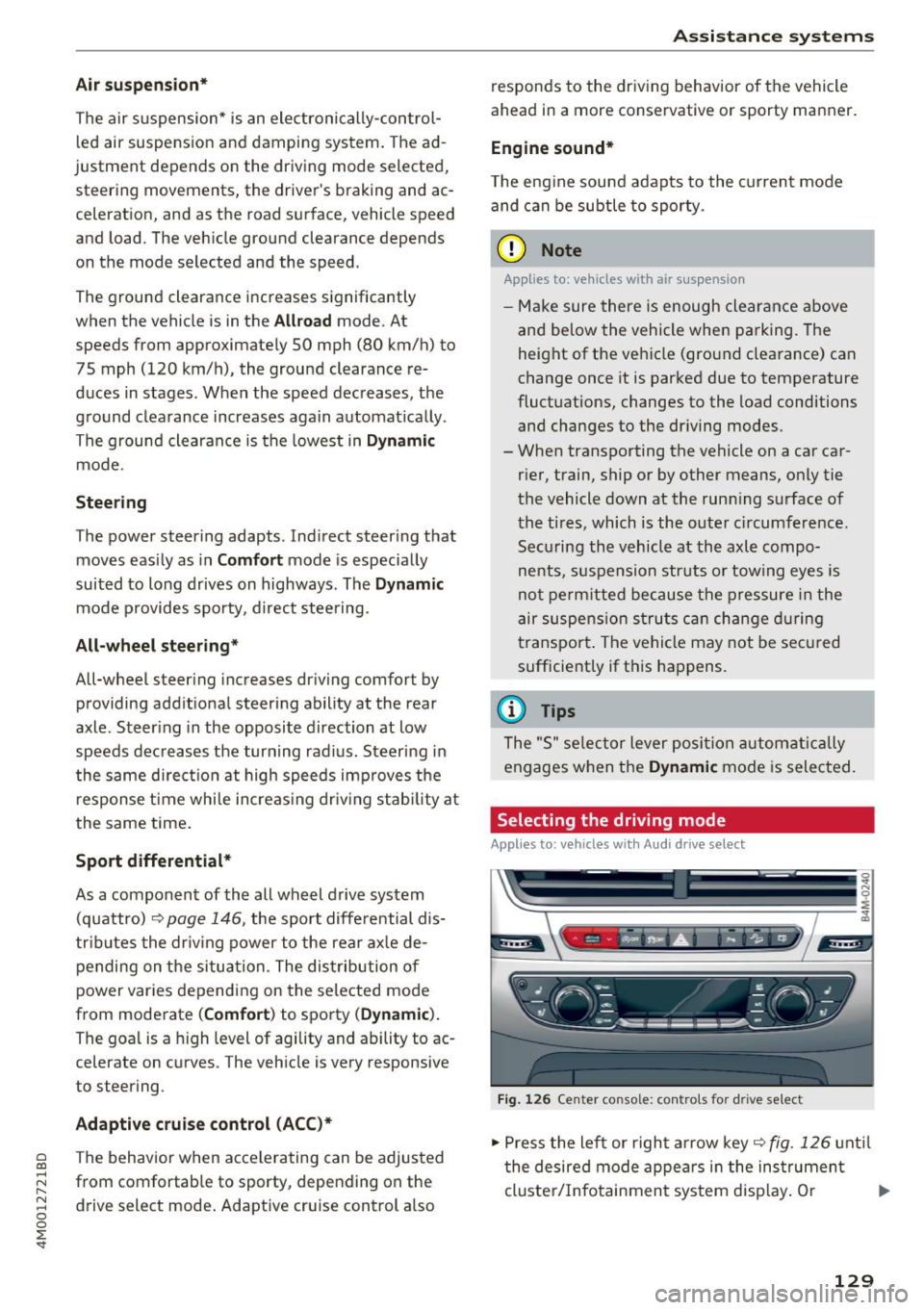
Fig. 1 26 Ce nter console: co ntro ls for d rive select
.,,. Press the le ft or righ t arrow key~ fig. 126 unt il
t he desired mode appe ars in the ins trumen t
cluste r/ Infotainmen t system disp lay. O r ..,,.
129
Page 132 of 398
Assistance systems
~ Select in the Infotainment system: IMENUI but-
ton
> Vehicle > Audi drive select.
~ Select and confirm the desired setting .
You can change the driving mode when the vehi
cle is stationary or whi le driving. If traffic per
mits, after changing modes, briefly take your
foot off the accelerator pedal so that the recent ly
selected mode is a lso activated for the engine.
Offroad * or Lift/ Offroad* -activates offroad
functions to support driving on rough terrain .
The engine, transmission and steering adjust and
the Start/Stop system* switches off. Applies to
air suspension*: the vehicle also lifts for passing
over obstacles to maintain maximum ground
clearance.
Adjusting the Individual mode
A pp lies to: ve hicles w ith Audi drive select
Allroad * -on ly for air suspension*: the vehicle
li fts to maintain higher ground clearance for dif
ficult stretches of road .
Comfort -provides a comfort-oriented vehicle
setup and is suited fo r long drives on highways.
Auto -provides an overa ll comfortable yet dy
namic driv in g feel and is suited for everyday use.
Dynamic -gives the driver a sporty driving feel
and is suited to a spo rty driving style.
Individual -c::;,page 130.
A WARNING
Pay attention to traffic when operating the
drive select to reduce the risk of an accident .
-
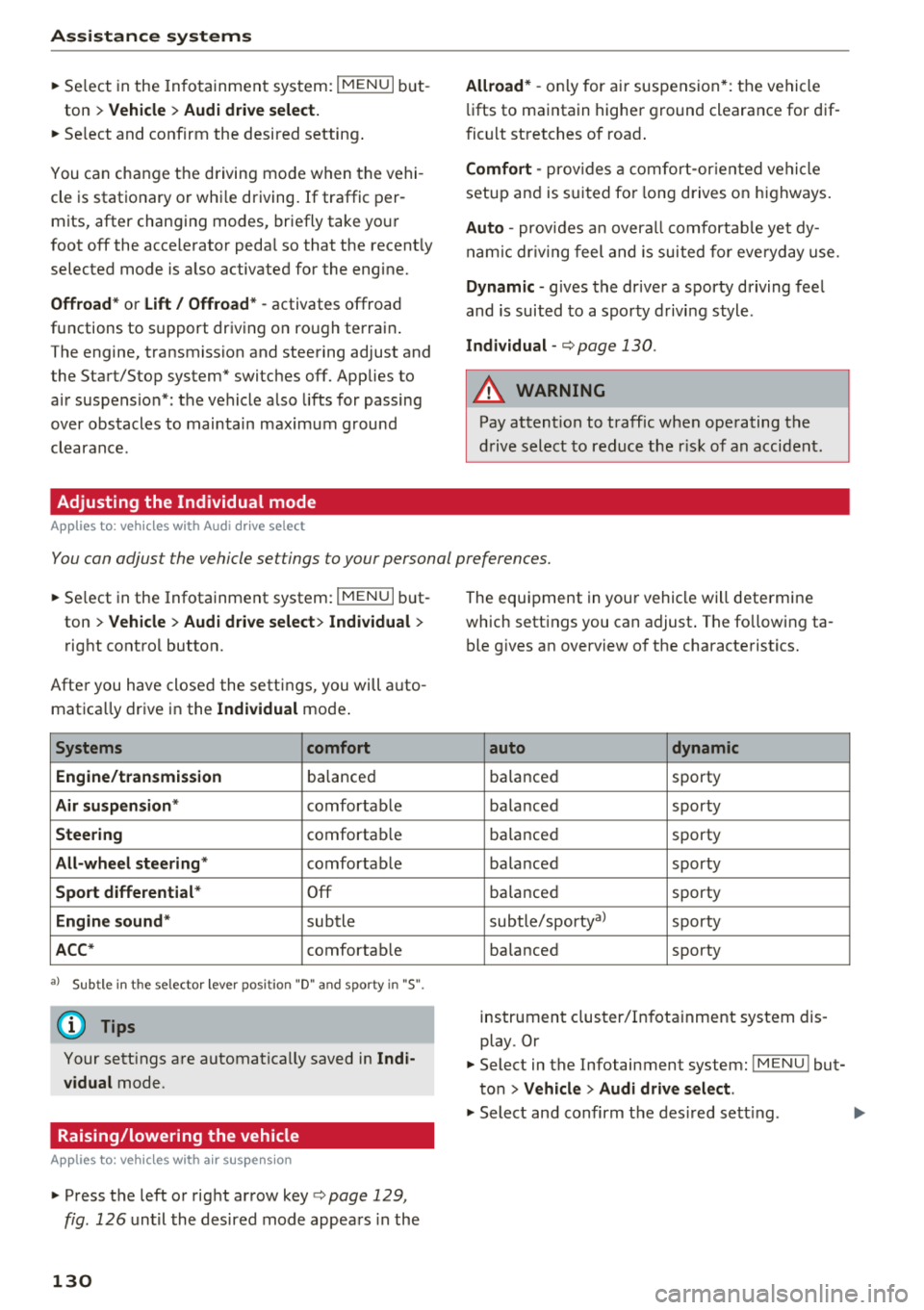
You can adjust the vehicle settings to your personal preferences.
~ Select in the Infotainment system: IMENU I but
ton
> Vehicle > Audi drive select > Individual >
right control button.
Afte r you have closed the settings, you will auto
matica lly drive in the
Individual mode .
Systems comfort
Engine/transmission
ba lanced
Air suspension * comfortable
Steering comfortable
All-wheel steering* comfortable
Sport differential * Off
Engine sound * subtle
ACC* comfortable
a l Sub tle in t he se lecto r lever posit ion "D" and sporty in "S".
(D Tips
Your settings are automatica lly saved in Indi
vidual
mode.
Raising/lowering the vehicle
A pp lies to: ve hicles w ith air susp en sion
~ Press the left or right arrow key c> page 129 ,
fig . 126
until the desired mode appears in the
130
The equipment in your vehicle will determine
which settings you can adjust . The fo llowing ta
ble gives an overview of the characteristics.
auto dynamic
ba
lanced sporty
balanced sporty
ba lanced sporty
ba la nced sporty
ba lanced sporty
subtle/sportyal sporty
ba lanced sporty
instrument cluster/Infotainment system dis
play. Or
~ Select in the Infotainment system: IMENU ! but
ton
> Vehicle > Audi drive select.
~ Select and confirm the desired setting .