suspension AUDI Q7 2018 Owner´s Manual
[x] Cancel search | Manufacturer: AUDI, Model Year: 2018, Model line: Q7, Model: AUDI Q7 2018Pages: 398, PDF Size: 185.58 MB
Page 133 of 398
a co .... N r--. N .... 0
0
:E '
The lift/ Offroad mode switches to Allroad
mode when dr iving above approximately
20 mph (30 km/h) and the veh icle automati
cally lowers again. These modes may only be
used on a temporary bas is and are not intend
ed for continuous d riving.
(D Tips
- The filled-in boxes in the Infotainment sys
tem represent the current vehicle level. If
the box is wh ite or the boxes are blinking,
the veh icle is lift ing or lowe ring. If on ly the
bottom box is fi lled in, the vehicle is at the
l owest level ( le a st amount of g round clear
ance) . If all the segme nts are fi lled in, then
the vehicle is at the highest level (highest
ground clear a nee) .
- The target level is hig hligh ted wi th a
red
frame while the vehicle is lifting o r lower
i ng. The frame is then hidden when the ve
hicle reaches the target level.
- The vehicle lifts up to the highest level
when you se lect
lift / Offroad . Select an
other mode to lower the vehicle again.
Rear lowering
App lies to: vehicl es with air suspe nsio n
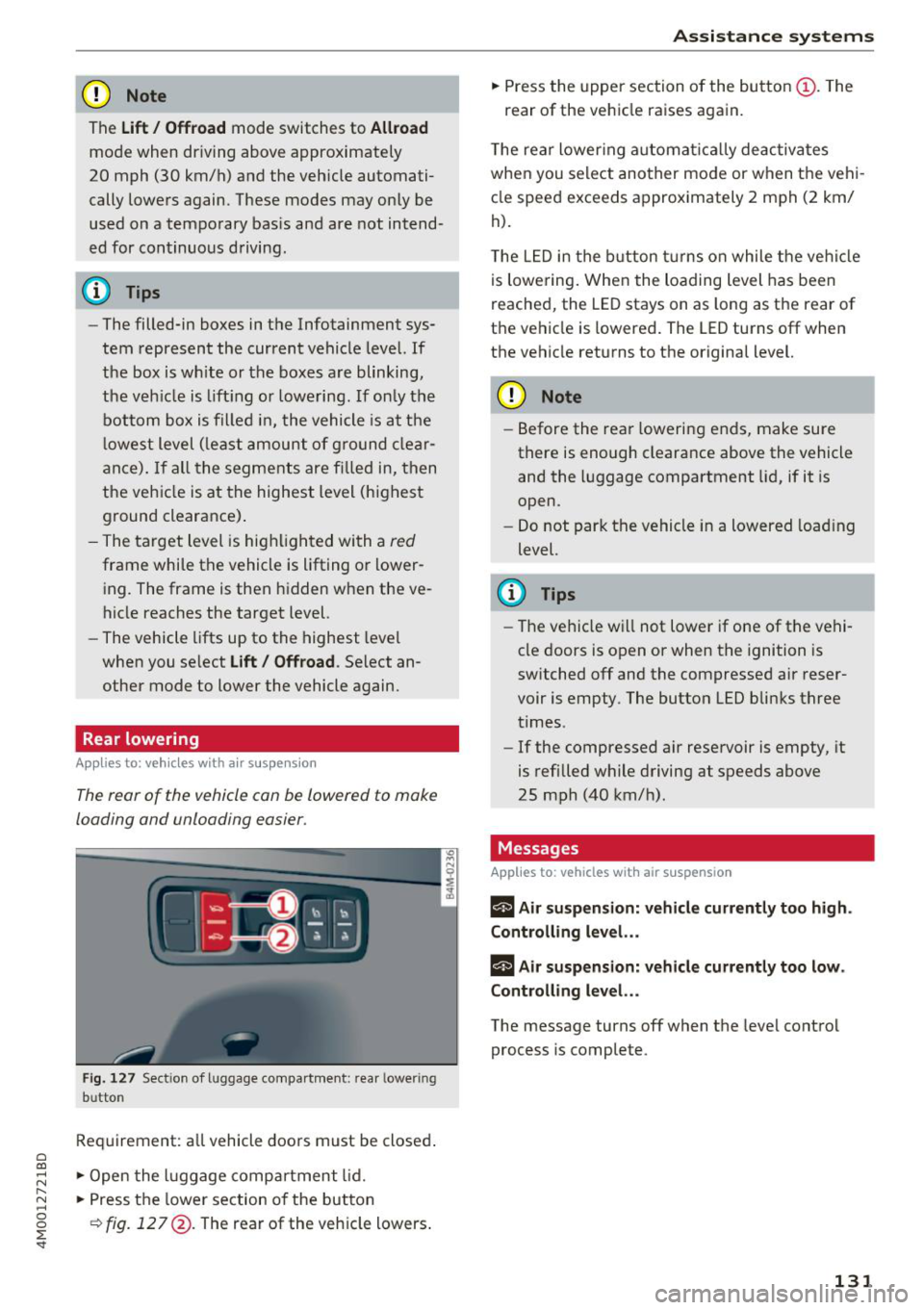
The rear of the vehicle con be lowered to make
loading and unloading easier .
Fig . 12 7 Sect ion of l uggage co mpa rt m ent: rear lower ing
b ut ton
Req uirement: a ll vehicle doors must be closed .
" Open the l uggage compa rtment lid .
" Press the lower section of the button
¢fig . 127 @. The rear of the veh icle lowers .
Assi st a nce systems
" Press the upper section of the butto n (D. The
rear of the vehicle raises again.
T he rear lower ing a utomat ica lly deac tiva tes
when you select another mode or when the vehi
cle speed exceeds approximately 2 mph (2 km/
h).
T he L ED in the button t urns on while the ve hicl e
is lowering . When the loading level has been
reached, the LE D stays on as long as the rear of
t h e vehicle is lowered . The LED turns off when
the vehicle returns to the original level.
CD Note
- Before the rea r lowering e nds, make sure
there is enough clearance above the vehicle
and the l uggage compartment lid, if it is
open.
- Do not park the vehicle in a lowered load ing
level.
(D Tips
- The ve hicle w ill not lowe r if one of the vehi
cle doors is open
or when the ignition is
switched off and the compressed air reser
voir is empty . The butto n LED bli nks three
times .
- If the compressed air reservoir is empty, it
is refilled while driving at speeds above
25 mph (40 km/h).
Messages
Applies to: vehicles with air suspension
rl A ir s uspension: vehicle current ly too h igh.
Controlling level. ..
rl Air suspension: vehicle currently too low.
Controlling level. ..
The message turns off when t he leve l cont rol
process is complete .
131
Page 137 of 398
a co ...... N r--. N ...... 0
0
:E '
ver using the orientation lines .
General information
Applies to: vehicles with rearview camera
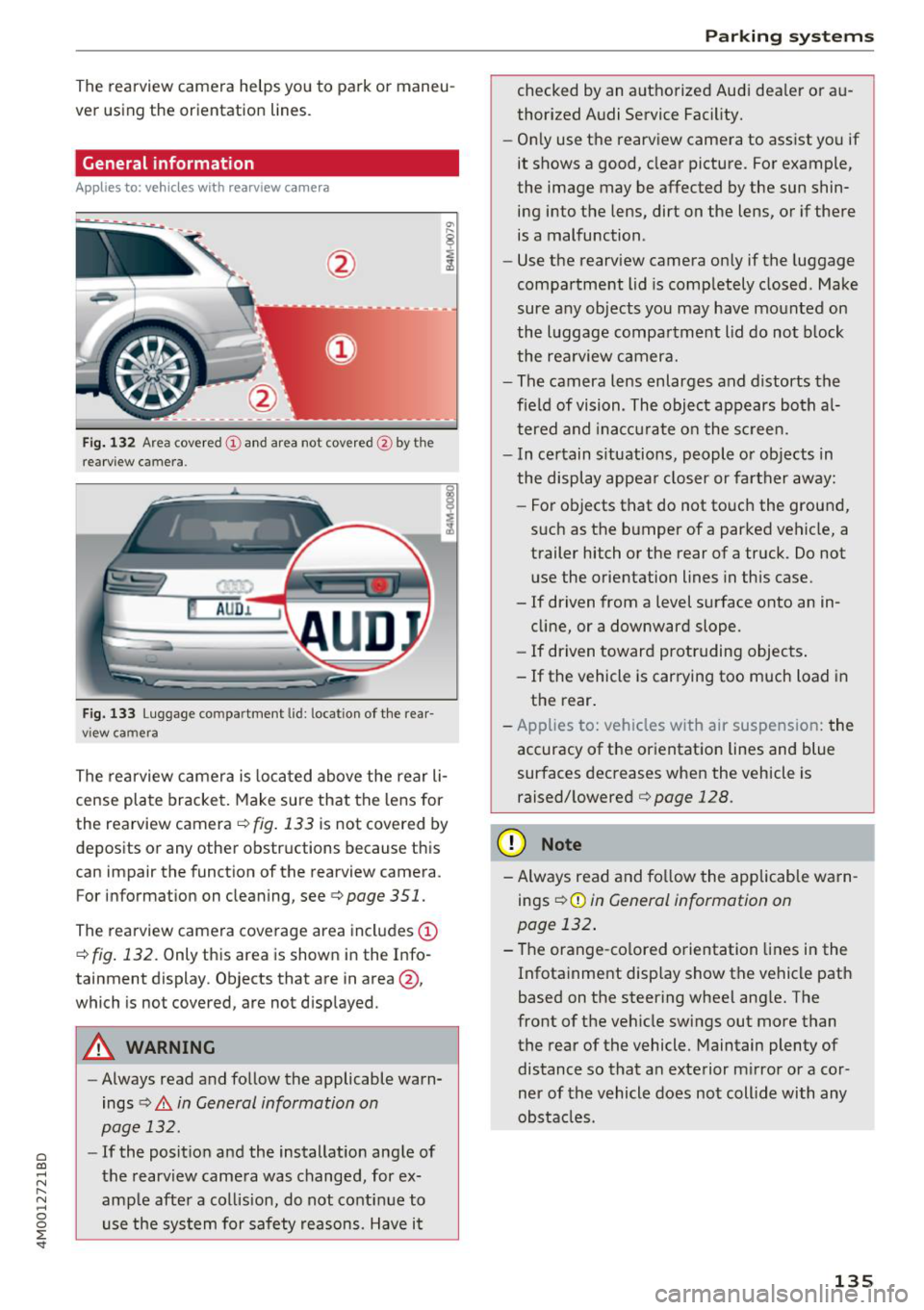
Fig. 132 Area covered (!) and area no t covered @ by the
r earview c amera.
AU D .L
Fig. 133 Luggage co mpar tment lid : lo ca ti on of the rear
view ca mera
The rearview camera is located above the rear li
cense plate bracket. Make sure that the lens for
the rearview camera .=;,
fig. 133 is not covered by
deposits or any other obstructions because this
can impair the function of the rearview camera .
For information on cleaning , see .=;,
page 351.
The rearview camera coverage area includes (D
.=;, fig. 132 . Only this area is shown in the Info
ta inment display . Objects that are in area @,
which is no t covered, are not displayed .
A WARNING
- Always read and follow the applicable warn
ings
.=;, A in General information on
page 132.
- If the position and the installation angle of
the rearview camera was changed , for ex
ample after a collision, do not continue to use the system for safety reasons. Have it
Parking systems
checked by an authorized Audi dealer or au
thorized Audi Service Facility.
- Only use the rearview camera to assist you if
it shows a good, clear picture. For example,
the image may be affected by the sun shin ing into the lens, dirt on the lens, or if there
is a malfunction .
- Use the rearview camera only if the luggage
compartment lid is completely closed . Make
sure any objects you may have mounted on
the luggage compartment lid do not block
the rearview camera.
- The camera lens enlarges and distorts the
field of vision . The object appears both al
tered and inaccurate on the screen.
- In certain situations, people or objects in
the display appear closer or farther away:
- For objects that do not touch the ground,
such as the bumper of a parked vehicle, a trailer hitch or the rear of a truck . Do not
use the orientation lines in this case.
- If driven from a level surface onto an in
cline, or a downward slope.
- If driven toward protruding objects.
- If the vehicle is carrying too much load in the rear.
- Applies to: vehicles with air suspension: the
accuracy of the orientation lines and blue
surfaces decreases when the vehicle is raised/lowered
.=;, page 128.
(D Note
- Always read and follow the applicable warn
i ngs
i=;, (D in General information on
page 132.
- The orange-colored orientation lines in the
Infotainment display show the vehicle path
based on the steering wheel angle. The
front of the vehicle swings out more than
the rear of the vehicle. Maintain plenty of
distance so that an exterior mirror or a cor
ner of the vehicle does not collide with any
obstacles .
135
Page 139 of 398
a co ...... N r--. N ...... 0
0
:E '
Introduction
Applies to: vehicles with peripheral cameras
With this equipment, the park ing system p lus*
¢
page 133 is supplemented w ith various pe riph
e ral cameras. The four cameras give you the fol
l owing views: area around the vehicle, front cor
ner view and rear corner view, view in front of the
vehicle and behind the vehicle .
General information
Applies to: vehicles with peripheral cameras
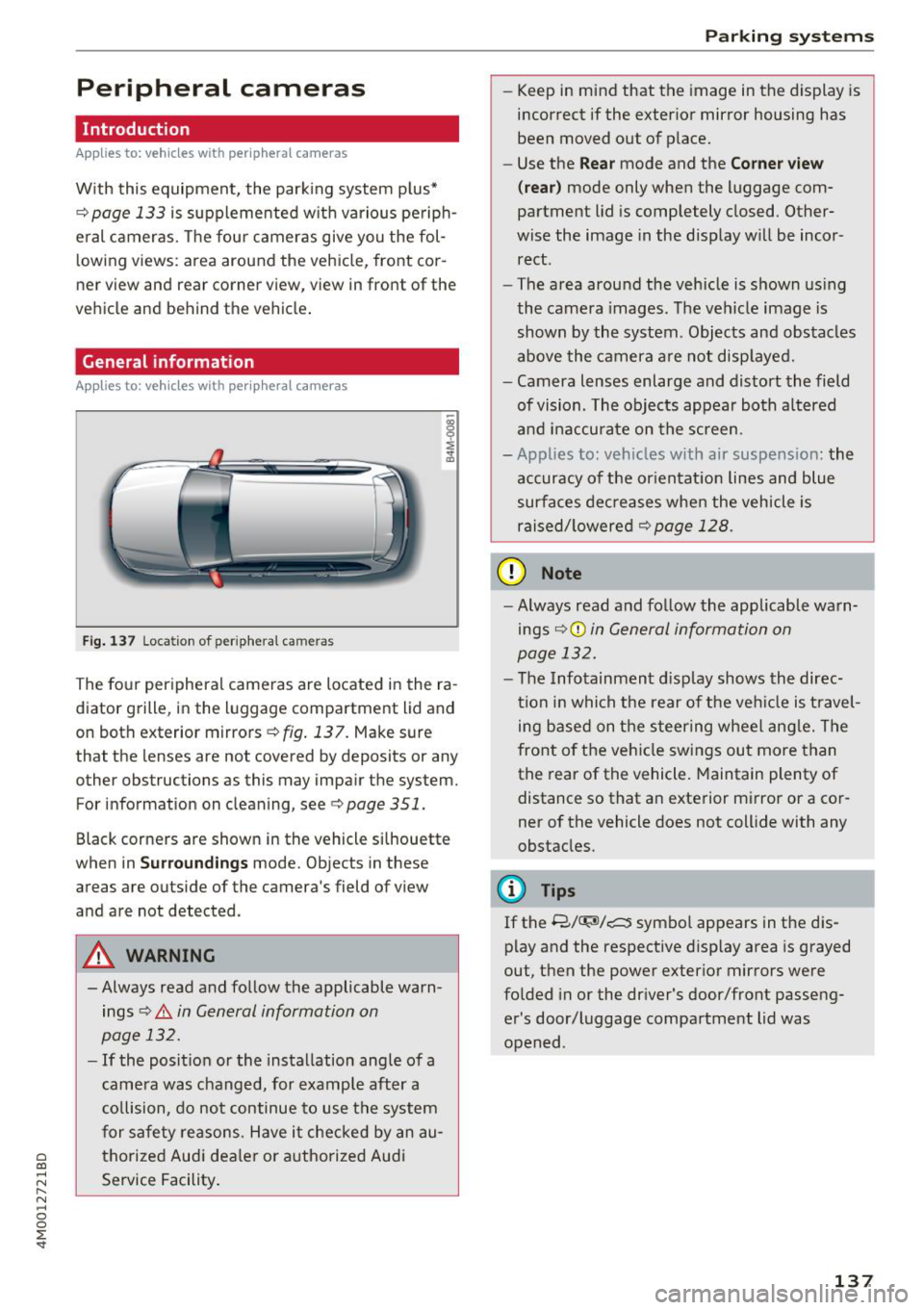
Fig. 137 Location of periphera l cameras
The four peripheral cameras are located in the ra
diator grille, in the luggage compartment lid and
on both exterior mirrors
¢ fig. 137. Make sure
that the lenses are not covered by deposits or any
other obstructions as this may impair the system. For information on cleaning, see¢
page 351.
Black corners are shown in the vehicle si lhouette
when in
S u rro und ing s mode. Objects in these
areas are outside of the camera's field of view
and are not detected.
A WARNING
-Always read and follow the applicable warn ings
¢.&. in General information on
page 132.
- If the position or the installation angle of a
came ra was changed, for example after a
co llision, do not continue to use the system
for safety reasons. Have it checked by an au
thorized Audi dea le r or authorized Audi
Service Facility .
Parking systems
- Keep in mind that the image in the display is
incorrect if the exterior mirror housing has
been moved out of p lace.
- Use the
Re ar mode and the Co rner view
(r ea r)
mode only when the luggage com
partment lid is completely closed. Other
wise the image in the display will be incor
rect.
- The area around the vehicle is shown using
the camera images. The vehicle image is
shown by the system . Objects and obstacles
above the camera a re not disp layed.
- Camera lenses enlarge and distort the field
of vision. The objects appear both a ltered
and ina ccurate on the screen.
- Applies to: vehicles with air suspension: the
accuracy of the or ientat ion lines and blue
surfaces dec reases whe n the veh icle is
raised/ lowered¢
page 128.
(D Note
- Always read and fo llow the applicable wa rn
ings ¢Ci)
in General information on
page 132.
- The Infotainment d isplay shows the direc
tion in which the rear of the veh icle is travel
ing based on the steering wheel ang le. The
front of the vehicle swings out more than
the rear of the vehicle. Maintain plenty of distance so that an exterior mirror or a cor
ner of the vehicle does not collide with any
obstacles.
(l) Tips
If the 8/~/c::; symbol appears in the dis
play and the respective disp lay area is grayed
out, then the power exterior mirrors were
fo lded in or the dr iver's door/front passeng
er's door/luggage compartment lid was
opened .
137
Page 287 of 398
a co ...... N r--. N ...... 0
0
:E '
alternator and starter are separated from
the vehicle battery with a pyrotechnic circuit
interrupter.
- Work on the pyrotechnic circuit interrupt
er must only be performed by a qualified
technicians who have the experience, in
formation and special tools necessary to
perform the work safely.
- If the vehicle or the circuit interrupter is
scrapped, all applicable safety precautions
must be followed .
@ For the sake of the environment
Undeployed airbag modules and pretension
ers might be classified as Perchlorate Materi
al -special handling may apply, see
www.dtsc.ca.gov/hazardouswaste/perchlo rate. When the vehicle or parts of the re
straint system including airbag modules and
safety belts with pretensioners are scrapped,
all applicable laws and regulations must be
observed. Your authorized Audi dealer is fa
miliar with these requirements and we recom
mend that you have your dealer perform this
service for you.
Other things that can affect Advanced
Airbag performance
Changing the vehicle's suspension system can
change the way that the Advanced Airbag System
performs in a crash . For example, using tire-rim
combinations not approved by Audi, lowering the
veh icle, chang ing the stiffness of the suspens ion,
including the springs, suspension struts, shock
absorbers etc. can change the forces that are
measured by the airbag sensors and sent to the
electronic contro l unit. Some suspension changes
can, for example, increase the force levels meas
ured by the sensors and make the airbag system
deploy in crashes in which it would not deploy if
the changes had not been made. Other kinds of changes may reduce the force levels measured by
the sensors and prevent the airbag from deploy
ing when it should .
Airbag system
A WARNING
Changing the vehicle's suspension including
use of unapproved tire-rim combinations can
change Advanced Airbag performance and in
crease the risk of serious personal injury in a
crash.
- Never install suspension components that
do not have the same performance charac
teristics as the components originally instal
led on your vehicle.
- Never use tire-rim combinations that have
not been approved by Audi.
Side airbags
· Description of side airbags
The airbag system can provide supplemental
protection to properly restrained occupants.
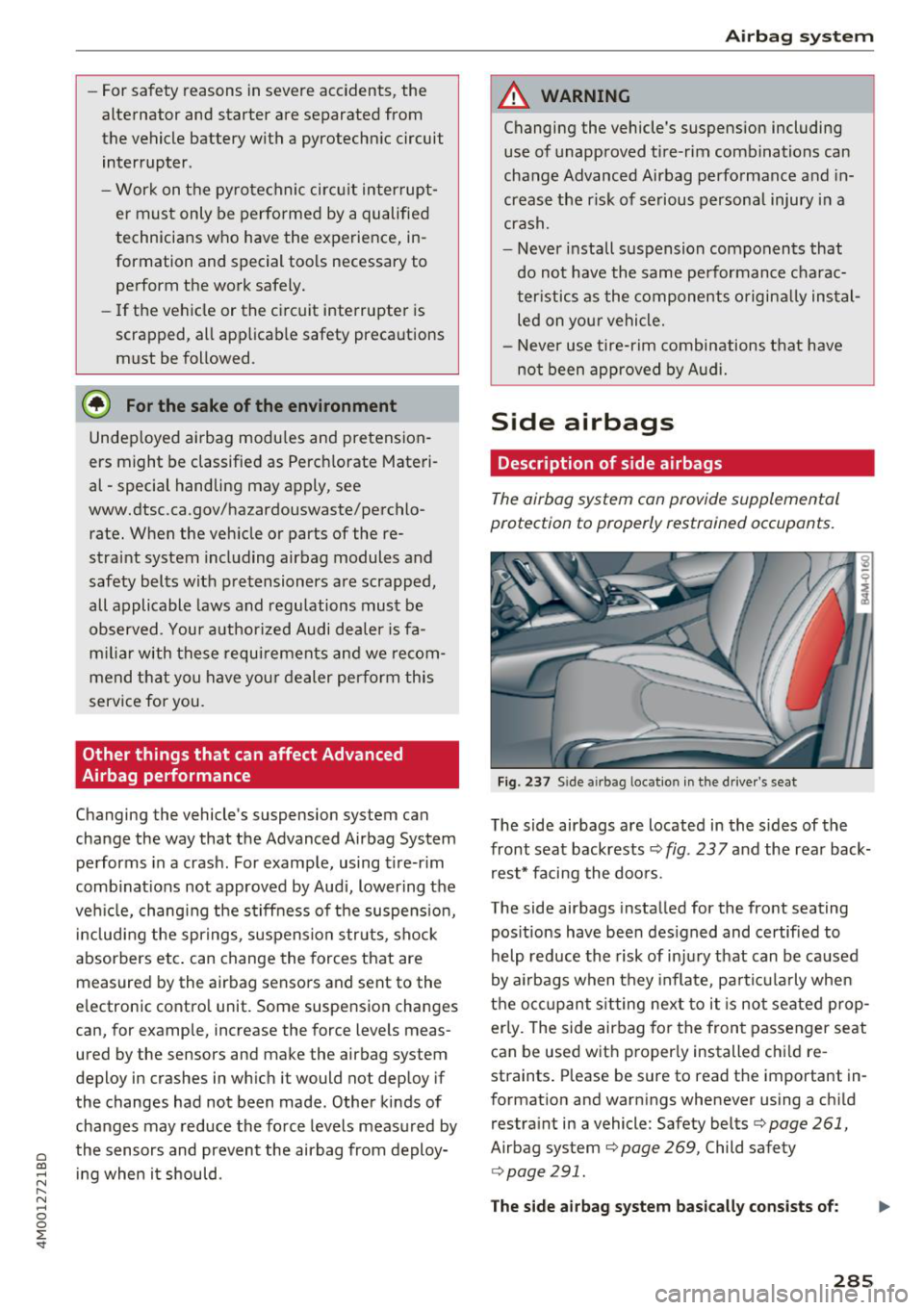
Fig. 237 Side a irbag locatio n in the driver's seat
The side airbags are located in the sides of the
front seat backrests ¢
fig. 23 7 and the rear back
rest* facing the doors.
The side airbags installed for the front seating
pos itions have been des igned and certified to
help reduce the risk of injury that can be caused
by airbags when they inflate, particularly when
the occupant s itting next to it is not seated prop
erly. The side airbag for the front passenger seat
can be used w ith proper ly installed chi ld re
straints . Please be sure to read the important in
formation and warnings whenever using a child
restraint in a vehicle: Safety belts¢
page 261,
Airbag system ¢ page 269, Child safety
r:=> page 291.
The side airbag system basically consists of: .,..
285
Page 348 of 398
Wheels
tires cause less road noise, tire wear and fuel
consumption.
(D Tips
You can also use all season tires instead of
winter tires. Please note that in some coun
tries where winter tires are required, only
winter tires with the
& symbol may be per
mitted.
Snow chains
Snow chains not only improve the driving in win
ter road conditions, but also the braking .
~ Only install snow chains on the front wheels.
~ Check and correct the seating of the snow
chains after driving a few feet, if necessary . Fol
low the instructions from the manufacturer.
~ Note the maximum speed of 30 mph (SO km/
h). Note the local regulations.
Use of snow chains is only permitted with certain
rim/tire combinations due to technical reasons.
Check with an authorized Audi dealer or author
ized Audi Service Facility to see if you may use
snow chains.
Use
fine-mesh snow chains . They must not add
more than 0 .53 in (13.5 mm) in height, including
the chain lock.
You must remove the snow chains on roads with
out snow. Otherwise, you could impair driving
ability and damage the tires.
.&_ WARNING
Using incorrect snow chains or installing snow
chains incorrectly can result in loss of vehicle
control, which increases the risk of an acci
dent.
(LlJ) Note
- Snow chains can damage the rims/wheel
covers* if the chains come into direct con
tact with them. Remove the wheel covers*
first. Use coated snow chains.
- Do not install and use snow chains if there is
a malfunction in the air suspension*, be
cause the vehicle height will be
very low. If
346
you drive with snow chains anyway, the
wheel housings and other vehicle compo nents can be severely damaged.
(D Tips
When using snow chains, it may be useful to
switch the offroad mode on
r=> page 143.
Low-profile tires
Applies to: vehicles with low-profile tires
Compared to other tire/rim combinations, low
profile tires offer a wider tread surface and a
larger rim diameter with shorter tire sidewalls.
This results in an agile driving style. However, it
may reduce the level of comfort and increase
road noise when driving on roads in poor condi
tion.
Low -profile tires can become damaged more
quickly than standard tires when driving
over
large bumps, potholes, manhole covers, and
curbs . Therefore, it is particularly important to
maintain the correct tire pressure
r=.> page 340.
To reduce the risk of damage to the tires and
rims, drive
very carefully on poor roads.
Check your wheels regularly every 2,000 mi
(3,000 km) for damage . For example, check for
bulges/cracks on the tires or deformations/
cracks on the rims.
After a heavy impact or damage, have the tires
and rims inspected or replaced immediately by
an authorized Audi dealer or authorized Audi
Service Facility.
Low-profile tires can wear out faster than stand
ard tires .
Uniform tire quality grading
- Tread wear
- Traction AA ABC
- Temperature ABC
Quality grades can be found where applicable on
the tire side wall between tread shoulder and maximum section width
r=.> page 331, fig. 269.
Page 362 of 398
Emergency assistance
placing the Automatic Transmission in P
(Park) will
not prevent the vehicle from
moving.
- Before you change a wheel, be sure the
ground is level and firm. If necessary, use a
sturdy board under the jack*.
-Always store the vehicle tool kit, the jack* and the replaced tire in the luggage compartment <=>
page 257.
@ Tips
-Obey all laws.
- Before changing the wheel, you must acti- vate the jacking mode*, so that the automatic controls for the air suspension* do
not make it more difficult to lift the vehicle
with the jack*<=>
page 360 .
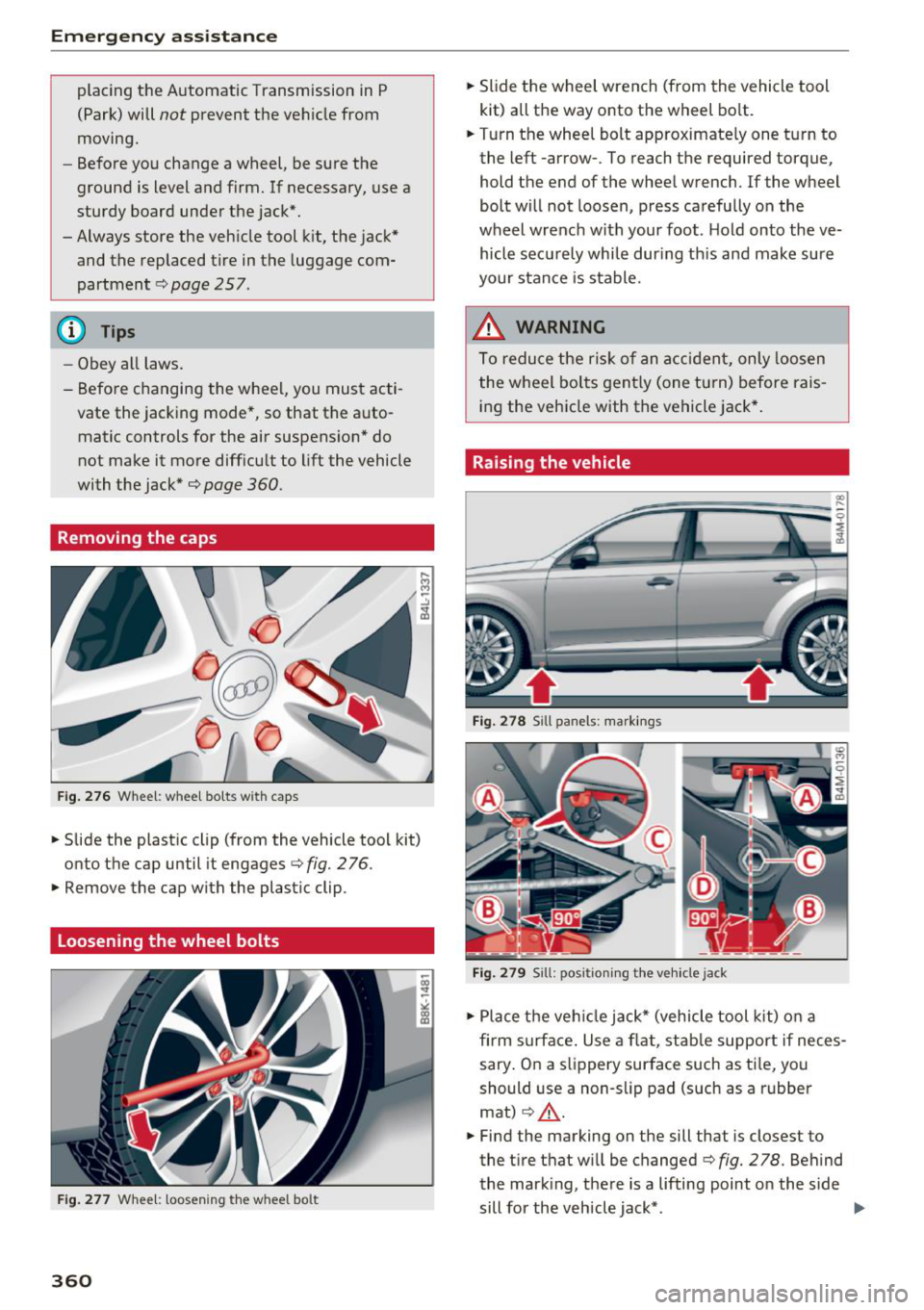
Removing the caps
Fig .. 276 Wheel: wheel bo lts wi th caps
.,. Slide the plastic clip (from the vehicle tool kit)
onto the cap until it engages
<=> fig. 276 .
.,. Remove the cap with the plastic clip .
Loosening the wheel bolts
Fig. 277 Whee l: loosen ing the w heel bo lt
360
.,. Slide the wheel wrench (from the vehicle tool
kit) all the way onto the wheel bolt .
.,. Turn the wheel bolt approximately one turn to
the left -arrow- . To reach the required torque,
hold the end of the wheel wrench. lfthe wheel
bolt will not loosen, press carefully on the
wheel wrench with your foot . H old onto the ve
hicle securely whi le during this and make sure
your stance is stable.
_&. WARNING
To reduce the risk of an accident, only loosen
the wheel bolts gently (one turn) before rais
ing the vehicle with the vehicle jack*.
Raising the vehicle
Fig. 278 S ill panels: markings
Fig. 279 Sill: positi on ing the vehicle jack
.,. Place the veh icle jack* (vehicle tool kit) on a
firm s urface. Use a flat, stable support if neces
sary . On a slippery surface such as ti le, you
should use a non-slip pad (such as a rubber
mat)
c> .&_ .
.,. Find the marking on the sill that is closest to
the tire that wi ll be changed<=>
fig. 278. Behind
the mark ing, there is a lifting point o n the side
sill for the vehicle jack* . ..,.
Page 363 of 398

a co ...... N r--. N ...... 0
0
:E '
cle tool kit), turn the v ehicle jack* under the
li ft ing po int on the side sill unti l it is high
enough that the arm@c:>
fig. 2 79 is under the
designated plastic moun t .
.. Align the vehicle jack* so the arm @engages in
t h e des ignated l ift ing po int in the door s ill and
the base @ lies f lat on the ground . The base @
must be d irectly under the lifting poi nt @ .
.. To lift the vehicle , pl ace the ratchet @(from
the vehicle too l
kit) with the correct side on the
hex socket wrench ©-
.. Move the ratchet @clockwise back and forth
unt il the wheel lifts up slightly from the
ground.
A WARNING
- Make sure the vehicle jack* is stable. There
is a r isk of injury when the ground is slick or
soft, because the vehicle jack* could slide or
sink.
- Only ra ise your vehicle with the vehicle jack*
provided by the factory .
If you use a vehicle
jack des igned for another veh icle, your vehi
cl e can slide and ca use i nju ry .
- Posi tion the vehicle ja ck* only at the desig
na ted mounting points on the side s ill and
align the jack. O therwise, the ve hicl e jack *
cou ld slip and ca use an inj ury i f it does not
have sufficie nt hold on the vehicle.
- Vehicles wi th air suspension*: changes in
tempe rat ure or load can affect the height of
the stopped vehicle.
- To reduce the risk of an accident, never start
the engine when the vehicle is raised .
- T o reduce the risk of injury, support the ve
hicle securely with suitab le stands if work is
to be performed underneath the vehicle.
- To help prevent injury to yoursel f and your
passengers:
- Do not ra ise the vehicle unt il you are sure
the jack* is securely engaged.
- Passengers must not remain in the vehicle
when it is jacked up.
- Make sure that passengers wait in a safe
p lace away from the vehicle and well away
from the road and traff ic .
Em ergen cy as sis tanc e
-Make sure jack position is correct, adjust
as necessary and then continue to raise
the jack*.
- If work has to be done under the vehicle,
ensure that it is safely supported on suita
ble stands -risk of injury!
- Never start the eng ine when the vehicle is
on the jack* -risk of accident!
(D Note
Do not lift the ve hicle by the s ill. Pos ition the
vehicle jack* only at the designated mount ing
points on the side sill. Otherw ise, your veh icle
will be damaged.
(!) Tips
The vehicle jack mode* switches off automati
cally at speeds above 6 mph (10 km/h).
Removing and installing a wheel
F ig . 28 0 Whee l: in terna l he x socke t to tu rn th e whee l
bo lt s
F ig . 2 81 W hee l: ali gnm en t p in in the top ho le
Removing a wheel
.. Remove the top wheel bolt completely using
the hex socket in the screwdriver handle (in the
IJJI>
361
Page 376 of 398
Emergency situations -Before driving over a workshop hoist, en
sure that there is sufficient clearance be
tween the hoist and low parts of the ve
hicle.
Vehicle transport
Applies to: vehicles with air suspension
The following contains information you should
know about transporting your vehicle.
(LlJ Note
W he n tra nsp orting t he vehi cle on a ca r ca rr i
er, tra in, shi p or by ot her means, only tie the
veh icle d own at t he r unnin g surface of the
tires, w hich is the outer circumference. Secur
ing the vehicle at the axle components, sus
pens io n struts or tow ing eyes is not pe rm itted
because the pressure in the air suspe nsio n
s tr uts ca n ch an ge dur ing transp ort. Th e ve hi
cle may not be se cur ed suf ficientl y if this hap
pe ns.
374
Page 383 of 398
Cl a:, ...... N
" N ...... 0
0
::r '
A/C MAX (button) .................. .
A/C (button)
. .. ................ ... .
67, 71
67, 70
ABS
.. .. .. .. .. ............... .. .. .. . 142
Accessories 60,379
Active lane assist
Cleaning the camera area . . . . . . . . . . . . . 352
also refer to Audi active lane assist . . . . . 117
Adaptive air suspension
refer to Air suspension ........ .. .. .. .
Adaptive cruise control ................ .
C leaning the sensor ................. .
Messages .... ................ ..... .
Predictive control
............. .. .. .. .
Ad Blue .. .. .. .. ............. .. .. .. .. . 128
102
352 110
100
314
Messages .... ................ ..... . 314
Additional accessories . . . . . . . . . . . . . . . . . 3 79
Adjusting air distribution (automatic climate
control) . . . . . . . . . . . . . . . . . . . . . . . . . . . 68, 71
Adjusting the additional display . . . . . . . . . . 14
Adjusting the rear seats . . . . . . . . . . . . . . . . . 55
Adjusting the sound . . . . . . . . . . . . . . . . . . . 249
Adjusting the temperature (automatic climate
control) . . . . . . . . . . . . . . . . . . . . . . . . . . . 68 71
,
Adjusting the volume . . . . . . . . . . . . . . . . . . . 15
Advanced key
refer to Convenience key . . . . . . . . . . . . . . . 77
Airbag . . . . . . . . . . . . . . . . . . . . . . . . . . . . . . 269
Airbag system . . . . . . . . . . . . . . . . . . . . 269, 287
Advanced Airbag System components . . . 276
Care . . . . . . . . . . . . . . . . . . . . . . . . . . . . . . 284
Children · · · · · · · · · · · · · · ...... .. .. .. . 293
Ch ild restraints
............ .. .. .. .. .
Components (front airbags) ...... .. .. .
Danger of fitting a child safety seat on the
front passenger seat ................ .
Disposal ..... ................ ..... .
Front airbags ................ .. .. .. .
How do the front airbags work? . .. .. .. .
How many airbags does my vehicle have?
How the Advanced Airbag System compo -
nents work together ........... ... .. .
Indicator light ............... .. .. .. .
Monitoring . .. ............. .. .. .. .. .
PASSENGER AIR BAG light ....... .. .. .
Repairs .... .. ................ ..... . 293
276
270
284
274
279
276
278
281
281
281
284
Index
Safety instructions . . . . . . . . . . . . . . . . . . . 283
When must the system be inspected? . . . 281
Air suspension . . . . . . . . . . . . . . . . . . . . . . . 128
Alarm system
refer to Anti-theft alarm system . . . . . . . . . 35
Alignment pin (changing the wheel) . . . . . . 357
All-weather lights . . . . . . . . . . . . . . . . . . . . . . 43
All-wheel steering . . . . . . . . . . . . . . . . 128, 146
All season tires
All wheel drive
refer to quattro
AM I 34S
146
refer to Audi music interface . . . . . . . 231, 232
Android Auto
refer to Audi smartphone interface
Anti-freeze 243
Windshield washer system . . . . . . . . . . . . 328
Anti-lock braking system
refer to ABS . . . . . . . . . . . . . . . . . . . . . . . . 142
Anti-Slip Regulation
refer to ASR . . . . . . . . . . . . . . . . . . . . . . . . 142
Anti-theft alarm system . . . . . . . . . . . . . . . . . 35
Apple CarPlay
refer to Audi smartphone interface . . . . . 243
Ashtray . . . . . . . . . . . . . . . . . . . . . . . . . . . . . . 60
ASR · · ... .. .. .. .. .. ............. .. .. 142
Audi active lane assist . . . . . . . . . . . . . . . . . 117
Messages
119
Audi adaptive cruise control
Distance display, distance warning . . . . . . 110
Traffic jam assist . . . . . . . . . . . . . . . . . . . . 109
Audi connect emergency call and service . . 201
Online roadside assistance . . . . . . . . . . . . 202
Audi connect vehicle control . . . . . . . . . . . . 197
Parking location . . . . . . . . . . . . . . . . . . . . . 198
Remote locking and unlock ing . . . . . . . . . 198
Vehicle status report . . . . . . . . . . . . . . . . . 198
Audi connect (Infotainment) ........ 187, 194
Data protection . . . . . . . . . . . . . . . . . . . . . 195
Services overview
. .. ... .. ..... ... .. ..
Start ing .. .. .. .. .. ............. .. . .
Audi drive select .
.. .. ............... ..
Audi Entertainment mobile 188
188
128
233
Audi music interface . . . . . . . . . . . . . . . . . . . 231
Audi music stream
refer to Wi-Fi . . . . . . . . . . . . . . . . . . . . . . . 229
381