window AUDI Q7 2018 Owner´s Manual
[x] Cancel search | Manufacturer: AUDI, Model Year: 2018, Model line: Q7, Model: AUDI Q7 2018Pages: 398, PDF Size: 185.58 MB
Page 11 of 398
Cl a:, ...... N
" N ...... 0
0
::r '
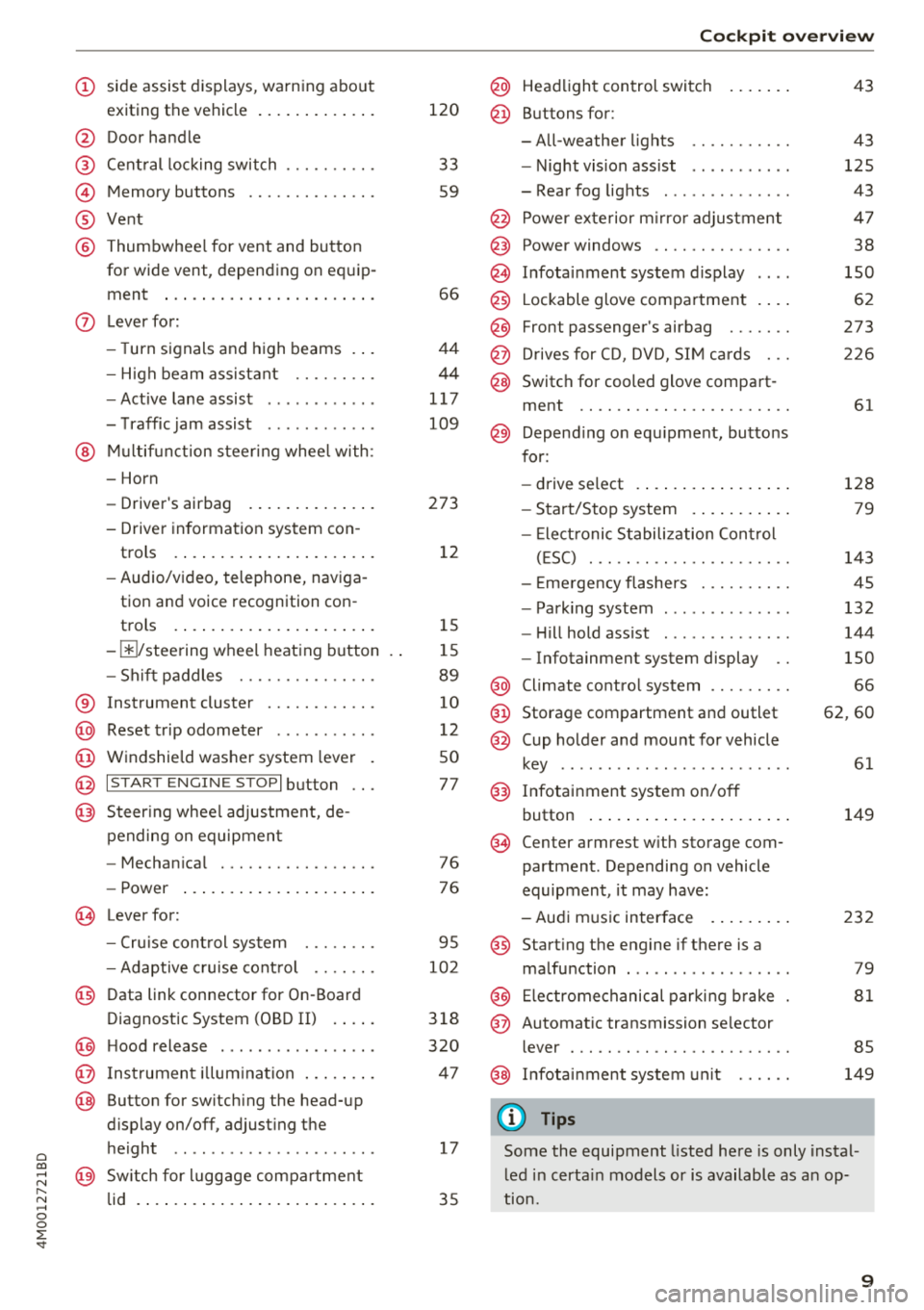
exiting the vehicle ..... ... .. .. .
@ Door handle
@ Cen tral locking swit ch ....... .. .
@ Memory buttons ........... .. .
® Vent
@ Thumbwhee l for vent and button
for wide vent, depending on eq uip -
ment ..... ... .. ..... ... .. .. .
- High beam assistant .... .. .. .
- Active lane assist ........... .
- T raffic jam assist ........... .
@ Mul tifunct ion steer ing whee l with:
- Horn
- Driver's airbag . ..... ... .. .. .
- Driver in formation sys tem con -
trols .... ... .. ..... ... .. .. .
- Audio/v ideo, telephone, nav iga
tion and voice recognition con -
trols .... ... .. ..... ... .. .. .
- III/ steering wheel heat ing b utton
- Sh ift paddles .......... .. .. .
® Instrument cluster ......... .. .
@ Reset t rip odometer .......... .
@ W indshie ld was her system lever
@ !S TAR T ENGIN E ST OPI button .. .
@ Steer ing whee l adjustment, de-
pending on equipmen t
- Mechan ica l .............. .. .
- Power ... ... .. ..... ... .. .. .
~ Lever for:
- Cru ise cont rol sys tem ... .. .. .
- Adaptive c ruise cont rol .. .. .. .
@ Data link connector for On -Board
Diagnostic System (OBD II) . ... .
@) H ood release ............... . .
@ Ins trumen t il lum ina tion ... .. .. .
@ Button for switch ing the head-up
d isplay on/off, adjust ing the
h eight .. .. ................ . .
@ Sw itch for lugg age compar tment
lid . ..... .. ... .. ..... ... .. .. .
120
33
59
66
4 4
44
1 17
109
273 12
1 5
1 5
89
10
12
50
77
76 76
95
102
3 18
320
4 7
17
35
Coc kpit o ver view
@ Head light control switc h
@ Buttons for:
- All-weathe r lights
- Night vis ion ass ist .......... .
- Rear fog lights ............. .
@ Power exte rior m irro r adjustment
@) Power windows .............. .
@ In fota inment system display
@ Lockable glove compa rtment . .. .
@ Front passenger's airbag ...... .
@ D rives for CD, DVD, S IM cards .. .
@ Switch for cooled glove compa rt-
ment .. .. .. .. .............. .
@ Depend ing o n equ ipment, butto ns
for:
- drive select .... ... .. ..... .. .
- Start/Stop system . .. ..... .. .
- Ele ct ronic S tabiliz ation Con trol
( E SC) . .. .. .. .............. .
- E me rgency flashers ......... .
- Park ing system ............. .
- Hi ll hold ass ist ............. .
- Infotainment system display ..
@ Climate cont ro l system ........ .
@ Storage compartment and outlet
@ Cup holder and mount for vehicle
key ..... ... .. .. ............ .
@) Infotainment system on/off
button ... .... .. ... .. ..... .. .
(§ Cen ter armrest w ith storage com
partment . Depending on vehicle
equipment , it may have:
- Aud i m usic interface . ..... .. .
@ Start ing t he engine if there is a
malfunction ... .. ............ .
@ Electromechanical parki ng b rake
@ Automatic transmission se lector
lever ... .. .. .. .. ............ .
@ In fota inment system un it
(D Tips
43
43
125
43
4 7
38
150
62
273
2 26
61
128 79
143
45
132
144
150
66
62 ,60
61
149
232
79
81
85
149
Some the equipment listed here is only insta l
l ed in certa in models or is available as a n op
t ion.
9
Page 31 of 398
Opening and closing
Central locking
Description
You can lock and un lock the veh icle centrally . You
h ave the following options:
- Remote control key
c> page 32,
-Sensors in the door hand les* c> page 32,
- Lock cylinder on the driver's door c:> page 34,
or
- Interior central locking switch
c:> page 33.
Turn signals
The turn s ignals flas h tw ice when yo u unloc k the
ve hicl e and flash once when you lock the veh icle.
If they do not flas h, then one of the doors, the
l uggage compartment lid or the hood is not
closed.
Automatic locking (Auto Lock )
The Auto Lock f unct io n loc ks all doors and the
l uggage compartment lid on ce the speed has ex
ceeded approximately 9 mph (15 km/ h).
The vehicle ca n be un loc ked if the open ing f unc
tion in t he centra l lock ing system sw itch is used
or one of the door handles is pulled.
I n t he event of a crash with a irbag deployment,
the doo rs will a lso automat ica lly unloc k to allow
access to t he ve hicle.
Selective door unlocking
The doors and luggage compartment lid w ill lock
when they close . You can set in the Infotainment
system whether
only the driver's door or the en
tire ve hicle should be unlocked w hen unlocking
c:>page 34.
Unintentionally locking yourself out
Only lock your veh icle when all of the doors and
the luggage compa rtme nt lid a re closed and the
r emote control key is not in the vehicle. This
h e lps to p revent yo u from locking yourse lf out
o a ccident ally. a:, ......
~ The follow ing cond it io ns prevent you from lock-
"' 8 in g your remote contro l key in the veh icle: 0 ::r '
-If the driver's door is open, the vehi cle cannot
be locked by pressing the
l'.D button on the re
mote contro l key o r by touching the locking
sensor* on a door.
- If the most recently used convenience key* is
detected in the luggage compartment, the lug
gage compartment lid automatica lly unlocks
aga in after closing it.
- If the convenience key* that was last used is de
tected ins ide the veh icle, then the vehicle can
not be locked from the outside .
Closing aid on the do ors *
T he vehicle doors a re equipped with closing aids.
When closing a door, yo u on ly have to let it fall
li ghtly into the latch. It then closes automatically
¢ ,&. .
A WARNING
-
-If you leave the vehicle, sw itch the ignition
off and take the veh icle key with you . This
applies pa rtic ula rly when children remain in
the vehicle. Ot herwise, ch ildren cou ld start
the engine or opera te e lectr ical equipme nt
(such as power w indows), which increases
the risk of an accident.
- No one, especi ally children, should stay in
the vehicle when it is locked from the out
side, because the windows can no longer be
opened from the inside
c:> page 35. Locked
doors make it more diffic ult for eme rgency
workers to get into the vehicle, which puts
lives at risk .
A WARNING
Applies to: vehicles with closing aids on the doors
-To reduce the r is k of injury, m ake sure that
the area where the d oor is closing is cle ar
du ring the closing process.
- Th e closing process ca n be stopped at any
time by pulling on the ou ter or inne r door
handle.
(D Tips
- Do not leave valuables unattended in the ve-
hicle. A lo cked ve hicl e is not a sa fe! ..,
29
Page 34 of 398
Opening and closing
,.. Slide the battery holder carefully into the re
mote control key .
,.. Insert the mechanica l key.
@ For the sake of the environment
Discharged batteries must be disposed of us
ing methods that will not harm the environ
ment. Do not dispose of them in household
trash.
@ Tips
The replacement battery must meet the same
specifications as the original battery in the re
mote control key.
Unlocking /locking by remote control
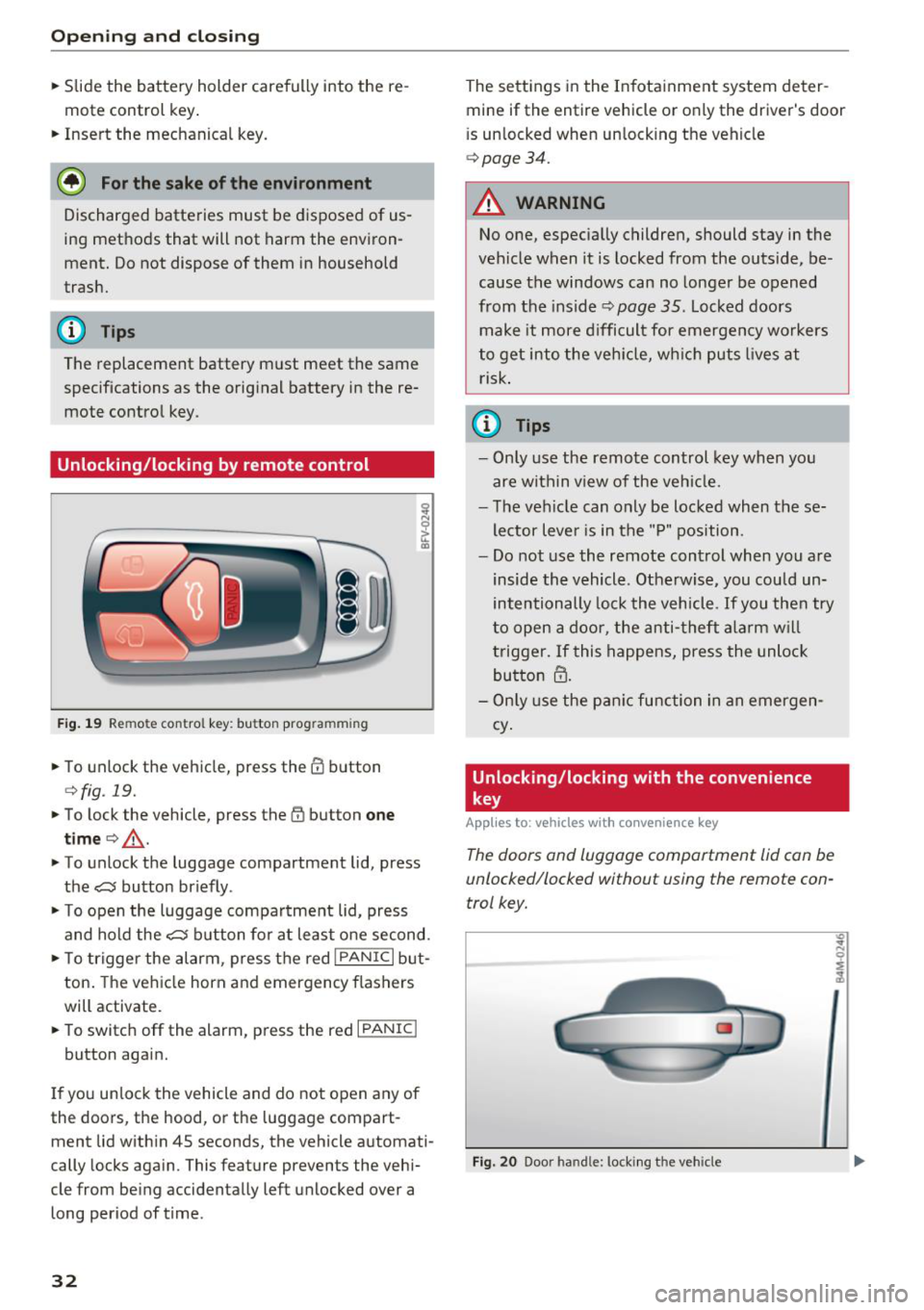
F ig . 19 Remote control key: button prog ramming
,.. To unlock the vehicle, press the CD button
¢fig . 19.
,.. To lock the vehicle, press the (I) button one
time
c> _& .
,.. To unlock the luggage compartment lid, press
the~ button briefly .
,.. To open the luggage compartment lid, press
and hold the~ button for at least one second.
,.. To trigger the alarm , press the red
I PANIC I but
ton. The vehicle horn and emergency flashers
will activate.
,.. To switch off the alarm, press the red
I PANIC I
button again.
If you unlock the vehicle and do not open any of
the doors, the hood, or the luggage compart
ment lid within 4S seconds, the vehicle automati
cally locks again. This feature prevents the vehi
cle from being accidentally left unlocked over a
long period of time.
32
The settings in the Infotainment system deter
mine if the entire vehicle or only the driver's door
i s unlocked when unlocking the vehicle
c> page34.
A WARNING
No one, especially children, should stay in the
vehicle when it is locked from the outside, be
cause the windows can no longer be opened
from the inside
c> page 35. Locked doors
make it more difficult for emergency workers
to get into the vehicle, wh ich puts lives at
risk.
(D Tips
- Only use the remote control key when you
are within v iew of the vehicle.
- The vehicle can only be locked when these
lector lever is in the "P" position .
- Do not use the remote control when you are
inside the vehicle . Otherwise, you could un
intentionally lock the vehicle. If you then try
to open a door, the anti-theft alarm will
trigger. If this happens, press the unlock
button
m.
- Only use the panic function in an emergen
cy .
Unlocking /locking with the convenience
key
App lies to: vehicles with co nvenience key
The doors and luggage compartment lid can be
unlocked/locked without using the remote con
trol key.
Fig. 20 Door handle: locki ng t he veh icle
"' .. N 0 :;
:1,
Page 40 of 398

Opening and clo sin g
Luggage compartment lid emergency
release
Fig. 27 Inner luggage compart men t lid : acces s to the
emergency rel ease
.. Remove the mechanica l key ¢ page 31 .
.. Pry out the cover using the mechanical key
¢fig . 27.
.. Press the lever in the direction of the arrow to
release the luggage compartment lid .
Child safety lock
The child safety lock prevents the rear doors
from being opened from the inside and the rear
power windows from be operated.
Fig . 28 Sect io n of drive r's door: c hild safety lock butto ns
a,
~ co a,
.. To activate/deactivate the inner door handle
and the power window switch for the respective
rear door , press the left/right
t button in the
driver 's door ¢
fig. 28 . The indicator light in the
button turns on/b links .
.. To activate/deact ivate the child safety lock on
both sides, you must press the
T buttons one
after the othe r.
It is not possible to operate the rear climate con
trol system* when the child safety lock is switch
ed on . T he
S ET REAR function allows you to app ly
38
a ll settings to the rear using the climate control
system controls in the cockpit
¢ page 72.
Message in th e instrument cluster di splay
(BJ Childproof catch : ma lfun ction! Plea se con
tac t Service
There is a ma lfunction in the ch ild safety lock .
Press the
t button aga in .
If the message stays on, dr ive immediately to an
authorized Audi dealer or authorized Audi Serv ice
Facility to have the malfunction repaired.
A WARNING
- If you leave the vehicle, sw itch the ignition
off and take the veh icle key with you. This
app lies pa rtic ula rly whe n children remain in
the vehicle. Otherwise chi ldren cou ld start
the engine or operate e lectrica l equipment
(such as power windows), which increases
the risk of an accident.
- A ma lfunction in the chi ld safety lock could
allow the rear doors to be opened from the
inside, which increases the risk of an acci
dent.
Power windows
Controls
The driver can control all power windows .
Fig. 29 D river 's doo r: pow er w indow con trols
A ll power window switches are equipped with a
two-stage function:
Opening and closing the windows
co ~ M 0
=> co a,
.. To open o r close the window comp letely, press
the swit ch down o r pull the swit ch up b riefly to .,.
Page 41 of 398
Cl a:, ...... N
" N ...... 0
0
::r '
switch is pressed/pu lled again.
• To se lect a position in between opened and
closed, press/pull the sw itch to the first level
until the desired window position is reached.
Po we r w indow switch es
(D Left front door
@ R ight front door
@ L eft rea r door
@ Right r ear door
A WARNING
- If you leave the veh icle, switch the ignit ion
off and take the vehicle key with you . This
applies particularly when children remain in
the vehicle . Otherwise children could start
the engine or operate elect rical equipment
(s uc h as powe r windows), whi ch in cr eases
the risk of an a ccident. The power windows
contin ue to f unct ion until the driver's door
or front passenge r's door has been opened .
- Pay c areful a ttent ion when closing the win
dows. Pinching co uld cause serious injur ies .
- When lo cking the veh icle from outside, the
vehicle mus t be unoc cupied since the win
dows can no longer be opened in an emer
gency.
(D Tips
You c an still open an d close the w indows for
app roxima tely 10 minutes after tu rning the
ign it ion off. The power windows do no t switch
off until the driver's door or front passenger's
door has been opened .
Convenience opening/closing
Applies to: vehicles wit h convenience key
All of the windows and the roof* can be opened/
closed at the same time.
Convenience opening feature
• Press and hold the III button on t he remote con
t ro l key until a ll of the w indows reach the de
s ir ed position and the roof* is tilted open .
Opening and cl osing
Convenience closing feature
• Press the 0 b utton on the remo te con trol key
until the roof* is closed
q .&, , or
• Touch the sensor * on the door handle unti l all
of the windows and the roof* are closed. Do not
place your hand in the door handle when doing
this .
Sett ing convenience op ening in the
Infotainment system
• Select in the Infotainment system: I MENU ! but
ton
> Vehicle > left control button > Vehicle
setting s
> Central locking > Long press to
open windows .
A WARNING
-
-Never close the w indows o r the roof* ca re
lessly or in an uncontrolled manner, be
c a use this increases the risk of injury.
- For secur ity reasons, the windows and the
roof* c an only be opened and close d wit h
the remote con trol key a t a maxim um dis
tance of approx imately 6.5 feet (2 m) away
from the vehicle . Always pay attention when
using the
0 button to close the windows
and the roof* so that no one is pinched. The
clos ing process will stop immediately when
the 6j button is released .
(D Tips
Applies to: vehicles with panorama glass roof:
the power sunshade also opens/closes when
opening/closing the roof .
Correcting power window malfunctions
You can reactivate the one-touch up/down func
tion if it ma/func tion s.
• Pull the powe r window switch up until the win
dow is compl ete ly raised.
• Release the switch and pu ll it up aga in for at
least one second .
39
Page 50 of 398
Lights and Vi sion
0 -all adjustment functions are deactivated .
Q/P -adjusting the left/right exter io r mir ror.
Move the knob in the desired direction .
4iil -Heats * the m irror glass depending on the
outside temperature .
8 - Folds the exterior mirrors*. To fold the mir
rors out, turn the knob to one of the other posi
tions . In the Infotainment system, you can select
if the mirrors fold in automat ica lly when you lock
the vehicle
~ page 34.
F ront pas senger 's e xterior mirror tilt
function*
To help you see the curb when back ing into a
pa rking space, t he surface of the mir ror tilts
slightly . Fo r thi s to happen, t he knob must be in
t he pos it io n for the front passenger's exterior
mirror.
You can adjust the t ilted m irror surface by turn
i n g the knob in the des ired direction. Whe n you
move ou t of reverse and in to anothe r gear, the
new mirror position is stored and assigned to the
key yo u are using.
The mir ror goes back into its o rig inal posi tion
once yo u drive forward faster than 9 mph
(15 km/h) or tu rn the ignition
off .
A WARNING
Curved mir ror surfaces (for examp le convex)
enlarge t he f ie ld of vision . Howeve r, they
make objects i n the mirror appear sma ller
and farther away. You may est imate inco r
rectly when you use these mirrors to ga uge
your distance from the vehicles behind you
when c hanging lanes, wh ic h increases the r is k
of an a ccident.
@ Note
- Applies to vehicles with power folding exte
rior m irrors : if the mirror housing was
moved by outside forces (such as an impact
whe n m aneuver ing), you m ust use the pow
e r fold ing func tion to fo ld the m irror all t he
way o ut. The m irro rs will make a loud no ise
when they latch into p lace . The mirror hous
ing must not be moved back i nto place by
48
hand because this would impair the func
tion of the mirror mechanism.
- Applies to vehicles wi thou t power folding
exterior mirrors : if the mirror housing was
moved by outside forces (such as a n impact
when maneuvering), you must move it back
in place by hand.
- If you wash the vehicle in a n automatic ca r
wash, you must fold the exter ior mirrors in
to reduce the r isk of damage to the m irrors.
Never fold power fo ld ing exterior mirrors*
by hand. On ly fold them in and out using
the power cont rols.
(D Tips
- If the power adjust ing function malfunc
t ions, the glass in both mir rors can be ad
justed by p ressing on t he edge of it by hand .
- The exterior m irror settings are sto red w ith
the memory fu nct io n* ~
page 59.
Dimming the mirrors
Your vehicle is equipped with a manual or auto
matic* dimming rearview mirror .
Manual dimming rear view mirror
.,. Pull the lever on the bottom of the m irror back.
Automatic dimming rearvi ew mirror*
.,. The inte rior and exte rior m irrors d im a utomat i
cally when ligh t shi nes on them, for examp le
from headlig hts on a vehicle behind you.
A WARNING
If th e g lass on an a utomatic dimming m irror
b reaks, e lectrolyte can lea k out. T his liquid
can irritate the skin, eyes and respiratory sys
tem . If there is contact w it h the fluid, flush
i mmediately with p lenty of water. Consult a
phys ic ian if necessa ry .
- Repeated or long-term exposure to e lectro
ly te fl uid ca n lead to ir ritation of the air
ways, espec ia lly in people with ast hma o r
o ther resp iratory condi tions. Take deep
b re at hs immedia tely afte r leav ing t he veh i
cle or, if this is no t possib le, open all of the
doors and windows as wide as possib le .
Page 51 of 398
a co ...... N r--. N ...... 0
0
:E '
them thoroughly with a large amount of
clean water for at least 15 minutes and then
seek medical attention .
- If electrolyte flu id comes into contact with
the skin, flush the affected area with clean
water for at least 15 minutes and then clean
with soap and water and seek medical at
tention. Clean affected clothing and shoes
thoroughly before wearing again .
- If the fluid was swallowed and the person is
conscious, flush the mouth with water for at
least 15 minutes. Do not induce vomiting
unless this is recommended by medical pro
fessionals. Seek medical attention immedi
ately.
(D Note
If the glass on an automatic dimming mirror
breaks, electrolyte can leak out. This liquid
damages plastic surfaces and paint. Clean
this liquid as quickly as possible, for example
with a wet sponge.
(D Tips
- If the light reaching the rearview mirror is
obstructed, the automatic dimming mirror
will not function correctly,
- The automatic dimming mirrors do not dim
when the interior lighting is turned on or
the reverse gear is selected .
Sun visors
Fig. 41 Comfort s un visor
Lights and Vision
Comfort sun visor
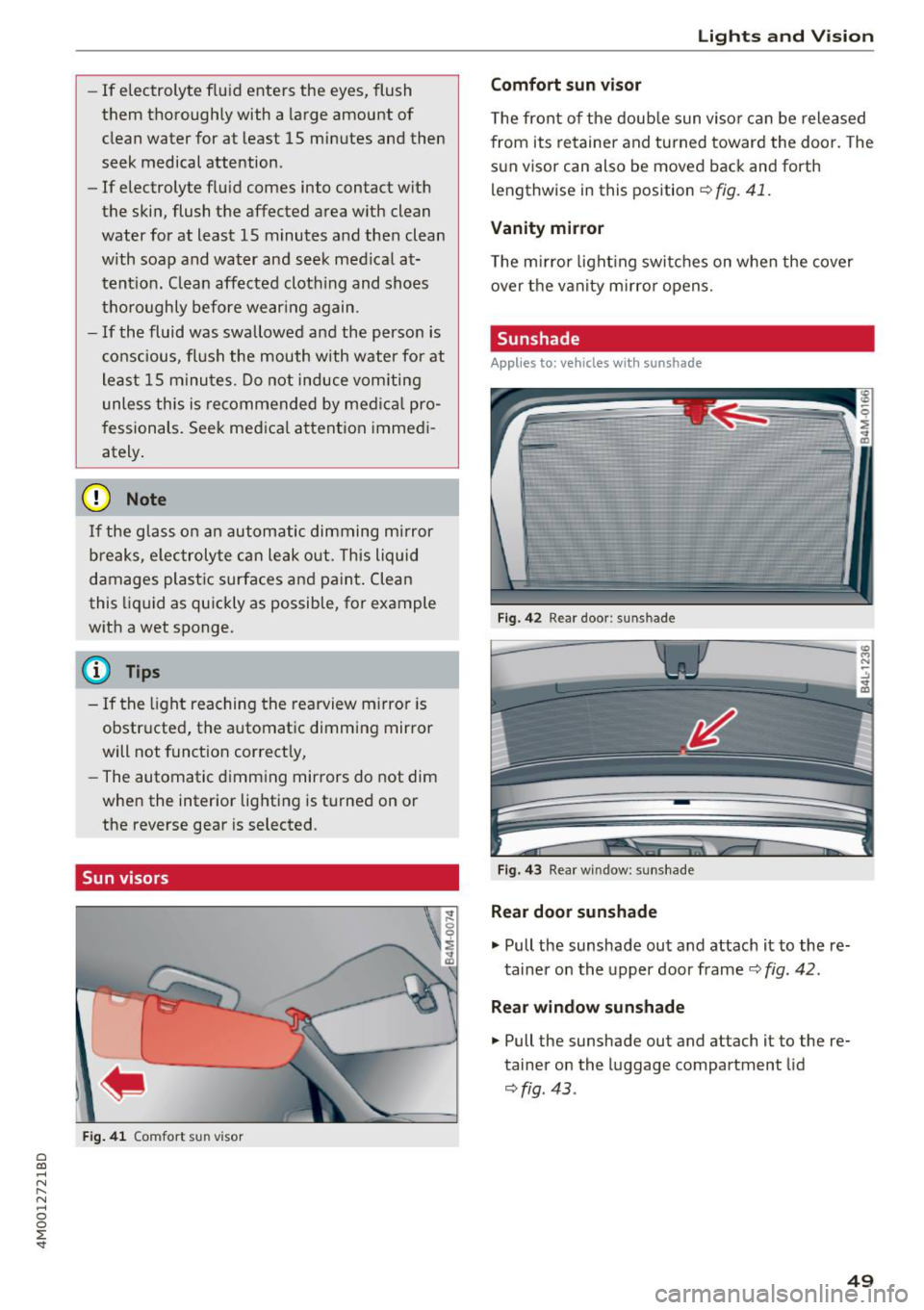
The front of the double sun visor can be released
from its retainer and turned toward the door . The
sun visor can also be moved back and forth
lengthwise in this position
~ fig. 41.
Vanity mirror
The mirror lighting switches on when the cover
over the vanity mirror opens.
Sunshade
Applies to: vehicles with sunshade
Fig. 42 R ear door: sun shade
Fig. 43 Rear w indow : sunshade
Rear door sunshade
.,. Pull the sunshade out and attach it to the re
tainer on the upper door frame
~ fig. 42.
Rear window sunshade
.,. Pull the sunshade out and attach it to the re
tainer on the luggage compartment lid
~fig . 43 .
49
Page 52 of 398
Lights and Vision
Windshield wipers
Switching the wipers on
Fig. 44 Windshield wiper lever
Fig. 45 Rear window w ipe r operation
•® I
• @
• @
• @
•®
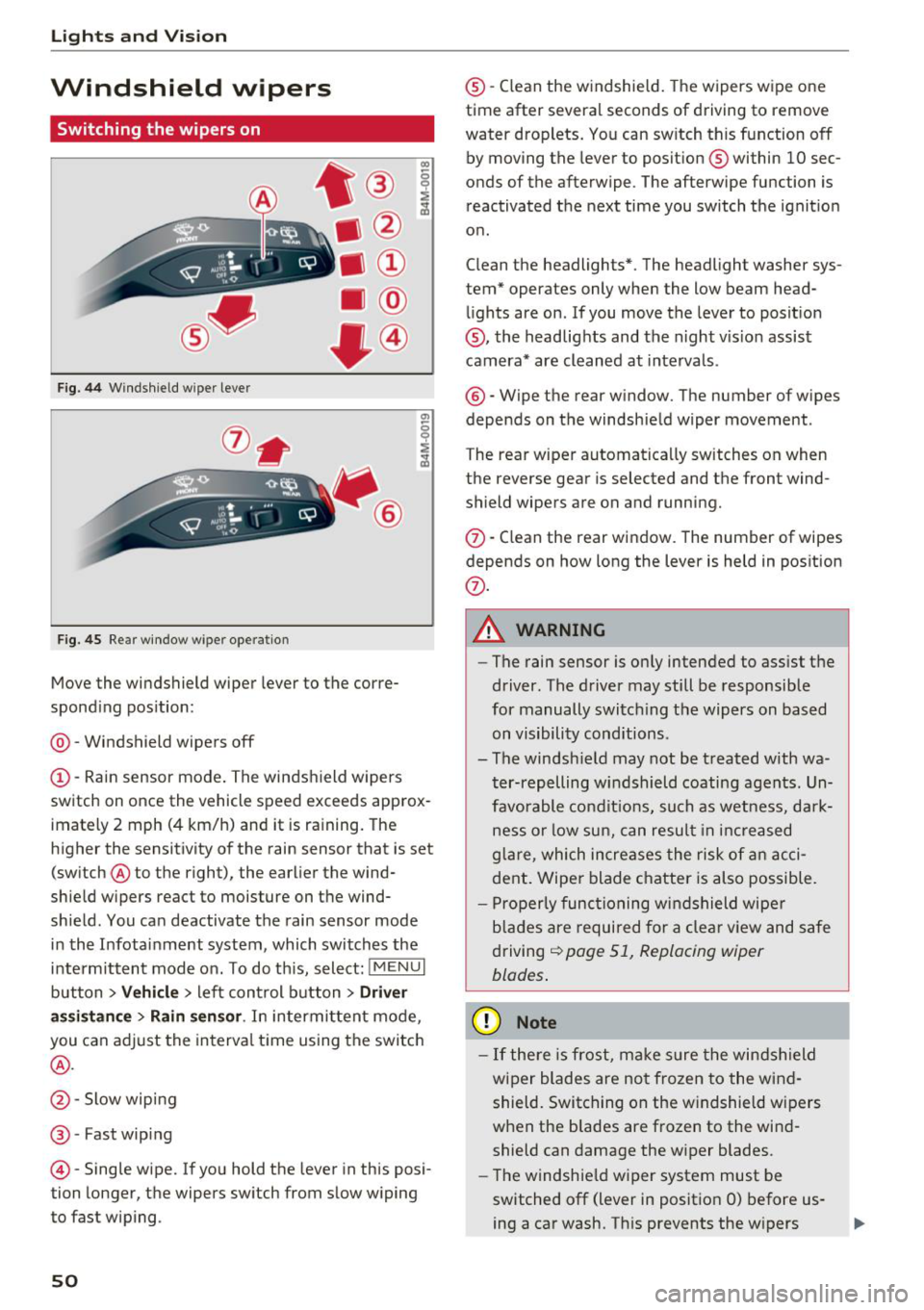
Move the windshield wiper lever to the corre
sponding position:
@ -Windshield wipers off
(D-Rain sensor mode. The windshield wipers
switch on once the vehicle speed exceeds approx
imately 2 mph (4 km/h) and it is raining. The
higher the sensitivity of the rain sensor that is set (switch ® to the right), the earlier the wind
shield wipers react to moisture on the wind
shield. You can deactivate the rain sensor mode
in the Infotainment system , which switches the
intermittent mode on. To do this, select:
! MENUI
button > Vehicle > left control button > Driver
assistance
> Rain sensor . In intermittent mode,
you can adjust the interval time using the switch
®·
@ -Slow wiping
®-Fast wiping
©-Single wipe. If you hold the lever in this posi
tion longer, the wipers switch from slow wiping
to fast wiping .
50
®-Clean the w indshield. The wipers wipe one
time after several seconds of driving to remove
water droplets. You can switch this function off
by moving the lever to position ® within 10 sec
onds of the afterwipe . The afterwipe function is
reactivated the next time you switch the ignition
on .
Clean the headlights*. The headlight washer sys
tem* operates only when the low beam head lights are on . If you move the lever to position
@, the headlights and the night v is ion assist
camera* are cleaned at intervals.
®-Wipe the rear window. The number of wipes
depends on the windshield wiper movement .
The rear wiper automatically switches on when
the reverse gear is selected and the front wind
shield wipers are on and running.
(f) -Clean the rear window . The number of wipes
depends on how long the lever is held in position
(f) .
A WARNING
-The rain sensor is only intended to assist the
driver . The driver may still be responsible
for manually switching the wipers on based on visibility conditions.
- The windsh ield may not be treated with wa
ter-repelling windshield coating agents. Un
favorable conditions, such as wetness, dark
ness or low sun, can result in increased
glare, which increases the risk of an acci
dent. Wiper blade chatter is also possible.
- Properly functioning windshield wiper
blades are required for a clear view and safe
driving
¢ page 51, Replacing wiper
blades .
(D Note
-If there is frost, make sure the windshield
wiper blades are not frozen to the wind
shield. Switching on the windshield wipers
when the blades are frozen to the wind
shield can damage the wiper blades.
- The windshield wiper system must be
switched off (lever in position 0) before us
ing a car wash. This prevents the w ipers
Page 53 of 398
Cl a:, ...... N
" N ...... 0
0
::r '
ing damage to the windshie ld wiper system .
(D Tips
-The windshield wipers switch off when the
ignition is switched off . You can activate the
windshield wipers after the ignition is switched back on by moving the windsh ield
wiper lever to any posit ion.
- Worn or dirty windshield wiper blades result
in streaking. This can affect the rain sensor
funct ion. Check your windshield wiper
blades regularly.
- The washer fluid nozzles for the windshie ld
washer system are heated at low tempera
tures when the ignition is on .
- When stopping temporarily, such as at a
traffic light, the speed of the windshield
wipers automatically reduces by one level.
Cleaning the wiper blades
Clean the wiper blades when you see wiper
strea ks. Use a soft clot h and a glass cleane r.
Windshield wiper
.. Place the windshield wiper arms in the service
pos ition
¢ page 51 .
.. Fold the w indshield wiper arms away from the
windshield .
Rear window wiper
.. Fold the w iper arm away from the rear window .
A WARNING
Dirty windshield wiper blades can impair v i
sion, which increases the risk of an accident .
-
Lights and Vision
Replacing wiper blades
Fig. 46 Removing windshield wiper blades
Windshield wiper service position/blade
replacement position
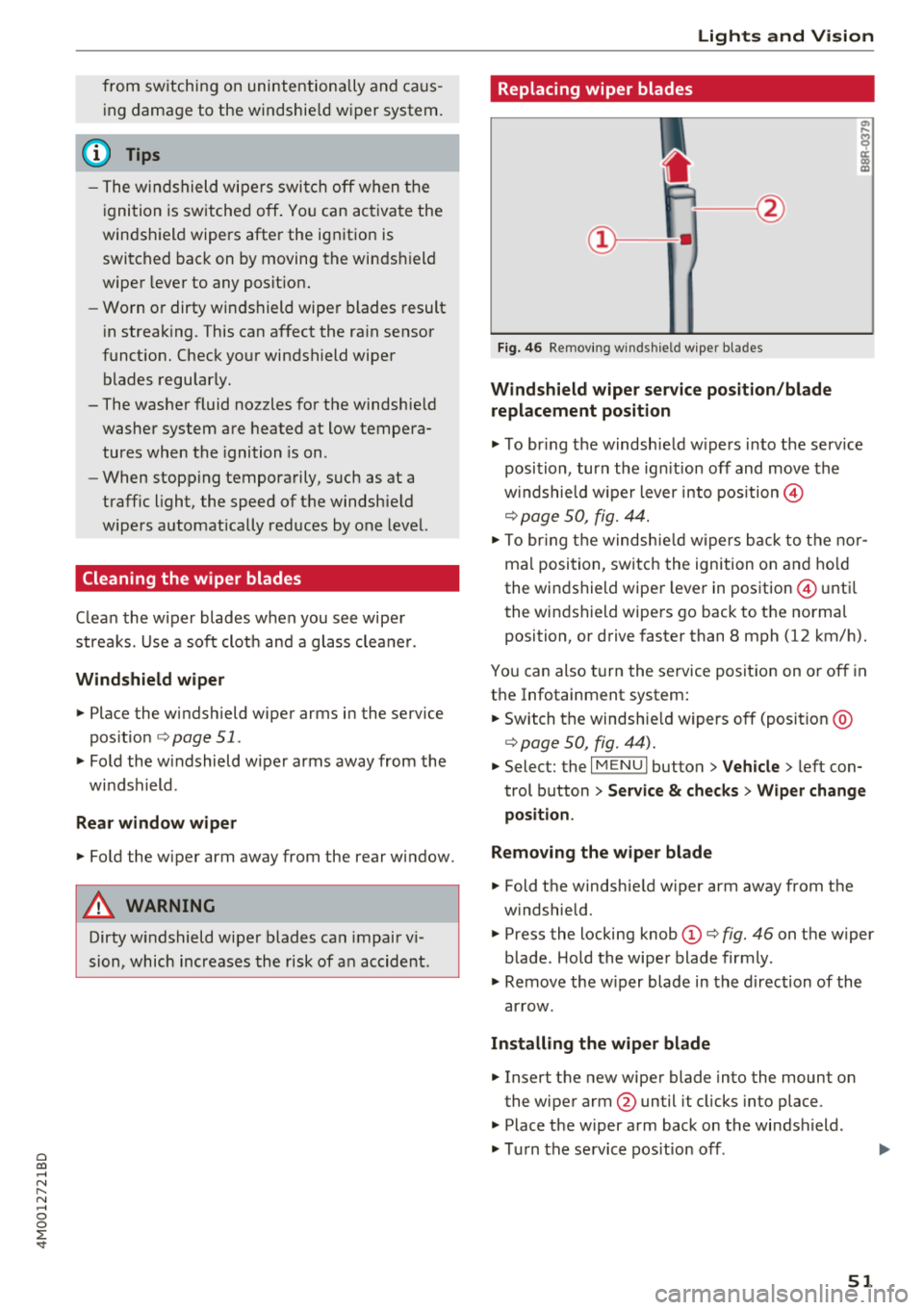
.. To br ing the windsh ield w ipers into the serv ice
position , turn the ign ition off and move the
w indshie ld w iper lever into position@
¢ page 50, fig. 44.
.. To bring the windshie ld wip ers back to the nor
mal position, switch the ignition on and hold
the windshield wiper lever in position @ until
the windshield wipers go back to the normal
position, or drive faster than 8 mph (12 km/h).
You can also turn the service position on or off in
the Infotainment system:
.. Switch the windshie ld wipers off (position @
¢page 50, fig. 44) .
.. Select: the I MENU I button >V ehicle > left con
trol button
> Service & checks > Wiper change
position .
Removing the wiper blade
.. Fold the windshie ld wiper arm away from the
w indshield.
.. Press the locking knob
(D ¢ fig. 46 on the wiper
blade . Hold the wiper blade firmly.
.. Remove the w iper blade in the direction of the
arrow.
Installing the wiper blade
.. Insert the new wiper blade into the mount on
the wiper arm @until it clicks into place .
.. Place the wiper arm back on the windshield .
.. Turn the service position off.
51
Page 54 of 398
Lights and Vision
A WARNING
For safety reasons, the windshield wiper
blades should be replaced once or twice each
year.
@ Note
- Only fold the windshield wipers away when they are in the service position. Otherwise,
you risk damaging the paint on the hood or
the windshield w iper motor .
- You should not move your vehicle or operate
the w indshield wiper lever when the wiper
arms are folded away from the windshield.
The windshield wipe rs would move back in
to their original position and could damage
the hood and windshield.
- To reduce the risk of damage to the wiper
system, always loosen blades which are fro
zen to the windshield before operating the
wipers.
- To reduce the risk of damage to the wiper
blades, do not use gasoline, kerosene, paint
thinner, or other so lvents on or near the
wiper blades.
- To reduce the risk of damage to the wiper
arms or other components, do not attempt
to move the wipers by hand.
(D Tips
- You can also use the service position, for ex
ample, if you want to protect the windshield
from icing by using a cover.
- You cannot activate the service position
when the hood is open.
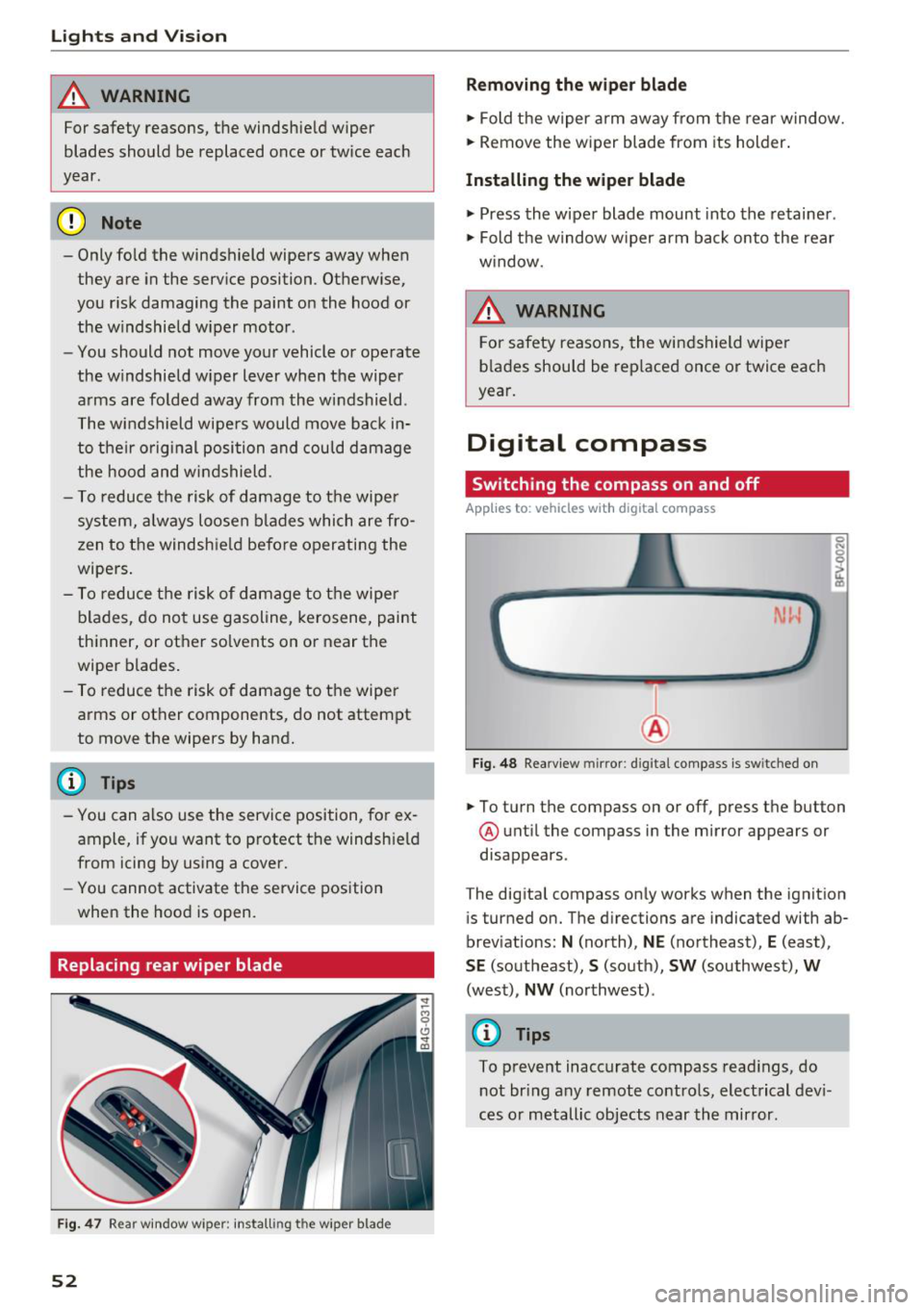
Replacing rear wiper blade
F ig. 47 Rear window w iper : install ing t he wiper blad e
52
Removing the wiper blade
.,. Fold the wiper arm away from the rear window.
.,. Remove the wiper blade from its holder .
Installing the wiper blade
.,. Press the wiper blade mount into the retainer .
.,. Fold the window w iper arm back onto the rear
w indow.
6 WARNING
For safety reasons , the windshield wiper
blades should be replaced once or twice each
year.
Digital compass
Switching the compass on and off
App lies to: vehicles with digital compass
Fig. 48 Rearview mirror: d ig ital compass is sw itched on
.,. To turn the compass on or off, press the button
@ until the compass in the mirror appears or
disappears.
The digital compass only works when the ignition is turned on. The directions are indicated with ab
breviations:
N (north), NE (northeast), E (east),
SE (southeast), S (south), SW (southwest), W
(west), NW (northwest) .
(0 Tips
To prevent inaccurate compass readings, do
not bring any remote controls, electrical devi
ces or metallic objects near the mirror .