ESP AUDI Q7 2019 Owner´s Manual
[x] Cancel search | Manufacturer: AUDI, Model Year: 2019, Model line: Q7, Model: AUDI Q7 2019Pages: 394, PDF Size: 105.97 MB
Page 210 of 394
Navigation
—Checktheaddressinputagainwhenselecting
anaddress.
—ThenselectandconfirmStartrouteguidance.
Additionaldirectoryfunctionsinthenavigation
systemcanbefound under>page213.
G)Tips
—Addressesthathavebeenimportedfrom
yourmobiledeviceintotheMMIcanalsobe
usedasadestination.
—Ifacontactisgrayed outinthedirectory,
thiscontacthasneitheradestinationnoran
addressassignedtoit.
Pointofinterestsearch
Appliesto:vehicleswithnavigationsystem
> Pressthe LNAV/MAP]buttonrepeatedlyuntil
the Enterdestinationmenuisdisplayed
=>page205,fig. 189.
>Select:leftcontrolbutton>Pointsofinterest.
—Changingthesearcharea:selectandconfirm
Searcharea>asearchareafromthelist.
Thefollowingsearchcategoriesareavailable:
Nearby:pointsofinterestcanbeselectedfrom
differentcategories.Thepointsofinterestare
listedstartingfromtheimmediatevicinityofthe
vehicleuptoaradiusofapproximately124miles
(200km).
Alongtheroute:pointsofinterestalongthe
routecanonlybeselectedduringactiveroute
guidance.Thepointsofinterestarelocateddi-
rectlyalongorintheimmediatevicinityofthe
calculatedroute.Thepointsofinterestcanlike-
wisebeselectedfromvariouscategories.Forex-
ample,youcansearchforahotelorparkinglot
atthedestination.
Neardestination/Nearstopover:pointsofinter-
estnearadestinationorastopovercanonlybe
selectedduringactiverouteguidance.Thepoints
ofinterestcanlikewisebeselectedfromvarious
categories.Forexample,youcansearchforaho-
telorparkinglotatthedestination.
Innewcity:selectacountry/stateorsearchina
newcity.Enterthenameofthedesiredcity.
208
Pointsofinterestcanbeselectedfromvarious
categories.Thisfunctionallowsyoutosearchfor
points ofinterestinanycityregardlessoftheac-
tiverouteguidanceorthevehicleposition.
—Searchingforthenameofapointofinterest
intheselectedsearcharea:Select:Findentry
>Enter pointofinterest.Enterthenameofthe
pointofinterest.
—Searchingforapointofinterestinaspecific
category:selectSelectcategory.Selectand
confirmacategorysuchasRestaurants.
(i)Tips
—Distancestopointsofinterestaredisplayed
asastraight-linedistancefromyourcurrent
location.Theactualdistancefromyourcur-
rent locationtothepointofinterestisup-
datedautomatically.Thelistofpointsofin-
terestthatwerefoundisnotresortedwhen
thishappens.
—Theremaybeentriesinthelistthatcannot
bedisplayedcompletelyduetotheirlength.
Selectthecorrespondingentryfromthelist.
Select:rightcontrolbutton>Showdestina-
tiondetails.Detailedinformationforthese-
lectedentryinthelististhendisplayed.
eTTawYelelMeeieeeCoal
search)
Appliesto:vehicleswithnavigationsystem andAudiconnect
Infotainment
You
cansearchforpointsofinterestontheInter-
net.
Requirement:TherequirementsforAudiconnect
Infotainmentmustbemet>page193.
>Pressthe [NAV/MAP]buttonrepeatedlyuntil
theEnterdestinationmenuisdisplayed
=>page205,fig. 189.
>Select:leftcontrolbutton>Onlinesearch.The
searcharealastsetisdisplayedintheinput
field.
—Changingthesearcharea:select:rightcontrol
button>Selectsearcharea.
—Searchingforonlinedestinationsinthese-
lectedsearcharea:enteranewcity/stateif
necessary.Enterasearchterm, suchas"Hotel",>
Page 212 of 394
Navigation
Deletingastopover
—Pushthecontrolknobup.Freetextsearchand
activerouteguidancearedisplayed.Or:Turn
the
controlknobtotheleftuntiltheactive
routeguidanceisshown.
—SelectandconfirmDeletestopover(2)
>fig.191.
—Thestopoverisdeleted.
(eTleeET
Appliesto:vehicleswithnavigationsystem
Requirement:routeguidancemustbeactive.
>Pressthe LNAV/MAP]buttonrepeatedlyuntil
the Enterdestinationmenuisdisplayed
=>page205,fig. 189.
>Turn thecontrolknobtotheleftuntiltheactive
routeguidanceisshown>page209,fig.191.
> SelectandconfirmDeletedestination@)
=>page209,fig.191.Thedestinationisdelet-
ed. Or:selecttherightcontrolbutton>Cancel
routeguidance.
Additionaloptionswhenenteringa
Ceeacea)
Appliesto:vehicleswithnavigationsystem
>Presstherightcontrolbutton.
Dependingontheselectedfunction,thefollow-
ingoptionsmaybeavailablewhenenteringa
destination:
Cancelrouteguidance:Requirement:routeguid-
ancemustbeactive.Routeguidanceiscanceled.
Foradditionalinformation,see>page210.
Countryinformation:youcandisplaytheappli-
cableurbanandruralspeedlimitsforanycoun-
try/state.Ifthisfunctionisactivated,theinfor-
mationwillbeautomaticallyshowntoyouinthe
routeinformation@)%page214,fig.196when
thespeedlimitisexceeded>page217.
Country/stateselection:see>page206,Nar-
rowingthesearcharea.
Route
criteria: see>page214,Routecriteria.
210
Showlocationonmap:Requirement:youmust
haveselectedadestinationfromtheresultslist.
Thedestinationenteredisdisplayedonthemap.
Parkingatthislocation*:Requirement:youmust
haveselectedadestinationfromtheresultslist.
Allparkingoptionsnear theselectedlocationare
displayedintheInfotainmentsystem.
Delete:theselectedentryisdeleted.Youcande-
leteindividualentriesorallentries(forexample,
favoritesorlastdestinations).
Audiconnectatthislocation*:Requirement:you
musthaveselectedadestinationfromtheresults
list.Allowsyoutosearchforitemsinthevicinity
oftheselectedlocation,suchasTravelinforma-
tion.
Onlinetrafficdata*:theonlinetrafficinforma-
tion>page220canbe switchedonoroff.
Adddestinationtocontact:see>page213.
Storeasfavorite:see>page213.
Voiceguidance:see>page214.
Navigationsettings:see>page213.
@Tips
Informationononlinetrafficdata*canalso
befoundonlineatwww.audiusa.com.
Page 214 of 394
Navigation
G@)Tips
—Personalroutesarelearnedbasedontheve-
hicleposition.Therouteisprioritizedac-
cordingtohowfrequentlyyoudrivetoa
destination.
—Amaximumofthreepersonalroutesare
displayedintheEnterdestinationmenu.
Basedonthecurrentvehicleposition,the
trafficsituation fortheroutethatismost
likelytobedrivenoutofthethreeroutes
willalwaysbemonitored.
—Pleasenotethatpersonalroutesthathave
alreadybeenstoredwillremainstoredafter
theignitionisswitchedoffandtheymust
bedeletedmanually.
Alternativeroutes
Appliesto:vehicleswithnavigationsystem
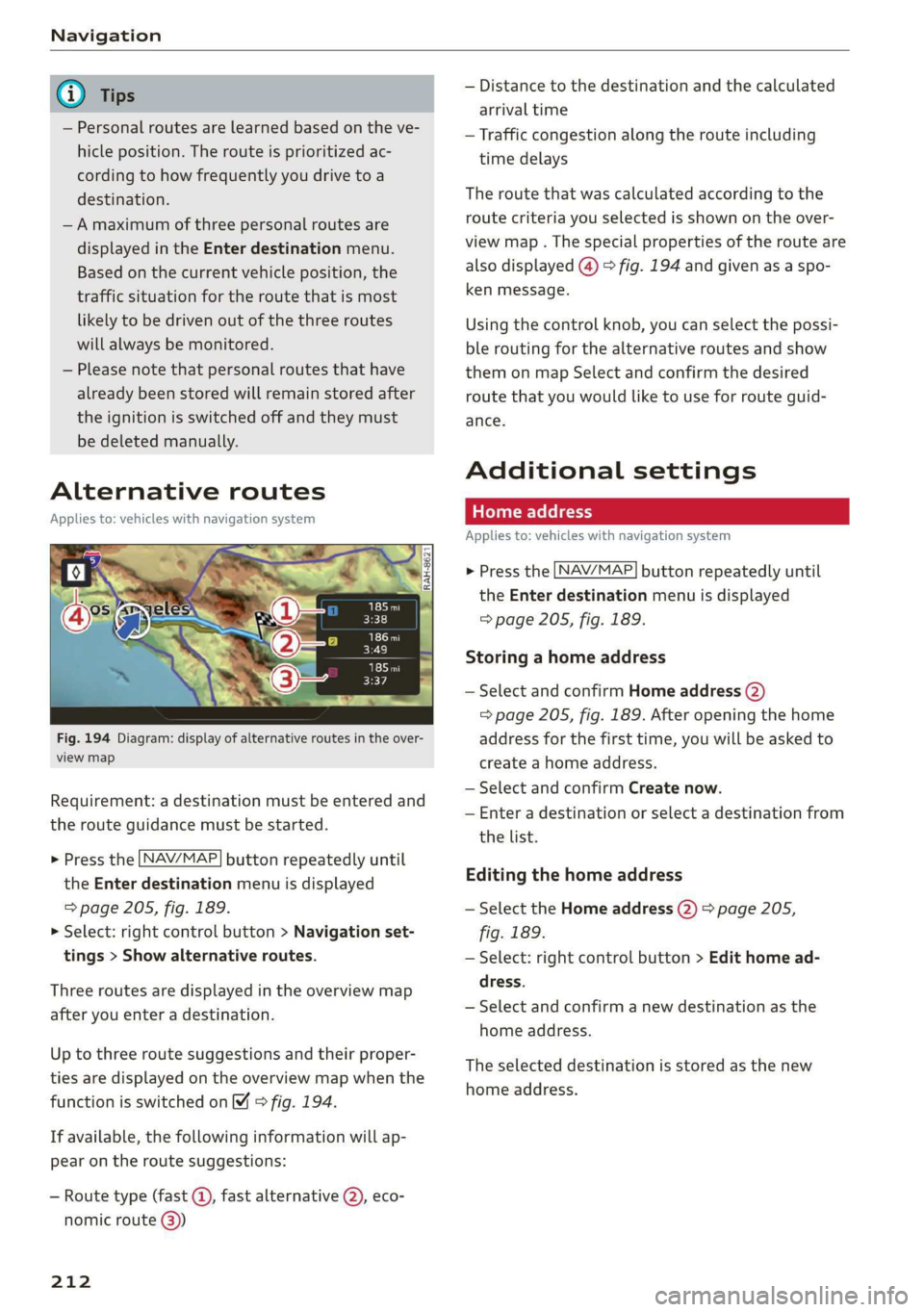
Fig.194Diagram:displayofalternativeroutesintheover-
viewmap
Requirement:adestinationmustbeenteredand
therouteguidancemustbestarted.
>Pressthe LNAV/MAP]buttonrepeatedlyuntil
the Enterdestinationmenuisdisplayed
=>page205,fig. 189.
>Select:rightcontrolbutton>Navigationset-
tings>Showalternativeroutes.
Threeroutesaredisplayedinthe overviewmap
afteryouenteradestination.
Uptothree routesuggestionsandtheirproper-
tiesaredisplayedonthe overviewmapwhenthe
functionisswitchedon4©fig.194.
Ifavailable,thefollowinginformationwillap-
pearontheroutesuggestions:
—Routetype(fast©,fastalternative2), eco-
nomicroute@))
212
—Distancetothedestinationandthecalculated
arrivaltime
—Trafficcongestion along therouteincluding
timedelays
Theroutethatwascalculatedaccordingtothe
routecriteriayouselectedisshownontheover-
viewmap.Thespecialpropertiesoftherouteare
alsodisplayed(@)>fig.194andgivenasaspo-
kenmessage.
Usingthecontrolknob,youcanselectthepossi-
ble
routingforthealternativeroutesandshow
themonmapSelectandconfirmthedesired
routethatyouwouldliketouseforrouteguid-
ance.
Additionalsettings
Appliesto:vehicleswithnavigationsystem
>Pressthe LNAV/MAP]buttonrepeatedlyuntil
theEnterdestinationmenuisdisplayed
=>page205,fig. 189.
Storingahomeaddress
—SelectandconfirmHomeaddress(2)
=>page205,fig. 189.Afteropeningthehome
addressforthefirsttime,youwillbe askedto
createahomeaddress.
—SelectandconfirmCreatenow.
—Enteradestinationorselectadestinationfrom
thelist.
Editingthehomeaddress
—SelecttheHomeaddress(2)page205,
fig.189.
—Select:rightcontrolbutton>Edithomead-
dress.
—Selectandconfirmanewdestinationasthe
homeaddress.
Theselecteddestinationisstoredasthenew
homeaddress.
Page 217 of 394
![AUDI Q7 2019 Owner´s Manual 4M0012721BG
Navigation
>Pressthe LNAV/MAP]buttonrepeatedlyuntil
themapisdisplayed>fig.196.
Zoomingin/outonthemap
—Turn thecontrolknobtotheleftortotheright.
Alternatively,youcanalsozoomin/out](/img/6/40283/w960_40283-216.png "AUDI Q7 2019 Owner´s Manual 4M0012721BG
Navigation
>Pressthe LNAV/MAP]buttonrepeatedlyuntil
themapisdisplayed>fig.196.
Zoomingin/outonthemap
—Turn thecontrolknobtotheleftortotheright.
Alternatively,youcanalsozoomin/out")
4M0012721BG
Navigation
>Pressthe LNAV/MAP]buttonrepeatedlyuntil
themapisdisplayed>fig.196.
Zoomingin/outonthemap
—Turn thecontrolknobtotheleftortotheright.
Alternatively,youcanalsozoomin/outonthe
mapusingtheMMItouchcontrolpad*
=>page158,ifthecrosshairsareswitchedon.
Or:turntheleftthumbwheelonthemultifunc-
tionsteeringwheel*>page17.
Turningthecrosshairson/off
—Switchingthecrosshairson:pressthecontrol
knobinthemapview>fig.196.
—Switchingthecrosshairsoff:pressthe[BACK
button.
Whenthecrosshairsareswitchedoff>fig.196:
@)Direction.Foradditionalinformation,see
=>page216.
@)Thedistancetothedestinationincludesthe
calculatedarrivaltime.
@Whenthetrailermodefunctionisswitched
on,thecorrespondingsymbolisdisplayed
nexttothearrivaltime.
@Scale:turnthecontrolknobtotheleftor
righttodecreaseor increasethescale.When
theAutomaticzoomfunctionisswitchedon
,an“A”for“Automatic”isdisplayedinthe
magnifyingglass.
Altitude
Vehiclelocation
Routeinformation:variousinformationwill
bedisplayedduringactiverouteguidance
(forexample,theupcomingmaneuverin-
cludingcalculateddistanceandstreet
names).Thedisplayalsoprovidestrafficin-
formationorpointsofinterestonthecurrent
route.
Roadcurrentlybeingdrivenon
CO®@
Whenthecrosshairsareswitchedon>fig.197:
@)Thecrosshairs:movethecrosshairsinthede-
sireddirectionandsetapointonthemapus-
ingtheMMItouchcontrolpad”orthecontrol
D_Onlyappliestovehicleswithoutcamera-basedspeedlimit
display.
knob.Whenthecrosshairsareturnedoff,the
roadbeingcurrentlydrivenonisshown.
@Speedlimit display”):displayofthemaxi-
mumpermittedspeedontheexpressways
andhighways.
@Entertainmentslidingmenu*:see
=>page159.
@®Additionalinformationonthecrosshairspo-
sition:ifyoumovethecrosshairstoa loca-
tiononthemap,availableinformationfor
thecurrentpositionisdisplayed.Tapbriefly
ontheMMItouchcontrolpad.Or:pressthe
controlknob.Inthedestinationdetails,you
canstartrouteguidancetothedisplayedlo-
cation.SelectandconfirmStartrouteguid-
ance.
@Mapcontents(pointsofinterest,favorites).
Whentherearemultiplepointsofinterestin
theimmediatevicinity,thesymbolsare
shownstackedonthemap.
Betterroute#3:ifabetterrouteisavailable
forthecurrentrouteguidance,itwillbeindi-
catedonthemapincludingthetimethat
wouldbesaved.Moreinformationcanbe
foundunder>page220.
Mapfunctions
Appliesto:vehicleswithnavigationsystem
>Pressthe [NAV/MAP]buttonrepeatedlyuntil
themapisdisplayed>page214,fig.196.
>Presstheleftcontrolbutton.
Thefollowingmapfunctionscan beselected:
Switchtodestinationinput
ThefreetextsearchintheEnterdestination
menuisdisplayed>page205,fig.189.
Trafficmessages
CurrenttrafficinformationisdisplayedintheIn-
fotainmentsystemdisplay.Youcanalsofindad-
ditionalinformationunder>page219.>
215
Page 221 of 394
4M0012721BG
Navigation
@Tips
—Alwaysreadthechapter>page193.
— Theamountofavailableonlinemapupdates
inthevehicleislimited.Toupdatemorere-
gions,usethemapupdateviaSDcardat
www.audiusa.com/myaudi.
—Alwaysreadthechapter>page193,Audi
connect.
Trafficinformation
Appliesto:vehicleswithnavigationsystem
Coeenaes@
®Westbound#>Eastbound
@)Northbound
©>-@serthvoun
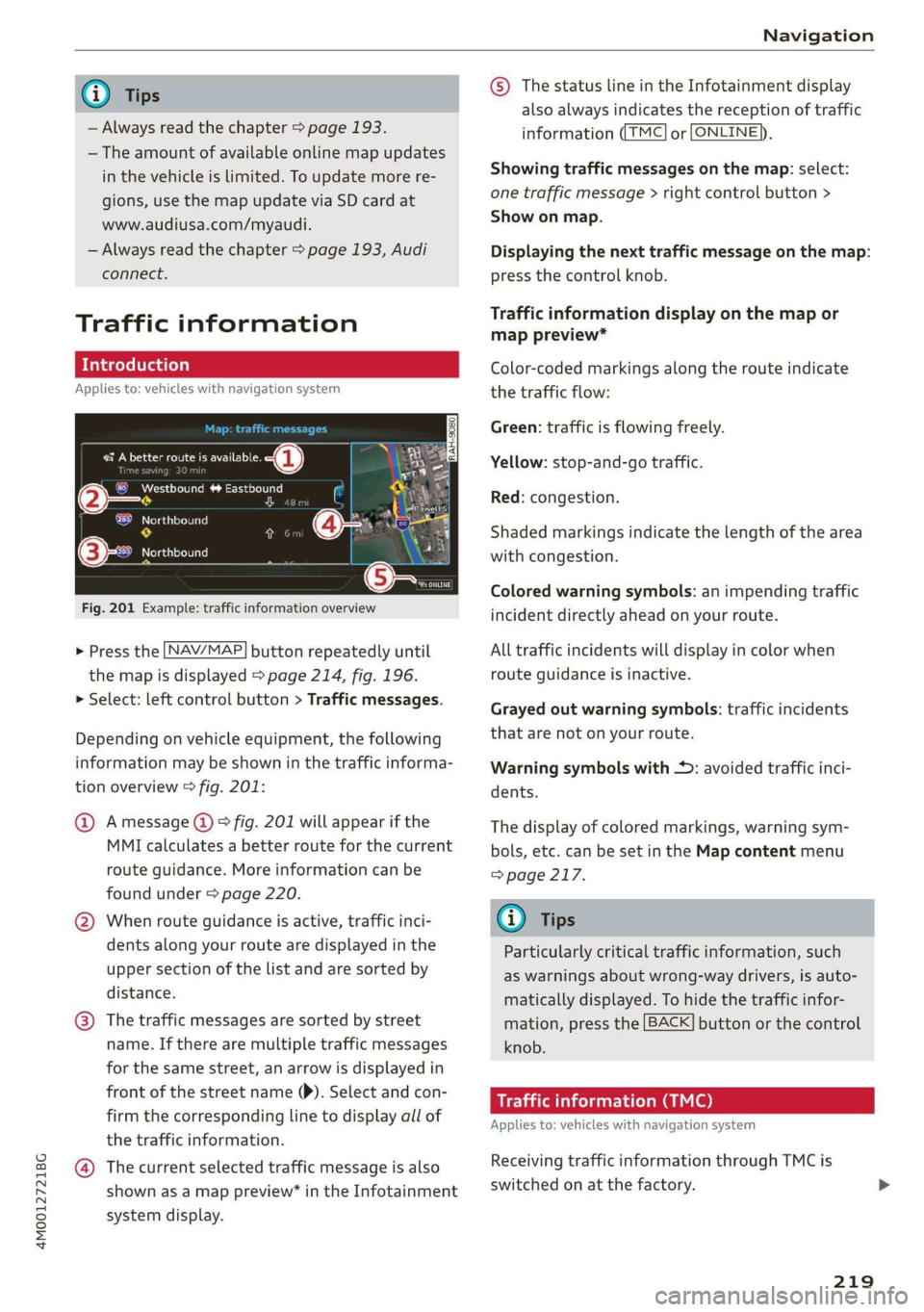
Fig.201Example:trafficinformationoverview
>Pressthe LNAV/MAP]buttonrepeatedlyuntil
themapisdisplayed>page214,fig. 196.
>Select:leftcontrolbutton>Trafficmessages.
Dependingonvehicleequipment,thefollowing
informationmaybeshowninthetrafficinforma-
tionoverview>fig.201:
@Amessage(@)>fig.201willappearifthe
MMIcalculatesabetterrouteforthecurrent
routeguidance.Moreinformationcanbe
foundunder>page220.
@Whenrouteguidanceisactive,trafficinci-
dents along yourroutearedisplayedinthe
uppersectionofthelistandaresortedby
distance.
@®Thetrafficmessagesaresorted bystreet
name.Iftherearemultipletrafficmessages
forthesamestreet,anarrowisdisplayedin
frontofthestreetname()).Selectandcon-
firmthecorrespondinglinetodisplayallof
thetrafficinformation.
@Thecurrentselectedtrafficmessageisalso
shownasamappreview”intheInfotainment
systemdisplay.
©)ThestatuslineintheInfotainmentdisplay
alsoalwaysindicatesthereceptionoftraffic
informationTMC]orLONLINE}),
Showingtrafficmessagesonthemap:select:
onetrafficmessage>rightcontrolbutton>
Showonmap.
Displayingthe nexttrafficmessageonthemap:
pressthecontrolknob.
Trafficinformationdisplayonthemapor
mappreview*
Color-codedmarkingsalongtherouteindicate
thetrafficflow:
Green:trafficisflowingfreely.
Yellow:stop-and-gotraffic.
Red:congestion.
Shadedmarkingsindicatethelength ofthearea
withcongestion.
Coloredwarningsymbols:animpendingtraffic
incidentdirectlyaheadonyourroute.
Alltrafficincidentswilldisplayincolorwhen
routeguidanceisinactive.
Grayedoutwarningsymbols:trafficincidents
thatarenotonyourroute.
Warningsymbolswith*:avoidedtrafficinci-
dents.
Thedisplay ofcoloredmarkings,warningsym-
bols,etc.canbesetintheMapcontentmenu
=>page217.
G@)Tips
Particularlycriticaltrafficinformation,such
aswarningsaboutwrong-waydrivers,isauto-
maticallydisplayed.Tohidethetrafficinfor-
mation,pressthe[BACK]buttonorthecontrol
knob.
Trafficinformation(TMC)
Appliesto:vehicleswithnavigationsystem
ReceivingtrafficinformationthroughTMCis
switchedonatthefactory.
219
Page 223 of 394
4M0012721BG
Navigation
processesitsanonymous,encryptedposi-—Theonlinetrafficinformationnetworkis
tioninformationatregularintervalstothecurrentlynotavailableinallcountries,and
trafficdataprovider.Ifyoudonotwanttothecoverageisnotnationwide.Foraddi-
usethis,youcanswitchofftheonlinetraf-tionalinformation,visitwww.audiusa.com.
ficinformationfunctionatanytime.
Troubleshooting
Appliesto:vehicleswithnavigationsystem
ProblemSolution
Freetextsearch:thedesireddes-
tinationcannotbefound.
Thedestinationmightnotbeenteredinthenavigationdatabase.
Or:checkthespellingofthetermthatwassearched.Checkifthe
desiredcountry/statewasselectedforthefreetextsearchusing
theCountry/stateselection>page206orthe optionAllcoun-
tries/states.
221
Page 229 of 394
4M0012721BG
Media
Media
Introduction
Therearevariousmediadrivesandconnections
availableintheMMI.Forexample,youcanplay
audio/video*filesfromtheJukebox*orconnect
yourmobiledevicetotheAudimusicinterface*
andoperateitthroughtheMMI.
Notes
Mediaandformatrestrictions:theMMI(includ-
ingtheSDcardreaderandtheUSBstoragede-
viceconnection*)wastestedwithavarietyof
productsandmediaavailableinthemarket.
However,theremaybecaseswhereindividualde-
vicesormediaandaudio/video*filesmaynot be
recognized,mayplayonlywithrestrictionsor
maynotplayatall.
DigitalRightsManagement:pleasenotethat
theaudio/video*filesaresubjecttocopyright
protection.
Themediadrivesdonotplayfilesthatarepro-
tectedbyDRMandthatareidentifiedwiththe
symbolfi.
Datasecurity:neverstoreimportantdataonSD
cards,theJukebox*,CDs/DVDsormobiledevices.
AudiAGisnotresponsiblefordamagedorlost
filesandmedia.
Loadingtimes:themorefiles/folders/playlists
thatareonastoragemedium,thelongeritwill
taketo loadtheaudio/video*files.Audirecom-
mendsusingstoragemediathatonlycontainau-
dio/videofiles*.To decreasethetimeittakesto
loadaudio/videofiles*,createsubfolders(forex-
ample,fortheartistoralbum).Theloadingtime
willalsoincreasewhenimportingfiles.
Additionalinformation:whenplaying,audio
filesareautomaticallydisplayedwithanyaddi-
tionalinformationthatisstored(suchasthear-
tist,trackandalbumcover).Ifthisinformationis
notavailableonthestoragemedium,theMMI
willchecktheGracenotemetadatadatabase.
However,insomecases,theadditionalinforma-
tionmaynotbedisplayed.
Restrictedfunctionality:resettheMediaset-
tingstothefactorydefaultsettingsiffunctional-
ityisrestricted>page248.
Iffunctionalityisrestricted,resettheJukebox*
tothefactorydefaultsettings>page248.
Forinformationaboutthepropertiesofsupport-
edmediaandfileformats,see>page241.
CG)Note
Alwaysfollowtheinformationfoundin>@in
Wi-Fisettingsonpage200.
CD/DVDoperation
CD/DVDandformatrestrictions:thefunctionali-
tyofindividualstoragemediamaybelimiteddue
tothevarietyofblankCDs/DVDsavailable and
thevariouscapacities.AudioCDsorvideoDVDs
withcopyprotection,CDs/DVDsthatdonotcon-
formtothestandard,andmultisessionCDsmay
havelimitedplaybackormaynotplayatall.Audi
recommendsfinalizingtherecordingprocess
whencreatingmultisession CDs.Multisession
DVDsarenotsupported.
UsingCDs/DVDs,theCDdrive ortheDVDdrive:
toensurecorrect,high-qualityplaybackandto
preventdamagetothedriveordiscreadinger-
rors,alwaysstoreCDs/DVDsinaprotective
sleeveanddonotexposethemtodirectsunlight.
Donotuse:
—Damaged,dirtyorscratchedCDs/DVDs
—
SingleCDs/DVDswith3in(8cm)diameter
—CD/DVDsthatarenotround
—CDs/DVDswithlabels
—Protectiverings
—CleaningCDs
Thermalprotectionswitch:CD/DVDplayback
maybetemporarilyunavailableifoutsidetem-
peraturesareextremelyhotorcold.Athermal
protectionswitchisinstalledtoprotectthe
CD/DVDandthelaser.
Laserdevices:laserdevicesare dividedintosafe-
tyclasses1to4inaccordancewithDINIEC76
227
>
Page 233 of 394
4M0012721BG
Media
Wi-Fiaudioplayer
Appliesto:vehicleswithWi-Fiaudioplayer
UsingtheWi-Fiaudioplayermediasourceonthe
MMI, youcanconnectandoperateyourWi-Fi-ca-
pablemediaplayer(suchasasmartphone)to
wirelesslyplaymusicfromyourmediaplayerli-
brary.Themediaplayerisconnectedthroughthe
vehicle'sWi-Fihotspot.AUPnPServerapporan
integratedUPnP/DLNAserveronyourmedia
playerisrequiredtoaccessyourmediaplayerli-
brary.
Requirement:theWi-Fifunctiononyourmedia
playermustbe switchedon.ThemyAudiappora
UPnPserverappmustbeinstalledonyourmedia
player.Or:youmustbeusingamediaplayerwith
anintegratedUPnP/DLNAserver.
—Connectingamediaplayer:pressthe[MEDIA
button.Presstheleftcontrolbuttonuntilthe
sourcesoverview>page235isdisplayed.Se-
lectandconfirm Wi-Fiaudioplayer(7)
>page235,fig.213.
—Ifnecessary,selectandconfirmWi-Fiturned
off>TurnonWi-FitoactivateWi-Fiinthe
MMI.SelectWi-Fisettings,ifnecessary.Select
thesamesettingsonthewirelessmediaplayer
thatareusedfortheWi-Fihotspot.
—StartingtheWi-Fiaudioplayer:Startthe
myAudiapporanUPnPserverapp,orallow
mediasharingonyourdevice.
Operatingthemediaplayer:themediaplayeris
operatedthroughtheMMI.
—Presstheleftcontrolbuttonrepeatedlyuntil
theFoldersmenuitemappears.Selectandcon-
firmFolders.
—Playingmusicfromthemediaplayer:select
andconfirmMediacenter.
Webradio:see>page232.
objects,theycouldbethrownaroundthein-
sideofthevehicleinacrashandcauseseri-
ousinjuries.Storethesetypesofdevicesse-
curelywhiledriving.
—Donotuseanywirelessdevicesonthefront
seatswithinrangeoftheairbagswhiledriv-
ing.Also readandfollowthewarningsin
=page272,Frontairbags.
ZAWARNING
—Asthedriver,donotallowusageoftheWi-
Fihotspottodistractyoufromdriving,as
thiscouldincreasetheriskofanaccident.
—Itisonlysafe tousetablets,laptops,mobile
devicesandothersimilardeviceswhenthe
vehicleisstationarybecause,likeallloose
C)Note
Alwaysfollowtheinformationfoundin>@in
Wi-Fisettingsonpage200.
G)Tips
—Alwaysreadthechapter>page193,Audi
connect.
—PleasenotethataWi-Ficonnectiondoes
notautomaticallymakeitpossible touse
the
Internet.Foradditionalinformation,
see>page193.
—Toavoidinterruptionsduringplayback,de-
activatethepowersavingfunctiononthe
mediaplayer orconnectittoacharger.
—Theloadingtimesfortheaudiodatadepend
onthemediaplayerusedandthenumberof
filesthatitcontains.
—Amaximumof2,000entriesperdirectory
aredisplayedintheMMI.
—Songsdownloadedforofflineuseusingmu-
sicstreamingservicesarestoredonyour
mobiledevice(suchasasmartphone)and
maybeDRMprotected.TheWi-Fiaudio
playerwillnotplayDRMprotectedfiles.
—ContactanauthorizedAudidealeror au-
thorizedAudiServiceFacilityforadditional
informationontheWi-Fiaudioplayer.
231
Page 234 of 394
![AUDI Q7 2019 Owner´s Manual Media
Onlinemediaand
Internetradio
Appliesto:vehicleswithAudiconnect
Youcanplaybackandoperatevariousonlineme-
diaservicesandInternetradiousingtheMMI.
Fig.210Onlinemedia
> Pressthe[MEDIA]button.P](/img/6/40283/w960_40283-233.png "AUDI Q7 2019 Owner´s Manual Media
Onlinemediaand
Internetradio
Appliesto:vehicleswithAudiconnect
Youcanplaybackandoperatevariousonlineme-
diaservicesandInternetradiousingtheMMI.
Fig.210Onlinemedia
> Pressthe[MEDIA]button.P")
Media
Onlinemediaand
Internetradio
Appliesto:vehicleswithAudiconnect
Youcanplaybackandoperatevariousonlineme-
diaservicesandInternetradiousingtheMMI.
Fig.210Onlinemedia
> Pressthe[MEDIA]button.Presstheleftcontrol
buttonuntilthesourcesoverview>fig.210is
displayed.
Appliesto:usingonlinemediaandInternetradio
Requirement:
—themyAudiappmustbeinstalledandopenon
yourmobiledevice.
—YoumustbeloggedintoyourmyAudiaccount
inthemyAudiapp andyoumusthaveselected
yourvehicle.
—TheWi-Fifunctiononthemobiledeviceandon
theMMImustbe switchedon.
—Ifnecessary,checkinthe connectionmanager
=>page248ifthemobiledeviceyouconnected
isselectedundertheMMIconnectapp().
—TheMMImustbeconnectedtothenetwork.
—ThesymbolfortheOnlinemediasource(4)
=>fig.210isshownintheMMI.
Appliesto:usingonlinemedia
Additionalrequirement:
— Asupportedonlinemediaservicemustbeavail-
ableinthecountrywherethevehicleisbeing
operated.
—Youmusthave anaccountwithasupportedon-
linemediaservice.
—Dependingontheonlinemediaservice,you
mayneedtoinstallandopenanapponyour
mobiledevice.
StartingOnlinemedia
—Pressthe[MEDIA]button.Presstheleftcontrol
buttonuntilthesourcesoverview>page235is
displayed.
232
—Selectandconfirm anonlinemediaservice.
StartingInternetradio
—Pressthe[MEDIA]button.Presstheleftcontrol
buttonuntilthesourcesoverview>page235is
displayed.
—SelectandconfirmInternetradio.TheInternet
radiobrowserorthelaststationthatwasplay-
ingisshown.
—Selectingthestation:ifnecessary,selectand
confirmacategoryintheInternetradioBrows-
er>astation.
OnlinemediaandInternetradio:additionalop-
tions
—Presstherightcontrolbutton.
Thefollowingoptionsmaybeavailable,depend-
ingontheinformationshown(suchasthesta-
tion/trackthatiscurrentlyplaying):
—Soundsettings:see>page251.
—Wi-Fisettings:see>page200,Wi-Fisettings.
—Connectionmanager:see>page248.
—Additionaloptionsmaybeavailable,depending
ontheactiveonlinemediaserviceorInternet
radio.
ZA\WARNING
—Itisonlysafe tousetablets,laptops,mobile
devicesandothersimilardeviceswhenthe
vehicleisstationarybecause,likeallloose
objects,theycouldbethrownaroundthein-
sideofthevehicleinacrashandcauseseri-
ousinjuries.Storethesetypesofdevicesse-
curelywhiledriving.
—Donotuseanywirelessdevicesonthefront
seatswithinrangeoftheairbagswhiledriv-
ing.Also readandfollowthewarningsin
=>page272,Frontairbags.
C)Note
—Alwaysfollowtheinformationfoundin>®
inWi-Fisettingsonpage200.
—Theregenerallyareadditionalcostswhen
usinganonlinemediaserviceaccount,espe-
ciallywhenitisusedinternationally.
Page 235 of 394
4M0012721BG
Media
@Tips
— Depending ontheInternetconnectionand
networktraffic,the connectionmaydiscon-
nectedwhenonlinemediasourcesareplay-
ing.
—OnlinemediaandInternetradiousagede-
pendsontheserviceavailabilityofthethird
partyprovider.
—AudiAGsimplymakestheaccesstoonline
mediaservicespossiblethroughtheMMI
anddoesnottakeanyresponsibilityforthe
contentsoftheonlinemediaservices.
—Alwaysreadthe chapter>page193,Audi
connect.
— Depending onthemobiledevicebeingused,
theremaybeinterruptionsduringmedia
playbackandwhenusingthemyAudiapp.
Topreventinterruptionswhenusingamo-
biledevice,donotlockthescreenonyour
mobiledeviceandkeepthemyAudiappin
theforeground.
—ContactanauthorizedAudidealeror au-
thorizedAudiServiceFacilityforadditional
informationaboutonlinemedia.
Multimediaconnections
OyeTmleeMulelarskelg
USBchargingport
Dependingonthevehicleequipment,youcan
connectyourmobiledevices(suchas asmart-
phoneorMP3player)totheAudimusicinterface
oraUSBchargingportusingaspecialUSB
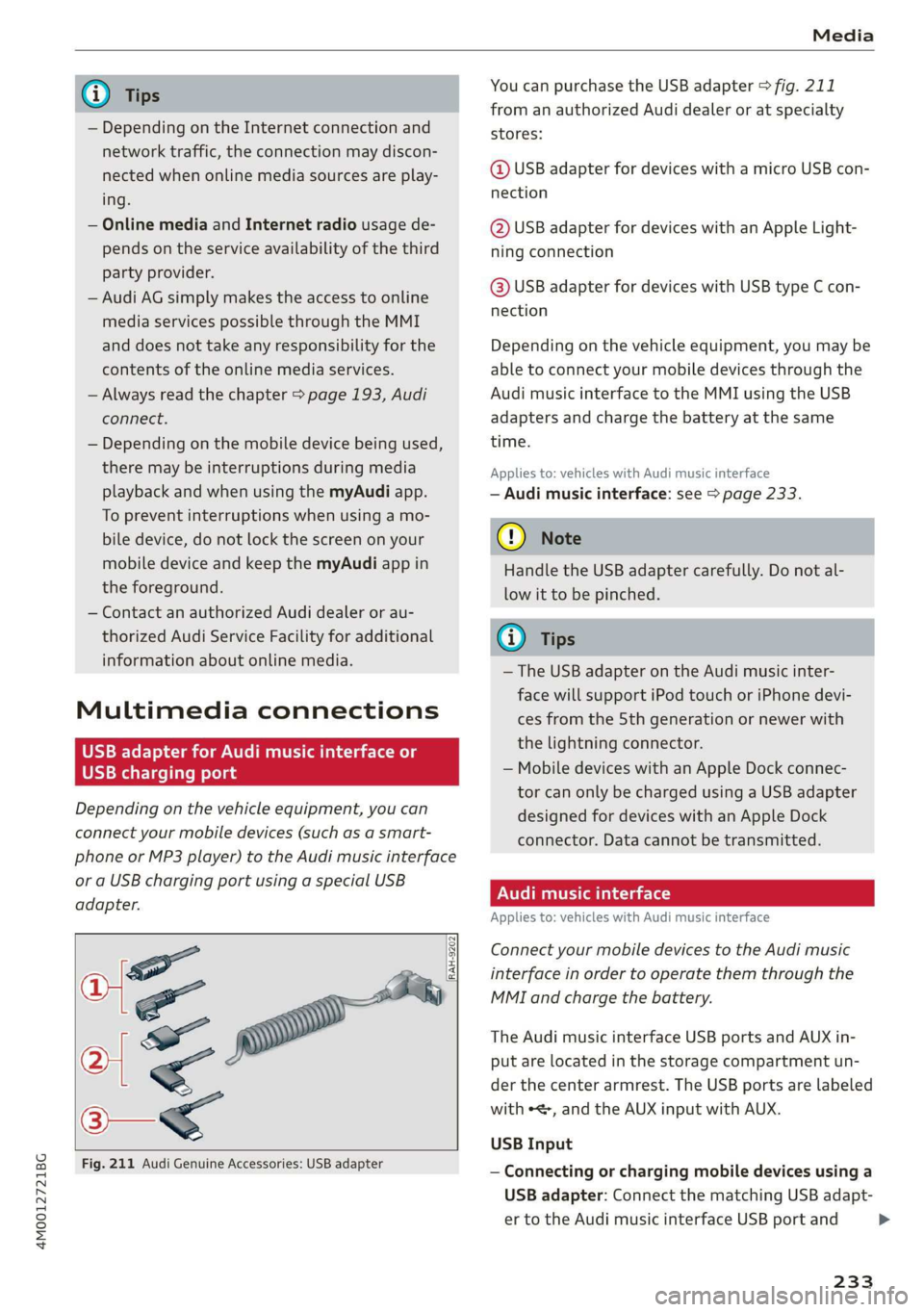
adapter.
af
a|=
of
Fig.211AudiGenuineAccessories:USBadapter
[RAH-9202
\
YoucanpurchasetheUSBadapter>fig.211
fromanauthorizedAudidealeroratspecialty
stores:
@USBadapterfordeviceswithamicroUSBcon-
nection
@USBadapterfordeviceswithanAppleLight-
ningconnection
@USBadapterfordeviceswithUSBtypeCcon-
nection
Depending onthevehicleequipment,youmaybe
abletoconnectyourmobiledevicesthroughthe
Audi
musicinterfacetotheMMIusingtheUSB
adaptersandchargethebatteryatthesame
time.
Appliesto:vehicleswithAudimusicinterface
—Audimusicinterface:see>page233.
@)Note
HandletheUSBadaptercarefully.Donotal-
lowittobepinched.
(i)Tips
—TheUSBadapteronthe Audimusicinter-
facewillsupportiPodtouchoriPhonedevi-
cesfromthe5thgenerationornewerwith
thelightningconnector.
—MobiledeviceswithanAppleDockconnec-
torcanonlybechargedusingaUSBadapter
designedfordeviceswithanAppleDock
connector.Datacannotbetransmitted.
PNUreemlala)
Appliesto:vehicleswith Audimusicinterface
ConnectyourmobiledevicestotheAudimusic
interfaceinordertooperatethemthroughthe
MMIandchargethebattery.
TheAudimusicinterfaceUSBportsandAUXin-
putarelocatedinthestoragecompartmentun-
der thecenter armrest.TheUSBportsarelabeled
withe,andtheAUXinputwithAUX.
USBInput
—Connectingorchargingmobiledevicesusinga
USBadapter:ConnectthematchingUSBadapt-
ertotheAudimusicinterfaceUSBportand
233
>