Red AUDI Q7 2019 Owner´s Manual
[x] Cancel search | Manufacturer: AUDI, Model Year: 2019, Model line: Q7, Model: AUDI Q7 2019Pages: 394, PDF Size: 105.97 MB
Page 205 of 394
4M0012721BG
Emergencycall
Emergencycall
Introduction
Appliesto:vehicleswithemergencycallfunction
Dependingonthe countryandthevehicleequip-
ment,thefollowing functionsmaybeavailable.
Withtheemergencycall,youcancallforhelpin
dangeroussituationsasquicklyaspossible.Use
thisfunctionwhenemergencyhelpisneeded
=>page203.
Withonlineroadsideassistance,youcanrequest
assistanceifthereisabreakdownoraminoracci-
dent>page204.
@Tips
— TheservicesareprovidedthroughaSIM
cardinstalledinthevehicle.Thecostofthe
callanddataconnectionsisincludedinthe
priceoftheservices.Servicesareprovided
assumingthatthecellphonenetworkre-
quiredfortheinstalledSIMcardisfunction-
ingandavailable foruse.Theavailableserv-
icessetbyAudiAGareonlyavailablewithin
thecellphonenetworkcoverageareafor
thecellphoneserviceprovider selectedby
AudiAG.
—Youcanfindwhatdatawillbetransferredat
www.audiusa.com.
—Theseservicescannotbedeactivatedusing
thesettingsintheInfotainmentsystem.
Emergencycall
Appliesto:vehicleswithemergencycallfunction
Anemergencycallisacombinationofdatatrans-
missionandaphonecall.Thedatatransmission
fromyourvehicleforwardsimportantinforma-
tion,suchasthevehicleandpositiondata,tothe
emergencycallcenter.
Makinganemergencycall
Appliesto:vehicleswithemergencycallfunction
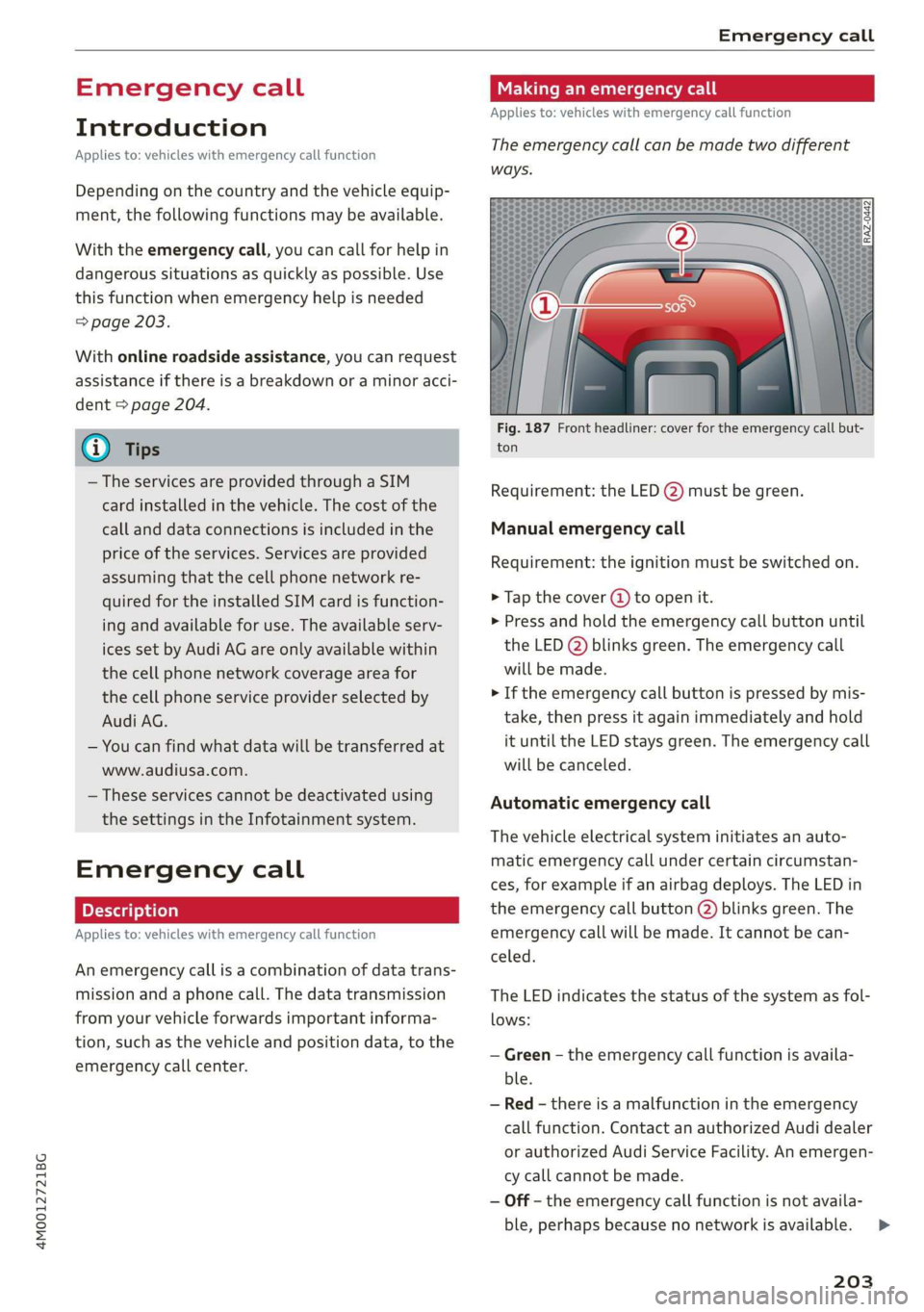
Theemergencycallcanbemadetwodifferent
ways.
Fig.187Frontheadliner:coverfortheemergencycallbut-
ton
Requirement:theLED@)mustbegreen.
Manualemergencycall
Requirement:theignitionmustbeswitchedon.
>Tapthecover(4)toopenit.
>Pressandholdthe emergencycallbuttonuntil
theLED()blinksgreen.Theemergencycall
willbemade.
>Iftheemergencycallbuttonispressedbymis-
take,thenpressitagainimmediatelyandhold
ituntiltheLEDstaysgreen.Theemergencycall
willbecanceled.
Automaticemergencycall
Thevehicleelectricalsysteminitiatesanauto-
matic emergencycallundercertaincircumstan-
ces,forexampleifanairbagdeploys.TheLEDin
the emergencycallbutton(2)blinksgreen.The
emergencycallwillbe made.Itcannot becan-
celed.
TheLEDindicatesthestatusofthesystemasfol-
lows:
—Green-theemergencycallfunctionisavaila-
ble.
—Red-thereisamalfunctionintheemergency
callfunction.ContactanauthorizedAudidealer
orauthorizedAudiServiceFacility.Anemergen-
cycallcannotbemade.
—Off-theemergencycallfunctionisnotavaila-
ble,perhaps becausenonetworkisavailable.
203
>
Page 206 of 394
Emergencycall
@Tips
Iftheemergencycalliscanceledduetoa
poorconnection,thenthesystemautomati-
cally triestoconnectagain.
Messages
Appliesto:vehicleswithemergencycallfunction
SsEmergencycallfunction:malfunction!Re-
strictedfunctionality.PleasecontactService
Ifthisindicatorlightturnsonandthismessage
appears,the emergencycallfunctionisrestrict-
ed.Forexample,youcannotcalltheemergency
callcenter,butdatamaystill betransmittedun-
dercertaincircumstances.Drivetoanauthorized
AudidealerorauthorizedAudiServiceFacilityim-
mediatelytohavethemalfunctioncorrected.
BSEmergencycallfunction:malfunction!Func-
tionunavailable.PleasecontactService
Ifthisindicatorlightturnsonandthismessage
appears,youcannotmakeanemergencycall.
DrivetoanauthorizedAudidealerorauthorized
AudiServiceFacilityimmediatelytohavethe
malfunctioncorrected.
Onlineroadside
assistance
Appliesto:vehicleswithonlineroadsideassistance
Anonlineroadsideassistancecall)) isacombina-
tionofdatatransmissionandaphonecall.The
data transmissionfromyourvehicleforwardsim-
portantinformationtothe Audiservicecenter,
suchasthevehicleandpositiondata.
))Theavailabilityoftheservicesoffereddependsonthe
countryandmaychangeinthefuture.
204
Callingonlineroadsideassistance
Appliesto:vehicleswithonlineroadsideassistance
RAZ-0443
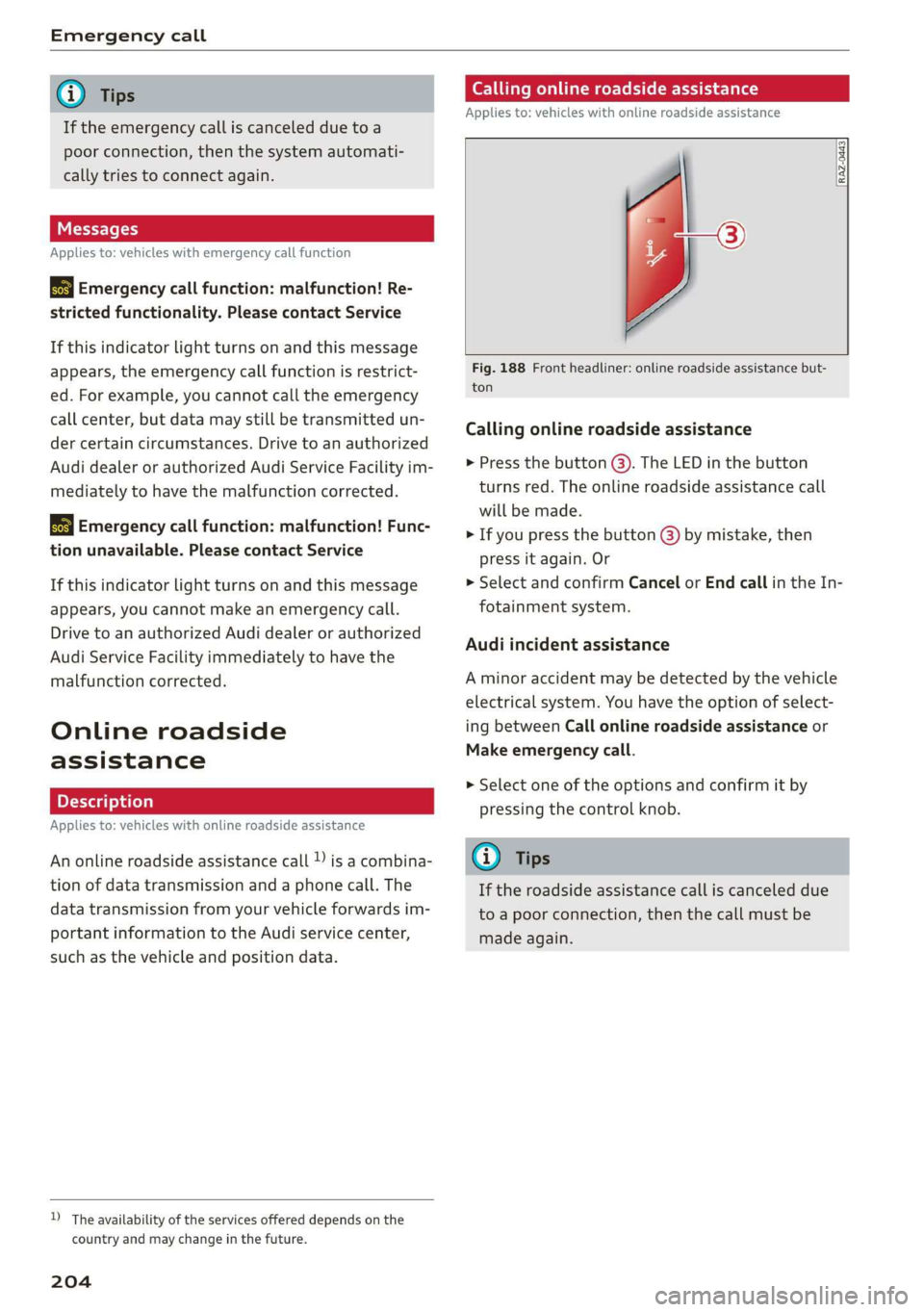
Fig.188Frontheadliner:onlineroadsideassistancebut-
ton
Callingonlineroadsideassistance
>Pressthebutton@).TheLEDinthebutton
turnsred.Theonlineroadsideassistancecall
willbemade.
>Ifyoupressthebutton@)bymistake,then
pressitagain.Or
>SelectandconfirmCancelorEndcallintheIn-
fotainmentsystem.
Audiincidentassistance
Aminoraccidentmaybedetectedbythevehicle
electricalsystem.Youhavethe optionofselect-
ingbetweenCallonlineroadsideassistanceor
Makeemergencycall.
>Selectoneoftheoptionsandconfirmitby
pressingthecontrolknob.
G)Tips
Iftheroadsideassistancecalliscanceleddue
toapoorconnection,thenthecallmustbe
madeagain.
Page 207 of 394
4M0012721BG
Navigation
Navigation
Openingnavigation
Appliesto:vehicleswithnavigationsystem
Thenavigationsystemdirectsyoutoyourdesti-
nation,aroundtrafficincidents,andonalterna-
tiveroutes,ifdesired.
Homeaddress
2)Gasstation
4
Senet
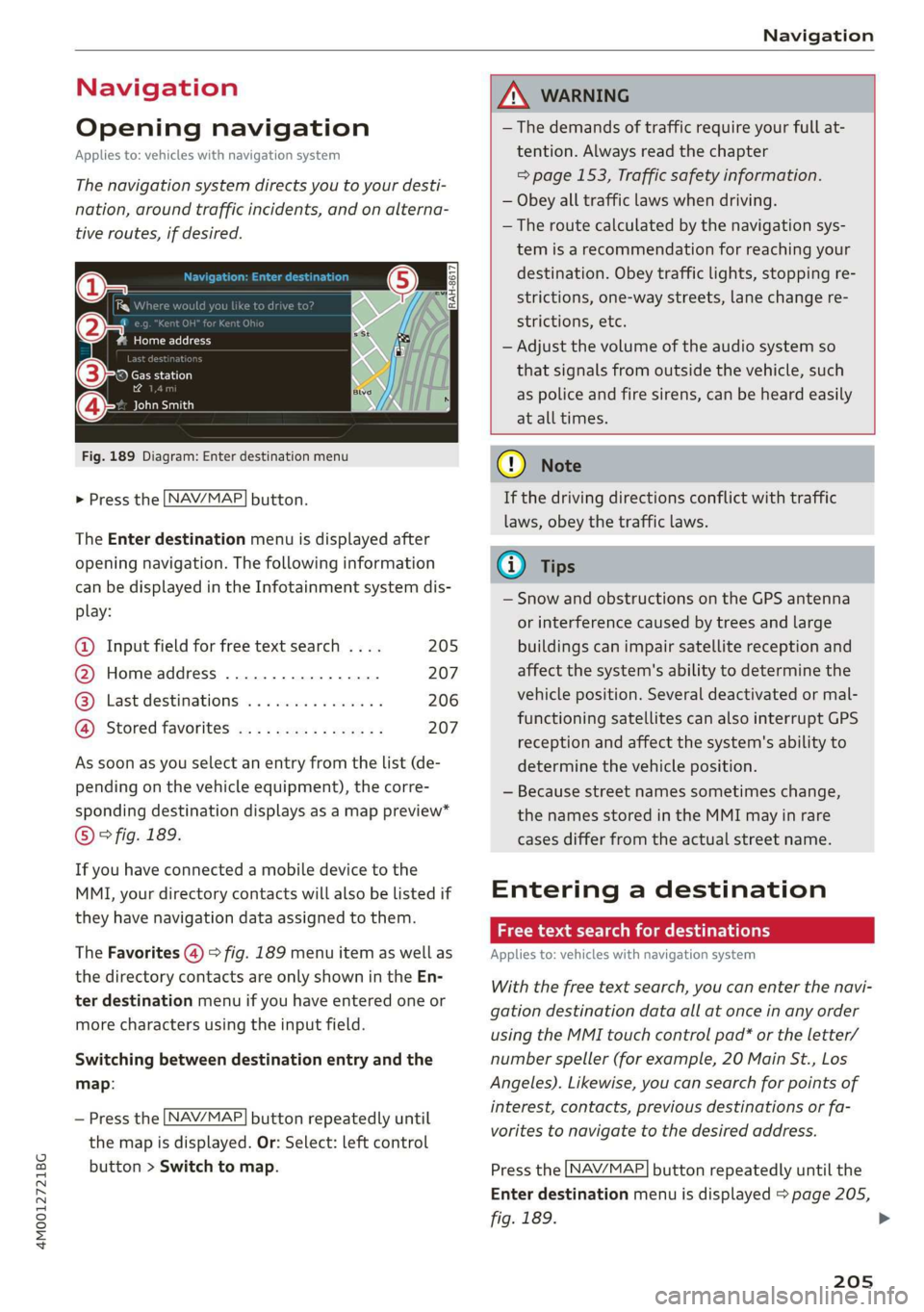
Fig.189Diagram:Enterdestinationmenu
NAV/MAP. >Pressthebutton.
TheEnterdestinationmenuisdisplayedafter
openingnavigation.Thefollowinginformation
canbedisplayedintheInfotainmentsystemdis-
play:
@Inputfieldforfreetextsearch....205
@Homeaddress.................207
@®Lastdestinations...............206
@Storedfavoritescos:ncesynewss207
Assoonasyouselectanentryfromthelist(de-
pendingonthevehicleequipment),thecorre-
spondingdestinationdisplaysasamappreview*
©?fig.189.
Ifyouhaveconnectedamobiledevicetothe
MMI,yourdirectorycontactswillalsobelistedif
they havenavigationdataassignedtothem.
TheFavorites(4)>fig.189menuitemaswellas
thedirectorycontactsareonlyshownintheEn-
terdestinationmenuifyouhaveenteredoneor
morecharactersusingtheinputfield.
Switchingbetweendestinationentryandthe
map:
NAV/MAP —Pressthebuttonrepeatedlyuntil
themapisdisplayed.Or:Select:leftcontrol
button>Switchtomap.
ZAWARNING
— Thedemandsoftrafficrequireyourfullat-
tention.Alwaysreadthechapter
=>page153,Trafficsafetyinformation.
—Obeyalltrafficlawswhendriving.
— Theroutecalculatedbythenavigationsys-
temisarecommendationforreachingyour
destination.Obeytrafficlights,stoppingre-
strictions,one-waystreets,lanechangere-
strictions,etc.
—Adjustthevolumeoftheaudiosystemso
thatsignalsfromoutsidethevehicle,such
aspoliceandfiresirens,can beheardeasily
atalltimes.
C)Note
Ifthedrivingdirectionsconflictwithtraffic
laws,obeythetrafficlaws.
G@)Tips
—SnowandobstructionsontheGPSantenna
or interferencecausedbytreesandlarge
buildingscanimpairsatellitereceptionand
affectthesystem'sabilitytodeterminethe
vehicleposition.Severaldeactivatedormal-
functioningsatellitescanalsointerruptGPS
receptionandaffectthesystem'sabilityto
determinethevehicleposition.
—Becausestreetnamessometimeschange,
thenamesstoredintheMMImayinrare
casesdifferfromtheactualstreetname.
Enteringadestination
Freetextsearchfordestinations
Appliesto:vehicleswithnavigationsystem
Withthefreetextsearch,youcanenterthenavi-
gationdestinationdataallatonceinanyorder
usingtheMMItouchcontrolpad*ortheletter/
numberspeller(forexample,20MainSt.,Los
Angeles).Likewise,youcansearchforpointsof
interest,contacts,previousdestinationsorfa-
voritestonavigatetothedesiredaddress.
NAV/MAP Pressthebuttonrepeatedlyuntilthe
Enterdestinationmenuisdisplayed>page205,
fig.189.
205
>
Page 208 of 394
Navigation
>Pushthecontrolknobup.Theinputfieldisdis-
played@)&page205,fig. 189.
—Enteroneormoresearchtermsintotheinput
field.
—Ifavailable,confirmtheinputsuggestion*to
completetheentryorawordsuggestion*.See
=page161,Letter/numberspeller.
—Turn thecontrolknobtotherighttochangethe
resultslist.
—Selectandconfirmadestinationfromthere-
sultslist.
Theroutedisplaysasanoverviewinthemap.
Routeguidanceisalreadyactive.
Narrowingthesearcharea
Allcountries/statesareselectedatthefactory
forthefreetextsearch.
—Select:therightcontrolbutton>Country/state
selectionintheinputfield@>page205,
fig.189.
—Selectthecountryorstate(@)thatshould be
searchedforinthefreetextsearchinorderto
narrowthenumberofresultsandincreasethe
searchspeed.Theselectedentryinthecoun-
try/stateselectionisstored.Or:SelectAll
countries/states.
@Tips
— TheMMIinputsuggestionsdependonthe
lastnavigateddestinations.
—Upto50entriescanbestoredinthelast
destinationslist.
—Additionalinformationonfreetextsearches
canbefoundunder>page162.
Loadingpreviousdestinations
Appliesto:vehicleswithnavigationsystem
Yourlastdestinationsareautomaticallystored
andcanbeloadeddirectlyas adestination.
Requirement:adestinationwasalreadynavigat-
edto.
>Pressthe [NAV/MAP]buttonrepeatedlyuntil
the Enterdestinationmenuisdisplayed
=>page205,fig. 189.
206
YourlastdestinationislisteddirectlyintheEnter
destinationmenuunderthehomeaddressand
identifiedwiththesymbol@)>page205,
fig.189.
—Selectandconfirmoneofthelastdestinations
fromthelist.
Deletingpreviousdestinations
—Selectoneofthelastdestinationsfromthelist.
—Select:rightcontrolbutton>Deletedestina-
tion>DeletethislastdestinationorDeleteall
lastdestinations.
Theselecteddestinationoralllastdestinations
is/aredeletedandnolongerdisplayedintheEn-
terdestinationmenu.
Enteringanaddress
Appliesto:vehicleswithnavigationsystem
As analternativetofreetextsearch,youcanal-
so enteranaddressinstages.
>Pressthe [NAV/MAP]buttonrepeatedlyuntil
theEnterdestinationmenuisdisplayed
=>page205,fig. 189.
>Select:leftcontrolbutton>Enteraddress.
—Enteringadestinationusingacountry/state:
selectandconfirmCountry/state.Selectand
confirmacountryorstatedirectlyfromthelist.
Or:searchforacountryorstateusingtheinput
field.
—EnteringadestinationusingtheCityorZIP
code:selectandconfirmCity/ZIPcode.Entera
cityoraZIPcode.Or:selectandconfirmacity
fromthelist.
—Selectandconfirmadditionaldetailsaboutthe
destinationsuchasStreet,Housenumberor
Downtown.
—Destinationentry usinga streetintersection*:
Requirement:youmustenterastreet.Select
andconfirmIntersection.Selectandconfirma
streetdirectlyfromthelist.Or:searchfora
streetusingtheinputfield.
—SelectandconfirmStartrouteguidance.
Page 209 of 394
![AUDI Q7 2019 Owner´s Manual 4M0012721BG
Navigation
Settingadestinationfromthemap
Appliesto:vehicleswithnavigationsystem
Apointonthemapcanbeusedasthedestina-
tion.
>Pressthe [NAV/MAP]buttonrepeatedlyuntil
themapisdisplayed.](/img/6/40283/w960_40283-208.png "AUDI Q7 2019 Owner´s Manual 4M0012721BG
Navigation
Settingadestinationfromthemap
Appliesto:vehicleswithnavigationsystem
Apointonthemapcanbeusedasthedestina-
tion.
>Pressthe [NAV/MAP]buttonrepeatedlyuntil
themapisdisplayed.")
4M0012721BG
Navigation
Settingadestinationfromthemap
Appliesto:vehicleswithnavigationsystem
Apointonthemapcanbeusedasthedestina-
tion.
>Pressthe [NAV/MAP]buttonrepeatedlyuntil
themapisdisplayed.
—Adjustingthescale:turnthecontrolknobto
theleftorright.
—Activatingthecrosshairs:pressthecontrol
knob.Thecrosshairsareshownonthemap.
—Movingthecrosshairs:movethecrosshairsto
thedestinationusingtheMMItouchcontrol
pad*>page158.
—Hidingthecrosshairs:pressthe[BACK]button.
—Settingasdestination:pressthecontrolknob
whenthecrosshairsareshown.Selectandcon-
firm
Startrouteguidance.
Additionalinformationaboutthelocationof
thecrosshairs:whenyouselectmapcontentus-
ingthecrosshairs,adisplay ofavailableinforma-
tionappears(suchasstreetname,addressor
pointsofinterest)@>page214,fig.196.
Settingahomeaddress/favoriteasthe
Oda)
Appliesto:vehicleswithnavigationsystem
Youcanquicklyandeasilystartrouteguidance
toyourhomeaddressusingthehomeaddress
function.Favoritesalloweasieraccesstofre-
quentlyuseddestinations.
>Pressthe LNAV/MAP]buttonrepeatedlyuntil
theEnterdestinationmenuisdisplayed
=>page205,fig. 189.
Settingahomeaddressasthedestination
Requirement:ahomeaddressmustbestored
=>page212.
YourHomeaddressisshowndirectlyinthe Enter
destinationmenu@)>page205,fig. 189.
—Select:Homeaddress.
Settingafavoriteasthedestination
Requirement:afavoritemustbestoredasades-
tination>page213.
—Enteratleastthefirstthreelettersofthede-
siredfavoriteinthefreetextsearchinputfield.
ThefavoritesfoundareshownintheInfotain-
mentsystemdisplay(4)>page205,fig. 189.
—Selectandconfirmthedesiredentry.
@)Tips
—Additionalsettingsforthehomeaddress
canbefoundunder=page212.
—Additionalsettingsforthefavoritescanbe
found under>page213.
SICgteeMedialatea)
liracola
Appliesto:vehicleswithnavigationsystem
You cannavigatedirectlytodestinationsinthe
directory.
(1)Beetle)
LdAudiBeverlyHills
aeeroe
©-*MemusaCae
ECWereeaeCeey
Fig.190Possibledirectory/contacts
Requirement:an addresswithnavigationdataor
anavigationdestinationmustalreadybeas-
signedtoacontact>page213.
>Pressthe [NAV/MAP]buttonrepeatedlyuntil
theEnterdestinationmenuisdisplayed
=>page205,fig. 189.
>Select:leftcontrolbutton>Directory>acon-
tact.
Thedirectory/contactsareshowninalphabetical
orderandaremarkedwithsymbolstoindicate
thestoragelocation:
@Businessaddress
@Privateaddress
@®Businessdestination
@Privatedestination
—Selectandconfirm an addressoradestination.
Whenyouhaveselectedadestination,the
routeguidancecanbestarteddirectly.
207
Page 210 of 394
Navigation
—Checktheaddressinputagainwhenselecting
anaddress.
—ThenselectandconfirmStartrouteguidance.
Additionaldirectoryfunctionsinthenavigation
systemcanbefound under>page213.
G)Tips
—Addressesthathavebeenimportedfrom
yourmobiledeviceintotheMMIcanalsobe
usedasadestination.
—Ifacontactisgrayed outinthedirectory,
thiscontacthasneitheradestinationnoran
addressassignedtoit.
Pointofinterestsearch
Appliesto:vehicleswithnavigationsystem
> Pressthe LNAV/MAP]buttonrepeatedlyuntil
the Enterdestinationmenuisdisplayed
=>page205,fig. 189.
>Select:leftcontrolbutton>Pointsofinterest.
—Changingthesearcharea:selectandconfirm
Searcharea>asearchareafromthelist.
Thefollowingsearchcategoriesareavailable:
Nearby:pointsofinterestcanbeselectedfrom
differentcategories.Thepointsofinterestare
listedstartingfromtheimmediatevicinityofthe
vehicleuptoaradiusofapproximately124miles
(200km).
Alongtheroute:pointsofinterestalongthe
routecanonlybeselectedduringactiveroute
guidance.Thepointsofinterestarelocateddi-
rectlyalongorintheimmediatevicinityofthe
calculatedroute.Thepointsofinterestcanlike-
wisebeselectedfromvariouscategories.Forex-
ample,youcansearchforahotelorparkinglot
atthedestination.
Neardestination/Nearstopover:pointsofinter-
estnearadestinationorastopovercanonlybe
selectedduringactiverouteguidance.Thepoints
ofinterestcanlikewisebeselectedfromvarious
categories.Forexample,youcansearchforaho-
telorparkinglotatthedestination.
Innewcity:selectacountry/stateorsearchina
newcity.Enterthenameofthedesiredcity.
208
Pointsofinterestcanbeselectedfromvarious
categories.Thisfunctionallowsyoutosearchfor
points ofinterestinanycityregardlessoftheac-
tiverouteguidanceorthevehicleposition.
—Searchingforthenameofapointofinterest
intheselectedsearcharea:Select:Findentry
>Enter pointofinterest.Enterthenameofthe
pointofinterest.
—Searchingforapointofinterestinaspecific
category:selectSelectcategory.Selectand
confirmacategorysuchasRestaurants.
(i)Tips
—Distancestopointsofinterestaredisplayed
asastraight-linedistancefromyourcurrent
location.Theactualdistancefromyourcur-
rent locationtothepointofinterestisup-
datedautomatically.Thelistofpointsofin-
terestthatwerefoundisnotresortedwhen
thishappens.
—Theremaybeentriesinthelistthatcannot
bedisplayedcompletelyduetotheirlength.
Selectthecorrespondingentryfromthelist.
Select:rightcontrolbutton>Showdestina-
tiondetails.Detailedinformationforthese-
lectedentryinthelististhendisplayed.
eTTawYelelMeeieeeCoal
search)
Appliesto:vehicleswithnavigationsystem andAudiconnect
Infotainment
You
cansearchforpointsofinterestontheInter-
net.
Requirement:TherequirementsforAudiconnect
Infotainmentmustbemet>page193.
>Pressthe [NAV/MAP]buttonrepeatedlyuntil
theEnterdestinationmenuisdisplayed
=>page205,fig. 189.
>Select:leftcontrolbutton>Onlinesearch.The
searcharealastsetisdisplayedintheinput
field.
—Changingthesearcharea:select:rightcontrol
button>Selectsearcharea.
—Searchingforonlinedestinationsinthese-
lectedsearcharea:enteranewcity/stateif
necessary.Enterasearchterm, suchas"Hotel",>
Page 211 of 394
4M0012721BG
Navigation
andpressthecontrolknob.Selectandconfirm
anonlinedestinationfromthelist.
—Searchingforonlinedestinationsinaspecific
category:selectandconfirmSelect category.
SelectandconfirmacategorysuchasRestau-
rants.
Findwhichsearchareasareavailableunder
=>page208,Pointofinterestsearch.
Youcansearchforonlinedestinationsusingthe
voicerecognitionsystem=>tableonpage174.
@Tips
Alwaysreadthechapter>page193,Audi
connect.
ONSETsRMUNA
account
Appliesto:vehicleswithnavigationsystemandAudiconnect
Infotainment
ImportindividualdestinationsfromyourmyAudi
accountintotheMMI.
Requirement:
TherequirementsforAudiconnectInfotainment
mustbemet>page193.
YoumusthavearegisteredmyAudiaccountat
www.audiusa.com/myaudi.Youmusthaveavehi-
cleassignedtoyourmyAudiaccountandyou
musthavestoredoneormoredestinations.
>Pressthe [NAV/MAP|buttonrepeatedlyuntil
the Enterdestinationmenuisdisplayed
=>page205,fig. 189.
>Select:leftcontrolbutton>myAudicontacts.
>Ifnecessary,enteryourmyAudiuserdataor
yourmyAudiPIN>page194.Thecontacts
storedinmyAudiaredisplayed.
—Selectandconfirmacontact.
—Selectandconfirmaprivateorbusinessdesti-
nation.
—SelectandconfirmStartrouteguidance.
G)Tips
—YouonlyneedtoenterthemyAudiuserdata
onetime.
—YoucanreceiveyourmyAudiPINifyouhave
setupamyAudiaccount.
—Foradditionalinformation,visitwww.
audiusa.com.
Enteringadestinationusinggeo
coordinates
Appliesto:vehicleswithnavigationsystem
>Pressthe [NAV/MAP]buttonrepeatedlyuntil
theEnterdestinationmenuisdisplayed
=>page205,fig. 189.
>Select:leftcontrolbutton>Geographicalcoor-
dinates.
—SelectLatitude/Longitude.
—Pressthecontrolknobtosettheindividualval-
ues.
—Turn thecontrolknobtotheleft/rightto
changetheselectedvalue.
—SelectandconfirmStartrouteguidance.
Addingastopover
Appliesto:vehicleswithnavigationsystem
You canenteranadditionaldestinationwhen
routeguidanceisactive.
RAH-862079.9 mi
yea
reeceOaie
Nae
5emmateeiies—@
Penola
SRRGaerneUrCome
Fig.191Example:activerouteguidancewithstopover
Requirement:routeguidancemustalreadybeac-
tive.
>Pressthe [NAV/MAP]buttonrepeatedlyuntil
theEnterdestinationmenuisdisplayed
=>page205,fig. 189.
Enteringadestinationasastopover
—Enteradestinationintheinputline
=>page205.
—Selectandconfirmadestinationfromthere-
sultslist.
—SelectandconfirmAddasstopover.
209
Page 212 of 394
Navigation
Deletingastopover
—Pushthecontrolknobup.Freetextsearchand
activerouteguidancearedisplayed.Or:Turn
the
controlknobtotheleftuntiltheactive
routeguidanceisshown.
—SelectandconfirmDeletestopover(2)
>fig.191.
—Thestopoverisdeleted.
(eTleeET
Appliesto:vehicleswithnavigationsystem
Requirement:routeguidancemustbeactive.
>Pressthe LNAV/MAP]buttonrepeatedlyuntil
the Enterdestinationmenuisdisplayed
=>page205,fig. 189.
>Turn thecontrolknobtotheleftuntiltheactive
routeguidanceisshown>page209,fig.191.
> SelectandconfirmDeletedestination@)
=>page209,fig.191.Thedestinationisdelet-
ed. Or:selecttherightcontrolbutton>Cancel
routeguidance.
Additionaloptionswhenenteringa
Ceeacea)
Appliesto:vehicleswithnavigationsystem
>Presstherightcontrolbutton.
Dependingontheselectedfunction,thefollow-
ingoptionsmaybeavailablewhenenteringa
destination:
Cancelrouteguidance:Requirement:routeguid-
ancemustbeactive.Routeguidanceiscanceled.
Foradditionalinformation,see>page210.
Countryinformation:youcandisplaytheappli-
cableurbanandruralspeedlimitsforanycoun-
try/state.Ifthisfunctionisactivated,theinfor-
mationwillbeautomaticallyshowntoyouinthe
routeinformation@)%page214,fig.196when
thespeedlimitisexceeded>page217.
Country/stateselection:see>page206,Nar-
rowingthesearcharea.
Route
criteria: see>page214,Routecriteria.
210
Showlocationonmap:Requirement:youmust
haveselectedadestinationfromtheresultslist.
Thedestinationenteredisdisplayedonthemap.
Parkingatthislocation*:Requirement:youmust
haveselectedadestinationfromtheresultslist.
Allparkingoptionsnear theselectedlocationare
displayedintheInfotainmentsystem.
Delete:theselectedentryisdeleted.Youcande-
leteindividualentriesorallentries(forexample,
favoritesorlastdestinations).
Audiconnectatthislocation*:Requirement:you
musthaveselectedadestinationfromtheresults
list.Allowsyoutosearchforitemsinthevicinity
oftheselectedlocation,suchasTravelinforma-
tion.
Onlinetrafficdata*:theonlinetrafficinforma-
tion>page220canbe switchedonoroff.
Adddestinationtocontact:see>page213.
Storeasfavorite:see>page213.
Voiceguidance:see>page214.
Navigationsettings:see>page213.
@Tips
Informationononlinetrafficdata*canalso
befoundonlineatwww.audiusa.com.
Page 213 of 394
4M0012721BG
Navigation
Personalroute
assistance
Appliesto:vehicleswithnavigationsystemandpersonal
routeassistance
YourMMIcanlearntheroutesthatyoudrivefre-
quently(suchasyourdailycommutetoworkand
back)andsuggestrouteguidancebasedonthe
currentvehicleposition.
#Homeaddress
5iRk]Ae
na
®MarketStreet
14
Fig.192Example:displayofpersonalroutesinthe"Enter
destination"menu
Thereisadelayof6minonyour
personalrouteto
StevensCreekBlvd,SanJose,CA95117.
Byelamceleiemeeee)
Paescruheiuccsc
Ignoreallmessages
Fig.193Informationonpersonalroute
>Pressthe [NAV/MAP]buttonrepeatedlyuntil
the Enterdestinationmenuisdisplayed
=>page205,fig. 189.
>Select:rightcontrolbutton>Navigationset-
tings>Personalrouteassistance.
WhenthefunctionisswitchedonM,theMMIre-
cordsthefrequently-drivenroutesregardlessof
whetheradestinationwasenteredandreached
ornot.
Aslongasrouteguidanceisnotactive,yourper-
sonalroutesarelistedinthe Enterdestination
menuunderthehomeaddressandindicatedwith
thesymbol(@©fig.192.Whenpersonalroute
assistanceisswitchedon,thissymbolisdis-
playedintheNavigationmenuandintheInfo-
tainmentsystemdisplaystatuslineatthesame
time.
Thedistancetothedestinationandthecalculat-
edarrivaltimearealsodisplayedforyourperson-
alroutes.Withoutstartingrouteguidance,your
MMImonitorsthetrafficconditionsforyourper-
sonalroutesandshowspossibletrafficincidents
forthepossibleroutestobedrivenintheInfo-
tainmentsystemdisplay@)>fig.192.
Amessagewillbedisplayedifthereisalarge
trafficincident(morethan12minutedelay)re-
gardlessofwhichmenuisselected>fig.193.
Selectandconfirmoneofthefollowingoptions:
—Startrouteguidance:theMMIstartstheroute
guidanceforthepersonalroutedisplayedand
searchesfora fasterrouteifavailable.
—Ignorethisrouteandthismessage:thedis-
playeddestinationwithallapplicablepersonal
routesisnoLongerfactoredintothecurrent
trip.Nomoremessagesareshownforthedis-
playeddestination.Thedisplayeddestination
withallapplicablepersonalrouteswillbefac-
toredintothetripagainonlyafterstoppingthe
vehicleandswitchingtheignitiononagain.
—Ignoreallmessages:allpersonalroutesareno
longerfactoredintothecurrenttrip.No more
messagesaredisplayed.Messagesforpersonal
routeswhenthereisincreasedtrafficwillap-
pearagainafterthevehicleisstoppedandthe
ignitionisswitchedonagain.
Assoonasyouswitchoffpersonalrouteassis-
tance,thesymbolinthestatuslineturnsoffand
yourtripsarenolongerrecorded.Tripsthatwere
alreadystoredremainstored.
Deletingpersonalroutes:
—SelectthedesiredpersonalrouteintheEnter
destinationmenu°fig.192.
—Select:rightcontrolbutton>Deletedestina-
tion.
Deletingallpersonalroutes:
—Select:[MENU]button>Settings>leftcontrol
button>MMIsettings>Factorysettings.
—Select:Navigationandonlinememory>Re-
storefactorysettings>page248.
211
Page 214 of 394
Navigation
G@)Tips
—Personalroutesarelearnedbasedontheve-
hicleposition.Therouteisprioritizedac-
cordingtohowfrequentlyyoudrivetoa
destination.
—Amaximumofthreepersonalroutesare
displayedintheEnterdestinationmenu.
Basedonthecurrentvehicleposition,the
trafficsituation fortheroutethatismost
likelytobedrivenoutofthethreeroutes
willalwaysbemonitored.
—Pleasenotethatpersonalroutesthathave
alreadybeenstoredwillremainstoredafter
theignitionisswitchedoffandtheymust
bedeletedmanually.
Alternativeroutes
Appliesto:vehicleswithnavigationsystem
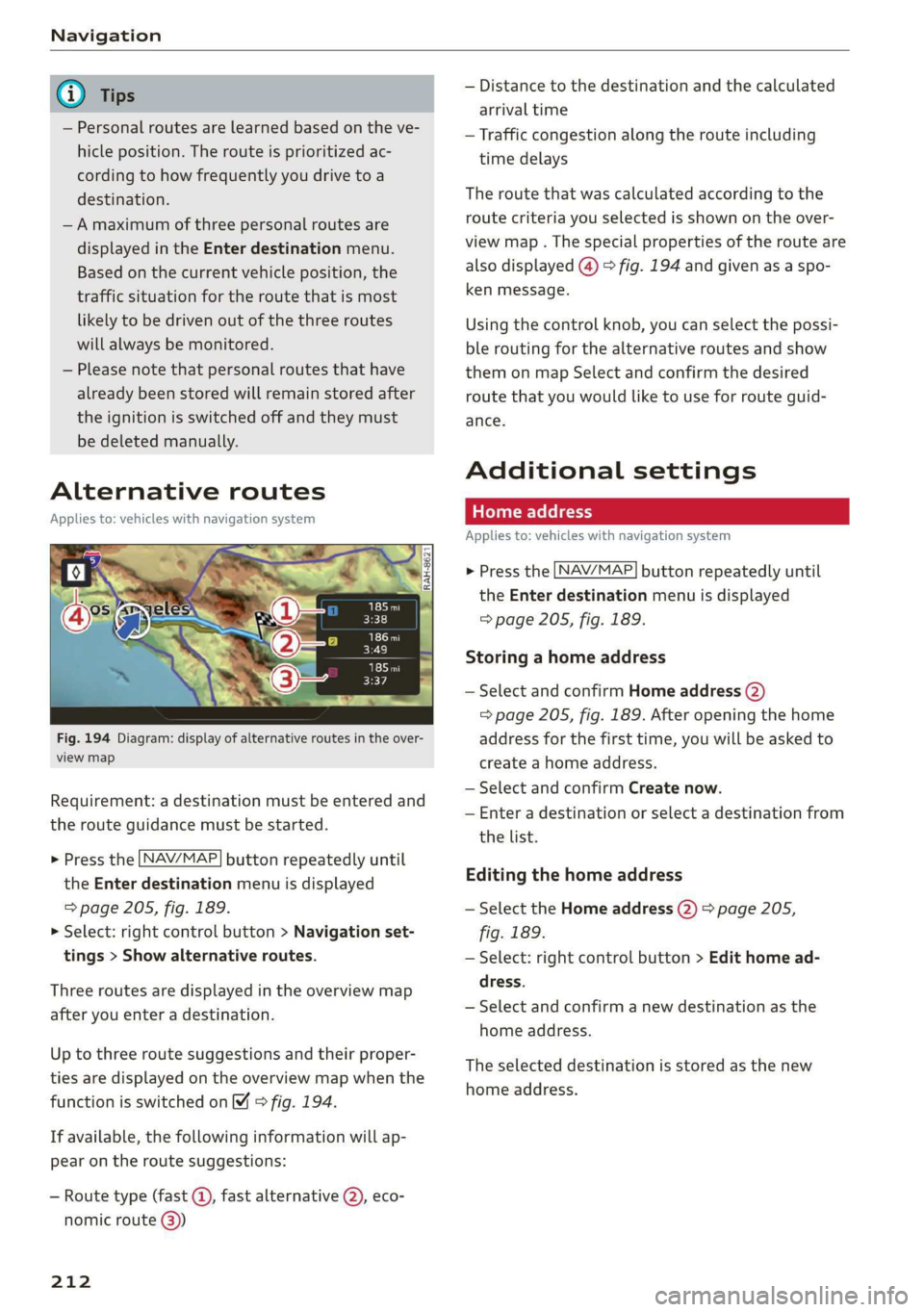
Fig.194Diagram:displayofalternativeroutesintheover-
viewmap
Requirement:adestinationmustbeenteredand
therouteguidancemustbestarted.
>Pressthe LNAV/MAP]buttonrepeatedlyuntil
the Enterdestinationmenuisdisplayed
=>page205,fig. 189.
>Select:rightcontrolbutton>Navigationset-
tings>Showalternativeroutes.
Threeroutesaredisplayedinthe overviewmap
afteryouenteradestination.
Uptothree routesuggestionsandtheirproper-
tiesaredisplayedonthe overviewmapwhenthe
functionisswitchedon4©fig.194.
Ifavailable,thefollowinginformationwillap-
pearontheroutesuggestions:
—Routetype(fast©,fastalternative2), eco-
nomicroute@))
212
—Distancetothedestinationandthecalculated
arrivaltime
—Trafficcongestion along therouteincluding
timedelays
Theroutethatwascalculatedaccordingtothe
routecriteriayouselectedisshownontheover-
viewmap.Thespecialpropertiesoftherouteare
alsodisplayed(@)>fig.194andgivenasaspo-
kenmessage.
Usingthecontrolknob,youcanselectthepossi-
ble
routingforthealternativeroutesandshow
themonmapSelectandconfirmthedesired
routethatyouwouldliketouseforrouteguid-
ance.
Additionalsettings
Appliesto:vehicleswithnavigationsystem
>Pressthe LNAV/MAP]buttonrepeatedlyuntil
theEnterdestinationmenuisdisplayed
=>page205,fig. 189.
Storingahomeaddress
—SelectandconfirmHomeaddress(2)
=>page205,fig. 189.Afteropeningthehome
addressforthefirsttime,youwillbe askedto
createahomeaddress.
—SelectandconfirmCreatenow.
—Enteradestinationorselectadestinationfrom
thelist.
Editingthehomeaddress
—SelecttheHomeaddress(2)page205,
fig.189.
—Select:rightcontrolbutton>Edithomead-
dress.
—Selectandconfirmanewdestinationasthe
homeaddress.
Theselecteddestinationisstoredasthenew
homeaddress.