buttons AUDI Q7 2019 Owner´s Manual
[x] Cancel search | Manufacturer: AUDI, Model Year: 2019, Model line: Q7, Model: AUDI Q7 2019Pages: 394, PDF Size: 105.97 MB
Page 61 of 394
4M0012721BG
Seats
—Forsafetyreasons,theseatsettingcanonly
berecalledwhenthevehicleisstationaryto
reducetheriskofanaccident.
—Inanemergency,seatadjustmentoperation
canbestoppedbypressingthe[SET]button
orthebuttons(@)or®)>page53,fig.50.
s9
Page 71 of 394
4M0012721BG
Warmandcold
windows.Coolingmodeswitchesoffautomati-
callywhentheoutsidetemperatureisbelow
zero.Whenthecoolingmodeisswitchedon,M&
thevehicleinterioriscooledanddehumidifiedas
quicklyaspossible.
<=Recirculationmode
Inrecirculationmode,theairinsidethevehicleis
circulatedandfiltered.Thispreventstheunfil-
teredairoutsidethevehiclefromenteringthe
vehicleinterior.Switchingrecirculationmodeon
whendrivingthroughatunnelorwhensittingin
trafficisrecommended>A.
Usingthebutton,recirculationmodeisswitched
onandoffusingthe<>button.Youcanalso
switchofftherecirculationmodebypressingthe
knob@(leftside)ortheoffusingthe§&button.
AUTOAutomaticmode
Automaticmodemaintainsaconstanttempera-
tureinsidethevehicle.Airtemperature,airflow
andairdistributionarecontrolledautomatically.
Youcanswitchautomaticmodeonoroffby
pressingtheknob(2)(leftside).
Temperature
Youcanadjustthetemperaturebetween60°F
(+16°C)and84°F(+28°C)byturningtheknob
©.Ifoutsideofthisrange,LOorHIwillappear
intheclimatecontrolsystemdisplay.Atbothof
thesesettings,theclimatecontrolsystemruns
continuously
atmaximumcoolingorheating
power.Thereisnotemperatureregulation.
§Blower
Youcanmanuallyadjustthevolumeofairgener-
ated
by theblowertoyourpreferencebyturning
theknob@).Theblowershouldalwaysrunata
lowsettingtopreventthewindowsfromfogging
andtoensureacontinuousexchangeofairinside
thevehicle.To havetheblowerregulatedauto-
matically,presstheknob(2)(leftside).
Airdistribution
Youcanuse thebuttonstoselecttheventswhere
theairwillflow.Tohavetheairdistributionregu-
latedautomatically,presstheknob(2)(leftside).
af£JSeatheating/ventilation*
Pressingthe«/“J buttonswitchestheseat
heating/ventilationonatthehighestsetting(lev-
el 3).TheLEDsindicatethetemperaturelevel.To
reducethetemperature,pressthebuttonagain.
Toswitchtheseatheating/ventilationoff,press
the buttonrepeatedlyuntiltheLEDturnsoff.
Defogging
Thewindshieldandsidewindowsaredefrosted
orclearedofcondensationasquicklyaspossible.
Themaximumamountofairflowsmainlyfrom
theventsbelowthewindshield.Recirculation
modeswitchesoff. Thetemperatureshould be
setat+72°F(+22°C)orhigher.Thetemperature
iscontrolledautomatically.
Defrostisswitchedonandoffswitchedonand
offusingthe§%button.Youcanswitchthefunc-
tionoffbypressingtheknob(2)(leftside).
Appliestovehicleswithwindshielddefogger:the
windshielddefoggerswitchesonautomatically
whenoutsidetemperaturesarelow.Ifyouwould
liketoswitchthewindshielddefrosteronman-
ually,pressthe§button.TheLEDinthebutton
blinks.
®Rearwindowdefogger
Pressthebutton28toswitchtherearwindowde-
foggeron.Itonlyoperateswhentheengineis
running.Itswitchesoffautomaticallyafter10to
20minutes,dependingontheoutsidetempera-
ture.
Topreventtherearwindowdefoggerfrom
switchingoffautomatically,pressandholdthe
buttonformorethanthreeseconds.Thisisstor-
eduntiltheignitionisswitchedoff.
Synchronization
Thefunctionisactivatedbypressingandholding
theknob@)(Leftside).Thetemperaturedisplays
willblinkbriefly.Whensynchronizationisswitch-
edon,thesettingsforthedriver'ssideare ap-
pliedtothefrontpassenger'ssideandtherear
(exceptforseatheating/ventilation*).Synchroni-
zationswitchesoffifthesettingsarechangedon
thefrontpassenger'ssideorintherear.
69
>
Page 73 of 394
4M0012721BG
Warmandcold
4-zonedeluxeautomaticclimatecontrol
Appliesto:vehicleswith4-zonedeluxeautomaticclimatecontrol
B4M-0199
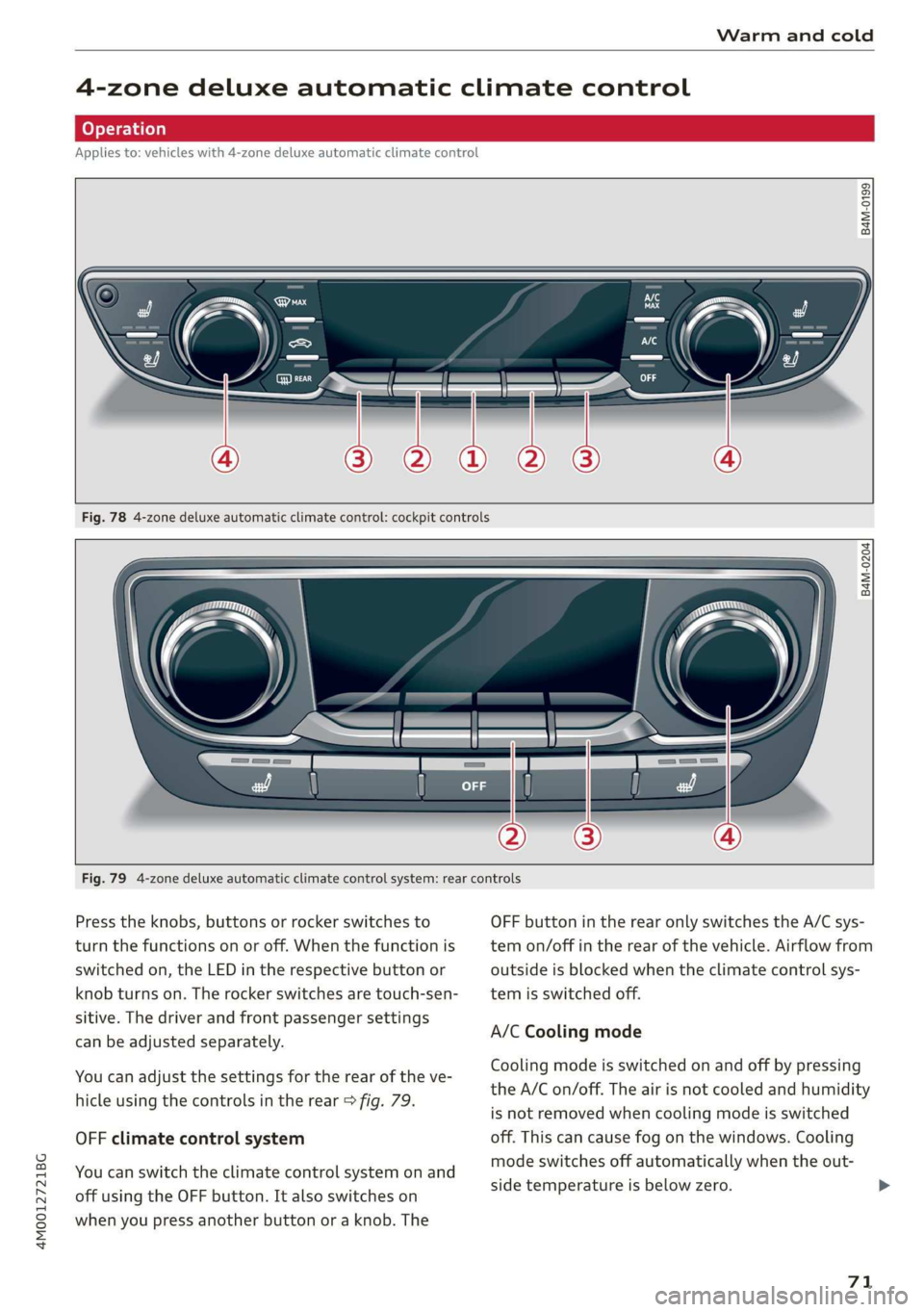
Fig.784-zonedeluxeautomaticclimatecontrol:cockpitcontrols
3 $
= a
Fig.794-zonedeluxeautomaticclimatecontrolsystem:rearcontrols
Presstheknobs,buttonsorrockerswitchestoOFFbuttonintherearonlyswitchestheA/Csys-
turnthefunctionsonoroff.Whenthefunctionistemon/offintherearofthevehicle.Airflowfrom
switchedon,theLEDintherespectivebuttonoroutsideisblockedwhentheclimatecontrolsys-
knobturnson.Therockerswitchesaretouch-sen-temisswitchedoff.
sitive.Thedriverandfrontpassengersettings.
:A/CCoolingmode
canbeadjustedseparately.
Coolingmodeisswitchedonandoffbypressing
theA/Con/off.Theairisnotcooledandhumidity
isnotremovedwhencoolingmodeisswitched
OFFclimatecontrolsystemoff.Thiscancausefogonthewindows.Cooling
modeswitchesoffautomaticallywhentheout-
sidetemperatureisbelowzero.>
Youcanadjustthesettingsfortherearoftheve-
hicleusingthecontrolsintherear>fig.79.
Youcanswitchtheclimatecontrolsystemonand
offusingtheOFFbutton.Italsoswitcheson
whenyoupressanotherbuttonoraknob.The
71
Page 74 of 394
Warmandcold
MSCoolingmode*
Themaximumcoolingmodecanbe switchedon
andoffusingthe4button.Theairisnot cooled
andhumidityisnotremovedwhencoolingmode
isswitchedoff.Thiscancausefogonthewin-
dows.Coolingmodeswitchesoffautomatically
whentheoutsidetemperatureisbelowzero.
Whenthecoolingmodeisswitchedon,M&the
vehicleinterioriscooledanddehumidifiedas
quicklyaspossible.
<>Recirculationmode
Inrecirculationmode,theairinsidethevehicleis
circulatedandfiltered.Thispreventstheunfil-
teredairoutsidethevehiclefromenteringthe
vehicleinterior.Switchingrecirculationmodeon
whendrivingthroughatunnelorwhensittingin
trafficisrecommended>A\.
Usingthebutton,recirculationmodeisswitched
onandoffusingthe<>button.Youcanalso
switchtherecirculationmodeoffbypressingthe
knob@ortheoffusingthe§&button.
AUTOAutomaticmode
Automaticmodemaintainsaconstanttempera-
tureinsidethevehicle.Airtemperature,airflow
andairdistributionarecontrolledautomatically.
Youcanswitchautomaticmodeonoroffby
pressingtheknob(@).
Temperature
Youcanadjustthetemperaturebetween60°F
(+16°C)and84°F(+28°C)byturningtheknob
@.Ifoutsideofthisrange,LOorHIwillappear
intheclimatecontrolsystemdisplay.Atbothof
thesesettings,theclimatecontrolsystemruns
continuously
atmaximumcoolingorheating
power.Thereisnotemperatureregulation.
%=Blower
Youcanadjustthevolumeofairgeneratedby the
blowertoyourpreferenceusingtherocker
switches(@).Theblowershouldalwaysrunata
lowsettingtopreventthewindowsfromfogging
andtoensureacontinuousexchangeofairinside
thevehicle.To havetheblowerregulatedauto-
matically,presstheknob@).
72
Airdistribution
Youcanusetherockerswitches(2)toadjustthe
ventswheretheairwillflowoutof.Pressthe
rockerswitches(2)repeatedlyuntilthedesired
airdistributionsettingisdisplayedintheclimate
controlsystemcontrols.To havetheairdistribu-
tionregulatedautomatically,presstheknob@).
af£JSeatheating/ventilation*
Pressingthe«/“J buttonswitchestheseat
heating/ventilationonatthehighestsetting(lev-
el 3).TheLEDsindicatethetemperaturelevel.To
reducethetemperature,pressthebuttonagain.
Toswitchtheseatheating/ventilationoff,press
thebuttonrepeatedlyuntiltheLEDturnsoff.
@WMAXDefogging
Thewindshieldandsidewindowsaredefrosted
orclearedofcondensationasquicklyaspossible.
Themaximumamountofairflowsmainlyfrom
theventsbelowthewindshield.Recirculation
modeswitchesoff. Thetemperatureshouldbe
setat+72°F(+22°C)orhigher.Thetemperature
iscontrolledautomatically.
Defrostisswitchedonandoff#MAXbutton.
Youcanalsoswitchthefunctionoffbypressing
theknob@).
Appliestovehicleswithwindshielddefogger:the
windshielddefoggerswitchesonautomatically
whenoutsidetemperaturesarelow.Ifyouwould
liketoswitchthewindshielddefrosteronman-
ually,pressthe&button.TheLEDinthebutton
blinks.
GDREARRearwindowdefogger
Pressthebutton&toswitchtherearwindowde-
foggeron.Itonlyoperateswhentheengineis
running.Itswitchesoffautomaticallyafter10to
20minutes,dependingontheoutsidetempera-
ture.
Topreventtherearwindowdefoggerfrom
switchingoffautomatically,pressandholdthe
GPREARbuttonformorethanthreeseconds.
Thisisstoreduntiltheignitionisswitchedoff.>
Page 79 of 394
4M0012721BG
Driving
Invehicleswithmemoryfunction*,thesteering
columnsettingsarestoredtogetherwiththe
seatposition.
VA
Appliesto:vehicleswithpowersteeringwheeladjustment
Easyseatentrymakesiteasiertoenterandexit
thevehiclebyadjustingthesteeringcolumnau-
tomatically.
> SelectintheInfotainmentsystem:[MENU]but-
ton>Vehicle> leftcontrolbutton>Vehicle
settings>Seats>Driver'sseat>Easyentry
function.
Wheneasyseatentryisswitchedon,thesteering
columngoesbackupintotheparkpositionwhen
theignitionisswitchedoff.Afterenteringtheve-
hicle,thesteeringcolumnreturnstothestored
positiononcetheignitionisswitchedon.
Startingandstopping
theengine
Startingtheengine
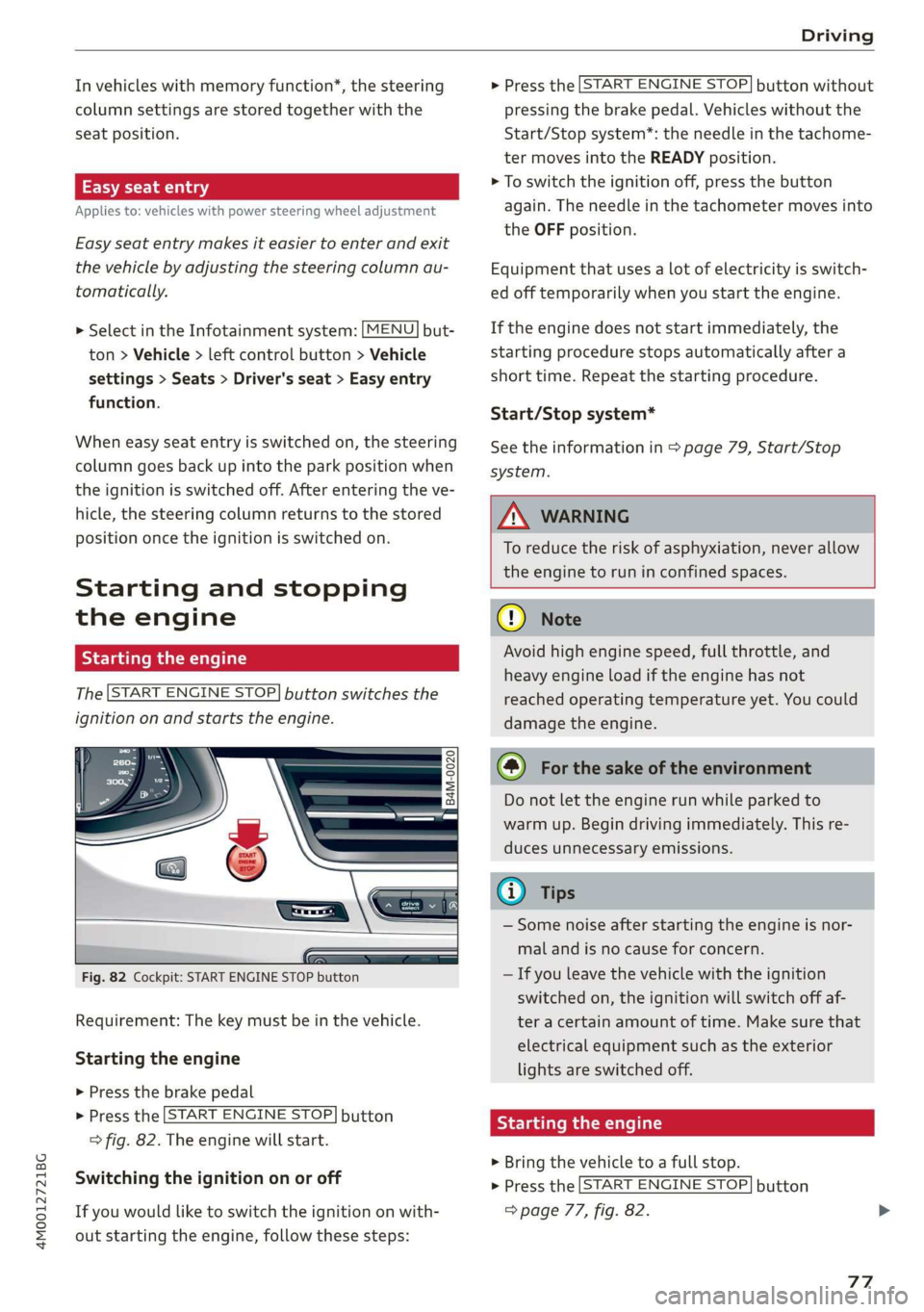
The[STARTENGINESTOP]buttonswitchesthe
ignitiononandstartstheengine.
B4M-0020
5
Fig.82Cockpit:STARTENGINESTOPbutton
Requirement:Thekeymustbeinthevehicle.
Startingtheengine
>Pressthebrake pedal
>Pressthe[STARTENGINESTOP]button
>fig.82.Theenginewillstart.
Switching theignitiononoroff
Ifyouwouldliketoswitchtheignitiononwith-
outstartingtheengine,followthesesteps:
>Pressthe[STARTENGINESTOP]buttonwithout
pressingthebrakepedal.Vehicleswithoutthe
Start/Stopsystem*:theneedleinthetachome-
termovesintotheREADYposition.
>Toswitchtheignitionoff,pressthe button
again.Theneedleinthetachometermovesinto
theOFFposition.
Equipmentthatusesalotofelectricityisswitch-
edofftemporarilywhenyoustarttheengine.
Iftheenginedoesnotstartimmediately,the
startingprocedurestopsautomaticallyaftera
shorttime.Repeatthestartingprocedure.
Start/Stopsystem*
Seetheinformationin>page79,Start/Stop
system.
ZXWARNING
To reducetheriskofasphyxiation,never allow
theenginetoruninconfinedspaces.
@)Note
Avoidhighenginespeed,fullthrottle,and
heavyengineloadiftheenginehasnot
reached
operatingtemperatureyet.Youcould
damagetheengine.
@)Forthesakeoftheenvironment
Donotlettheenginerunwhileparkedto
warmup.Begindrivingimmediately.Thisre-
ducesunnecessaryemissions.
@)Tips
—Somenoiseafterstartingtheengineisnor-
malandisnocauseforconcern.
—Ifyouleavethevehiclewiththeignition
switchedon,theignitionwillswitchoffaf-
teracertainamountoftime.Makesurethat
electricalequipmentsuchastheexterior
lightsareswitchedoff.
Startingtheengine
>Bringthevehicletoafullstop.
>Pressthe[STARTENGINESTOP]button
=>page77,fig.82.
77
Page 106 of 394
Assistsystems
Youcansetanyspeedbetween20mphand95
mph(30km/hand150km/h).
Indicatorlightsandmessagesintheinstrument
clusterdisplayinformyouaboutthecurrentsit-
uationandsetting.
Anadditionalindicatorappearsinthehead-up
display”.
Switchingadaptivecruisecontrolon
>Pullthelevertowardyouintoposition@
>fig.99.
Storingthespeedandactivatingregulation
>Tostorethecurrentspeed,pressthe[SET]but-
ton>fig.99.Thestoredspeedisshowninthe
speedometerintheLEDline(@)andappears
brieflyinthestatusline©)>fig.100.
>Toactivatecontrolwhenstationary,thebrake
pedalmustalsobepressed.
Switchingadaptivecruisecontroloff
>Pushtheleverawayfromyouintoposition©)
untilitclicksintoplace.ThemessageACC:off
appears.
Indicatorlights
B-Adaptivecruisecontrolisswitchedon.No
vehiclesaredetectedahead.Thestoredspeedis
maintained.
B-Avehicledrivingaheadwasdetected.The
adaptivecruisecontrolsystemregulatesthe
speedanddistancetothevehicledrivingahead
andaccelerates/brakesautomatically.
A-Adaptivecruisecontrolisswitchedon.Ave-
hiclewasdetectedahead.Yourvehicleisstation-
aryandwillnotstartdrivingautomatically.
EB-Adaptivecruisecontrolisswitchedon.No
vehiclesweredetectedahead.Yourvehicleissta-
tionaryandwillnotstartdrivingautomatically.
B-Theautomaticbrakingisnotenoughto
maintainasufficientdistancetoavehicledriving
ahead.Youmustintervene>page107,Driverin-
terventionrequest.
104
©Instrumentclusterdisplay
IftheDriverassistancedisplayisnotshownin
theinstrumentclusterdisplay,youcanopenit
usingthemultifunctionsteeringwheelbuttons
=>page16.
Basedonthegraphicdisplay,youcandetermine
ifthesystemismaintainingadistancetotheve-
hicledrivingaheadandwhatthatdistanceis.
Novehicle-novehiclewasdetecteddriving
ahead.
Silvervehicle-avehiclewasdetecteddriving
ahead.
Redvehicle-requestfordriverintervention
=>page107.
Thefivedistance barsonthegauge(©represent
the
setdistance(see>page105forinformation
onhowtochangethedistance).Ifyoufallbelow
theselecteddistance,thedistancebarsbecome
redfromthebottomupward.
ZXWARNING
Ifyoupressthe[SET]buttonwhendrivingat
speedsbelow20mph(30km/h),thevehicle
acceleratesautomaticallyupto20mph(30
km/h),whichistheminimumspeedthatcan
beset.
(i)Tips
—Ifyouswitchtheignitionortheadaptive
cruisecontrolsystemoff,thesetspeedis
erasedforsafetyreasons.
— TheElectronicStabilizationControl(ESC)
andtheAnti-Slip-Regulation(ASR)areauto-
maticallyswitchedonwhentheadaptive
cruisecontrolisswitchedon.
Page 120 of 394
Assistsystems
Displayintheinstrumentcluster
Appliesto:vehicleswithAudiactivelaneassist
Pee
wmaq 9
=+a
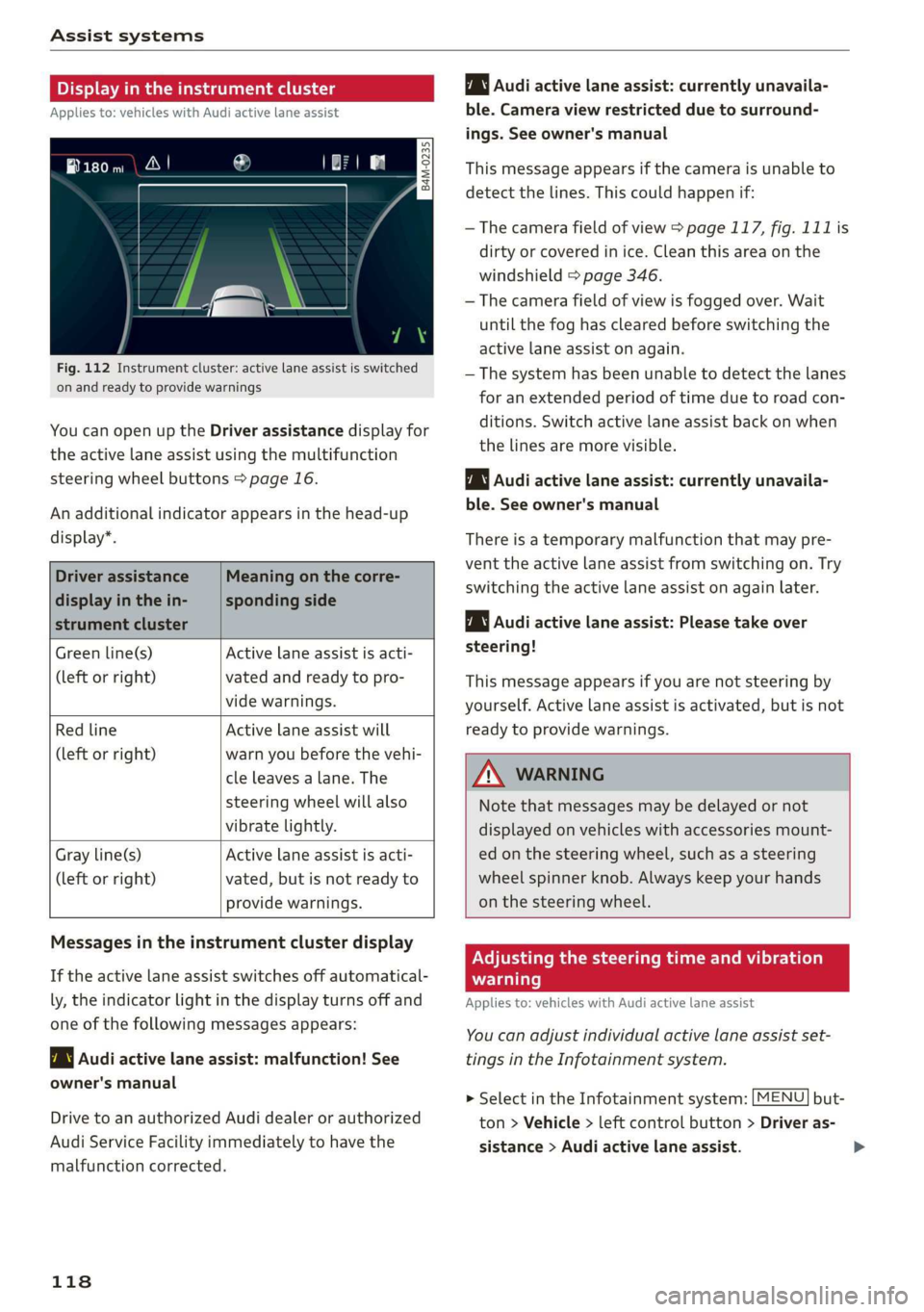
Fig.112Instrumentcluster:activelaneassistisswitched
onandreadytoprovidewarnings
YoucanopenuptheDriverassistancedisplayfor
theactivelaneassistusingthemultifunction
steeringwheelbuttons>page16.
Anadditionalindicatorappearsinthehead-up
display”.
Driverassistance
displayinthein-
strumentcluster
Meaningonthecorre-
spondingside
Greenline(s)Activelaneassistisacti-
(leftorright)vatedandreadytopro-
videwarnings.
RedlineActivelaneassistwill
(leftorright)warnyoubeforethevehi-
cleleavesa lane.The
steeringwheelwillalso
vibratelightly.
Activelaneassistisacti-
vated,butisnotreadyto
providewarnings.
Grayline(s)
(leftorright)
Audiactivelaneassist:currentlyunavaila-
ble.Cameraviewrestrictedduetosurround-
ings.Seeowner'smanual
Thismessageappearsifthecameraisunableto
detectthelines.Thiscouldhappenif:
—Thecamerafieldofview>page117,fig.111is
dirtyorcoveredinice.Cleanthisareaonthe
windshield>page346.
—Thecamerafieldofviewisfoggedover.Wait
untilthe foghasclearedbeforeswitchingthe
activelaneassistonagain.
—Thesystemhasbeenunabletodetectthelanes
foranextendedperiodoftimeduetoroad con-
ditions.Switchactivelaneassistbackonwhen
thelinesaremorevisible.
Audiactivelaneassist:currentlyunavaila-
ble.Seeowner'smanual
Thereisatemporarymalfunctionthatmaypre-
vent theactivelaneassistfromswitchingon. Try
switchingtheactivelaneassistonagainlater.
Audiactivelaneassist:Pleasetake over
steering!
Thismessageappearsifyouarenotsteeringby
yourself.Activelaneassistisactivated,butisnot
readytoprovidewarnings.
ZAWARNING
Notethatmessagesmaybedelayedornot
displayedonvehicleswithaccessoriesmount-
edonthesteeringwheel,suchasasteering
wheelspinnerknob.Alwayskeep yourhands
onthesteeringwheel.
Messagesintheinstrumentclusterdisplay
Iftheactivelaneassistswitchesoffautomatical-
ly,theindicatorlightinthedisplayturnsoffand
oneofthefollowingmessagesappears:
7\|Audiactivelaneassist:malfunction!See
owner'smanual
DrivetoanauthorizedAudidealerorauthorized
AudiServiceFacilityimmediatelytohavethe
malfunctioncorrected.
118
Adjustingthesteeringtimeandvibration
warning
Appliesto:vehicleswithAudiactivelaneassist
Youcanadjustindividualactivelaneassistset-
tingsintheInfotainmentsystem.
MENU]but- >SelectintheInfotainmentsystem:
ton>Vehicle> leftcontrolbutton>Driveras-
sistance>Audiactivelaneassist.
Page 127 of 394
4M0012721BG
Assistsystems
approximately1000feet(300m).Thethermal
imagedetectedbythecameraisshowninthein-
strumentclusterdisplay.Warmareasappear
lighterandcoldareasappeardarker.
Appliesto:vehicleswithnightvision assist
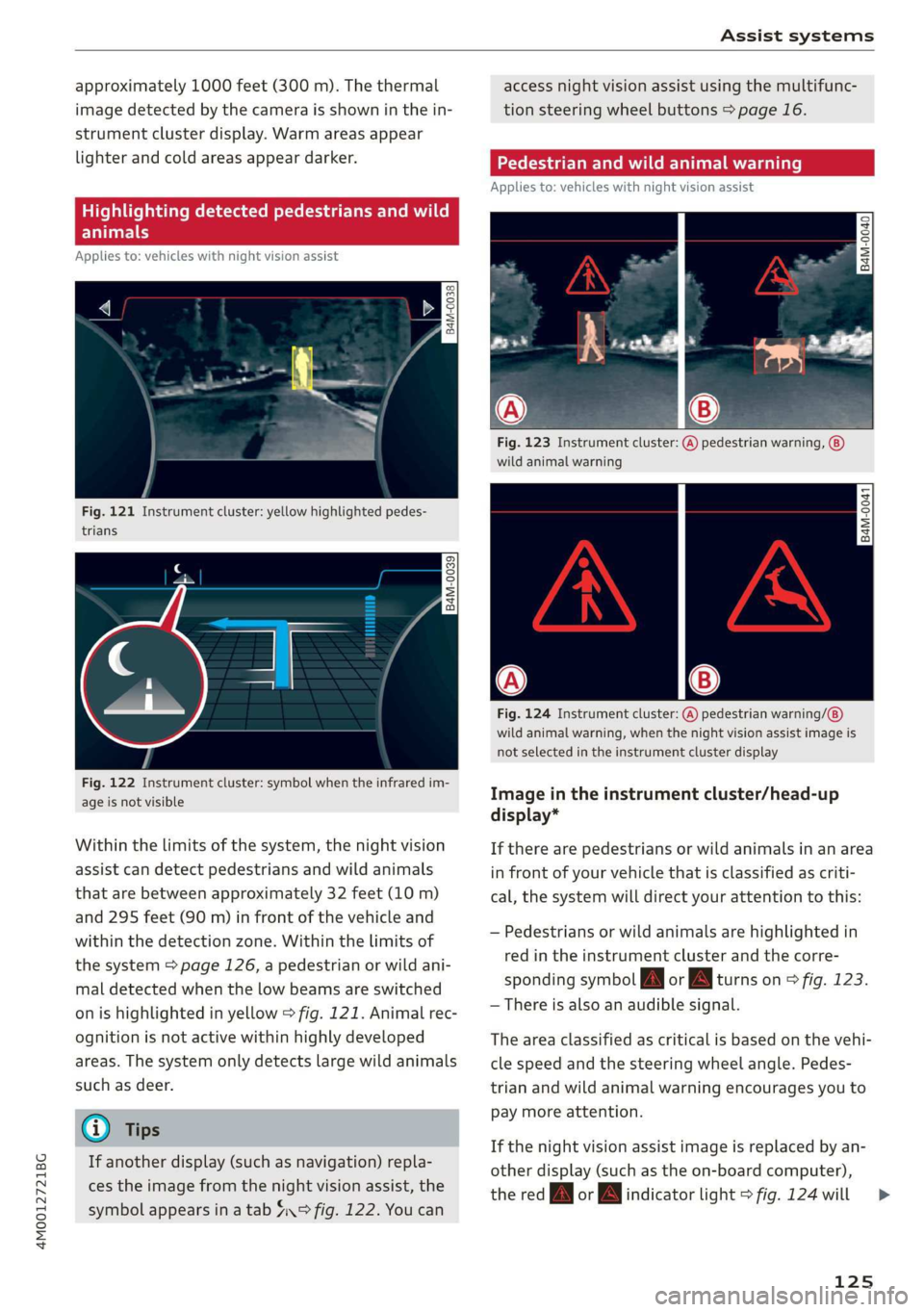
Fig.121Instrumentcluster:yellowhighlightedpedes-
trians
B4M-0039
Fig.122Instrumentcluster:symbolwhentheinfraredim-
ageisnotvisible
Withinthelimitsofthesystem,thenightvision
assistcandetectpedestriansandwildanimals
thatarebetweenapproximately32feet(10m)
and295feet(90m)infront ofthevehicleand
withinthedetectionzone.Withinthelimitsof
thesystem=>page126,apedestrianorwildani-
maldetectedwhenthelowbeamsareswitched
onishighlightedinyellow>fig.121.Animalrec-
ognitionisnotactivewithinhighlydeveloped
areas.Thesystemonlydetectslargewildanimals
suchasdeer.
@)Tips
Ifanotherdisplay(suchasnavigation)repla-
cestheimagefromthenightvisionassist,the
symbolappearsinatab4°fig.122.Youcan
accessnightvision assistusingthemultifunc-
tionsteeringwheelbuttons>page16.
Appliesto:vehicleswithnightvision assist
Fig.123Instrumentcluster:(A)pedestrianwarning,
wildanimalwarning
B4M-0041
Fig.124Instrumentcluster:
wildanimalwarning,whenthenightvisionassistimageis
notselectedintheinstrumentclusterdisplay
pedestrianwarning/
Imageintheinstrumentcluster/head-up
display*
Iftherearepedestriansorwildanimalsinanarea
infront ofyourvehiclethatisclassifiedascriti-
cal,thesystemwilldirectyourattentiontothis:
—Pedestriansor wildanimalsarehighlightedin
redintheinstrumentclusterandthecorre-
spondingsymbolJMorBMturnson>fig.123.
—Thereisalsoanaudiblesignal.
Theareaclassifiedascriticalisbasedonthevehi-
clespeedandthesteeringwheelangle.Pedes-
trianandwildanimalwarningencouragesyouto
paymoreattention.
Ifthenightvision assistimageisreplacedbyan-
otherdisplay(suchastheon-boardcomputer),
theredfayorindicatorlight>fig.124will
125
>
Page 155 of 394
4M0012721BG
MultiMediaInterface
MultiMediaInterface
Trafficsafety
information
AudirecommendsperformingcertainInfotain-
mentsystemfunctions,suchasenteringa desti-
nation,onlywhenthevehicleisstationary.Al-
waysbepreparedtostopoperating theInfotain-
mentsystemintheinterestofyoursafetyand
thesafety ofotherroadusers.
Z\WARNING
Onlyuse theInfotainmentsystemwhentraf-
ficconditionspermitandalwaysinawaythat
allows
youtomaintaincompletecontrolover
yourvehicle.
G)Tips
Certainfunctionsarenotavailablewhiledriv-
ing.
Introduction
TheMultiMediaInterface,orMMIforshort,
combinesvarioussystemsforcommunication,
navigation*andentertainmentinyourAudi.You
canoperatetheMMIusingtheMMIcontrolpan-
el,themultifunctionsteeringwheelorthevoice
recognitionsystem*.
[RAH-8341
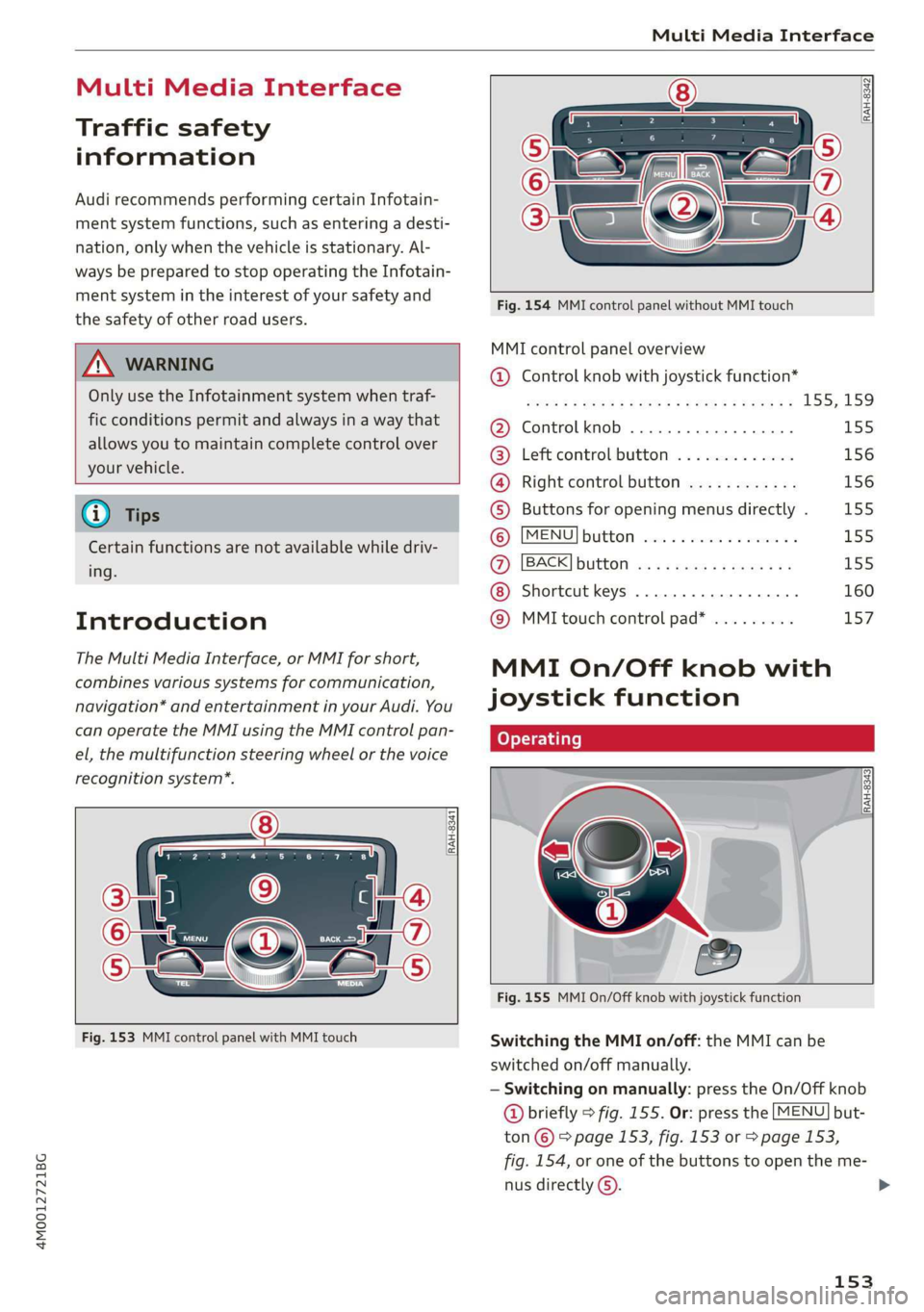
Fig.153MMIcontrolpanelwithMMItouch
RAH-8342]
Fig.154MMIcontrolpanelwithoutMMItouch
MMIcontrolpaneloverview
@®Controlknobwithjoystickfunction*
S008FBAROSEFMOG¥EERFCSORaE155;159
@Controlknob.............0000-155
@®Leftcontrolbutton.............156
@®Rightcontrolbutton............156
©Buttonsforopeningmenusdirectly.155
©MENUBUttONsaccce2 xencase= oanaes2 ¥L55
@)[BACK]buttonos:+causssmewsvas155
Shortcutkeys.........2000000160
@®MMItouchcontrolpad*.........157
MMIOn/Offknobwith
joystickfunction
Operating
Fig.155MMIOn/Offknobwithjoystickfunction
SwitchingtheMMIon/off:theMMIcanbe
switched
on/offmanually.
—Switchingonmanually:presstheOn/Offknob
@briefly>fig.155.Or:pressthe[MENU]but-
ton©©page153,fig.153or>page153,
fig.154,oroneofthebuttonstoopentheme-
nusdirectlyG).
153
>
Page 158 of 394
MultiMediaInterface
Openingtheselectionmenu/optionsmenu
thecontrolbuttons
= z
||zrxG3
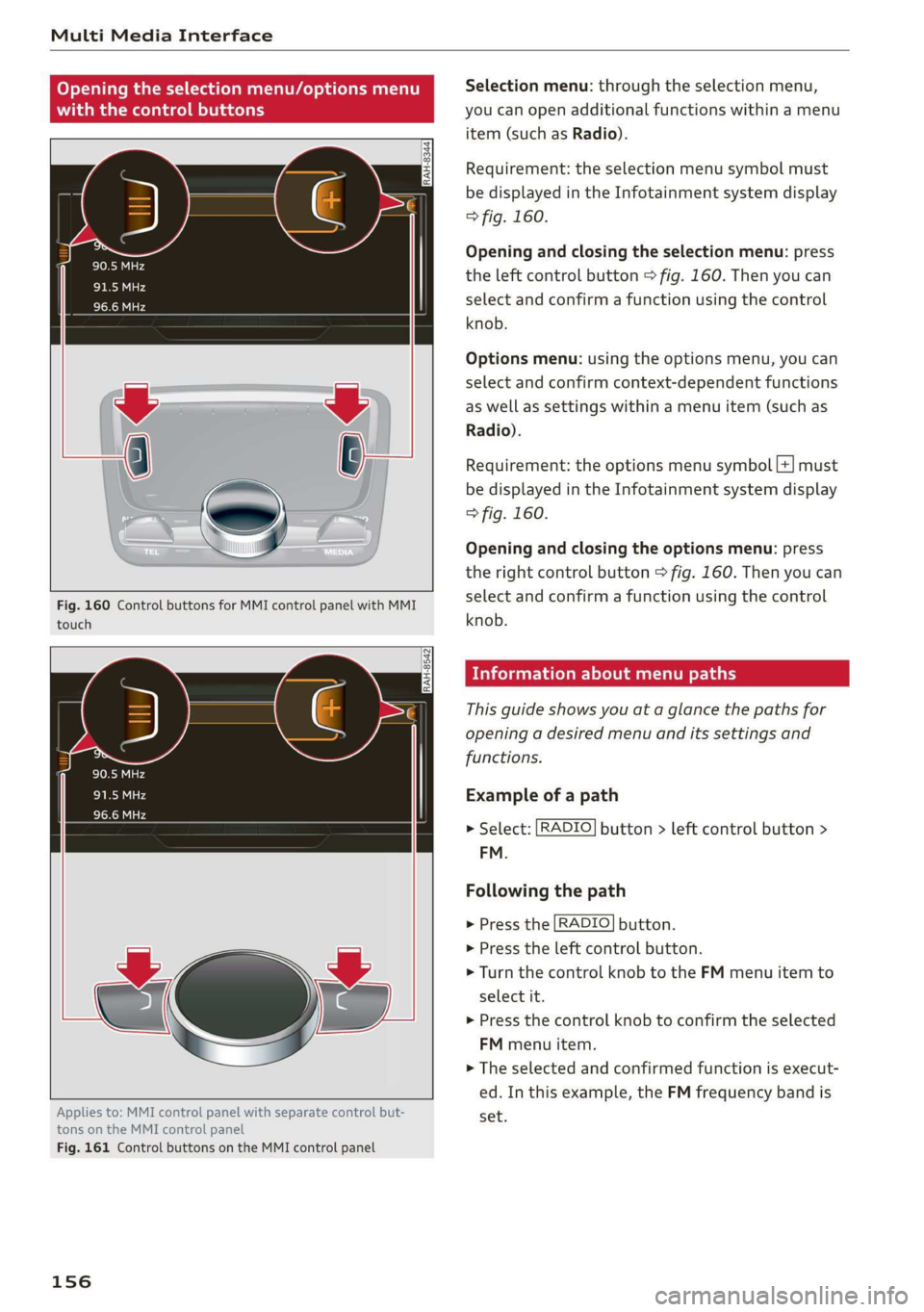
Fig.160ControlbuttonsforMMIcontrolpanelwithMMI
touch
RAH-8542
Appliesto:MMIcontrolpanelwithseparatecontrolbut-
tonsontheMMIcontrolpanel
Fig.161ControlbuttonsontheMMIcontrolpanel
156
Selectionmenu:throughtheselectionmenu,
youcanopenadditionalfunctionswithinamenu
item(suchasRadio).
Requirement:theselectionmenusymbolmust
bedisplayedintheInfotainmentsystemdisplay
>fig.160.
Openingandclosingtheselectionmenu:press
theleftcontrolbutton>fig.160.Thenyoucan
selectandconfirmafunctionusingthecontrol
knob.
Optionsmenu:usingtheoptionsmenu,youcan
selectandconfirmcontext-dependentfunctions
aswellassettingswithinamenuitem(suchas
Radio).
Requirement:theoptionsmenusymbol[+]must
bedisplayedintheInfotainmentsystemdisplay
>fig.160.
Openingandclosingtheoptionsmenu:press
therightcontrolbutton>fig.160.Thenyoucan
selectandconfirmafunctionusingthecontrol
knob.
Meleeelak)Celieeerary
Thisguideshowsyouat aglancethepathsfor
openingadesiredmenuand itssettingsand
functions.
Exampleofapath
>Select:[RADIO]button>leftcontrolbutton>
FM.
Followingthepath
>Pressthe[RADIO]button.
>Presstheleftcontrolbutton.
>Turn thecontrolknobtotheFMmenuitemto
selectit.
>Pressthecontrolknobtoconfirmtheselected
FMmenuitem.
>Theselectedandconfirmedfunctionisexecut-
ed.In thisexample,theFMfrequencybandis
set.