change time AUDI Q7 2019 Owner´s Manual
[x] Cancel search | Manufacturer: AUDI, Model Year: 2019, Model line: Q7, Model: AUDI Q7 2019Pages: 394, PDF Size: 105.97 MB
Page 118 of 394
Assistsystems
systemwillwarnyouwithcorrectivesteering.
Youcanoverridethissteeringatanytime.Ifyou
passoveraline,thesteeringwheelwillvibrate
lightly.Inorderforthiswarningvibrationtooc-
cur,itmustfirstbe switchedonintheInfotain-
mentsystem.Active laneassistisreadyforoper-
ationwhenthelanemarkerlineisdetectedonat
leastonesideofthevehicle.
Thesystemisdesignedfordrivingonexpress-
waysandhighwaysandthereforeonlyactivates
atspeedsaboveapproximately40mph(65
km/h).
Appliesto:vehicleswithsideassist:ifyouacti-
vateaturnsignalwhenactivelaneassistisready
anditclassifiesalanechangeascriticalbecause
ofvehiclestravelingalongsideyouorapproach-
ingyou,therewillbenoticeablecorrectivesteer-
ingshortlybeforeyouleavethelane.Thiswillat-
tempttokeepyourvehicleinthelane.
Appliesto:vehicleswithoutsideassist:theready
systemdoesnotwarnyouifyouactivateaturn
signalbeforecrossingthelane markerline.In
thiscase,itassumesthatyouarechanginglanes
intentionally.
Appliesto:vehicleswithadaptivecruisecontrol:
thereisnocorrectivesteeringorwarningsifthe
systemrecognizesadistinctpassingmaneuver.If
theconditionsaremet,trafficjamassistswitches
onatspeedsunderapproximately40mph
(65km/h)>page107.
Z\WARNING
—Thesystemwarnsthedriverthatthevehicle
isleavingthelaneusingcorrectivesteering.
Thedriverisalwaysresponsibleforkeeping
thevehiclewithinthelane.
— Thesystemcanassistthedriverinkeeping
thevehicleinthelane,butitdoesnotdrive
byitself.Alwayskeep yourhandsonthe
steeringwheel.
—Correctivesteeringmaynotoccurincertain
situations,suchasduringheavybraking.
—Theremaybecaseswherethecameradoes
notrecognizealllanemarkerlines.Correc-
tivesteeringcanonly takeplaceontheside
116
ofthevehiclewherelanemarkerlinesare
detected.
—Otherroadstructuresorobjectscouldpossi-
blybeidentifiedunintentionallyaslane
markerlines.Asaresult,correctivesteering
maybeunexpectedormaynotoccur.
— Thecameraviewcanberestricted,forexam-
plebyvehiclesdrivingaheadorbyrain,
snow,heavysprayorlightshiningintothe
camera.Thiscanresultinactivelaneassist
notdetectingthelanemarkerlinesorde-
tectingthemincorrectly.
—Incertainsituationswherevisibilityislow,
thevehiclemayswitchfroman“early”to
“late”steeringcorrection.
—Undercertainconditionssuchasrutsinthe
road,aninclinedroadwayorcrosswinds,the
correctivesteeringalonemaynot beenough
tokeepthevehicleinthemiddleofthelane.
—Forsafetyreasons,activelaneassistmust
notbeusedwhentherearepoorroadand/or
weatherconditionssuchasslipperyroads,
fog,gravel,heavyrain,snowandthepoten-
tialforhydroplaning.Usingactivelaneas-
sistundertheseconditionsmayincreasethe
riskofacrash.
Page 121 of 394
4M0012721BG
Assistsystems
Steeringtime
Early:inthissetting,thecorrectivesteeringhap-
penscontinuouslytohelpkeepthevehicleinthe
centerofthelane.
Late:inthissetting,thesystemprovidescorrec-
tivesteeringjustbeforeawheelgoesoverade-
tectedlanemarkerline.
Vibrationwarning
Youcanswitchtheadditionalvibrationwarning
inthesteeringwheelonoroff.
Z\WARNING
Withthevibrationwarningswitchedoff,there
willalsobenovisualwarningintheinstru-
mentclusterdisplaywhencrossingalane
markerline.
@Tips
Market-specific:Certainsettingsareautomat-
icallystoredandassignedtothevehiclekey
beingused.
Audisideassist
Appliesto:vehicleswith Audisideassist
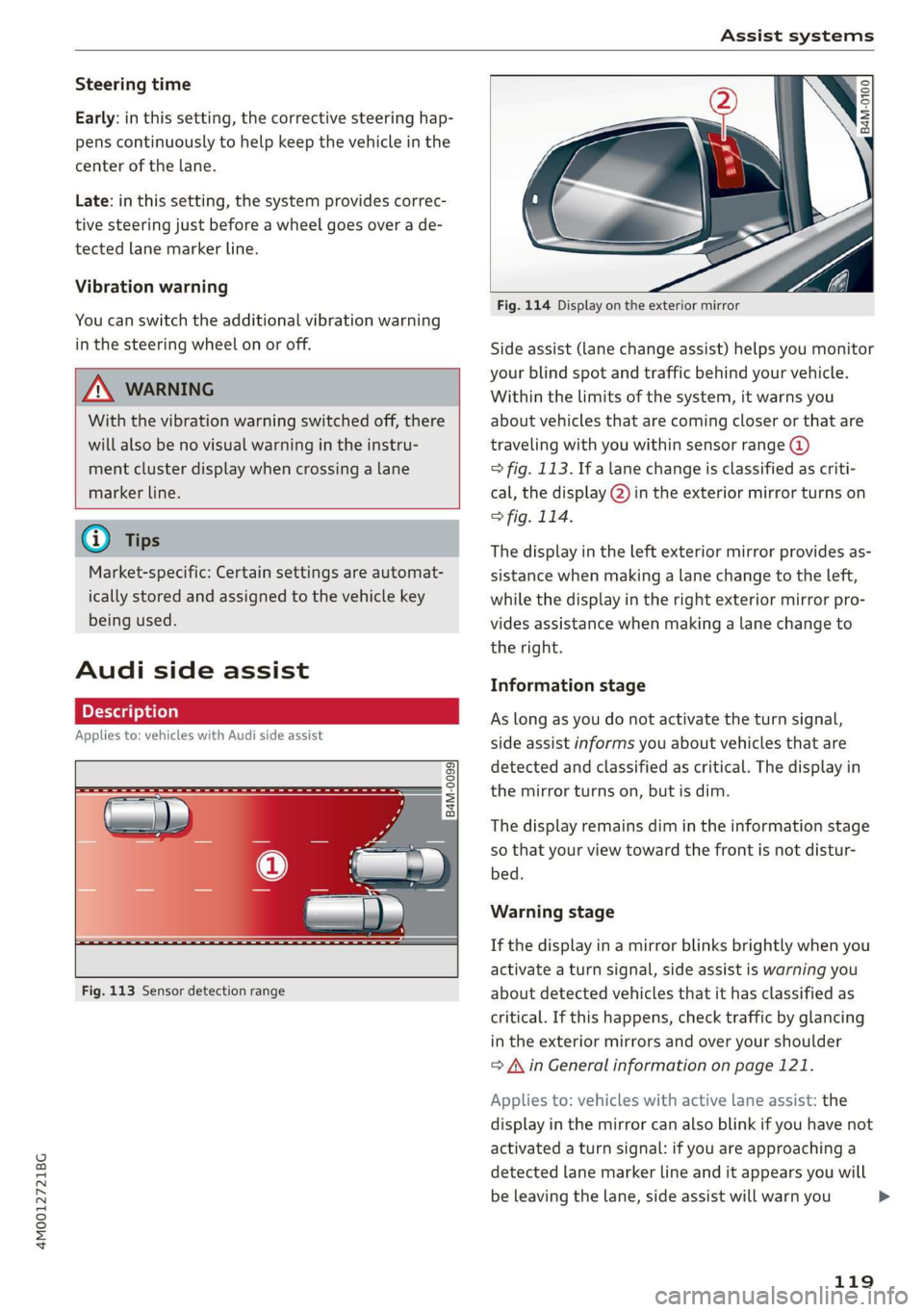
B4M-0099]
Fig.113Sensordetectionrange
S s 5 =
=a
Fig.114Displayontheexteriormirror
Sideassist(lanechangeassist)helpsyoumonitor
yourblindspotandtrafficbehindyourvehicle.
Withinthelimitsofthesystem,itwarnsyou
aboutvehiclesthatarecomingcloserorthatare
traveling
withyouwithinsensorrange@)
>fig.113.If alanechangeisclassifiedascriti-
cal,thedisplay@)intheexteriormirrorturnson
>fig.114.
Thedisplayintheleftexteriormirrorprovidesas-
sistancewhenmakingalanechangetotheleft,
whilethedisplayintherightexteriormirrorpro-
videsassistancewhenmakingalanechangeto
theright.
Informationstage
Aslongasyoudonotactivatetheturnsignal,
sideassistinformsyouaboutvehiclesthatare
detectedandclassifiedascritical.Thedisplayin
themirrorturnson,butisdim.
Thedisplayremainsdimintheinformationstage
sothatyour viewtowardthefrontisnotdistur-
bed.
Warningstage
Ifthedisplayinamirrorblinksbrightlywhenyou
activateaturnsignal,sideassistiswarningyou
aboutdetectedvehiclesthatithasclassifiedas
critical.Ifthishappens,checktrafficby glancing
intheexteriormirrorsandoveryourshoulder
=>AinGeneralinformationonpage121.
Appliesto:vehicleswithactivelaneassist:the
displayinthemirrorcanalsoblinkifyouhavenot
activatedaturnsignal:ifyouareapproachinga
detectedlanemarkerlineanditappearsyouwill
beleavingthelane,sideassistwillwarnyou
119
>
Page 122 of 394
Assistsystems
aboutdetectedvehiclesthatithasclassifiedas
critical.
iG)Tips
Youcanadjustthebrightnessonofthedis-
playontherearviewmirror>page121.
CeeaeLo}
Appliesto:vehicleswithAudisideassist
S
2 =
+oO
B4M-0102
Fig.116Rearofthevehicle:positionofthesensors
Sideassistfunctionsatspeedsaboveapproxi-
mately9mph(15km/h).
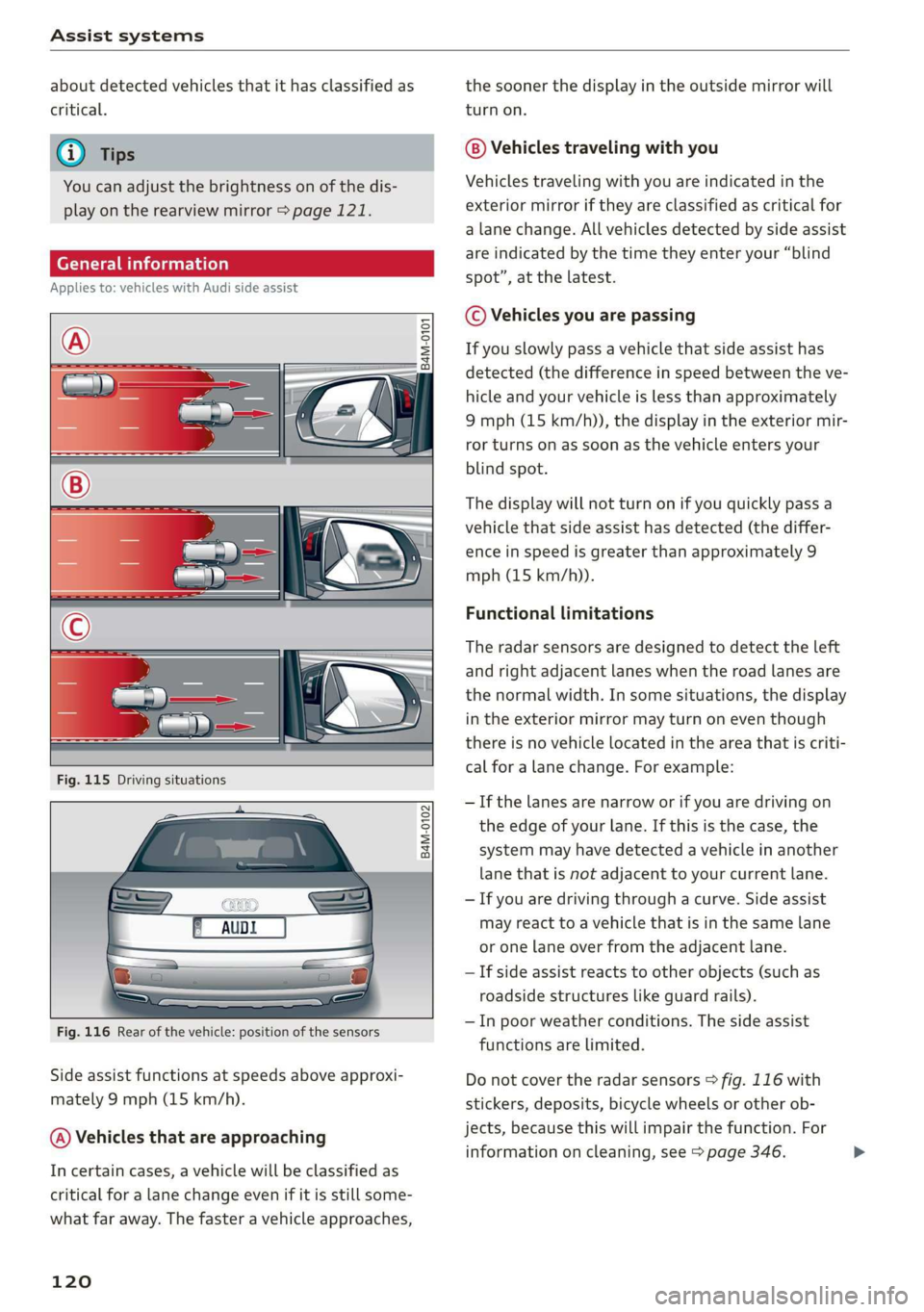
@)Vehiclesthatareapproaching
Incertaincases,avehiclewillbeclassifiedas
criticalforalanechangeevenifitisstillsome-
whatfaraway.Thefasteravehicleapproaches,
120
thesoonerthedisplayintheoutsidemirrorwill
turnon.
Vehiclestravelingwithyou
Vehiclestravelingwithyouareindicatedinthe
exteriormirroriftheyareclassifiedascriticalfor
alane change.Allvehiclesdetectedbysideassist
areindicatedbythetimetheyenteryour“blind
spot”,atthelatest.
©Vehiclesyouarepassing
Ifyouslowlypassavehiclethatsideassisthas
detected(thedifferenceinspeedbetweentheve-
hicleandyourvehicleislessthanapproximately
9mph(15km/h)),thedisplayintheexteriormir-
rorturnsonassoonasthevehicleentersyour
blindspot.
Thedisplaywillnotturnonifyouquicklypassa
vehiclethatsideassisthasdetected(thediffer-
enceinspeedisgreaterthanapproximately9
mph(15km/h)).
Functionallimitations
Theradarsensorsaredesignedtodetecttheleft
andrightadjacentlaneswhentheroadlanesare
thenormalwidth.Insomesituations,thedisplay
intheexteriormirrormayturnoneventhough
thereisnovehiclelocatedintheareathatiscriti-
calforalanechange.Forexample:
—Ifthelanesarenarroworifyouaredrivingon
theedgeofyourlane.Ifthisisthecase,the
systemmayhavedetectedavehicleinanother
lanethatisnotadjacenttoyourcurrentlane.
—Ifyouaredrivingthroughacurve.Sideassist
mayreacttoavehiclethatisinthesamelane
oronelaneoverfromtheadjacentlane.
—Ifsideassistreactstootherobjects(such as
roadsidestructureslikeguardrails).
—Inpoorweatherconditions.Thesideassist
functionsarelimited.
Donotcovertheradarsensors>fig.116with
stickers,deposits,bicyclewheelsorotherob-
jects,becausethiswillimpairthefunction.For
informationoncleaning,see>page346.>
Page 123 of 394
Assistsystems
AWARNINGSwitchingonandoff
Appliesto:vehicleswithAudisideassist
—Alwayspayattentiontotrafficandtothe
areaaroundyourvehicle.SideassistcannotThesystemcanbe switchedon/offintheInfo-
replaceadriver'sattention.Thedriveralonetainmentsystem.
isalwaysresponsibleforlanechangesand
similardrivingmaneuvers.
>SelectintheInfotainmentsystem:[MENU]but-
ton>Vehicle>leftcontrolbutton>Driveras-
sistance>Audisideassist.Offswitchesthe
—Insomesituations,thesystemmaynot
functionoritsfunctionmaybelimited.Forsystemoff.
example:
—IfvehiclesareapproachingorbeingleftIfthesystemisactivated,thedisplaysintheex-
behindveryquickly.Thedisplaymaynotteriormirrorswillturnonbrieflywhentheigni-
turnonintime.tionisswitchedon.
—Inpoorweatherconditionssuchasheavy)
rain,snoworheavymist.@Tips
—Onverywidelanes,intightcurves,orifWhenyouswitchsideassistonoroff,theexit
thereisariseintheroadsurface.Vehicleswarningsystemactivatesordeactivates
intheadjacentlanemaynot be detected=>page122.
becausetheyareoutsideofthesensor
range.Settingthedisplaybrightness
4M0012721BG
Appliesto:vehicleswith Audisideassist
@)Note
ThedisplaybrightnesscanbeadjustedintheIn-
Thesensorscanbedisplacedbyimpactsorfotainmentsystem.
damagetothebumper,wheelhousingand
underbody.Thiscanimpair thesystem.Have»SelectintheInfotainmentsystem:[MENU]but-
anauthorizedAudidealerorauthorizedAuditon>Vehicle>leftcontrolbutton>Driveras-
ServiceFacilitychecktheirfunction.sistance>Audisideassist.
@)TipsThedisplaybrightnessadjustsautomaticallyto
thebrightness ofthesurroundings,bothinthe
informationandinthewarningstage.Invery
darkorverybrightsurroundings,theautomatic
adjustmentwillsetthedisplay totheminimum
ormaximumlevel.Insuchcases,youmaynotice
nochangewhenadjustingthebrightness, orthe
changemayonlybenoticeableoncethesur-
roundingschange.
—Thesesystemsarenotavailableintrailer
towingmode.Thereisnoguaranteethesys-
temswillswitchoffwhenusingaretrofitted
trailerhitch.Donot use thesefunctions
whentowingatrailer.
—Ifthewindowglassinthedriver'sdooror
front
passenger'sdoorhasbeentinted,the
displayintheexteriormirrormaybeincor-
aes.Adjustthebrightnesstoalevelwherethedisplay
—Foranexplanationonconformitywiththeintheinformationstagewillnotdisruptyour
FCCregulationsintheUnitedStatesandtheviewahead.Ifyouchangethebrightness,thedis-
IndustryCanadaregulations,seeplayintheexteriormirrorwillbrieflyshowthe
>page373.brightnesslevelintheinformationstage.The
brightnessofthewarningstageislinkedtothe
brightnessintheinformationstageandisadjust-
edalongwiththeinformationstage.>
121
Page 130 of 394
Assistsystems
Airsuspension
Appliesto:vehicleswithairsuspension
The
airsuspensionisanelectronically-controlled
suspensionandlevelingsystem.Thefirmnessof
thesuspensionwilladapttothedrivingcondi-
tionsandthedrivingsituation.Thesystembalan-
cesoutchangesinload.Thevehiclelevelwillalso
adaptgraduallytothevehiclespeedinorderto
reduce thewindresistanceathighspeedsandin-
creasethegroundclearanceatlowspeeds.The
settingsdependontheselectedAudidrivese-
lect*mode.
Steering
Thepowersteeringadapts.Indirectsteeringthat
moveseasilyasinComfortmodeisespecially
suitedtolongdrivesonhighways.TheDynamic
modeprovidessporty,directsteering.
All-wheelsteering*
All-wheelsteeringincreasesdrivingcomfortby
providingadditionalsteeringabilityattherear
axle.Steeringintheoppositedirectionatlow
speedsdecreasestheturningradius.Steeringin
thesamedirectionathighspeeds improvesthe
responsetimewhileincreasingdrivingstabilityat
thesametime.
Sportdifferential*
Asacomponentoftheallwheeldrivesystem
(quattro)>page151,thesportdifferentialdis-
tributesthedrivingpowertotherearaxlede-
pendingonthesituation.Thedistributionof
powervariesdependingontheselectedmode
frommoderate(Comfort)tosporty(Dynamic).
Thegoalisahighlevelofagilityandabilitytoac-
celerateoncurves.Thevehicleisveryresponsive
tosteering.
Adaptivecruisecontrol(ACC)*
Thebehaviorwhenacceleratingcanbeadjusted
fromcomfortabletosporty,dependingonthe
driveselectmode.Adaptivecruisecontrolalso
respondstothedrivingbehaviorofthevehicle
aheadinamoreconservativeorsportymanner.
128
Enginesound*
Theenginesoundadaptstothecurrentmode
andcan besubtletosporty.
C@)Note
Appliesto:vehicleswithairsuspension
—
Makesurethereisenoughclearanceabove
andbelowthevehiclewhenparking.The
heightofthevehicle(groundclearance)can
changeonceitisparkedduetotemperature
fluctuations,changestotheload condi-
tions,andchangestothedrivingmodes.
—
Whentransportingthevehicleonacarcar-
rier,train,ship,orbyothermeans,onlyse-
curethevehicleattheoutercircumference
ofthetires(thetreadsurface).Securingthe
vehicleattheaxlecomponents,suspension
struts,ortowingeyesisnotpermittedbe-
causethepressureintheairsuspension
strutscanchangeduringtransport.Theve-
hiclemightnot besecuredsufficientlyifthis
happens.
@Tips
The"S"selectorleverpositionautomatically
engageswhentheDynamicmodeisselected.
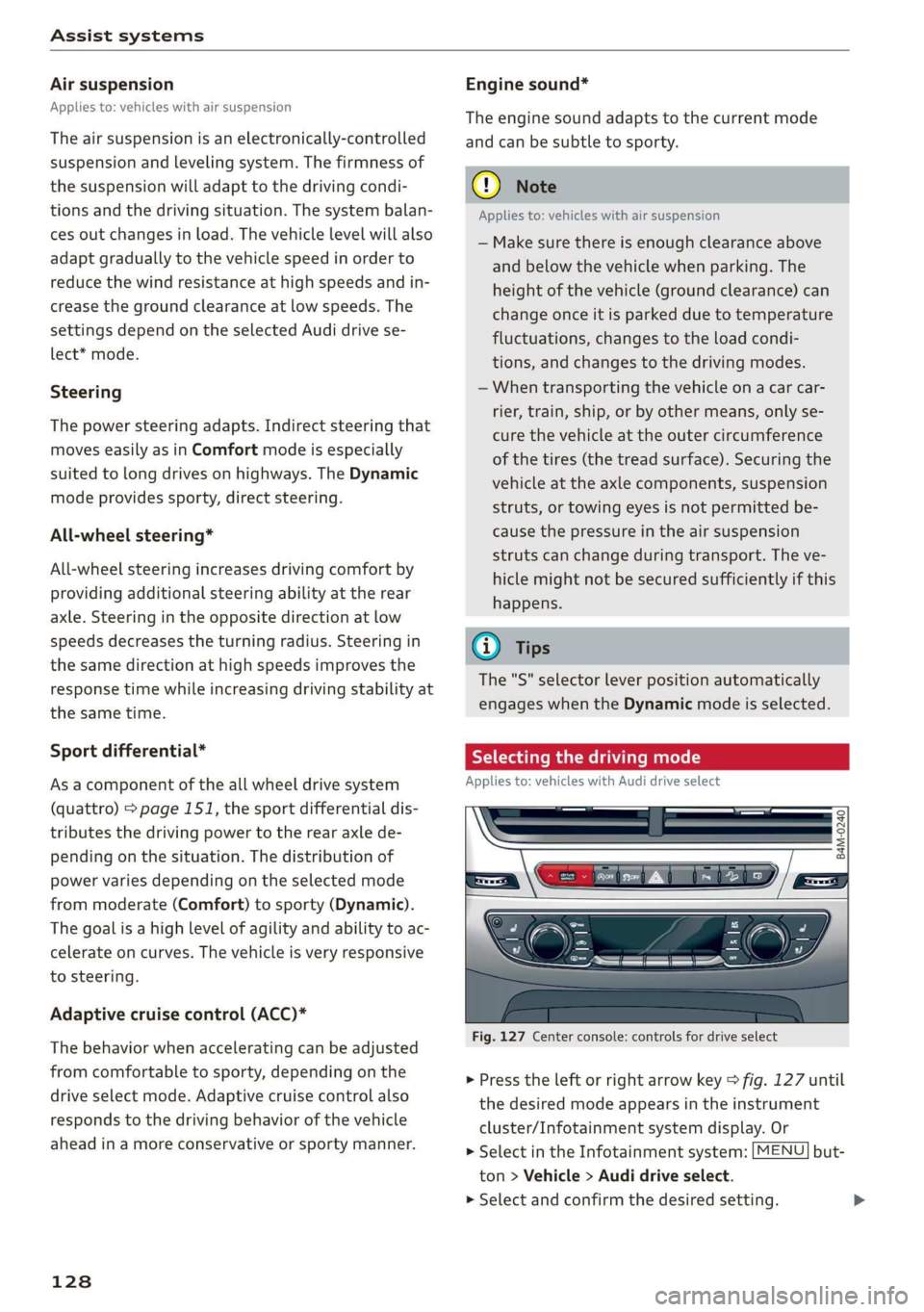
Selectingthedrivingmode
Appliesto:vehicleswithAudidriveselect
B4M-0240
Fig.127Centerconsole:controlsfordriveselect
>Presstheleftorrightarrowkey>fig.127until
thedesiredmodeappearsintheinstrument
cluster/Infotainmentsystemdisplay.Or
>SelectintheInfotainmentsystem:[MENU]but-
ton>Vehicle>Audidriveselect.
>Selectandconfirmthedesiredsetting.
Page 133 of 394

4M0012721BG
Parkingaid
Parkingaid
Generalinformation
Appliesto:vehicleswitharearparkingsystem/parkingsys-
templus/rearviewcamera/peripheralcameras/parkassist.
Dependingonyourvehicle'sequipment,various
parkingaidswillhelpyouwhenparkingandma-
neuvering.
Therearparkingsystemisanaudible parkingaid
thatwarnsyouofobstaclesbehindthevehicle
=>page132.
Theparkingsystemplusassistsyouwhilepark-
ingusingaudioandvisualsignalstowarnyou
aboutobjectsdetectedinfrontof,behind,andat
thesides*ofthevehicle>page132.
Therearviewcamerashowstheareabehindthe
vehicleintheInfotainmentsystemdisplay.The
linesintherearviewcameraimagehelpyouto
parkormaneuver>page134.
Theperipheralcamerasgivevariousviewsto
helpyouwhenparkingormaneuvering
=page136.Theparkingsystemplusfunctions
arealsoavailable>page132.
Parkassisthelpsyoutolocatesuitableparking
spaceswhenparallelorperpendicularparking,
andalsohelpswhenleavingaparallelparking
space>page139.
ingsystemmaybe impairedasaresult.
HaveanauthorizedAudidealerorauthor-
izedAudiServiceFacilitychecktheirfunc-
tion.
ZA\WARNING
—Alwayslookfortrafficandcheckthearea
aroundyourvehiclebylookingatitdirectly
aswell.Theparkingsystemcannotreplace
thedriver'sattention.Thedriverisalways
responsiblewhenenteringorexitingapark-
ingspaceandduringsimilarmaneuvers.
—Pleasenotethatsomesurfaces,suchas
clothing,arenotdetectedbythesystem.
—Sensorsandcamerashaveblindspotsin
whichpeopleandobjectscannotbedetect-
ed.Beespeciallycautiousofsmallchildren
andanimals.
—Alwayskeepyoureyesonthevehicle'ssur-
roundings,usingtherearviewmirroraswell.
— Thesensorscanbedisplacedbyimpactsor
damagetotheradiatorgrille,bumper,
wheelhousingandtheunderbody.Thepark-
@)Note
—Someobjectsarenotdetectedordisplayed
bythesystemundercertaincircumstances:
—objectssuchasbarrierchains,trailerdraw
bars,verticalpolesorfences
—objectsabovethesensorssuchaswallex-
tensions
—objectswithcertainsurfacesorstructures
suchaschainlinkfencesorpowdersnow
—Ifyoucontinuedrivingclosertoalowob-
ject,itmaydisappearfromthe sensor
range.NotethatyouwillnoLongerbe
warnedaboutthisobstacle.
—Maintainenoughdistancefromthecurbto
reducetheriskofdamagetotherims.
@)Tips
—Thesystemmayprovideawarningeven
thoughtherearenoobstaclesinthecover-
ageareainsomesituations,suchas:
—certainroadsurfacesor whenthereistall
grass
—externalultrasonicsourcessuchasfrom
cleaningvehicles
—inheavyrain,snow,orthickvehicleex-
haust
—Werecommendthatyoupracticeparkingin
atraffic-freelocationorparkinglottobe-
comefamiliarwiththesystem.Practice
parkingingoodlightand weathercondi-
tions.
—Youcanchangethevolumeofthesignals
andthedisplay>page144.
—Whatappearsintheinfotainmentdisplayis
somewhattime-delayed.
—Thesensorsmustbekeptcleanandfreeof
snowandicefortheparkingaidtooperate.
131
Page 135 of 394

4M0012721BG
Parkingaid
Audiosignals
Thecloseryourvehiclegetstoadetectedobsta-
cle,theshorterthetimebetweentheaudiblesig-
nals.Acontinuoustonesoundswhenanobstacle
islessthanapproximately1foot(0.30m) away
fromthefrontorrearofthevehicle.Acontinu-
oustonesoundswhenanobstacleislessthan
approximately0.7feet(0.20m)awayfromthe
sides*ofthevehicle.Donotcontinuedrivingfor-
wardorinreverse>A\inGeneralinformationon
page131,>@inGeneralinformationon
page131.
Visualwarnings
ThevisualwarningsintheInfotainmentsystem
displayhelpyoutodetectthecriticalvehiclearea
andtoestimatethedistancetoanobstacle
>fig.129.
Redsegmentsshowidentifiedobstaclesthatare
inyourvehicle'spath.Theredlinesmarktheex-
pecteddirectionoftravelaccordingtothesteer-
ingangle.Awhitesegmentindicatesanidenti-
fiedobstaclethatisoutsideofthevehicle'spath.
Asyourvehiclecomesclosertotheobstacle,the
segmentsmoveclosertothevehicle.Thecolli-
sionareahasbeenreachedwhenthenexttolast
segmentisdisplayed.Obstaclesinthecollision
area,includingthoseoutsideofthevehicle's
path,areshowninred.Donotcontinuedriving
forwardorinreverse>A\inGeneralinformation
onpage131,>@inGeneralinformationon
page131!
G)Tips
— Thesegmentsinthesidearea*aredetected
andanalyzedwhenpassing.Ifyouswitch
theignitionoffandonagainoropenthe
door,orifthevehicleisstationaryforaperi-
odoftime,thesurroundingareamayhave
changedinthemeantime.In thisscenario,
thesidearea*willappearblackuntilthe
areahasbeendetectedandevaluated.
—Ifthedistancetoanobstacleremainscon-
stant,thevolumeofthedistancewarning
graduallylowersafterafewsecondsuntilit
ismuted(thisdoesnotapplytothecontinu-
oustone).Iftheobstaclecomescloserthan
itwasbeforethesoundwasmuted,the
tonewillsoundagain.Iftheobstaclebe-
comesfartherawaythanitwasbeforethe
soundwasmuted,notonewillsound. Pay
attentiontothevehicle'ssurroundings
whenyoustarttodrive.
—Thereisnodistancewarningfortherear
andthesides*whentrailertowingmodeis
detected.Thefrontsensorsremainactivat-
ed.Thevisualdisplayswitchestotrailer
mode.Thereisnoguaranteethefunctions
willswitchoffwhenusingaretrofittedtrail-
erhitch.
SYieaiaremilieKeli
Appliesto:vehicleswithparkingsystemplus/parkassist
Fig.130Centerconsole:parkingaidbutton
Switchingonandoff
Requirement:thevehiclespeedmustbeunder
approximately6mph(10km/h).
>PressthePtbuttoninthecenterconsole.A
shortconfirmationtonesoundsandtheLEDin
thebuttonturnson.
Switchingonautomatically
The
systemswitchesonautomaticallywhenre-
versegearisengagedwhiletheengineisrun-
ning.Abrieftonewillsound.
IfActivateautomaticallyisswitchedoninthe
Infotainmentsystemandifthevehicleap-
proachesanobstacleatspeedsunderapproxi-
mately6mph(10km/h),theparkingaidwill
switchonautomatically.Audiblesignalswill
soundoncetheobstacleiswithinthesensorde-
tectionarea.
133
>
Page 142 of 394
Parkingaid
system.Forinformationoncleaning,see
=>page346.
Whenparkingspacesaresmall,theparkingsys-
temsignalsacontinuoustonewhenanobstacle
islessthanapproximately0.7feet(0.20m)
away.Donotcontinuedrivingfarther.
ZAWARNING
—Alwaysreadandfollowtheapplicablewarn-
ings>A\inGeneralinformationon
page131.
—Pleasenotethat parkassistonlycontrols
thesteering.Thedriverisalwaysresponsi-
bleforbrakingandaccelerating.
— Thedrivermustdecideiftheparkingspace
displayedissuitableforthevehicle.
—Thevehiclewillchangepositionwhenpark-
ing.Makesureyoudonotendangeranyoth-
erdrivers.
—Whenusingparkassisttodriveintoorout
ofaparkingspace,thesteeringwheelturns
quicklyonitsown.Reachingintothesteer-
ing
wheelspokeswhilethisishappeningcan
resultininjury.
—Youcannotparkwith parkassistwhenyou
aretowingatrailerorhavetheconnectorin-
sertedinthetrailersocket.
Sleemela
Appliesto:vehicleswithparkassist
B4M-0084
@)Note
—Alwaysreadandfollowtheapplicablewarn-
ings>@inGeneralinformationon
page131.
—Parkassistguidesthevehicleeitheraway
fromcurbsorontothemifothervehicles
areparkedonthecurb.Makesurethatyour
vehicle'stiresandrimsarenotdamaged.
Takeoversteeringattherighttime.
—Certainconditionsaroundtheparkingspace
mayresultinthevehiclenotbeingparked
asexpected.
—Objectssuchaspillarsorposts.
—Groundcoveringsuchasgravel,snowor
ice
G)Tips
— TheElectronicStabilizationControl(ESC)
mustnotbe switchedoffduringtheparking
process>page147.
—Parkingintightcurveswith parkassistis
notpossible.
140
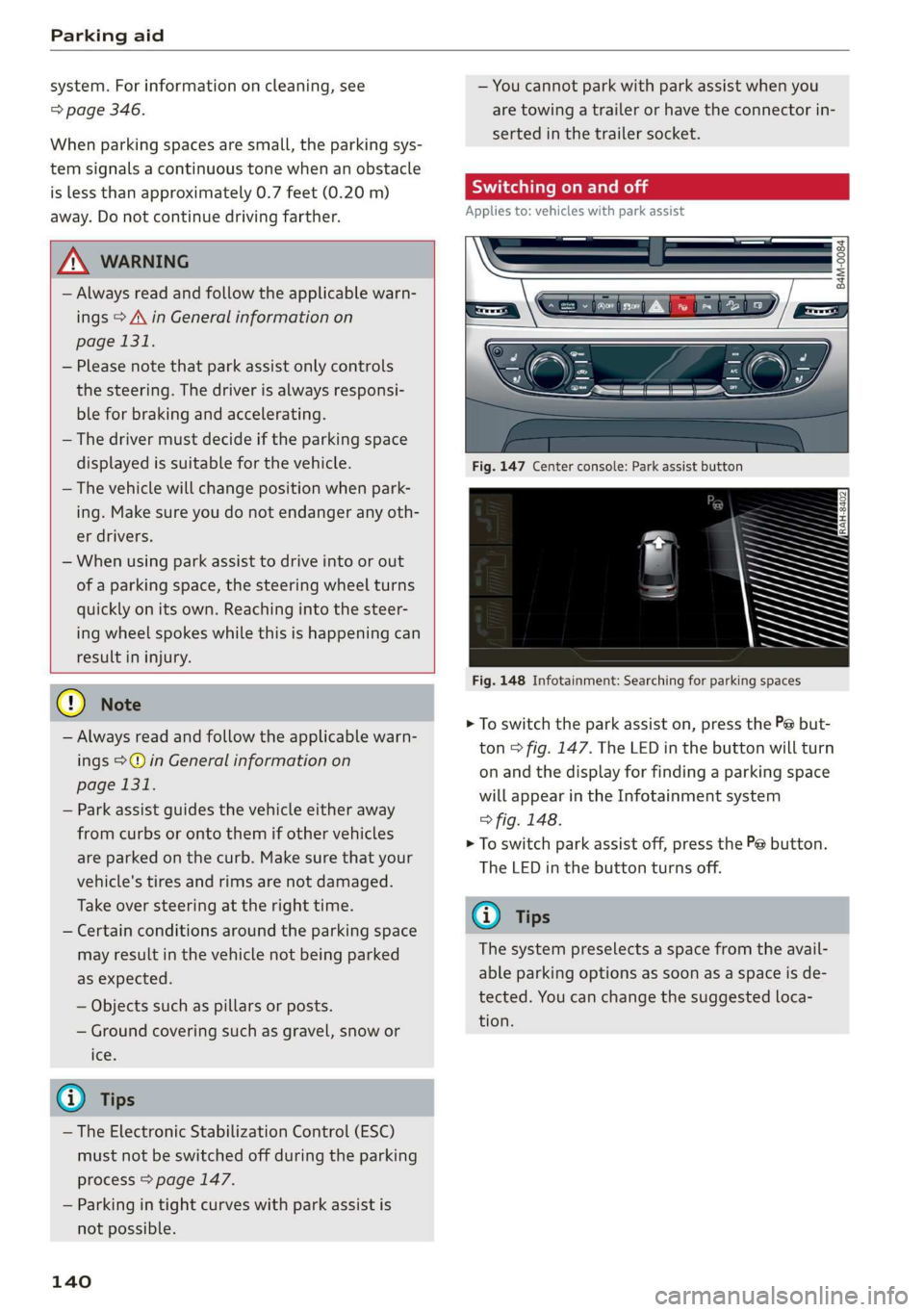
Fig.147Centerconsole:Parkassistbutton
Fig.148Infotainment:Searchingforparkingspaces
>Toswitchtheparkassiston,pressthePebut-
ton>fig.147.The LEDinthebuttonwillturn
onandthedisplayforfindingaparkingspace
willappearintheInfotainmentsystem
>fig.148.
>Toswitchparkassistoff,pressthePebutton.
TheLEDinthebuttonturnsoff.
G)Tips
Thesystempreselectsaspacefromtheavail-
ableparkingoptionsassoonasaspaceisde-
tected.Youcanchangethesuggestedloca-
tion.
Page 143 of 394
4M0012721BG
Parkingaid
Parkingspacesearch
Appliesto:vehicleswithparkassist
Fig.150Infotainment:indicatortocontinuedrivinginre-
verse
Parallelparkingisdescribedhere.Theprocessis
thesameforperpendicularparking.
Searchingforparkingspaces
>Driveforwardtotherowofparkingspacesata
lowspeed.Forthebestparkingresults,theve-
hicleshould beapproximately3feet(1m)from
therowofparkingspaces.
>Theparkingspacesearchisfirstdoneonone
sideofthelane.Toswitchthesideforthepark-
ingspacesearch,activatetheturnsignalfor
thatside.
Selectingtheparkingspace
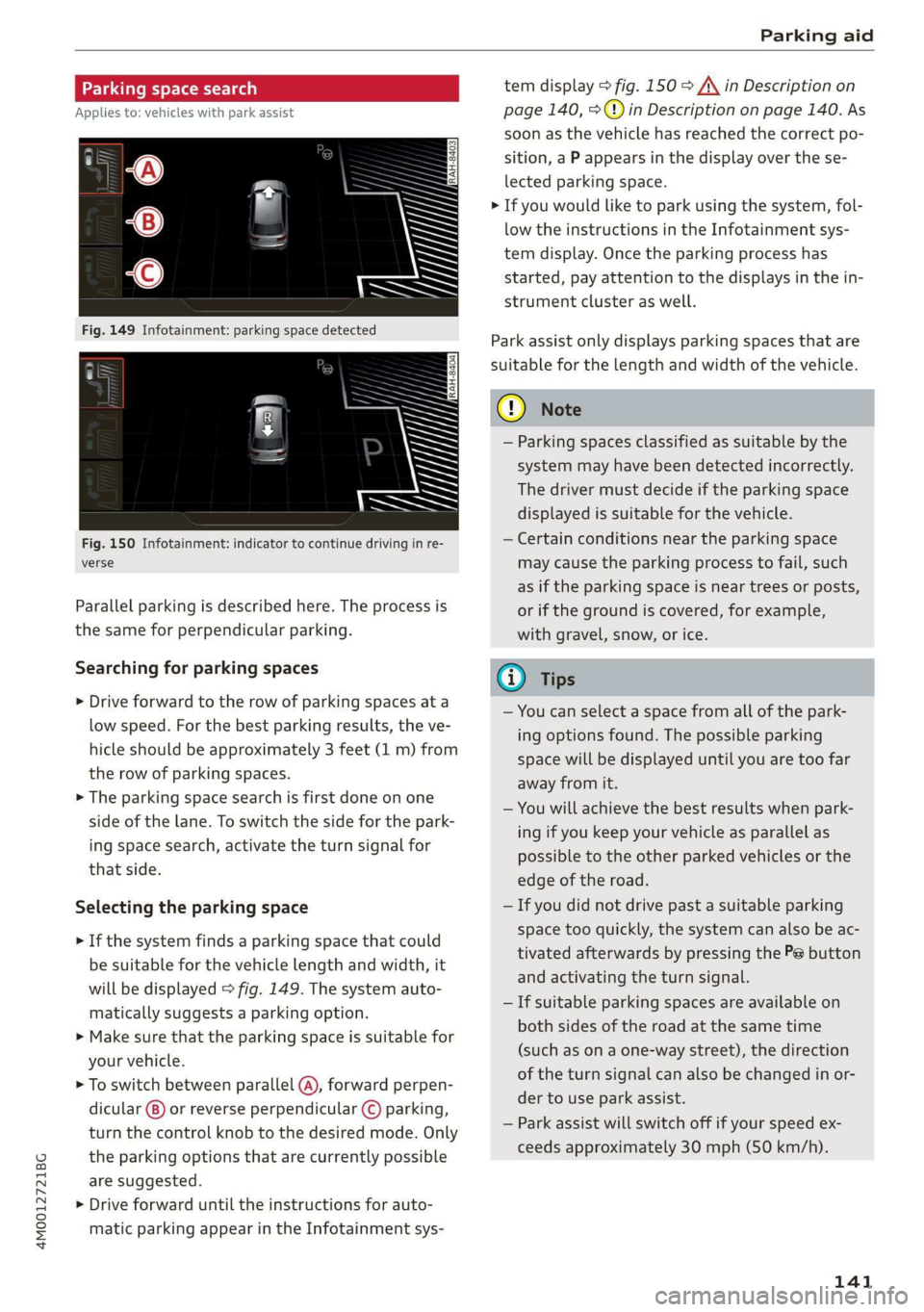
>Ifthesystemfindsaparkingspacethatcould
besuitableforthevehiclelengthandwidth,it
willbedisplayed>fig.149.Thesystemauto-
maticallysuggestsaparkingoption.
>Makesurethattheparkingspaceissuitablefor
yourvehicle.
>Toswitchbetweenparallel(@),forwardperpen-
dicular()or reverseperpendicular©parking,
turnthecontrolknobtothedesiredmode.Only
theparkingoptionsthatarecurrentlypossible
aresuggested.
>Driveforwarduntiltheinstructionsforauto-
maticparkingappearintheInfotainmentsys-
temdisplay>fig.150>A\inDescriptionon
page140,>@)inDescriptiononpage140.As
soonasthevehiclehas reachedthecorrectpo-
sition,aPappearsinthedisplayoverthese-
lectedparkingspace.
>Ifyouwouldliketoparkusingthesystem,fol-
lowtheinstructionsintheInfotainmentsys-
temdisplay.Oncetheparkingprocesshas
started,payattentiontothedisplaysinthein-
strumentclusteraswell.
Parkassistonlydisplaysparkingspacesthatare
suitableforthelengthandwidthofthevehicle.
@)Note
—Parkingspacesclassifiedassuitablebythe
systemmayhavebeendetectedincorrectly.
Thedrivermustdecideiftheparkingspace
displayedissuitableforthevehicle.
—Certainconditionsnear theparkingspace
maycausetheparkingprocesstofail, such
asiftheparkingspaceisneartreesorposts,
orifthegroundiscovered,forexample,
withgravel,snow,orice.
@)Tips
—Youcanselectaspacefromallofthepark-
ingoptionsfound.Thepossibleparking
spacewillbedisplayeduntilyouaretoofar
awayfromit.
—Youwillachievethebestresultswhenpark-
ingifyoukeepyourvehicleasparallelas
possibletotheotherparkedvehiclesorthe
edgeoftheroad.
—Ifyoudidnotdrivepastasuitableparking
space tooquickly,thesystemcanalsobeac-
tivatedafterwardsbypressingthePebutton
andactivatingtheturnsignal.
—Ifsuitableparkingspacesareavailableon
bothsidesoftheroadatthesametime
(such asonaone-waystreet),thedirection
oftheturnsignalcanalsobechangedinor-
dertouseparkassist.
—Parkassistwillswitchoffifyourspeedex-
ceedsapproximately30mph(50km/h).
141
Page 166 of 394
MultiMediaInterface
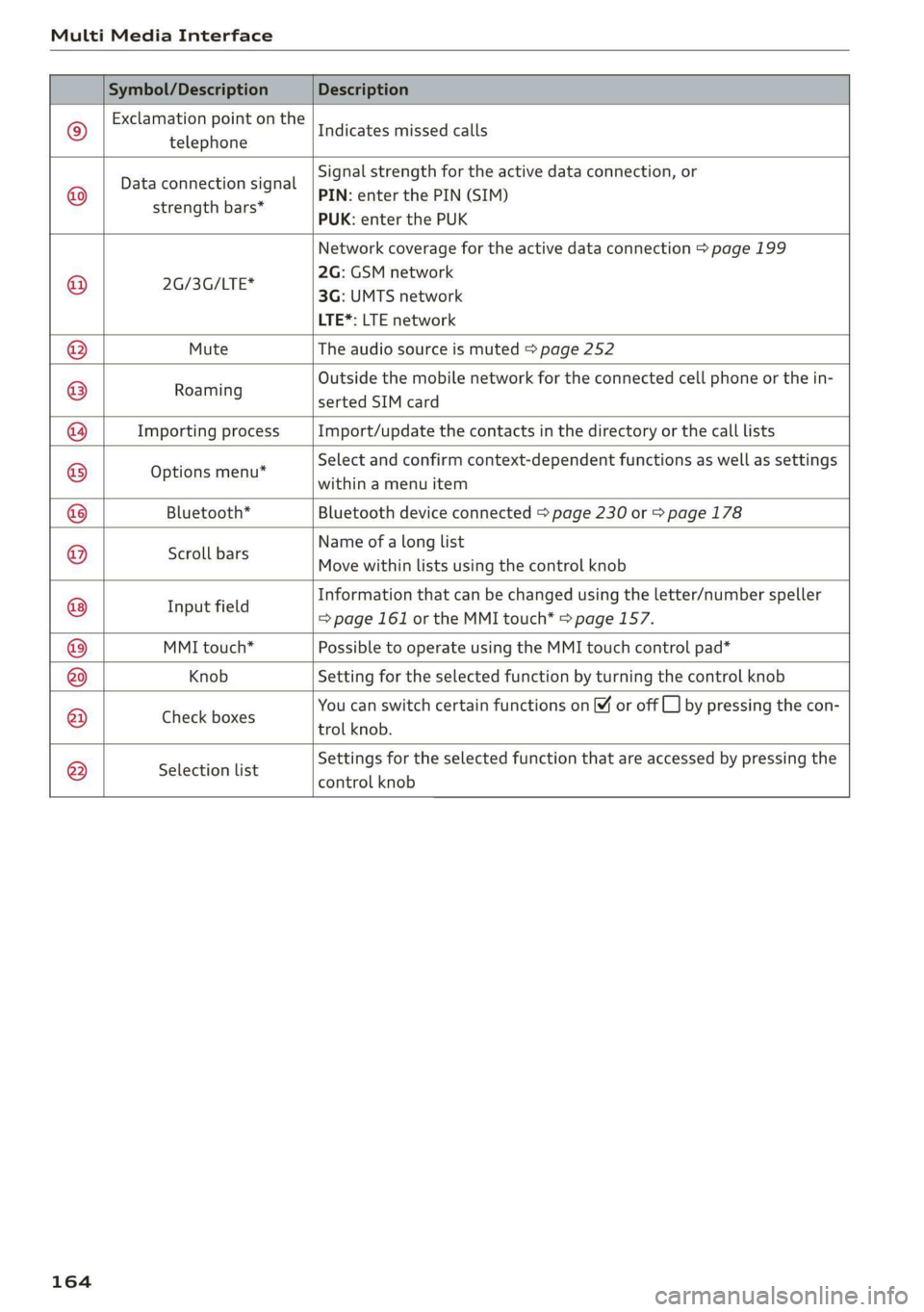
Symbol/DescriptionDescription
©
Exclamationpointonthe
telephone
Indicatesmissedcalls
©
Dataconnectionsignal
strengthbars*
Signalstrengthfortheactivedataconnection,or
PIN:enterthePIN(SIM)
PUK:enterthePUK
Networkcoveragefortheactivedataconnection>page199
2G:GSMnetwork
x
aSSeTIE3G:UMTSnetwork
LTE*:LTEnetwork
MuteTheaudiosourceismuted>page252
:Outside themobilenetworkfortheconnectedcellphoneorthein-
Roaming
sertedSIMcard
ImportingprocessImport/updatethecontactsinthedirectoryorthecalllists
Optionsmenu*
Selectandconfirmcontext-dependentfunctionsaswellas settings
withinamenuitem
Bluetooth*Bluetoothdeviceconnected>page230or>page178
Scrollbars
Nameofalonglist
Movewithinlistsusingthecontrolknob
®
|
©
|@|
©
|©)
©
|O|
©
Informationthatcanbechangedusingtheletter/numberspeller
aie=page161ortheMMItouch*=page157.
MMItouch*PossibletooperateusingtheMMItouchcontrolpad*
KnobSettingfortheselectedfunctionbyturningthecontrolknob
; 3 ;SF5
CheckboxesYoucanswitchcertainfunctionson[¥oroffL_]bypressingthecon
trolknob.
®
|
®
|O|©
Selectionlist
Settingsfortheselectedfunctionthatareaccessedbypressingthe
controlknob
164