hitch AUDI Q7 2019 Owner´s Manual
[x] Cancel search | Manufacturer: AUDI, Model Year: 2019, Model line: Q7, Model: AUDI Q7 2019Pages: 394, PDF Size: 105.97 MB
Page 137 of 394

4M0012721BG
Parkingaid
—Onlyuse therearviewcameratoassistyouif
itshowsagood,clearpicture.Forexample,
theimagemaybeaffectedbythesunshin-
ingintothelens,dirtonthelens,orifthere
isamalfunction.
—Usetherearviewcameraonlyiftheluggage
compartmentlidiscompletelyclosed.Make
sureanyobjectsyoumayhavemountedon
theluggagecompartmentliddonotblock
therearviewcamera.
— Thecameralensenlargesanddistortsthe
fieldofvision.Theobjectappearsbothal-
teredandinaccurateonthescreen.
—Incertainsituations,peopleorobjectsin
thedisplayappearcloserorfartheraway:
—Forobjectsthatdonottouchtheground,
suchasthebumperofaparkedvehicle,a
trailerhitchortherearofatruck.Donot
use the
orientationlinesinthiscase.
—Ifdrivenfromalevelsurfaceontoanin-
cline,oradownwardslope.
—Ifdriventowardprotrudingobjects.
—Ifthevehicleiscarryingtoomuchloadin
therear.
—Appliesto:vehicleswithairsuspension:the
accuracyoftheorientationlinesandblue
surfacesdecreaseswhenthevehicleis
raised/lowered>page127.
@)Note
—Alwaysreadandfollowtheapplicablewarn-
ings>@inGeneralinformationon
page131.
— Theorange-coloredorientationlinesinthe
Infotainmentdisplayshowthevehiclepath
basedonthesteeringwheelangle.The
front ofthevehicleswingsoutmorethan
therearofthevehicle.Maintainplentyof
distanceso thatanexteriormirrororacor-
nerofthevehicledoesnotcollidewithany
obstacles.
@)Tips
Thereisnodistancewarningfortherearand
thesides*whentrailertowingmodeisdetect-
ed.Thefrontsensorsremainactivated.The
visualdisplayswitchestotrailermode.The
rearviewcameraimagewillnotshowtheori-
entationlinesandthebluesurfaces.Thereis
noguaranteethefunctionswillswitchoff
whenusingaretrofittedtrailerhitch.
SicaReRol
Appliesto:vehicleswithrearviewcamera
Switchingonandoff
Requirement:thevehiclespeedmustbeunder
approximately6mph(10km/h).
>PressthePvbuttoninthecenterconsole
=>page133,fig.130.Ashortconfirmation
tonesoundsandtheLEDinthebuttonturns
on.
Switchingonautomatically
Thesystemswitchesonautomaticallywhenre-
versegearisengagedwhiletheengineisrun-
ning.Abrieftonewillsound.
Switchingoffautomatically
Thesystemswitchesoffautomaticallywhendriv-
ingforwardfasterthan6mph(10km/h).
Perpendicularparking
Applies
to:vehicleswithrearviewcamera
Thisviewmaybeusedwhenparkinginagarage
orinaparkingspace.
Fig.135Infotainmentsystem:aligningthevehicle
135
Page 138 of 394
Parkingaid
>Turn theInfotainmentsystemonandshiftinto
reversegear.
>Theorangeorientationlines@showthevehi-
cle'sdirectionoftravel.Turn thesteeringwheel
untiltheorangeorientationlinesalignwiththe
parkingspace>fig.134.Usethemarkings@)
tohelpyouestimatethedistancetoanobsta-
cle.Eachmarkingrepresentsapproximately3ft
(1m).Thebluearearepresentsanextensionof
thevehicle'soutlinebyapproximately16ft(5
meters)totherear.
>Whiledrivinginreversegear,adjustthesteer-
ingwheelangletofittheparkingspaceusing
theorangeorientationlinesforassistance>A\
inGeneralinformationonpage134,>@)in
Generalinformationonpage135.Area@)rep-
resentstherearbumper.Attheverylatest,
stopthevehiclewhentheredorientationline
@bordersanobject.
NirliCimUCW
Appliesto:vehicleswith rearviewcamera/peripheralcameras
andtrailerhitch
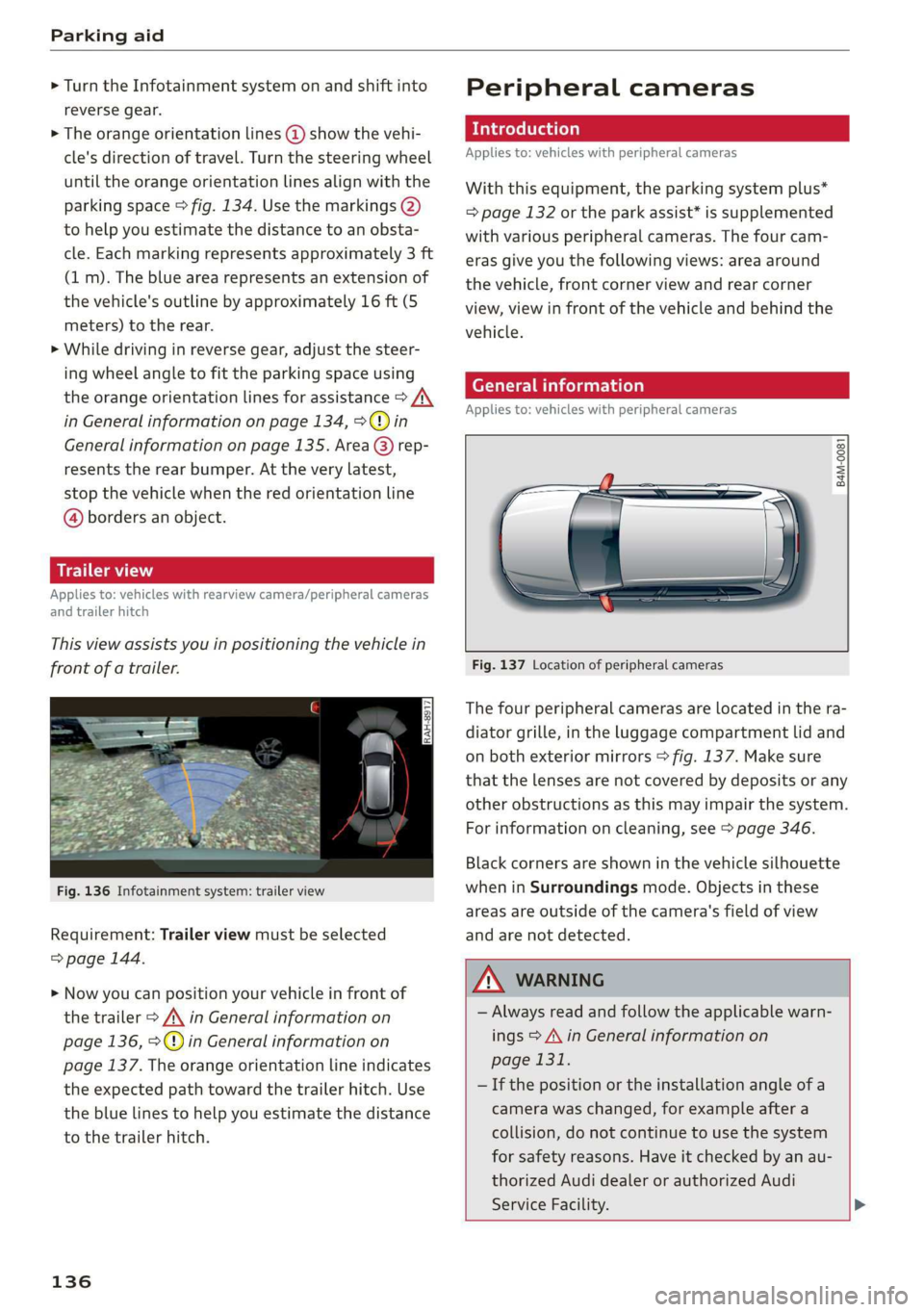
Thisviewassistsyouinpositioningthevehiclein
frontofatrailer.
Fig.136Infotainmentsystem:trailerview
Requirement:Trailerviewmustbeselected
=>page144.
>Nowyoucanpositionyourvehicleinfrontof
thetrailer>/\inGeneralinformationon
page136,>@)inGeneralinformationon
page137.Theorangeorientationlineindicates
theexpectedpathtowardthetrailerhitch.Use
thebluelinestohelpyouestimatethedistance
tothetrailerhitch.
136
Peripheralcameras
Introduction
Appliesto:vehicleswithperipheralcameras
Withthisequipment,theparkingsystemplus*
=page132ortheparkassist*issupplemented
withvariousperipheralcameras.Thefourcam-
erasgiveyouthefollowingviews:areaaround
thevehicle,frontcornerviewandrearcorner
view,viewinfrontofthevehicleandbehindthe
vehicle.
Generalinformation
Appliesto:vehicleswithperipheralcameras
B4M-0081
Fig.137Locationofperipheralcameras
Thefourperipheralcamerasarelocatedinthera-
diatorgrille,intheluggagecompartmentlidand
onbothexteriormirrors>fig.137.Makesure
thatthelensesarenotcoveredbydepositsorany
otherobstructionsasthismayimpairthesystem.
Forinformationoncleaning,see>page346.
Blackcornersareshowninthevehiclesilhouette
wheninSurroundingsmode.Objectsinthese
areasareoutsideofthecamera'sfieldofview
andarenotdetected.
Z\WARNING
—Alwaysreadandfollowtheapplicablewarn-
ings>A\inGeneralinformationon
page131.
—Ifthepositionortheinstallationangleofa
camerawaschanged,forexampleaftera
collision,donotcontinuetouse thesystem
forsafety reasons.Haveitcheckedby anau-
thorizedAudidealerorauthorizedAudi
ServiceFacility.>
Page 139 of 394
4M0012721BG
Parkingaid
—Keepinmindthattheimageinthedisplayis
incorrectiftheexteriormirrorhousinghas
beenmovedoutofplace.
—Onlyuse theimagesprovidedby thecamera
ontherearofthevehiclewhentheluggage
compartmentlidiscompletelyclosed.Make
sureanyobjectsyoumayhavemountedon
theluggagecompartmentliddonotblock
therearviewcamera.
— Theareaaroundthevehicleisshownusing
thecameraimages.Thevehicleimageis
shownbythesystem.Objectsandobstacles
abovethecameraarenotdisplayed.
—Cameralensesenlargeanddistortthefield
ofvision.Theobjectsappearbothaltered
andinaccurateonthescreen.
—Appliesto:vehicleswithairsuspension:the
accuracyoftheorientationlinesandblue
surfacesdecreaseswhenthevehicleis
raised/lowered>page127.
@)Note
—Alwaysreadandfollowtheapplicablewarn-
ings>@inGeneralinformationon
page131.
— TheInfotainmentdisplayshowsthedirec-
tioninwhichtherearofthevehicleistravel-
ingbasedonthesteeringwheelangle.The
frontofthevehicleswings outmorethan
therearofthevehicle.Maintainplentyof
distanceso thatanexteriormirrororacor-
nerofthevehicledoesnotcollidewithany
obstacles.
G)Tips
—Ifthe2/&8/
grayedout,thenthepowerexteriormirrors
werefoldedinorthedriver'sdoor/front
passenger'sdoor/luggagecompartmentlid
wasopened.
—Thereisnodistancewarningfortherear
andthesides*whentrailertowingmodeis
detected.Thefrontsensorsremainactivat-
ed.Thevisualdisplayswitchestotrailer
mode.Therearviewcameraimagewillnot
showtheorientationlinesandthebluesur-
faces.Thereisnoguaranteethefunctions
willswitchoffwhenusingaretrofittedtrail-
erhitch.
ice
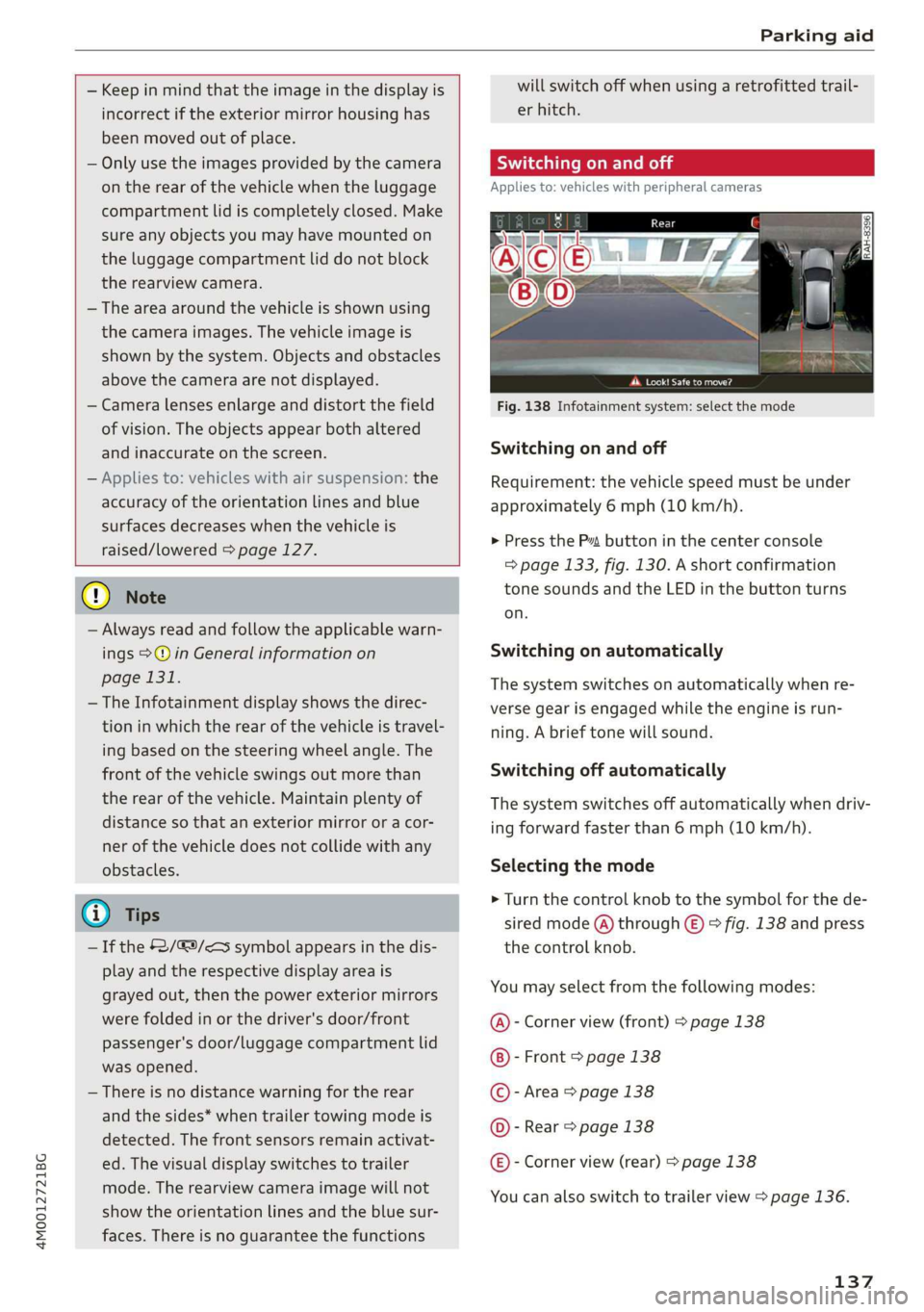
Appliesto:vehicleswithperipheralcameras
Fig.138Infotainmentsystem:selectthemode
Switchingonandoff
Requirement:thevehiclespeedmustbeunder
approximately6mph(10km/h).
>PressthePsbuttoninthecenterconsole
=>page133,fig.130.Ashortconfirmation
tonesoundsandtheLEDinthebuttonturns
on.
Switchingonautomatically
Thesystemswitchesonautomaticallywhenre-
versegearisengagedwhiletheengineisrun-
ning.Abrieftonewillsound.
Switchingoffautomatically
Thesystemswitchesoffautomaticallywhendriv-
ingforwardfasterthan6mph(10km/h).
Selectingthemode
>Turn thecontrolknobtothesymbolforthede-
siredmode(A)through©)>fig.138andpress
thecontrolknob.
Youmayselectfromthefollowingmodes:
@-Cornerview(front)>page138
-Front>page138
©-Area>page138
@©-Rear>page138
@®-Cornerview(rear)>page138
Youcanalsoswitchtotrailerview>page136.
137
Page 341 of 394
4M0012721BG
Wheels
Yoursafetyandthat ofyourpas-
sengersalsodependsonmaking
surethatloadlimitsarenotex-
ceeded.Vehicleload includesev-
erybodyandeverythinginandon
thevehicle.Theseloadlimitsare
technicallyreferredto asthevehi-
cle’sGrossVehicleWeightRating
(“GVWR”).
The“GVWR”includestheweight
ofthebasicvehicle,allfactoryin-
stalledaccessories,afulltankof
fuel,oil,coolantandotherfluids
plusmaximumload.Themaxi-
mumloadincludesthenumberof
passengersthatthevehicleisin-
tendedtocarry(“seatingcapaci-
ty”)withanassumedweightof
150lbs.(68kg)foreachpassen-
geratadesignatedseatingposi-
tionandthetotalweightofany
luggageinthevehicle.Ifyoutow
atrailer,theweightofthetrailer
hitchandthetongueweightof
the loadedtrailermustbeinclud-
edaspartofthevehicleload.
TheGrossAxleWeightRating
(“GAWR’”)isthemaximumload
thatcanbeappliedateachofthe
vehicle’stwoaxles.
Thefactthatthereisanupper
limittoyourvehicle’sGrossVehi-
cleWeightRatingmeansthatthe
totalweightofwhateverisbeing
carriedinthevehicle(including
theweightofatrailerhitchand
thetongueweightoftheloaded
trailer)islimited.Themorepas-
sengersinthevehicle orpassen-
gerswhoareheavierthanthe
standardweightsassumedmean
thatlessweightcanbecarriedas
luggage.
TheGrossVehicleWeightRating
andtheGrossAxleWeightRating
arelistedonthesafetycompli-
ancestickerlabellocatedonthe
driver’ssideB-pillar.
Z\WARNING
Overloadingavehiclecancause
lossofvehiclecontrol,acrash
orotheraccident,seriousper-
sonalinjury,andevendeath.
—Carryingmoreweightthan
yourvehiclewasdesignedto
carrywillpreventthevehicle
fromhandlingproperlyandin-
creasetheriskofthelossof
vehiclecontrol.
—Thebrakesonavehiclethat
hasbeenoverloadedmaynot
beabletostopthevehicle
withinasafedistance.
339
Page 342 of 394
Wheels
—Tiresonavehiclethathas
beenoverloadedcanfailsud-
denly,includingablowoutand
suddendeflation,causingloss
ofcontrolandacrash.
—Alwaysmakesurethattheto-
talloadbeingtransported-
includingtheweightofatrail-
erhitchandthetongue
weightofaloadedtrailer-
doesnotmakethevehicle
heavierthanthevehicle’s
GrossVehicleWeightRating.
Determiningcorrectload
limit
Usetheexamplebelowtocalcu-
latethetotalweightofthepas-
sengersandluggageorother
thingsthatyouplantotransport
sothatyoucanmakesurethat
yourvehiclewillnotbeoverload-
ed.
StepsforDeterminingCorrect
LoadLimit
1.Locatethestatement“THE
COMBINEDWEIGHTOFOCCU-
PANTSANDCARGOSHOULD
NEVEREXCEEDXXXKGORXXX
LBS”onyourvehicle’splacard
(tireinflationpressurelabel)
=>page336,fig.271.
340
2.Determinethecombined
weightofthedriverandpas-
sengersthatwillberidingin
yourvehicle.
.Subtractthecombinedweight
ofthedriverandpassengers
from“XXX”kilogramsor“XXX”
poundsshownonthestick-
er>page336,fig.271.
.Theresultingfigureequalsthe
availableamountofcargoand
uggageloadcapacity.Forex-
ample,ifthe“XXX”amount
equals1400lbs.andtherewill
befive150lbs.passengersin
yourvehicle,theamountof
availablecargoandluggage
oadcapacityis650lbs.
(1400-750(5x150)=650
bs.)
.Determinethecombined
weightofluggageandcargo
beingloadedonthevehicle.
Thatweightmaynotsafelyex-
ceedtheavailablecargoand
uggageloadcapacitycalculat-
edinStep4.
.Ifyourvehiclewillbetowinga
trailer,loadfromyourtrailer
willbetransferredtoyourvehi-
cle.Consultthismanualtode-
terminehowthisreducesthe>
Page 364 of 394
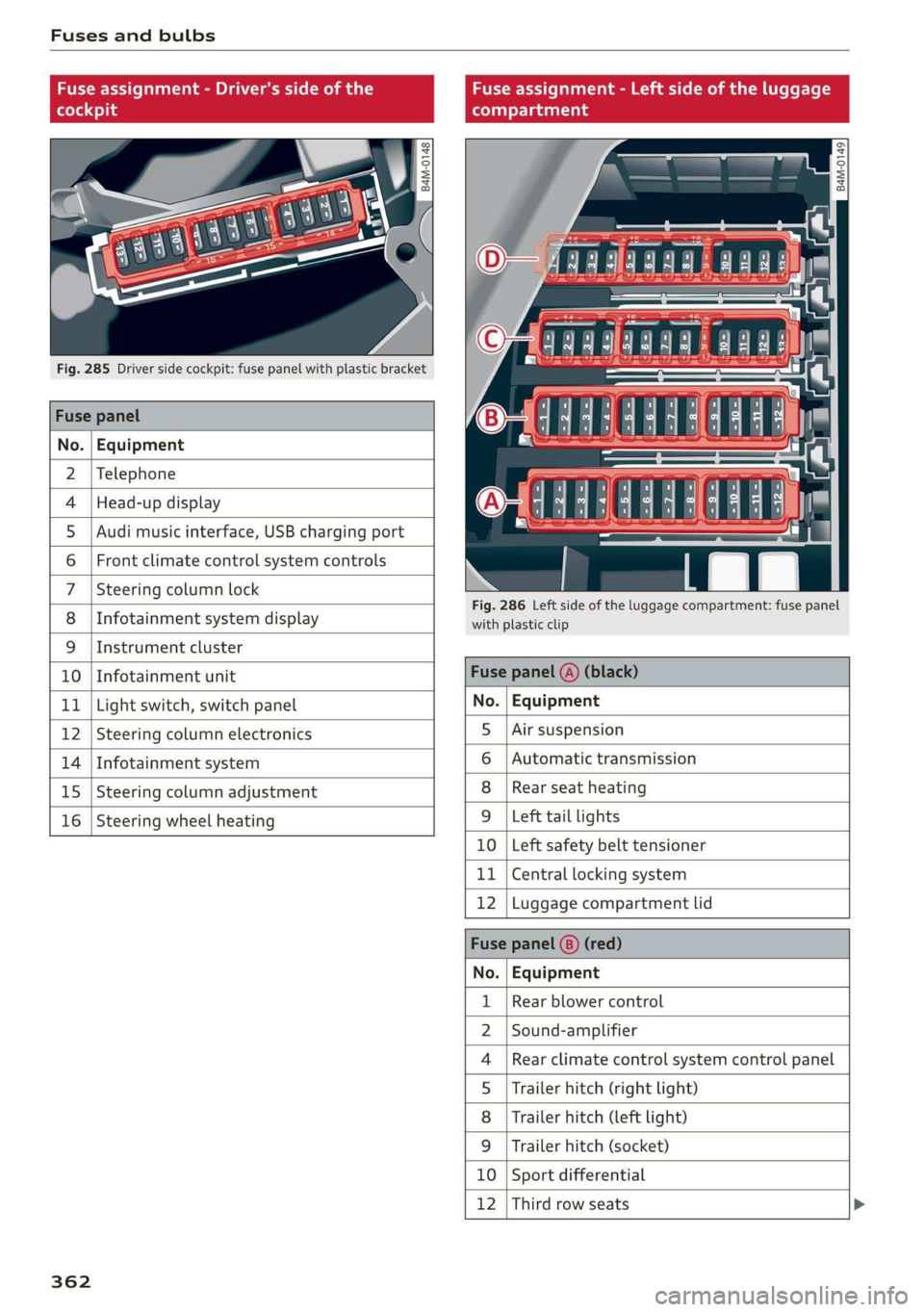
Fusesandbulbs
Fuseassignment-Driver'ssideoftheFuseassignment-Leftsideoftheluggage
(hole4)9(oTnaleats
@ag g
22
= =
aa
Fig.285Driversidecockpit:fusepanelwithplasticbracket
Fusepanel
No.|Equipment
2|Telephone
4|Head-updisplayO4444:4449858
5|Audimusicinterface,USBchargingport=
6|Frontclimatecontrolsystemcontrols|
7|Steeringcolumnlock
; .Fig.286Leftsideof theluggagecompartment:fusepanel
8
|
InfotainmentsystemdisplayCanney
9|Instrumentcluster
10
|
InfotainmentunitFusepanel(A)(black)
11
|
Lightswitch,switchpanelNo.|Equipment
12
|
Steeringcolumnelectronics5
|
Airsuspension
14
|
Infotainmentsystem6
|
Automatictransmission
15
|
Steeringcolumnadjustment8
|
Rearseatheating
16
|
Steeringwheelheating9
|
Lefttaillights
10|Leftsafetybelttensioner
11|Centrallockingsystem
12|Luggagecompartmentlid
Fusepanel(8)(red)
No.|Equipment
Rearblowercontrol
Sound-amplifier
Rearclimatecontrolsystemcontrolpanel
Trailerhitch(rightlight)
Trailerhitch(leftlight)
Trailerhitch(socket)
10|Sportdifferential
12|Thirdrowseats
WO;a;m|)AINI
FR
362
Page 369 of 394
4M0012721BG
Emergencysituations
>Pressthecapinwardwithbrief,strong pressure
>fig.289.Thecapwillloosenfromthe
bumper.
> Or:pullsharplyonthetriminthedirectionof
thearrowtoremove>fig.290.
>Tightenthetowingloopinthethreadedopen-
inguntilitstopsandthentightenitwitha
wheelwrench.
> Afterusing,placethetowingloopbackinthe
vehicletoolkit.
ZAWARNING
Ifthetowingloopisnot tighteneduntilit
stopswheninstalling,thethreadsmaybe
pulledoutwhentowingthevehicleandresult
inanaccident.
@)Note
Thetrimisattachedtothebumperwithsev-
eralhooks.Toreducetheriskofdamage,do
notuseanyforcewhenremovingandinstal-
ling.
Reartowingloop
2
is gz
==oa
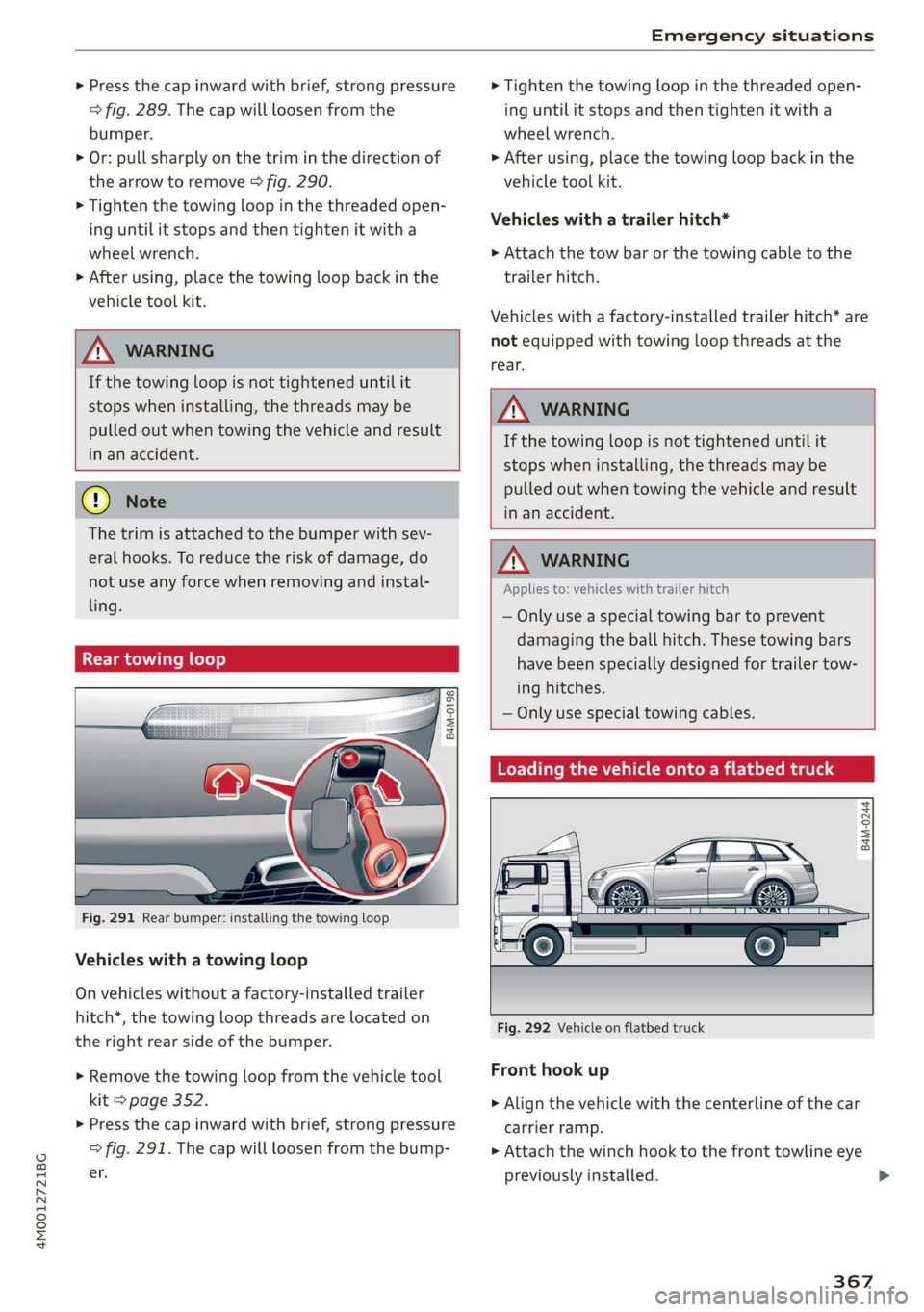
Fig.291Rearbumper:installingthetowingloop
Vehicleswithatowingloop
Onvehicleswithoutafactory-installedtrailer
hitch*,thetowingloopthreadsarelocatedon
therightrear sideofthebumper.
>Removethetowingloopfromthevehicletool
kit>page352.
>Pressthecapinwardwithbrief,strong pressure
>fig.291.Thecapwillloosenfromthebump-
er.
>Tightenthetowingloopinthethreadedopen-
inguntilitstopsandthentightenitwitha
wheelwrench.
>Afterusing,placethetowingloopbackinthe
vehicletoolkit.
Vehicleswithatrailerhitch*
>Attachthetowbarorthetowingcabletothe
trailerhitch.
Vehicleswithafactory-installedtrailerhitch*are
notequippedwithtowingloopthreadsatthe
rear.
ZAWARNING
Ifthetowingloopisnottighteneduntilit
stopswheninstalling,thethreadsmaybe
pulledoutwhentowingthevehicleandresult
inanaccident.
Z\WARNING
Appliesto:vehicleswithtrailerhitch
—Onlyuseaspecialtowingbartoprevent
damagingtheballhitch.Thesetowingbars
havebeenspeciallydesignedfortrailertow-
inghitches.
—Onlyusespecialtowingcables.
CelleAMRe-Miciaeltemaata4
B4M-0244
Fig.292Vehicleonflatbedtruck
Fronthookup
>Alignthevehiclewiththecenterlineofthecar
carrierramp.
>Attachthewinchhooktothefronttowlineeye
previouslyinstalled.>
367