phone AUDI Q7 2019 Owner´s Manual
[x] Cancel search | Manufacturer: AUDI, Model Year: 2019, Model line: Q7, Model: AUDI Q7 2019Pages: 394, PDF Size: 105.97 MB
Page 172 of 394
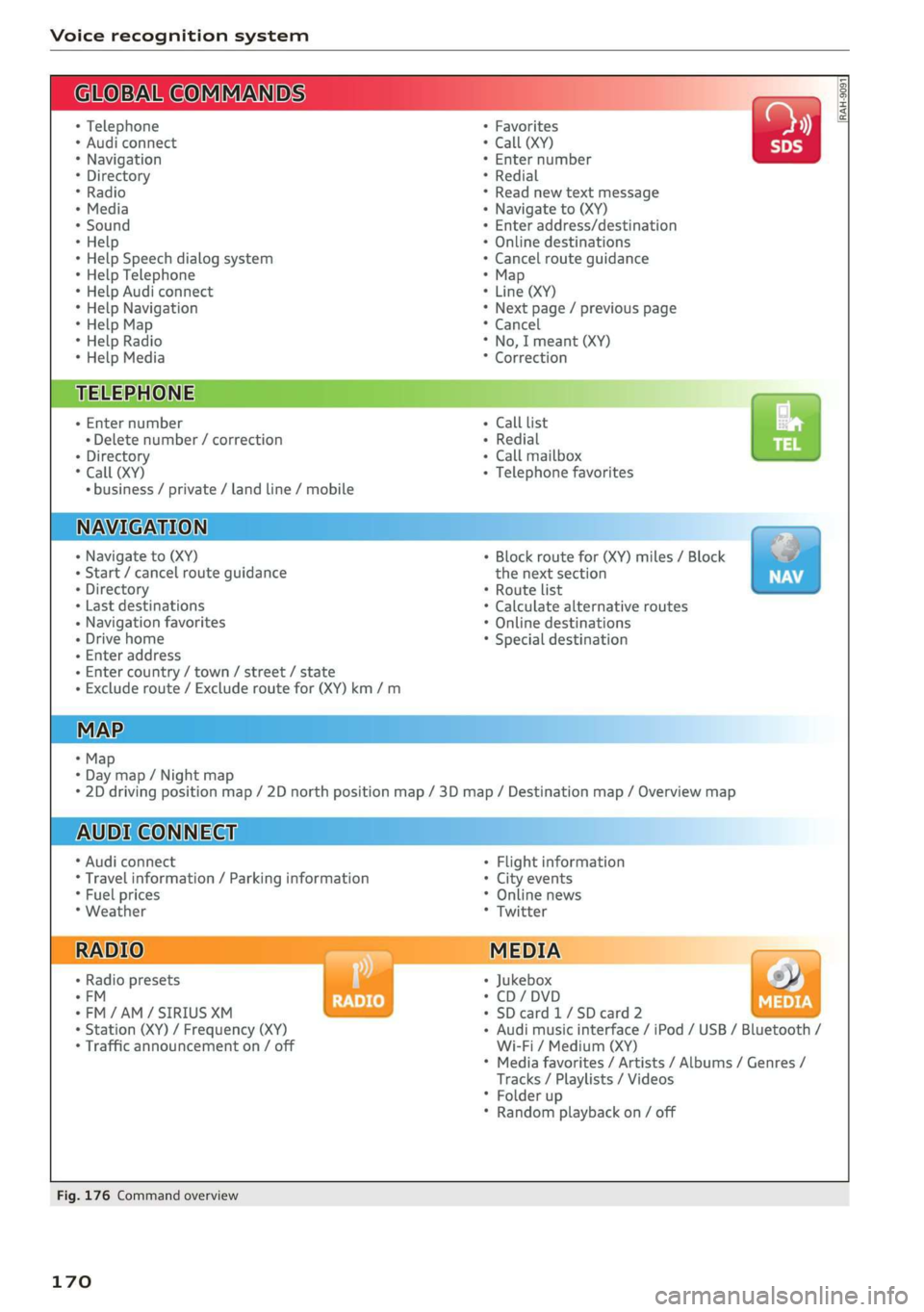
Voicerecognitionsystem
GLOEVALCOMMANDS
+Telephone
*Audiconnect
*Navigation
*Directory
*Radio
+Media
+Sound
*Help
*HelpSpeechdialogsystem
*HelpTelephone
*HelpAudiconnect
*HelpNavigation
*HelpMap
*HelpRadio
*HelpMedia
TELEPHONE
+Enternumber
+Deletenumber/correction
+Directory
*Call(XY)
«business/private/landline/mobile
NAVIGATION
+Navigateto(XY)
+Start/cancelrouteguidance
+Directory
+Lastdestinations
+Navigationfavorites
+Drivehome
+Enteraddress
+Entercountry/town/street/state
+Excluderoute/Excluderoutefor(XY)km/m
MAP.
+Map
*Daymap/Nightmap
AUDICONNECT
*Audiconnect
*Travelinformation/Parkinginformation
*Fuelprices
*Weather
+Radiopresets
-FM
*FM/AM/SIRIUSXM
+Station(XY)/Frequency(XY)
*Trafficannouncementon/off
+Favorites
*Call(XY)
*Enternumber
*Redial
*Readnewtextmessage
+Navigateto(XY)
+Enteraddress/destination
*Onlinedestinations
*Cancelrouteguidance
*Map
+Line(XY)
*Next page/previouspage
*Cancel
*No,Imeant(XY)
*Correction
Calllist
Redial
Callmailboxba
Telephonefavorites
+Block routefor(XY)miles/Block
thenextsection
*Routelist
*Calculatealternativeroutes
*Onlinedestinations
*Specialdestination
*2Ddrivingpositionmap/2Dnorthpositionmap/3Dmap/Destinationmap/Overviewmap
Flightinformation
*Cityevents
*Onlinenews
*Twitter
Jukebox6}
CD/DVDPay
SDcard1/SDcard2
Audimusicinterface/iPod/USB/Bluetooth/
Wi-Fi/Medium(XY)
Mediafavorites/Artists/Albums/Genres/
Tracks/Playlists/Videos
Folderup
Randomplaybackon/off
RAH-9091
Fig.176Commandoverview
170
Page 173 of 394
4M0012721BG
Voicerecognitionsystem
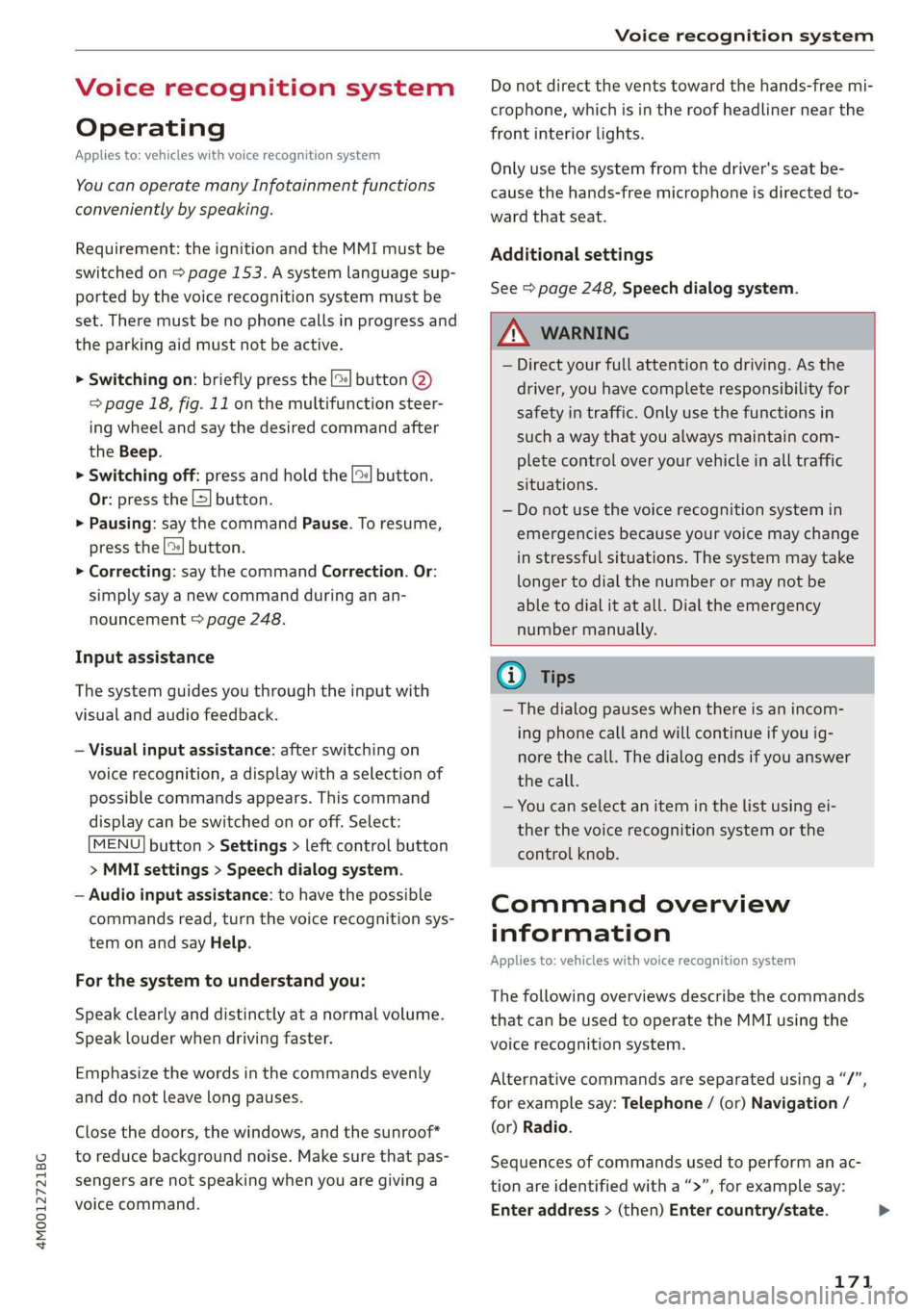
Voicerecognitionsystem
Operating
Appliesto:vehicleswithvoicerecognitionsystem
YoucanoperatemanyInfotainmentfunctions
convenientlybyspeaking.
Requirement:theignitionandtheMMImustbe
switched
on>page153.Asystemlanguagesup-
portedbythevoicerecognitionsystemmustbe
set.Theremustbenophonecallsinprogressand
theparkingaidmustnotbeactive.
>Switchingon:brieflypressthe[2]button@)
=>page18,fig.11onthemultifunctionsteer-
ing
wheelandsaythedesiredcommandafter
theBeep.
>Switchingoff:pressandholdthe|]button.
Or:pressthe|S]button.
>Pausing:saythecommandPause.Toresume,
pressthe|]button.
>Correcting:saythecommandCorrection.Or:
simplysayanewcommandduringanan-
nouncement>page248.
Inputassistance
Thesystemguidesyouthroughtheinputwith
visualandaudiofeedback.
—Visualinputassistance:afterswitchingon
voicerecognition,adisplaywithaselectionof
possiblecommandsappears.Thiscommand
displaycanbe switchedonoroff.Select:
MENU]button>Settings>leftcontrolbutton
>MMIsettings>Speechdialogsystem.
—Audioinputassistance: tohavethepossible
commandsread,turnthevoicerecognitionsys-
temonandsayHelp.
Forthesystemtounderstandyou:
Speakclearlyanddistinctly atanormalvolume.
Speaklouderwhendrivingfaster.
Emphasizethewordsinthecommandsevenly
anddonotleavelongpauses.
Closethedoors,thewindows,andthesunroof*
toreducebackgroundnoise.Makesurethatpas-
sengersarenotspeakingwhenyouaregivinga
voicecommand.
Donotdirecttheventstowardthehands-freemi-
crophone,whichisintheroofheadlinernearthe
frontinteriorlights.
Onlyusethesystemfromthedriver'sseatbe-
causethehands-freemicrophoneisdirectedto-
wardthatseat.
Additionalsettings
See>page248,Speechdialogsystem.
ZAWARNING
—Directyourfullattentiontodriving.Asthe
driver,youhavecompleteresponsibilityfor
safetyintraffic.Only usethefunctionsin
suchawaythatyoualwaysmaintaincom-
pletecontroloveryourvehicleinalltraffic
situations.
—Donotuse thevoicerecognitionsystemin
emergenciesbecauseyourvoicemaychange
instressfulsituations.Thesystemmaytake
longertodialthenumberormaynot be
abletodialitatall.Dialtheemergency
numbermanually.
G)Tips
—Thedialogpauseswhenthereisanincom-
ingphonecallandwillcontinueifyouig-
norethecall.Thedialogendsifyouanswer
thecall.
—Youcanselectan iteminthelistusingei-
therthevoicerecognitionsystemorthe
controlknob.
Commandoverview
information
Appliesto:vehicleswithvoicerecognitionsystem
Thefollowingoverviewsdescribethecommands
thatcan beusedtooperatetheMMIusingthe
voicerecognitionsystem.
Alternativecommandsareseparatedusinga“/”,
forexamplesay:Telephone/(or)Navigation/
(or)Radio.
Sequencesofcommandsusedtoperformanac-
tionareidentifiedwitha“>”,forexamplesay:
Enteraddress>(then)Entercountry/state.
171
Page 174 of 394
Voicerecognitionsystem
Themajorityshownaremaincommands.Thises.ForaBusinessaddress,youcanalsosaybusi-
systemalsorecognizessynonymsincertaincas-ness,work,officeor attheoffice.
Commands
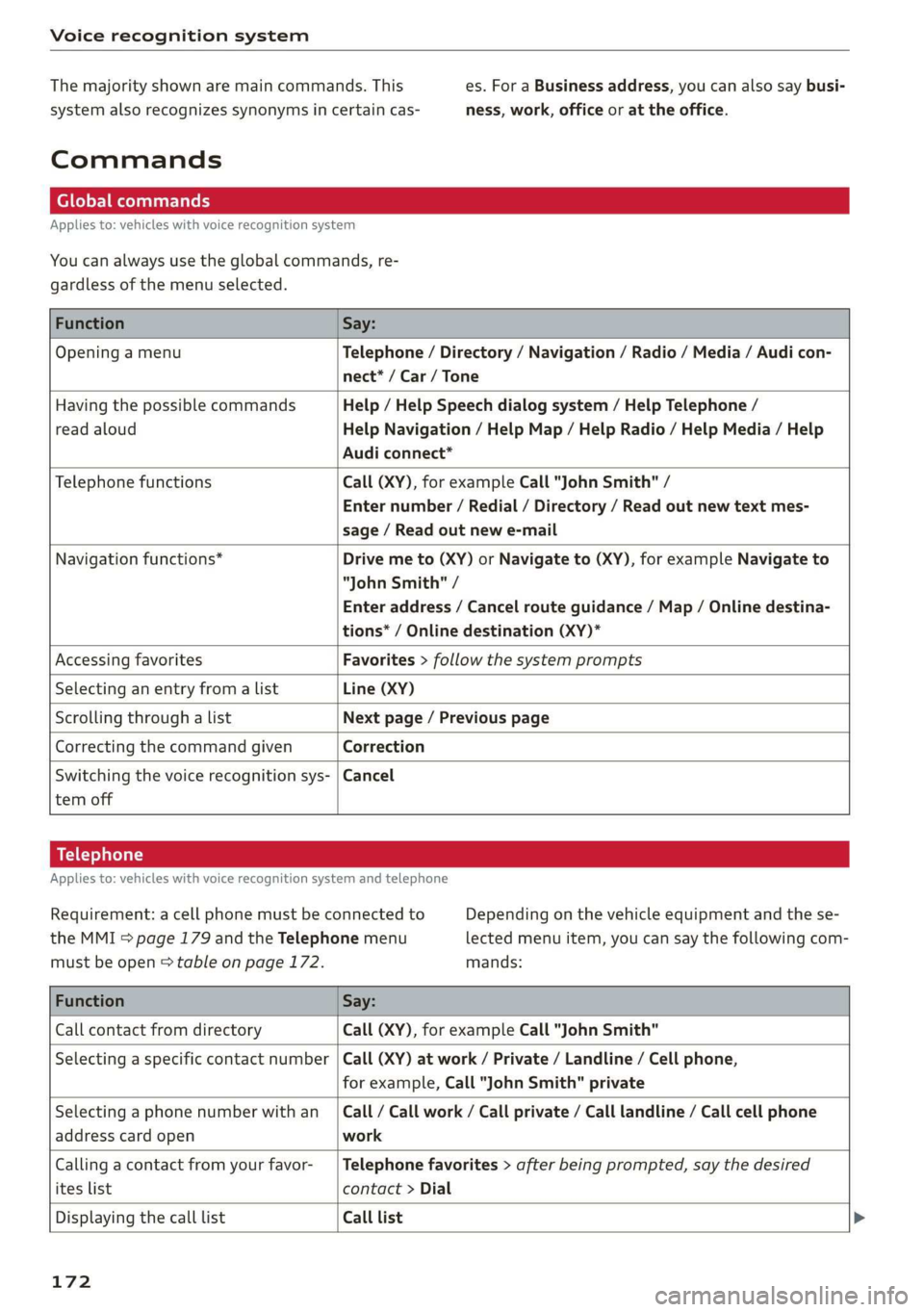
Globalcommands
Appliesto:vehicleswithvoicerecognitionsystem
Youcanalwaysuse theglobalcommands,re-
gardlessofthemenuselected.
FunctionSay:
OpeningamenuTelephone/Directory/Navigation/Radio/Media/Audicon-
nect*/Car/Tone
HavingthepossiblecommandsHelp/HelpSpeechdialogsystem/HelpTelephone/
readaloudHelpNavigation/HelpMap/HelpRadio/HelpMedia/Help
Audiconnect*
TelephonefunctionsCall(XY),forexampleCall"JohnSmith"/
Enternumber/Redial/Directory/Readoutnewtextmes-
sage/Readoutnewe-mail
Navigationfunctions*Drivemeto(XY)orNavigateto(XY),forexampleNavigateto
"JohnSmith"/
Enteraddress/Cancelrouteguidance/Map/Onlinedestina-
tions*/Onlinedestination(XY)*
AccessingfavoritesFavorites>follow thesystemprompts
SelectinganentryfromalistLine(XY)
Scrollingthroughalist Nextpage/Previouspage
CorrectingthecommandgivenCorrection
Switchingthevoicerecognitionsys-|Cancel
temoff
Telephone
Appliesto:vehicleswithvoicerecognitionsystem andtelephone
Requirement:acellphonemustbeconnectedtoDependingonthevehicleequipmentandthese-
theMMI>page179andtheTelephonemenulectedmenuitem,youcansaythefollowingcom-
mustbeopen>tableonpage172.mands:
FunctionSay:
CallcontactfromdirectoryCall(XY),forexampleCall"JohnSmith"
Selectinga specificcontactnumber|Call(XY)atwork/Private/Landline/Cellphone,
forexample,Call"JohnSmith"private
Selectingaphonenumberwithan_|Call/Call work/Callprivate/Calllandline/Callcellphone
addresscardopenwork
Callingacontactfromyourfavor-|Telephonefavorites>afterbeingprompted,saythedesired
iteslistcontact>Dial
DisplayingthecalllistCalllist
172
Page 175 of 394
4M0012721BG
Voicerecognitionsystem
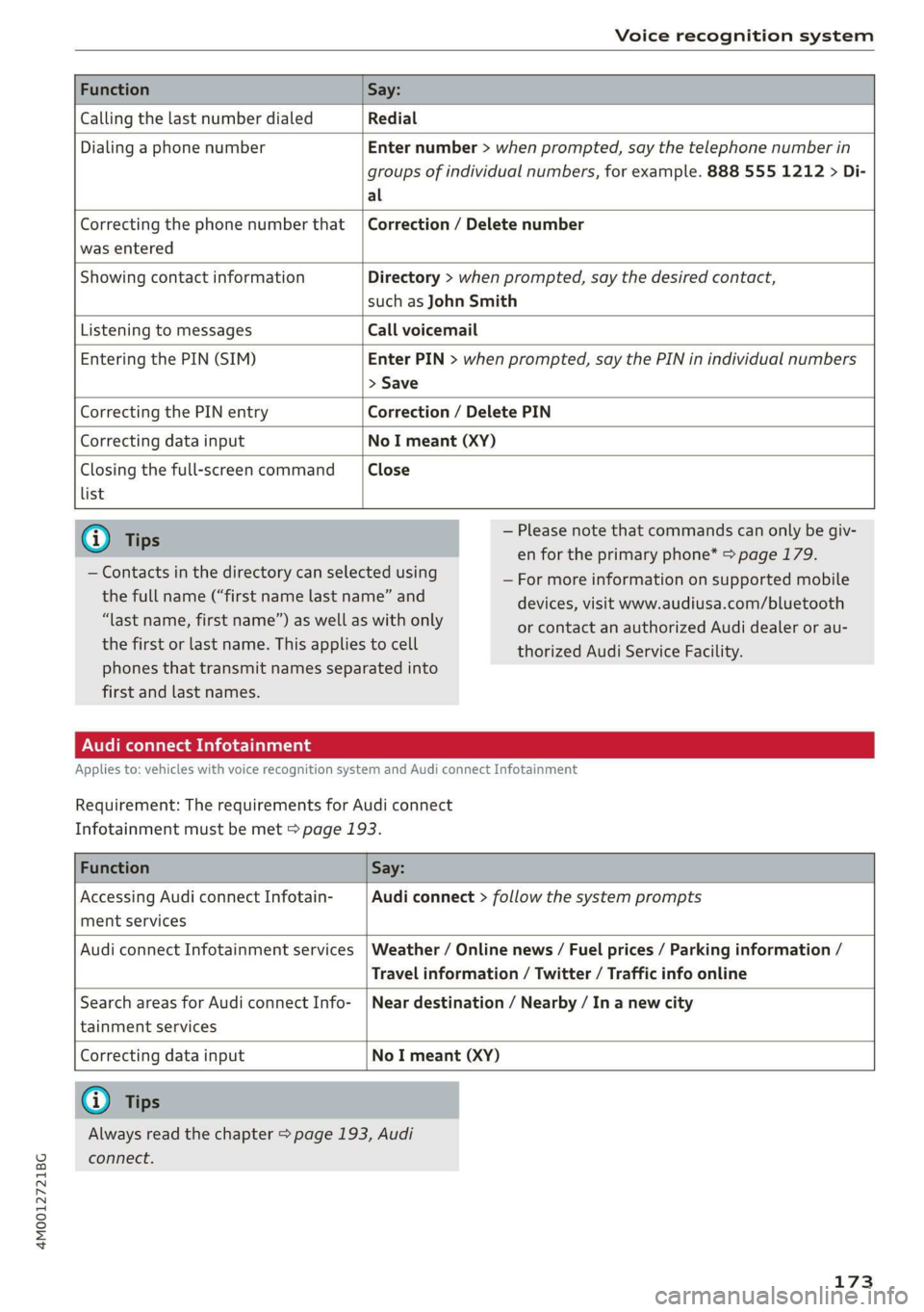
FunctionSay:
CallingthelastnumberdialedRedial
DialingaphonenumberEnternumber>whenprompted,saythetelephonenumberin
groupsofindividualnumbers,forexample.8885551212>Di-
al
Correctingthephonenumberthat|Correction/Deletenumber
wasentered
ShowingcontactinformationDirectory>whenprompted,saythedesiredcontact,
suchasJohnSmith
ListeningtomessagesCallvoicemail
EnteringthePIN(SIM)EnterPIN>whenprompted,saythePINinindividualnumbers
>Save
CorrectingthePINentryCorrection/DeletePIN
CorrectingdatainputNoImeant(XY)
Closingthefull-screencommandClose
list
G)Tips—Pleasenotethatcommandscanonlybegiv-
enfortheprimaryphone*>page179.
—Formoreinformationonsupportedmobile
devices,visitwww.audiusa.com/bluetooth
orcontactanauthorizedAudidealeror au-
thorizedAudiServiceFacility.
—Contactsinthedirectorycanselectedusing
thefullname(“firstnamelastname”and
“lastname,firstname”)aswellaswithonly
thefirstorlastname.Thisappliestocell
phonesthattransmit namesseparatedinto
firstandlastnames.
AudiconnectInfotainment
Appliesto:vehicleswithvoicerecognitionsystem andAudiconnectInfotainment
Requirement:
TherequirementsforAudiconnect
Infotainmentmustbemet>page193.
FunctionSay:
AccessingAudiconnectInfotain-Audiconnect>followthesystemprompts
mentservices
AudiconnectInfotainmentservices|Weather/Onlinenews/Fuelprices/Parkinginformation/
Travelinformation/Twitter/Trafficinfoonline
SearchareasforAudiconnectInfo-|Neardestination/Nearby/In anewcity
tainmentservices
CorrectingdatainputNoImeant(XY)
@Tips
Alwaysreadthechapter>page193,Audi
connect.
173
Page 176 of 394
Voicerecognitionsystem
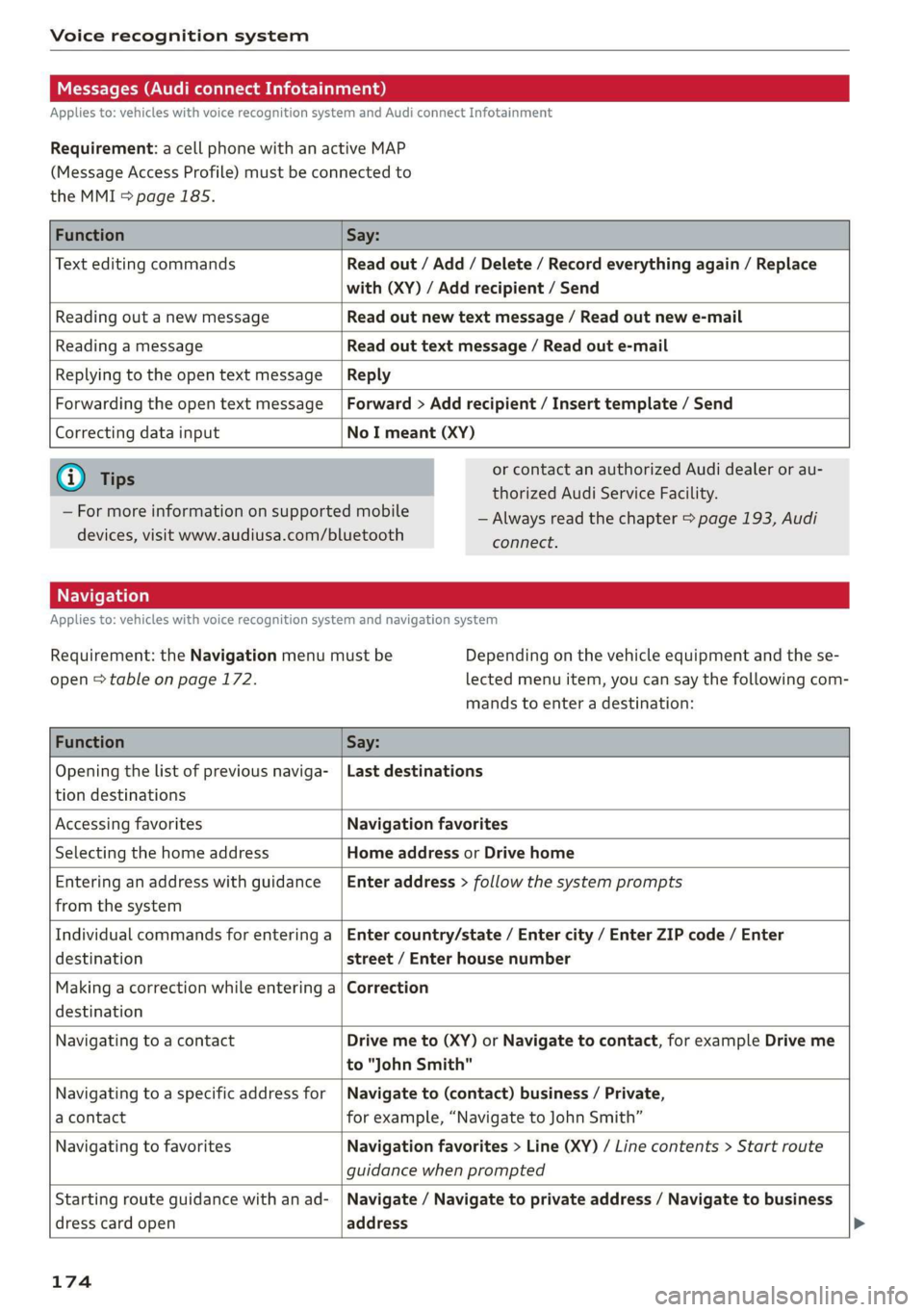
Messages(AudiconnectInfotainment)
Appliesto:vehicleswithvoicerecognitionsystem andAudiconnectInfotainment
Requirement:acellphonewithanactiveMAP
(MessageAccessProfile)mustbeconnectedto
theMMI>page185.
FunctionSay:
TexteditingcommandsReadout/Add/Delete/Recordeverythingagain/Replace
with(XY)/Addrecipient/Send
ReadingoutanewmessageReadoutnewtextmessage/Readoutnewe-mail
ReadingamessageReadouttextmessage/Readoute-mail
ReplyingtotheopentextmessageReply
ForwardingtheopentextmessageForward>Addrecipient/Inserttemplate/Send
Correctingdatainput
NoImeant(XY)
@)Tips
—Formoreinformationonsupportedmobile
devices,visitwww.audiusa.com/bluetooth
orcontactanauthorizedAudidealerorau-
thorizedAudiServiceFacility.
—Alwaysreadthechapter>page193,Audi
connect.
Appliesto:vehicleswithvoicerecognitionsystem andnavigationsystem
Requirement:theNavigationmenumustbe
open>tableonpage172.
Dependingonthevehicleequipmentandthese-
lectedmenuitem,youcansaythefollowingcom-
mandstoenteradestination:
FunctionSay:
Openingthelistofpreviousnaviga-
tiondestinations
Lastdestinations
AccessingfavoritesNavigationfavorites
SelectingthehomeaddressHomeaddressorDrivehome
Enteringan addresswithguidance
fromthesystem
Enteraddress>followthesystemprompts
Individualcommandsforenteringa
destination
Entercountry/state/Entercity/EnterZIPcode/Enter
street/Enterhousenumber
Makingacorrectionwhileenteringa
destination
Correction
NavigatingtoacontactDrivemeto(XY)orNavigatetocontact,forexampleDriveme
to"JohnSmith"
Navigatingtoa specificaddressfor
acontact
Navigateto(contact)business/Private,
forexample,“NavigatetoJohnSmith”
NavigatingtofavoritesNavigationfavorites>Line(XY)/Linecontents>Start route
guidancewhenprompted
Startingrouteguidancewithanad-
dresscardopen
Navigate/Navigatetoprivateaddress/Navigatetobusiness
address
174
Page 178 of 394
Voicerecognitionsystem
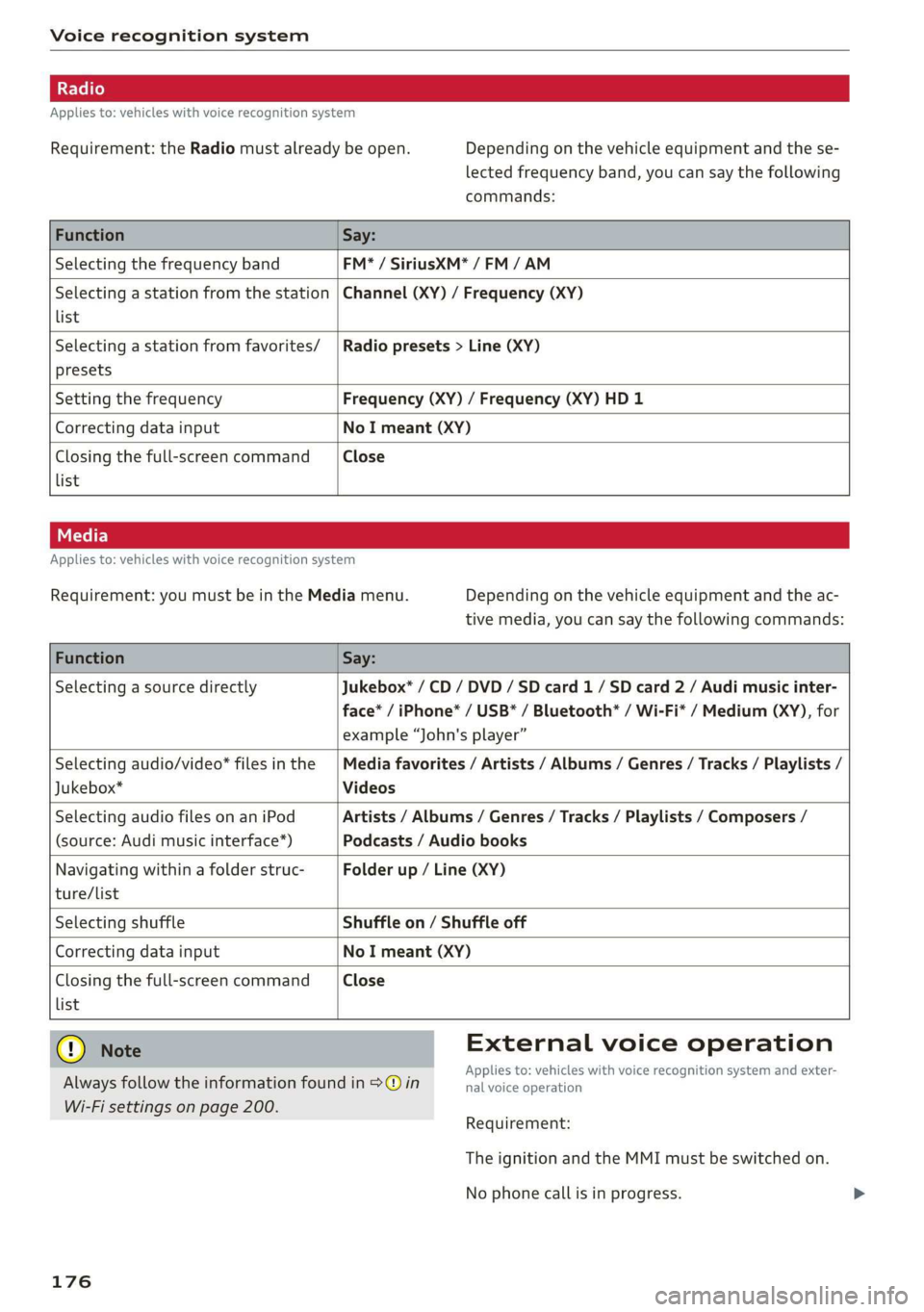
Appliesto:vehicleswithvoicerecognitionsystem
Requirement:theRadiomustalreadybeopen.Dependingonthevehicleequipmentandthese-
lectedfrequencyband,youcansaythefollowing
commands:
FunctionSay:
SelectingthefrequencybandFM*/SiriusXM*/FM/AM
Selectingastationfromthestation
list
Channel(XY)/Frequency(XY)
Selectingastationfromfavorites/
presets
Radiopresets>Line(XY)
SettingthefrequencyFrequency(XY)/Frequency(XY)HD1
CorrectingdatainputNoImeant(XY)
Closingthefull-screencommand
list
Close
Appliesto:vehicleswithvoicerecognitionsystem
Requirement:youmustbeintheMediamenu.Dependingonthevehicleequipmentandtheac-
tivemedia,youcansaythefollowingcommands:
FunctionSay:
SelectingasourcedirectlyJukebox*/CD/DVD/SDcard1/ SDcard2/Audimusicinter-
face*/iPhone*/USB*/Bluetooth*/Wi-Fi*/Medium(XY),for
example“John'splayer”
Selectingaudio/video*filesinthe
Jukebox*
Mediafavorites/Artists/Albums/Genres/Tracks/Playlists/
Videos
SelectingaudiofilesonaniPod
(source:Audimusicinterface*)
Artists/Albums/Genres/Tracks/Playlists/Composers/
Podcasts/Audiobooks
Navigatingwithinafolderstruc-
ture/list
Folderup/Line(XY)
list
SelectingshuffleShuffleon/Shuffleoff
CorrectingdatainputNoImeant(XY)
Closingthefull-screencommandClose
@®)Note
Alwaysfollowtheinformationfoundin>@in
Wi-Fisettingsonpage200.
176
Externalvoiceoperation
Appliesto:vehicleswithvoicerecognitionsystem andexter-
nalvoiceoperation
Requirement:
TheignitionandtheMMImustbe switchedon.
Nophonecallisinprogress.
Page 179 of 394
4M0012721BG
Voicerecognitionsystem
TheparkingaidaswellastheAudivoicerecogni-
tionsystemmustnotbeactive.
AcellphonemustbeconnectedtotheMMIwith
theHandsfreeprofile>page178.
Themobiledevicebeingconnectedmusthave
voicecontrolthatcanbecontrolledexternally.
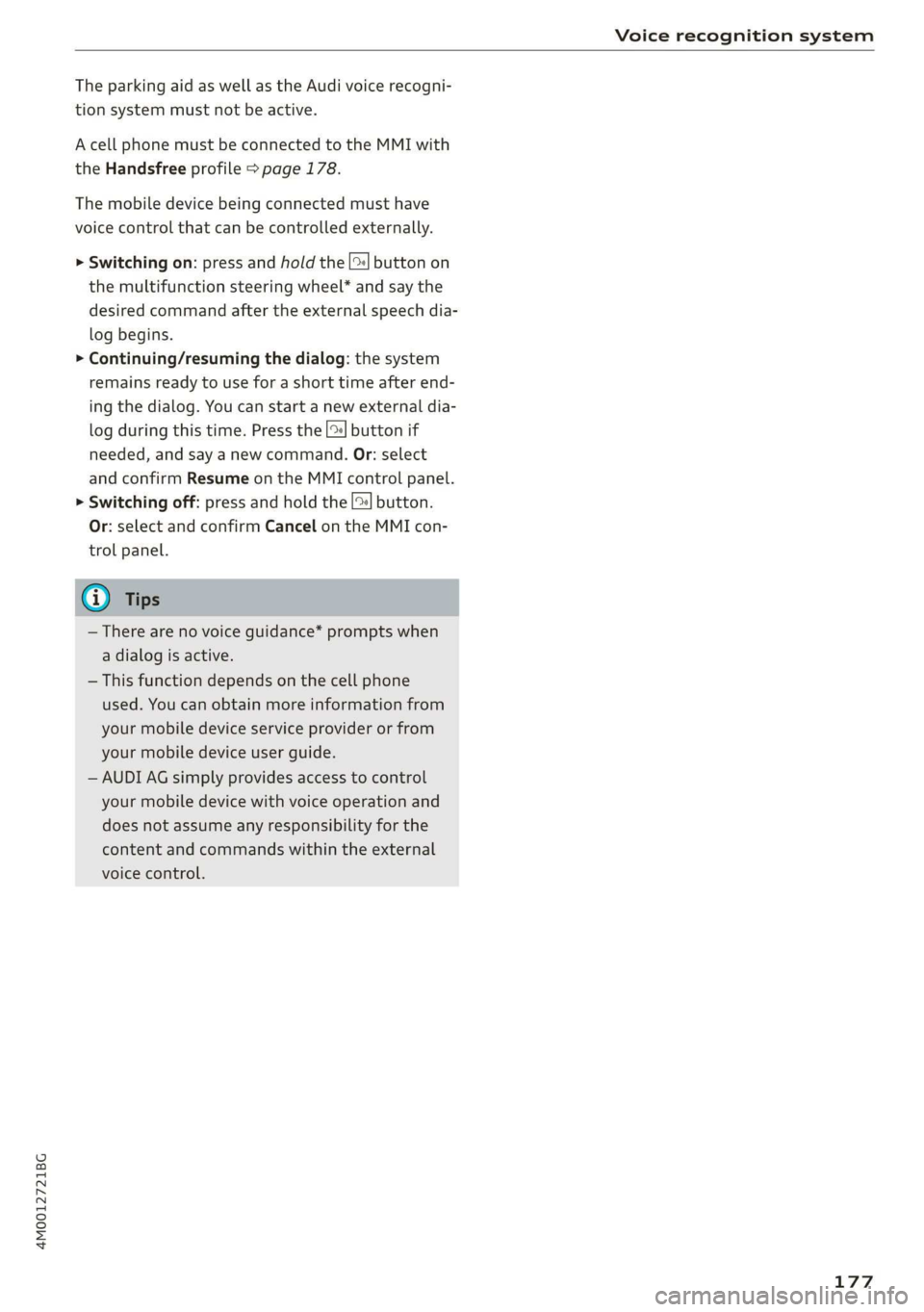
>»Switchingon:pressandholdthe||buttonon
themultifunctionsteeringwheel* andsaythe
desiredcommandaftertheexternalspeechdia-
logbegins.
>Continuing/resumingthedialog:thesystem
remainsreadytouseforashorttimeafterend-
ingthedialog.Youcanstartanewexternaldia-
logduringthistime. Pressthe[2]buttonif
needed,andsayanewcommand.Or:select
andconfirmResumeontheMMIcontrolpanel.
>Switchingoff:pressandholdthe|™]button.
Or:selectandconfirmCancelontheMMIcon-
trolpanel.
G)Tips
—Therearenovoiceguidance*promptswhen
adialogisactive.
—Thisfunctiondependsonthecellphone
used.Youcanobtainmoreinformationfrom
yourmobiledeviceserviceproviderorfrom
yourmobiledeviceuserguide.
—AUDIAGsimplyprovidesaccesstocontrol
yourmobiledevicewithvoiceoperationand
doesnotassumeanyresponsibilityforthe
contentandcommandswithintheexternal
voicecontrol.
177
Page 180 of 394

Telephone
Telephone
Introduction
Appliesto:vehicleswithtelephone
Tomakephonecallsinyourvehicleusingthe
MMI,connectyourcellphonetotheMMIvia
Bluetooth.
Handsfree
Afteryouhaveconnectedyourmobiledevice to
theMMIviaBluetooth,youcan use thehandsfree
systemandoperatetelephonefunctionsthrough
yourMMI.Youcanmakecallsusingtheantenna
onyourmobiledevice.
Withthe Audiphonebox’,callsaremadeusing
theexteriorantennaonthevehicle.Usingtheex-
ternalantennahelpswhenthereisalowsignal
andalsoprovidesbetterreceptionquality
=>page181.
ZA\WARNING
—Medicalexpertswarnthatmobiledevices
caninterferewiththefunctionofpacemak-
ers.Alwaysmaintainaminimumdistanceof
about8inches(20cm)betweenthecell
phoneantennaandthepacemaker.
—Donotcarrythemobiledeviceinapocket
directlyoverthepacemakerwhenthe
phoneisswitchedon.
—Switchthemobiledeviceoffimmediately
ifyoususpectitmaybeinterferingwith
thepacemaker.
—Donotuse thevoicerecognitionsystem*
=page171inemergenciesbecauseyour
voicemaychangeinstressfulsituations.The
systemmaytakelongertodialthenumber
ormaynotbeabletodialitatall.Dialthe
emergencynumbermanually.
—Switchyourmobiledeviceoffinareaswhere
thereisariskofanexplosion.Theseloca-
tionsarenotalwaysclearlymarked.This
mayincludegasstations,fuelandchemical
storagefacilitiesortransportvehicles,orlo-
cationswherefuelvapors(such aspropane
orgasolinevaporinvehiclesorbuildings),
chemicalsorlargequantitiesofdustparti-
cles(suchasflour,sawdustormetal)may
178
bepresentintheair.Thisalsoappliestoall
otherlocationswhereyouwouldnormally
turnyourvehicleengineoff.
— Thedemandsoftrafficrequireyourfullat-
tention.Alwaysreadthechapter
=>page153,Trafficsafetyinformation.
@)Note
Alwaysfollowtheinformationfoundin>@in
Wi-Fisettingsonpage200.
G)Tips
— TheBluetooth connectionrangeislimited
toinsidethevehicle.Itcanalsobeaffected
bylocalconditionsandinterferencewith
otherdevices.
—TolearnwhichBluetoothconnectionsand
whichofthefunctionsinyourmobiledevice
aresupported,checkwithyourmobilede-
viceserviceproviderorthedatabaseformo-
biledevicesatwww.audiusa.com/
bluetooth.
Setup
ConnectingacellphoneusingBluetooth
Appliesto:vehicleswithtelephone
MyPhone
DoesthisPINmatchtheoneon your
Bluetoothdevice?PIN:967536
Fig.177DisplayingthePINforenteringinthecellphone
Requirement
Thevehiclemustbestationaryandtheignition
mustbeswitchedon.
TheBluetoothsettingsmustbeopenonyour
mobiledeviceduringtheconnectionsetup.
TheBluetoothfunctionandvisibilityoftheMMI
=page250andmobiledevicemustbeswitched
on.
Page 181 of 394
![AUDI Q7 2019 Owner´s Manual 4M0012721BG
Telephone
Themobiledevicethatwillbeconnectedmust
notbeconnectedtoanyotherBluetoothdevice.
TheMMImustnotbeconnectedtoamobilede-
vice.
Connectingamobiledevice
>Select:[MENU]button>Tele](/img/6/40283/w960_40283-180.png "AUDI Q7 2019 Owner´s Manual 4M0012721BG
Telephone
Themobiledevicethatwillbeconnectedmust
notbeconnectedtoanyotherBluetoothdevice.
TheMMImustnotbeconnectedtoamobilede-
vice.
Connectingamobiledevice
>Select:[MENU]button>Tele")
4M0012721BG
Telephone
Themobiledevicethatwillbeconnectedmust
notbeconnectedtoanyotherBluetoothdevice.
TheMMImustnotbeconnectedtoamobilede-
vice.
Connectingamobiledevice
>Select:[MENU]button>Telephone>Connect
mobiledevice>Findnewdevices>Next.The
availableBluetoothdevicesareshownintheIn-
fotainmentsystemdisplay.Orselect:[MENU
button>Settings>leftcontrolbutton>MMI
settings>Connectionmanager©page248.
>Selectandconfirmthedesiredcellphonefrom
thelistofdisplayedBluetoothdevices.
>TheMMIgeneratesaPINforthe connection
setup
>fig.177.
>SelectandconfirmYes.
>»EnterthePINforconnectingonyourcell
phone.Or:whenthePINisdisplayedonyour
cellphone,confirmthePINonyourcellphone
andintheMMI.Thetimeallowedforentering
thePINislimitedtoapproximately30seconds.
>Payattentiontoanyadditionalsystemprompts
displayedonyourcellphone,forexampleifthe
systemshouldconnectautomaticallyinthefu-
ture.Dependingonthecellphone,youmay
havetoconfirmdownloadingthedirectorysep-
arately.
Afterconnectingsuccessfully
Afterconnectingsuccessfully,informationabout
theconnectedprofileswillappear.Youcanalso
changetheprofileslater.Select:[MENU]button>
Settings> leftcontrolbutton>MMIsettings>
Connectionmanager>page248.
Inaddition,thecellphonecontactsareautomat-
icallyloadedintheMMIdirectory.Thisprocess
cantakeseveralminutes,dependingonthenum-
berofcontacts.
Youcanalsomakeyourconnectedcellphonethe
defaultphonebyselectingSetasdefaulttele-
phoneintheConnectionmanager=page250.
@)Note
Alwaysfollow theinformationfoundin>@in
Wi-Fisettingsonpage200.
@Tips
—MakingphonecallsthroughtheMMIisonly
possibleusingtheHandsfreeBluetoothpro-
file.
—Youcanapplyadditionalsettingstocon-
nectedmobiledevicesusingtheConnection
manager>page248.
—YoucanalsosearchfortheMMIonyourmo-
biledeviceusingtheBluetoothdevice
search.
—Youonlyhavetopairyourdeviceonetime.
Bluetoothdevicesthatarealreadypaired
automaticallyconnecttotheMMIwhenthe
Bluetoothfunctionisswitchedon,when
theyarewithinrange,andwhentheignition
isswitchedon.Thelastconnectedmobile
deviceisgivenfirstpriority.
—AuthorizingtheMMIconnectiononyour
mobiledevicewillmakeitpossibletocon-
nectautomatically.
—Payattentiontoanysystempromptsdis-
playedonyourcellphone,forexampleif
thesystemshouldconnectautomaticallyin
thefuture.Dependingonthecellphone,
youmayalsoneedtodownloadthedirecto-
ryandconfirmaccesstoyourtextmessages
separately.
—Whenleavingthevehicle,theBluetooth
connectiontothemobiledevicewillauto
maticallydisconnect.Depending onyour
mobiledevice,phonecallsinprogressmay
beautomaticallyredirectedfromtheMM
toyourmobiledevicesothatyoucan con
tinuethecallon yourphone.
I
—Youcanobtainmoreinformationfromyour
mobiledeviceserviceproviderorfromyo!ur
mobiledeviceuserguide. Forinformation
onusingthetelephone,visitwww.audiusa.
com/bluetoothorcontactanauthorizedAu-
didealerorauthorizedAudiServiceFacili
—Appliesto:vehicleswithoutsecondary
phone:Severalcellphonescanbepaired
ity.
to
theMMI,butonlyonecellphonecanbeac-
tivelyconnectedtotheMMI.
179
Page 182 of 394
Telephone
—Appliesto:vehicleswithoutsecondary
phone:IfaBluetoothdeviceisalreadycon-
nectedtotheMMI,itwillbedisconnected
whenanotherdeviceconnectstotheMMI.
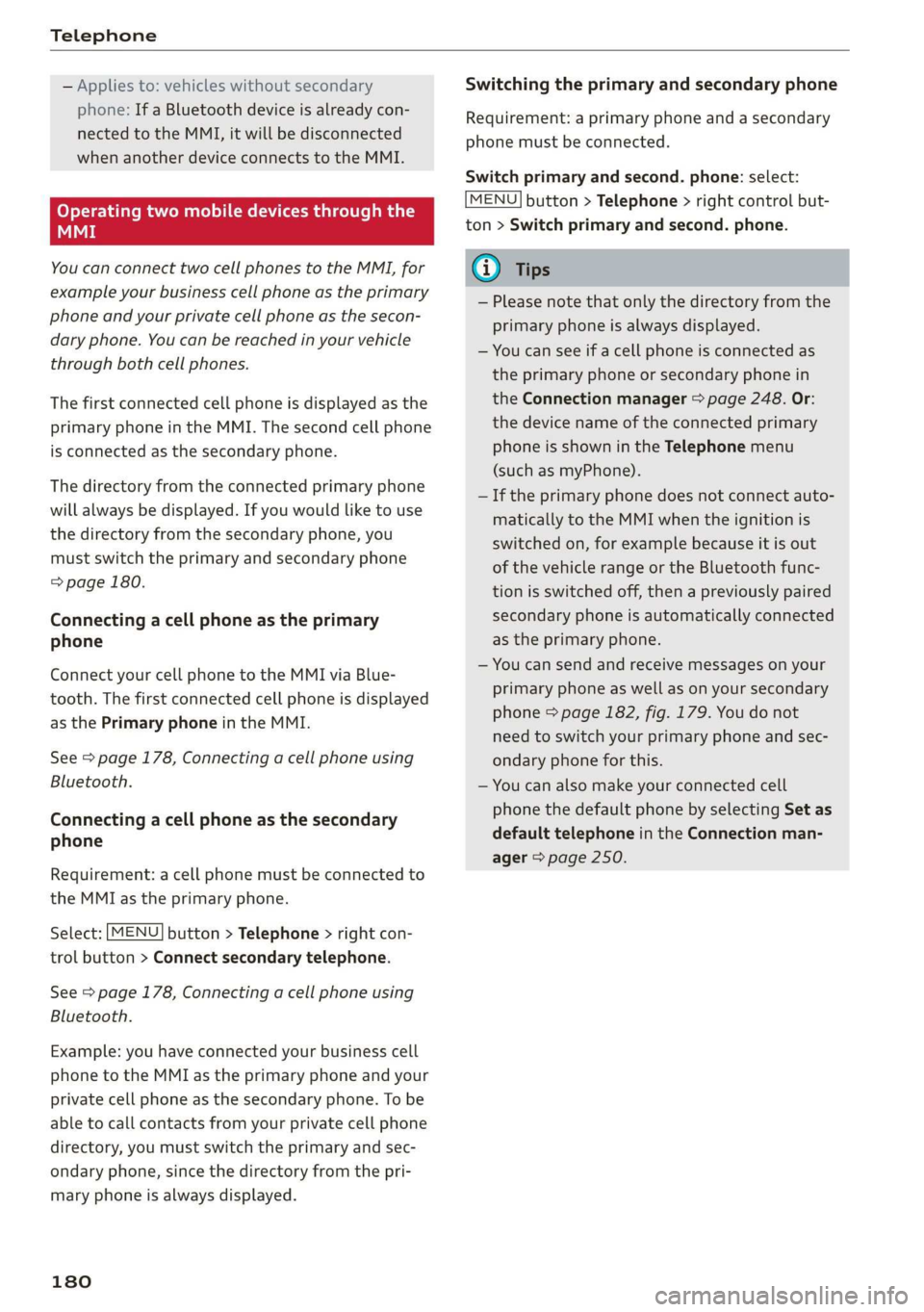
Operatingtwomobiledevicesthroughthe
MMI
YoucanconnecttwocellphonestotheMMI,for
exampleyourbusinesscellphoneastheprimary
phoneandyourprivatecellphoneasthesecon-
daryphone.You canbereachedinyourvehicle
throughbothcellphones.
Thefirstconnectedcellphoneisdisplayedasthe
primaryphoneintheMMI.Thesecondcellphone
isconnectedasthesecondaryphone.
Thedirectoryfromtheconnectedprimaryphone
willalwaysbedisplayed.Ifyouwouldliketouse
thedirectoryfromthesecondary phone, you
mustswitchtheprimaryandsecondaryphone
=>page180.
Connectingacellphoneastheprimary
phone
ConnectyourcellphonetotheMMIviaBlue-
tooth.
Thefirstconnectedcellphoneisdisplayed
asthePrimaryphoneintheMMI.
See>page178,Connectingacellphoneusing
Bluetooth.
Connectingacellphoneasthesecondary
phone
Requirement:acellphonemustbeconnectedto
theMMIastheprimaryphone.
Select:[MENU]button>Telephone>rightcon-
trolbutton>Connectsecondarytelephone.
See>page178,Connectingacellphoneusing
Bluetooth.
Example:youhaveconnectedyourbusinesscell
phonetotheMMIastheprimaryphoneandyour
privatecellphoneasthesecondaryphone.To be
abletocallcontactsfromyourprivatecellphone
directory,youmustswitchtheprimaryandsec-
ondaryphone,sincethedirectoryfromthepri-
maryphoneisalwaysdisplayed.
180
Switchingtheprimaryandsecondaryphone
Requirement:aprimaryphoneandasecondary
phonemustbe connected.
Switchprimaryandsecond.phone:select:
MENU]button>Telephone>rightcontrolbut-
ton>Switchprimaryandsecond.phone.
G)Tips
—Pleasenotethatonlythedirectoryfromthe
primaryphoneisalwaysdisplayed.
—Youcanseeifacellphoneisconnectedas
theprimaryphoneorsecondaryphonein
theConnectionmanager>page248.Or:
thedevicenameoftheconnectedprimary
phoneisshownintheTelephonemenu
(suchasmyPhone).
—Iftheprimaryphonedoesnotconnectauto-
matically totheMMIwhentheignitionis
switchedon, forexamplebecauseitisout
ofthevehiclerangeortheBluetoothfunc-
tionisswitchedoff,thenapreviously paired
secondaryphoneisautomaticallyconnected
astheprimaryphone.
—Youcansendandreceivemessagesonyour
primaryphoneaswellasonyoursecondary
phone>page182,fig. 179.You donot
needtoswitchyourprimaryphoneandsec-
ondaryphoneforthis.
—Youcanalsomakeyourconnectedcell
phonethedefaultphonebyselectingSetas
defaulttelephoneintheConnectionman-
ager>page250.