phone AUDI Q7 2019 Owner´s Manual
[x] Cancel search | Manufacturer: AUDI, Model Year: 2019, Model line: Q7, Model: AUDI Q7 2019Pages: 394, PDF Size: 105.97 MB
Page 216 of 394
Navigation
TheMMInotifiesyouwhenyouareapproaching
selectedpointsofinterestwhenthisfunctionis
switchedonM.YoucanalsohaveaNotification
tone.
Presentationmode
ThePresentationmodehelpsyoutoeffectively
planatripandfollowtheplannedroutewithout
movingthevehicle.Youcan useSelectstarting
pointwhenyouwouldliketocalculatearoute
startingfromalocationotherthanthevehicle
position, forexample.StartPresentationmode
tosimulaterouteguidance.
Routecriteria
Appliesto:vehicleswithnavigationsystem
»[0]»[8]
>i)<(a
RAH-8472
Appliesto:vehicleswithnavigationsystem
>Pressthe [NAV/MAP]buttonrepeatedlyuntil
theEnterdestinationmenuisdisplayed
=>page205,fig. 189.
>Select:rightcontrolbutton>Voiceguidance.
Voiceguidance:voiceguidancecanbeComplete
orShortened.WiththeTrafficfunction,voice
guidancepromptsareonlygivenwhenthereare
trafficincidentsonyourroute.WhenOffisse-
lected,novoiceguidanceisgiven.
Voiceguidanceduringphonecall:voiceguidance
duringaphonecallcan be switchedonoroff.
Entertainmentfader:see>page252.
Voiceguidancevolume:youcanadjustthevol-
umeduringvoiceguidanceusingtheOn/Offknob
=page153Youcanalsofindadditionalinforma-
tionunder>page252.
Map
Appliesto:vehicleswithnavigationsystem
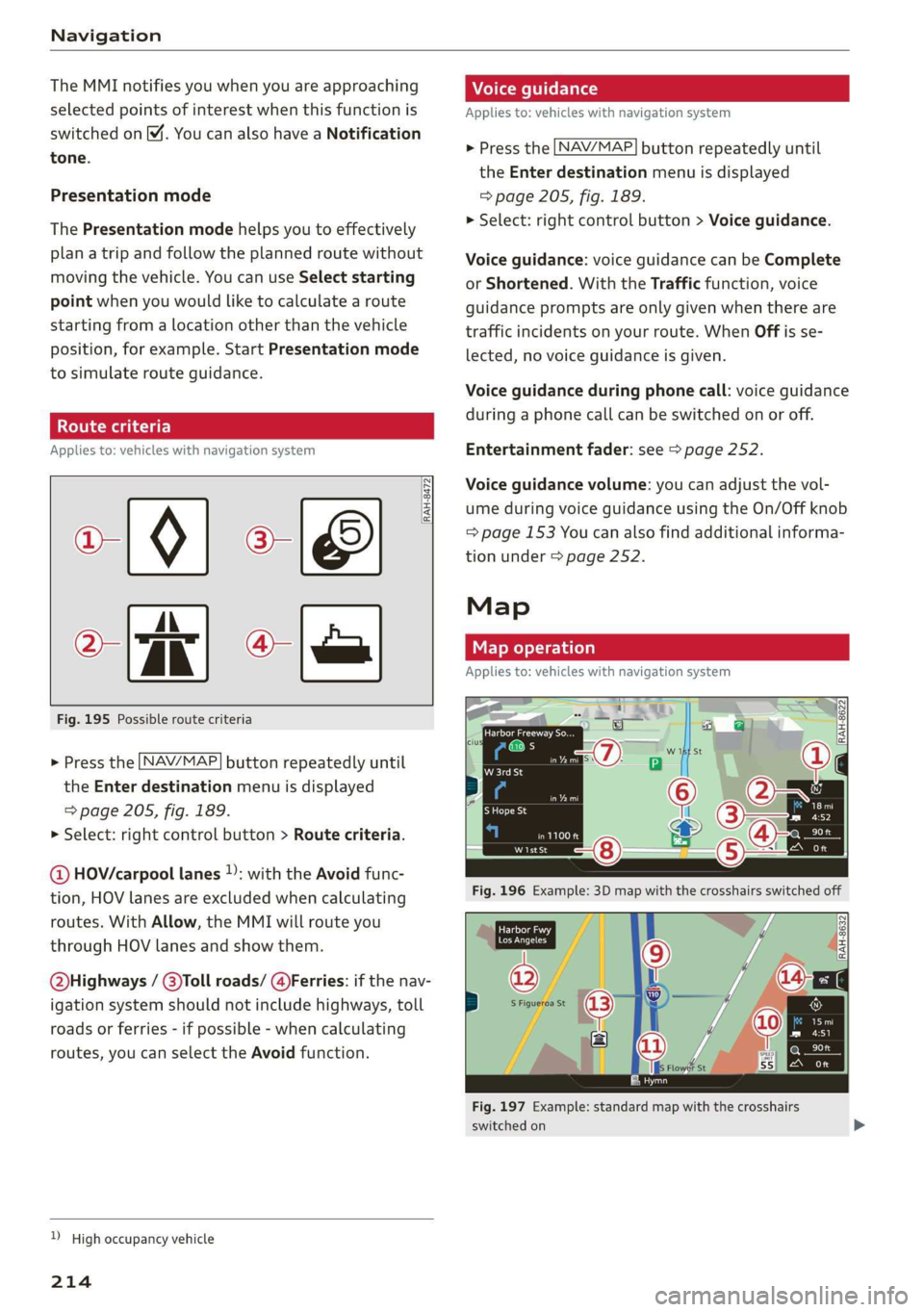
Fig.195Possibleroutecriteria
>Pressthe LNAV/MAP]buttonrepeatedlyuntil
the Enterdestinationmenuisdisplayed
=>page205,fig. 189.
>Select:rightcontrolbutton>Routecriteria.
@HOV/carpoollanes):withtheAvoidfunc-
tion,HOVlanes areexcludedwhencalculating
routes.WithAllow,theMMIwillrouteyou
throughHOVlanesandshowthem.
Q@bighways/@)Tollroads/@)Ferries:ifthenav-
igationsystemshould notincludehighways,toll
roadsorferries-ifpossible-whencalculating
routes,youcanselecttheAvoidfunction.
)Highoccupancyvehicle
214
Giro
eek
W1stSt
Fig.197Example:standardmapwiththecrosshairs
switchedon
Page 225 of 394
4M0012721BG
Radio
Radiofunctions
etme)4at1a)
Appliesto:vehicleswithfreetextsearch
Usingthefreetextsearch,youcanselecttheor-
derthatthesearchtermsareenteredinthein-
putfield.Searchin allfrequencybandsforasta-
tionnameorprogramtype,suchasNews.
DTaP
Teaee
aTTaal)
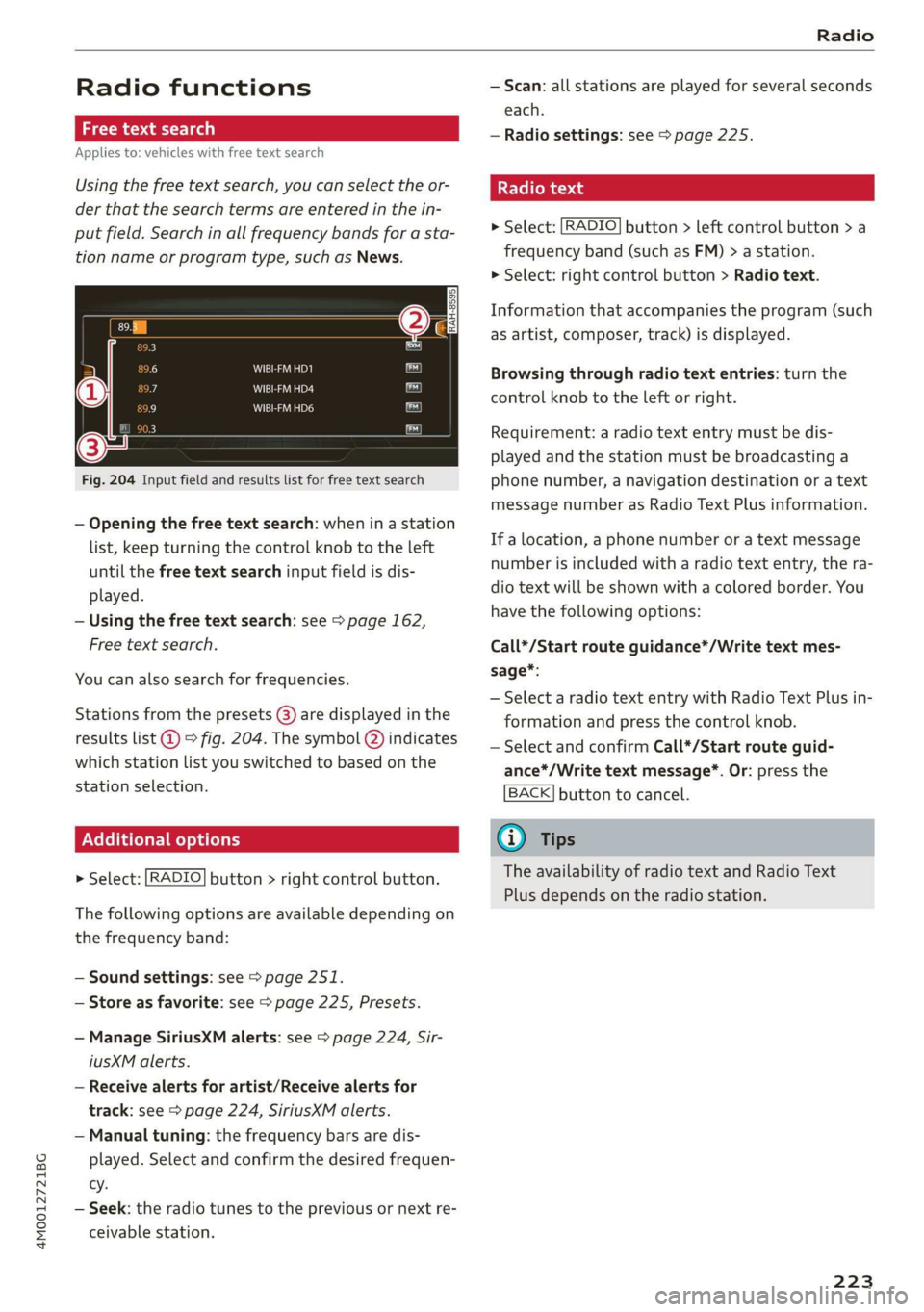
Fig.204Inputfieldandresultslistforfreetextsearch
—Openingthefreetextsearch: wheninastation
list,keepturningthecontrolknobtotheleft
untilthefreetextsearchinputfieldisdis-
played.
—Usingthefreetextsearch:see>page162,
Freetextsearch.
Youcanalsosearchforfrequencies.
Stationsfromthepresets(8)aredisplayedinthe
resultslist@)>fig.204.Thesymbol@)indicates
whichstationlistyouswitchedtobasedonthe
stationselection.
EX]
naloptions
>Select:[RADIO]button>rightcontrolbutton.
Thefollowingoptionsareavailabledependingon
thefrequencyband:
—Soundsettings:see>page251.
—Storeasfavorite:see>page225,Presets.
—ManageSiriusXMalerts:see>page224,Sir-
iusXMalerts.
—Receivealertsforartist/Receivealerts for
track:see>page224,SiriusXMalerts.
—Manualtuning:thefrequencybarsaredis-
played.Selectandconfirmthedesiredfrequen-
cy.
—Seek:theradiotunestothepreviousornextre-
ceivablestation.
—Scan:allstationsareplayedforseveralseconds
each.
—Radiosettings:see>page225.
Radiotext
>Select:[RADIO]button>leftcontrolbutton>a
frequencyband(suchasFM)>astation.
>Select:rightcontrolbutton>Radiotext.
Informationthataccompaniestheprogram(such
asartist,composer,track)isdisplayed.
Browsingthroughradiotextentries:turnthe
controlknobtotheleftorright.
Requirement:aradiotextentrymustbedis-
playedandthestationmustbebroadcastinga
phonenumber,anavigationdestinationoratext
messagenumberasRadioTextPlusinformation.
If alocation,aphonenumberoratextmessage
numberisincludedwitharadiotextentry,thera-
diotextwillbeshownwithacoloredborder.You
havethefollowingoptions:
Call*/Startrouteguidance*/Writetextmes-
sage*:
—SelectaradiotextentrywithRadioTextPlusin-
formationandpressthecontrolknob.
—SelectandconfirmCall*/Startrouteguid-
ance*/Writetextmessage*.Or:pressthe
BACK]buttontocancel.
G)Tips
TheavailabilityofradiotextandRadioText
Plusdependsontheradiostation.
223
Page 232 of 394
Media
—Thestatusofthedeletingprocessisshownin
theMMI.Jukeboxplaybackstopsduringthede-
letingprocessandstartsagainautomatically
oncethedeletioniscomplete.
@)Note
Donotimportaudio/videofileswhentheen-
gineisturnedoffbecausethiswilldrainthe
vehiclebattery.
@)Tips
—TracksfromaudioCDscannotbeimported
totheJukeboxforlegalreasons.
—Filesthathavealreadybeenimportedare
automaticallyrecognizedandcannotbe
copiedtotheJukeboxagain.
—Itisnotpossible toplay audio/video*files
intheCD/DVD*drivewhileimportingthem.
— TheJukeboxdoesnotprovidean export
functionduetolegalreasons.
—Filesortrackswithoutadditionalstoredin-
formationarelistedasUnknown.Audirec-
ommendsaddingadditionalinformation
(such asID3tags)toaudiofiles.
—ResettheJukeboxtothefactorydefaultset-
tingswhensellingyourvehicle>page248.
Bluetoothaudioplayer
Appliesto:vehicleswithBluetoothaudioplayer
WiththeBluetoothaudioplayer,youcanplay
musicwirelesslyfrom yourBluetooth-capable
device(suchasacellphone)throughtheMMI.
Requirement:thevehiclemustbestationaryand
theignitionmustbe switchedon.TheBluetooth
settingswillopenonyourmobiledeviceduring
theconnectionsetup.TheBluetoothfunctionand
visibilityoftheMMI>page250andmobilede-
vicemustbe switchedon.TheBluetoothaudio
player>page250mustbeswitchedoninthe
MMI.
—ConnectingaBluetoothdevice:pressthe
MEDIA]button.Presstheleftcontrolbutton
untilthesourcesoverviewisdisplayed.Select
andconfirmBluetoothaudioplayer@)
>page235,fig.213.
230
—Ifnecessary,selectandconfirmNotconnected
>ConnectBluetoothaudioplayer.TheBlue-
toothdevicesearchstarts.Followtheinstruc-
tionsintheMMI.
—SelectandconfirmthedesiredBluetoothdevice
fromthelist.TheMMIgeneratesaPINforthe
connection.
—SelectandconfirmYes.
—EnterthePINforconnectingonyourBluetooth
device.Or:ifthePINisalreadydisplayedon
yourBluetoothdevice,confirmitintheBlue-
toothdeviceandintheMMI.Thetimeallowed
forenteringthePINislimitedtoapproximately
30seconds.
Themediaisstartedandoperatedthroughthe
mobiledeviceortheMMI,dependingonthede-
vicebeingused.
(i)Tips
—Checkforanyconnectionrequestsonyour
Bluetoothdevice.
—MultipleBluetoothaudioplayerscan be
connectedtotheMMI,butonlyonemobile
devicecanbeactive.
—BluetoothprotocolsAVRCP(1.0/1.3/1.4)
andA2DParesupported.
—NotethevolumesettingonyourBluetooth
device.Audirecommendssettingyourmo-
biledevicetothemaximumvolumewhen
usingitasaBluetoothaudioplayer.
— Thesupportedmediafunctions(suchas
shuffle)dependontheBluetoothdevicebe-
ingused.
—Formoreinformationonsupporteddevices,
visitwww.audiusa.com/bluetoothorcon-
tactanauthorizedAudidealerorauthorized
AudiServiceFacility.
Page 233 of 394
4M0012721BG
Media
Wi-Fiaudioplayer
Appliesto:vehicleswithWi-Fiaudioplayer
UsingtheWi-Fiaudioplayermediasourceonthe
MMI, youcanconnectandoperateyourWi-Fi-ca-
pablemediaplayer(suchasasmartphone)to
wirelesslyplaymusicfromyourmediaplayerli-
brary.Themediaplayerisconnectedthroughthe
vehicle'sWi-Fihotspot.AUPnPServerapporan
integratedUPnP/DLNAserveronyourmedia
playerisrequiredtoaccessyourmediaplayerli-
brary.
Requirement:theWi-Fifunctiononyourmedia
playermustbe switchedon.ThemyAudiappora
UPnPserverappmustbeinstalledonyourmedia
player.Or:youmustbeusingamediaplayerwith
anintegratedUPnP/DLNAserver.
—Connectingamediaplayer:pressthe[MEDIA
button.Presstheleftcontrolbuttonuntilthe
sourcesoverview>page235isdisplayed.Se-
lectandconfirm Wi-Fiaudioplayer(7)
>page235,fig.213.
—Ifnecessary,selectandconfirmWi-Fiturned
off>TurnonWi-FitoactivateWi-Fiinthe
MMI.SelectWi-Fisettings,ifnecessary.Select
thesamesettingsonthewirelessmediaplayer
thatareusedfortheWi-Fihotspot.
—StartingtheWi-Fiaudioplayer:Startthe
myAudiapporanUPnPserverapp,orallow
mediasharingonyourdevice.
Operatingthemediaplayer:themediaplayeris
operatedthroughtheMMI.
—Presstheleftcontrolbuttonrepeatedlyuntil
theFoldersmenuitemappears.Selectandcon-
firmFolders.
—Playingmusicfromthemediaplayer:select
andconfirmMediacenter.
Webradio:see>page232.
objects,theycouldbethrownaroundthein-
sideofthevehicleinacrashandcauseseri-
ousinjuries.Storethesetypesofdevicesse-
curelywhiledriving.
—Donotuseanywirelessdevicesonthefront
seatswithinrangeoftheairbagswhiledriv-
ing.Also readandfollowthewarningsin
=page272,Frontairbags.
ZAWARNING
—Asthedriver,donotallowusageoftheWi-
Fihotspottodistractyoufromdriving,as
thiscouldincreasetheriskofanaccident.
—Itisonlysafe tousetablets,laptops,mobile
devicesandothersimilardeviceswhenthe
vehicleisstationarybecause,likeallloose
C)Note
Alwaysfollowtheinformationfoundin>@in
Wi-Fisettingsonpage200.
G)Tips
—Alwaysreadthechapter>page193,Audi
connect.
—PleasenotethataWi-Ficonnectiondoes
notautomaticallymakeitpossible touse
the
Internet.Foradditionalinformation,
see>page193.
—Toavoidinterruptionsduringplayback,de-
activatethepowersavingfunctiononthe
mediaplayer orconnectittoacharger.
—Theloadingtimesfortheaudiodatadepend
onthemediaplayerusedandthenumberof
filesthatitcontains.
—Amaximumof2,000entriesperdirectory
aredisplayedintheMMI.
—Songsdownloadedforofflineuseusingmu-
sicstreamingservicesarestoredonyour
mobiledevice(suchasasmartphone)and
maybeDRMprotected.TheWi-Fiaudio
playerwillnotplayDRMprotectedfiles.
—ContactanauthorizedAudidealeror au-
thorizedAudiServiceFacilityforadditional
informationontheWi-Fiaudioplayer.
231
Page 235 of 394
4M0012721BG
Media
@Tips
— Depending ontheInternetconnectionand
networktraffic,the connectionmaydiscon-
nectedwhenonlinemediasourcesareplay-
ing.
—OnlinemediaandInternetradiousagede-
pendsontheserviceavailabilityofthethird
partyprovider.
—AudiAGsimplymakestheaccesstoonline
mediaservicespossiblethroughtheMMI
anddoesnottakeanyresponsibilityforthe
contentsoftheonlinemediaservices.
—Alwaysreadthe chapter>page193,Audi
connect.
— Depending onthemobiledevicebeingused,
theremaybeinterruptionsduringmedia
playbackandwhenusingthemyAudiapp.
Topreventinterruptionswhenusingamo-
biledevice,donotlockthescreenonyour
mobiledeviceandkeepthemyAudiappin
theforeground.
—ContactanauthorizedAudidealeror au-
thorizedAudiServiceFacilityforadditional
informationaboutonlinemedia.
Multimediaconnections
OyeTmleeMulelarskelg
USBchargingport
Dependingonthevehicleequipment,youcan
connectyourmobiledevices(suchas asmart-
phoneorMP3player)totheAudimusicinterface
oraUSBchargingportusingaspecialUSB
adapter.
af
a|=
of
Fig.211AudiGenuineAccessories:USBadapter
[RAH-9202
\
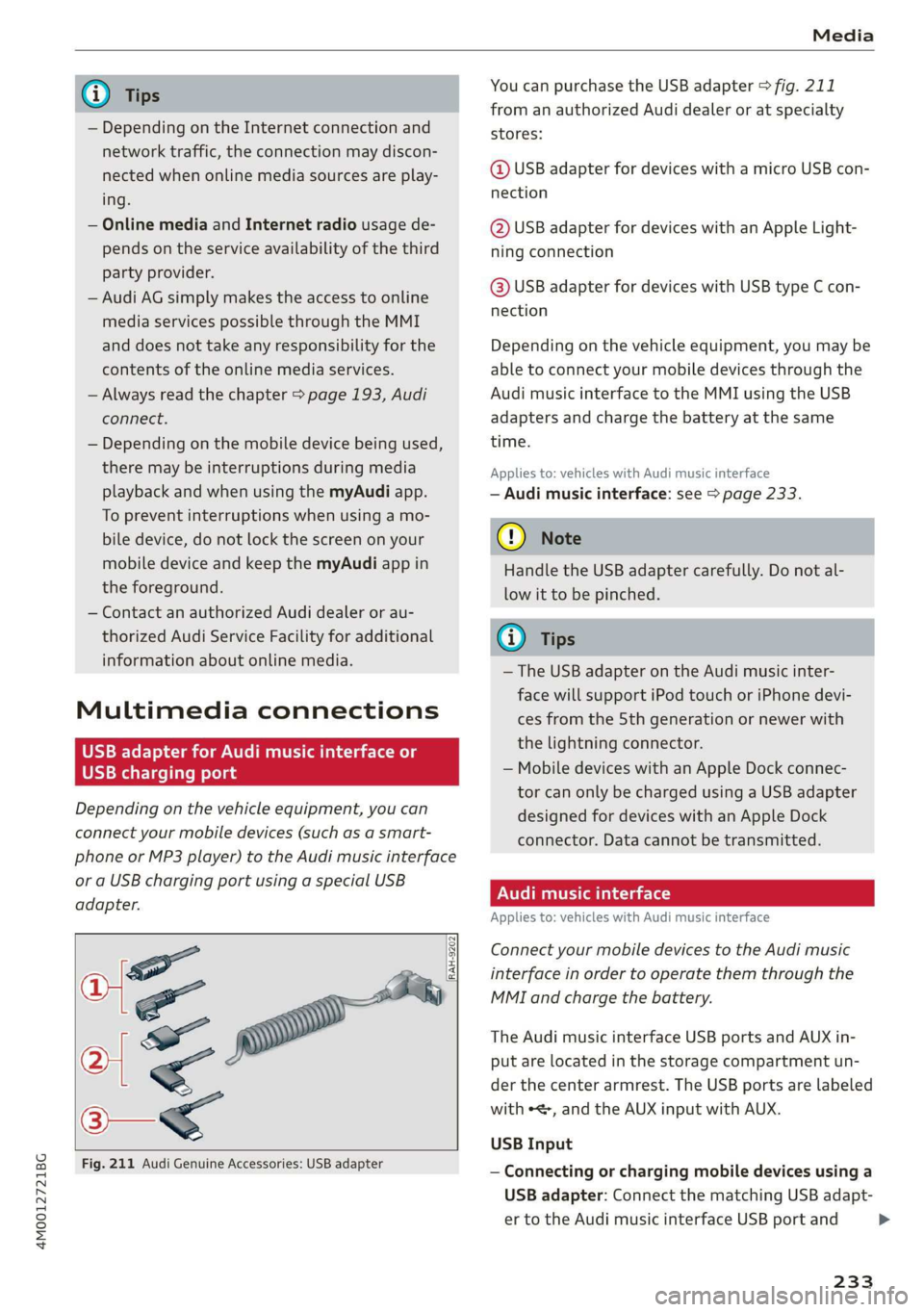
YoucanpurchasetheUSBadapter>fig.211
fromanauthorizedAudidealeroratspecialty
stores:
@USBadapterfordeviceswithamicroUSBcon-
nection
@USBadapterfordeviceswithanAppleLight-
ningconnection
@USBadapterfordeviceswithUSBtypeCcon-
nection
Depending onthevehicleequipment,youmaybe
abletoconnectyourmobiledevicesthroughthe
Audi
musicinterfacetotheMMIusingtheUSB
adaptersandchargethebatteryatthesame
time.
Appliesto:vehicleswithAudimusicinterface
—Audimusicinterface:see>page233.
@)Note
HandletheUSBadaptercarefully.Donotal-
lowittobepinched.
(i)Tips
—TheUSBadapteronthe Audimusicinter-
facewillsupportiPodtouchoriPhonedevi-
cesfromthe5thgenerationornewerwith
thelightningconnector.
—MobiledeviceswithanAppleDockconnec-
torcanonlybechargedusingaUSBadapter
designedfordeviceswithanAppleDock
connector.Datacannotbetransmitted.
PNUreemlala)
Appliesto:vehicleswith Audimusicinterface
ConnectyourmobiledevicestotheAudimusic
interfaceinordertooperatethemthroughthe
MMIandchargethebattery.
TheAudimusicinterfaceUSBportsandAUXin-
putarelocatedinthestoragecompartmentun-
der thecenter armrest.TheUSBportsarelabeled
withe,andtheAUXinputwithAUX.
USBInput
—Connectingorchargingmobiledevicesusinga
USBadapter:ConnectthematchingUSBadapt-
ertotheAudimusicinterfaceUSBportand
233
>
Page 236 of 394
Media
thenconnectittothemobiledevice,forexam-
pleaniPhone.Thebatterywillchargeautomat-
ically.
—DisconnectingamobiledevicefromtheAudi
musicinterface:RemovetheUSBadapterfrom
the AudimusicinterfaceUSBport.
Themediaarestartedandoperatedthroughthe
mobiledeviceortheMMI,dependingonthede-
vicebeingused>page235.
Connectingmultiplemobiledevices:ifamobile
device(suchasasmartphone)isconnectedatthe
respectiveUSBportontheAudimusicinterface,
thenalldevicescanbeusedasaplaybacksource.
AUXInput
—Connectingamobiledevice totheAUXinput:
ConnecttheAUXcabletotheAUXinputonthe
Audimusicinterfaceandthenconnectittothe
mobiledevice(forexample,anMP3playerora
smartphone).
—DisconnectingamobiledevicefromtheAUX
input:RemovetheAUXcablefromtheAUXin-
putonthe Audimusicinterface.
—Operation:selectandconfirm theExternalau-
dioplayersourceG)>page235,fig.212.Me-
diaisstartedandoperatedonthemobilede-
vice.
Z\WARNING
Drivingrequiresyourcompleteandundivided
attention.Asthedriver,youhavecompletere-
sponsibilityforsafetyintraffic.Neveroperate
mobiledeviceswhiledriving,becausethisin-
creasestheriskofanaccident.
@)Note
—UseaUSBextensioncabletoconnectdevi-
cesthathaveanintegratedUSBconnector
(suchasaUSBstick)topreventdamageto
yourUSBdeviceandtheAudimusicinter-
face.
—Extremelyhighorlow temperaturesthat
canoccurinsidevehiclescandamagemobile
devicesand/orimpairtheirperformance.
1)Applies onlytoMTPdevices.DoesnotapplytoAppledevi-
cesandUSBmassstoragedevices.
234
Neverleavemobiledevicesinthevehiclein
extremelyhighorlowtemperatures.
(i)Tips
—Alwaysfollowtheinformationfoundin
=>page60.
—Whenyouswitchtheignitionoff,theUSB
portsarestillsuppliedwithpoweruntilthe
energymanagementintervenes.
—DonotuseanadditionaladapterorUSBex-
tensioncabletoconnectmobiledevicesto
theAudimusicinterfacethatalreadyhavea
cableorthatmustbeconnectedwithaUSB
adapter(=page233).Using anadditional
adapterorUSextensioncablemayimpair
functionality.
—YoucanpurchasetheAUXconnectorcable
fromanauthorizedAudidealeroratspe-
cialtystores.
—Audirecommendssettingthevolumeofa
mobiledeviceconnectedtotheAUXinputto
approximately70%ofthemaximumvol-
ume.
—Functionalityisnotguaranteedformobile
devicesthatdonotconformtotheUSB2.0
specification.
—USBhubsarenotsupported.
—SomeversionsoftheiPodsuchastheiPod
shufflecannotbeconnectedtotheUSB
adapterfordeviceswithAppleDockconnec-
tor.ConnectthesedevicesusingaAUXcon-
nectorcable.
—Changedcontentonamobiledevice»)that
isconnectedtotheAudimusicinterface
maynotbedisplayedinthemediacenter.In
thiscase,resettheMediasettingsbackto
Factorysettings>page248.
—Videoplaybackthroughthe Audimusicin-
terfaceisonlysupportediftheconnected
deviceisrecognizedasaUSBstoragedevice
(forexampleaUSBstick).Appledevicesand
MTPdevices(suchassmartphones)arenot
recognizedasUSBstoragedevices.
Page 237 of 394
4M0012721BG
Media
—iPod oriPhonemalfunctionsalsoaffectthe
operationoftheMMI.ResetyouriPodor
iPhoneifthishappens.
—AudirecommendsupdatingtheiPod or
iPhonesoftwaretothelatestversion.For
importantinformationonoperatingyour
iPod oriPhone,refertotheuserguidefor
thedevice.
— TheUSBadapteronthe Audimusicinter-
facewillsupportiPodtouchoriPhonedevi-
cesfromthe5thgenerationornewerwith
thelightningconnector.
—Formoreinformationaboutthe Audimusic
interfaceandsupporteddevices,checkthe
Audidatabaseformobiledevicesatwww.
audiusa.com/mp3orcontactanauthorized
AudidealerorauthorizedAudiServiceFa-
cility.
Tet1keLhd)
Appliesto:vehicleswithRearSeatEntertainmentpreparation
TheRear SeatEntertainmentpreparationin-
cludescablesandamountforAudiEntertain-
mentmobileinthedriver'sandfrontpassenger's
seatbackrests.
ThesuitableAudiEntertainmentmobileRear
SeatEntertainmentpackageisavailablethrough
AudiGenuineAccessories.
UsingAudiGenuineAccessoriesisrecommended.
Audihasverifiedtheirreliability,safety,andsuit-
ability.
Wecannotevaluateorendorseotherproductsin
thisway,evenifthe productisapprovedbyacer-
tifiedtestingagencyorgovernmentagency.
@)Note
Onlyusedevicesthatareapprovedforthe
Rear SeatEntertainmentpreparation.Unap-
provedequipmentcan causedamagetothe
vehicleelectricalsystem.
@)Tips
—Contact anauthorizedAudidealeror au-
thorizedAudiServiceFacilityforadditional
informationonAudiEntertainmentmo-
bile.
—Alwaysreadthechapter>page370.
— TheRear SeatEntertainmentpreparationis
notintendedtochargeexternalelectronic
devices.
Playingmedia
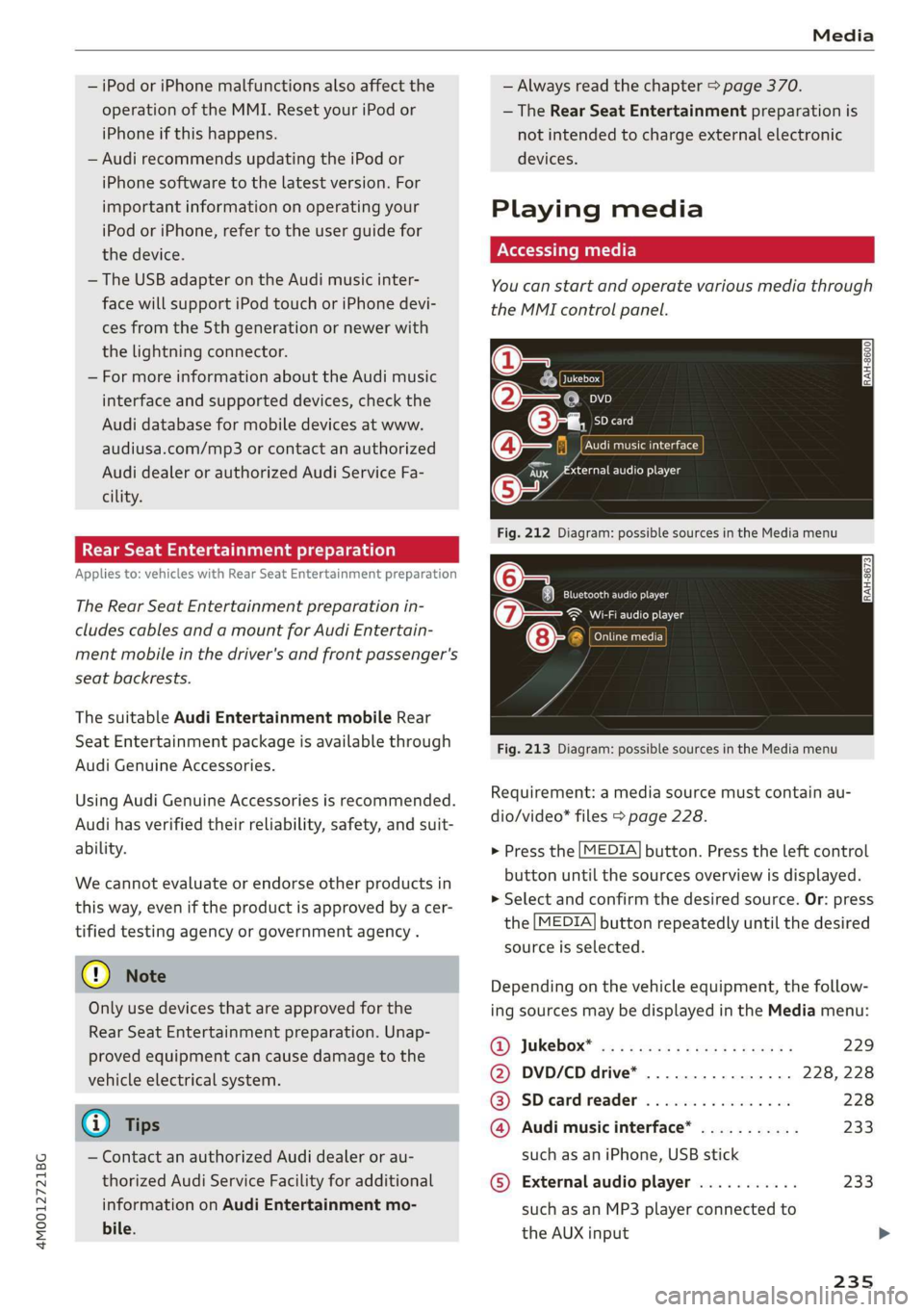
Youcanstartandoperatevariousmediathrough
theMMIcontrolpanel.
@-=
eyes
a
SDcard
:iiaudioplayer
Fig.212Diagram:possiblesourcesintheMediamenu
6Teaelec)ie
(7owe@}Wi-Fiaudioplayer
ens
”
Fig.213Diagram:possiblesourcesintheMediamenu
CATTaacor}
Requirement:amediasourcemustcontainau-
dio/video*files>page228.
>Pressthe[MEDIA]button.Presstheleftcontrol
buttonuntilthesourcesoverviewisdisplayed.
>Selectandconfirmthedesiredsource.Or:press
the[MEDIA]buttonrepeatedlyuntilthedesired
sourceisselected.
Dependingonthevehicleequipment,thefollow-
ingsourcesmaybedisplayedintheMediamenu:
@)Jukebox*®osi5easssewesiyawns229
@DVD/CDdrive*. . .228,228
@®SDcardreader228
@Audimusicinterface*...........233
suchasaniPhone,USBstick
©Externalaudioplayer...........233
suchasanMP3playerconnectedto
theAUXinput
Page 238 of 394
Media
©Bluetoothaudioplayer*........230
@Wi-Fiaudioplayer*............231
Onlinemedia*andInternetradio”.232
—Playingaudio/videofiles:selectasourceinthe
Mediamenu>category(suchasartists>al-
bum>track).
—Movingonelevelupinthefolderstructure:
pressthe[BACK]button.Or:selectandconfirm
Folderup.
—Selectingthepreviousornexttrack/chapter*
D:presstheOn/OffknobontheMMIcontrol
panelbrieflytotheleftKdorrightDI.
—Fast-forwardingandrewindingaudio/video*
files:pressandholdtheOn/Offknobonthe
MMIcontrolpaneltotheleftKdorrightPbfor
alongertime.
—Pausingorresumingplayback:pressthe
On/Offknob ontheMMIcontrolpanelbriefly.
@Tips
—Youcanscrollthroughlonglistsquicklyby
turningthecontrolknobquickly.Thescroll-
ingspeeddependsonthenumberoflisten-
tries.
—Forsafetyreasons,thevideoimageisonly
displayedwhenthevehicleisstationary.On-
lythesoundfromthevideoplayswhiledriv-
ing.
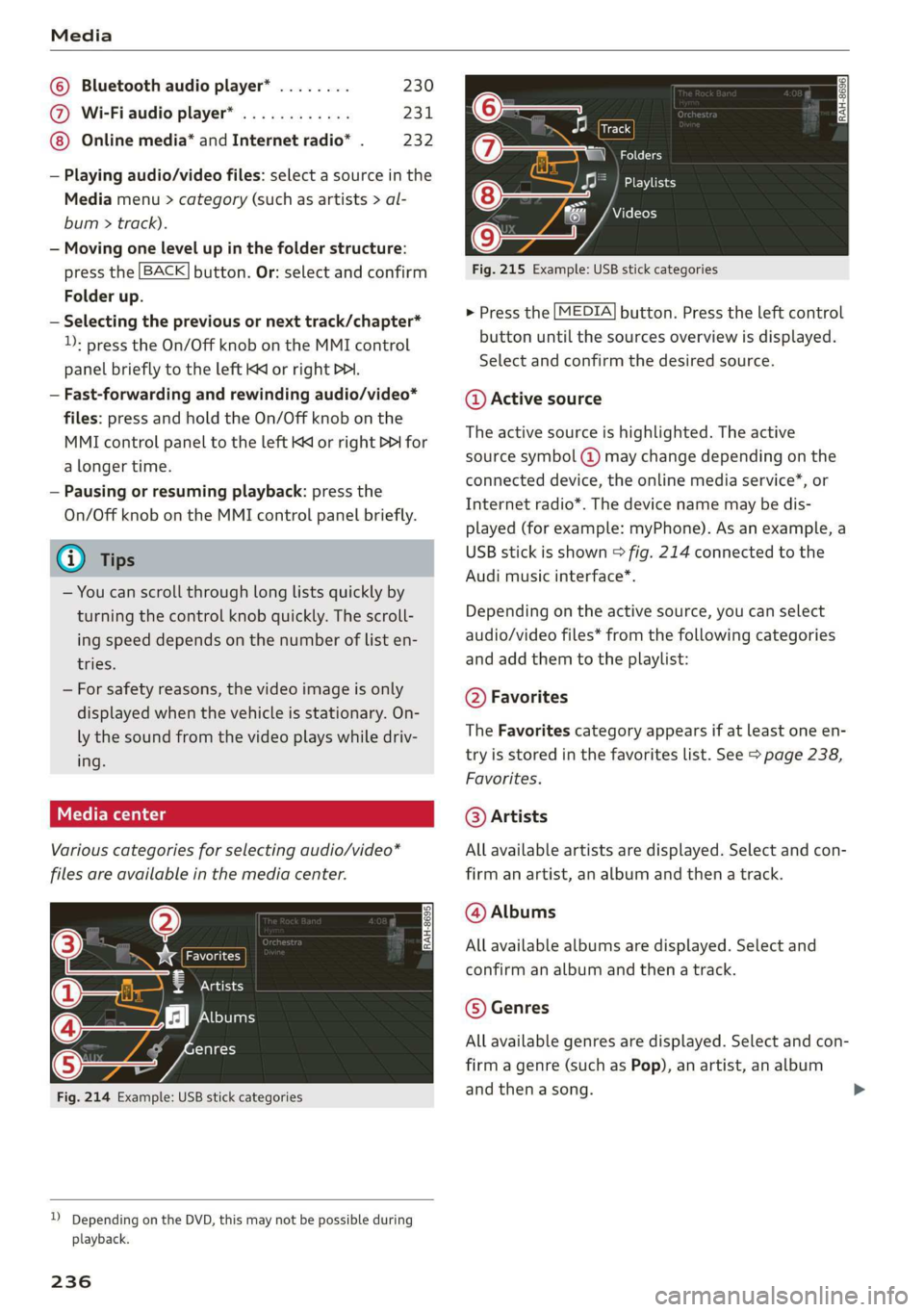
Variouscategoriesfor selectingaudio/video*
filesareavailableinthemediacenter.
ae
@—8atecy
(4)j2][bums
FfClee
(5ee
Fig.214Example:USBstickcategories
))DependingontheDVD,thismaynotbepossibleduring
playback.
236
Track
Folders
Oa
Seaaeytse
Videos
Fig.215Example:USBstickcategories
>Pressthe[MEDIA]button.Presstheleftcontrol
buttonuntilthesourcesoverviewisdisplayed.
Selectandconfirmthedesiredsource.
@Activesource
Theactivesourceishighlighted.Theactive
sourcesymbol@)maychangedependingonthe
connecteddevice,theonlinemediaservice*,or
Internetradio*.Thedevicenamemaybedis-
played(forexample:myPhone).Asanexample,a
USBstickisshown>fig.214connectedtothe
Audimusicinterface*.
Dependingonthe activesource,youcanselect
audio/videofiles*fromthefollowingcategories
andaddthemtotheplaylist:
@Favorites
TheFavoritescategoryappearsifatleastoneen-
tryisstoredinthefavoriteslist.See>page238,
Favorites.
@Artists
Allavailableartistsaredisplayed.Selectandcon-
firmanartist,analbumandthenatrack.
@Albums
Allavailablealbumsaredisplayed.Selectand
confirm analbumandthenatrack.
©Genres
Allavailablegenresaredisplayed.Selectandcon-
firmagenre(such asPop),anartist,analbum
andthenasong.
Page 239 of 394
4M0012721BG
Media
©Tracks
Allavailabletracksaredisplayed.Selectandcon-
firm
atrack.
@Folders
Thefolderstructureortrack/chapterlistisdis-
played.Selectafolder,ifnecessary. Selectand
confirmatrack.
Playlists
Allavailableplaylistsfromthe sourceandthe
smartplaylistsaredisplayed.Selectandconfirm
aplaylistandthenatrack.
Smartplaylists:
—Lastplayedtracks:thelasttracksplayedinthe
selectedsourcearedisplayed.
— Mostplayed:themostplayedsongsinthese-
lectedsourcearedisplayed.
—5starsto1star:tracksfromtheselected
sourcearedisplayedaccordingtotheirrating.
—Unrated:allfilesfromtheselectedsource
withoutratinginformation(forexample,inthe
ID3tag)aredisplayed.
©Videos*
Allavailablevideofilesaredisplayed.Selectand
confirmavideofile.
()Note
Appliesto:vehicleswithAudiconnectInfotainmentand
useoftheradiocategorywithiPod/iPhone
Alwaysfollow theinformationfoundin>@in
Wi-Fisettingsonpage200.
@Tips
—Onlythecategoriessupportedbythemedi-
umareavailable.Forexample,CD/DVD-
ROMtrackscannotbeselectedwithcatego-
riessuchasArtists,AlbumsorGenres.
WithaniPod/iPhone(source:Audimusicin-
terface>page233),the Podcasts,Audio
booksandComposerscategoriesarealso
available.
—For safetyreasons,thevideoimageisonly
displayedwhenthevehicleisstationary.On-
lythesoundfromthevideoplayswhiledriv-
ing.
—Whensynchronizingaportabledevicewith
"Cloud“services,playlistsmaydisplayincor-
rectly
intheMMI.Usethemediacenterin
thedevice.
—WithaniPod/iPhone(mediasource:Audi
musicinterface>page233),thePodcasts,
Audio booksandComposerscategoriesare
alsoavailable.
Gi)Tips
Appliesto:iPod/iPhoneonAudimusicinterface
— AnInternetconnectionisrequiredtouse
theadditionalRadiocategory,anonline
mediaservice.Alsoseethe chapter
=>page200,Wi-Fisettings.Alsoreadthe
informationontheAudimusicinterfaceand
thesupporteddevices>page233.
—DependingontheInternetconnectionand
networktraffic,the connectionmaydiscon-
nectedwhenonlinemediasourcesareplay-
ing.
—Theuseofonlinemediaservicesdependson
theserviceavailabilityofthethirdparty
provider.
—AudiAGsimplymakestheaccesstoonline
mediaservicespossiblethroughtheMMI
anddoesnottakeanyresponsibilityforthe
contentsoftheonlinemediaservices.
aceasta)
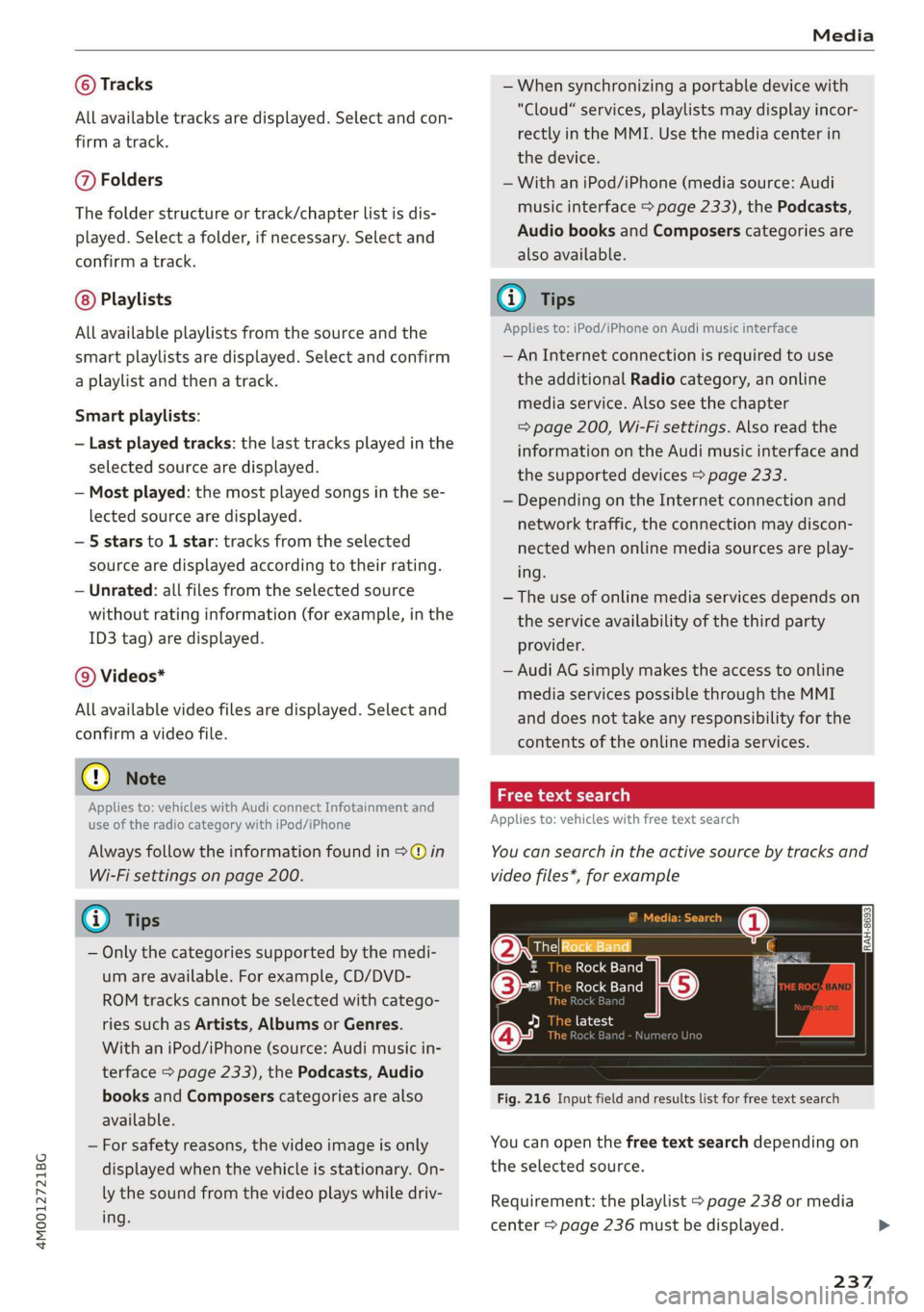
Appliesto:vehicleswithfreetextsearch
Youcansearchintheactivesourcebytracksand
videofiles*,forexample
RockBand
(2eeBand
©-RockBand5
@*rs7
Fig.216Inputfieldandresultslistforfreetextsearch
Youcanopenthefreetextsearchdependingon
theselectedsource.
Requirement:theplaylist>page238ormedia
center>page236mustbedisplayed.
237
Page 241 of 394
4M0012721BG
Media
Bluetoothsettings
See>page250.
Wi-Fisettings*
See>page200,Wi-Fisettings.
Connectionmanager
See>page248.
Show"NowPlaying"screen
Withthefunctionswitchedon¥andaplaylist
open,variousinformationaboutthecurrenttrack
(suchasartist,albumandalbumcover*)aswell
astheplayingtimeandtheremainingplaying
timearedisplayed.
Jukeboxmemorycapacity*
InformationontheJukeboxmemorycapacityand
thenumberofstoredtracksintheJukeboxisdis-
played.
Rewind/Fastforward
Turnthecontrolknobtotheleftorright.Or:
moveyourfingerontheMMItouchcontrolpad*
fromthelefttotheright.
Shuffle)
Withthefunctionswitchedon,allfilesinthe
playlistareplayedandshowninrandomorder.
Repeattrack!)
Whenthefunctionisswitchedon M,thecurrent
trackrepeats.
Repeat*
Requirement:aniPod/iPhone*mustbeselected
asthemediasourceintheAudimusicinterface
=>page235,Accessingmedia.
—Track:thecurrenttrackwillberepeated.
—Folder:thetracksinthecurrentfolderare
playedcontinuouslyinaloop.
—Off:thefunctionisswitchedoff.
)Thefunctionautomaticallyswitchesoffwhenthesourceis
changed.
2)Thisfunctionisnotavailableforallcellphones.
Backto'Playback'
Theoptionsmenuisclosed.Thetrackcurrently
playingappearsintheplaylist.
Playsimilarmusic*
Thetrackcurrentlyplayingisquicklyanalyzedfor
featuressuchasartist,genres,mood,andbeat,
andasmartplaylistwithsimilartrackswillbe
shown.
Playmore...
Asmartplaylistisshownbasedonthetrackcur-
rentlyplaying.Youcanselectbetweenaplaylist
withmoretracksbythisartist,fromthisalbum
orofthisgenre.
Copytojukebox*
See>page229,AddingfilestotheJukebox.
Setasringtone*2)
Requirement:amobiledevicemustbeconnected
totheMMI.Thetrackcurrentlyplayingmustbe
intheJukebox*>page229.
Theselectedtrackwillbeusedastheringtone
forincomingcalls.
Gracenoteonlinedatabase*
Requirement:theMMImustbeconnectedtothe
Internet.
Dependingonavailability,variousinformation
willloadaboutthetrackcurrentlyplayingwhen
thisfunctionisswitchedon.
Favorites
See>page238.
Additionaloptions
Requirement:thevehiclemustbestationaryand
avideofile*oraDVD*mustbeplaying.
Parentalcontrol*
PlaybackofvideoDVDscanberestrictedusing
parentalcontrol.
239