reset AUDI Q7 2019 Owner´s Manual
[x] Cancel search | Manufacturer: AUDI, Model Year: 2019, Model line: Q7, Model: AUDI Q7 2019Pages: 394, PDF Size: 105.97 MB
Page 193 of 394
4M0012721BG
Telephone
Microphoneinputlevelcan beadjustedduringa
phonecallusingthecontrolknob.
i)Tips
—Severalmobiledevicescan bepairedwith
theMMI,butonlytwo*mobiledevicescan
be
activelyconnected.
—TodeleteallpairedBluetoothdevices,the
Bluetoothfunctioncanberesettothefac-
torydefaultsettings>page248.
Additionaloptions
>Select:[MENU]button>Telephone>rightcon-
trolbutton.
Connectionmanager
See>page248.
Bluetoothsettings*
See>page250.
Onlinesettings*
See>page250.
Wi-Fisettings*
See>page200,Wi-Fisettings.
Directorysettings
Appliesto:vehicleswithtelephone
>Select:[MENU]button>Telephone>leftcon-
trolbutton>Directory>rightcontrolbutton>
Contactsettings.
Memorycapacity
ShowstheMemorycapacityforthedirectory.
Youcanmanageupto17,000contactswiththe
directory.Youcanloadupto4,000contactsfrom
yourcellphoneintoeachdirectory.Youcanalso
importupto1,000contactsfromastoragede-
vice.
Sortorder
Youcansortthecontactsinyourdirectoryalpha-
beticallyaccordingtoLastnameorFirstname.
Importcontacts/Exportcontacts
See>page190.
Downloaddirectory
ToupdatethecontactsintheMMI,youcanman-
uallydownloadyourmobiledevicecontacts.De-
pendingonthemobiledevice,youmayneedto
disconnectandreconnecttheBluetooth connec-
tiontoupdatethecontacts.
Hidecontactswithoutphonenumber
Whenthisfunctionisswitchedon,grayed-out
contactsthathavenophonenumbersstoredfor
themwillbehiddeninthedirectory.
Troubleshooting
Appliesto:vehicleswithtelephone
ProblemSolution
PairingthecellphonetotheMMI|Checkiftherequirementsforconnectingamobiledevicearemet
failed.=>page178.
=>page178.
Or:checkifyouaccidentallydeclinedthe connection setupPINon
yourmobiledevice.Ifnecessary,repeat thepairingprocess
Afterpairing,notallcontactsor
theMMI.
Avoidusingspecialcharactersinnames.
nocontactshavebeenloadedinto|Avoidusingcontactgroups onyourmobiledevice.
191
Page 200 of 394
Audiconnect
services.Thecostsforthisareincludedin
thepriceofAudiconnectvehiclecontrol
services.Thecellphonenetwork,forexam-
ple,mustbeavailabletouse theseservices.
Appliesto:vehicleswithAudiconnectvehiclecontrol
ForsomeAudiconnectvehiclecontrolservices,
thevehicleownermustbesetupasthekeyuser.
Set keyuser
Requirement:akeyusermustnotbesetyet.the
ignitionmustbe switchedon.
>Tosetakeyuserforthevehicle,youwillneeda
myAudiaccount.Registeratwww.audiusa.
com/myaudi.
>Linkyourvehicletotheaccountatwww.
audiusa.com/myaudiandthenverifyyour
myAudiaccountimmediatelyinordertouse
the Audiconnectvehiclecontrolservices.
>YoucanalsoverifyyourmyAudiaccountlater.
Loginatwww.audiusa.com/myaudiwithyour
accessinformationandverifyyourmyAudiac-
countinusermanagementusingtheverifica-
tionprocessthatisgiven.
>Select:[MENU]button>Audiconnect>ifnec-
essary,Displayavailablefunctions>rightcon-
trolbutton>Audiconnectusermanagement>
Keyuser>Set keyuser.
>
EnteryourmyAudiuser nameandthe10-digit
vehiclecode=page29.Thekeyuserisset.You
havetherightstouse the Audiconnectvehicle
controlservices>page198aswellastheabili-
tytomanageothervehiclefunctionsandany
otherusers.
Resettingtheprimaryuser
Ifyouremovethekeyuser,allotherusersand
theirauthorizationswillbedeleted.Itwillno
longerbepossibletouse the Audiconnectvehi-
clecontrolservices.
Requirement:akeyusermustbeset.theignition
mustbe switchedon.
Select:[MENU]button>Audiconnect>right
controlbutton>Audiconnectusermanagement
>Keyuser>Resetkeyuser.
198
UsingthemyAudiapp
>InstallthemyAudiapponyourmobiledevice
andloginwithyouraccessinformation.
(i)Tips
—Itmayalsobenecessarytoenteryour4-
digitmyAudiPINwhenaccessingsomeAudi
connectvehiclecontrolservices.
—Storethevehiclecodeinasecureplace.It
maybenecessaryto re-enterthevehicle
code.
—Payattentiontoupper-andlower-caselet-
terswhenenteringthevehiclecode.
—Ifyoudonot havethe10-digitvehiclecode,
contactanauthorizedAudidealerorauthor-
izedAudiServiceFacility.
Additionaloptions
AppliestovehicleswithAudiconnectvehiclecontrol
Licensesubscription
Thevalidityandexpirationdateofyoursubscrip-
tionsaredisplayed.Whenthisfunctionisactivat-
ed,youwillbenotifiedbeforeyoursubscription
expires.
Select:[MENU]button>Audiconnect>Display
availablefunctions>rightcontrolbutton>Li-
censesubscription.
Warninglevels
Requirement:theprimaryusermusthavesetone
ormorewarninglevels.Secondaryuserscanonly
seeifawarninglevelisactiveornot.
Select:[MENU]button>Audiconnect>right
controlbutton>Alerts.
Appliesto:vehicleswith Audiconnectvehiclecontrol
Dependingonthecountryandthevehicleequip-
ment,thefollowingservicesmaybeavailable:
Remotelockingandunlocking
Requirement:thevehiclemustbeparkingand
theignitionmustbeswitchedoff.
Thisserviceallowsyoutounlockor lockyourve-
hicle.
Page 224 of 394
Radio
Radio
Openingtheradio
TheradiosupportstheFM,AMandSiriusXM*
(satelliteradio)bands.UsingtheHDRadiore-
ceiveralsoallowsyoutoreceiveradiostationson
theFMandAMbandsindigitalformat.
0
D)€
aaea
STP
Saale
RAH-8598(6sRadioID:Rectan
evenNoSignal
NoSignal
La)
200n20
eToysNoSignal
Fig.203SiriusXMstationlist
>Pressthe[RADIO]button.
Afteropeningtheradio,thelastopenedstation
listisdisplayed.
Selectingastation:selectandconfirmastation
fromthestationlist.FM/AMstationsthatcan be
receivedbydigitalradioaremarkedwiththeHD
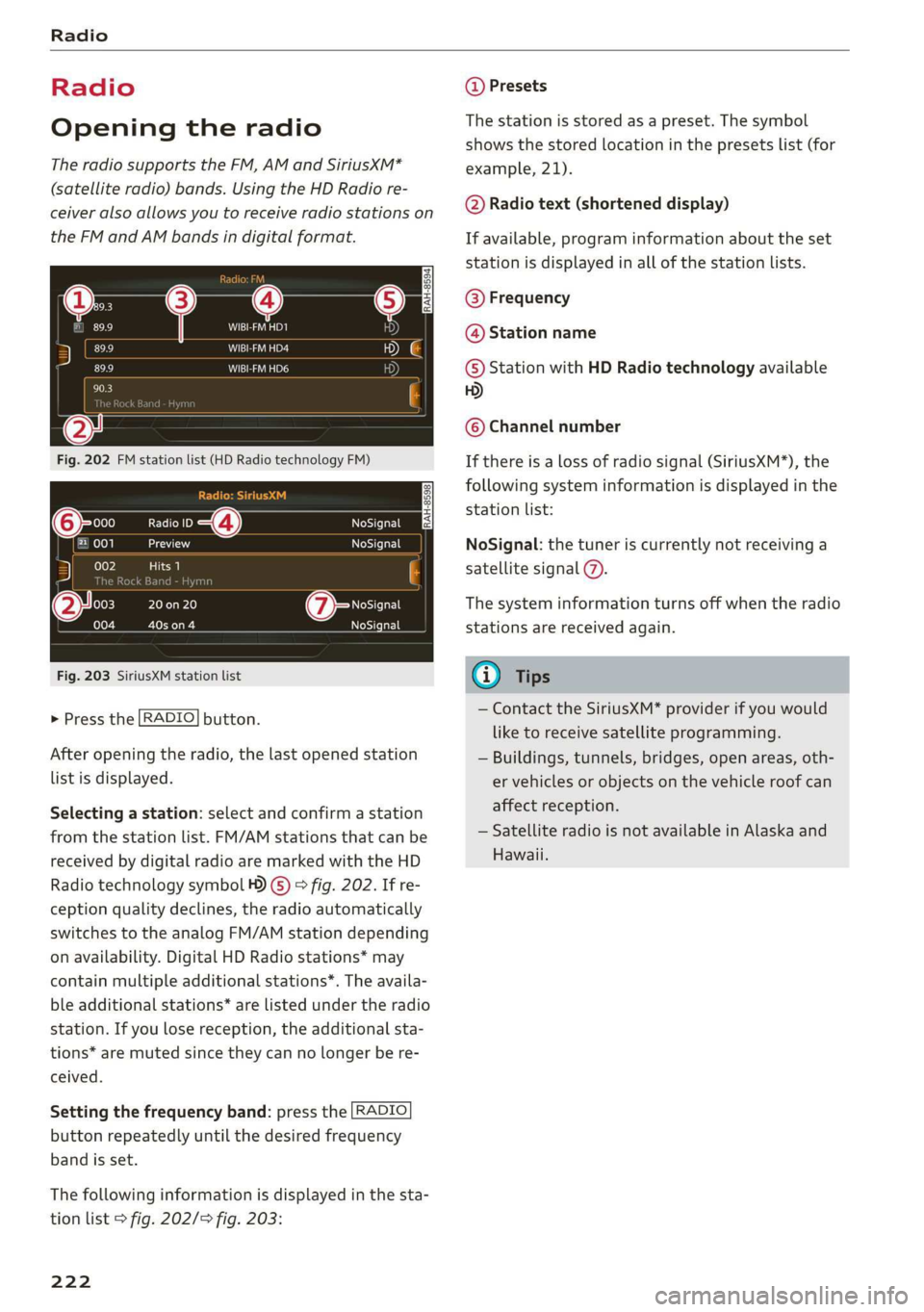
Radiotechnologysymbol4)©)>fig.202.Ifre-
ceptionqualitydeclines,theradioautomatically
switchestotheanalogFM/AMstationdepending
onavailability.DigitalHDRadiostations*may
containmultipleadditionalstations*.Theavaila-
bleadditionalstations*arelistedundertheradio
station.Ifyoulosereception,theadditionalsta-
tions*aremutedsincetheycannolongerbere-
ceived.
Settingthefrequencyband:pressthe [RADIO
buttonrepeatedlyuntilthedesiredfrequency
bandisset.
Thefollowinginformationisdisplayedinthesta-
tionlist>fig.202/>fig.203:
222
@Presets
Thestationisstoredasapreset.The symbol
showsthestoredlocationinthepresetslist(for
example,21).
@Radiotext(shorteneddisplay)
Ifavailable,programinformationabouttheset
stationisdisplayedinallofthestationlists.
@Frequency
@Stationname
©StationwithHDRadiotechnologyavailable
5)
©Channelnumber
Ifthereisalossofradiosignal(SiriusXM*),the
followingsysteminformationisdisplayedinthe
stationlist:
NoSignal:thetuneriscurrentlynotreceivinga
satellitesignal@).
Thesysteminformationturnsoffwhentheradio
stationsarereceivedagain.
G)Tips
—ContacttheSiriusXM*providerifyouwould
liketoreceivesatelliteprogramming.
—Buildings,tunnels,bridges,openareas,oth-
ervehiclesorobjectsonthevehicleroofcan
affectreception.
—SatelliteradioisnotavailableinAlaskaand
Hawaii.
Page 225 of 394
4M0012721BG
Radio
Radiofunctions
etme)4at1a)
Appliesto:vehicleswithfreetextsearch
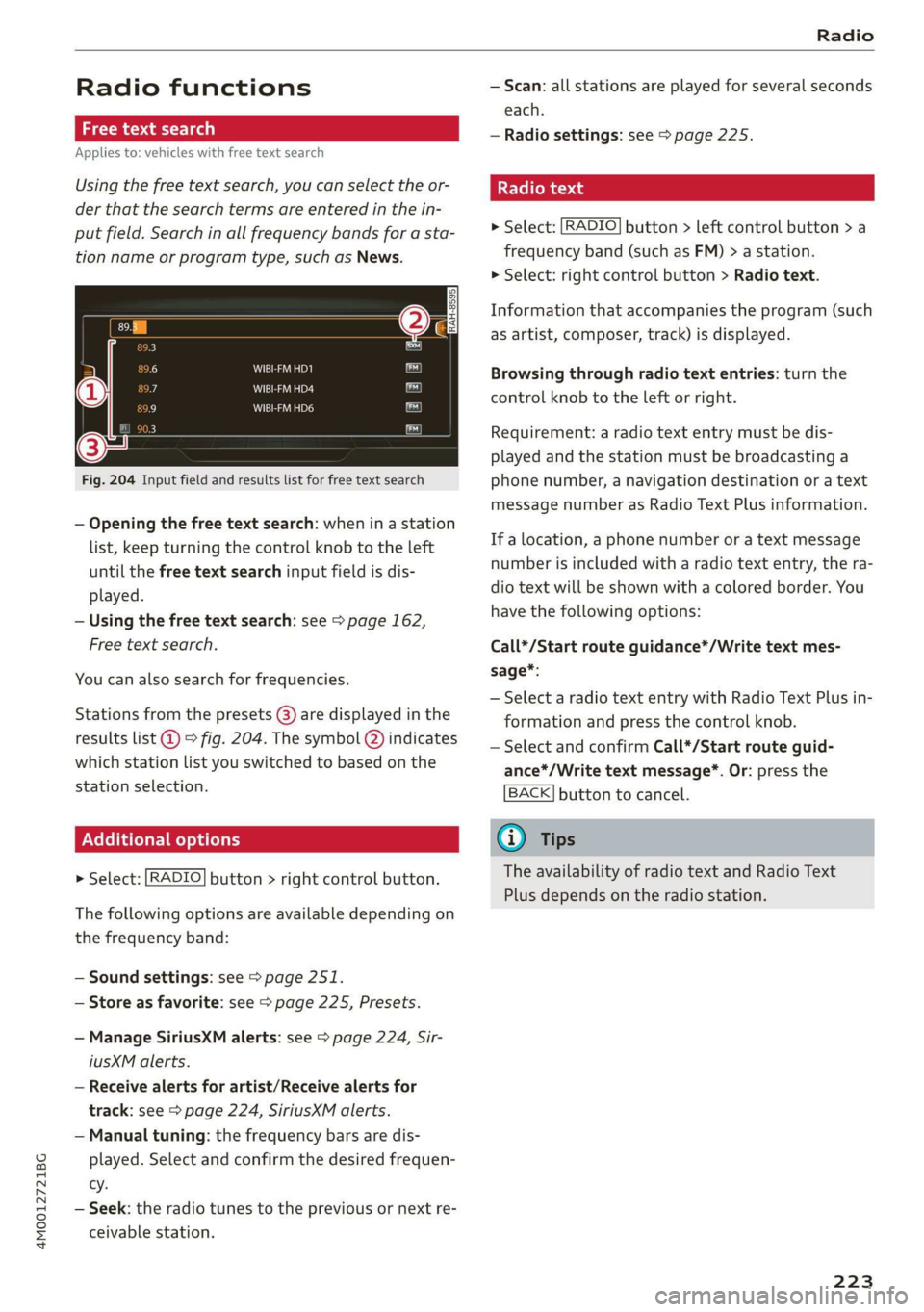
Usingthefreetextsearch,youcanselecttheor-
derthatthesearchtermsareenteredinthein-
putfield.Searchin allfrequencybandsforasta-
tionnameorprogramtype,suchasNews.
DTaP
Teaee
aTTaal)
Fig.204Inputfieldandresultslistforfreetextsearch
—Openingthefreetextsearch: wheninastation
list,keepturningthecontrolknobtotheleft
untilthefreetextsearchinputfieldisdis-
played.
—Usingthefreetextsearch:see>page162,
Freetextsearch.
Youcanalsosearchforfrequencies.
Stationsfromthepresets(8)aredisplayedinthe
resultslist@)>fig.204.Thesymbol@)indicates
whichstationlistyouswitchedtobasedonthe
stationselection.
EX]
naloptions
>Select:[RADIO]button>rightcontrolbutton.
Thefollowingoptionsareavailabledependingon
thefrequencyband:
—Soundsettings:see>page251.
—Storeasfavorite:see>page225,Presets.
—ManageSiriusXMalerts:see>page224,Sir-
iusXMalerts.
—Receivealertsforartist/Receivealerts for
track:see>page224,SiriusXMalerts.
—Manualtuning:thefrequencybarsaredis-
played.Selectandconfirmthedesiredfrequen-
cy.
—Seek:theradiotunestothepreviousornextre-
ceivablestation.
—Scan:allstationsareplayedforseveralseconds
each.
—Radiosettings:see>page225.
Radiotext
>Select:[RADIO]button>leftcontrolbutton>a
frequencyband(suchasFM)>astation.
>Select:rightcontrolbutton>Radiotext.
Informationthataccompaniestheprogram(such
asartist,composer,track)isdisplayed.
Browsingthroughradiotextentries:turnthe
controlknobtotheleftorright.
Requirement:aradiotextentrymustbedis-
playedandthestationmustbebroadcastinga
phonenumber,anavigationdestinationoratext
messagenumberasRadioTextPlusinformation.
If alocation,aphonenumberoratextmessage
numberisincludedwitharadiotextentry,thera-
diotextwillbeshownwithacoloredborder.You
havethefollowingoptions:
Call*/Startrouteguidance*/Writetextmes-
sage*:
—SelectaradiotextentrywithRadioTextPlusin-
formationandpressthecontrolknob.
—SelectandconfirmCall*/Startrouteguid-
ance*/Writetextmessage*.Or:pressthe
BACK]buttontocancel.
G)Tips
TheavailabilityofradiotextandRadioText
Plusdependsontheradiostation.
223
Page 227 of 394
4M0012721BG
Radio
Radiotextisavailable fortheselectedstation.
See>page223.
@FMHDRadiotechnology
ThestationisreceivedthroughFMHDRadio
technology.
@Screenview
DisplayCoverartorStationlogo.See
=>page226,Preferredpictureview*.
Displayingthestationlist:
Turnthecontrolknob.Or:pressthe[BACK]but-
ton.
Satie)o—
(3Ginte.od
@=—7aa
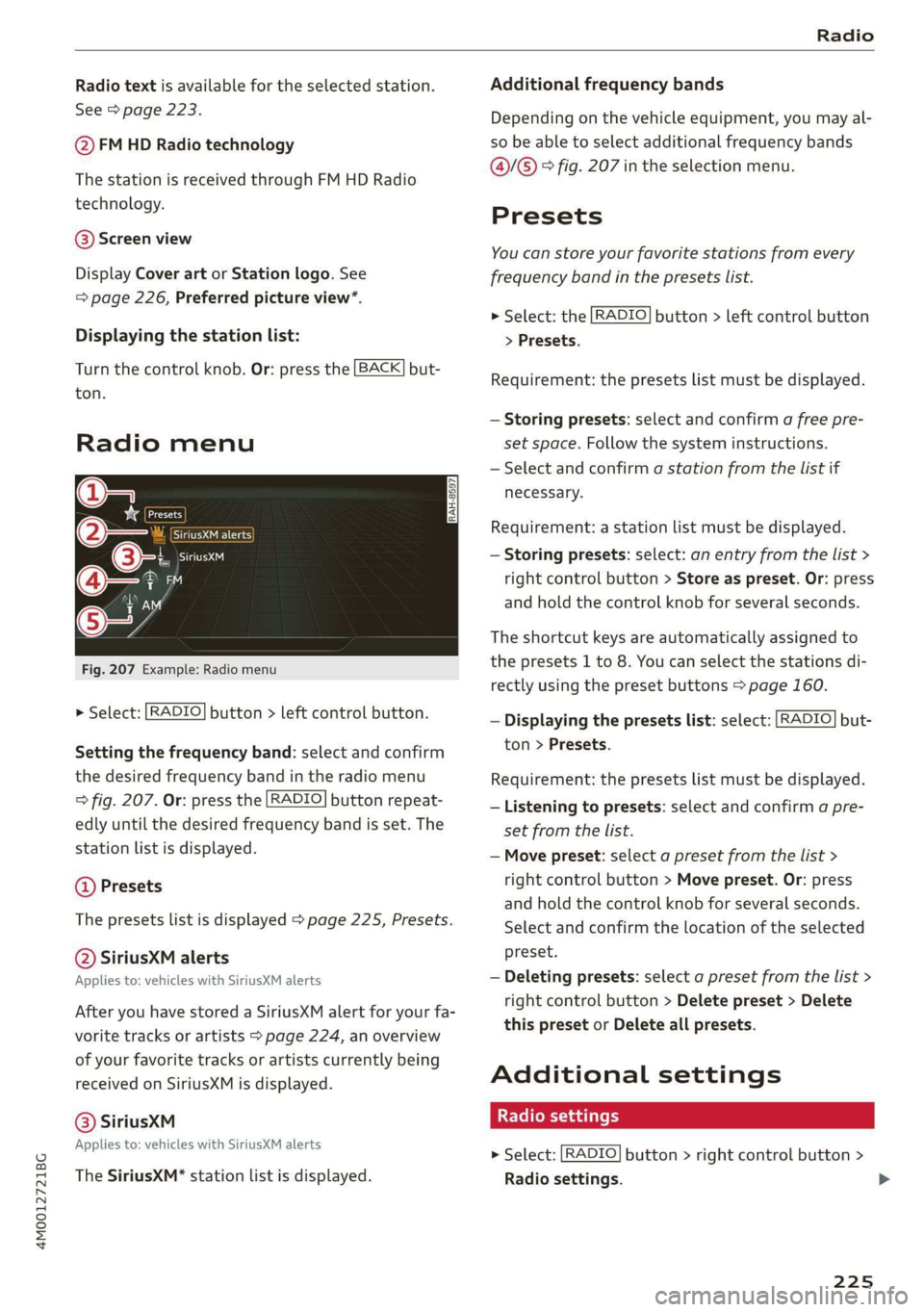
Fig.207Example:Radiomenu
>Select:[RADIO]button>leftcontrolbutton.
Settingthefrequencyband:selectandconfirm
thedesiredfrequencybandintheradiomenu
=>fig.207.Or:pressthe[RADIO]buttonrepeat-
edlyuntilthedesiredfrequencybandisset.The
stationlistisdisplayed.
@Presets
Thepresetslistisdisplayed>page225,Presets.
@SiriusXMalerts
Appliesto:vehicleswithSiriusXMalerts
AfteryouhavestoredaSiriusXMalertforyourfa-
voritetracksorartists>page224, anoverview
ofyourfavoritetracksorartistscurrentlybeing
receivedonSiriusXMisdisplayed.
©®SiriusKM
Appliesto:vehicleswithSiriusXMalerts
TheSiriusXM*stationlistisdisplayed.
Additionalfrequencybands
Depending onthevehicleequipment,youmayal-
sobeabletoselectadditionalfrequencybands
@/@®®fig.207intheselectionmenu.
Presets
Youcanstoreyourfavoritestationsfromevery
frequencybandinthepresetslist.
>Select:the[RADIO]button>leftcontrolbutton
>Presets.
Requirement:thepresetslistmustbedisplayed.
—Storingpresets:selectandconfirm afreepre-
setspace.Followthesysteminstructions.
—Selectandconfirmastationfromthelistif
necessary.
Requirement:astationlistmustbedisplayed.
—Storingpresets:select:anentryfromthelist>
rightcontrolbutton>Storeaspreset.Or:press
andholdthecontrolknobforseveralseconds.
Theshortcutkeysareautomaticallyassignedto
thepresets1to8.Youcanselectthestationsdi-
rectlyusingthepresetbuttons>page160.
—Displayingthepresetslist:select:[RADIO]but-
ton>Presets.
Requirement:thepresetslistmustbedisplayed.
—Listeningtopresets:selectandconfirmapre-
setfromthelist.
—Movepreset:selectapresetfromthelist>
rightcontrolbutton>Movepreset.Or:press
andholdthecontrolknobforseveralseconds.
Selectandconfirmthelocationoftheselected
preset.
—Deletingpresets:selectapresetfromthelist>
rightcontrolbutton>Deletepreset>Delete
thispresetorDeleteallpresets.
Additionalsettings
Radiosettings
>Select:[RADIO]button>rightcontrolbutton>
Radiosettings.
225
>
Page 228 of 394
Radio
Thefollowingsettingscan beselected,depend-
ingonthebandthatisselected:
Stationnames(FM)
Variable:scrollingtexttransmittedbytheFM
stationsisshownintheInfotainmentsystemdis-
play.
Fixed:scrollingtexttransmittedby theFMsta-
tionsisnotshownintheInfotainmentsystem
display.Onlythecurrentsectionofthescrolling
textisdisplayed.
FM/AMHDRadio*
YoucanswitchHDRadioreceptiononoroff.
Channelsorting(SiriusXM*)
YoucansetthechannelsortingforSiriusXMsta-
tionlists*by:
—Channelnumber:thechannelsaresortedinas-
cendingorderaccordingtotheirchannelnum-
ber.
—Channelname:thechannelsarelistedinalpha-
beticalorder.
—Firstcategory,thenchannelnumber:thechan-
nelsaresorted bytheircategoryandthenby
theirchannelnumbers.
—Firstcategory,thenchannelname:thechan-
nelsaresorted bytheircategoryandthenby
theirchannelnames.
Categoryfilter(SiriusXM*)
Thestationsshowninthestationlistcanbefil-
teredby yourpersonalpreferencesandbypro-
gramtype.Theprogramcategoriesthatyoucan
selectdependonwhatisofferedbyyourprovid-
er.SelecttheAllcategoriesoptiontodeactivate
allfilteroptionsanddisplayallavailablestations
inthesatellitestationlist.
Troubleshooting
Show"NowPlaying"screen
Whenthefunctionisswitchedon¥andthesta-
tionsorpresetslistisopen, thedisplaywill
switchtothe"NowPlaying"screenviewafterap-
proximatelyfiveseconds>page224.Depending
onavailability,informationaboutthesetstation
(such asstationname,artistandstationlogo)
maybedisplayedinthisview.
Preferredpictureview*
Youcansetyourpreferredscreenviewforthe
"NowPlaying"screen>page224.
—Stationlogo:thestationlogoisdisplayed,de-
pendingonavailability.
—Coverart:thealbumcoverisdisplayedifavaila-
ble.
Gracenoteonlinedatabase*
Requirement:theMMImustbeconnectedtothe
Internet.TheCoverartoptionmustbeselected
=page226,Preferredpictureview*.
Whenthefunctionisswitchedon(¥,thealbum
coverorgenrecoverforthesongthatisplayingis
loadedfromtheGracenoteonlinedatabase,de-
pendingonavailability.
Subscriptionstatus(SiriusXM)*
Thisoptionisavailablewhenyoursubscriptionis
abouttoexpireorhasalreadyexpired.Theexpi-
rationdateforyourlicenseisdisplayed.
CalltoSiriusXM”*:thecontactinformationfor
yoursatelliteradioproviderisdisplayed.Tocall
yoursatelliteradioproviderusingtheMMI,press
CalltoSiriusXM”*.
ProblemSolution
Astationwithpoorreceptionisnolonger
displayedinthestationlistonceyou
switchtoadifferentstation.
Storethestationasapresetinadvance.Accessthepre-
setsusingthepresetslist>page225.
226
Page 229 of 394
4M0012721BG
Media
Media
Introduction
Therearevariousmediadrivesandconnections
availableintheMMI.Forexample,youcanplay
audio/video*filesfromtheJukebox*orconnect
yourmobiledevicetotheAudimusicinterface*
andoperateitthroughtheMMI.
Notes
Mediaandformatrestrictions:theMMI(includ-
ingtheSDcardreaderandtheUSBstoragede-
viceconnection*)wastestedwithavarietyof
productsandmediaavailableinthemarket.
However,theremaybecaseswhereindividualde-
vicesormediaandaudio/video*filesmaynot be
recognized,mayplayonlywithrestrictionsor
maynotplayatall.
DigitalRightsManagement:pleasenotethat
theaudio/video*filesaresubjecttocopyright
protection.
Themediadrivesdonotplayfilesthatarepro-
tectedbyDRMandthatareidentifiedwiththe
symbolfi.
Datasecurity:neverstoreimportantdataonSD
cards,theJukebox*,CDs/DVDsormobiledevices.
AudiAGisnotresponsiblefordamagedorlost
filesandmedia.
Loadingtimes:themorefiles/folders/playlists
thatareonastoragemedium,thelongeritwill
taketo loadtheaudio/video*files.Audirecom-
mendsusingstoragemediathatonlycontainau-
dio/videofiles*.To decreasethetimeittakesto
loadaudio/videofiles*,createsubfolders(forex-
ample,fortheartistoralbum).Theloadingtime
willalsoincreasewhenimportingfiles.
Additionalinformation:whenplaying,audio
filesareautomaticallydisplayedwithanyaddi-
tionalinformationthatisstored(suchasthear-
tist,trackandalbumcover).Ifthisinformationis
notavailableonthestoragemedium,theMMI
willchecktheGracenotemetadatadatabase.
However,insomecases,theadditionalinforma-
tionmaynotbedisplayed.
Restrictedfunctionality:resettheMediaset-
tingstothefactorydefaultsettingsiffunctional-
ityisrestricted>page248.
Iffunctionalityisrestricted,resettheJukebox*
tothefactorydefaultsettings>page248.
Forinformationaboutthepropertiesofsupport-
edmediaandfileformats,see>page241.
CG)Note
Alwaysfollowtheinformationfoundin>@in
Wi-Fisettingsonpage200.
CD/DVDoperation
CD/DVDandformatrestrictions:thefunctionali-
tyofindividualstoragemediamaybelimiteddue
tothevarietyofblankCDs/DVDsavailable and
thevariouscapacities.AudioCDsorvideoDVDs
withcopyprotection,CDs/DVDsthatdonotcon-
formtothestandard,andmultisessionCDsmay
havelimitedplaybackormaynotplayatall.Audi
recommendsfinalizingtherecordingprocess
whencreatingmultisession CDs.Multisession
DVDsarenotsupported.
UsingCDs/DVDs,theCDdrive ortheDVDdrive:
toensurecorrect,high-qualityplaybackandto
preventdamagetothedriveordiscreadinger-
rors,alwaysstoreCDs/DVDsinaprotective
sleeveanddonotexposethemtodirectsunlight.
Donotuse:
—Damaged,dirtyorscratchedCDs/DVDs
—
SingleCDs/DVDswith3in(8cm)diameter
—CD/DVDsthatarenotround
—CDs/DVDswithlabels
—Protectiverings
—CleaningCDs
Thermalprotectionswitch:CD/DVDplayback
maybetemporarilyunavailableifoutsidetem-
peraturesareextremelyhotorcold.Athermal
protectionswitchisinstalledtoprotectthe
CD/DVDandthelaser.
Laserdevices:laserdevicesare dividedintosafe-
tyclasses1to4inaccordancewithDINIEC76
227
>
Page 232 of 394
Media
—Thestatusofthedeletingprocessisshownin
theMMI.Jukeboxplaybackstopsduringthede-
letingprocessandstartsagainautomatically
oncethedeletioniscomplete.
@)Note
Donotimportaudio/videofileswhentheen-
gineisturnedoffbecausethiswilldrainthe
vehiclebattery.
@)Tips
—TracksfromaudioCDscannotbeimported
totheJukeboxforlegalreasons.
—Filesthathavealreadybeenimportedare
automaticallyrecognizedandcannotbe
copiedtotheJukeboxagain.
—Itisnotpossible toplay audio/video*files
intheCD/DVD*drivewhileimportingthem.
— TheJukeboxdoesnotprovidean export
functionduetolegalreasons.
—Filesortrackswithoutadditionalstoredin-
formationarelistedasUnknown.Audirec-
ommendsaddingadditionalinformation
(such asID3tags)toaudiofiles.
—ResettheJukeboxtothefactorydefaultset-
tingswhensellingyourvehicle>page248.
Bluetoothaudioplayer
Appliesto:vehicleswithBluetoothaudioplayer
WiththeBluetoothaudioplayer,youcanplay
musicwirelesslyfrom yourBluetooth-capable
device(suchasacellphone)throughtheMMI.
Requirement:thevehiclemustbestationaryand
theignitionmustbe switchedon.TheBluetooth
settingswillopenonyourmobiledeviceduring
theconnectionsetup.TheBluetoothfunctionand
visibilityoftheMMI>page250andmobilede-
vicemustbe switchedon.TheBluetoothaudio
player>page250mustbeswitchedoninthe
MMI.
—ConnectingaBluetoothdevice:pressthe
MEDIA]button.Presstheleftcontrolbutton
untilthesourcesoverviewisdisplayed.Select
andconfirmBluetoothaudioplayer@)
>page235,fig.213.
230
—Ifnecessary,selectandconfirmNotconnected
>ConnectBluetoothaudioplayer.TheBlue-
toothdevicesearchstarts.Followtheinstruc-
tionsintheMMI.
—SelectandconfirmthedesiredBluetoothdevice
fromthelist.TheMMIgeneratesaPINforthe
connection.
—SelectandconfirmYes.
—EnterthePINforconnectingonyourBluetooth
device.Or:ifthePINisalreadydisplayedon
yourBluetoothdevice,confirmitintheBlue-
toothdeviceandintheMMI.Thetimeallowed
forenteringthePINislimitedtoapproximately
30seconds.
Themediaisstartedandoperatedthroughthe
mobiledeviceortheMMI,dependingonthede-
vicebeingused.
(i)Tips
—Checkforanyconnectionrequestsonyour
Bluetoothdevice.
—MultipleBluetoothaudioplayerscan be
connectedtotheMMI,butonlyonemobile
devicecanbeactive.
—BluetoothprotocolsAVRCP(1.0/1.3/1.4)
andA2DParesupported.
—NotethevolumesettingonyourBluetooth
device.Audirecommendssettingyourmo-
biledevicetothemaximumvolumewhen
usingitasaBluetoothaudioplayer.
— Thesupportedmediafunctions(suchas
shuffle)dependontheBluetoothdevicebe-
ingused.
—Formoreinformationonsupporteddevices,
visitwww.audiusa.com/bluetoothorcon-
tactanauthorizedAudidealerorauthorized
AudiServiceFacility.
Page 236 of 394
Media
thenconnectittothemobiledevice,forexam-
pleaniPhone.Thebatterywillchargeautomat-
ically.
—DisconnectingamobiledevicefromtheAudi
musicinterface:RemovetheUSBadapterfrom
the AudimusicinterfaceUSBport.
Themediaarestartedandoperatedthroughthe
mobiledeviceortheMMI,dependingonthede-
vicebeingused>page235.
Connectingmultiplemobiledevices:ifamobile
device(suchasasmartphone)isconnectedatthe
respectiveUSBportontheAudimusicinterface,
thenalldevicescanbeusedasaplaybacksource.
AUXInput
—Connectingamobiledevice totheAUXinput:
ConnecttheAUXcabletotheAUXinputonthe
Audimusicinterfaceandthenconnectittothe
mobiledevice(forexample,anMP3playerora
smartphone).
—DisconnectingamobiledevicefromtheAUX
input:RemovetheAUXcablefromtheAUXin-
putonthe Audimusicinterface.
—Operation:selectandconfirm theExternalau-
dioplayersourceG)>page235,fig.212.Me-
diaisstartedandoperatedonthemobilede-
vice.
Z\WARNING
Drivingrequiresyourcompleteandundivided
attention.Asthedriver,youhavecompletere-
sponsibilityforsafetyintraffic.Neveroperate
mobiledeviceswhiledriving,becausethisin-
creasestheriskofanaccident.
@)Note
—UseaUSBextensioncabletoconnectdevi-
cesthathaveanintegratedUSBconnector
(suchasaUSBstick)topreventdamageto
yourUSBdeviceandtheAudimusicinter-
face.
—Extremelyhighorlow temperaturesthat
canoccurinsidevehiclescandamagemobile
devicesand/orimpairtheirperformance.
1)Applies onlytoMTPdevices.DoesnotapplytoAppledevi-
cesandUSBmassstoragedevices.
234
Neverleavemobiledevicesinthevehiclein
extremelyhighorlowtemperatures.
(i)Tips
—Alwaysfollowtheinformationfoundin
=>page60.
—Whenyouswitchtheignitionoff,theUSB
portsarestillsuppliedwithpoweruntilthe
energymanagementintervenes.
—DonotuseanadditionaladapterorUSBex-
tensioncabletoconnectmobiledevicesto
theAudimusicinterfacethatalreadyhavea
cableorthatmustbeconnectedwithaUSB
adapter(=page233).Using anadditional
adapterorUSextensioncablemayimpair
functionality.
—YoucanpurchasetheAUXconnectorcable
fromanauthorizedAudidealeroratspe-
cialtystores.
—Audirecommendssettingthevolumeofa
mobiledeviceconnectedtotheAUXinputto
approximately70%ofthemaximumvol-
ume.
—Functionalityisnotguaranteedformobile
devicesthatdonotconformtotheUSB2.0
specification.
—USBhubsarenotsupported.
—SomeversionsoftheiPodsuchastheiPod
shufflecannotbeconnectedtotheUSB
adapterfordeviceswithAppleDockconnec-
tor.ConnectthesedevicesusingaAUXcon-
nectorcable.
—Changedcontentonamobiledevice»)that
isconnectedtotheAudimusicinterface
maynotbedisplayedinthemediacenter.In
thiscase,resettheMediasettingsbackto
Factorysettings>page248.
—Videoplaybackthroughthe Audimusicin-
terfaceisonlysupportediftheconnected
deviceisrecognizedasaUSBstoragedevice
(forexampleaUSBstick).Appledevicesand
MTPdevices(suchassmartphones)arenot
recognizedasUSBstoragedevices.
Page 237 of 394
4M0012721BG
Media
—iPod oriPhonemalfunctionsalsoaffectthe
operationoftheMMI.ResetyouriPodor
iPhoneifthishappens.
—AudirecommendsupdatingtheiPod or
iPhonesoftwaretothelatestversion.For
importantinformationonoperatingyour
iPod oriPhone,refertotheuserguidefor
thedevice.
— TheUSBadapteronthe Audimusicinter-
facewillsupportiPodtouchoriPhonedevi-
cesfromthe5thgenerationornewerwith
thelightningconnector.
—Formoreinformationaboutthe Audimusic
interfaceandsupporteddevices,checkthe
Audidatabaseformobiledevicesatwww.
audiusa.com/mp3orcontactanauthorized
AudidealerorauthorizedAudiServiceFa-
cility.
Tet1keLhd)
Appliesto:vehicleswithRearSeatEntertainmentpreparation
TheRear SeatEntertainmentpreparationin-
cludescablesandamountforAudiEntertain-
mentmobileinthedriver'sandfrontpassenger's
seatbackrests.
ThesuitableAudiEntertainmentmobileRear
SeatEntertainmentpackageisavailablethrough
AudiGenuineAccessories.
UsingAudiGenuineAccessoriesisrecommended.
Audihasverifiedtheirreliability,safety,andsuit-
ability.
Wecannotevaluateorendorseotherproductsin
thisway,evenifthe productisapprovedbyacer-
tifiedtestingagencyorgovernmentagency.
@)Note
Onlyusedevicesthatareapprovedforthe
Rear SeatEntertainmentpreparation.Unap-
provedequipmentcan causedamagetothe
vehicleelectricalsystem.
@)Tips
—Contact anauthorizedAudidealeror au-
thorizedAudiServiceFacilityforadditional
informationonAudiEntertainmentmo-
bile.
—Alwaysreadthechapter>page370.
— TheRear SeatEntertainmentpreparationis
notintendedtochargeexternalelectronic
devices.
Playingmedia
Youcanstartandoperatevariousmediathrough
theMMIcontrolpanel.
@-=
eyes
a
SDcard
:iiaudioplayer
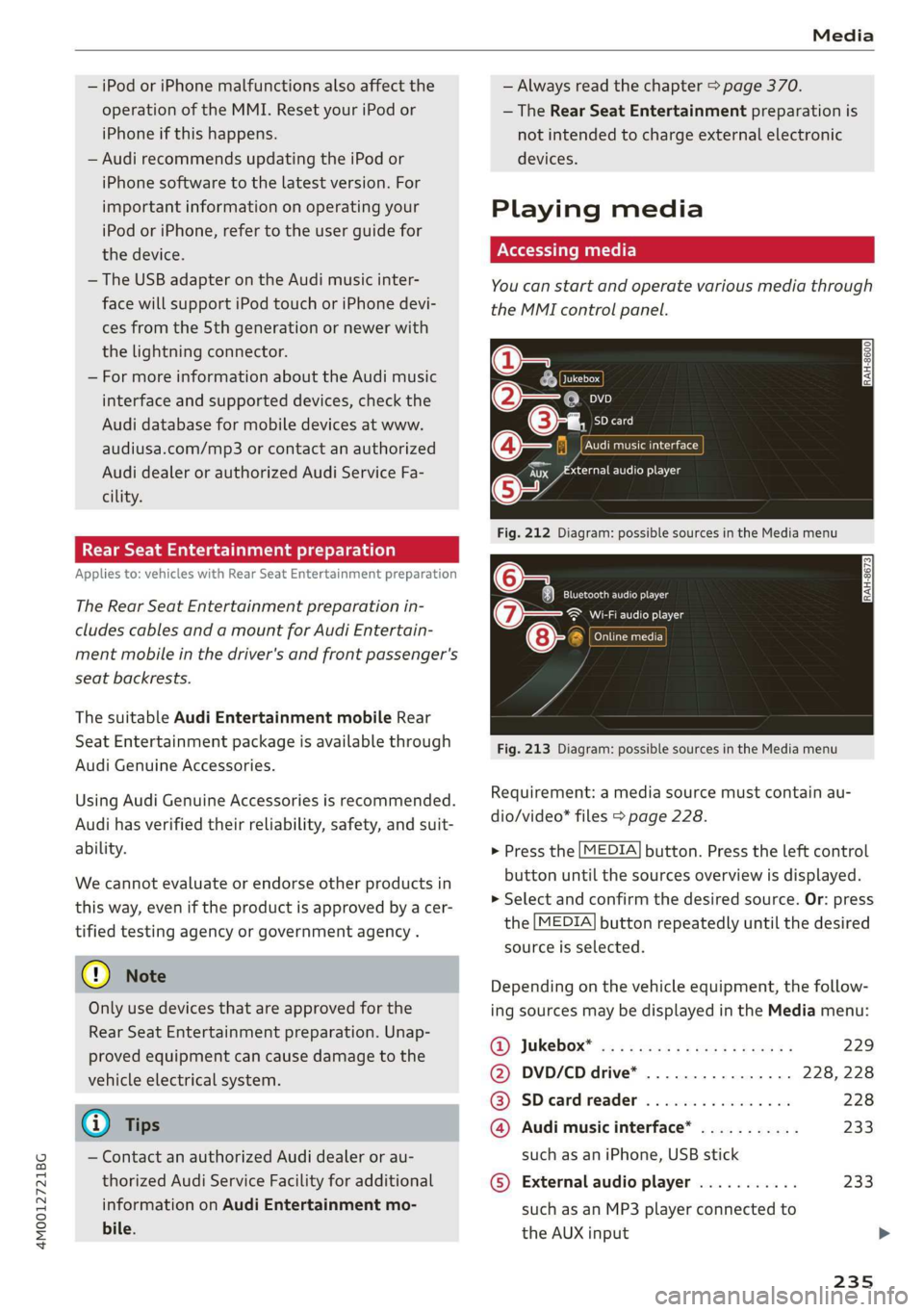
Fig.212Diagram:possiblesourcesintheMediamenu
6Teaelec)ie
(7owe@}Wi-Fiaudioplayer
ens
”
Fig.213Diagram:possiblesourcesintheMediamenu
CATTaacor}
Requirement:amediasourcemustcontainau-
dio/video*files>page228.
>Pressthe[MEDIA]button.Presstheleftcontrol
buttonuntilthesourcesoverviewisdisplayed.
>Selectandconfirmthedesiredsource.Or:press
the[MEDIA]buttonrepeatedlyuntilthedesired
sourceisselected.
Dependingonthevehicleequipment,thefollow-
ingsourcesmaybedisplayedintheMediamenu:
@)Jukebox*®osi5easssewesiyawns229
@DVD/CDdrive*. . .228,228
@®SDcardreader228
@Audimusicinterface*...........233
suchasaniPhone,USBstick
©Externalaudioplayer...........233
suchasanMP3playerconnectedto
theAUXinput