reset AUDI Q7 2019 Owner´s Manual
[x] Cancel search | Manufacturer: AUDI, Model Year: 2019, Model line: Q7, Model: AUDI Q7 2019Pages: 394, PDF Size: 105.97 MB
Page 243 of 394
4M0012721BG
Media
arow.Thepasswordcanonlyberesetbyan
authorizedAudidealer.
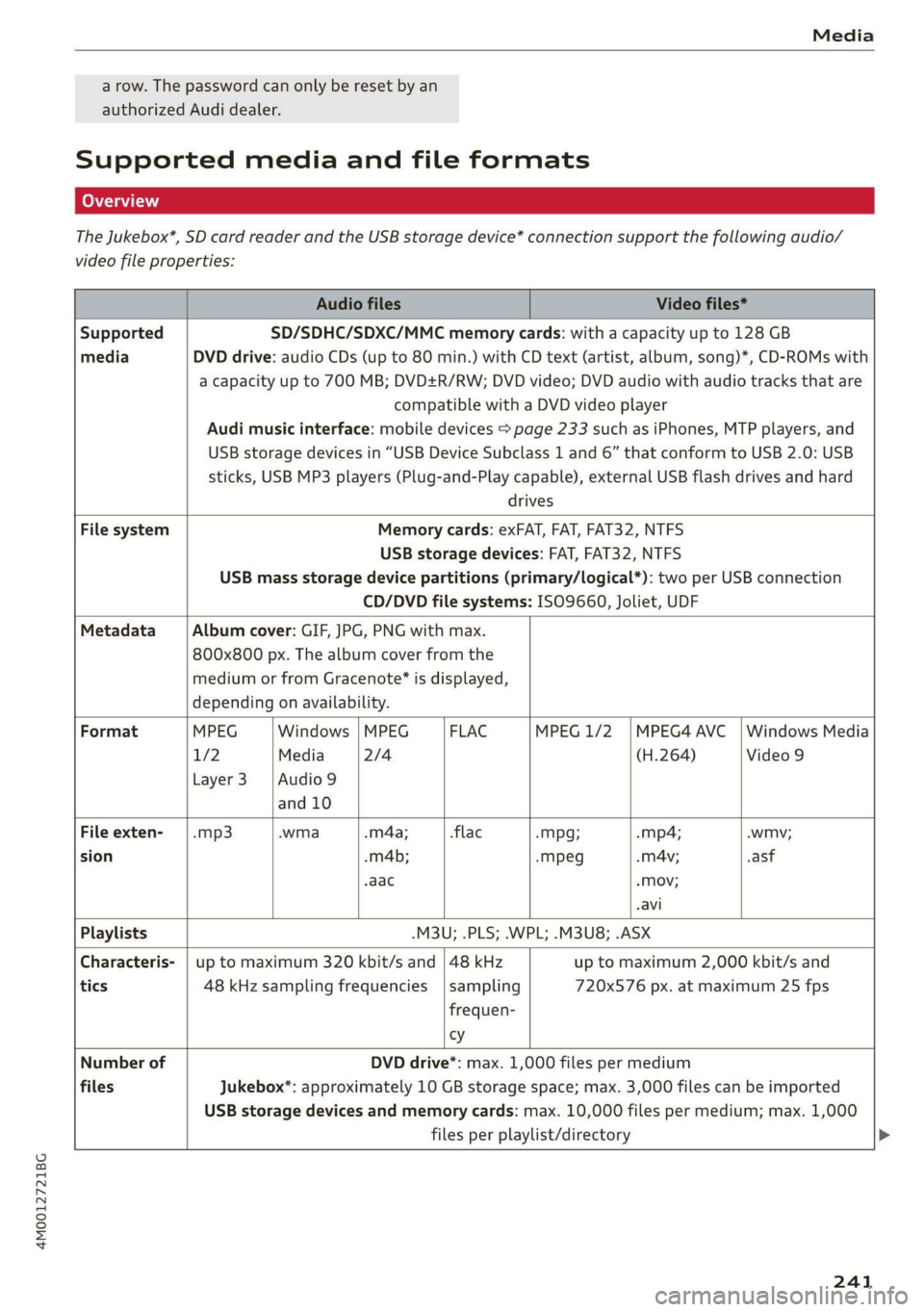
Supportedmediaandfileformats
TheJukebox*,SDcardreaderandtheUSBstoragedevice*connectionsupportthefollowingaudio/
videofileproperties:
AudiofilesVideofiles*
SupportedSD/SDHC/SDXC/MMCmemorycards:withacapacityupto128GB
mediaDVDdrive:audioCDs(upto80min.)withCDtext(artist,album,song)*,CD-ROMswith
acapacityupto700MB;DVD+R/RW;DVDvideo;DVDaudiowithaudiotracksthatare
compatiblewithaDVDvideoplayer
Audimusicinterface:mobiledevices>page233suchasiPhones,MTPplayers,and
USBstoragedevicesin“USBDeviceSubclass1and6” thatconformtoUSB2.0:USB
sticks,USBMP3players(Plug-and-Playcapable),externalUSBflashdrivesandhard
drives
FilesystemMemorycards:exFAT,FAT,FAT32,NTFS
USBstoragedevices:FAT,FAT32,NTFS
USBmassstoragedevicepartitions(primary/logical*):twoperUSBconnection
CD/DVDfilesystems:ISO9660,Joliet,UDF
MetadataAlbumcover:GIF,JPG,PNGwithmax.
800x800px.Thealbumcoverfromthe
mediumorfromGracenote®isdisplayed,
dependingonavailability.
FormatMPEGWindows|MPEGFLACMPEG1/2|MPEG4AVC|WindowsMedia
17/2Media2/4(H.264)Video9
Layer3|Audio9
and10
Fileexten--mp3.wma.m4a;-flac-mpg;-mp4;.wmv;
sion.m4b;-mMpeg-mAv;asf
.aac-Mov;
-avi
Playlists-M3U;.PLS;.WPL;.M3U8;.ASX
Characteris-|uptomaximum320kbit/sand|48kHzuptomaximum2,000kbit/sand
tics48kHzsamplingfrequencies|sampling720x576px.atmaximum25fps
frequen-
vy
NumberofDVDdrive*:max.1,000filespermedium
filesJukebox":approximately10GBstoragespace;max.3,000filescanbeimported
USBstoragedevicesandmemorycards:max.10,000filespermedium;max.1,000
filesperplaylist/directory
241
Page 245 of 394
4M0012721BG
Media
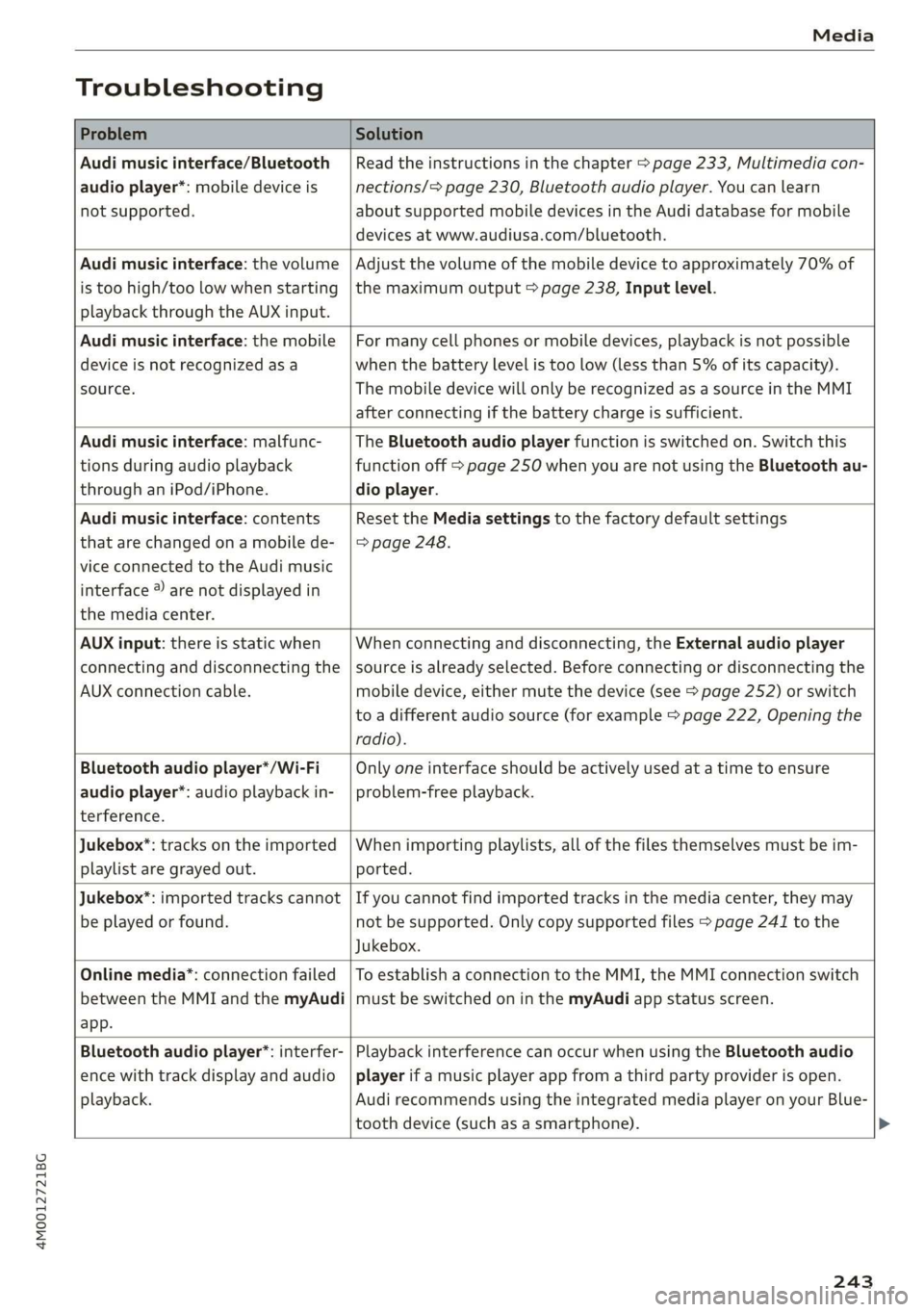
Troubleshooting
ProblemSolution
Audimusicinterface/Bluetooth
audioplayer*:mobiledeviceis
notsupported.
Readtheinstructionsinthechapter>page233,Multimediacon-
nections/=>page230,Bluetoothaudioplayer.Youcanlearn
aboutsupportedmobiledevicesintheAudidatabaseformobile
devicesatwww.audiusa.com/bluetooth.
Audimusicinterface:thevolume
istoohigh/toolowwhenstarting
playbackthroughtheAUXinput.
Adjustthevolumeofthemobiledevicetoapproximately70%of
themaximumoutput>page238,Inputlevel.
Audimusicinterface:themobile
deviceisnotrecognizedasa
source.
Formanycellphonesormobiledevices,playbackisnotpossible
when
thebatteryLevelistoolow(lessthan5%ofitscapacity).
ThemobiledevicewillonlyberecognizedasasourceintheMMI
afterconnectingifthebatterychargeissufficient.
Audimusicinterface:malfunc-
tionsduringaudioplayback
throughaniPod/iPhone.
TheBluetoothaudioplayerfunctionisswitchedon.Switchthis
functionoff>page250whenyouarenotusingtheBluetoothau-
dio
player.
Audimusicinterface:contents
thatarechangedonamobilede-
viceconnectedtotheAudimusic
interface®arenotdisplayedin
themediacenter.
Reset theMediasettingstothefactorydefaultsettings
=>page248.
AUXinput:thereisstaticwhen
connectinganddisconnectingthe
AUXconnectioncable.
Whenconnectinganddisconnecting,theExternalaudioplayer
sourceisalreadyselected.Beforeconnectingordisconnectingthe
mobiledevice,eithermutethedevice(see>page252)orswitch
toadifferentaudiosource(forexample>page222,Openingthe
radio).
Bluetoothaudioplayer*/Wi-Fi
audioplayer*:audioplaybackin-
terference.
Onlyoneinterfaceshouldbeactivelyusedatatimetoensure
problem-freeplayback.
Jukebox*:tracksontheimported
playlistaregrayedout.
Whenimportingplaylists,allofthefilesthemselvesmustbeim-
ported.
Jukebox®*:importedtrackscannot
beplayedorfound.
Ifyoucannotfindimportedtracksinthemediacenter,theymay
notbesupported.Onlycopysupportedfiles>page241tothe
Jukebox.
Onlinemedia*:connectionfailed
betweentheMMIandthemyAudi
app.
ToestablishaconnectiontotheMMI,theMMIconnectionswitch
mustbe switchedoninthemyAudiappstatusscreen.
Bluetoothaudioplayer*:interfer-
encewithtrackdisplayandaudio
playback.
PlaybackinterferencecanoccurwhenusingtheBluetoothaudio
playerifamusicplayerappfromathirdpartyproviderisopen.
AudirecommendsusingtheintegratedmediaplayeronyourBlue-
toothdevice (such asasmartphone).
243
Page 250 of 394
Systemsettings
Switchoffpop-up:thisfunctionisswitchedonat
thefactory.WhenthefunctionisswitchedonM,
themessagesintheInfotainmentsystemdisplay
regardingthechargingstatusofyourcellphone
intheAudiphonebox*arehidden.Thereminder
nottoforgetyourcellphonewhenleavingthe
vehicleisalsoswitchedoff.
Tooltips
Whenthisfunctionisswitchedon4,yourMMI
showsyoutipsforinput.Thefrequencyofhow
oftenitdisplaysdecreaseswithtime.
Speechdialogsystem
Appliesto:vehicleswithvoicerecognitionsystem
Dependingonvehicleequipment,thefollowing
functions
maybeavailable:
Commanddisplay:whenthisfunctionisswitch-
edon,theMMIwillshowyouthepossible
commandsforvoiceinputintherespective
menu.
Shortdialog:whenthisfunctionisswitchedon
(Y,ashorterformofthepromptsisused.
Commandduringvoiceoutput*:thisfunctionis
switchedonatthefactory.Whenthisfunctionis
switchedon(MW,youcansaynewcommandsdur-
ingannouncements.Youdonotneedtowaitfor
thesignaltone(beep)duringanannouncement.
WhenthefunctionisswitchedoffLJ,youneedto
waitforthesignaltone(beep)tosayanewcom-
mand.
Volume:youcanadjustthevolumeofthe
promptsbyturningthecontrolknob.
Individualspeechtraining(onlywhenthevehi-
cleisstationary):youcanadaptthevoicerecog-
nitionsystemtoyourvoiceorpronunciationinor-
dertoimprovethesystem'sabilitytorecognize
yourspeech.Individualspeechtrainingiscom-
prisedof20speechentriesthatconsistofcom-
mandsand sequencesofnumbers.Youcande-
letetheprogrammedvoicetrainingwiththeRe-
setindividualspeechtrainingfunction.
Displaybrightness
YoucanadjustthebrightnessoftheInfotain-
mentsystemdisplaybyturningthecontrolknob.
248
Factorysettings
Dependingonthevehicleequipment,thefollow-
ingfunctionscanberesettofactorysettings:
—Soundsettings
—Radio
—Mediasettings
—Jukebox*
—Directory
—Telephone
—BluetoothandWi-Fi*
—Navigationsettings*
—Navigationandonlinememory*
—Voicerecognitionsystem*
—Shortcutkeys
—Messagesettings*
—Apps*
—Tooltips
—Audiconnect*
—Audismartphoneinterface*
Youcanselectthedesiredfunctionsindividually
orallatoncewiththeoptionSelectallentries.
Selectandconfirm Restorefactorysettings.
G)Tips
Makesurethatnotonlythesettingswerede-
letedbutalsothestoreddata,ifnecessary.
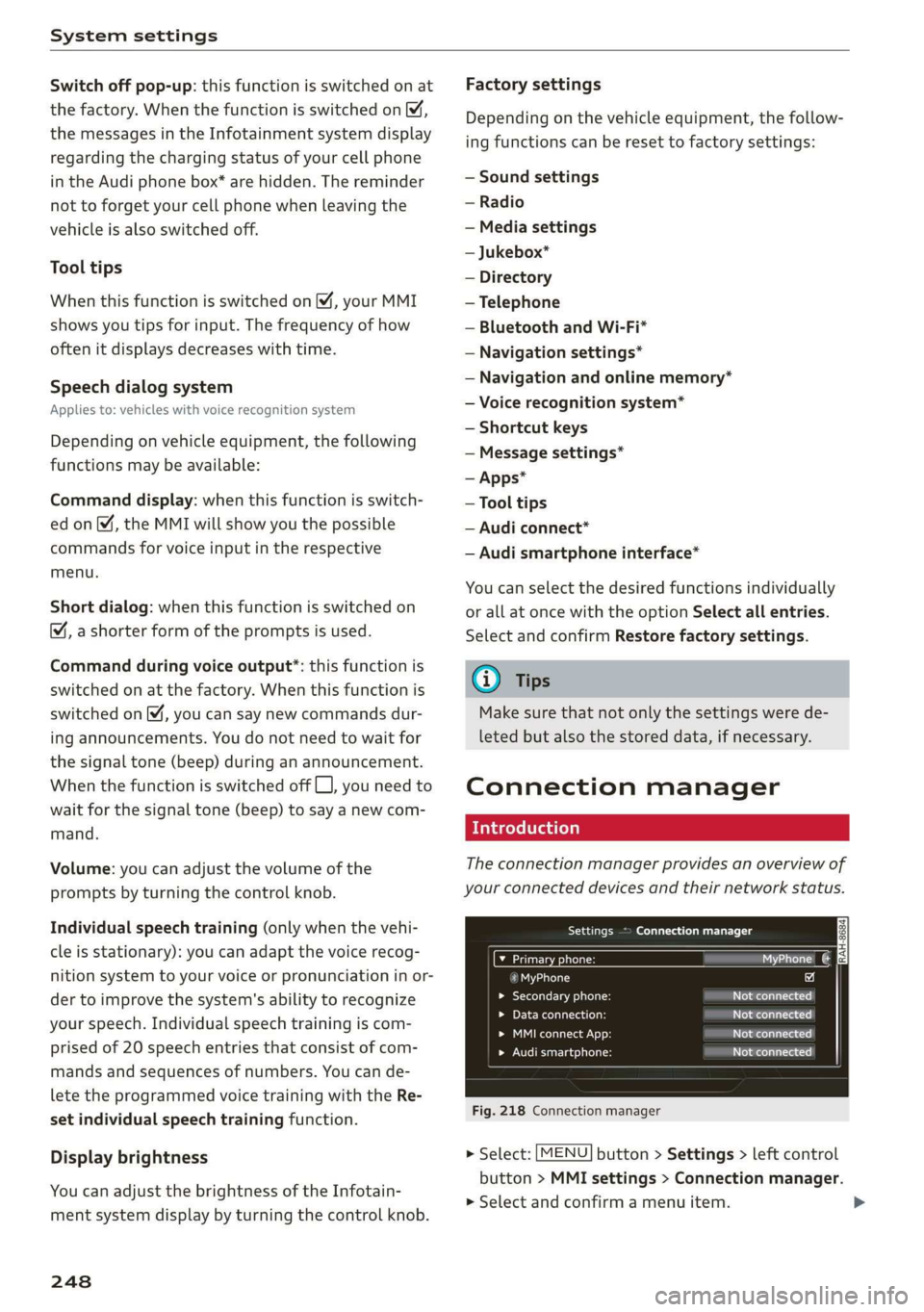
Connectionmanager
Introduction
Theconnectionmanagerprovidesanoverviewof
yourconnecteddevicesandtheirnetworkstatus.
SerreenUsOTs
M7inetpensWie
icfSiac
»Secondaryphone:Notconnected
LaerieReonasotNotconnected
Peeit.)Notconnected
eelrast)Peertasienats
Fig.218Connectionmanager
>Select:[MENU]button>Settings>leftcontrol
button>MMIsettings>Connectionmanager.
>Selectandconfirmamenuitem.
Page 252 of 394
Systemsettings
Appliesto:vehicleswithtelephone
Displaycontactsfromacellphone(oranaddi-
tionalcellphone).
Requirement:nocellphonescanbeconnectedto
theMMIusingtheHandsfreeprofile.
—Connectnewdevice:searchforandconnecta
newcellphone.
—Listofdevicesalreadypaired:selectyourcell
phonefromthelistofallthecellphonesthat
arealreadypaired.
Audismartphone
Appliesto:vehicleswithAudismartphoneinterface
—Connectyourcellphonetothe Audimusicin-
terface>page233usingaUSBadapter
=>page233,fig.211.
—Selectyourcellphonefromthelistofcell
phonesthathavealreadybeenconnected.
Additionaloptions
Depending
ontheselectedfunction,youcanuse
therightcontrolbuttontoaccesstheavailable
additionaloptionsintheconnectionmanager.
DeleteBluetoothdevice*
Theselectedcellphone/mobiledeviceisdiscon-
nectedfromtheMMIandisremovedfromthe
listofalldevicesthatarealreadypaired.
ShowBluetoothprofiles*
YoucanConnectorDisconnecttheHandsfree,
Messages",Directory/contactsandBluetooth
audioplayerprofilesseparately.
Bluetoothsettings*
—Bluetooth:selectandconfirmasettingforthe
Bluetooth
connectionvisibility.SelectVisible
fortheMMItobevisibletootherdevices.Se-
lectInvisiblefortheMMItonotbevisibleto
otherdevices.However,itisstillpossibletoes-
tablishaBluetoothconnectionwithpairedde-
viceswhenthevisibilityisswitchedoff.Select
Offtoturnvisibilityoff.ThenaBluetoothcon-
nectionisnotpossible.
250
—Bluetoothaudioplayer:whenthisfunctionis
switchedon,theBluetoothaudioplayeris
availableasasourceintheMediamenu.
—Bluetoothname:theMMIBluetoothname(for
example"AUDIMMI")isdisplayedandcan be
changed.
Onlinesettings*
—Datausagecounter:theamountofdatapack-
etsthataresentandreceivedthroughtheMMI
isdisplayed.Youcanresetthedatausageinfor-
mationtozerousingtheResetdatacounter
option.
—Networkstatus:themobilenetworkprovider
fordataserviceaswellasthenetworkstatus
aredisplayed.
Wi-Fisettings*
See>page200,Wi-Fisettings.
Storingasadefaulttelephone
Appliesto:vehicleswithtelephone
Requirement:amobiledevicemustbeconnected
totheMMI>page178.
WhenthemobiledeviceisinrangeandtheBlue-
toothfunctiononthemobiledeviceandinthe
MMLisswitchedon,thismobiledevicewillbe
givenpriorityovertheotherBluetoothdevices
andwillbeconnecteddirectlytotheMMI.The
connectedmobiledeviceisdisplayedfirstinthe
devicelist.
Networksettings*
—Login:youcanchoseanautomaticloginto
yourcellphoneserviceprovider'snetwork,or
youcanchooseamanualloginfromthelistof
availablenetworks.
—Networkselection:availablenetworksinthe
presentlocationcanbeselectedundernetwork
selection.Thisfunctionisonlyavailableforthe
Manualloginsetting.
AppleCarPlaysoundsettings/AndroidAuto
soundsettings
Appliesto:vehicleswithAudismartphoneinterface
See>page251.
Page 253 of 394
4M0012721BG
Systemsettings
AboutAppleCarPlay/AboutAndroidAuto
Appliesto:vehicleswithAudismartphoneinterface
Hereyouwillfindlegalinformationregardingthe
useofAppleCarPlayorAndroidAutoandinfor-
mationaboutdevice-specificdataexchange.
DeleteAppleCarPlaydevice/DeleteAndroid
Autodevice
Applies
to:vehicleswithAudismartphoneinterface
Requirement:yourcellphonemustnot becon-
nectedtotheAudimusicinterfacewithaUSB
adapter.
Select:Audismartphone>adevicefromthelist
>rightcontrolbutton.
Toremoveyourcellphonefromthelist,select
andconfirm DeleteAppleCarPlaydeviceorDe-
leteAndroidAutodevice.
Systemupdate
>Select:[MENU]button>Settings>leftcontrol
button>Systemmaintenance.
—Systemupdate:insertthestoragedevicewith
theupdatedataintotheappropriatedrive
=>page228.Selectandconfirmthedrive>
Startupdate.Thelengthoftheprocessde-
pendsonthesizeoftheupdate.
—Resetdriverinstallation:theselectedmedia
driverpackageisresettothesettingsatthe
timeofdelivery.
—Versioninformation:informationontheMMI
softwareversionandthenavigationdatabase*
softwareversionisdisplayed.TheSoftwarein-
formationfunctionalsoprovidesinformation
onthesoftwarecontainedintheMMIandthe
licensingagreement.
Soundsettings
ThesounddistributionandvolumeoftheMMI
canbeadjustedindividually.Thesettingsdepend
onthevehicleequipment.
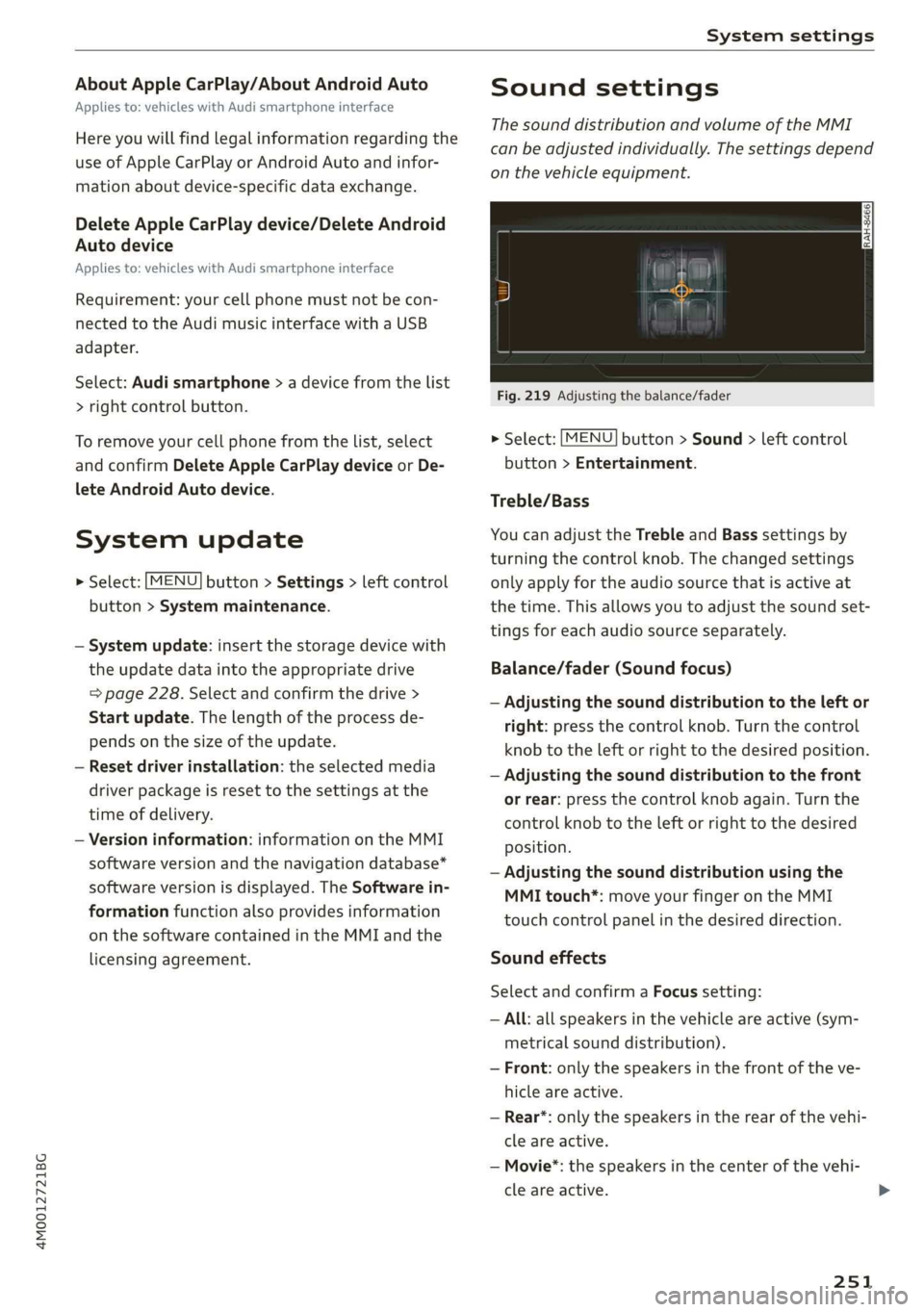
Fig.219Adjustingthebalance/fader
>Select:[MENU]button>Sound>leftcontrol
button>Entertainment.
Treble/Bass
YoucanadjusttheTrebleandBasssettingsby
turningthecontrolknob.Thechangedsettings
onlyapplyfortheaudiosourcethatisactiveat
thetime.Thisallowsyoutoadjustthesoundset-
tingsforeachaudiosourceseparately.
Balance/fader(Soundfocus)
—Adjustingthesounddistributiontotheleftor
right:pressthecontrolknob.Turnthecontrol
knobtotheleftorrighttothedesiredposition.
—Adjustingthesounddistributiontothefront
orrear:pressthecontrolknobagain.Turnthe
controlknobtotheleftorrighttothedesired
position.
—Adjustingthesounddistributionusingthe
MMItouch*:moveyourfingerontheMMI
touchcontrolpanelinthedesireddirection.
Soundeffects
SelectandconfirmaFocussetting:
—All:allspeakersinthevehicleareactive(sym-
metricalsounddistribution).
—Front:onlythespeakersinthefrontoftheve-
hicleareactive.
—Rear*:onlythespeakersintherearofthevehi-
cleareactive.
—Movie*:thespeakersinthe centerofthevehi-
cleareactive.
251
Page 254 of 394
Systemsettings
Selectandconfirma3Deffect*setting(surround
sound):
—Off:the3Deffectisswitchedoff.
—Low:the3Deffectisoptimized,forexample
foraudiobooks.
—Medium:the3Deffectisoptimizedforallsour-
ces.
—High:the3Deffectisatthemaximum.
Subwoofer*
Turnthecontrolknobtoadjustthesubwoofer.
Speeddependentvolumecontrol
Turnthecontrolknobtoadjusttheplaybackvol-
umetothenoiseinsidethevehicle.
AudioPilot*
Whenthisfunctionisswitchedon %,theplay-
backvolumeisautomaticallyadjustedtothelev-
elofnoiseinsidethevehicle(dynamicroadnoise
compensation).
Volumesettings
Adjustingthevolume
Thevolumeofanaudiosourceorasystemmes-
sage(forexample,fromthevoicerecognition
system*)canbeadjusteddirectlywhilethe
soundisplayingusingtheOn/Offknob.
—Increasingordecreasingthevolume:turnthe
On/Offknob@)>page153,fig.155tothe
rightorleft.
—Mutingorpausing:presstheOn/Offknob
briefly.Or:turntheOn/Offknobtotheleftun-
tilthesymbol@>page163appears.Anactive
audio/videosourceisstopped.
—Unmutingorresuming:presstheOn/Offknob
briefly.Or:turntheOn/Offknobtotheright.
ZAWARNING
To reducetheriskofanaccident,adjustthe
volumeoftheaudiosystemsothataudible
signalsfromoutsidethevehicle,suchas po-
liceandfiresirens,canbeheardeasilyatall
times.
252
G)Tips
Volumethatistoohighortoolowisautomat-
icallyadjustedtoasetlevelwhentheMMIis
switchedon.
Adjustingthesystemvolume
>Select:[MENU]button>Sound>leftcontrol
button.
Telephone
Appliesto:vehicleswithtelephone
Mutetelephone:messagesandringtonesareset
tomute.
Ringtone:see=page190,Ringtoneandvolume
settings.
Ringtonevolume:youcanadjustthevolumeof
theselectedringtonebyturningthecontrol
knob.
Messagevolume:youcanadjustthevolumeof
thenotificationforanincomingtextmessageby
turningthecontrolknob.
Microphoneinputlevel:youcanadjustthecall
volumeduringaphonecallbyturningthecontrol
knob.
Navigation
Appliesto:vehicleswithnavigationsystem
Voiceguidance:see>page214.
Voiceguidanceduringphonecall:see
=>page214.
Voiceguidancevolume:youcanadjustthevoice
guidancevolumebyturningthecontrolknob.Or:
youcanadjustthevoiceguidancevolumeduring
activerouteguidancebyturningtheOn/Offknob.
Entertainmentfader:thevolumeofaudioplay-
backcanbetemporarilyloweredwhenthepark-
ingsystemorvoiceguidanceisactive.
Voicerecognitionsystem
Appliesto:vehicleswithvoicerecognitionsystem
Commanddisplay:see>page248.
Shortdialog:see>page248.
Speechdialogsystemvolume:See>page248.>
Page 255 of 394
4M0012721BG
Systemsettings
Individualspeechtraining:see>page248.
Parkingaid*
Youcanadjustthevolumeofthesignaltoneby
turningthecontrolknob.
—AdjustingtheFront volume:selectandcon-
firmHigh,MediumorLow.
—AdjustingtheRearvolume:selectandconfirm
High,MediumorLow.
MMItouch*
Turnthecontrolknobtoadjustthevolumeofthe
spokenpromptsfromtheMMItouch*.
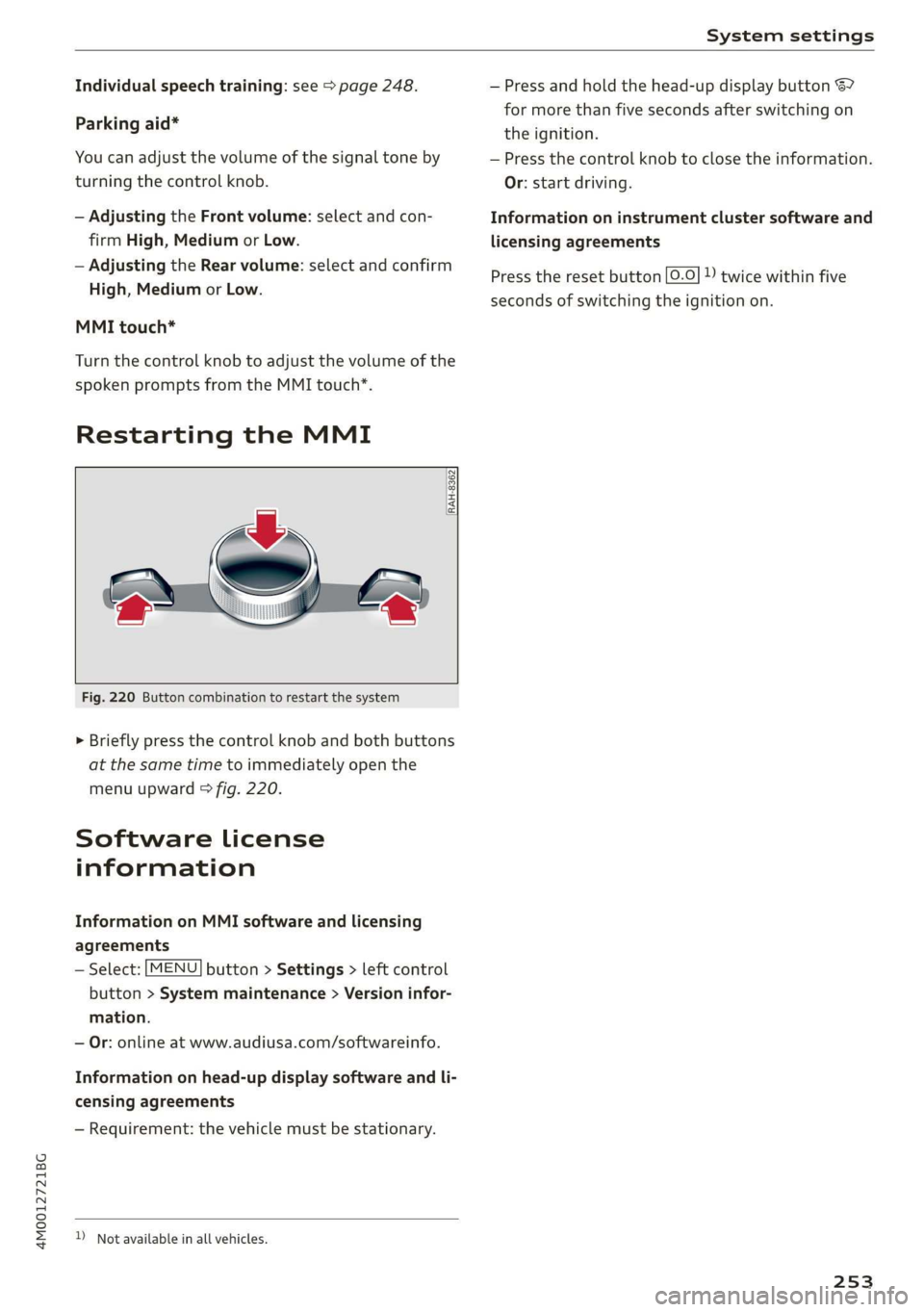
RestartingtheMMI
RAH-8362
Fig.220Buttoncombinationtorestartthesystem
>Brieflypressthecontrolknob andbothbuttons
atthesametimetoimmediatelyopenthe
menuupward>fig.220.
Softwarelicense
information
InformationonMMIsoftwareandlicensing
agreements
—Select:[MENU]button>Settings>leftcontrol
button>Systemmaintenance>Versioninfor-
mation.
—Or:onlineatwww.audiusa.com/softwareinfo.
Informationonhead-updisplaysoftwareandli-
censingagreements
—Requirement:thevehiclemustbestationary.
)Notavailableinallvehicles.
—Pressandholdthehead-updisplaybutton67
formorethanfivesecondsafterswitchingon
theignition.
—Pressthecontrolknobtoclosetheinformation.
Or:startdriving.
Informationoninstrumentclustersoftwareand
licensingagreements
Presstheresetbutton[0.0]»)twicewithinfive
secondsofswitchingtheignitionon.
253
Page 326 of 394
CheckingandFilling
ZA\WARNING
—Neverconnectthechargingcabledirectlyto
yourvehiclebattery.Onlyuse the connec-
tionsintheenginecompartment
=>page323.
—Ahighlyexplosivemixtureofgasescanform
whenchargingbatteries.Onlychargethe
batteryinwell-ventilatedareas.
—Adrainedbatterycanfreezeattempera-
turesaround329F(02C).Donotchargeor
useafrozenorthawedbattery.If iceforms,
thebatteryhousingcancrackandbattery
electrolytecanleakout,whichincreasesthe
riskofanexplosionandchemicalburns.
Contact anauthorizedAudidealerorauthor-
izedAudiServiceFacilityformoreinforma-
tion.
—Donotconnectordisconnectthecharging
cablewhilechargingbecausethisincreases
theriskofanexplosion.
G)Tips
Readallofthemanufacturer'sinstructions
forthechargerbeforechargingthebattery.
Windshieldwasher
system
B4M-0135,
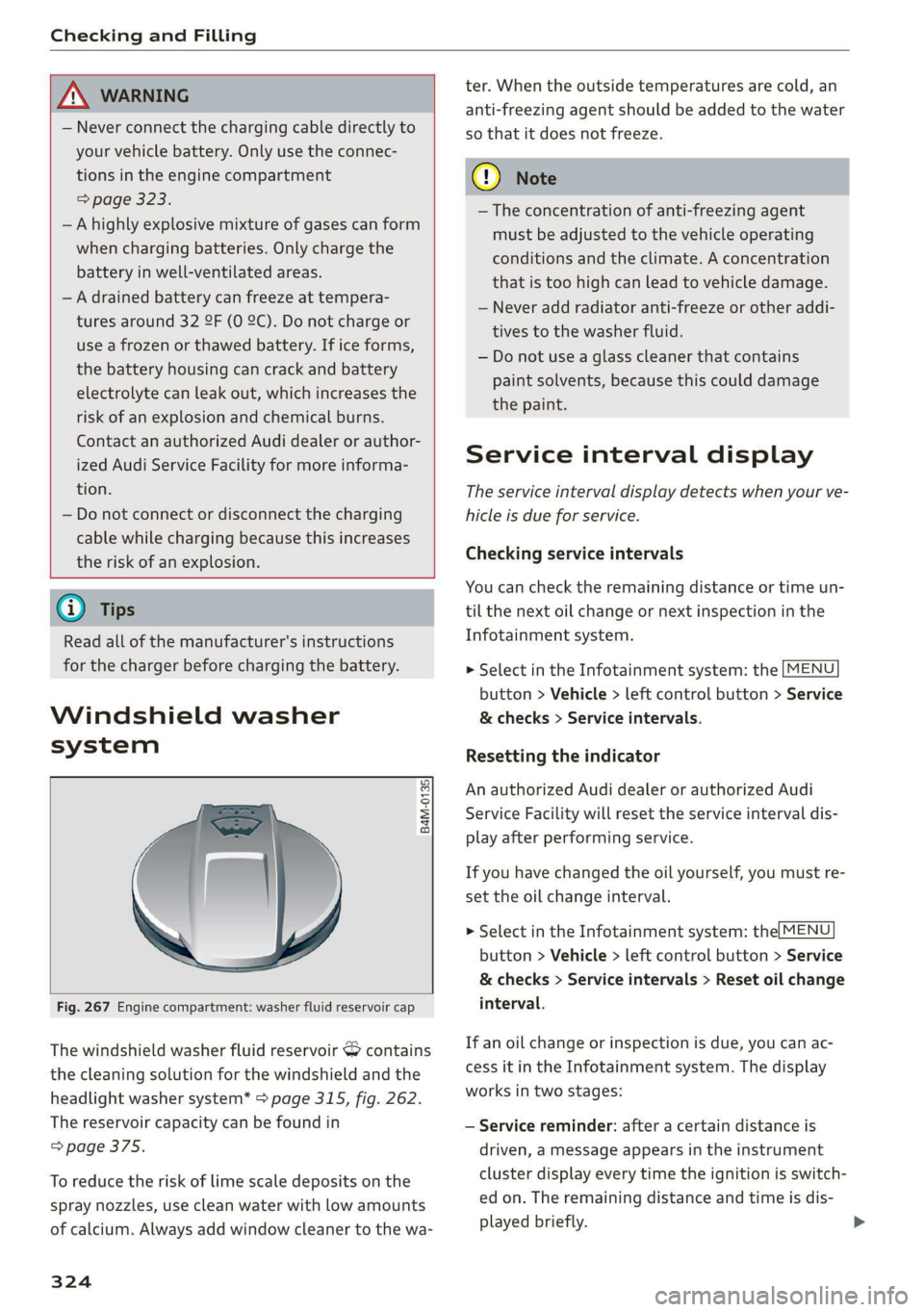
Fig.267Enginecompartment:washerfluidreservoircap
Thewindshieldwasherfluidreservoir&contains
thecleaningsolutionforthewindshieldandthe
headlight
washersystem*>page315,fig.262.
Thereservoircapacitycan befoundin
=>page375.
Toreducetheriskof limescaledepositsonthe
spraynozzles,usecleanwaterwithlowamounts
ofcalcium.Alwaysaddwindowcleanertothewa-
324
ter.Whentheoutsidetemperaturesarecold,an
anti-freezingagentshould beaddedtothewater
sothatitdoesnotfreeze.
C)Note
— Theconcentrationofanti-freezingagent
mustbeadjustedtothevehicleoperating
conditionsandtheclimate.Aconcentration
thatistoohighcanleadtovehicledamage.
—Neveraddradiatoranti-freezeorotheraddi-
tivestothewasherfluid.
—Donotuseaglasscleanerthat contains
paintsolvents,becausethiscoulddamage
thepaint.
Serviceintervaldisplay
Theserviceintervaldisplaydetectswhenyourve-
hicleisdueforservice.
Checkingserviceintervals
Youcan checktheremainingdistanceortimeun-
tilthenextoilchangeornextinspectioninthe
Infotainmentsystem.
>SelectintheInfotainmentsystem:the[MENU
button>Vehicle>leftcontrolbutton>Service
&checks>Serviceintervals.
Resettingtheindicator
AnauthorizedAudidealerorauthorizedAudi
ServiceFacilitywillresettheserviceintervaldis-
playafterperformingservice.
Ifyouhavechangedtheoilyourself,youmustre-
settheoilchangeinterval.
>SelectintheInfotainmentsystem:the|MENU
button>Vehicle>leftcontrolbutton>Service
&checks>Serviceintervals>Resetoilchange
interval.
Ifanoilchangeorinspectionisdue,youcanac-
cessitintheInfotainmentsystem.Thedisplay
worksintwostages:
—Servicereminder:afteracertaindistanceis
driven,amessageappearsintheinstrument
clusterdisplayeverytimetheignitionisswitch-
edon.Theremainingdistanceandtimeisdis-
playedbriefly.
Page 327 of 394
4M0012721BG
CheckingandFilling
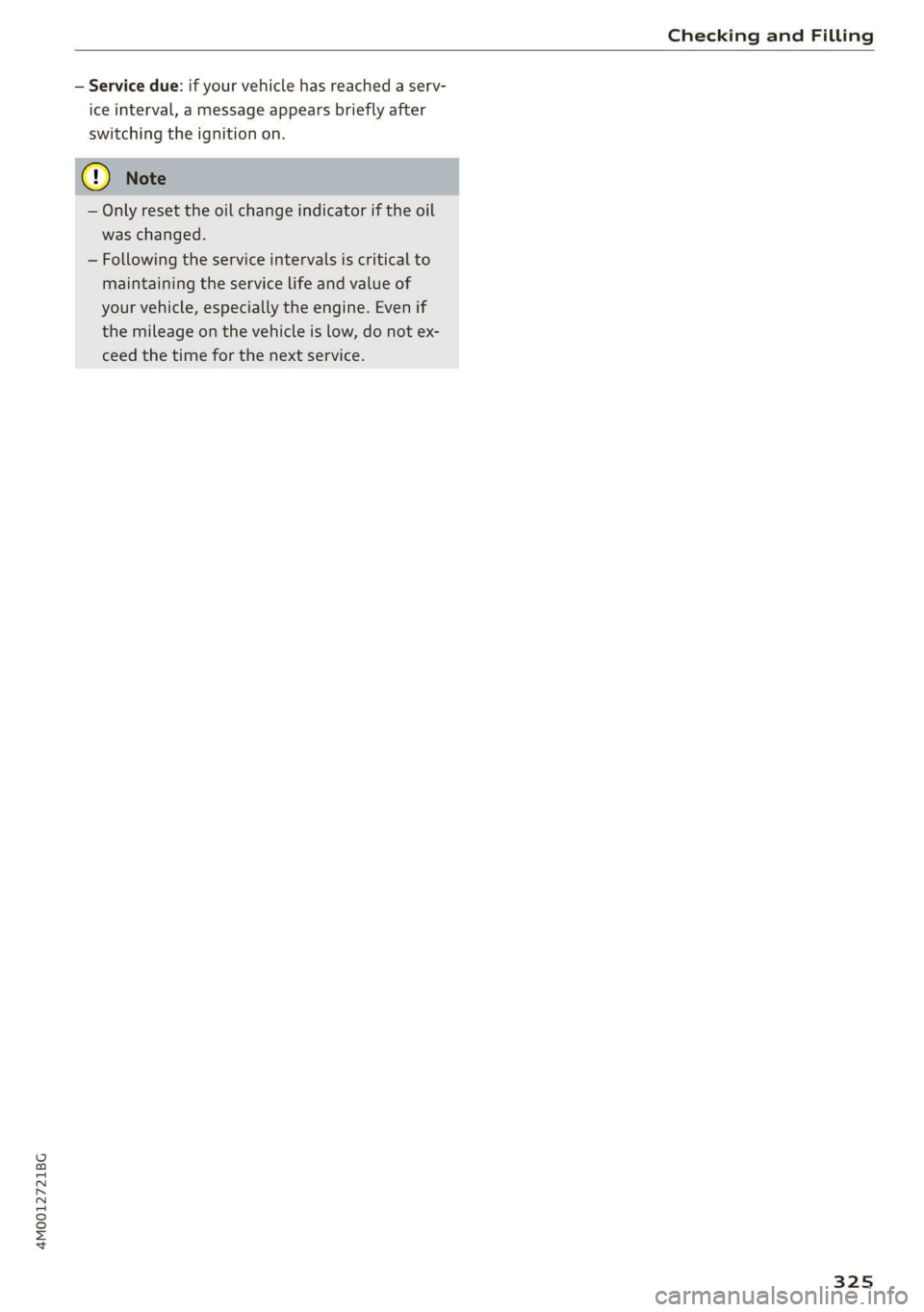
—Servicedue:ifyourvehiclehasreachedaserv-
iceinterval,amessageappearsbrieflyafter
switchingtheignitionon.
—Onlyresettheoilchangeindicatoriftheoil
waschanged.
—Followingtheserviceintervalsiscriticalto
maintainingtheservicelifeandvalueof
yourvehicle,especiallytheengine.Evenif
themileageonthevehicleislow,donotex-
ceed thetimeforthenextservice.
325
Page 387 of 394
4M0012721BG
Index
Panoramicglassroof...................39
Sunshade........eeeeeeeeeeeeee39
WITTKKOWS2coumx :canes§ &oemooee82ee38
Opening andclosing
refertoUnlockingandlocking........28,31
Operating
Head=upidisplayss« «cess« «anew©svetew ©areas27
Multifunctionsteeringwheel............16
MultiMediaInterface.................155
Voicerecognitionsystem..............LVI,
Optionalequipmentnumber.............375
OpPtiOnSiMENYsaex =ewesx=emeen7 aow156,160
OtherConsuMers'ss+ =newsxsceaxvcawas oe20
Outsidetemperaturedisplay..............14
Overview(cockpit)..............cesseeeee8
P
Paintdamage............2.-ceeeeeeee348
Paintnumber...........0.ceceeeeeens375
Panic:Buttomsec1saseseeovavennnsovexonane+ &anaseve31
Panoramiciglass. roofs«ssi.«sein+ 0ccaeeroo39
Convenienceopeningandclosing.........38
Emergencyclosings«ges<
Parentalcontrol
DVD0...eeeeee238
BarksaSsiStisen2»mus2 xmonew©tienesim3secure«139
Leavingparkingspace.................142
Parkingaid......eeeeececeeee eee131
Cleaningsensors/camera.............-347
ParktaSsistt.accoa2omena ©eamoeomea 2139
Parkingbrake
refertoElectromechanicalparkingbrake..81
ParkinglightStain« aciewe©scamowena@>wroeema42
Parkingsystem
Peripheralcameras...........---000-5136
Rearviewcamera...........00eeeeee134
SQttiNGSseis55seversoaeons5waevaaNeEBS144
PASSENGERAIRBAGlight...............280
Pause(audio/videofile).................235
P@dalSiss: «scues 5Rese+ 5HeeAREsRE258
Pedestriandetection................00.124
Perchlorate....0.2.0.0...ceceeeeeee370
Personalconveniencesettings............29
Personalrouteassistance...............ZL.
Phonebook
refertoContactS.......0...cee eeeeee188
Physicalprinciplesofafrontalcollision....261
Pictureformat(VIdO0)osx6cncnxwaren«46238
Playback(media)i.2.ssswscocwnsw 6sonews¥ & 3235
Playlistscccsi=cosa2weanseeeewwae¥eo238
Pointofinterest’:«esa«xmews» xcaysx 2care208
Pointiofinterestsearch2.0...owescoases208
alsorefertoPoint ofinterest...........208
PolishinGiicvs<3wwen=3eenvowee=eseo348
Pollutantfilter(automaticA/Csystem).....67
PowerSOUrCeS::sgessseexeseoe60,181,233
POWEFWINKOWS's5siensmeenssmeaua aeeea38
MalfOTietiOnce:2 3secon2sweru6ransaoare&39
Predictiveefficiencyassist................99
Pregnantwomen
Specialconsiderationswhenwearingasafe-
tybelt.....2...eeeeeeeeee265
presense
refertoAudipresense................ 111
Presentationmode.....................214
Presets(radio)................00000eee225
Pressure
Tirepressuremonitoringsystem........344
Tin@S's« ¢eons© ¢emma© 2eoeweFe ees Te eR336
Programguide
RaGiOtowsxoarcminwocommiemacaeracose8ew223
Programmingbuttons(multifunctionsteering
wheel)...2.0.0...ceeeeeeee eeeee18
Properoccupantseatingpositions........255
Propersafetybeltposition..............264
Properseatingposition
Frontpassenger...........0eeeeeeeee256
Occupants.............0..0.0020000255
RearpaSS@ngenswaves« 2sevenseeau9&cow256
PROUECEINGia:» ¢sews5 2meme& oeexFae5348
Pyrotechnicelements............-00eee370
Q
quattro...2...2.eeeeeeeee151
Selectivewheeltorquecontrol..........146
Question
Whathappenstounbeltedoccupants?...261
385