steering wheel AUDI Q7 2019 Owner´s Manual
[x] Cancel search | Manufacturer: AUDI, Model Year: 2019, Model line: Q7, Model: AUDI Q7 2019Pages: 394, PDF Size: 105.97 MB
Page 31 of 394

4M0012721BG
Openingandclosing
cannotbelockedfromtheoutside.Theturn
signalswillflashseveraltimestoindicate
this.Ifyoudonotopenthevehiclewithina
shorttimetoremovethevehiclekey,thenthe
vehiclewilllockautomatically.Thisprevents
thevehiclefrombeingleftunlockedforlong
periodsoftime.Thekeywillthenbelocked
insidethevehicle.
@Tips
—Donotleavevaluablesunattendedintheve-
hicle.Alockedvehicleisnota safe!
—TheLEDinthedriver's doorrailblinkswhen
youlockthevehicle.IftheLEDlightsupfor
approximately30secondsafterlocking,
thereisamalfunctioninthecentral locking
system.Havetheproblemcorrectedby an
authorizedAudidealerorauthorizedAudi
ServiceFacility.
BFV-0278
Fig.15Yourvehiclekeyset
@Vehiclekey
Thevehiclekeyisaremotecontrolkeyorconven-
iencekey*.Theconveniencekey*isaremotecon-
trolkeywithspecialfunctions>page31and
=page77.Youcanunlockorlockyourvehicle
withthevehiclekey.Amechanicalkeyisintegrat-
edinthevehiclekey>page30.
@Keytagwithvehiclecode
AppliestovehicleswithAudiconnectvehiclecontrol
Openthekeytagandscratchtorevealthevehicle
code.YoucanunlocktheAudiconnectvehicle
controlservices*foryourvehiclewiththisvehicle
code.Foradditionalinformation,see
=>page197.Ifakeyfobislost,contactanau-
thorizedAudidealerorauthorizedAudiService
Facility.
Vehiclekeyreplacement
If akeyislost,seeanauthorizedAudidealeror
authorizedAudiServiceFacility.Havethisvehicle
keydeactivated.Itisimportanttobringallkeys
withyou.Ifakeyislost,youshouldreportitto
yourinsurancecompany.
Numberofkeys
Youcancheckthenumberofkeysprogrammed
toyourvehicleintheInfotainmentsystem.Todo
this,selectthe[MENU]button>Vehicle>left
controlbutton>Service&checks>Vehiclein-
formation.Thisway,youcanmakesurethatyou
haveallthekeyswhenpurchasingausedvehicle.
Electronicimmobilizer
Theimmobilizerpreventsunauthorizeduseof
thevehicle.
Insomecases,itmaynot bepossibletostartthe
vehicleifthereisavehiclekeyfromadifferent
vehiclemanufactureronthekeychain.
Datainthevehiclekey
Whendriving,serviceandmaintenance-relevant
dataiscontinuouslystoredinyourvehiclekey.
YourAudiserviceadvisorcanreadoutthisdata
andtellyouabouttheworkyourvehicleneeds.
This appliesalsotovehicleswithaconvenience
key*.
Personalconveniencesettings
Iftwopeopleuseonevehicle,itisrecommended
thateachpersonalwaysusestheirownvehicle
key.Whentheignitionisturnedofforwhenthe
vehicleislocked,personalconveniencesettings
forthefollowingsystemsarestoredandas-
signedtothevehiclekey:
—Climatecontrolsystem
—Steeringwheelheating*
—Centrallockingsystem
—Interiorlighting”
—Exteriorlighting
—Rainsensor
—Memoryfunction*
29
Page 55 of 394
4M0012721BG
Seats
Seats
Generalinformation
ZAWARNING
See>page254,Drivingsafetyforimportant
information,tips,suggestionsandwarnings
thatyoushouldreadandfollowforyourown
safetyandthesafetyofyourpassengers.
Frontseats
Powerseatadjustment
+ S 2
= c
oO
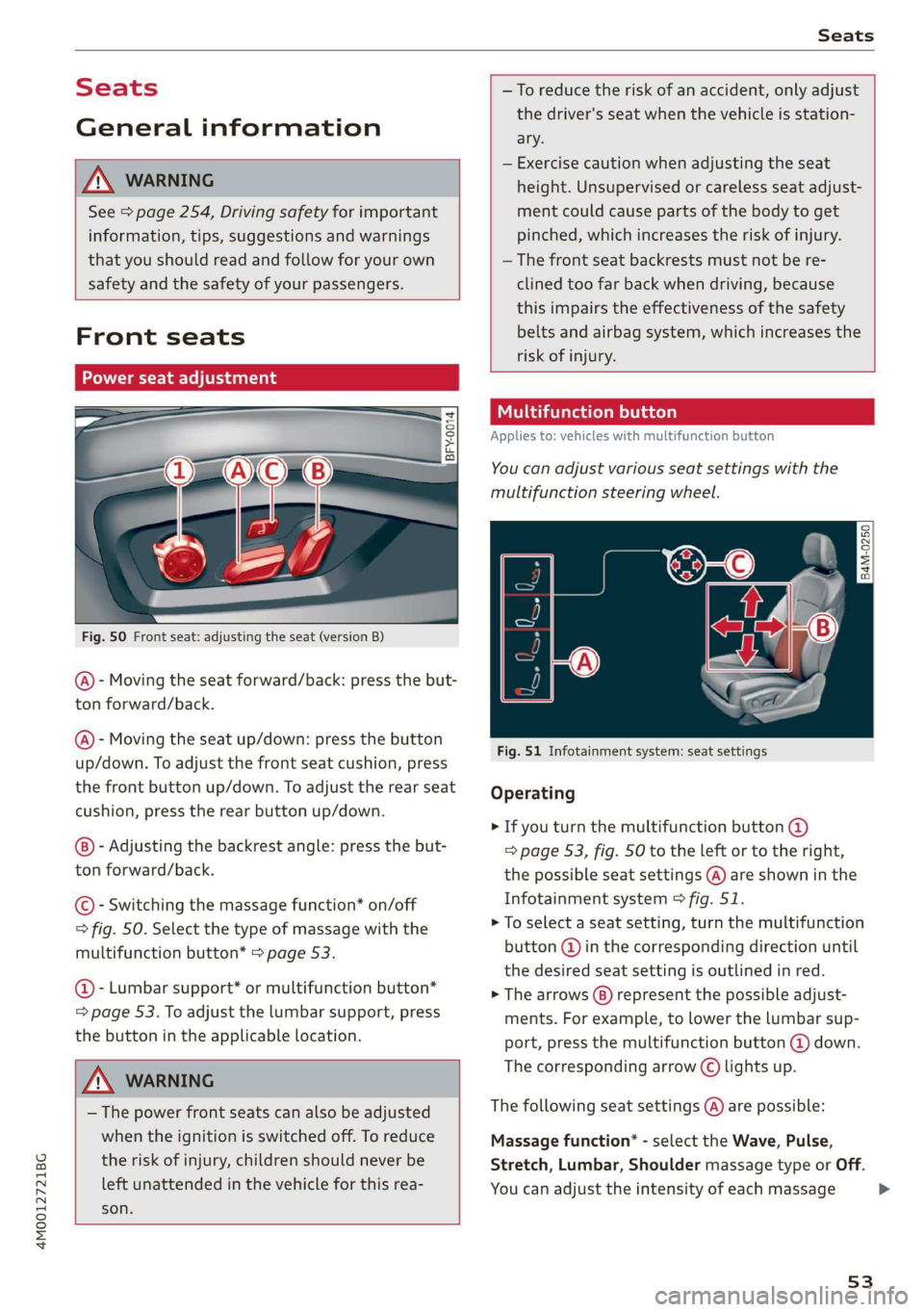
Fig.50Frontseat:adjustingtheseat(versionB)
@)-Movingtheseatforward/back:pressthebut-
tonforward/back.
@-Movingtheseatup/down:pressthe button
up/down.Toadjustthefrontseatcushion,press
thefrontbuttonup/down.Toadjusttherearseat
cushion,presstherearbuttonup/down.
-Adjustingthebackrestangle:pressthebut-
tonforward/back.
©-Switchingthemassagefunction*on/off
>fig.50.Selectthetypeofmassagewiththe
multifunctionbutton*>page53.
@-Lumbarsupport*ormultifunctionbutton*
=page53.Toadjustthelumbarsupport,press
thebuttonintheapplicablelocation.
ZAWARNING
— Thepowerfrontseatscanalsobeadjusted
whentheignitionisswitchedoff.To reduce
theriskofinjury,childrenshouldneverbe
leftunattendedinthevehicleforthisrea-
son.
—Toreducetheriskofanaccident,onlyadjust
thedriver'sseatwhenthevehicleisstation-
ary.
—Exercisecautionwhenadjustingtheseat
height.Unsupervisedorcarelessseatadjust-
mentcouldcausepartsofthebodytoget
pinched,whichincreasestheriskofinjury.
— Thefrontseatbackrestsmustnotbere-
clinedtoofarbackwhendriving,because
thisimpairstheeffectivenessofthesafety
beltsandairbagsystem,whichincreasesthe
riskofinjury.
Utrateoleae)
Appliesto:vehicleswithmultifunctionbutton
Youcanadjustvariousseatsettingswiththe
multifunctionsteeringwheel.
|
B4M-0250]
Fig.51Infotainmentsystem:seatsettings
Operating
>Ifyouturnthemultifunctionbutton@
=>page53,fig.50totheleftortotheright,
thepossibleseatsettings@)areshowninthe
Infotainmentsystem>fig.51.
>Toselectaseatsetting,turnthemultifunction
button@)inthecorrespondingdirectionuntil
thedesiredseatsettingisoutlinedinred.
>Thearrows(8)representthepossibleadjust-
ments.Forexample,tolower thelumbarsup-
port,pressthemultifunctionbutton@down.
Thecorrespondingarrow©lightsup.
Thefollowingseatsettings()arepossible:
Massagefunction*-selecttheWave,Pulse,
Stretch,Lumbar,ShouldermassagetypeorOff.
Youcanadjusttheintensityofeachmassage
53
Page 60 of 394
Seats
>Pressthereleasepoint>fig.61usingtheme-
chanicalkey>page29,Keysetandpressthe
button-arrow->fig.60.Pulltheheadrestraint
outofthebackrestatthesametime>A\.
Installingtheheadrestraints
>Slidethepostsontheheadrestraintdowninto
theguidesuntilthepostsclickintoplace.
>Pressthebutton-arrow->fig.60andslidethe
headrestraintallthewaydown.Youshould not
be
abletoremovetheheadrestraintfromthe
backrestwithoutpressingthebutton.
ZXWARNING
—Alwaysreadandfollowtheapplicablewarn-
ings>page257,Properadjustmentof
headrestraints.
—Onlyremovetheheadrestraintsforthesec-
ond rowseatswhenitisnecessaryforinstal-
linga childsafetyseat>page290,Child
safety.Installtheheadrestraintagainim-
mediatelyoncethechildsafetyseatisre-
moved.Drivingwiththeheadrestraintsre-
movedornotintheuprightpositionincreas-
estheriskofseriousinjury.
Memoryfunction
Appliesto:vehicleswithmemoryfunction
Withthememoryfunction,youcansaveandre-
call
seatprofilesusingthememorybuttonsin
thedoortrimpanelandwiththevehiclekey.
Thedriver'sseatprofileisstoredagainandas-
signedtothevehiclekeyeachtimethevehicleis
locked.Whenyouopenthedoor,theseatprofile
isautomaticallyrecalled.Iftwopeopleuseone
vehicle,itisrecommendedthateachpersonal-
waysuses“hisorherown”vehiclekey.
Dependingontheequipment,itmaybepossible
tostorethefollowingsettings:
—Driver'sseat:seat,steeringwheel*,exterior
mirrors*
58
AaaCoy]
Appliesto:vehicleswithmemoryfunction
Thedriver'sseatprofilecanbeassignedtothe
vehiclekeywhenthevehicleislocked.
>SelectintheInfotainmentsystem:[MENU]but-
ton>Vehicle>leftcontrolbutton>Vehicle
settings>Seats>Driver'sseat>Storeset-
tingson remotecontrolkey.
@Tips
Ifyoudonotwishtohavetheseatprofilefor
anotherdriverassignedtothevehiclekey,
switchthememoryfunctionoffintheInfo-
tainmentsystem.
atleast
Appliesto:vehicleswithmemoryfunction
S 3
3
2
=zta
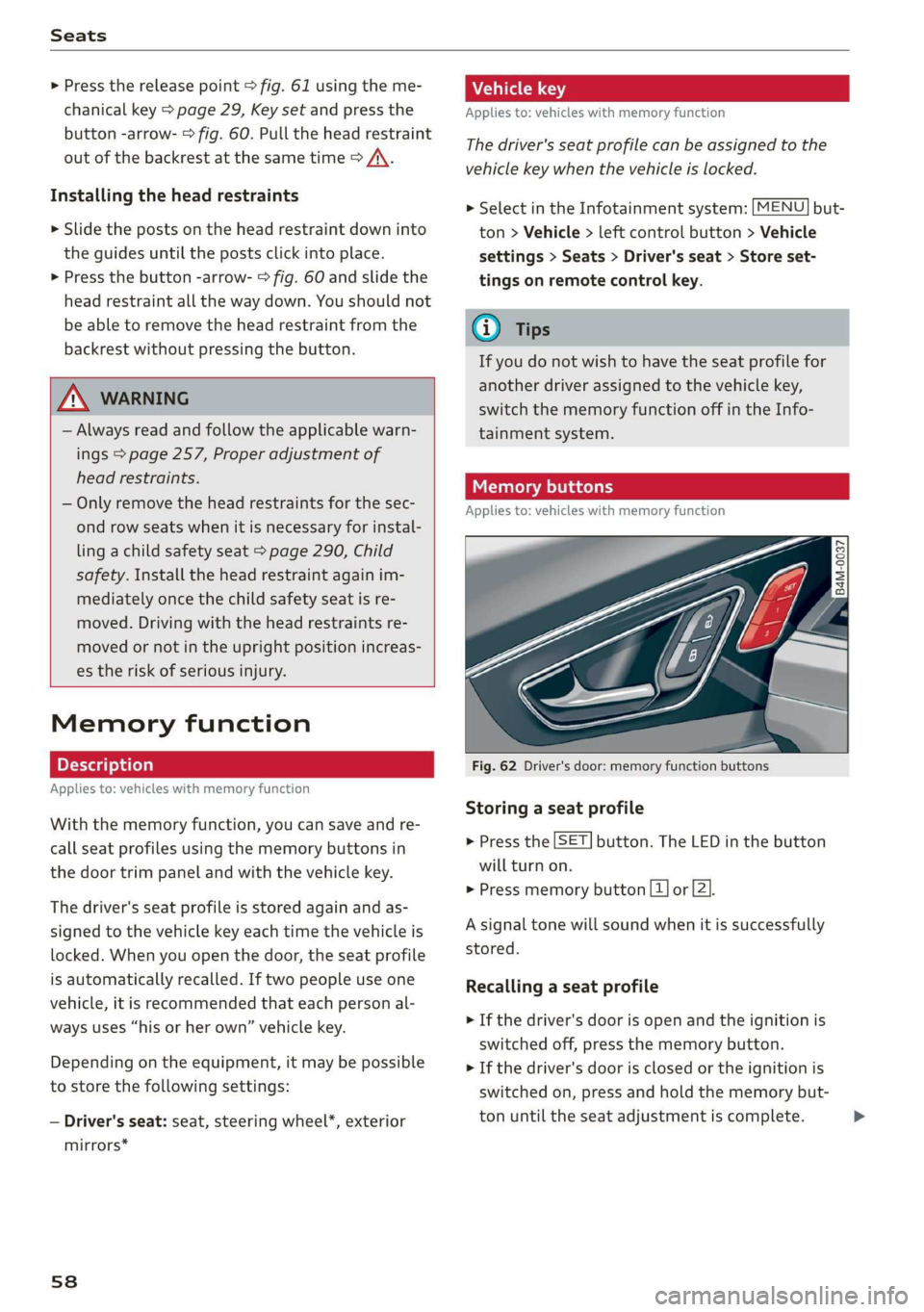
Fig.62Driver'sdoor:memoryfunctionbuttons
Storingaseatprofile
SET. >Pressthebutton.TheLEDinthebutton
willturnon.
>Pressmemorybutton[1]or[2].
Asignaltonewillsoundwhenitissuccessfully
stored.
Recallingaseatprofile
>Ifthedriver'sdoorisopenandtheignitionis
switchedoff,pressthememorybutton.
>Ifthedriver'sdoorisclosedortheignitionis
switchedon, pressandholdthememorybut-
tonuntiltheseat adjustmentiscomplete.>
Page 76 of 394
Warmandcold
Steeringwheelheating
Appliesto:vehicleswithsteeringwheelheating
Thesteeringwheelrimcanbeheated.
>Pressthebuttononthemultifunctionsteering
wheeltoswitchthesteeringwheelheatingon
andoff@>page18,fig.11.Themessage
Steeringwheelheating:on/Steeringwheel
heating:offappearsintheinstrumentcluster
display.
Thetemperatureismaintainedataconstantlev-
elwhensteeringwheelheatingisswitchedon.
Thesteeringwheelheatingsettings arestored
automaticallyandassignedtothevehiclekey
thatisinuse.
74
Page 78 of 394
Driving
G@)Tips
Theamountofnoiseproducedbythevehicle
canincreasesignificantlywhendrivingwitha
sportystyle.Showrespecttoothersaround
youandtheenvironmentwiththewayyouop-
erateyourvehicle,especiallyatnight.
Steering
Manualsteeringwheelpositionadjustment
Appliesto:vehicleswithmanualsteeringwheeladjustment
Thesteeringwheelpositionisadjustableupand
downandforwardandback.
B4G-0567
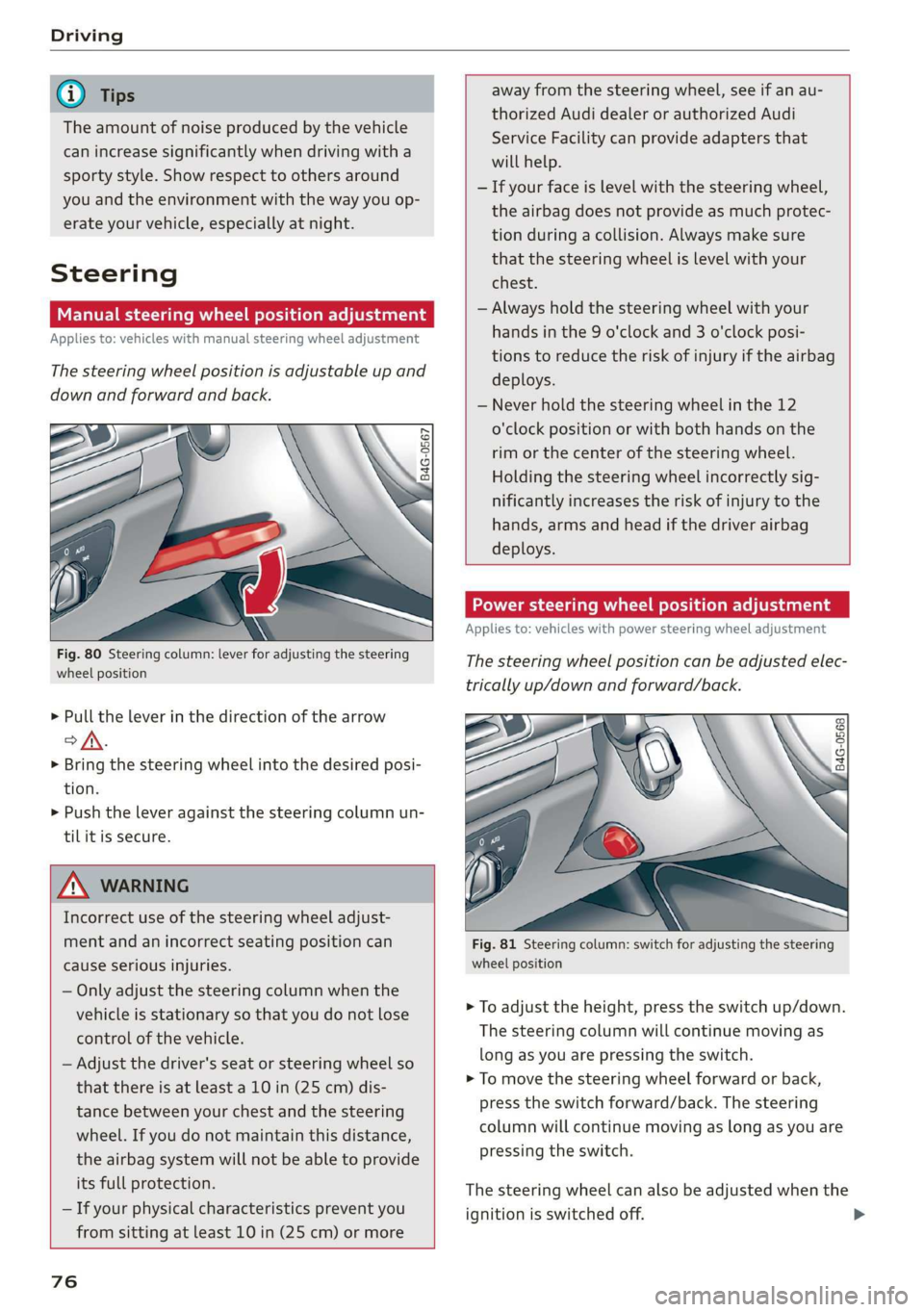
Fig.80Steeringcolumn:leverforadjustingthesteering
wheelposition
>Pulltheleverinthedirectionofthearrow
of.
> Bringthesteeringwheelintothedesiredposi-
tion.
>Pushtheleveragainstthesteeringcolumnun-
tilitissecure.
Z\WARNING
Incorrectuseofthesteeringwheeladjust-
mentandanincorrectseatingpositioncan
causeseriousinjuries.
—Onlyadjustthesteeringcolumnwhenthe
vehicleisstationaryso thatyoudonotlose
controlofthevehicle.
—Adjustthedriver'sseatorsteeringwheelso
that
thereisatleasta10in(25cm)dis-
tancebetweenyourchestandthesteering
wheel.Ifyoudonotmaintainthisdistance,
theairbagsystemwillnot beabletoprovide
itsfullprotection.
—Ifyourphysicalcharacteristicspreventyou
fromsittingatleast10in(25cm)ormore
76
awayfromthesteeringwheel,seeifanau-
thorizedAudidealerorauthorizedAudi
ServiceFacilitycanprovideadaptersthat
willhelp.
—Ifyourfaceislevelwiththesteeringwheel,
theairbagdoesnotprovideasmuchprotec-
tionduringacollision.Alwaysmakesure
thatthesteeringwheelislevelwithyour
chest.
—Alwaysholdthesteeringwheelwithyour
handsinthe9o'clockand3o'clockposi-
tionstoreducetheriskofinjuryiftheairbag
deploys.
—Neverholdthesteeringwheelinthe12
o'clockpositionorwithbothhands onthe
rimorthecenterofthesteeringwheel.
Holding the
steeringwheelincorrectlysig-
nificantlyincreasestheriskofinjurytothe
hands,armsandheadifthedriverairbag
deploys.
Powersteeringwheelpositionadjustment
Appliesto:vehicleswithpowersteeringwheeladjustment
Thesteeringwheelpositioncanbeadjustedelec-
tricallyup/downandforward/back.
oo
B4G-0568
Fig.81Steering column:switchforadjustingthesteering
wheelposition
>Toadjusttheheight,presstheswitchup/down.
Thesteering columnwillcontinuemovingas
longasyouarepressingtheswitch.
>Tomovethesteeringwheelforwardor back,
presstheswitchforward/back.Thesteering
columnwillcontinuemovingaslongasyouare
pressingtheswitch.
Thesteeringwheelcanalsobeadjustedwhenthe
ignitionisswitchedoff.
Page 79 of 394
4M0012721BG
Driving
Invehicleswithmemoryfunction*,thesteering
columnsettingsarestoredtogetherwiththe
seatposition.
VA
Appliesto:vehicleswithpowersteeringwheeladjustment
Easyseatentrymakesiteasiertoenterandexit
thevehiclebyadjustingthesteeringcolumnau-
tomatically.
> SelectintheInfotainmentsystem:[MENU]but-
ton>Vehicle> leftcontrolbutton>Vehicle
settings>Seats>Driver'sseat>Easyentry
function.
Wheneasyseatentryisswitchedon,thesteering
columngoesbackupintotheparkpositionwhen
theignitionisswitchedoff.Afterenteringtheve-
hicle,thesteeringcolumnreturnstothestored
positiononcetheignitionisswitchedon.
Startingandstopping
theengine
Startingtheengine
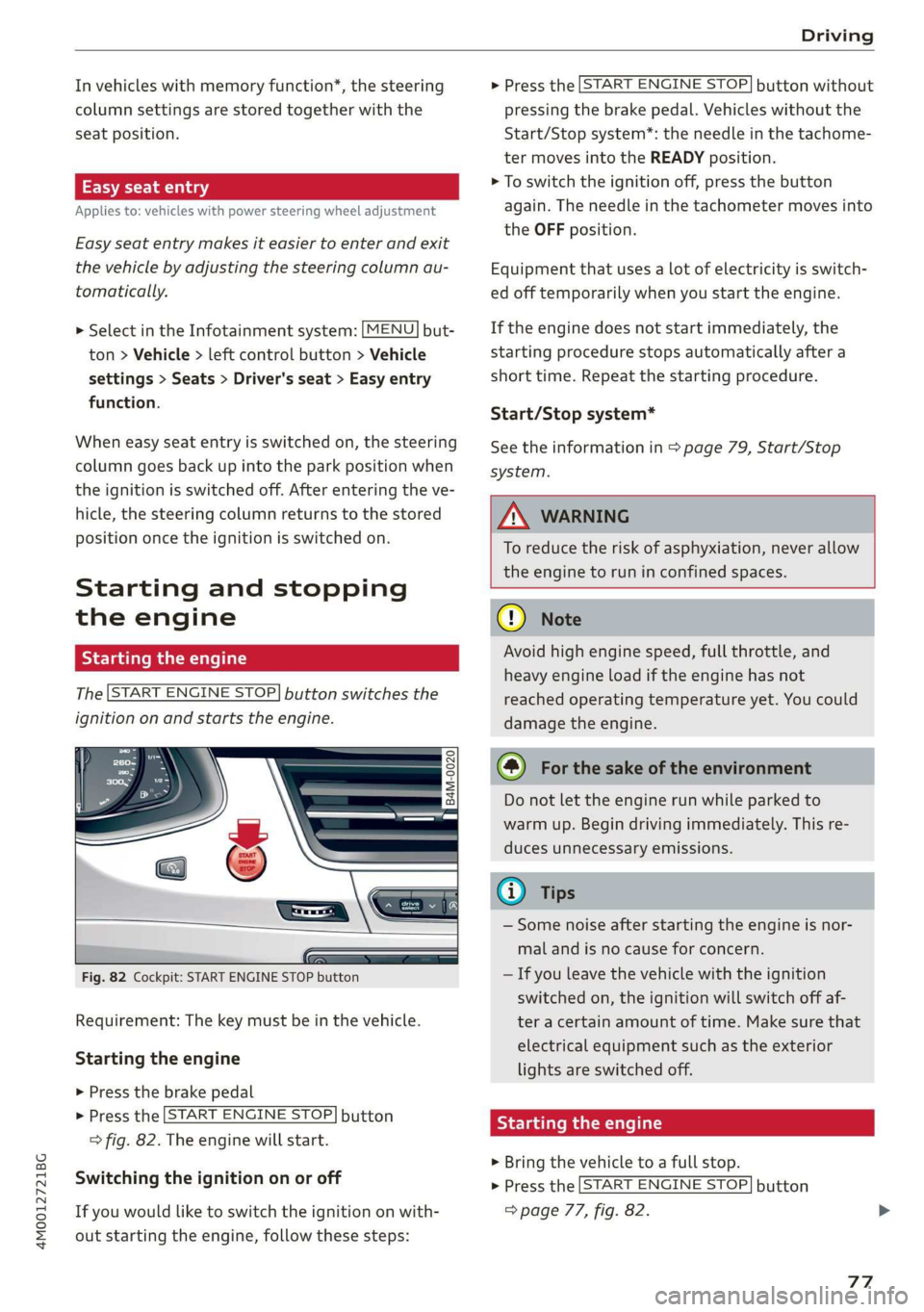
The[STARTENGINESTOP]buttonswitchesthe
ignitiononandstartstheengine.
B4M-0020
5
Fig.82Cockpit:STARTENGINESTOPbutton
Requirement:Thekeymustbeinthevehicle.
Startingtheengine
>Pressthebrake pedal
>Pressthe[STARTENGINESTOP]button
>fig.82.Theenginewillstart.
Switching theignitiononoroff
Ifyouwouldliketoswitchtheignitiononwith-
outstartingtheengine,followthesesteps:
>Pressthe[STARTENGINESTOP]buttonwithout
pressingthebrakepedal.Vehicleswithoutthe
Start/Stopsystem*:theneedleinthetachome-
termovesintotheREADYposition.
>Toswitchtheignitionoff,pressthe button
again.Theneedleinthetachometermovesinto
theOFFposition.
Equipmentthatusesalotofelectricityisswitch-
edofftemporarilywhenyoustarttheengine.
Iftheenginedoesnotstartimmediately,the
startingprocedurestopsautomaticallyaftera
shorttime.Repeatthestartingprocedure.
Start/Stopsystem*
Seetheinformationin>page79,Start/Stop
system.
ZXWARNING
To reducetheriskofasphyxiation,never allow
theenginetoruninconfinedspaces.
@)Note
Avoidhighenginespeed,fullthrottle,and
heavyengineloadiftheenginehasnot
reached
operatingtemperatureyet.Youcould
damagetheengine.
@)Forthesakeoftheenvironment
Donotlettheenginerunwhileparkedto
warmup.Begindrivingimmediately.Thisre-
ducesunnecessaryemissions.
@)Tips
—Somenoiseafterstartingtheengineisnor-
malandisnocauseforconcern.
—Ifyouleavethevehiclewiththeignition
switchedon,theignitionwillswitchoffaf-
teracertainamountoftime.Makesurethat
electricalequipmentsuchastheexterior
lightsareswitchedoff.
Startingtheengine
>Bringthevehicletoafullstop.
>Pressthe[STARTENGINESTOP]button
=>page77,fig.82.
77
Page 81 of 394

4M0012721BG
Driving
Startingtheenginewhenthereisa
arearadea)
Itmaynotbepossibletostarttheengineunder
certaincircumstances,forexample,ifthebat-
teryinthevehiclekeyisdrained,ifinterferenceis
affectingthekey,orifthereisasystemmalfunc-
tion.
Fig.83Centerconsole/vehiclekey:Startingtheengine
whenthereisamalfunction
Requirement:ThemessageRemotecontrolkey:
holdbackofkeyagainstthedesignatedarea.
Seeowner'smanualmustappearandtheQJin-
dicatorlightmustbeon.
> Placethevehiclekeyonthelocationshownin
theillustrationP)©fig.83.
>Pressthebrakepedal.
>Pressthe[STARTENGINESTOP]button.The
enginewill start.
>DrivetoanauthorizedAudidealerorauthor-
izedAudiServiceFacilityimmediatelytohave
themalfunctioncorrected.
@Tips
Youcanviewthemessageagainbypressing
the[STARTENGINESTOP]button.
Start/Stopsystem
Appliesto:vehicleswith Start/Stopsystem
TheStart/Stopsystemcanhelpincreasefuel
economyandreduceCO2emissions.
InStart/Stopmode,theengineshutsoffauto-
maticallywhenstopped,forexampleatatraffic
D_Incertaincountries.
light.Theignitionandimportantassistsystems
suchaspowersteeringandthebrakeboosterwill
remainavailableduringthe"stop"phase.Theen-
ginewillrestartautomaticallywhenneeded.
TheStart/Stopsystemisautomaticallyactivated
oncetheignitionisswitchedon.
Basicrequirements
—Thedriver'sdoorandhoodmustbeclosed.
—"p","N",or"D"mustbeengaged.
—Thesteeringwheelmustnotbeturnedfarinei-
therdirection.
—Thevehiclemusthavedrivenfasterthan2mph
(3km/h)sincethelasttimeitstopped.
—Atrailermustnot behitchedtothevehicle.
@)Note
AlwaysswitchtheStart/Stopsystemoffwhen
drivingthroughwater>page80.
G)Tips
—Dependingonthedrivingsituation,theen-
ginemayalreadystopwhencoastingbefore
thevehiclehascometoacompletestop)).
—Ifyouselectthe"D"positionaftershifting
intoreverse,thevehiclemustbedrivenfast-
erthan6mph(10km/h)inorderforthe
Start/Stopsystemtobeactiveagain.This
makesitpossibletomaneuverwithout
stoppingtheengine.
Stopping/starting theengine
Appliesto:vehicleswithStart/Stopsystem
>Pressandholdthebrakepedaluntilthevehicle
hasstopped.The@indicatorlightappearsin
theinstrumentclusteroncetheenginestops
automatically.
>Theenginestartsagainwhenyouremoveyour
footfromthebrakepedal.Theindicatorlight
turnsoff.
iG)Tips
—PressthebrakepedalduringaStopphase
tokeepthevehiclefromrolling.
79
Page 83 of 394
4M0012721BG
Driving
Start/stopsystem:malfunction!Function
unavailable.PleasecontactService
ThereisamalfunctionintheStart/Stopsystem.
DrivethevehicletoanauthorizedAudidealeror
authorizedServiceFacilityassoonaspossibleto
havethemalfunctioncorrected.
Electromechanical
parkingbrake
nR
& = & a
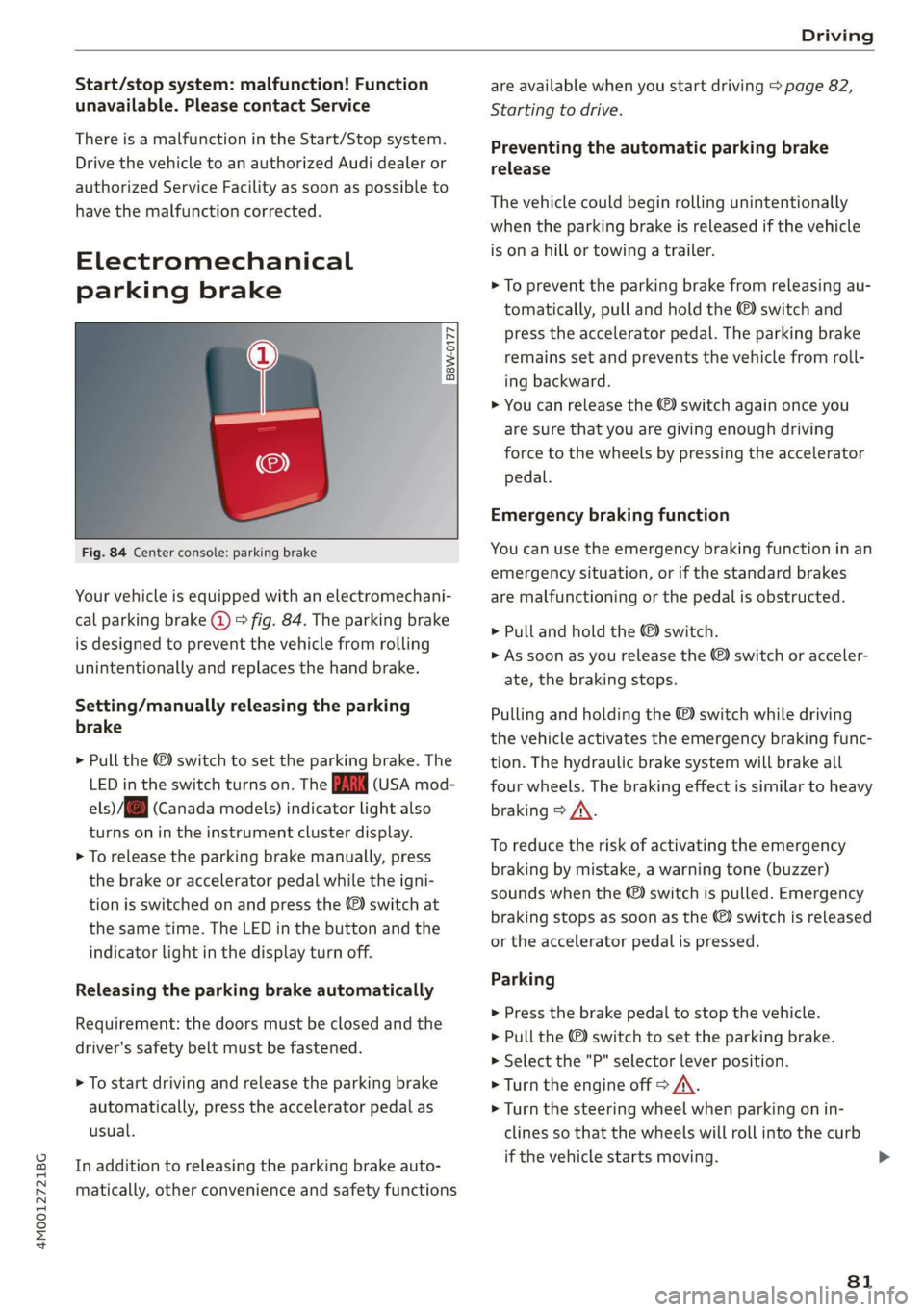
Fig.84Centerconsole:parkingbrake
Yourvehicleisequippedwithanelectromechani-
calparkingbrake@©fig.84.Theparkingbrake
isdesignedtopreventthevehiclefromrolling
unintentionallyandreplacesthehandbrake.
Setting/manuallyreleasingtheparking
brake
>Pullthe©switchto settheparkingbrake.The
LEDintheswitchturnson.TheZin(USAmod-
els)/[@(Canadamodels)indicatorlightalso
turnsonintheinstrumentclusterdisplay.
>Toreleasetheparkingbrakemanually,press
thebrakeoracceleratorpedalwhiletheigni-
tionisswitchedonandpressthe©)switchat
thesametime.TheLEDinthebuttonandthe
indicatorlightinthedisplayturnoff.
Releasingtheparking brake automatically
Requirement:
thedoorsmustbeclosedandthe
driver'ssafetybeltmustbefastened.
>Tostartdrivingandreleasetheparkingbrake
automatically,presstheacceleratorpedalas
usual.
Inadditiontoreleasingtheparkingbrakeauto-
matically,otherconvenienceandsafetyfunctions
are availablewhenyoustartdriving>page82,
Startingtodrive.
Preventingtheautomaticparkingbrake
release
Thevehiclecouldbeginrollingunintentionally
whentheparkingbrakeisreleasedifthevehicle
isonahillortowingatrailer.
>Topreventtheparkingbrakefromreleasingau-
tomatically,pullandholdthe©)switchand
presstheacceleratorpedal.Theparkingbrake
remainssetandpreventsthevehiclefromroll-
ingbackward.
>Youcanreleasethe©)switchagainonceyou
aresurethatyouaregivingenoughdriving
force tothewheelsbypressingtheaccelerator
pedal.
Emergencybrakingfunction
Youcan usetheemergencybrakingfunctioninan
emergency
situation,orifthestandardbrakes
aremalfunctioningorthepedalisobstructed.
> Pullandholdthe©)switch.
>»Assoonasyoureleasethe©)switchoracceler-
ate,thebrakingstops.
Pullingandholdingthe©)switchwhiledriving
thevehicleactivatestheemergencybrakingfunc-
tion.Thehydraulicbrakesystemwillbrakeall
fourwheels.Thebrakingeffectissimilartoheavy
braking>A\.
Toreducetheriskofactivatingtheemergency
brakingby mistake,awarningtone(buzzer)
soundswhenthe©)switchispulled.Emergency
brakingstopsassoonasthe©)switchisreleased
ortheacceleratorpedalispressed.
Parking
>Pressthebrakepedaltostopthevehicle.
> Pullthe©)switchto settheparkingbrake.
>Selectthe"P"selectorleverposition.
>Turn theengineoff>/\.
>Turnthesteeringwheelwhenparkingonin-
clinesso thatthewheelswillrollintothecurb
ifthevehiclestartsmoving.
81
Page 87 of 394
4M0012721BG
Driving
Tiltangledisplay
Appliesto:vehicleswithatiltangledisplay
Lift/offroad(
Allroad
Celoles
Auto
Dynamic
Individual
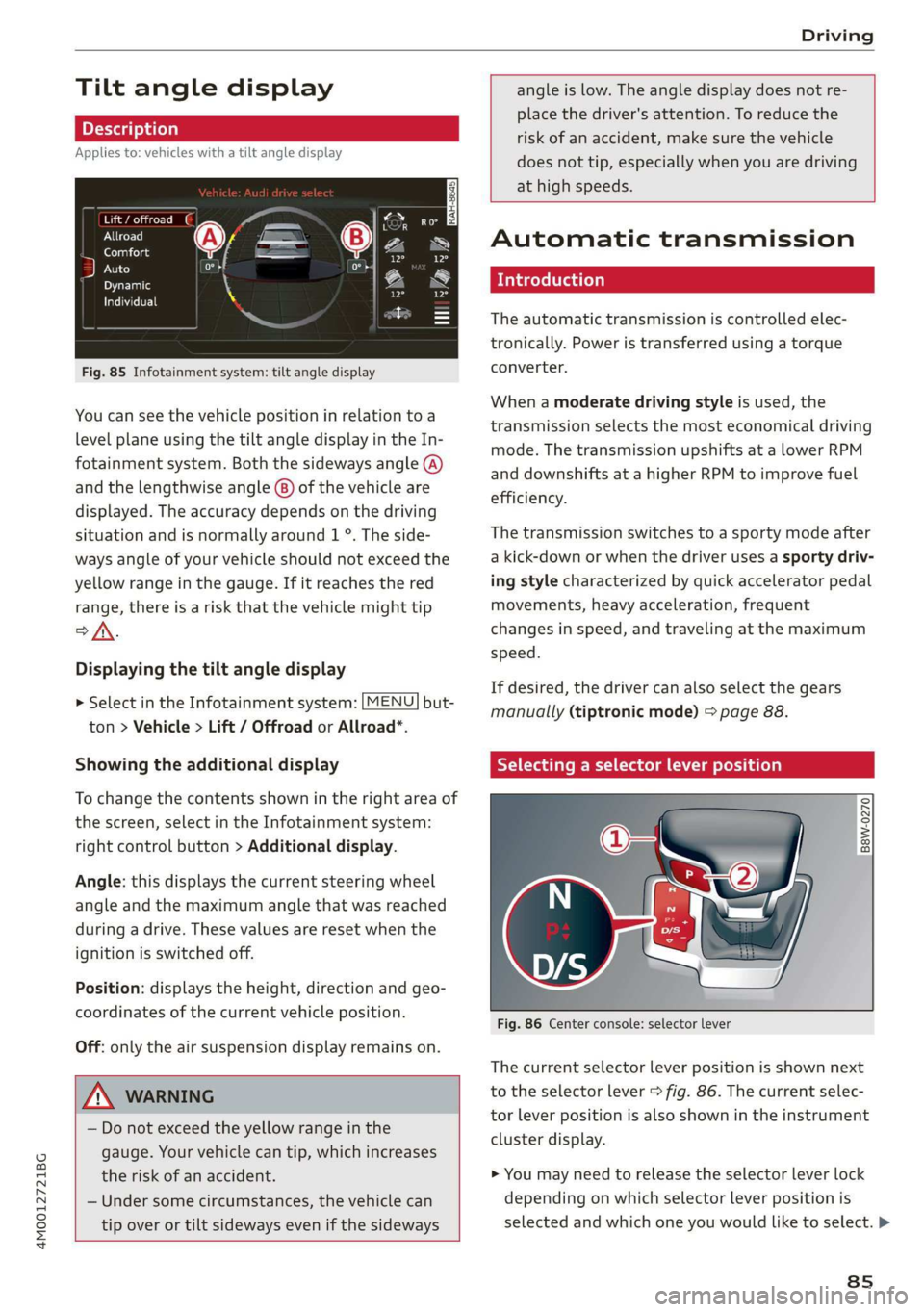
Fig.85Infotainmentsystem:tiltangledisplay
Youcan see thevehiclepositioninrelationtoa
levelplaneusingthetiltangledisplayintheIn-
fotainmentsystem.Boththesidewaysangle(A)
andthelengthwiseangle@)ofthevehicleare
displayed.Theaccuracydependsonthedriving
situationandisnormallyaround1°.Theside-
waysangleofyourvehicleshouldnotexceedthe
yellowrangeinthegauge.Ifitreachesthered
range,thereisariskthatthevehiclemighttip
>/\.
Displayingthetiltangledisplay
>SelectintheInfotainmentsystem:[MENU]but-
ton>Vehicle> Lift/Offroador Allroad*.
Showingtheadditionaldisplay
Tochangethecontentsshownintherightareaof
thescreen,selectintheInfotainmentsystem:
rightcontrolbutton>Additionaldisplay.
Angle:thisdisplaysthecurrentsteeringwheel
angleandthemaximumanglethatwasreached
duringadrive.Thesevaluesareresetwhenthe
ignitionisswitchedoff.
Position:displaystheheight,directionandgeo-
coordinatesofthecurrentvehicleposition.
Off:onlytheairsuspensiondisplayremainson.
Z\WARNING
—Donotexceedthe yellowrangeinthe
gauge.Yourvehiclecantip,whichincreases
theriskofanaccident.
—Undersomecircumstances,thevehiclecan
tipoverortiltsidewaysevenifthesideways
angleislow.Theangledisplaydoesnotre-
placethedriver'sattention.To reducethe
riskofanaccident,makesurethevehicle
doesnottip,especiallywhenyouaredriving
athighspeeds.
Automatictransmission
Introduction
Theautomatictransmissioniscontrolledelec-
tronically.Poweristransferredusingatorque
converter.
Whenamoderatedrivingstyleisused,the
transmissionselectsthemosteconomicaldriving
mode.ThetransmissionupshiftsatalowerRPM
anddownshiftsatahigherRPMtoimprovefuel
efficiency.
Thetransmissionswitchestoasportymodeafter
akick-downorwhenthedriverusesasportydriv-
ingstylecharacterizedbyquickacceleratorpedal
movements,heavyacceleration,frequent
changesinspeed,andtravelingatthemaximum
speed.
Ifdesired,thedrivercanalsoselectthegears
manually(tiptronicmode)>page88.
Selectingaselectorleverposition
°RgS
&
Ss&a
Fig.86Centerconsole:selectorlever
Thecurrentselectorleverpositionisshownnext
totheselectorlever>fig.86.Thecurrentselec-
torleverpositionisalsoshownintheinstrument
clusterdisplay.
>
Youmayneedtoreleasetheselectorleverlock
dependingonwhichselectorleverpositionis
selectedandwhichoneyouwouldliketoselect.>
8s
Page 90 of 394
Driving
—Toreducetheriskofanaccident,donot
presstheacceleratorpedalwhenchanging
theselectorleverpositionwhilethevehicle
isstationaryandtheengineisrunning.
—Toreducetheriskofanaccident,neverse-
lectthe"R"or"P"positionswhiledriving.
—Donotinadvertentlypresstheaccelerator
pedalwhenthevehicleisstationary.Press-
ingthepedalincreasesriskof accidentbe-
causethevehiclewillmove,evenifparking
brakeisset.
Hilldescentcontrol
Thehilldescentcontrolsystemassiststhedriver
whendrivingdownhills.
Hilldescentcontrolactivateswhenthetransmis-
sionisinthe"D"or'"S"positionand youpressthe
brakepedal.Thetransmissionautomaticallyse-
lects
agearthatissuitableforthehill.Hillde-
scentcontroltriestomaintainthespeedthat
wasselectedatthetimeofbraking,withinphysi-
calandtechnicallimitations.Ifmaystill benec-
essarytoadjustthespeedwiththebrakepedal.
Hilldescentcontrolswitchesoffoncethehilllev-
elsoutorifyoupresstheacceleratorpedal.
Whenoperatingthecruisecontrolsystem*
=page95,hilldescentcontrolisalsoactivated
when
thespeedisset.
Z\WARNING
Hilldescentcontrolmaynotbeabletomain-
tainaconstantspeedunderallconditions.Al-
waysbereadytoapplythebrakes.
838
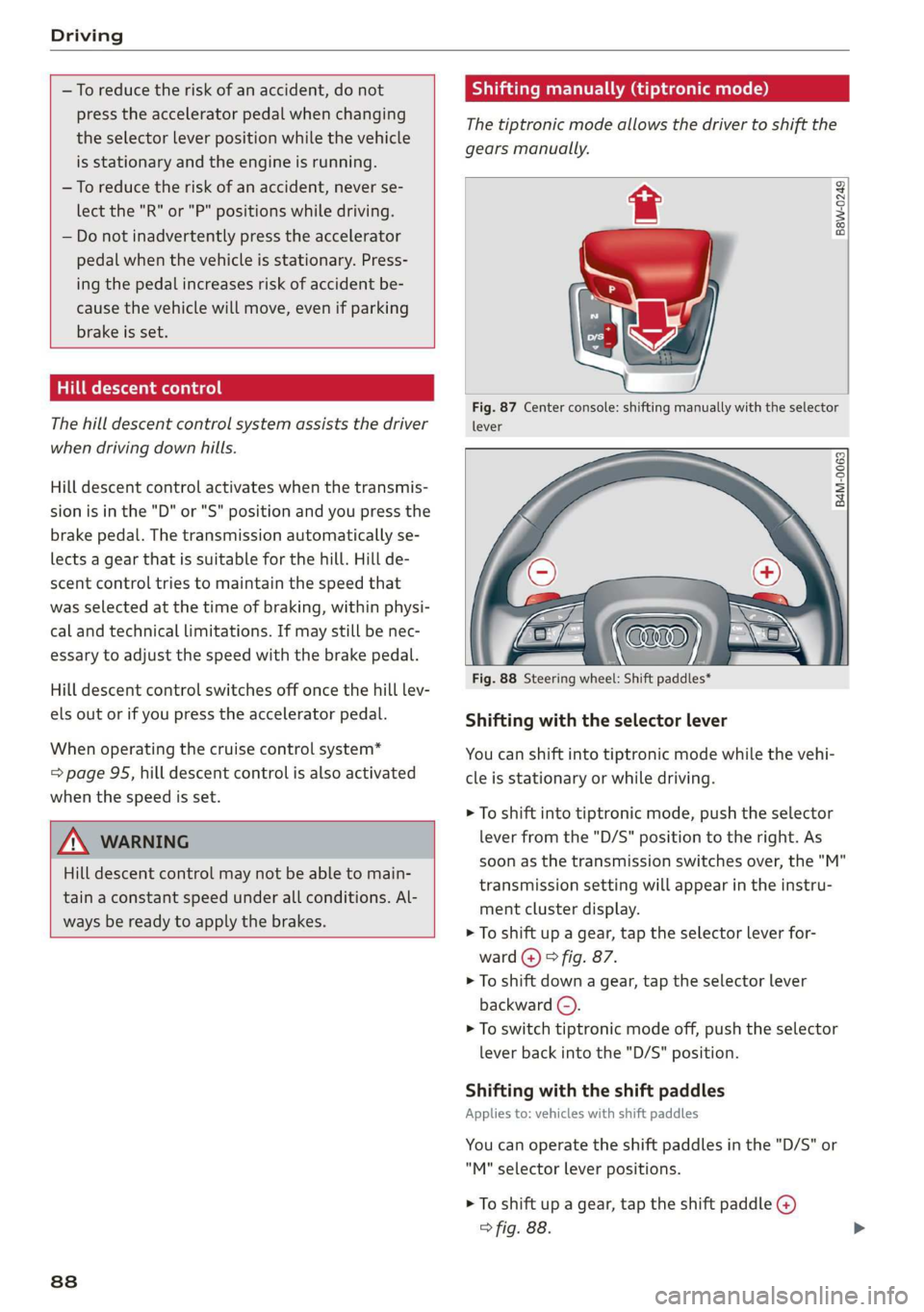
Shiftingmanually(tiptronicmode)
Thetiptronicmodeallowsthedrivertoshiftthe
gearsmanually.
B8w-0249
Fig.87Centerconsole:shiftingmanuallywiththeselector
lever
B4M-0063
Fig.88Steeringwheel:Shiftpaddles*
Shiftingwiththeselectorlever
Youcanshiftintotiptronicmodewhilethevehi-
cleisstationaryorwhiledriving.
>Toshiftintotiptronicmode,pushtheselector
leverfromthe"D/S"positiontotheright.As
soonasthetransmissionswitchesover,the"M"
transmissionsettingwillappearintheinstru-
mentclusterdisplay.
>Toshiftupagear,tap theselectorleverfor-
ward(@)>fig.87.
>Toshiftdownagear,tap theselectorlever
backward(©).
>Toswitchtiptronicmodeoff,pushtheselector
leverbackintothe"D/S"position.
Shiftingwiththeshiftpaddles
Appliesto:vehicleswithshiftpaddles
Youcanoperatetheshiftpaddlesinthe"D/S"or
"M"selectorleverpositions.
>Toshiftupagear,tap theshiftpaddle@)
>fig.88.