trailer AUDI Q7 2019 Owner´s Manual
[x] Cancel search | Manufacturer: AUDI, Model Year: 2019, Model line: Q7, Model: AUDI Q7 2019Pages: 394, PDF Size: 105.97 MB
Page 139 of 394
4M0012721BG
Parkingaid
—Keepinmindthattheimageinthedisplayis
incorrectiftheexteriormirrorhousinghas
beenmovedoutofplace.
—Onlyuse theimagesprovidedby thecamera
ontherearofthevehiclewhentheluggage
compartmentlidiscompletelyclosed.Make
sureanyobjectsyoumayhavemountedon
theluggagecompartmentliddonotblock
therearviewcamera.
— Theareaaroundthevehicleisshownusing
thecameraimages.Thevehicleimageis
shownbythesystem.Objectsandobstacles
abovethecameraarenotdisplayed.
—Cameralensesenlargeanddistortthefield
ofvision.Theobjectsappearbothaltered
andinaccurateonthescreen.
—Appliesto:vehicleswithairsuspension:the
accuracyoftheorientationlinesandblue
surfacesdecreaseswhenthevehicleis
raised/lowered>page127.
@)Note
—Alwaysreadandfollowtheapplicablewarn-
ings>@inGeneralinformationon
page131.
— TheInfotainmentdisplayshowsthedirec-
tioninwhichtherearofthevehicleistravel-
ingbasedonthesteeringwheelangle.The
frontofthevehicleswings outmorethan
therearofthevehicle.Maintainplentyof
distanceso thatanexteriormirrororacor-
nerofthevehicledoesnotcollidewithany
obstacles.
G)Tips
—Ifthe2/&8/
grayedout,thenthepowerexteriormirrors
werefoldedinorthedriver'sdoor/front
passenger'sdoor/luggagecompartmentlid
wasopened.
—Thereisnodistancewarningfortherear
andthesides*whentrailertowingmodeis
detected.Thefrontsensorsremainactivat-
ed.Thevisualdisplayswitchestotrailer
mode.Therearviewcameraimagewillnot
showtheorientationlinesandthebluesur-
faces.Thereisnoguaranteethefunctions
willswitchoffwhenusingaretrofittedtrail-
erhitch.
ice
Appliesto:vehicleswithperipheralcameras
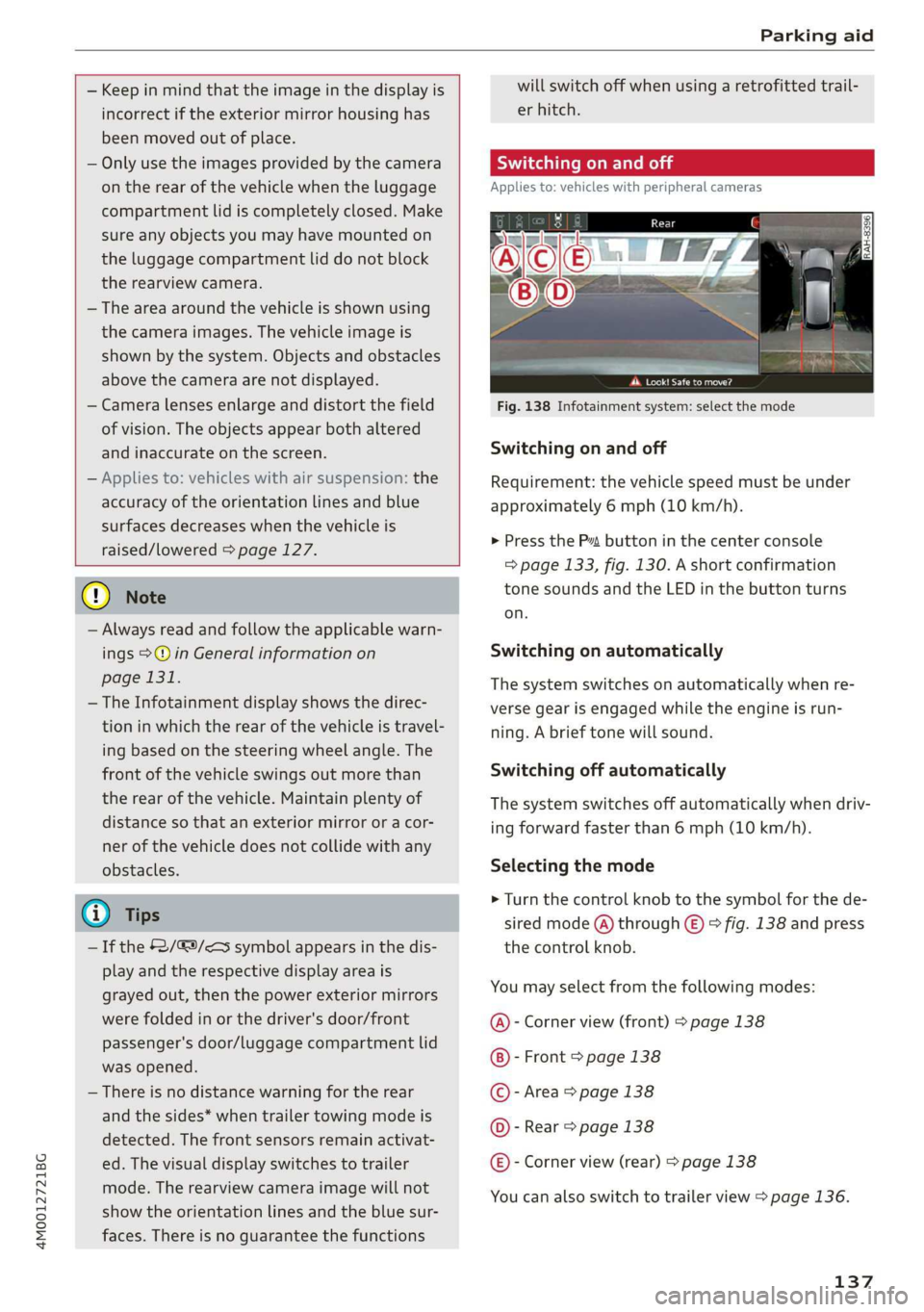
Fig.138Infotainmentsystem:selectthemode
Switchingonandoff
Requirement:thevehiclespeedmustbeunder
approximately6mph(10km/h).
>PressthePsbuttoninthecenterconsole
=>page133,fig.130.Ashortconfirmation
tonesoundsandtheLEDinthebuttonturns
on.
Switchingonautomatically
Thesystemswitchesonautomaticallywhenre-
versegearisengagedwhiletheengineisrun-
ning.Abrieftonewillsound.
Switchingoffautomatically
Thesystemswitchesoffautomaticallywhendriv-
ingforwardfasterthan6mph(10km/h).
Selectingthemode
>Turn thecontrolknobtothesymbolforthede-
siredmode(A)through©)>fig.138andpress
thecontrolknob.
Youmayselectfromthefollowingmodes:
@-Cornerview(front)>page138
-Front>page138
©-Area>page138
@©-Rear>page138
@®-Cornerview(rear)>page138
Youcanalsoswitchtotrailerview>page136.
137
Page 142 of 394
Parkingaid
system.Forinformationoncleaning,see
=>page346.
Whenparkingspacesaresmall,theparkingsys-
temsignalsacontinuoustonewhenanobstacle
islessthanapproximately0.7feet(0.20m)
away.Donotcontinuedrivingfarther.
ZAWARNING
—Alwaysreadandfollowtheapplicablewarn-
ings>A\inGeneralinformationon
page131.
—Pleasenotethat parkassistonlycontrols
thesteering.Thedriverisalwaysresponsi-
bleforbrakingandaccelerating.
— Thedrivermustdecideiftheparkingspace
displayedissuitableforthevehicle.
—Thevehiclewillchangepositionwhenpark-
ing.Makesureyoudonotendangeranyoth-
erdrivers.
—Whenusingparkassisttodriveintoorout
ofaparkingspace,thesteeringwheelturns
quicklyonitsown.Reachingintothesteer-
ing
wheelspokeswhilethisishappeningcan
resultininjury.
—Youcannotparkwith parkassistwhenyou
aretowingatrailerorhavetheconnectorin-
sertedinthetrailersocket.
Sleemela
Appliesto:vehicleswithparkassist
B4M-0084
@)Note
—Alwaysreadandfollowtheapplicablewarn-
ings>@inGeneralinformationon
page131.
—Parkassistguidesthevehicleeitheraway
fromcurbsorontothemifothervehicles
areparkedonthecurb.Makesurethatyour
vehicle'stiresandrimsarenotdamaged.
Takeoversteeringattherighttime.
—Certainconditionsaroundtheparkingspace
mayresultinthevehiclenotbeingparked
asexpected.
—Objectssuchaspillarsorposts.
—Groundcoveringsuchasgravel,snowor
ice
G)Tips
— TheElectronicStabilizationControl(ESC)
mustnotbe switchedoffduringtheparking
process>page147.
—Parkingintightcurveswith parkassistis
notpossible.
140
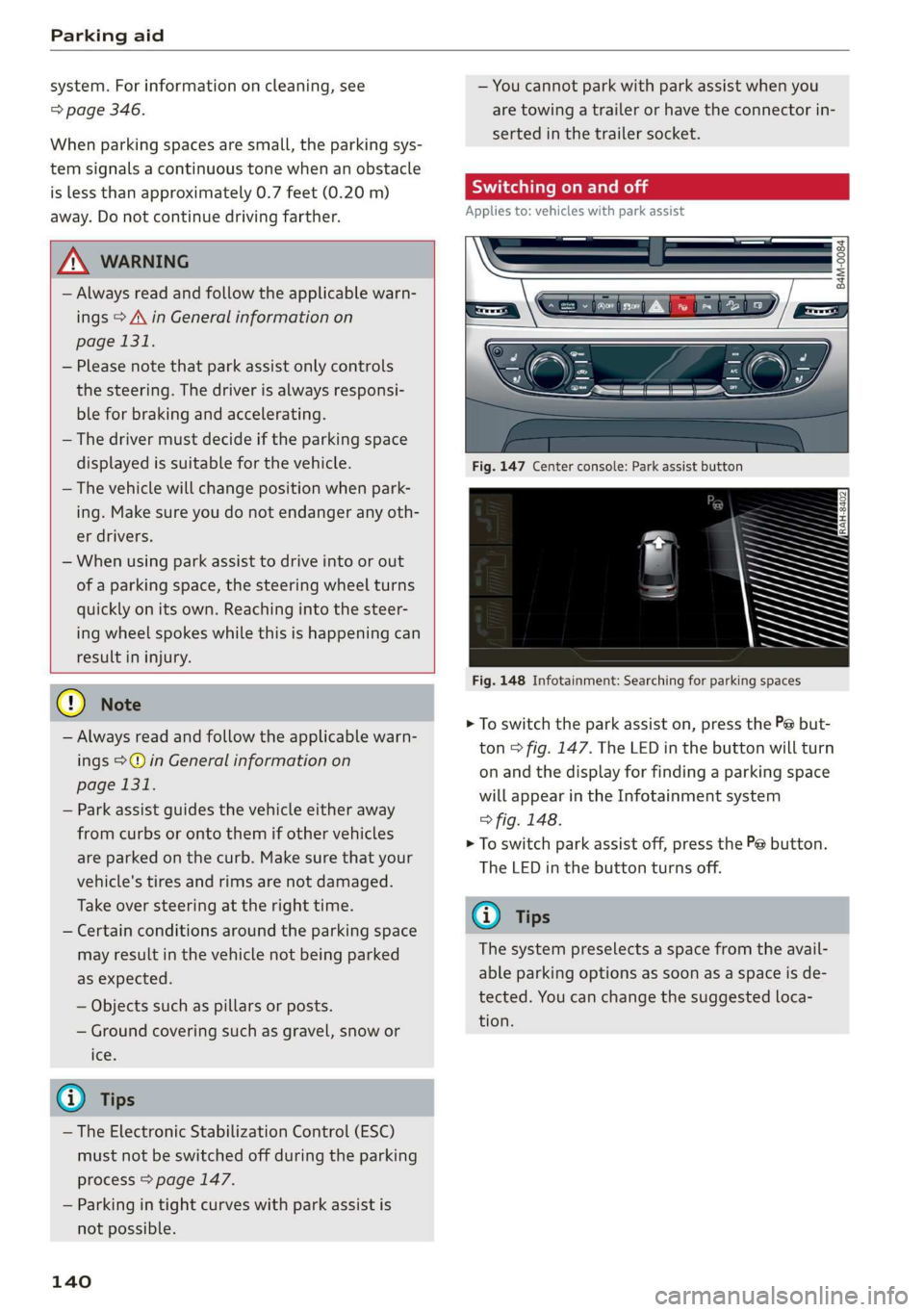
Fig.147Centerconsole:Parkassistbutton
Fig.148Infotainment:Searchingforparkingspaces
>Toswitchtheparkassiston,pressthePebut-
ton>fig.147.The LEDinthebuttonwillturn
onandthedisplayforfindingaparkingspace
willappearintheInfotainmentsystem
>fig.148.
>Toswitchparkassistoff,pressthePebutton.
TheLEDinthebuttonturnsoff.
G)Tips
Thesystempreselectsaspacefromtheavail-
ableparkingoptionsassoonasaspaceisde-
tected.Youcanchangethesuggestedloca-
tion.
Page 145 of 394
4M0012721BG
Parkingaid
Theparkingprocesswasnotcompletedwithin
approximatelysixminutesofactivatingparkas-
sist.Tocontinueparking, pressthePebutton
again.
Parkassist:canceled.Speedtoohigh.Please
take oversteering!
Thevehiclespeedwhileenteringtheparking
spaceistoohigh.Driveatspeedsnohigherthan
4mph(7km/h).
Parkassist:canceled.Stabilizationcontrol
(ESC)input.Pleasetakeoversteering!
The ESCtookactiontostabilizethevehicle.Take
overthesteering.Completeparkingwithoutus-
ingparkassistordriveoutoftheparkingspace.
roe"Parkassist:currentlyunavailable.Stabiliza-
tioncontrol(ESC)off
The ESCwasswitchedoff.The ESCmustbe
switched
ontouseparkassist.
pomParkassist:malfunction!Pleasecontact
Service
Parkassist:malfunction!Takeoversteering!
PleasecontactService.
Contact anauthorizedAudidealerorauthorized
AudiServiceFacility.Youcannotparkwithpark
assistifthereisasystemmalfunction.
Parkassist:currentlyunavailable
Parkassist:currentlyunavailable.Please
takeoversteering!
Parkingwithparkassistisnotpossible.Trypark-
ingagainorswitchtheignitionoffandbackon
againifnecessary.
Parkassist:ended.Pleasetakeoversteering
andcontinuedriving.
Theprocessofexitingtheparkingspacewith
park
assisthasended.Pleasetakeoversteering.
Parkassist:canceled.Parkingspacetoo
small.Pleasetake oversteering!
Parkinginthisspacewithparkassistisnotpossi-
ble.Parkwithoutusingparkassistorfindalarger
parkingspace.
ro"Parkassist:canceled.Obstacledetected.
Please
takeoversteering!
Parkingwith parkassistwasstopped becausethe
vehiclecouldcollidewithanobstacle.
Parkassist:ended
iParkassist:ended.Pleasetakeoversteer-
ing!
Parkingwith parkassisthasended.
Parkassist:unavailableincurrentAudidrive
selectmode
Parkassist:canceled.Unavailableincurrent
Audidriveselectmode.Pleasetakeoversteer-
ing!
ParkassistisnotavailableinLift/Offroad*or
Allroad*mode.Selectadifferentmodeindrive
select>page127.
Parkassist:stabilizationcontrol(ESC)input
Thedisplayedparkingspacewasrejectedbecause
theESCtookactiontostabilizethevehicle.
Parkassist:currently unavailable.Towing
mode
Youcannotparkwith parkassistwhenyouare
towingatrailer.
Parkassist:notstoppedlongenough
Afterengagingthereversegear,parkassistmust
stopbrieflyinordertoactivatethesteering.Fol-
lowtheinstructionsinthedisplay.
Parkassist:canceled.Unabletoleave park-
ingspaceautomatically.Parkingspacetoo
small
Theparkingspaceistoosmallforthevehicleto
automaticallyleavethespace.Leavetheparking
spacewithoutusingparkassist.
rao"|Parkassist:canceled.Pleasetakeoversteer-
ing!
Parkingwithparkassistwasstopped.
Parkassist:notavailablewhenusingarear
carrier
Youcannotparkwith parkassistwhenyouare
towingatrailerorwhenarearcarrierisattached.
143
Page 146 of 394
Parkingaid
Adjustingtheparkingaid
Appliesto:vehicleswitharearparkingsystem/parkingsys-
templus/rearviewcamera/peripheralcameras/parkassist.
ThefunctionsareadjustedintheInfotainment
system.
> SelectintheInfotainmentsystem:[MENU]but-
ton>Vehicle> leftcontrolbutton>Driveras-
sistance>Parkingaid.Or
>Whentheparkingaidisactive,selectintheIn-
fotainmentsystem:rightcontrolbutton*.
Endsystem*-stoptheparkingaid
Activateautomatically*-switchautomaticacti-
vationon/off
Frontvolume*-volumeforthefrontandside*
area
Rearvolume-volumeforthereararea
Entertainmentfader-thevolumeoftheaudio/
videosourceisLoweredwhentheparkingsystem
isturnedon.
Thenewvalueisgivenbrieflyduringtheadjust-
ment.
View*-switchbetweenanopticaldisplay
(Graphic)andcameraimage(Camera)onthe
sideofthedisplay.
Trailerview*-showtrailerview
*Auto.front/rearcamerachange*-theviewbe-
hindthevehicle(Rearmode)isdisplayedauto-
maticallywhenyoushiftintoreversegear.The
viewinfront ofthevehicle(Frontmode)isdis-
playedautomaticallywhenyoushiftintothefor-
wardgears.Whenfirstactivatinginaforward
gearwiththeP”button,thefrontsideviewis
displayed(Cornerview(front)mode).
IfyoudonotsettheV,theviewbehindthevehi-
cle(Rearmode)isalwaysdisplayedanditdoes
notswitchtothe Frontmodewhenaforward
gearisselected.
@)Tips
—Severalmenuscanbeaccessedwiththe
rightcontrolbuttononlywhentheparking
aidisactive.
144
— Thesettingsforvolumeandautomaticacti-
vation*areautomaticallystoredandas-
signedtothevehiclekeybeingused.
Errormessages
Appliesto:vehicleswitharearparkingsystem/parkingsys-
templus/rearviewcamera/peripheralcameras/parkassist.
wwRearparkingaid:malfunction!Obstacles
cannotbedetected
wwFront parkingaid:malfunction!Obstacles
cannotbedetected
wmParkingaid:malfunction!Obstaclescannot
bedetected
Whenoneofthesemessagesappears,thereisa
systemmalfunction.The LEDintheP”buttonal-
soblinkswhenswitchingiton.Therelevantmes-
sageonlyappearsagainwhenyoumanuallyacti-
vatetheparkingaidwiththebutton.
Rearparkingaid:obstacledetectionrestrict-
ed
Therearcross-trafficassist*>page123,Rear
cross-trafficassistisnotavailable.EithertheESC
isswitchedoff,ortheradarsensorsmaybecov-
ered byabikerack,stickers,leaves,snoworother
objects.SwitchtheESCon,orcleantheareain
frontofthesensorsifnecessary>page120,
fig.116.Ifthismessagecontinuestobedis-
played,driveimmediatelytoanauthorizedAudi
dealerorauthorizedAudiServiceFacilitytohave
themalfunctionrepaired.
Parkingsystemplus*/Parkassist*
If asensororspeakerisfaulty,theP4symbol
willappearinfrontof/behindthevehicleinthe
Infotainmentsystemdisplay.If arearsensoris
faulty,onlyobstaclesthatareinareas(@)and
areshown>page132,fig. 128.Ifafrontsensor
isfaulty,onlyobstaclesthatareinareas©and
©areshown.
Peripheralcameras*
Thereisasystemmalfunctionifthe#«symbol
appearsandthecorrespondingareaofthedis-
playisshowninblack.Thecameraisnotworking
inthisarea.
Page 215 of 394
4M0012721BG
Navigation
Appliesto:vehicleswithnavigationsystem
>Pressthe [NAV/MAP|buttonrepeatedlyuntil
the Enterdestinationmenuisdisplayed
=>page205,fig. 189.
—Storingadestinationasafavorite:searchfor
thedesireddestinationusingtheinputfield.
Or:selectadestinationfromthelist.Select:
rightcontrolbutton>Storeasfavorite.
—Renamingafavorite:selecttheleftcontrol
button>Favorites>afavoritefromthelist>
rightcontrolbutton>Renamefavorite.
—Movefavorite:selectafavoritefromthelist>
rightcontrolbutton>Movefavorite.Select
andconfirmthelocationoftheselectedfavor-
ite.
—Deletingafavorite:selectafavoritefromthe
list>rightcontrolbutton>Deletefavorite>
DeletethisfavoriteorDeleteallfavorites.
Directorycontacts
Appliesto:vehicleswithnavigationsystem
Twoaddresses(private/business)canbeas-
signedasdestinationsforeachcontactinthedi-
rectory.
>Pressthe [NAV/MAP]buttonrepeatedlyuntil
theEnterdestinationmenuisdisplayed
=>page205,fig. 189.
Storingadestinationasacontactinthe
directory
Requirement:amobiledevicemustbeconnected
totheMMI>page178.
—Select:adestination>rightcontrolbutton>
Adddestinationtocontact.
—Enterthefirstlettersofthedesiredcontactin
thefreetextsearchinputfield>page205,
fig.189andthenselectacontactfromthelist.
—SelectandconfirmAddbusinessdestinationor
Addprivatedestination.
Navigationsettings
Appliesto:vehicleswithnavigationsystem
>Pressthe [NAV/MAP]buttonrepeatedlyuntil
theEnterdestinationmenuisdisplayed
=>page205,fig. 189.
>Select:rightcontrolbutton>Navigationset-
tings.
Depending ontheselectedfunction,thefollow-
ingsettingscan beselected:
Showalternativeroutes
Uptothreesuggestedroutesareshownonthe
mapwhenthisfunctionisswitchedon4
=>page212.
Lowfuelwarning
Amessageisdisplayedifthefuelgaugegoesbe-
lowthereservemarkingwhenthisfunctionis
switchedonM.Confirmingthismessagedisplays
alistofgasstationsinthearea.Whenagassta-
tionisselected,routeguidancefromthecurrent
vehiclepositioniscalculated.
Trailermode*
Trailermodeisswitchedoffatthefactory.
WhenthefunctionisswitchedonM,themaxi-
mumpermittedspeedforvehicleswithtrailersis
incorporatedintotherouteguidanceandthecal-
culatedarrivaltimeisadjustedaccordingly.Trail-
ermodeisdisplayedusingsymbols"8intheside
menuonthemap.
Personalrouteassistance*
Personalrouteassistanceisswitchedoffatthe
factory.
Yourtripsarerecordedanddestinationsaresug-
gestedbytheMMIwhen thisfunctionisswitched
onpage211.
Thepersonalrouteassistanceisindicatedby the
P&symbolinthestatuslineoftheInfotainment
systemdisplay.
Notificationwhennearby*
Thenotificationwhennearbyisswitchedoffat
thefactory.
213
Page 217 of 394
![AUDI Q7 2019 Owner´s Manual 4M0012721BG
Navigation
>Pressthe LNAV/MAP]buttonrepeatedlyuntil
themapisdisplayed>fig.196.
Zoomingin/outonthemap
—Turn thecontrolknobtotheleftortotheright.
Alternatively,youcanalsozoomin/out](/img/6/40283/w960_40283-216.png "AUDI Q7 2019 Owner´s Manual 4M0012721BG
Navigation
>Pressthe LNAV/MAP]buttonrepeatedlyuntil
themapisdisplayed>fig.196.
Zoomingin/outonthemap
—Turn thecontrolknobtotheleftortotheright.
Alternatively,youcanalsozoomin/out")
4M0012721BG
Navigation
>Pressthe LNAV/MAP]buttonrepeatedlyuntil
themapisdisplayed>fig.196.
Zoomingin/outonthemap
—Turn thecontrolknobtotheleftortotheright.
Alternatively,youcanalsozoomin/outonthe
mapusingtheMMItouchcontrolpad*
=>page158,ifthecrosshairsareswitchedon.
Or:turntheleftthumbwheelonthemultifunc-
tionsteeringwheel*>page17.
Turningthecrosshairson/off
—Switchingthecrosshairson:pressthecontrol
knobinthemapview>fig.196.
—Switchingthecrosshairsoff:pressthe[BACK
button.
Whenthecrosshairsareswitchedoff>fig.196:
@)Direction.Foradditionalinformation,see
=>page216.
@)Thedistancetothedestinationincludesthe
calculatedarrivaltime.
@Whenthetrailermodefunctionisswitched
on,thecorrespondingsymbolisdisplayed
nexttothearrivaltime.
@Scale:turnthecontrolknobtotheleftor
righttodecreaseor increasethescale.When
theAutomaticzoomfunctionisswitchedon
,an“A”for“Automatic”isdisplayedinthe
magnifyingglass.
Altitude
Vehiclelocation
Routeinformation:variousinformationwill
bedisplayedduringactiverouteguidance
(forexample,theupcomingmaneuverin-
cludingcalculateddistanceandstreet
names).Thedisplayalsoprovidestrafficin-
formationorpointsofinterestonthecurrent
route.
Roadcurrentlybeingdrivenon
CO®@
Whenthecrosshairsareswitchedon>fig.197:
@)Thecrosshairs:movethecrosshairsinthede-
sireddirectionandsetapointonthemapus-
ingtheMMItouchcontrolpad”orthecontrol
D_Onlyappliestovehicleswithoutcamera-basedspeedlimit
display.
knob.Whenthecrosshairsareturnedoff,the
roadbeingcurrentlydrivenonisshown.
@Speedlimit display”):displayofthemaxi-
mumpermittedspeedontheexpressways
andhighways.
@Entertainmentslidingmenu*:see
=>page159.
@®Additionalinformationonthecrosshairspo-
sition:ifyoumovethecrosshairstoa loca-
tiononthemap,availableinformationfor
thecurrentpositionisdisplayed.Tapbriefly
ontheMMItouchcontrolpad.Or:pressthe
controlknob.Inthedestinationdetails,you
canstartrouteguidancetothedisplayedlo-
cation.SelectandconfirmStartrouteguid-
ance.
@Mapcontents(pointsofinterest,favorites).
Whentherearemultiplepointsofinterestin
theimmediatevicinity,thesymbolsare
shownstackedonthemap.
Betterroute#3:ifabetterrouteisavailable
forthecurrentrouteguidance,itwillbeindi-
catedonthemapincludingthetimethat
wouldbesaved.Moreinformationcanbe
foundunder>page220.
Mapfunctions
Appliesto:vehicleswithnavigationsystem
>Pressthe [NAV/MAP]buttonrepeatedlyuntil
themapisdisplayed>page214,fig.196.
>Presstheleftcontrolbutton.
Thefollowingmapfunctionscan beselected:
Switchtodestinationinput
ThefreetextsearchintheEnterdestination
menuisdisplayed>page205,fig.189.
Trafficmessages
CurrenttrafficinformationisdisplayedintheIn-
fotainmentsystemdisplay.Youcanalsofindad-
ditionalinformationunder>page219.>
215
Page 341 of 394
4M0012721BG
Wheels
Yoursafetyandthat ofyourpas-
sengersalsodependsonmaking
surethatloadlimitsarenotex-
ceeded.Vehicleload includesev-
erybodyandeverythinginandon
thevehicle.Theseloadlimitsare
technicallyreferredto asthevehi-
cle’sGrossVehicleWeightRating
(“GVWR”).
The“GVWR”includestheweight
ofthebasicvehicle,allfactoryin-
stalledaccessories,afulltankof
fuel,oil,coolantandotherfluids
plusmaximumload.Themaxi-
mumloadincludesthenumberof
passengersthatthevehicleisin-
tendedtocarry(“seatingcapaci-
ty”)withanassumedweightof
150lbs.(68kg)foreachpassen-
geratadesignatedseatingposi-
tionandthetotalweightofany
luggageinthevehicle.Ifyoutow
atrailer,theweightofthetrailer
hitchandthetongueweightof
the loadedtrailermustbeinclud-
edaspartofthevehicleload.
TheGrossAxleWeightRating
(“GAWR’”)isthemaximumload
thatcanbeappliedateachofthe
vehicle’stwoaxles.
Thefactthatthereisanupper
limittoyourvehicle’sGrossVehi-
cleWeightRatingmeansthatthe
totalweightofwhateverisbeing
carriedinthevehicle(including
theweightofatrailerhitchand
thetongueweightoftheloaded
trailer)islimited.Themorepas-
sengersinthevehicle orpassen-
gerswhoareheavierthanthe
standardweightsassumedmean
thatlessweightcanbecarriedas
luggage.
TheGrossVehicleWeightRating
andtheGrossAxleWeightRating
arelistedonthesafetycompli-
ancestickerlabellocatedonthe
driver’ssideB-pillar.
Z\WARNING
Overloadingavehiclecancause
lossofvehiclecontrol,acrash
orotheraccident,seriousper-
sonalinjury,andevendeath.
—Carryingmoreweightthan
yourvehiclewasdesignedto
carrywillpreventthevehicle
fromhandlingproperlyandin-
creasetheriskofthelossof
vehiclecontrol.
—Thebrakesonavehiclethat
hasbeenoverloadedmaynot
beabletostopthevehicle
withinasafedistance.
339
Page 342 of 394
Wheels
—Tiresonavehiclethathas
beenoverloadedcanfailsud-
denly,includingablowoutand
suddendeflation,causingloss
ofcontrolandacrash.
—Alwaysmakesurethattheto-
talloadbeingtransported-
includingtheweightofatrail-
erhitchandthetongue
weightofaloadedtrailer-
doesnotmakethevehicle
heavierthanthevehicle’s
GrossVehicleWeightRating.
Determiningcorrectload
limit
Usetheexamplebelowtocalcu-
latethetotalweightofthepas-
sengersandluggageorother
thingsthatyouplantotransport
sothatyoucanmakesurethat
yourvehiclewillnotbeoverload-
ed.
StepsforDeterminingCorrect
LoadLimit
1.Locatethestatement“THE
COMBINEDWEIGHTOFOCCU-
PANTSANDCARGOSHOULD
NEVEREXCEEDXXXKGORXXX
LBS”onyourvehicle’splacard
(tireinflationpressurelabel)
=>page336,fig.271.
340
2.Determinethecombined
weightofthedriverandpas-
sengersthatwillberidingin
yourvehicle.
.Subtractthecombinedweight
ofthedriverandpassengers
from“XXX”kilogramsor“XXX”
poundsshownonthestick-
er>page336,fig.271.
.Theresultingfigureequalsthe
availableamountofcargoand
uggageloadcapacity.Forex-
ample,ifthe“XXX”amount
equals1400lbs.andtherewill
befive150lbs.passengersin
yourvehicle,theamountof
availablecargoandluggage
oadcapacityis650lbs.
(1400-750(5x150)=650
bs.)
.Determinethecombined
weightofluggageandcargo
beingloadedonthevehicle.
Thatweightmaynotsafelyex-
ceedtheavailablecargoand
uggageloadcapacitycalculat-
edinStep4.
.Ifyourvehiclewillbetowinga
trailer,loadfromyourtrailer
willbetransferredtoyourvehi-
cle.Consultthismanualtode-
terminehowthisreducesthe>
Page 356 of 394
Emergencyassistance
Inflatingatire
>Movetheswitch(8)>fig.274onthecompres-
sorintopositionI.
>Inflatethetiretobetween29psi(200kPA)
and36psi(250kPA)andreadthepressureon
thegauge.
>Ifthistirepressureisnotreached,removethe
fillerhose.Driveslowlyapproximately33feet
(10m)forwardorinreversesothatthesealant
canbedistributedinthetire.Inflatethetire
again>A\.
Z\WARNING
—Readandfollowthemanufacturer'ssafety
precautionsonthecompressorandinthein-
structionsonthebottleofsealant.
—Ifatirepressureof29psi(200kPA)cannot
reachedafterinflatingfor6minutes,then
thetireistooseverelydamaged.Donotcon-
tinuedriving.
—Ifthetirecannotberepairedwiththetire
sealant,seeanauthorizedAudidealerorau-
thorizedAudiServiceFacilityforassistance.
G)Tips
Donotoperatethecompressorformorethan
sixminutescontinuously,oritcanoverheat.
Oncethecompressorhascooled,youcancon-
tinuetouseit.
Completing
>Affixthestickerthatsays"max.50mph(max.
80km/h)"thatisprovidedwiththetiremobili-
tykitwithinthedriver'sfieldofvision.
>Stopthevehicleafterdrivingforabout10mi-
nutesandcheckthetirepressure.
>
Ifthetirepressureislowerthan19psi(130
kPA),thenthetireistooseverelydamaged.Do
notcontinuedriving.
ZA\WARNING
Payattentiontothefollowingafterrepairing
thetire:
—Donotdrivefasterthan50mph(80km/h).
—Avoidhardacceleration,heavybraking,and
fastcornering.
354
— Thevehiclemaybecomemoredifficultto
control.
—Ifthetireistooseverelydamaged,seean
authorizedAudidealerorauthorizedAudi
ServiceFacilityforassistance.
@)Forthesakeoftheenvironment
Youcangivetheusedtiresealantbottletoan
authorizedAudidealerorauthorizedAudi
ServiceFacilityfor disposal.
G)Tips
Remembertoobtainanewbottleofsealant
fromanauthorizedAudidealerorauthorized
AudiServiceFacilityafterrepairingatire.
Changingatire
Youmustcompletethepreparationbefore
changingatire.
>Readandfollowtheimportantsafetyprecau-
tions>page352.
>Set theparkingbrake.
>Selectthe"P"selectorleverposition.
>Whentowingatrailer:disconnectthetrailer
fromyourvehicle.
>Layout thevehicletoolkit>page352andthe
sparetire.
>Switchonwheelchangemode*intheInfotain-
mentsystem:[MENU]button>Vehicle> left
controlbutton>Service&checks>Airsuspen-
sion:wheelchange.
>Switchtheignitionoff.
Thevehiclejackmode*switchesoffautomatically
atspeedsabove6mph(10km/h).
ZA\WARNING
Whenusingthevehiclejack*onaroadwitha
steephillorwhenoffroad,youmusttakeex-
tra
precautionstopreventthevehiclefrom
rolling.Usesuitableobjectstoblockthefront
andbackofthewheelthatisdiagonalfrom
thewheelwiththeflattire.>
Page 364 of 394
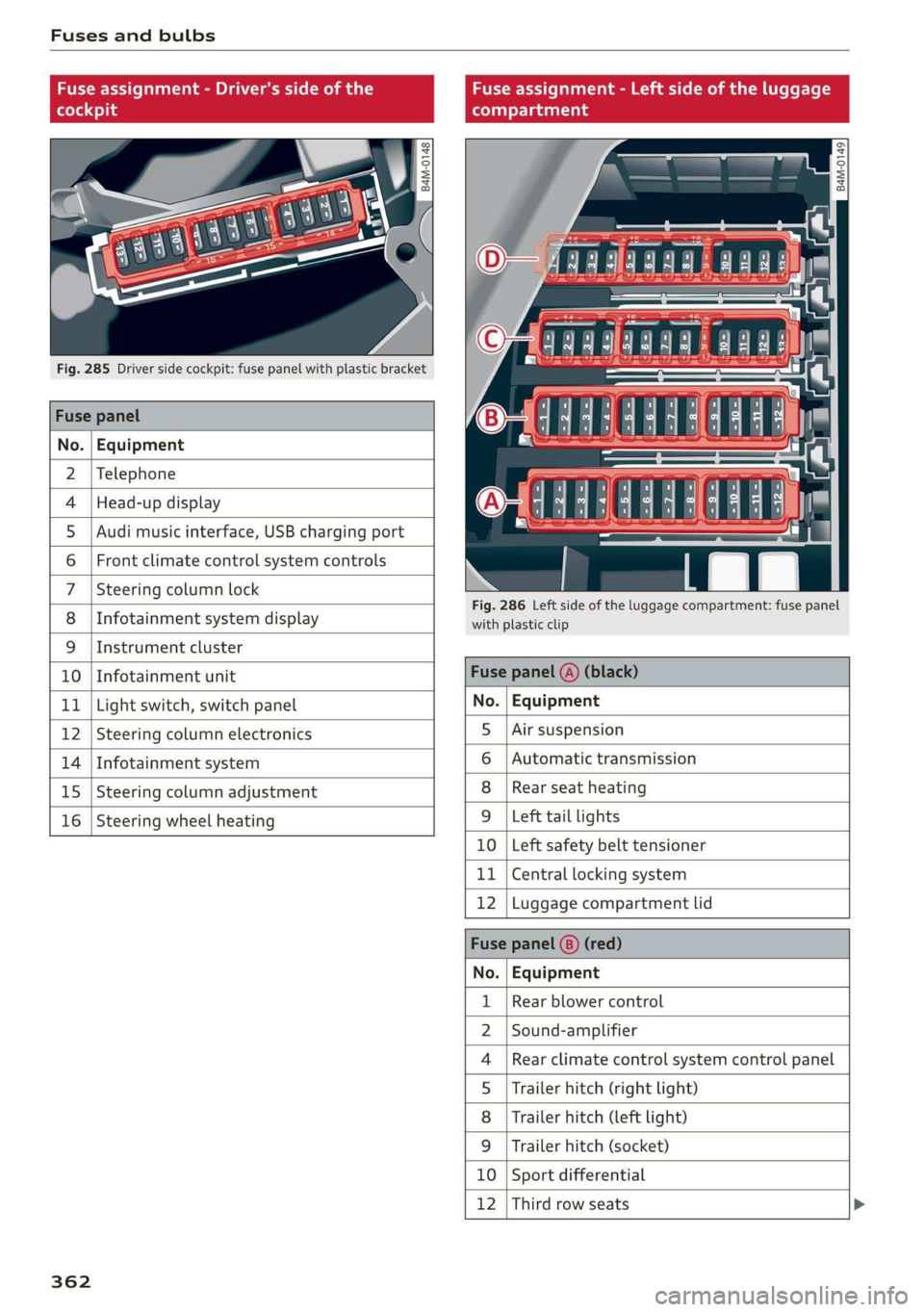
Fusesandbulbs
Fuseassignment-Driver'ssideoftheFuseassignment-Leftsideoftheluggage
(hole4)9(oTnaleats
@ag g
22
= =
aa
Fig.285Driversidecockpit:fusepanelwithplasticbracket
Fusepanel
No.|Equipment
2|Telephone
4|Head-updisplayO4444:4449858
5|Audimusicinterface,USBchargingport=
6|Frontclimatecontrolsystemcontrols|
7|Steeringcolumnlock
; .Fig.286Leftsideof theluggagecompartment:fusepanel
8
|
InfotainmentsystemdisplayCanney
9|Instrumentcluster
10
|
InfotainmentunitFusepanel(A)(black)
11
|
Lightswitch,switchpanelNo.|Equipment
12
|
Steeringcolumnelectronics5
|
Airsuspension
14
|
Infotainmentsystem6
|
Automatictransmission
15
|
Steeringcolumnadjustment8
|
Rearseatheating
16
|
Steeringwheelheating9
|
Lefttaillights
10|Leftsafetybelttensioner
11|Centrallockingsystem
12|Luggagecompartmentlid
Fusepanel(8)(red)
No.|Equipment
Rearblowercontrol
Sound-amplifier
Rearclimatecontrolsystemcontrolpanel
Trailerhitch(rightlight)
Trailerhitch(leftlight)
Trailerhitch(socket)
10|Sportdifferential
12|Thirdrowseats
WO;a;m|)AINI
FR
362