ignition AUDI Q7 2019 Owner´s Manual
[x] Cancel search | Manufacturer: AUDI, Model Year: 2019, Model line: Q7, Model: AUDI Q7 2019Pages: 394, PDF Size: 105.97 MB
Page 135 of 394

4M0012721BG
Parkingaid
Audiosignals
Thecloseryourvehiclegetstoadetectedobsta-
cle,theshorterthetimebetweentheaudiblesig-
nals.Acontinuoustonesoundswhenanobstacle
islessthanapproximately1foot(0.30m) away
fromthefrontorrearofthevehicle.Acontinu-
oustonesoundswhenanobstacleislessthan
approximately0.7feet(0.20m)awayfromthe
sides*ofthevehicle.Donotcontinuedrivingfor-
wardorinreverse>A\inGeneralinformationon
page131,>@inGeneralinformationon
page131.
Visualwarnings
ThevisualwarningsintheInfotainmentsystem
displayhelpyoutodetectthecriticalvehiclearea
andtoestimatethedistancetoanobstacle
>fig.129.
Redsegmentsshowidentifiedobstaclesthatare
inyourvehicle'spath.Theredlinesmarktheex-
pecteddirectionoftravelaccordingtothesteer-
ingangle.Awhitesegmentindicatesanidenti-
fiedobstaclethatisoutsideofthevehicle'spath.
Asyourvehiclecomesclosertotheobstacle,the
segmentsmoveclosertothevehicle.Thecolli-
sionareahasbeenreachedwhenthenexttolast
segmentisdisplayed.Obstaclesinthecollision
area,includingthoseoutsideofthevehicle's
path,areshowninred.Donotcontinuedriving
forwardorinreverse>A\inGeneralinformation
onpage131,>@inGeneralinformationon
page131!
G)Tips
— Thesegmentsinthesidearea*aredetected
andanalyzedwhenpassing.Ifyouswitch
theignitionoffandonagainoropenthe
door,orifthevehicleisstationaryforaperi-
odoftime,thesurroundingareamayhave
changedinthemeantime.In thisscenario,
thesidearea*willappearblackuntilthe
areahasbeendetectedandevaluated.
—Ifthedistancetoanobstacleremainscon-
stant,thevolumeofthedistancewarning
graduallylowersafterafewsecondsuntilit
ismuted(thisdoesnotapplytothecontinu-
oustone).Iftheobstaclecomescloserthan
itwasbeforethesoundwasmuted,the
tonewillsoundagain.Iftheobstaclebe-
comesfartherawaythanitwasbeforethe
soundwasmuted,notonewillsound. Pay
attentiontothevehicle'ssurroundings
whenyoustarttodrive.
—Thereisnodistancewarningfortherear
andthesides*whentrailertowingmodeis
detected.Thefrontsensorsremainactivat-
ed.Thevisualdisplayswitchestotrailer
mode.Thereisnoguaranteethefunctions
willswitchoffwhenusingaretrofittedtrail-
erhitch.
SYieaiaremilieKeli
Appliesto:vehicleswithparkingsystemplus/parkassist
Fig.130Centerconsole:parkingaidbutton
Switchingonandoff
Requirement:thevehiclespeedmustbeunder
approximately6mph(10km/h).
>PressthePtbuttoninthecenterconsole.A
shortconfirmationtonesoundsandtheLEDin
thebuttonturnson.
Switchingonautomatically
The
systemswitchesonautomaticallywhenre-
versegearisengagedwhiletheengineisrun-
ning.Abrieftonewillsound.
IfActivateautomaticallyisswitchedoninthe
Infotainmentsystemandifthevehicleap-
proachesanobstacleatspeedsunderapproxi-
mately6mph(10km/h),theparkingaidwill
switchonautomatically.Audiblesignalswill
soundoncetheobstacleiswithinthesensorde-
tectionarea.
133
>
Page 136 of 394
Parkingaid
Switchingoffautomatically
Thedistanceindicatorfortheparkingsystem
plusswitchesoffautomaticallywhendrivingfor-
wardfasterthan6mph(10km/h).
G)Tips
IfyoupresstheP“buttontoswitchthepark-
ingaidoff,itcanonlybereactivatedautomat-
icallywhenoneofthefollowingconditionsis
met:
— Thevehiclespeedexceeds6mph(10km/h)
—Theignitionisswitchedoffandbackon
again
— Theparkingbrakeissetandthenreleased
—The"P"selectorleverpositionisengaged
andreleasedagain
Rearviewcamera
Introduction
Appliesto:vehicleswith rearviewcamera
B8V-0629
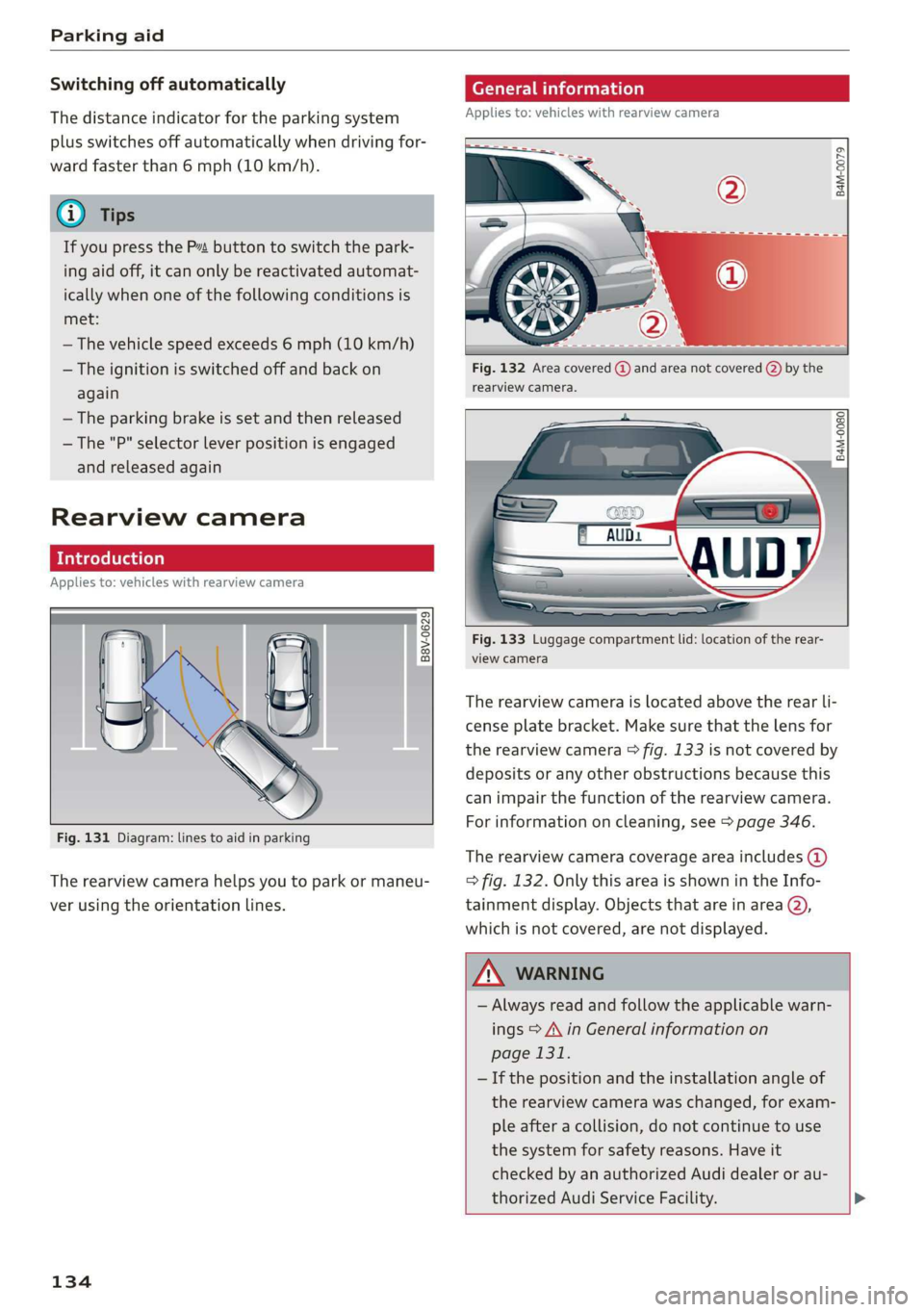
Fig.131Diagram:linestoaidinparking
Therearviewcamerahelpsyoutoparkormaneu-
verusingtheorientationlines.
134
eTelaLely
Appliesto:vehicleswithrearviewcamera
agz
g
==a
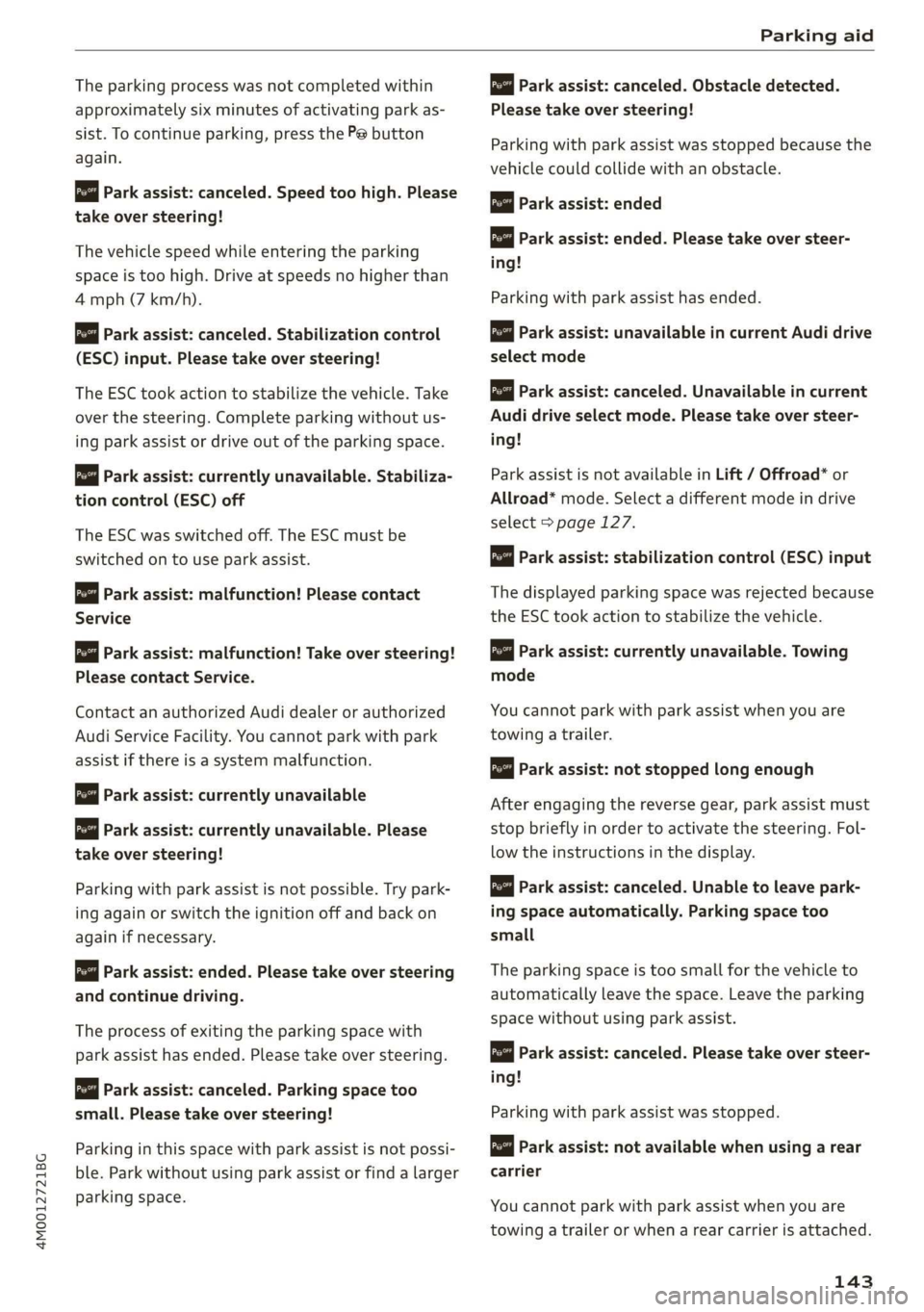
Fig.132Areacovered@)andareanotcovered()bythe
rearviewcamera.
B4M-0080|
:
Fig.133Luggagecompartmentlid:locationoftherear-
viewcamera
Therearviewcameraislocatedabovetherearli-
censeplatebracket.Makesurethatthelensfor
therearviewcamera>fig.133isnotcoveredby
depositsoranyotherobstructionsbecausethis
can impairthefunctionoftherearviewcamera.
Forinformationoncleaning,see>page346.
Therearviewcameracoverageareaincludes()
=>fig.132. OnlythisareaisshownintheInfo-
tainmentdisplay.Objectsthatareinarea@),
whichisnotcovered,arenotdisplayed.
ZA\WARNING
—Alwaysreadandfollow theapplicablewarn-
ings>A\inGeneralinformationon
page131.
—Ifthepositionandtheinstallation angleof
therearviewcamerawaschanged,forexam-
pleafteracollision,donotcontinuetouse
the
systemforsafetyreasons.Haveit
checkedby anauthorizedAudidealeror au-
thorizedAudiServiceFacility.>
Page 145 of 394
4M0012721BG
Parkingaid
Theparkingprocesswasnotcompletedwithin
approximatelysixminutesofactivatingparkas-
sist.Tocontinueparking, pressthePebutton
again.
Parkassist:canceled.Speedtoohigh.Please
take oversteering!
Thevehiclespeedwhileenteringtheparking
spaceistoohigh.Driveatspeedsnohigherthan
4mph(7km/h).
Parkassist:canceled.Stabilizationcontrol
(ESC)input.Pleasetakeoversteering!
The ESCtookactiontostabilizethevehicle.Take
overthesteering.Completeparkingwithoutus-
ingparkassistordriveoutoftheparkingspace.
roe"Parkassist:currentlyunavailable.Stabiliza-
tioncontrol(ESC)off
The ESCwasswitchedoff.The ESCmustbe
switched
ontouseparkassist.
pomParkassist:malfunction!Pleasecontact
Service
Parkassist:malfunction!Takeoversteering!
PleasecontactService.
Contact anauthorizedAudidealerorauthorized
AudiServiceFacility.Youcannotparkwithpark
assistifthereisasystemmalfunction.
Parkassist:currentlyunavailable
Parkassist:currentlyunavailable.Please
takeoversteering!
Parkingwithparkassistisnotpossible.Trypark-
ingagainorswitchtheignitionoffandbackon
againifnecessary.
Parkassist:ended.Pleasetakeoversteering
andcontinuedriving.
Theprocessofexitingtheparkingspacewith
park
assisthasended.Pleasetakeoversteering.
Parkassist:canceled.Parkingspacetoo
small.Pleasetake oversteering!
Parkinginthisspacewithparkassistisnotpossi-
ble.Parkwithoutusingparkassistorfindalarger
parkingspace.
ro"Parkassist:canceled.Obstacledetected.
Please
takeoversteering!
Parkingwith parkassistwasstopped becausethe
vehiclecouldcollidewithanobstacle.
Parkassist:ended
iParkassist:ended.Pleasetakeoversteer-
ing!
Parkingwith parkassisthasended.
Parkassist:unavailableincurrentAudidrive
selectmode
Parkassist:canceled.Unavailableincurrent
Audidriveselectmode.Pleasetakeoversteer-
ing!
ParkassistisnotavailableinLift/Offroad*or
Allroad*mode.Selectadifferentmodeindrive
select>page127.
Parkassist:stabilizationcontrol(ESC)input
Thedisplayedparkingspacewasrejectedbecause
theESCtookactiontostabilizethevehicle.
Parkassist:currently unavailable.Towing
mode
Youcannotparkwith parkassistwhenyouare
towingatrailer.
Parkassist:notstoppedlongenough
Afterengagingthereversegear,parkassistmust
stopbrieflyinordertoactivatethesteering.Fol-
lowtheinstructionsinthedisplay.
Parkassist:canceled.Unabletoleave park-
ingspaceautomatically.Parkingspacetoo
small
Theparkingspaceistoosmallforthevehicleto
automaticallyleavethespace.Leavetheparking
spacewithoutusingparkassist.
rao"|Parkassist:canceled.Pleasetakeoversteer-
ing!
Parkingwithparkassistwasstopped.
Parkassist:notavailablewhenusingarear
carrier
Youcannotparkwith parkassistwhenyouare
towingatrailerorwhenarearcarrierisattached.
143
Page 156 of 394
MultiMediaInterface
—Switchingoffmanually:pressandholdthe
On/Offknob@)>fig.155untiltheMMI
switchesoff.IftheMMIhasbeenswitchedoff
manually,itdoesnotswitchonagainautomati-
callythenexttimetheignitionisswitchedon.
Additionalfunctions:
—Adjustingthevolume:turntheOn/Offknob@
>fig.155.
—Muting:presstheOn/Offknob@°fig.155
briefly.
—Selectingtheprevious/nextfunction(forex-
ample,aradiostation/track):presstheOn/Off
knob@®fig.155brieflytowardtheleftKdor
rightDo.
—Fastforwarding/rewinding(forexample
songs):pressandholdtheOn/Offknob@)
=>fig.155towardtheleftKdorrightPel.
ZAWARNING
Adjustthevolumeoftheaudiosystemsothat
signalsfromoutsidethevehicle,suchas po-
liceandfiresirens,canbeheardeasilyatall
times.
G@)Tips
TheMMIswitchesoffautomaticallyiftheen-
gineisnotrunningandthevehiclebatteryis
low.
Infotainmentsystem
display
Switchingon/off
TheInfotainmentsystemdisplayautomatically
extendsandretractswhenyouswitchtheigni-
tiononandoff.
>Whenitisextended,presstheLo]buttonto
switchtheInfotainmentsystemdisplayonor
off.
WhentheMMIisswitchedonandthedisplayis
switchedoff,youcanoperatecertainfunctions
usingtheOn/OffknobwiththeMMIjoystick
function>page153.
154
G)Tips
Theremaybedelayswhenswitchingonthe
display.
celmurlClmelmelevee(rs
Thedisplayversiondependsonvehicleequip-
ment.
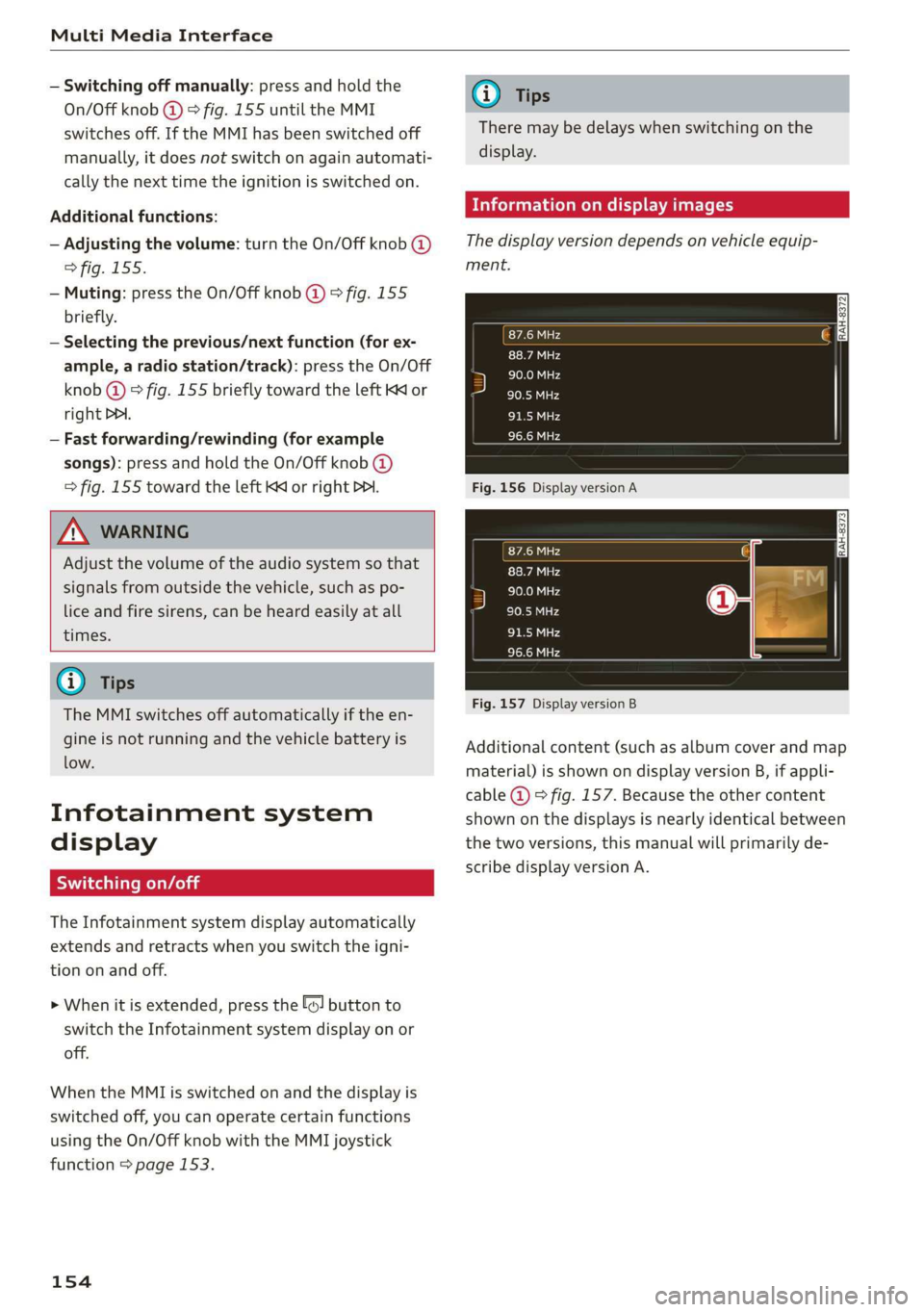
Fig.156DisplayversionA
Fig.157DisplayversionB
Additionalcontent(suchasalbumcoverandmap
material)isshownondisplayversionB,ifappli-
cable@)©fig.157.Becausetheothercontent
shownonthedisplaysisnearlyidenticalbetween
thetwoversions,thismanualwillprimarilyde-
scribedisplayversionA.
Page 173 of 394
4M0012721BG
Voicerecognitionsystem
Voicerecognitionsystem
Operating
Appliesto:vehicleswithvoicerecognitionsystem
YoucanoperatemanyInfotainmentfunctions
convenientlybyspeaking.
Requirement:theignitionandtheMMImustbe
switched
on>page153.Asystemlanguagesup-
portedbythevoicerecognitionsystemmustbe
set.Theremustbenophonecallsinprogressand
theparkingaidmustnotbeactive.
>Switchingon:brieflypressthe[2]button@)
=>page18,fig.11onthemultifunctionsteer-
ing
wheelandsaythedesiredcommandafter
theBeep.
>Switchingoff:pressandholdthe|]button.
Or:pressthe|S]button.
>Pausing:saythecommandPause.Toresume,
pressthe|]button.
>Correcting:saythecommandCorrection.Or:
simplysayanewcommandduringanan-
nouncement>page248.
Inputassistance
Thesystemguidesyouthroughtheinputwith
visualandaudiofeedback.
—Visualinputassistance:afterswitchingon
voicerecognition,adisplaywithaselectionof
possiblecommandsappears.Thiscommand
displaycanbe switchedonoroff.Select:
MENU]button>Settings>leftcontrolbutton
>MMIsettings>Speechdialogsystem.
—Audioinputassistance: tohavethepossible
commandsread,turnthevoicerecognitionsys-
temonandsayHelp.
Forthesystemtounderstandyou:
Speakclearlyanddistinctly atanormalvolume.
Speaklouderwhendrivingfaster.
Emphasizethewordsinthecommandsevenly
anddonotleavelongpauses.
Closethedoors,thewindows,andthesunroof*
toreducebackgroundnoise.Makesurethatpas-
sengersarenotspeakingwhenyouaregivinga
voicecommand.
Donotdirecttheventstowardthehands-freemi-
crophone,whichisintheroofheadlinernearthe
frontinteriorlights.
Onlyusethesystemfromthedriver'sseatbe-
causethehands-freemicrophoneisdirectedto-
wardthatseat.
Additionalsettings
See>page248,Speechdialogsystem.
ZAWARNING
—Directyourfullattentiontodriving.Asthe
driver,youhavecompleteresponsibilityfor
safetyintraffic.Only usethefunctionsin
suchawaythatyoualwaysmaintaincom-
pletecontroloveryourvehicleinalltraffic
situations.
—Donotuse thevoicerecognitionsystemin
emergenciesbecauseyourvoicemaychange
instressfulsituations.Thesystemmaytake
longertodialthenumberormaynot be
abletodialitatall.Dialtheemergency
numbermanually.
G)Tips
—Thedialogpauseswhenthereisanincom-
ingphonecallandwillcontinueifyouig-
norethecall.Thedialogendsifyouanswer
thecall.
—Youcanselectan iteminthelistusingei-
therthevoicerecognitionsystemorthe
controlknob.
Commandoverview
information
Appliesto:vehicleswithvoicerecognitionsystem
Thefollowingoverviewsdescribethecommands
thatcan beusedtooperatetheMMIusingthe
voicerecognitionsystem.
Alternativecommandsareseparatedusinga“/”,
forexamplesay:Telephone/(or)Navigation/
(or)Radio.
Sequencesofcommandsusedtoperformanac-
tionareidentifiedwitha“>”,forexamplesay:
Enteraddress>(then)Entercountry/state.
171
Page 178 of 394
Voicerecognitionsystem
Appliesto:vehicleswithvoicerecognitionsystem
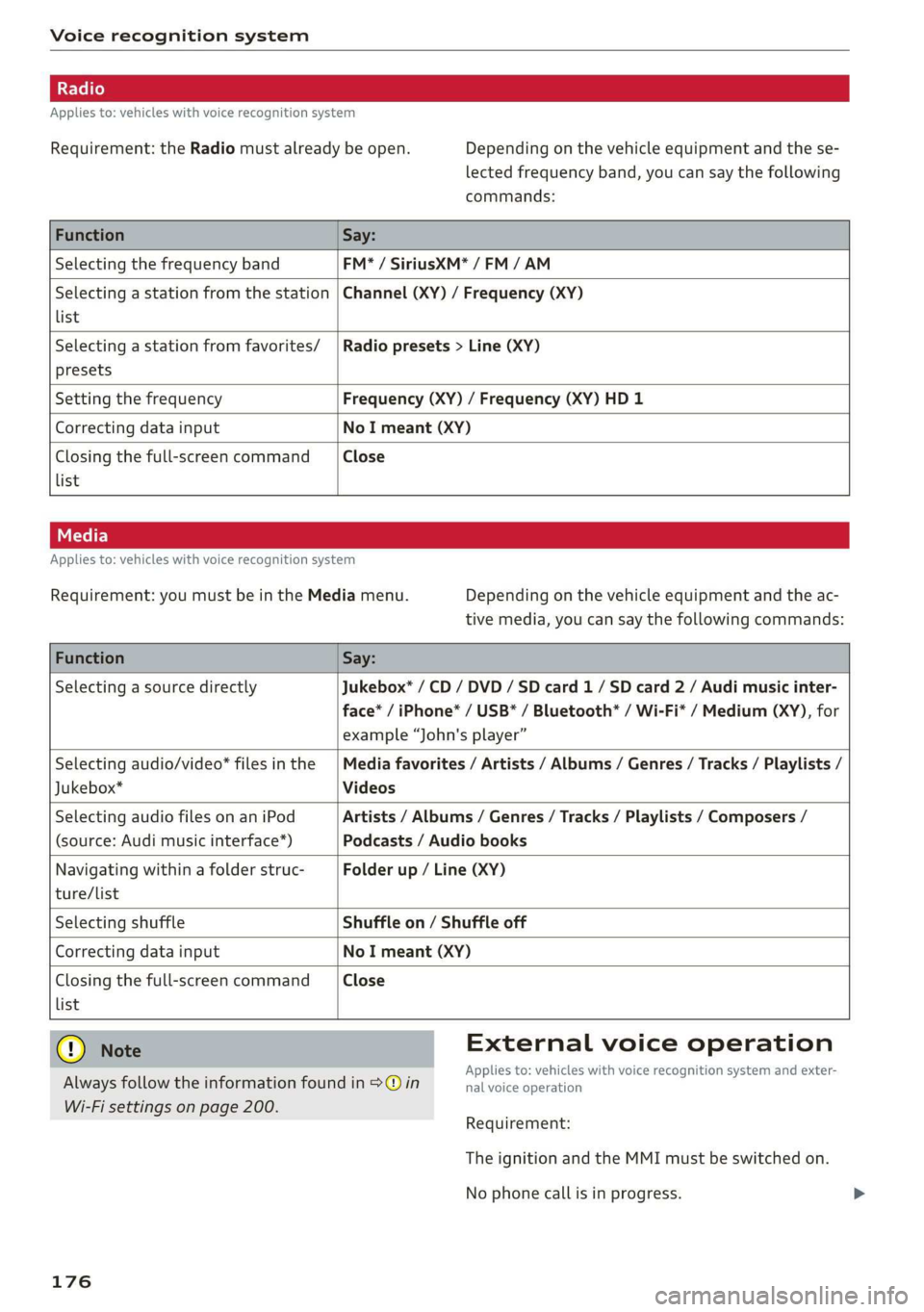
Requirement:theRadiomustalreadybeopen.Dependingonthevehicleequipmentandthese-
lectedfrequencyband,youcansaythefollowing
commands:
FunctionSay:
SelectingthefrequencybandFM*/SiriusXM*/FM/AM
Selectingastationfromthestation
list
Channel(XY)/Frequency(XY)
Selectingastationfromfavorites/
presets
Radiopresets>Line(XY)
SettingthefrequencyFrequency(XY)/Frequency(XY)HD1
CorrectingdatainputNoImeant(XY)
Closingthefull-screencommand
list
Close
Appliesto:vehicleswithvoicerecognitionsystem
Requirement:youmustbeintheMediamenu.Dependingonthevehicleequipmentandtheac-
tivemedia,youcansaythefollowingcommands:
FunctionSay:
SelectingasourcedirectlyJukebox*/CD/DVD/SDcard1/ SDcard2/Audimusicinter-
face*/iPhone*/USB*/Bluetooth*/Wi-Fi*/Medium(XY),for
example“John'splayer”
Selectingaudio/video*filesinthe
Jukebox*
Mediafavorites/Artists/Albums/Genres/Tracks/Playlists/
Videos
SelectingaudiofilesonaniPod
(source:Audimusicinterface*)
Artists/Albums/Genres/Tracks/Playlists/Composers/
Podcasts/Audiobooks
Navigatingwithinafolderstruc-
ture/list
Folderup/Line(XY)
list
SelectingshuffleShuffleon/Shuffleoff
CorrectingdatainputNoImeant(XY)
Closingthefull-screencommandClose
@®)Note
Alwaysfollowtheinformationfoundin>@in
Wi-Fisettingsonpage200.
176
Externalvoiceoperation
Appliesto:vehicleswithvoicerecognitionsystem andexter-
nalvoiceoperation
Requirement:
TheignitionandtheMMImustbe switchedon.
Nophonecallisinprogress.
Page 180 of 394

Telephone
Telephone
Introduction
Appliesto:vehicleswithtelephone
Tomakephonecallsinyourvehicleusingthe
MMI,connectyourcellphonetotheMMIvia
Bluetooth.
Handsfree
Afteryouhaveconnectedyourmobiledevice to
theMMIviaBluetooth,youcan use thehandsfree
systemandoperatetelephonefunctionsthrough
yourMMI.Youcanmakecallsusingtheantenna
onyourmobiledevice.
Withthe Audiphonebox’,callsaremadeusing
theexteriorantennaonthevehicle.Usingtheex-
ternalantennahelpswhenthereisalowsignal
andalsoprovidesbetterreceptionquality
=>page181.
ZA\WARNING
—Medicalexpertswarnthatmobiledevices
caninterferewiththefunctionofpacemak-
ers.Alwaysmaintainaminimumdistanceof
about8inches(20cm)betweenthecell
phoneantennaandthepacemaker.
—Donotcarrythemobiledeviceinapocket
directlyoverthepacemakerwhenthe
phoneisswitchedon.
—Switchthemobiledeviceoffimmediately
ifyoususpectitmaybeinterferingwith
thepacemaker.
—Donotuse thevoicerecognitionsystem*
=page171inemergenciesbecauseyour
voicemaychangeinstressfulsituations.The
systemmaytakelongertodialthenumber
ormaynotbeabletodialitatall.Dialthe
emergencynumbermanually.
—Switchyourmobiledeviceoffinareaswhere
thereisariskofanexplosion.Theseloca-
tionsarenotalwaysclearlymarked.This
mayincludegasstations,fuelandchemical
storagefacilitiesortransportvehicles,orlo-
cationswherefuelvapors(such aspropane
orgasolinevaporinvehiclesorbuildings),
chemicalsorlargequantitiesofdustparti-
cles(suchasflour,sawdustormetal)may
178
bepresentintheair.Thisalsoappliestoall
otherlocationswhereyouwouldnormally
turnyourvehicleengineoff.
— Thedemandsoftrafficrequireyourfullat-
tention.Alwaysreadthechapter
=>page153,Trafficsafetyinformation.
@)Note
Alwaysfollowtheinformationfoundin>@in
Wi-Fisettingsonpage200.
G)Tips
— TheBluetooth connectionrangeislimited
toinsidethevehicle.Itcanalsobeaffected
bylocalconditionsandinterferencewith
otherdevices.
—TolearnwhichBluetoothconnectionsand
whichofthefunctionsinyourmobiledevice
aresupported,checkwithyourmobilede-
viceserviceproviderorthedatabaseformo-
biledevicesatwww.audiusa.com/
bluetooth.
Setup
ConnectingacellphoneusingBluetooth
Appliesto:vehicleswithtelephone
MyPhone
DoesthisPINmatchtheoneon your
Bluetoothdevice?PIN:967536
Fig.177DisplayingthePINforenteringinthecellphone
Requirement
Thevehiclemustbestationaryandtheignition
mustbeswitchedon.
TheBluetoothsettingsmustbeopenonyour
mobiledeviceduringtheconnectionsetup.
TheBluetoothfunctionandvisibilityoftheMMI
=page250andmobiledevicemustbeswitched
on.
Page 181 of 394
![AUDI Q7 2019 Owner´s Manual 4M0012721BG
Telephone
Themobiledevicethatwillbeconnectedmust
notbeconnectedtoanyotherBluetoothdevice.
TheMMImustnotbeconnectedtoamobilede-
vice.
Connectingamobiledevice
>Select:[MENU]button>Tele](/img/6/40283/w960_40283-180.png "AUDI Q7 2019 Owner´s Manual 4M0012721BG
Telephone
Themobiledevicethatwillbeconnectedmust
notbeconnectedtoanyotherBluetoothdevice.
TheMMImustnotbeconnectedtoamobilede-
vice.
Connectingamobiledevice
>Select:[MENU]button>Tele")
4M0012721BG
Telephone
Themobiledevicethatwillbeconnectedmust
notbeconnectedtoanyotherBluetoothdevice.
TheMMImustnotbeconnectedtoamobilede-
vice.
Connectingamobiledevice
>Select:[MENU]button>Telephone>Connect
mobiledevice>Findnewdevices>Next.The
availableBluetoothdevicesareshownintheIn-
fotainmentsystemdisplay.Orselect:[MENU
button>Settings>leftcontrolbutton>MMI
settings>Connectionmanager©page248.
>Selectandconfirmthedesiredcellphonefrom
thelistofdisplayedBluetoothdevices.
>TheMMIgeneratesaPINforthe connection
setup
>fig.177.
>SelectandconfirmYes.
>»EnterthePINforconnectingonyourcell
phone.Or:whenthePINisdisplayedonyour
cellphone,confirmthePINonyourcellphone
andintheMMI.Thetimeallowedforentering
thePINislimitedtoapproximately30seconds.
>Payattentiontoanyadditionalsystemprompts
displayedonyourcellphone,forexampleifthe
systemshouldconnectautomaticallyinthefu-
ture.Dependingonthecellphone,youmay
havetoconfirmdownloadingthedirectorysep-
arately.
Afterconnectingsuccessfully
Afterconnectingsuccessfully,informationabout
theconnectedprofileswillappear.Youcanalso
changetheprofileslater.Select:[MENU]button>
Settings> leftcontrolbutton>MMIsettings>
Connectionmanager>page248.
Inaddition,thecellphonecontactsareautomat-
icallyloadedintheMMIdirectory.Thisprocess
cantakeseveralminutes,dependingonthenum-
berofcontacts.
Youcanalsomakeyourconnectedcellphonethe
defaultphonebyselectingSetasdefaulttele-
phoneintheConnectionmanager=page250.
@)Note
Alwaysfollow theinformationfoundin>@in
Wi-Fisettingsonpage200.
@Tips
—MakingphonecallsthroughtheMMIisonly
possibleusingtheHandsfreeBluetoothpro-
file.
—Youcanapplyadditionalsettingstocon-
nectedmobiledevicesusingtheConnection
manager>page248.
—YoucanalsosearchfortheMMIonyourmo-
biledeviceusingtheBluetoothdevice
search.
—Youonlyhavetopairyourdeviceonetime.
Bluetoothdevicesthatarealreadypaired
automaticallyconnecttotheMMIwhenthe
Bluetoothfunctionisswitchedon,when
theyarewithinrange,andwhentheignition
isswitchedon.Thelastconnectedmobile
deviceisgivenfirstpriority.
—AuthorizingtheMMIconnectiononyour
mobiledevicewillmakeitpossibletocon-
nectautomatically.
—Payattentiontoanysystempromptsdis-
playedonyourcellphone,forexampleif
thesystemshouldconnectautomaticallyin
thefuture.Dependingonthecellphone,
youmayalsoneedtodownloadthedirecto-
ryandconfirmaccesstoyourtextmessages
separately.
—Whenleavingthevehicle,theBluetooth
connectiontothemobiledevicewillauto
maticallydisconnect.Depending onyour
mobiledevice,phonecallsinprogressmay
beautomaticallyredirectedfromtheMM
toyourmobiledevicesothatyoucan con
tinuethecallon yourphone.
I
—Youcanobtainmoreinformationfromyour
mobiledeviceserviceproviderorfromyo!ur
mobiledeviceuserguide. Forinformation
onusingthetelephone,visitwww.audiusa.
com/bluetoothorcontactanauthorizedAu-
didealerorauthorizedAudiServiceFacili
—Appliesto:vehicleswithoutsecondary
phone:Severalcellphonescanbepaired
ity.
to
theMMI,butonlyonecellphonecanbeac-
tivelyconnectedtotheMMI.
179
Page 182 of 394
Telephone
—Appliesto:vehicleswithoutsecondary
phone:IfaBluetoothdeviceisalreadycon-
nectedtotheMMI,itwillbedisconnected
whenanotherdeviceconnectstotheMMI.
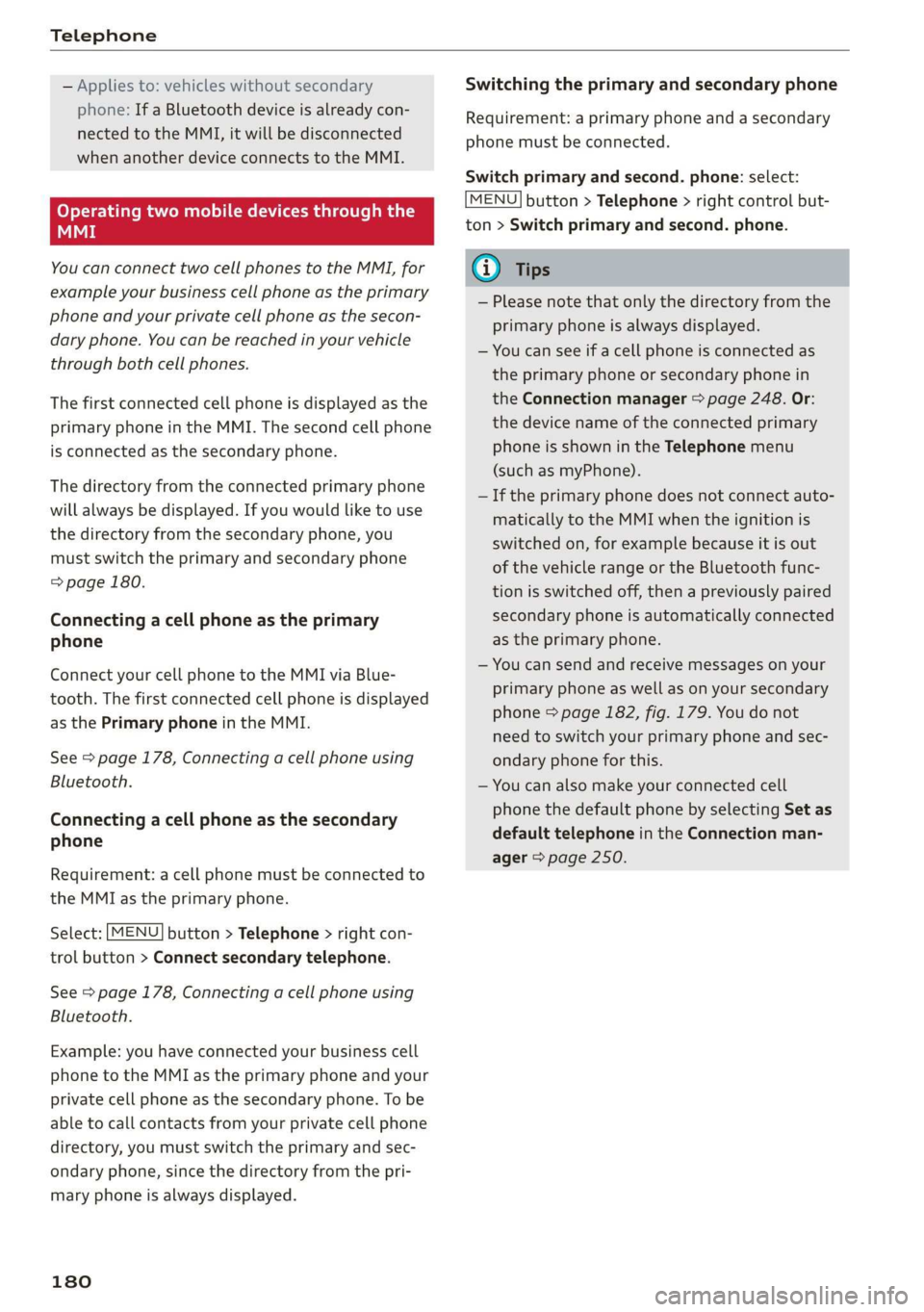
Operatingtwomobiledevicesthroughthe
MMI
YoucanconnecttwocellphonestotheMMI,for
exampleyourbusinesscellphoneastheprimary
phoneandyourprivatecellphoneasthesecon-
daryphone.You canbereachedinyourvehicle
throughbothcellphones.
Thefirstconnectedcellphoneisdisplayedasthe
primaryphoneintheMMI.Thesecondcellphone
isconnectedasthesecondaryphone.
Thedirectoryfromtheconnectedprimaryphone
willalwaysbedisplayed.Ifyouwouldliketouse
thedirectoryfromthesecondary phone, you
mustswitchtheprimaryandsecondaryphone
=>page180.
Connectingacellphoneastheprimary
phone
ConnectyourcellphonetotheMMIviaBlue-
tooth.
Thefirstconnectedcellphoneisdisplayed
asthePrimaryphoneintheMMI.
See>page178,Connectingacellphoneusing
Bluetooth.
Connectingacellphoneasthesecondary
phone
Requirement:acellphonemustbeconnectedto
theMMIastheprimaryphone.
Select:[MENU]button>Telephone>rightcon-
trolbutton>Connectsecondarytelephone.
See>page178,Connectingacellphoneusing
Bluetooth.
Example:youhaveconnectedyourbusinesscell
phonetotheMMIastheprimaryphoneandyour
privatecellphoneasthesecondaryphone.To be
abletocallcontactsfromyourprivatecellphone
directory,youmustswitchtheprimaryandsec-
ondaryphone,sincethedirectoryfromthepri-
maryphoneisalwaysdisplayed.
180
Switchingtheprimaryandsecondaryphone
Requirement:aprimaryphoneandasecondary
phonemustbe connected.
Switchprimaryandsecond.phone:select:
MENU]button>Telephone>rightcontrolbut-
ton>Switchprimaryandsecond.phone.
G)Tips
—Pleasenotethatonlythedirectoryfromthe
primaryphoneisalwaysdisplayed.
—Youcanseeifacellphoneisconnectedas
theprimaryphoneorsecondaryphonein
theConnectionmanager>page248.Or:
thedevicenameoftheconnectedprimary
phoneisshownintheTelephonemenu
(suchasmyPhone).
—Iftheprimaryphonedoesnotconnectauto-
matically totheMMIwhentheignitionis
switchedon, forexamplebecauseitisout
ofthevehiclerangeortheBluetoothfunc-
tionisswitchedoff,thenapreviously paired
secondaryphoneisautomaticallyconnected
astheprimaryphone.
—Youcansendandreceivemessagesonyour
primaryphoneaswellasonyoursecondary
phone>page182,fig. 179.You donot
needtoswitchyourprimaryphoneandsec-
ondaryphoneforthis.
—Youcanalsomakeyourconnectedcell
phonethedefaultphonebyselectingSetas
defaulttelephoneintheConnectionman-
ager>page250.
Page 184 of 394
Telephone
@)Note
ApplicabletoCanada
InCanada,operationofaZoneEnhancer,
suchasan AudiPhoneBox,issubjecttothe
followingrequirementsoftheInnovation,
ScienceandEconomicDevelopmentCanada
(ISED):
—ThisisaCONSUMERdevice.
—BEFOREUSE,youMUSTmeetallrequire-
mentssetoutinCPC-2-1-05.
—YouMUSToperatethisdevicewithapproved
antennas
andcablesasspecifiedbythe
manufacturer.AntennasMUSTNOTbein-
stalledwithin20cmofanyperson.
—YouMUSTceaseoperatingthisdeviceim-
mediatelyifrequestedbyISEDoralicensed
wirelessserviceprovider.
—WARNING:£911locationinformationmay
notbeprovidedormaybeinaccuratefor
callsservedbyusingthisdevice.
G)Tips
— TheAudiphoneboxisnotavailableinall
countries.Foradditionalinformation,con-
tactanauthorizedAudidealership.
—Placingthemobiledeviceinabagorprotec-
tivesleeveinsidetheAudiphoneboxcanin-
terferewiththeconnectiontotheexternal
antenna”*.
—Metallicobjectsinthe Audiphoneboxblock
thewirelesschargingofyourmobiledevice
andcallsmadeusingtheexteriorantenna”*.
— Thechargingtimeandtemperaturewillvary
dependingonthemobiledevicebeingused.
—Yourmobiledevicecanonlybechargedin
theAudiphoneboxwhentheignitionis
switchedon.
—Toreducetheriskofmalfunctions,make
surethemobiledeviceispositionedcorrect-
lyintheAudiphonebox.
— Themaximumchargingoutputis5watts.
—Strongtransmissionqualitycannotbeguar-
anteedifmorethanonemobiledeviceisin
thebox.*
—Onlyonemobiledeviceatatimecanbe
chargedwirelesslyintheAudiphonebox.
182
—AudirecommendsusingAudiGenuineAc-
cessories.Audihasverifiedtheirreliability,
safety,andsuitability.
—YoucanpurchaseaUSBadapterfromanau-
thorizedAudidealerorauthorizedAudi
ServiceFacility,oratspecialtystores.
Usingthetelephone
Openingthetelephone
Appliesto:vehicleswithtelephone
Calllist
@-=aia
RAH-8735|
BeFaeming
Tamessage(MyPhone)
Fig.179Example:telephonefunctionsinselectionmenu
omatl)
LRoteOa)
|ieeesecurenen)
(6eemail(MyPhone)
Fig.180Example:additionaltelephonefunctionsinselec-
tionmenu
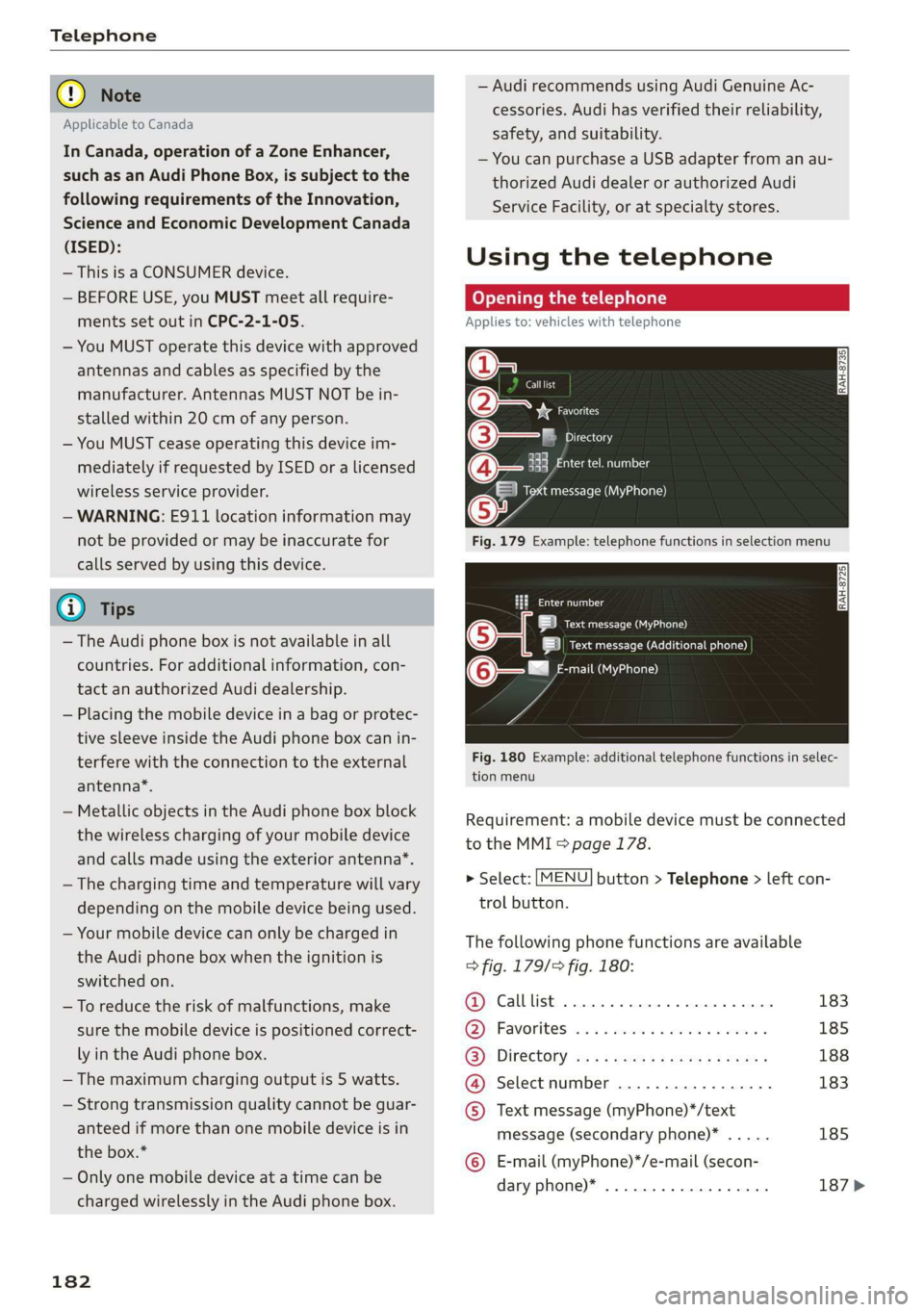
Requirement:amobiledevicemustbeconnected
totheMMI>page178.
>Select:[MENU]button>Telephone>leftcon-
trolbutton.
Thefollowingphonefunctionsareavailable
>fig.179/fig.180:
@Calllist00.0...ee183
@)Favoriteswes+sense«omen«xoem»185
GB):Directoryasssweesszrowsgoes188
@®Selectnumber............-..-.183
©Textmessage(myPhone)*/text
message(secondaryphone)*.....185
©E-mail(myPhone)*/e-mail(secon-
daryphone)*..................187>