lock AUDI Q7 2019 Owner´s Manual
[x] Cancel search | Manufacturer: AUDI, Model Year: 2019, Model line: Q7, Model: AUDI Q7 2019Pages: 394, PDF Size: 105.97 MB
Page 150 of 394
IntelligentTechnology
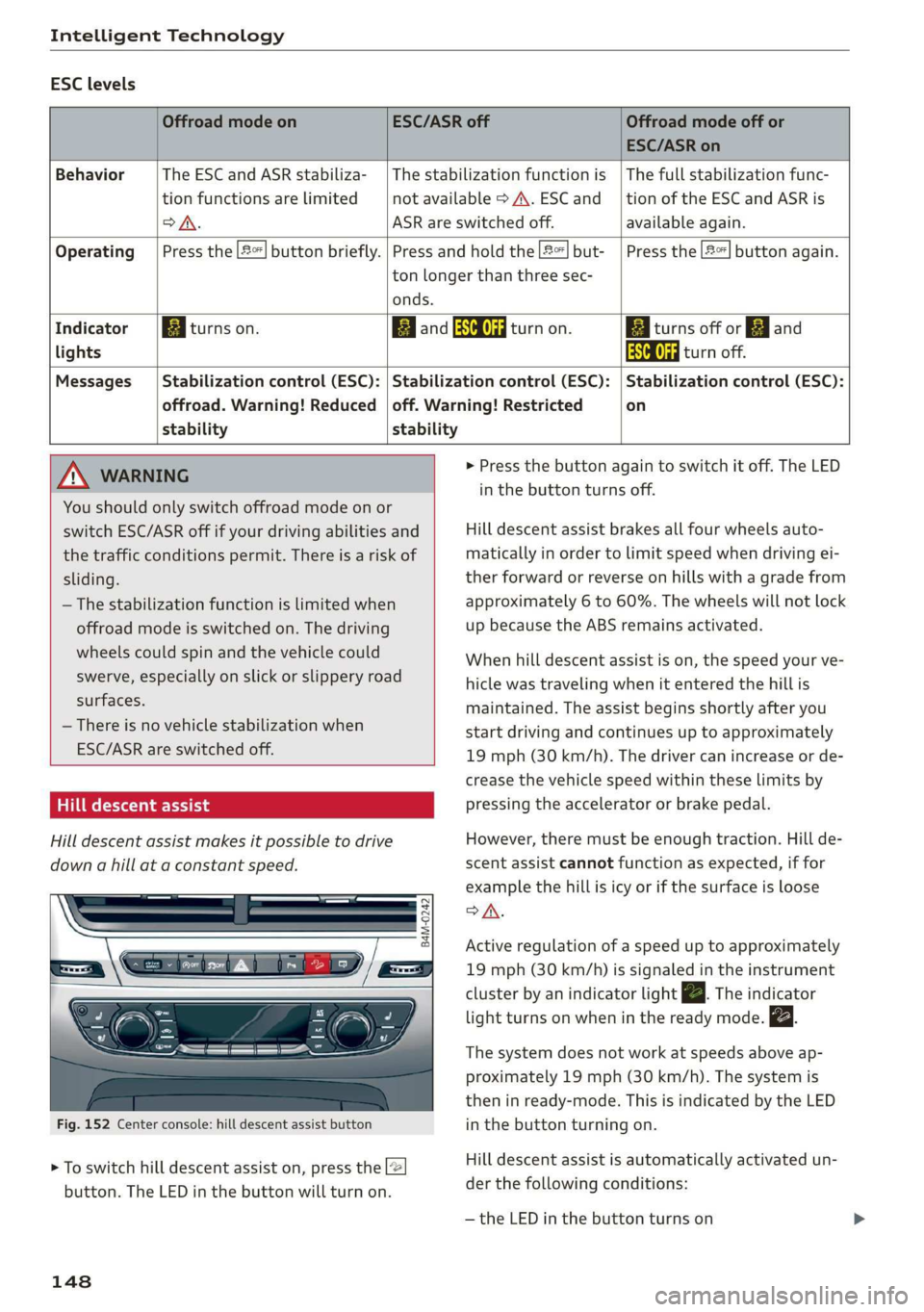
ESClevels
OffroadmodeonESC/ASRoffOffroadmodeoffor
ESC/ASRon
BehaviorThe ESC andASRstabiliza-|Thestabilizationfunctionis|Thefullstabilizationfunc-
tionfunctionsarelimitednotavailable>A\.ESCand__|tionoftheESCandASRis
oA.ASRareswitchedoff.available again.
Operating|Pressthe|#%]buttonbriefly.|Pressandholdthe2]but-|Pressthe|2%]buttonagain.
tonlongerthanthreesec-
onds.
IndicatorBiturnson.EganESCOFFRattanon.BiiturnsofforEjand
lightsAaaturnoff.
Messages__|Stabilizationcontrol(ESC):|Stabilizationcontrol(ESC):|Stabilizationcontrol(ESC):
offroad.Warning!Reduced|off.Warning!Restrictedon
stabilitystability
MNWARNING>Pressthebuttonagaintoswitchitoff.TheLED
You
shouldonlyswitchoffroadmodeonor
switchESC/ASRoffifyourdrivingabilitiesand
thetrafficconditionspermit.Thereisariskof
sliding.
—Thestabilizationfunctionislimitedwhen
offroadmodeisswitchedon.Thedriving
wheelscouldspinandthevehiclecould
swerve,especiallyonslickorslipperyroad
surfaces.
—Thereisnovehiclestabilizationwhen
ESC/ASRareswitchedoff.
Hilldescentassist
Hilldescentassistmakesitpossibletodrive
downahillataconstantspeed.
B4M-0242
Fig.152Centerconsole:hilldescentassistbutton
>Toswitchhilldescentassiston,pressthe2
button.TheLEDinthebuttonwillturnon.
148
inthebuttonturnsoff.
Hilldescentassistbrakesallfourwheelsauto-
maticallyinordertolimitspeedwhendrivingei-
therforwardorreverseonhillswithagradefrom
approximately6to60%.Thewheelswillnotlock
upbecausetheABSremainsactivated.
Whenhilldescentassistison,thespeedyourve-
hiclewastravelingwhenitenteredthehillis
maintained.Theassistbeginsshortlyafteryou
startdrivingandcontinuesuptoapproximately
19mph(30km/h).Thedrivercanincreaseorde-
creasethevehiclespeedwithintheselimitsby
pressingtheacceleratororbrakepedal.
However,theremustbeenoughtraction.Hillde-
scentassistcannotfunctionasexpected,iffor
examplethehillisicyorifthesurfaceisloose
SA.
Activeregulationofaspeeduptoapproximately
19mph(30km/h)issignaledintheinstrument
clusterby anindicatorlightZBTheindicator
lightturnsonwheninthereadymode.
Thesystemdoesnotworkatspeedsaboveap-
proximately19mph(30 km/h).Thesystemis
theninready-mode.ThisisindicatedbytheLED
inthebuttonturningon.
Hilldescentassistisautomaticallyactivatedun-
der thefollowingconditions:
—theLEDinthe buttonturnson
Page 172 of 394
Voicerecognitionsystem
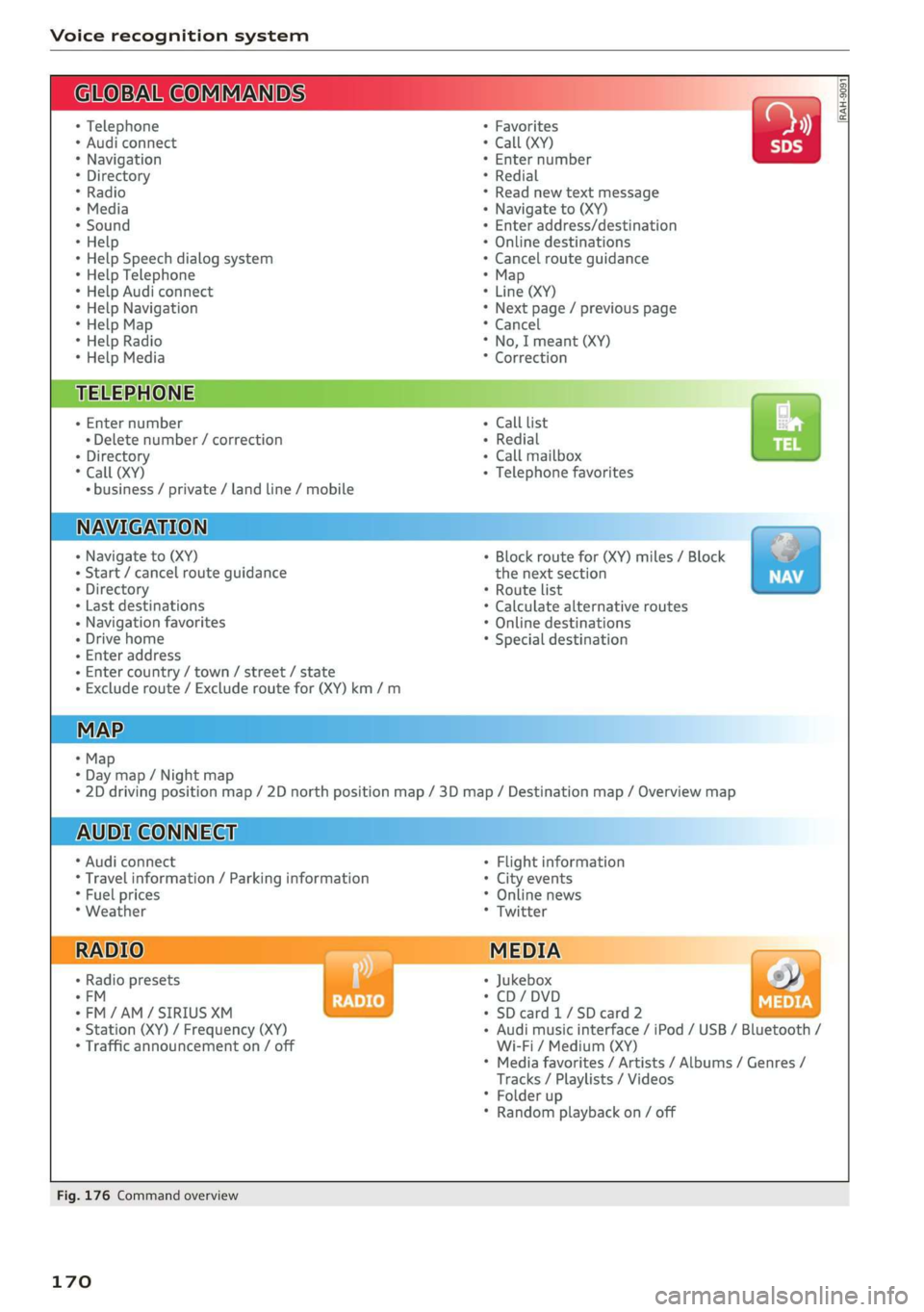
GLOEVALCOMMANDS
+Telephone
*Audiconnect
*Navigation
*Directory
*Radio
+Media
+Sound
*Help
*HelpSpeechdialogsystem
*HelpTelephone
*HelpAudiconnect
*HelpNavigation
*HelpMap
*HelpRadio
*HelpMedia
TELEPHONE
+Enternumber
+Deletenumber/correction
+Directory
*Call(XY)
«business/private/landline/mobile
NAVIGATION
+Navigateto(XY)
+Start/cancelrouteguidance
+Directory
+Lastdestinations
+Navigationfavorites
+Drivehome
+Enteraddress
+Entercountry/town/street/state
+Excluderoute/Excluderoutefor(XY)km/m
MAP.
+Map
*Daymap/Nightmap
AUDICONNECT
*Audiconnect
*Travelinformation/Parkinginformation
*Fuelprices
*Weather
+Radiopresets
-FM
*FM/AM/SIRIUSXM
+Station(XY)/Frequency(XY)
*Trafficannouncementon/off
+Favorites
*Call(XY)
*Enternumber
*Redial
*Readnewtextmessage
+Navigateto(XY)
+Enteraddress/destination
*Onlinedestinations
*Cancelrouteguidance
*Map
+Line(XY)
*Next page/previouspage
*Cancel
*No,Imeant(XY)
*Correction
Calllist
Redial
Callmailboxba
Telephonefavorites
+Block routefor(XY)miles/Block
thenextsection
*Routelist
*Calculatealternativeroutes
*Onlinedestinations
*Specialdestination
*2Ddrivingpositionmap/2Dnorthpositionmap/3Dmap/Destinationmap/Overviewmap
Flightinformation
*Cityevents
*Onlinenews
*Twitter
Jukebox6}
CD/DVDPay
SDcard1/SDcard2
Audimusicinterface/iPod/USB/Bluetooth/
Wi-Fi/Medium(XY)
Mediafavorites/Artists/Albums/Genres/
Tracks/Playlists/Videos
Folderup
Randomplaybackon/off
RAH-9091
Fig.176Commandoverview
170
Page 177 of 394
4M0012721BG
Voicerecognitionsystem
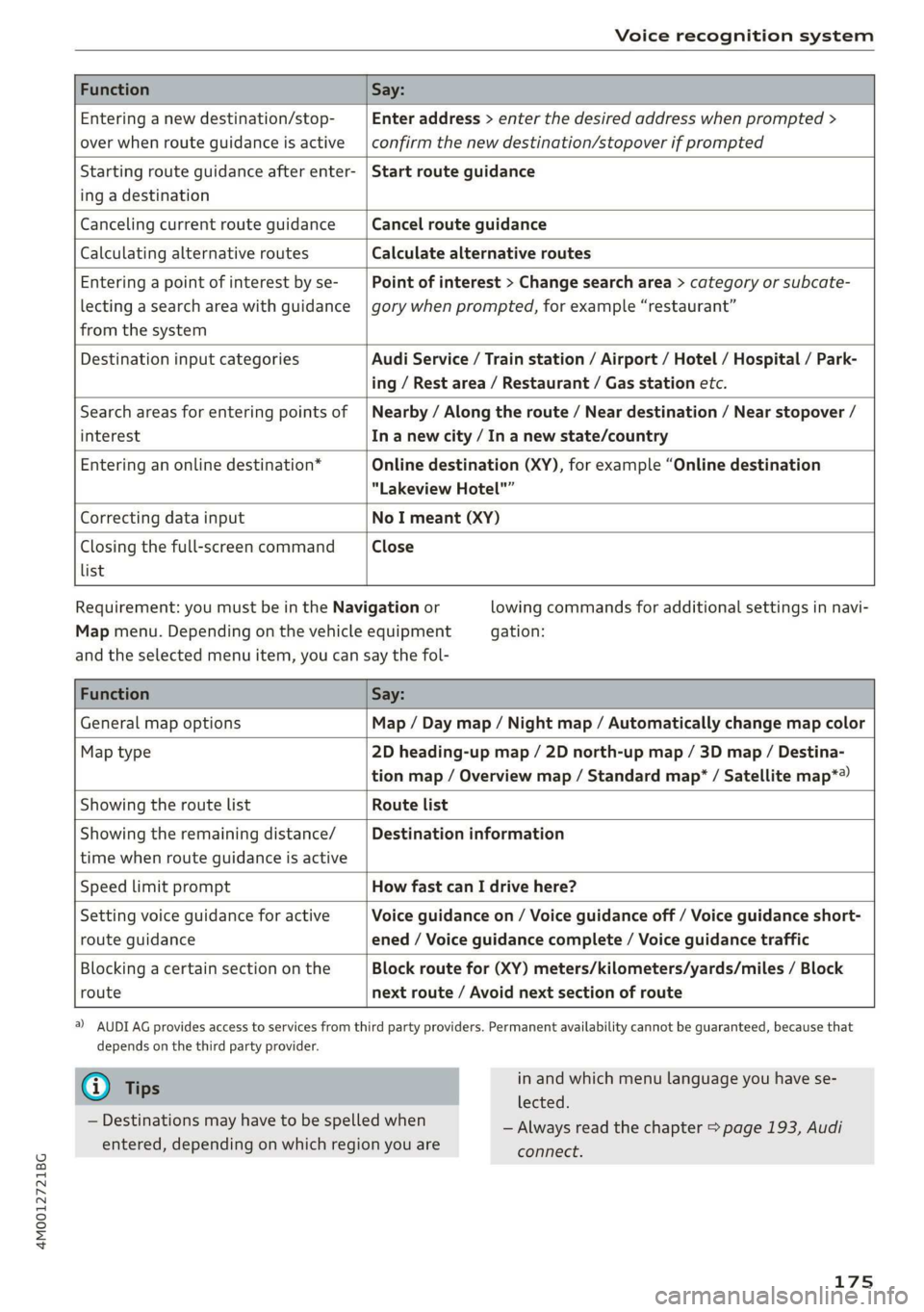
FunctionSay:
Enteringanewdestination/stop-
overwhenrouteguidanceisactive
Enteraddress>enterthedesiredaddresswhenprompted>
confirmthenewdestination/stopoverifprompted
Startingrouteguidanceafterenter-
ingadestination
Startrouteguidance
CancelingcurrentrouteguidanceCancelrouteguidance
CalculatingalternativeroutesCalculatealternativeroutes
Enteringapointofinterestbyse-
lectingasearchareawithguidance
fromthesystem
Pointofinterest>Changesearcharea>categoryorsubcate-
gorywhenprompted,forexample“restaurant”
DestinationinputcategoriesAudiService/Trainstation/Airport/Hotel/Hospital/Park-
ing/Restarea/Restaurant/Gasstationetc.
Searchareasforenteringpointsof
interest
Nearby/Alongtheroute/Neardestination/Nearstopover/
Inanewcity/In anewstate/country
Enteringanonlinedestination*Onlinedestination(XY),forexample“Onlinedestination
"LakeviewHotel"”
CorrectingdatainputNoImeant(XY)
Closingthefull-screencommand
list
Close
Requirement:youmustbeintheNavigationor
Mapmenu.Dependingonthevehicleequipment
lowingcommandsforadditionalsettingsinnavi-
gation:
andtheselectedmenuitem,youcansaythefol-
FunctionSay:
GeneralmapoptionsMap/Daymap/Nightmap/Automaticallychangemapcolor
Maptype2Dheading-upmap/2Dnorth-upmap/3Dmap/Destina-
tionmap/Overviewmap/Standardmap*/Satellitemap*®
Showingtheroute listRoutelist
Showingtheremainingdistance/
timewhenrouteguidanceisactive
Destinationinformation
SpeedlimitpromptHowfastcanIdrivehere?
Settingvoiceguidanceforactive
routeguidance
Voiceguidanceon/Voiceguidanceoff/Voiceguidanceshort-
ened/Voiceguidancecomplete/Voiceguidancetraffic
Blockingacertainsectiononthe
route
Blockroutefor(XY)meters/kilometers/yards/miles/Block
nextroute/Avoidnextsectionofroute
)AUDIAGprovidesaccesstoservicesfromthirdpartyproviders.Permanentavailabilitycannotbeguaranteed,becausethat
dependsonthethirdpartyprovider.
@Tips
—Destinationsmayhavetobespelledwhen
entered,dependingonwhichregionyouare
inandwhichmenulanguageyouhavese-
lected.
—Alwaysreadthechapter>page193,Audi
connect.
175
Page 184 of 394
Telephone
@)Note
ApplicabletoCanada
InCanada,operationofaZoneEnhancer,
suchasan AudiPhoneBox,issubjecttothe
followingrequirementsoftheInnovation,
ScienceandEconomicDevelopmentCanada
(ISED):
—ThisisaCONSUMERdevice.
—BEFOREUSE,youMUSTmeetallrequire-
mentssetoutinCPC-2-1-05.
—YouMUSToperatethisdevicewithapproved
antennas
andcablesasspecifiedbythe
manufacturer.AntennasMUSTNOTbein-
stalledwithin20cmofanyperson.
—YouMUSTceaseoperatingthisdeviceim-
mediatelyifrequestedbyISEDoralicensed
wirelessserviceprovider.
—WARNING:£911locationinformationmay
notbeprovidedormaybeinaccuratefor
callsservedbyusingthisdevice.
G)Tips
— TheAudiphoneboxisnotavailableinall
countries.Foradditionalinformation,con-
tactanauthorizedAudidealership.
—Placingthemobiledeviceinabagorprotec-
tivesleeveinsidetheAudiphoneboxcanin-
terferewiththeconnectiontotheexternal
antenna”*.
—Metallicobjectsinthe Audiphoneboxblock
thewirelesschargingofyourmobiledevice
andcallsmadeusingtheexteriorantenna”*.
— Thechargingtimeandtemperaturewillvary
dependingonthemobiledevicebeingused.
—Yourmobiledevicecanonlybechargedin
theAudiphoneboxwhentheignitionis
switchedon.
—Toreducetheriskofmalfunctions,make
surethemobiledeviceispositionedcorrect-
lyintheAudiphonebox.
— Themaximumchargingoutputis5watts.
—Strongtransmissionqualitycannotbeguar-
anteedifmorethanonemobiledeviceisin
thebox.*
—Onlyonemobiledeviceatatimecanbe
chargedwirelesslyintheAudiphonebox.
182
—AudirecommendsusingAudiGenuineAc-
cessories.Audihasverifiedtheirreliability,
safety,andsuitability.
—YoucanpurchaseaUSBadapterfromanau-
thorizedAudidealerorauthorizedAudi
ServiceFacility,oratspecialtystores.
Usingthetelephone
Openingthetelephone
Appliesto:vehicleswithtelephone
Calllist
@-=aia
RAH-8735|
BeFaeming
Tamessage(MyPhone)
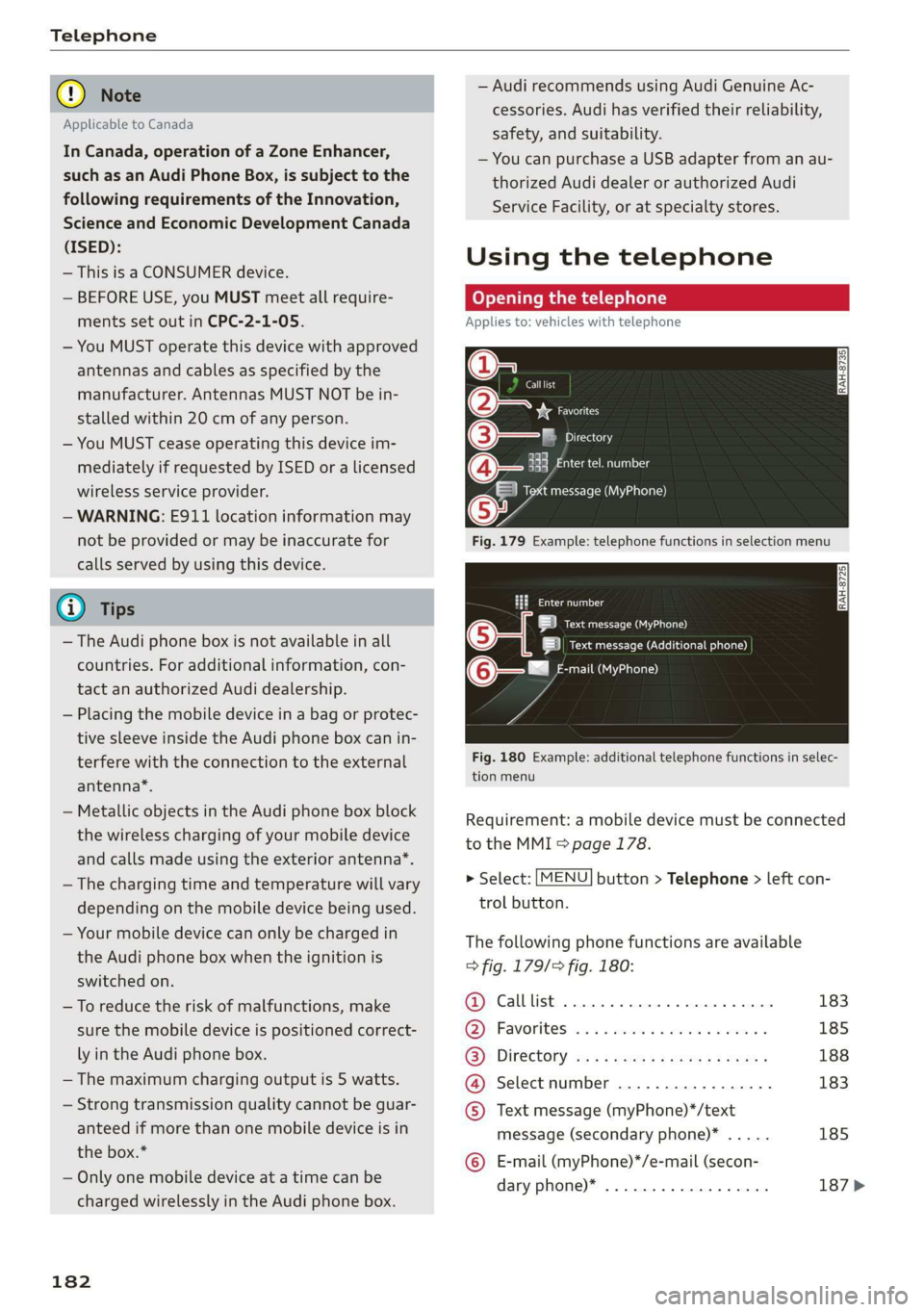
Fig.179Example:telephonefunctionsinselectionmenu
omatl)
LRoteOa)
|ieeesecurenen)
(6eemail(MyPhone)
Fig.180Example:additionaltelephonefunctionsinselec-
tionmenu
Requirement:amobiledevicemustbeconnected
totheMMI>page178.
>Select:[MENU]button>Telephone>leftcon-
trolbutton.
Thefollowingphonefunctionsareavailable
>fig.179/fig.180:
@Calllist00.0...ee183
@)Favoriteswes+sense«omen«xoem»185
GB):Directoryasssweesszrowsgoes188
@®Selectnumber............-..-.183
©Textmessage(myPhone)*/text
message(secondaryphone)*.....185
©E-mail(myPhone)*/e-mail(secon-
daryphone)*..................187>
Page 200 of 394
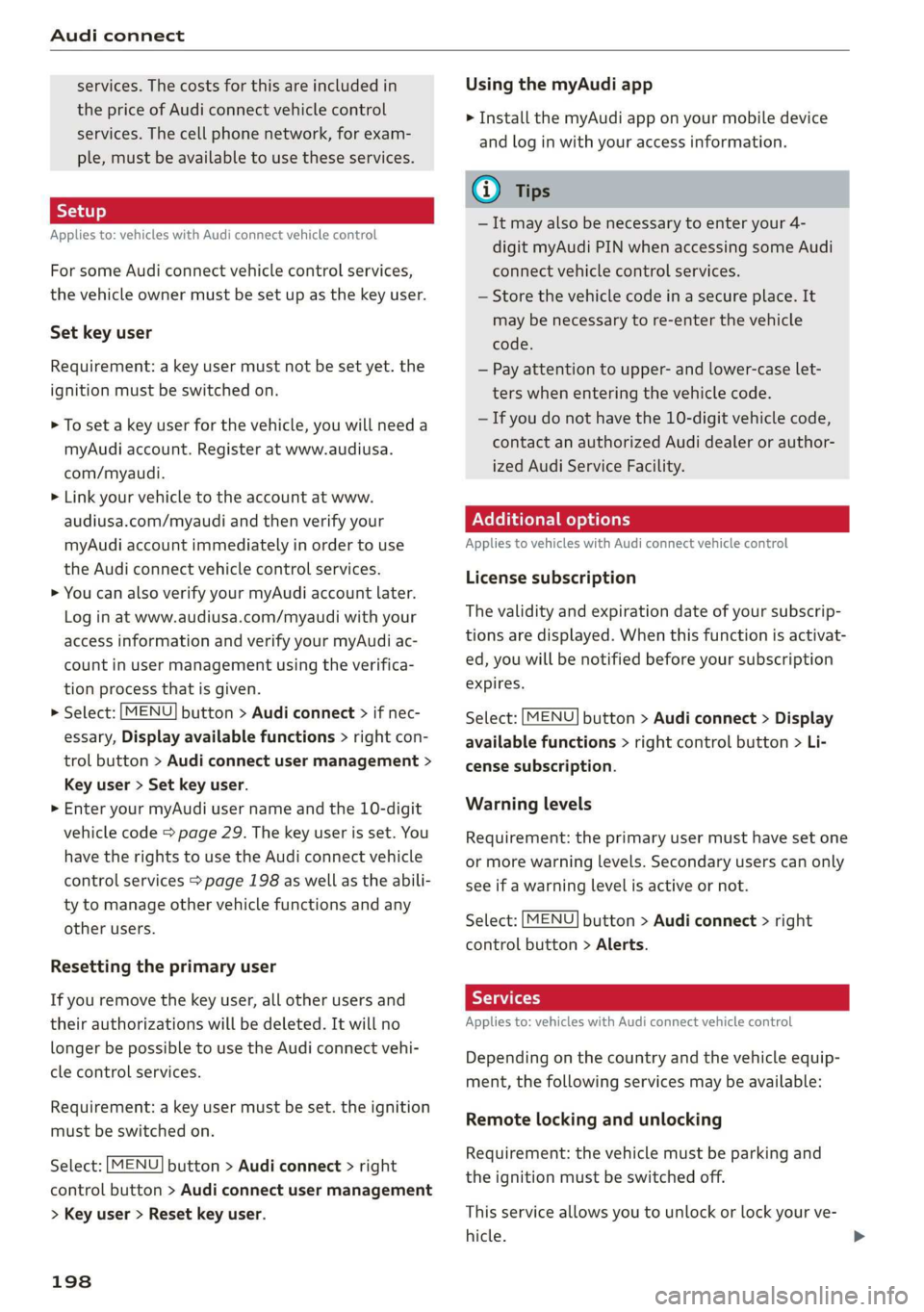
Audiconnect
services.Thecostsforthisareincludedin
thepriceofAudiconnectvehiclecontrol
services.Thecellphonenetwork,forexam-
ple,mustbeavailabletouse theseservices.
Appliesto:vehicleswithAudiconnectvehiclecontrol
ForsomeAudiconnectvehiclecontrolservices,
thevehicleownermustbesetupasthekeyuser.
Set keyuser
Requirement:akeyusermustnotbesetyet.the
ignitionmustbe switchedon.
>Tosetakeyuserforthevehicle,youwillneeda
myAudiaccount.Registeratwww.audiusa.
com/myaudi.
>Linkyourvehicletotheaccountatwww.
audiusa.com/myaudiandthenverifyyour
myAudiaccountimmediatelyinordertouse
the Audiconnectvehiclecontrolservices.
>YoucanalsoverifyyourmyAudiaccountlater.
Loginatwww.audiusa.com/myaudiwithyour
accessinformationandverifyyourmyAudiac-
countinusermanagementusingtheverifica-
tionprocessthatisgiven.
>Select:[MENU]button>Audiconnect>ifnec-
essary,Displayavailablefunctions>rightcon-
trolbutton>Audiconnectusermanagement>
Keyuser>Set keyuser.
>
EnteryourmyAudiuser nameandthe10-digit
vehiclecode=page29.Thekeyuserisset.You
havetherightstouse the Audiconnectvehicle
controlservices>page198aswellastheabili-
tytomanageothervehiclefunctionsandany
otherusers.
Resettingtheprimaryuser
Ifyouremovethekeyuser,allotherusersand
theirauthorizationswillbedeleted.Itwillno
longerbepossibletouse the Audiconnectvehi-
clecontrolservices.
Requirement:akeyusermustbeset.theignition
mustbe switchedon.
Select:[MENU]button>Audiconnect>right
controlbutton>Audiconnectusermanagement
>Keyuser>Resetkeyuser.
198
UsingthemyAudiapp
>InstallthemyAudiapponyourmobiledevice
andloginwithyouraccessinformation.
(i)Tips
—Itmayalsobenecessarytoenteryour4-
digitmyAudiPINwhenaccessingsomeAudi
connectvehiclecontrolservices.
—Storethevehiclecodeinasecureplace.It
maybenecessaryto re-enterthevehicle
code.
—Payattentiontoupper-andlower-caselet-
terswhenenteringthevehiclecode.
—Ifyoudonot havethe10-digitvehiclecode,
contactanauthorizedAudidealerorauthor-
izedAudiServiceFacility.
Additionaloptions
AppliestovehicleswithAudiconnectvehiclecontrol
Licensesubscription
Thevalidityandexpirationdateofyoursubscrip-
tionsaredisplayed.Whenthisfunctionisactivat-
ed,youwillbenotifiedbeforeyoursubscription
expires.
Select:[MENU]button>Audiconnect>Display
availablefunctions>rightcontrolbutton>Li-
censesubscription.
Warninglevels
Requirement:theprimaryusermusthavesetone
ormorewarninglevels.Secondaryuserscanonly
seeifawarninglevelisactiveornot.
Select:[MENU]button>Audiconnect>right
controlbutton>Alerts.
Appliesto:vehicleswith Audiconnectvehiclecontrol
Dependingonthecountryandthevehicleequip-
ment,thefollowingservicesmaybeavailable:
Remotelockingandunlocking
Requirement:thevehiclemustbeparkingand
theignitionmustbeswitchedoff.
Thisserviceallowsyoutounlockor lockyourve-
hicle.
Page 235 of 394
4M0012721BG
Media
@Tips
— Depending ontheInternetconnectionand
networktraffic,the connectionmaydiscon-
nectedwhenonlinemediasourcesareplay-
ing.
—OnlinemediaandInternetradiousagede-
pendsontheserviceavailabilityofthethird
partyprovider.
—AudiAGsimplymakestheaccesstoonline
mediaservicespossiblethroughtheMMI
anddoesnottakeanyresponsibilityforthe
contentsoftheonlinemediaservices.
—Alwaysreadthe chapter>page193,Audi
connect.
— Depending onthemobiledevicebeingused,
theremaybeinterruptionsduringmedia
playbackandwhenusingthemyAudiapp.
Topreventinterruptionswhenusingamo-
biledevice,donotlockthescreenonyour
mobiledeviceandkeepthemyAudiappin
theforeground.
—ContactanauthorizedAudidealeror au-
thorizedAudiServiceFacilityforadditional
informationaboutonlinemedia.
Multimediaconnections
OyeTmleeMulelarskelg
USBchargingport
Dependingonthevehicleequipment,youcan
connectyourmobiledevices(suchas asmart-
phoneorMP3player)totheAudimusicinterface
oraUSBchargingportusingaspecialUSB
adapter.
af
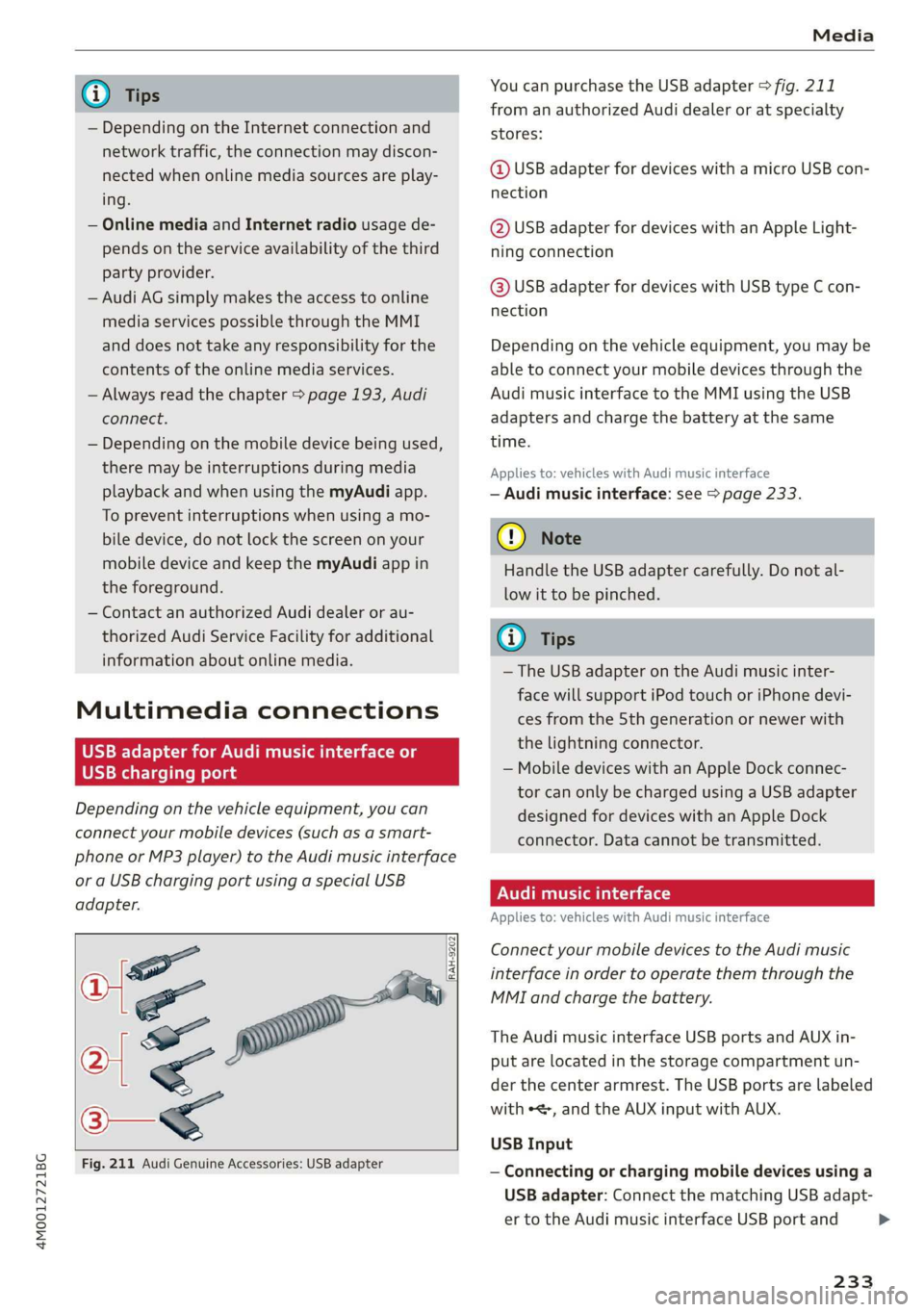
a|=
of
Fig.211AudiGenuineAccessories:USBadapter
[RAH-9202
\
YoucanpurchasetheUSBadapter>fig.211
fromanauthorizedAudidealeroratspecialty
stores:
@USBadapterfordeviceswithamicroUSBcon-
nection
@USBadapterfordeviceswithanAppleLight-
ningconnection
@USBadapterfordeviceswithUSBtypeCcon-
nection
Depending onthevehicleequipment,youmaybe
abletoconnectyourmobiledevicesthroughthe
Audi
musicinterfacetotheMMIusingtheUSB
adaptersandchargethebatteryatthesame
time.
Appliesto:vehicleswithAudimusicinterface
—Audimusicinterface:see>page233.
@)Note
HandletheUSBadaptercarefully.Donotal-
lowittobepinched.
(i)Tips
—TheUSBadapteronthe Audimusicinter-
facewillsupportiPodtouchoriPhonedevi-
cesfromthe5thgenerationornewerwith
thelightningconnector.
—MobiledeviceswithanAppleDockconnec-
torcanonlybechargedusingaUSBadapter
designedfordeviceswithanAppleDock
connector.Datacannotbetransmitted.
PNUreemlala)
Appliesto:vehicleswith Audimusicinterface
ConnectyourmobiledevicestotheAudimusic
interfaceinordertooperatethemthroughthe
MMIandchargethebattery.
TheAudimusicinterfaceUSBportsandAUXin-
putarelocatedinthestoragecompartmentun-
der thecenter armrest.TheUSBportsarelabeled
withe,andtheAUXinputwithAUX.
USBInput
—Connectingorchargingmobiledevicesusinga
USBadapter:ConnectthematchingUSBadapt-
ertotheAudimusicinterfaceUSBportand
233
>
Page 242 of 394
Media
Enterthepasswordforparentalcontrol.Pass-
wordsetatthefactory:1234.Youhavethefol-
lowingoptions:
—Protectionlevel:selectandconfirmtheprotec-
tionlevel(forexample,Level5).Eightdifferent
protectionlevelscan beset forparentalcon-
trol.Ifyousettheparentalcontrollevelat Lev-
el5,allDVDsfromlevels1-5canbeplayed.
VideoDVDswithahigherlevelwillnotplay.Se-
lectUnrestrictedtoremovealloftherestric-
tions.
—Changepassword:editthecurrentpassword.
Switchtofullscreen
Thevideoimageisdisplayed.Turnthecontrol
knobtodisplaytheplaylist.Or:pressthe[BACK
button.
Replayvideo!)
Whenthisfunctionisswitchedon @,thecurrent
videowillreplay.
Show DVDmenu
TheDVDmainmenuopensintheInfotainment
systemdisplay.
—Selectingamenuitem:selectandconfirma
menuitem.Or:moveyourfingerontheMMI
touchcontrolpad*andpressthecontrolknob.
Audiotrack2)
Youcanmanuallysettheaudiotrack(language
andaudioformat).Thelanguageandaudiofor-
matoptionsdependonthevideoDVD.
Subtitles)
Youcanmanuallyselectsubtitlesforplayback.
ThelanguagesavailabledependontheDVD.
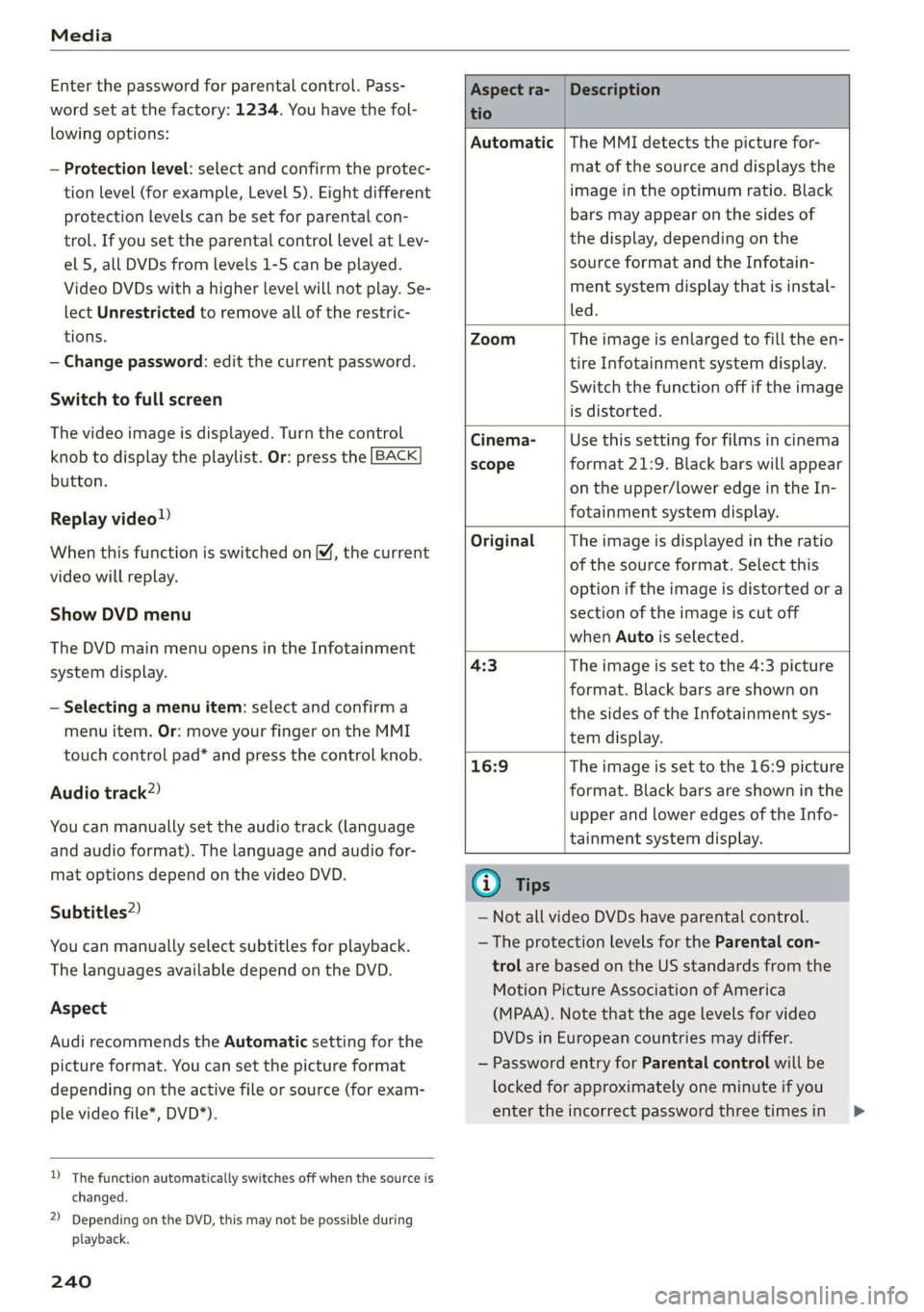
Aspect
AudirecommendstheAutomaticsettingforthe
pictureformat.Youcansetthepictureformat
dependingontheactivefileorsource(forexam-
plevideofile*,DVD*).
)Thefunctionautomaticallyswitchesoffwhenthesourceis
changed.
2)DependingontheDVD,thismaynotbepossibleduring
playback.
240
Aspectra-
tio
Description
Automatic|TheMMIdetectsthepicturefor-
matofthe sourceanddisplaysthe
imageintheoptimumratio.Black
barsmayappearonthesidesof
thedisplay,dependingonthe
sourceformatandtheInfotain-
mentsystemdisplaythatisinstal-
led.
ZoomTheimageisenlargedtofilltheen-
tireInfotainmentsystemdisplay.
Switchthefunctionoffiftheimage
isdistorted.
Cinema-
scope
Usethissettingforfilmsincinema
format21:9. Blackbarswillappear
ontheupper/loweredgeintheIn-
fotainmentsystemdisplay.
OriginalTheimageisdisplayedintheratio
ofthesourceformat.Selectthis
optioniftheimageisdistorted ora
sectionoftheimageiscutoff
whenAutoisselected.
4:3Theimageissettothe 4:3picture
format.Blackbarsareshownon
thesidesoftheInfotainmentsys-
temdisplay.
16:9 Theimageissettothe16:9picture
format.Blackbarsareshowninthe
upperandloweredgesoftheInfo-
tainmentsystemdisplay.
(i)Tips
— NotallvideoDVDshaveparentalcontrol.
— TheprotectionlevelsfortheParental con-
trolarebasedontheUSstandardsfromthe
MotionPictureAssociationofAmerica
(MPAA).Notethattheagelevelsforvideo
DVDsinEuropeancountriesmaydiffer.
—PasswordentryforParentalcontrolwillbe
lockedforapproximatelyoneminuteifyou
entertheincorrectpasswordthreetimesin
Page 249 of 394
![AUDI Q7 2019 Owner´s Manual 4M0012721BG
Systemsettings
Systemsettings
Settingthedateand
time
Youcanset theclocktimemanuallyorusingthe
GPS*,
>Select:[MENU]button>Settings>leftcontrol
button>MMIsettings>Date&time.
>Or:select](/img/6/40283/w960_40283-248.png "AUDI Q7 2019 Owner´s Manual 4M0012721BG
Systemsettings
Systemsettings
Settingthedateand
time
Youcanset theclocktimemanuallyorusingthe
GPS*,
>Select:[MENU]button>Settings>leftcontrol
button>MMIsettings>Date&time.
>Or:select")
4M0012721BG
Systemsettings
Systemsettings
Settingthedateand
time
Youcanset theclocktimemanuallyorusingthe
GPS*,
>Select:[MENU]button>Settings>leftcontrol
button>MMIsettings>Date&time.
>Or:select:[MENU]button>Vehicle>leftcon-
trolbutton>Vehiclesettings>Date&time.
Automaticsetting
Whenthisfunctionisswitchedon¥,thetime
anddateareautomaticallyset.
Time
Requirement:theAutomaticsettingmustbe
switchedoff.
Pressthecontrolknob.YoucansettheTime
manuallybyturningandpressingthecontrol
knob.
Date
Requirement:theAutomaticsettingmustbe
switchedoff.
Pressthecontrolknob.YoucansettheDate
manuallybyturningandpressingthecontrol
knob.
Timezone
Whenselectingtheappropriatetimezone,a
samplingofcountriesinthiszonewillbelisted.
Automatictimezone*
Whenthisfunctionisswitchedon@,thetime
willautomaticallyadjusttothecorresponding
timezone.
Automaticdaylightsavingtime*
WhenthisfunctionisswitchedonM,thetime
willautomaticallyswitchtodaylightsavingtime.
D_TheQistandardmakesitpossibletocharge yourmobile
devicewirelessly.
Timeformat
Ifyouselect24h,theclockwilldisplay,forexam-
ple,13:00.IfyouselectAM/PM,theclockwill
display,forexample,1:00PM.
Dateformat
IfyouselectDD.MM.YYYY,thedatedisplaywill
show,forexample,31.08.2018.Ifyouselect
MM/DD/YYVY,thedatedisplaywillshow,forex-
ample,08/31/2018.IfyouselectYYYY-MM-DD,
thedatedisplaywillshow,forexample,
2018-08-31.
MMIsettings
>Select:[MENU]button>Settings>leftcontrol
button>MMIsettings.
Language
Youcanchangethedisplaylanguageaswellas
thelanguageforthevoiceguidance*andvoice
recognitionsystem”*.
Thenumberoflanguagesavailabledependson
themarket.
Measurementunits
Thefollowingmeasurementunitscan besetde-
pendingonavailability:Speed,Distance,Tem-
perature,Fuelconsumption,Volume,Pressure.
Mobiledeviceremindersignal
Appliesto:vehicleswithAudiphonebox
Requirement:yourcellphonemustbeQi-capa-
ble)orconnectedtotheAudimusicinterface@
withaUSBadaptercable>page181,fig.178.
Whenthedeviceremindersignalisswitchedon,
youwillbenotifiedthatyourmobiledeviceisstill
intheAudiphonebox*whenyouleavethevehi-
cle.YoucanselectbetweenSpokencue,Signal
toneandOff.
Mobiledeviceremindersignalvolume:youcan
adjusttheremindersignalvolumebyturningthe
controlknob.
247
Page 257 of 394
4M0012721BG
Drivingsafety
>ALWAYSadjustyourspeedtoroad,trafficand
weatherconditions.
>Take frequentbreaksonlongtrips.Donotdrive
formorethantwohoursatastretch.
>DoNOTdrivewhenyouaretired,underpres-
sureorwhenyouarestressed.
Z\WARNING
Impaireddrivingsafetyincreasestheriskof
seriouspersonalinjuryanddeathwhenevera
vehicleisbeingused.
Correctpassenger
seatingpositions
Properseatingpositionforthedriver
Theproperdriverseatingpositionisimportant
forsafe,relaxeddriving.
B4G-0374
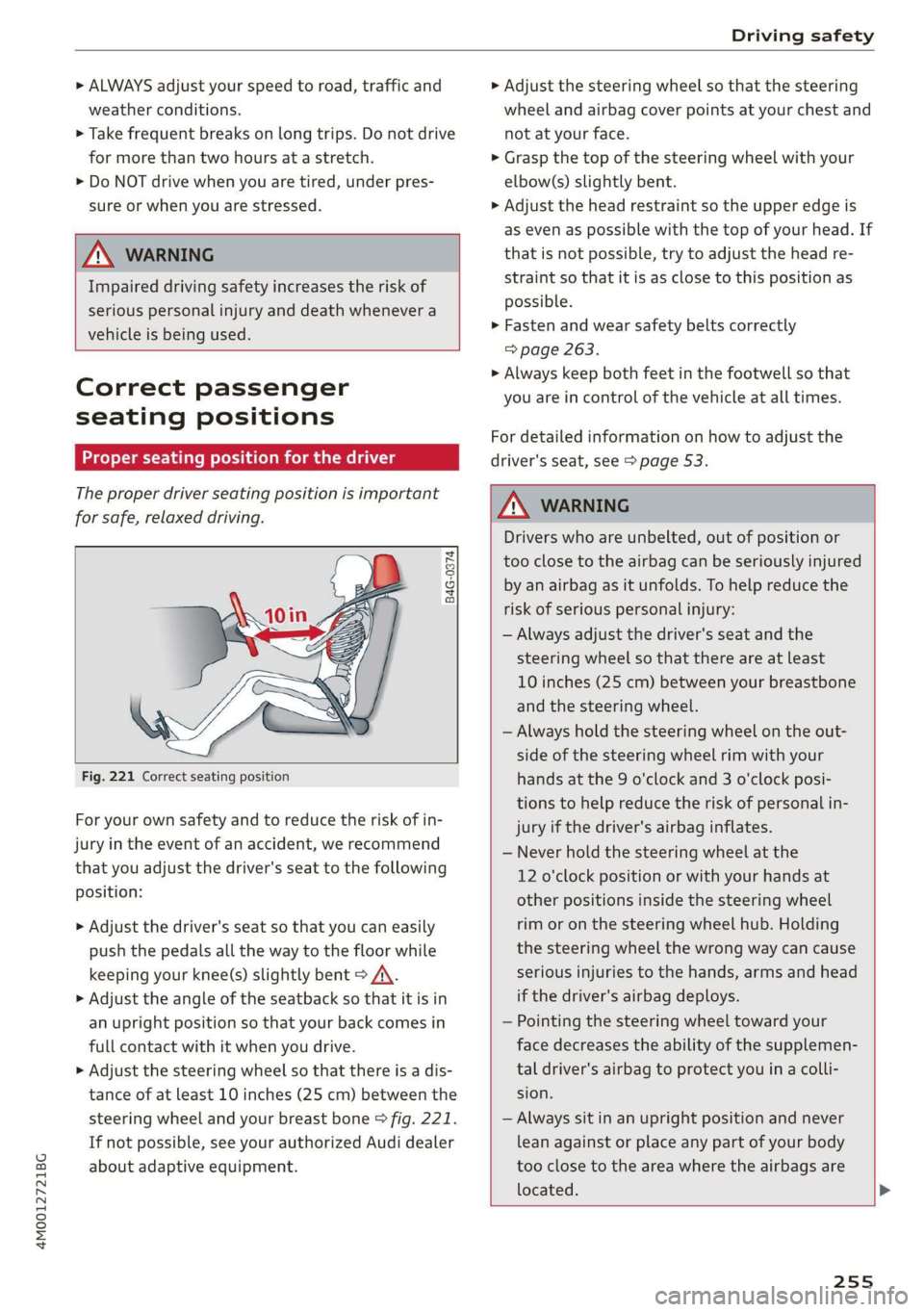
Fig.221Correctseatingposition
Foryourownsafetyandtoreducetheriskofin-
juryinthe eventofanaccident,werecommend
thatyouadjustthedriver'sseattothefollowing
position:
>Adjustthedriver'sseatso thatyoucaneasily
pushthepedalsallthewaytothefloorwhile
keepingyourknee(s)slightlybent>A\.
>Adjusttheangleoftheseatbacksothatitisin
anuprightpositionsothatyourbackcomesin
fullcontactwithitwhenyoudrive.
>Adjustthesteeringwheelsothatthereisadis-
tanceofatleast10inches(25cm)betweenthe
steeringwheelandyourbreastbone>fig.221.
Ifnotpossible,seeyourauthorizedAudidealer
aboutadaptiveequipment.
>Adjust thesteeringwheelso thatthesteering
wheelandairbagcoverpointsatyourchestand
notatyourface.
>Graspthetopofthesteeringwheelwithyour
elbow(s)slightlybent.
>Adjusttheheadrestraintsotheupperedgeis
asevenas possiblewiththetopofyourhead.If
thatisnotpossible,trytoadjusttheheadre-
straintso thatitisasclosetothispositionas
possible.
>Fastenandwearsafetybeltscorrectly
=>page263.
>Alwayskeepbothfeetinthefootwell so that
youareincontrolofthevehicleatalltimes.
For detailedinformationonhowtoadjustthe
driver'sseat,see>page53.
ZAWARNING
Driverswhoareunbelted,outofpositionor
tooclosetotheairbagcanbeseriouslyinjured
by anairbagasitunfolds.Tohelpreduce the
riskofseriouspersonalinjury:
—Alwaysadjustthedriver'sseatandthe
steeringwheelsothatthereareatleast
10inches(25cm)betweenyourbreastbone
andthesteeringwheel.
—Alwaysholdthesteeringwheelontheout-
sideofthesteeringwheelrimwithyour
handsatthe9o'clockand3o'clockposi-
tionstohelpreducetheriskofpersonalin-
juryifthedriver'sairbaginflates.
—Neverholdthesteeringwheelatthe
12o'clockpositionorwithyourhandsat
otherpositionsinsidethesteeringwheel
rimoronthesteeringwheelhub.Holding
the
steeringwheelthewrongwaycancause
seriousinjuriestothehands,armsandhead
ifthedriver'sairbagdeploys.
—Pointingthesteeringwheeltowardyour
facedecreasestheabilityofthesupplemen-
taldriver'sairbagtoprotectyouinacolli-
sion.
—Alwayssitinanuprightpositionandnever
leanagainstor placeanypart ofyourbody
tooclosetotheareawheretheairbagsare
located.
255
Page 266 of 394
Safetybelts
>Makesuretheseatbackoftherearseatbenchis
inanuprightpositionandsecurelylatchedin
placebeforeusingthebelt>/\.
>Pullthesafetybeltevenlyacrossthechestand
pelvis©fig.229,>A\.
> Insertthetongueintothecorrectbuckle of
yourseatuntilyouhearitlatchsecurely.
>Pullonthebelttomakesurethatitissecurely
latchedinthebuckle.
Automaticsafetybeltretractors
Everysafetybeltisequippedwithanautomatic
beltretractorontheshoulderbelt.Thisfeature
locksthebeltwhenthebeltispulledoutfast,
duringhardbrakingandinanaccident.Thebelt
mayalsolockwhenyoudriveupordownasteep
hillorthroughasharpcurve.Duringnormaldriv-
ingthebeltletsyoumovefreely.
Safetybeltpretensioners
Safetybeltswithpretensionershelptotighten
thesafetybeltandremoveslackwhenthepre-
tensionersareactivated>page266.Thefunc-
tionofthepretensionerismonitoredbyawarn-
inglight>page22.
Convertiblelockingretractor
Everysafetybeltexcept theoneonthedriver
seatisequippedwithaconvertiblelockingretrac-
torthatmustbeusedwhenthesafetybeltis
usedtoattacha childsafetyseat.Besuretoread
theimportantinformationaboutthisfeature
=>page301.
ZAWARNING
Improperlypositionedsafetybeltscancause
seriousinjuryinanaccident>page264,
Safetybeltposition.
—Safetybeltsofferoptimumprotectiononly
whentheseatbackisuprightandbeltsare
properlypositionedonthebody.
—Alwaysmakesurethattherearseatbackrest
towhichthecenterrearsafetybeltisat-
tachedissecurelylatchedwhenevertherear
centersafetybeltisbeingused.Iftheback-
restisnotsecurelylatched,thepassenger
willmoveforwardwiththebackrestduring
264
suddenbraking,inasuddenmaneuverand
especiallyinacrash.
—Neverattachthesafetybelt tothe buckle
foranotherseat.Attachingthebelttothe
wrongbucklewillreducesafetybelteffec-
tivenessandcancauseseriouspersonalin-
jury.
—Apassengerwhoisnotproperlyrestrained
canbeseriouslyinjuredbythesafetybeltit-
selfwhenitmovesfromthestrongerparts
ofthebodyintocriticalareasliketheabdo-
men.
—Alwayslocktheconvertiblelockingretractor
whenyouaresecuringachildsafetyseatin
thevehicle>page303.
Safetybeltposition
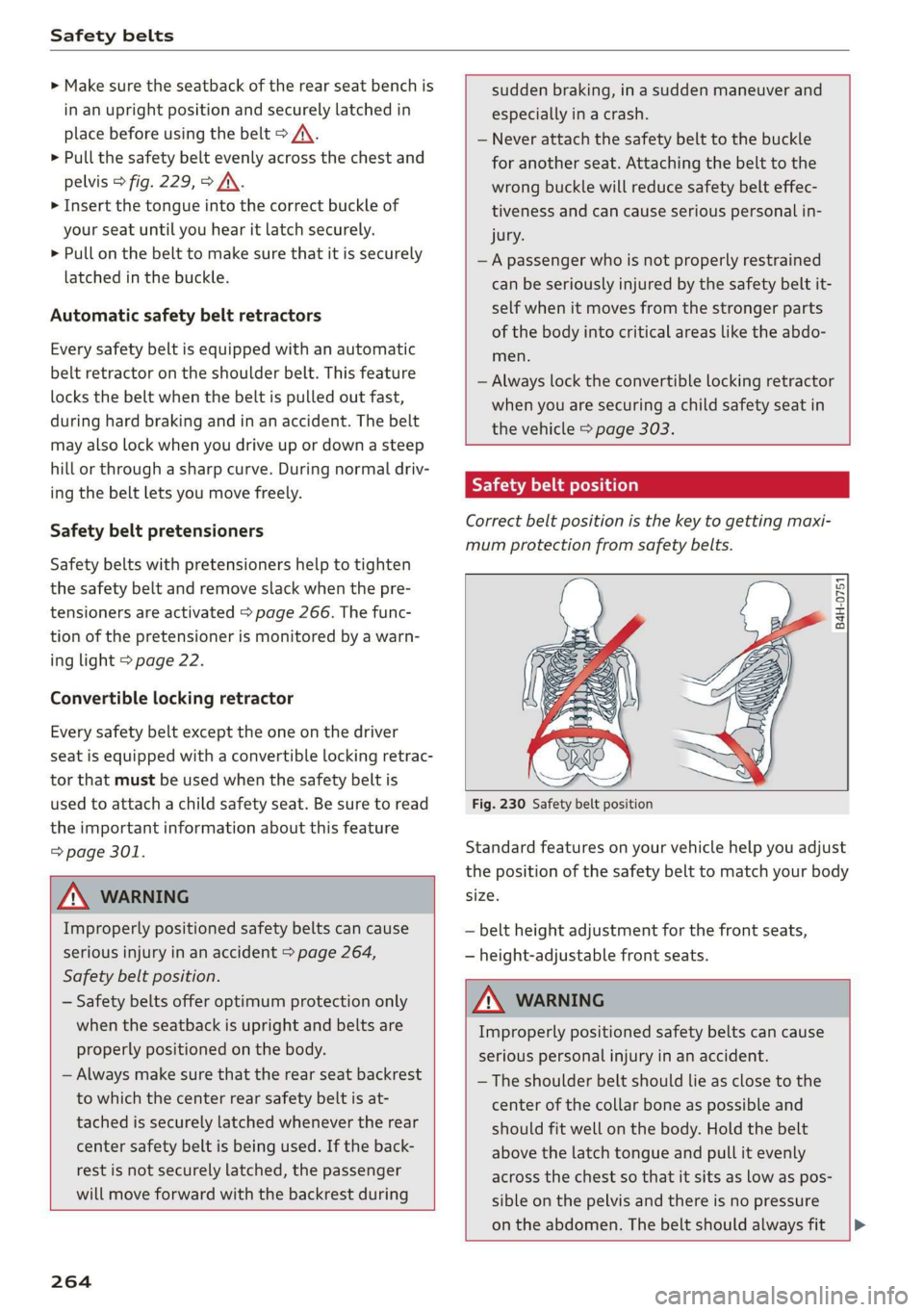
Correctbeltpositionisthekeytogettingmaxi-
mumprotectionfromsafetybelts.
B4H-0751
Fig.230Safetybeltposition
Standardfeaturesonyourvehiclehelpyouadjust
thepositionofthesafetybelttomatchyourbody
size.
—beltheightadjustmentforthefrontseats,
—height-adjustablefrontseats.
ZAWARNING
Improperlypositionedsafetybeltscancause
seriouspersonalinjuryinanaccident.
— Theshoulderbeltshouldlieasclosetothe
center ofthecollarboneaspossibleand
shouldfitwellonthebody.Holdthebelt
abovethelatchtongueandpullitevenly
acrossthechestsothatitsitsaslowaspos-
sibleonthepelvisandthereisnopressure
ontheabdomen.Thebeltshouldalwaysfit[>