wheel AUDI Q7 2020 Owner´s Manual
[x] Cancel search | Manufacturer: AUDI, Model Year: 2020, Model line: Q7, Model: AUDI Q7 2020Pages: 316, PDF Size: 113.87 MB
Page 279 of 316

4M1012721BA
Emergency assistance
> Find the marking on the sill that is closest to
the tire that will be changed > fig. 183. Behind
the marking, there is a lifting point on the side
sill for the vehicle jack.
>» Using the hex socket wrench (3) from the vehi-
cle tool kit, turn the vehicle jack under the lift-
ing point on the side sill until it is high enough
that the arm @) 9 fig. 184 is under the desig-
nated plastic mount.
> Align the vehicle jack so the arm @ engages in
the designated Lifting point in the door sill and
the base (2) lies flat on the ground. The base @)
must be directly under the mounting point ().
> To lift the vehicle, position the ratchet @ from
the vehicle tool kit with the correct side on the
hex socket wrench @).
> Move the ratchet (@) clockwise back and forth
until the wheel lifts up slightly from the
ground.
Z\ WARNING
—To reduce the risk of injury, make sure no
one is in the vehicle before raising it.
— Make sure the vehicle jack is stable. The risk
of injury is increased when the ground is
slippery or soft, because the vehicle jack
could slide or sink.
— Only raise your vehicle with the vehicle jack
provided by the factory. If you use a vehicle
jack designed for another vehicle, your vehi-
cle could slip and cause injury.
— Position the vehicle jack only at the desig-
nated mounting points on the side sill and
align the jack. Otherwise, the vehicle jack
could slip and cause an injury if it does not
have sufficient hold on the vehicle.
—To reduce the risk of injury, do not raise any
other vehicles or other loads using the vehi-
cle jack provided by the factory.
— Applies to: vehicles with air suspension:
Changes in temperature or load can affect
the height of the stopped vehicle.
D Applies to: vehicles with ceramic brake rotors*: Use a sec-
ond alignment pin* from the vehicle tool kit for the lowest
hole according to the steps described for the first align-
ment pin.
—To reduce the risk of an accident, never start
the engine when the vehicle is raised.
—To reduce the risk of injury, no work should
be performed under the vehicle while it is
raised.
C) Note
Do not lift the vehicle by the sill. Position the
vehicle jack only at the designated mounting
points on the side sill. Otherwise, your vehicle
could be damaged.
Removing and installing a wheel
~
B8K-1479
Fig. 186 Wheel: alignment pin in the top hole
Removing a wheel
» Remove the top wheel bolt completely using
the hex socket in the screwdriver handle from
the vehicle tool kit > fig. 185 and place it ona
clean surface.
> Then install the alignment pin from the vehicle
tool kit by hand in the empty wheel bolt hole
> fig. 186).
277
Page 280 of 316

Emergency assistance
> Remove the rest of the wheel bolts.
> Remove the wheel >(). The alignment pin re-
mains in the hole while doing this.
Installing a wheel
Read the directions on > page 278 when instal-
ling unidirectional tires.
> Slide the wheel on over the alignment pin >@.
> Install the wheel bolts and tighten them gently
using the hex socket.
> Remove the alignment pin and tighten the re-
maining wheel bolt.
> Carefully lower the vehicle using the vehicle
jack*.
> Tighten the wheel bolts in a diagonal pattern
using the wheel wrench.
The wheel bolts must be clean and loosen and
tighten easily. Check the contact surfaces for the
wheel and hub. Contaminants on these surfaces
must be removed before installing the wheel.
ZA\ WARNING
— Read and follow the important information
and notes under > page 253.
— Never use the hex socket in the screwdriver
handle to tighten the wheel bolts. Using the
hex socket will not achieve the required
tightening torque, which increases the risk
of an accident.
©) Note
When removing or installing the wheel, the
rim
could hit the brake rotor and damage the
rotor. Work carefully and have a second per-
son help you.
Unidirectional tires
A unidirectional tire profile is identified by arrows
on the tire sidewall that point in the running di-
rection. You must always maintain the specified
running direction. This is necessary to ensure the
tire's optimal performance in regard to adhesion,
running noise, and friction, and to reduce the risk
of
hydroplaning.
To benefit fully from the advantages of the uni-
directional tire design, you should replace faulty
278
tires as soon as possible and restore the correct
running direction on all of the tires.
> Reinstall the caps on the wheel bolts if necessa-
ry.
> Store the vehicle tool kit in its designated
place.
> Store the replaced tire securely in the luggage
compartment > page 82.
» Check the tire pressure on the installed wheel
as soon as possible.
> Correct the tire pressure and store it in the MMI
=> page 265.
> The wheel bolt tightening specification must be
120 ft lbs (160 Nm). Have it checked as soon as
possible with a torque wrench. Drive carefully
until then.
> Have the faulty wheel replaced as quickly as
possible.
Jump starting
You should only perform the steps that follow if
you have the necessary tools and technical ex-
pertise.
If the engine does not start because the vehicle
battery is drained, you can jump start your vehi-
cle using another vehicle. Jump start cables are
needed to do this.
Both vehicle batteries must have 12 V nominal
voltage. The voltage capacity (Ah) of the vehicle
battery that is giving power must not be less
than the capacity of the drained vehicle battery.
Jump start cable
Only use a jump start cable with a large enough
diameter. Note the manufacturer's specifica-
tions.
Only use a jump start cable with insulated termi-
nal clamps.
Positive cable - usually red.
Negative cable - usually black.
Page 283 of 316

4M1012721BA
Emergency assistance
(50 km), then transport the vehicle on a
special carrier.
— If the vehicle is towed by a tow truck at the
axle that is not permitted, this can cause se-
vere damage to the transmission.
— The vehicle must not be tow started for
technical reasons.
G) Tips
— If the power supply is interrupted, then it
will not be possible to move the selector
lever out of the "P" position. The parking
lock must be released using the emergency
release before towing the vehicle
=> page 98.
— Switch Audi pre sense* off > page 149 when
loading the vehicle onto a vehicle carrier,
train, ship, or other type of transportation,
or when towing the vehicle. This can prevent
an undesired intervention from the pre
sense* system.
— Follow the local legal regulations for tow-
ing.
Read and follow the important information under
=> page 280.
Preparations
> Only secure the towing cable or tow bar at the
designated towing loops > page 281,
=> page 282.
> Make sure the towing cable is not twisted. Oth-
erwise it could disconnect from the towing loop
while towing.
> Switch the emergency flashers on in both
vehicles > page 49. However, do not do this if it
prohibited by law.
Towing vehicle (front)
> Only start to drive when the towing cable is
taut.
> Press the brake pedal very carefully.
> Avoid sudden braking or driving maneuvers.
Vehicle being towed (rear)
> Make sure the ignition is switched on so that
the steering wheel is not locked and so that you
can use the turn signals, the horn, and the
windshield wipers if needed > A\.
> Switching it off before the vehicle has stopped
may
impair the function of the brake booster
and power steering. You would then need to
use more force to steer and brake the vehicle.
> Release the parking brake > page 104.
> Select the “N” selector lever position.
> Make sure the towing cable is always taut.
ZA\ WARNING
Never tow a vehicle using a tow bar or towing
cable if the vehicle does not have electrical
power.
Front towing loop
Fig. 190 Front bumper: installing the towing loop (version
2)
The threaded opening for the towing loop is lo-
cated on the right side of the front bumper.
> Remove the towing loop from the vehicle tool
kit > page 273.
281
>
Page 284 of 316

Emergency assistance
> Press the cap inward with brief, strong pressure
> fig. 189 or > fig. 190. The cap will loosen
from the bumper.
> Tighten the towing loop in the threaded open-
ing until it stops and then tighten it with a
wheel wrench.
> After using, place the towing loop back in the
vehicle tool kit.
Z\ WARNING
If the towing loop is not tightened until it
stops when installing, the threads may be
pulled out when towing the vehicle and result
Vehicles with a trailer hitch*
>» Attach the tow bar or the towing cable to the
trailer hitch.
Vehicles with a factory-installed trailer hitch* are
not equipped with towing loop threads at the
rear.
ZX WARNING
If the towing loop is not tightened until it
stops when installing, the threads may be
pulled out when towing the vehicle and result
in an accident.
in an accident.
@) Tips
Depending on the model, the shape of the
cover can vary.
Rear towing loop
Fig. 191 Rear bumper: installing the towing loop
Vehicles with a towing loop
On vehicles without a factory-installed trailer
hitch*, the towing loop threads are located on
the right rear side of the bumper.
> Remove the towing loop from the vehicle tool
kit > page 273.
> Press the cap inward with brief, strong pressure
> fig. 191. The cap will loosen from the bump-
er.
> Tighten the towing loop in the threaded open-
ing until it stops and then tighten it with a
wheel wrench.
>» After using, place the towing loop back in the
vehicle tool kit.
282
C) Note
To reduce the risk of damaging the trailer
hitch*, only use suitable tow bars that are
compatible with it. If a tow bar is not availa-
ble, you can use a towing cable.
G) Tips
Depending on the model, the shape of the
cover can vary.
Page 288 of 316
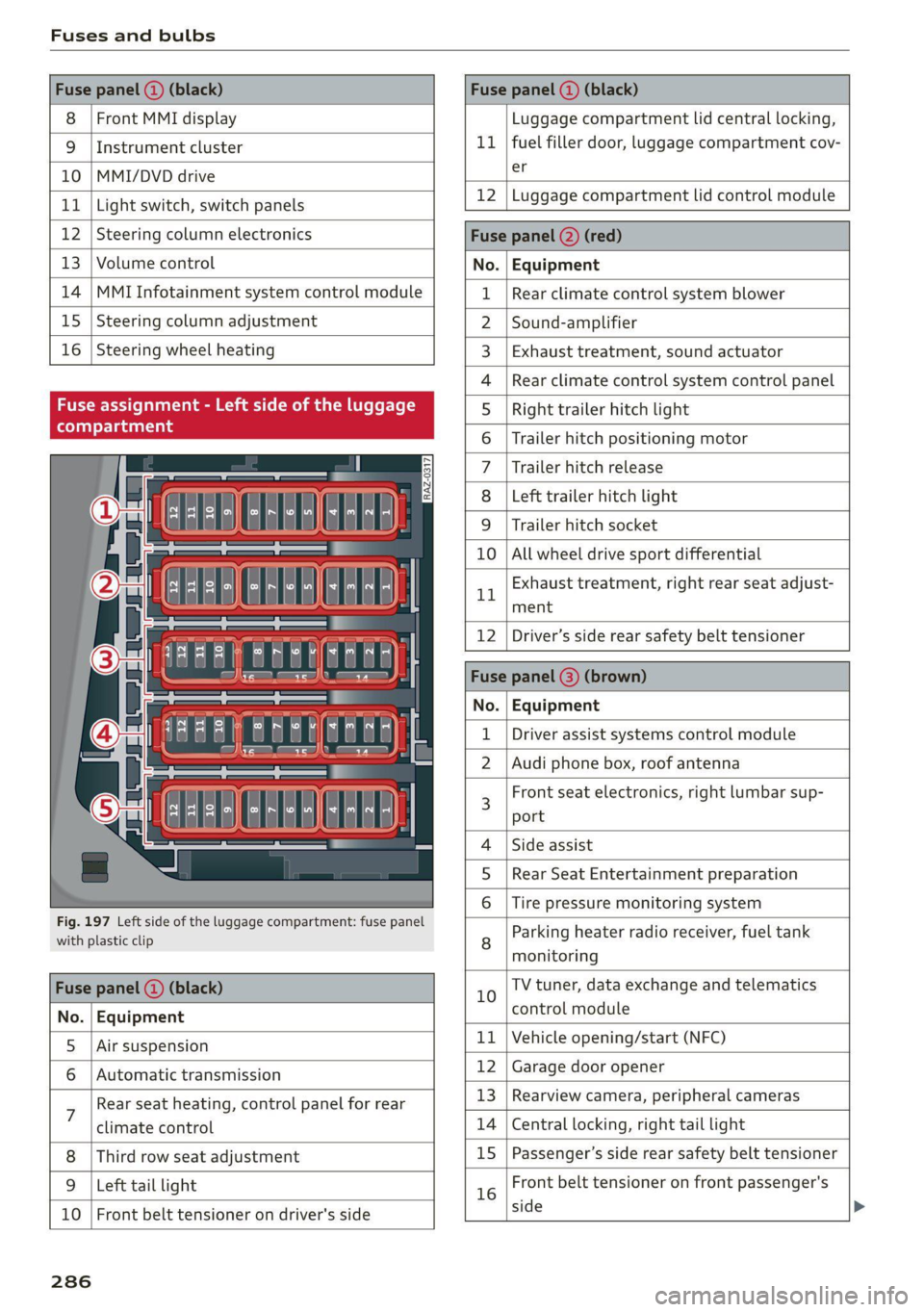
Fuses and bulbs
Fuse panel () (black) Fuse panel (2) (black)
8 | Front MMI display Luggage compartment lid central locking,
9 | Instrument cluster 11 | fuel filler door, luggage compartment cov-
10 |MMI/DVD drive er
11 | Light switch, switch panels 12 |Luggage compartment lid control module
12 | Steering column electronics Fuse panel (2) (red)
13 | Volume control No. Equipment
14 | MMI Infotainment system control module 1 | Rear climate control system blower
15 | Steering column adjustment 2 |Sound-amplifier
16 | Steering wheel heating 3 | Exhaust treatment, sound actuator
4 |Rear climate control system control panel
Fuse assignment - Left side of the luggage 5 | Right trailer hitch light
6 |Trailer hitch positioning motor
7 |Trailer hitch release
8 | Left trailer hitch light
9 | Trailer hitch socket
ele
a
i] a rE ia) °
U i)
TCE |
Fig. 197 Left side of the luggage compartment: fuse panel
with plastic clip
BR oO All wheel drive sport differential
Bh BR
Exhaust treatment, right rear seat adjust-
ment
Fuse panel (@) (black)
No. | Equipment
5 |Air suspension
6 |Automatic transmission
7 Rear seat heating, control panel for rear
climate control
Third row seat adjustment
9 | Left tail light
10 | Front belt tensioner on driver's side
12 | Driver’s side rear safety belt tensioner
Fuse | (3) (
No. | Equipment
Driver assist systems control module
2 |Audi phone box, roof antenna
3 Front seat electronics, right lumbar sup-
port
4 |Side assist
5 | Rear Seat Entertainment preparation
Tire pressure monitoring system
8 Parking heater radio receiver, fuel tank
monitoring
10 TV tuner, data exchange and telematics
control module
11 | Vehicle opening/start (NFC)
12 | Garage door opener
13 | Rearview camera, peripheral cameras
14 | Central locking, right tail light
15
|Passenger’s side rear safety belt tensioner
16 Front belt tensioner on front passenger's
side
286
Page 301 of 316
4M1012721BA
A
A/C cooling mode............. ee eee eee ee 90
Accelerator pedal.............--00000005 98
also refer to Accelerator pedal........... 98
ACCeSSOFICS . 6... eee 294
Active lane assist
refer to Lane departure warning......... 144
refer to Lane guidance................ 144
Adaptive cruise assist..............-000. 134
Cleaning the sensors...........00 ee eee 268
Predictive control.................... 133
Adaptive dampers...........--0000-00- 109
Adaptive speed assist
refer to Adaptive cruise assist........... 134
Adjusting the air distribution............. 90
Adjusting the brightness................. 51
Adjusting the rear seats.................. 62
Adjusting the sound..............-.0005 225
Adjusting the temperature............... 90
Adjusting the vents .......... 00 cece sees 92
Adjusting the volume..............00-005 27
Adjusting the volume (announcements).... 225
Adjusting the welcome sound............ 225
Airbag system... 2... 2. eee eee 70
Air suspension..............00.00-0008 109
Alarm system
refer to Anti-theft alarm system.......... 33
Alignment pin (changing the wheel)....... 273
All-weather lights...............-.00000. 45
All-wheel steering.............--000005 110
ALSeaSOMtineSien. is 5: suse 6 samme «0 imevsnee ow we 261
All wheel drive
refer to quattro... . 2... cece eee eee 111
Amazon Alexa integration
Media playback............. eee veee 213
QPeration » wee 2 + ane = + case o vere & 8 eae 26
AMI
refer to Audi music interface........... 213
Android Auto
refer to Audi smartphone interface...... 223
Anti-freeze
Windshield washer system............. 244
Anti-lock braking system.............0-- 112
Anti-Slip Regulation.................0.. 112
Anti-theft alarm system ...........-..00-- 33
Anti-theft wheel bolts...............0..5 276
Apple CarPlay
refer to Audi smartphone interface...... 223
Aspect ratio (video) ..............0. 217,219
ASR
refer to Anti-Slip Regulation............ 112
Audi adaptive light...............-.00005 45
Audi connect
refer to connect..........0e cece eee 178
Audi connect Remote & Control
refer to Vehicle control services......... 180
Audi drive select....................005 108
Audi entertainment mobile.............. 214
Audi entertainment mobile device
REMOVING < : wage x 2 een g 5 ees 5s eee gs: 215
SQCULING’s « « onan 2 2 wes 2 ere = een a @ aHe 215
Audi music interface..............00005 213
AUdiO TINGS ese: = & eaups 3 & eaogs & & Hees 3 t RES 2 215
AUdi phone BOX: wows yz wenn ¢ 2 wees © cree F 167
Audi presense...........0-.. cee eee eee 146
MeSSAQES cui 5 ¢ ais + ¥ caer ¥ o pew 8 e eee 149
Audi pre sense front......... 0c eee eens 147
Audi side assist
refer to Side assist. «noi... 2 seen ee eee ee 150
Audi smartphone interface.............. 223
Legalinfonmation:s. « svscon 0 seon oo ae © 2 227
Audi virtual cockpit
refer to Instrument cluster.............. 11
AUTO
Automatic headlights.................. 4S
Climate control system..............0-5 90
Auto Lock (central locking) ..............- 30
Automatic climate control system
refer to Climate control system.......... 89
Automatic luggage compartment lid.... 38,39
Automatic transmission...............005 96
Parking lock emergency release.......... 98
Automatic wipe/wash system............. 53
Average CONSUMPTION ws ccioes s neem os weer 14
Average speed i «i sins seer ws ee nates oo eee 14
B
Bag hOOks:. = sews =z wens 2 ¢ sees ex oes be ee 82
299
Page 305 of 316
4M1012721BA
Favorites
Bluetooth ........ cece eee eee eee 227.
NavViGatiGnis « = snes 5 2 anes 2 ¥ aes & 2 Ree 189
RadiObes. cs scwas x awsome. w cecteee we v cmermes om ow 204
Telephone .......... 0. cece e eee eee 170
Federal Communications Commission (FCC) . 295
File formats (media drives).............. 221
Fixture@S@ tics: os maw s x wees ov mewn ov ie @ 2 86
FOG (WINDOWS) ie x 2 seine x 2 sweets 2 a mene vw es 91
Folding the backrest down/up............. 63
Folding the rearseats............--..00. 85
Footwell temperature...............-00. 92
For the sake of the environment
Disposing of engine oil................ 238
FUCLING's & crcisis +o sesinsne sw arava © 8 aeite © # ose 230
Leaks... 2... eee eee 234
Fragrance....... 0.0.00. cece eee eee 91,92
Free text search
Media... ... eee eee eee eee 219
RaGiGves « s wens « x ome go cee 2 seem 2 ae 204
also refer to Intelligent search.......... 187
Freeze protection
Coolant... . 6.6... ce eee eee ee eee eee 239
Front:centerartmrest . vices eo nice ae nese oo 61
Front collision warning
refer to Audi pre sense front............ 146
Front passenger’s seat adjustment
PRON ts = zesn: ¢ 2 wees § 5 savee 5 5 eee Ey eR Fe 61
ROAR innsncs « & sxosuns & o snveaus xv onamen & 0 eet 8 ae 61
Front wiper blades
Changing.......... eee eee eee eee 54
Cleaning .......... 2... eee cece eee eee 54
Fuel... ec eee ee eee eee 229
AGGITIVES « cree: 2 2 geen ss gown se ees 230
Current consumption..............00005 14
Fueldisplay........... 0... cee eee eee 11
Fuel tank capacity.............-...00-. 297
GaSOlING « sissies & snewase 6 arenies oo wanes 8 w is 229
Reducing fuel consumption............ 100
Fueling
Fuel filler door. .... 0.0.0... cece eee ee 230
Fuel filler door emergency release....... 232
Fueltankc capacity’. « sia oo ncunin «a enema © 297
G
Garage door opener.............--02 eee 42
GarmentihOoks esiscas «x cocoa vo aso v a menine vos 82
Gasolimerecan « & wsivie a a eiswine a 8 sree ¥ 6 orien os 229
Additives..................000000008 230
Gasoline MIXtUIE coc sie ee ei eaaa ee gee 229
GAWR
refer to Gross Axle Weight Rating (GAWR) . 298
GOarSs « = sewn ¢ seems so eS se Fees ee Ree ee 96
Glossary of tire and loading terminology... 249
Glove compartment...............00000e 82
Gross Axle Weight Rating (GAWR)........ 298
Gross Vehicle Weight Rating (GVWR)...... 298
GVWR
refer to Gross Vehicle Weight
Rating (GVWR) « sews 2 2 seme = 2 sees & 2 ees 298
H
Hatidstrée’s < aces « sac « » nau & = ewe oD oe 166
Hafids | Free Profiles: « ¢ aaciu «4 aim a seem ea 166
Head-up display
AGjUSUING scx = = cows 5 © gems so ees ee ee ge 24
Adjusting the brightness................ 51
Operating................2.00.000 000. 24
Headlight range control................0- 4S
Headlights
Cleaning.......... 0. cece eee ee eee eee 268
Headlight range control................ 45
Washer system. .............00 0-0 a ee 53
Head restraints
AdjUStINg 2... eee eee eee eee 65
Removing and installing................ 65
Heated rear window.................005- 91
Heated steering wheel.................0. 92
Heating. ..... 0.0... cece eect eee 89
HFP
refer to Hands Free Profile............. 165
High beams
High beamassistant’s seus « ¢ seme « x nouns ¢ 8 46
Highway lights « wes s seme : sues : seam es AS
Hill descent assist..................00. 107
Hill descent control.................005 106
Hill hold assist... 2.0.0.0... 02. eee eee 96
Home
refer to Home address...........-.04. 195
Home address...............00 00 ee eee 195
HomeLink
refer to Garage door opener............. 42
Page 306 of 316

Index
HOMeSCROO Ms so swcvies ww secu weer BREE ao 17
FIOGN sa savas 5 2 ess oo mena ow ma BOOK we AL 6
Hotspot
refer to Wi-Fi......... 0.0.2.0 ee eee eee 182
I
Ignition
Switching on and off...............0--- 94
Imbalance (wheels) ..............0-2005 255
Immobilizer
refer to Electronic immobilizer........... 34
Inclinometer.... 2... cee eee eee ee 106
Indicator lights........ 20.0... eee eee eee 7
Inspection interval..............000200. 245
Instrument:cluster’. «5 cscs es cece ve ese ew 11,
Adjusting the layout................... 12
Cleaning’: ¢ « em. ¢ » awe s 2 ees ss PER ee Be 269
Engineicodes: ss mss 3 + seve ow ema ¥ 8 suis 228
Failure... ee eee 11
On-board computer ...........00.0000 0 14
Operating’: & was « 6 essen 2 o mawe 2 oem ov es 12
Personal profile.................000005 11
Service interval display................ 245
Software information...............0. 228
SWITCHING TADS. « » wvecsos » 0 sess 6 6 aconese 0 4 nae 12
Switching the view...............-00 ee 12
Vehicle Tunctions « ssies «2 sais x & sais © nae 14
Version information...............0-. 228
Instrument illumination................- 51
Integrated assistance...............0005 18
Integrated Toll Module..............005 128
Intelligent search
NaVigatiOMiees « s asaus va mawes ¥ sues a een 187
Interior lighting « «sisi sc ieee s eee as ween a 50
Interior MONItOrinG’s + eae « « vee 2 + ewes oe 33
Intermittent mode (windshield wipers) ..... 53
International travels : 2 wees x s wean x ¢ eres g 183
Internet
refer to connect. < o caeu semen ee newe ae we 178
Internet radio
refer to Online radio...............4.. 206
Intersection assistantsens «x scene so saws 2 os 153
TOniZer's = ¢ sews + 2 seus 2c aes bo caw ek ee 91
iPhone
refer to Audi music interface........... 213
304
J
Jump starting......................00. 278
K
Key. ee eee eee eee 30, 34
Convenience opening and closing......... Al
Key replacement...
. 00... cscs e eee e ene 34
Mechanical key............0 0000 eee eee 34
NOt recognized « « sss ¢ s seus ss sane vo eee 95
PANIG Ke Yi «x csvwcse o 2 ascnes © 0 cunviews w a amincine we 34
Replacing the battery.................. 36
Unlocking and locking............-...0- 35
Vehicle code « sins s x saws & 2 saws ys wae 2 es 34
K@Y USER wis & © eeu so eee gs Hews oo Fees oe oe 29
KiCkK-COWii: < 2 seme x x gem o 2 wee fe gee 2s 2 98
L
Lane assist
refer to Lane departure warning......... 144
refer to Lane guidance................ 144
Lane departure warning................. 144
Cleaning the camera area.............. 268
Lane guidance...........-....--00 eee 138
Laser lighting............... 0. eee ee eee 47
EASOR:SCANNEP ions 6 & sawivie 6 a scam + sree © wreseon 119
Cleaning.......... 0. cece ee eee eee 269
LATCH (securing child safety seats)......... 77
Leather care and cleaning............... 270
Legal information
License subscriptions.............000. 227
Software information.......0.. 0000005 227
Software licemsesies: «senses i wane « v eawane 227
Version information...............4-. 227
License plate bracket..............0000. 294
Lifting points (vehicle jack).............. 276
Light/rain sensor
Headlights ....... 0... cece eee eee eee 45
Intermittent mode (windshield wipers).... 53
Lighting
EXt@rOM's + wen « s eewe a x oye ae ewe © ooo 45
TMECHIOR se cswsnis 2 x csemeien © eietane we caer we Hen = 50
LIQHtSis 2 coccens v + esses ve eseune we nn © w ee © 45
Listening to music
refer to Media.............0e eee 210,215
LOA « sires 1 < vnemem « 0 sietene © = weemws =u sea 2 2 298
Page 307 of 316
4M1012721BA
Locking and unlocking
By remote control. ...... 0... eee ee 35
Using the lock cylinder...............0. 33
With the convenience key............... 35
Low beam headlights .................... 45
Lowering the rear of the vehicle........... 84
Luggage compartment..............0.4. 82
Cage lOO cscs: «2 wes « 2 ewes 6 6 sae ov ee 87
COVED... eee eee eee eee eee 84
Increasing the'size:. «= sea : swam ss mem ss 85
also refer to Luggage compartment...... 82
Luggage compartment lid
Closing button. ................0000005 38
General information...............200. 36
Mechanically unlocking...............-. 39
Opening and closing................4-. 37
Opening and closing with foot motion..... 39
Power opening and closing.............. 38
Lumbar support ¢ ees « s sees = x pees ss Hews 2 59
M
MaiNtENSNGS « scces = aces ¢ o ace to tem a a 292
Maintenance intervals...............005 245
Malfunction Indicator Lamp (MIL)........ 233
Manual shifting..............0.0-eeee ee 98
Map
Changing thescale................... 191
Display « seme + 2 weenie 2 nee & ¢ RoR & 5 He 193
Operating x « cwwvsina so ccswaws av cesniwe o veasaae & on 192
Setting the destination................ 191
MAP
refer to Message Access Profile......... 172
Map preview... 0.0... 0.000. c eee cece 190
Map update.......... 0... 197
ONLINE weer: x 2 saseu 9 2 aayEN od MoE oe EE Ee 197
SD card/USB connection............... 197
Massage function...............-000 eee 59
PRONE: « scomene « ¢ exorause #2 axons a 8 manors nH amazet «0 60
Mechanicalikeys. s assis vs osuse + 0 saa on exnsinn 34
Med iavacss 2 x scone x 2 aon 5 vere oF eee 210,215
Drives 0... . eee eee 210
Supported formats............-00 eee 221
Media center......................00005 216
Memory card
SD card reader (MMD) ¢ i teins se ce ee te cee 210
Supported types and formats........... 221
Memory fUNCtON ses oo cee ee reine ee ees oe 70
Menu language
refer to Setting the language........... 225
Message Access Profile................- 172
MOSSAGESE os wcities excuses 3 oo amet 4 0 aeOS os 172
Mild hybrid drive system..........-...0. 100
Mirror compass’: + sows » + saws 5 2 sees ye ewe 8 56
Mirrors
Adjusting exterior mirrors............... 51.
Dimming... 6... cee cece eee eee §2
Vanity iniirror’s scam » y seme : y eee ce ees 5 53
MMI
refer to Multi Media Interface........... 18
Mobile device
referto Telephone « wie os wean eo nema «ore 165
Mobile phone network
Connection settings.................. 176
Mountainipasses.. » wie « 0 meses « oanesen © cons 106
Moumntaiinnoadsss a isso «x seivaue oo csnsoe oo an 106
Multifunction steering wheel
Buttons ........ 0.0.00 cee eee eee 12,27
OPEratinG’s « = sess s seen ee Heiss se Hewes os 12
Programming buttons.................. 27
Voice recognition system.............0. 25
Multi Media Interface................... 18
Menus and symbols...............--00- 19
Operating’ « s ems < naan 5 x ReEE es BOE e 16; 19
Switching the displays on or off.......... 18
MUuting (MUTE) rice scree ws oreeos & w oeweeis a 0 as 27
MYAUGI + » seas 5 ¢ caw § o pees so eee eee 28
Automatic login..............00 eee eee 28
myAudi navigation................. 186, 190
N
NarrowialeaSiovns « a eaens « 0 sere « wn mmie aw 8 ome 142
Natural leather care and cleaning......... 270
NAVIGA@LION « saws « x eauye = x gues Fe oR FE ew 186
Betterroutesicis + i seven + o cones + a swawens + ones 198
Calling... 0.6.0... cece eee 190
Changing the scale.............0 eee ee 190
also:referto Maps « swe. «2 we « vunene ae oe 192
Navigation database
Version information..............000- 227
Navigation (instrument cluster) .......... 193
NHTSA: scence sw omens + 0 exauoue ¥ x emmuame > ¢ oman 8 294
305
Page 308 of 316

Index
Night vision assist...............-..000- 126
Cleaning the camera...........2--000- 268
Notification center..............022.000. 20
O
Octane rating (gasoline)................ 229
Odometer’ sas ie cancers wo aonvene «+ sewnare @ # severe 14
Resetting...............0..00.0000002 14
Office address
refer to Business address...........005 195
Offroad
refer to Offroad driving................ 106
Offroad
driving «: « s swas zs exes 2 e ews 2 ye 106
OFF (climate control system) .............. 90
Oil
referto Engine oil................-.-- 236
On-board computer...............22.05. 14
On Board Diagnostic System (OBD)... 233, 288
Online destination
refer to Online Points of Interest........ 189
Online map
refer to Satellite map................. 196
Online MEd sie «= wise se wares se Reve a HHH 212
Online Points of Interest.............0.. 189
Onlin@ radio = wees =: wesu 2 e eee s see ee 206
also refer to Online radio.............. 206
Online roadside assistance.............. 185
Online services
refer LO CONNECE: « 2 cere e eiven ee rue oe 178
Online system update...........0e. eee 226
Online traffic information............... 199
OPENING: = s sews < & news & x wes + eo eoES ee ee 30
Automatic luggage compartment lid...... 38
Convenience opening................05 41
Fuel fillerdoor': « = sass ¢ = sees ¢ e sees 2 gos 230
HOOd « & serene ve soveese ¢ x eames 2 meen 2 tE 2 234
Luggage compartment lid............... 37
Luggage compartment lid with foot motion . 39
Panoramic glass roof..............0.005 41
Sunshade (roof) ............-..00 eee eee 4l
WiIndOWS): s cece 3 x eee 7 ¢ ReeS GF BERS FF 40
Opening and closing
refer to Unlocking and locking........ 30,35
Operating
Headsup displays: « « cicen se owe oo ome vo ave 24
Instrument cluster................005- 12
306
Multifunction steering wheel............ 12
Multi Media Interface............... 16,19
TEXE INP Uti = y ecm + yawe so RoE x © BeeeD 8 BE 22
Touch displayies. «mci se nwcne ee onene ae eace 16
Voice recognition system.............-. 25
Optional equipment number............. 297
Options
Media....... 0.0... eee eee eee eee eee 219
NaVigatiOtiiis< « savew 5 = sus & = meme 2 eae 199
RAGIO annus: «a neues 4 i aseaias a o semwine ou amine & 207
Overview (COCKpit) sss: ss savers ¥ & ones 8 emai & we 6
P
PainticOd@ies < o wens a ¥ sere oo een ae Ree ce 297
Paint dattag@iswc = x xem 2 s eee 2 5 eee 2 pee 269
Panic BUtHON » agus : x wean ss ame 2s See Zoe 34
PANIC button....................000005 34
Panic
function ...............0 eee eee eee 34
Panoramic glass roof.............00000 0 41
Convenience opening and closing......... 4l
Emergency closing... ........sceeeeveees 42
Quick opening............-...00 eee ee 42
Parental control
DVD 2... eee eee
Parking aid... ... 0... cece cece
Adjusting the volume.................
Automatic activation..................
Cleaning the sensors and camera
Deactivating rear cross-traffic assist... . . 163
Parkingzaid plus: = sss 2 0 were @ 6 wanes @ os 156
Peripheral
cameras...........---.000-5 158
RearvieW CaiMera sites ss wean sb vies s vas 158
Trailer views 3 = ssw x aseuow 2 2 cowie 2 2 ammo 160
Parking and maneuvering..............- 156
Parking brake
refer to Electromechanical parking brake. 104
Parking lightSieses 2 + acu so ane se orem 6 2 eae 45
Parking lock emergency release........... 98
Partition Het s sess = sees sy com ce eee gE ee 85
Password
myAudi automatic login.............00. 28
Paths’; « = sees = 5 Gee g + Rees GE BeeS ee ee gee 17
Pause (media files)................000-. 215
Pedals. .... 2.0... cece eee eee eee 98
Pedestrian detection................... 126
Perchlorate .... 0... 0. cee eee eee eee eee 292