infotainment AUDI Q7 2020 Owner´s Manual
[x] Cancel search | Manufacturer: AUDI, Model Year: 2020, Model line: Q7, Model: AUDI Q7 2020Pages: 316, PDF Size: 113.87 MB
Page 214 of 316
Media
— The supported media functions (such as
shuffle, list view, categories, search, op-
tions) depend on the Bluetooth device being
used.
— Note the volume setting on your Bluetooth
device. AUDI AG recommends setting your
mobile device to the maximum volume
when using it as a Bluetooth audio player.
—Aselection of supported Bluetooth devices
can be found in the database for tested mo-
bile devices at www.audi.com/bluetooth.
Online media
Applies to: vehicles with Audi connect Infotainment and on-
line media
You can play and operate various online media
services, such as music streaming services, using
the MMI.
Requirement: a supported online media service
must be available in the country where the vehi-
cle is being operated.
Connect online media
> Connect the MMI to the Internet > page 178.
> Switch on the Wi-Fi hotspot in the MMI
=> page 182.
> Applies to: MMI: Select on the home screen:
MEDIA > Source > Connect online media.
> Switch the Wi-Fi function on in your mobile de-
vice and connect it to the MMI Wi-Fi hotspot
=> page 179.
> Install and start the myAudi app on your mo-
bile device.
> Log in to your myAudi account in the myAudi
app and select your vehicle.
Your mobile device must be connected to the
MMI and must be highlighted. When you press
the highlighted device, it will be disconnected
from the MMI.
Starting online media
> Applies to: MMI: Select on the home screen:
MEDIA > Source. All online media services sup-
ported in your country will be displayed.
> Press on the desired online media service and
follow the system instructions.
212
Z\ WARNING
—To reduce the risk of an accident, only use
Audi connect services and the Wi-Fi hotspot
only if the traffic situation permits it. Read
and follow the guidelines provided in
=> page 18, Traffic safety information.
— It is only safe to use tablets, laptops, mobile
devices and other similar devices when the
vehicle is stationary because, like all loose
objects, they could be thrown around the in-
side of the vehicle in a crash and cause seri-
ous injuries. Store these types of devices se-
curely while driving. Also read the warnings
in the chapter > page 70.
@) Note
— Read the information about Audi connect,
and be sure to note the connectivity costs
section >@ in General information on
page 178.
— There generally are additional costs when
using an online media service account, espe-
cially when it is used internationally.
(i) Tips
— Depending on the Internet connection and
network traffic, the connection may discon-
nected when online media sources are play-
ing.
— Online media usage depends on the service
availability of the third party provider.
— Audi AG simply makes the access to online
media services possible through the MMI
and does not take any responsibility for the
contents of the online media services.
— Depending on the mobile device being used,
there may be interruptions during media
playback and when using the myAudi app.
To avoid interruptions, do not lock the
screen on your mobile device and keep the
myAudi app in the foreground.
Page 219 of 316
4M1012721BA
Media
Compilations
You can control your playlists through the MMI.
> Select: a playlist > a song.
Composers
All available composers are displayed.
> Select: a composer > an album > a song.
Radio
>» Press on a radio station.
Audio books
You can control your audio books on the MMI.
>» Press on an audio book.
Podcasts
You can control your podcasts through the MMI.
> Select: a podcast > a podcast episode.
Genres
All available genres are displayed.
> Select: a genre > an artist > an album > a song.
Videos
All available video files are displayed.
> Press ona video.
Tracks
All available tracks are displayed.
tele mitardatelary
> Press ona track.
Albums
All available albums are displayed.
> Select: an album > a track.
CG) Note
Applies to: vehicles with Audi connect Infotainment
— Cloud services and category radio always re-
quire an Internet connection.
— Read the information about Audi connect,
and be sure to note the connectivity costs
section >@ in General information on
page 178.
(i) Tips
— Only the categories supported by the medi-
um are available.
— For safety reasons, the video image is only
displayed when the vehicle is stationary. On-
ly the sound from the video plays while driv-
ing.
—When synchronizing a portable device with
Cloud services, playlists may display incor-
rectly in the MMI. Use the media center in
the device.
— Applies to: iPod/iPhone: Note the informa-
tion about the Audi music interface and the
supported devices > page 213.
The Rock Band
Hymn
coed
ian
Reeoery
ans
reer)
nc
RAX-0098
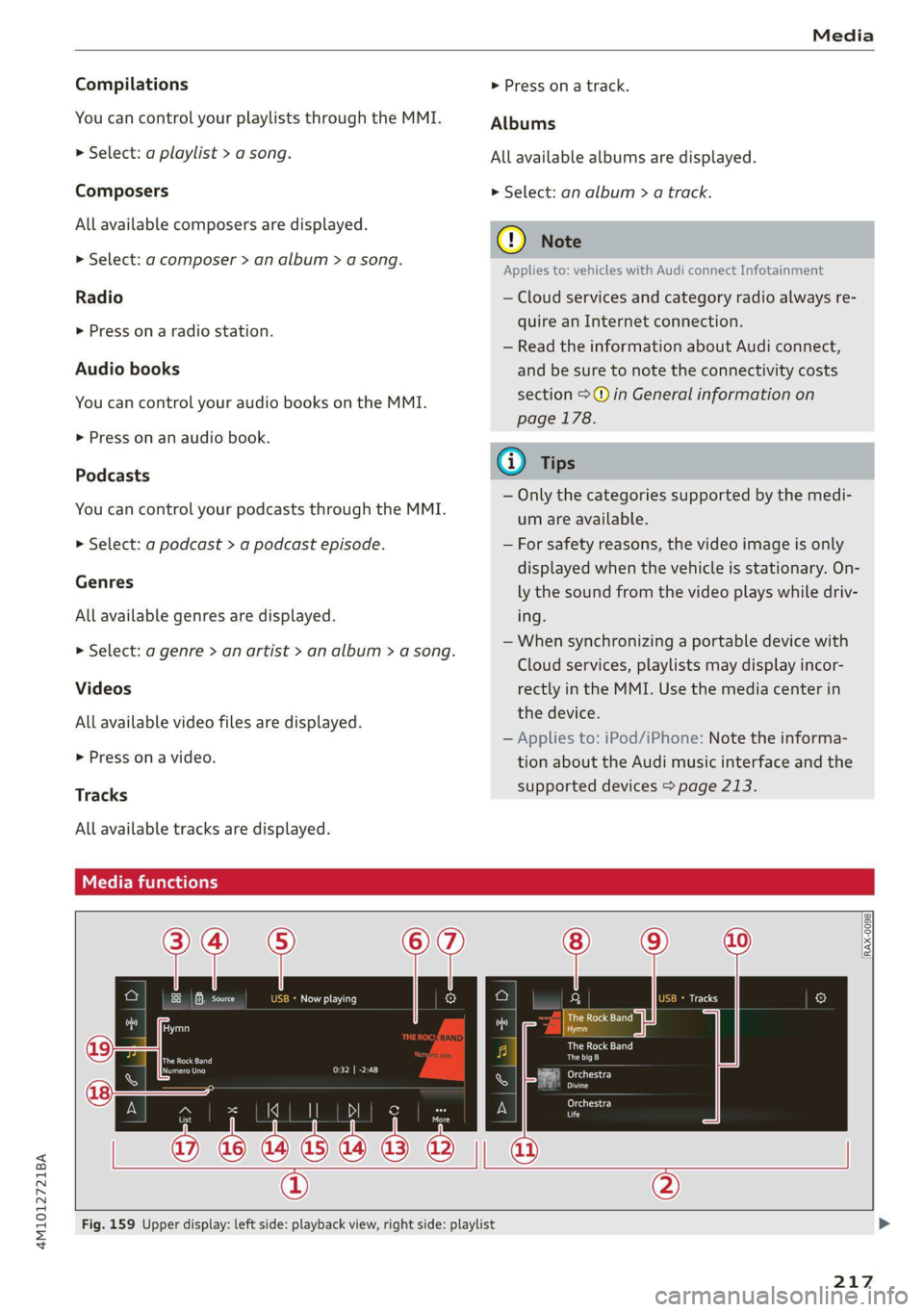
Fig. 159 Upper display: left side: playback view, right side: playlist
217
Page 247 of 316

4M1012721BA
Checking and Filling
To reduce the risk of lime scale deposits on the
spray nozzles, use clean water with low amounts
of calcium. Always add window cleaner to the wa-
ter. When the outside temperatures are cold, an
anti-freezing agent should be added to the water
so that it does not freeze.
Message
Eg Please add washer fluid
Fill the washer fluid for the windshield washer
system and the headlight washer system* when
the ignition is switched off.
C) Note
—The concentration of anti-freezing agent
must be adjusted to the vehicle operating
conditions and the climate. A concentration
that is too high can lead to vehicle damage.
— Never add radiator anti-freeze or other addi-
tives to the washer fluid.
— Do not use a glass cleaner that contains
paint solvents, because this could damage
the paint.
Service interval display
The service interval display detects when your ve-
hicle is due for service.
The service interval display works in two stages:
— Inspection or oil change reminder: after driv-
ing a certain distance, a message appears in the
instrument cluster display each time the igni-
tion is switched on or off. The remaining dis-
tance or time is displayed briefly.
— Inspection or oil change due: if your vehicle
has reached an inspection or oil change interval
or both intervals at the same time, the mes-
sage Inspection due! or Oil change due! or Oil
change and inspection due! appears briefly af-
ter switching the ignition on or off.
Checking service intervals
You can check the remaining distance or time un-
til the next oil change or next inspection in the
Infotainment system.
Applies to MMI: Select on the home screen: VE-
HICLE > Settings & Service > Service intervals.
Resetting the indicator
An authorized Audi dealer or authorized Audi
Service Facility will reset the service interval dis-
play after performing service.
If you have changed the oil yourself, you must re-
set the oil change interval.
Applies to: MMI: To reset the display, select on
the home screen: VEHICLE > Settings & Service
> Service intervals.
@) Note
— Only reset the oil change indicator if the oil
was changed.
— Following the service intervals is critical to
maintaining the service life and value of
your vehicle, especially the engine. Even if
the mileage on the vehicle is low, do not ex-
ceed the time for the next service.
245
Page 288 of 316
Fuses and bulbs
Fuse panel () (black) Fuse panel (2) (black)
8 | Front MMI display Luggage compartment lid central locking,
9 | Instrument cluster 11 | fuel filler door, luggage compartment cov-
10 |MMI/DVD drive er
11 | Light switch, switch panels 12 |Luggage compartment lid control module
12 | Steering column electronics Fuse panel (2) (red)
13 | Volume control No. Equipment
14 | MMI Infotainment system control module 1 | Rear climate control system blower
15 | Steering column adjustment 2 |Sound-amplifier
16 | Steering wheel heating 3 | Exhaust treatment, sound actuator
4 |Rear climate control system control panel
Fuse assignment - Left side of the luggage 5 | Right trailer hitch light
6 |Trailer hitch positioning motor
7 |Trailer hitch release
8 | Left trailer hitch light
9 | Trailer hitch socket
ele
a
i] a rE ia) °
U i)
TCE |
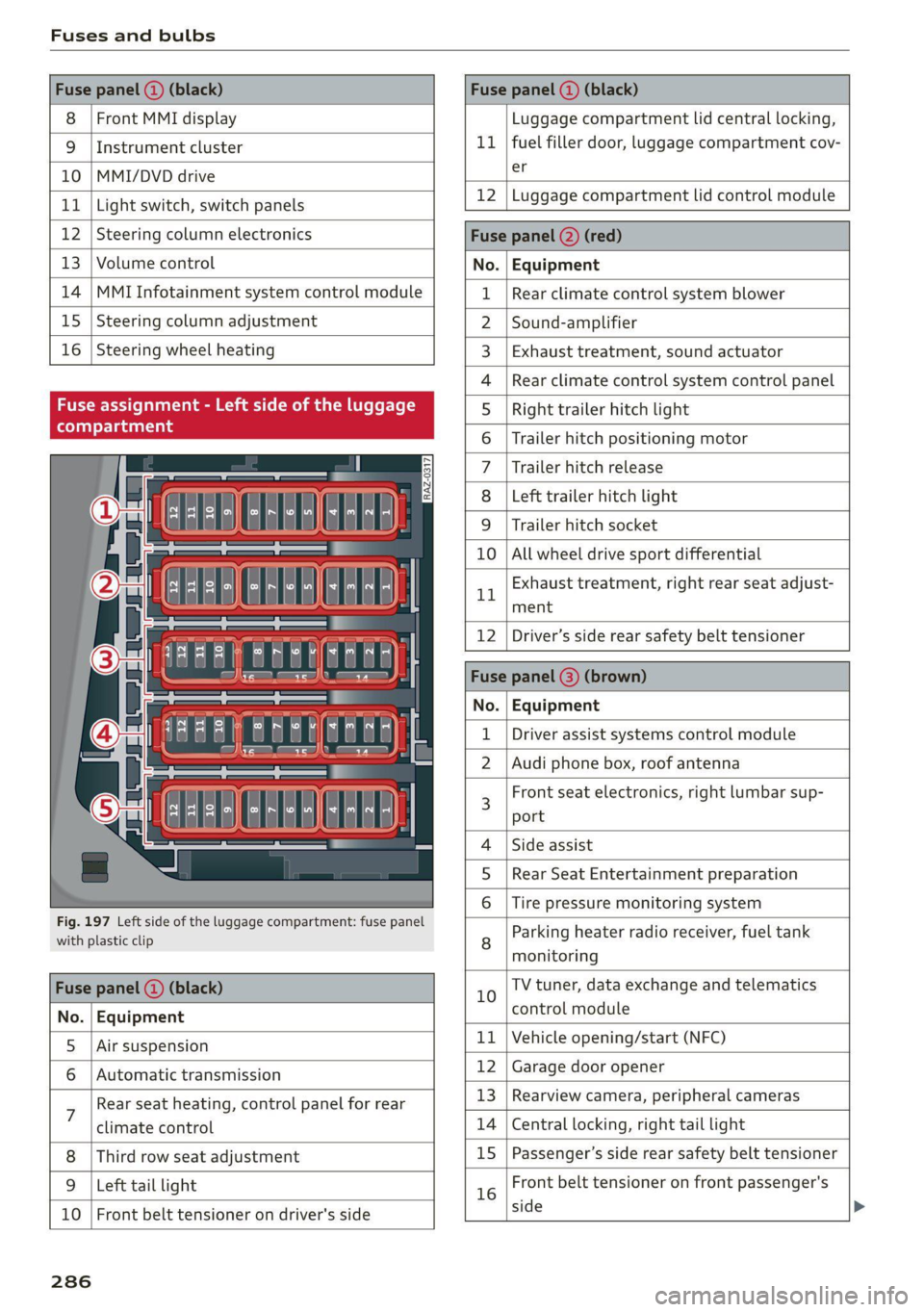
Fig. 197 Left side of the luggage compartment: fuse panel
with plastic clip
BR oO All wheel drive sport differential
Bh BR
Exhaust treatment, right rear seat adjust-
ment
Fuse panel (@) (black)
No. | Equipment
5 |Air suspension
6 |Automatic transmission
7 Rear seat heating, control panel for rear
climate control
Third row seat adjustment
9 | Left tail light
10 | Front belt tensioner on driver's side
12 | Driver’s side rear safety belt tensioner
Fuse | (3) (
No. | Equipment
Driver assist systems control module
2 |Audi phone box, roof antenna
3 Front seat electronics, right lumbar sup-
port
4 |Side assist
5 | Rear Seat Entertainment preparation
Tire pressure monitoring system
8 Parking heater radio receiver, fuel tank
monitoring
10 TV tuner, data exchange and telematics
control module
11 | Vehicle opening/start (NFC)
12 | Garage door opener
13 | Rearview camera, peripheral cameras
14 | Central locking, right tail light
15
|Passenger’s side rear safety belt tensioner
16 Front belt tensioner on front passenger's
side
286
Page 292 of 316
Data privacy
@) Note
You are responsible for all precautions taken
for data protection, anti-virus protection, and
protection against loss of data on mobile de-
vices that are used to access the Internet
through the Wi-Fi hotspot.
@ Tips
— The following interfaces are not affected by
changes to the privacy settings: Bluetooth,
Bluetooth Low Energy (BLE), Wi-Fi, Audi
smartphone interface (ASI), Near Field
Communication (NFC), charging communi-
cation (high-voltage system), Electronic Toll
Collect (ETC), On-Board Diagnostic System
(OBD) if equipped.
— If the maximum privacy settings are switch-
ed on, your vehicle may not receive security
updates and certificates for establishing an
encrypted connection, depending on vehicle
equipment. In order to receive security up-
dates and certificates, switch the maximum
privacy settings off for at least ten minutes
every six months. Make sure that your vehi-
cle is connected to the Internet. A symbol in
the MMI status bar indicates if the required
data connection is available > page 20.
— If the transmission of data is limited, it will
have the following effects on the exchange
of data for Audi connect services and emer-
gency calls, if equipped:
— The emergency call function will remain
available without restrictions and will con-
tinue to transmit data.
— If an online roadside assistance call is ini-
tiated, no data will be transmitted, but a
call will be made.
— If the Geofencing Alert, Speed Alert,
and/or Valet Alert services have been acti-
vated by the key user, then they will re-
main available without restrictions and
continue to transmit data.
— Stored destinations (favorites, last desti-
nations) are only stored in the vehicle. If
you allow transmission of data again,
these destinations will be synchronized via
the myAudi account. To prevent synchroni-
290
zation of destinations, delete the destina-
tions before you allow data to be trans-
mitted again.
Applies to: vehicles with Audi connect Infotainment
AUDI AG collects, uses, stores and shares your
personal information, such as contact data, vehi-
cle data, usage data, driving data and precise ge-
olocation, in order to provide you with the prod-
ucts and services you have purchased or request-
ed, and for a number of other purposes, for ex-
ample, to track quality issues, to performance
and safety, to meet our internal compliance or le-
gal requirements and to market to customers
and potential customers. For a more complete
list of the data we collect, how we use it and with
whom we share it, please visit your Audi nation-
al/sales region website at www.audi.com.
The collection, use and sharing may vary depend-
ing on your model and model year, your subscrip-
tion status, or the service offering. For example,
collection, use and sharing may vary between
Audi connect services, if you have designated a
key user, or if you are driving a model equipped
with persistent data logging. Please review the
complete Privacy Statement to understand our
data handling practices with respect to a particu-
lar service.
You can find additional information about our da-
ta privacy practices in your MMI.
>» Applies to: MMI: On the home screen, select:
SETTINGS > General > Legal notes > About
Audi connect.
Information about our privacy practices in con-
junction with the mobile Audi connect applica-
tion can be found in the Application’s Privacy
Statement.
For additional information about the privacy
practices relating to Audi connect, myAudi, or
other websites, applications or online services as
well as your obligations with respect to using
these services, and for additional information re-
garding Audi connect terms and conditions, >
Page 303 of 316

4M1012721BA
Closing
Automatic luggage compartment lid...... 38
Convenience closing.........:0e..e500% 41
HOO « cisco a cstinee ov cose ek oa aw ar 234
Luggage compartment lid............... 37
Luggage compartment lid with foot motion . 39
Panoramic glassir00ficc:. «sce ws naenn 0 seen 41
Sunshade (roof) ...............0000000e 41
WIUTCGWS = ssae 5% eae 5b Beee & a ee ge 40
Closing aid (power closing doors).......... 30
Cockpit dimming....................005 51
Cockpit (overview) ..........-..00 eee eee 6
[6(0) (0) 2300 |-) eet er oo 297
Combustion engine................+-6- 100
Coming home/Leaving home
refer to Entry/exit lighting.............. 48
COMPAPEMENES!: » s sccwr » 0 wes 2 6 ezewens 6 0 ommets 82
Compass inthe mirror...............00-4 56
Compliance. « sevice ss weve sv exces 2 v oeae ¥ os 295
Configuration wizard.................0.. 18
CONMECEs: 5 o sue ge MeN s RES aE eee Oe 178
Data plano: « win os mosue ve cman o mane oe 183
Data Privacy..... 0... eee ee eee eee 290
Emergency Call sacs: s sens s eee: veens 184
Tnfotainmetitie. . vcs os woos oo camo 6 eae 178
Infotainment services.............---- 179
Online roadside assistance............. 185
Vehicle control services.............005 180
Connected devices
Device overview ............ 0000. e eee 226
Connections
referto Media..............0000- 210,215
Consumer information............-.0004 292
Consumption
Reducing.......... 0. eee ee eee eee ee 100
Consumption (fuel) ..............000 eee 14
Contacts
Add destination...................... 195
Importing and exporting.............. 176
Memoryscapacltyice « « scsos « « pene < « mene © 176
Opening (business card) ............... 170
Updating inthe MMI.................. 176
Convenience: key’: « scan ss wewm sy ewe + gees 30
Convenience closing...............0005 4l
also refer to Vehicle key..............-5 34
Convenience opening and closing
Windows or panoramic glass roof........ 41
Coolant temperature display.............. 13
Cooling Moder: i = iain. + meee s & aK wv eR 90
Cooling system
Adding
coolant..............2-000005 240
Checking the coolant level............. 240
COOLAHE weeny. = ¢ seuss % 2 eee 9 § eee bY ew 239
Cornering
light: =» sees ¢ 2 eese 2» ewan ss es 45
Cross traffic assist (intersection assistant) .. 153
Cruise control system............000005 130
Cup holders. ....... eee eee cece eee 81
Current consumption..............000005 14
D
Data plans... 2... eee eee eee eee 183
Data: Privatty’s « sss: + 2 sence oo secu vo ein vo 290
Date seca « 2 ssi + a ieee vn wee > OER = RR 14
SQCEIN Gl « sucnsir « ansvinns ou snenene # ¥ ecowase oo) asetn 225
Daytime running lights.................. AS
Declaration of compliance............... 295
DEF (instrument cluster) ..............004 11
Demo mode
refer to Presentation mode............. 199
Destination on the map..............0.. 191
Detailst: os sscmve o vam 2 2 aneee ao ansome 2 2 aeeeT 190
Determining correct load limit........... 260
Digital: cOMpaSs sew: : 2 sees c= reas ve een se 56
Dimensions ...........-..0 0c e eee eee ee 297
Dimming the exterior mirrors............. 52
Dimming the rearview mirror............. 52
Directory
Settings........... 002.2 eee eee eee 176
also refer to ContactS..............00. 170
Display
Gleanings « « exis = > erasers « 2 esecnie ow ears owe 269
Disposalicne is « scsswa se suns « @ mnenes oe mae ow 292
DiStaNCO rss « ¢ cams = o aaae 3 ¢ eeupe « 2 Hee x a 14
DIStanGe WARNING, ames 3 « says se gems «eR 143
Doors
Childisatety lock eric. ss cio so ween a ewes « 40
Door contact switch................200. 50
Mechanically unlocking and locking....... 33
Power closing/closing aid............... 30
Driver information system................ 12
Drives
refer toMed aise « «wees sv wwie 6 owen 21.0,.2;L5
301