trailer AUDI Q7 2020 Owner´s Manual
[x] Cancel search | Manufacturer: AUDI, Model Year: 2020, Model line: Q7, Model: AUDI Q7 2020Pages: 316, PDF Size: 113.87 MB
Page 194 of 316

Navigation
Map
Applies to: vehicles with navigation system
Cra ua
2)
Fig. 147 Upper display: marked map item
Opening the map
Applies to: MMI
> Press NAVIGATION on the home screen.
> If necessary, press A to display the map.
The following list gives an overview of the infor-
mation displayed on the map. Press on any func-
tion (for example, alternative routes) to show ad-
ditional options.
Destination input > page 187
Intelligent search > page 187
Cancel route guidance > page 191
Current route
Request spoken prompt
Alternative routes > page 194
COOOOLOO Display active destinations, stopovers, or
route plan. The distance to the destination
including the calculated arrival time is dis-
played > page 191.
© For vehicles with trailer mode, the symbol in-
dicates that the function is switched on.
= page 200
© Traffic information > page 198
D_ Only applies to vehicles without camera-based speed limit
display.
192
@ Altitude
@) Displays the maximum permitted speed):
within city limits, on expressways, and on
highways.
Current vehicle position
Route information > page 200
Name of the street on which you are current-
ly driving
®
®O®8
Start route guidance for the marked destina-
tion @2) > page 191, Selecting a destination
from the map
Display details for the destination
=> page 190
POI search within the vicinity of a marking
®@®
®
Adjust the map orientation. Also see
=> page 199
Navigation settings > page 199
®©©® Adjust the scale. Set scale. Or: Press the
magnifying glass to switch automatic zoom
=> page 199 on or off directly on the map. The
symbol appears when this function is
switched on.
® Marked destination. See > page 191, Select-
ing a destination from the map
® Map contents (points of interest, favorites).
When there are multiple map contents in the
immediate vicinity, the symbols are shown
stacked on the map. To display a list of indi-
vidual symbols, press @9 > fig. 147. Press on
a POT in the list.
@3) Center the map to the current vehicle posi-
tion
Additional possible symbols on the map
Description |
Home address > page 195, Favor-
ites
Business address > page 195, Fa-
vorites
Presets > page 195
@| Previous destinations display >
Page 202 of 316

Navigation
Map settings
Satellite map: see > page 196.
Traffic: you can display current traffic informa-
tion on the map. See > page 193, Traffic infor-
mation display on the map or map preview
— Free flow of traffic
— Traffic obstructions
— Traffic information
Map colors
— Automatic: the map display adapts to the light-
ing conditions (for example, by changing from
day to night when driving through a tunnel).
— Day or Night
Map orientation
— 2D map or 2D north: the current vehicle posi-
tion is displayed. The map is oriented in the di-
rection of travel or to the north.
— 3D map: the current vehicle position is shown
on a three-dimensional map and is oriented in
the direction of travel.
— Overview: the entire route from the vehicle po-
sition to the destination or the next stopover is
displayed on the map. The map is oriented to
the north.
Automatic zoom
— On: the map scale is adapted automatically de-
pending on the type of road being traveled (ex-
pressway, highway, other roads) so that you al-
ways have an optimal overview of the road
ahead. When route guidance is active, the scale
is adjusted automatically for a better detailed
view when there are upcoming maneuvers.
— Intersection: when route guidance is active, the
scale is adjusted automatically for a better de-
tailed view when there are upcoming maneu-
vers.
— Off
MMI map contents/Map content: you can switch
the display of additional information (such as
POIs) on the map in the upper display on or off.
Note the following for the 3D city model > ©.
Voice guidance
Voice guidance: you can adjust the navigation
prompts. With the Traffic setting, the MMI will
200
only give prompts if there are traffic incidents on
your route.
Voice guidance during phone call
Entertainment fader during navigation: the au-
dio playback volume is temporarily lowered when
navigation prompts are active.
Route criteria
You can adjust which route criteria should be al-
lowed or avoided for the route calculation.
HOV/carpool lanes
Highways
Toll roads
Ferries
Route information
When this function is switched on and route
guidance is active, route information ®
=> page 192, fig. 146 is displayed. The next ma-
neuver will be displayed at the bottom. POIs and
traffic information will also be displayed. Press
route information to display a preview of the next
maneuver on the map. You can switch the follow-
ing information on or off in route information.
— POIs along the route
— Traffic information
Personal route assistance
Personal route assistance is switched off at the
factory.
Your trips are recorded and destinations are sug-
gested by the MMI when this function is switched
on > page 194.
Trailer mode
Trailer mode is switched off at the factory.
When the function is switched on, the maximum
permitted speed for vehicles with trailers is in-
cluded during route guidance and the calculated
arrival time is adjusted accordingly. When the
function is switched on, the symbol @)
=> page 192, fig. 146 is displayed on the map. >
Page 261 of 316
4M1012721BA
Wheels
intended to carry (“seating ca-
pacity”) with an assumed weight
of 150 lbs. (68 kg) for each pas-
senger at a designated seating
position and the total weight of
any luggage in the vehicle. If you
tow a trailer, the weight of the
trailer hitch and the tongue
weight of the loaded trailer must
be included as part of the vehicle
load.
The Gross Axle Weight Rating
(“GAWR”) is the maximum load
that can be applied at each of the
vehicle’s two axles.
The fact that there is an upper
limit to your vehicle’s Gross Vehi-
cle Weight Rating means that the
total weight of whatever is being
carried in the vehicle (including
the weight of a trailer hitch and
the tongue weight of the loaded
trailer) is limited. The more pas-
sengers in the vehicle or passen-
gers who are heavier than the
standard weights assumed mean
that less weight can be carried as
luggage.
The Gross Vehicle Weight Rating
and the Gross Axle Weight Rating
are listed on the safety compli-
ance sticker label located on the
driver’s side B-pillar.
AN WARNING
Overloading a vehicle can cause
loss of vehicle control, a crash
or other accident, serious per-
sonal injury, and even death.
—Carrying more weight than
your vehicle was designed to
carry will prevent the vehicle
from handling properly and in-
crease the risk of the loss of
vehicle control.
—The brakes on a vehicle that
has been overloaded may not
be able to stop the vehicle
within a safe distance.
—Tires ona vehicle that has
been overloaded can fail sud-
denly, including a blowout and
sudden deflation, causing loss
of control and a crash.
—Always make sure that the to-
tal load being transported -
including the weight of a trail-
er hitch and the tongue
weight of a loaded trailer -
does not make the vehicle
heavier than the vehicle’s
Gross Vehicle Weight Rating.
259
Page 262 of 316

Wheels
Determining correct load
limit
Use the example below to calcu-
late the total weight of the pas-
sengers and luggage or other
things that you plan to transport
so that you can make sure that
your vehicle will not be overload-
ed.
Steps for Determining Correct
Load Limit
1. Locate the statement “THE
COMBINED WEIGHT OF OCCU-
PANTS AND CARGO SHOULD
NEVER EXCEED XXX KG OR XXX
LBS” on your vehicle’s placard
(tire inflation pressure label)
=> page 256, fig. 175.
2. Determine the combined
weight of the driver and pas-
sengers that will be riding in
your vehicle.
3. Subtract the combined weight
of the driver and passengers
from “XXX” kilograms or “XXX”
pounds shown on the sticker
=> page 256, fig. 175.
4. The resulting figure equals the
available amount of cargo and
luggage load capacity. For ex-
ample, if the “XXX” amount
equals 1400 lbs. and there will
260
be five 150 lbs. passengers in
your vehicle, the amount of
available cargo and luggage
oad capacity is 650 lbs.
(1400-750 (5 x 150) = 650
bs.)
5. Determine the combined
weight of luggage and cargo
being loaded on the vehicle.
That weight may not safely ex-
ceed the available cargo and
uggage load capacity calculat-
ed in Step 4.
6. If your vehicle will be towing a
trailer, load from your trailer
will be transferred to your vehi-
cle. Consult this manual to de-
termine how this reduces the
available cargo and luggage
load capacity of your vehicle.
>Check the tire sidewall
(=> page 247, fig. 172) to deter-
mine the designated load rating
for a specific tire.
Wheel bolts and rims
Wheel bolts
Wheel bolts must be clean and loosen/tighten
easily.
Rims
Rims with a bolted rim ring* or with bolted wheel
covers* consist of multiple pieces. These compo-
nents were bolted together using special bolts
and a special procedure. You must not repair or
disassemble them > A\.
Page 277 of 316
4M1012721BA
Emergency assistance
ZA\ WARNING
— Read and follow the manufacturer's safety
precautions on the compressor and in the in-
structions on the bottle of sealant.
— Ifa tire pressure of 29 psi (200 kPA) cannot
reached after inflating for 6 minutes, then
the tire is too severely damaged. Do not con-
tinue driving.
— If the tire cannot be repaired with the tire
sealant, see an authorized Audi dealer or au-
thorized Audi Service Facility for assistance.
G) Tips
Do not operate the compressor for more than
six minutes continuously, or it can overheat.
Once the compressor has cooled, you can con-
tinue to use it.
Completing
Applies to: vehicles with tire mobility kit
> Affix the sticker that says "max. 50 mph (max.
80 km/h)" that is provided with the tire mobili-
ty kit within the driver's field of vision.
> Stop the vehicle after driving for about 10 mi-
nutes and check the tire pressure.
> If the tire pressure is lower than 19 psi (130
kPA), then the tire is too severely damaged. Do
not continue driving.
ZA\ WARNING
Pay attention to the following after repairing
the tire:
— Do not drive faster than 50 mph (80 km/h).
— Avoid hard acceleration or braking and driv-
ing fast around curves.
— The vehicle may become more difficult to
control.
— If the tire is too severely damaged, see an
authorized Audi dealer or authorized Audi
Service Facility for assistance.
@ For the sake of the environment
You can give the used tire sealant bottle to an
authorized Audi dealer or authorized Audi
Service Facility for disposal.
@) Tips
Remember to obtain a new bottle of sealant
from an authorized Audi dealer or authorized
Audi Service Facility after repairing a tire.
Replacing wheels
You must complete the preparation before
changing a tire.
> Read and follow the important safety precau-
tions > page 273.
> Set the parking brake.
> Select the “P” position.
» When towing a trailer: disconnect the trailer
from your vehicle.
> Lay out the vehicle tool kit > page 273 and the
spare tire.
> Applies to: vehicles with air suspension: Select
on the home screen: VEHICLE > Settings &
Service > Air suspension: wheel change.
> Switch the ignition off.
ZA\ WARNING
The vehicle must also be secured to prevent it
from rolling when using the vehicle jack*. Use
suitable objects to block the front and back of
the wheel that is diagonal from the wheel
with the flat tire.
i
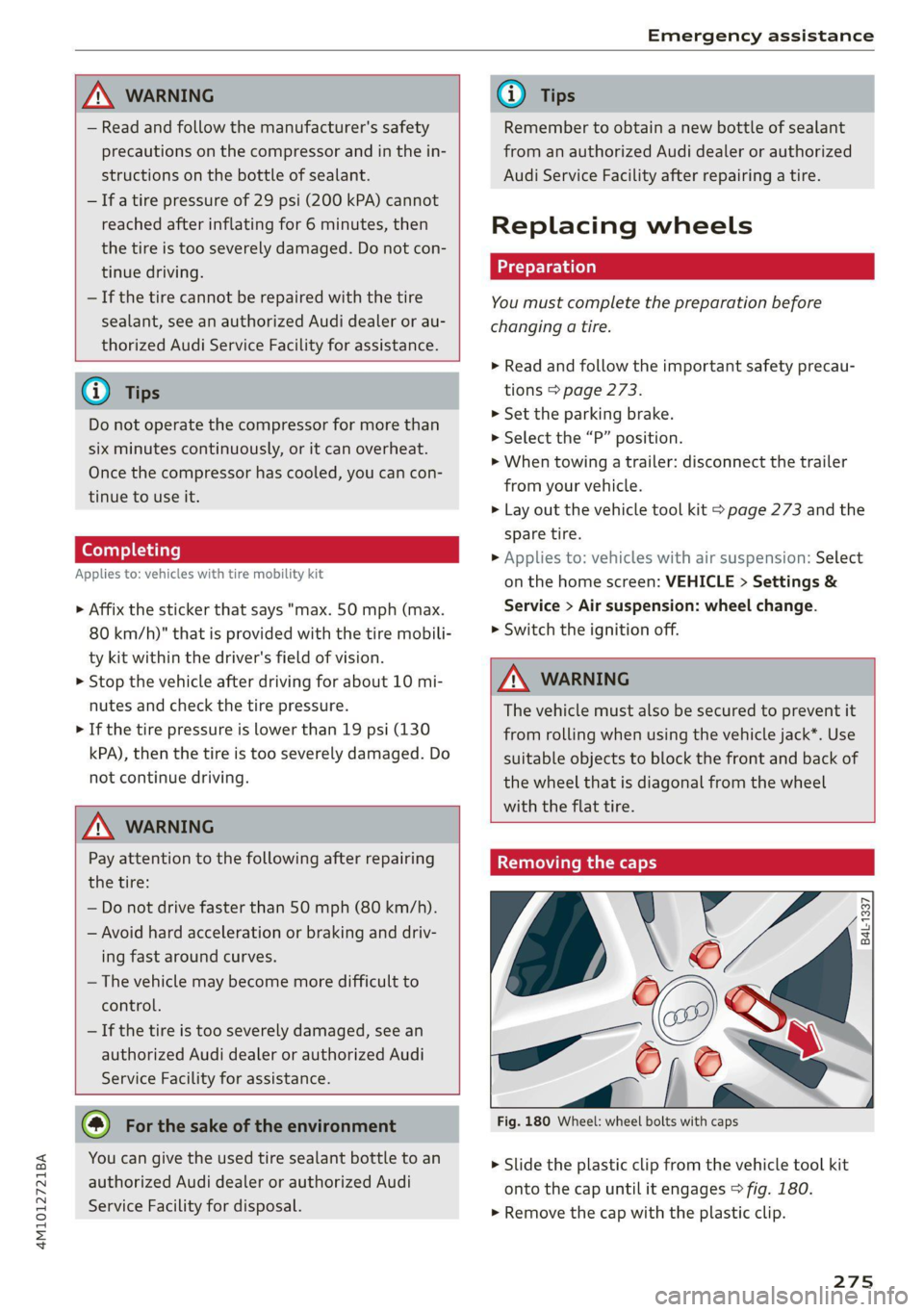
Fig. 180 Wheel: wheel bolts with caps
@
Oo-q
th.
is y
> Slide the plastic clip from the vehicle tool kit
onto the cap until it engages > fig. 180.
> Remove the cap with the plastic clip.
275
Page 284 of 316

Emergency assistance
> Press the cap inward with brief, strong pressure
> fig. 189 or > fig. 190. The cap will loosen
from the bumper.
> Tighten the towing loop in the threaded open-
ing until it stops and then tighten it with a
wheel wrench.
> After using, place the towing loop back in the
vehicle tool kit.
Z\ WARNING
If the towing loop is not tightened until it
stops when installing, the threads may be
pulled out when towing the vehicle and result
Vehicles with a trailer hitch*
>» Attach the tow bar or the towing cable to the
trailer hitch.
Vehicles with a factory-installed trailer hitch* are
not equipped with towing loop threads at the
rear.
ZX WARNING
If the towing loop is not tightened until it
stops when installing, the threads may be
pulled out when towing the vehicle and result
in an accident.
in an accident.
@) Tips
Depending on the model, the shape of the
cover can vary.
Rear towing loop
Fig. 191 Rear bumper: installing the towing loop
Vehicles with a towing loop
On vehicles without a factory-installed trailer
hitch*, the towing loop threads are located on
the right rear side of the bumper.
> Remove the towing loop from the vehicle tool
kit > page 273.
> Press the cap inward with brief, strong pressure
> fig. 191. The cap will loosen from the bump-
er.
> Tighten the towing loop in the threaded open-
ing until it stops and then tighten it with a
wheel wrench.
>» After using, place the towing loop back in the
vehicle tool kit.
282
C) Note
To reduce the risk of damaging the trailer
hitch*, only use suitable tow bars that are
compatible with it. If a tow bar is not availa-
ble, you can use a towing cable.
G) Tips
Depending on the model, the shape of the
cover can vary.
Page 288 of 316
Fuses and bulbs
Fuse panel () (black) Fuse panel (2) (black)
8 | Front MMI display Luggage compartment lid central locking,
9 | Instrument cluster 11 | fuel filler door, luggage compartment cov-
10 |MMI/DVD drive er
11 | Light switch, switch panels 12 |Luggage compartment lid control module
12 | Steering column electronics Fuse panel (2) (red)
13 | Volume control No. Equipment
14 | MMI Infotainment system control module 1 | Rear climate control system blower
15 | Steering column adjustment 2 |Sound-amplifier
16 | Steering wheel heating 3 | Exhaust treatment, sound actuator
4 |Rear climate control system control panel
Fuse assignment - Left side of the luggage 5 | Right trailer hitch light
6 |Trailer hitch positioning motor
7 |Trailer hitch release
8 | Left trailer hitch light
9 | Trailer hitch socket
ele
a
i] a rE ia) °
U i)
TCE |
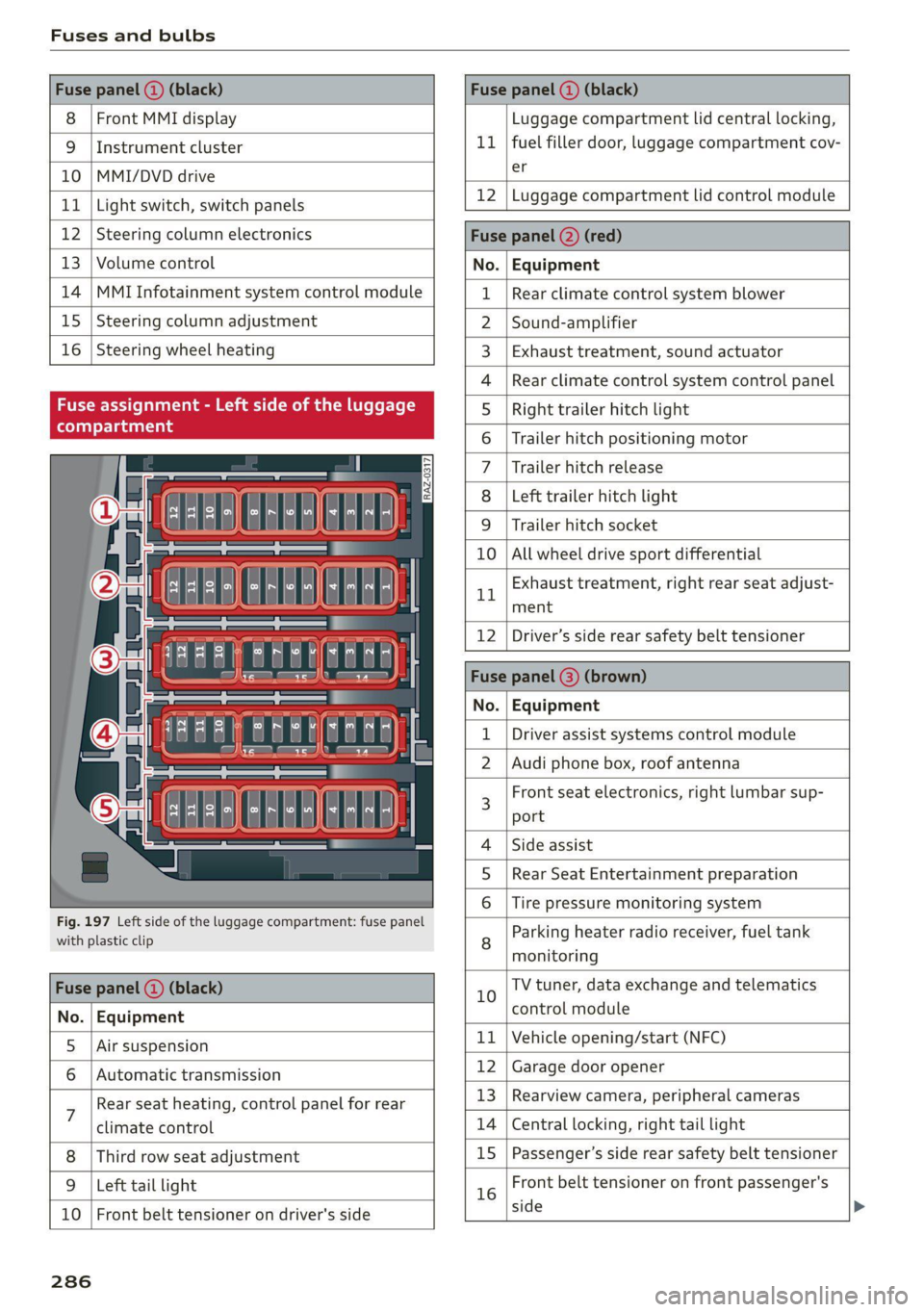
Fig. 197 Left side of the luggage compartment: fuse panel
with plastic clip
BR oO All wheel drive sport differential
Bh BR
Exhaust treatment, right rear seat adjust-
ment
Fuse panel (@) (black)
No. | Equipment
5 |Air suspension
6 |Automatic transmission
7 Rear seat heating, control panel for rear
climate control
Third row seat adjustment
9 | Left tail light
10 | Front belt tensioner on driver's side
12 | Driver’s side rear safety belt tensioner
Fuse | (3) (
No. | Equipment
Driver assist systems control module
2 |Audi phone box, roof antenna
3 Front seat electronics, right lumbar sup-
port
4 |Side assist
5 | Rear Seat Entertainment preparation
Tire pressure monitoring system
8 Parking heater radio receiver, fuel tank
monitoring
10 TV tuner, data exchange and telematics
control module
11 | Vehicle opening/start (NFC)
12 | Garage door opener
13 | Rearview camera, peripheral cameras
14 | Central locking, right tail light
15
|Passenger’s side rear safety belt tensioner
16 Front belt tensioner on front passenger's
side
286
Page 300 of 316

Technical data
Gross Axle Weight Rating (GAWR)
B8U-0380 The maximum permitted load on the front axle
@ or the rear axle @) is listed on the safety cer-
tificate on the side area of the door or on the
driver's door pillar.
Load
The maximum permitted load is listed on the tire
pressure label on the driver's door pillar.
Fig. 200 Safety certificate
Roof load
Gross Vehicle Weight Rating (GVWR) The maximum permissible roof load is 220 lbs
The maximum permitted total weight @ of the (100 kg).
vehicle is listed on the safety certificate on the
side area of the door or on the driver's door pillar.
Trailer load
7,700 lbs (3,500 kg) 770 lbs (350 kg)
298
Page 308 of 316

Index
Night vision assist...............-..000- 126
Cleaning the camera...........2--000- 268
Notification center..............022.000. 20
O
Octane rating (gasoline)................ 229
Odometer’ sas ie cancers wo aonvene «+ sewnare @ # severe 14
Resetting...............0..00.0000002 14
Office address
refer to Business address...........005 195
Offroad
refer to Offroad driving................ 106
Offroad
driving «: « s swas zs exes 2 e ews 2 ye 106
OFF (climate control system) .............. 90
Oil
referto Engine oil................-.-- 236
On-board computer...............22.05. 14
On Board Diagnostic System (OBD)... 233, 288
Online destination
refer to Online Points of Interest........ 189
Online map
refer to Satellite map................. 196
Online MEd sie «= wise se wares se Reve a HHH 212
Online Points of Interest.............0.. 189
Onlin@ radio = wees =: wesu 2 e eee s see ee 206
also refer to Online radio.............. 206
Online roadside assistance.............. 185
Online services
refer LO CONNECE: « 2 cere e eiven ee rue oe 178
Online system update...........0e. eee 226
Online traffic information............... 199
OPENING: = s sews < & news & x wes + eo eoES ee ee 30
Automatic luggage compartment lid...... 38
Convenience opening................05 41
Fuel fillerdoor': « = sass ¢ = sees ¢ e sees 2 gos 230
HOOd « & serene ve soveese ¢ x eames 2 meen 2 tE 2 234
Luggage compartment lid............... 37
Luggage compartment lid with foot motion . 39
Panoramic glass roof..............0.005 41
Sunshade (roof) ............-..00 eee eee 4l
WiIndOWS): s cece 3 x eee 7 ¢ ReeS GF BERS FF 40
Opening and closing
refer to Unlocking and locking........ 30,35
Operating
Headsup displays: « « cicen se owe oo ome vo ave 24
Instrument cluster................005- 12
306
Multifunction steering wheel............ 12
Multi Media Interface............... 16,19
TEXE INP Uti = y ecm + yawe so RoE x © BeeeD 8 BE 22
Touch displayies. «mci se nwcne ee onene ae eace 16
Voice recognition system.............-. 25
Optional equipment number............. 297
Options
Media....... 0.0... eee eee eee eee eee 219
NaVigatiOtiiis< « savew 5 = sus & = meme 2 eae 199
RAGIO annus: «a neues 4 i aseaias a o semwine ou amine & 207
Overview (COCKpit) sss: ss savers ¥ & ones 8 emai & we 6
P
PainticOd@ies < o wens a ¥ sere oo een ae Ree ce 297
Paint dattag@iswc = x xem 2 s eee 2 5 eee 2 pee 269
Panic BUtHON » agus : x wean ss ame 2s See Zoe 34
PANIC button....................000005 34
Panic
function ...............0 eee eee eee 34
Panoramic glass roof.............00000 0 41
Convenience opening and closing......... 4l
Emergency closing... ........sceeeeveees 42
Quick opening............-...00 eee ee 42
Parental control
DVD 2... eee eee
Parking aid... ... 0... cece cece
Adjusting the volume.................
Automatic activation..................
Cleaning the sensors and camera
Deactivating rear cross-traffic assist... . . 163
Parkingzaid plus: = sss 2 0 were @ 6 wanes @ os 156
Peripheral
cameras...........---.000-5 158
RearvieW CaiMera sites ss wean sb vies s vas 158
Trailer views 3 = ssw x aseuow 2 2 cowie 2 2 ammo 160
Parking and maneuvering..............- 156
Parking brake
refer to Electromechanical parking brake. 104
Parking lightSieses 2 + acu so ane se orem 6 2 eae 45
Parking lock emergency release........... 98
Partition Het s sess = sees sy com ce eee gE ee 85
Password
myAudi automatic login.............00. 28
Paths’; « = sees = 5 Gee g + Rees GE BeeS ee ee gee 17
Pause (media files)................000-. 215
Pedals. .... 2.0... cece eee eee eee 98
Pedestrian detection................... 126
Perchlorate .... 0... 0. cee eee eee eee eee 292
Page 311 of 316

4M1012721BA
Index
Speed limits
refer to Traffic sign recognition......... 123
Speedometer............. 000 e eee eee ee iy
Speed warning system.............0200. 123
Sport differentials. «2 cece ee emacs ve seen « 111
Start/Stop system’. « « sees os wees ve eee ee 101
MESSAGES! ssesn » w cuwsnne wv sxenseus 4 0 mtusinie © veeone 102
Switching offandon..............000- 101
Starting to drive........ 2... eee eee ee eee 95
Starting (engine) ........ 00. cece eee 102
SUECEHIMG:. « anniane » w scouie © 6 etenese 9 4 sources 0 6 en 110
Audi drive select..................0.. 108
glsorefer to Steering : «cess sc esos sc ews 110
Steeringlock’ « » sews + s sews s 4 eee + oe 94,110
Steering wheel
AGJUSTING ws i 6 vases. oo exer oo nes ¥ © eos 2 64
Shift paddles............ 00.0002... 98
Steering wheel heating................. 92
also refer to Multifunction steering wheel. . 12
Steps for determining correct load limit... 260
Stopover (navigation) . sess < eses ss wows s 191
Stopping (ENGINE) os ss gees sy oes sk Saws es 102
SS) 0) | 82
Storage compartment................065 82
SEOFAGEIMEL. « wneceoe su anon of © exetene # 0 eowteae a ¥ 00s 82
Streaming
refer to Online media................. 212
Subtitles (DVD) .......... cece eee eee eee 219
Sunshade
Rear window/rear doors................ 53
ROOF’s seins « = seve & 2 cae xe eeurn oe ee eae 4l
also refer to Panoramic glass roof........ 41
SUMVISOMS: oscars @ 6 cowane a scene @ 6 axene « avanens w a 52
SUSPENSION sau: xo nor = 0 mem 3 wa as eee 109
Audi drive select...............00000. 108
Swap call... 2.2... eee eee eee ee 172
SWEPVEASSISE seccees we seco woo aseone vw ene © we 148
Symbols
Navigation....................00000. 192
TrattiCes 2 5 mews 2 2 wean = 68,8 4 Bae GX BO 198
also refer to Indicator lights.............. 7
SYNC (climate control system)............ 90
SyStENI SELCINGS seazx sv mews se mews = Sees < 225
T
TaChOMEter iss ¢ 2 sewn ¢ a eee ¢ 2 eee E KOR 11; 13
Tail lights
Cleaning ........ eee eee eee eee 268
Technical data.....................00. 297
Technical modifications................. 292
Telephone. « «ssc © 2 enis © 9 awe ¥ 9 eee © oe 165
Audi phone box............0.--00 eee 167
Connecting acellphone............... 165
Dialing. aMMMmber’. cias sees os wean 2 2 ws 171
Options during a phone call............ 172
Playing tHUSIC sous: ¢ x wane 9 2 eee 5 a es 8 211
Temperature display (outside temperature) .. 14
Temperature gauge
COGLAIIE wees x ¢ sues x ewes 3 © eps Fe eRe 11
TeXtinput ess = ¢ eens ¢ i ewe 5 8 caas ¢ 2 eee 22
Text messages
S@tUINGS ios s » aoew + Karem ws Hem & x ROR 4 172
Text messaging settings............... 172
also refer to Text messages............ 172
Tie-GOWNS . 6... eee eee ees 86
Tightening specification
Wheel bolts..............0. 00 eee eee 278
Tightening specification (wheel bolts) .... . 278
TIMG eet eee 14
tiptronic
refer to Manual shifting................ 98
Tire Mobility System (tire repair set)....... 273
THOS Coe eect tees
Loose wheel warning
Lowsprofiletires s sais 2s wee 2 0 wae seer
Repairset..........0..0.....0 0000004
REplaciitg = seas ¢ sean ¢ aren § + eee8 GY ee
RONSF lat in 2 wes as aise oo wee so oe oo
Service life... . eee eee eee eee
Tire pressure....
Tire pressure monitoring system.... 263, 264
Tire pressure table................00.. 257
Tire pressure (trailer mode)............ 115
Treadwear indicators.................. 255
Unidirectional.................0. 248, 278
Uniform tire quality grading............ 263
Tires and wheels
Glossary of tire and loading terminology .. 249
Tires and vehicle load limits............ 258
Toll Module
refer to Integrated Toll Module......... 128
TOO bs arcssire 6 iocrnine so aresnee 6 w aeaie sw ecm oe an 273
TOOL PStiies 2 vasa «2 matin « ¥ waTeG a 4 OA © 8 8 18