phone AUDI Q7 2020 Owner´s Manual
[x] Cancel search | Manufacturer: AUDI, Model Year: 2020, Model line: Q7, Model: AUDI Q7 2020Pages: 316, PDF Size: 113.87 MB
Page 193 of 316
4M1012721BA
Navigation
make a direct call to the phone number that
is stored for the destination.
© Start: starts navigation to the displayed des-
tination directly. The map will be displayed
= page 193, Map operation.
@) Parking: press Parking to search for a park-
ing space at the destination. You can use the
parking space as the destination or stopover.
Details: Requirement: the MMI must be con-
nected to the Internet > page 178, Audi con-
nect.
@) Weather at the destination: Requirement:
the MMI must be connected to the Internet
= page 178, Audi connect.
@®) Display of distance/driving time to the des-
tination
® Note
Read the information about Audi connect, and
be sure to note the connectivity costs section
=@ in General information on page 178.
Selecting a destination from the map
Applies to: vehicles with navigation system
A point on the map can be used as the destina-
tion.
Opening the map
Applies to: MMI
> Press NAVIGATION on the home screen.
> If necessary, press /\ to display the map.
Adjusting
the scale
> Select: / > select a scale.
Marking the destination
> Press and hold a point on the map until a mark-
ing appears @2) > page 192, fig. 147. Or: the
address of the selected destination is displayed
@ > page 192, fig. 147.
Selecting map content (such as POIs) as the
destination
Requirement: map content must be displayed
=> page 199.
> Press on map content on the map (for example,
@) > page 192, fig. 147).
Selecting the destination
> Select: (3 > page 192, fig. 147. Or:
> To display destination details, press on @)
=> page 192, fig. 147 > Start.
Route guidance will be activated and the map will
be displayed > page 192, fig. 146.
Stopovers and route plan
Applies to: vehicles with navigation system
You can enter additional destinations during ac-
tive route guidance.
Entering a stopover
Requirement: route guidance must be active.
> Enter a destination > page 187.
Displaying stopovers or the route plan
All destinations are listed in the route plan.
> Press on (7) > page 192, fig. 146 on the map.
Editing stopovers
> Press on (2) > page 192, fig. 146 on the map.
> Adding a stopover: Select: Add destination >
select a destination > Add.
> Moving a stopover: press Z. Touch the $ sym-
bol and move the entry to the desired position.
Press Done.
> Deleting a stopover: Select: Z > one or more
entries or Select all > Delete > (Done).
Stopping route guidance
Applies to: vehicles with navigation system
Requirement: route guidance must be active and
the map must be displayed.
> Applies to: MMI: Press ® @) > page 192,
fig. 146. Or:
> Applies to: multifunction steering wheel: Select
in the instrument cluster: Navigation tab >
button > Cancel route guidance.
191
Page 198 of 316

Navigation
> Select: a contact > |---| > Add destination.
> Follow the system instructions.
Settings
> Applies to: MMI: Select on the home screen:
NAVIGATION > (88) > Contacts > ©.
Hide grayed-out contacts
When the function is switched on, contacts that
have no address or navigation destination stored
will be hidden in navigation. You can find infor-
mation for additional settings under > page 176,
Directory settings.
@) Tips
If you add a navigation destination to a con-
tact, the destination will only be stored in the
MMI. The MMI does not change any contacts
on your phone.
On-street parking
Applies
to: navigation system and on-street parking
In supported areas, you can display parking
along the route.
Requirement: the Parking notification must be
switched on > page 20, Notification center. The
MMI must be connected to the Internet
=> page 178, Audi connect. Route guidance must
be active, you must be close to your destination,
and a notification must be displayed. Or: a point
is marked on the map.
> Press on the notification. Or: press on 6| on the
map.
> To navigate to a parking: space, press on a col-
ored marking on the map.
> Select: F2 > Start.
Depending on availability, colored markings on
the map indicate the probability of open parking
spaces.
)) Audi provides access to services from third party provid-
ers. Permanent availability cannot be guaranteed, because
that depends on the third party provider.
196
Color Description
Green | High probability
Orange |Medium probability
Red Low probability
C) Note
Read the information about Audi connect, and
be sure to note the connectivity costs section
=@ in General information on page 178.
Satellite map
Applies to: vehicles with navigation system and satellite map
You can display the navigation map with satel-
lite images.
Requirement: the MMI must be connected to the
Internet > page 178, Audi connect.
> Applies to: MMI: Select on the home screen:
NAVIGATION > <} > Map settings > Satellite
map).
The map view is based on data packets received
from the Internet in the form of satellite images,
which are then combined with the roadways from
the > page 192, fig. 146 standard map view.
@) Note
Read the information about Audi connect, and
be sure to note the connectivity costs section
=@ in General information on page 178.
Gi) Tips
—The satellite map) is updated regularly
whenever the function is opened. The proc-
ess may take several seconds.
— When the satellite map display is switched
on )) with the 3D position map type, the dis-
play automatically switches to the 2D map
type when driving through tunnels.
— Depending on the Internet connection, the
standard map may also be displayed when
the satellite map is switched on ).
Page 202 of 316

Navigation
Map settings
Satellite map: see > page 196.
Traffic: you can display current traffic informa-
tion on the map. See > page 193, Traffic infor-
mation display on the map or map preview
— Free flow of traffic
— Traffic obstructions
— Traffic information
Map colors
— Automatic: the map display adapts to the light-
ing conditions (for example, by changing from
day to night when driving through a tunnel).
— Day or Night
Map orientation
— 2D map or 2D north: the current vehicle posi-
tion is displayed. The map is oriented in the di-
rection of travel or to the north.
— 3D map: the current vehicle position is shown
on a three-dimensional map and is oriented in
the direction of travel.
— Overview: the entire route from the vehicle po-
sition to the destination or the next stopover is
displayed on the map. The map is oriented to
the north.
Automatic zoom
— On: the map scale is adapted automatically de-
pending on the type of road being traveled (ex-
pressway, highway, other roads) so that you al-
ways have an optimal overview of the road
ahead. When route guidance is active, the scale
is adjusted automatically for a better detailed
view when there are upcoming maneuvers.
— Intersection: when route guidance is active, the
scale is adjusted automatically for a better de-
tailed view when there are upcoming maneu-
vers.
— Off
MMI map contents/Map content: you can switch
the display of additional information (such as
POIs) on the map in the upper display on or off.
Note the following for the 3D city model > ©.
Voice guidance
Voice guidance: you can adjust the navigation
prompts. With the Traffic setting, the MMI will
200
only give prompts if there are traffic incidents on
your route.
Voice guidance during phone call
Entertainment fader during navigation: the au-
dio playback volume is temporarily lowered when
navigation prompts are active.
Route criteria
You can adjust which route criteria should be al-
lowed or avoided for the route calculation.
HOV/carpool lanes
Highways
Toll roads
Ferries
Route information
When this function is switched on and route
guidance is active, route information ®
=> page 192, fig. 146 is displayed. The next ma-
neuver will be displayed at the bottom. POIs and
traffic information will also be displayed. Press
route information to display a preview of the next
maneuver on the map. You can switch the follow-
ing information on or off in route information.
— POIs along the route
— Traffic information
Personal route assistance
Personal route assistance is switched off at the
factory.
Your trips are recorded and destinations are sug-
gested by the MMI when this function is switched
on > page 194.
Trailer mode
Trailer mode is switched off at the factory.
When the function is switched on, the maximum
permitted speed for vehicles with trailers is in-
cluded during route guidance and the calculated
arrival time is adjusted accordingly. When the
function is switched on, the symbol @)
=> page 192, fig. 146 is displayed on the map. >
Page 207 of 316
4M1012721BA
Radio
Editing a preset
> Deleting presets: Press on We in the playback
view, or
> In the presets list, select: Z > one or more sta-
tions or Select all > Delete > (Done).
Requirement: the presets list must be displayed.
> Moving a preset: press A.
> Touch the $ symbol and move the entry to the
desired position.
> Press Done.
Smart favorites
Applies to: vehicles with SiriusXM
SiriusXM channels are stored in the presets as
smart favorites with the s%: symbol. After switch-
ing the ignition and the MMI on, the smart favor-
ites store radio programs at a specific time.
> Press on a smart favorite. You have the follow-
ing options:
> Pause or Start: press |lorD.
> Selecting the previous or next track: press I<
or >i.
> Going to the beginning of a recording or live
program: press and hold !I< or >i.
> Setting the playback point: you can adjust the
playback position using the knob.
> Going to a live program: press Lvl.
Cleo -bg
Program information (for example, general text
messages, artist, composer, song) is displayed in
the radio text.
Requirement: the selected radio station must
support the radio text function.
Opening radio text
> Applies to: MMI: Select on the home screen:
RADIO > select a frequency band (such as FM)
> select a station > More > Radio text.
Displaying previous radio text entries: drag your
finger downward. The last radio text entries are
displayed if they are available.
Browsing through radio text entries: drag your
finger upward or downward on the screen.
If a radio text entry is displayed with a color, a
phone number or a navigation destination for the
station is available as radio text plus information.
G) Tips
The availability of radio text and RadioText
Plus depends on the radio station.
Syria
Applies to: vehicles with SiriusXM
You can see an overview of your favorite artists,
favorite songs, or teams that are currently being
broadcast on a SiriusXM channel.
Accessing SiriusXM alerts
> Applies to: MMI: Select on the home screen:
RADIO > Source > SiriusXM alerts.
After you have saved a SiriusXM alert, you can see
an overview in the SiriusXM alerts menu of the
songs, artists, or teams being currently received
and can play them directly from there.
Storing a SiriusXM music alert
Requirement: an artist or song must be playing
ona SiriusXM channel.
> Applies to: MMI: Select on the home screen:
RADIO > Source > SiriusXM > select a channel
> More > Artist as SXM alert/Title as SXM
alert.
Storing a SiriusXM game alert
> Applies to: MMI: Select on the home screen:
RADIO > © > Manage SiriusXM alerts > Store
SiriusXM game alerts > select an entry from
the list.
Playing a song/artist/team from a SiriusXM
alert (option 1)
Requirement: a SiriusXM music/game alert must
be stored and must be currently broadcast ona
SiriusXM channel.
> Applies to: MMI: Select on the home screen:
RADIO > Source > SiriusXM alerts > select an
entry from the list.
205
Page 210 of 316
Radio
channel will be played from the beginning
=> page 205. To switch to the previous or next
smart favorite, press the On/Off knob briefly to
the left or right.
Artist as SXM alert
The artist being currently played will be stored as
a SiriusXM alert > page 205.
Title as SXM alert
The title being currently played will be stored as
a SiriusXM alert > page 205.
Team 1 as game alert/Team 2 as game alert
The teams currently playing will be stored as a
game alert > page 205.
Save podcast
See > page 207, Podcast favorites.
Save as a shortcut
See > page 21, Shortcuts.
> Applies to: MMI: Select on the home screen:
RADIO > ©.
Depending on the vehicle equipment, the follow-
ing settings may be available:
HD Radio FM/HD Radio AM
You can switch HD Radio reception on or off.
SiriusXM Tune Start
If you play a smart favorite when this function is
switched on, the song currently playing on the
channel will play from the beginning.
Managing SiriusXM alerts
See > page 206.
SiriusXM channel sorting
You can set how the channels are sorted in the
SiriusXM channel list:
— Channel number: the channels are sorted in as-
cending order according to their channel num-
ber.
208
— Channel name: the channels are listed in alpha-
betical order.
— First category, then channel number: the chan-
nels are sorted by their category and then by
their channel number.
— First category, then channel name: the chan-
nels are sorted by their category and then by
their channel names.
SiriusXM category filter
The stations shown in the station list can be fil-
tered by your personal preferences and by pro-
gram type. The program categories that you can
select depend on what is offered by your provid-
er. When the Unsubscribed channels function is
switched off, unsubscribed channels will be hid-
den.
SiriusXM subscription status
This option is available when your subscription is
about to expire or has already expired. The expi-
ration date for your license is displayed.
Call SiriusXM: the telephone number and radio
ID of your satellite radio provider are displayed.
To call your satellite radio provider using the
MMI, press Call SiriusXM.
Online additional data
Requirement: the MMI must be connected to the
Internet > page 178.
When the function is switched on, additional in-
formation (such as station logos, cover, artist,
track) will be loaded depending on the availabili-
ty from the different providers.
Preferred online radio data rate
You can set the data rate for online radio
=> page 206.
For optimal sound playback, press High. To re-
duce data usage, press Low.
() Note
Read the information about Audi connect, and
be sure to note the connectivity costs section
=>@ in General information on page 178. >
Page 213 of 316
4M1012721BA
Media
@) Note
To reduce the risk of damaging the drive and
data carriers:
— Always store data carriers in a protective
sleeve and do not expose them to direct
sunlight
— Do not use damaged, dirty, or laminated da-
ta carriers
— Do not use single CDs/DVDs with an 8 cm
diameter, non-circular CDs/DVDs (shaped
CDs), cleaning CDs, and protective rings
— Never force CDs/DVDs into the drive. Discs
are pulled in automatically.
G) Tips
The thermal protection switch stops playback
temporarily when outside temperatures are
too high.
Pee Tii
Applies to: vehicles with a DVD drive
[RAH-9153
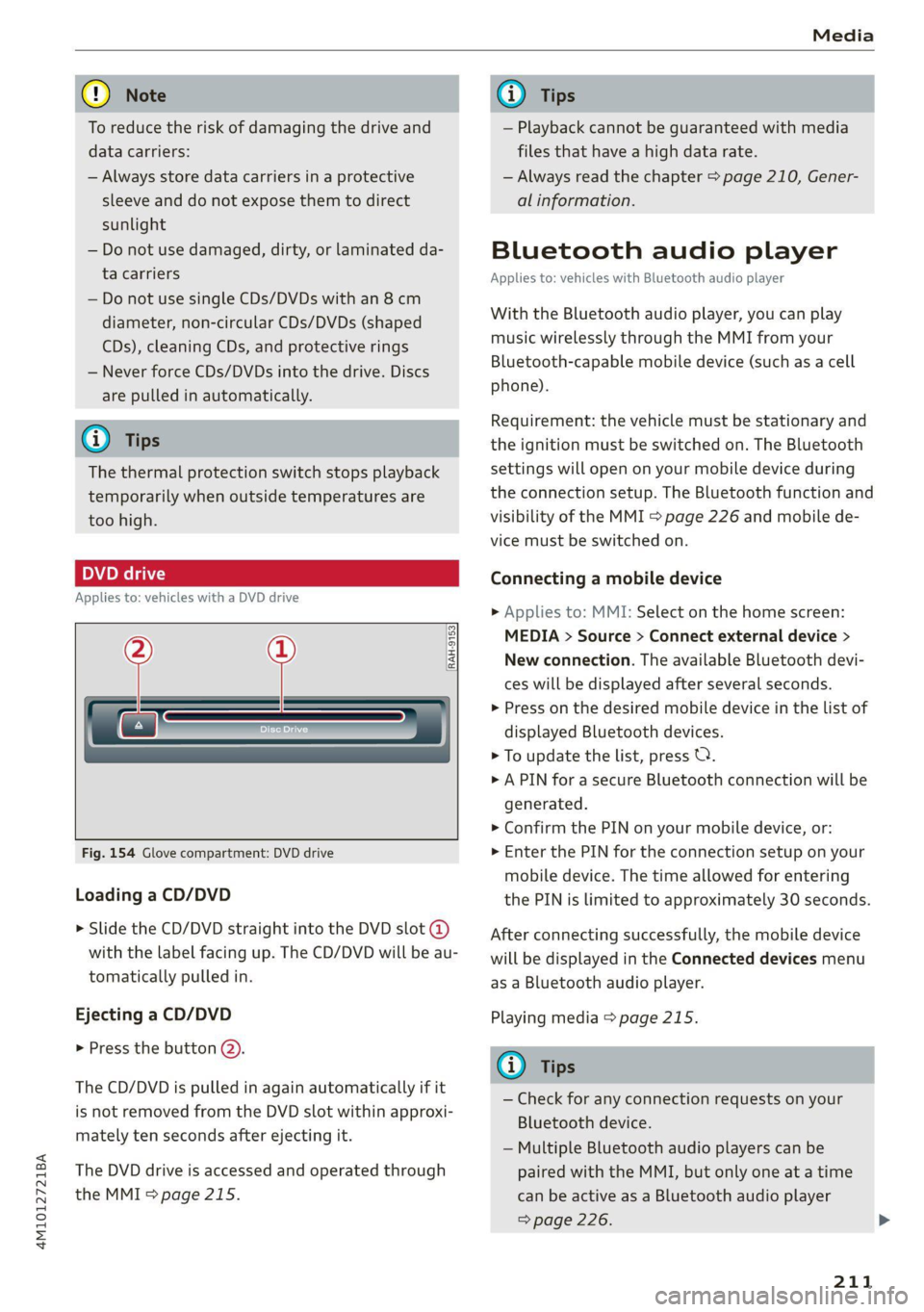
Fig. 154 Glove compartment: DVD drive
Loading a CD/DVD
> Slide the CD/DVD straight into the DVD slot @
with the label facing up. The CD/DVD will be au-
tomatically pulled in.
Ejecting a CD/DVD
> Press the button (2).
The CD/DVD is pulled in again automatically if it
is not removed from the DVD slot within approxi-
mately ten seconds after ejecting it.
The DVD drive is accessed and operated through
the MMI % page 215.
@) Tips
— Playback cannot be guaranteed with media
files that have a high data rate.
— Always read the chapter > page 210, Gener-
al information.
Bluetooth audio player
Applies to: vehicles with Bluetooth audio player
With the Bluetooth audio player, you can play
music wirelessly through the MMI from your
Bluetooth-capable mobile device (such as a cell
phone).
Requirement: the vehicle must be stationary and
the ignition must be switched on. The Bluetooth
settings will open on your mobile device during
the connection setup. The Bluetooth function and
visibility of the MMI > page 226 and mobile de-
vice must be switched on.
Connecting a mobile device
> Applies to: MMI: Select on the home screen:
MEDIA > Source > Connect external device >
New connection. The available Bluetooth devi-
ces will be displayed after several seconds.
> Press on the desired mobile device in the list of
displayed Bluetooth devices.
> To update the list, press OQ.
> A PIN for a secure Bluetooth connection will be
generated.
> Confirm the PIN on your mobile device, or:
> Enter the PIN for the connection setup on your
mobile device. The time allowed for entering
the PIN is limited to approximately 30 seconds.
After connecting successfully, the mobile device
will be displayed in the Connected devices menu
as a Bluetooth audio player.
Playing media > page 215.
(i) Tips
— Check for any connection requests on your
Bluetooth device.
— Multiple Bluetooth audio players can be
paired with the MMI, but only one at a time
can be active as a Bluetooth audio player
=> page 226.
211
Page 215 of 316
4M1012721BA
Media
Amazon Alexa
Applies to: vehicles with Amazon Alexa Integration
You can play various types of content from Ama-
zon Alexa through the MMI. The voice recognition
system is used to operate it.
Requirement: Amazon Alexa must be activated
=> page 26.
> Start Amazon Alexa using the voice recognition
system.
> Applies to: MMI: Select on the home screen:
MEDIA > Source > Amazon Alexa.
() Note
Read the information about Audi connect, and
be sure to note the connectivity costs section
=>page 178.
Multimedia connections
USB adapter cable
OL
a| =
oS
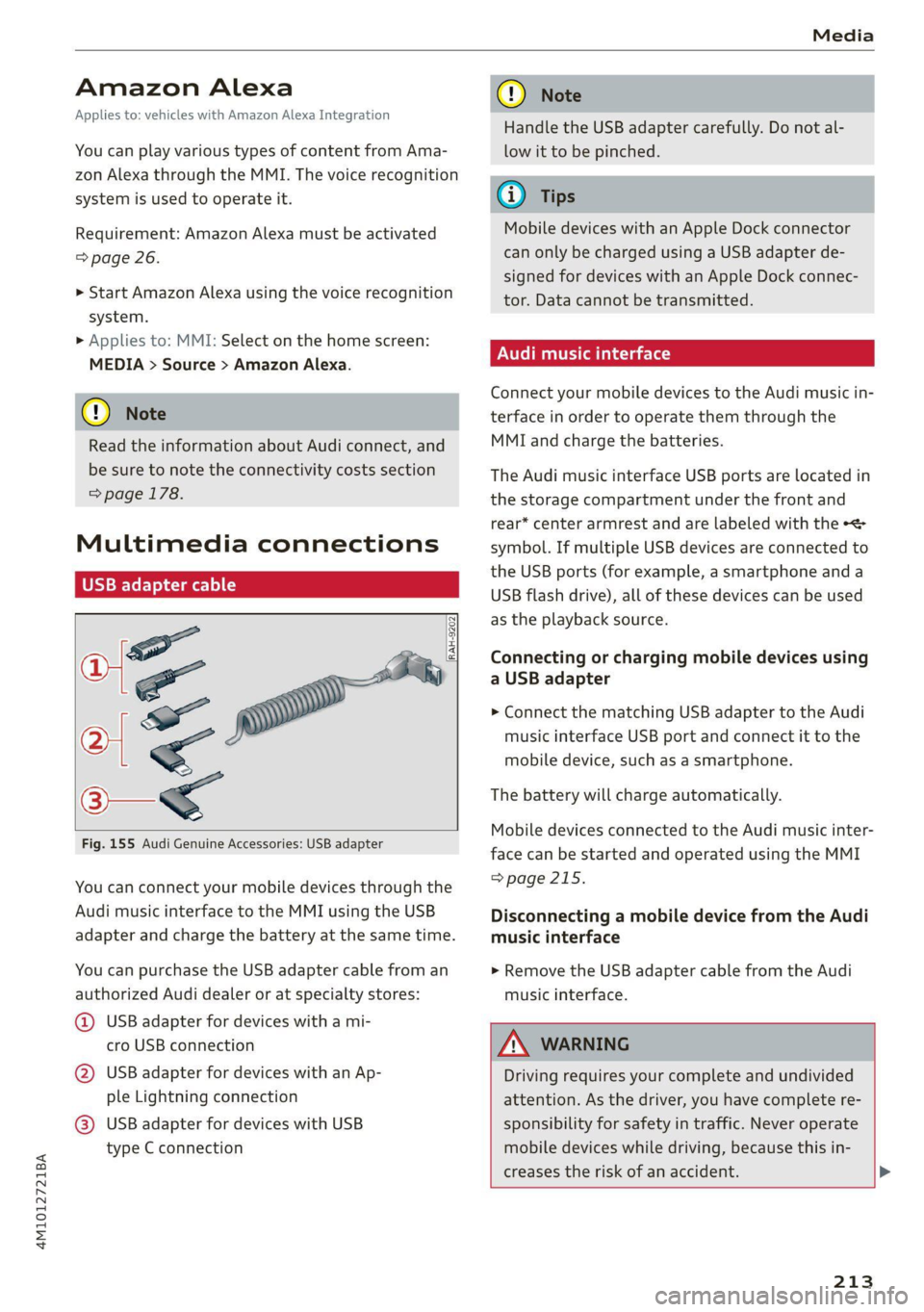
Fig. 155 Audi Genuine Accessories: USB adapter
[RAH-9202.
\
You can connect your mobile devices through the
Audi music interface to the MMI using the USB
adapter and charge the battery at the same time.
You can purchase the USB adapter cable from an
authorized Audi dealer or at specialty stores:
@ USB adapter for devices with a mi-
cro USB connection
@ USB adapter for devices with an Ap-
ple Lightning connection
@ USB adapter for devices with USB
type C connection
CG) Note
Handle the USB adapter carefully. Do not al-
low it to be pinched.
@) Tips
Mobile devices with an Apple Dock connector
can only be charged using a USB adapter de-
signed for devices with an Apple Dock connec-
tor. Data cannot be transmitted.
NUT Tas Tale)
Connect your mobile devices to the Audi music in-
terface in order to operate them through the
MMI and charge the batteries.
The Audi music interface USB ports are located in
the storage compartment under the front and
rear* center armrest and are labeled with the «<>
symbol. If multiple USB devices are connected to
the USB ports (for example, a smartphone and a
USB flash drive), all of these devices can be used
as the playback source.
Connecting or charging mobile devices using
a USB adapter
> Connect the matching USB adapter to the Audi
music interface USB port and connect it to the
mobile device, such as a smartphone.
The battery will charge automatically.
Mobile devices connected to the Audi music inter:
face can be started and operated using the MMI
=> page 215.
Disconnecting a mobile device from the Audi
music interface
> Remove the USB adapter cable from the Audi
music interface.
ZA WARNING
Driving requires your complete and undivided
attention. As the driver, you have complete re-
sponsibility for safety in traffic. Never operate
mobile devices while driving, because this in-
creases the risk of an accident. >
213
Page 216 of 316
— Pull the cable out of the Audi music inter-
face carefully so that the USB ports are not
damaged.
— Use a USB extension cable to connect devi-
— For more information about the Audi music
interface and supported devices, check the
Audi database for mobile devices at www.
audi.com/mp3 or contact an authorized
Audi dealer or authorized Audi Service Fa-
cility.
ces that have an integrated USB connector
(such as a USB stick) to reduce the risk of
damage to your USB device and the Audi
Rear Seat Entertainment
music interface. preparation
— Extremely high or low temperatures that ‘mall inate
can occur inside vehicles can damage mobile Applies to: vehicles with Rear Seat Entertainment preparation
devices and/or impair their performance.
Never leave mobile devices in the vehicle in
extremely high or low temperatures.
The Rear Seat Entertainment preparation in-
cludes cables and a mount for Audi entertain-
ment mobile device in the driver's and front pas-
@ Tips senger's seat backrests.
— Always follow the information found in The suitable Audi entertainment mobile package
=> page 81. can be obtained from the Audi Genuine Accesso-
— When you switch the ignition off, the USB ries program.
ports are still supplied with power until the
energy management intervenes. AN WARNING
— Do not use an additional adapter cable or If you are transporting a child in a rear-facing
USB extension cable to connect mobile devi- child safety seat in the rear of the vehicle, re-
ces to the Audi music interface that already move the Audi entertainment mobile device
have a cable or that must be connected with from the backrest on the front seat to reduce
a USB adapter cable (> page 213, fig. 155). the risk of injury.
Using an additional adapter or US extension
cable may impair functionality. @) Note
— Functionality is not guaranteed for mobile
devices that do not conform to the USB 2.0
specification.
— USB hubs are not supported.
— Video playback through the Audi music in-
terface is not supported on Apple and MTP G) Tips
devices (such as smartphones).
— iPod or iPhone malfunctions also affect the
operation of the MMI. Reset your mobile de-
vice in these situations.
— Audi recommends updating the iPod or
iPhone software to the latest version. Refer
to your mobile device owner's manual for
more information.
Only use devices that are approved for the
Rear Seat Entertainment preparation. Unap-
proved equipment can cause damage to the
vehicle electrical system.
— Always read the chapter > page 292.
— The Rear Seat Entertainment preparation is
not intended to charge other electronic de-
vices.
— The USB adapter on the Audi music inter-
face will support iPod touch or iPhone devi-
ces from the 5th generation or newer with
the lightning connector.
214
Page 217 of 316
![AUDI Q7 2020 Owner´s Manual 4M1012721BA
Media
Using the Audi entert
[We]
Applies to: vehicles with Rear Seat Entertainment preparation
and Audi entertainment mobile device
Fig. 156 Rear side of the driver’s/front](/img/6/40284/w960_40284-216.png "AUDI Q7 2020 Owner´s Manual 4M1012721BA
Media
Using the Audi entert
[We]
Applies to: vehicles with Rear Seat Entertainment preparation
and Audi entertainment mobile device
Fig. 156 Rear side of the driver’s/front")
4M1012721BA
Media
Using the Audi entert
[We]
Applies to: vehicles with Rear Seat Entertainment preparation
and Audi entertainment mobile device
Fig. 156 Rear side of the driver’s/front passenger's seat:
securing/removing the Audi entertainment mobile device
@
an
(RAH-8642
Fig. 157 Rear side of the driver’s/front passenger's seat:
tilting the Audi entertainment mobile device
Securing the Audi entertainment mobile
device
» Slide the holder for the Audi entertainment
mobile device back into the mounting slot until
you can feel and hear it lock into place. The cov-
er will open automatically when the device
locks into place.
It should no longer be possible to remove the
Audi entertainment mobile device @) without
pulling on the release mechanism () © fig. 156.
Tilting the Audi entertainment mobile device
> Hold the Audi entertainment mobile device in
both hands during the entire process.
> Tilt the Audi entertainment mobile device by
pressing on the area indicated (@ without using
strong force > fig. 157.
Removing the Audi entertainment mobile
device
> To release the Audi entertainment mobile de-
vice, pull the release mechanism on the rear
side of the device out evenly with both hands
@ ° fig. 156.
> Pull the Audi entertainment mobile device (2)
straight out of the mounting slot.
The cover on the mounting slot will close auto-
matically once you have removed the Audi enter-
tainment mobile device completely.
Playing media
The following sources can be selected depending
on the vehicle equipment:
— Amazon Alexa > page 213.
—SD card > page 210.
— USB © page 213.
— DVD drive > page 211.
— Connect external device: you can connect ex-
ternal devices via Bluetooth and use the Blue-
tooth audio player > page 211, or you can con-
nect
an external device directly to the Audi mu-
sic interface > page 213.
— Connect online media > page 212.
Accessing media
Playing media files using the MMI
> Applies to: MMI: Select on the home screen:
MEDIA > Source > a source. Depending on the
connected device or online media service*, the
symbol for a source may change. The device
name may be displayed (for example: my-
Phone).
> Select a track from the categories in the media
center > page 216.
Playing media files using the multifunction
steering wheel
Requirement: a media drive must contain media
files > page 215.
> Select the Radio/Media tab using the multi-
function steering wheel.
215
Page 219 of 316
4M1012721BA
Media
Compilations
You can control your playlists through the MMI.
> Select: a playlist > a song.
Composers
All available composers are displayed.
> Select: a composer > an album > a song.
Radio
>» Press on a radio station.
Audio books
You can control your audio books on the MMI.
>» Press on an audio book.
Podcasts
You can control your podcasts through the MMI.
> Select: a podcast > a podcast episode.
Genres
All available genres are displayed.
> Select: a genre > an artist > an album > a song.
Videos
All available video files are displayed.
> Press ona video.
Tracks
All available tracks are displayed.
tele mitardatelary
> Press ona track.
Albums
All available albums are displayed.
> Select: an album > a track.
CG) Note
Applies to: vehicles with Audi connect Infotainment
— Cloud services and category radio always re-
quire an Internet connection.
— Read the information about Audi connect,
and be sure to note the connectivity costs
section >@ in General information on
page 178.
(i) Tips
— Only the categories supported by the medi-
um are available.
— For safety reasons, the video image is only
displayed when the vehicle is stationary. On-
ly the sound from the video plays while driv-
ing.
—When synchronizing a portable device with
Cloud services, playlists may display incor-
rectly in the MMI. Use the media center in
the device.
— Applies to: iPod/iPhone: Note the informa-
tion about the Audi music interface and the
supported devices > page 213.
The Rock Band
Hymn
coed
ian
Reeoery
ans
reer)
nc
RAX-0098
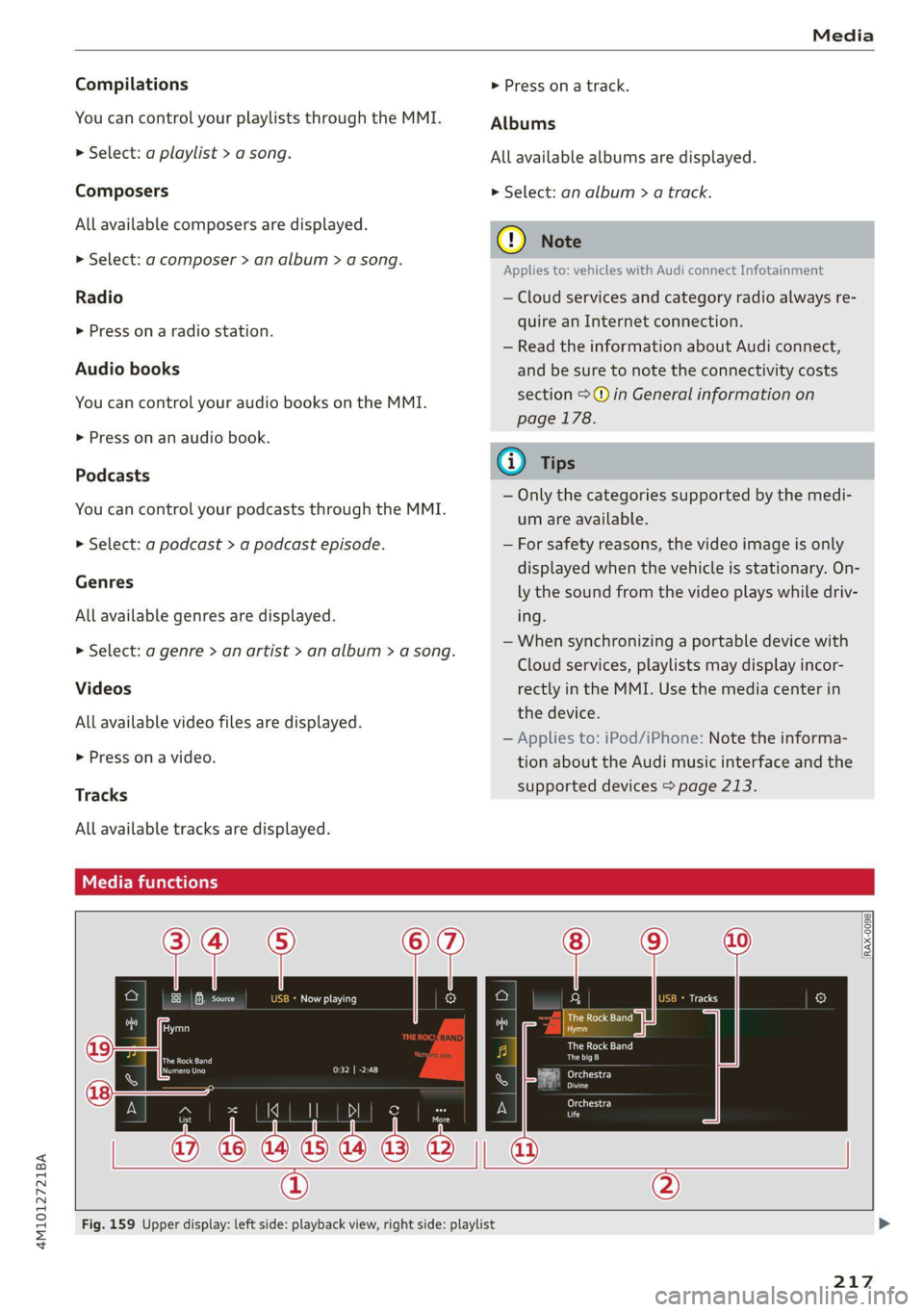
Fig. 159 Upper display: left side: playback view, right side: playlist
217