Garage AUDI Q7 2021 Owner´s Manual
[x] Cancel search | Manufacturer: AUDI, Model Year: 2021, Model line: Q7, Model: AUDI Q7 2021Pages: 332, PDF Size: 117.99 MB
Page 172 of 332
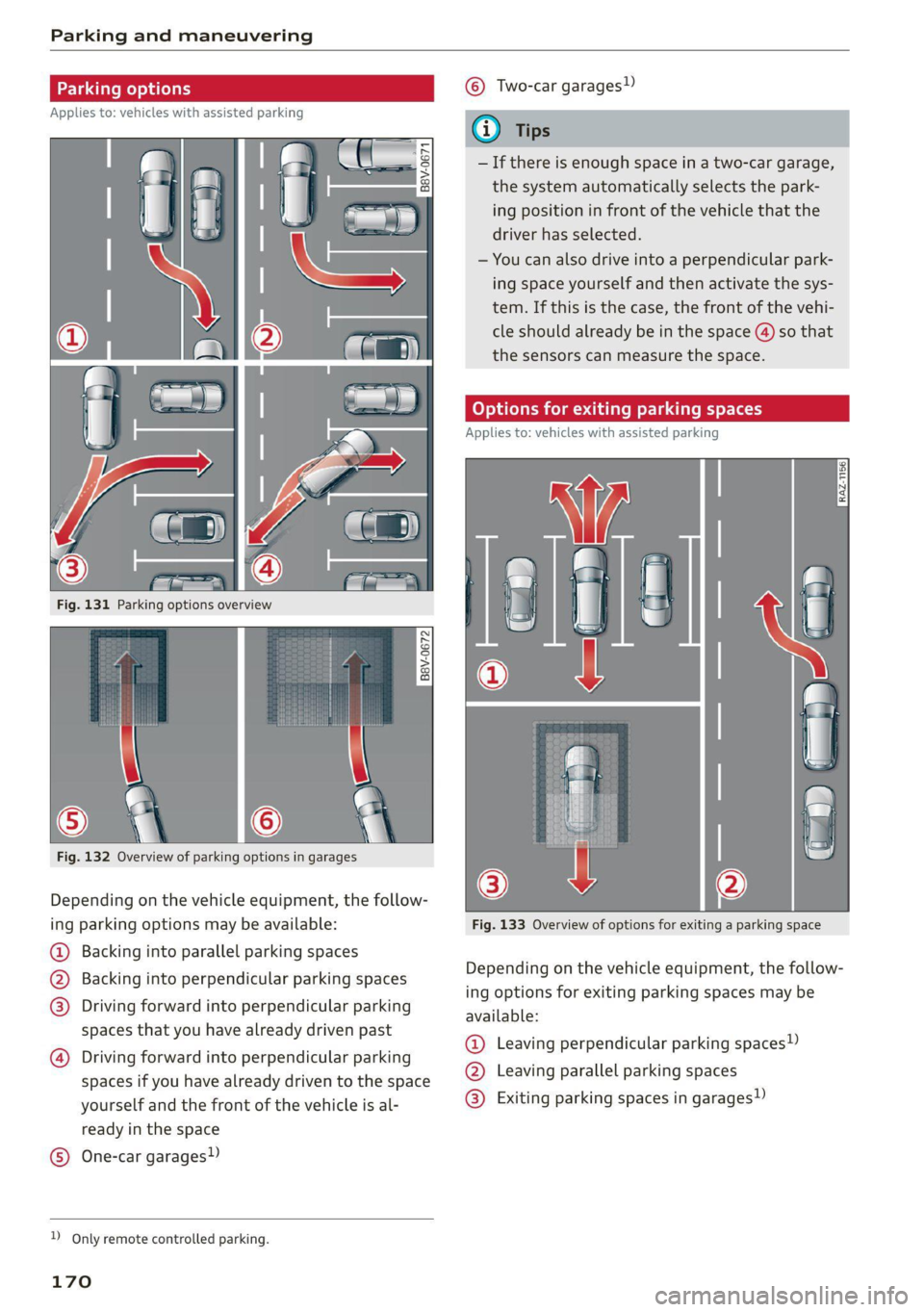
Parking and maneuvering
cE
Applies to: vehicles with assisted parking
Fig. 132 Overview of parking options in garages
Depending on the vehicle equipment, the follow-
ing parking options may be available:
@ Backing into parallel parking spaces
@ Backing into perpendicular parking spaces
@®) Driving forward into perpendicular parking
spaces that you have already driven past
@)
Driving forward into perpendicular parking
spaces if you have already driven to the space
yourself
and the front of the vehicle is al-
ready in the space
One-car garages) @
D_ Only remote controlled parking.
170
© Two-car garages)
— If there is enough space in a two-car garage,
the system automatically selects the park-
ing position in front of the vehicle that the
driver has selected.
— You can also drive into a perpendicular park-
ing space yourself and then activate the sys-
tem. If this is the case, the front of the vehi-
cle should already be in the space () so that
the sensors can measure the space.
go P is as
Applies to: vehicles with assisted parking
Fig. 133 Overview of options for exiting a parking space
Depending on the vehicle equipment, the follow-
ing options for exiting parking spaces may be
available:
@ Leaving perpendicular parking spaces»)
@ Leaving parallel parking spaces
® Exiting parking spaces in garages)
Page 177 of 332
4M1012721BC
Parking and maneuvering
— Park assist plus is an assist system. The driv-
er is still responsible for monitoring the ve-
hicle's surroundings and preventing colli-
sions when using the system.
— When using park assist plus to drive into or
out of a parking space, the steering wheel
turns quickly on its own. Reaching into the
steering wheel spokes while this is happen-
ing can result in injury.
@) Note
Resume steering immediately after the last
corrective movement and the takeover
prompt, so that the specified steering wheel
angle is not recentered.
G) Tips
You can reduce the speed selected by the ve-
hicle or stop the vehicle at any time by press-
ing the brake pedal.
Pausing park assist plus))2)
Applies to: vehicles with park assist plus
You can pause park assist plus at any time by re-
leasing the [>>P] button @ > page 173, fig. 135.
To resume the parking process, press and hold
the [>>P] button again.
Canceling automatically
Park assist plus is canceled automatically among
other things, if:
— If you switch off the system
— You take over steering or press the brake pedal,
— If the time limit is exceeded
— If an obstacle is detected
— The ESC intervenes
Resume control of the vehicle, end the parking
process manually, or:
You can resume the parking process in some sit-
uations. Press and hold the brake pedal and press
Pe.
)_ System availability may be limited depending on the mar-
ket.
2) In preparation at the time of printing.
ZA\ WARNING
Observe the safety precautions and note the
limits of the assist systems, sensors, and
cameras > page 123.
Messages
Applies to: vehicles with park assist plus
If the roll or il indicator light turns on, the
park assist is not available or was interrupted.
A message that indicates the cause and possible
solution may appear with some displays. The
weather conditions may be too poor or a sensor
may be covered. Clean the area in front of the
sensors > page 125 and try to turn the system on
again later.
If the malfunction remains, drive to an author-
ized Audi dealer or authorized Audi Service Facili-
ty immediately to have the malfunction correct-
ed.
Remote controlled
parking!)2)
General information
Applies to: vehicles with remote park assist plus
Remote controlled parking is part of park assist
plus/park assist plus with garage function. The
process for parking or exiting a parking space can
be controlled with a mobile device from outside
the vehicle. To do so, the driver must have both
the vehicle key and the mobile device with him or
her. While the driver controls the vehicle remote-
ly and monitors the vehicle's surroundings, the
system controls the steering, gear selection, ac-
celeration, braking, and locking the vehicle.
ZA\ WARNING
— Observe the safety precautions and note the
limits of the assist systems, sensors, and
cameras > page 123. >
175
Page 179 of 332
4M1012721BC
Parking and maneuvering
— Your mobile device should have a sufficient
battery charge level. If necessary, charge
the mobile device before starting to drive.
— Do not use the remote controlled parking
function with devices that are faulty or dam-
aged or whose function is impaired. Only
use the operating systems approved by the
mobile device manufacturer.
— When using remote controlled parking, al-
ways pay attention to the areas where your
vehicle can be accessed. Check that no one
can enter your vehicle and if the vehicle has
been locked after parking is completed.
Take the vehicle key with you when leaving
the vehicle.
Applies to: vehicles with remote park assist plus
The following steps must be completed before
using for the first time:
> Create a myAudi account by registering in the
myAudi app or at my.audi.com, depending on
your country.
> Add your vehicle to your myAudi account.
> Set the key user > page 31.
> Install the myAudi app on your mobile device
and log in with your access information.
Device compatibility
The mobile device will be checked at the start of
a parking procedure. If an incompatibility is de-
tected, it will be displayed in the myAudi app.
Audi does not recommend using the function if
an incompatibility is detected > A\.
A selection of supported Bluetooth devices can
be found in the database for tested mobile devi-
ces at www.audi.com/bluetooth. Compatibility
cannot be guaranteed for all types of mobile de-
vices. The availability depends on the following
factors, among others:
— Brand and build version of the mobile device
D_ System availability may be limited depending on the mar-
ket.
2) In preparation at the time of printing.
3) Applies to: vehicles with remote park assist plus with ga-
rage function
— Version of the mobile device operating system
— Software version of the app used
— Individual settings on the mobile device
Z\ WARNING
— Observe the safety precautions and note the
limits of the assist systems, sensors, and
cameras > page 123.
— There is a risk of an accident if an incompati-
ble mobile device is used. If there is a dis-
play indicating that functionality is restrict-
ed, the vehicle’s reaction speed may be im-
paired due to reduced transmission speed.
Parking options!)2)
Applies to: vehicles with remote park assist plus
Depending on the vehicle equipment, you may
have the following options when using remote
controlled parking:
Driving into parking spaces
— Parallel parking on the left or right side of the
street @ > page 170, fig. 131
— Driving forward or backing into perpendicular
parking spaces (2)/@) > page 170, fig. 131.
— Parking in one-car or two-car garages») ©)/@)
=> page 170, fig. 132
Exiting parking spaces
— Leaving perpendicular parking spaces @)
=> page 170, fig. 133.
— Exiting parallel parking spaces (2).
— Exiting one-car or two-car garages?) ®.
Z\ WARNING
Observe the safety precautions and note the
limits of the assist systems, sensors, and
cameras > page 123. >
177
Page 180 of 332
Parking and maneuvering
@) Tips
— When parking in garages, you can be
straight in front of the garage or at a slight
angle in front of the garage. You will have
the best results when you align and stop
your vehicle as straight as possible in front
of the garage.
— If there is enough space in a two-car garage,
the system automatically selects the park-
ing position in front of the vehicle that the
driver has selected.
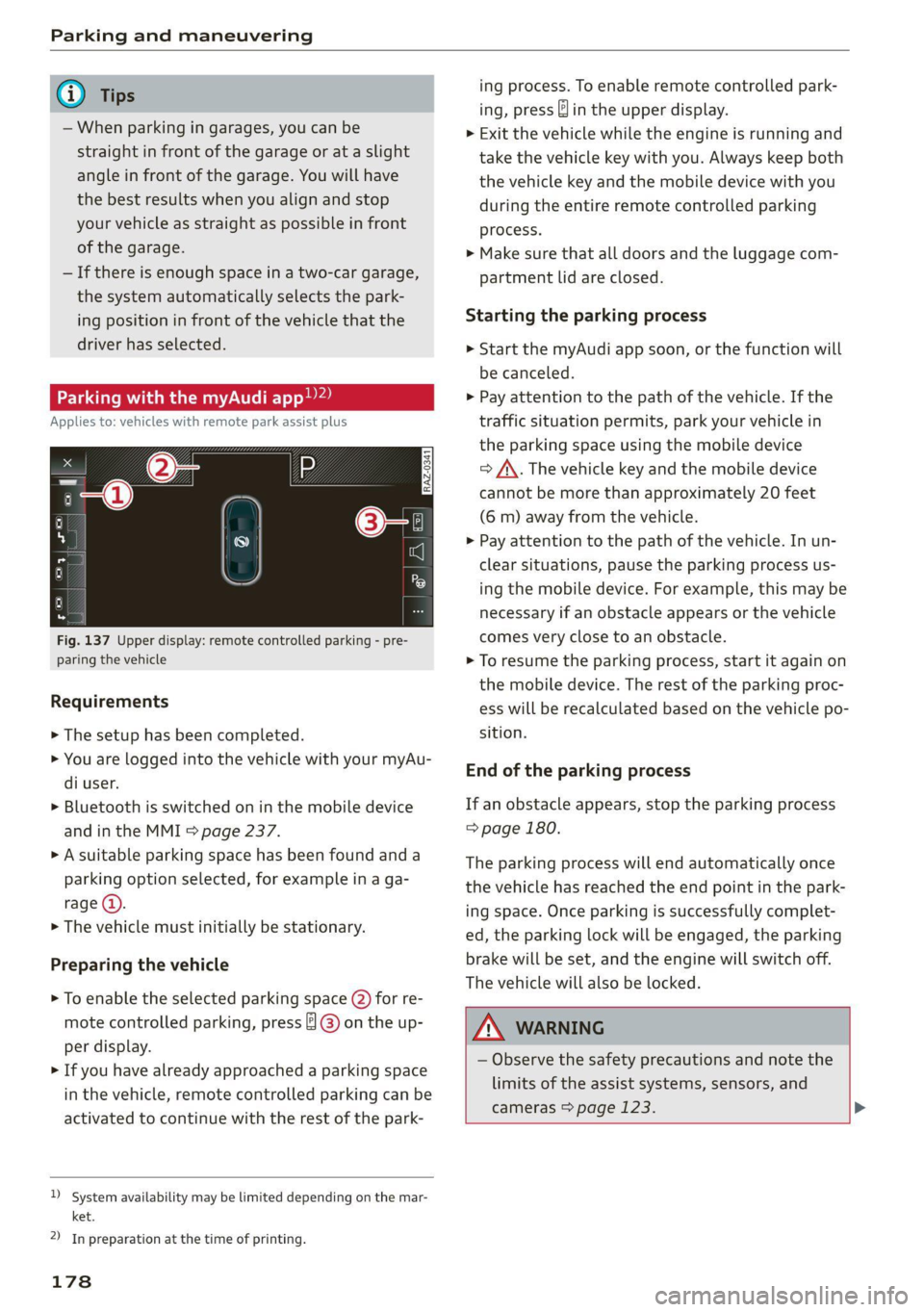
Parking with the myAud re
Applies to: vehicles with remote park assist plus
Fig. 137 Upper display: remote controlled parking - pre-
paring the vehicle
Requirements
> The setup has been completed.
> You are logged into the vehicle with your myAu-
di user.
> Bluetooth is switched on in the mobile device
and in the MMI > page 237.
> A suitable parking space has been found anda
parking option selected, for example in a ga-
rage (@).
> The vehicle must initially be stationary.
Preparing the vehicle
> To enable the selected parking space (2) for re-
mote controlled parking, press ] @) on the up-
per display.
> If you have already approached a parking space
in the vehicle, remote controlled parking can be
activated to continue with the rest of the park-
)_ system availability may be limited depending on the mar-
ket.
2) In preparation at the time of printing.
178
ing process. To enable remote controlled park-
ing, press J in the upper display.
> Exit the vehicle while the engine is running and
take the vehicle key with you. Always keep both
the vehicle key and the mobile device with you
during the entire remote controlled parking
process.
> Make sure that all doors and the luggage com-
partment lid are closed.
Starting the parking process
> Start the myAudi app soon, or the function will
be canceled.
> Pay attention to the path of the vehicle. If the
traffic situation permits, park your vehicle in
the parking space using the mobile device
> J\. The vehicle key and the mobile device
cannot be more than approximately 20 feet
(6 m) away from the vehicle.
> Pay attention to the path of the vehicle. In un-
clear situations, pause the parking process us-
ing the mobile device. For example, this may be
necessary if an obstacle appears or the vehicle
comes very close to an obstacle.
> To resume the parking process, start it again on
the mobile device. The rest of the parking proc-
ess will be recalculated based on the vehicle po-
sition.
End of the parking process
If an obstacle appears, stop the parking process
=> page 180.
The parking process will end automatically once
the vehicle has reached the end point in the park-
ing space. Once parking is successfully complet-
ed, the parking lock will be engaged, the parking
brake will be set, and the engine will switch off.
The vehicle will also be locked.
ZA WARNING
— Observe the safety precautions and note the
limits of the assist systems, sensors, and
cameras > page 123. >
Page 181 of 332
4M1012721BC
Parking and maneuvering
— Failing to pay careful attention to the vehi-
cle's surroundings increases the risk of an
accident. Park your vehicle with the mobile
device only if you are sure that no obstacle is
in the vehicle's path or under the vehicle,
and that no obstacles will move into the ve-
hicle's path.
G) Tips
— If the parking space is located in a garage, it
must be detected correctly by the vehicle.
When the parking space is detected com-
pletely, the edges of the space will be high-
lighted @).
— The parking process can only be started if
the vehicle key is located outside the vehicle
after the vehicle is prepared. Always keep
both the vehicle key and the mobile device
with you during the entire remote control-
led parking process.
— Remote controlled parking may be restrict-
ed or unavailable in situations such as the
following:
— If the ESC is restricted or switched off, or
if there is a malfunction.
— If there is another vehicle key inside the
vehicle or nearby.
— The system can incorrectly interpret parking
space barriers (such as parking curbs). Take
over the parking process > page 180 if the
vehicle is not completely inside the parking
space or if the vehicle tries to drive over the
parking space barrier.
Exiting parking spaces wit
app)
Applies to: vehicles with remote park assist plus
the myAudi
> Start the myAudi app.
> Start the engine in the myAudi app soon. When
starting, the vehicle key and mobile device
must not be more than approximately 10 feet
(3 m) away from the vehicle.
> Start the parking process with the mobile de-
vice soon. Otherwise, the function will be can-
celed.
> Pay attention to the path of the vehicle. If the
traffic situation permits, drive the vehicle out of
the parking space using the mobile device
> /\. The vehicle key and the mobile device
cannot be more than approximately 20 feet
(6 m) away from the vehicle during remote con-
trolled parking.
> The process for exiting a parking space ends
when the maximum distance is reached or if ad-
ditional corrective movements are no longer
necessary. Unlock and resume manual control
of the vehicle.
If an obstacle appears, stop the parking process
=> page 180.
ZA\ WARNING
— Observe the safety precautions and note the
limits of the assist systems, sensors, and
cameras > page 123.
— Failing to pay careful attention to the vehi-
cle's surroundings increases the risk of an
accident. Park your vehicle with the mobile
device only if you are sure that no obstacle is
in the vehicle's path or under the vehicle,
and that no obstacles will move into the ve-
hicle's path.
)_ System availability may be limited depending on the mar-
ket.
2) In preparation at the time of printing.
(i) Tips
You can interrupt the path set by the vehicle,
for example if it will drive very close to an ob-
stacle, by pausing the parking process using
the mobile device. Based on the position of
the vehicle, the system then calculates the
additional steering and driving directions for
maneuvering.
179
Page 303 of 332

4M1012721BC
Fuses and bulbs
Fuse panel (2) (red) Fuse panel @ (red)
6 | Trailer hitch positioning motor 8 | Climate control system compressor
7 |Trailer hitch release 9 |Auxiliary battery control module
8 | Left trailer hitch light 10 | High-voltage battery
9 | Trailer hitch socket 11 |Charging system
10 |Allroad sport differential 12 Auxiliary heating and air conditioning ra-
11 | Exhaust treatment dio receiver
12 | Driver’s side rear safety belt tensioner 14 | Thermal management, coolant pumps
15 | Thermomanagement control module
Fuse panel (3) (brown)
No. | Equipment Fuse panel (5) (brown)
Driver assistance systems control module No. | Equipment
2. | Audi phone box Front seat heating
3 Front seat electronics, right lumbar sup- 9 | Exhaust treatment
port 10 Rear seat heating, rear climate control sys-
4 |Side assist tem controls
5 | Rear Seat Entertainment preparation 12 | Exhaust treatment
6 |Tire pressure monitoring system
7 |Exterior antenna Bulbs
8 Auxiliary heating radio receiver, tank mod-
ule
: Audi recommends having a bulb replaced by an
10 ae and telematics authorized Audi dealer or doris Audi i
Facility in cases of doubt. These facilities have
ll Convenience access and start authoriza- the correct tools and replacement parts as well
tion control module as the required technical knowledge.
12 | Garage door opener LED lights*
13 | Rearview camera, peripheral cameras
14 Convenience system control module, right yourveniee is equipped with maintenance-free
tail light
L5 Passenger’s side rear safety belt tensioner
16
Front belt tensioner on front passenger's
side
Fuse panel @) (red)
No. Equipment
Active roll stabilization
High-voltage battery
High-voltage battery water pump
Power electronics control module
Brake booster
Voltage converter
NI
oO)
uw)
BR)
Wl)
Ni
eR
Engine start
ights and tail lights. However, if a light bulb
needs to be replaced, please contact an author-
ized Audi dealer or authorized Audi Service Facili-
ty.
AX
If you still would like to try replacing the
bulbs in your vehicle yourself, read the warn-
ings regarding working in the engine compart-
ment > A\ in General information on
page 245.
WARNING
© Note
Make sure the covers are fitted correctly on
the headlights lights so that no water will
301
>
Page 321 of 332
4M1012721BC
Index
F
Factory default settings
Multi Media Interface................. 237
Fast mOUté sacs = & wanes = & Sees = 4 ew Fa 203
Favorites... 0... eee eee eee ee 21
Bluetooth = « sec : s gows es ees e Sewn ee we 239
Navigation. . « ccmes s + sximene «0 onmem = 6 meen « 204
Telephone .......... 0... e eee eee eee 188
Federal Communications Commission (FCC) . 311
File formats (media drives)...........005 231
FIXGURE'SC bisa 5 + sso a o cence 3 x canaems ov aunewas oo 91
Fog QWINKOWS) ace ee wesw wo armans a ¥ semen 6 ¥ coe 95
Folding the backrest down/up............. 68
Folding the rearseats.............-.000. 90
Footwell temperature................-4. 96
For the sake of the environment
Disposing of engine oil................ 250
Fueling... 02... cee cece eee eee 242
Leaks... 2... eee eee eee eee 246
Fragrance.......... 0.0... eee eee 95,96
Free text search
M@dia:: : seme ¢ 3 azn x 5 eG £ Eee TE 230
RadiOtes. x = meses oe acses vo nome ooo eH 216
also refer to Intelligent search.......... 203
Freeze protection
Coolant...... 2... eee eee eee eee 251
Windshield washer system............. 257
Fréqueticy batids « s sccs = s sees ss wees se ea 214
also refer to Frequency band........... 214
Front center arinrest « score « & mea 4s news a vo 66
Front collision warning
refer to Audi pre sense front............ 151
Front passenger’s seat adjustment
Front... 0.2.0... eee eee eee 66
ROaf seas ¢ s seas ¢ o ees Fe ees Ys ees 66
Front wiper blades
Changing s = = eees = 2 mews = stews e Sees coe 59
ClEATIIAG » x. seasios + swiesss ae a sumaes wo omoaas i 6 eens 59
ee ee 241
Additives ...... 0.00... cee cece eee 242
CUMFENt CONSUMPTION = csux « = wows «2 ems se 15
Fuel:display esses. + sue so enue ov eee ¥ os 12
Fuel tank capacity.................00-. 314
Gasoline : acs + ¢ ees +o aaa + 2 sates Fe ees 241
Reducing fuel consumption............ 104
Fueling
Fuel filler door..... 0... . cece eee eee ee 242
Fuel filler door emergency release....... 244
Fueltankcapacity'. « 5 soca es cence ao cman « 314
Functions on demand.................. 196
Functions that require a license.......... 196
also refer to Functions on demand....... 196
G
Garage door opener............--0e ee eee 47
GarMenthOOks eves sv severe oo snes o a wes oo 2 87
GaSOlIMG coy « x were g 2 emp = 2 eee 5 ¢ see & 241
Additives ...... 0... cece eee eee eee 242
Gasoline mixture.................0005 241
GAWR
refer to Gross Axle Weight Rating (GAWR) . 314
Gears... eee 100
Glossary of tire and loading terminology... 262
Glove compartment..............000 eee 87
Gross Axle Weight Rating (GAWR)........ 314
Gross Vehicle Weight Rating (GVWR)...... 314
GVWR
refer to Gross Vehicle Weight
Rating (GVWR) « sce se mee = 4 metas & 2 ee 314
H
Handsfree................-..0.0 00s ee 184
Hands Free Profile..................... 184
Head-up display
ACiUStiNGizes: 5 = :zexes 5 « eee ss ween § v eee 26
Adjusting the brightness................ 55
Operating...................0.00.0000. 26
Headlight range control................0. 50
Headlights
Cleaning ....... 6.06 281
Headlight range control................ 50
Washer'systems « ¢ wesa es mera. oemre + eas 58
Washer system (filling washer fluid) .... . 257
Head restraints
Adjusting... 2.0.02... . 0. c eee eee eee 70
Removing and installing............0065 70
Heated rear window............-. 000s eee 95
Heated steering wheel................0.. 96
Heating....... 0.0.0... eee eee eee eee 93
319
Page 322 of 332
Index
HFP
refer to Hands Free Profile............. 183
High beams
High beam assistant................... 51
Highway lights ..... 0.0... sce e eee eee 50
Hill descent assist..............02-000. 111
Hill descent control.............0 0000 ee 110
Hill hold assist... 0.2.0.0... 00.0022 eae 100
Home
refer to Home address............0008 208
Home address.............00 2.00 ee eee 208
HomeLink
refer to Garage door opener............. 47
Home screen... .... cece eee eee ee eee 18
HOM... eee eee 6
Hotspot
refer to Wi-Fi...........0. 00sec eee eee 197
I
Ignition
Switching on and off...............0-.- 98
Imbalance (wheels) ...............--05. 268
Immobilizer
refer to Electronic immobilizer........... 38
Inclinometérs < = sees =» wees sg wees sy eee 110
Indicator lights....... 0.0... eee eee eee 7
Inspection interval...............20-00. 257
Instrument cluster..............--000005 12
Adjusting the layout................00. 13
Cleaning ’s 2 a sina 5 6 wens oo were 2 6 wonem @ ere 283
Engine code.............-. eee eee eee 239
Pailit@s < anaes = eae & 3 Baws § & Rae 2 FS 12
On-board computer..............2-.00. 15
Operating ........ cece eee eee ee eee 13
Service interval display................ 257
Software information..............004 239
Switching
tabs.................000000. 13
Switching the view.................0005 13
Vehicle functions « cs. se cere sc cee ee cae 15
Version information.................. 239
Instrument illumination................. 55
Integrated assistance................0-. 19
Integrated Toll Module................. 134
Intelligent search
Navigationicn « = ses 2 x mews = wanes a 2 cae a 203
Interior lighting « « ses 2s cess ewes eee 54,55
320
Interior MONItOriING’s « s ccs so wou 2 ¥ vesvee o 37:
Intermittent mode (windshield wipers) ..... 58
International travel...............20005 198
Internet
PEPE TOXCONNCCE is. = veseer ee seem ev ateeee eos 194
Internet radio
refer to Online radio.............. 218, 219
Intersection:assistant ccc. 26 case so mse © 158
TOMZOP oe. oa cxanwes < w omawees vv ema a x ee wo coe 95
iPhone
refer to Audi music interface........... 224
J
JUMAPESEAMERNG) revise © sreeees wo © euersay wo © vette «8 Boe 292
K
Rey's « cwensne oo ccenaua a 0 sean @ arene we sro a 4 34, 38
Convenience opening and closing......... 46
Key'replacemenit:.: ss sees se eean ee eee es 38
Mechanical-key’s wssenc a « case ao saw ve ee ¥ 38
Not recognized ........ cece cee eee 99
PANIG Button » ses < = sacs ¢ = seen ¢ = sees ye 38
Replacing the battery.................. 40
Unlocking and locking................-- 39
VEHICLE COdG « secs s ¢ seme = 2 ee yo ee Fe 38
Key User... eee eee 32
Kick-down .... 2... eee eee eee 102
L
Lane assist
refer to Lane departure warning......... 149
refer to Lane guidance..............0. 149
Lane departure warning..............05- 149
Cleaning the camera area.............. 281
Lame Quidaneeiens 5 « cscsce oo ae vw accuse ¥ oem 142
LapitlIMe rs. « & soesons « awesese + sameness cream 2 Oo 131
Laser lightingiss + + sss 6s eeu sy pew ae ees 52
FaSer Scanners « « aay a eegu 4 x ees x ROE 124
Gleaming wor = 2 ween o anne 2 peewee oe ween oo x 282
LATCH (securing child safety seats)......... 82
Leather care and cleaning............... 283
Legal information
License subscriptions................. 239
Software information................. 239
Page 326 of 332
Index
Remote control
Garage door opener........... eee eens 47
Remote control key............02-000005 38
Convenience opening and closing......... 46
Key replacement...............-.00005 38
a 40
PANIC function ..............000 0000 ee 38
Replacingthe battery cos « « warns x ¢ saves @ es 40
Unlocking and locking................0- 39
also refer to Vehicle key............000. 38
Remote controlled parking.............. 175
Remote park assist plus
refer to Remote controlled parking...... 175
Remote park assist plus with garage function
refer to Remote controlled parking...... 175
Removing the caps (wheel bolts)......... 289
REDOINS sav ¢ mavas & § Sein se BeOS «Saree Gs 308
Replacement key............00 0c e eee 38
Replacement partS...........-0 eee eee 310
Replacing bulbs................0000005 301
Replacing fusesi. . « asic. «sme & «i mere « 5 en 297
Reporting
Safety Defects................ 310
RIMS%s con oo eases oe eee ot eee 2 eee 274
Cleaning... . eee ee eee eee eee ee 282
ROAGiGANRGIER sesso + ences wo nee wo emo & oe HO 114
ROU «owns oe ewes 6s ene oe mae oo ee 99
Rolling
ability
Electromechanical parking brake........ 108
Transmission idle..................00. 101
Roof
refer to Panoramic glass roof............ 46
ROOFIOS « = esis ¢ o cen ¢ Hates & & Hee & Eee 314
Roof rack... eee eee eee 92
also refer to Roof rack. .........-eeeeeee 92
Route guidance
SEOPPING swvsas ov seeauee 6 v seus wo sxaweve vo sume 206
also refer to Navigation............... 202
Run-flat (tires)... eee eee 278
Running direction (tires)................ 291
S
Safety beltSiesces 2 x aces vw cece < wens wv ene & 71
Cleaning............. 6.6 c ee eee eee eee 283
LOCKINGiwes = s cous = = oes 2 2 eee go eee ge 83
Securing child safety seats.............. 83
Satellite map « sess = mea 2 ewes 2 wasn © 209
324
Saving fuel
Energy consumers ...... 0.0020 s cece eee 16
REGUPERAtION s + nase + meee x mew eG ReveD 8 16
Screen
refer to Touch display................-. 17
Screwdriver v. + 2 sss ¢ ¢ sees oe eas ee pee = 286
Search function
refer to Free text search............... 230
Seat Heating s scsia ow sscnve v warm ov seme a a ome 95
Seats
Adjusting the front seats............... 64
Adjusting the rear seats................ 66
GCleSniNG ie « ¢ same x e aes x oe a a eR EEE 283
FOUGING secs «a eserens wo wenecs «a anew WH reese 90
Front passenger’s seat adjustment....... 66
Head restraints...............222-000- 69
Massage function wives. eves ee een ev ees 64
Memory function.............0 eee eee 75
Resetting the position.................. 66
Storing aseat profile................... 75
Seat ventilation acs « ¢ same so eaves yo saws es 95
Securing the vehicles « css < pass ee news se xe 99
Selecting a source (media).............. 226
Selector lever...............00 00 cece 100
Sensors
Coverage areas « esis ie ves se eden cee s 124
WOCALIONS esas 3 + snovsus 2 + suwsaee 0 o execute 2 a comet 125
Service interval display................. 257
Setting measurement units.............. 236
S@ttiniGSias = « meay < & wee « eee 2 gamR se BE 236
Announcements and tones............. 236
Bluetooth. ......... 0... eee eee eee 237
Dat@ dnd time@ys: : 2 ewes 2 2 sees ee wenn ss 236
LANQUAGE & sicess os & smacess 9 & ieawens & & rae v & aes 236
Measurement units................... 236
Medidioz ¢ 5 smun § 5 cea & HameG & i RaeE ga eR 231
NavigatiOtticess + wes + savin so amas « % comem 212
Radio... eee cece eee eee 220
SOONG sassx z < saws ¢ 2 Bae FB Ree eB RRA GS 236
SYSt@Ms <2 wees 2 2 acne 2 2 arene yo ee 2 8 oe 236
TIME ZONE... ee eee 236
Wi-Fi hotspot..............02-.00000- 197
Setting the language................... 236
Setting the time...............-.00000- 236
Shift paddles........... 0. eee eee 102
Shipseanrier's + scaeve s wees © woven a ares o o ane 114
SHOPlice: so nessa + nese 2 eae 2 HaMeG ae BRIN 196