lights AUDI Q7 2021 Owner´s Manual
[x] Cancel search | Manufacturer: AUDI, Model Year: 2021, Model line: Q7, Model: AUDI Q7 2021Pages: 332, PDF Size: 117.99 MB
Page 280 of 332

Wheels
only monitors the tire pressure you have stored.
Refer to the tire pressure label for the recom-
mended tire pressure for your vehicle
=> page 269, fig. 177.
Tire tread circumference and vibration character-
istics can change and cause a tire pressure warn-
ing if:
— The tire pressure in one or more tires is too low
— The tires have structural damage
— The tire was replaced or the tire pressure was
changed and it was not stored > page 278
— Tires that are only partially used are replaced
with new tires
Indicator lights
If the @ indicator light turns on, there is a loss
of pressure in at least one tire .> A\ Check the
tires and replace or repair if necessary. Check and
correct the pressures of all four tires and store
the pressure again > page 278.
ia Tire pressure: malfunction! See owner's
manual
iff appears after switching the ignition on or
while driving and the @ indicator light in the in-
strument cluster blinks for approximately one
minute and then stays on, there is system mal-
function. Try to store the correct tire pressures
= page 278. In some cases, you must drive for
several minutes after storing the pressures until
the indicator light turns off. If the indicator light
does turn off or turns on again after a short peri-
od of time, drive to an authorized Audi dealer or
authorized Audi Service Facility immediately to
have the malfunction corrected.
Z\ WARNING
— If the tire pressure indicator appears in the
display, reduce your speed immediately and
avoid any hard steering or braking maneu-
vers. Stop as soon as possible and check the
tires and their pressure.
— The driver is responsible for maintaining the
correct tire pressure. You must check the
tire pressure regularly.
— Under certain conditions (such as a sporty
driving style, winter conditions, or unpaved
278
roads), the tire pressure monitoring system
indicator may be delayed.
@) Tips
—The tire pressure monitoring system can al-
so stop working when there is an ESC mal-
function.
— Using snow chains may result in a system
malfunction.
—The tire pressure monitoring system in your
Audi was calibrated with “Audi Original
Tires” > page 266. Audi recommends using
these tires.
Storing tire pressures
Applies to: vehicles with Tire Pressure Monitoring System in-
dicator
If the tire pressure changes or a tire is replaced,
it must be confirmed in the MMI.
> Before storing the tire pressures, make sure the
tire pressures in all four tires meet the speci-
fied values and are adapted to the load
=> page 269.
» Switch the ignition on.
> Applies to MMI: Select on the home screen: VE-
HICLE > Settings & Service > Tire pressure
monitoring > Store tire pressure > Yes, store
now.
G) Tips
Do not store the tire pressures if snow chains
are installed.
Run-flat tires
Applies to: vehicles with run-flat tires
Run-flat tires can allow you to remain driving
when there is a loss of pressure.
Run-flat tires have reinforced sidewalls that pro-
tect
the tire if there is a loss of pressure.
If the tire pressure monitoring system indicates a
loss of pressure in one or several tires, you can
continue driving on run-flat tires for at least
20 mi (30 km). Drive to an authorized Audi dealer
or authorized Audi Service Facility immediately to
have the problem corrected.
Page 283 of 332

4M1012721BC
Care and cleaning
A WARNING height and width of the inside of the car
wash.
—To reduce the risk of accidents, only wash
the vehicle when the ignition is off and fol-
low the instructions from the car wash oper-
ator.
—To reduce the risk of paint damage, do not
wash the vehicle in direct sunlight.
—To reduce the risk of damage, do not wash
decorative decals* with a pressure washer.
—To reduce the risk of damage to the surface,
do not use insect removing sponges, kitchen
sponges, or similar items.
— When washing matte finish painted vehicle
components:
—To reduce the risk of cuts, protect yourself
from sharp metal components when wash-
ing the underbody or the inside of the wheel
housings.
— After washing the vehicle, the braking effect
may be delayed due to moisture on the
brake rotors or ice in the winter. This in-
creases the risk of an accident. The brakes
must be dried with a few careful brake appli-
cations.
— To reduce the risk of damage to the sur-
face, do not use polishing agents or hard
wax.
— Never use protective wax. It can destroy
the matte finish effect.
@) Note — Do not place any stickers or magnetic
signs on vehicle components painted with
matte finish paint. The paint could be
damaged when the stickers or magnets
are removed.
— If you wash the vehicle in an automatic car
wash, you must fold the exterior mirrors in
to reduce the risk of damage to the mirrors.
Power folding exterior mirrors* must only
be folded in and out using the power folding (@) For the sake of the environment
function.
—To reduce the risk of damage to the rims
and tires, compare the width between the
wheels on your vehicle with the distance be-
tween the guide rails in the car wash.
Only wash the vehicle in facilities specially de-
signed for that purpose. This will reduce the
risk of dirty water contaminated with oil from
entering the sewer system.
—To reduce the risk of damage, compare the
height and width of your vehicle with the
Cleaning and care information
When cleaning and caring for individual vehicle are not listed, consult an authorized Audi dealer
components, refer to the following tables. The or authorized Audi Service Facility. Also follow
information contained there is simply recommen- __ the information found in > A.
dations. For questions or for components that
Exterior cleaning
Component Situation Solution
Windshield wiper | Deposits Soft cloth with glass cleaner, > page 60
blades
Headlights/ Deposits Soft sponge with a mild soap solution®
tail lights
Sensors/ Deposits Sensors: soft cloth with a solvent-free cleaning product
camera lenses Camera lenses: soft cloth with an alcohol-free cleaning sol-
ution
Snow/ice Hand brush/solvent-free de-icing spray >
281
Page 285 of 332
4M1012721BC
Care and cleaning
Water-based deposits
such as coffee, tea,
blood, etc.
Component Situation Solution
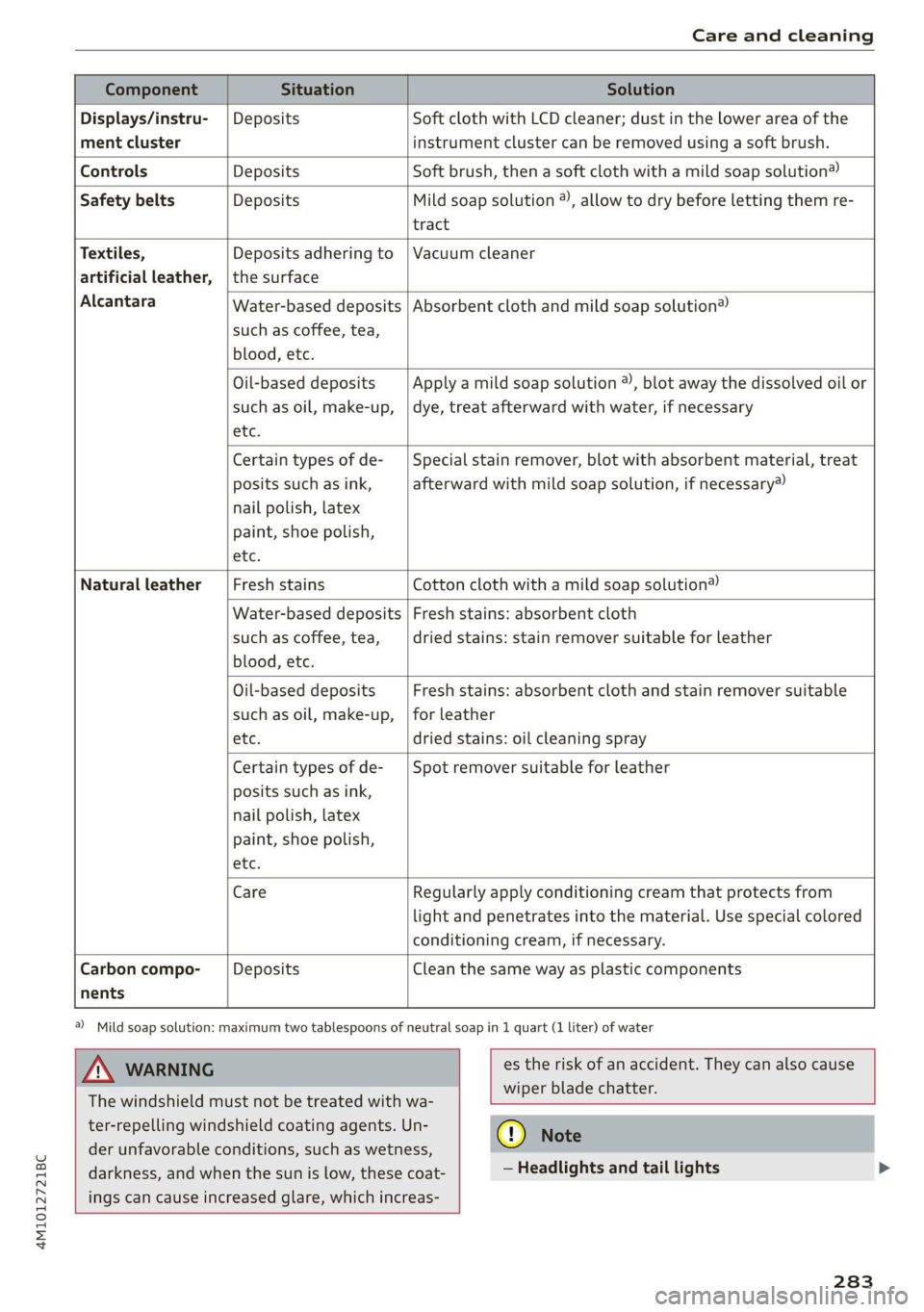
Displays/instru- | Deposits Soft cloth with LCD cleaner; dust in the lower area of the
ment cluster instrument cluster can be removed using a soft brush.
Controls Deposits Soft brush, then a soft cloth with a mild soap solution®
Safety belts Deposits Mild soap solution ®), allow to dry before letting them re-
tract
Textiles, Deposits adhering to | Vacuum cleaner
artificial leather, |the surface
Alcantara Absorbent cloth and mild soap solution®
Oil-based deposits
such as oil, make-up,
etc.
Apply a mild soap solution ®), blot away the dissolved oil or
dye, treat afterward with water, if necessary
Certain types of de-
posits such as ink,
nail polish, latex
paint, shoe polish,
etc.
Special stain remover, blot with absorbent material, treat
afterward with mild soap solution, if necessary)
Natural leather Fresh stains Cotton cloth with a mild soap solution®
Water-based deposits
such as coffee, tea,
blood, etc.
Fresh stains: absorbent cloth
dried stains: stain remover suitable for leather
Oil-based deposits
such as oil, make-up,
etc.
Fresh stains: absorbent cloth and stain remover suitable
for leather
dried stains: oil cleaning spray
Certain types of de-
posits such as ink,
nail polish, latex
paint, shoe polish,
etc.
Spot remover suitable for leather
nents
Care Regularly apply conditioning cream that protects from
light and penetrates into the material. Use special colored
conditioning cream, if necessary.
Carbon compo- Deposits Clean the same way as plastic components
@) Mild soap solution: maximum two tablespoons of neutral soap in 1 quart (1 liter) of water
Z\ WARNING
The windshield must not be treated with wa-
ter-repelling windshield coating agents. Un-
der
unfavorable conditions, such as wetness,
darkness, and when the sun is low, these coat-
ings can cause increased glare, which increas-
es the risk of an accident. They can also cause
wiper blade chatter.
() Note
— Headlights and tail lights
283
Page 286 of 332

Care and cleaning
— Never clean the headlights or tail lights
with a dry cloth or sponge because the
lights could be damaged.
— Do not use any cleaning products that con-
tain alcohol, because they could cause
cracks to form.
— Wheels
— Never use any paint polish or other abra-
sive materials.
— Damage to the protective layer on the
rims, such as stone chips or scratches,
must be repaired immediately.
— Camera lenses
— Never use warm or hot water to remove
snow or ice from the camera lens. This
could cause the lens to crack.
— Never use abrasive cleaning materials or
alcohol to clean the camera lens. This
could cause scratches and cracks.
— Laser scanner
— Never use abrasive cleaning materials to
clean the laser scanner. This could cause
scratches and cracks.
— Door windows
— Remove snow and ice on windows and ex-
terior mirrors with a plastic scraper. To re-
duce the risk of scratches, move the scra-
per only in one direction and not back and
forth.
— Never remove snow or ice from door win-
dows and mirrors using warm or hot water
because this could cause cracks to form.
—To reduce the risk of damage to the rear
window defogger, do not apply any stick-
ers on the heating wires on the inside of
the window.
— Decorative parts and trim
— Never use chrome care or cleaning prod-
ucts.
— Paint
— To reduce the risk of scratches, the vehicle
must be free of dirt and dust before pol-
ishing or waxing.
—To prevent paint damage, do not polish or
wax the vehicle in direct sunlight.
—To reduce the risk of paint damage, do not
polish away rust spots.
284
— Remove cosmetics and sunscreen immedi-
ately because they could damage the
paint.
— Decorative decals
—To reduce the risk of damage, do not use
any rough powder or abrasive cleaning
products.
— To reduce the risk of damage, do not pol-
ish decorative decals that have a matte or
printed finish.
— Due to the risk of damage, do not use an
ice scraper to remove snow and ice on win-
dows with decorative decals on them.
— Displays and instrument cluster
— Make sure that the display and instrument
cluster are switched off and have cooled
down before cleaning. To switch off the
upper and lower display, select on the
MMI home screen: SETTINGS > Display &
brightness > MMI > Screen cleaning.
— Displays, the instrument cluster, and the
trim surrounding it must not be cleaned
with dry cleaning methods because they
could become scratched.
— Make sure no fluids enter the spaces be-
tween the instrument cluster and the
trim, because that could cause damage.
— Controls
— Make sure that no fluids enter the con-
trols, because this could cause damage.
— Safety belts
— Do not remove the safety belts to clean
them.
— Never clean safety belts or their compo-
nents with chemicals or with corrosive flu-
ids or solvents and never allow sharp ob-
jects to come into contact with the safety
belts. This could cause damage to the belt
webbing.
—If there is damage to the webbing, the
connections, the retractors, or the buck-
les, have them replaced by an authorized
Audi dealer or authorized Audi Service Fa-
cility.
— Textiles, artificial leather, and Alcantara
— Never treat artificial leather or Alcantara
with leather care products, solvents, floor >
Page 295 of 332
4M1012721BC
Emergency assistance
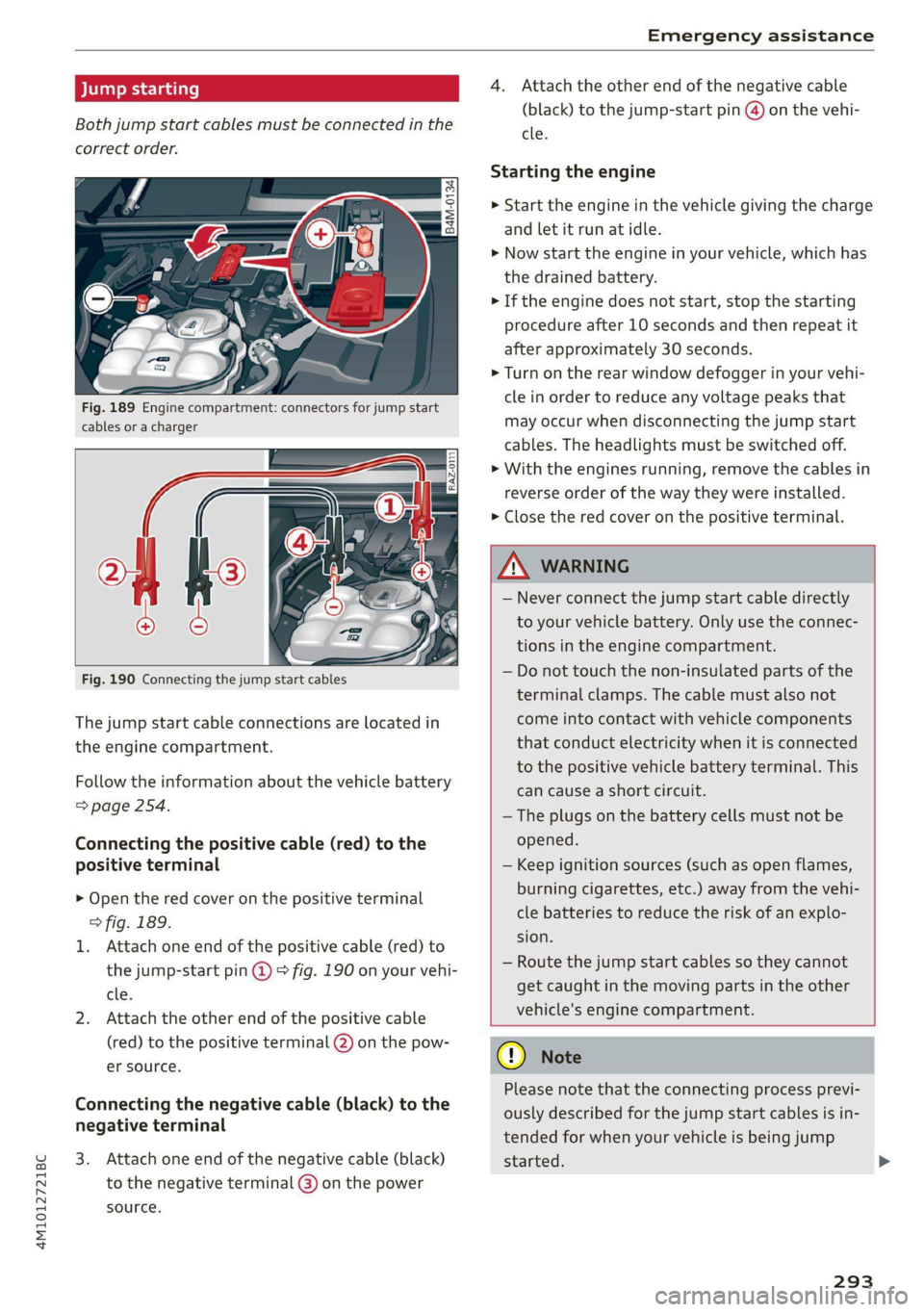
Both jump start cables must be connected in the
correct order.
Fig. 189 Engine compartment: connectors for jump start
cables or a charger
Fig. 190 Connecting the jump start cables
The jump start cable connections are located in
the engine compartment.
Follow the information about the vehicle battery
=> page 254.
Connecting the positive cable (red) to the
positive terminal
> Open the red cover on the positive terminal
> fig. 189.
1. Attach one end of the positive cable (red) to
the jump-start pin @ 9° fig. 190 on your vehi-
cle.
2. Attach the other end of the positive cable
(red) to the positive terminal @ on the pow-
er source.
Connecting the negative cable (black) to the
negative terminal
3. Attach one end of the negative cable (black)
to the negative terminal @) on the power
source.
4. Attach the other end of the negative cable
(black) to the jump-start pin @ on the vehi-
cle.
Starting the engine
> Start the engine in the vehicle giving the charge
and let it run at idle.
> Now start the engine in your vehicle, which has
the drained battery.
> If the engine does not start, stop the starting
procedure after 10 seconds and then repeat it
after approximately 30 seconds.
> Turn on the rear window defogger in your vehi-
cle in order to reduce any voltage peaks that
may occur when disconnecting the jump start
cables. The headlights must be switched off.
> With the engines running, remove the cables in
reverse order of the way they were installed.
> Close the red cover on the positive terminal.
ZA\ WARNING
— Never connect the jump start cable directly
to your vehicle battery. Only use the connec-
tions in the engine compartment.
— Do not touch the non-insulated parts of the
terminal clamps. The cable must also not
come into contact with vehicle components
that conduct electricity when it is connected
to the positive vehicle battery terminal. This
can cause a short circuit.
—The plugs on the battery cells must not be
opened.
— Keep ignition sources (such as open flames,
burning cigarettes, etc.) away from the vehi-
cle batteries to reduce the risk of an explo-
sion.
— Route the jump start cables so they cannot
get caught in the moving parts in the other
vehicle's engine compartment.
@) Note
Please note that the connecting process previ-
ously described for the jump start cables is in-
tended for when your vehicle is being jump
started.
293
Page 303 of 332

4M1012721BC
Fuses and bulbs
Fuse panel (2) (red) Fuse panel @ (red)
6 | Trailer hitch positioning motor 8 | Climate control system compressor
7 |Trailer hitch release 9 |Auxiliary battery control module
8 | Left trailer hitch light 10 | High-voltage battery
9 | Trailer hitch socket 11 |Charging system
10 |Allroad sport differential 12 Auxiliary heating and air conditioning ra-
11 | Exhaust treatment dio receiver
12 | Driver’s side rear safety belt tensioner 14 | Thermal management, coolant pumps
15 | Thermomanagement control module
Fuse panel (3) (brown)
No. | Equipment Fuse panel (5) (brown)
Driver assistance systems control module No. | Equipment
2. | Audi phone box Front seat heating
3 Front seat electronics, right lumbar sup- 9 | Exhaust treatment
port 10 Rear seat heating, rear climate control sys-
4 |Side assist tem controls
5 | Rear Seat Entertainment preparation 12 | Exhaust treatment
6 |Tire pressure monitoring system
7 |Exterior antenna Bulbs
8 Auxiliary heating radio receiver, tank mod-
ule
: Audi recommends having a bulb replaced by an
10 ae and telematics authorized Audi dealer or doris Audi i
Facility in cases of doubt. These facilities have
ll Convenience access and start authoriza- the correct tools and replacement parts as well
tion control module as the required technical knowledge.
12 | Garage door opener LED lights*
13 | Rearview camera, peripheral cameras
14 Convenience system control module, right yourveniee is equipped with maintenance-free
tail light
L5 Passenger’s side rear safety belt tensioner
16
Front belt tensioner on front passenger's
side
Fuse panel @) (red)
No. Equipment
Active roll stabilization
High-voltage battery
High-voltage battery water pump
Power electronics control module
Brake booster
Voltage converter
NI
oO)
uw)
BR)
Wl)
Ni
eR
Engine start
ights and tail lights. However, if a light bulb
needs to be replaced, please contact an author-
ized Audi dealer or authorized Audi Service Facili-
ty.
AX
If you still would like to try replacing the
bulbs in your vehicle yourself, read the warn-
ings regarding working in the engine compart-
ment > A\ in General information on
page 245.
WARNING
© Note
Make sure the covers are fitted correctly on
the headlights lights so that no water will
301
>
Page 317 of 332
4M1012721BC
A
A/C cooling mode..........-. eee eee eee ee 94
A/C system refrigerant oil............... 314
Accelerator pedal.............2--00000- 102
also refer to Accelerator pedal.......... 102
ACCESSOFICS 2. eee 310
Active lane assist
refer to Lane departure warning......... 149
refer to Lane guidance................ 149
Adaptive cruise assist................04. 139
Cleaning the sensors..............0055 281
Adaptive cruise control
Predictive control................0005 143
Adaptive dampers ........... 000000 eee 114
Adaptive speed assist
refer to Adaptive cruise assist.......... 139
Adjusting the air distribution............. 94
Adjusting the brightness................. 55
Adjusting the rear seats.................. 67
Adjusting the sound................0005 236
Adjusting the temperature............... 94
Adjusting the vents ccs <= csws + © sews +o oer 96
Adjusting the volume.............e eee eee 30
Adjusting the volume (announcements) .... 236
Adjusting the welcome sound............ 236
Airbag system... 2.2... eee eee 75
AIPSUSPENSION ix. o © aoewes « 2 menses + meme» 5, v0 114
Alarm system
refer to Anti-theft alarm system.......... 37
Alignment pin (changing the wheel)....... 286
All-weather lights...............-..00005 50
All-wheel steering.............---00005 115
ALUS@aSOntineSies. « 3 ssasess «x aimee a & iwesane sw a8 275
All wheel drive
refer to quattro.............0 0. eee 116
Amazon Alexa integration
Media playback................00000. 223
Operating « « seen s » ewes se eee G s FeeE Ys BOS 28
AMI
refer to Audi music interface........... 224
Android Auto
refer to Audi smartphone interface...... 234
Anti-lock braking system................ 117
AnitisSlip REQUlation ws a & sos se weae 9 oe 117
Anti-theft alarm system...............05. 37
Anti-theft wheel bolts...............0... 289
Apple CarPlay
refer to Audi smartphone interface...... 234
Aspect ratio
VIdCO eee eee eee eee eee 228, 230
ASR
refer to Anti-Slip Regulation............ 117
Audi adaptive light...............-.0000- 50
Audi connect
refer to CONnNect ; «= = sass ss sees ss eee ee ae 194
Audidrive'selecticy, « + scum oz scum « x pewe yoo 113
Audi entertainment mobile.............. 225
Audi entertainment mobile device
Removing « « sees « sews gs sees xe ees cee 226
SOGUMING's « « ssessie © ccerave 2 6 sesnew « araneos w @ are 226
Tilting... 2... eee eee eee 226
Audi music interface................00- 224
AUGIOFLES xo: 5, coc: i « commons ow cme = at sammie = 226
Audi phone Bx: « sccvise so eaves so emane oe meses 185
Audi pre sense .........0 seve cece ee eee 151
Messages ........... 0.00.0 eee eee 155
Audi pre sense front.............-...0-- 152
Audi side assist
refer to Side assist............-0000005 155
Audi smartphone interface.............. 234
Legalinformation..................0. 239
Audi virtual cockpit
refer to Instrument cluster.............. 12
AUTO
Automatic headlights .................. 50
Climate control system..............0-- 94
Auto Lock (central locking) ............... 34
Automatic climate control system
refer to Climate control system.......... 93
Automatic luggage compartment lid.... 42, 43
Automatic transmission................ 100
Parking lock emergency release......... 102
Automatic wipe/wash system............. 58
Average consumption................... 15
Average speed... 2.2... cee eee eee eee 15
B
Bagshooks3. « swiss o anewivs © ¥ arene 6 6 oman © oes 87
Band
refer to Frequency band............... 214
315
Page 319 of 332

4M1012721BC
Closing
Automatic luggage compartment lid...... 42
Convenience closing..........0...e5e0% 46
HOO « sisson sa cnamee ov atteoe a como eo ae vo 246
Luggage compartment lid............... 42
Luggage compartment lid with foot motion . 43
Panoramic glass:r00ficc:. «sien as nani we 6 cas 46
Sunshade (roof) .................000008 46
WINGGWS = scau 5 wae 5 § eee & 2 eS a 45
Closing aid (power closing doors).......... 34
Cockpit dimming....................008 55
Cockpit (overview) ............00 eee eee 6
(60) (0) 1-0: =) ee 313
Combustion engine sisi. «esses oe cave oo aoe 104
Coming home/Leaving home
refer to Entry/exit lighting.............. 53
Compartments’ » ween « « weonn + 4 weenie a 0 comes 87
Compass inthe mirror................0-. 61
Compliance. « seve ss seve sv wren 2 o exe ¥ os 311
ConferencerCallin.. ss agus sy eewe su ewe gay 189
Configuration wizard.............0...00 19
CONMECE as 2 news ¢ < Ree dB NOR FD Ree sD ae 194
Data plans: « secs os sew vs ewe v was wv 198
Data Privacy... .... eee cee cece 306
Emergency call.............-.-00000- 199
Infotainment: « s wees 2 & wees ss wae & owes 194
Infotainment services. ....... 000... 005 195
Online roadside assistance............. 200
Vehicle control services. .........0.0005 196
Connected devices
Device overview cc ss wine oo ween ov ewe 238
Connections
refer to Media.............000005 222,226
Consumer information..............0004 308
Consumption
Reducing... ... 2... cee eee eee eee eee 104
Consumption’ CUED) «cases oo russe ov seenere « sine 15
Contacts
Importing..............0-..0 000 eee ee 191,
Updating inthe: MMI a « « asa « paaws s nyen 191
also refer to Directory................. 188
Convenience keys. veces eevee meee soe 34
Convenience closing................... 46
also refer to Vehicle key..............05 38
Convenience opening and closing
Windows or panoramic glass roof........ 46
Coolant temperature display.............. 14
Cooling MOG etic. i = ssc se eocwere ve serene wv omen 94
Cooling system
Adding
coolant................-000 ee 252
Checking the coolant level............. 252
GOOlANE svc 2 x oes ov ewe eo a 2 o oe 251
Cornering lighti:; ¢ 2 aces > = awe yo ees ee ee 50
Cross traffic assist (intersection assistant) .. 159
Cruise control system............000005 136
Cup holders. ....... 0 cece eee eee eee 86
Current consumption.............-0 eens 15
D
Data module
Serial:number (IMED) ¢ esses ss casas canes 191
Data plans... 1... eee eee eee 198
Data Privacy...... 0... s cee cece eee 306
Date... eee eee LS
SOttiliG's s savy 3 ¥ HAY s 4 BaueS 4 E RaER & sae 236
Daytime running lights...............0-. 50
Declaration of compliance...........0005 311
DEF (instrument cluster) ...............4- 12
Demo mode
refer to Presentation mode............. 212
Destination onthe map...............4. 205
Details, . a ssc « sxaneus os stineoue oo omnis mo auncems 205
Determining correct load limit........... 273
Digitalicompass siavis « s sess oa saves o 8 suse a 3 61
DIM@NSIONS. « s ween « seems oy noes 6 2 ew & e 3:13
Dimming the exterior mirrors............. 56
Dimming the rearview mirror............. 56
Directory.......... 2.0.00. cece eee eee 188
Businessicatd cis ss aces so meas s eames s we 189
SOEGINGS
cscs « 2 mazes & aenseee « stems © 6 amt « 191
Display
Cleaning...........0 0. 283
Disposal..... 0.0.0... eee eee eee eee ee 308
DistamG@ sericea & ssseie ss owes so covnine oo creme @ os 15
Distance: warning csvevs © « sce vs sseoee wo senses 148
Doors
Child safety lock...................000. 44
DOOrCONntactSWitch » + ceau sv sees yc aeam a: 54
Mechanically unlocking and locking....... 37
Power closing/closing aid............... 34
Driver information system.............--. 13
317
Page 321 of 332
4M1012721BC
Index
F
Factory default settings
Multi Media Interface................. 237
Fast mOUté sacs = & wanes = & Sees = 4 ew Fa 203
Favorites... 0... eee eee eee ee 21
Bluetooth = « sec : s gows es ees e Sewn ee we 239
Navigation. . « ccmes s + sximene «0 onmem = 6 meen « 204
Telephone .......... 0... e eee eee eee 188
Federal Communications Commission (FCC) . 311
File formats (media drives)...........005 231
FIXGURE'SC bisa 5 + sso a o cence 3 x canaems ov aunewas oo 91
Fog QWINKOWS) ace ee wesw wo armans a ¥ semen 6 ¥ coe 95
Folding the backrest down/up............. 68
Folding the rearseats.............-.000. 90
Footwell temperature................-4. 96
For the sake of the environment
Disposing of engine oil................ 250
Fueling... 02... cee cece eee eee 242
Leaks... 2... eee eee eee eee 246
Fragrance.......... 0.0... eee eee 95,96
Free text search
M@dia:: : seme ¢ 3 azn x 5 eG £ Eee TE 230
RadiOtes. x = meses oe acses vo nome ooo eH 216
also refer to Intelligent search.......... 203
Freeze protection
Coolant...... 2... eee eee eee eee 251
Windshield washer system............. 257
Fréqueticy batids « s sccs = s sees ss wees se ea 214
also refer to Frequency band........... 214
Front center arinrest « score « & mea 4s news a vo 66
Front collision warning
refer to Audi pre sense front............ 151
Front passenger’s seat adjustment
Front... 0.2.0... eee eee eee 66
ROaf seas ¢ s seas ¢ o ees Fe ees Ys ees 66
Front wiper blades
Changing s = = eees = 2 mews = stews e Sees coe 59
ClEATIIAG » x. seasios + swiesss ae a sumaes wo omoaas i 6 eens 59
ee ee 241
Additives ...... 0.00... cee cece eee 242
CUMFENt CONSUMPTION = csux « = wows «2 ems se 15
Fuel:display esses. + sue so enue ov eee ¥ os 12
Fuel tank capacity.................00-. 314
Gasoline : acs + ¢ ees +o aaa + 2 sates Fe ees 241
Reducing fuel consumption............ 104
Fueling
Fuel filler door..... 0... . cece eee eee ee 242
Fuel filler door emergency release....... 244
Fueltankcapacity'. « 5 soca es cence ao cman « 314
Functions on demand.................. 196
Functions that require a license.......... 196
also refer to Functions on demand....... 196
G
Garage door opener............--0e ee eee 47
GarMenthOOks eves sv severe oo snes o a wes oo 2 87
GaSOlIMG coy « x were g 2 emp = 2 eee 5 ¢ see & 241
Additives ...... 0... cece eee eee eee 242
Gasoline mixture.................0005 241
GAWR
refer to Gross Axle Weight Rating (GAWR) . 314
Gears... eee 100
Glossary of tire and loading terminology... 262
Glove compartment..............000 eee 87
Gross Axle Weight Rating (GAWR)........ 314
Gross Vehicle Weight Rating (GVWR)...... 314
GVWR
refer to Gross Vehicle Weight
Rating (GVWR) « sce se mee = 4 metas & 2 ee 314
H
Handsfree................-..0.0 00s ee 184
Hands Free Profile..................... 184
Head-up display
ACiUStiNGizes: 5 = :zexes 5 « eee ss ween § v eee 26
Adjusting the brightness................ 55
Operating...................0.00.0000. 26
Headlight range control................0. 50
Headlights
Cleaning ....... 6.06 281
Headlight range control................ 50
Washer'systems « ¢ wesa es mera. oemre + eas 58
Washer system (filling washer fluid) .... . 257
Head restraints
Adjusting... 2.0.02... . 0. c eee eee eee 70
Removing and installing............0065 70
Heated rear window............-. 000s eee 95
Heated steering wheel................0.. 96
Heating....... 0.0.0... eee eee eee eee 93
319
Page 322 of 332
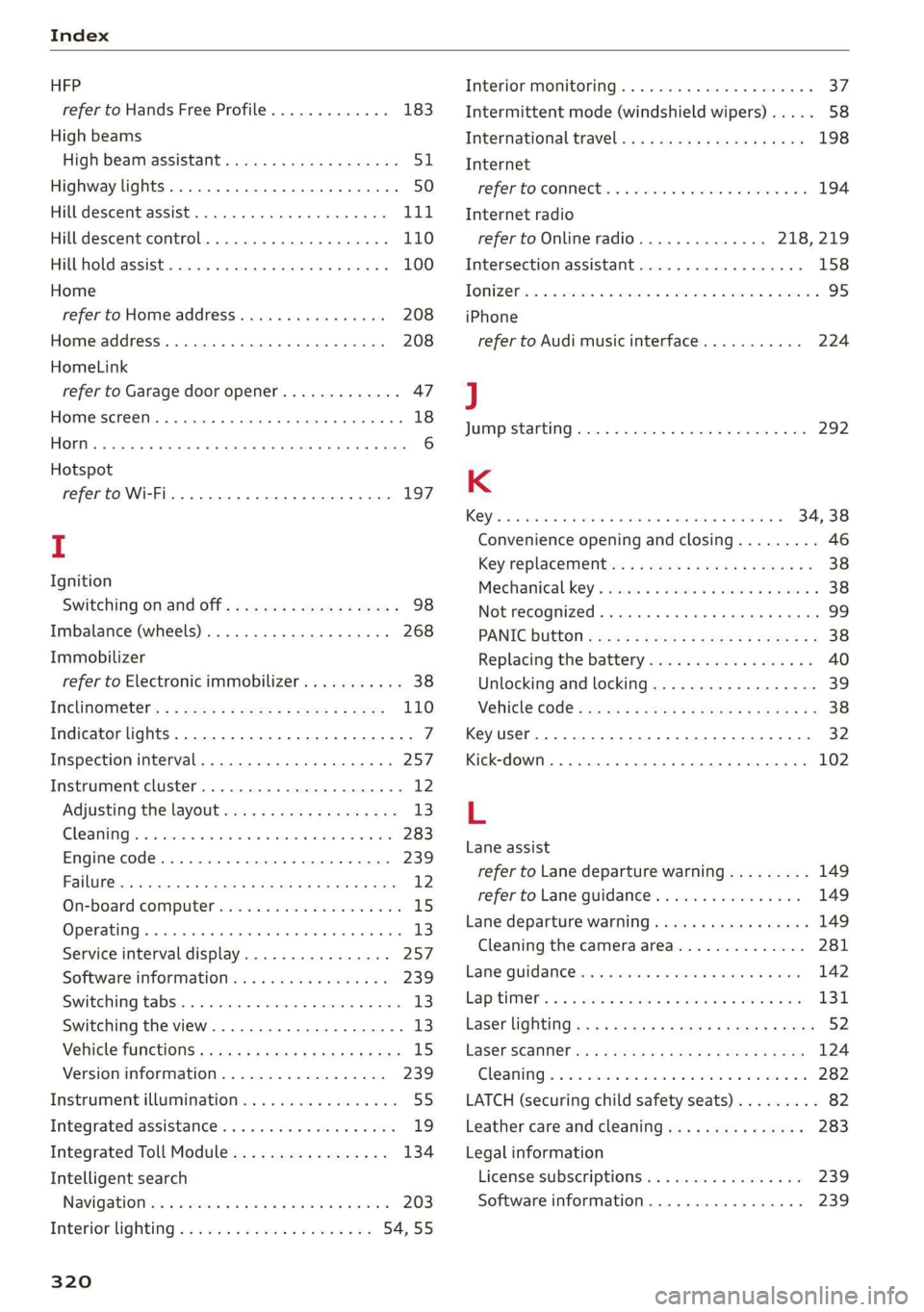
Index
HFP
refer to Hands Free Profile............. 183
High beams
High beam assistant................... 51
Highway lights ..... 0.0... sce e eee eee 50
Hill descent assist..............02-000. 111
Hill descent control.............0 0000 ee 110
Hill hold assist... 0.2.0.0... 00.0022 eae 100
Home
refer to Home address............0008 208
Home address.............00 2.00 ee eee 208
HomeLink
refer to Garage door opener............. 47
Home screen... .... cece eee eee ee eee 18
HOM... eee eee 6
Hotspot
refer to Wi-Fi...........0. 00sec eee eee 197
I
Ignition
Switching on and off...............0-.- 98
Imbalance (wheels) ...............--05. 268
Immobilizer
refer to Electronic immobilizer........... 38
Inclinometérs < = sees =» wees sg wees sy eee 110
Indicator lights....... 0.0... eee eee eee 7
Inspection interval...............20-00. 257
Instrument cluster..............--000005 12
Adjusting the layout................00. 13
Cleaning ’s 2 a sina 5 6 wens oo were 2 6 wonem @ ere 283
Engine code.............-. eee eee eee 239
Pailit@s < anaes = eae & 3 Baws § & Rae 2 FS 12
On-board computer..............2-.00. 15
Operating ........ cece eee eee ee eee 13
Service interval display................ 257
Software information..............004 239
Switching
tabs.................000000. 13
Switching the view.................0005 13
Vehicle functions « cs. se cere sc cee ee cae 15
Version information.................. 239
Instrument illumination................. 55
Integrated assistance................0-. 19
Integrated Toll Module................. 134
Intelligent search
Navigationicn « = ses 2 x mews = wanes a 2 cae a 203
Interior lighting « « ses 2s cess ewes eee 54,55
320
Interior MONItOriING’s « s ccs so wou 2 ¥ vesvee o 37:
Intermittent mode (windshield wipers) ..... 58
International travel...............20005 198
Internet
PEPE TOXCONNCCE is. = veseer ee seem ev ateeee eos 194
Internet radio
refer to Online radio.............. 218, 219
Intersection:assistant ccc. 26 case so mse © 158
TOMZOP oe. oa cxanwes < w omawees vv ema a x ee wo coe 95
iPhone
refer to Audi music interface........... 224
J
JUMAPESEAMERNG) revise © sreeees wo © euersay wo © vette «8 Boe 292
K
Rey's « cwensne oo ccenaua a 0 sean @ arene we sro a 4 34, 38
Convenience opening and closing......... 46
Key'replacemenit:.: ss sees se eean ee eee es 38
Mechanical-key’s wssenc a « case ao saw ve ee ¥ 38
Not recognized ........ cece cee eee 99
PANIG Button » ses < = sacs ¢ = seen ¢ = sees ye 38
Replacing the battery.................. 40
Unlocking and locking................-- 39
VEHICLE COdG « secs s ¢ seme = 2 ee yo ee Fe 38
Key User... eee eee 32
Kick-down .... 2... eee eee eee 102
L
Lane assist
refer to Lane departure warning......... 149
refer to Lane guidance..............0. 149
Lane departure warning..............05- 149
Cleaning the camera area.............. 281
Lame Quidaneeiens 5 « cscsce oo ae vw accuse ¥ oem 142
LapitlIMe rs. « & soesons « awesese + sameness cream 2 Oo 131
Laser lightingiss + + sss 6s eeu sy pew ae ees 52
FaSer Scanners « « aay a eegu 4 x ees x ROE 124
Gleaming wor = 2 ween o anne 2 peewee oe ween oo x 282
LATCH (securing child safety seats)......... 82
Leather care and cleaning............... 283
Legal information
License subscriptions................. 239
Software information................. 239