park assist AUDI Q7 2021 Owner´s Manual
[x] Cancel search | Manufacturer: AUDI, Model Year: 2021, Model line: Q7, Model: AUDI Q7 2021Pages: 332, PDF Size: 117.99 MB
Page 184 of 332

Parking and maneuvering
Messages
Applies to: vehicles with maneuver assist
if i or fd is displayed when there is a malfunc-
tion, the maneuver assist functions may be un-
available or may be limited.
A message that indicates the cause and possible
solution may appear with some displays. The
weather conditions may be too poor or a sensor
may be covered. Clean the area in front of the
sensors and cameras > page 125 and try to turn
the system on again later.
If the malfunction remains, drive to an author-
ized Audi dealer or authorized Audi Service Facili-
ty immediately to have the malfunction correct-
ed.
182
Page 288 of 332
Emergency assistance
Emergency assistance
General information
> Park the vehicle as far as possible from moving
traffic in the event of a breakdown. In the event
of a flat tire, park the vehicle ona level surface.
If you are ona steep hill, be especially careful.
> Set the parking brake.
> Switch the emergency flashers on.
> Have the passengers exit the vehicle. They
should move to a safe place, for example be-
hind a guard rail.
ZX WARNING
Follow the steps given above. This is for your
protection and the for the safety of others on
the road.
Equipment
Vehicle tool kit, tire mobility kit, and
vehicle jack
Applies to: vehicles with the vehicle tool kit, tire mobility kit,
and vehicle jack
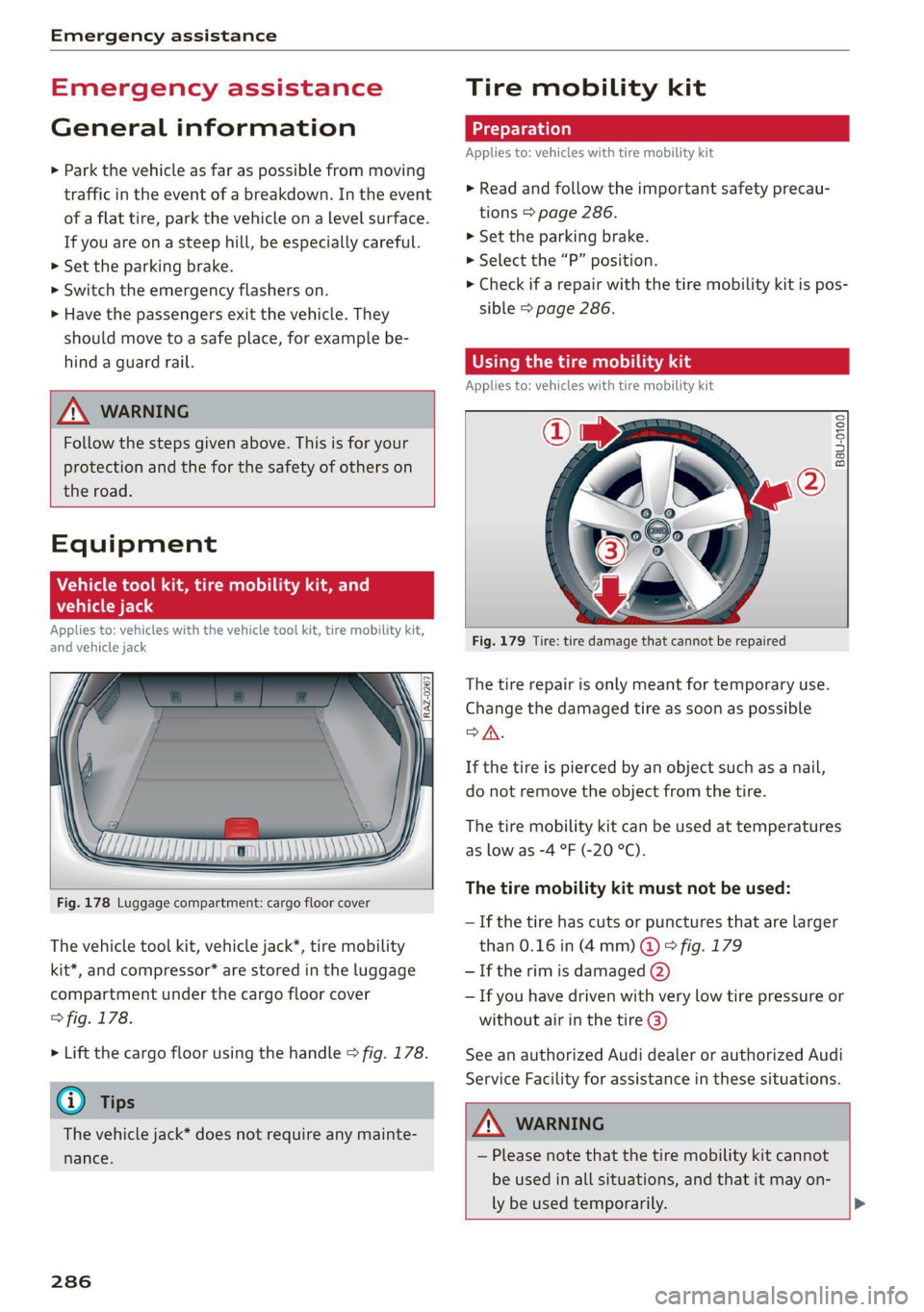
Fig. 178 Luggage compartment: cargo floor cover
The vehicle tool kit, vehicle jack*, tire mobility
kit*, and compressor* are stored in the luggage
compartment under the cargo floor cover
> fig. 178.
> Lift the cargo floor using the handle > fig. 178.
@) Tips
The vehicle jack* does not require any mainte-
nance.
286
Tire mobility kit
Applies to: vehicles with tire mobility kit
> Read and follow the important safety precau-
tions > page 286.
>» Set the parking brake.
> Select the “P” position.
> Check if a repair with the tire mobility kit is pos-
sible > page 286.
time) iS ads
Applies to: vehicles with tire mobility kit
B8U-0100
Fig. 179 Tire: tire damage that cannot be repaired
The tire repair is only meant for temporary use.
Change the damaged tire as soon as possible
SA.
If the tire is pierced by an object such as a nail,
do not remove the object from the tire.
The tire mobility kit can be used at temperatures
as low as -4 °F (-20 °C).
The tire mobility kit must not be used:
— If the tire has cuts or punctures that are larger
than 0.16 in (4mm) @ © fig. 179
— If the rim is damaged (2)
— If you have driven with very low tire pressure or
without air in the tire @)
See an authorized Audi dealer or authorized Audi
Service Facility for assistance in these situations.
ZA WARNING
— Please note that the tire mobility kit cannot
be used in all situations, and that it may on-
ly be used temporarily. >
Page 290 of 332
Emergency assistance
ZA\ WARNING
— Read and follow the manufacturer's safety
precautions on the compressor and in the in-
structions on the bottle of sealant.
— Ifa tire pressure of 29 psi (200 kPA) cannot
reached after inflating for 6 minutes, then
the tire is too severely damaged. Do not con-
tinue driving.
— If the tire cannot be repaired with the tire
sealant, see an authorized Audi dealer or au-
thorized Audi Service Facility for assistance.
@ Tips
Do not operate the compressor for more than
six minutes continuously, or it can overheat.
Once the compressor has cooled, you can con-
tinue to use it.
(eeyn aye) (-ialare)
Applies to: vehicles with tire mobility kit
> Affix the sticker that says "max. 50 mph (max.
80 km/h)" that is provided with the tire mobili-
ty kit within the driver's field of vision.
> Stop the vehicle after driving for about 10 mi-
nutes and check the tire pressure.
> If the tire pressure is lower than 19 psi (130
kPA), then the tire is too severely damaged. Do
not continue driving.
ZA WARNING
Pay attention to the following after repairing
the tire:
— Do not drive faster than 50 mph (80 km/h).
— Avoid hard acceleration or braking and driv-
ing fast around curves.
— The vehicle may become more difficult to
control.
— If the tire is too severely damaged, see an
authorized Audi dealer or authorized Audi
Service Facility for assistance.
@ For the sake of the environment
You can give the used tire sealant bottle to an
authorized Audi dealer or authorized Audi
Service Facility for disposal.
288
G) Tips
Remember to obtain a new bottle of sealant
from an authorized Audi dealer or authorized
Audi Service Facility after repairing a tire.
Replacing wheels
You must complete the preparation before
changing a tire.
> Read and follow the important safety precau-
tions > page 286.
> Set the parking brake.
> Select the “P” position.
» When towing a trailer: disconnect the trailer
from your vehicle.
> Lay out the vehicle tool kit > page 286 and the
spare tire.
> Applies to: vehicles with air suspension: Select
on the home screen: VEHICLE > Settings &
Service > Air suspension: wheel change.
> Switch the ignition off.
ZA WARNING
— The vehicle must also be secured to prevent
it from rolling when using the vehicle jack*.
Use suitable objects to block the front and
back of the wheel that is diagonal from the
wheel with the flat tire.
— Applies to: vehicles with active roll stabiliza-
tion: Switch the ignition off because the sus-
pension regulation could change the vehicle
height,
which increases the risk of an acci-
dent.
Page 296 of 332
Emergency assistance
@) Tips
Make sure that the connected jump start ca-
bles have sufficient contact with metal.
Towing
General information
You should only perform the steps that follow if
you have the necessary tools and technical ex-
pertise.
Towing requires a certain amount of practice.
Audi recommends contacting a towing company
to have the vehicle transported.
You should only have your vehicle towed by an-
other vehicle when disabled in exceptional cir-
cumstances. Inexperienced drivers should not
tow.
Notes on towing
When the engine is stopped, the transmission
will not be sufficiently lubricated if traveling at
high speeds and long distances:
— The maximum permitted towing speed is 30
mph (50 km/h).
— The maximum permitted towing distance is 30
miles (50 km).
Additional information on towing with a tow
truck
The vehicle may only be towed with the front axle
raised. Do not wrap any chains or cables around
the brake lines.
Tow bar and towing cable
The vehicle can be towed with a tow bar or tow-
ing cable. Both drivers should be familiar with
the special considerations when towing, especial-
ly when using a towing cable.
Always make sure the traction force does not ex-
ceed the permitted level and there are no shock
loading conditions. There is always the risk of the
coupling becoming overloaded when driving off-
road.
For the most safety and security, drive with a tow
bar. You should use a towing cable only if a tow
294
bar is not available. Use a towing cable made of
synthetic elastic cable similar elastic material.
ZA\ WARNING
— Towing highly increases the risk of an acci-
dent, for example from colliding with the
towing vehicle.
— To reduce the risk of an accident, do not al-
low anyone to remain inside the vehicle
when it is being transported by a tow truck
or a special transporter.
C) Note
— If normal towing is not possible, for exam-
ple if the transmission is faulty or if the
towing distance is greater than 30 miles
(50 km), then transport the vehicle on a
special carrier.
— If the vehicle is towed by a tow truck at the
axle that is not permitted, this can cause se-
vere damage to the transmission.
— The vehicle must not be tow started for
technical reasons.
G) Tips
— If the power supply is interrupted, then it
will not be possible to move the selector
lever out of the "P" position. The parking
lock must be released using the emergency
release before towing the vehicle
=> page 102.
— Switch Audi pre sense* off > page 154 when
loading the vehicle onto a vehicle carrier,
train, ship, or other type of transportation,
or when towing the vehicle. This can prevent
an undesired intervention from the pre
sense* system.
— Follow the local legal regulations for tow-
ing.
Read and follow the important information under
=> page 294.
Page 297 of 332
4M1012721BC
Emergency assistance
Preparations
> Only secure the towing cable or tow bar at the
designated towing loops > page 295,
=> page 296.
> Make sure the towing cable is not twisted. Oth-
erwise it could disconnect from the towing loop
while towing.
> Switch the emergency flashers on in both
vehicles > page 53. However, do not do this if it
prohibited by law.
Towing vehicle (front)
> Only start to drive when the towing cable is
taut.
> Press the brake pedal very carefully.
> Avoid sudden braking or driving maneuvers.
Vehicle being towed (rear)
> Make sure the ignition is switched on so that
the steering wheel is not locked and so that you
can use the turn signals, the horn, and the
windshield wipers if needed > A\.
> Switching it off before the vehicle has stopped
may impair the function of the brake booster
and power steering. You would then need to
use more force to steer and brake the vehicle.
> Release the parking brake > page 108.
> Select the “N” selector lever position.
> Make sure the towing cable is always taut.
ZA WARNING
— Never tow a vehicle using a tow bar or tow-
ing cable if the vehicle does not have electri-
cal power.
— If the vehicle runs out of power while it is
being towed, stop towing the vehicle imme-
diately and consult an authorized Audi deal-
er or qualified repair facility.
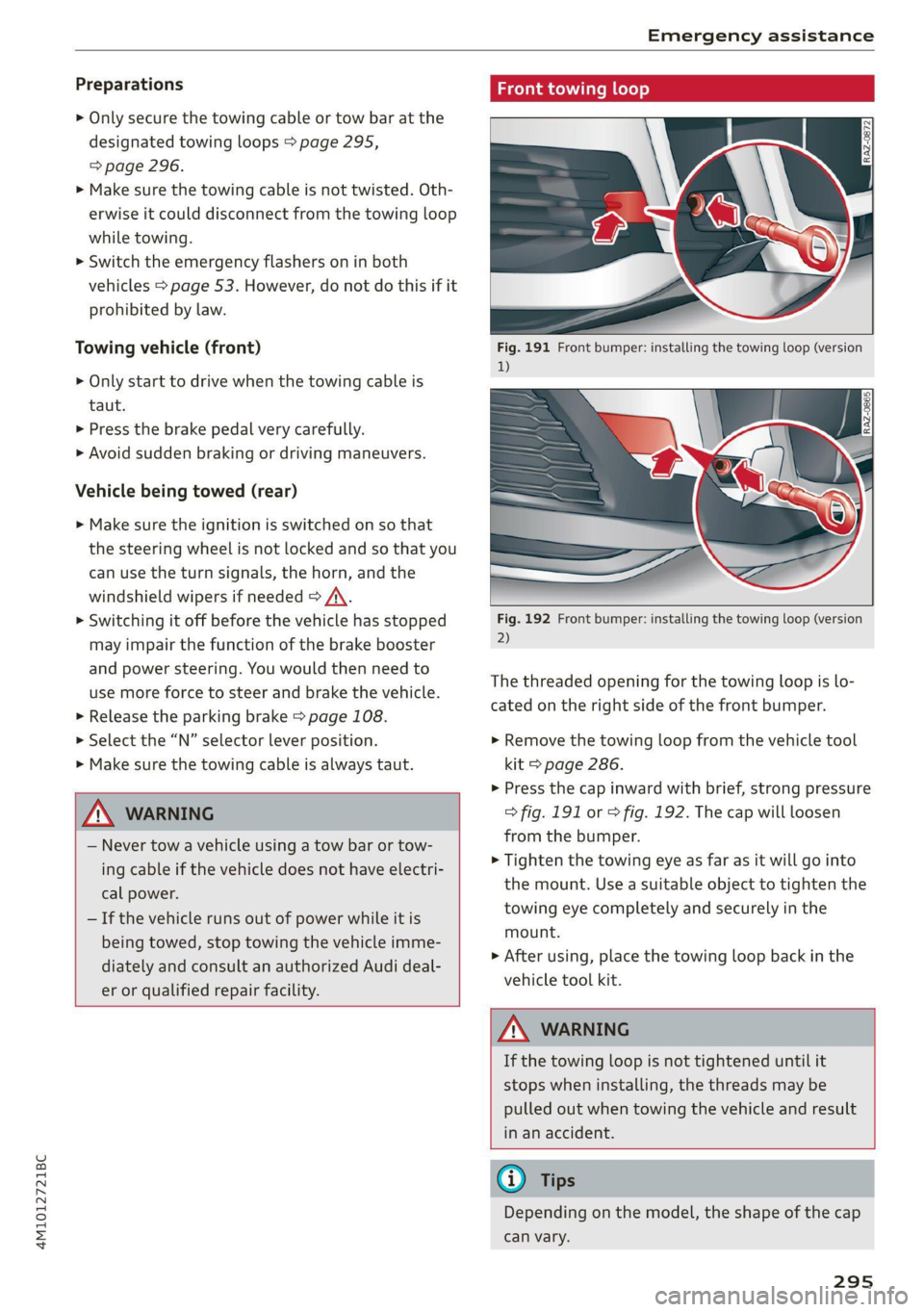
ing loop
Fig. 192 Front bumper: installing the towing loop (version
2)
The threaded opening for the towing loop is lo-
cated on the right side of the front bumper.
> Remove the towing loop from the vehicle tool
kit > page 286.
>» Press the cap inward with brief, strong pressure
> fig. 191 or > fig. 192. The cap will loosen
from the bumper.
> Tighten the towing eye as far as it will go into
the mount. Use a suitable object to tighten the
towing eye completely and securely in the
mount.
> After using, place the towing loop back in the
vehicle tool kit.
Z\ WARNING
If the towing loop is not tightened until it
stops when installing, the threads may be
pulled out when towing the vehicle and result
in an accident.
G) Tips
Depending on the model, the shape of the cap
can vary.
295
Page 301 of 332
4M1012721BC
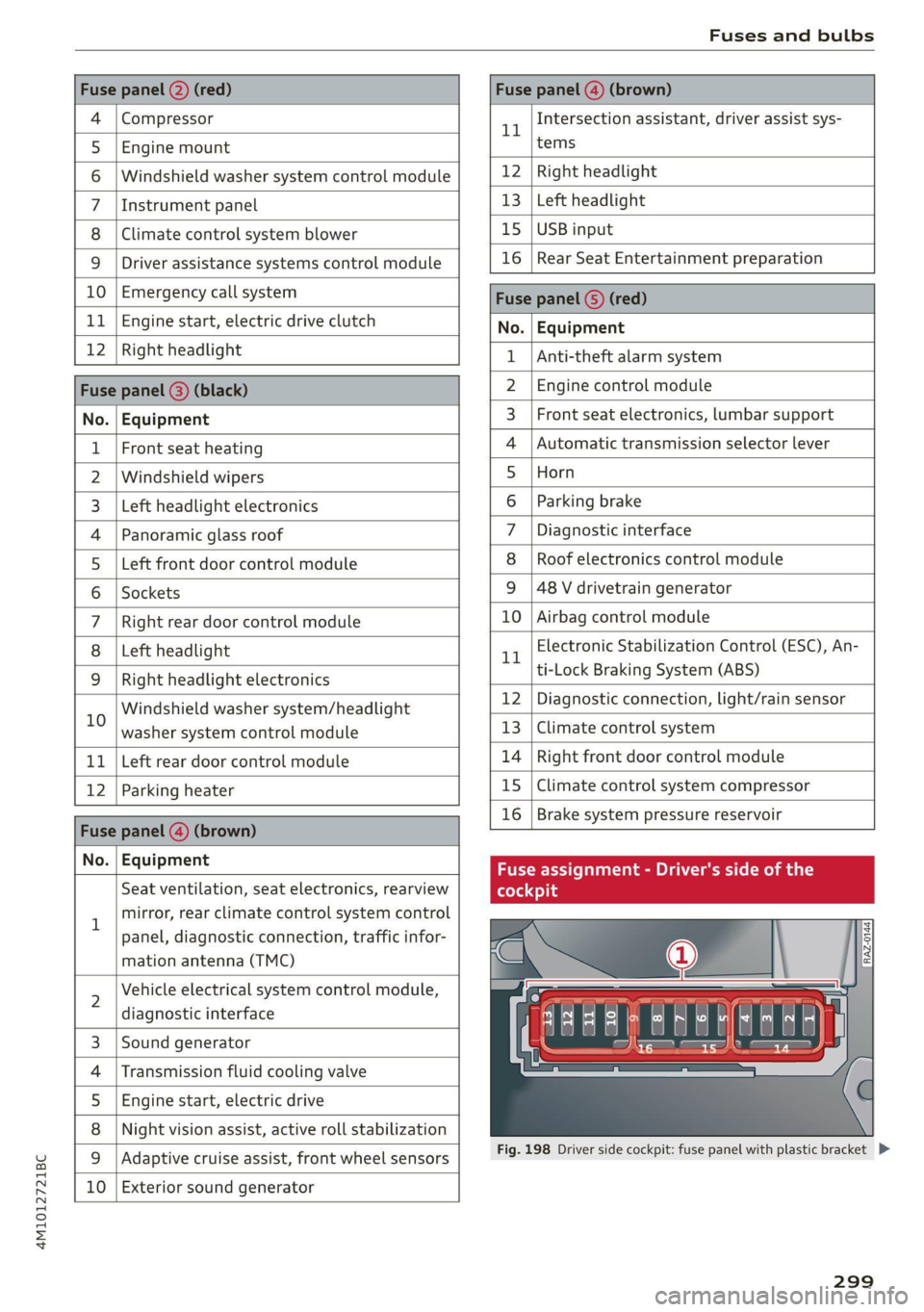
Fuses and bulbs
Fuse panel @) (red) Fuse panel (4) (brown)
4 |Compressor 1 Intersection assistant, driver assist sys-
5 |Engine mount tems
6 |Windshield washer system control module 12 | Right headlight
7 |Instrument panel 13 | Left headlight
8 | Climate control system blower 15 | USB input
9 | Driver assistance systems control module 16 | Rear Seat Entertainment preparation
10 | Emergency call system Fuca panel G) (DD)
11 | Engine start, electric drive clutch No. | Equipment
12 | Right Headlight 1 |Anti-theft alarm system
Fuse panel (8) (black) 2 |Engine control module
No. | Equipment 3 | Front seat electronics, lumbar support
1 | Front seat heating 4 |Automatic transmission selector lever
2 |Windshield wipers 5 |Horn
3 | Left headlight electronics 6 |Parking brake
4 |Panoramic glass roof 7 | Diagnostic interface
5 |Left front door control module 8 | Roof electronics control module
6 |Sockets 9 |48 V drivetrain generator
7 |Right rear door control module 10 | Airbag control module
8 | Left headlight 1 Electronic Stabilization Control (ESC), An-
9 |Right headlight electronics trtock Braking System cine
in Windshield washer systemn/headlight 12 Diagnostic connection, light/rain sensor
washer system control module 13 | Climate control system
11 | Left rear door control module 14 | Right front door control module
12 | Parking heater 15 |Climate control system compressor
Fase panel @ (brown) 16 | Brake system pressure reservoir
Nou) Faipmsns Fuse assignment - Driver's side of the
Seat ventilation, seat electronics, rearview (oleae
1 mirror, rear climate control system control
panel, diagnostic connection, traffic infor-
mation antenna (TMC)
N
Vehicle electrical system control module,
diagnostic interface
Sound generator
Transmission fluid cooling valve
Engine start, electric drive
Night vision assist, active roll stabilization
wW}oa;m|
&|w
Adaptive cruise assist, front wheel sensors
10 Exterior sound generator
LE EEEL|
Fig. 198 Driver side cockpit: fuse panel with plastic bracket D>
299
Page 305 of 332

4M1012721BC
Data privacy
Data privacy
Privacy
notice
You can find information about responsibility for
data protection in the MMI.
Transmitted information
Applies to: MMI: Select on the home screen: SET-
TINGS > General > Legal notes > About Audi
connect.
Image recording
Surrounding area monitoring
Applies to: vehicles with surrounding area monitoring
The functionality of the park assist plus requires
detecting and evaluating the vehicle's path. This
is done by cameras installed permanently on the
vehicle that detect objects in the vehicle's sur-
roundings (such as obstacles or guard rails). The
live images from the cameras are transmitted to
the applicable control module.
The camera images are transferred to the respon-
sible control module for processing and may be
stored, depending on vehicle equipment. The
control
module analyzes the current camera im-
age using image evaluation software. This image
evaluation software detects anonymized techni-
cal measurements, such as distances to objects.
The control module evaluates these technical
measurements and makes it possible for the as-
sist systems to control the vehicle, if necessary.
Data memories
5 io. oO
2 x= + oO
Fig. 201 Driver's side footwell: connection port for the On
Board Diagnostic System (OBD)
Your vehicle is equipped with electronic control
modules for various vehicle systems such as the
airbags. These vehicle control modules store data
while driving normally that is required by an au-
thorized Audi dealer or authorized Audi Service
Facility for diagnosis and repair purposes. Only
certain types of data are recorded for a very short
period of time if a control module has detected a
system event. No noises, conversations, or im-
ages will be recorded in the vehicle.
The data may include information such as the ve-
hicle speed, the direction of travel, and informa-
tion about the brake system, or also the behavior
of the restraint system in the event of an acci-
dent. The stored data can be exported and down-
loaded with special devices, which must be con-
nected directly to the vehicle.
On Board Diagnostic System (OBD)
There is a diagnostic connector socket in the driv-
er's side footwell to read out the various control
modules and the event data recorder. Data re-
garding the function and condition of the elec-
tronic control modules is stored in the event
memory. Only have an authorized Audi dealer or
authorized Audi Service Facility read out and de-
lete the event memory.
ZA\ WARNING
— Incorrect use of the connection port for the
On Board Diagnostic System can cause mal-
functions, which can then result in accidents
and serious injuries.
— Only allow an authorized Audi dealer or au-
thorized Audi Service Facility to read out the
engine data.
h data recorder
Event Data Recorder
This vehicle is equipped with an Event Data Re-
corder (EDR). The main purpose of an EDR is to
record, in certain crash or near crash-like situa-
tions,
such as an airbag deployment or hitting a
road obstacle, data that will assist in understand-
ing how a vehicle's system performed. The EDR is
designed to record data related to vehicle dynam-
ics and safety systems for a short period of time, >
303
Page 306 of 332

Data privacy
typically 30 seconds or less. The EDR in this vehi-
cle is designed to record such data as:
— How various systems in your vehicle were oper-
ating;
— Whether or not the driver and passenger safety
belts were buckled/fastened;
— How far (if at all) the driver was depressing the
accelerator and/or brake pedal; and,
— How fast the vehicle was traveling.
These data can help provide a better understand-
ing of the circumstances in which crashes and in-
juries occur. NOTE: EDR data are recorded by your
vehicle only if a non-trivial crash situation occurs;
no data are recorded by the EDR under normal
driving conditions and no personal data (e.g.
name, gender, age, and crash location) are re-
corded. However, other parties, such as law en-
forcement, could combine the EDR data with the
type of personally identifying data routinely ac-
quired during a crash investigation.
To read data recorded by an EDR, special equip-
ment is required, and access to the vehicle or the
EDR is needed. In addition to the vehicle manu-
facturer, other parties, such as law enforcement,
that have the special equipment, can read the in-
formation if they have access to the vehicle or the
EDR.
Assist system monitor
This vehicle is equipped with an Assist System
Monitor (ASM). The ASM collects data that is not
stored by the EDR in the event of an accident. The
main task of the ASM is to make it possible to un-
derstand the role and the behavior of the assist
systems in these accident situations. In addition
to the data that the EDR stores, the ASM records
data related to the assist systems starting sever-
al seconds before the accident or near-accident.
The data collected by ASM depends on the equip-
ment and may include the following information:
status information of the assist systems (for ex-
ample, if they are switched on or off, system
events, etc.), control interventions (for example,
D_ System availability may be limited depending on the mar-
ket.
2) In preparation at the time of printing.
304
by ESC, ABS, Audi pre sense’, etc.), and assist
systems settings (such as speed settings).
Special devices and access to the vehicle or to the
ASM are necessary in order to read the data from
the ASM memory. In addition to the vehicle man-
ufacturer, third parties such as law enforcement
authorities can also read and analyze the stored
data if they have access to the vehicle or to the
ASM.
Data usage
Audi can read out the information stored in the
data memories or similar data, or give this infor-
mation to third parties, especially in the follow-
ing situations:
— If the vehicle owner or lessee agrees
— If there is an official request from the police
— Ifa court or authorities request it
If legally permitted, Audi can also use the data
for analysis of vehicle operation and safety per-
formance or provide this data to third parties for
research purposes.
Data memory for autonomous driving!)
Applies to: vehicles with data memory for autonomous driv-
ing
When park assist plus is active > page 172, data
is stored in a memory in the vehicle. This data is
continuously overwritten by more current data
after a few seconds. The data is erased when the
ignition is switched off.
In certain situations, such as if an airbag has
been triggered or a parking process was ended,
the corresponding technical data may be stored
in the data memory for autonomous driving. The
data memory for autonomous driving is a read-
only memory that has a limited amount of stor-
age space. If the storage space is full, the oldest
data will be overwritten with the newest data. >
Page 307 of 332

4M1012721BC
Data privacy
Exporting data
You can read out the data memory for autono-
mous driving and export this data to a USB stick.
The settings depend on the vehicle equipment.
Requirement: the vehicle must be stationary, the
automated systems must not be active, and the
ignition must be switched on. A USB stick must
be connected to the USB input.
» Applies to: MMI: Select on the home screen:
SETTINGS > Data management > Statistics.
> Follow the instructions in the MMI.
The export will be canceled if you switch menus,
for example.
Recorded data
— Driver interactions (such as the driver pressing
the brake pedal)
— Vehicle dynamics (such as speed)
— Status of automated systems
— Control requests
— Relevant measurements from monitoring the
surroundings
— Image data from monitoring the surroundings
— System status, timestamp, and vehicle location
when deactivating/activating park assist plus
You can find additional information in the MMI:
— Applies to: MMI: Select on the home screen:
SETTINGS > General > Legal notes > About the
data memory.
@) Tips
— The data is processed and stored locally in
the vehicle. It is not automatically transmit-
ted to Audi or other third parties, for exam-
ple through the cloud. The owner or driver is
responsible for the data. Audi does not have
access to it.
— For additional information and the evalua-
tion of data, please contact Audi Customer
Care.
Transmitted information
Data collection
Applies to: vehicles with data collection
Depending on the country, Audi may collect data
for the following purposes, for example: offer
and product optimization, public safety, provision
of Audi connect remote vehicle services, and
adaptation to customer expectations. For exam-
ple, various technical function data, environmen-
tal data, driving data, and usage data will be col-
lected for a specific purpose and forwarded to
Audi. The data will be sent from the vehicle at
the time the data was collected.
Applies to: MMI: You can find additional informa-
tion about data collection in the MMI. Select on
the home screen: SETTINGS > General > Legal
notes > About Audi connect.
If you would like to deny data transmission to
Audi, contact an authorized Audi dealer or au-
thorized Audi Service Facility for more informa-
tion. You also have the option to deactivate data
transmission within the privacy settings.
Privacy settings
Applies to: vehicles with Audi connect
> Applies to MMI: Select on the home screen:
SETTINGS > Privacy settings.
When using Audi connect services or during data
collection, data will be transmitted from the ve-
hicle.
> To display additional information about the pri-
vacy settings and the associated symbols in the
status bar, press @ in the MMI.
Requirement: the ignition must be switched on.
Setting the maximum privacy settings
When the Activate privacy mode function is
switched on, the data connection is deactivated
or sending of data is restricted, but all safety-re-
lated, legal, or contractually required Audi con-
nect
services remain activated. The majority of
the Audi connect services are deactivated.
305
Page 317 of 332
4M1012721BC
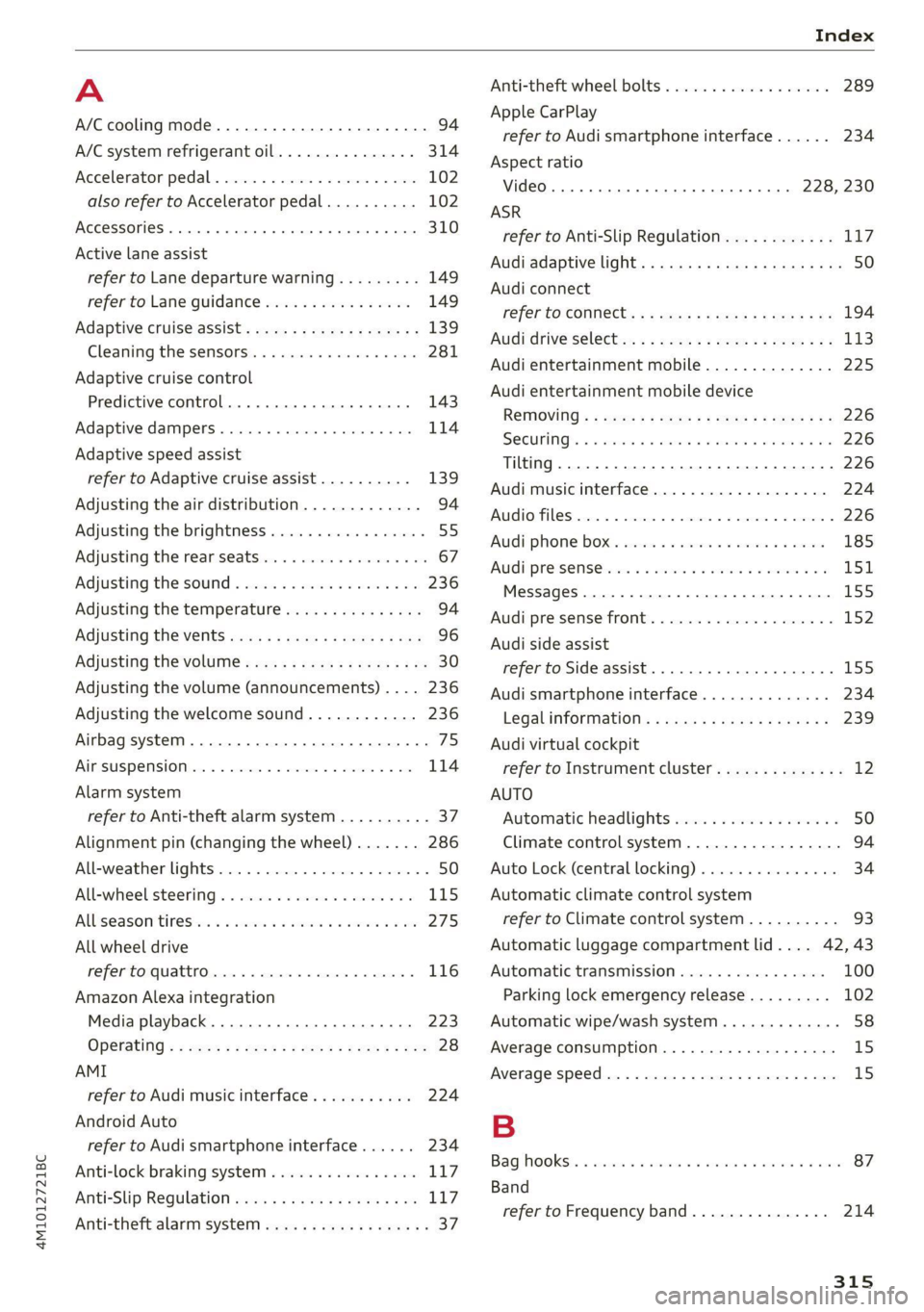
A
A/C cooling mode..........-. eee eee eee ee 94
A/C system refrigerant oil............... 314
Accelerator pedal.............2--00000- 102
also refer to Accelerator pedal.......... 102
ACCESSOFICS 2. eee 310
Active lane assist
refer to Lane departure warning......... 149
refer to Lane guidance................ 149
Adaptive cruise assist................04. 139
Cleaning the sensors..............0055 281
Adaptive cruise control
Predictive control................0005 143
Adaptive dampers ........... 000000 eee 114
Adaptive speed assist
refer to Adaptive cruise assist.......... 139
Adjusting the air distribution............. 94
Adjusting the brightness................. 55
Adjusting the rear seats.................. 67
Adjusting the sound................0005 236
Adjusting the temperature............... 94
Adjusting the vents ccs <= csws + © sews +o oer 96
Adjusting the volume.............e eee eee 30
Adjusting the volume (announcements) .... 236
Adjusting the welcome sound............ 236
Airbag system... 2.2... eee eee 75
AIPSUSPENSION ix. o © aoewes « 2 menses + meme» 5, v0 114
Alarm system
refer to Anti-theft alarm system.......... 37
Alignment pin (changing the wheel)....... 286
All-weather lights...............-..00005 50
All-wheel steering.............---00005 115
ALUS@aSOntineSies. « 3 ssasess «x aimee a & iwesane sw a8 275
All wheel drive
refer to quattro.............0 0. eee 116
Amazon Alexa integration
Media playback................00000. 223
Operating « « seen s » ewes se eee G s FeeE Ys BOS 28
AMI
refer to Audi music interface........... 224
Android Auto
refer to Audi smartphone interface...... 234
Anti-lock braking system................ 117
AnitisSlip REQUlation ws a & sos se weae 9 oe 117
Anti-theft alarm system...............05. 37
Anti-theft wheel bolts...............0... 289
Apple CarPlay
refer to Audi smartphone interface...... 234
Aspect ratio
VIdCO eee eee eee eee eee 228, 230
ASR
refer to Anti-Slip Regulation............ 117
Audi adaptive light...............-.0000- 50
Audi connect
refer to CONnNect ; «= = sass ss sees ss eee ee ae 194
Audidrive'selecticy, « + scum oz scum « x pewe yoo 113
Audi entertainment mobile.............. 225
Audi entertainment mobile device
Removing « « sees « sews gs sees xe ees cee 226
SOGUMING's « « ssessie © ccerave 2 6 sesnew « araneos w @ are 226
Tilting... 2... eee eee eee 226
Audi music interface................00- 224
AUGIOFLES xo: 5, coc: i « commons ow cme = at sammie = 226
Audi phone Bx: « sccvise so eaves so emane oe meses 185
Audi pre sense .........0 seve cece ee eee 151
Messages ........... 0.00.0 eee eee 155
Audi pre sense front.............-...0-- 152
Audi side assist
refer to Side assist............-0000005 155
Audi smartphone interface.............. 234
Legalinformation..................0. 239
Audi virtual cockpit
refer to Instrument cluster.............. 12
AUTO
Automatic headlights .................. 50
Climate control system..............0-- 94
Auto Lock (central locking) ............... 34
Automatic climate control system
refer to Climate control system.......... 93
Automatic luggage compartment lid.... 42, 43
Automatic transmission................ 100
Parking lock emergency release......... 102
Automatic wipe/wash system............. 58
Average consumption................... 15
Average speed... 2.2... cee eee eee eee 15
B
Bagshooks3. « swiss o anewivs © ¥ arene 6 6 oman © oes 87
Band
refer to Frequency band............... 214
315