warning lights AUDI Q7 2021 Owner´s Manual
[x] Cancel search | Manufacturer: AUDI, Model Year: 2021, Model line: Q7, Model: AUDI Q7 2021Pages: 332, PDF Size: 117.99 MB
Page 9 of 332
4M1012721BC
Quick access
Cup holden asce es cscvene wv omens x v oe 86
ESOGKE « 2 santice wm aconens we < emommiee © osm 86
— Vehicle key holder
Depending on equipment:
— Audi music interface .......... 224
—Audi phone box ............... 185
@® Electromechanical parking brake
BUERON sese ¢ eevee ¢ x mew © 2 pee 4 108
@9 Automatic transmission selector
EVER” scowp: « 2 gave & o eee Go eee Ee 100
@) [START ENGINE STOP] button .... 98
@) Steering wheel adjustment ...... 69
@3) Lever for:
— Cruise control system ......... 136
— Adaptive cruise assist .......... 139
@4 Connection port for the On Board
Diagnostic System (OBD) ........ 303
@5) Buttons for:
LIQHts: as 5 2 sacs 5 2 eqws 3 o ees ss 50
—All-weather lights ............ 50
—Rear fog lights ............... 50
@8 Hood release ..............00-% 246
@) Button for:
— Luggage compartment lid ...... 41
@8 Exterior mirror adjustment ...... 56
@9) Buttons for:
— Power windows ............-. 45
—Child safety lock .............. 44
@ Tips
Some the equipment listed here is only instal-
led in certain models or is available as an op-
tion.
Indicator lights overview
The indicator lights in the instrument cluster
blink or turn on. They indicate functions or mal-
functions. Some warning and indicator lights
turn on when you switch the ignition on and must
turn off when the drive system is switched on or
while driving.
With some indicator lights, messages may ap-
pear and warning signals may sound. The indica-
tor lights and messages may be covered by other
displays. To show them again, select the second
tab for messages with the multifunction steering
wheel © page 13.
Some indicator lights in the display can display in
several colors.
ON ee tle ins
If the A or A indicator light turns on, check
the message in the instrument cluster.
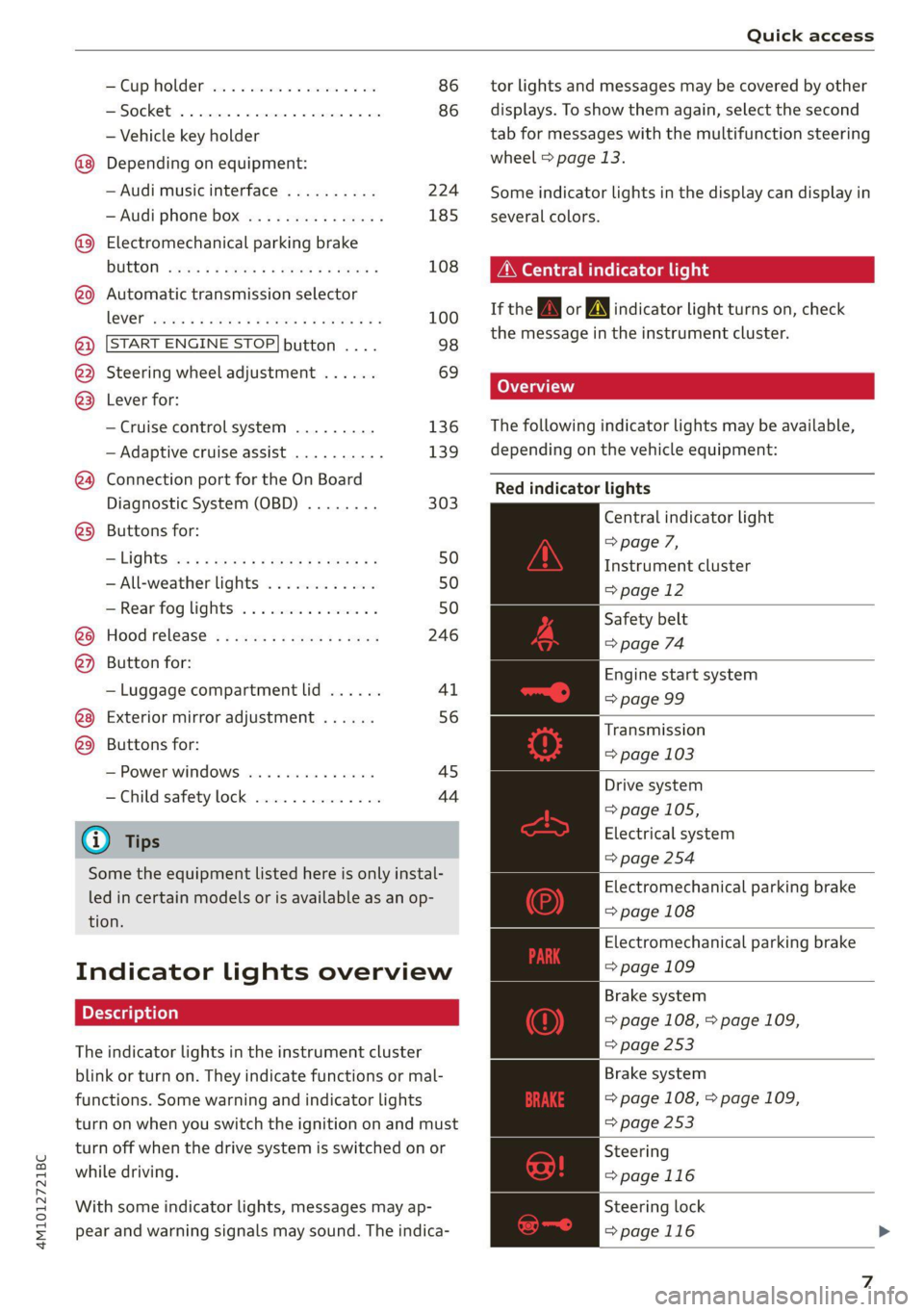
The following indicator lights may be available,
depending on the vehicle equipment:
Red indicator lights
Central indicator light
=> page 7,
Instrument cluster
=> page 12
Safety belt
=> page 74
Engine start system
=> page 99
Transmission
=> page 103
Drive system
=> page 105,
Electrical system
=> page 254
Electromechanical parking brake
=> page 108
Electromechanical parking brake
=> page 109
Brake system
=> page 108, > page 109,
=> page 253
Brake system
=> page 108, > page 109,
=> page 253
Steering
=>page 116
Steering lock
=>page 116
Page 10 of 332
Quick access
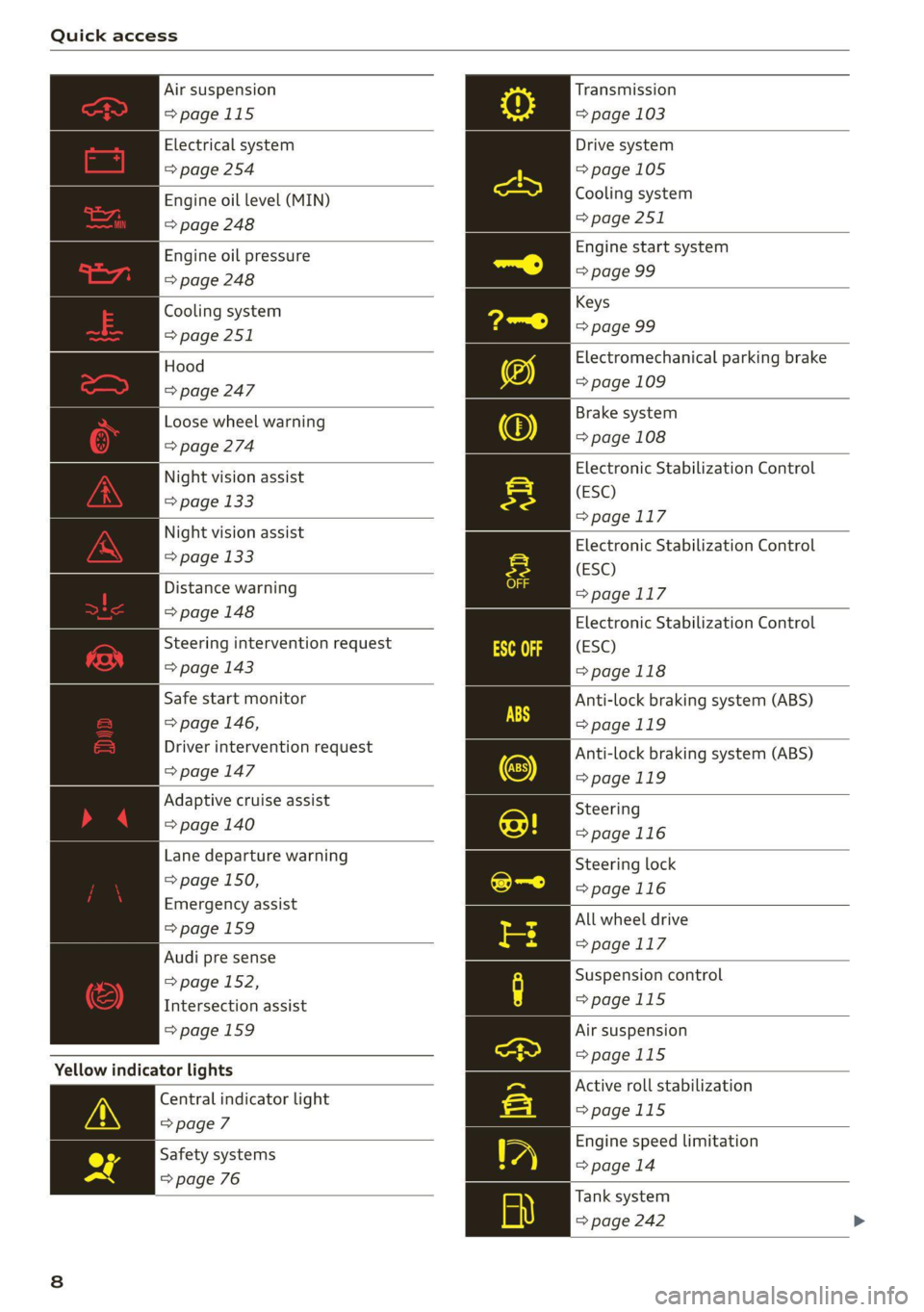
Air suspension
=>page 115
Electrical system
=> page 254
Engine oil level (MIN)
=> page 248
Engine oil pressure
=> page 248
Cooling system
=> page 251
Hood
=> page 247
Loose wheel warning
=> page 274
Night vision assist
=> page 133
Night vision assist
= page 133
Distance warning
=> page 148
Steering intervention request
=> page 143
Safe start monitor
=> page 146,
Driver intervention request
=> page 147
Adaptive cruise assist
=> page 140
Lane departure warning
= page 150,
Emergency assist
=>page 159
Audi pre sense
= page 152,
Intersection assist
=>page 159
Yellow indicator lights
Central indicator light
=> page 7
Safety systems
=> page 76
Transmission
=> page 103
Drive system
=>page 105
Cooling system
=> page 251
Engine start system
=> page 99
Keys
=> page 99
Electromechanical parking brake
=> page 109
Brake system
=> page 108
Electronic Stabilization Control
(ESC)
=>page 117
Electronic Stabilization Control
(ESC)
=>page 117
Electronic Stabilization Control
(ESC)
>page 118
Anti-lock braking system (ABS)
>page 119
Anti-lock braking system (ABS)
=>page 119
Steering
=>page 116
Steering lock
=>page 116
All wheel drive
=>page 117
Suspension control
>page 115
Air suspension
=>page 115
Active roll stabilization
>page 115
Engine speed limitation
=> page 14
Tank system
= page 242
Page 11 of 332
4M1012721BC
Quick access
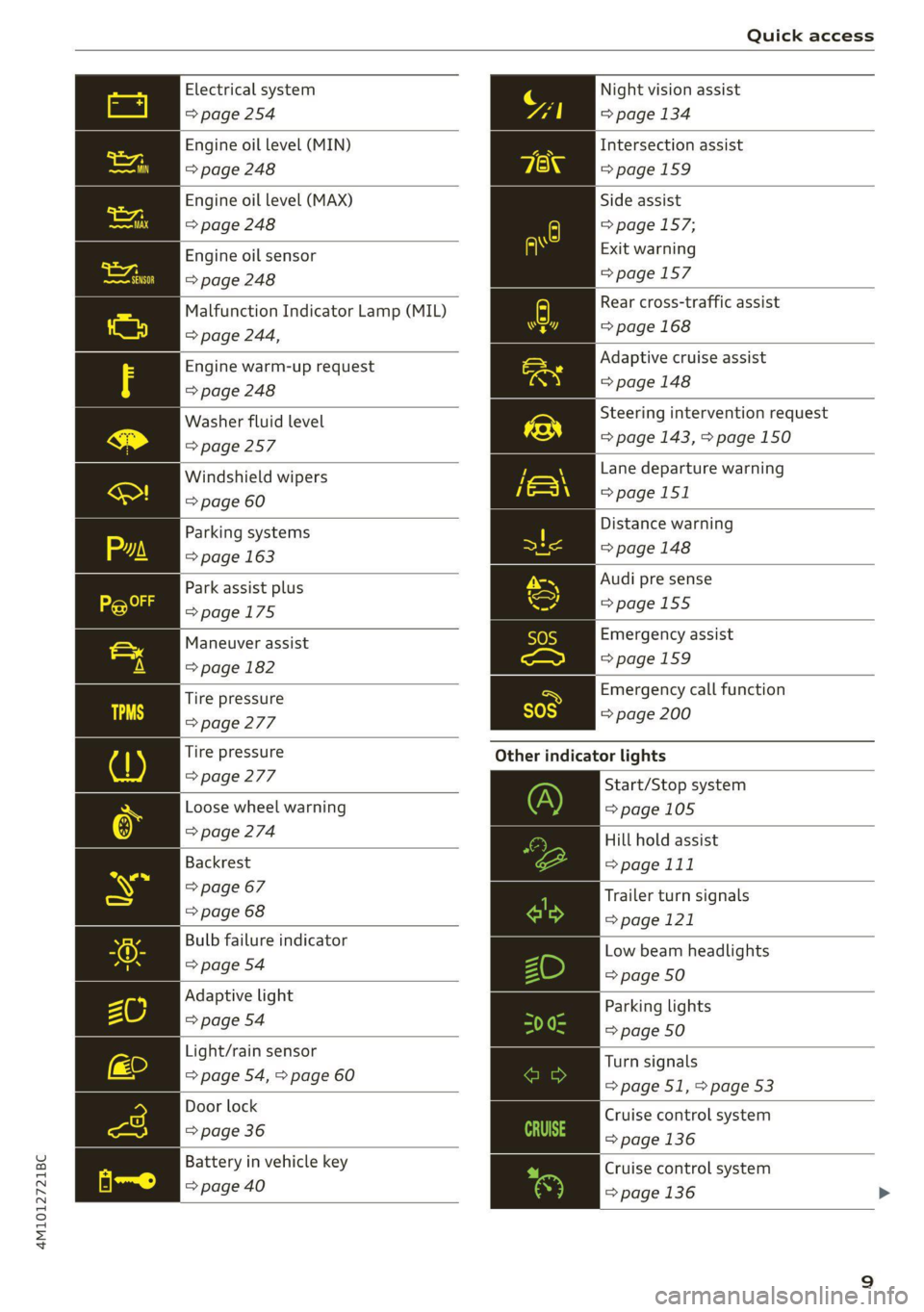
Electrical system Night vision assist
=> page 254 => page 134
Engine oil level (MIN)
Intersection assist
=> page 248 =>page 159
Engine oil level (MAX) Side assist
=> page 248 => page 157;
Exit warning
=>page 157
Engine oil sensor
=> page 248
Malfunction Indicator Lamp (MIL)
> page 244,
Rear cross-traffic assist
=> page 168
Engine warm-up request Adaptive cruise assist
=> page 248 => page 148
Washer fluid level Steering intervention request
=> page 257 => page 143, > page 150
Windshield wipers Lane departure warning
=> page 60 >page 151
Parking systems Distance warning
=> page 163 = page 148
Park assist plus Audi pre sense
>page 175 =>page 155
Maneuver assist Emergency assist
Spiga 1 pagemes
Tire pressure ra Emergency call function
=> page 277 = page 200
Tire pressure Other indicator lights
> page 277
Start/Stop system
Loose wheel warning => page 105
> page 274 Hill hold assist
Backrest => page 111
> page 67 Trailer turn signals
= page 68 >page 121
Bulb failure indicator Low beam headlights
© page.o4 => page 50
Adaptive light
Parking lights
=> page 54 a9
=> page 50
Light/rain sensor
Turn signals
=> page 54, > page 60
= page 51, > page 53
Door lock Cruise control system
=> page 36 => page 136
Battery in vehicle key Cruise control system
pppage400 > page 136 >
Page 12 of 332
Quick access
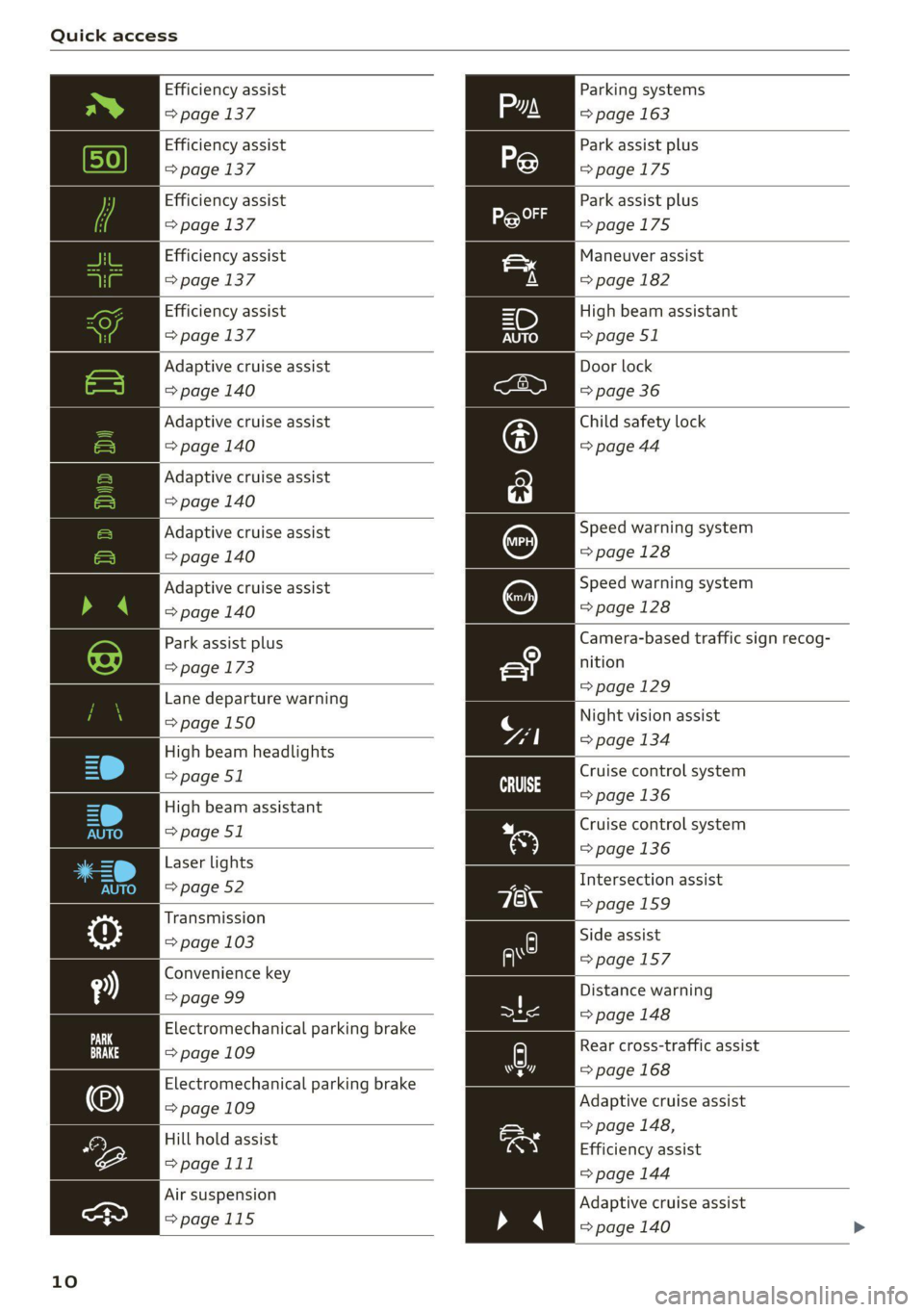
Efficiency assist
=> page 137
Efficiency assist
=> page 137
Efficiency assist
=> page 137
Efficiency assist
=> page 137
Efficiency assist
=> page 137
Adaptive cruise assist
=> page 140
Adaptive cruise assist
=> page 140
Adaptive cruise assist
=> page 140
Adaptive cruise assist
=> page 140
Adaptive cruise assist
=> page 140
Park assist plus
=> page 173
Lane departure warning
=> page 150
High beam headlights
=> page 51
High beam assistant
=> page 51
Laser lights
=> page 52
Transmission
=> page 103
Convenience key
=> page 99
Electromechanical parking brake
=> page 109
Electromechanical parking brake
=> page 109
Hill hold assist
=>page 111
Air suspension
>page 115
10
Parking systems
=> page 163
Park assist plus
=>page 175
Park assist plus
=>page 175
Maneuver assist
=> page 182
High beam assistant
=> page 51
Door lock
=> page 36
Child safety lock
=> page 44
Speed warning system
=> page 128
Speed warning system
=> page 128
Camera-based traffic sign recog-
nition
=>page 129
Night vision assist
=> page 134
Cruise control system
=>page
136
Cruise control system
=> page 136
Intersection assist
=>page 159
Side assist
=>page 157
Distance warning
= page 148
A) Rear cross-traffic assist
=> page 168 hr]
Adaptive cruise assist
> page 148,
Efficiency assist
=> page 144
Adaptive cruise assist
=> page 140 >
Page 17 of 332
4M1012721BC
Instrument cluster
Outside temperature
display
The outside temperature is displayed in the sta-
tus bar @) 9 page 12.
If your vehicle is stationary or if you are driving at
very low speeds, the temperature displayed in
the instrument cluster may be slightly higher
than the actual temperature outside due to heat
radiating from the engine.
At temperatures below 41 °F (+5 °C), a snowflake
symbol appears in front of the temperature dis-
play > A.
ZA WARNING
Do not assume the roads are free of ice based
on the outside temperature display. Be aware
that there may be ice on roads even when the
outside temperature is around 41 °F (+5 °C)
and that ice can increase the risk of accidents.
Engine oil temperature
indicator
Depending on the vehicle equipment, the engine
oil temperature %7 may be indicated by a bar in
the instrument cluster.
> Open the vehicle functions tab and switch to
the enhanced view > page 13.
When engine oil temperatures are low, the dis-
play --- °F (--- °C) appears in the instrument clus-
ter. The engine has reached its operating temper-
ature when the engine oil temperature is be-
tween 176 °F (80 °C) and 248 °F (120 °C) under
normal driving conditions. The engine oil temper-
ature may be higher if there is heavy engine load
and high temperatures outside. This is not a
cause for concern as long as the B or = indica-
tor lights do not turn on.
Boost indicator
Applies to: vehicles with boost indicator
Depending on vehicle equipment, the current en-
gine load (meaning the current boost pressure)
may be indicated by a bar in the instrument clus-
ter.
> Open the vehicle functions tab and switch to
the enhanced view > page 13.
Vehicle functions
Coad (iy
The trip computer is displayed in the first tab of
the driver information system. Additional vehicle
functions can be accessed depending on the vehi-
cle equipment.
> Press the [=] button on the multifunction steer-
ing wheel.
— Trip computer > page 15
— Reduced display > page 14
— Reset trip odometer > page 14
—Lap times > page 131
— Lap statistics > page 132
On-board computer
Resetting values to zero
Requirement: the Consumption, Short-term
memory, or Long-term memory display must be
selected.
> To reset the values in one of the memories to
zero, press and hold the left thumbwheel on
the multifunction steering wheel for one sec-
ond, or
> Select on the instrument cluster: vehicle func-
tions tab > E=] button > Reset mi.
Depending on the vehicle equipment, you can call
up the following displays in the on-board com-
puter one at a time by turning the left thumb-
wheel on the multifunction steering wheel:
— Time and date > page 236
— Average consumption > page 16
— Short-term memory overview
— Long-term memory overview
— Energy consumers > page 16
— Driver assistance
— Traffic sign recognition and traffic light infor-
mation
15
Page 28 of 332

Head-up display
Head-up display
Description
Applies to: vehicles with head-up display
The head-up display projects certain warnings or
selected information from the assist systems on
the windshield. The display appears within the
driver's field of vision.
Switching on and off
The Y button is located in the function bar on
the lower display > page 20.
> To switch the head-up display on or off, press
and hold the Y button.
Settings in the Infotainment system
> Applies to MMI: Select on the home screen:
SETTINGS > Display & brightness > Head-up
display, or
> Press the Y button.
Possible settings:
— Display rotation
— Brightness
— Display height: you can adjust the height of the
display. Sit in the correct seating position
=> page 63 and adjust the head-up display.
— Display contents: you can set which informa-
tion should be displayed. The display of certain
information and some of the red indicator
lights cannot be hidden.
® Note
To reduce the risk of scratches on the glass
covering the head-up display, do not place any
objects in the projection opening.
@ Tips
— Sunglasses with polarization filters and un-
favorable lighting conditions can impair visi-
bility of the display.
— An optimal display depends on the seat po-
sition and the height adjustment of the
head-up display.
— A special windshield is needed for the head-
up display function.
26
— For information on cleaning, see > table In-
terior cleaning on page 282.
Page 29 of 332
4M1012721BC
Voice recognition system
Voice recognition system
General information
Applies to: vehicles with voice recognition system
You can operate many functions in the vehicle
easily using voice commands.
Using the voice recognition system optimally
> Speak clearly and distinctly at a normal volume.
Speak louder when driving faster.
» Emphasize the words in the commands evenly
and do not leave long pauses.
> Close the doors, the windows, and the sunroof*
to reduce background noise. Make sure that
passengers are not speaking when you are giv-
ing a voice command.
> Do not direct the vents toward the hands-free
microphone, which is in the roof headliner near
the front interior lights.
> Only the driver should speak to the system, be-
cause the handsfree microphone is aimed to-
ward this seating position.
ZA\ WARNING
— Direct your full attention to driving. As the
driver, you have complete responsibility for
safety in traffic. Only use the functions in
such a way that you always maintain com-
plete control over your vehicle in all traffic
situations.
— Do not use the voice recognition system in
emergencies because your voice may change
in stressful situations. The system may take
longer to dial the number or may not be
able to dial it at all. Dial the emergency
number manually.
G) Tips
There are no voice guidance* prompts when a
dialog is active.
Description
eye aU mame ees eR
Applies to: vehicles with voice recognition system
Se
Drive me to
Where is a a
Connect
Pre)
Play
Eg
Maes
coy
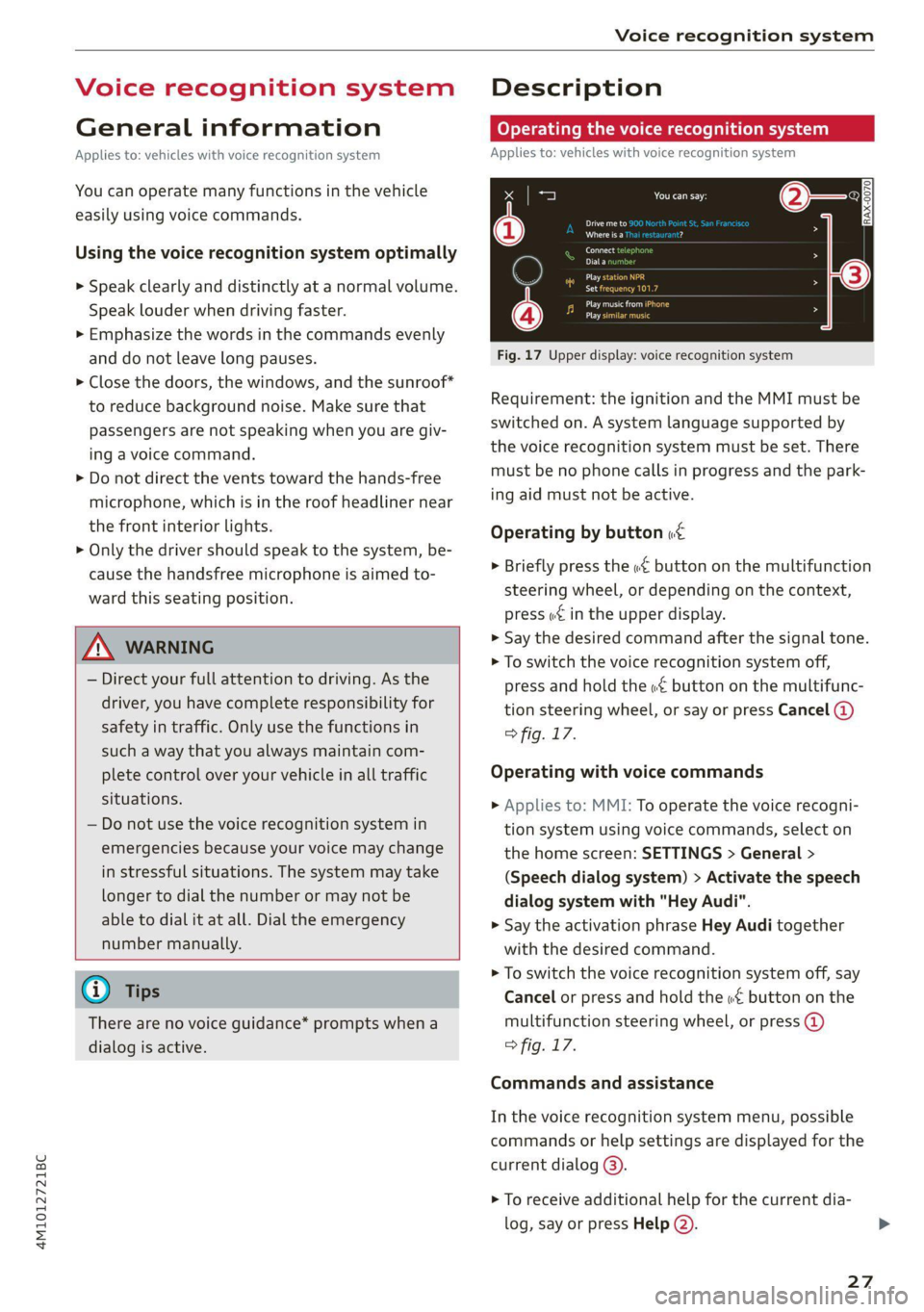
Fig. 17 Upper display: voice recognition system
Requirement: the ignition and the MMI must be
switched on. A system language supported by
the voice recognition system must be set. There
must be no phone calls in progress and the park-
ing aid must not be active.
Operating by button «£
> Briefly press the «€ button on the multifunction
steering wheel, or depending on the context,
press we in the upper display.
> Say the desired command after the signal tone.
> To switch the voice recognition system off,
press and hold the «€ button on the multifunc-
tion steering wheel, or say or press Cancel (@)
> fig. 17.
Operating with voice commands
> Applies to: MMI: To operate the voice recogni-
tion system using voice commands, select on
the home screen: SETTINGS > General >
(Speech dialog system) > Activate the speech
dialog system with "Hey Audi".
> Say the activation phrase Hey Audi together
with the desired command.
> To switch the voice recognition system off, say
Cancel or press and hold the «£ button on the
multifunction steering wheel, or press @)
> fig. 17.
Commands and assistance
In the voice recognition system menu, possible
commands or help settings are displayed for the
current dialog @).
> To receive additional help for the current dia-
log, say or press Help (2).
27
Page 49 of 332
4M1012721BC
Opening and closing
Roof emergency closing
If an object is detected when closing, the roof
will open again automatically. In this case, you
can then close it with the power emergency clos-
ing function.
> Within five seconds after the sunroof opens au-
tomatically, pull the applicable button until the
roof is closed.
Z\ WARNING
To reduce the risk of injury, always pay atten-
tion when closing the roof. Always switch the
ignition off and take the key with you when
leaving the vehicle.
@) Note
Always close the roof when you leave the vehi-
cle and when there is precipitation to reduce
the risk of damage to the interior equipment,
particularly the electronic equipment.
G) Tips
— After switching off the ignition, the roof and
sunshades can still be operated for several
minutes as long as neither of the front
doors have been opened.
— It is not possible to open the roof when
temperatures are too low.
Garage door opener
Applies to: vehicles with garage door opener
With the garage door opener, you can activate
systems such as the garage doors, security sys-
tems or house lights from inside your vehicle.
These functions are operated in the MMI. Multi-
ple receivers can be programmed, which can con-
trol the functions of up to eight!) hand-held
transmitters.
)) The possible number of hand-held transmitters depends
on the equipment.
ZA\ WARNING
— When operating or programming the garage
door opener, make sure that no people or
objects are in the area immediately sur-
rounding the equipment. People can be in-
jured or property can be damaged if struck
when closing.
— Do not allow yourself to be distracted from
traffic by the viewing and operating the dis-
plays.
Gi) Tips
— If you sell your vehicle, reset all settings to
the factory default settings > page 237.
— The system complies with United States FCC
regulations and ISED regulations
> page 311.
G) Tips
Before you program your system to the ga-
rage door opener, first check the compatibili-
ty:
— Ask an authorized Audi dealer or authorized
Audi Service Facility or check at www.
homelink.com. You can also find more infor-
mation about HomeLink there.
— You can display information about Home-
Link (compatibility level/status/country
code/HomeLink generation) in the MMI:
— Select on the home screen: VEHICLE > Set-
tings & Service > Garage door opener > @.
Applies to: vehicles with garage door opener
Requirements: the remote control transmitter
must be programmed > page 48, Program-
ming, the vehicle must be within range of the
system, and the ignition must be switched on.
There are multiple options to open or close the
system (such as the garage door).
47
Page 52 of 332
Lights and Vision
Lights and Vision
Exterior lighting
Switching the lights on and off
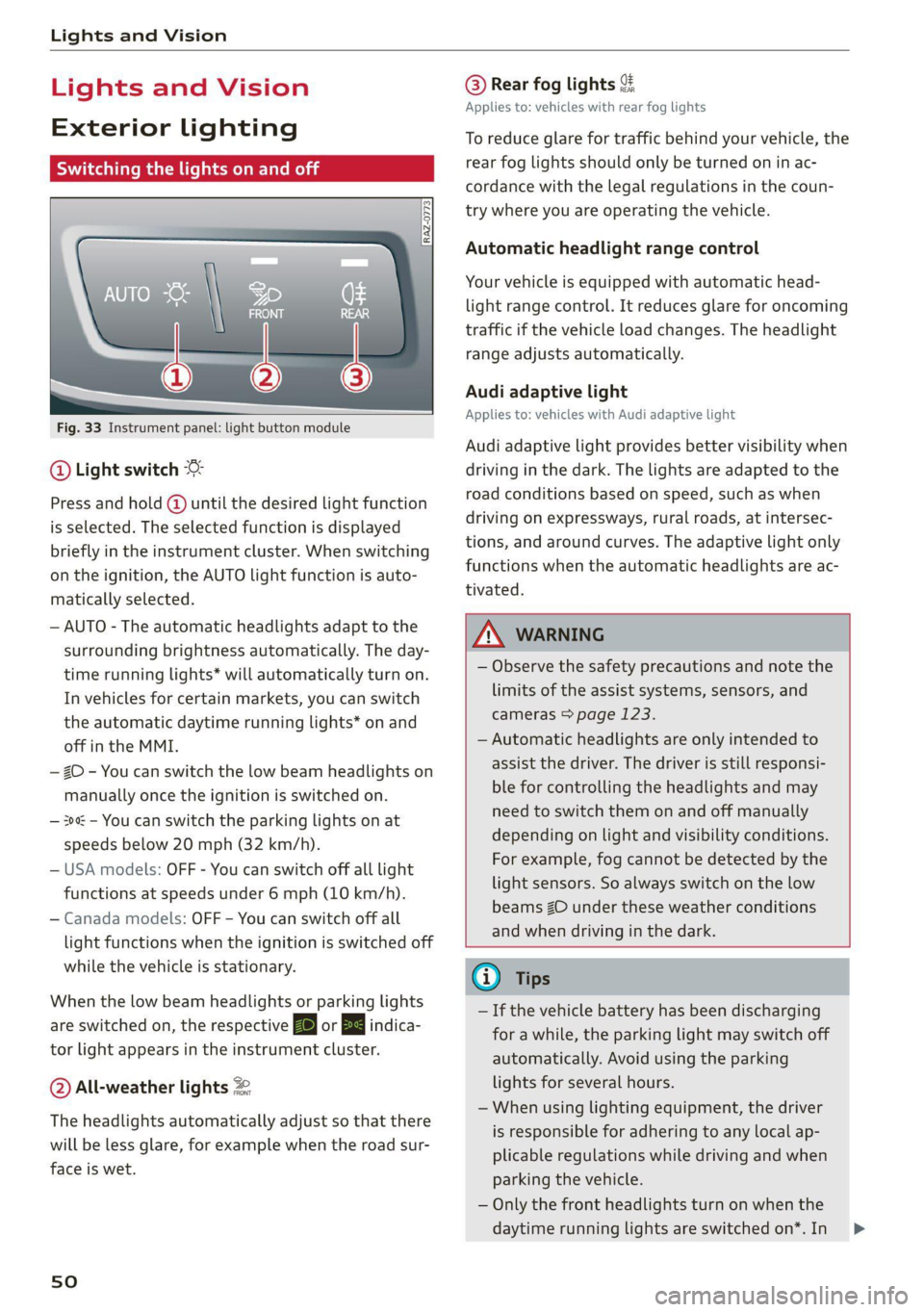
Fig. 33 Instrument panel: light button module
@ Light switch &
Press and hold @ until the desired light function
is selected. The selected function is displayed
briefly in the instrument cluster. When switching
on the ignition, the AUTO light function is auto-
matically selected.
— AUTO - The automatic headlights adapt to the
surrounding brightness automatically. The day-
time running lights* will automatically turn on.
In vehicles for certain markets, you can switch
the automatic daytime running lights* on and
off in the MMI.
— 20 - You can switch the low beam headlights on
manually once the ignition is switched on.
— 3 - You can switch the parking lights on at
speeds below 20 mph (32 km/h).
— USA models: OFF - You can switch off all light
functions at speeds under 6 mph (10 km/h).
— Canada models: OFF - You can switch off all
light functions when the ignition is switched off
while the vehicle is stationary.
When the low beam headlights or parking lights
are switched on, the respective Ba or EB indica-
tor light appears in the instrument cluster.
@ All-weather lights 2
The headlights automatically adjust so that there
will be less glare, for example when the road sur-
face is wet.
sO
@ Rear fog lights &
Applies to: vehicles with rear fog lights
To reduce glare for traffic behind your vehicle, the
rear fog lights should only be turned on in ac-
cordance with the legal regulations in the coun-
try where you are operating the vehicle.
Automatic headlight range control
Your vehicle is equipped with automatic head-
light range control. It reduces glare for oncoming
traffic if the vehicle load changes. The headlight
range adjusts automatically.
Audi adaptive light
Applies to: vehicles with Audi adaptive light
Audi adaptive light provides better visibility when
driving in the dark. The lights are adapted to the
road conditions based on speed, such as when
driving on expressways, rural roads, at intersec-
tions, and around curves. The adaptive light only
functions when the automatic headlights are ac-
tivated.
ZX WARNING
— Observe the safety precautions and note the
limits of the assist systems, sensors, and
cameras > page 123.
— Automatic headlights are only intended to
assist the driver. The driver is still responsi-
ble for controlling the headlights and may
need to switch them on and off manually
depending on light and visibility conditions.
For example, fog cannot be detected by the
light sensors. So always switch on the low
beams ZO under these weather conditions
and when driving in the dark.
@ Tips
— If the vehicle battery has been discharging
for a while, the parking light may switch off
automatically. Avoid using the parking
lights for several hours.
— When using lighting equipment, the driver
is responsible for adhering to any local ap-
plicable regulations while driving and when
parking the vehicle.
— Only the front headlights turn on when the
daytime running lights are switched on*. In >
Page 53 of 332
4M1012721BC
Lights and Vision
vehicles in certain markets, the tail lights
will also turn on.
—In cool or damp weather, the inside of the
headlights, turn signals, and tail lights can
fog
over due to the temperature difference
between the inside and outside. They will
clear shortly after switching them on. This
does not affect the service life of the light-
ing.
— When the parking lights are switched on
and the ignition is switched off, the 200} sym-
bol appears in the light switch module.
Turn signal and high beam lever
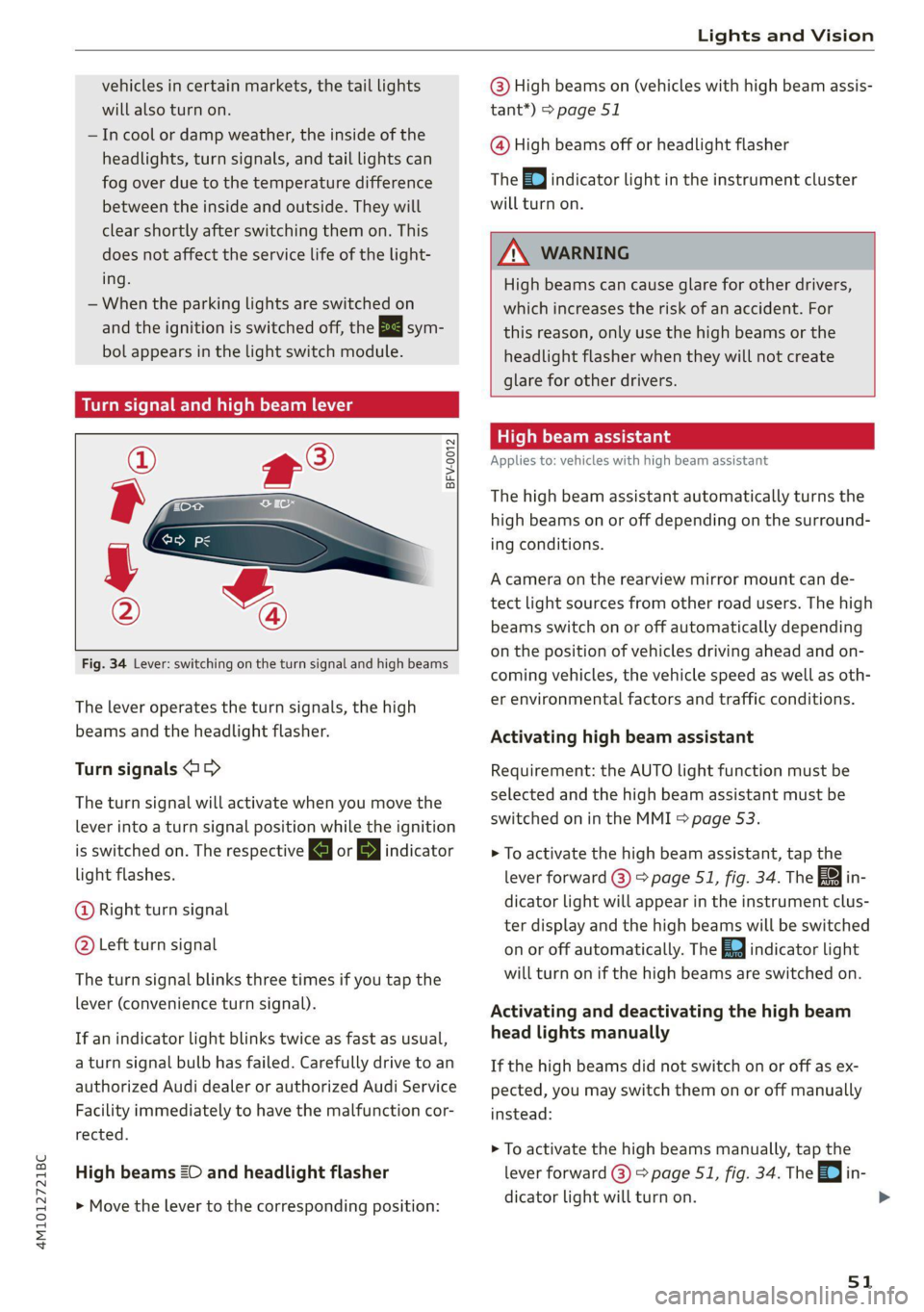
BFV-0012
Fig. 34 Lever: switching on the turn signal and high beams
The lever operates the turn signals, the high
beams and the headlight flasher.
Turn signals (>>
The turn signal will activate when you move the
lever into a turn signal position while the ignition
is switched on. The respective a or B indicator
light flashes.
@ Right turn signal
@ Left turn signal
The turn signal blinks three times if you tap the
lever (convenience turn signal).
If an indicator light blinks twice as fast as usual,
a turn signal bulb has failed. Carefully drive to an
authorized Audi dealer or authorized Audi Service
Facility immediately to have the malfunction cor-
rected.
High beams =O and headlight flasher
> Move the lever to the corresponding position:
@) High beams on (vehicles with high beam assis-
tant*) > page 51
@ High beams off or headlight flasher
The
=| indicator light in the instrument cluster
will turn on.
ZA WARNING
High beams can cause glare for other drivers,
which increases the risk of an accident. For
this reason, only use the high beams or the
headlight flasher when they will not create
glare for other drivers.
High beam assistant
Applies to: vehicles with high beam assistant
The high beam assistant automatically turns the
high beams on or off depending on the surround-
ing conditions.
A camera on the rearview mirror mount can de-
tect light sources from other road users. The high
beams switch on or off automatically depending
on the position of vehicles driving ahead and on-
coming vehicles, the vehicle speed as well as oth-
er environmental factors and traffic conditions.
Activating high beam assistant
Requirement: the AUTO light function must be
selected and the high beam assistant must be
switched on in the MMI > page 53.
> To activate the high beam assistant, tap the
lever forward @) > page 51, fig. 34. The fa in-
dicator light will appear in the instrument clus-
ter display and the high beams will be switched
on or off automatically. The Ed indicator light
will turn on if the high beams are switched on.
Activating and deactivating the high beam
head lights manually
If the high beams did not switch on or off as ex-
pected, you may switch them on or off manually
instead:
> To activate the high beams manually, tap the
lever
forward 3) > page 51, fig. 34. The =0] in-
dicator light will turn on.
51
>