head-up AUDI Q8 2021 Owner´s Manual
[x] Cancel search | Manufacturer: AUDI, Model Year: 2021, Model line: Q8, Model: AUDI Q8 2021Pages: 332, PDF Size: 118.76 MB
Page 131 of 332
4M8012721BF
Driving information
— The traffic signs on the road always take pri-
ority over the display. The driver is always
responsible for adhering to the regulations
applicable in the country where the vehicle
is being operated.
— Units of measurement and language set-
tings are displayed based on how they were
set in the MMI system settings > page 233.
Applies to: vehicles with traffic light information
Switching traffic light information on and
off
The system can be switched on and off in the
MMI page 124.
Accessing traffic light information
> Select in the instrument cluster: vehicle func-
tions tab > Traffic signs.
G@) Tips
If another tab or another function is selected
in the instrument cluster, the traffic light in-
formation will appear in the status bar on the
instrument cluster.
Messages
Applies to: vehicles with traffic light information
Malfunction! See owner's manual
The system could not be configured, for example
due to a network malfunction. Switch the igni-
tion off and shut down the vehicle to restart the
system. Wait several minutes until the vehicle
has shut down completely and then switch the
ignition back on.
Function currently unavailable. See owner's
manual
There is a temporary system malfunction. Check
if one or more of the following situations applies
and correct the issue if necessary:
— Traffic light information is switched off
— Data transmission is deactivated
— The vehicle is not equipped with traffic sign rec-
ognition.
— There is no valid license
— Traffic light information is not available in that
area
Lap timer
Introduction
Applies to: vehicles with lap timer
You can record and evaluate lap times with the
lap timer. You can operate the lap timer using the
multifunction steering wheel > page 13.
Opening the lap timer
> Select in the instrument cluster: Vehicle func-
tions tab > [=] button > Lap times.
An additional indicator will appear in the head-up
display”.
Z\ WARNING
Your focus should always be on driving your
vehicle safely. As the driver, you have com-
plete responsibility for safety in traffic. To re-
duce the risk of an accident, only use the lap
timer functions in such a way that you always
maintain complete control over your vehicle in
all traffic situations.
@ Tips
You can retrieve information from the trip
computer while the lap timer stopwatch is
running.
Fy R teem ale)
Applies to: vehicles with lap timer
Requirement: the lap timer must be open
=> page 129.
Timing laps
> To start timing manually, select Start lap 1 in
the menu.
> To start timing automatically as soon as you be-
gin
to drive, select Start lap 1 by driving off or
Start by driving off in the menu.
> To start timing a new lap after driving a lap, se-
lect New lap in the menu. This starts timing
the next lap at the same time.
129
Page 134 of 332
Driving information
Marking and warning
Applies to: vehicles with night vision assist
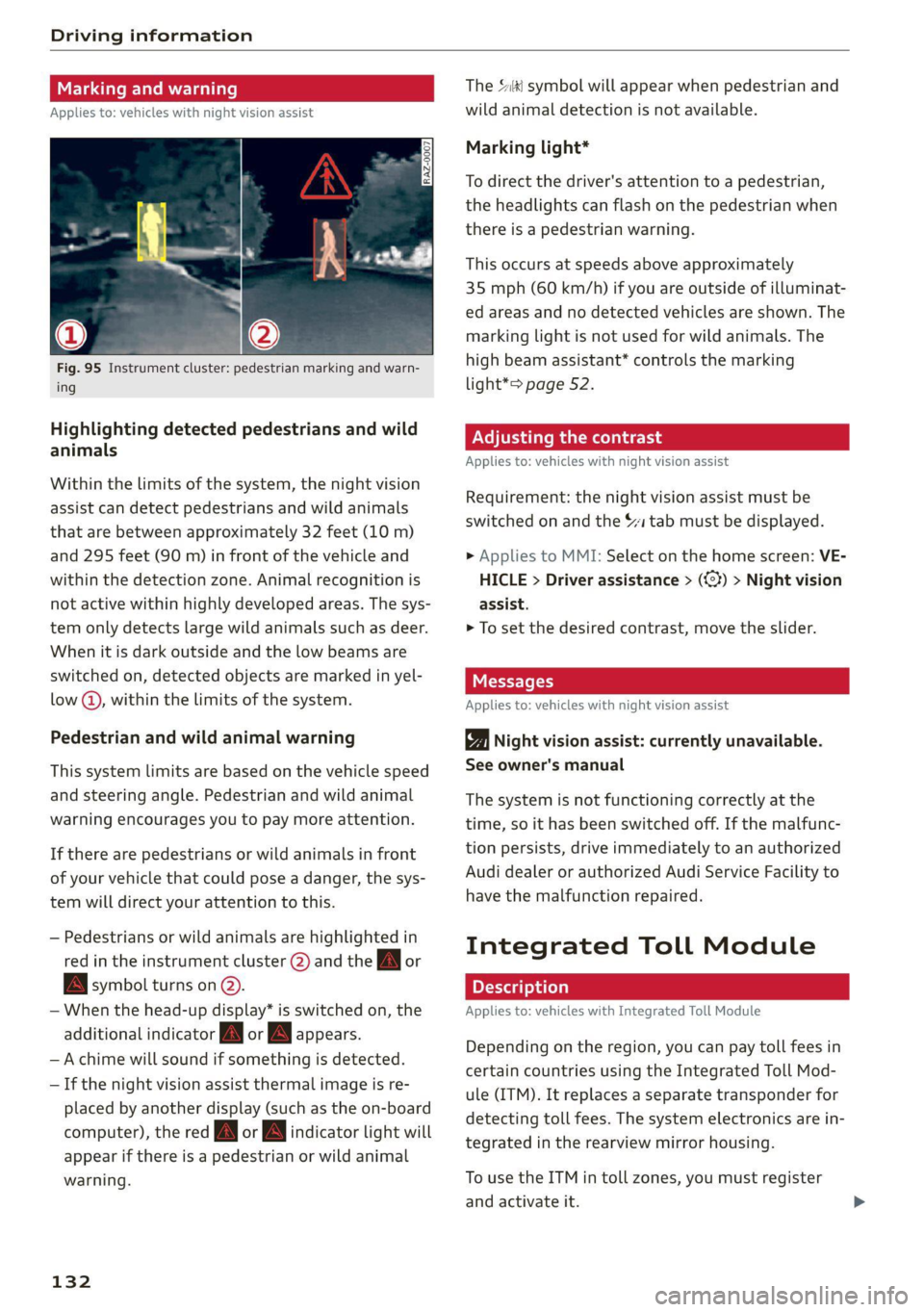
Fig. 95 Instrument cluster: pedestrian marking and warn-
ing
Highlighting detected pedestrians and wild
animals
Within the limits of the system, the night vision
assist can detect pedestrians and wild animals
that are between approximately 32 feet (10 m)
and 295 feet (90 m) in front of the vehicle and
within the detection zone. Animal recognition is
not active within highly developed areas. The sys-
tem only detects large wild animals such as deer.
When it is dark outside and the low beams are
switched on, detected objects are marked in yel-
low @), within the limits of the system.
Pedestrian and wild animal warning
This system limits are based on the vehicle speed
and steering angle. Pedestrian and wild animal
warning encourages you to pay more attention.
If there are pedestrians or wild animals in front
of your vehicle that could pose a danger, the sys-
tem will direct your attention to this.
— Pedestrians or wild animals are highlighted in
red in the instrument cluster @) and the AA] or
BAN symbol turns on @.
— When the head-up display* is switched on, the
additional indicator JM or appears.
—Achime will sound if something is detected.
—If the night vision assist thermal image is re-
placed by another display (such as the on-board
computer), the red A or wa indicator light will
appear if there is a pedestrian or wild animal
warning.
132
The Sl symbol will appear when pedestrian and
wild animal detection is not available.
Marking light*
To direct the driver's attention to a pedestrian,
the headlights can flash on the pedestrian when
there is a pedestrian warning.
This occurs at speeds above approximately
35 mph (60 km/h) if you are outside of illuminat-
ed areas and no detected vehicles are shown. The
marking light is not used for wild animals. The
high beam assistant* controls the marking
light*> page 52.
Adjusting the contrast
Applies to: vehicles with night vision assist
Requirement: the night vision assist must be
switched on and the 1 tab must be displayed.
» Applies to MMI: Select on the home screen: VE-
HICLE > Driver assistance > (<3) > Night vision
assist.
> To set the desired contrast, move the slider.
Messages
Applies to: vehicles with night vision assist
Night vision assist: currently unavailable.
See owner's manual
The system is not functioning correctly at the
time, so it has been switched off. If the malfunc-
tion persists, drive immediately to an authorized
Audi dealer or authorized Audi Service Facility to
have the malfunction repaired.
Integrated Toll Module
Applies to: vehicles with Integrated Toll Module
Depending on the region, you can pay toll fees in
certain countries using the Integrated Toll Mod-
ule (ITM). It replaces a separate transponder for
detecting toll fees. The system electronics are in-
tegrated in the rearview mirror housing.
To use the ITM in toll zones, you must register
and activate it.
Page 137 of 332
4M8012721BF
Driver assistance
An additional indicator will appear in the head-up
display*.
Changing the cruise control speed
Applies to: vehicles with cruise control system
Requirement: the system must be switched on.
> To increase or decrease the cruise control speed
in small increments, tap the lever up to the
first level toward @)/G) & page 134, fig. 96.
> To increase or decrease the cruise control speed
in larger increments, tap the lever up to the
second level toward (4)/).
> To increase or decrease the cruise control speed
continuously, tap and hold the lever at the first
or second level toward @)/G).
Overriding or deactivating the cruise
control speed
Applies to: vehicles with cruise control system
You can override or deactivate the cruise control
system. When you deactivate the system, your
cruise control speed will be stored and you can
resume that speed.
Requirement: the system must be switched on
and the regulated speed must be activated.
Overriding
> To temporarily override the cruise control
speed, press the accelerator pedal.
> To resume the stored regulated speed, remove
your foot from the accelerator pedal.
If you override the cruise control system for a
long period of time, the cruise control system
will be deactivated. The (Usd or [RM indicator
light will be displayed and the cruise control
speed will be saved.
Deactivating
> To deactivate the cruise control speed, press
the lever toward (2) (not locked into place)
=> page 134, fig. 96, or
> Press the brake pedal.
ZX WARNING
Resting your foot on the accelerator pedal
could override the cruise control. This will pre-
vent braking interventions by the system.
Seem NLU ai
Applies to: vehicles with cruise control system
When you switch the system off, the cruise con-
trol speed will be erased.
Requirement: the system must be switched on.
> To switch the system off, press the lever toward
@ (locked into place) > page 134, fig. 96, or
>» Switch the ignition off.
Applies to: vehicles with cruise control system
Gs / 3) Speed control system: currently un-
available. See owner's manual
If the indicator light turns on and this message
appears, the cruise control system has been deac-
tivated. There is a temporary malfunction, for ex-
ample the brakes are overheating. Switch the
cruise control system on again later.
Efficiency assist
Applies to: vehicles with efficiency assist
Efficiency assist can assist the driver with predic-
tive information in order to reduce fuel consump-
tion. Depending on vehicle equipment, the sys-
tem may access data from the navigation system,
the camera behind the windshield, and the radar
sensors.
Adjusting the efficiency assist
You can adjust efficiency assist functions individ-
ually. The settings depend on the vehicle equip-
ment.
— Accelerator pedal feedback > page 99.
— Predictive messages > page 136.
— Predictive control > page 145, Adjusting the
adaptive cruise assist.
135
Page 202 of 332
Navigation
Navigation
Opening navigation
Applies to: vehicles with navigation system
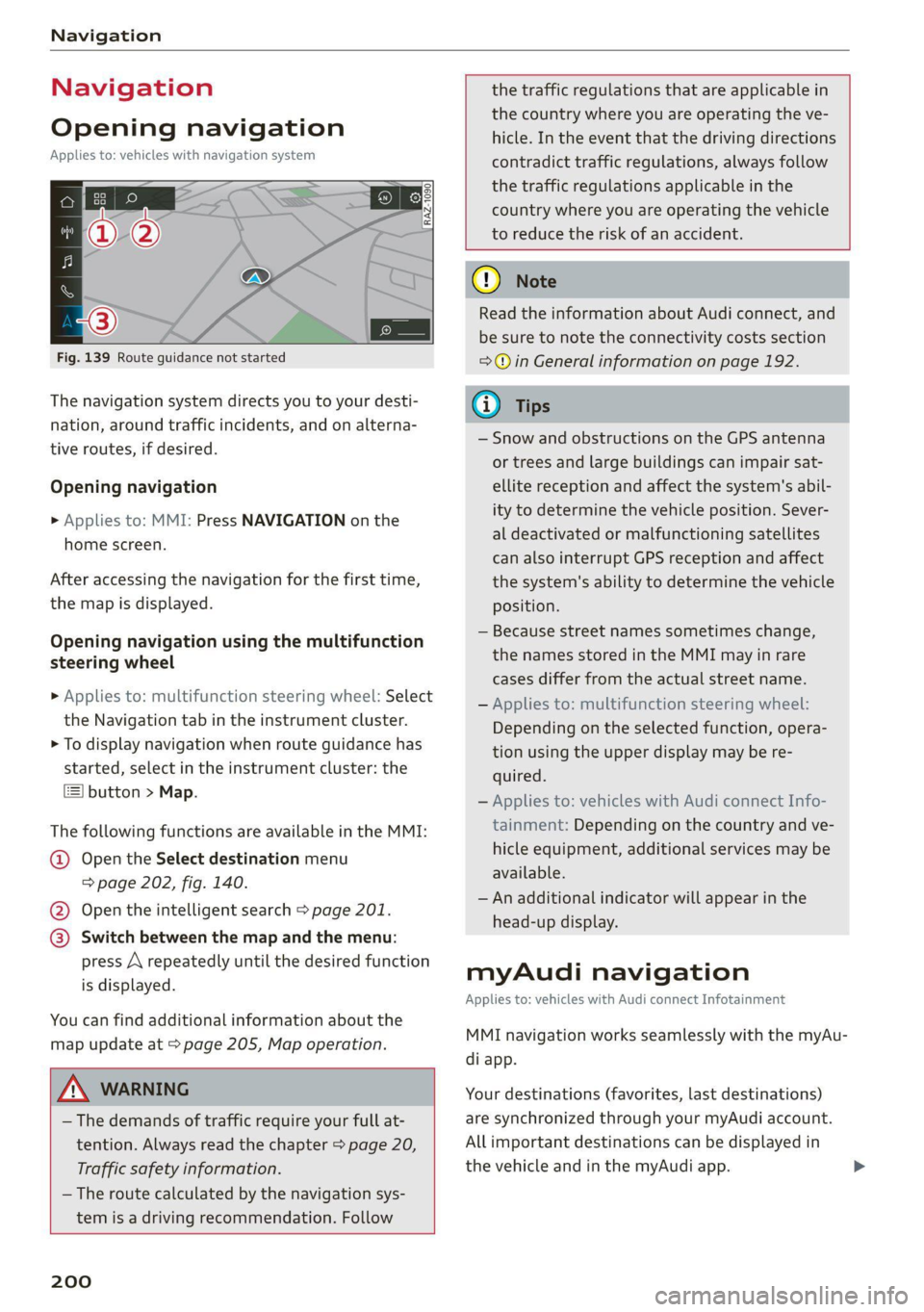
Fig. 139 Route guidance not started
The navigation system directs you to your desti-
nation, around traffic incidents, and on alterna-
tive routes, if desired.
Opening navigation
>» Applies to: MMI: Press NAVIGATION on the
home screen.
After accessing the navigation for the first time,
the map is displayed.
Opening navigation using the multifunction
steering wheel
> Applies to: multifunction steering wheel: Select
the Navigation tab in the instrument cluster.
> To display navigation when route guidance has
started, select in the instrument cluster: the
button > Map.
The following functions are available in the MMI:
@ Open the Select destination menu
= page 202, fig. 140.
@ Open the intelligent search > page 201.
@ Switch between the map and the menu:
press A repeatedly until the desired function
is displayed.
You can find additional information about the
map update at > page 205, Map operation.
ZA\ WARNING
— The demands of traffic require your full at-
tention. Always read the chapter > page 20,
Traffic safety information.
— The route calculated by the navigation sys-
tem is a driving recommendation. Follow
200
the traffic regulations that are applicable in
the country where you are operating the ve-
hicle. In the event that the driving directions
contradict traffic regulations, always follow
the traffic regulations applicable in the
country where you are operating the vehicle
to reduce the risk of an accident.
() Note
Read the information about Audi connect, and
be sure to note the connectivity costs section
=@ in General information on page 192.
(i) Tips
— Snow and obstructions on the GPS antenna
or trees and large buildings can impair sat-
ellite reception and affect the system's abil-
ity to determine the vehicle position. Sever-
al deactivated or malfunctioning satellites
can also interrupt GPS reception and affect
the system's ability to determine the vehicle
position.
— Because street names sometimes change,
the names stored in the MMI may in rare
cases differ from the actual street name.
— Applies to: multifunction steering wheel:
Depending on the selected function, opera-
tion using the upper display may be re-
quired.
— Applies to: vehicles with Audi connect Info-
tainment: Depending on the country and ve-
hicle equipment, additional services may be
available.
— An additional indicator will appear in the
head-up display.
myAudi navigation
Applies to: vehicles with Audi connect Infotainment
MMI navigation works seamlessly with the myAu-
di app.
Your destinations (favorites, last destinations)
are synchronized through your myAudi account.
All important destinations can be displayed in
the vehicle and in the myAudi app.
Page 238 of 332
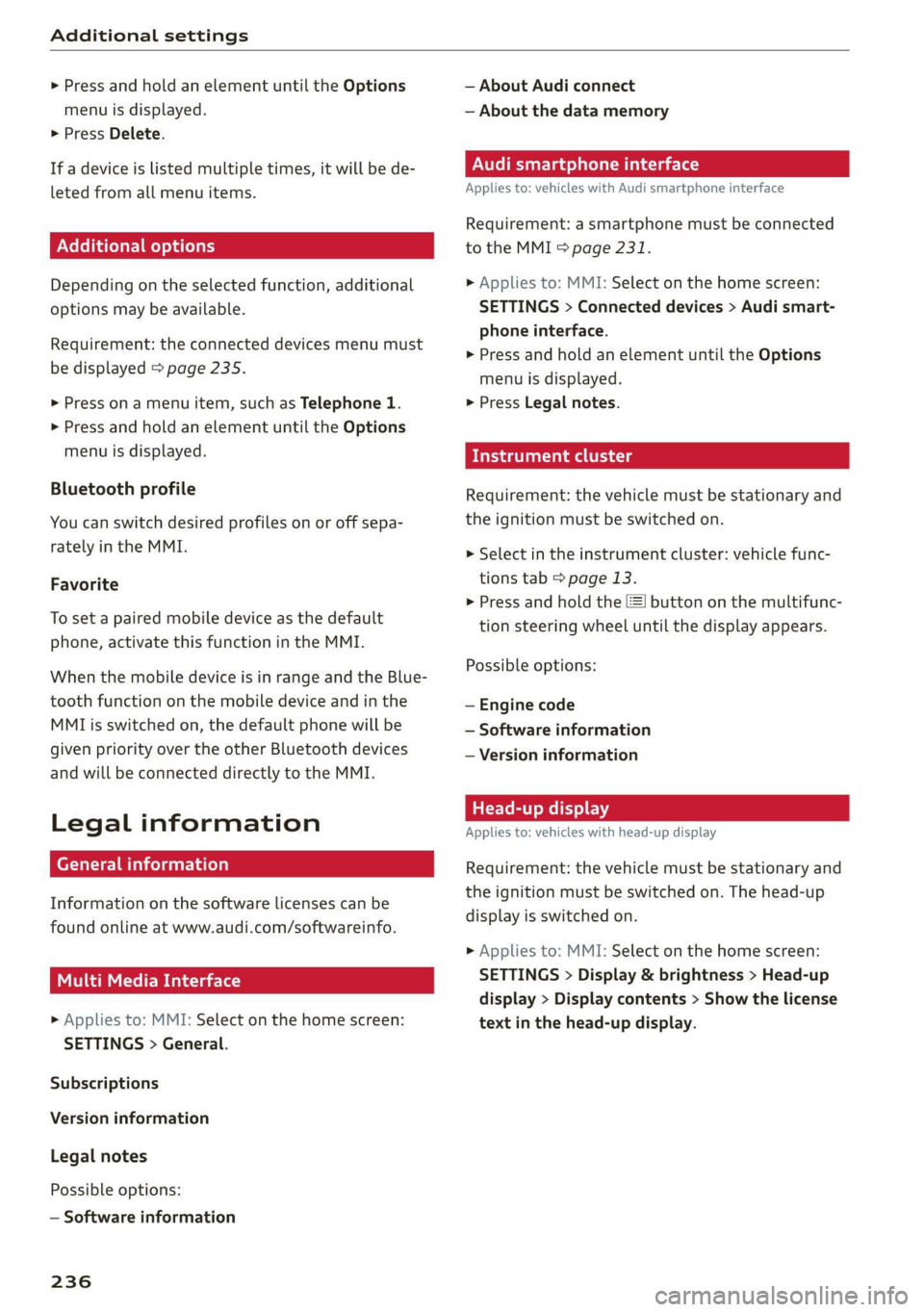
Additional settings
> Press and hold an element until the Options
menu is displayed.
> Press Delete.
If a device is listed multiple times, it will be de-
leted from all menu items.
Additional options
Depending on the selected function, additional
options
may be available.
Requirement: the connected devices menu must
be displayed > page 235.
> Press ona menu item, such as Telephone 1.
> Press and hold an element until the Options
menu is displayed.
Bluetooth profile
You can switch desired profiles on or off sepa-
rately in the MMI.
Favorite
To set a paired mobile device as the default
phone, activate this function in the MMI.
When the mobile device is in range and the Blue-
tooth function on the mobile device and in the
MMI is switched on, the default phone will be
given priority over the other Bluetooth devices
and will be connected directly to the MMI.
Legal information
erreur)
Information on the software licenses can be
found online at www.audi.com/softwareinfo.
Item elem tarts)
> Applies to: MMI: Select on the home screen:
SETTINGS > General.
Subscriptions
Version information
Legal notes
Possible options:
— Software information
236
— About Audi connect
— About the data memory
Audi smartphone interface
Applies to: vehicles with Audi smartphone interface
Requirement: a smartphone must be connected
to the MMI > page 231.
» Applies to: MMI: Select on the home screen:
SETTINGS > Connected devices > Audi smart-
phone interface.
> Press and hold an element until the Options
menu is displayed.
> Press Legal notes.
Requirement: the vehicle must be stationary and
the ignition must be switched on.
> Select in the instrument cluster: vehicle func-
tions tab > page 13.
> Press and hold the =] button on the multifunc-
tion steering wheel until the display appears.
Possible options:
— Engine code
— Software information
— Version information
Head-up display
Applies to: vehicles with head-up display
Requirement: the vehicle must be stationary and
the ignition must be switched on. The head-up
display is switched on.
> Applies to: MMI: Select on the home screen:
SETTINGS > Display & brightness > Head-up
display > Display contents > Show the license
text in the head-up display.
Page 302 of 332
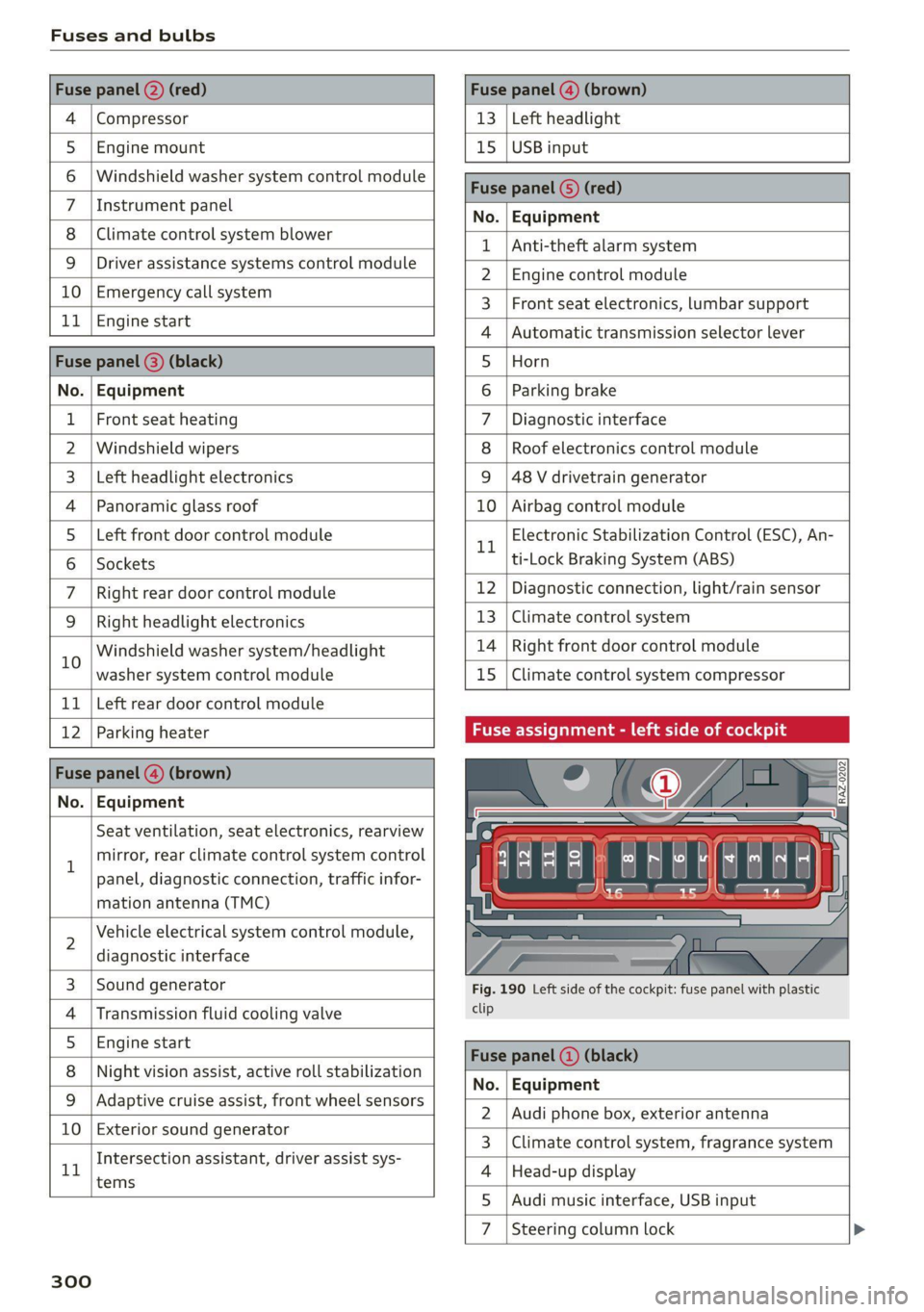
Fuses and bulbs
Compressor | 13 | Left headlight
Audi music interface, USB input
4
5 |Engine mount 15 | USB input
6 |Windshield washer system control module
7 LisioTnieNe panel Nas | Equipinent
8 | Climate control system blower T | Ant-theté dlaunsystem
9 |Driver assistance systems control module :
2 | Engine control module
E UL
10. | Emergency 'callsystem 3 | Front seat electronics, lumbar support
11 | Engi
ngine start 4 |Automatic transmission selector lever
Di 5 |Horn
No. | Equipment 6 | Parking brake
1 |Front seat heating 7 |Diagnostic interface
2 |Windshield wipers 8 | Roof electronics control module
3 | Left headlight electronics 9 |48 V drivetrain generator
4 |Panoramic glass roof 10 | Airbag control module
5 |Left front door control module Electronic Stabilization Control (ESC), An-
Il | ‘
6 |Sockets ti-Lock Braking System (ABS)
7 | Right rear door control module 12 | Diagnostic connection, light/rain sensor
9 | Right headlight electronics 13 | Climate control system
10 Windshield washer system/headlight 14 | Right front door control module
washer system control module 15 | Climate control system compressor
11 | Left rear door control module
12 | Parking heater Fuse assignment - left side of cockpit
No. | Equipment
Seat ventilation, seat electronics, rearview
1 mirror, rear climate control system control
panel, diagnostic connection, traffic infor-
mation antenna (TMC)
2 Vehicle electrical system control module,
diagnostic interface
3 |Sound generator Fig. 190 Left side of the cockpit: fuse panel with plastic
4 | Transmission fluid cooling valve ete
5 |Engine start
8 | Night vision assist, active roll stabilization 5
No. | Equipment
9 |Adaptive cruise assist, front wheel sensors - -
2. |Audi phone box, exterior antenna
10 | Exterior sound generator 5
3 | Climate control system, fragrance system
Intersection assistant, driver assist sys- .
11 4 |Head-up display
tems
5
7d
Steering column lock
300
Page 321 of 332
4M8012721BF
Index
External voice operation................. 29
F
Factory default settings
Multi Media Interface................. 234
EASE OUTS sissses ow snaawee 0 x sons #9 seme a 0 onennns 201
FAVORITOS! & o cowsms w 6 cman 6 8 semua & wexees & renee 22
Bluetooth. .............. 0... eee eee 236
NaVIG@EION:: « + swe 9 o eee 5 ¢ oem & e eee 202
Telephone wwe «x cain © aesee e+ ence oo eee 186
Federal Communications Commission (FCC) . 311
File formats (media drives).............. 228
FOg (WINdOWS)ixw: 5 2 came y 5 anew ay aeew 5 2 Re 92
Folding the rearseats...............0005 86
Footwell temperature.............2.0005 93
For the sake of the environment
Disposing of engine oil................ 247
FUeLIRG!s © anecsns so answers & v annum © ¥ seems WH avose 239
Leaks... i eee eee eee eee 243
Fragrance... ... ee eee eee eee 92,93
Free text search
Media....... cee eee eee eee ee 227
R&GiOiss = = seus = = saupe & = ems 4 neoRE ee 214
also refer to Intelligent search.......... 201
Freeze protection
Coolant... .. 0. eee eee eee 248
Windshield washer system............. 254
Frequency band..........-..00 eevee ee 212
also refer to Frequency band........... 212
Front center armrest ....... 000. cece ee eee 65
Front collision warning
refer to Audi pre sense front............ 149
Front passenger’s seat adjustment
PRON. « ssweece xo aceane wo axevene ao coenaie w 6 ace 65
Rear... eee eee eee 65
Front wiper blades
ChanGinG’s + x same sy eames ¢ a eae ¢ HER Fe 58
Cleaning « « cvs sv even oe enn oe ence oo 58
FUGls sce ¢ x cage x 2 eee 7 o we Ye eee ee 238
TAGAIEIVES «scones x 5 sures @ 2 sxenene © 8 ommrane oa ot 239
Current consumption................... 16
Fueldisplay sec: = s sees ey seen sy eee ge es 12
Fuel-tank. capacity’: « scsi oo cise a 0 caves « 314
Gasoline
Reducing fuel consumption............ 102
Fueling
Fuel filler door..... 0.0... cece eee eee ee 239
Fuel filler door emergency release....... 241
Fueltankcapacity'. « 5 con es cone a wanna « 314
Functions on demand...............0.4. 194
Functions that require a license.......... 194
also refer to Functions on demand....... 194
G
Garage door opener............--0ee eee 48
GarMeNthOokS scesiiss sv cevevee oo ances o a wees 9 0 2 83
GaSOlING cy « x wares & 2 meee = 2 eee 4 ¢ eee 4 8 238
Additives ...... 0... cece eee eee 239
Gasoline mixture ...............0000ee 238
GAWR
refer to Gross Axle Weight Rating (GAWR) . 314
Gears... eee 97
Glossary of tire and loading terminology... 259
Glove compartment..............000 eee 83
G meter
refer to Sport displays.................. 15
Gross Axle Weight Rating (GAWR)........ 314
Gross Vehicle Weight Rating (GVWR)...... 314
GVWR
refer to Gross Vehicle Weight
Rating (GVWR) « ssope « 2 wecne 2 2 ceuee & 2 ces 314
H
Hanastrees « « asms = eevee § = netR se HOR Se 182
Hatids Free Profiles « 2 swcas x x agus ¢ 2 ems 2 182
Head-up display
AGjUSUING was +» ences 3 ¢ swe yo ees oy eee = 27
Adjusting the brightness................ 55
Operating...............0 0. cece eee 27
Headlight range control................05 51
Headlights
ClOSNiNG’s = = cams ¢ 5 eas 7 o Seas tS ee Ea: 281
Headlight range control................ 51
Washer system... 1.2... 00. e cee ee eee 57
Washer system (filling washer fluid)... . . 254
Head restraints
ACIUSEINGisyes x = sewas 3 2 gas x & eewR = # aR x 67
Removing and installing................ 67
Heated rear window .........000 sees eeeeen 92
Heated steering wheel.................0. 93
319
Page 324 of 332
Index
Multi Media Interface...............0005 20
Menus and symbols.............000-008 21
OPGrAtiNG's + ease x x eee ee Kae s 2 BemE o 18,21
Switching the displays on or off.......... 20
MUEING ies: 2 secon © a women & eee ooo oN Foo eae 31.
MYAUGI 5 = ees ss pews so pews s eames ee 32,193
myAudi navigation................. 200, 203
MYAUGI USERS ¢ sicts ss caus a x ens ds Bema sa: 32
N
Narrow areaS.... 22... cece eee eee 146
Natural leather care and cleaning......... 283
Navigation. ..............0..0..0.000. 200
BetteRhOUt@aas 2 x wean s a sana s age & s a 209
CallinGiesnis ¢ = scene v awe ov ween ee wm 8 oe 203
Changing the scale.............00000e 203
also refertoMap...........--.0e ee eee 204
Navigation database
Version information.............00005 236
Navigation (instrument cluster) .......... 206
Ns 83
SY, 310
Night vision assist...............-..0004 131
Cleaning the camera...............4.- 281
Notification center. ....... 0... cee eee eee 23
Oo
Octane rating (gasoline)................ 238
Odometer... .... cece eee eee eee 14
ReS@ttinGssssx « = sees ¢ ¢ ees 3 ieee ss res 14
Office address
refer to Business address.............. 206
Offroad
refer to Offroad driving................ 108
Offroad
driving ees = ¢ swwn 2 2 wen 2 2 were so wee 108
OFF (climate control system) ............-. 91
Oil
refer to Engine Oils: «sw s vases owen 2 245
On-board computer. .......5-.0. 00 eee ee 16
On Board Diagnostic System (OBD)... 241, 303
Online map
refer to Satellite map...............05 207
ONLINE RADIO « swcomss «2 sooness 6 w sevens wo ERE oo 216
also refer to Online radio.......... 216, 217
Online roadside assistance.............. 198
322
Online services
refer toconnect.........e eee eee eee 192
Online system update.................. 234
Online traffic information............... 209
OPEN Geers so ceseons 3 v cevvans ov sumsees & 2 sume Woe ORE 35
Automatic luggage compartment lid...... 43
Convenience opening...............0085 47
Fuel filler:dOOP ss: ics cane so eae oe eas ooo 239
HOOd .... cece eee eee 243
Luggage compartment lid............... 43
Luggage compartment lid with foot motion . 44
Panoramic glass roof.............2-200. 47
Sltishiade (OT) ss i s cows 4 c teen se ree ei 47
Sunshade (Windows): s «sso so ieee oo sossan 46
Windows..... 02.00.00. cece eee ee eee 46
Opening and closing
refer to Unlocking and locking........ 35,40
Operating
Head-up display.................00000. 27
InstruMeNt ClUster s sions & eines & wave ae ove 13
Multifunction steering wheel............ 13
Multi Media Interface............... 18,21
TEXtIN PUB iss 3 2 wien 3 wens a = acer os EM 6 eo 25
Touch display.......... 0.00 eee eee eee 18
Voice recognition system............... 28
Optional equipment number............. 313
Options
MeGidiwe = » zemy s meme ¢ eee « 5 ee et 227
R@GIO sxisacs 3 smisans @ o amivens & 0 orewaun 2 0 aera 8 217
Overview (cockpit) «6 cies ce cece sce nees eee 6
P
Paint COd@z»: = » saws x 2 wee sy eee a 2 ee 313
Paint damad@ws« z = sem es ewe se eee es oe 282
PANIC button. ..............-.0..00000 39
PANIC function... 0.0.0... c cece eee eee eee 39
Panoramic glass roof..............00000- 47
Convenience opening and closing......... 47
Emergency closing..........sceeseeeees 48
Quick opening................ eee eae 48
Parental control
DVD... eee eee eee 227
Park assist plus. ........ 0.0000 e eee eee 170
Parking ..... 0.6... cee cece eee ee 96