lane assist AUDI Q8 2021 Owner´s Manual
[x] Cancel search | Manufacturer: AUDI, Model Year: 2021, Model line: Q8, Model: AUDI Q8 2021Pages: 332, PDF Size: 118.76 MB
Page 152 of 332
Driver assistance
Audi pre sense preemptive safety measures
Applies to: vehicles with Audi pre sense
Depending on the vehicle speed and the vehicle
equipment, the following functions may be initi-
ated in certain situations:
— Visual and audio warnings
— Reversible tensioning of safety belts
— Closing the windows and panoramic glass roof
— Adjusting the seats
— Other preemptive safety measures by individual
systems
ZA WARNING
Observe the safety precautions and note the
limits of the assist systems, sensors, and
cameras > page 121.
@ Tips
— Depending on the risk situation that is de-
tected and the selected Audi drive select*
mode, not all preemptive safety measures
may be initiated under certain circumstan-
ces. Certain functions can be adjusted or
skipped if necessary.
— Audi pre sense may be restricted or unavail-
able under certain circumstances, for exam-
ple if:
— There are passengers with unfastened
safety belts
— After turning on the ignition, as long as
the 8 indicator light is on.
— When driving in reverse.
— There is an airbag control module mal-
function
— System functions may not be available if
the ESC is limited or switched off, or if
there is a malfunction.
Audi pre sense basic
Applies to: vehicles with Audi pre sense basic
Audi pre sense basic is automatically active at
speeds of approximately 20 mph (30 km/h) and
higher. Audi pre sense basic can trigger preemp-
tive safety measures during emergency braking
and dangerous braking maneuvers as well as in
unstable driving situations, such as oversteering
150
or understeering > page 150, Audi pre sense pre-
emptive safety measures.
The message Audi pre sense © will warn you
about the danger.
A WARNING
Observe the safety precautions and note the
limits of the assist systems, sensors, and
cameras > page 121.
Audi pre sense front
Applies to: vehicles with Audi pre sense front
Within the limits of the system, Audi pre sense
front can warn about an impending front end col-
lision and brake the vehicle strongly, if necessary.
The system uses the camera behind the wind-
shield and is available at speeds above approxi-
mately 6 mph (10 km/h).
Driving situations
The situations to which the system reacts de-
pends on the vehicle speed.
Up to speeds of approximately 50 mph
(85 km/h), the system may react to the following
situations:
— Pedestrians and cyclists in your lane
Up to speeds of approximately 155 mph
(250 km/h), the system may react to the follow-
ing situations:
—Avehicle driving ahead clearly applies the
brakes
— When approaching a vehicle ahead that is clear-
ly traveling more slowly
— When approaching a stationary vehicle
Prewarning
To warn about detected dangers, Audi pre
sense [@ will appear in the instrument cluster
and an audio signal will sound.
A brief application of the brakes
If a collision is imminent, there may be an acute
warning using a brief application of the brakes.
You
will also be warned about the danger by an
indicator in the instrument cluster display. You >
Page 154 of 332
Driver assistance
ZA\ WARNING
— Observe the safety precautions and note the
limits of the assist systems, sensors, and
cameras > page 121.
— Audi pre sense side does not react to pedes-
trians, animals, and objects not detected as
vehicles.
@) Tips
— The Audi pre sense side functions are limit-
ed when trailer mode is detected.
— The Audi pre sense side functions may also
switch off if there is a malfunction in the in-
tersection assistant*.
Swerve assist
Applies to: vehicles with swerve assist
The swerve assist can help you to steer the vehi-
cle around an obstacle detected in a critical area.
If you avoid an obstacle after the acute warning,
then swerve assist assists you by specifically
braking individual wheels and applying slight
steering adjustment to correct the steering
wheel angle as long as you are actively steering.
The swerve assist is available at speeds between
approximately 30 mph and 90 mph (50 km/h -
150 km/h).
ZA\ WARNING
— Observe the safety precautions and note the
limits of the assist systems, sensors, and
cameras > page 121.
— Swerve assist does not react to pedestrians,
animals, crossing objects, and objects not
detected as vehicles.
@) Tips
— System functions may not be available if the
ESC is limited or switched off, or if there is a
malfunction.
— An indicator in the instrument cluster will
inform you when there is an intervention.
D_ In certain countries.
152
ag
Applies to: vehicles with turn assist
When turning left, turn assist can help to reduce
the risk of a collision with an oncoming vehicle by
using braking action to keep your vehicle in its
lane. The function is only available when the turn
signal is turned on and at speeds up to maximum
of 6 mph (10 km/h).
ZA WARNING
— Observe the safety precautions and note the
limits of the assist systems, sensors, and
cameras > page 121.
— The turn assist does not react to pedes-
trians, animals, crossing objects, and ob-
jects not detected as vehicles.
G) Tips
— System functions may not be available if the
ESC is limited or switched off, or if there is a
malfunction.
—An indicator in the instrument cluster will
inform you when there is an intervention.
Adjusting Audi pre sense
Applies to: vehicles with Audi pre sense
The system can be switched on and off in the
MMI > page 124. You can adjust Audi pre sense
functions to your preferences. The adjustment
options depend on the vehicle equipment.
> Applies to MMI: Select on the home screen: VE-
HICLE > Driver assistance > (3) > Audi pre
sense.
Setting the prewarning
You can adjust the warning time for the prewarn-
ing» individually (Early/Medium/Late) or switch
the prewarning off.
Set the warning time for the early warning to
Early at first. If you feel that the prewarnings ap-
pear too early, then set the warning time to Me-
dium. The Late warning time should only be set
in special circumstances. >
Page 155 of 332
4M8012721BF
Driver assistance
@ Tips
— If the system is switched off, it switches on
again automatically once the ignition is
switched on again.
— Switch Audi pre sense off when you are not
using public streets, when loading the vehi-
cle onto a vehicle carrier, train, ship, or oth-
er type of transportation, or when towing
the vehicle. This can help to prevent an un-
desired intervention from the Audi pre
sense system.
Messages
Applies to: vehicles with Audi pre sense
If BJ is displayed when there is a malfunction,
the Audi pre sense functions may be unavailable
or may be limited.
A message that indicates the cause and possible
solution may appear with some displays. The
weather conditions may be too poor or a sensor
may be covered. Bring the vehicle to a full stop,
switch the ignition off, and clean the area in front
of the sensors > page 123.
If the message still appears after switching the
ignition on again, have an authorized repair facili-
ty correct the malfunction as soon as possible.
D In certain countries.
Side assist
petted aCoy a)
Applies to: vehicles with side assist
al 3 a z
e|
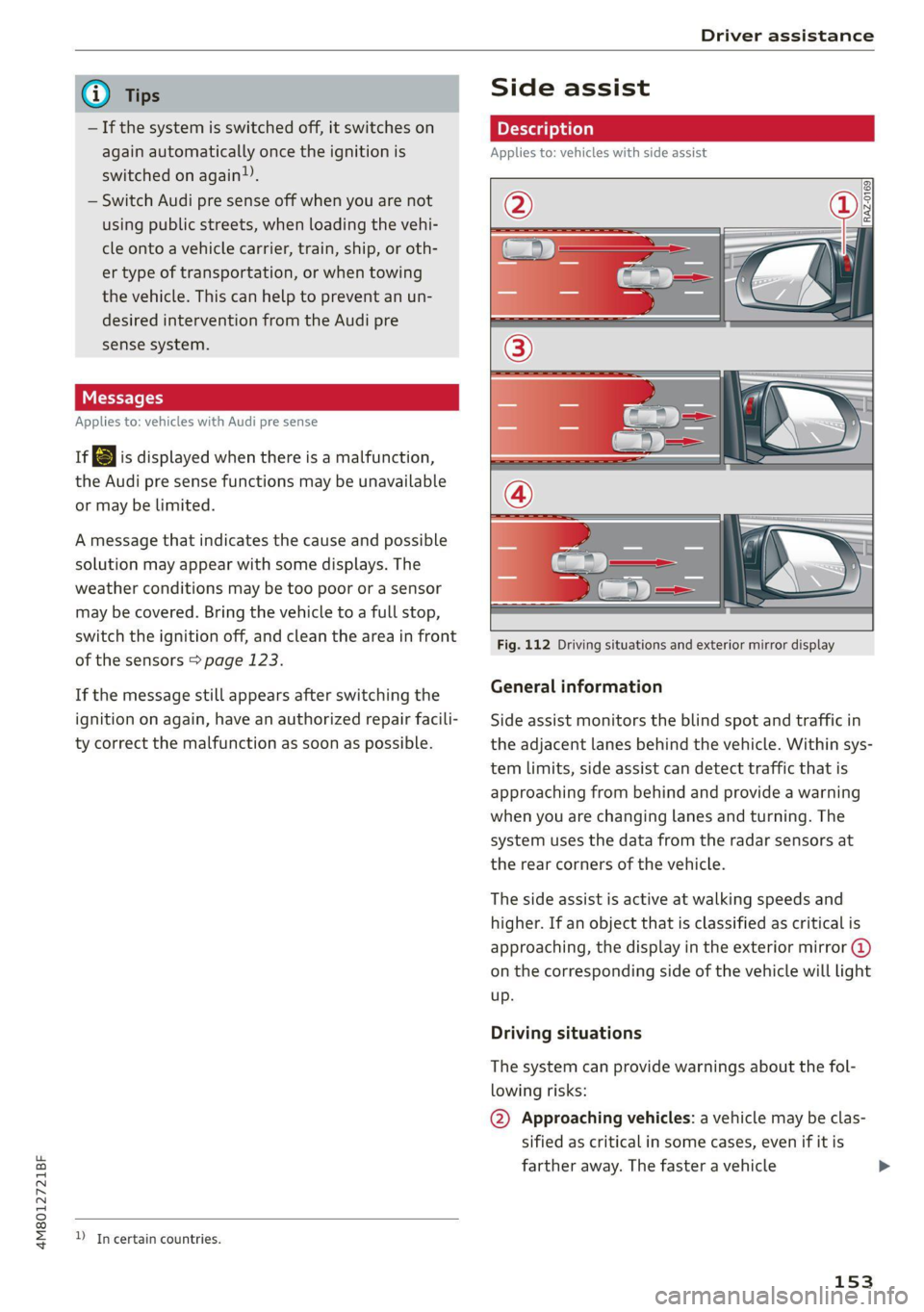
Fig. 112 Driving situations and exterior mirror display
General information
Side assist monitors the blind spot and traffic in
the adjacent lanes behind the vehicle. Within sys-
tem limits, side assist can detect traffic that is
approaching from behind and provide a warning
when you are changing lanes and turning. The
system uses the data from the radar sensors at
the rear corners of the vehicle.
The side assist is active at walking speeds and
higher. If an object that is classified as critical is
approaching, the display in the exterior mirror @)
on the corresponding side of the vehicle will light
up.
Driving situations
The system can provide warnings about the fol-
lowing risks:
@ Approaching vehicles: a vehicle may be clas-
sified as critical in some cases, even if it is
farther away. The faster a vehicle
153
Page 156 of 332
Driver assistance
approaches, the sooner the display will turn
on.
@ Vehicles traveling in the same direction: the
display will turn on if vehicles traveling in the
same direction as your vehicle are classified
as critical. The side assist warns you of all de-
tected vehicles when they are in the “blind
spot” or before they reach that point.
@ Vehicles you are passing: the display only
turns on if you slowly pass a detected vehicle
(difference in speed between the two vehicles
is less than 9 mph (15 km/h)). There is no
display if you pass a vehicle more quickly.
Information stage
At the information level, the side assist informs
you of detected objects that are classified as criti-
cal. This is even possible when your vehicle is sta-
tionary and the turn signal is turned on, so that
the system can also assist you when turning.
From speeds of approximately 6 mph (10 km/h)
and higher, the system will warn you of detected
objects that are classified as critical, even if the
turn signal is not turned on.
The display remains dim in the information stage
so that you are not distracted while looking for-
ward.
Warning stage
If you activate a turn signal and the display flash-
es, side assist is warning about objects that have
been classified as critical.
Depending on the vehicle equipment and other
driver assistance systems, the display may also
flash if you have not activated a turn signal. If
you are approaching a detected lane marker line
and it appears you will be leaving the lane, the
display will warn you about detected vehicles
that are classified as critical. You can also be
warned with corrective steering > page 147,
Lane departure warning.
Detection range
The radar sensors are designed to detect the left
and right adjacent lanes when the road lanes are
the normal width. In some situations, the display
may turn on even though there is no vehicle lo-
154
cated in the area that is critical for a lane change.
For example:
— If the lanes are narrow or if you are driving on
the edge of your lane. If this is the case, the
system may have detected a vehicle in another
lane that is not adjacent to your current lane.
—If you are driving through a curve. Side assist
may react to a vehicle that is in the same lane
or one lane over from the adjacent lane.
— If side assist reacts to other objects (such as
roadside structures like guard rails).
ZA WARNING
— Observe the safety precautions and note the
limits of the assist systems, sensors, and
cameras > page 121.
— The display may not appear on time when
vehicles are approaching or being passed
very quickly.
G) Tips
— If the window glass in the driver's door or
front passenger's door has been tinted, the
display in the exterior mirror may be incor-
rect.
— These systems are not available in trailer
towing mode. There is no guarantee the sys-
tems will switch off when using a retrofitted
trailer hitch. Do not use these functions
when towing a trailer.
— The coverage areas of the sensors > fig. 112
are diagrams and do not represent a true-
to-scale image of the sensor ranges.
— The system complies with United States FCC
regulations and ISED regulations
=> page 311.
Peet
Applies to: vehicles with side assist
The system can be switched on and off in the
MMI & page 124. If the system is activated, the
displays will turn on briefly when the ignition is
switched on.
Page 159 of 332
4M8012721BF
Driver assistance
Displays, warnings, and braking
— Display: the red arrow @ can indicate the direc-
tion from which the cross traffic is approaching.
The indicator in the upper display only appears
when the parking aid is activated. For vehicles
with peripheral cameras only in the Front and
Front corner camera views. The display only ap-
pears in the instrument cluster > fig. 116 when
the Driver assistance display is open in the on-
board computer > page 16.
— Warnings: the message Cross traffic! © can
warn about critical cross-traffic when driving
forward. There may also be an audible signal.
— Automatic brake activation: if you do not react
to a warning, a brief braking by the system can
warn you of a potential collision with an ap-
proaching object when driving forward at
speeds up to approximately 6 mph (10 km/h).
Switching the intersection assistant on and
off
— The system can be switched on and off in the
MMI & page 124.
Messages
If Eo, or > is displayed when there is a mal-
function, the intersection assistant functions
may be unavailable or may be limited.
A message that indicates the cause and possible
solution may appear with some displays. The
weather conditions may be too poor or a sensor
may be covered. Clean the area in front of the
sensors > page 123 and try to turn the system on
again later.
If the malfunction remains, drive to an author-
ized Audi dealer or authorized Audi Service Facili-
ty immediately to have the malfunction correct-
ed.
ZA\ WARNING
— Observe the safety precautions and note the
limits of the assist systems, sensors, and
cameras © page 121.
— The intersection assistant will not provide
alerts about people and cannot warn you
about every type of approaching objects,
such as cyclists. Always monitor the traffic
as well as the vehicle's surroundings with di-
rect eye contact.
—The system may not react if vehicles are ap-
proaching very fast.
G@) Tips
— The coverage areas of the sensors > fig. 115
are diagrams and do not represent a true-
to-scale image of the sensor ranges.
— The system complies with United States FCC
regulations and ISED regulations
> page 311.
Emergency assist
Applies to: vehicles with emergency assist
General information
Within the limits of the system, emergency assist
can detect inactivity from the driver. In these in-
stances, the system will warn the driver, assume
control of the vehicle if necessary, and bring the
vehicle automatically to a stop in the lane.
Regardless of the speed, the emergency assist is
automatically available when the adaptive cruise
assist* is activated. When the adaptive cruise as-
sist* is deactivated, the system is only available
at speeds above approximately 40 mph
(65 km/h).
Emergency assist functions
Measures may be initiated in stages. The vehicle
can be controlled with the limits of the system.
The measures depend on the dangerous situation
and the vehicle equipment:
— Visual and audio warnings
— Vehicle control
— Reduction of vehicle speed in stages
— Lowers the volume of the Infotainment system
— Tugs on the safety belt
— Activates the brakes
— The emergency flashers are activated
— Audi pre sense preemptive safety measures are
triggered > page 150
— The brakes are applied until the vehicle is sta-
tionary
157
Page 171 of 332
4M8012721BF
Parking and maneuvering
Parking space sea
Applies to: vehicles with assisted parking
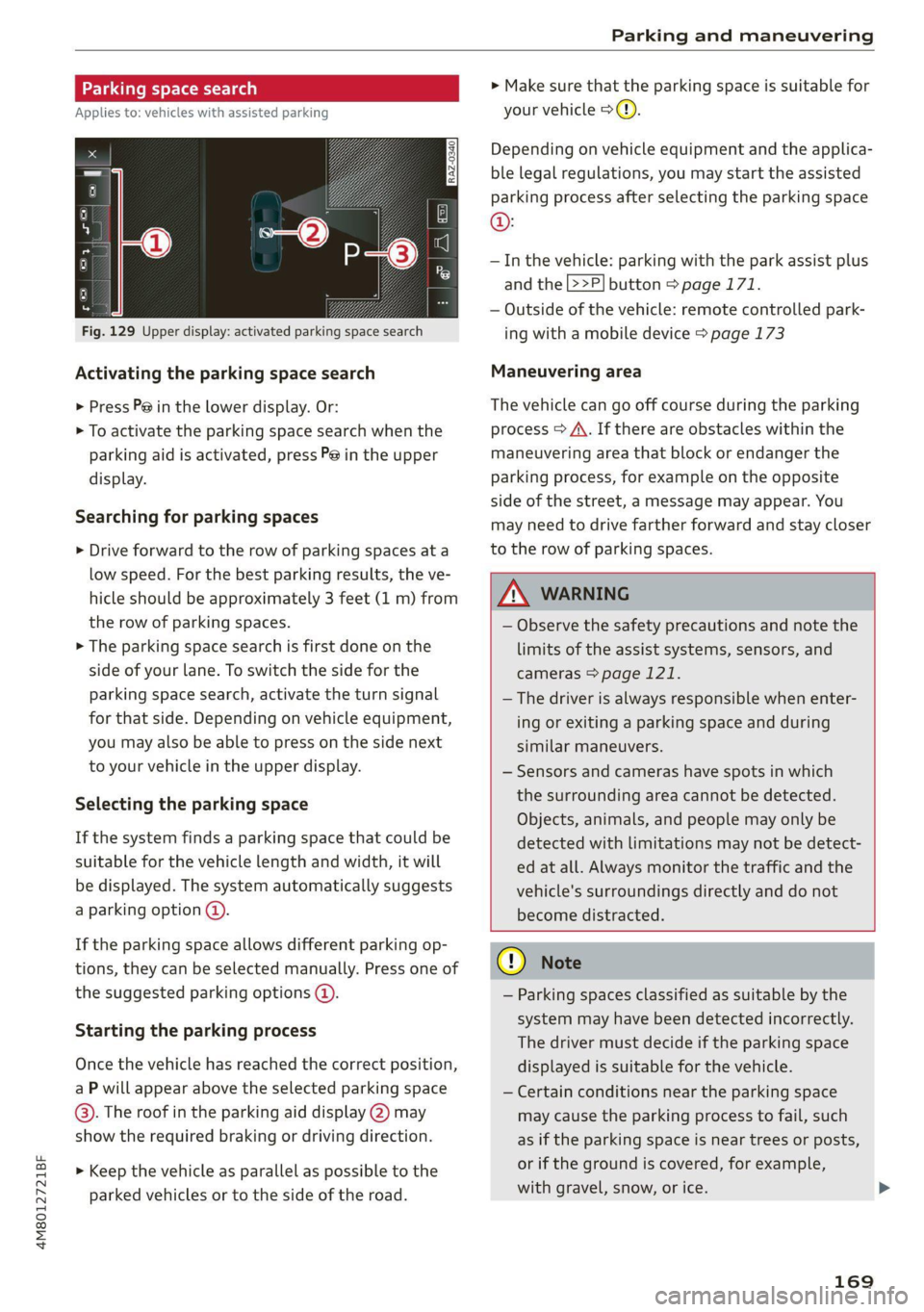
Fig. 129 Upper display: activated parking space search
Activating the parking space search
> Press P@ in the lower display. Or:
> To activate the parking space search when the
parking aid is activated, press Pe in the upper
display.
Searching for parking spaces
> Drive forward to the row of parking spaces at a
low speed. For the best parking results, the ve-
hicle should be approximately 3 feet (1 m) from
the row of parking spaces.
> The parking space search is first done on the
side of your lane. To switch the side for the
parking space search, activate the turn signal
for that side. Depending on vehicle equipment,
you may also be able to press on the side next
to your vehicle in the upper display.
Selecting the parking space
If the system finds a parking space that could be
suitable for the vehicle length and width, it will
be displayed. The system automatically suggests
a parking option @.
If the parking space allows different parking op-
tions, they can be selected manually. Press one of
the suggested parking options @.
Starting the parking process
Once the vehicle has reached the correct position,
a P will appear above the selected parking space
©. The roof in the parking aid display @) may
show the required braking or driving direction.
> Keep the vehicle as parallel as possible to the
parked vehicles or to the side of the road.
> Make sure that the parking space is suitable for
your vehicle >().
Depending on vehicle equipment and the applica-
ble legal regulations, you may start the assisted
parking process after selecting the parking space
@:
— In the vehicle: parking with the park assist plus
and the |>>P] button > page 171.
— Outside of the vehicle: remote controlled park-
ing with a mobile device > page 173
Maneuvering area
The vehicle can go off course during the parking
process > A\. If there are obstacles within the
maneuvering area that block or endanger the
parking process, for example on the opposite
side of the street, a message may appear. You
may need to drive farther forward and stay closer
to the row of parking spaces.
ZA\ WARNING
— Observe the safety precautions and note the
limits of the assist systems, sensors, and
cameras > page 121.
— The driver is always responsible when enter-
ing or exiting a parking space and during
similar maneuvers.
— Sensors and cameras have spots in which
the surrounding area cannot be detected.
Objects, animals, and people may only be
detected with limitations may not be detect-
ed at all. Always monitor the traffic and the
vehicle's surroundings directly and do not
become distracted.
@) Note
— Parking spaces classified as suitable by the
system may have been detected incorrectly.
The driver must decide if the parking space
displayed is suitable for the vehicle.
— Certain conditions near the parking space
may cause the parking process to fail, such
as if the parking space is near trees or posts,
or if the ground is covered, for example,
with gravel, snow, or ice.
169
Page 317 of 332
4M8012721BF
A
A/C cooling mode..........-. eee eee eee ee
A/C system refrigerant oil...............
Acceleration measurement..............
Accelerator pedal...............--00 000s
also refer to Accelerator pedal...........
AccessorieS.... 0... 0.00. eee eee
Active lane assist
refer to Lane departure warning.........
refer to Lane guidance................
Adaptive cruise assist................04.
Cleaning the sensors......... 0.0.0.0 005
Adaptive cruise control
Predictive control..............000005
Adaptive dampers « sve « « savece ae scare 6 0 oe
Adaptive speed assist
refer to Adaptive cruise assist..........
Adjusting the air distribution.............
Adjusting the brightness.................
Adjusting the sound................0005
Adjusting the temperature...............
Adjusting the vents ccs <= csws + © sews +o oer
Adjusting the volume............. eee eee
Adjusting the volume (announcements) ... .
Adjusting the welcome sound............
Airbag system... 2.2... eee eee
AIPSUSPONSION ix o © aowees « 2 mines + omnes 5, v0
Alarm system
refer to Anti-theft alarm system..........
Alignment pin (changing the wheel).......
All-weather lights...............-..00005
All-wheel steering.............---00005
ALUS@aSOntineSies. « 3 ssasess «x aimee a & iwesane sw a8
All wheel drive
refer to quattro.............0 0. eee
Amazon Alexa integration
Media playback................00000.
Operating « « seen s » ewes se eee G s FeeE Ys BOS
AMI
refer to Audi music interface...........
Android Auto
refer to Audi smartphone interface......
Anti-lock braking system................
Anti-Slip Regulation 0.642 5 eccs «sense ees
Anti-theft alarm system...............05.
Anti-theft wheel bolts...............0... 289
Apple CarPlay
refer to Audi smartphone interface...... 231
Aspect ratio
VIdCO eee eee eee eee eee 225,.227
ASR
refer to Anti-Slip Regulation............ 116
Audi adaptive light...............-.0000- 51
Audi connect
refer to CONnNect ; «= = sass ss sees ss eee ee ae 192
Audidrive'selecticy, « + scum oz scum « x pewe yoo 111
Audi music interface...............2.-- 222
Audio files............. 0000 c cece eee eee 223
Audi phone box...........0.- 00 eee eee 183
Audi presense....... 00... cee eee eee 149
Messages ........... 0.0. e eee eee eee 153
Audi pre sense front.............-...0-- 150
Audi side assist
refer to Side assist. ........ 0... cece eee 153
Audi smartphone interface.............. 231
Legalinformation.................005 236
Audi virtual cockpit
refer to Instrument cluster.............. 12
AUTO
Automatic headlights................4. 51
Climate control system.............0005 91
Auto Lock (central locking) ............... 35
Automatic climate control system
refer to Climate control system.......... 90
Automatic luggage compartment lid.... 43,44
Automatic transmission............-.0005 97
Parking lock emergency release......... 100
Automatic wipe/wash system............. 57
Average consumption................... 16
Average speed..........-. 00. cece eee ee 16
B
Bag hooks ........ 0.0. e eee eee eee eee 83
Band
refer to Frequency band............... 212
Battery
Charging (12 Volt vehicle battery)....... 253
Vehicle battery (12 Volt)............... 2511,
Winter operation (12 Volt vehicle battery) . 252
Blinds
refer to Panoramic glass roof............ 47
315
Page 319 of 332
4M8012721BF
Luggage compartment lid with foot motion . 44
Panoramic glass roof............00 ee eee 47
SUTSHadE (FOOT): + wars a 2 womm a 2 cows © a rey 47
Sunshade (windows) ...............0005 46
Windows........... eee eee cece eee 46
Closing aid (power closing doors).......... 35
GOEKPIEIMIMING'. & wesisn ee cnncens 6 6 sexuene w ca0ee 55
Cockpit (overview) « «wes e wsen 6 eae seem 6
Collapsible spare tire...............00.. 292
Collapsible tire
refer to Collapsible spare tire........... 292
Coloreodetsss « «cams +s wines + seam oo were wo 313
COMBUSTION ENGINE sess ss warms v & sows ve 102
Coming home/Leaving home
refer to Entry/exit lighting.............. 53
Gompartmentsi: « «asec « « wsene 4 + weer «+ ee 83
Goripassin the mirrors « wees s exea as ween as 60
GComiplianee:: « sews = ¢ sews + o serps + ¢ ees 7 es 311
Conference calles: ¢ «seus 5 « ewes so wee eve 187
Configuration wizard.................04. 20
connect ..... 0... eee eee 192
Data PlariSe: s seas = x mews < ¢ ewe & eae wy 196
Datta Privacy tious x + sess + a aesuwn v wexeua ¥ theme 306
Emergency call................-000ee 197
Infotainent:: = « sees ¢ s cess « v news sp eee 192
Infotainment services............00005 193
Online roadside assistance............. 198
Vehicle control services................ 194
Connected devices
Device overvieW 0... ccc cece cece eens 235
Connections
referto Media.............-.+++- 220, 223
Consumer information.................- 308
Consumption
Reducing........... 0. eee eee eee eee 102
Consumption (fltel) « ssiccw: 2 a cow 2 0 neue © mes 16
Contacts
TI POFEA pose: « o sxsuess 9 01 ceri «0 umannce © oxenene 189
Updating inthe MMI.................. 189
alsovrefer to Directory’: . wiiws v wows o 2 eee 186
Convenience: key’: « swan: « + qeme sv seme ys seem 35
Convenience closing ..........0s..enees 47
also refer to Vehicle key 39
Convenience opening and closing
Windows or panoramic glass roof........ 47
Coolant temperature display.............. 14
Cooling MOd etic. i = scciin ee ecenere ee serene wv omen 91
Cooling system
Adding
coolant................-000 ee 249
Checking the coolant level............. 249
GOOlANE svc 2 x oes ov ewe eo a 2 o oe 248
Cornering lighti:. » 2 ces: = ews: o ees ee eee 51
Cross traffic assist (intersection assistant) .. 157
Cruise control system............000005 134
Cup holders. ....... 0 cece eee eee eee 82
Current consumption.............-0 eens 16
D
Data module
Serial:number (IMED) ¢ esses ss saan ss cause 189
Data plans... .... eee eee eee 196
Data Privacy...... 0... s cee cece eee 306
Date... eee eee 16
SGttiliG's s savau 3 ¥ RAH s 4 BeueS 4 E RaER ¢ Esa 2:33:
Daytime running lights................-. 51
Declaration of compliance...........0005 311
DEF (instrument cluster)...............4- 12
Demo mode
refer to Presentation mode............. 210
Destination onthe map...............4. 203
Details, . a resco « sxanene os stineoue i 6 omens mo auncems 203
Determining correct load limit........... 271,
Digital:compass sass «seas oo save oo sare 2 60
DIM@NSIONS. « s ween « seems oy noes 6 2 ew & e 3:13
Dimming the exterior mirrors............. 56
Dimming the rearview mirror............. 56
Directory........ 0.0.02... cece eee eee ee 186
BUSINESS Cat dsiies + » news oe wows ¢ pawe ws BE 187
SOEGINGS
cscs « 2 mazes & nenseee « scene © © amt « 189
Display
Cleaning...........0 0. 283
Disposal..... 0.02... ce eee eee eee eee ee 308
DistamG@ sericea & ssseie ss owes so covnine oo creme @ os 16
Distance: warning csvevs © « sce vs sseoee wo senses 146
Doors
Child safety lock...................000. 45
DOOrCONntactSWitch » + ceau sv sees gc aeam a: 54
Mechanically unlocking and locking....... 38
Power closing/closing aid............... 35
Driver information system.............--. 13
317
Page 322 of 332
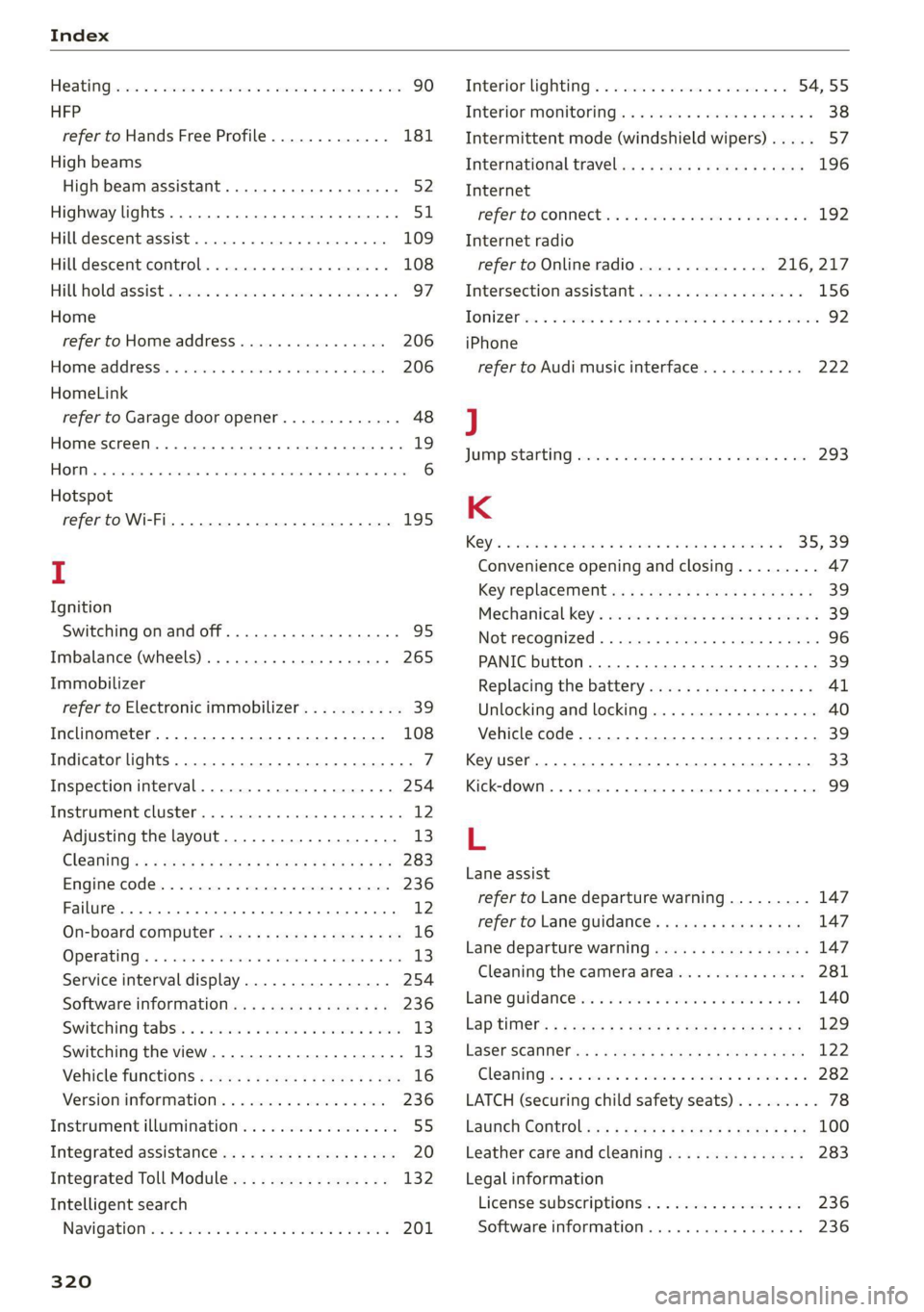
Index
Heating hwcses vs cscs vo orci we sees oo es oH oes 90
HFP
refer to Hands Free Profile............. 181
High beams
High beam assistant............00000ae 52
Highway lights...................5.0005 51
Hill descent assist.............0000 0008 109
Hill descemticomtrol. «seve + « anise a a mmo © © 108
Hill Hold assist « ccosace es wen v rane ve ramen oe 97
Home
refer to Home address.............04. 206
Hommesaddnessi, = sieves + nmawos «+ wines x 2 eens 206
HomeLink
refer to Garage door opener............. 48
Home screen... ... ee eee eee ee eee 19
FHORM « « sonst 6 o arate © oi come © a ane © senor 6
Hotspot
refer to Wi-Fi...........0 0.0 c eee eee 195
I
Ignition
Switching on and off...............0--- 95
Imbalance (wheels) ..............000005 265
Immobilizer
refer to Electronic immobilizer........... 39
Inclinometer...........-.0 0c eee eee eee 108
Indicator lights........ 0... eee eee eee 7
Inspection interval............-..2.200. 254
Instrument cluster......... 0.00. e eee ee 12
Adjusting the layout................... 13
Cleaning’: « ¢ saws so sews oy eeew ee ees ene 283
Engine code............... 0c eee eee 236
Failure... eee eee eee eee 12
On-board computer..............---65- 16
OPeratiigts » mesns s+ asses a 2 mmatews © x cemsene © 5 a 13
Service interval display................ 254
Software information..............005 236
Switching
tabs: « « sosies x + acuise 6 6 cxsueee ww enn 13
Switching the view...................0. 13
Vehicle TUNCtIONS ¢ esses ¢ ¢ exes be Sees be ee 16
Version information................-. 236
Instrument illumination................. 55
Integrated assistance...............00-. 20
Integrated Toll Module................. 132
Intelligent search
NaVigatiOntice « saeco 2 & sew o same @ 9 Bears 6 201
320
Interior lighting). «+ ccs + ween ev ween ee 54,55
Interior MONItOriNgss «saa. 6 wae as wave os 38
Intermittent mode (windshield wipers) ..... 57
International travel « « wsws s 2 gaa a x mews 196
Internet
fefer'to CONNECE se. 2 sie s ween ee ewe ee 192
Internet radio
refer to Online radio.............. 216, 217
Intersection assistant.................. 156
TONIZEf wes oo ssees o 2 srw 2 2 seem oo mR oo eo 92
iPhone
refer to Audi music interface........... 222
J
JUMPStartiNG cess 2 waves a v wees ao eeeuoes oo one 293
K
Ch ee ee ee 35, 39
Convenience opening and closing......... 47
Key replacement.........ceeeeeereeeee 39
Mechanical-key’s cccv. 2s ose v sera ee ewe 39
INGE RECOGMIZER « « cnsese 6 « ecnsece sn 6 sanaeae « © anseete 96
PANIC button..................0..0005 39
Replacing the battery.................. 41
Unlocking and locking..............0005 40
Vehicle code... 2.6.6... ee eee eee eee 39
Key user... 0... eee eee eee 33
Kick-down ... 2... eee eee eee eee 99
L
Lane assist
refer to Lane departure warning......... 147
refer to Lane guidance..............05 147
Lane departure warning................. 147
Cleaning the camera area.............. 281
Lane quidanc@sas . sees eevee a enews wee 140
Lap'timer’s « = sees ¢ 2 ean x 2 oes yo wees v8: 129.
FaSer Scanners « « aay a eegu 4 x ees x ROE 122
Cleaning wor = 2 wee se anne 2 pes oe wee © 2 x 282
LATCH (securing child safety seats)......... 78
Pane Controle»: + y sagu 2 eqs x worm & & By 100
Leather care and cleaning............... 283
Legal information
License subscriptions................. 236
Software information...............0 236