transmission AUDI Q8 2021 Owner´s Manual
[x] Cancel search | Manufacturer: AUDI, Model Year: 2021, Model line: Q8, Model: AUDI Q8 2021Pages: 332, PDF Size: 118.76 MB
Page 307 of 332
4M8012721BF
Data privacy
Exporting data
You can read out the data memory for autono-
mous driving and export this data to a USB stick.
The settings depend on the vehicle equipment.
Requirement: the vehicle must be stationary, the
automated systems must not be active, and the
ignition must be switched on. A USB stick must
be connected to the USB input.
» Applies to: MMI: Select on the home screen:
SETTINGS > Data management > Statistics.
> Follow the instructions in the MMI.
The export will be canceled if you switch menus,
for example.
Recorded data
— Driver interactions (such as the driver pressing
the brake pedal)
— Vehicle dynamics (such as speed)
— Status of automated systems
— Control requests
— Relevant measurements from monitoring the
surroundings
— Image data from monitoring the surroundings
— System status, timestamp, and vehicle location
when deactivating/activating park assist plus
You can find additional information in the MMI:
— Applies to: MMI: Select on the home screen:
SETTINGS > General > Legal notes > About the
data memory.
@) Tips
— The data is processed and stored locally in
the vehicle. It is not automatically transmit-
ted to Audi or other third parties, for exam-
ple through the cloud. The owner or driver is
responsible for the data. Audi does not have
access to it.
— For additional information and the evalua-
tion of data, please contact Audi Customer
Care.
Transmitted information
Data collection
Applies to: vehicles with data collection
Depending on the country, Audi may collect data
for the following purposes, for example: offer
and product optimization, public safety, provision
of Audi connect remote vehicle services, and
adaptation to customer expectations. For exam-
ple, various technical function data, environmen-
tal data, driving data, and usage data will be col-
lected for a specific purpose and forwarded to
Audi. The data will be sent from the vehicle at
the time the data was collected.
Applies to: MMI: You can find additional informa-
tion about data collection in the MMI. Select on
the home screen: SETTINGS > General > Legal
notes > About Audi connect.
If you would like to deny data transmission to
Audi, contact an authorized Audi dealer or au-
thorized Audi Service Facility for more informa-
tion. You also have the option to deactivate data
transmission within the privacy settings.
Privacy settings
Applies to: vehicles with Audi connect
> Applies to MMI: Select on the home screen:
SETTINGS > Privacy settings.
When using Audi connect services or during data
collection, data will be transmitted from the ve-
hicle.
> To display additional information about the pri-
vacy settings and the associated symbols in the
status bar, press @ in the MMI.
Requirement: the ignition must be switched on.
Setting the maximum privacy settings
When the Activate privacy mode function is
switched on, the data connection is deactivated
or sending of data is restricted, but all safety-re-
lated, legal, or contractually required Audi con-
nect
services remain activated. The majority of
the Audi connect services are deactivated.
305
Page 308 of 332
Data privacy
When the function is switched off, the data con-
nection will be available in order to use Audi
connect services.
Adjusting individual privacy settings
In the MMI, you can adjust individually which da-
ta should be transmitted from the vehicle. If you
switch on a data category, the data will be trans-
mitted.
You can also deactivate individual services for
your vehicle at my.audi.com if you are logged into
the vehicle as the key user > page 32. These de-
activated services will not be available in the ve-
hicle. For additional information, visit my.audi.
com.)
@) Note
You are responsible for all precautions taken
for data protection, anti-virus protection, and
protection against loss of data on mobile de-
vices that are used to access the Internet
through the Wi-Fi hotspot.
G) Tips
— The following interfaces are not affected by
changes to the privacy settings: Bluetooth,
Bluetooth Low Energy (BLE), Wi-Fi, Audi
smartphone interface (ASI), Near Field
Communication (NFC), charging communi-
cation (high-voltage system), Electronic Toll
Collect (ETC), On-Board Diagnostic System
(OBD) if equipped.
— If the maximum privacy settings are switch-
ed on, your vehicle may not receive security
updates and certificates for establishing an
encrypted connection, depending on vehicle
equipment. In order to receive security up-
dates and certificates, switch the maximum
privacy settings off for at least ten minutes
every six months. Make sure that your vehi-
cle is connected to the Internet. A symbol in
the MMI status bar indicates if the required
data connection is available > page 23.
— If the transmission of data is limited, it will
have the following effects on the exchange
D_ In certain countries.
306
of data for Audi connect services and emer-
gency calls, if equipped:
— The emergency call function will remain
available without restrictions and will con-
tinue to transmit data.
— If an online roadside assistance call is ini-
tiated, no data will be transmitted, but a
call will be made.
— If the Geofencing Alert, Speed Alert,
and/or Valet Alert services have been acti-
vated by the key user, then they will re-
main available without restrictions and
continue to transmit data.
— Stored destinations (favorites, last desti-
nations) are only stored in the vehicle. If
you allow transmission of data again,
these destinations will be synchronized via
the myAudi account. To prevent synchroni-
zation of destinations, delete the destina-
tions before you allow data to be trans-
mitted again.
Applies to: vehicles with Audi connect Infotainment
Audi collects, uses, stores and shares your per-
sonal information, such as contact data, vehicle
data, usage data, driving data and precise geolo-
cation, in order to provide you with the products
and services you have purchased or requested,
and for a number of other purposes, for example,
to track quality issues, to performance and safe-
ty, to meet our internal compliance or legal re-
quirements and to market to customers and po-
tential customers. For a more complete list of
the data we collect, how we use it and with
whom we share it, please visit your Audi nation-
al/sales region website at www.audi.com.
The collection, use and sharing may vary depend-
ing on your model and model year, your subscrip-
tion status, or the service offering. For example,
collection, use and sharing may vary between
Audi connect services, if you have designated a
key user, or if you are driving a model equipped
with persistent data logging. Please review the
complete Privacy Statement to understand our >
Page 315 of 332
4M8012721BF
Technical data
Technical data
Identification data
Vehicle data label
XXX X= HKNK WOK XX
(Hae wrccnce XX XNKKKNKK
Frm XXX XX
2
XX XKXKKKX XK. XX XK
(3) / SERB
ENG. CODE / TRANS CODE
XXX KW XXX
XXXX XXX XXX
@ in | INNENAUSST.
PAINT NO. J INTERIOR
M. -AUSST./ OPTIONS
XXXX [XXX XXX / XX
EOA 7D5 4UB 6XM 5SG 5RW
2EH JOZ 1LB 1AS 1BA
3FC SMU 7X1
FOA 9G3 0G7 OYH OJF
TL6 3KA 8EH UIA X9B QZ7
1xw 8Q3 9Q8 824 D2D
716 CV7 7KO 4X3 2K2
34 4KC 3Y0 413 5D2
1SA 7GB QIA 4GQ
RAZ-0668
SH
ee
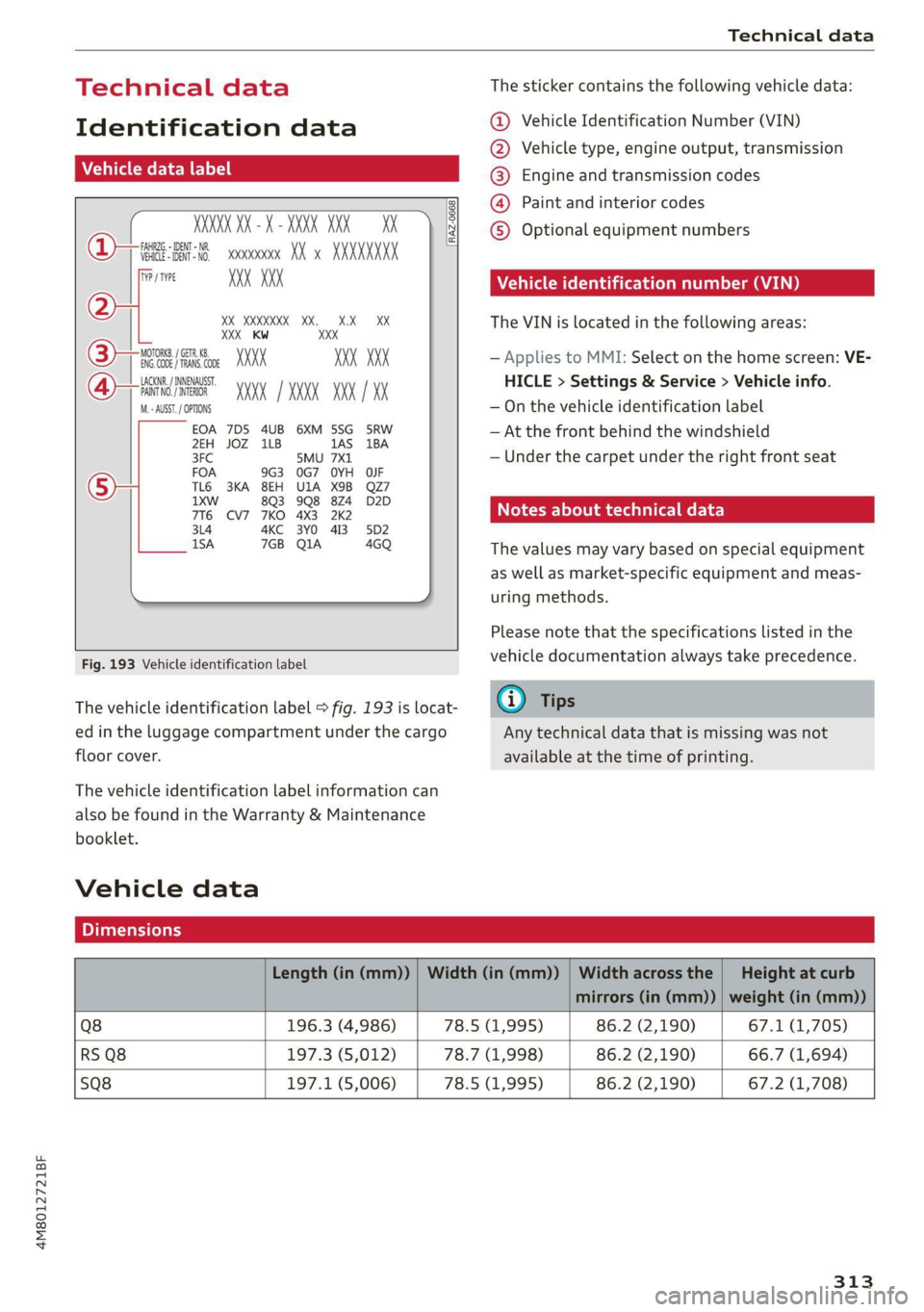
Fig. 193 Vehicle identification label
The vehicle identification label > fig. 193 is locat-
ed in the luggage compartment under the cargo
floor cover.
The vehicle identification label information can
also be found in the Warranty & Maintenance
booklet.
Vehicle data
The sticker contains the following vehicle data:
@ Vehicle Identification Number (VIN)
@ Vehicle type, engine output, transmission
® Engine and transmission codes
@) Paint and interior codes
© Optional equipment numbers
Vehicle identification number (VIN)
The VIN is located in the following areas:
— Applies to MMI: Select on the home screen: VE-
HICLE > Settings & Service > Vehicle info.
— On the vehicle identification label
— At the front behind the windshield
— Under the carpet under the right front seat
Notes about technical data
The values may vary based on special equipment
as well as market-specific equipment and meas-
uring methods.
Please note that the specifications listed in the
vehicle documentation always take precedence.
@ Tips
Any technical data that is missing was not
available at the time of printing.
Length (in (mm)) | Width (in (mm)) | Width across the | Height at curb
mirrors (in (mm)) | weight (in (mm))
Q8 196.3 (4,986) 78.5 (1,995) 86.2 (2,190) 67.1 (1,705)
RS Q8 197.3 (5,012) 78.7 (1,998) 86.2 (2,190) 66.7 (1,694)
SQ8 197.1 (5,006) 78.5 (1,995) 86.2 (2,190) 67.2 (1,708)
313
Page 317 of 332
4M8012721BF
A
A/C cooling mode..........-. eee eee eee ee
A/C system refrigerant oil...............
Acceleration measurement..............
Accelerator pedal...............--00 000s
also refer to Accelerator pedal...........
AccessorieS.... 0... 0.00. eee eee
Active lane assist
refer to Lane departure warning.........
refer to Lane guidance................
Adaptive cruise assist................04.
Cleaning the sensors......... 0.0.0.0 005
Adaptive cruise control
Predictive control..............000005
Adaptive dampers « sve « « savece ae scare 6 0 oe
Adaptive speed assist
refer to Adaptive cruise assist..........
Adjusting the air distribution.............
Adjusting the brightness.................
Adjusting the sound................0005
Adjusting the temperature...............
Adjusting the vents ccs <= csws + © sews +o oer
Adjusting the volume............. eee eee
Adjusting the volume (announcements) ... .
Adjusting the welcome sound............
Airbag system... 2.2... eee eee
AIPSUSPONSION ix o © aowees « 2 mines + omnes 5, v0
Alarm system
refer to Anti-theft alarm system..........
Alignment pin (changing the wheel).......
All-weather lights...............-..00005
All-wheel steering.............---00005
ALUS@aSOntineSies. « 3 ssasess «x aimee a & iwesane sw a8
All wheel drive
refer to quattro.............0 0. eee
Amazon Alexa integration
Media playback................00000.
Operating « « seen s » ewes se eee G s FeeE Ys BOS
AMI
refer to Audi music interface...........
Android Auto
refer to Audi smartphone interface......
Anti-lock braking system................
Anti-Slip Regulation 0.642 5 eccs «sense ees
Anti-theft alarm system...............05.
Anti-theft wheel bolts...............0... 289
Apple CarPlay
refer to Audi smartphone interface...... 231
Aspect ratio
VIdCO eee eee eee eee eee 225,.227
ASR
refer to Anti-Slip Regulation............ 116
Audi adaptive light...............-.0000- 51
Audi connect
refer to CONnNect ; «= = sass ss sees ss eee ee ae 192
Audidrive'selecticy, « + scum oz scum « x pewe yoo 111
Audi music interface...............2.-- 222
Audio files............. 0000 c cece eee eee 223
Audi phone box...........0.- 00 eee eee 183
Audi presense....... 00... cee eee eee 149
Messages ........... 0.0. e eee eee eee 153
Audi pre sense front.............-...0-- 150
Audi side assist
refer to Side assist. ........ 0... cece eee 153
Audi smartphone interface.............. 231
Legalinformation.................005 236
Audi virtual cockpit
refer to Instrument cluster.............. 12
AUTO
Automatic headlights................4. 51
Climate control system.............0005 91
Auto Lock (central locking) ............... 35
Automatic climate control system
refer to Climate control system.......... 90
Automatic luggage compartment lid.... 43,44
Automatic transmission............-.0005 97
Parking lock emergency release......... 100
Automatic wipe/wash system............. 57
Average consumption................... 16
Average speed..........-. 00. cece eee ee 16
B
Bag hooks ........ 0.0. e eee eee eee eee 83
Band
refer to Frequency band............... 212
Battery
Charging (12 Volt vehicle battery)....... 253
Vehicle battery (12 Volt)............... 2511,
Winter operation (12 Volt vehicle battery) . 252
Blinds
refer to Panoramic glass roof............ 47
315
Page 326 of 332
Index
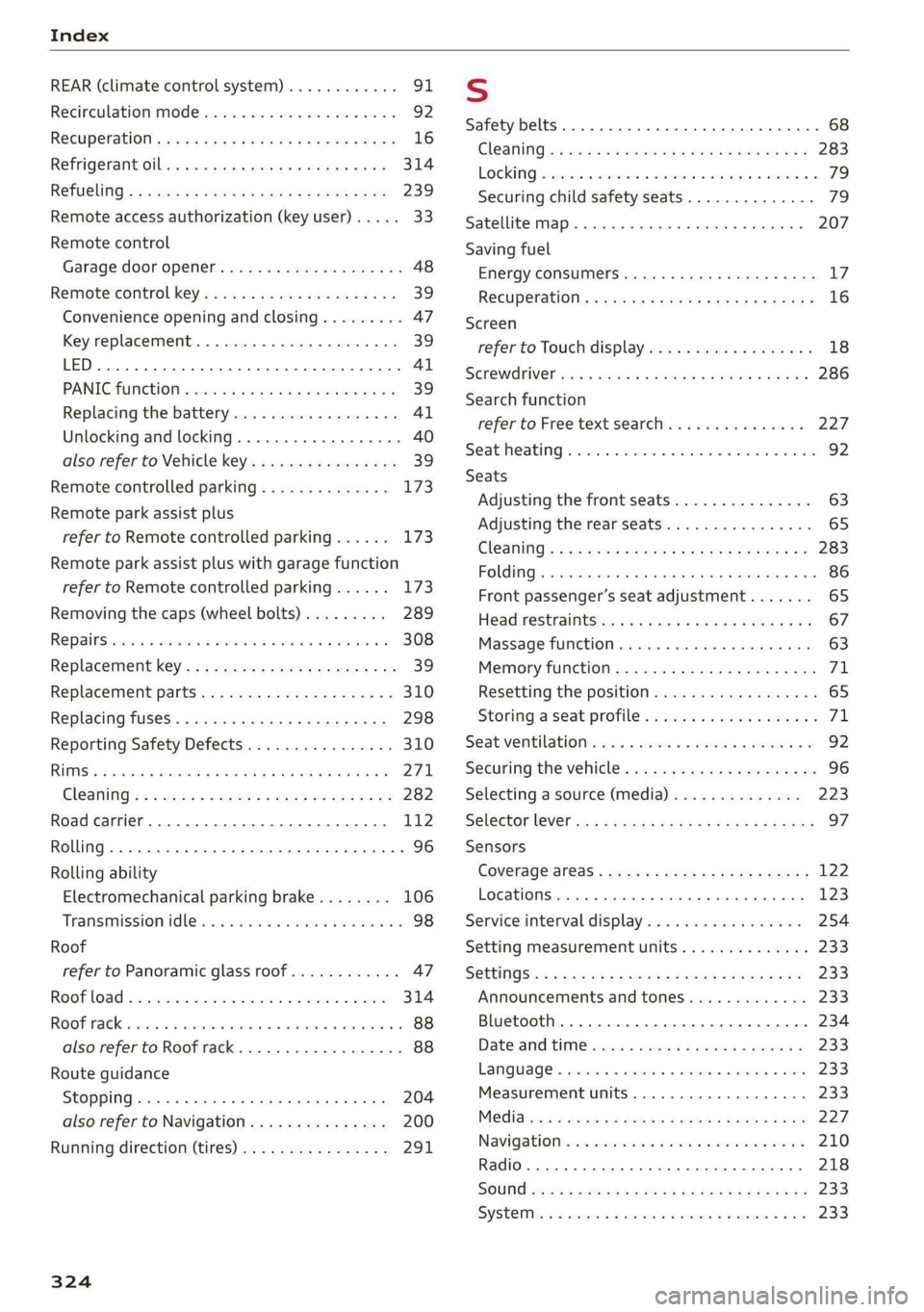
REAR (climate control system) ............- 91
Recirculation Mode savin ss swims x sce 6 4 wee 92
Recuperationsses «= ses + 2 samen ¥ ¢ ees 9 coe 16
REfrigeranit Ollvs sz wavew xe exes ox meme 2 eae 314
RETUGLING « « wews 6 a news oe ees Fe ema ee 239
Remote access authorization (key user) ..... 33
Remote control
Garage door opener........se.ceeeeeees 48
Remote control key 39
Convenience opening and closing......... 47
Key replacement.............02-.00 eee 39
| Al
PANIGfUNCHION ¢ s wees ¢ gaseu aan ss een 39
Replacing the battery...............00. 41
Unlocking and locking..............0008 40
also refer to Vehicle key..............-. 39
Remote controlled parking.............. 173
Remote park assist plus
refer to Remote controlled parking...... 173
Remote park assist plus with garage function
refer to Remote controlled parking...... 173
Removing the caps (wheel bolts)......... 289
REPAIIS sess 6s mmo © 3 ees © a sume SF er oo 308
Replacement key.........--22e eee eee 39
Replacement parts............--..20--5 310
Replacing fuses........... 2. eee e ee eee 298
Reporting
Safety Defects................ 310
RIMS 0. eee eee eee eee 271
Cl@SNiNG's ¢ = 22m ¢ » wemn 2 2 ees yo eee sz Be 282
Road carrier... 0.6.2... eee eee eee eee 112
Rolling... .. cece cece eee eee eee 96
Rolling
ability
Electromechanical parking brake........ 106
Transmission idleis . isan si maven oo ccomea soo 98
Roof
refer to Panoramic glass roof............ 47
Roof LOad ©» awevis oo cvewsss v seavans ao sueeun ao came 314
ROORKACK asia + aon os waren 6 e naene a 2 BOR He 88
also refer to Roof rack..........--..000. 88
Route guidance
StOPPING ..... cee eee eee eee eee 204
also refer to Navigation............... 200
Running direction (tires)..............-. 291
324
Ss
Safety belts. ...... 0.0... eee eee eee 68
GCl@aNiNG ies « s wei + y ewe » eon ee Dew gE 283
LOEKING sexes ico seesene xe emevene ww maevare ¥ w anetese © 79
Securing child safety seats.............. 79
Satellite map...... 2... eee eee eee 207
Saving fuel
Energy consumers..........-.2-.020005 L7
Recuiperationts s sacs s zaee 5 s gees & x geome e 16
Screen
refer to Touch display ...........0e0eeee 18
SGrEWALIVET iss x = caves x = sae & & eerR 8 & OG s 286
Search function
refer to Free text search............... 227
Seat:heating « sci owes 2 wawn se meen 6 ¥ owe 92
Seats
Adjusting the front seats............... 63
Adjusting the rear seats................ 65
ClOaniNiG:<« = s gees + sees s been ge wees ae: 283
FOL Giaiss o wscass vo areas 6 Hama v Fame vO 86
Front passenger’s seat adjustment....... 65
Head restraititSies x « saws + = semis + eee eo 67
Massage function..........0seeeeee eee 63
Memory function..............--000 00 71
Resetting the position.................. 65
Storing aseat profile................... 71
Seat vertilationsecs so sexes 2 sce 2 2 orm 9 oo 92
Securing the vehicle............-..2+--5- 96
Selecting a source (media).............. 223
Selector lever cs x « news ¢ ¢ hoes ss eee oP eS 97
Sensors
COVETAGE ALCS « cercx : s wow so wegs + Rares o 122
LOCATIONS race x « canzone » © camsuae » & sunoane « @ meas 123
Service interval display................. 254
Setting measurement units.............. 233
S@ttiNGSiog « 5 wes = © ewes a eee ¢ Ree § Go Be 233
Announcements and tones............. 233
Bluetooth.....................000008 234
Dateanid titties: + saws x 2 eee « «ewe gs 233
LANGUAGE « sesso vo sens oo memes vo ERE vo es 233
Measurement units...............0005 233
Medidicn = 2 gaws : «meee s Hoon 4 > eu os ee 227
Navigationiccs « weve + even 6+ semen sv meres 210
Radio... 2.6... ce cece eee eee eee eee 218
SOUNG :geue ss wee 5 s seme fs meee Ee eee 233
SySteMss «+ assva 2 e eesen 2 v eeie 2 8 eae Foes 233