technical data AUDI R8 2007 User Guide
[x] Cancel search | Manufacturer: AUDI, Model Year: 2007, Model line: R8, Model: AUDI R8 2007Pages: 210, PDF Size: 8.1 MB
Page 27 of 210
Driver information system25
Controls
Safety
Driving tips
General maintenance
Self-help
Technical data
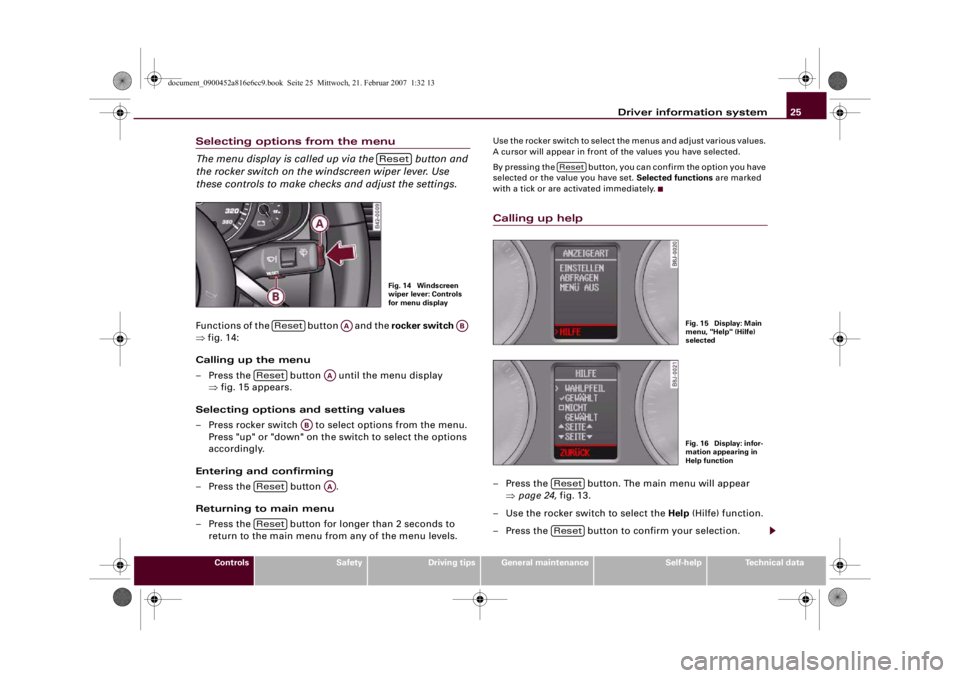
Selecting options from the menu
The menu display is called up via the button and
the rocker switch on the windscreen wiper lever. Use
these controls to make checks and adjust the settings.Functions of the button and the rocker switch
⇒fig. 14:
Calling up the menu
– Press the button until the menu display
⇒fig. 15 appears.
Selecting options and setting values
– Press rocker switch to select options from the menu.
Press "up" or "down" on the switch to select the options
accordingly.
Entering and confirming
– Press the button .
Returning to main menu
– Press the button for longer than 2 seconds to
return to the main menu from any of the menu levels.
Use the rocker switch to select the menus and adjust various values.
A cursor will appear in front of the values you have selected.
By pressing the button, you can confirm the option you have
selected or the value you have set. Selected functions are marked
with a tick or are activated immediately.Calling up help– Press the button. The main menu will appear
⇒page 24, fig. 13.
– Use the rocker switch to select the Help (Hilfe) function.
– Press the button to confirm your selection.
ResetFig. 14 Windscreen
wiper lever: Controls
for menu display
Reset
AA
AB
Reset
AA
AB
Reset
AA
Reset
Reset
Fig. 15 Display: Main
menu, "Help" (Hilfe)
selectedFig. 16 Display: infor-
mation appearing in
Help function
ResetReset
document_0900452a816e6cc9.book Seite 25 Mittwoch, 21. Februar 2007 1:32 13
Page 29 of 210
Driver information system27
Controls
Safety
Driving tips
General maintenance
Self-help
Technical data
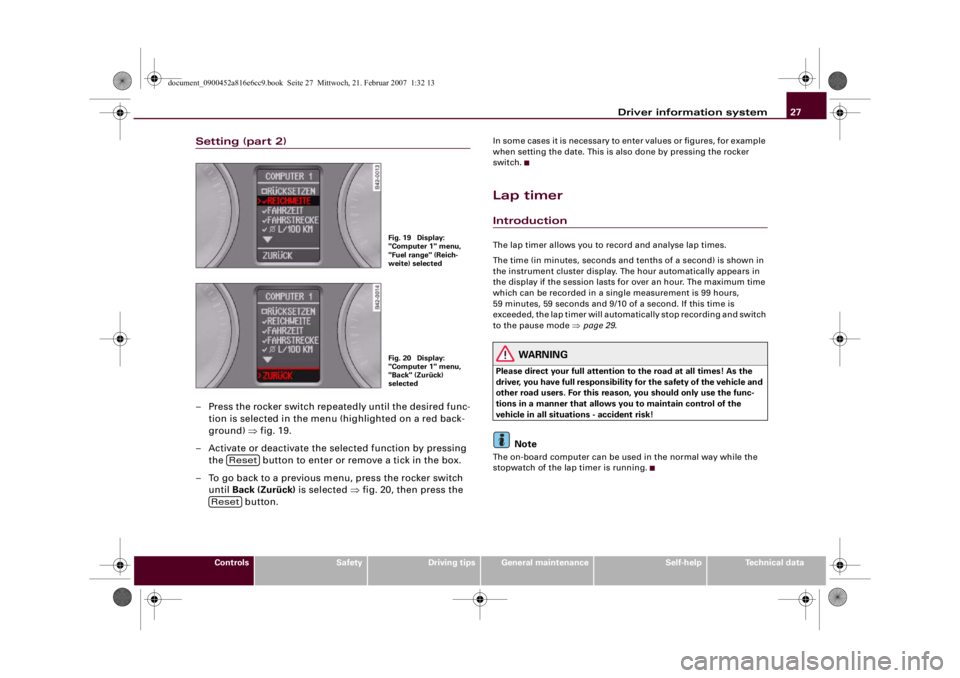
Setting (part 2)– Press the rocker switch repeatedly until the desired func-
tion is selected in the menu (highlighted on a red back-
ground) ⇒fig. 19.
– Activate or deactivate the selected function by pressing
the button to enter or remove a tick in the box.
– To go back to a previous menu, press the rocker switch
until Back (Zurück) is selected ⇒fig. 20, then press the
button.
In some cases it is necessary to enter values or figures, for example
when setting the date. This is also done by pressing the rocker
switch.Lap timerIntroductionThe lap timer allows you to record and analyse lap times.
The time (in minutes, seconds and tenths of a second) is shown in
the instrument cluster display. The hour automatically appears in
the display if the session lasts for over an hour. The maximum time
which can be recorded in a single measurement is 99 hours,
59 minutes, 59 seconds and 9/10 of a second. If this time is
exceeded, the lap timer will automatically stop recording and switch
to the pause mode ⇒page 29.
WARNING
Please direct your full attention to the road at all times! As the
driver, you have full responsibility for the safety of the vehicle and
other road users. For this reason, you should only use the func-
tions in a manner that allows you to maintain control of the
vehicle in all situations - accident risk!
Note
The on-board computer can be used in the normal way while the
stopwatch of the lap timer is running.
Fig. 19 Display:
"Computer 1" menu,
"Fuel range" (Reich-
weite) selectedFig. 20 Display:
"Computer 1" menu,
"Back" (Zurück)
selected
Reset
Reset
document_0900452a816e6cc9.book Seite 27 Mittwoch, 21. Februar 2007 1:32 13
Page 31 of 210
Driver information system29
Controls
Safety
Driving tips
General maintenance
Self-help
Technical data Each time a lap time is stored, it moves one line up the display
⇒page 28, fig. 24. The time for the new lap appears in the bottom
line .
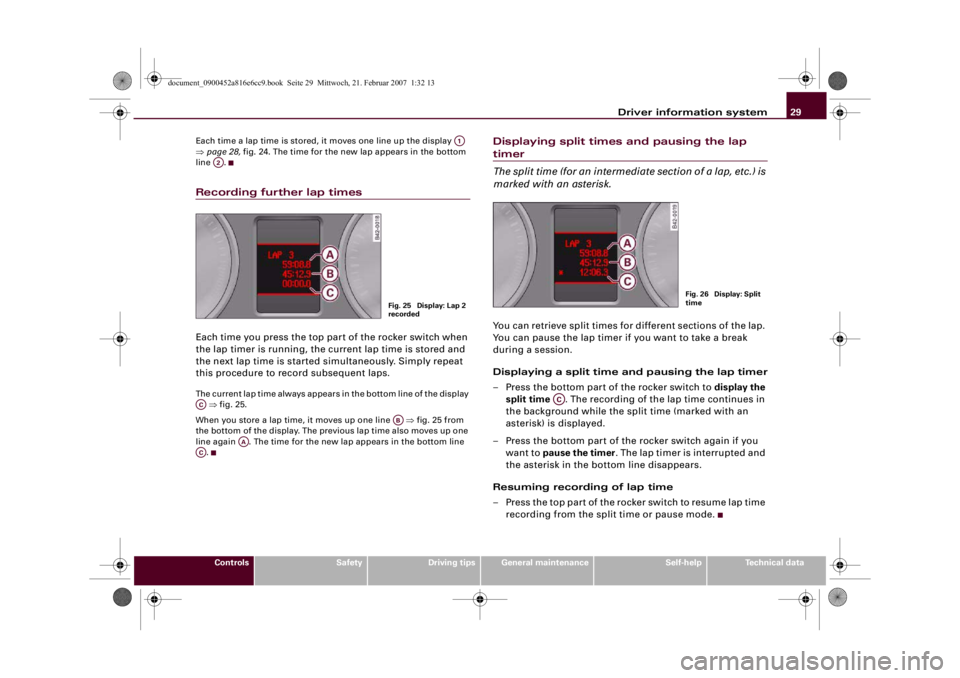
Recording further lap timesEach time you press the top part of the rocker switch when
the lap timer is running, the current lap time is stored and
the next lap time is started simultaneously. Simply repeat
this procedure to record subsequent laps.The current lap time always appears in the bottom line of the display
⇒fig. 25.
When you store a lap time, it moves up one line ⇒fig. 25 from
the bottom of the display. The previous lap time also moves up one
line again . The time for the new lap appears in the bottom line
.
Displaying split times and pausing the lap timer
The split time (for an intermediate section of a lap, etc.) is
marked with an asterisk.You can retrieve split times for different sections of the lap.
You can pause the lap timer if you want to take a break
during a session.
Displaying a split time and pausing the lap timer
– Press the bottom part of the rocker switch to display the
split time . The recording of the lap time continues in
the background while the split time (marked with an
asterisk) is displayed.
– Press the bottom part of the rocker switch again if you
want to pause the timer. The lap timer is interrupted and
the asterisk in the bottom line disappears.
Resuming recording of lap time
– Press the top part of the rocker switch to resume lap time
recording from the split time or pause mode.
A1
A2
Fig. 25 Display: Lap 2
recorded
AC
AB
AA
AC
Fig. 26 Display: Split
time
AC
document_0900452a816e6cc9.book Seite 29 Mittwoch, 21. Februar 2007 1:32 13
Page 33 of 210
Driver information system31
Controls
Safety
Driving tips
General maintenance
Self-help
Technical data
Resuming the lap time session laterWhen you have evaluated the lap times, you can resume the
session and continue recording lap times later.
– Keep pressing the button until the lap timer
appears ⇒page 30, fig. 27.
– Press the top part of the rocker switch to start recording
a new lap time.
– To record further lap times, repeat the procedure
described earlier ⇒page 29, “Recording further lap
times”. To evaluate the overall results, refer to ⇒page 30,
“Finishing the session and evaluating or resetting lap
times”.Speed warning functionApplies to vehicles: with speed warning functionIntroduction
The speed warning function can help you keep below a
pre-set maximum speed.
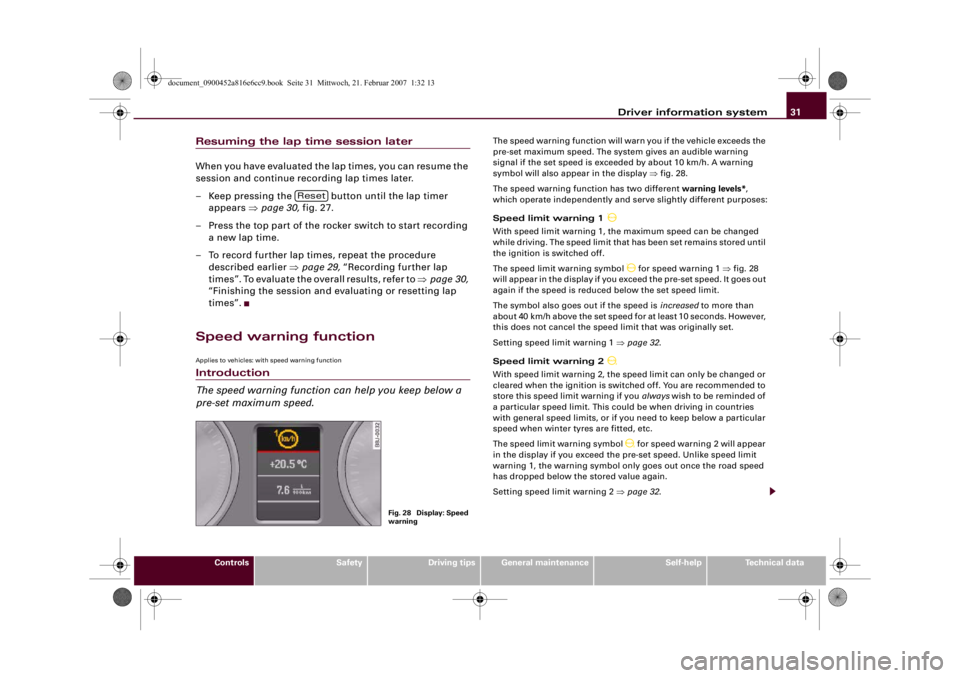
The speed warning function will warn you if the vehicle exceeds the
pre-set maximum speed. The system gives an audible warning
signal if the set speed is exceeded by about 10 km/h. A warning
symbol will also appear in the display ⇒fig. 28.
The speed warning function has two different warning levels*,
which operate independently and serve slightly different purposes:
Speed limit warning 1
With speed limit warning 1, the maximum speed can be changed
while driving. The speed limit that has been set remains stored until
the ignition is switched off.
The speed limit warning symbol
for speed warning 1 ⇒fig. 28
will appear in the display if you exceed the pre-set speed. It goes out
again if the speed is reduced below the set speed limit.
The symbol also goes out if the speed is increased to more than
about 40 km/h above the set speed for at least 10 seconds. However,
this does not cancel the speed limit that was originally set.
Setting speed limit warning 1 ⇒page 32.
Speed limit warning 2
With speed limit warning 2, the speed limit can only be changed or
cleared when the ignition is switched off. You are recommended to
store this speed limit warning if you always wish to be reminded of
a particular speed limit. This could be when driving in countries
with general speed limits, or if you need to keep below a particular
speed when winter tyres are fitted, etc.
The speed limit warning symbol
for speed warning 2 will appear
in the display if you exceed the pre-set speed. Unlike speed limit
warning 1, the warning symbol only goes out once the road speed
has dropped below the stored value again.
Setting speed limit warning 2 ⇒page 32.
Reset
Fig. 28 Display: Speed
warning
document_0900452a816e6cc9.book Seite 31 Mittwoch, 21. Februar 2007 1:32 13
Page 35 of 210
Driver information system33
Controls
Safety
Driving tips
General maintenance
Self-help
Technical data
Clearing speed limit
– Switch off the ignition.
– Briefly press the adjuster/test button in the instrument
cluster ⇒page 32, fig. 29. The mileage recorder display
and the digital clock will light up.
– Press the adjuster/test button for at least 2 seconds. The
display will show the speed limit which is currently set.
– Now press and hold the button on the wind-
screen wiper lever ⇒page 32, fig. 30 until the
crossed-out warning symbol for speed limit 2 appears on
the display.The display lighting for the mileage recorder and digital clock goes
off again a few seconds after the button is released.
Note
This speed limit function can also be operated via the on-board
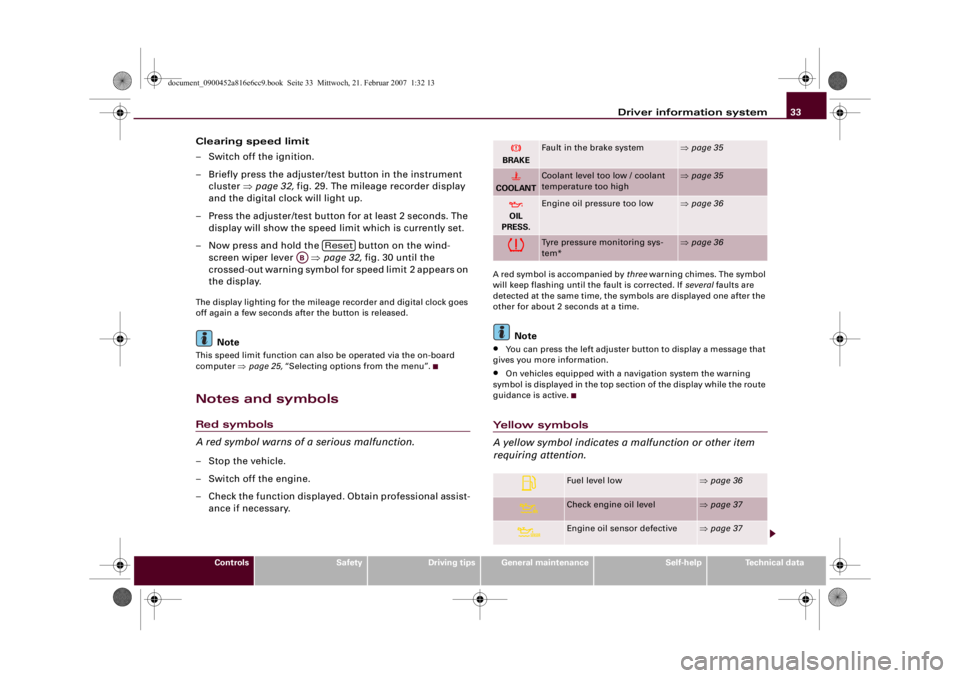
computer ⇒page 25, “Selecting options from the menu”.Notes and symbolsRed symbols
A red symbol warns of a serious malfunction.–Stop the vehicle.
– Switch off the engine.
– Check the function displayed. Obtain professional assist-
ance if necessary.
A red symbol is accompanied by three warning chimes. The symbol
will keep flashing until the fault is corrected. If several faults are
detected at the same time, the symbols are displayed one after the
other for about 2 seconds at a time.
Note
•
You can press the left adjuster button to display a message that
gives you more information.
•
On vehicles equipped with a navigation system the warning
symbol is displayed in the top section of the display while the route
guidance is active.
Yellow symbols
A yellow symbol indicates a malfunction or other item
requiring attention.
Reset
AB
BRAKE
Fault in the brake system
⇒page 35
COOLANT
Coolant level too low / coolant
temperature too high
⇒page 35
OIL
PRESS.
Engine oil pressure too low
⇒page 36
Tyre pressure monitoring sys-
tem*
⇒page 36
Fuel level low
⇒page 36
Check engine oil level
⇒page 37
Engine oil sensor defective
⇒page 37
document_0900452a816e6cc9.book Seite 33 Mittwoch, 21. Februar 2007 1:32 13
Page 37 of 210
Driver information system35
Controls
Safety
Driving tips
General maintenance
Self-help
Technical data
Fault in the brake system
The warning lamp flashes when the handbrake is applied,
or if the brake fluid level is too low or if there is a fault in
the ABS system.If the symbol
flashes in the display when the handbrake
is not applied, there is a fault in the brake system. One of the
following messages will appear in the display together with
the symbol:
Stop vehicle and check brake fluid level
Brake fault ! Drive carefully to nearest workshop
–Stop the vehicle.
– You should obtain professional assistance.
If the ABS fails, the ABS warning lamp
will light up together with
the brake warning symbol
⇒.
Handbrake applied
The warning lamp
also lights up when the handbrake is applied.
In addition to this, a warning buzzer will sound after driving for
3 seconds at a speed above 5 km/h.
WARNING
•
If the brake fluid level in the reservoir is too low, this could
result in an accident. Do not drive on. You should obtain profes-
sional assistance.
•
If the brake warning lamp lights up together with the ABS
warning lamp, this can mean that the control function of the ABS
is out of action. As a result the rear wheels can lock relatively
easily when braking. This could cause the tail of the vehicle to skid
sideways. Drive carefully to the nearest qualified workshop and
have the fault rectified.
Fault in the cooling system
Faults in the cooling system must be rectified immedi-
ately.If the
symbol flashes in the display, this means that either
the coolant temperature is too high or the coolant level is
too low. The following message will appear in the display
together with the symbol:
Switch off engine, check coolant level
– Stop the vehicle.
– Switch off the engine.
– Check the coolant level ⇒page 160.
– Add more coolant if necessary ⇒page 160.
– Wait for the symbol to go out before driving on.
– Obtain professional assistance if necessary.
If the coolant level is correct, the overheating may be caused by a
malfunction of the radiator fan.
If the alternator warning lamp lights up as well ⇒page 18, it is
possible that the drive belt has broken.
WARNING
•
If your vehicle should break down for technical reasons, stop it
at a safe distance away from moving traffic, switch off the engine
and turn on the hazard warning lights ⇒page 56, “Hazard
warning lights ”.
•
Never open the engine lid if you can see or hear steam or
coolant escaping from the engine compartment; there is a risk of
being scalded. Wait until you can no longer see or hear escaping
steam or coolant.
document_0900452a816e6cc9.book Seite 35 Mittwoch, 21. Februar 2007 1:32 13
Page 39 of 210
Driver information system37
Controls
Safety
Driving tips
General maintenance
Self-help
Technical data
Check engine oil level
Please check oil level
If the symbol lights up, add 1 litre of oil at the next opportunity
⇒page 158.
Engine oil sensor defective
If the
symbol lights up, take the vehicle to a qualified workshop
and have the oil level sensor checked.
Front brake pads worn
If the
symbol lights up, have the front brake pads (and, for
safety's sake the rear pads as well) inspected by a qualified
workshop.
Speed warning 1
If the
symbol lights up, this means you are exceeding the speed
that has been pre-set with the speed warning function. You should
reduce your speed accordingly ⇒page 31.
Speed warning 2
If the
symbol lights up, this means you are exceeding the speed
that has been pre-set for speed warning 2. You should reduce your
speed accordingly ⇒page 31.
Headlight range control defective
This symbol
indicates a malfunction in the dynamic headlight
range control. Take the vehicle to a qualified workshop to have the
dynamic headlight range control function repaired.
Washer fluid level low
If the
symbol lights up, top up the fluid for the windscreen
washer and headlight washer system ⇒page 164.
Battery voltage too high or too low
If the
symbol lights up, take the vehicle to a qualified workshop
and have the following items checked:
•
Poly-V belt
•
Battery condition
It is also advisable to check whether the alternator warning lamp
has come on ⇒page 18.
Bulb monitor
The bulb monitor checks whether the lights on the vehicle
are working.If a defective bulb is detected, or if one of the lights has failed for
any reason, the bulb monitor symbol
will appear in the display
together with an additional message (which goes out after
5 seconds). For instance, if the rear left turn signal is not working,
the display in the instrument cluster will show the following
message:
REAR LEFT TURN SIGNAL
document_0900452a816e6cc9.book Seite 37 Mittwoch, 21. Februar 2007 1:32 13
Page 41 of 210
Driver information system39
Controls
Safety
Driving tips
General maintenance
Self-help
Technical data If these symbols light up, the clutch has overheated and could be
damaged if you continue driving.
Stop the car and obtain professional assistance.
document_0900452a816e6cc9.book Seite 39 Mittwoch, 21. Februar 2007 1:32 13
Page 43 of 210
Doors and windows41
Controls
Safety
Driving tips
General maintenance
Self-help
Technical data
Remote control key
The remote control will lock and unlock the vehicle
without having to insert the key in the lock.The remote control transmitter and the battery are integrated in the
handle of the key. The receiver is in the interior of the vehicle. The
maximum range of the remote control depends on various factors.
The range is reduced when the battery starts to lose power.
If the receiver has been repaired or replaced, or if a replacement key
is used, the system will need re-programming by a qualified work-
shop. This is necessary so that the receiver can recognise your
remote control key.
The remote control keys (which are radio-operated) conform with all
relevant requirements for Germany and have been approved by the
Federal Approvals Office for Telecommunications of the Federal
Republic of Germany. All components are marked in accordance
with the current legal requirements. This certification forms the
basis for approval for use in other countries.
Personalised remote control key
When you switch off the ignition or lock the vehicle, the settings of
various convenience features are automatically stored and assigned
individually to the remote control key that is currently in use. The
settings stored for the remote control key are then recalled auto-
matically the next time the vehicle is unlocked, the door is opened
or the ignition is switched on.
Note
•
The remote control key is automatically deactivated when the
ignition is switched on.
•
The function of the remote control key may be impaired by inter-
ference from other nearby radio signals (for example from a mobile
telephone or TV transmitter) if these are in the same frequency
range.
Synchronisation
If the remote control fails to unlock the vehicle, it will be
necessary to re-synchronise the system.– Press the unlock button
on the remote control.
– Use the key to manually unlock the driver's door within
30 seconds.
– Press the unlock
or the lock button
.
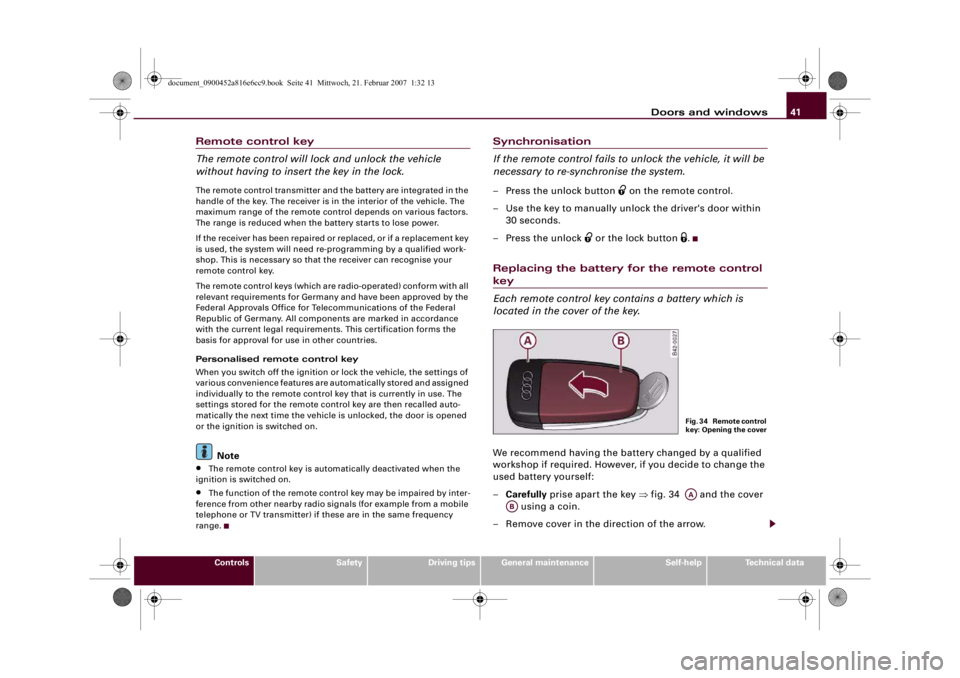
Replacing the battery for the remote control key
Each remote control key contains a battery which is
located in the cover of the key.We recommend having the battery changed by a qualified
workshop if required. However, if you decide to change the
used battery yourself:
–Carefully prise apart the key ⇒fig. 34 and the cover
using a coin.
– Remove cover in the direction of the arrow.
F i g . 3 4 R e m o t e c o n t r o l
key: Opening the coverAA
AB
document_0900452a816e6cc9.book Seite 41 Mittwoch, 21. Februar 2007 1:32 13
Page 45 of 210
Doors and windows43
Controls
Safety
Driving tips
General maintenance
Self-help
Technical data Driver's door lock: Turn the key in the driver's door to the “lock” posi-
tion twice within 2 seconds.
Automatic locking function (Auto Lock)
The Auto Lock function locks all the doors and the luggage lid when
the vehicle exceeds a speed of about 15 km/h.
The vehicle is unlocked again automatically when the ignition key is
removed. Alternatively, the vehicle can also be unlocked via the
central locking switch
or by pulling one of the inside door
handles. If desired, you can deactivate the Auto Lock feature in the
menu display ⇒page 24 or have it deactivated by a qualified work-
shop.
Turn signals
All the turn signals will flash as confirmation when the vehicle is
locked or unlocked. The turn signals flash twice when the vehicle is
unlocked and once when the vehicle is locked, provided that the
luggage lid and all the doors are closed. In addition, the interior
lights will automatically light up when the vehicle is unlocked and
go out when the vehicle is locked, provided that the switches are in
the courtesy light position.
WARNING
Do not leave anyone (especially children) in the car if it is locked
from the outside and the deadlock mechanism is activated: the
doors and windows cannot then be opened from the inside.
Locked doors could delay assistance in an emergency, potentially
putting lives at risk.
Note
•
If the central locking system should fail to work, you can still lock
and unlock the driver's door with the key. The passenger's door can
be locked manually ⇒page 46.
•
The deadlock mechanism and the anti-theft alarm cannot be acti-
vated if the central locking is not functioning.
•
Never leave any valuable items in the vehicle unattended. Even a
locked vehicle is not a safe.
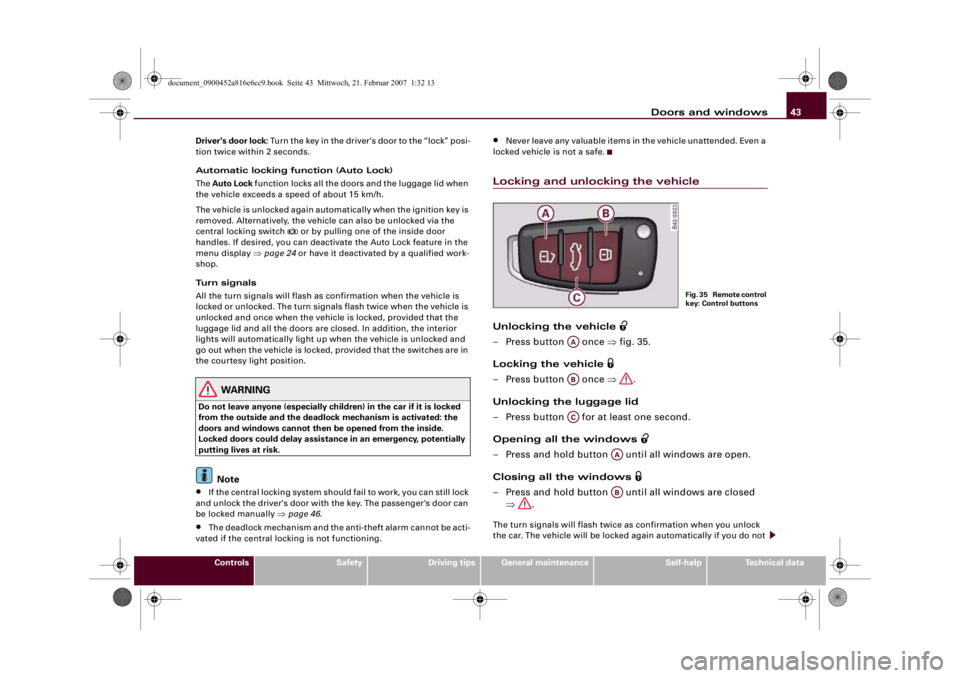
Locking and unlocking the vehicleUnlocking the vehicle
– Press button once ⇒fig. 35.
Locking the vehicle
– Press button once ⇒.
Unlocking the luggage lid
– Press button for at least one second.
Opening all the windows
– Press and hold button until all windows are open.
Closing all the windows
– Press and hold button until all windows are closed
⇒.The turn signals will flash twice as confirmation when you unlock
the car. The vehicle will be locked again automatically if you do not
F i g . 3 5 R e m o t e c o n t r o l
key: Control buttons
AAABAC
AAAB
document_0900452a816e6cc9.book Seite 43 Mittwoch, 21. Februar 2007 1:32 13