display AUDI R8 COUPE 2020 Owners Manual
[x] Cancel search | Manufacturer: AUDI, Model Year: 2020, Model line: R8 COUPE, Model: AUDI R8 COUPE 2020Pages: 308, PDF Size: 82.41 MB
Page 171 of 308
4S1012721BA
System settings
Treedate Tae eli) Wi-Fi audio player
Applies to: vehicles with Audi phone box Requirement: the Wi-Fi hotspot on the MMI
— Connect new device: search for and connect a = page 129 and the Wi-Fi on your Wi-Fi audio
cell phone. player must be switched on.
— List of devices already paired: select your cell — Connect new device: press the control knob.
phone from the list of all the devices that are Search for and connect a Wi-Fi capable device.
already paired. — Disconnecting the Wi-Fi audio player: deacti-
vate Wi-Fi on your Wi-Fi-capable device. The
device will be automatically removed from the
Applies to: vehicles with Audi connect list.
— Connect new device: search for and connect a @) Note
mobile device (such as a smartphone).
Always follow the information found in >@ in
— List of devices already paired: select your cell
General information on page 124.
phone from the list of all devices already
paired, or insert a mini SIM card in the SIM card
@ Note Display contacts from a cell phone (or an addi-
tional cell phone).
Always follow the information found in >@ in
General information on page 124. Requirement: cell phones must not be connected
to the MMI through the Bluetooth remote SIM
access profile or through the Handsfree profile.
myAudi app
Applies to: vehicles with Audi connect — Connect new device: search for and connect a
new cell phone.
— List of devices already paired: select your cell
phone from the list of all the cell phones that
— Connect new device: search for and connect a are already paired.
mobile device (such as a smartphone).
— List of devices already paired: select your mo- Menace
bile device from the list of all the devices that Applies to: vehicles with Audi smartphone interface
are already paired.
Requirement: the myAudi app must be installed
and open on your mobile device.
— Connect your cell phone to the Audi music in-
terface > page 156 using a USB adapter
=> page 155, fig. 134.
Bluetooth player — Select your cell phone from the list of cell
phones that have already been connected.
Audio player
Requirement: the Bluetooth function and visibili-
ty must be switched on in the MMI > page 169
and on the Bluetooth audio player. Additional options
— Connect new device: press the control knob. Depending on the selected function, you can use
Select Bluetooth audio player. Search for and the right control button to access the available
connect a mobile device. additional options in the connection manager.
— List of devices already paired: select a Blue-
tooth device from the list of all the devices that
are already paired. — Bluetooth: select and confirm a setting for the
Bluetooth connection visibility. Select Visible >
Bluetooth settings
169
Page 172 of 308
System settings
for the MMI to be visible to other devices. Se-
lect Invisible for the MMI to not be visible to
other devices. However, it is still possible to es-
tablish a Bluetooth connection with paired de-
vices when the visibility is switched off. Select
Off to turn visibility off. Then a Bluetooth con-
nection is not possible.
— Bluetooth audio player: when this function is
switched on , the Bluetooth audio player is
available as a source in the Media menu.
— Delete Bluetooth device: the selected cell
phone/mobile device is disconnected from the
MMI.
— Show Bluetooth profiles: you can Connect or
Disconnect the Handsfree profile and the Di-
rectory/contacts* separately.
— Bluetooth name: the MMI Bluetooth name (for
example ,AUDI MMI 2017“) is displayed and
can be changed.
When the function is switched on [M, the symbol
© appears in the Infotainment system display
=> page 101, fig. 107.
Online settings*
— Data connection settings: See > page 128, Cell
phone network.
— Data usage counter: the amount of data pack-
ets that are sent and received through the MMI
is displayed. You can reset the data usage infor-
mation to zero using the Reset data counter
option.
— Network status: the mobile network provider
for data service as well as the network status
are displayed.
Wi-Fi settings
See > page 129.
SIM PIN settings*
— Automatic PIN entry: when this function is
switched on , the SIM PIN is automatically
saved in the MMI after it is entered for the first
time. The SIM PIN for four different SIM cards
can be saved in the MMI. With the function
switched off, the currently stored SIM PIN is
deleted from the MMI. When the automatic
PIN entry is switched on, there are no SIM PIN
prompts.
170
— Disable PIN query: when switched on, there are
no SIM PIN queries. The automatic PIN entry is
not used in this case.
— Change PIN: you can change the PIN on your
SIM card. First enter the current SIM PIN. The
SIM PIN may only contain digits 0-9. The new
SIM PIN must be entered twice for security and
then it will be saved to the SIM card.
Apple CarPlay sound settings/Android Auto
sound settings
Applies to: vehicles with Audi smartphone interface
See > page 171.
About Apple CarPlay/About Android Auto
Applies to: vehicles with Audi smartphone interface
Here you will find legal information regarding the
use of Apple CarPlay or Android Auto and infor-
mation about device-specific data exchange.
Delete Apple CarPlay device/Delete Android
Auto device
Applies to: vehicles with Audi smartphone interface
Requirement: your cell phone must not be con-
nected to the Audi music interface with a USB
adapter.
Select: Audi smartphone interface > a device
from the list > right control button.
To remove your mobile device from the list, select
and confirm Delete Apple CarPlay device or De-
lete Android Auto device.
G) Tips
Some SIM cards do not allow the SIM PIN
queries to be switched off.
System update
> Select: [MENU] button > Settings > left control
button > System maintenance.
— System update: insert the storage device with
the update data into the appropriate drive
= page 151. Select and confirm the drive >
Start update. The length of the process de-
pends on the size of the update.
Page 173 of 308
4S1012721BA
System settings
— Reset driver installation: the selected media
driver package is reset to the settings at the
time of delivery.
— Version information: information on the MMI
software version and the navigation database*
software version is displayed. The Software in-
formation function also provides information
on the software contained in the MMI and the
licensing agreement.
Sound settings
The sound distribution and volume of the MMI
can be adjusted individually. The settings depend
on the vehicle equipment.
> Select: [MENU] button > Sound > left control
button > Entertainment.
Treble/Bass
You can adjust the Treble and Bass settings by
turning the control knob. The changed settings
only apply for the audio source that is active at
the time. This allows you to adjust the sound set-
tings for each audio source separately.
Balance/fader* (sound focus)
— Adjusting the sound distribution to the left or
right: press the control knob. Turn the control
knob to the left or right to the desired position.
— Adjusting the sound distribution to the front
or rear*: press the control knob again. Turn the
control knob to the left or right to the desired
position.
— Adjusting the sound distribution using the
MMI touch: move your finger on the MMI touch
control panel in the desired direction.
Sound effects*
Select and confirm a Focus setting:
— All: all speakers in the vehicle are active (sym-
metrical sound distribution).
— Front: only the speakers in the front of the ve-
hicle are active.
Speed dependent volume control
You can adjust how much the volume changes to
compensate for noise inside the vehicle by turn-
ing the control knob.
Volume settings
Adjusting the volume
The volume of an audio source or a system mes-
sage (for example, from the voice recognition
system) can be adjusted directly while the sound
is playing using the On/Off knob.
— Increasing or decreasing the volume: turn the
On/Off knob @) > page 93, fig. 94 to the right
or left.
—
Muting or pausing: press the On/Off knob
briefly, or turn the On/Off knob to the left until
the Mute symbol appears. An active audio/
video source is stopped.
—Unmuting or resuming: press the On/Off knob
briefly or turn the On/Off knob to the right.
ZA\ WARNING
Adjust the volume of the audio system so that
signals from outside the vehicle, such as po-
lice and fire sirens, can be heard easily at all
times.
G) Tips
The volume is automatically adjusted to a pre-
set level when the MMI is switched on.
Adjusting the system volume
> Select: [MENU] button > Sound > left control
button.
Telephone
Mute telephone: messages and ringtones are set
to mute.
Ringtone: see = page 122, Ringtone and volume
settings.
Ringtone volume: you can adjust the volume of
the selected ringtone by turning the control
knob.
Message volume: you can adjust the volume of
the notification for an incoming text message by
turning the control knob.
171
Page 192 of 308
Airbag system
— Forward-facing child seats installed on the
front passenger's seat may interfere with
the deployment of the airbag and cause seri-
ous personal injury to the child.
ZA WARNING
If, in exceptional circumstances, you must in-
stall a forward-facing child restraint on the
front passenger's seat:
— Always make sure the forward-facing seat
has been designed and certified by its manu-
facturer for use on a front seat with a pas-
senger front and side airbag.
— Never put the forward-facing child restraint
up against or very near the instrument pan-
el.
— Always move the front passenger seat to the
highest position in the up and down adjust-
ment range and move it back to the rear-
most position in the seat's fore and aft ad-
justment range, as far away from the airbag
as possible, before installing the forward-
facing child restraint.
— Always make sure that the safety belt upper
anchorage is behind the child restraint and
not next to or in front of the child restraint
so that the safety belt will be properly posi-
tioned.
— Make sure that the PASSENGER AIR BAG
OFF 7%; light comes on and stays on all the
time whenever the ignition is switched on.
Z\ WARNING
If, in exceptional circumstances, you must in-
stall a forward or rearward-facing child re-
straint on the front passenger's seat:
— Improper installation of child restraints can
reduce their effectiveness or even prevent
them from providing any protection.
— An improperly installed child restraint can
interfere with the airbag as it deploys and
seriously
injure or even kill the child - even
with an Advanced Airbag System.
— Always carefully follow the manufacturer's
instructions provided with the child seat or
carrier.
— Always make sure that there is nothing on
the front passenger seat that will cause the
capacitive passenger detection system in
the seat to signal to the Airbag System that
the seat is occupied by a person when it is
not, or to signal that it is occupied by some-
one who is heavier than the person actually
sitting on the seat. The presence of addi-
tional objects could cause the passenger
front airbag to be turned on when it should
be off, or could cause the airbag to work ina
way that is different from the way it would
have worked without the object on the seat.
ZA WARNING
To reduce the risk of serious injury, make sure
that the PASSENGER AIR BAG OFF 3; light
will be displayed whenever a child restraint is
installed on the front passenger seat and the
ignition is switched on.
— If the PASSENGER AIR BAG OFF 3; light
does not stay on, perform the checks descri-
bed > page 198, Monitoring the Advanced
Airbag System.
— Have the airbag system inspected by your
Audi dealer immediately.
— Always carefully follow instructions from
child restraint manufacturers when instal-
ling child restraints.
190
Page 236 of 308

Checking and Filling
oil quality to decrease. Do not extract engine oil
to reduce the level, because this will increase the
risk of engine damage. Drive to an authorized Au-
di dealer or authorized Audi Service Facility im-
mediately to have engine oil extracted.
3 Oil level system: malfunction! Please con-
tact Service
The sensor that checks the engine oil level has
malfunctioned. Drive immediately to an author-
ized Audi dealer or authorized Audi Service Facili-
ty to have the malfunction repaired.
3 Oil pressure sensor: malfunction! Please
contact Service
The sensor that checks the engine oil pressure
has malfunctioned. Drive immediately to an au-
thorized Audi dealer or authorized Audi Service
Facility to have the malfunction repaired.
Engine warm-up request*
fi Please drive to warm up engine
Fuel has entered the engine oil, either due to low
outside temperatures or frequent short drives.
Drive until the engine is warm so that the fuel in
the engine oil will evaporate. Avoid high engine
speeds, full accelerating, and heavy engine loads
when doing this.
G) Tips
The oil pressure warning & is not an oil level
indicator. Always check the oil level regularly.
Checking the engine oil level
The engine oil level can be checked in the Info-
tainment system
Observe the safety precautions > A\ in General
information on page 229.
> Park your vehicle on a level surface.
> Let the engine run at idle.
> Wait approximately two minutes.
> Select in the Infotainment system: the [MENU
button > left control button > Service & checks
> Oil level
234
> Read the oil level in the display. Add engine oil
if the bar in the oil level indicator is just below
“min” > page 235.
C) Note
If the engine oil level is too low or too high,
there is a risk of engine damage.
G) Tips
The oil level indicator in the display is only an
informational display. If the oil level is too
low, a minimum oil warning appears in the in-
strument cluster. Add oil and close the engine
compartment lid. The current oil level is dis-
played in the Infotainment system the next
time the ignition is switched on.
G) Tips
— The engine oil consumption may be up to
1 quart per 600 miles (0.8 liter/1,000 km),
depending on driving style and operating
conditions. Consumption may be higher dur-
ing the first 3,000 miles (5,000 km). The
engine oil level must be checked regularly.
It is best to check each time you refuel your
vehicle and before long drives.
— Because of the lubrication and cooling of
the engine, combustion engines consume
oil. The oil consumption varies depending
on the engine and may change during the
service life of the engine. Engines generally
consume more oil at the beginning during
the break-in period. Then oil consumption
stabilizes after the break-in period.
— Under normal conditions, oil consumption
depends on the quality and viscosity of the
oil, the engine RPM, the climate conditions,
and the road conditions. The dilution of oil
from condensation or fuel residue as well as
the age of the oil also play a role. Because
engine wear increases with mileage, oil con-
sumption will increase again over time until
it may be necessary to replace worn compo-
nents.
— Because all these variables play a role, it is
not possible to define an oil consumption
standard. Therefore, the oil level must be
checked regularly.
Page 245 of 308
4S1012721BA
Checking and Filling
@) Note
— The concentration of anti-freezing agent
must be adjusted to the vehicle operating
conditions and the climate. A concentration
that is too high can lead to vehicle damage.
— Never add radiator anti-freeze or other addi-
tives to the washer fluid.
— Do not use a glass cleaner that contains
paint solvents, because this could damage
the paint.
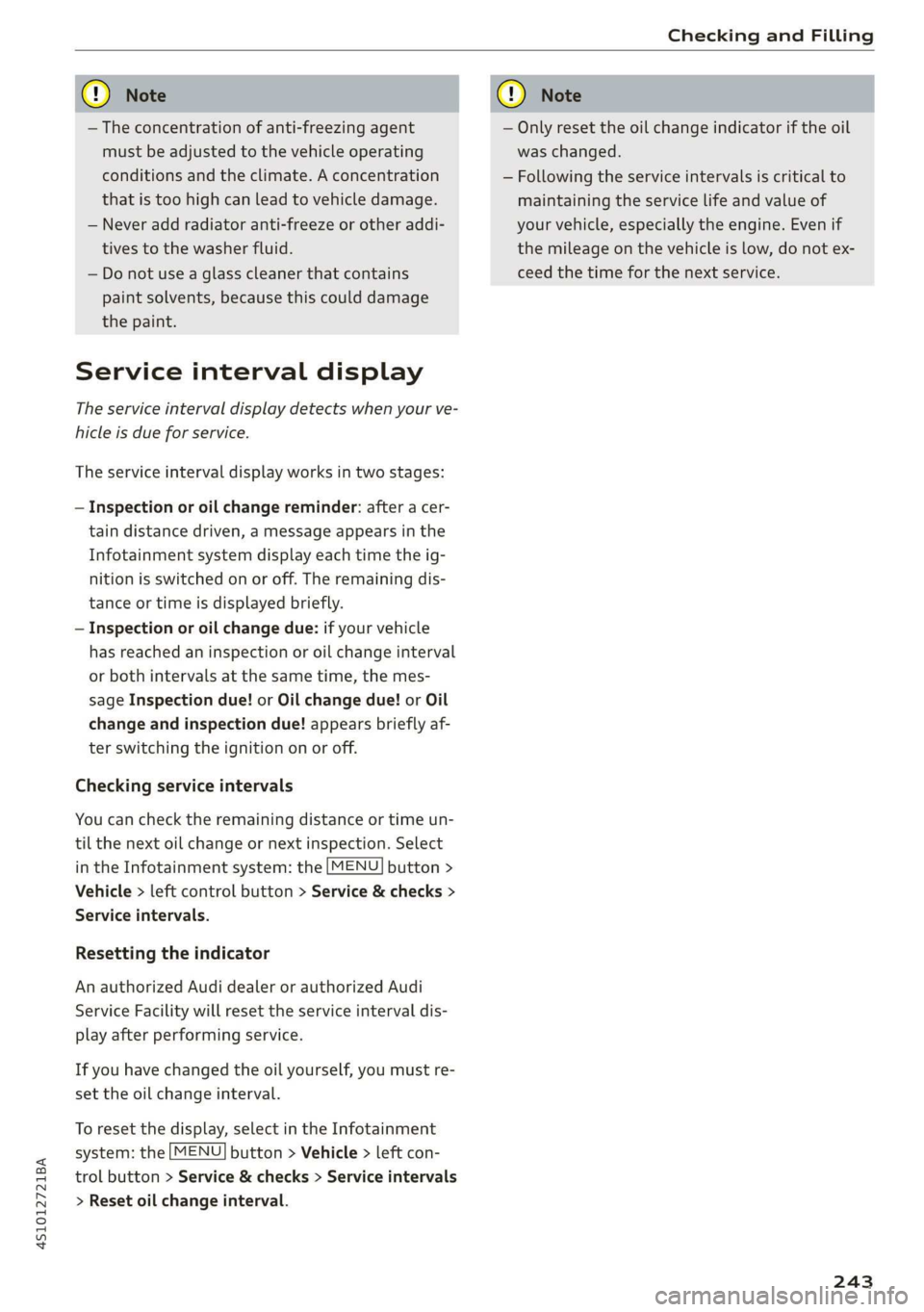
Service interval display
The service interval display detects when your ve-
hicle is due for service.
The service interval display works in two stages:
— Inspection or oil change reminder: after a cer-
tain distance driven, a message appears in the
Infotainment system display each time the ig-
nition is switched on or off. The remaining dis-
tance or time is displayed briefly.
— Inspection or oil change due: if your vehicle
has reached an inspection or oil change interval
or both intervals at the same time, the mes-
sage Inspection due! or Oil change due! or Oil
change and inspection due! appears briefly af-
ter switching the ignition on or off.
Checking service intervals
You can check the remaining distance or time un-
til the next oil change or next inspection. Select
in the Infotainment system: the [MENU] button >
Vehicle > left control button > Service & checks >
Service intervals.
Resetting the indicator
An authorized Audi dealer or authorized Audi
Service Facility will reset the service interval dis-
play after performing service.
If you have changed the oil yourself, you must re-
set the oil change interval.
To reset the display, select in the Infotainment
system: the [MENU] button > Vehicle > left con-
trol button > Service & checks > Service intervals
> Reset oil change interval.
CG) Note
— Only reset the oil change indicator if the oil
was changed.
— Following the service intervals is critical to
maintaining the service life and value of
your vehicle, especially the engine. Even if
the mileage on the vehicle is low, do not ex-
ceed the time for the next service.
243
Page 264 of 308

Wheels
— If wheels with new wheel sensors are used
Z\ WARNING
— The tire pressure monitoring system assists
the driver in monitoring tire pressures. The
driver is responsible for having the tires in-
flated to the correct pressure.
— Do not change the tire pressure when the
temperature of the tire is extremely high.
This could result in serious damage to the
tire and even cause the tire to burst, increas-
ing the risk of an accident.
— A tire with low pressure flexes more. This
heats the tire up too much. This could cause
the tread to separate and even cause the tire
to
burst, increasing the risk of an accident.
— The tire pressure monitoring system does
not warn about damage or defects in the
tire construction that could cause the tire to
burst, for example. Inspect your tires regu-
larly.
G) Tips
—If tires are replaced, the sensors and valves
do not need to be removed or replaced. Only
replace the valve stem and, if necessary, the
valve and the wheel electronics. If you have
questions, see an authorized Audi dealer or
authorized Audi Service Facility.
— An incorrect display or a malfunction in the
tire pressure monitoring system can occur
after using the tire mobility kit. Have the
sensors replaced by an authorized Audi
dealer or authorized Audi Service Facility.
— For an explanation on conformity with the
FCC regulations in the United States and the
Industry Canada regulations, see
=> page 287.
PEM Um com eee Teme eka)
Applies to: vehicles with tire pressure monitoring system
Requirement: you must be driving the vehicle.
> Select in the Infotainment system: [MENU] but-
ton > Service & checks > Tire pressure monitor-
ing > Display tire pressure.
262
The current tire pressures are shown in green or
as yellow numbers in the Infotainment system:
— Green: the current tire pressure and the speci-
fied tire pressure are approximately the same.
— Yellow: the current tire pressure is lower than
the specified tire pressure.
The specified tire pressure is the last tire pressure
that was stored > page 263.
Note
that the tire pressure also depends on the
temperature of the tire. The tire pressure increas-
es as the engine becomes warmer while driving.
ZA WARNING
Read and follow the important information
and notes > page 261.
G) Tips
The tire pressure or temperature is not dis-
played while the vehicle is stationary and in
adaptation mode. Dashes --.-- are shown in
place of the pressure and temperature.
ON ice deste oy
Applies to: vehicles with tire pressure monitoring system
If the @ indicator light turns on, the pressure in
at least one tire is too low or new sensors were
not adapted:
@ indicator lights turns on after turning the
ignition on
The tire pressure is too low compared to the
specified pressure.
> Check and store the tire pressure(s) the next
time it is possible > page 263.
@ indicator light turns on while driving
Wheels with new sensors were not adapted or
the tire pressure has reached a critical level com-
pared to the specified pressure.
> Avoid unnecessary steering and braking maneu-
vers.
> Adapt your driving style to the situation.
>» Stop as soon as possible and check the tire(s).
> If it is possible to continue driving, see an au-
thorized Audi dealer or authorized Audi Service >
Page 265 of 308
4S1012721BA
Wheels
Facility immediately and have your tire(s) re-
paired or replaced.
Z\ WARNING
Read and follow the important information
and notes > page 261.
Storing new tire pressures
Applies to: vehicles with tire pressure monitoring system
The tire pressure specifications must be stored
correctly for the tire pressure monitoring system
to function reliably.
It is always necessary to store the tire pressures
when the tire pressures are modified, for exam-
ple due to a change in load or when new sensors
are installed.
> Before storing the tire pressures, make sure the
tire pressures of all four tires meet the speci-
fied values and are adapted to the load
=> page 254, fig. 194. Only correct and store
the pressure in tires whose temperature is ap-
proximately the same as the ambient tempera-
ture. If the temperature of the tire is higher
than the ambient air temperature, the tire
pressure must be increased approximately
3.0 PSI (0.2 bar) above the value on the sticker.
> Switch the ignition on.
> Select in the Infotainment system: [MENU] but-
ton > Service & checks > Tire pressure monitor-
ing > Store tire pressure > Yes, store now. Af-
ter storing the tire pressures, the tire pressure
monitoring system measures the current pres-
sures while driving and stores them as the new
specified pressures.
> If the changed tire pressures are not displayed
in the Infotainment system, drive the vehicle
for approximately 10 minutes so that the sen-
sor signal from the wheels is received again.
During this adaptation phase, --.-- is displayed
for the pressure and temperature and the tire
pressure monitoring system is only partially
available. It only provides a warning if one or
more tire pressures is below the minimum per-
mitted specified pressure.
If the @ indicator light turns on and the mes-
sage Tire pressure: wheel change detected.
Please check all tires and store pressures in
MMI also appears, the system has detected that
the position of the sensors has changed because
of a tire rotation, or that new sensors were instal-
led. Store the new tire pressures.
ZA\ WARNING
Read and follow the important information
and notes > page 261.
Malfunctions
Applies to: vehicles with tire pressure monitoring system
If the tire pressure monitoring system is not
available, the is indicator light appears in the
instrument cluster display along with the mes-
sage Tire pressure: malfunction! See owner's
manual.
If the iis indicator light appears after switching
the ignition on or while driving and the @ indi-
cator light also blinks for approximately one mi-
nute and then stays on, there is system malfunc-
tion. The following are examples of situations
that could cause a malfunction:
— If the message appears at the end of the adap-
tation phase, the system may not detect one or
several of the wheel sensors necessary for pres-
sure monitoring. This may result from one or
more wheels without wheel sensors or with in-
compatible wheel sensors being installed.
—Awheel sensor or another component has
failed.
— Using snow chains can affect the function of
the system because of the shielding effect of
the chains.
— The tire pressure monitoring system is not
available due to a malfunction.
— Transmitters with the same frequency, such as
headphones or remote-controlled devices, may
cause a temporary system malfunction due to
the strong electromagnetic field.
The ia indicator light and the message turn off
once the tire pressure monitoring system is avail-
able again. If you cannot correct the malfunction
and the is indicator light stays on, drive
263
Page 270 of 308
Care and cleaning
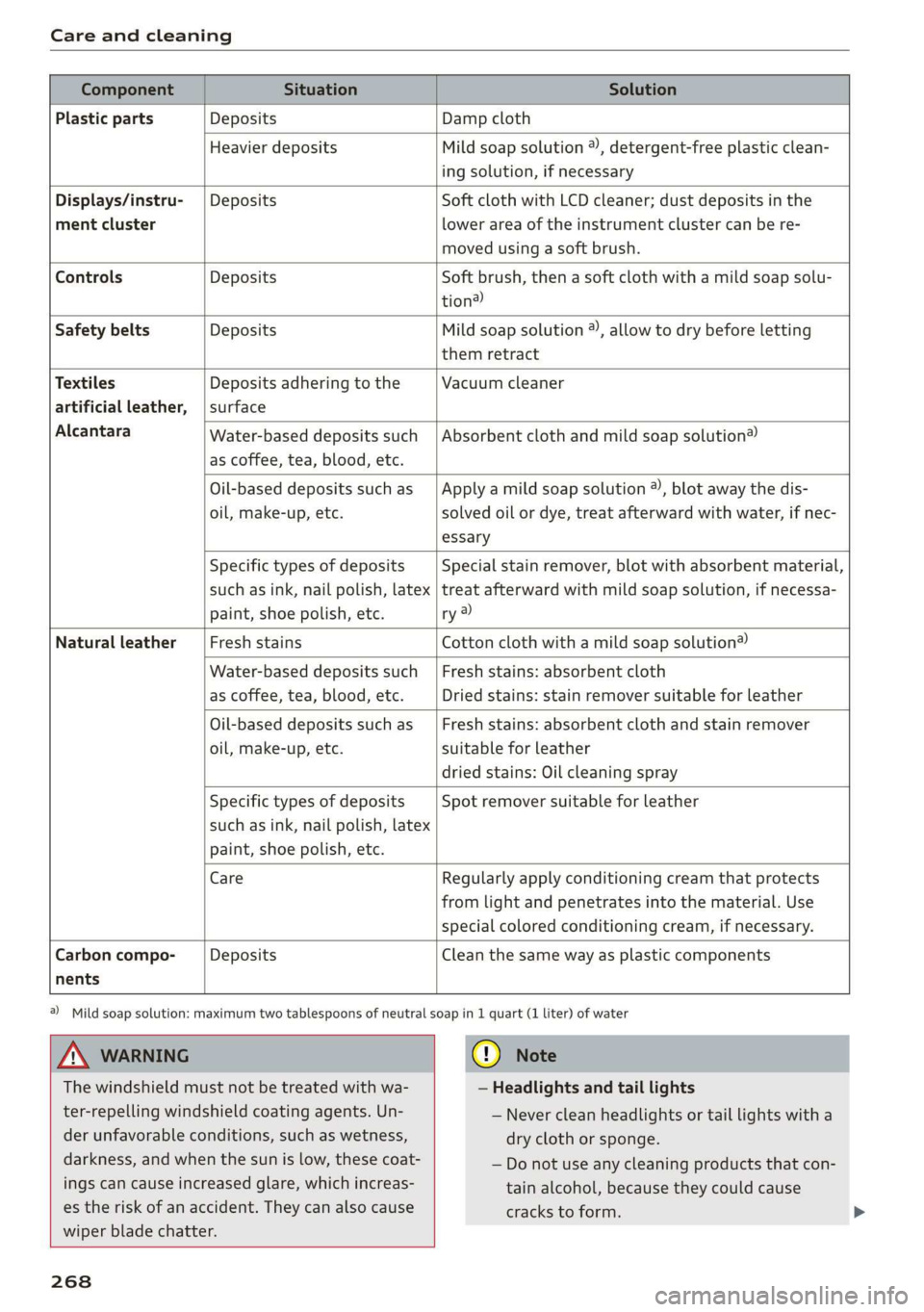
Component Situation Solution
Plastic parts Deposits Damp cloth
Heavier deposits Mild soap solution ®, detergent-free plastic clean-
ing solution, if necessary
Water-based deposits such
as coffee, tea, blood, etc.
Displays/instru- | Deposits Soft cloth with LCD cleaner; dust deposits in the
ment cluster lower area of the instrument cluster can be re-
moved using a soft brush.
Controls Deposits Soft brush, then a soft cloth with a mild soap solu-
tion?)
Safety belts Deposits Mild soap solution ®, allow to dry before letting
them retract
Textiles Deposits adhering to the Vacuum cleaner
artificial leather, | surface
Alcantara Absorbent cloth and mild soap solution®
Oil-based deposits such as
oil, make-up, etc.
Apply a mild soap solution ®), blot away the dis-
solved oil or dye, treat afterward with water, if nec-
essary
Specific types of deposits
such as ink, nail polish, latex
paint, shoe polish, etc.
Special stain remover, blot with absorbent material,
treat afterward with mild soap solution, if necessa-
ry a)
Natural leather Fresh stains Cotton cloth with a mild soap solution®
Water-based deposits such
as coffee, tea, blood, etc.
Fresh stains: absorbent cloth
Dried stains: stain remover suitable for leather
Oil-based deposits such as
oil, make-up, etc.
Fresh stains: absorbent cloth and stain remover
suitable for leather
dried stains: Oil cleaning spray
Specific types of deposits
such as ink, nail polish, latex
paint, shoe polish, etc.
Spot remover suitable for leather
nents
Care Regularly apply conditioning cream that protects
from light and penetrates into the material. Use
special
colored conditioning cream, if necessary.
Carbon compo- Deposits Clean the same way as plastic components
A WARNING
The windshield must not be treated with wa-
ter-repelling windshield coating agents. Un-
der
unfavorable conditions, such as wetness,
darkness, and when the sun is low, these coat-
ings can cause increased glare, which increas-
es the risk of an accident. They can also cause
wiper blade chatter.
268
@) Mild soap solution: maximum two tablespoons of neutral soap in 1 quart (1 liter) of water
@) Note
— Headlights and tail lights
— Never clean headlights or tail lights with a
dry cloth or sponge.
— Do not use any cleaning products that con-
tain alcohol, because they could cause
cracks to form.
Page 274 of 308
Emergency assistance
— The tire sealant must not come in contact
with skin, eyes, or clothing.
— If tire sealant comes into contact with your
eyes or your skin, thoroughly rinse the af-
fected area immediately with clean water.
— Do not inhale the fumes.
— If you swallow any of the tire sealant, thor-
oughly rinse your mouth immediately and
drink a lot of water. Do not induce vomiting.
Seek medical attention immediately.
— Change your clothing immediately if it
comes into contact with tire sealant.
— If an allergic reaction occurs, seek medical
attention immediately.
— Keep the tire sealant away from children.
— In vehicles with a tire pressure monitoring
system*, using tire sealant can result in an
incorrect display or a system malfunction.
Drive carefully to the nearest authorized Au-
di dealer or authorized Audi Service Facility.
@) Tips
— If sealant leaks, allow it to dry in place. You
can then peel it off like a sticker.
— Note the expiration date on the sealant bot-
tle. Replace the tire sealant at an authorized
Audi dealer or authorized Audi Service Fa-
cility.
— Radio reception can be interrupted when
operating the compressor.
— Follow the legal regulations that are appli-
cable in the country where you are operating
the vehicle.
D_ The compressor may look different. However, the way it is
operated is generally the same.
272
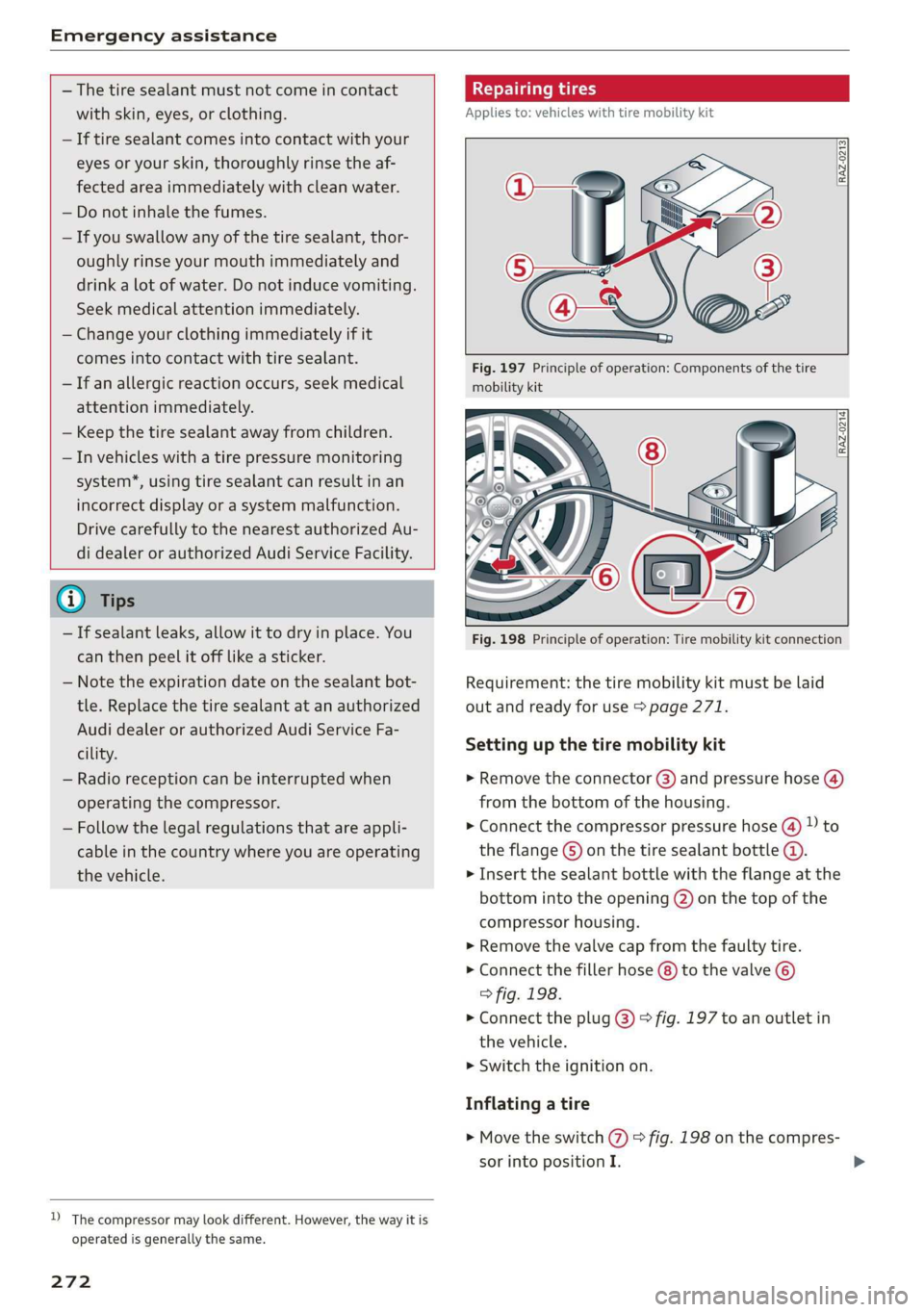
Repairing tires
Applies to: vehicles with tire mobility kit
RAZ-0213|
Fig. 197 Principle of operation: Components of the tire
mobility kit
Fig. 198 Principle of operation: Tire mobility kit connection
Requirement: the tire mobility kit must be laid
out and ready for use > page 271.
Setting up the tire mobility kit
> Remove the connector @) and pressure hose (4)
from the bottom of the housing.
> Connect the compressor pressure hose (4) D to
the flange ©) on the tire sealant bottle @.
> Insert the sealant bottle with the flange at the
bottom into the opening @) on the top of the
compressor housing.
> Remove the valve cap from the faulty tire.
> Connect the filler hose (8) to the valve ©)
> fig. 198.
> Connect the plug @) © fig. 197 to an outlet in
the vehicle.
> Switch the ignition on.
Inflating a tire
> Move the switch () > fig. 198 on the compres-
sor into position I.