display AUDI R8 COUPE 2020 User Guide
[x] Cancel search | Manufacturer: AUDI, Model Year: 2020, Model line: R8 COUPE, Model: AUDI R8 COUPE 2020Pages: 308, PDF Size: 82.41 MB
Page 45 of 308

4S1012721BA
Lights and Vision
ZA\ WARNING
High beams can cause glare for other drivers,
which increases the risk of an accident. For
this reason, only use the high beams or the
headlight flasher when they will not create
glare for other drivers.
thee
Applies to: vehicles with high beam assistant
The high beam assistant automatically turns the
high beams on or off depending on the surround-
ing conditions.
Asensor on the rearview mirror mount can detect
light sources from other road users. The high
beams switch on or off automatically depending
on the position of vehicles driving ahead and on-
coming vehicles, the vehicle speed, and other en-
vironmental and traffic conditions.
Activating high beam assistant
Requirement: the light switch must be set to AU-
TO, the low beams must be switched on and the
high beam assistant must be switched on in the
Infotainment system > page 44.
> To activate the high beam assistant, press the
lever forward @) > page 42, fig. 51. The 54 in-
dicator light appears in the Infotainment sys-
tem display and the high beams switch on/off
automatically. The indicator light Fad turns on if
the high beams were switched on.
Switching the high beams on or off manually
If the high beams did not switch on or off auto-
matically as expected, you may switch them on or
off manually instead:
> To switch the high beams on manually, press
the lever into position @). The ES indicator
light turns on.
> To switch the high beams off manually, pull the
lever back @). The high beam assistant is deac-
tivated.
Operating the headlight flasher
> To operate the headlight flasher when the high
beam assistant is activated and high beams are
switched off, pull the lever back @). The high
beam assistant remains active.
Messages in Infotainment display
High beam assistant: malfunction! See owner's
manual
Drive immediately to an authorized Audi dealer
or authorized Audi Service Facility to have the
malfunction repaired. You can still switch the
high beams on or off manually.
High beam assistant: currently unavailable.
Camera view limited due to surroundings. See
owner's manual
The camera view is blocked, for example by a
sticker or debris.
The sensor is located between the interior rear-
view mirror and the windshield. Do not place any
stickers
in this area on the windshield.
ZA WARNING
High beam assistant is only intended to assist
the driver. The driver is still responsible for
controlling the headlights and switching them
manually depending on light and visibility
conditions. It may be necessary to operate
them manually in situations such as:
— In adverse weather conditions such as fog,
heavy rain, blowing snow or spraying water.
— On roads where oncoming traffic may be
partially obscured, such as expressways.
— When there are road users that do not have
sufficient lighting, such as bicyclers or vehi-
cles with dirty tail lamps.
—In tight curves and on steep hills.
— In poorly lit areas.
— With strong reflectors, such as signs.
— If the area of the windshield near the sensor
is fogged over, dirty, icy or covered with a
sticker.
G@) Tips
The high beam assistant is deactivated if you
manually switch the high beam high beam
headlights on or off @) instead of waiting for
the system to do it automatically.
43
Page 51 of 308
451012721BA
Lights and Vision
Digital compass
Switching the compass on and off
Applies to: vehicles with digital compass
@ ©, q
S| > a
ao.
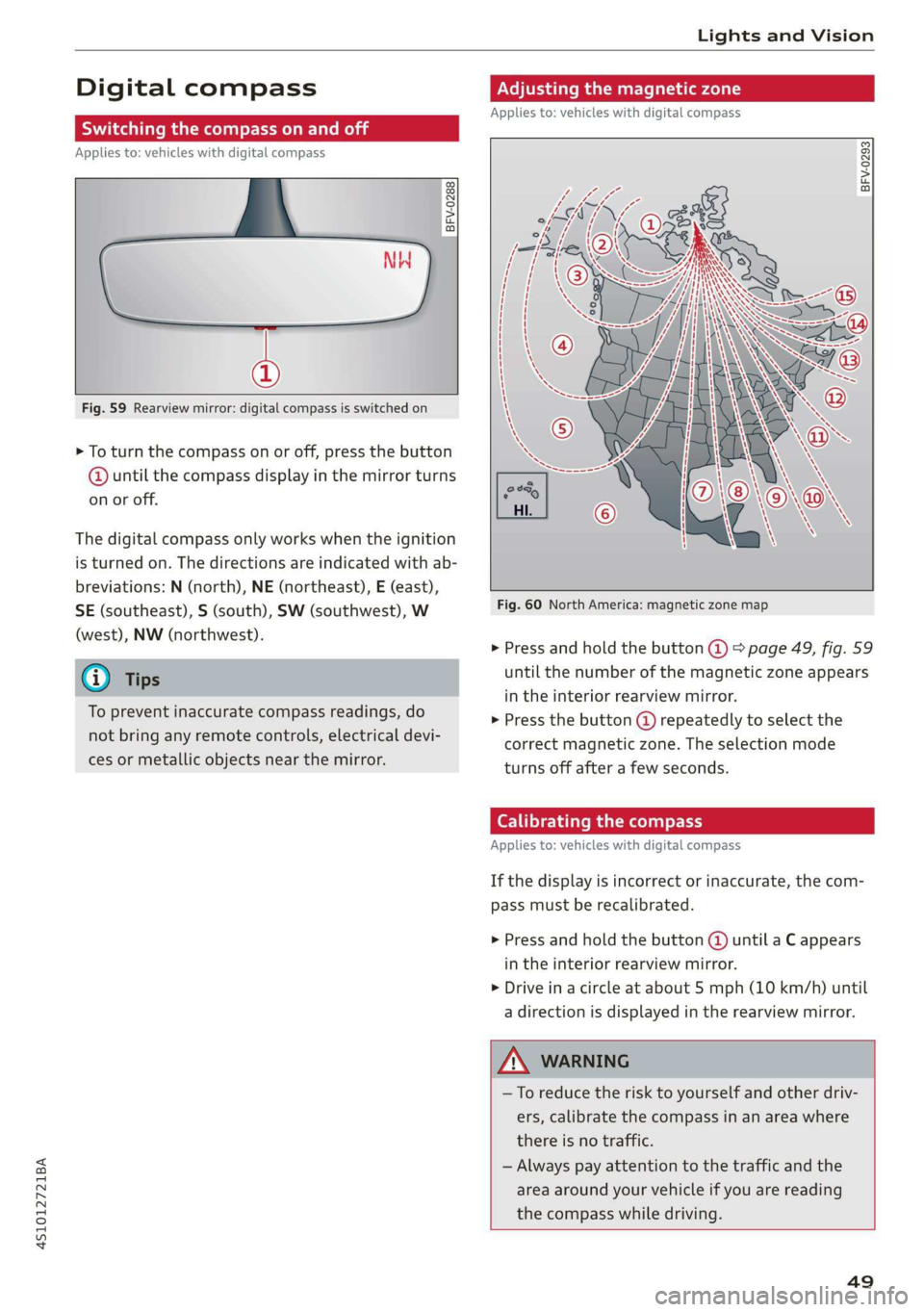
Fig. 59 Rearview mirror: digital compass is switched on
> To turn the compass on or off, press the button
@ until the compass display in the mirror turns
on or off.
The digital compass only works when the ignition
is turned on. The directions are indicated with ab-
breviations: N (north), NE (northeast), E (east),
SE (southeast), S (south), SW (southwest), W
(west), NW (northwest).
To prevent inaccurate compass readings, do
not bring any remote controls, electrical devi-
ces or metallic objects near the mirror.
Adjusting the magnetic zone
Applies to: vehicles with digital compass
BFV-0293
Fig. 60 North America: magnetic zone map
> Press and hold the button @ > page 49, fig. 59
until the number of the magnetic zone appears
in the interior rearview mirror.
> Press the button () repeatedly to select the
correct magnetic zone. The selection mode
turns off after a few seconds.
Calibrating the compass
Applies to: vehicles with digital compass
If the display is incorrect or inaccurate, the com-
pass must be recalibrated.
> Press and hold the button @ until a C appears
in the interior rearview mirror.
> Drive in a circle at about 5 mph (10 km/h) until
a direction is displayed in the rearview mirror.
—To reduce the risk to yourself and other driv-
ers, calibrate the compass in an area where
there is no traffic.
— Always pay attention to the traffic and the
area around your vehicle if you are reading
the compass while driving.
49
Page 64 of 308
![AUDI R8 COUPE 2020 User Guide Driving
This message appears when you press the
START ENGINE STOP] button while driving.
Engine start system: malfunction! Please con-
tact Service
The engine automatic start system](/img/6/57639/w960_57639-63.png "AUDI R8 COUPE 2020 User Guide Driving
This message appears when you press the
START ENGINE STOP] button while driving.
Engine start system: malfunction! Please con-
tact Service
The engine automatic start system")
Driving
This message appears when you press the
START ENGINE STOP] button while driving.
Engine start system: malfunction! Please con-
tact Service
The engine automatic start system has a mal-
function.
Drive immediately to an authorized Au-
di dealer or authorized Audi Service Facility to
have the malfunction repaired. To start the en-
gine, press and hold the [START ENGINE STOP
button.
Remote control key: hold back of key
against the designated area. See owner's man-
ual
This message appears if there is no convenience
key inside the vehicle or if the system does not
recognize the key. The convenience key may not
be recognized, for example, if it is covered by an
object that disrupts the signal (such as a brief-
case), or if the key battery is weak. Electronic de-
vices such as cell phones can also interfere with
the signal.
To still be able to start or stop the engine, see
=> page 62, Starting the engine when there is a
malfunction.
B Remote control key: key not detected. Is the
key
still in the vehicle?
The B indicator light turns on and this message
appears if the convenience key was removed from
the vehicle when the engine was running. If the
convenience key is no longer in the vehicle, you
cannot switch the ignition on or start the engine
once you stop it. You also cannot lock the vehicle
from the outside.
Please press the brake pedal
This message appears if you do not press the
brake pedal when starting the engine.
Please select N or P
This message appears when starting or stopping
the engine if the selector lever is not in the "N" or
"P" position. The engine will not start/stop.
62
Starting the engine when there is a
area d ea)
It may not be possible to start the engine under
certain circumstances, for example, if the bat-
tery in the vehicle key is drained, if interference is
affecting the key or if there is a system malfunc-
tion.
2 3
9
db + a
Fig. 70 Steering column/remote control key: starting the
engine if there is a malfunction
As long as the message ?) Remote control key:
hold back of key against the designated area.
See owner's manual is displayed, you can emer-
gency start your vehicle.
> Press the brake pedal.
> Press the [START ENGINE STOP] button.
> Hold the master key in the location indicated in
the illustration ?) © fig. 70. The engine will
start.
> If the engine does not automatically start,
press the [START ENGINE STOP] button again.
(i) Tips
You can view the message again by pressing
the [START ENGINE STOP] button.
Start/Stop system
Applies to: vehicles with Start/Stop system
The Start/Stop system can help increase fuel
economy and reduce CO2 emissions.
In Start/Stop mode, the engine shuts off auto-
matically when the vehicle is stopped, such as at
a traffic light. The ignition remains switched on
during this stop phase. The engine will restart
automatically when needed.
Page 65 of 308
4S1012721BA
Driving
The Start/Stop system is automatically activated
once
the ignition is switched on.
Basic requirements for Start/Stop mode
— The driver's door must be closed.
— The driver's seat belt much be fastened.
— The engine compartment lid must be closed.
— The vehicle must have driven faster than 2 mph
(4 km/h) since the last time it stopped.
Z\ WARNING
— Never turn off the engine before the vehicle
has come to a complete stop. Switching it
off before the vehicle has stopped may im-
pair the function of the brake booster and
power steering. You would then need to use
more force to steer and brake the vehicle.
The fact that you cannot steer and brake as
usual may increase the risk of accidents and
serious
injuries.
— If you leave the vehicle, switch the ignition
off and take the vehicle key with you. This
applies particularly when children remain in
the vehicle. Otherwise the children could
start the engine or operate electrical equip-
ment such as power windows.
—To reduce the risk of injuries, make sure that
the Start/Stop system is turned off when
working in the engine compartment
=> page 64.
©) Note
Always switch the Start/Stop system off when
driving through water > page 64.
Stopping/starting the engine
Applies to: vehicles with Start/Stop system
eo Ss
2 db t a
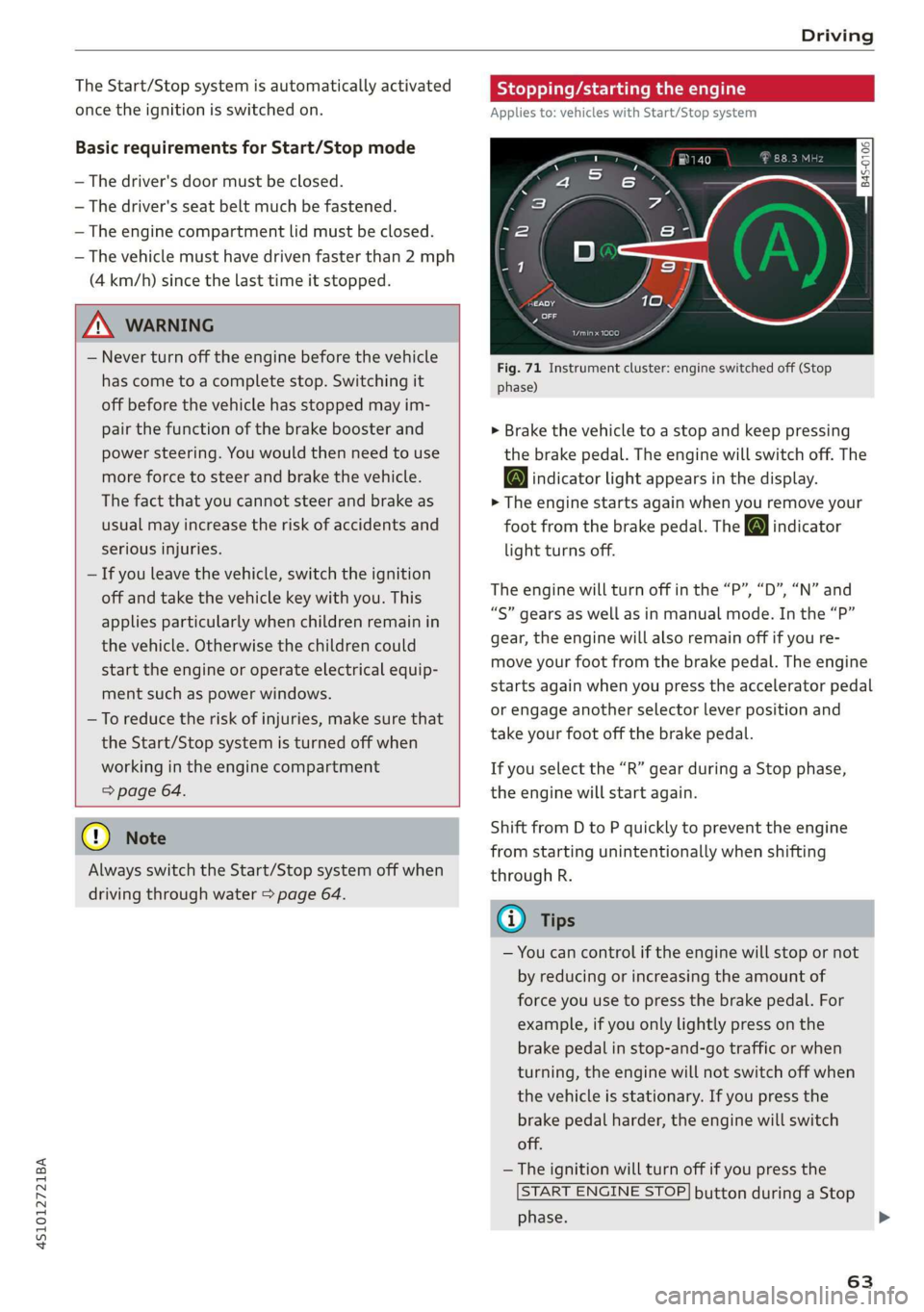
Fig. 71 Instrument cluster: engine switched off (Stop
phase)
> Brake the vehicle to a stop and keep pressing
the brake pedal. The engine will switch off. The
@ indicator light appears in the display.
> The engine starts again when you remove your
foot from the brake pedal. The o indicator
light turns off.
The engine will turn off in the “P”, “D”, “N” and
“S” gears as well as in manual mode. In the “P”
gear, the engine will also remain off if you re-
move your foot from the brake pedal. The engine
starts again when you press the accelerator pedal
or engage another selector lever position and
take your foot off the brake pedal.
If you select the “R” gear during a Stop phase,
the engine will start again.
Shift from D to P quickly to prevent the engine
from starting unintentionally when shifting
through R.
@) Tips
— You can control if the engine will stop or not
by reducing or increasing the amount of
force you use to press the brake pedal. For
example, if you only lightly press on the
brake pedal in stop-and-go traffic or when
turning, the engine will not switch off when
the vehicle is stationary. If you press the
brake pedal harder, the engine will switch
off.
— The ignition will turn off if you press the
START ENGINE STOP] button during a Stop
phase.
63
>
Page 66 of 308

Driving
— When you stop and the Start/Stop system
turns the engine off, the ignition remains
on. Make sure the ignition is switched off
before you leave the vehicle or else the bat-
tery could drain.
General information
Applies to: vehicles with Start/Stop system
Starting and stopping the engine automat-
ically
The system checks if certain conditions are met
before and during the Stop phase, and deter-
mines if the engine stops and how long it re-
mains stopped. For example, if power usage is
high, the engine will not be stopped. Along with
other conditions, the following factors influence
the automatic engine start or stop:
— Environmental conditions (slopes, inclines, ele-
vation, temperature)
— Battery (charge status, temperature, power us-
age)
— Engine temperature
— Assist systems
— Driving behavior
Depending on the engine, the indicator light
may appear if the engine is not stopped.
Ignition is switched off automatically
To prevent the vehicle battery from draining, the
ignition will switch off automatically under the
following conditions:
— If the vehicle has already been driven
— If the Start/Stop system has stopped the en-
gine
— If the driver's door is opened
—If the driver's safety belt is unbuckled
— If the brake pedal is not pressed
— If the vehicle is stationary
In this case, the parking lights switch on in place
of the low beams and the message Side marker
lights will switch off automatically in 30 mi-
nutes. See owner's manual appears in the Info-
tainment system display. The side marker lights
will switch off after approximately 30 minutes or
when you lock the vehicle.
64
If the Start/Stop system has not turned off the
engine or if you have switched the Start/Stop sys-
tem off manually, the ignition will not be auto-
matically switched off and the engine will contin-
uetorun>A.
ZX WARNING
To reduce the risk of poisoning, never allow
the engine to run in confined spaces.
@ Tips '
If you select the “D”, “N” or “S” gear after
shifting into reverse, the vehicle must be driv-
en faster than 6 mph (10 km/h) in order for
the engine to switch off again.
Manually switching the Start/Stop system
ame emo
Applies to: vehicles with Start/Stop system
If you do not wish to use the system, you can
switch it off manually.
S g
2 § £
g z
Fig. 72 Center console: Start/Stop system button
> To switch the Start/Stop system off/on manual-
ly, press the || button. The LED in the button
turns on when the system is switched off.
G@) Tips
If you switch the system off during a Stop
phase, the engine will start again automati-
cally.
Page 67 of 308
4S1012721BA
Driving
Messages in the instrument cluster display
Applies to: vehicles with Start/Stop system
Start/stop system: deactivated. Please start
engine manually
This message appears when specific conditions
are not met during a Stop phase. The Start/Stop
system will not be able to restart the engine. The
engine must be started with the
START ENGINE STOP] button.
Start/stop system: malfunction! Function
unavailable. Please contact Service
There is a malfunction in the Start/Stop system.
Drive the vehicle to an authorized Audi dealer or
authorized Service Facility as soon as possible to
have the malfunction corrected.
Electromechanical
parking brake
The ©) switch is located under the selector lever
in the center console.
Your vehicle is equipped with an electromechani-
cal parking brake. The parking brake is designed
to prevent the vehicle from rolling unintentional-
ly and replaces the hand brake.
Setting/manually releasing the parking
brake
> Pull the @) switch to set the parking brake. The
LED in the switch turns on. The Zw (USA mod-
els)/[@) (Canada models) indicator light also
turns on in the instrument cluster display.
> To release the parking brake manually, press
the brake or accelerator pedal while the igni-
tion is switched on and press the ©) switch at
the same time. The LED in the button and the
indicator light in the display turn off.
Releasing the parking brake automatically
Requirement: The driver's door must be closed.
> To start driving and release the parking brake
automatically, press the accelerator pedal as
usual.
In addition to releasing the parking brake auto-
matically, other convenience and safety functions
are available when you start driving > page 66,
Starting to drive.
Emergency braking function
You can use the emergency braking function in an
emergency situation, or if the standard brakes
are malfunctioning or the pedal is obstructed.
> Pull and hold the ©) switch.
>» As soon as you release the (©) switch or acceler-
ate, the braking stops.
Pulling and holding the ©) switch while driving
the vehicle activates the emergency braking func-
tion. The hydraulic brake system will brake all
four wheels. The braking effect is similar to heavy
braking > A\.
To reduce the risk of activating the emergency
braking by mistake, a warning tone (buzzer)
sounds when the ©) switch is pulled. Emergency
braking stops as soon as the ©) switch is released
or the accelerator pedal is pressed.
Parking
> Press the brake pedal to stop the vehicle.
> Pull the ©) switch to set the parking brake.
> Select the "P" selector lever position.
> Turn the engine off > /\.
> Turn the steering wheel when parking on in-
clines so that the wheels will roll into the curb
if the vehicle starts moving.
ZA WARNING
— If a gear is engaged while the vehicle is sta-
tionary and the engine is running, do not
press the accelerator pedal inadvertently.
Otherwise, the vehicle will start to move im-
mediately and this could result in an acci-
dent.
— Emergency braking should only be used in
an emergency, when the when the standard
brake pedal is malfunctioning or obstructed.
During emergency braking, your vehicle will
brake similar to heavy braking. ESC and the
associated components (ABS, ASR, EDL) can-
not overcome the laws of physics. In corners
and when road or weather conditions are
bad, a full brake application can cause the
65
Page 69 of 308
4S1012721BA
Driving
— Hill hold assist cannot hold the vehicle in
place on all hills (for example, if the ground
is slippery or icy).
—To reduce the risk of an accident, always
make sure the vehicle is situated safely
while stationary.
Sporty driving
When driving in a sporty style, for example ona
driving track, the wear on all vehicle components
is greatly increased, especially on the engine,
transmission, tires, brakes, and suspension. This
can result in increased wear. Also note the fol-
lowing points:
— Make sure the vehicle is in good condition.
Make sure to check the brake pads, tire tread,
and tire pressure (when tires are warm).
— Beforehand, warm up the engine by driving no
higher than two-thirds of the maximum permit-
ted engine RPM. The engine oil temperature
must be brought to a minimum of 140 °F
(60 °C).
— Before stopping the vehicle, allow the engine
and brakes to cool back down to a regular oper-
ating temperature by driving normally.
If necessary, use the following functions:
— Audi drive select* Dynamic mode > page 78
— Launch Control > page 70
— Limit ESC > page 87
@) Tips
Wear caused by load does not constitute a ve-
hicle fault as defined by the terms of the war-
ranty.
Automatic transmission
Introduction
Your vehicle is equipped with an electronically-
controlled DSG transmission called S tronic. Two
independent clutches transfer the power be-
tween the engine and transmission. It allows the
vehicle to accelerate without a noticeable inter-
ruption in traction.
The transmission shifts up or down automatically
depending on which drive program is selected.
When a moderate driving style is used, the
transmission selects the most economical driving
mode. The transmission upshifts at a lower RPM
and downshifts at a higher RPM to improve fuel
efficiency.
If desired, the driver can also select the gears
manually (tiptronic mode) > page 71.
Selecting a selector lever position
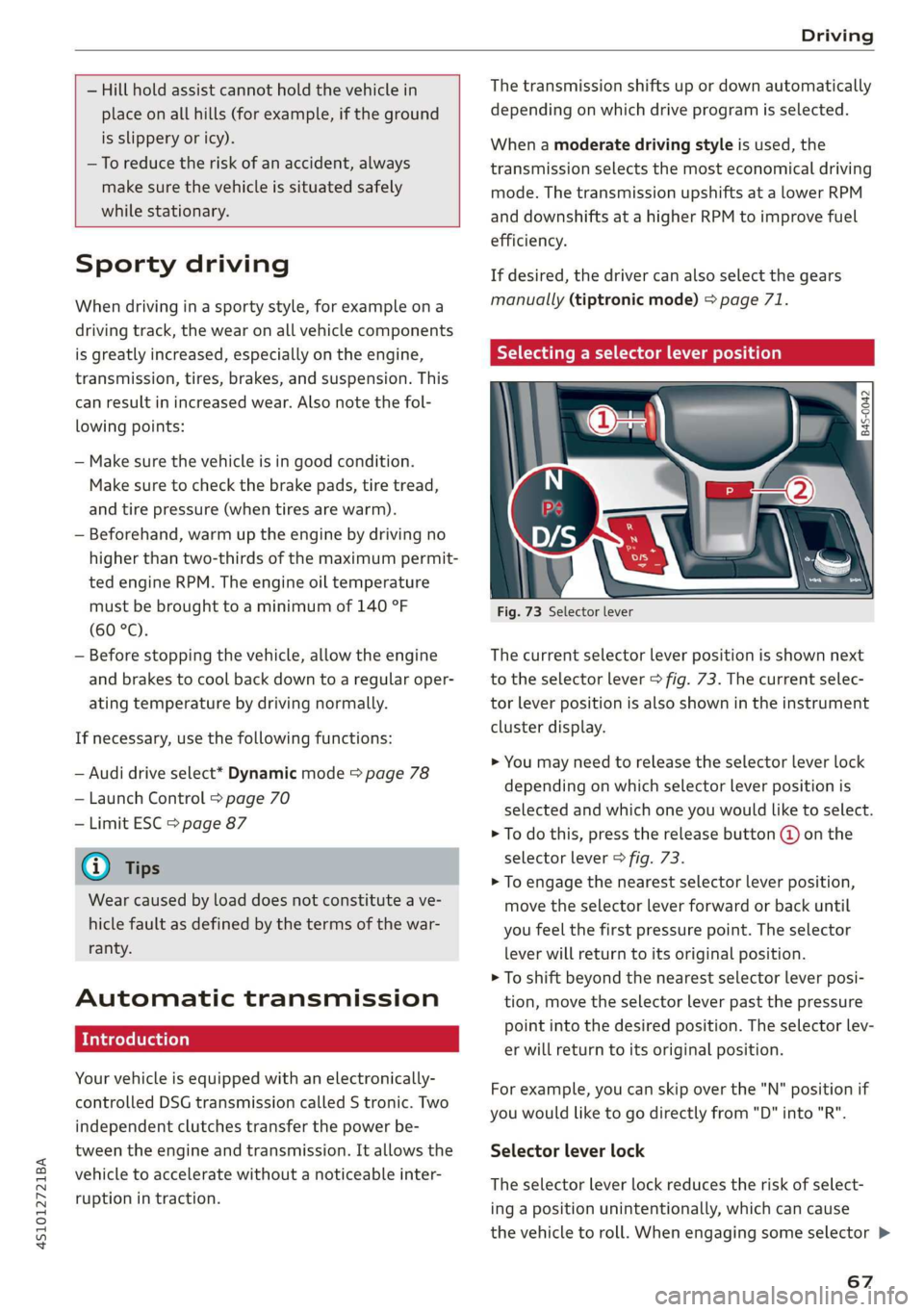
Fig. 73 Selector lever
The current selector lever position is shown next
to the selector lever > fig. 73. The current selec-
tor lever position is also shown in the instrument
cluster display.
> You may need to release the selector lever lock
depending on which selector lever position is
selected and which one you would like to select.
> To do this, press the release button @ on the
selector lever > fig. 73.
> To engage the nearest selector lever position,
move the selector lever forward or back until
you feel the first pressure point. The selector
lever will return to its original position.
> To shift beyond the nearest selector lever posi-
tion, move the selector lever past the pressure
point into the desired position. The selector lev-
er will return to its original position.
For example, you can skip over the "N" position if
you would like to go directly from "D" into "R".
Selector lever lock
The selector lever lock reduces the risk of select-
ing a position unintentionally, which can cause
the vehicle to roll. When engaging some selector >
67
Page 70 of 308
Driving
lever positions, you must press the release but-
ton @ on the selector lever and/or press the
brake pedal > fig. 73.
You must press the brake pedal to engage a se-
lector lever position when the engine is running
and the vehicle is stationary.
You do not have to press the brake pedal if you
shift from "D" to "R" within one second. This al-
lows you to “rock” the vehicle to free it when it is
stuck.
P - Park
The wheels are locked in this position. Only shift
into park when the vehicle is stationary > A\. To
select the "P" selector lever position, press the
"P" button 2) on the selector lever > fig. 73. P
appears next to the selector lever.
You can only shift out of park when the engine is
running and you are pressing the brake pedal. To
release the parking lock, press the brake pedal,
press the locking button @ on the selector lever
and select the desired selector lever position
> fig. 73.
P engages automatically when you switch the en-
gine off while D, S or R is engaged or in manual
mode.
If you switch the engine off when the N position
is selected, the transmission remains in N for ap-
proximately 20 minutes and then P is engaged.
You must use the parking lock emergency release
before towing the vehicle > page 73.
R - Reverse
The reverse gear is engaged in this position. Only
select reverse gear when the vehicle is stationary
and the engine is running at idle speed > A. To
engage the "R" selector lever position, press the
brake pedal, press the release button (@) on the
selector lever, and select the "R" position
> fig. 73.
A tone will sound when the reverse gear is engag-
ed.
68
N - Neutral (idle)
The transmission is in idle in this position. To en-
gage the N selector lever position, press the lock-
ing button @ on the selector lever and select the
N position > fig. 73 or pull both shift paddles at
the same time > page 71, fig. 75.
If you switch the engine off when the N position
is selected, the transmission remains in N for ap-
proximately 20 minutes and then P is engaged.
You cannot select the "N" position when the igni-
tion is switched off. When driving through an au-
tomatic car wash, first select the "N" position and
then turn the engine off.
For safety reasons, the vehicle cannot be locked
when the transmission is in the "N" position.
D/S - Driving forward
When the transmission is in the "D/S" position, it
can be operated either in the normal "D" mode or
in the "S" sport mode. Move the selector lever
back to engage the "S" sport mode. You can only
select the S selector lever position when "D" is
engaged. To select the "D" selector lever position
again when "S" is engaged, move the selector lev-
er back > A\. To shift from "N" to "D" when travel-
ing at speeds below 1 mph (2 km/h), press the
brake pedal and shift into the "D" position > A.
In the normal mode "D", the transmission auto-
matically selects the correct gear. It depends on
engine load, vehicle speed and driving style.
Select the sport mode "S" for sporty driving. The
vehicle makes full use of the engine's power.
Shifting may become noticeable when accelerat-
ing.
The "S" selector lever position engages automati-
cally when you select the dynamic mode in drive
select.
Additional driving programs are available when
you select the performance mode* > page 79.
Z\ WARNING
— Before starting to drive, check if the desired
selector lever position is displayed next to
the selector lever.
Page 73 of 308
4S1012721BA
Driving
Shifting manually (tiptronic mode)
The tiptronic mode allows the driver to shift the
gears manually.
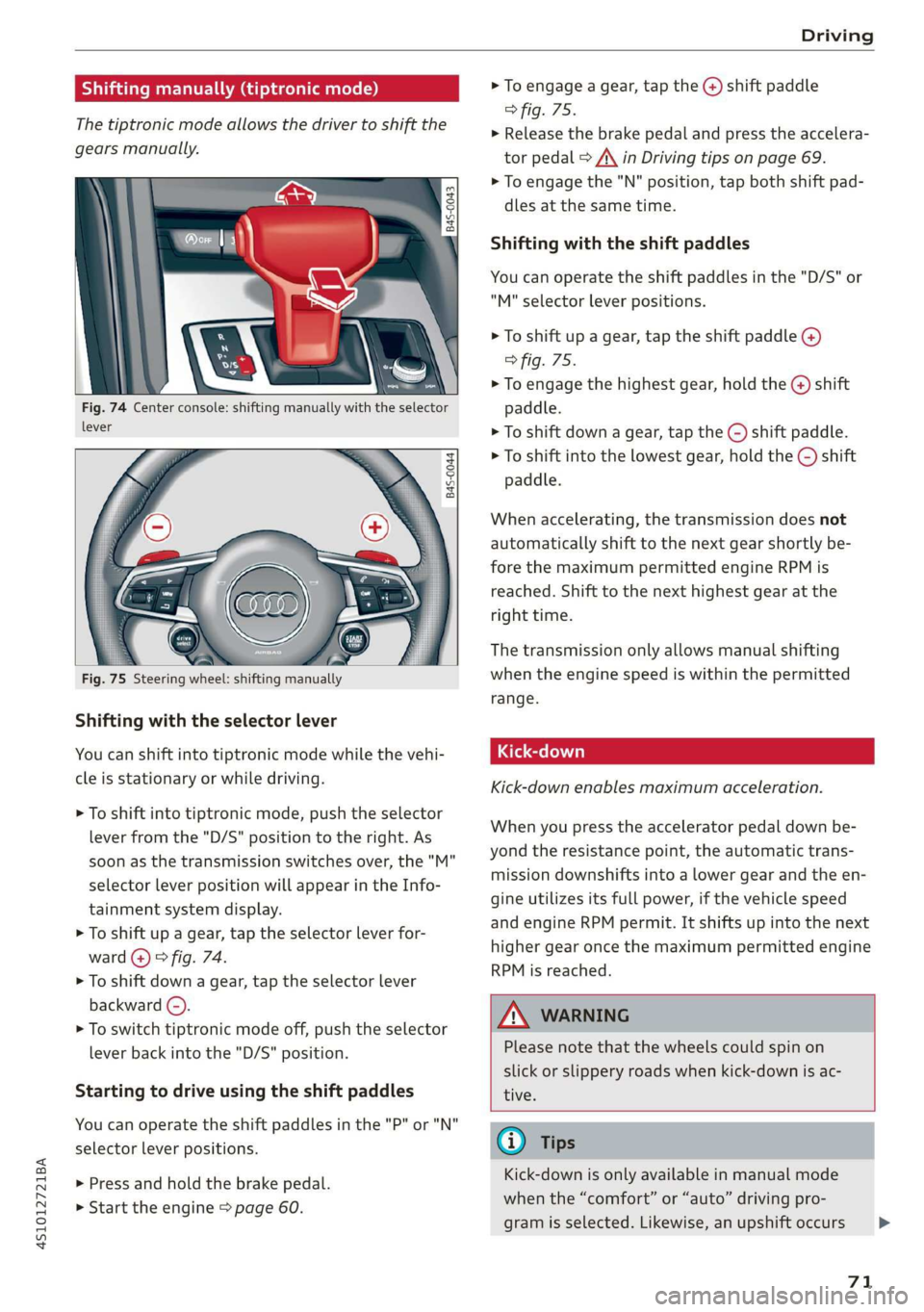
Fig. 74 Center console: shifting manually with the selector
lever
B4S-0044
Shifting with the selector lever
You can shift into tiptronic mode while the vehi-
cle is stationary or while driving.
> To shift into tiptronic mode, push the selector
lever from the "D/S" position to the right. As
soon as the transmission switches over, the "M"
selector lever position will appear in the Info-
tainment system display.
> To shift up a gear, tap the selector lever for-
ward @) © fig. 74.
> To shift down a gear, tap the selector lever
backward (©).
> To switch tiptronic mode off, push the selector
lever back into the "D/S" position.
Starting to drive using the shift paddles
You can operate the shift paddles in the "P" or "N"
selector lever positions.
> Press and hold the brake pedal.
>» Start the engine > page 60.
> To engage a gear, tap the @) shift paddle
> fig. 75.
> Release the brake pedal and press the accelera-
tor pedal > A\ in Driving tips on page 69.
> To engage the "N" position, tap both shift pad-
dles at the same time.
Shifting with the shift paddles
You can operate the shift paddles in the "D/S" or
"M" selector lever positions.
> To shift up a gear, tap the shift paddle @)
> fig. 75.
> To engage the highest gear, hold the @) shift
paddle.
> To shift down a gear, tap the () shift paddle.
> To shift into the lowest gear, hold the © shift
paddle.
When accelerating, the transmission does not
automatically shift to the next gear shortly be-
fore the maximum permitted engine RPM is
reached. Shift to the next highest gear at the
right time.
The transmission only allows manual shifting
when the engine speed is within the permitted
range.
Kick-down enables maximum acceleration.
When you press the accelerator pedal down be-
yond the resistance point, the automatic trans-
mission downshifts into a lower gear and the en-
gine utilizes its full power, if the vehicle speed
and engine RPM permit. It shifts up into the next
higher gear once the maximum permitted engine
RPM is reached.
Z\ WARNING
Please note that the wheels could spin on
slick or slippery roads when kick-down is ac-
tive.
@) Tips
Kick-down is only available in manual mode
when the “comfort” or “auto” driving pro-
gram is selected. Likewise, an upshift occurs >
71
Page 76 of 308
Assist systems
Assist systems
Speed warning system
Applies to: vehicles with speed warning system
The speed warning system helps you to stay be-
low a specified maximum speed that can be set,
changed or deleted in the Infotainment system.
The speed warning system warns you if you are
exceeding the maximum speed that you have set.
A warning tone will sound as soon as your speed
exceeds the stored value slightly. The ow in-
dicator light and a message will appear in the in-
strument cluster display at the same time. The
bbe) indicator light and the message turn off if
the speed falls back below the stored maximum
speed.
Setting a threshold is recommended if you would
like to be reminded when you reach a certain
maximum speed. Situations where you may want
to do so include driving in a country with a gener-
al speed limit or if there is a specified maximum
speed for winter tires.
Setting the warning threshold
> Select in the Infotainment system: [MENU] but-
ton > Vehicle > left control button > Driver as-
sistance > Speed warning > Manual.
G) Tips
Regardless of the speed warning system, you
should always monitor your speed using the
speedometer and make sure you are following
the legal speed limit.
Cruise control system
Applies to: vehicles with cruise control system
The cruise control system assists the driver in
maintaining a constant speed above approxi-
mately 15 mph (20 km/h). The system maintains
the desired speed by braking and accelerating.
74
Z\ WARNING
— Always pay attention to the traffic around
your vehicle when the cruise control system
is in operation. As the driver, you are always
responsible for controlling your vehicle
speed and the distance between your vehicle
and
other vehicles.
— For safety reasons, cruise control should not
be used in the city, in stop-and-go traffic, on
winding roads, and when road conditions are
poor (such as ice, fog, gravel, heavy rain,
and conditions that could lead to hydroplan-
ing), because this increases the risk of an ac-
cident.
— Switch the cruise control off temporarily
when driving in turning lanes, highway exits,
or in construction zones.
—To reduce the risk of an accident, you should
only resume the stored speed if it is suitable
for the current traffic conditions.
() Note
Before driving downhill a long distance on a
steep hill, decrease your speed and select a
lower gear. This makes use of the engine brak-
ing effect and reduces the load placed on the
brakes.
G) Tips
The brake lights turn on when the brakes are
applied automatically.
Switching the system on
Applies to: vehicles with cruise control system
BFV-0220
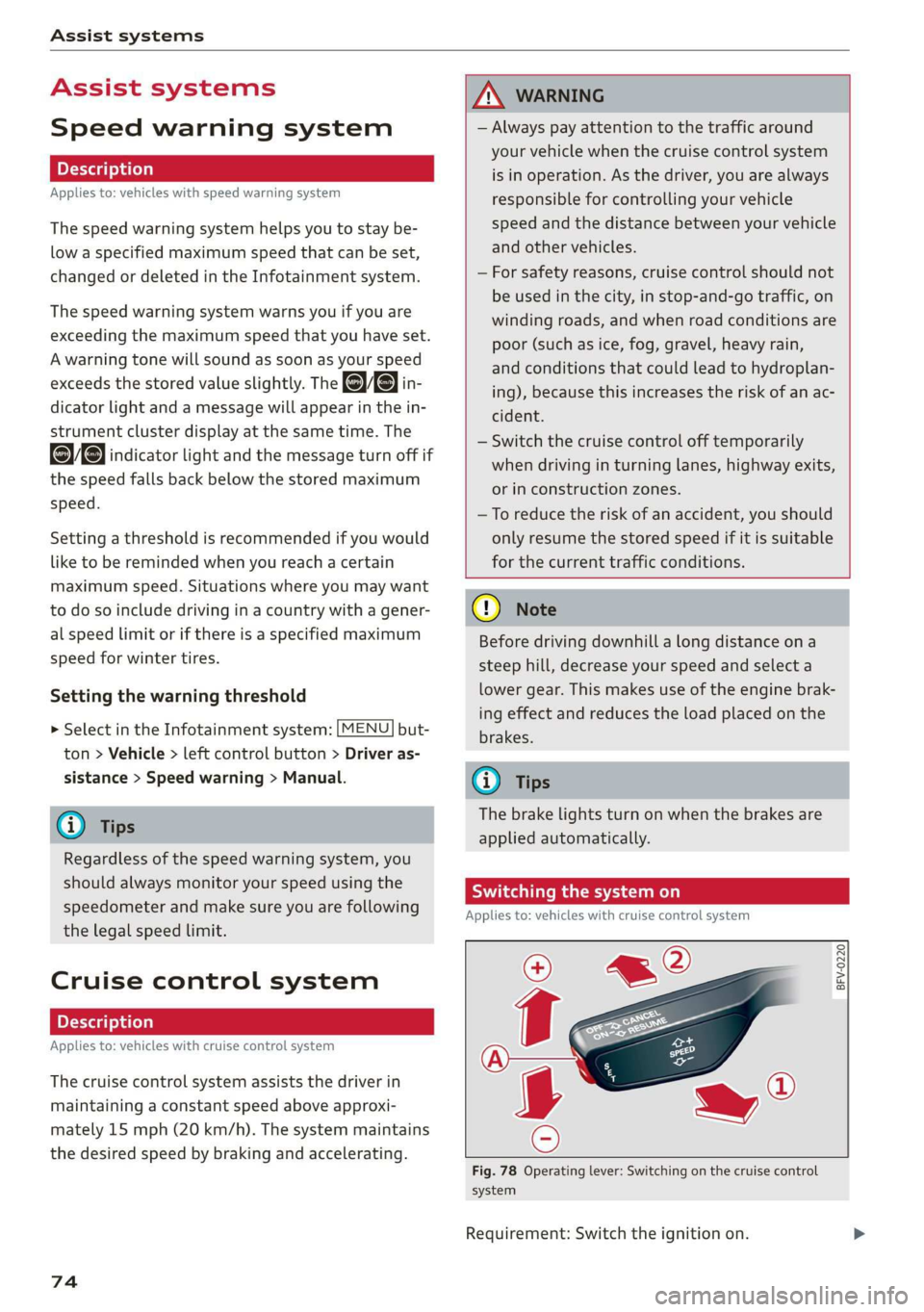
Fig. 78 Operating lever: Switching on the cruise control
system
Requirement: Switch the ignition on.