ECU AUDI R8 COUPE 2020 Owner's Manual
[x] Cancel search | Manufacturer: AUDI, Model Year: 2020, Model line: R8 COUPE, Model: AUDI R8 COUPE 2020Pages: 308, PDF Size: 82.41 MB
Page 131 of 308
4S1012721BA
Audi connect
Data connection settings
Using the Data connection settings menu, you
can set when the system should connect to the
Internet. The Internet connection disconnects
automatically once the requested Audi connect
Infotainment service no longer requires any data.
— Connection setup: you can select when a data
connection should be established.
— Audi connect (MMI): when this function is
switched on, a data connection is automatically
established in order to use Audi connect Info-
tainment services.
— Wi-Fi devices: when this function is switched
on, you can allow or deny Internet connections.
Connection settings
The connection is configured automatically based
on the SIM card being used. The following values
can be changed. You can obtain more information
from your cell phone service provider.
— APN: the access point depends on the cell
phone service provider and is assigned auto-
matically.
— User name: your cell phone service provider as-
signs the user name for your online profile.
— Password: your cell phone service provider as-
signs the password for your online profile.
TX WARNING
Always follow the information found in > AV
in General information on page 124.
C) Note
Always follow the information found in >@ in
General information on page 124.
@) Tips
For more information on roaming charges,
contact your cell phone service provider.
Applies to: vehicles with Wi-Fi hotspot
Requirement: the ignition must be switched on.
> Select: [MENU] button > Telephone > right con-
trol button > Wi-Fi settings.
Depending on the country and the vehicle equip-
ment, the following functions may be available:
Wi-Fi
When the function is switched on, the MMI's Wi-
Fi hotspot is active and Wi-Fi devices can be con-
nected to the hotspot.
Network key
The
Wi-Fi connection between the MMI and your
Wi-Fi device is encrypted. You can change the fol-
lowing information if needed.
— Access point (SSID): Wi-Fi hotspot name.
— Password: a random password was set in the
MMI at the factory. The password can be
changed. The encryption method requires a
password to be at least eight characters long.
Choose a secure password.
— Visible to others: you can switch the visibility
of the Wi-Fi hotspot on or off.
Network search
A list of available Wi-Fi networks in your area is
displayed.
Connection to personal hotspot
The MMI Wi-Fi hotspot is activated. An MMI In-
ternet connection to a personal Wi-Fi hotspot
(such as a smartphone) can be established. For
additional information, see > page 125.
ZA WARNING
Always follow the information found in > AV
in General information on page 124.
@) Note
Always follow the information found in >@ in
General information on page 124.
@ Tips
In vehicles without Audi connect Infotain-
ment, the use of the Wi-Fi hotspot is only
possible for the Wi-Fi audio player*. A data
connection to the Internet cannot be estab-
lished.
129
Page 152 of 308
Media
Media
Introduction
There are various media drives and connections
available in the MMI. For example, you can play
audio/video files from the Jukebox or connect
your mobile device to the Audi music interface
and operate it through the MMI.
Notes
Media and format restrictions: the MMI (includ-
ing the SD card reader and the USB storage de-
vice connection) was tested with a variety of
products and media on the market. However,
there may be cases where individual devices or
media and audio/video files may not be recog-
nized, may play only with restrictions, or may not
play at all.
Digital Rights Management: please note that
the audio/video files are subject to copyright pro-
tection.
The media drives do not play files that are pro-
tected by DRM and that are identified with the
symbol fi.
Data security: never store important data on SD
cards, the Jukebox, CDs/DVDs or mobile devices.
Audi AG is not responsible for damaged or lost
files and media.
Loading times: the more files, folders, or play-
lists that are on a storage medium, the longer it
will take to load the audio/video files. Audi rec-
ommends using storage media that only contain
audio/video files. To decrease the time it takes to
load audio/video files, create subfolders (for ex-
ample, for the artist or album). The loading time
will also increase when importing files.
Additional information: when playing, audio
files are automatically displayed with any addi-
tional information that is stored (such as the ar-
tist, track and album cover). If this information is
not available on the storage medium, the MMI
will check the Gracenote metadata database.
150
However, in some cases, the additional informa-
tion may not be displayed.
Restricted functionality: reset the Media set-
tings to the factory default settings if functional-
ity is restricted > page 168.
Reset the Jukebox to the factory default settings
if functionality is restricted > page 168.
For information about the properties of support-
ed media and file formats, see > page 162.
@) Note
Always follow the information found in >@ in
General information on page 124.
CD/DVD operation
CD/DVD and format restrictions: the functionali-
ty of individual storage media may be limited due
to the variety of blank CDs/DVDs available and
the various capacities. Audio CDs or video DVDs
with copy protection, CDs/DVDs that do not con-
form to the standard, and multisession CDs may
have limited playback or may not play at all. Audi
recommends finalizing the recording process
when creating multisession CDs. Multisession
DVDs are not supported.
Using CDs/DVDs, the CD drive or the DVD drive:
to ensure correct, high-quality playback and to
prevent damage to the drive or disc reading er-
rors, always store CDs/DVDs in a protective
sleeve and do not expose them to direct sunlight.
Do not use:
— Damaged, dirty or scratched CDs/DVDs
— Single CDs/DVDs with 3 in (8 cm) diameter
— CD/DVDs that are not round
— CDs/DVDs with labels
— Protective rings
— Cleaning CDs
Thermal protection switch: CD/DVD playback
may be temporarily unavailable if outside tem-
peratures
are extremely hot or cold. A thermal
protection switch is installed to protect the
CD/DVD and the laser.
Laser devices: laser devices are divided into safe-
ty classes 1 to 4 in accordance with DIN IEC 76 >
Page 172 of 308
System settings
for the MMI to be visible to other devices. Se-
lect Invisible for the MMI to not be visible to
other devices. However, it is still possible to es-
tablish a Bluetooth connection with paired de-
vices when the visibility is switched off. Select
Off to turn visibility off. Then a Bluetooth con-
nection is not possible.
— Bluetooth audio player: when this function is
switched on , the Bluetooth audio player is
available as a source in the Media menu.
— Delete Bluetooth device: the selected cell
phone/mobile device is disconnected from the
MMI.
— Show Bluetooth profiles: you can Connect or
Disconnect the Handsfree profile and the Di-
rectory/contacts* separately.
— Bluetooth name: the MMI Bluetooth name (for
example ,AUDI MMI 2017“) is displayed and
can be changed.
When the function is switched on [M, the symbol
© appears in the Infotainment system display
=> page 101, fig. 107.
Online settings*
— Data connection settings: See > page 128, Cell
phone network.
— Data usage counter: the amount of data pack-
ets that are sent and received through the MMI
is displayed. You can reset the data usage infor-
mation to zero using the Reset data counter
option.
— Network status: the mobile network provider
for data service as well as the network status
are displayed.
Wi-Fi settings
See > page 129.
SIM PIN settings*
— Automatic PIN entry: when this function is
switched on , the SIM PIN is automatically
saved in the MMI after it is entered for the first
time. The SIM PIN for four different SIM cards
can be saved in the MMI. With the function
switched off, the currently stored SIM PIN is
deleted from the MMI. When the automatic
PIN entry is switched on, there are no SIM PIN
prompts.
170
— Disable PIN query: when switched on, there are
no SIM PIN queries. The automatic PIN entry is
not used in this case.
— Change PIN: you can change the PIN on your
SIM card. First enter the current SIM PIN. The
SIM PIN may only contain digits 0-9. The new
SIM PIN must be entered twice for security and
then it will be saved to the SIM card.
Apple CarPlay sound settings/Android Auto
sound settings
Applies to: vehicles with Audi smartphone interface
See > page 171.
About Apple CarPlay/About Android Auto
Applies to: vehicles with Audi smartphone interface
Here you will find legal information regarding the
use of Apple CarPlay or Android Auto and infor-
mation about device-specific data exchange.
Delete Apple CarPlay device/Delete Android
Auto device
Applies to: vehicles with Audi smartphone interface
Requirement: your cell phone must not be con-
nected to the Audi music interface with a USB
adapter.
Select: Audi smartphone interface > a device
from the list > right control button.
To remove your mobile device from the list, select
and confirm Delete Apple CarPlay device or De-
lete Android Auto device.
G) Tips
Some SIM cards do not allow the SIM PIN
queries to be switched off.
System update
> Select: [MENU] button > Settings > left control
button > System maintenance.
— System update: insert the storage device with
the update data into the appropriate drive
= page 151. Select and confirm the drive >
Start update. The length of the process de-
pends on the size of the update.
Page 175 of 308
4S1012721BA
Safe driving
Safe driving
Basics
SER Nails mali
Please remember - safety first!
The individual safety features of your vehicle can
work together as a system to help protect you
and
your passengers in a wide range of accidents.
These features cannot work as a system if they
are not always correctly adjusted and correctly
used.
This chapter contains important information,
tips, instructions and warnings that you need to
read and observe for your own safety, the safety
of your passengers and others. We have summar-
ized here what you need to know about safety
belts, airbags, child restraints as well as child
safety. Your safety is for us priority number 1. Al-
ways observe the information and warnings in
this section - for your own safety as well as that
of your passengers.
The information in this section applies to all
model versions of your vehicle. Some of the fea-
tures described in this sections may be standard
equipment on some models, or may be optional
equipment on others. If you are not sure, ask
your authorized Audi dealer.
ZA WARNING
— Always make sure that you follow the in-
structions and heed the WARNINGS in this
Manual. It is in your interest and in the in-
terest of your passengers.
— Always keep the complete Owner's Litera-
ture in your Audi when you lend or sell your
vehicle so that this important information
will always be available to the driver and
passengers.
— Always keep the Owner's literature handy so
that you can find it easily if you have ques-
tions.
Important things to do before driving
Safety is everybody's job! Vehicle and occupant
safety always depends on the informed and care-
ful driver.
For your safety and the safety of your passenger,
before driving always:
> Make sure that all lights and signals are operat-
ing correctly.
> Make sure that the tire pressure is correct.
> Make sure that all windows are clean and afford
good visibility to the outside.
> Secure all luggage and other items carefully
=> page 54, > page 54.
> Make sure that nothing can interfere with the
pedals.
> Adjust seat and mirrors correctly for your
height.
> Make sure to use the right child restraint cor-
rectly to protect children > page 211, Child
safety.
> Sit properly in your seat and make sure that
your passenger do the same © page 50, Front
seats.
> Fasten your safety belt and wear it properly. Al-
so instruct your passenger to fasten his safety
belt properly > page 180.
What impairs driving safety?
Safe driving is directly related to the condition of
the vehicle, the driver as well as the driver’s abili-
ty to concentrate on the road without being dis-
tracted.
The driver is responsible for the safety of the ve-
hicle and all of its occupants. If your ability to
drive is impaired, safety risks for everybody in the
vehicle increase and you also become a hazard to
everyone else on the road > /\. Therefore:
> Do not let yourself be distracted by passenger
or by using a cellular telephone.
> NEVER drive when your driving ability is im-
paired (by medications, alcohol, drugs, etc.).
> Observe all traffic laws, rules of the road and
speed limits and plain common sense.
> ALWAYS adjust your speed to road, traffic and
weather conditions.
173
>
Page 178 of 308
Safe driving
> Never allow anyone to assume an incorrect
seating position when the vehicle is being used
>/\.
The following bulletins list only some sample po-
sitions that will increase the risk of serious injury
and death. Our hope is that these examples will
make you more aware of seating positions that
are dangerous.
Therefore, whenever the vehicle is moving:
— never stand up in the vehicle
— never stand on the seats
— never kneel on the seats
— never ride with the seatback reclined
— never lie down on the seats
— never lean up against the instrument panel
— never sit on the edge of the seat
— never sit sideways
— never lean out the window
— never put your feet out the window
— never put your feet on the instrument panel
— never rest your feet on the seat cushion or back
of the seat
— never ride in the footwell
— never ride in the cargo area
ZA\ WARNING
Improper seating positions increase the risk
of serious personal injury and death whenever
a vehicle is being used.
— Always make sure that all vehicle occupants
stay in a proper seating position and are
properly restrained whenever the vehicle is
being used.
Driver and passenger
side footwell
acetic a mee soary
ZA\ WARNING
Always make sure that the knee airbag can in-
flate without interference. Objects between
yourself and the airbag can increase the risk
of injury in an accident by interfering with the
176
way the airbag deploys or by being pushed in-
to you as the airbag deploys.
— No persons (children) or animals should ride
in the footwell in front of the passenger
seat. If the airbag deploys, this can result in
serious or fatal injuries.
— No objects of any kind should be carried in
the footwell area in front of the driver's or
passenger's seat. Bulky objects (shopping
bags, for example) can hamper or prevent
proper deployment of the airbag. Small ob-
jects can be thrown through the vehicle if
the airbag deploys and injure you or your
passengers.
Pedal area
The pedals must always be free to move and
must never be interfered with by a floor mat or
any other object.
Make sure that all pedals move freely without in-
terference and that nothing prevents them from
returning to their original positions.
Only use floor mats that leave the pedal area free
and can be secured with floor mat fasteners.
If a brake circuit fails, increased brake pedal trav-
el is required to bring the vehicle to a full stop.
ZA\ WARNING
Pedals that cannot move freely can cause loss
of vehicle control and increase the risk of seri-
ous injury.
— Never place any objects in the driver's foot-
well. An object could get into the pedal area
and interfere with pedal function. In case of
sudden braking or an accident, you would
not be able to brake or accelerate!
— Always make sure that nothing can fall or
move into the driver's footwell.
Page 179 of 308
4S1012721BA
Safe driving
1a CoYey al Mela Mealy -lard (el
Always use floor mats that can be securely at-
tached to the floor mat fasteners and do not in-
terfere with the free movement of the pedals.
> Make sure that the floor mats are properly se-
cured and cannot move and interfere with the
pedals > A\.
Use only floor mats that leave the pedal area un-
obstructed and that are firmly secured so that
they cannot slip out of position. You can obtain
suitable floor mats from your authorized Audi
Dealer.
Floor mat fasteners are installed in your Audi.
Floor
mats used in your vehicle must be attached
to these fasteners. Properly securing the floor
mats will prevent them from sliding into posi-
tions that could interfere with the pedals or im-
pair safe operation of your vehicle in other ways.
ZA\ WARNING
Pedals that cannot move freely can result ina
loss of vehicle control and increase the risk of
serious personal injury.
— Always make sure that floor mats are prop-
erly secured.
— Never place or install floor mats or other
floor coverings in the vehicle that cannot be
properly secured in place to prevent them
from slipping and interfering with the ped-
als or the ability to control the vehicle.
— Never place or install floor mats or other
floor coverings on top of already installed
floor mats. Additional floor mats and other
coverings will reduce the size of the pedal
area and interfere with the pedals.
— Always properly reinstall and secure floor
mats that have been taken out for cleaning.
— Always make sure that objects cannot fall in-
to the driver footwell while the vehicle is
moving. Objects can become trapped under
the brake pedal and accelerator pedal caus-
ing a loss of vehicle control.
Active rollover
protection system
Applies to: vehicles with active rollover protection system
The active rollover protection system helps pro-
tect vehicle occupants in the event of a rollover.
a gx
5 od x a
B4S-0173
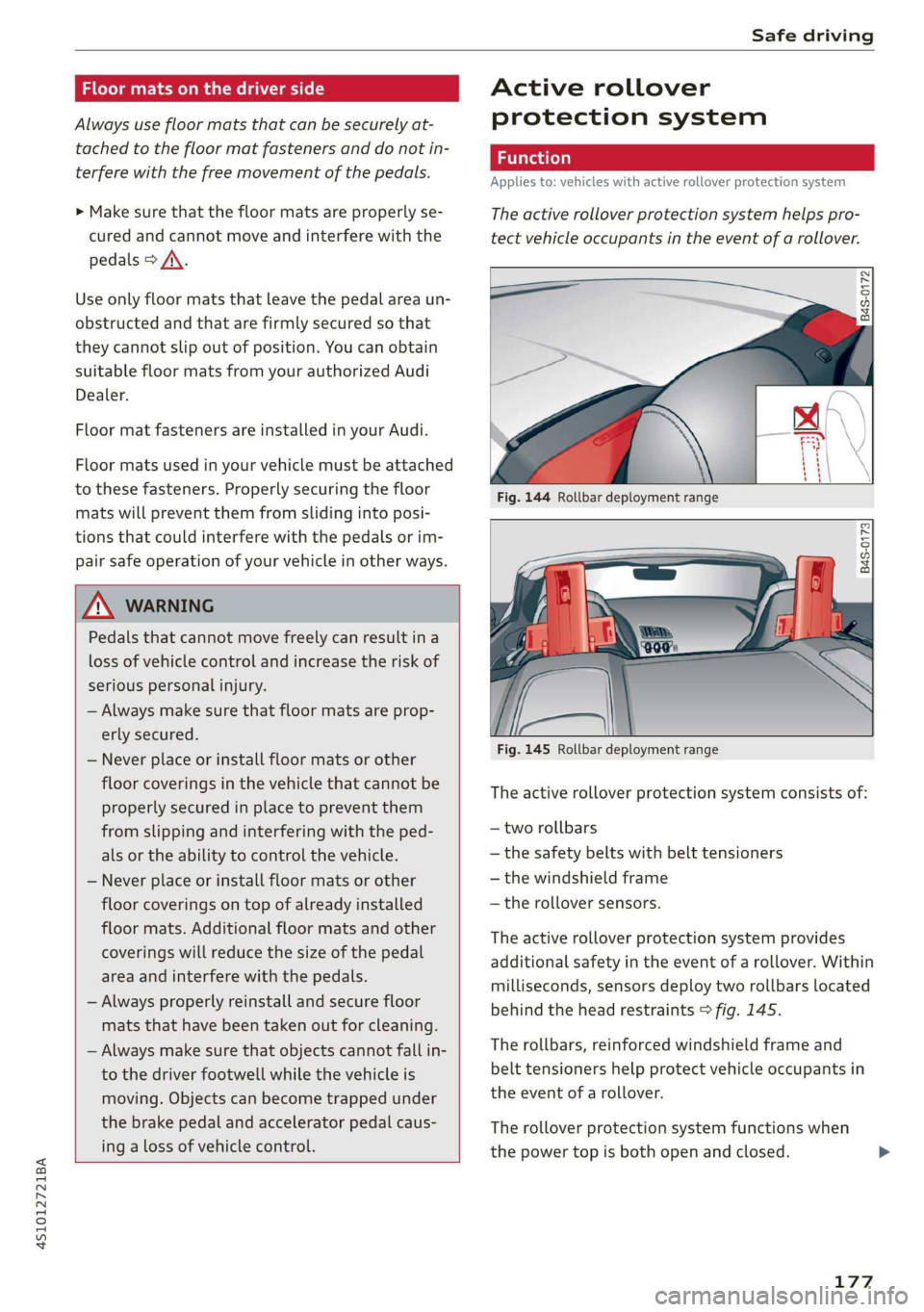
Fig. 145 Rollbar deployment range
The active rollover protection system consists of:
— two rollbars
— the safety belts with belt tensioners
— the windshield frame
— the rollover sensors.
The active rollover protection system provides
additional safety in the event of a rollover. Within
milliseconds, sensors deploy two rollbars located
behind the head restraints > fig. 145.
The rollbars, reinforced windshield frame and
belt tensioners help protect vehicle occupants in
the event of a rollover.
The rollover protection system functions when
the power top is both open and closed.
177
Page 180 of 308
Safe driving
A WARNING
Do not use the area behind the head restraints
> fig. 144 as a seat or storage area. This is the
area where the rollbars deploy. If the rollover
protection system is triggered, objects placed
there can be propelled through the vehicle
and make it more difficult for the rollbars to
deploy. This increases the risk for serious or
life-threatening injuries.
When is rollover protection deployed?
Applies to: vehicles with active rollover protection system
Rollover protection deploys in a collision or roll-
over.
Depending on the collision, sensors throughout
the vehicle and the control module trigger the
rollover system to deploy.
For safety reasons, rollover protection also de-
ploys during front, side and rear collisions above
a certain level of severity.
Retracting rollover protection
Applies to: vehicles with active rollover protection system
B4S-0174
B4S-0175
rh
Fig. 147 Deployed rollbar with power top frame facing up-
ward.
178
If the rollover protection has triggered but the
vehicle was not involved in an accident, you can
retract the rollover protection yourself in an
emergency. Drive to an authorized Audi dealer or
authorized Audi Service Facility immediately to
have the malfunction corrected.
> Remove the wind deflector, if necessary
> page 34.
> Retract the rear window, if necessary
=> page 35.
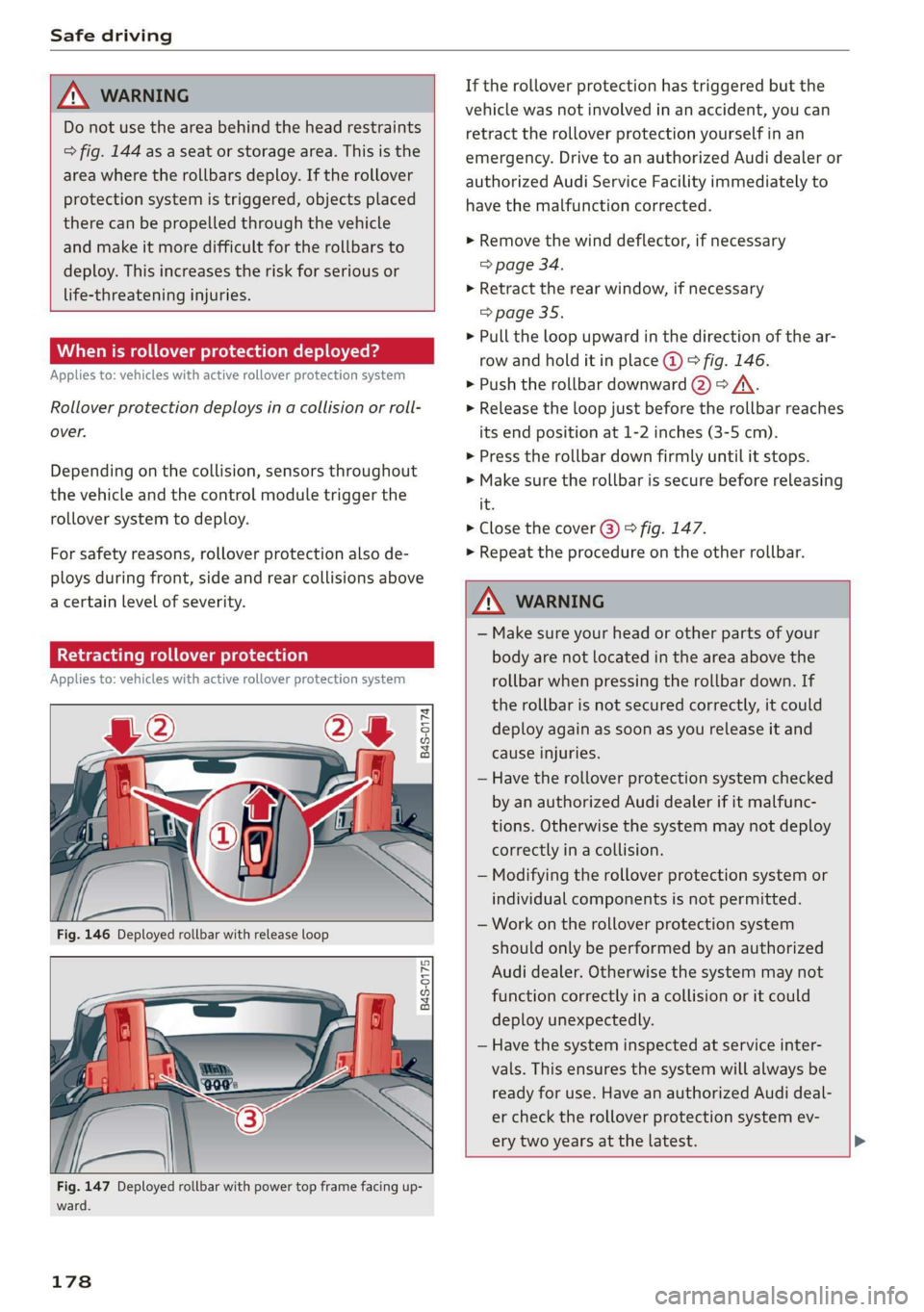
> Pull the loop upward in the direction of the ar-
row and hold it in place @ © fig. 146.
> Push the rollbar downward @) => /A\.
> Release the loop just before the rollbar reaches
its end position at 1-2 inches (3-5 cm).
> Press the rollbar down firmly until it stops.
> Make sure the rollbar is secure before releasing
it.
> Close the cover @) © fig. 147.
> Repeat the procedure on the other rollbar.
ZA\ WARNING
— Make sure your head or other parts of your
body are not located in the area above the
rollbar
when pressing the rollbar down. If
the rollbar is not secured correctly, it could
deploy again as soon as you release it and
cause injuries.
— Have the rollover protection system checked
by an authorized Audi dealer if it malfunc-
tions. Otherwise the system may not deploy
correctly in a collision.
— Modifying the rollover protection system or
individual components is not permitted.
— Work on the rollover protection system
should only be performed by an authorized
Audi dealer. Otherwise the system may not
function correctly in a collision or it could
deploy unexpectedly.
— Have the system inspected at service inter-
vals. This ensures the system will always be
ready for use. Have an authorized Audi deal-
er check the rollover protection system ev-
ery two years at the latest.
Page 185 of 308
4S1012721BA
Safety belts
— Never remove a safety belt while the vehicle
is moving. Doing so will increase your risk of
being injured or killed.
— Never wear belts twisted.
— Never wear belts over rigid or breakable ob-
jects in or on your clothing, such as eye
glasses, pens, keys, etc., as these may cause
injury.
— Never allow safety belts to become dam-
aged by being caught in door or seat hard-
ware.
— Do not wear the shoulder part of the belt
under your arm or otherwise out of position.
— Several layers of heavy clothing may inter-
fere with correct positioning of belts and re-
duce the overall effectiveness of the system.
— Always keep belt buckles free of anything
that may prevent the buckle from latching
securely.
— Never use comfort clips or devices that cre-
ate slack in the shoulder belt. However, spe-
cial clips may be required for the proper use
of some child restraint systems.
— Torn or frayed safety belts can tear and
damaged belt hardware can break in an acci-
dent. Inspect belts regularly. If webbing,
bindings, buckles, or retractors are dam-
aged, have belts replaced by an authorized
Audi dealer or qualified workshop.
— Safety belts that have been worn and loaded
in an accident must be replaced with the
correct replacement safety belt by an au-
thorized Audi dealer. Replacement may be
necessary even if damage cannot be clearly
seen. Anchorages that were loaded must al-
so be inspected.
— Never remove, modify, disassemble, or try
to repair the safety belts yourself.
— Always keep the belts clean. Dirty belts may
not work properly and can impair the func-
tion of the inertia reel > table Interior
cleaning on page 267.
Safety belts
Fastening safety belts
Safety first - everybody buckle up!
|
B4H-0462
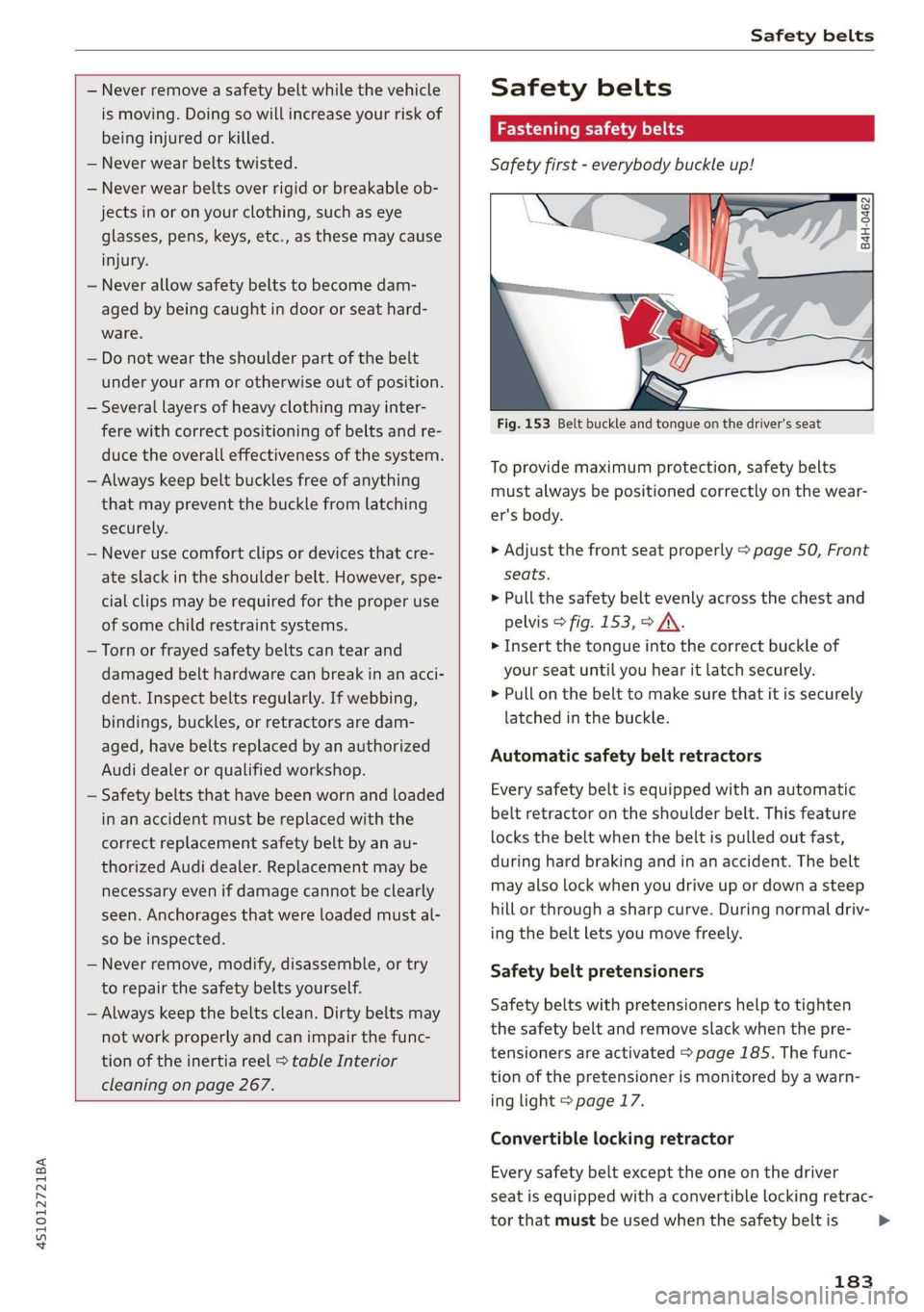
Fig. 153 Belt buckle and tongue on the driver's seat
To provide maximum protection, safety belts
must always be positioned correctly on the wear-
er's body.
> Adjust the front seat properly > page 50, Front
seats.
> Pull the safety belt evenly across the chest and
pelvis > fig. 153, > A\.
> Insert the tongue into the correct buckle of
your seat until you hear it latch securely.
> Pull on the belt to make sure that it is securely
latched in the buckle.
Automatic safety belt retractors
Every safety belt is equipped with an automatic
belt retractor on the shoulder belt. This feature
locks the belt when the belt is pulled out fast,
during hard braking and in an accident. The belt
may also lock when you drive up or down a steep
hill or through a sharp curve. During normal driv-
ing the belt lets you move freely.
Safety belt pretensioners
Safety belts with pretensioners help to tighten
the safety belt and remove slack when the pre-
tensioners are activated > page 185. The func-
tion of the pretensioner is monitored by a warn-
ing light > page 17.
Convertible locking retractor
Every safety belt except the one on the driver
seat is equipped with a convertible locking retrac-
tor that must be used when the safety belt is
183
>
Page 186 of 308
Safety belts
used to attach a child seat. Be sure to read the
important information about this feature
=> page 220.
ZA\ WARNING
Improperly positioned safety belts can cause
serious injury in an accident > page 184,
Safety belt position.
— Safety belts offer optimum protection only
when the seatback is upright and belts are
properly positioned on the body.
— Never attach the safety belt to the buckle
for another seat. Attaching the belt to the
wrong buckle will reduce safety belt effec-
tiveness and can cause serious personal in-
jury.
— A passenger who is not properly restrained
can be seriously injured by the safety belt it-
self when it moves from the stronger parts
of the body into critical areas like the abdo-
men.
— Always lock the convertible locking retractor
when you are securing a child seat in the ve-
hicle > page 221.
G@) Tips
For information on safety belt pretensioners,
refer to > page 185.
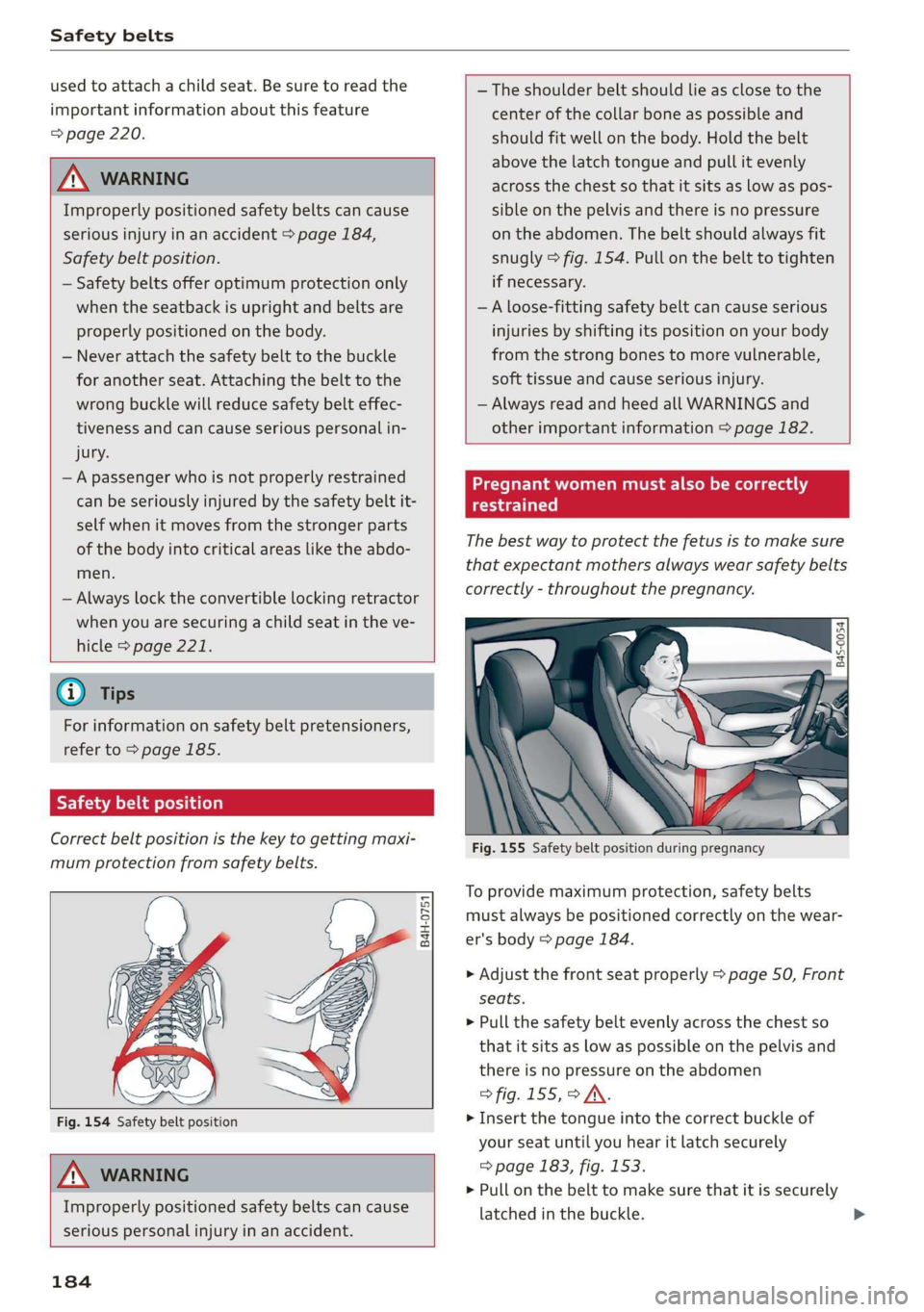
Safety belt position
Correct belt position is the key to getting maxi-
mum protection from safety belts.
B4H-0751
Fig. 154 Safety belt position
Z\ WARNING
Improperly positioned safety belts can cause
serious personal injury in an accident.
184
— The shoulder belt should lie as close to the
center of the collar bone as possible and
should fit well on the body. Hold the belt
above the latch tongue and pull it evenly
across the chest so that it sits as low as pos-
sible on the pelvis and there is no pressure
on the abdomen. The belt should always fit
snugly > fig. 154. Pull on the belt to tighten
if necessary.
—A loose-fitting safety belt can cause serious
injuries by shifting its position on your body
from the strong bones to more vulnerable,
soft tissue and cause serious injury.
— Always read and heed all WARNINGS and
other important information > page 182.
cer aU aM Le Co lel acral a
ee Xe)
The best way to protect the fetus is to make sure
that expectant mothers always wear safety belts
correctly - throughout the pregnancy.
el
hs
Fig. 155 Safety belt position during pregnancy
To provide maximum protection, safety belts
must always be positioned correctly on the wear-
er's body > page 184.
> Adjust the front seat properly > page 50, Front
seats.
> Pull the safety belt evenly across the chest so
that it sits as low as possible on the pelvis and
there is no pressure on the abdomen
> fig. 155,> /\.
> Insert the tongue into the correct buckle of
your seat until you hear it latch securely
=> page 183, fig. 153.
> Pull on the belt to make sure that it is securely
latched in the buckle.
Page 222 of 308
Child safety
— Children on the front seat of any car, even
with Advanced Airbags, can be seriously in-
jured or even killed when an airbag inflates.
— Never let a child stand or kneel on the seat.
— Never let a child ride in the cargo area of
your vehicle.
— Always remember that a child leaning for-
ward, sitting sideways or out of position in
any way during an accident can be struck by
a deploying airbag. This will result in serious
personal injury or death.
— If you must install a booster seat on the
front passenger seat because of exceptional
circumstances the PASSENGER AIR BAG
OFF %; light must come on and stay on,
whenever the ignition is switched on.
— If the PASSENGER AIR BAG OFF 3; light
does not come on and stay on, perform the
checks described > page 198, Monitoring
the Advanced Airbag System.
— If the PASSENGER AIR BAG OFF %; light
does not come on and stay on whenever the
ignition
is switched on the inflating airbag
will hit the child safety seat or infant carrier
with great force and will smash the child
safety seat and child against the backrest,
center armrest, door or roof. Have the air-
bag system inspected immediately by your
Audi dealer.
— Always read and heed all WARNINGS when-
ever using a child restrained in a vehicle is
being used = page 180, Safety belts,
=> page 187, Airbag system and > page 211,
Important information.
Securing child safety
seats
Trae e Mal CRT e REL ila
bys
Safety belts for the front passenger can be
locked with the convertible locking retractor to
properly secure child safety seats.
The safety belt emergency locking retractor for
the front passenger’s seat safety belt have a con-
vertible locking retractor for child restraints. The
safety belt must be locked so that belt webbing
220
cannot unreel. The retractor can be activated to
lock the safety belt and prevent the safety belt
webbing from loosening up during normal driv-
ing. A child safety seat can only be properly in-
stalled when the safety belt is locked so that the
child and child safety seat will stay in place.
Always remember: Even though your vehicle is
equipped with an Advanced Airbag system, a
child should always ride in the seat properly re-
strained for its age and size.
ZA\ WARNING
Improperly installed child safety seats in-
crease the risk of serious personal injury and
death in a collision.
— Always make sure that the safety belt retrac-
tor is locked when installing a child safety
seat. An unlocked safety belt retractor can-
not hold the child safety seat in place during
normal driving or in a crash.
— Always buckle the child safety seat firmly in
place even if a child is not sitting init. A
loose child safety seat can fly around during
a sudden stop or in a collision.
— If the backrest is not securely latched, the
child and the child restraint will be thrown
forward together with the backrest and will
strike parts of the vehicle interior. The child
can be seriously injured or killed.
— The inflating airbag will hit the child safety
seat or infant carrier with great force and
will smash the child safety seat and child
against the backrest, center armrest, door
or roof.
— Forward-facing child safety seats or infant
carriers installed on the front passenger's
seat may interfere with the deployment of
the airbag and cause serious injury to the
child.
— Always read and heed all WARNINGS when-
ever using a child restrained in a vehicle is
being used > page 211. Special precautions
apply when installing a child safety seat on
the front passenger seat > page 188, Child
restraints on the front seat - some impor-
tant things to know.