ECU AUDI R8 COUPE 2020 User Guide
[x] Cancel search | Manufacturer: AUDI, Model Year: 2020, Model line: R8 COUPE, Model: AUDI R8 COUPE 2020Pages: 308, PDF Size: 82.41 MB
Page 41 of 308
4S1012721BA
Power top
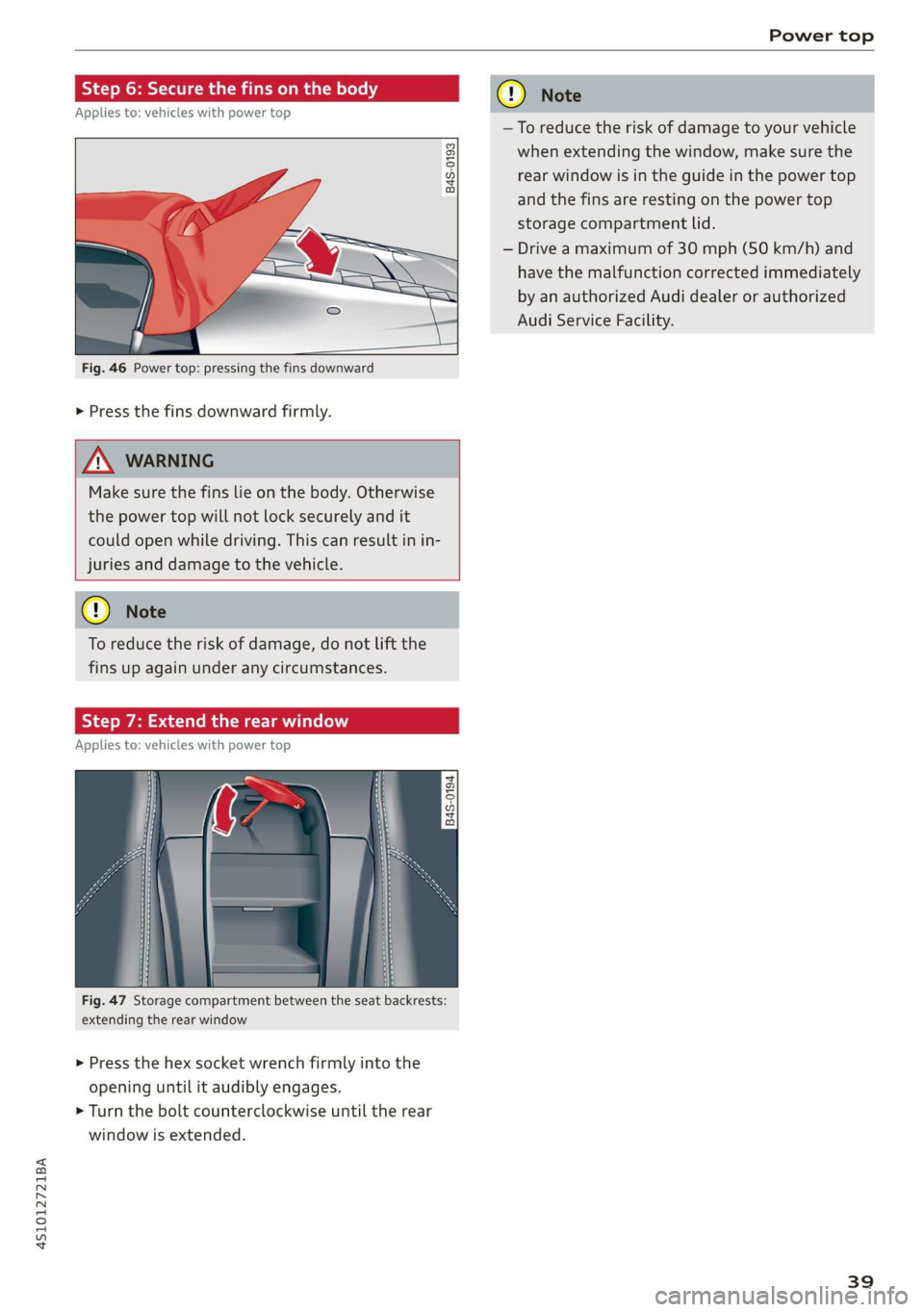
Step 6: Secure the fins on the body
Applies to: vehicles with power top
B4S-0193
Fig. 46 Power top: pressing the fins downward
> Press the fins downward firmly.
Z\ WARNING
Make sure the fins lie on the body. Otherwise
the power top will not lock securely and it
could open while driving. This can result in in-
juries and damage to the vehicle.
GQ) Note
To reduce the risk of damage, do not lift the
fins up again under any circumstances.
Step 7: Extend the rear window
Applies to: vehicles with power top
+
2 5
QO g a
Fig. 47 Storage compartment between the seat backrests:
extending the rear window
> Press the hex socket wrench firmly into the
opening until it audibly engages.
> Turn the bolt counterclockwise until the rear
window is extended.
cy Note
—To reduce the risk of damage to your vehicle
when extending the window, make sure the
rear window is in the guide in the power top
and the fins are resting on the power top
storage compartment lid.
— Drive a maximum of 30 mph (50 km/h) and
have the malfunction corrected immediately
by an authorized Audi dealer or authorized
Audi Service Facility.
39
Page 54 of 308
Seats
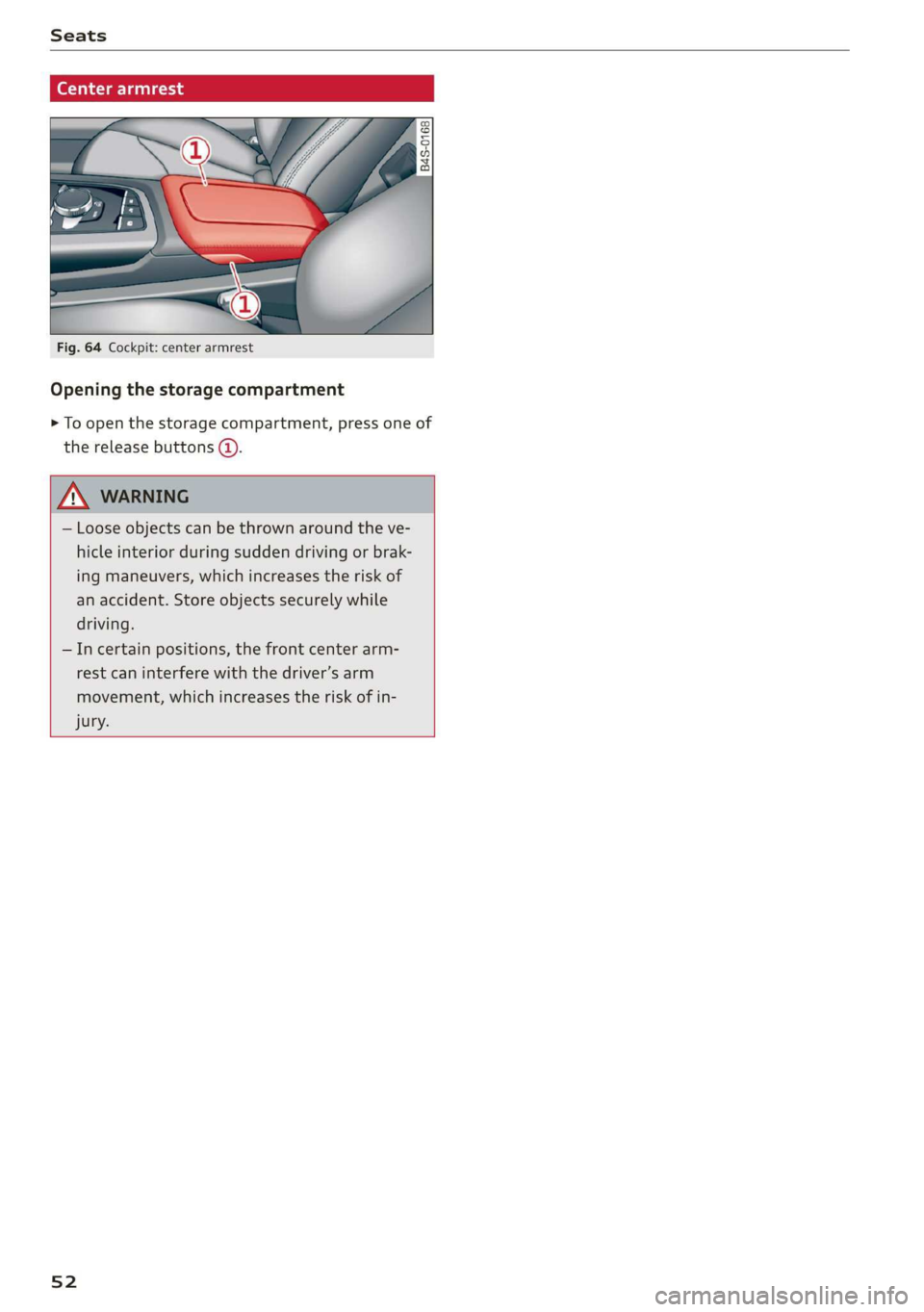
(eae aed
Fig. 64 Cockpit: center armrest
Opening the storage compartment
> To open the storage compartment, press one of
the release buttons (@).
— Loose objects can be thrown around the ve-
hicle interior during sudden driving or brak-
ing maneuvers, which increases the risk of
an accident. Store objects securely while
driving.
—Incertain positions, the front center arm-
rest can interfere with the driver’s arm
movement, which increases the risk of in-
jury.
52
Page 55 of 308
4S1012721BA
Stowing and using
Stowing and using
Power sources
When the ignition is switched on, you may be
able to use the electric power sources for exter-
nal devices, depending on the vehicle equipment.
12 volt sockets
You can connect electrical accessories to the 12
volt sockets. The power usage must not exceed
120 watts.
The 12 volt sockets are labeled with the & or
12V symbol. They are located in the front center
console* and on the side trim panel in the lug-
gage compartment*.
USB ports
Applies to: vehicles with USB port
You can charge mobile devices using the USB
ports. The USB ports are labeled with the «> or
[4 symbol or CHARGE ONLY.
Z\ WARNING
—To reduce the risk of fatal injury, store all
connected devices securely when driving so
that they do not move around inside the ve-
hicle when braking or in the event of an acci-
dent.
— Incorrect usage can lead to serious injuries
or burns. To reduce the risk of injuries, never
leave children unattended in the vehicle
with the vehicle key.
@) Note
— Read the operating manuals for the con-
nected devices.
—To reduce the risk of damage to the vehicle
electrical system, never attempt to charge
the vehicle battery by connecting accesso-
ries that provide power to the power sour-
ces.
— Do not connect any device whose network
class (voltage) does not match the network
class designed for the socket.
— Disconnect the connectors from the power
sources carefully to reduce the risk of dam-
aging them.
Storage
Cup holders
Applies to: vehicles with cup holders
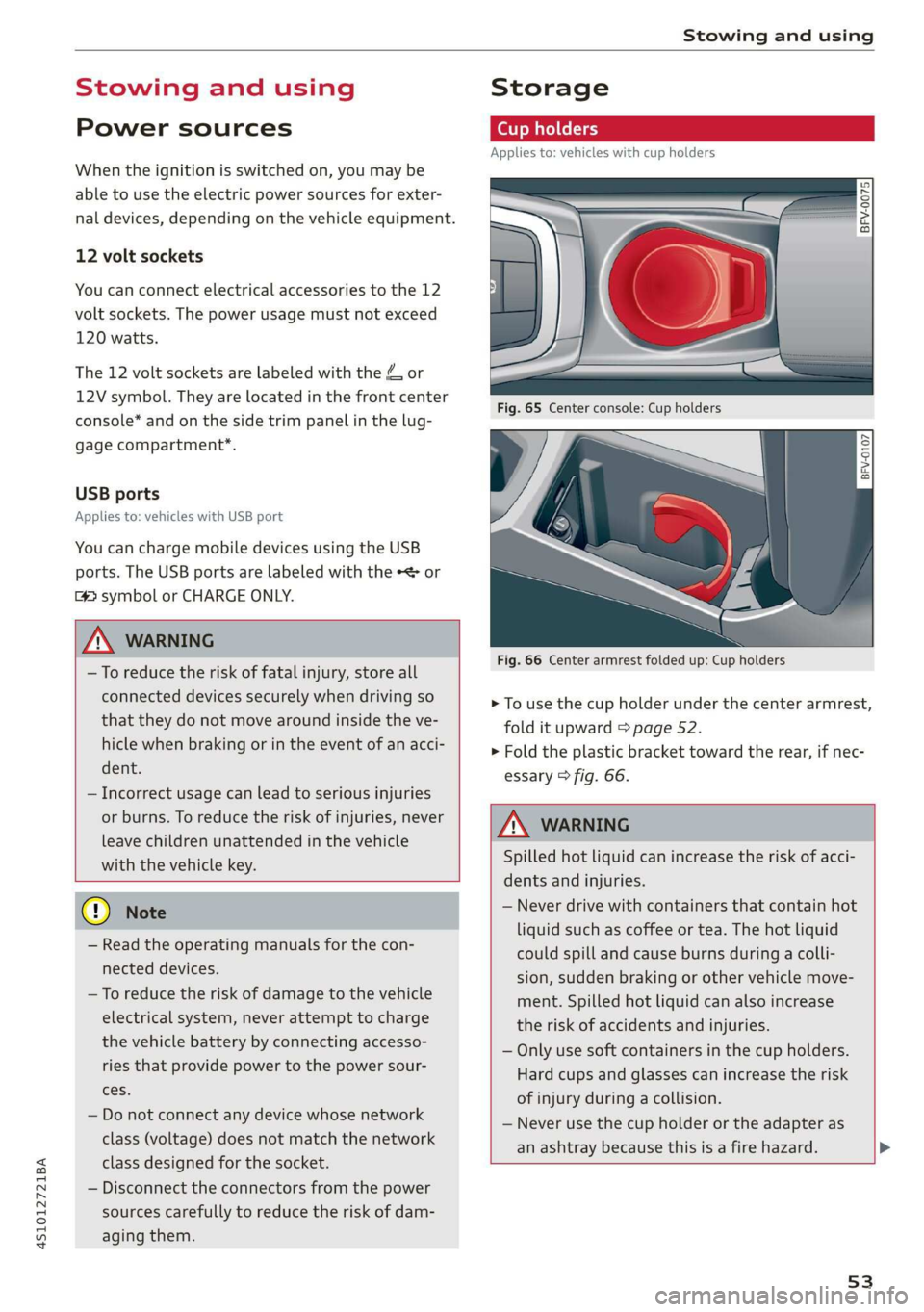
Fre} KR So
g > c oO
Fig. 66 Center armrest folded up: Cup holders
> To use the cup holder under the center armrest,
fold it upward > page 52.
> Fold the plastic bracket toward the rear, if nec-
essary > fig. 66.
Z\ WARNING
Spilled hot liquid can increase the risk of acci-
dents and injuries.
— Never drive with containers that contain hot
liquid such as coffee or tea. The hot liquid
could spill and cause burns during a colli-
sion, sudden braking or other vehicle move-
ment. Spilled hot liquid can also increase
the risk of accidents and injuries.
— Only use soft containers in the cup holders.
Hard cups and glasses can increase the risk
of injury during a collision.
— Never use the cup holder or the adapter as
an ashtray because this is a fire hazard.
53
Page 56 of 308
Stowing and using
@) Note
Beverage containers in the cup holders should
always
have a lid. Otherwise, the liquid inside
could spill and cause damage to vehicle
equipment.
Add
nal storage compartments
You will find a variety of storage compartments
and holders at various locations in the vehicle.
— Compartments in the doors
— Storage area in the glove compartment. The
glove compartment can be locked using the
mechanical key > page 23.
— Storage compartment under the center arm-
rest*
— Key compartment in the center console
— Coat hooks
— Storage compartment between the seat backr-
ests*
ZA\ WARNING
—To reduce the risk of injury, make sure all
storage compartments are always closed
while driving.
— Loose objects can be thrown around the ve-
hicle interior during sudden driving or brak-
ing maneuvers, which increases the risk of
an accident. Store objects securely while
driving.
— Only use the storage compartments in the
door trim panels to store small objects that
will not stick out of the compartment and
impair the function of the side airbags.
— Make sure your view toward the rear is not
blocked, for example by hanging clothing or
objects in the vehicle.
— Only lightweight clothing should be hung
from the garment hooks in the vehicle. Do
not use clothes hangers to hang clothing.
The pockets of the clothing must not con-
tain any heavy, breakable, or sharp-edged
objects. This could impair the effectiveness
of the side curtain airbags.
54
@) Note
Make sure that the heating grid strips for the
rear window defogger are not damaged by
abrasive objects.
Luggage compartment
General information
All pieces of luggage or objects must be securely
stowed.
Even small and light objects can absorb so much
energy during a collision or an accident that they
can cause severe injuries.
Z\ WARNING
—To reduce the risk of injury, always stow ob-
jects
securely in the luggage compartment.
— When transporting heavy objects, the vehi-
cle characteristics will change due to the
shift in the center of gravity, which increases
the risk of an accident. You may need to
adapt your driving style and speed to the
current conditions.
— Never exceed the permitted axle and load
and vehicle weight > page 290.
— Never leave your vehicle unattended, espe-
cially if the luggage compartment lid is
open. Children could enter the luggage com-
partment and close the luggage compart-
ment lid from the inside. This creates the
risk of fatal injury, since the children would
be locked in and may not be able to escape
by themselves.
— Do not allow children to play in or on the ve-
hicle. Close and lock the luggage compart-
ment lid as well as all other doors when you
leave the vehicle.
— Never transport passengers in the luggage
compartment. Every passenger must be cor-
rectly secured with the safety belts in the
vehicle > page 180.
() Note
Make sure that the heating grid strips for the
rear window defogger are not damaged by
abrasive objects.
Page 62 of 308
Driving
@ Tips
The amount of noise produced by the vehicle
can increase significantly when driving with a
sporty style. Show respect to others around
you and the environment with the way you op-
erate your vehicle, especially at night.
Steering
Adjusting the steering wheel position
The steering wheel position is fully adjustable up
and down and forward and back.
5 s
2 db t a
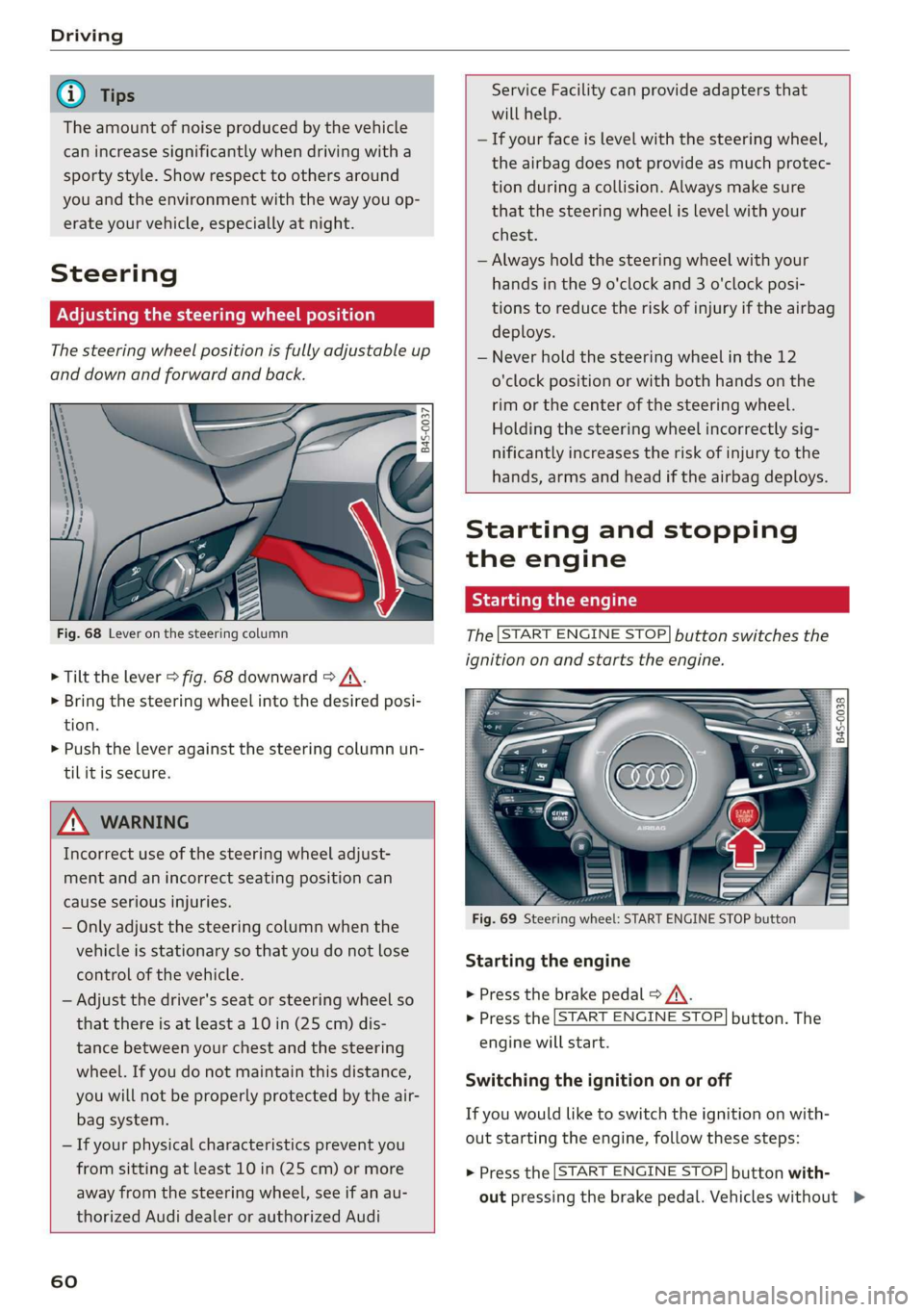
Fig. 68 Lever on the steering column
> Tilt the lever > fig. 68 downward > /\.
> Bring the steering wheel into the desired posi-
tion.
> Push the lever against the steering column un-
tilit is secure.
ZA WARNING
Incorrect use of the steering wheel adjust-
ment and an incorrect seating position can
cause serious injuries.
— Only adjust the steering column when the
vehicle is stationary so that you do not lose
control of the vehicle.
— Adjust the driver's seat or steering wheel so
that there is at least a 10 in (25 cm) dis-
tance between your chest and the steering
wheel. If you do not maintain this distance,
you will not be properly protected by the air-
bag system.
— If your physical characteristics prevent you
from sitting at least 10 in (25 cm) or more
away from the steering wheel, see if an au-
thorized Audi dealer or authorized Audi
60
Service Facility can provide adapters that
will help.
— If your face is level with the steering wheel,
the airbag does not provide as much protec-
tion during a collision. Always make sure
that the steering wheel is level with your
chest.
— Always hold the steering wheel with your
hands in the 9 o'clock and 3 o'clock posi-
tions to reduce the risk of injury if the airbag
deploys.
— Never hold the steering wheel in the 12
o'clock position or with both hands on the
rim or the center of the steering wheel.
Holding the steering wheel incorrectly sig-
nificantly increases the risk of injury to the
hands, arms and head if the airbag deploys.
Starting and stopping
the engine
Starting the engine
The [START ENGINE STOP] button switches the
ignition on and starts the engine.
utton
Starting the engine
> Press the brake pedal > A\.
> Press the [START ENGINE STOP] button. The
engine will start.
Switching the ignition on or off
If you would like to switch the ignition on with-
out starting the engine, follow these steps:
> Press the [START ENGINE STOP] button with-
out pressing the brake pedal. Vehicles without >
Page 68 of 308
Driving
vehicle to skid or the rear end to swerve,
which increases the risk of an accident.
— If the power supply fails, you cannot set the
parking brake once it is released. In this
case, park the vehicle on level ground and
secure it by placing the selector lever in the
"P" position. See an authorized Audi dealer
or authorized Audi Service Facility for assis-
tance.
— If you leave the vehicle, switch the ignition
off and take the vehicle key with you. This
applies particularly when children remain in
the vehicle. Otherwise children could start
the engine, release the parking brake or op-
erate electrical equipment such as power
windows, which increases the risk of an acci-
dent.
— No one should remain in the vehicle when it
is locked - especially children. Locked doors
make it more difficult for emergency work-
ers to get into the vehicle, which puts lives
at risk.
@) Note
Do not leave your vehicle unattended while
the engine is running, because this increases
the risk of an accident.
@) Tips
When stopping at a traffic signal or stopping
in city traffic, you can set the parking brake
manually. The vehicle does not have to be
held with the brake pedal. The parking brake
eliminates the tendency to creep when a se-
lector lever position is engaged. As soon as
you press the accelerator pedal, the parking
brake releases automatically and the vehicle
starts to move > page 66.
G@) Tips
— Occasional noises when the parking brake is
set and released are normal and are not a
cause for concern.
— The parking brake goes through a self-test
cycle at regular intervals when the vehicle is
stopped. Any noises associated with this are
normal.
66
— If there is a power failure, the parking brake
will not set if it is released, and it will not
release if it is set > A\. See an authorized
Audi dealer or authorized Audi Service Fa-
cility for assistance.
Starting to drive
Various convenience and safety functions may be
available when the vehicle begins driving, de-
pending on vehicle equipment.
Starting on hills with the parking brake set
Requirement: the driver's door must be closed.
> To start driving comfortably when on a hill, set
the parking brake and begin driving as usual.
The braking force of the parking brake does not
release automatically until the wheels build up
enough driving force.
Starting on hills with hill hold assist
Hill hold assist makes it easier to start on hills.
Requirement: the driver's door must be closed
and the engine must be running.
> To activate hill hold assist, press and hold the
brake pedal for several seconds. The vehicle
must be facing uphill.
After releasing the brake pedal, the braking pow-
er is maintained briefly > A\ to prevent the vehi-
cle from rolling back when starting. This allows
you to begin driving more easily.
Z\ WARNING
Applies to: vehicles with hill hold assist
— If you do not begin driving immediately or
the engine stalls after releasing the brake
pedal, your vehicle may begin to roll back-
ward. Press the brake pedal or set the park-
ing brake immediately.
— The intelligent technology of hill hold assist
cannot overcome the limitations imposed by
natural physical laws. The increased comfort
offered by hill hold assist should not cause
you to take safety risks. >
Page 74 of 308
Driving
in manual mode before reaching the maxi-
mum engine speed only in the “comfort” or
“auto” driving programs.
Transmission malfunction
i Transmission: malfunction! Safely stop vehi-
cle
Do not continue driving. Stop the vehicle as soon
as possible in a safe location and secure it so it
does not roll. See an authorized Audi dealer or
authorized Audi Service Facility for assistance.
5 Selector lever: malfunction! You can contin-
ue driving. Please contact Service
There is a system malfunction in the selector lev-
er. Drive immediately to an authorized Audi deal-
er or authorized Audi Service Facility to have the
malfunction repaired.
fs} P button: malfunction! Auto P when engine
off. Please contact Service
There is a malfunction in the "P" button on the
selector lever. The transmission automatically
engages "P" when you switch off the engine.
Drive to an authorized Audi dealer or authorized
Audi Service Facility immediately to have the
malfunction corrected.
Transmission: please press brake pedal and se-
lect gear again
Press the brake pedal and select the desired se-
lector lever position again. You can then continue
driving.
5 Transmission: too hot. Please adapt driving
style
The transmission temperature has increased sig-
nificantly. Drive very cautiously or take a break
from driving until the temperature returns to the
normal range and the indicator light turns off.
fl Transmission: malfunction! You can contin-
ue driving. See owner's manual
There is a system malfunction in the transmis-
sion. You may continue driving. Drive to an au-
thorized Audi dealer or authorized Audi Service
Facility soon to have the malfunction corrected.
72
[Gj Transmission: malfunction! You can contin-
ue driving in D until engine is off
There is a system malfunction in the transmis-
sion. The transmission is switching to emergency
mode. If you turn the engine off, you will not be
able to select any other selector lever positions
after starting the engine again. Drive to an au-
thorized Audi dealer or authorized Audi Service
Facility immediately to have the malfunction cor-
rected.
i} Transmission: malfunction! You can contin-
ue driving with limited function. Please contact
Service
There is a system malfunction in the transmis-
sion. The transmission is switching to emergency
mode. This mode only shifts into certain gears or
may no longer shift at all. The engine may stall.
Drive to an authorized Audi dealer or authorized
Audi Service Facility immediately to have the
malfunction corrected.
+} Transmission: malfunction! You can contin-
ue driving with limited function. No reverse
gear
There is a system malfunction in the transmis-
sion. The transmission is switching to emergency
mode. This mode only shifts into certain gears or
may no longer shift at all. The engine may stall.
You cannot engage the reverse gear. Drive to an
authorized Audi dealer or authorized Audi Service
Facility immediately to have the malfunction cor-
rected.
i Danger of rolling away! P not possible.
Please apply parking brake
— The parking lock was released using the emer-
gency release > page 73. Or
— The parking lock can no longer be engaged.
Drive to an authorized Audi dealer or author-
ized Audi Service Facility immediately to have
the malfunction corrected.
Move selector lever to automatic position
There is a malfunction in the tiptronic mode. End
tiptronic mode by pushing the selector lever to
the left into the "D/S" position.
Page 75 of 308
4S1012721BA
Driving
Parking lock emergency release
9 2
Ss Ss
db z a
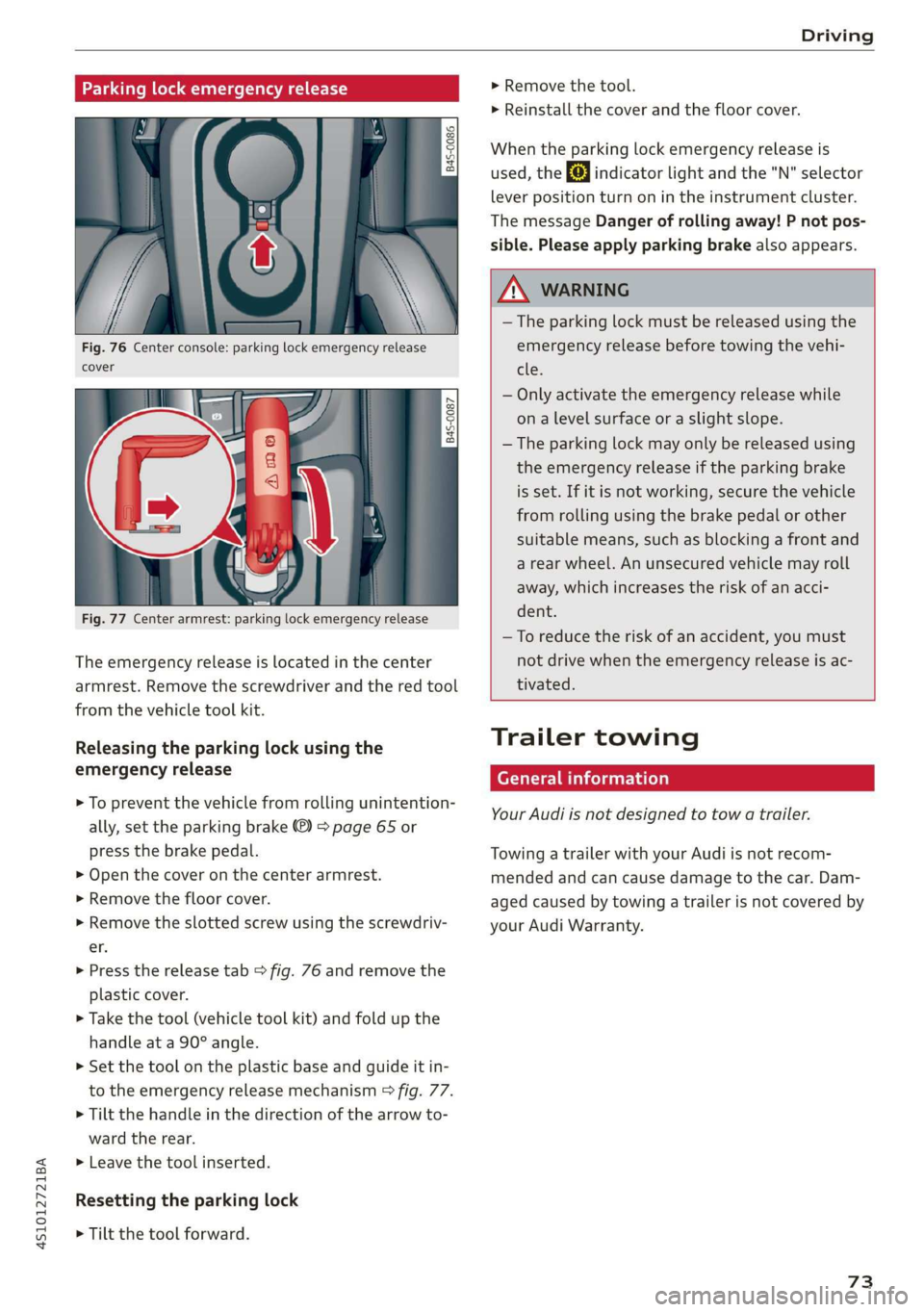
Fig. 76 Center console: parking lock emergency release
cover
[845-0087
|
Fig. 77 Center armrest: parking lock emergency release
The emergency release is located in the center
armrest. Remove the screwdriver and the red tool
from the vehicle tool kit.
Releasing the parking lock using the
emergency release
> To prevent the vehicle from rolling unintention-
ally, set the parking brake ®) > page 65 or
press the brake pedal.
> Open the cover on the center armrest.
> Remove the floor cover.
> Remove the slotted screw using the screwdriv-
er.
> Press the release tab > fig. 76 and remove the
plastic cover.
> Take the tool (vehicle tool kit) and fold up the
handle at a 90° angle.
>» Set the tool on the plastic base and guide it in-
to the emergency release mechanism > fig. 77.
> Tilt the handle in the direction of the arrow to-
ward the rear.
>» Leave the tool inserted.
Resetting the parking lock
> Tilt the tool forward.
> Remove the tool.
> Reinstall the cover and the floor cover.
When the parking lock emergency release is
used, the fs] indicator light and the "N" selector
lever position turn on in the instrument cluster.
The message Danger of rolling away! P not pos-
sible. Please apply parking brake also appears.
ZA WARNING
— The parking lock must be released using the
emergency release before towing the vehi-
tle.
— Only activate the emergency release while
ona level surface or a slight slope.
— The parking lock may only be released using
the emergency release if the parking brake
is set. If it is not working, secure the vehicle
from rolling using the brake pedal or other
suitable means, such as blocking a front and
a rear wheel. An unsecured vehicle may roll
away, which increases the risk of an acci-
dent.
—To reduce the risk of an accident, you must
not drive when the emergency release is ac-
tivated.
Trailer towing
General information
Your Audi is not designed to tow a trailer.
Towing a trailer with your Audi is not recom-
mended and can cause damage to the car. Dam-
aged caused by towing a trailer is not covered by
your Audi Warranty.
73
Page 97 of 308
4S1012721BA
Multi Media Interface
Selection menu: through the selection menu,
you can open additional functions within a menu
item (such as Radio).
Requirement: the Selection menu symbol must
appear in the Infotainment system display.
Opening and closing a selection menu: Press the
left control button. Then you can select and con-
firm
a function using the control knob.
Options menu: using the options menu, you can
select and confirm context-dependent functions
as well as settings within a menu item (such as
Radio).
Requirement: the Options menu symbol [+] must
be displayed in the Infotainment system display.
Opening and closing the options menu: Press
the right control button. Then you can select and
confirm a function using the control knob.
Information about menu paths
This guide shows you at a glance the paths for
opening a desired menu and its settings and
functions.
Example of a path
RADIO > Select: button > left control button >
FM.
Following the path
> Press the [RADIO] button.
> Press the left control button.
> Turn the control knob to the FM menu item to
select it.
> Press the control knob to confirm the selected
FM menu item.
> The selected and confirmed function is execut-
ed. In this example, the FM frequency band is
set.
MMI touch
MMI touch control pad
RAH-8760,
OL
¥-wreashire Blvd, Los Angeles
ea asi N7« Angele:
ba 18
cis Meu es10
EG E Locust St
~
Fig. 98 Entering a navigation destination
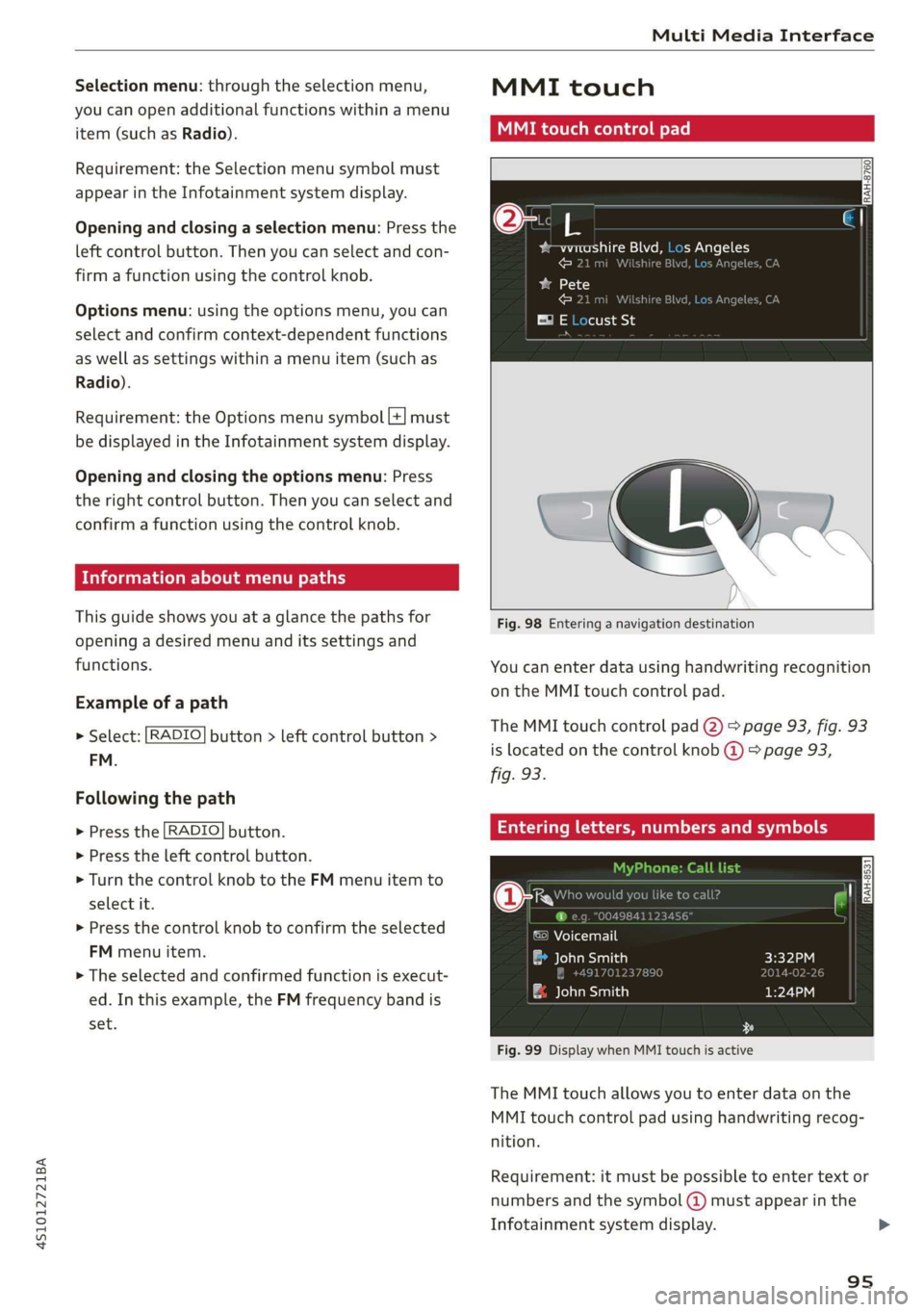
You can enter data using handwriting recognition
on the MMI touch control pad.
The MMI touch control pad @) > page 93, fig. 93
is located on the control knob @) > page 93,
fig. 93.
Entering letters, numbers and symbols
uld you lik
©) Voicemail
a John Smith
& John Smith
Fig. 99 Display when MMI touch is active
The MMI touch allows you to enter data on the
MMI touch control pad using handwriting recog-
nition.
Requirement: it must be possible to enter text or
numbers and the symbol (@) must appear in the
Infotainment system display.
95
>
Page 115 of 308
4S1012721BA
Telephone
the cell phone symbol in the Audi phone box
=> fig. 110. Make sure there are no objects be-
tween the Audi phone box and the mobile de-
vice.
— Charge a cell phone wirelessly: Place a Qi-capa-
ble » cell phone centered on the symbol in the
Audi phone box with the display facing up
=> fig. 110. The cell phone will charge.
— Charge a cell phone using the USB adapter:
Connect your cell phone to the Audi music in-
terface using a USB adapter cable @).
You can charge your mobile device using specific
USB adapters > page 155, fig. 134.
Z\ WARNING
— Loose objects can be thrown around the ve-
hicle interior during sudden driving or brak-
ing maneuvers, which increases the risk of
an accident. Store objects securely while
driving.
— The mobile device may become hot during
wireless charging. Pay attention to the tem-
perature of your mobile device and be care-
ful when removing it from the Audi phone
box.
— An alternating magnetic field is used for
wireless charging. Maintain a minimum dis-
tance of approximately 2.4 in (6 cm) to the
Audi phone box charging plate. The thresh-
olds for prolonged exposure at this distance
comply with ICNIRP1998. Therefore, inter-
actions such as irritation of sensory organs,
malfunctions of active implants (such as
pacemakers, infusion pumps, or neurosti-
mulators) or effects on passive implants
(such as prosthetic limbs) is highly unlikely.
If you have an implant, consult a medical
specialist if you have any questions.
@) Note
Applicable to U.S.A.
Operation of the Audi phone box is subject to
the following requirements of the Federal
Communications Commission:
) The Qi standard makes it possible to charge your mobile
device wirelessly.
— This is a CONSUMER device.
— BEFORE USE, you MUST REGISTER THIS DE-
VICE with your wireless provider and have
your provider’s consent. Most wireless pro-
viders consent to the use of signal boosters.
Some providers may not consent to the use
of this device on their network. If you are
unsure, contact your service provider.
— You MUST operate this device with approved
antennas and cables as specified by the
manufacturer. Antennas MUST be installed
at least 20 cm (8 inches) from any person.
— You MUST cease operating this device im-
mediately if requested by the FCC or a li-
censed wireless service provider.
— WARNING: E911 location information may
not be provided or may be inaccurate for
calls served by using this device.
() Note
Applicable to Canada
In Canada, operation of a Zone Enhancer,
such as an Audi Phone Box, is subject to the
following requirements of the Innovation,
Science and Economic Development Canada
(ISED):
— This is a CONSUMER device.
— BEFORE USE, you MUST meet all require-
ments set out in CPC-2-1-05.
— You MUST operate this device with approved
antennas
and cables as specified by the
manufacturer. Antennas MUST NOT be in-
stalled within 20 cm of any person.
— You MUST cease operating this device im-
mediately if requested by ISED or a licensed
wireless service provider.
— WARNING: £911 location information may
not be provided or may be inaccurate for
calls served by using this device.
@) Tips
— The Audi phone box is not available in all
countries. For additional information, con-
tact an authorized Audi dealership.
113