service AUDI R8 COUPE 2020 Owner's Manual
[x] Cancel search | Manufacturer: AUDI, Model Year: 2020, Model line: R8 COUPE, Model: AUDI R8 COUPE 2020Pages: 308, PDF Size: 82.41 MB
Page 61 of 308
4S1012721BA
Driving
Driving
General information
A new vehicle must be broken in within the first
1,000 miles (1,500 km) so that all moving parts
work smoothly together, which helps to increase
the service life of the engine.
Do not drive higher than two-thirds of the maxi-
mum permitted engine RPM during the first 600
miles (1,000 km) and do not use full accelera-
tion. The engine can be increased RPM gradually
during the next 300 miles (500 km).
Reducing the risk of vehicle damage
@ Note
When driving on poor roads, over curbs, and
on steep ramps, make sure that components
that hang below the vehicle, such as the spoil-
er and exhaust system, are not struck because
they could be damaged. This especially ap-
plies to vehicles with low ground clearance
and vehicles that are heavily loaded.
Driving through water on roads
Note the following to reduce the risk of vehicle
damage when driving through water, for example
on flooded roads:
— The water must not be any higher than the bot-
tom of the vehicle body.
— Do not drive faster than walking speed.
ZA WARNING
After driving through water or mud, the effec-
tiveness of the brakes may be reduced due to
moisture on the brake rotors and brake pads.
A few careful brake applications should dry off
the brakes and restore the full braking effect.
@) Note
— Vehicle components such as the engine,
transmission, suspension, or electrical sys-
tem, can be severely damaged by driving
through water.
— Always switch the Start/Stop system* off
when driving through water > page 62.
@) Tips
— Determine the depth before driving through
water.
— Do not stop the vehicle, drive in reverse, or
switch the engine off when driving through
water.
— Keep in mind that oncoming vehicles may
create waves that raise the water level and
make it too deep for your vehicle to drive
through safely.
— Avoid driving through salt water, because
this can cause corrosion.
aie e TRE erelie ltr)
driving
The amount of fuel consumption, the environ-
mental impact, and the wear to the engine,
brakes, and tires depends mostly on your driving
style. Note the following information for efficient
and environmentally-conscious driving:
— Do not let the engine run while the vehicle
parked.
— Use the Start/Stop system > page 62.
— Turn off electrical equipment that is not need-
ed, for example seat heating*.
— Anticipate upcoming traffic situations while
driving to avoid unnecessary acceleration and
braking.
— Utilize the engine braking effect.
— Avoid driving short distances or at high speeds
when possible.
— Avoid adding extra weight to the vehicle if pos-
sible, for example by not leaving roof racks or
bike racks installed when they are not needed.
— Have maintenance performed regularly on the
vehicle.
— Do not drive with winter tires during the summ-
er.
— Make sure the tire pressure is correct
=> page 254.
59
Page 62 of 308
Driving
@ Tips
The amount of noise produced by the vehicle
can increase significantly when driving with a
sporty style. Show respect to others around
you and the environment with the way you op-
erate your vehicle, especially at night.
Steering
Adjusting the steering wheel position
The steering wheel position is fully adjustable up
and down and forward and back.
5 s
2 db t a
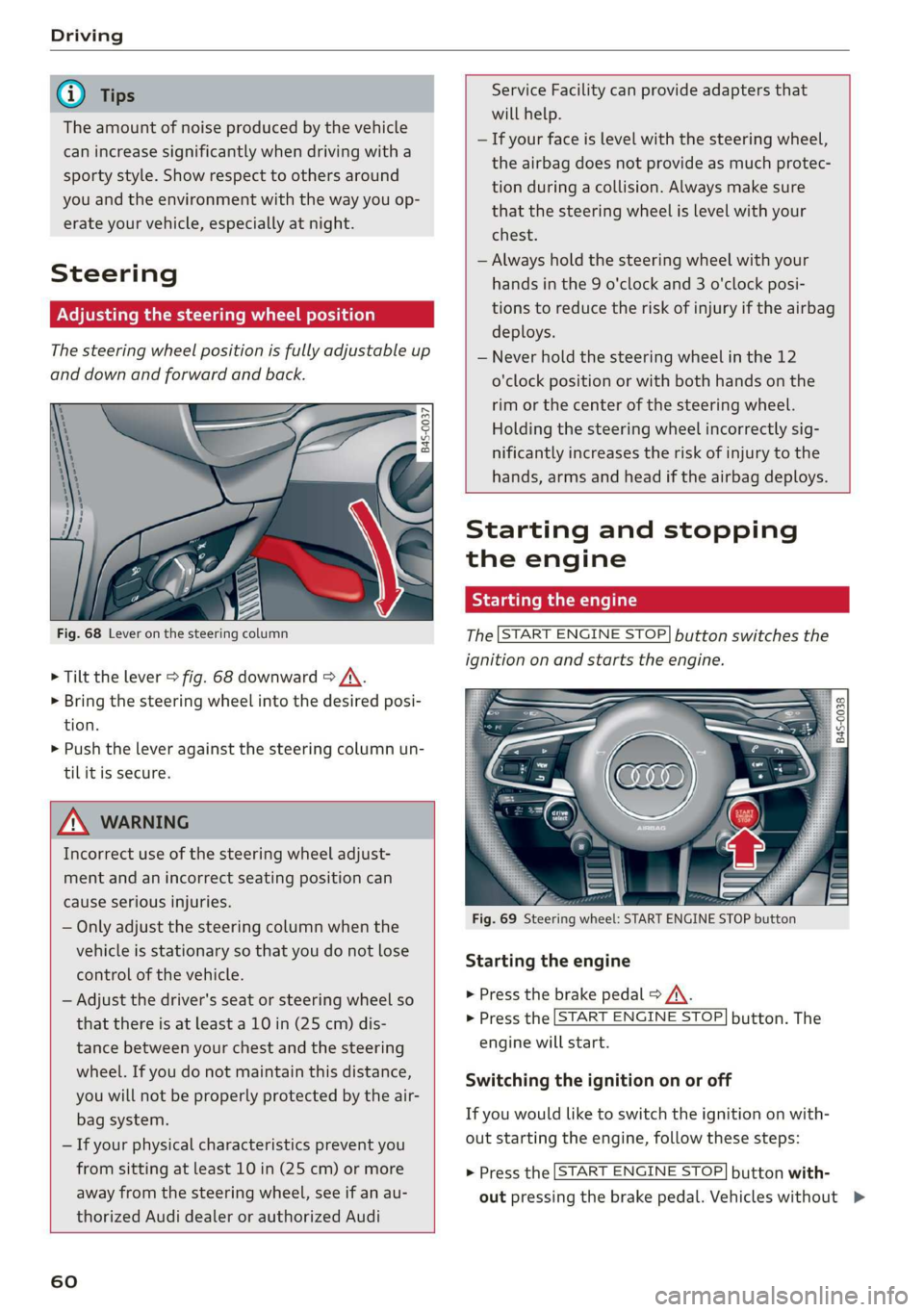
Fig. 68 Lever on the steering column
> Tilt the lever > fig. 68 downward > /\.
> Bring the steering wheel into the desired posi-
tion.
> Push the lever against the steering column un-
tilit is secure.
ZA WARNING
Incorrect use of the steering wheel adjust-
ment and an incorrect seating position can
cause serious injuries.
— Only adjust the steering column when the
vehicle is stationary so that you do not lose
control of the vehicle.
— Adjust the driver's seat or steering wheel so
that there is at least a 10 in (25 cm) dis-
tance between your chest and the steering
wheel. If you do not maintain this distance,
you will not be properly protected by the air-
bag system.
— If your physical characteristics prevent you
from sitting at least 10 in (25 cm) or more
away from the steering wheel, see if an au-
thorized Audi dealer or authorized Audi
60
Service Facility can provide adapters that
will help.
— If your face is level with the steering wheel,
the airbag does not provide as much protec-
tion during a collision. Always make sure
that the steering wheel is level with your
chest.
— Always hold the steering wheel with your
hands in the 9 o'clock and 3 o'clock posi-
tions to reduce the risk of injury if the airbag
deploys.
— Never hold the steering wheel in the 12
o'clock position or with both hands on the
rim or the center of the steering wheel.
Holding the steering wheel incorrectly sig-
nificantly increases the risk of injury to the
hands, arms and head if the airbag deploys.
Starting and stopping
the engine
Starting the engine
The [START ENGINE STOP] button switches the
ignition on and starts the engine.
utton
Starting the engine
> Press the brake pedal > A\.
> Press the [START ENGINE STOP] button. The
engine will start.
Switching the ignition on or off
If you would like to switch the ignition on with-
out starting the engine, follow these steps:
> Press the [START ENGINE STOP] button with-
out pressing the brake pedal. Vehicles without >
Page 64 of 308
![AUDI R8 COUPE 2020 Owners Manual Driving
This message appears when you press the
START ENGINE STOP] button while driving.
Engine start system: malfunction! Please con-
tact Service
The engine automatic start system](/img/6/57639/w960_57639-63.png "AUDI R8 COUPE 2020 Owners Manual Driving
This message appears when you press the
START ENGINE STOP] button while driving.
Engine start system: malfunction! Please con-
tact Service
The engine automatic start system")
Driving
This message appears when you press the
START ENGINE STOP] button while driving.
Engine start system: malfunction! Please con-
tact Service
The engine automatic start system has a mal-
function.
Drive immediately to an authorized Au-
di dealer or authorized Audi Service Facility to
have the malfunction repaired. To start the en-
gine, press and hold the [START ENGINE STOP
button.
Remote control key: hold back of key
against the designated area. See owner's man-
ual
This message appears if there is no convenience
key inside the vehicle or if the system does not
recognize the key. The convenience key may not
be recognized, for example, if it is covered by an
object that disrupts the signal (such as a brief-
case), or if the key battery is weak. Electronic de-
vices such as cell phones can also interfere with
the signal.
To still be able to start or stop the engine, see
=> page 62, Starting the engine when there is a
malfunction.
B Remote control key: key not detected. Is the
key
still in the vehicle?
The B indicator light turns on and this message
appears if the convenience key was removed from
the vehicle when the engine was running. If the
convenience key is no longer in the vehicle, you
cannot switch the ignition on or start the engine
once you stop it. You also cannot lock the vehicle
from the outside.
Please press the brake pedal
This message appears if you do not press the
brake pedal when starting the engine.
Please select N or P
This message appears when starting or stopping
the engine if the selector lever is not in the "N" or
"P" position. The engine will not start/stop.
62
Starting the engine when there is a
area d ea)
It may not be possible to start the engine under
certain circumstances, for example, if the bat-
tery in the vehicle key is drained, if interference is
affecting the key or if there is a system malfunc-
tion.
2 3
9
db + a
Fig. 70 Steering column/remote control key: starting the
engine if there is a malfunction
As long as the message ?) Remote control key:
hold back of key against the designated area.
See owner's manual is displayed, you can emer-
gency start your vehicle.
> Press the brake pedal.
> Press the [START ENGINE STOP] button.
> Hold the master key in the location indicated in
the illustration ?) © fig. 70. The engine will
start.
> If the engine does not automatically start,
press the [START ENGINE STOP] button again.
(i) Tips
You can view the message again by pressing
the [START ENGINE STOP] button.
Start/Stop system
Applies to: vehicles with Start/Stop system
The Start/Stop system can help increase fuel
economy and reduce CO2 emissions.
In Start/Stop mode, the engine shuts off auto-
matically when the vehicle is stopped, such as at
a traffic light. The ignition remains switched on
during this stop phase. The engine will restart
automatically when needed.
Page 67 of 308
4S1012721BA
Driving
Messages in the instrument cluster display
Applies to: vehicles with Start/Stop system
Start/stop system: deactivated. Please start
engine manually
This message appears when specific conditions
are not met during a Stop phase. The Start/Stop
system will not be able to restart the engine. The
engine must be started with the
START ENGINE STOP] button.
Start/stop system: malfunction! Function
unavailable. Please contact Service
There is a malfunction in the Start/Stop system.
Drive the vehicle to an authorized Audi dealer or
authorized Service Facility as soon as possible to
have the malfunction corrected.
Electromechanical
parking brake
The ©) switch is located under the selector lever
in the center console.
Your vehicle is equipped with an electromechani-
cal parking brake. The parking brake is designed
to prevent the vehicle from rolling unintentional-
ly and replaces the hand brake.
Setting/manually releasing the parking
brake
> Pull the @) switch to set the parking brake. The
LED in the switch turns on. The Zw (USA mod-
els)/[@) (Canada models) indicator light also
turns on in the instrument cluster display.
> To release the parking brake manually, press
the brake or accelerator pedal while the igni-
tion is switched on and press the ©) switch at
the same time. The LED in the button and the
indicator light in the display turn off.
Releasing the parking brake automatically
Requirement: The driver's door must be closed.
> To start driving and release the parking brake
automatically, press the accelerator pedal as
usual.
In addition to releasing the parking brake auto-
matically, other convenience and safety functions
are available when you start driving > page 66,
Starting to drive.
Emergency braking function
You can use the emergency braking function in an
emergency situation, or if the standard brakes
are malfunctioning or the pedal is obstructed.
> Pull and hold the ©) switch.
>» As soon as you release the (©) switch or acceler-
ate, the braking stops.
Pulling and holding the ©) switch while driving
the vehicle activates the emergency braking func-
tion. The hydraulic brake system will brake all
four wheels. The braking effect is similar to heavy
braking > A\.
To reduce the risk of activating the emergency
braking by mistake, a warning tone (buzzer)
sounds when the ©) switch is pulled. Emergency
braking stops as soon as the ©) switch is released
or the accelerator pedal is pressed.
Parking
> Press the brake pedal to stop the vehicle.
> Pull the ©) switch to set the parking brake.
> Select the "P" selector lever position.
> Turn the engine off > /\.
> Turn the steering wheel when parking on in-
clines so that the wheels will roll into the curb
if the vehicle starts moving.
ZA WARNING
— If a gear is engaged while the vehicle is sta-
tionary and the engine is running, do not
press the accelerator pedal inadvertently.
Otherwise, the vehicle will start to move im-
mediately and this could result in an acci-
dent.
— Emergency braking should only be used in
an emergency, when the when the standard
brake pedal is malfunctioning or obstructed.
During emergency braking, your vehicle will
brake similar to heavy braking. ESC and the
associated components (ABS, ASR, EDL) can-
not overcome the laws of physics. In corners
and when road or weather conditions are
bad, a full brake application can cause the
65
Page 68 of 308
Driving
vehicle to skid or the rear end to swerve,
which increases the risk of an accident.
— If the power supply fails, you cannot set the
parking brake once it is released. In this
case, park the vehicle on level ground and
secure it by placing the selector lever in the
"P" position. See an authorized Audi dealer
or authorized Audi Service Facility for assis-
tance.
— If you leave the vehicle, switch the ignition
off and take the vehicle key with you. This
applies particularly when children remain in
the vehicle. Otherwise children could start
the engine, release the parking brake or op-
erate electrical equipment such as power
windows, which increases the risk of an acci-
dent.
— No one should remain in the vehicle when it
is locked - especially children. Locked doors
make it more difficult for emergency work-
ers to get into the vehicle, which puts lives
at risk.
@) Note
Do not leave your vehicle unattended while
the engine is running, because this increases
the risk of an accident.
@) Tips
When stopping at a traffic signal or stopping
in city traffic, you can set the parking brake
manually. The vehicle does not have to be
held with the brake pedal. The parking brake
eliminates the tendency to creep when a se-
lector lever position is engaged. As soon as
you press the accelerator pedal, the parking
brake releases automatically and the vehicle
starts to move > page 66.
G@) Tips
— Occasional noises when the parking brake is
set and released are normal and are not a
cause for concern.
— The parking brake goes through a self-test
cycle at regular intervals when the vehicle is
stopped. Any noises associated with this are
normal.
66
— If there is a power failure, the parking brake
will not set if it is released, and it will not
release if it is set > A\. See an authorized
Audi dealer or authorized Audi Service Fa-
cility for assistance.
Starting to drive
Various convenience and safety functions may be
available when the vehicle begins driving, de-
pending on vehicle equipment.
Starting on hills with the parking brake set
Requirement: the driver's door must be closed.
> To start driving comfortably when on a hill, set
the parking brake and begin driving as usual.
The braking force of the parking brake does not
release automatically until the wheels build up
enough driving force.
Starting on hills with hill hold assist
Hill hold assist makes it easier to start on hills.
Requirement: the driver's door must be closed
and the engine must be running.
> To activate hill hold assist, press and hold the
brake pedal for several seconds. The vehicle
must be facing uphill.
After releasing the brake pedal, the braking pow-
er is maintained briefly > A\ to prevent the vehi-
cle from rolling back when starting. This allows
you to begin driving more easily.
Z\ WARNING
Applies to: vehicles with hill hold assist
— If you do not begin driving immediately or
the engine stalls after releasing the brake
pedal, your vehicle may begin to roll back-
ward. Press the brake pedal or set the park-
ing brake immediately.
— The intelligent technology of hill hold assist
cannot overcome the limitations imposed by
natural physical laws. The increased comfort
offered by hill hold assist should not cause
you to take safety risks. >
Page 74 of 308
Driving
in manual mode before reaching the maxi-
mum engine speed only in the “comfort” or
“auto” driving programs.
Transmission malfunction
i Transmission: malfunction! Safely stop vehi-
cle
Do not continue driving. Stop the vehicle as soon
as possible in a safe location and secure it so it
does not roll. See an authorized Audi dealer or
authorized Audi Service Facility for assistance.
5 Selector lever: malfunction! You can contin-
ue driving. Please contact Service
There is a system malfunction in the selector lev-
er. Drive immediately to an authorized Audi deal-
er or authorized Audi Service Facility to have the
malfunction repaired.
fs} P button: malfunction! Auto P when engine
off. Please contact Service
There is a malfunction in the "P" button on the
selector lever. The transmission automatically
engages "P" when you switch off the engine.
Drive to an authorized Audi dealer or authorized
Audi Service Facility immediately to have the
malfunction corrected.
Transmission: please press brake pedal and se-
lect gear again
Press the brake pedal and select the desired se-
lector lever position again. You can then continue
driving.
5 Transmission: too hot. Please adapt driving
style
The transmission temperature has increased sig-
nificantly. Drive very cautiously or take a break
from driving until the temperature returns to the
normal range and the indicator light turns off.
fl Transmission: malfunction! You can contin-
ue driving. See owner's manual
There is a system malfunction in the transmis-
sion. You may continue driving. Drive to an au-
thorized Audi dealer or authorized Audi Service
Facility soon to have the malfunction corrected.
72
[Gj Transmission: malfunction! You can contin-
ue driving in D until engine is off
There is a system malfunction in the transmis-
sion. The transmission is switching to emergency
mode. If you turn the engine off, you will not be
able to select any other selector lever positions
after starting the engine again. Drive to an au-
thorized Audi dealer or authorized Audi Service
Facility immediately to have the malfunction cor-
rected.
i} Transmission: malfunction! You can contin-
ue driving with limited function. Please contact
Service
There is a system malfunction in the transmis-
sion. The transmission is switching to emergency
mode. This mode only shifts into certain gears or
may no longer shift at all. The engine may stall.
Drive to an authorized Audi dealer or authorized
Audi Service Facility immediately to have the
malfunction corrected.
+} Transmission: malfunction! You can contin-
ue driving with limited function. No reverse
gear
There is a system malfunction in the transmis-
sion. The transmission is switching to emergency
mode. This mode only shifts into certain gears or
may no longer shift at all. The engine may stall.
You cannot engage the reverse gear. Drive to an
authorized Audi dealer or authorized Audi Service
Facility immediately to have the malfunction cor-
rected.
i Danger of rolling away! P not possible.
Please apply parking brake
— The parking lock was released using the emer-
gency release > page 73. Or
— The parking lock can no longer be engaged.
Drive to an authorized Audi dealer or author-
ized Audi Service Facility immediately to have
the malfunction corrected.
Move selector lever to automatic position
There is a malfunction in the tiptronic mode. End
tiptronic mode by pushing the selector lever to
the left into the "D/S" position.
Page 83 of 308
4S1012721BA
Parking aid
Parking aid
Introduction
Depending on the vehicle equipment, various
parking aids will help you when parking and ma-
neuvering.
The parking system plus assists you while park-
ing by audibly and visually warning you of objects
detected in front of and behind the vehicle
=> page 81.
The rearview camera shows the area behind the
vehicle in the Infotainment system display. The
lines in the rearview camera image help you to
park or maneuver > page 83.
ZA WARNING
— Always look for traffic and check the area
around your vehicle by looking at it directly
as well. The parking system cannot replace
the driver's attention. The driver is always
responsible when entering or exiting a park-
ing space and during similar maneuvers.
— Please note that some surfaces, such as
clothing, are not detected by the system.
— Sensors and cameras have blind spots in
which people and objects cannot be detect-
ed. Be especially cautious of small children
and animals.
— The sensors can be displaced by impacts or
damage to the radiator grille, bumper,
wheel housing and the underbody. The park-
ing system may be impaired as a result.
Have an authorized Audi dealer or author-
ized Audi Service Facility check their func-
tion.
— Make sure the sensors are not obstructed by
stickers, deposits or other materials. If they
are, the sensor function could be impaired.
For additional information on cleaning, see
=> page 265.
@) Note
— Some objects are not detected or displayed
by the system under certain circumstances:
— objects such as barrier chains, trailer draw
bars, vertical poles or fences
— objects above the sensors such as wall ex-
tensions
— objects with certain surfaces or structures
such as chain link fences or powder snow
— If you continue driving closer to a low ob-
ject, it may disappear from the sensor
range. Note that you will no Longer be
warned about this obstacle.
— Maintain enough distance from the curb to
reduce the risk of damage to the rims.
@ Tips
— The system may provide a warning even
though there are no obstacles in the cover-
age area in some situations, such as:
— certain road surfaces or when there is tall
grass
— external ultrasonic sources such as from
cleaning vehicles
— in heavy rain, snow, or thick vehicle ex-
haust
— We recommend that you practice parking in
a traffic-free location or parking lot to be-
come familiar with the system. Practice
parking in good light and weather condi-
tions.
— You can change the volume of the signals.
— What appears in the display is slightly de-
layed.
— The sensors must be kept clean and free of
snow and ice for the parking aid to operate.
Parking system plus
Description
Parking system plus provides audio and visual
signals when parking.
B4S-0092
Fig. 83 Principle of operation
81
Page 85 of 308

4S1012721BA
Parking aid
Rearview camera
Introduction
Applies to: vehicles with rearview camera
B8V-0629
Fig. 86 Diagram: lines to aid in parking
The rearview camera helps you to park or maneu-
ver using the orientation lines.
General information
Applies to: vehicles with rearview camera
B4s-0090
Fig. 87 Principle of operation: Area covered (@) and area
not covered (2) by the rearview camera.
Fig. 88 Vehicle rear: rearview camera component location
The rearview camera is located above the rear li-
cense plate bracket. Make sure that the lens for
the parking system > fig. 88 is not covered by de-
posits or any other obstructions because this can
impair the function of the parking system. For in-
formation on cleaning, see > page 265.
The rearview camera coverage area includes (4)
> fig. 87. Only this area is shown in the Infotain-
ment display. Objects that are in area @), which is
not covered, are not displayed.
ZA WARNING
— Always read and follow the applicable warn-
ings > A in Introduction on page 81.
— If the position and the installation angle of
the rearview camera was changed, for exam-
ple after a collision, do not continue to use
the system for safety reasons. Have it
checked by an authorized Audi dealer or au-
thorized Audi Service Facility.
— Only use the rearview camera to assist you if
it shows a good, clear picture. For example,
the image may be affected by the sun shin-
ing into the lens, dirt on the lens, or if there
is a malfunction.
— Use the rearview camera only if the engine
compartment lid is completely closed. Make
sure any objects you may have mounted on
the luggage compartment lid do not block
the rearview camera.
— The camera lens enlarges and distorts the
field of vision. The object appears both al-
tered and inaccurate on the screen.
—Incertain situations, people or objects in
the display appear closer or farther away:
— For objects that do not touch the ground,
such as the bumper of a parked vehicle, a
trailer hitch or the rear of a truck. Do not
use the orientation lines in this case.
— If driven from a level surface onto an in-
cline, or a downward slope.
— If driven toward protruding objects.
— If the vehicle is carrying too much load in
the rear.
@) Note
— Always read and follow the applicable warn-
ings >@ in Introduction on page 81.
— The orange-colored orientation lines in the
Infotainment display show the vehicle path
based on the steering wheel angle. The
83
>
Page 87 of 308
4S1012721BA
Parking aid
@) Tips
— The settings are automatically stored and
assigned to the remote control key that is in
use.
— The new level is demonstrated briefly* when
the volume is adjusted.
Error messages
There is an error in the system if the LED in the
Pv button is blinking and you hear a continuous
alarm for a few seconds after switching on the
parking system or when the parking system is al-
ready activated. If the error is not corrected be-
fore you switch off the ignition, the LED in the Pa
button will blink the next time you switch on the
parking system by shifting into reverse.
Parking system plus*
If a sensor or speaker is faulty, the P4 symbol
will appear in front of/behind the vehicle in the
Infotainment display. If a rear sensor is faulty,
only obstacles that are in areas @) and @)
=> page 81, fig. 83 are shown. If a front sensor is
faulty, only obstacles that are in areas @) and @)
are shown.
Drive immediately to an authorized Audi dealer
or authorized Audi Service Facility to have the
malfunction repaired.
8s
Page 90 of 308
Intelligent Technology
— There is no vehicle stabilization when
ESC/ASR are switched off.
@) Tips
— When the cruise control system* is switched
on, ESC/ASR cannot be switched off or sport
mode cannot be switched on.
— Malfunctions in the rear spoiler, in the Audi
magnetic ride or in the all wheel drive sys-
tem* may make it impossible to switch the
ESC/ASR off or to switch sport mode on.
— Some driving tracks (such as ones with
steep curves) can influence the ESC per-
formance.
Brakes
You can apply the vehicle's brakes using the brake
pedal.
Operating noise
Noises may occur when braking depending on the
speed, braking force, and outside conditions such
as temperature and humidity.
Braking effect
The response time from the brakes depends on
the weather and environmental conditions. To
ensure the optimal braking effect, the brake sys-
tem is cleaned at regular intervals. This is done
by applying the brake pads to the brake rotors for
a short period of time when driving at high
speeds when the windshield wipers are switched
on.
If the brake system becomes damp, for example
after driving in heavy rain, the braking effect may
be delayed. Other factors that could temporarily
increase the response time of the brakes include:
— Wet conditions
— Low temperatures, ice, and snow
— Roads covered in salt
— Dirty brake pads
Corrosion
Corrosion may form on the brake rotors if there is
no heavy braking, if the vehicle is not driven for
long periods of time, or if the vehicle is not driv-
838
en frequently or for long distances. In this case,
braking heavily several times while driving at
high speeds can clean the brake rotors > A\.
Brake pads
New brake pads do not achieve their full braking
effect during the first 250 miles (400 km). They
must be “broken in” first. However, you can com-
pensate for the slightly reduced braking force by
pressing firmly on the brake pedal. Avoid heavy
braking during the break-in period.
Brake pad wear depends largely on the way the
vehicle is driven and on operating conditions.
Brake pad wear increases when driving frequently
in the city or short distances or when using a very
sporty driving style.
Ceramic brakes
Applies to: vehicles with ceramic brakes
Ceramic brakes provide excellent deceleration
rates.
The break-in period for new ceramic brakes may
be significantly longer than for standard brake
rotors. Due to the properties of the material,
they may cause noises at lower speeds. Ceramic
brakes also absorb more moisture in wet condi-
tions. Therefore, there will temporarily be less
braking force than when the brakes are dry. You
can compensate for this by pressing the brake
pedal harder.
ZA WARNING
— Only apply the brakes for the purpose of
cleaning the brake system when road and
traffic conditions permit. You must not en-
danger other road users and increase the
risk of an accident.
— Due to the risk of injury, only have an au-
thorized Audi dealer or authorized Audi
Service Facility work on the brake system.
Incorrect repairs could impair the function.
— Never let the vehicle roll while the engine is
stopped because this increases the risk of an
accident.
— Depending on vehicle equipment, the brake
pedal
may move downward automatically
during autonomous braking maneuvers. To