ECO mode AUDI R8 SPYDER 2011 User Guide
[x] Cancel search | Manufacturer: AUDI, Model Year: 2011, Model line: R8 SPYDER, Model: AUDI R8 SPYDER 2011Pages: 244, PDF Size: 59.74 MB
Page 34 of 244
32 Driver in formation system
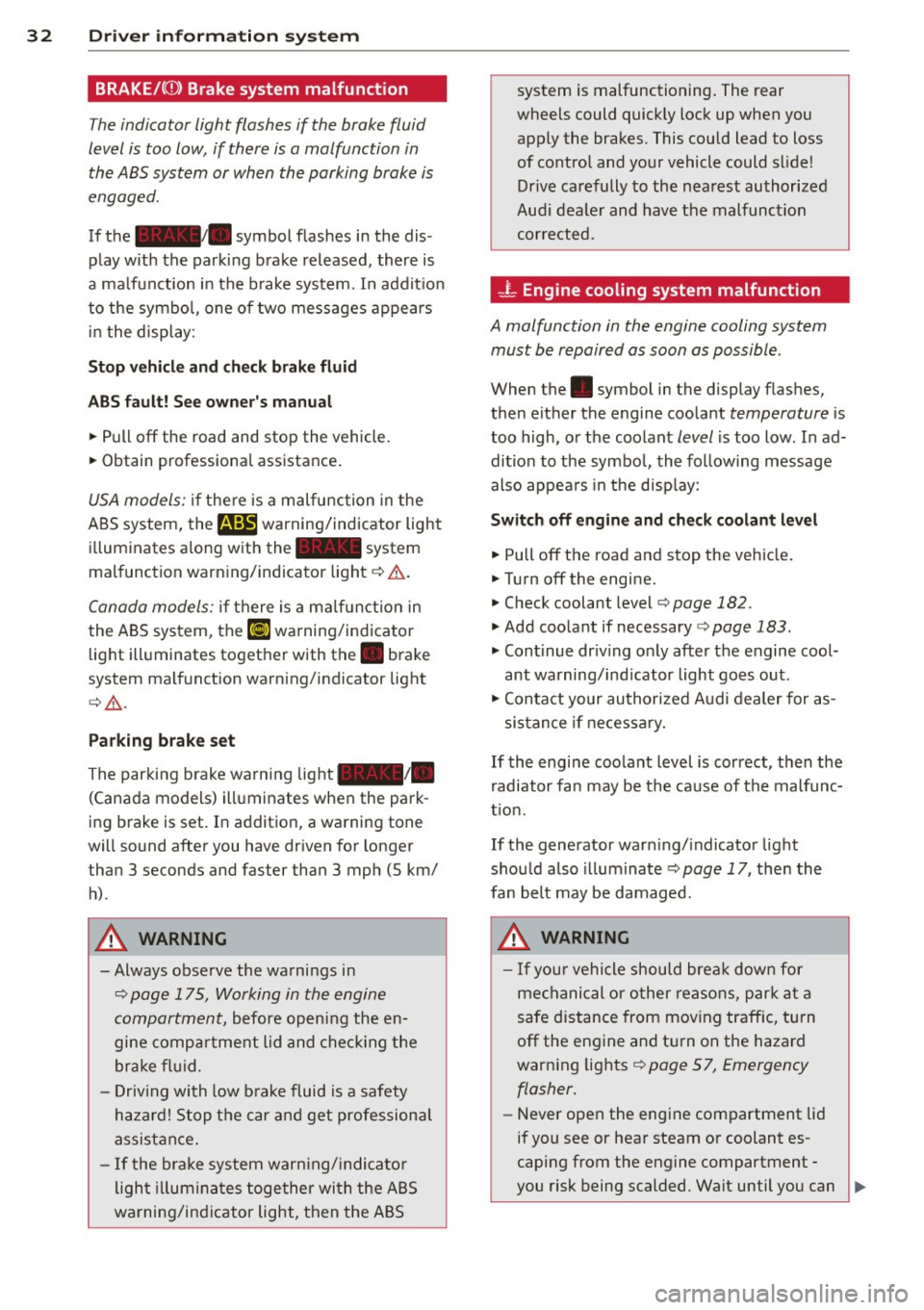
BRAKE/((D) Brake system malfunction
The indicator light flashes if the brake fluid
level is too low, if there is a malfunction in the ABS system or when the parking brake is
engaged.
If the alllill. symbol flashes in the dis
play with the parking brake released, there is
a malfunction in the brake system. In addit io n
to the symbo l, one of two messages appears
i n t he displ ay:
Stop veh icle and check brak e fluid
ABS f ault! See owner 's manual
• Pull off the road and stop the vehicle.
• Obtain professiona l assistance .
USA models: if the re is a malfunction in the
A BS system,
the m warning/indicator light
i l luminates a long w ith the - system
mal function warn ing/ indicator light ¢&. .
Canada models: if there is a ma lf u nction in
the ABS system, the
li] warning/indicator
light ill uminates toget her with th e . brake
system ma lf u nction warning/indicator light
¢ &_ .
Parking brak e set
The parking brake warni ng light _ /_
(Canada models) ill uminates when the park
ing brake is set . In additio n, a warning tone
will sound after you have dr iven for longer
than 3 seconds and faster than 3 mph (5 km/
h).
A WARNING
- Always observe the wa rnings i n
¢ page 175, Working in the engine
compartm ent,
before opening the en
gine compa rtme nt lid and che ck ing the
brake f luid.
- Driv ing with low b rake fluid is a safety
h aza rd! S top the c ar and get profession al
assist ance.
- If the bra ke system war ning/ indicato r
ligh t illumina tes toge ther wi th the ABS
wa rning/in dicator ligh t, then the AB S system is malfunctioning
. The rear
wheels could quick ly loc k up when you
apply the brakes. This could lead to loss
of co ntrol and yo ur vehicle could slide!
Drive ca refully to the nea rest au thorized
Aud i dea le r and hav e the malfunction
corrected.
- L Engine cooling system malfunction
A malfunction in the engine cooling system
must be repaired as soon as possible .
When the. symbol in the display flashes,
then either the engine coo lant
temperature is
too high, or the coolant
level is too low. In ad
dition to the symbo l, the following message
also appears in the d isp lay:
Switch off engine and check coolant level
• Pull off the road and stop the veh icle.
• Turnoff the engine.
• Check coolant level ¢
page 182 .
• Add coo lant if necessary ¢ page 183.
• Cont inue dr iv ing o nly afte r the engine cool
ant wa rning/ind icator light goes out .
• Con ta ct your au thori zed Aud i dealer for as-
sis tan ce if ne cess ary.
If the engine coolant level is correct, t hen the
r adiator fa n may be the ca use of the malfunc
t io n.
If the generator warn ing/ indicato r light
shou ld also illum inate
¢ page 17, then the
fan belt may be damaged.
A WARNING
- If you r vehicle should bre ak down for
me chanical or o ther reasons, par k at a
safe distance from mov ing traffic, tu rn
off the eng ine and tu rn on the hazard
warn ing lights ¢
page 57, Emergency
flasher.
- Never open the eng ine compartment lid
if you see or hear steam or coolant es
caping from t he engine compartment -
-
you risk being scalded. Wait until you can .,,.
Page 37 of 244
~ Defective light bulb warning
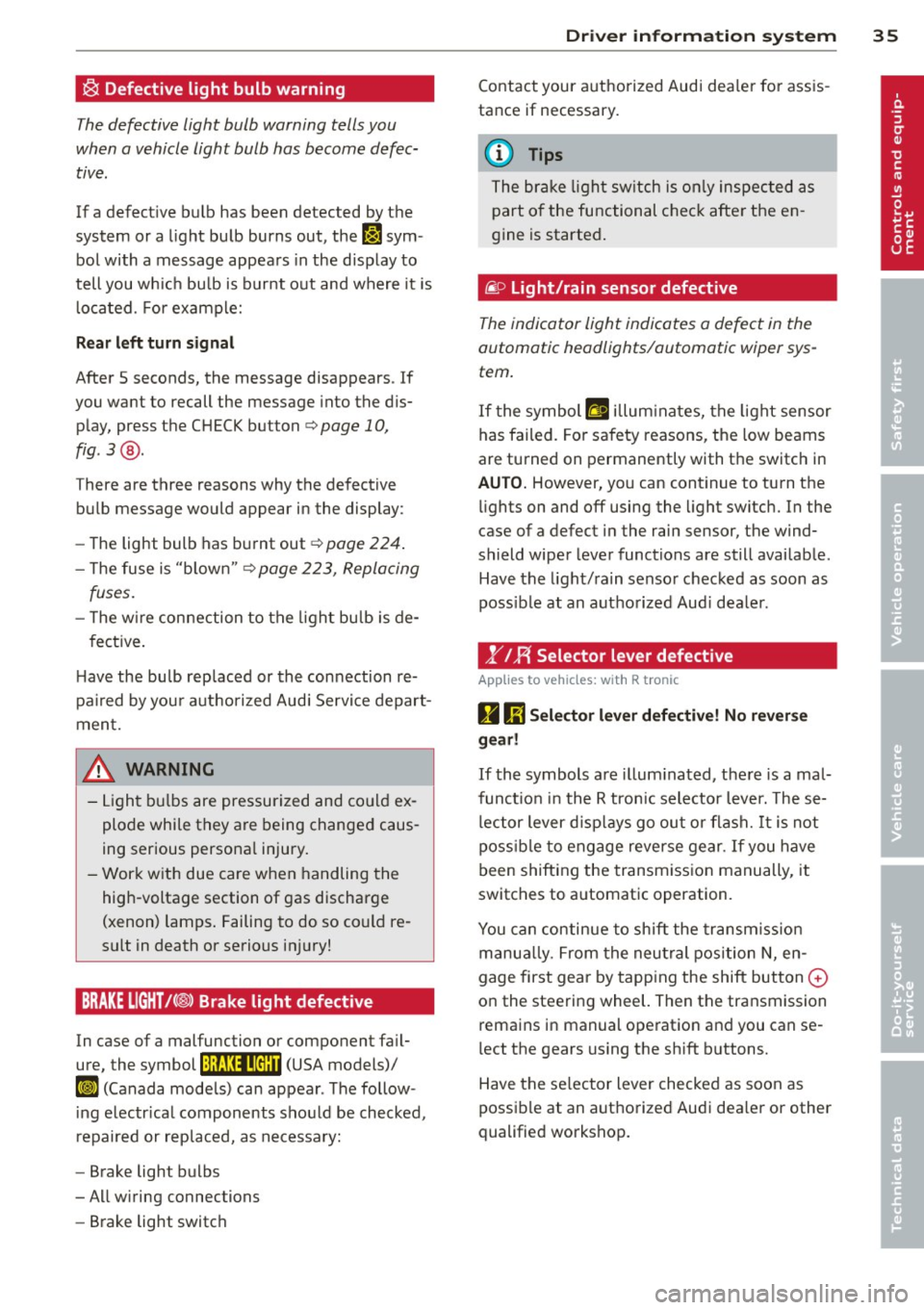
The defective light bulb warning tells you
when a vehicle light bulb has become defec· tive .
If a defective bulb has been detected by the
system or a light bulb burns out, the
II sym
bol with a message appears in the display to
tell you wh ich bu lb is bur nt out and where it is
located. For example:
R ea r left turn signal
After 5 seconds, the message disappears . If
you want to recall the message into the dis play, press the CHECK button
c::> page 10,
fig . 3 @ .
There are three reasons why the defective
bulb message would appea r in the display:
- The light bulb has burnt out
c=> poge 224 .
- The fuse is "blown"¢ page 223, Replacing
fuses.
- T he w ire connection to the light bulb is de-
fective .
H ave the bulb rep laced or the connection re·
pa ired by you r authorized Aud i Servi ce depart
ment.
A WARNING
- Light bu lbs are pressurized and co uld ex
plode while they are being changed caus
ing serious persona l injury.
- Work with due care when handling the
high-voltage section of gas discharge
(xenon) lamps . Failing to do so co uld re
sult in death or serious injury!
BRAKE LIGHT t<®> Brake light defective
In case of a malfunction or component fa il·
ure, the symbol (USA models)/
K@ )] (Canada models) can appear . The follow
i ng e lectr ica l components should be checked,
repaired or replaced, as necessary:
- Brake light bulbs
- All w iring connections
- Brake light switch
Dr iver in formati on sys tem 35
Contact your a uthorized Audi dea ler for assis
tance if necessary.
(0 Tips
The brake light sw itch is on ly inspected as
part of the functional chec k afte r the en
gine is started .
fi.D Light/rain sensor defective
The indicator light indicates a defect in the
automatic headlights/automatic wiper sys
tem.
If the symbol ftl illum inates, the light sensor
has failed. Fo r safety reasons, the low beams
are turned on permanently with the switch in
AUTO. However, yo u can cont inue to turn the
li ghts on and off using the light switch. In the
case of a defect in the rain sensor, the wind
shield wiper lever functions are still availab le .
Have the light/ rain senso r checked as soon as
poss ib le at an autho rized Aud i dea ler.
1" IF{ Selector lever defective
Applies to vehic les : wi th R tronic
D 1;j Sele ctor l ever defectiv e! No rev ers e
ge ar!
If the symbols are il lum ina ted, the re is a mal·
funct io n in the R tronic selector lever. These·
l ector lever d isp lays go out o r flash.
It is not
poss ible to engage reverse gear . If you have
been shifting the transm iss ion manually, it
switches to a utomatic operation .
You can continue to shift the transm iss ion
manua lly. From the neu tral pos ition N, en
gage first gea r by tapping the shift button
0
on the steering wheel. Then the transmission
rema ins in manual ope ration and you can se
lect the gears using the sh ift b uttons.
Have the se lector lever checked as soon as
possible at an authorized Audi dea ler or other
qualified workshop.
Page 59 of 244
instruments (needles and dials) is automati
cally adjusted to ambient conditions. The driv
er can a lso ad just the brightness of the light
ing.
Ignition ON , light switch at @
With the ignition swi tched O N, the glow of in
strument needles
can be adjusted to appear
brighter or dimmer.
Ignition ON , light switch at coo; or gD .
With the l igh ts sw itched on, the bright ness of
in str ument cluster (i.e. needles, g auges and
disp lays) and center console i llumination can
be adjusted .
(D Note
The inst rument cl uster and cente r console
illum ination (ga uges and needles) comes
on when you switch on the ignition and the
vehicle headlights are off. Be aware of t he
following difference between mode ls built
to US or Canadian specifications:
- USA models: illumination of the inst ru
ment cluster (ga uges and needles), das h
and center console around the gearsh ift
l ever is controlled by a light senso r locat
ed in the instrument panel. The instru
m ent pane l illumination will a utomat i
call y become dimmer as t he day ligh t
fades away and eventually will go o ut
com plete ly when o utside light is ve ry
l ow. This is to rem ind you, the driver, to
switch on the headlights before it gets
too dark .
- Canada mode ls: instrument panel i llum i
nat ion will stay bright regard less of the
i ntensity of amb ient light. Always be
aware of c hanges in outside light cond i
t ions wh ile you are driving. Respond in
time to fadi ng daylight by tu rning the
l ight sw itch to posit ion
io (or "AUTO" if
you r ca r is equ ipped with th is featu re) to
turn on your hea dligh ts. Clear vi
sion 5 7
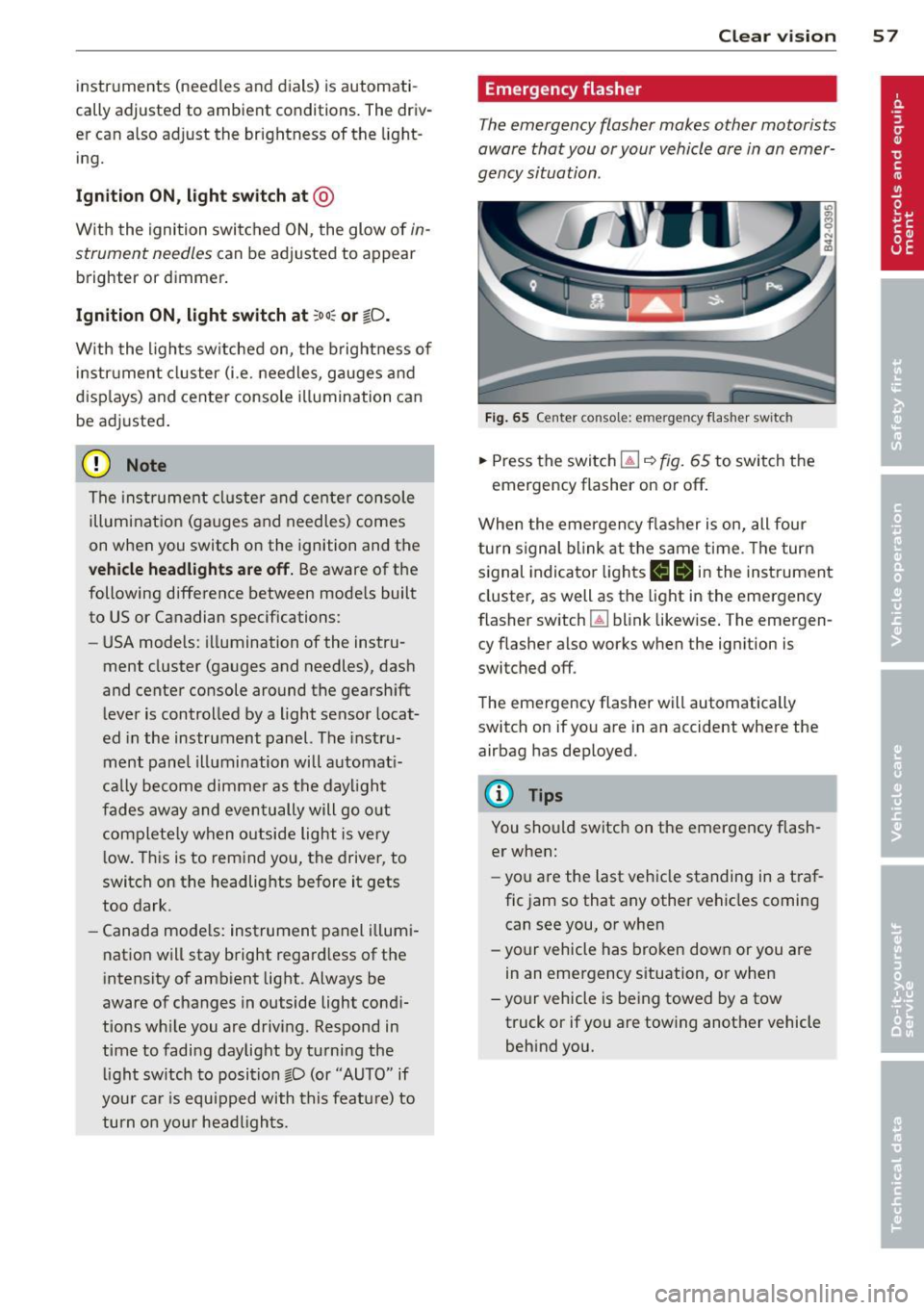
Emergency flasher
The emergency flasher makes other motorists
aware that you or your vehicle are in an emer
gency situation .
Fig. 65 Cent er consol e: eme rge ncy flas he r sw itc h
.,. Press the switc h l!J ~ fig. 65 to switch t he
emergency flasher on or off.
When the eme rgency f las her is on, all four
turn s ignal b link at t he same time . Th e turn
signal indicato r lights
1111 in t he instrument
cluster, as well as the light in the eme rgency
flasher switch ~ blink likew ise . The emergen
cy flasher also works when the ignition is
switched off .
The eme rgency flasher will automatically
switch on if you are in an accident where the
airbag has deployed.
@ Tips
You sho uld switch on the emergency flash
er when:
- you a re the last ve hicle standing in a t ra f
fic jam so that any other vehicles coming
can see you, or when
- yo ur vehicle has bro ken dow n or you are
in an eme rgency s ituation, or when
- yo ur vehicle is be ing towed by a tow
truck or if you are towing another vehicle
behind you.
Page 67 of 244
SE (Southeast), S (South), SW (Southwest),
W (West), NW (Northwest).
@ Tips
To avoid inaccurate di rections, do not al
low any remote controls, electrical sys
tems, or metal parts close to the mirror .
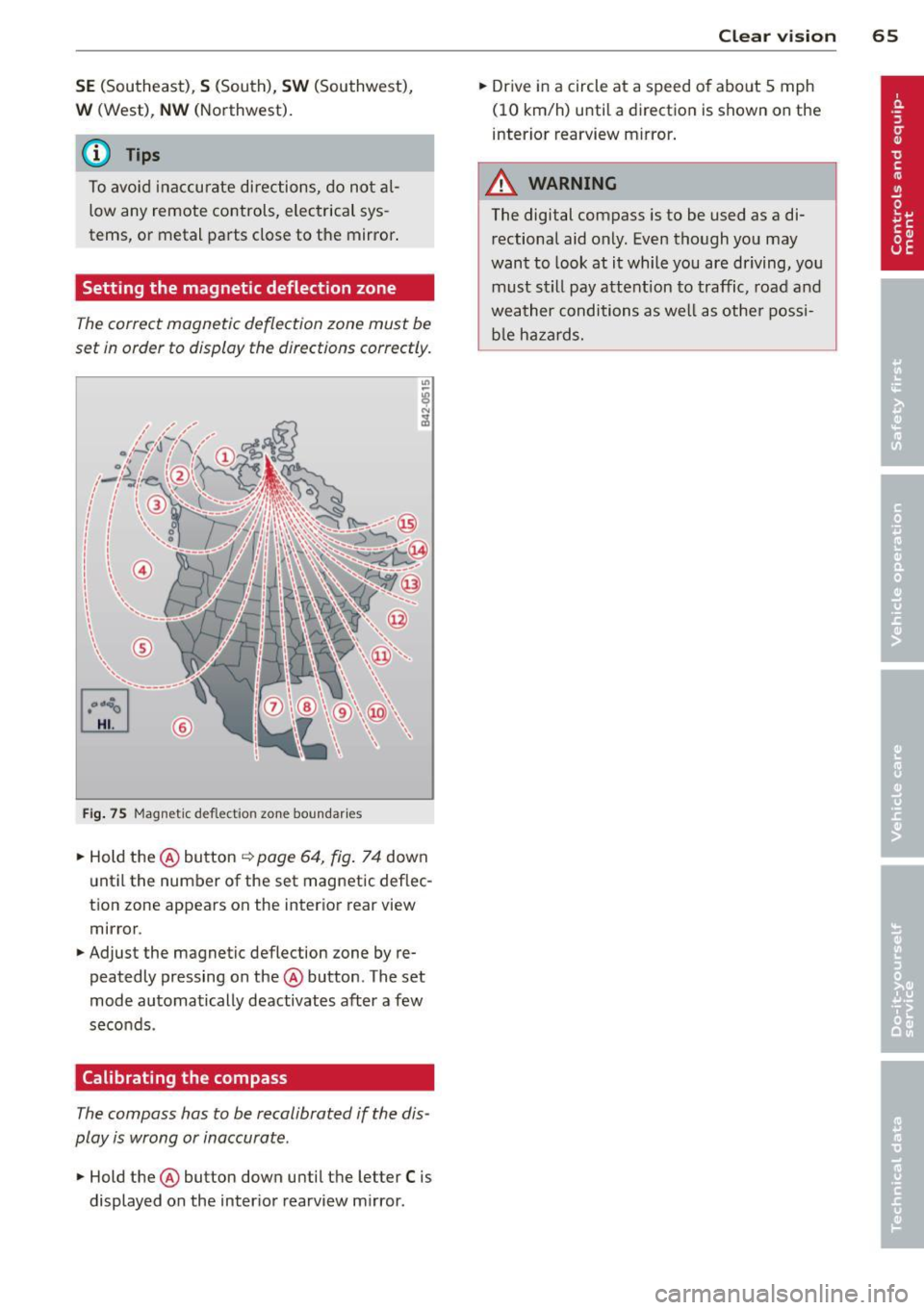
Setting the magnetic deflection zone
The correct magnetic deflection zone must be
set in order to display the directions correctly.
®
Fi g. 75 Magnet ic d efl ect io n zon e boundar ies
.. Hold the@ button ~ page 64, fig . 7 4 down
unt il the number of the set magnetic deflec
t ion zone appears on the inter ior rear view
mirror .
.. Adjust the magnetic deflection zone by re
peatedly pressing on the@ button . The set
mode automatically deactivates after a few
seco nds .
Calibrating the compass
The compass has to be recalibrated if the dis
play is wrong or inaccurate .
.. Hold the@ button down until the letter C is
displayed on the inter ior rearview m irror .
Clear vi sion 65
.. Dr ive in a circle at a speed o f abo ut 5 mph
(10 km/h) until a direction is shown on the
interior rearview mirror .
A WARNING
The digital compass is to be used as a di
rectional aid only. Even though you may
want to look at it while you are driving, you
must still pay attent ion to traffic, road and
weather conditions as well as othe r possi
b le ha za rds.
Page 74 of 244
7 2 Warm and cold
Warm and cold
Climate controls
Controls
The climate controls automatically maintain the selected temperature in the vehicle interior
throughout each season .
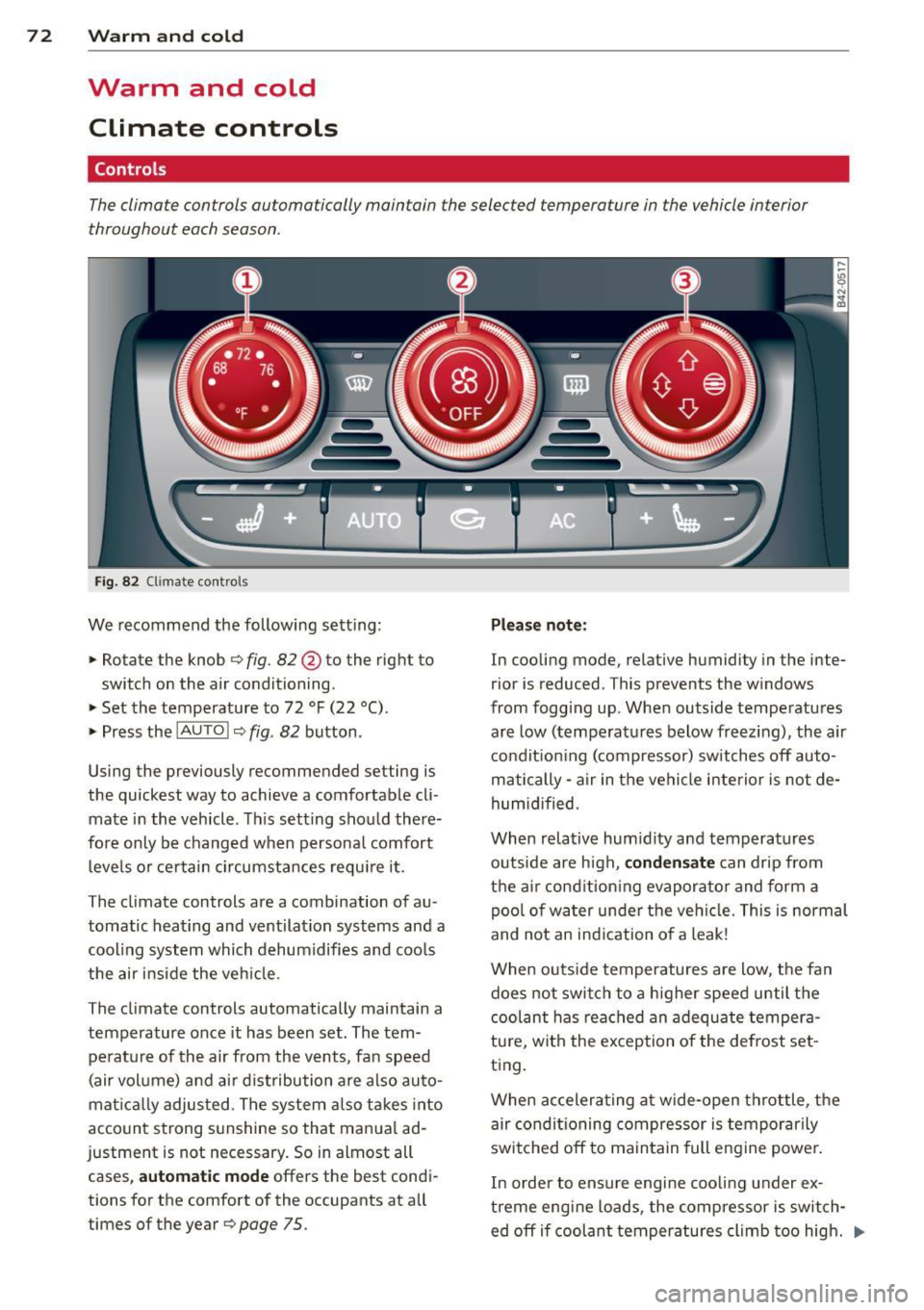
Fig. 82 Climate contro ls
We recommend the following sett ing :
> Rotate the knob 9 fig. 82 @ to the right to
switch on the air conditioning .
> Set the temperature to 72 °F (22 °().
> Press the !AUTO !~ fig. 82 button .
Using the previously recommended setting is
the quickest way to achieve a comfortable cli
mate in the vehicle . This setting should there
fore only be changed when persona l comfort
l evels or certain circumstances require it.
The climate controls are a combination of au
tomatic heating and ventilation systems and a
coo ling system which dehum idifies and coo ls
the air inside the veh icle.
The climate controls automatically maintain a temperature once it has been set . The tem
perat ure of the air from the vents, fan speed
(air volume) and a ir dist ribution are also auto
mat ical ly adjusted . The system also takes into
account strong s unshine so that manua l ad
justment is not necessary. So in almost all cases,
a ut om at ic mode offers the best condi
tions for the comfort of the occupants at all
times of the year
9 page 75 .
Plea se not e:
In cooling mode , relative humidity in the inte
rior is reduced . This prevents the w indows
from fogg ing up. When outside temperatures
are low (temperatures below freezing), the air
condit ion ing (compressor) switches off auto
matically - air in the vehicle inte rior is not de
humid ified.
When relative hum idity and temperatures
outside are h igh,
co nden sat e can drip from
the a ir cond ition ing evaporator and form a
pool of water under the vehi cle. This is normal
and not an ind ication of a leak!
When outs ide temperatures are low, the fan
doe s not switch to a h igher speed until the
coolant has reached an adequate tempera
tu re, with the exception of the defrost set
ting.
When accelerating at wide-open throttle, the air conditioning compressor is temporarily
switched off to maintain full eng ine power .
In order to ensure engine cooling under ex
t reme engine loads , the compressor is switch
ed off if coolant temperatures climb too high . .,..
Page 77 of 244
There are additional combinations (through
intermediate settings) avai lab le to adjust air
d istr ibution as needed.
(D Tips
I f the climate controls are running in cool
ing mode, air shou ld flow mainly from
vents @and
@. To achieve s uff ic ient coo l
ing, you shou ld never close these vents
completely.
Defrost ~
The windshield and side windows are defrost
ed or cleared of condensa tion as quickly as
possible.
~ To turn on the defogger/defroster, press the
~ button ¢ page 72 , fig . 82.
~ To turn the defogger/defroster off, press the
~ button again, or the IAU TOI button .
T emperature is controlled automatically. The
maximum amount of a ir flows mainly from
vents 1 ¢
page 74.
A small amount of air flows from vents 2 -if
they are open
¢ page 74 .
Pressing the~ button switches off recircu la
tion mode.
Automatic operation ~
Standard operating mode at all times of the
year.
Tu rning on automatic operation
~ Set the temperature you want .
~ Press the IAU TO I button ¢ page 72, fig. 82.
Automatic operation ensures constant tem
peratures in the inter ior and dehum idifies the
air ins ide the vehicle. Air temperature, vol
ume , and distribution are controlled automat
i cally to reach o r maintain the desired interior
temperature as q uickly as possib le. Fluctua
tions in exterior temperature and the effects
of temperature from the position of the sun
are compensated for automat ically.
Warm and c old 75
Manual air recirculation mode~
The recirculation mode prevents polluted out
side air from entering the vehicle interior.
S w itching on air re circul atio n
~ Press the button ~¢ page 72, fig. 82,
¢ ,&.
Switching off a ir re circulation
~ Press the button l.;., I again, or
~ Press the IAU TOI button , or
~ Press the~ button .
In recircu lation mode, air is drawn from the
vehicle interior, filte red, and recirculated . We
recommend that you se lect recirculation
mode
briefly ¢.& under the fo llowing condi
tions:
When driving through a tunne l or in a traffic
jam so that exhaust fumes and odors cannot enter the vehicle interior.
A WARNING
You shou ld not use the recirculation mode
for an extended period s ince no fresh air is
drawn in, and with the air condit ioning
switched off the windows can fog up -this
increases the r isk of an accident!
A/C operation ~
Switching on A /C
~ Press the IAC ! button ¢ page 72, fig. 82.
Sw itching A /C off
~ Press the IAC ! button again.
The cooling system is switched on during A/C
operation -the heating and ventilation system
is controlled automatically .
(D Tips
If the LED in the switch stays on after A/C
operation has been switched off( = switch-
ing the A/C off), there is a fault in an air
cond itioning component. Please consult
llJI,
Page 78 of 244
76 Warm and cold
an authorized Audi dealer when there is an
operating problem.
Using the climate controls economically
Economical use of the climate controls helps
to save fuel.
When climate control is wor king in cool ing
mode, engine performance is reduced and
fuel consumption is affected. To keep the time
the air conditioning is on as short as possible,
you shou ld do the fo llow ing:
.,. If you would like to save f uel, sw itch the air
condition ing off.
... If you open the windows whi le driving,
switch the air conditioning off.
... If the vehicle is extremely hot due to the
heat of the sun, briefly open doors and win
dows .
@ For the sake of the environment
When you save fuel, you reduce emissions
from the vehicle.
Rear window defogger
The rear window defogger clears the rear win
dow of condensation .
... Press the~ button c::> page 72, fig. 82 to
turn the rear window defogger on and off.
The rear window defogger works only when
the eng ine is running. The indicator light in
the butto n illum inates when the rear window
defogger is turned on .
The rear window defogger is switched off au
tomatically after approx. 10 minutes.
@ For the sake of the environment
As soon as the rear window is clear, yo u
should switch the rear window defogger
off. The reduced power consumption has a
beneficial effect on fuel consumption.
Heated seats
The seat cushion and the seotbock of the
front seats con be heated electrically.
... Press the heated seats button I- ., +I
c::> page 72, fig . 82 to set the level of heating
desired.
The range of contro ls goes from 1 to 3. The
heat setting selected is shown by LEDs above
the button.
(D Note
To avoid damage to the heating elements
in the seats, do not kneel on the seats or
place heavy loads on a small area of the
seat .
Page 91 of 244
Parking system
Parking system
advanced
Introduction
Applies to vehicles: with pa rkin g system advanced
D D
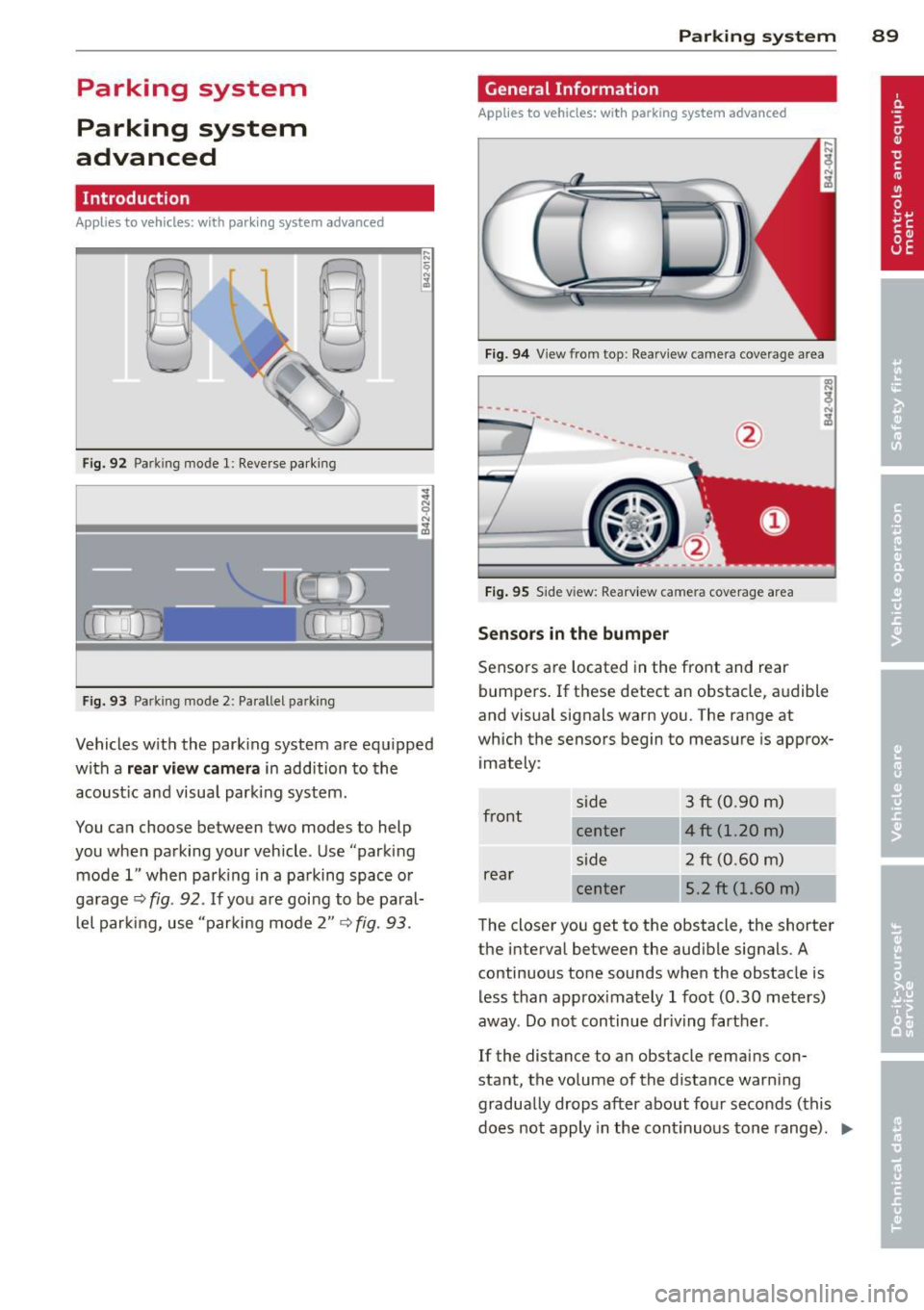
Fig. 92 Park ing mode l: Reve rse parking
F ig . 93 Parking mode 2: Pa rallel parking
Vehicles w ith the park ing system are equ ipped
with a
rear view camer a in addition to the
acoust ic and visual park ing system .
You ca n choose between two modes to help
you when parking your vehicle . Use "parking
mode 1" when park ing in a parking space o r
ga rage
Q fig . 92. If you are goi ng to be paral
l el par king, use "parking mode 2"
~ fig. 93.
Par king system 89
General Information
Applies to vehicles: wit h parking system advanced
Fig. 9 4 View from top: Rea rvi ew camera coverage area
---
---------
Fi g. 95 Side view: Rearv iew came ra coverage area
Sen sor s in the bumper
Sensors a re located in the front and rear
bumpers . If these detect an obstacle, a udible
and visual signals warn you. The range at
which the sensors begin to meas ure is approx
i mately:
front s
ide 3 ft (0.90 m)
center 4 ft (1.20 m)
side 2 ft (0.60 m)
rear center 5.2 ft (1.60 m)
The closer you get to the obstacle, the shorter
the interva l between the audible signals . A
continuous tone sounds when the obstacle is
less than approximately 1 foot (0.30 meters)
away . Do not continue dr iving farther .
If the distance to an obstacle rema ins con
stant, the volume of the distance warn ing
gradually drops after about fo ur seconds ( this
does not apply in the cont inuous tone range) .
II>
Page 97 of 244
Homelink®
Universal remote
control
General information
Appl ies to vehicles: with Horne Link® universal rem ote
control
The Homelink ® feature can learn up to three
radio frequency codes for most current trans
mitters used for operating garage doors, es tate gates, home or outdoor lighting sys
tems, and other devices.
You must first program the Homelink ® trans
mitter before you can use the system
¢ page 96, Programming the HomeLink ®
transmitter.
In order to program the Home link ® transmit
ter for devices utilizing rolling code, a second
person on a ladder who can safe ly reach the
garage door opener motor is recommended.
I t is also necessary to locate the "learn" but
ton on your garage door opener motor . Refer
to the operat ing instruct ions for the opener,
as the location and color of this button may
vary by manufacturer.
You can still use the origina l remote control
for the device at any time.
A WARNING
-
- Never use the Homelink ® transmitter
with any garage door opener that does
have not the safety stop and reverse fea
tu re as requ ired by federa l safety stand
ards . Th is includes any garage door open
er mode l manufact ured before April 1,
1982.
- A garage door opener which cannot de
te ct an object, signaling the door to stop
and rever se does no t mee t current feder
al safety standards. Using a ga rage doo r
opener witho ut these features increases
risk of serious inj ury or death.
- F or sa fety reasons never release the
par king brake or start the engine while
anyone is stand ing in front of the vehicle .
Hom elin k® 95
-A garage door or an estate gate may
sometimes be set in mot ion when the
Homelink ® remote control is being pro
grammed . If the device is repeatedly ac
tivated, th is can overstrain motor and
damage its e lectrical components -an
overheated moto r is a fire hazard!
- To avo id possib le injuries or property
damage, please always make abso lutely
certain that no persons o r objects are lo
ca ted in the range of motion of any
equ ipment being ope rated .
(D Tips
-If you would li ke more information on
Homel ink ®, w here to purchase the
Homel ink ® compatib le produc ts, or
would like to purchase the Homelink ®
Home Lighting Package, please ca ll toll
free: 1-800-355-3515 .
- For Declaration of Compliance to United States FCC and Ind ustry Canada reg ula
tions ¢
page 212 .
Page 98 of 244
96 Homelink®
Programming the Homelink ®
transmitter
Applies to vehicles: with Homelink® universal remote
co ntrol
The transmitter is programmed in two phas
es. For rolling code transmitters, a third
phase is also necessary .
~----------------- g: ~
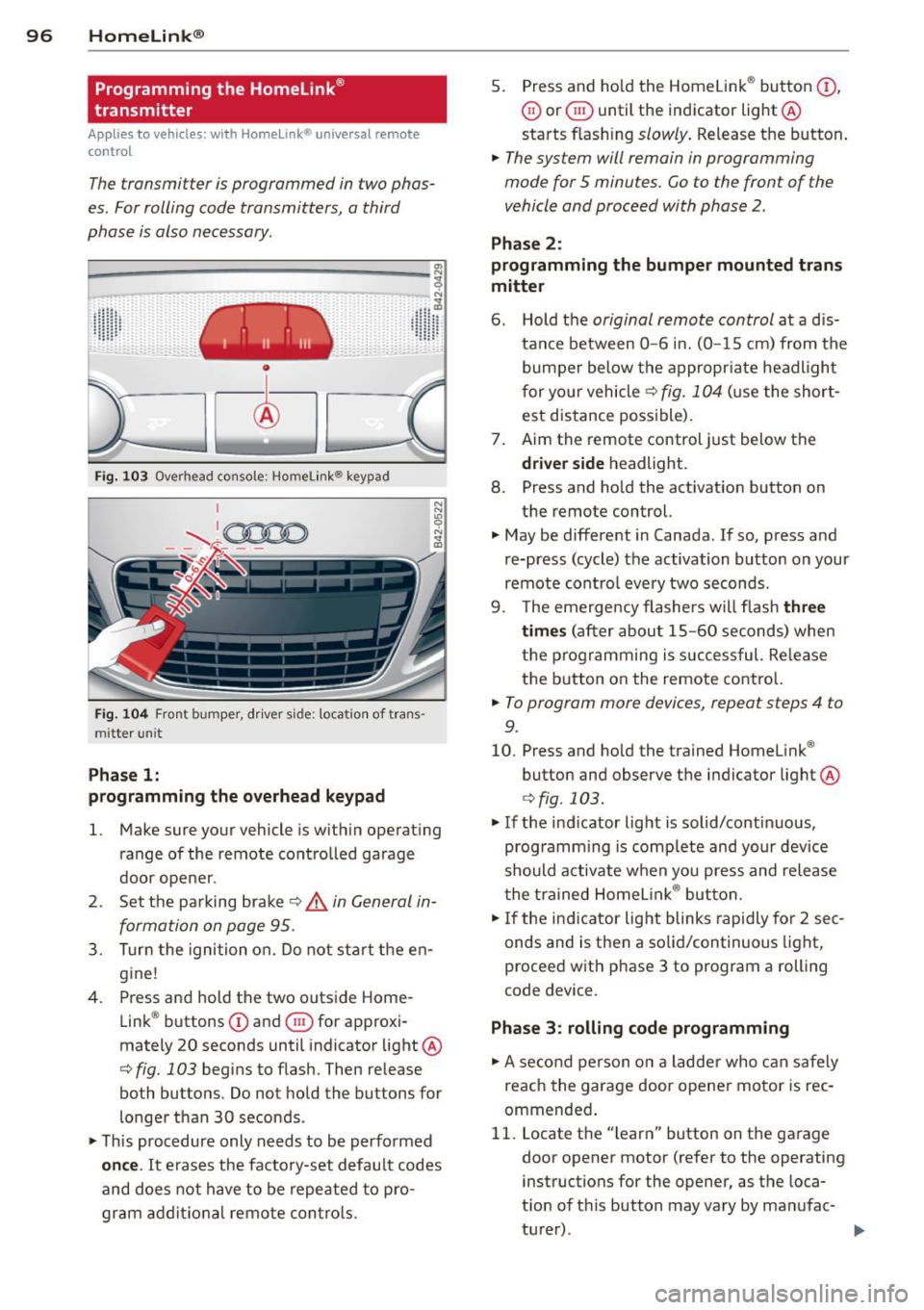
Fig . 103 Overhead console ; Homelink ® keypad
Fig. 104 Fron t bumper, drive r side: location of trans ·
m itterun it
Phase 1:
programming the overhead keypad
"' ,A
1. Make sure your vehicle is within operating
range of the remote controlled garage
door opener .
2 . Set the parking brake~,&.
in General in
formation on page 95 .
3. Turn the ignition on. Do not start the en
gine!
4 . Press and hold the two outside Home
Link ® buttons
CD and @for approxi
mately 20 seconds until indicator light ®
¢ fig. 103 begins to flash. Then release
both buttons . Do not hold the buttons for
longer than 30 seconds .
"'T his procedure only needs to be performed
once. It erases the factory-set default codes
and does not have to be repeated to pro
gram additional remote controls. 5
. Press and hold the Homelink ® button
(D ,
@ or @ until the indicator light ®
starts flash ing
slowly . Release the button.
.,. The system will remain in programming
mode for 5 minutes. Co to the front of the
vehicle and proceed with phase 2 .
Phase 2:
programming the bumper mounted trans
mitter
6 . Hold the original remote control at a dis
tance between
0 -6 in. (0 -15 cm) from the
bumper below the appropriate headlight
for your vehicle
~ fig. 104 (use the short
est distance possible).
7. Aim the remote control just below the
driver side headlight.
8. Press and hold the activation button on
the remote control.
"' May be different in Canada . If so, press and
re-press (cycle) the activation button on your
remote contro l every two seconds .
9. The emergency flashers will flash
three
times
(after about 15-60 seconds) when
the programming is successful. Re lease
the button on the remote control.
.,. To program more devices , repeat steps 4 to
9 .
10. Press and hold the trained Homelink ®
button and observe the indicator light®
¢fig . 103 .
"'If the ind icator light is solid/continuous,
programm ing is comp lete and your device
should activate when you press and release
the trained Homelink ® button.
"'If the indicator light blinks rapidly for 2 sec
onds and is then a solid/continuous light,
proceed with phase 3 to program a rolling
code device.
Phase 3: rolling code programming
.,. A second person on a ladder who can safely
reach the garage door opener motor is rec
ommended .
11. Locate the "learn" button on the garage
door opener motor (refer to the operating instructions for the opener, as the loca
t ion of this button may vary by manufac-
turer) .
~