tow AUDI R8 SPYDER 2011 User Guide
[x] Cancel search | Manufacturer: AUDI, Model Year: 2011, Model line: R8 SPYDER, Model: AUDI R8 SPYDER 2011Pages: 244, PDF Size: 59.74 MB
Page 76 of 244
7 4 Warm and cold
addit ional intermediate settings available to
adj ust the temperature as needed.
Switching climate control on and off
Sw it ch ing the clim ate con trol sy stem on
a nd off
• Turn the knob @¢ page 72, fig. 82 to the
r ight to sw itch climate control on. The LED
next to the word OFF goes out .
• Turn the knob@¢
page 72, fig. 82 to the
left to switch the climate contro l system off .
T he LED nex t to the word OFF comes on .
Setting fan speed~
• Turn the knob@¢ page 72, fig. 82 to the
setting you want to adjust fan speed (air
quantity) .
Air distribution
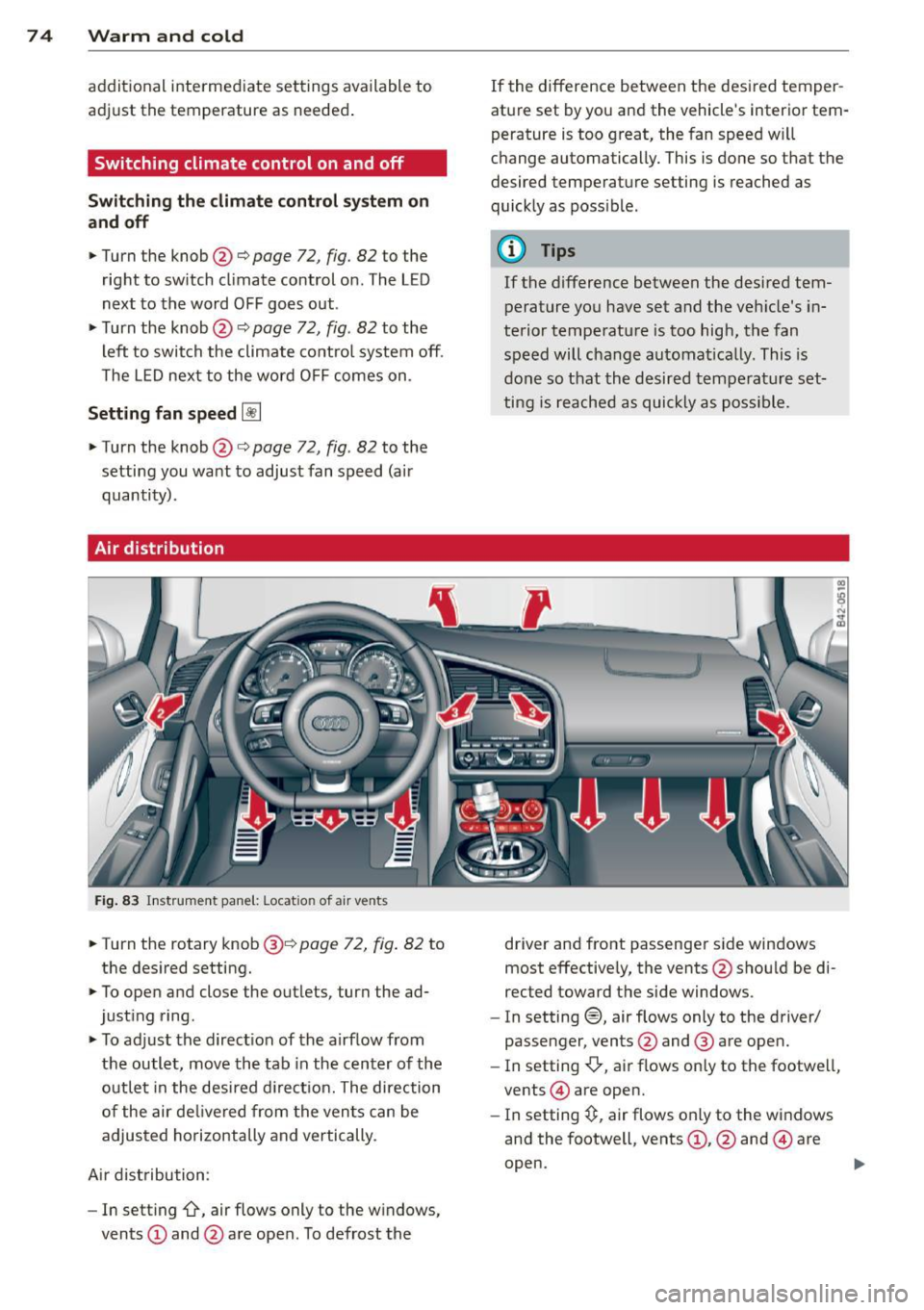
Fig . 83 Instr ume nt pane l: Locat io n of air vents
• Turn the rotary knob@¢ page 72, fig. 82 to
the desired setting.
• To open and close the outlets, turn the ad
justing ring .
• To adj ust the direct ion of the airflow from
the outlet, move the tab in the center of the
outlet in the desi red d irection. The direction
of the air de livered from the ven ts can be
adjusted horizontally and vertically.
A ir dist ribution:
- In setting
-0, air flows only to the windows,
vents
(D and @are open. To defrost the If the difference between the desired temper
ature set
by you and the vehicle's interior tem
perature is too great, the fan speed will
change automatically. This is done so that the
desired temperature setting is reached as
quick ly as possible .
(D Tips
If the difference between the desired tem
perature you have set and the veh icle's in
terior temperature is too high, the fan
speed will change automat ically. This is
done so that the desired temperature set
ting is reached as quickly as poss ible.
driver and front passenger side windows
most effective ly, the vents @shou ld be di
rected toward the side windows.
- In setting®, air flows only to the driver/
passenger, vents @and @ are open.
- In setting
-0-, air flows only to the footwe ll,
vents @) are open.
- In setting~. air flows only to the windows
and the footwell, vents
(D , @ and @are
open.
...
Page 81 of 244
-The engine c annot be started by pushing
or towing the vehicle.
@) For the sake of the environment
To avo id u nnecessary engine wea r and to
reduce exhaust emissions, do not let your
vehicle stand and warm up . Be ready to
drive off immediately after start ing your
veh icle.
Stopping the engine
On vehicles with R tronic*, the engine can be
turned off in the neutral position N and in
each gear (1 -6 and R).
.. Turn the ignition key to position@
¢page 77, fig. 85.
A WARNING
- Never turn off the eng ine unt il the vehi
cle has come to a complete stop.
- The brake booster and servotronic on ly
work when the engine is running. With
the ignition turned off, you have to apply
more force when steering or braking.
S ince you cannot steer and stop norma l
ly, this can lead to accidents and ser ious
injuries.
(D Note
- If the engine has been under heavy load
for an extended period of time, heat
builds up in the engine compartment af
ter the eng ine is sw itched off -there is a
risk of damaging the engine . Allow the
engine to continue to run at idle for a
short time or drive until it has cooled
down before you turn it off¢
page 159 .
-If the engine has been under heavy load
for an extended period of time, it can be
come extreme ly hot. You should not park
your vehicle over eas ily combustible ob
jects or areas (e .g. grass or leaves). There
i s a risk of start ing a fire.
On th e road 7 9
@ Tips
After the engine has been switched off, the
radiator fan can continue to run for up to
10 minutes -even wit h the ignition switch
ed off. It can also sw itch on again after
some time if the coolant temperatu re rises
as the result of heat bu ildup or if the en
gine compartment is heated by the s un's
r ays and the engine is hot.
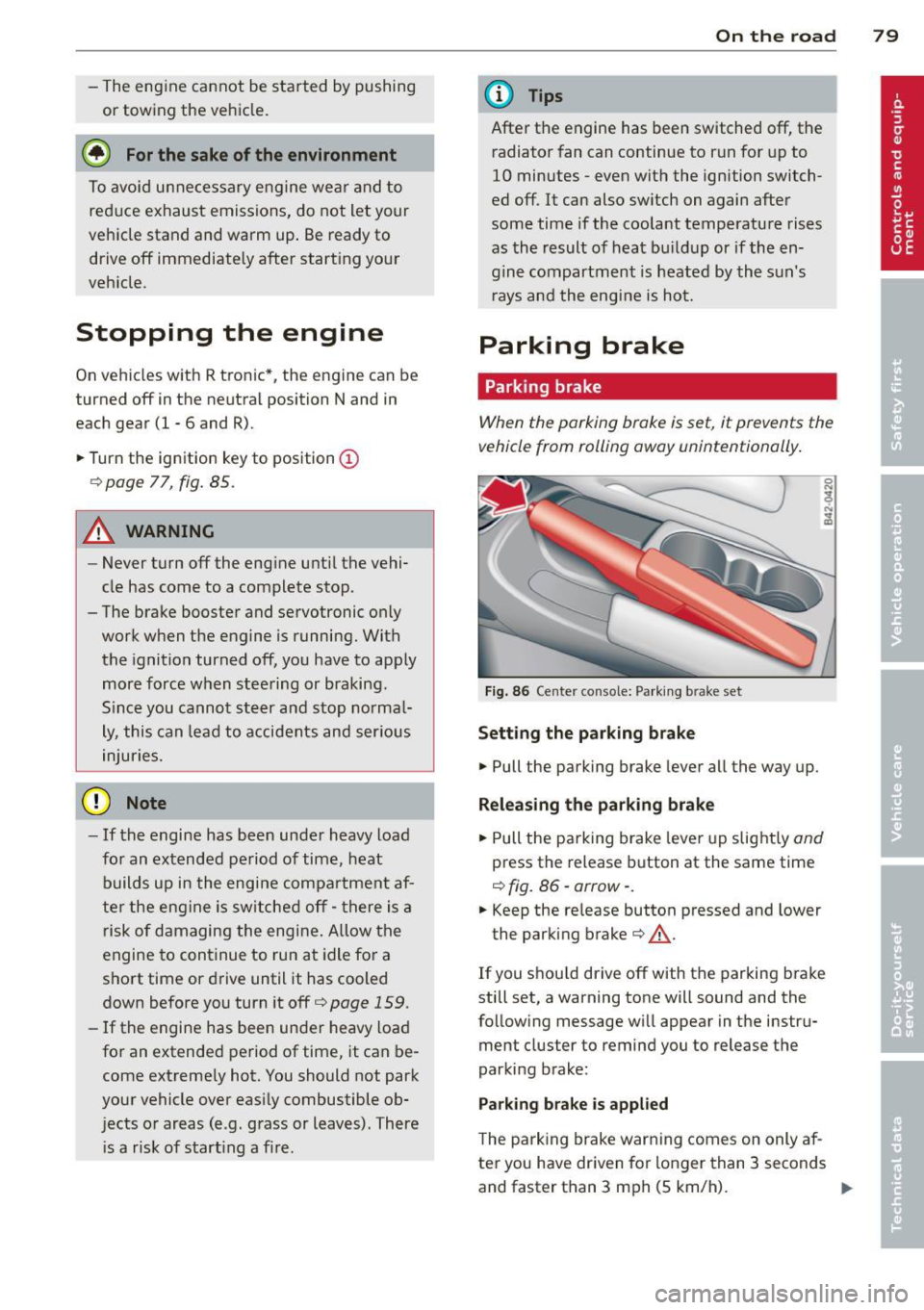
Parking brake
Parking brake
When the parking brake is set, it prevents the
vehicle from rolling away unintentionally .
Fig. 86 Ce nter console: Pa rk ing b rake set
Set ting the parking brake
.. Pull the parking brake lever all the way up.
Releasing th e park ing bra ke
.. Pull the parking brake lever up slight ly and
press the release button at the same time
¢ fig. 86 ·arrow· .
.. Keep the re lease button pressed and lower
the parking brake¢,&..
If you shou ld drive off with the parking brake
still set, a warning tone will sound and the
follow ing message wi ll appear in the instru
ment cluster to remind you to release the
parking brake:
Parking bra ke is appl ied
T he parking brake warning comes on only af
ter you have driven for longer than 3 seconds
and faster than 3 mph (5 km/h). ..,.
Page 83 of 244
Cruise control
Introduction
The cruise control system keeps the speed
constant .
The cruise control system makes it possible to
drive at a constant speed over 20 mph (US
model) or 30 km/h (Canadian model). This is
true only to the extent that engine power or
engine braking effect allow . Using the system
takes the strain off the "gas peda l foot" -es
pec ial ly on long tr ips.
In the control mode, the indicator light in the
instrument cluster is lit
(Dj;(i )~i~ (US model) ,111
(Canadian model).
The cruise control system automatically
switches itself off imm ed iately under the fol
lowing cond itions:
- Pressing the brake pedal.
- Pressing the clutch pedal.
A WARNING
-Always pay attention to traffic even when
the cruise control system is switched on.
You are always responsible for your
speed and the distance between your ve hicle and other vehicles.
- For safety reasons, the cruise control sys tem shou ld not be used in the city, in
stop-and-go traffic, on twisting roads
and when road conditions are poo r (such
as ice, fog, gravel, heavy rain and hydro
planing) -risk of accident.
- Turn off the cr uise control system tem
porarily when entering turn lanes, high
way exit lanes or in construction zones.
- Please note that inadvertently "rest ing"
your foot on the accelerator peda l causes
the cruise control system not to brake .
This is because the cruise contro l system
is overridden by the driver's acceleration.
(D Note
On manual transmission vehicles: If you
shift into neutral with the cruise contro l
On th e road 81
system switched on, always depress the
clutch pedal! Otherwise the engine will
race and could be damaged as a result .
(D Tips
When driving on steep downward grades,
the cruise control system cannot keep the
speed constant. The vehicle's own weight
increases the speed. Shift into a lower gear
i n plenty of t ime or brake the vehicle with
the foot brake .
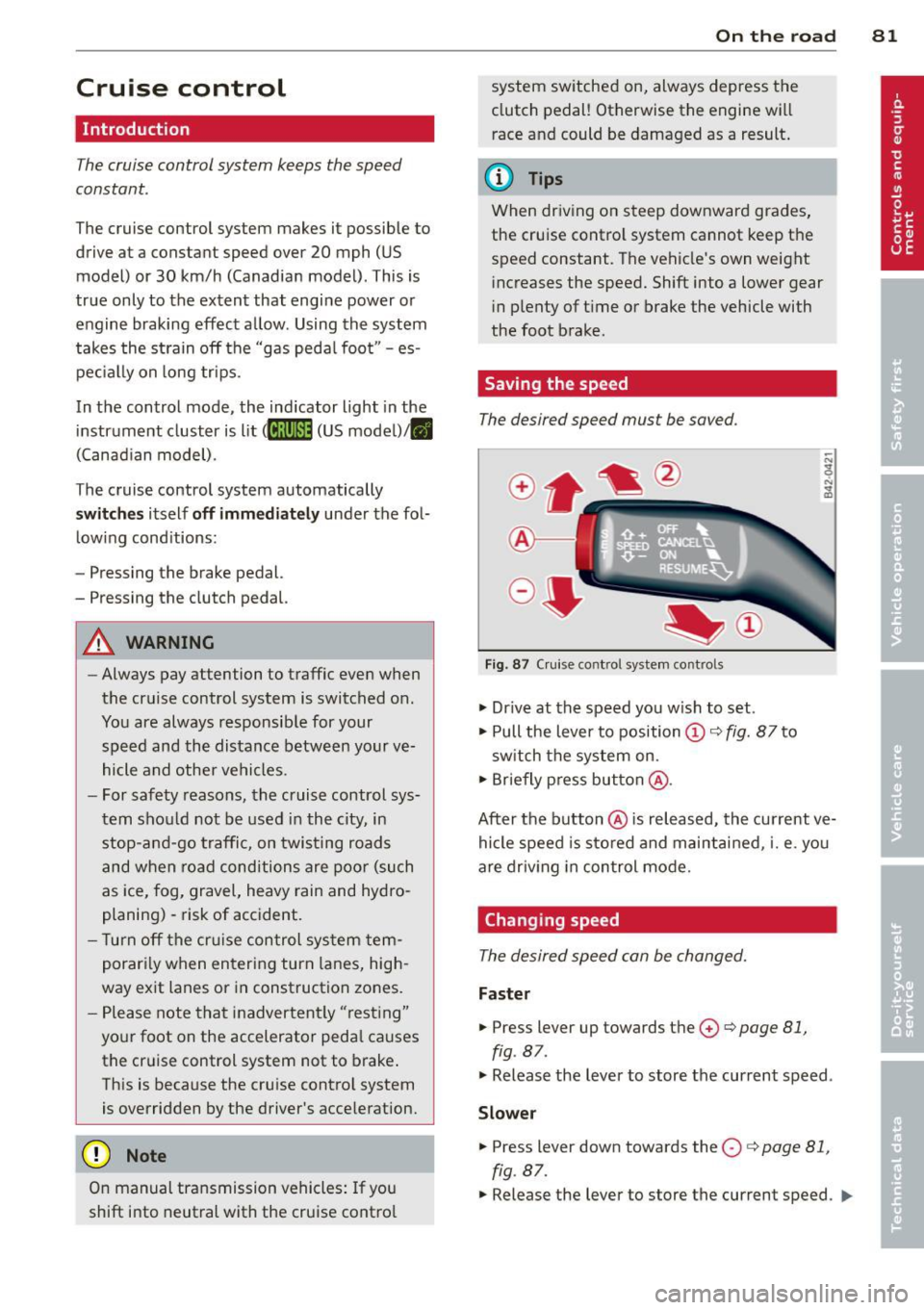
Saving the speed
The desired speed must be saved.
Fig. 87 C ruise control system controls
.,. Dr ive at the speed you w ish to set.
.,. Pull the lever to position
(D c:> fig. 87 to
sw itch the system on.
.,. Briefly press button @.
After the button @is released, the current ve
hicle speed is sto red and maintai ned, i.e. you
are driv ing in control mode.
Changing speed
The desired speed can be changed.
Fas ter
.,. Press lever up towards the 0 c:> page 81,
fig. 87.
.,. Release the lever to store the current speed .
Slower
.. Press lever down towards the O c:> page 81,
fig. 87.
.,. Release the lever to store the current speed. IJJl-
Page 84 of 244
82 On the road
You can also increase your speed by pressing
the accelerator pedal. After you release the
accelerator pedal, the system automat ically
adjusts back down to the speed you previously
set .
However, if you exceed this speed by 5 mph
(10 km/h) for longer than 5 m inutes, the stor
ed speed will be deleted. You will have to re
save it.
Briefly pressing lever
The desired speed is increased by about 2 mph
(2 km/h) by briefly pressing the lever upwards
towards
c:> page 81 , fig . 87 0 -
The desired speed is decreased by about 2
mph (2 km/h) by briefly pressing the lever
downwards towards
c:> poge 81, fig. 87G).
Switching control mode off temporarily
.. Step on the brake pedal, or
.. Depress the clutch pedal all the way, or
.. Press the lever towards @(not latched)
c> page 81, fig. 87 .
When the system is turned off temporarily,
the speed stored at the time is retained.
To resume the stored speed, release the brake
or clutch pedal and pu ll the lever to position
(D .
If no desired speed was stored when the sys
tem was temporarily switched
off, you can
store a new desired speed as follows: Drive at
the desired speed and briefly press button
c> page 81, fig. 87 @ (SET) .
A WARNING
You should only return to the saved speed
if it is not too fast for the current traffic
conditions - risk of an accident!
Deactivating
.. Press leve r into position @(latc hed)
¢ page 81, fig. 87.
The saved speed value is deleted when the ig
nition is switched
off.
(D Tips
Switch the cruise control system off com
pletely at the end of each trip. When you
start the next trip, the desired speed can
be set simp ly from the basic setting
c>poge 81.
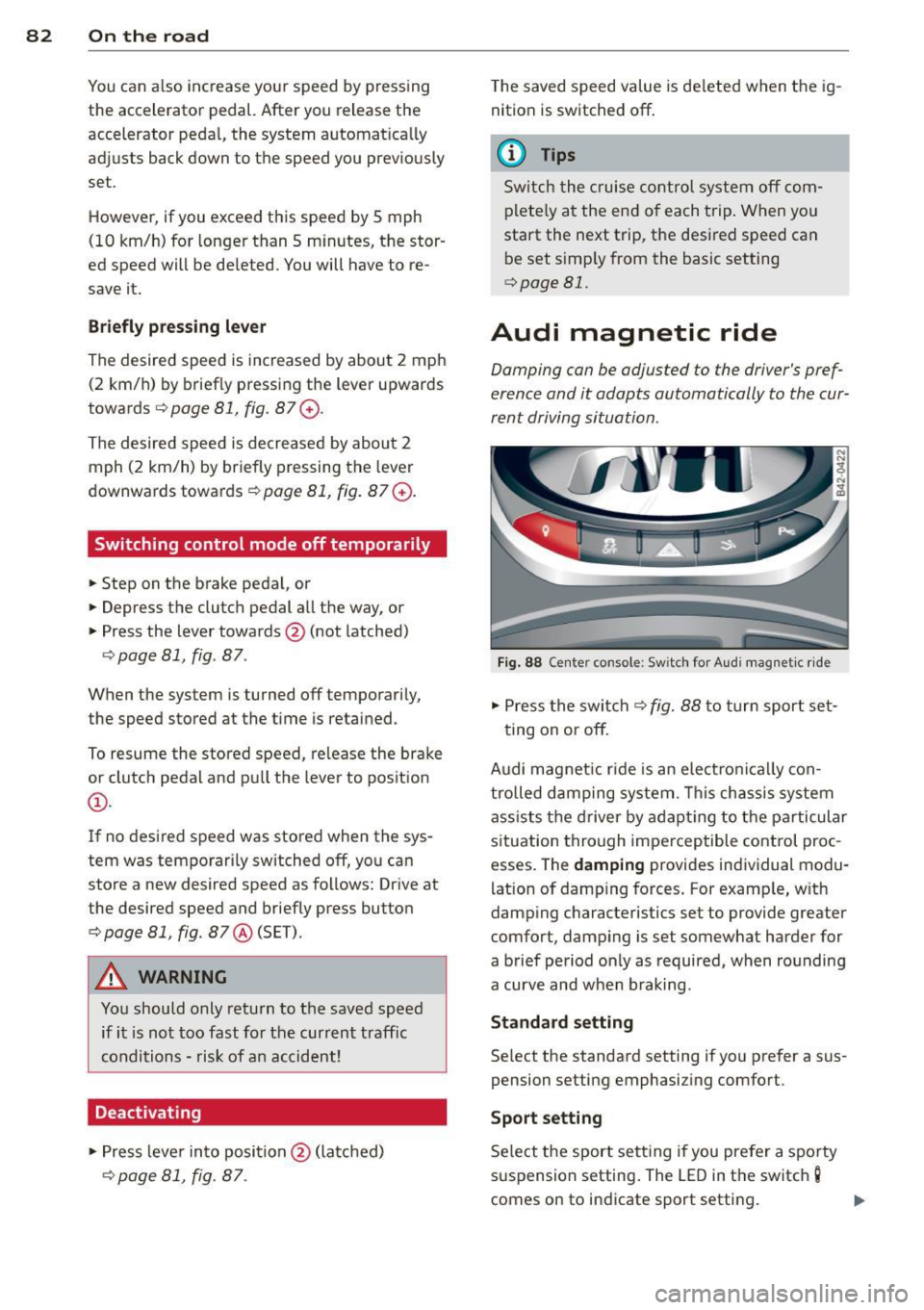
Audi magnetic ride
Damping con be adjusted to the driver's pref
erence and it adapts automatically to the cur
rent driving situation .
Fig. 88 Center console: Sw itch for Audi magnet ic ride
.. Press the switch c:> fig. 88 to turn sport set-
ting on or
off.
Audi magnet ic rid e is an elec tronically con
trolled damping system . This chassis system
assists the driver by adapting to the particular
situation through imperceptible control proc
esses. The
damping provides individual modu
lation of damp ing forces. For examp le, w ith
damp ing characteristics set to provide greater
comfort, damping is set somewhat harder for
a brief period only as required, when rounding
a curve and when braking.
Standard setting
Select the standard setting if you prefer a sus
pension setting emphasiz ing comfort.
Sport setting
Select the sport setting i f you prefer a spo rty
suspension setting . The LED in the switch
g
comes on to indicate sport setting .
Page 87 of 244
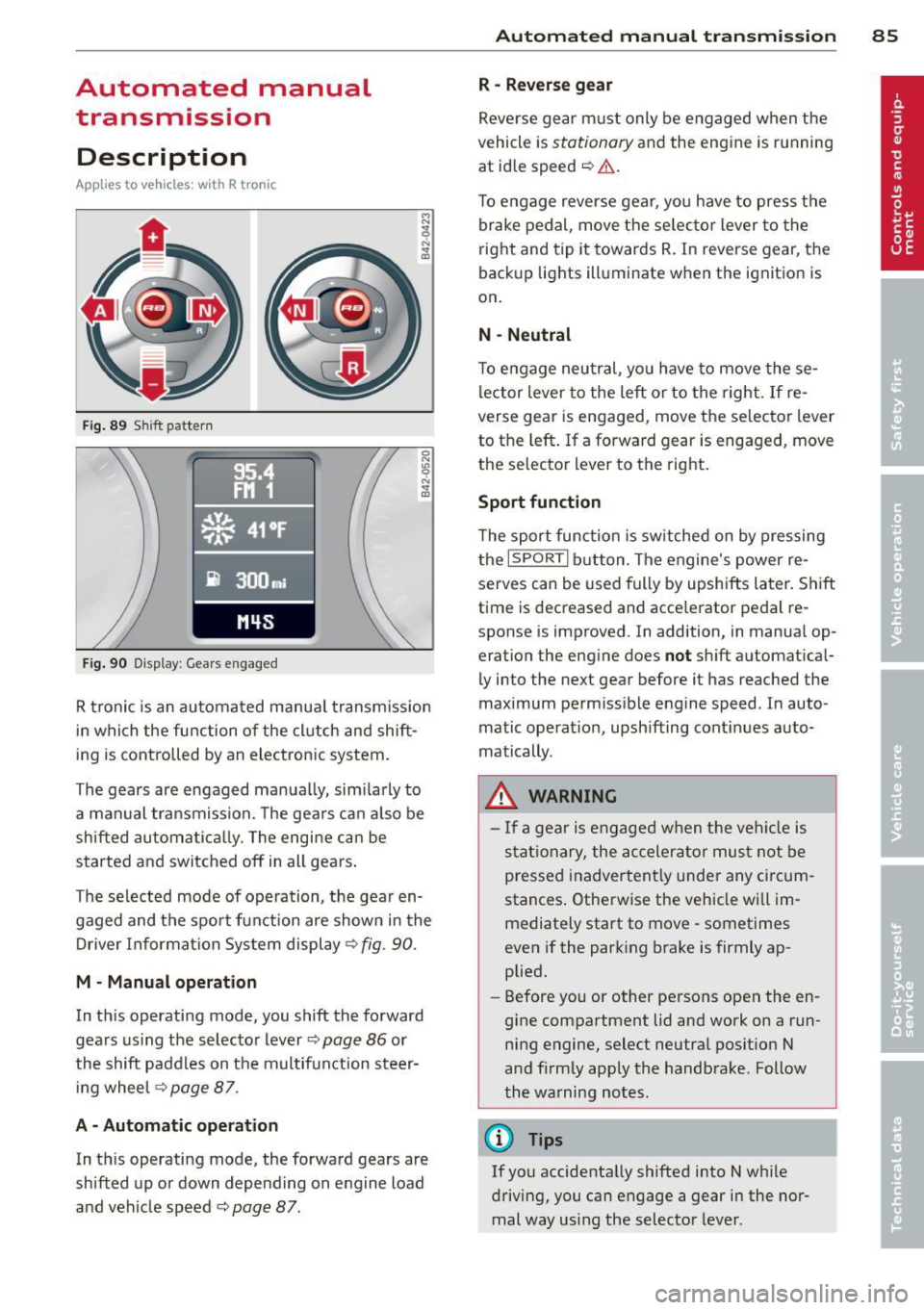
Automated manual transmission
Description
App lies to vehicles: with R tro nic
Fig . 89 S hift pattern
F ig. 90 Display : Gear s engaged
R tronic is an au tomated manua l transm iss ion
in which the function of the cl utch and shift
ing is controlled by an electronic system.
The gears are engaged manua lly, sim ilarly to
a manual transmission. The gears ca n also be
shifted automatica lly. The engine can be
started and switched off in all gears .
The selected mode of operation, the gear en gaged and the spor t funct ion are shown in the
Driver Information Sys tem display ¢
fig. 90.
M · Manual operation
In th is operating mode, you shift the forward
gears us ing the selecto r lever
¢ page 86 or
the shift paddles on the multifunction steer i ng whee l
¢page 87.
A - Automati c operation
In th is operating mode, the forward gears are
shifted up or down depending on engine load
and vehicle speed ¢
page 87.
Autom ated manual tr an sm iss ion 85
R -Rever se g ear
Reve rse gear m ust only be engaged when the
vehicle is
stationary and the engine is running
at id le speed
~ ,1. .
To engage reverse gear, you have to press the
brake pedal, move the selec to r lever to the
right and tip it towards R. In reverse gear, the
back up lights ill uminate when the ignition is
on .
N -Neutral
To engage neu tral, yo u have to move these
lector lever to the left or to the right .
If re
verse gear is engaged, move the selector lever
to the left . If a forward gear is engaged , move
the selector lever to the right.
Sport function
T he sport function is sw itched on by pressing
the
I SPORT I b utton. The engine's power re
serves can be used fully by upshifts later. Shift
t ime is decreased and acce lerator pedal re
sponse is improved . In addition, in manua l op
eration the eng ine does
not sh ift a utomat ical
ly into the next gear before it has reached the
maximum perm iss ible engine speed . In auto
matic operat io n, upsh ifting cont inues auto
matically .
_&. WARNING
- If a gear is engaged when the veh icle is
stat ionary, the accelera to r must not be
pressed inadvertent ly under any circum
stances . Otherwise the vehicle wi ll im
mediately start to move· sometimes
even if the park ing brake is firmly ap
plied.
- Before you or other persons open the en
gine compartment lid and work on a run ning engine, select neutral pos ition N
a nd firmly app ly the handbrake . Follow
the warning notes.
(!} Tips
If you accidenta lly shifted into N w hile
driving, you can engage a gear in the nor mal way us ing the selecto r lever.
Page 89 of 244
Automatic operation
Applies to vehicles: with R tronic
The forward gears are shi~ed up or down au
tomatically.
S tartin g from a stop
.. Press and hold the brake pedal.
.. Tap the se lector lever towards A.
.. Release the brake pedal and acce lerate
c::, A.
in Manual operation on page 86.
Under certain circumstances (driving in the
mounta ins for example), it can be beneficial
to switch temporarily to the manua l shift pro
gram
c::> page 86 in order to adjust the gear ra
tios to driving conditions manually.
Kick-down
Applies to vehicles : with R tronic
When you depress the accelerator pedal be
yond the resistance point, R tronic downshifts
into a lower gear, depending on vehicle speed
and engine rpm . The ups hift into the next
h igher gear takes place once the max imum
specified engine speed is reached. Exception:
You have activated the sport funct ion.
A WARNING
Please note that the d rive whee ls can spin
if kick -down is used on a smooth slippery
road - there is a risk of skidding .
Launch Control
Program
Applies to vehicles : with R tronic
The Launch Control Program enables maxi
mum acceleration.
Requirement: The engine must be at operat
ing temperature and the steering wheel must
not be turned .
.. With the engine running, press the
[!I but
ton one t ime. The ESP indicator light
fi in
the Driver Information System display illu minates and the message
ESP sp ort -W arn
in g! Re str icte d s tab ility
appears .
Autom ated manual tr an sm iss ion 8 7
.. Press the brake pedal with your left foot and
hold it down.
.. Engage a gear.
.. Press the
ISPORT I button on the selector lev
er cover.
.. Press the accelerator pedal w ith your right
foot simultaneously unt il the eng ine has
reached a constant speed .
.,. Remove your left foot from the brake
c::, ,& .
A WARNING
-Always adapt your dr iv ing to the traffic
f low.
- On ly use La unch Control when road and
traffic conditions allow it and other driv
ers will not be endangered or annoyed by
your driving and the vehicle's accelera
tion.
- Please note that t he driving wheels can
spin and the vehicle can break away
when ESP is switched off, especially
when the road is slippery .
- Once the starting procedure is complete,
you should sw itch ESP on again by press
ing the
[!I switch.
(D Tips
When accelerat ing using the Launch Con
trol program, all vehicle parts are sub ject
to heavy loads. This can result in increased
wear.
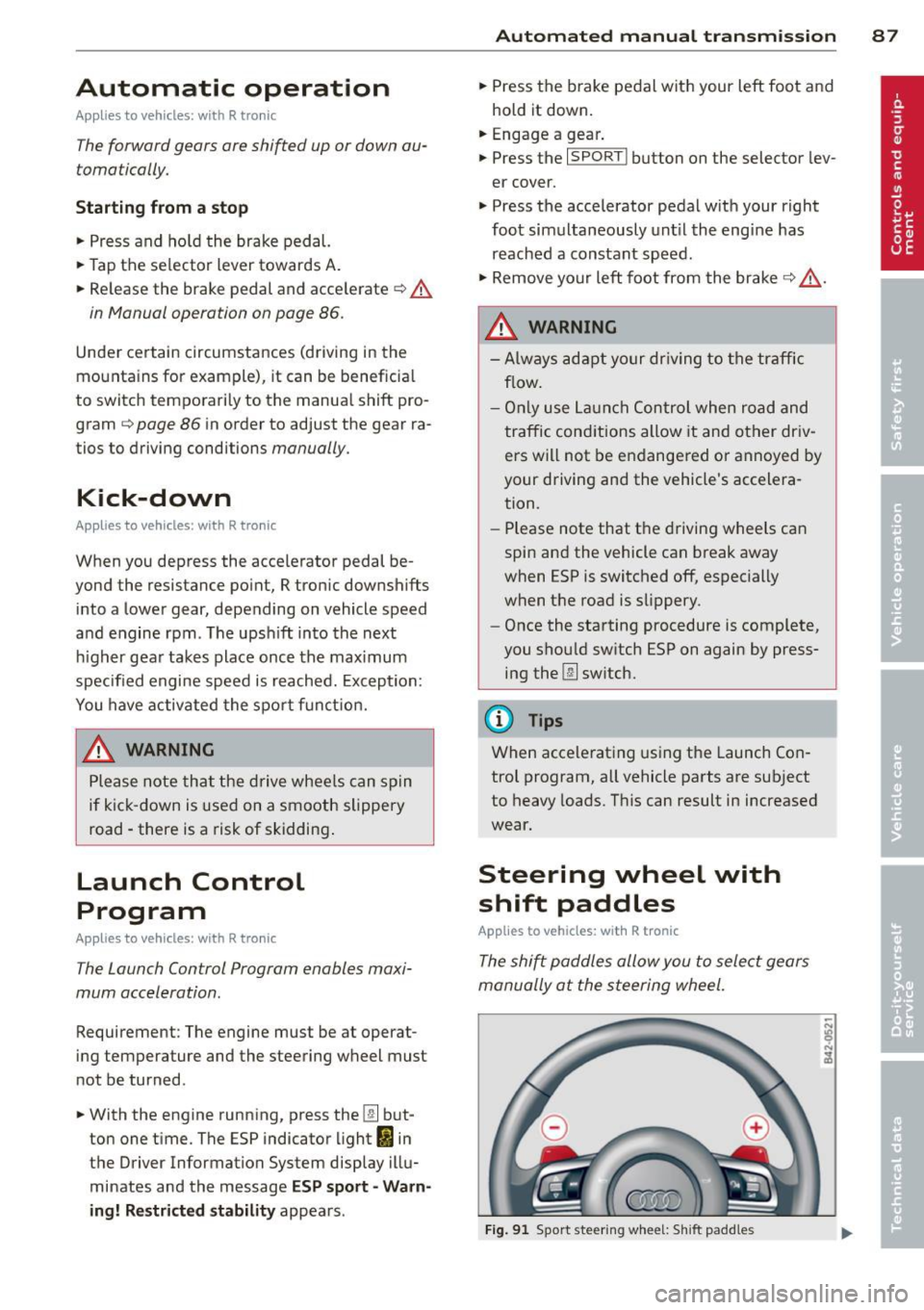
Steering wheel with
shift paddles
Applies to veh icles: with R tronic
The shi~ paddles allow you to select gears
manually at the steering wheel.
F ig . 91 Sport steering wheel: S hift padd les
Page 92 of 244
90 Parking system
Rear view camera coverage area
The rearview camera shows you the area behind your vehicle in the navigation system dis
play. This area roughly corresponds to the
area in
¢ fig. 94 and (!) ¢fig. 95. Orientation
lines and colored surfaces are projected in the
area shown, which can help you with parking
and maneuvering. Objects that are located in
an area that is not captured by the camera@
¢ fig. 95 and that are closer to the bumper
will not appear on the navigation system dis play.
We recommend that you practice parking with
the rearview camera in a traffic-free location
or parking lot to become familiar with the sys
tem, the orientation lines, and their function.
There should be sufficient light and good
weather conditions when doing so.
In the navigation system display, objects or
vehicles appear closer or further away if:
Objects or vehicles appear closer or farther
away in the navigation system if:
- you are driving in reverse gear from a level
surface onto an incline, or a downward
slope,
- you are driving in reverse gear toward pro-
truding objects.
The accuracy of the o rientation lines and blue
surfaces diminishes if:
- the rearview camera does not provide a reli able image, for example, in poor visibility
conditions or if the lens is dirty,
- the image on the screen is not visible due to
sun glare and reflection .
Caring for the rearview camera lens
The rearview camera is located in the center
of the vehicle above the rear license plate bracket. In order for the rearview camera to
function properly , the camera lens must be
kept clean and free of snow and ice .
- Dampen the lens with a household alcohol
based glass cleaner , and clean the lens with
a dry cloth. - Remove
snow with a hand brush and ice
preferably with a de-icing spray
¢ (D .
A WARNING
--
-The parking system cannot replace the
driver's attention. The driver alone is re
sponsible for parking and similar driving maneuvers .
- Sensors have blind spots in which objects
cannot be detected. Pay special attention
to small children and animals because
the sensors cannot always detect them .
- Always keep your eyes on the vehicle's
surroundings, using the rearview mirror
as well.
- Do not allow yourself to be distracted from traffic by the rearview camera pic
tures in the navigation system display .
- If the position and the installation angle
of the camera has changed, for example,
after a rear end collision, do not continue
to use the system for safety reasons .
Have it checked by an authorized Audi
dealer or other qualified workshop.
(D Note
-Low obstacles already s ignaled by a
warning can disappear from the system's detection range as they are approached
and will not continue to be signaled. Ob
jects such as barrier chains, trailer draw
bars, narrow painted vertical poles or
fences may not be detected by the sys
tem, posing risk of damage.
- Never use warm or hot water to remove
snow or ice from the rearview camera
lens because the lens could crack.
- Never use products that are abrasive
when cleaning the lens.
Page 103 of 244
For detailed information on how to adjust the
driver's seat, see ¢
page 66, Seats and stor
age.
A WARNING
Drivers who are unbelted, out of position
or too close to the airbag can be seriously
injured by an airbag as it deploys. To help
reduce the risk of serious personal injury:
- Always adjust the driver's seat and the
steering wheel so that there are at least
10 inches (25 cm) between your breast
bone and the steering wheel.
- Always adjust the driver's seat and the
steering wheel so that there are at least
4 inches (10 cm) between the knees and
the lower part of the instrument panel.
- Always hold the steering wheel on the
outside of the steering wheel rim with
your hands at the 9 o'clock and 3 o'clock positions to help reduce the risk of per
sonal injury if the driver's airbag inflates.
- Never hold the steering wheel at the
12 o'clock position or with your hands at
other positions inside the steering wheel
rim or on the steering wheel hub. Hold
ing the steering wheel the wrong way
can cause serious injuries to the hands,
arms and head if the driver's airbag in
flates
- Pointing the steering wheel toward your
face decreases the ability of the supple mental driver's airbag to protect you in a
collision.
- Always sit in an upright position and nev
er lean against or place any part of your
body too close to the area where the air
bags are located.
- Before driving, always adjust the front
seats and head restraints properly and
make sure that all passengers are prop
erly restrained.
- Never adjust the seats while the vehicle
is moving. Your seat may move unexpect
edly and you could lose control of the ve
hicle.
- Never drive with the backrest reclined or
tilted far back! The farther the backrests
Driving Safely 101
are tilted back, the greater the risk of in
jury due to incorrect positioning of the
safety belt and improper seating posi
tion .
- Children must always ride in child seats
¢
page 138 . Special precautions apply
when installing a child seat on the front
passenger seat¢
page 117.
Proper seating position for the front
passenger
The proper front passenger seating position
is important for safe, relaxed driving.
For your own safety and to reduce the risk of
injury in the event of an accident, we recom
mend that you adjust the seat for the front
passenger to the following position :
"'Adjust the angle of the seatback so that it is
in an upright position and your back comes
in full contact with it whenever the vehicle is
moving.
"'Adjust the head restraint so the upper edge
is as even as possible with the top of your
head. If that is not possible, try to adjust
the head restraint so that it is as close to
this position as possible
¢ page 102.
"' Keep both feet flat on the floor in front of
the front passenger seat .
"'Fasten and wear safety belts correctly
¢page 112.
For detailed information on how to adjust the
front passenger's seat, see ¢
page 66, Seats
and storage.
A WARNING
Front seat passengers who are unbelted,
out of position or too close to the airbag
can be seriously injured or killed by the air
bag as it deploys. To help reduce the risk of
serious personal injury:
- Passengers must always sit in an upright
position and never lean against or place
any part of their body too close to the
area where the airbags are located.
•
•
Page 106 of 244
104 Driving Safel y
Pedal area
The pedals must always be free to move and
must never be interfered with by a floor mat
or any other object.
• Make sure that all pedals move freely w ith
out interference.
• Make sure that noth ing prevents all pedals
from returning to their orig inal positions.
Only use floor mats that leave the pedal area
free and can be secured w ith floor mat fasten
e rs .
If a brake circuit fails, increased brake pedal
travel is required to bring the vehicle to a full
stop .
A WARNING ,_
Pedals that cannot move freely can cause
loss of vehicle control and increase the r is k
of serious injury.
- Never place any objects in the driver's
footwell. An object could get into the
peda l area and interfere w ith pedal func
tion . In case of sudden braking or an ac
cident, you would not be able to brake or
accelerate!
-Always make sure that nothing can fa ll
or move into the driver's footwell.
Floor mats on the driver side
Always use floor mats that can be securely attached to the floor mat fasteners and do
not interfere with the free movement of the
pedals.
• Make sure that the f loor mats are proper ly
secured and cannot move and interfere with
the pedals
q .&_ .
Use only floor mats that leave the pedal area
unobstructed and that are firmly secured so
that they cannot s lip out of position. You can
obtain suitable floor mats from your author ized Audi dealer .
A WARNING
Pedals that cannot move free ly can result
in a loss of vehicle control and increase the
risk of ser ious personal injury.
- Always make sure that floor mats are
properly secured.
- Never p lace or install floor mats or other
floor coverings in the vehicle that cannot be properly secured in place to prevent
them from slipping and interfer ing with
the peda ls or the ab ility to control the
veh icle.
- Never p lace or install floor mats or other
f loor coverings on top of al ready instal
led floor mats. Add itiona l floor mats and
other coverings will red uce the size of
the peda l area and interfere w ith the
pedals.
- Always properly reinstall and secure floor
mats that have been taken out for clean
ing.
- Always make sure that objects cannot
fall into the driver footwell while the ve
h icle is moving. Objects can become
trapped under the brake pedal and accel
erator pedal causing a loss of vehicle
control.
Stowing luggage
Loading the luggage compartment
All luggage and other objects must be prop erly stowed and secured in the luggage com
partment.
Loose items in the luggage compa rtment can
shift suddenly, changing vehicle handling
charac teristics. Loose items can also increase
the risk of serious personal injury in a sudden
vehicle maneuver or in a collision.
In a collision, the laws of physics mean that
even smaller items that are loose in the vehi
cle will become heavy missi les that can cause
serious injury. Items in the vehicle possess en
ergy which vary with vehicle speed and the
weight of the item. Vehicle speed is the most
significant factor.
Page 108 of 244
106 Driving Safely
of vehicles, it may order a recall
and remedy campaign. Howev
er, NHTSA cannot become in
volved in individual problems
between you, your dealer, or
Audi of America, Inc.
To contact NHTSA, you may call
the Vehicle Safety Hotline toll
free at:
Tel.: 1-888-327-4236 (TTY:
1-800-424-915 3)
or write to:
Administrator NHTSA 1200 New Jersey Avenue, SE
Washington, D.C. 20590
You can also obtain other infor mation about motor vehicle
safety from:
http://www.safercar.gov
Applicable to Canada
Canadian customers who wish
to report a safety-related de
fect to Transport Canada, De
fect Investigations and Recalls,
may telephone the toll free hot
line: Tel.
: 1-800-333-0371 or
Tel. : 1-613-998-8616 if you are
in the Ottawa area
TTY for hearing impaired:
1-888-67 5-6863
email comments/questions to: [email protected]
or contact Transport Canada by mail at:
Road Safety and Motor Vehicle
Regulation Directorate
Transport Canada
Tower C, Place de Ville,
330 Sparks Street
Ottawa, Ontario
KlA ONS
For additional road safety infor
mation, please visit the Road
Safety website at:
http://www.tc.gc.ca/roadsaf
ety/index.htm