wheel AUDI R8 SPYDER 2011 User Guide
[x] Cancel search | Manufacturer: AUDI, Model Year: 2011, Model line: R8 SPYDER, Model: AUDI R8 SPYDER 2011Pages: 244, PDF Size: 59.74 MB
Page 58 of 244
56 Clear vision
shown as active in the driver information
system.
The
coming home function illuminates the
area around the vehicle when the ignition is
switched off and the driver's door is opened.
The length of time the lights remain on can be
set in the menu display
(Lights> Exterior
lights> coming home) .
The leaving home function illuminates the
area around the vehicle when unlocking it.
.&_ WARNING
- Never use daytime running lights to see
where you are going. They are not bright enough and will not let you see far
enough ahead for safety, especially at dusk or when it is dark. Be aware of
changes in outside light conditions when
you are driving and respond by switching
on your low beams.
- Automatic head- and taillight control is
only intended to assist the driver. This
feature does not relieve the driver of his
responsibility to check the headlights
and to turn them on manually according
to the current light and visibility condi
tions. For example, fog and rain cannot be detected by the light sensors. Conse
quently, always switch the headlights on
under these weather conditions and
when driving in the dark.
- Crashes can happen when you cannot see
the road ahead and when you cannot be
seen by other motorists.
-Always turn on the headlights so that you can see ahead and so that others can see your car from the back.
(D Tips
- Always observe the specific local regula
tions for your area when to use your
lights .
- Turn on low beams as evening ap
proaches or in conditions of poor visibili
ty.
- Do not attach stickers to the windshield
in front of the sensors as this can disable the automatic head- and
taillight control
and the automatic glare-dimming of the
rearview mirror(s)*.
- If you
remove the ignition from the igni
tion lock while the headlights are still
on, a buzzer will sound as long as the
driver's door is open to remind you to
turn off the lights.
- In the AUTO mode, the low beams are
turned off when the ignition is turned
off. The remaining lights are turned off
when the key is taken out of the ignition .
- In cool or damp weather conditions the
headlights may fog
over temporarily on
the inside.
- The critical factor is the temperature
difference between the interior and the
exterior of the headlight lens.
- With the main beams switched on, the
light-emitting area will be free of con
densation after a short time, however
the edges of the glass may still be fog
ged.
- This physical phenomenon has no ef
fect on the life of your vehicle's light
ing system.
Instrument panel illumination
The illumination of the instruments, displays
and the center console can be adjusted.
Fig. 64 Instrument panel illumination
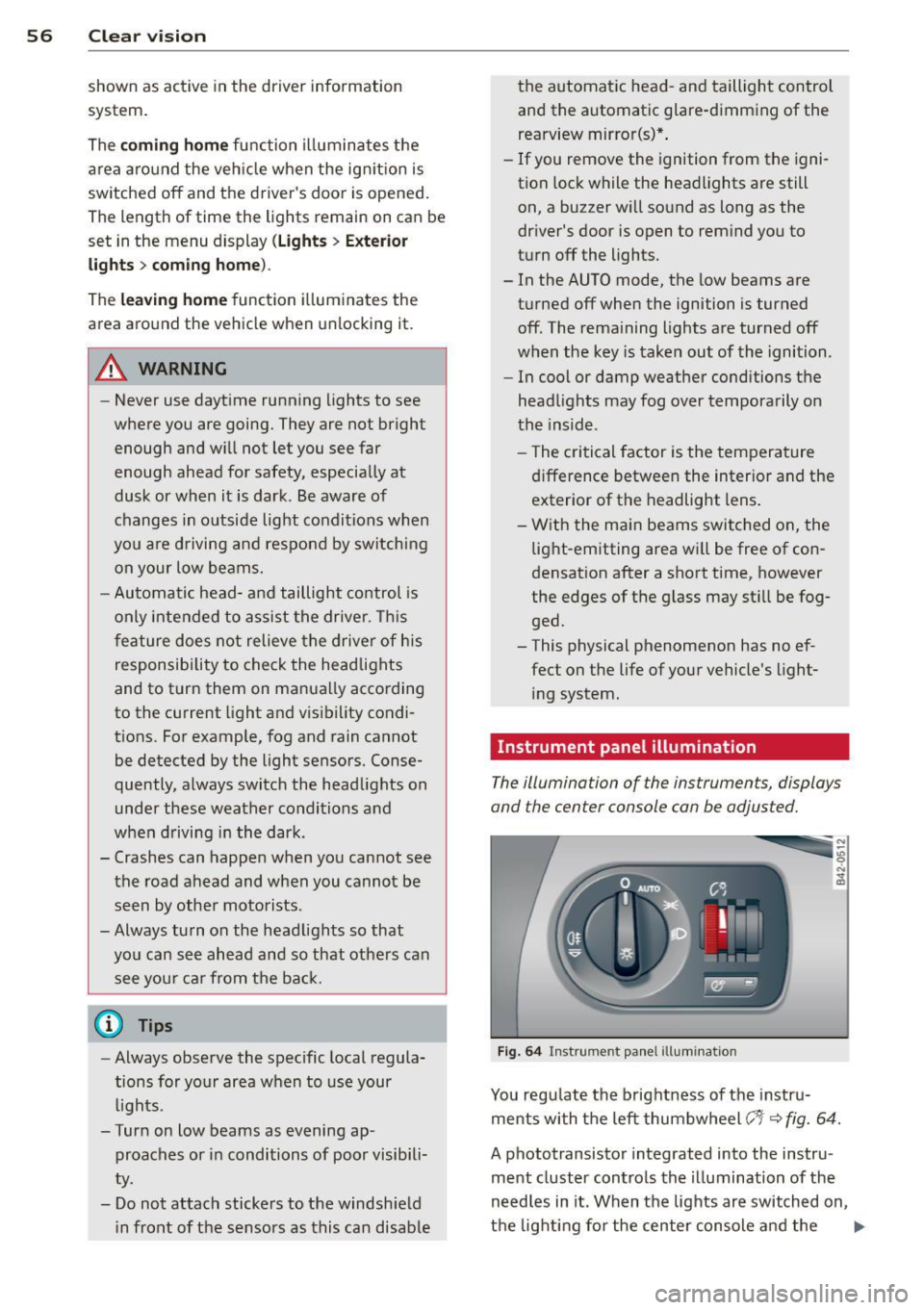
You regulate the brightness of the instru
ments with the left thumbwheel
(-'1· ~ fig. 64.
A phototransistor integrated into the instru
ment cluster controls the illumination of the
needles in it. When the lights are switched on,
the lighting for the center console and the
llll>
Page 60 of 244
58 Clear vis ion
Turn signals and high beam lever
The lever is used to operate the turn signals
and the high beam as well as the headlight
flasher .
Fig. 66 Turn s igna l and high beam lever
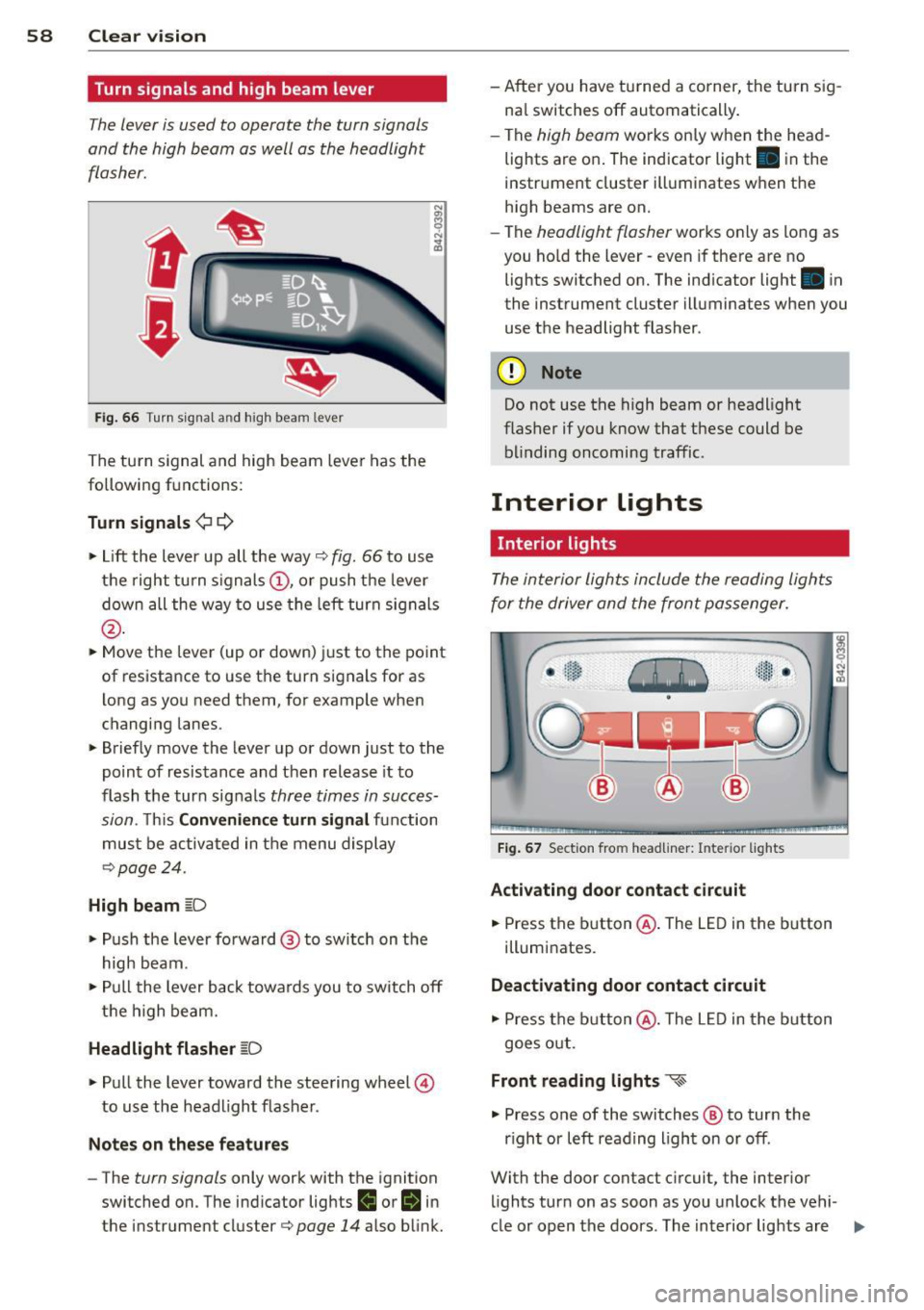
The turn s ignal and high beam leve r has the
following functions:
Turn signals ¢ c::>
"" Lift the lever up all the way¢ fig. 66 to use
the right turn signals @, or push the lever
down all the way to use the left turn signals
@ .
""Move the lever (up or down) just to the point
of resistance to use the turn signals for as
l ong as you need them, for example when
changing lanes.
"" Briefly move the lever up or down just to the
po int of resistance and then release it to
flash the turn signals
three times in succes
sion.
T his Convenience turn signal function
must be activated in the menu display
¢ page 24.
High beam [D
"" Push the lever forward @ to switch on the
high beam.
"" Pull the lever back towards you to switch off
the high beam.
Headlight flasher [D
"" Pull the lever toward the steering wheel @
to use the headlight flasher.
Notes on these features
- The turn signals only work with the ignition
switched on. The indicator lights
II or II in
t he instrument cluster¢
page 14 also blink. - After you have turned a corner, the turn sig
na l switches off automatically .
- The
high beam works only when the head
lights are on . The indicator light. in the
instrument cluster illuminates when the
high beams are on.
- The
headlight flasher works on ly as long as
you ho ld the lever -even if there a re no
lights switched on. The indicator light . in
the instrument cluster illuminates when you
use the headlight flasher.
(D Note
Do not use the high beam or headlight
flasher if you know that these could be
blinding oncoming traffic.
Interior Lights
Interior light s
The interior lights include the reading lights
for the driver and the front passenger.
Fig. 67 Sect ion from headliner: Interior lights
Activating door contact circuit
.,. Press the button@. The LED in the button
illumi nates.
Deactivating door contact circuit
"" Press the button @. The LED in the button
goes out.
Front reading lights ~
"" Press one of the switches @ to turn the
r ight or left reading l ight on or off.
With the door contact circuit, the interior
lights tur n on as soon as you unlock the vehi-
cle or open the doors. The interior lights are
Ill>
Page 68 of 244
66 Seat s a nd s tor ag e
Seats and storage
General recommen
dations
Why is your seat adjustment so
important?
The safety belts and the airbag system can
only provide maximum protection if the front
seats are correctly adjusted.
There are various ways of adjust ing the front
seats to provide safe and comfortable support
for the driver and the front passenger . Adjust
your seat properly so that :
- you can easily and quick ly reach all the
switches and controls in the instrument
panel
-your body is prope rly supported thus reduc
ing physical stress and fatigue
- the safety be lts and airbag system can offe r
maximum protection ¢
page 117.
In the following sec tions, you will see exactly
how you can best adjust you r seats .
There are special regulations and instructions
for insta lling a child safety seat on the front
passenger's seat. Always heed the informa
tion rega rd ing child safety provided in
¢ page 138, Child Safety .
A WARNING
Incorrect seating position of the driver and
all other passengers can result in serious
personal injury.
- Always keep your feet on the floor when
the vehicle is in motion -never p ut your
feet on top of the instrument panel, out
of the w indow or on top of the seat cush
ion! This applies espec ially to the passen
gers .
If your seating position is incorrect
you increase the r isk of injury in the case
of sudden braking or an acc ident.
If the
airbag infla tes and the seating position
is incorrect this could result in personal
injury or even death.
- It is important for bo th the driver and
front passenger to keep a distance of at least 10 inches (25 cm) between them
selves and the steering wheel and/or in
strument panel. If you're s itting any
closer than th is, the a irbag system can
not protect you properly . In addition to
this, the front seats and head restra ints
must be adjusted to your body height so
that they can give you max imum protec
tion.
- Always try to keep as much distance as
possible between yourself and the s teer
ing wheel or instrument pane l.
- Do not adjust the driver's o r fron t pa s
senger's seat whi le the vehicle is moving.
Your seat may move unexpected ly, caus
ing sudden loss of vehicle contro l and
personal inj ury . If you ad just yo ur seat
while the veh icle is moving, you are out
of posit io n.
Driver's seat
The correct seat position is important for safe
and relaxed driving.
We recommend that you adjust the driver's
seat in the fo llowing manner:
.,. Adjust the seat in fo re and aft direction so
t ha t you can easily p ush the peda ls to the
floor wh ile keeping your knee slightly bent
i::> A in Why is your seat adjustment so im
portant? on page 66 .
.,. Adjust the seatback so that when you sit
w ith your back against the seatback, you can
still grasp the top of the steering wheel.
.,. Posit io n the head restraint according to the
occupant 's height
<=:>page 68 . For maxi
mum protection, t he top of the head re
s t raint shou ld be a t least at eye level, pref
erab ly higher and idea lly level with the top
of the head
¢ page 102, fig. 107 .
A WARNING "--
Never place any objects in the dr iver's foot-
well. An object could get into the pedal
area and interfere with pedal function. In
case of sudden braking or an acc ident, you
wo uld not be able to brake or accelerate!
Page 79 of 244
On the road
Steering
Adjusting the steering wheel column
The steering wheel position can be continu
ously adjusted in height and distance.
Fig. 84 Lever under the stee ring column
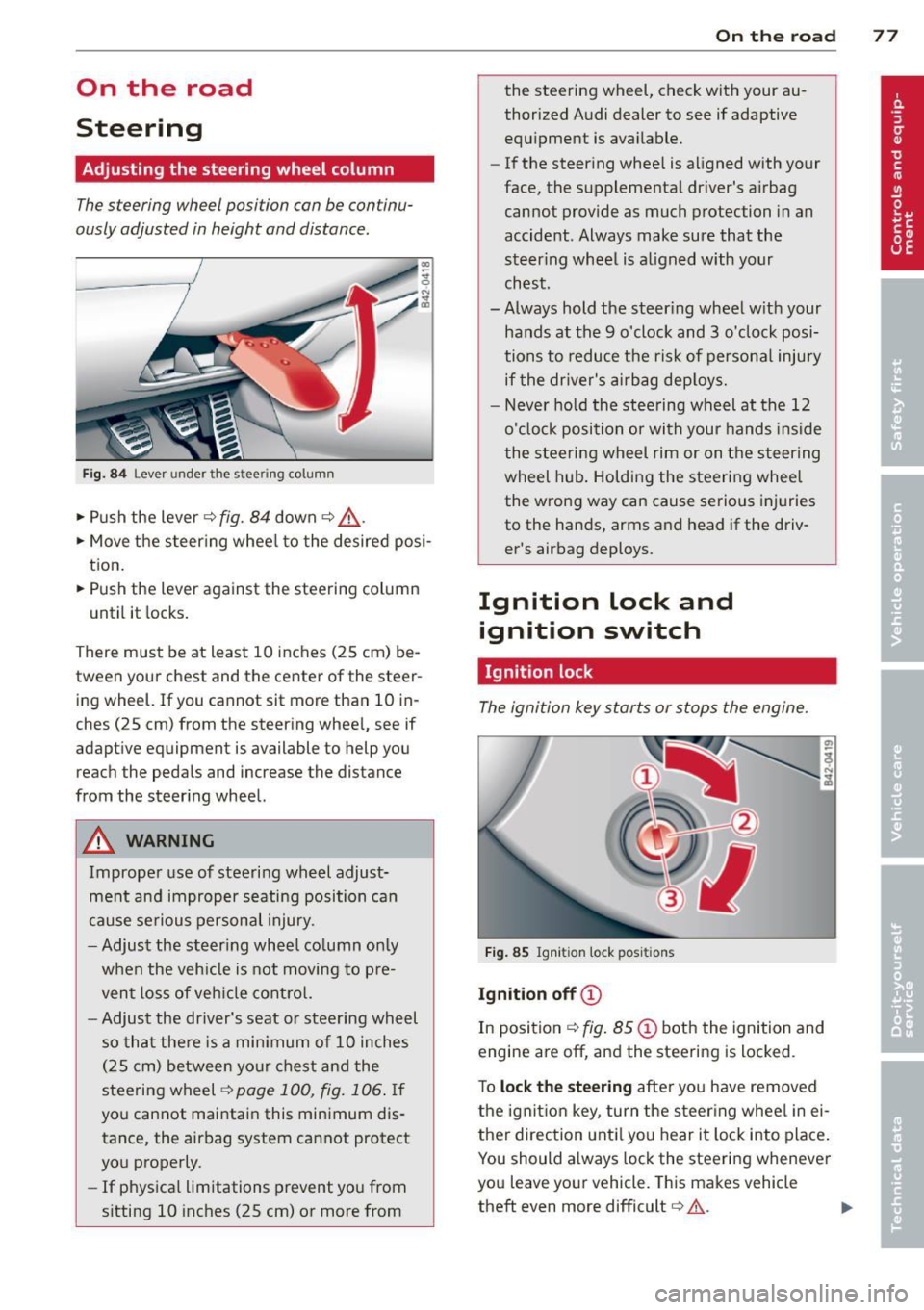
• Push the lever ¢ fig. 84 down ¢ &.
• Move the steer ing whee l to the desired posi
tion.
• Push the lever against the steering column
until it locks.
There must be at least 10 inches (25 cm) be
tween your chest and the center of the steer
ing wheel. If you cannot sit more than 10 in
ches (25 cm) from the steering wheel, see if
adaptive equipment is available to help you
reach the pedals and increase the distance
from the steering wheel.
A WARNING
Improper use of steering wheel adjust
ment and improper seating position can
cause serious personal injury .
- Adjust the steering whee l column only
when the veh icle is not moving to pre
vent loss of veh icle control.
-
-Adjust the driver's seat or steering wheel
so that there is a minimum of 10 inches
(25 cm) between your chest and the
steering wheel
¢ page 100, fig. 106. If
you cannot maintain this minimum dis
tance, the airbag system cannot protect
you properly.
- If physica l limitations prevent you from
sitting 10 inches (25 cm) or more from
On the road 77
the steering wheel, check with your au
thorized Audi dealer to see if adaptive
equipment is available.
- If the steering wheel is aligned with your
face, the supplemental driver's airbag cannot provide as much protection in an
accident . Always make sure that the
steer ing wheel is aligned with your
chest.
- Always hold the steer ing wheel w ith your
hands at the 9 o'clock and 3 o'clock posi
tions to reduce the risk of personal injury
if the driver's airbag deploys.
- Never hold the steering wheel at the 12
o'clock position or with your hands inside
the steering wheel rim or on the steering
wheel hub . Holding the steering wheel
the wrong way can cause serious injuries
to the hands, arms and head if the driv
er's airbag deploys.
Ignition lock and ignition switch
Ignition lock
The ignition key starts or stops the engine.
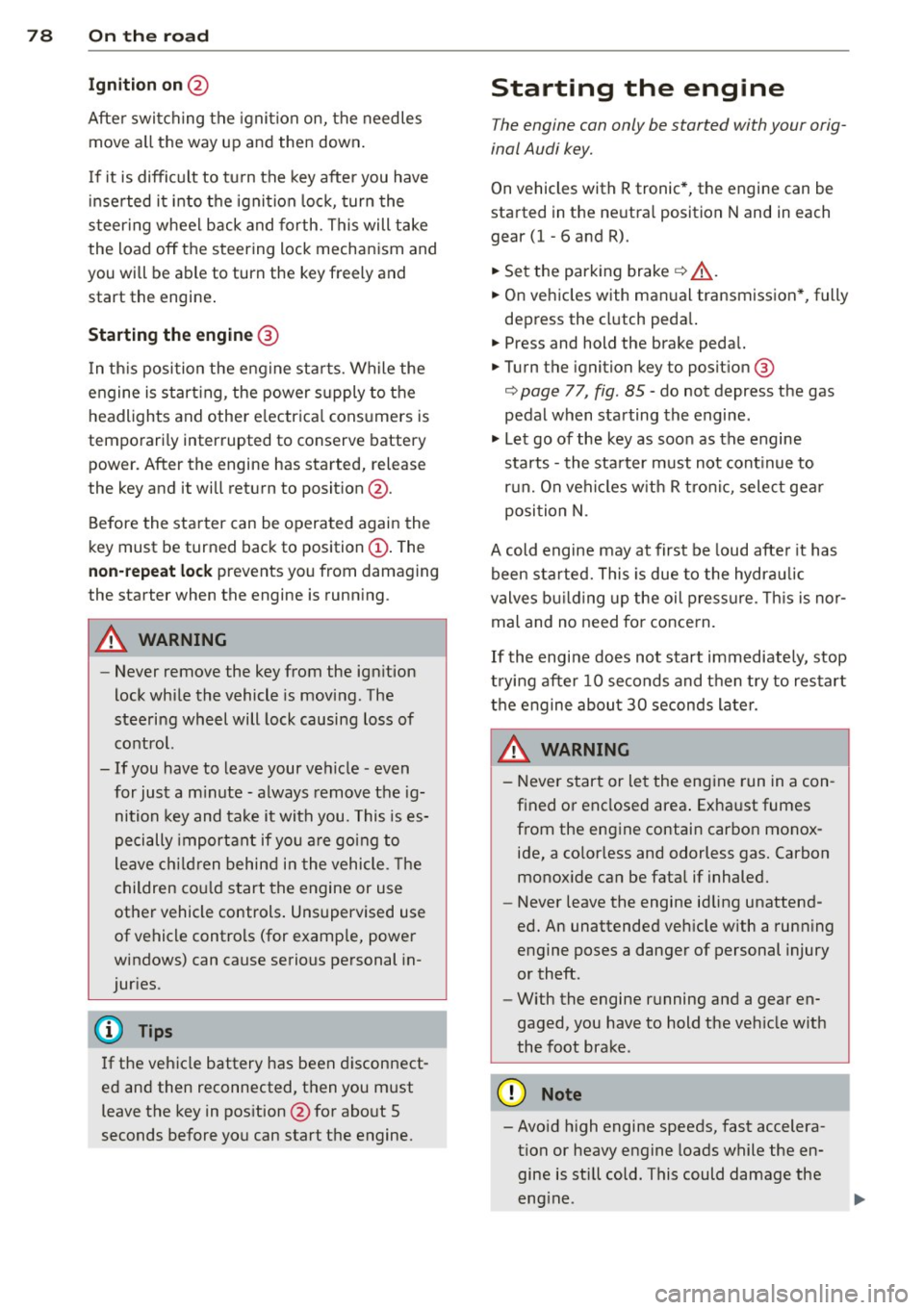
Fig. 85 Igniti on lock posit ions
Ignition off©
In position ¢ fig. 85@ both the ignition and
engine are
off, and the steering is locked .
To
lock the steering after you have removed
the ignition key, turn the steer ing wheel in ei
ther direction until you hear it lock into place.
You should always lock the steering whenever
you leave your vehicle. This makes vehicle
theft even more difficult
c::> .&. .
Page 80 of 244
78 On the road
Ignition on @
Afte r switching the ignition on, the needles
move a ll the way up and then down .
I f it is difficult to tu rn the key afte r you have
i nserted it into the ignition lock, turn the
steering wheel back and forth. This will take
the load off the steering lock mechan ism and
you will be able to turn the key freely and start the engine .
Starting the engine @
In th is position the engine sta rts. While the
engine is start ing, the power s upply to the
headlights and other e lectr ica l cons umers is
tempo rari ly interrupted to conserve battery
power. After the engine has started, release
the key and it will return to posit ion @.
Before the starter can be operated again the
key must be turned back to position@. The
non-repeat lock prevents you from damaging
the starter when the engine is runn ing .
A WARNING
-Never remove the key from the ign ition
lock whi le the vehicle is moving. The
steeri ng wheel will lock causing loss of
contro l.
- If you have to leave your vehicle - even
for just a m inute - always remove t he ig
nition key and ta ke it with you. This is es
pecially important if you a re going to
leave ch ildren behind in the vehicle. The
children co uld star t t he engine or use
other vehicle controls . Unsupervised use
of vehicle controls (for examp le, power
windows) can cause serious personal in
jur ies.
(D Tips
If the veh icle battery has been discon nect
ed and then reconnected, then you must leave the key in pos ition @for abo ut 5
seconds before you can start t he engine.
-
Starting the engine
The engine can only be started with your orig
inal Audi key.
On vehicles with R tronic *, the engine can be
started in the ne utra l position N and in each
gear (1 - 6 and R).
.. Se t the park ing brake ¢,&. .
.. On ve hicles with ma nual transmission *, fully
depress the cl utch peda l.
.. Press and hold the brake peda l.
.. Turn the ignition key to posit ion @
¢ page 77, fig . 85 - do not depress the gas
pedal when starting the engine .
.. Let go of the key as soo n as the engine
starts - the sta rter must not cont inue to
r u n. On veh icles w it h R t ro nic , sele ct ge ar
posi tion N.
A cold engine may at first be loud afte r it has
been started. This is due to the hydrau lic
valves b uilding up the oil p ress ure. This is no r
mal and no need fo r conce rn .
If th e engine does not start imm ediately, stop
t ry ing after 10 seconds and t hen t ry to res tart
t h e engine abou t 30 seconds later.
A WARNING
-
- Never star t or le t the eng ine run in a con
f ined o r enclosed area . Exha ust fumes
from the en gine contain carbon monox
ide, a co lorless and odorless gas. Carbon
monox ide ca n be fatal if inhaled.
- Never leave the engine id ling unattend
ed. An unattended veh icle w ith a run ning
e ngine poses a danger of personal injury
or theft.
- With the engine r unning and a gear en
gaged, you have to hold the ve hicle w it h
the foot brak e.
(D Note
-Avo id h igh engine speeds, fast accelera
tion or heavy engine loads while the en
gine is still cold. This could damage the
eng ine.
Page 82 of 244
80 On the road
The parking brake warning light_
(USA)/ . (CON) illuminates when the parking
brake is set and you switch on the ignition.
A WARNING
-
Always release the parking brake com
pletely. A partially engaged brake will
overheat the rear brakes, reduce their ef
fectiveness and cause excessive wear. This could lead to brake failure and an accident .
(D Note
Only after the vehicle has come to com
plete stop, should you firmly set the park
ing brake and
move the gearshift lever into
a gear.
Parking
To prevent a parked vehicle from rolling
away, there are a few things you should do .
.. Stop the vehicle using the brake pedal.
.. Set the parking brake firmly .
.. Switch off the engine.
.. Engage a gear
q ,&. .
What else you should do when parking
your vehicle on an incline or decline
Turn the steering wheel so that if the vehicle
should start to roll, it will roll into the curb.
A WARNING
This is how you can reduce the risk of in
jury when leaving your vehicle.
- Never park the vehicle where it can come
in contact with dry grass, spilled fuel or
any other flammable materials.
- Never allow anyone - especially small
children - to remain in the vehicle when
it is locked. Locked doors make it more
difficult for rescuers to access the pas
senger compartment in the event of an
emergency. Danger to life!
- Never leave children unsupervised in the
vehicle. Children could release the park
ing brake or
move the gearshift lever out
-
of gear. The vehicle could start to roll
away and cause an accident.
- No matter what the season is, the tem
perature in a parked vehicle can reach
dangerous levels.
Starting on hills
Applies to vehicles: with hill hold assist
Hill hold assist makes it easier to start on
hills .
The system is activated when the brake pedal
is depressed
for a few seconds.
After releasing the brake pedal, the brake
power is held for a
brief moment to prevent
the vehicle from rolling back when starting.
During this time, you can easily begin to
move
your vehicle.
A WARNING
-- If you did not begin moving immediately
after releasing the brake pedal, the vehi
cle could begin to roll backward under
certain circumstances. Depress the brake
pedal immediately or engage the parking
brake.
- If the engine stalls, depress the brake
pedal immediately or engage the parking
brake.
- To prevent the vehicle from rolling back
unintentionally when starting in stop
and-go traffic, keep the brake pedal de
pressed for a few seconds before driving
off.
(D Tips
You can find out if your vehicle is equipped
with "hill hold assist" at an authorized Au
di dealer.
Page 86 of 244
84 Manual transmission
Manual transmission
Launch Control
Program
Applies to vehicles: with VlO engi ne and manua l trans
mission
The Launch Control Program enables maxi
mum acceleration.
Requirement : The engine must be at operat
ing temperature and the steering wheel must
not be turned.
• With the engine runn ing, press the
[!I but
ton one time. The ESP indicator light
fi in
the Driver Information System display illu
minates and the message
ESP sport· Warn
ing! Restricted stability
appears.
• Press the clutch and hold it down.
• Engage the first gear.
• Press the accelerator peda l all the way down
until the engine speed remains steady at
6500 RPM.
• Release the clutch carefully~.&_ .
.&_ WARNING
-Always adapt your driving to the traffic
flow.
- Only use Launch Control when road and
traffic conditions a llow it and other driv
ers wi ll not be endangered or annoyed by
your driv ing and the vehicle's accelera
tion.
- Please note that the driving wheels can
spin and the vehicle can break away
when ESP is sw itched off, especially
when the road is slippery.
- Once you have accelerated, you should
switch the ESP back on by pressing the
l:m
button.
(D Tips
- When accelerating using the Launch
Control program, all vehicle parts are
subject to heavy loads. This can result in
i ncreased wear.
- The Launch Control Program only func
tions when the parking brake is released and
the vehicle speed is less than 3 mph
(5 km/h).
Page 89 of 244
Automatic operation
Applies to vehicles: with R tronic
The forward gears are shi~ed up or down au
tomatically.
S tartin g from a stop
.. Press and hold the brake pedal.
.. Tap the se lector lever towards A.
.. Release the brake pedal and acce lerate
c::, A.
in Manual operation on page 86.
Under certain circumstances (driving in the
mounta ins for example), it can be beneficial
to switch temporarily to the manua l shift pro
gram
c::> page 86 in order to adjust the gear ra
tios to driving conditions manually.
Kick-down
Applies to vehicles : with R tronic
When you depress the accelerator pedal be
yond the resistance point, R tronic downshifts
into a lower gear, depending on vehicle speed
and engine rpm . The ups hift into the next
h igher gear takes place once the max imum
specified engine speed is reached. Exception:
You have activated the sport funct ion.
A WARNING
Please note that the d rive whee ls can spin
if kick -down is used on a smooth slippery
road - there is a risk of skidding .
Launch Control
Program
Applies to vehicles : with R tronic
The Launch Control Program enables maxi
mum acceleration.
Requirement: The engine must be at operat
ing temperature and the steering wheel must
not be turned .
.. With the engine running, press the
[!I but
ton one t ime. The ESP indicator light
fi in
the Driver Information System display illu minates and the message
ESP sp ort -W arn
in g! Re str icte d s tab ility
appears .
Autom ated manual tr an sm iss ion 8 7
.. Press the brake pedal with your left foot and
hold it down.
.. Engage a gear.
.. Press the
ISPORT I button on the selector lev
er cover.
.. Press the accelerator pedal w ith your right
foot simultaneously unt il the eng ine has
reached a constant speed .
.,. Remove your left foot from the brake
c::, ,& .
A WARNING
-Always adapt your dr iv ing to the traffic
f low.
- On ly use La unch Control when road and
traffic conditions allow it and other driv
ers will not be endangered or annoyed by
your driving and the vehicle's accelera
tion.
- Please note that t he driving wheels can
spin and the vehicle can break away
when ESP is switched off, especially
when the road is slippery .
- Once the starting procedure is complete,
you should sw itch ESP on again by press
ing the
[!I switch.
(D Tips
When accelerat ing using the Launch Con
trol program, all vehicle parts are sub ject
to heavy loads. This can result in increased
wear.
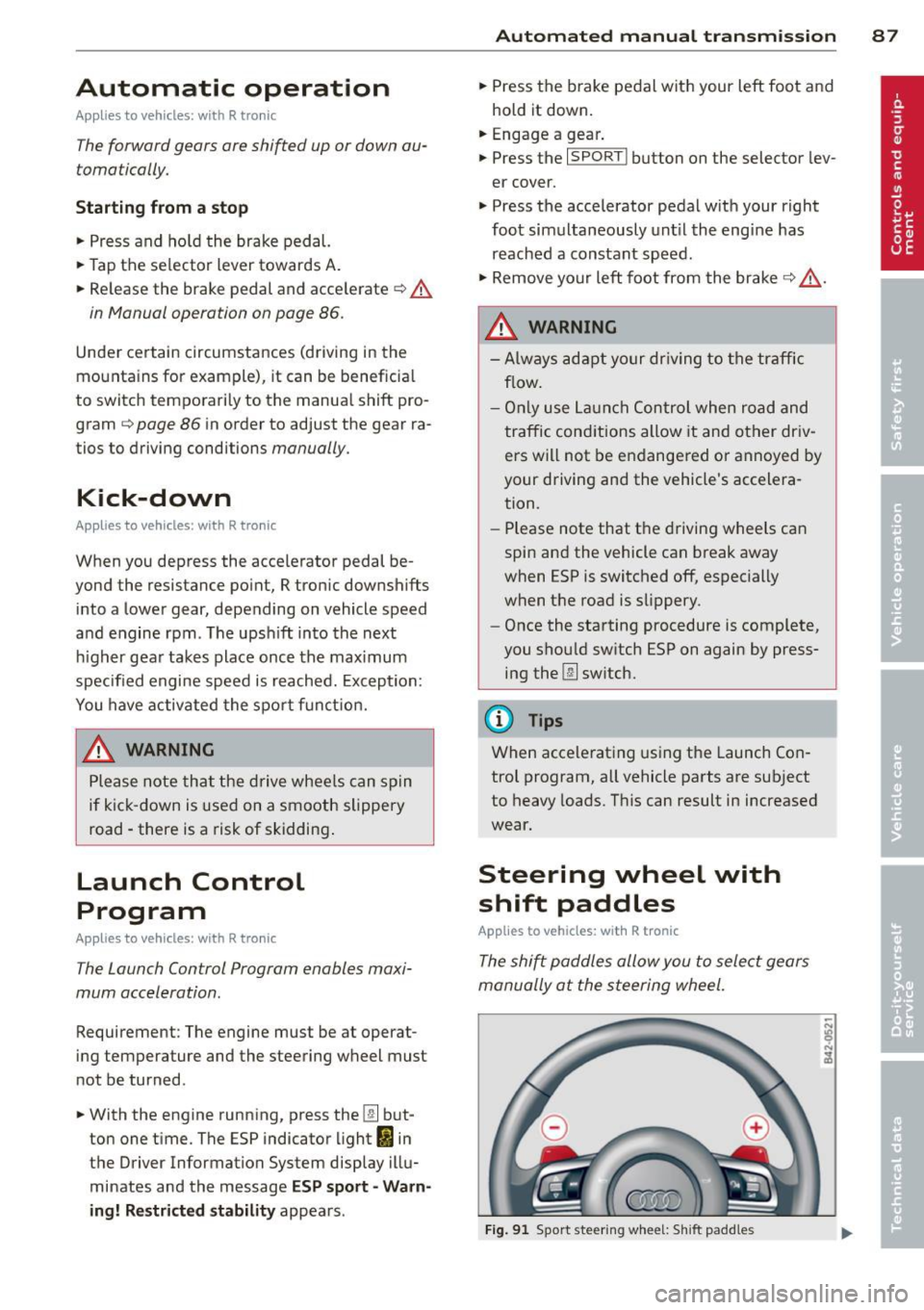
Steering wheel with
shift paddles
Applies to veh icles: with R tronic
The shi~ paddles allow you to select gears
manually at the steering wheel.
F ig . 91 Sport steering wheel: S hift padd les
Page 94 of 244
92 Parking system
Reverse parking
Applies to vehicles: with park ing system advanced
Parking mode 1 con be used when parking in
a garage or into a parking space.
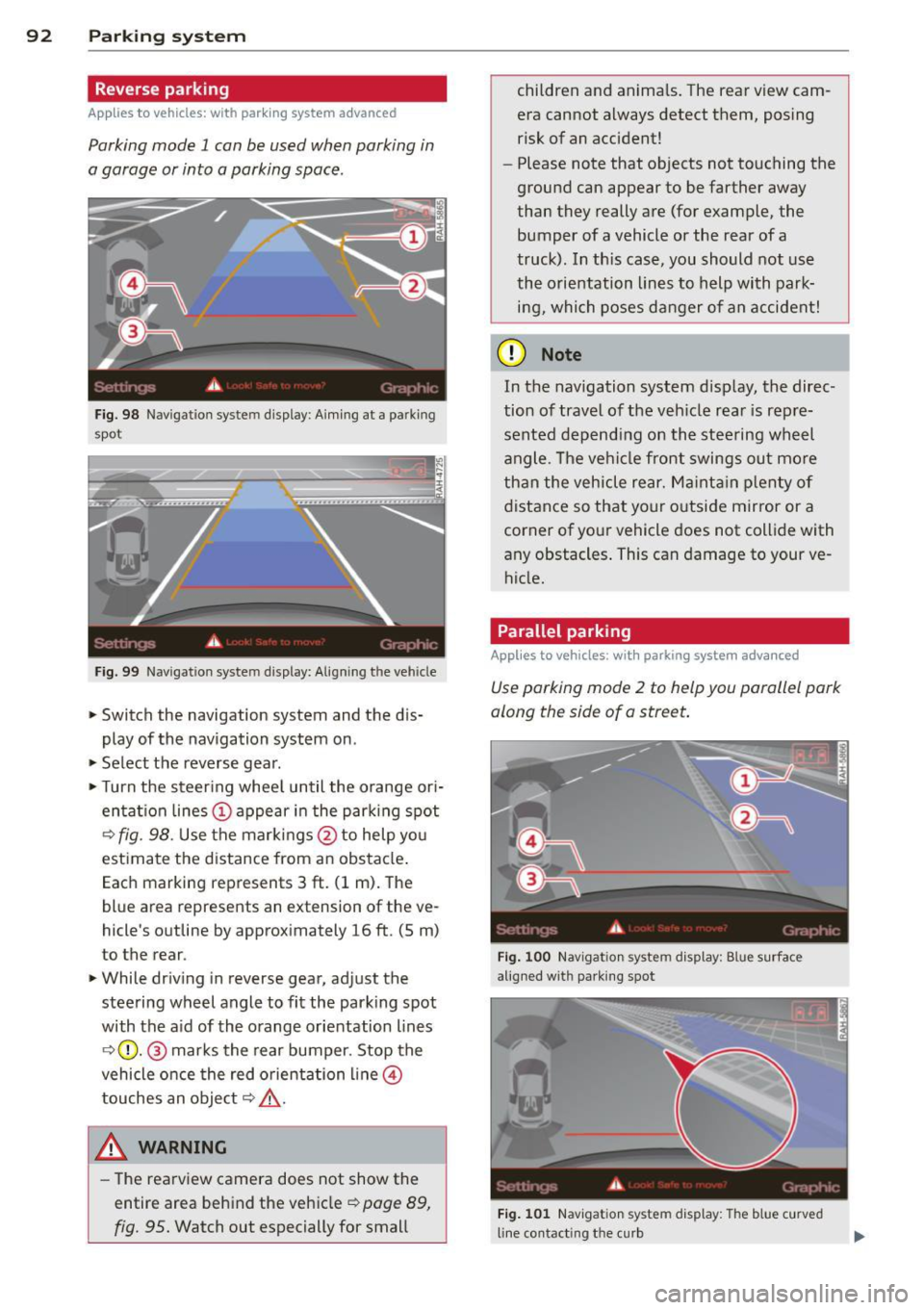
Fig. 98 Navigat ion syste m display : Aiming at a pa rk in g
spot
Fig. 99 Navigation syste m display: Align ing t he ve hicle
> Switch the navigation system and the dis
play of the navigation system on .
.,. Select the reverse gear .
.,. Turn the steer ing whee l until the orange ori
entat ion lines (;) appear in the parking spot
¢ fig. 98. Use the markings@to help yo u
estimate the distance from an obstacle .
Each marking represents 3
ft. (1 m). The
blue area represents an extension of the ve
hicle 's outline by approximately 16
ft. (5 m)
to the rear.
> While driving in reverse gear, adjust the
steering wheel angle to fit the parking spot
with the aid of the orange orientation lines
¢ (}). @ marks the rear bumper. Stop the
vehicle once the red orientation line@
touches an object¢,&. .
A WARNING
-The rearview camera does not show the
entire area behind the vehicle ¢
page 89,
fig. 95.
Watch out especially for small children and anima
ls. The rear view cam
era cannot always detect them, posing
risk of an accident!
- Please note that objects not touching the
ground can appear to be farther away
than they really are (for example, the
bumper of a vehicle or the rear of a
truck) . In th is case, you should not use
the orientation lines to help with park·
ing, which poses danger of an accident!
(D Note
In the navigation system display, the direc·
tion of travel of the vehicle rear is rep re
sented depending on the steering wheel
angle . The vehi cle front swings out more
than the vehicle rear. Maintain plenty of
distance so that your outside mirror or a
corner of your vehicle does not collide with
any obstacles . This can damage to your ve
hicle.
Parallel parking
Applies to vehicles: with parking system advanced
Use parking mode 2 to help you parallel park
along the side of a street.
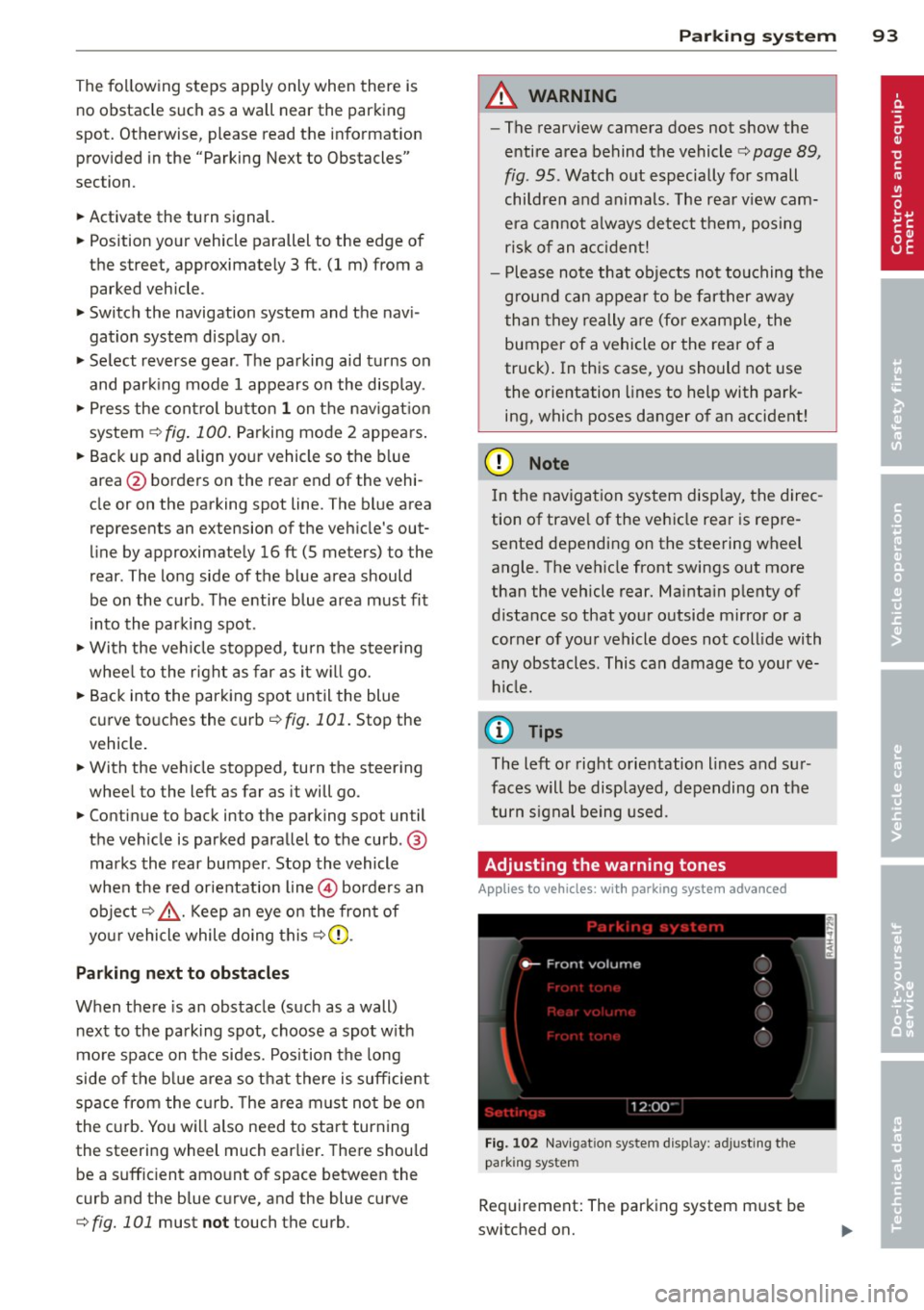
Fig. 100 Navigat ion sy stem display : B lu e surfac e
alig ned wit h parking spot
Fig. 101 Navigation system display : T h e b lue curved
line contact ing t he curb
Page 95 of 244
The following steps apply only when there is
no obstacle such as a wall near the parking
spot. Otherwise, please read the information
prov ided in the "Parking Next to Obstacles"
section.
~ Activate the turn signal.
~ Position yo ur vehicle parallel to the edge of
the street, approximately 3 ft. (1 m) from a parked vehicle .
~ Switch the navigation system and the nav i
gat ion system display on.
~ Se lect reverse gear . The parking aid tu rns on
and par king mode 1 appears on the display .
~ Press the control bu tto n 1 on the nav igat io n
system ¢
fig. 100. Parking mode 2 appea rs .
~ Backup and align yo ur vehicle so the b lue
area @ borders on the rear end of the vehi
cle or on the parking spot line. The bl ue area
represents an extension of the veh icle's out
line by approximate ly 16 ft (5 meters) to the
rear . The long side of the blue area should
be o n the curb . The entire blue area must fit
i nto the parking spot .
~ With the veh icle s topped, tu rn the s teer ing
whee l to the r ight as far as it w ill go.
~ Back into the park ing spot until the blue
cu rve to uches the curb¢
fig. 101. Stop the
vehicle.
~ With the veh icle stopped, turn the steer ing
wheel to the left as far as it will go .
~ Continue to back into the parking spot un til
the vehicle is parked para llel to the curb .@
marks the rear bumper. Stop the vehicle
when the red orientation line@ borde rs an
object ¢.&, . Keep an eye o n the fron t of
yo ur vehicle while do ing this ¢Ci) .
Parking next to obstacles
When t here is an obstacle (such as a wall)
next to the pa rking spot, choose a spot w it h
mo re space on t he sides. Position the long
side of the b lue a rea so that there is sufficient
space from the curb. The a rea m ust no t be on
the c urb. You w ill also need to start turn ing
the steeri ng wheel much earlie r. T he re should
be a s uffic ient amo unt of space between the
curb and the blue c urve, and the blue c urve
¢
fig. 101 must not touch the curb.
Par king system 93
A WARNING
-The rearview camera does not show the
entire area behind the vehicle¢
page 89,
fig. 95 . Watch out especially for small
children and anima ls . The rea r view cam
e ra can no t always de tect t hem, pos ing
ris k of an accident!
- P lease note that objects not touching the
g rou nd can appear to be far ther away
than they really are (for example, the
bumper of a vehicle or the rea r of a
truck) . In this case , you sho uld not use
the o rientation lines to help with park
ing, which poses danger of an accident!
(D Note
In the navigation system disp lay, the direc
tion of trave l of the vehicle rear is repre
sented depend ing on the stee ring wheel
angle. T he veh icle front swings out more
than the vehicle rear. Ma inta in p lenty of
distance so that you r o utside m irror or a
corner of you r vehicle does no t coll ide with
any obstacles. This can damage to your ve hicle.
(0 Tips
The left o r right o rientation lines and su r
faces will be disp layed, depending on the
turn s ignal being used .
Adjusting the warning tones
Applies to vehicles: wi th parking sys tem adva nced
Fi g. 102 Nav igat io n system d isplay: a djusting t he
park ing s yste m
Req uirement: The parking system m ust be
switched on.