lock AUDI R8 SPYDER 2011 Owner's Manual
[x] Cancel search | Manufacturer: AUDI, Model Year: 2011, Model line: R8 SPYDER, Model: AUDI R8 SPYDER 2011Pages: 244, PDF Size: 59.74 MB
Page 52 of 244
50 Convertible top
Step 1: Retract the rear window
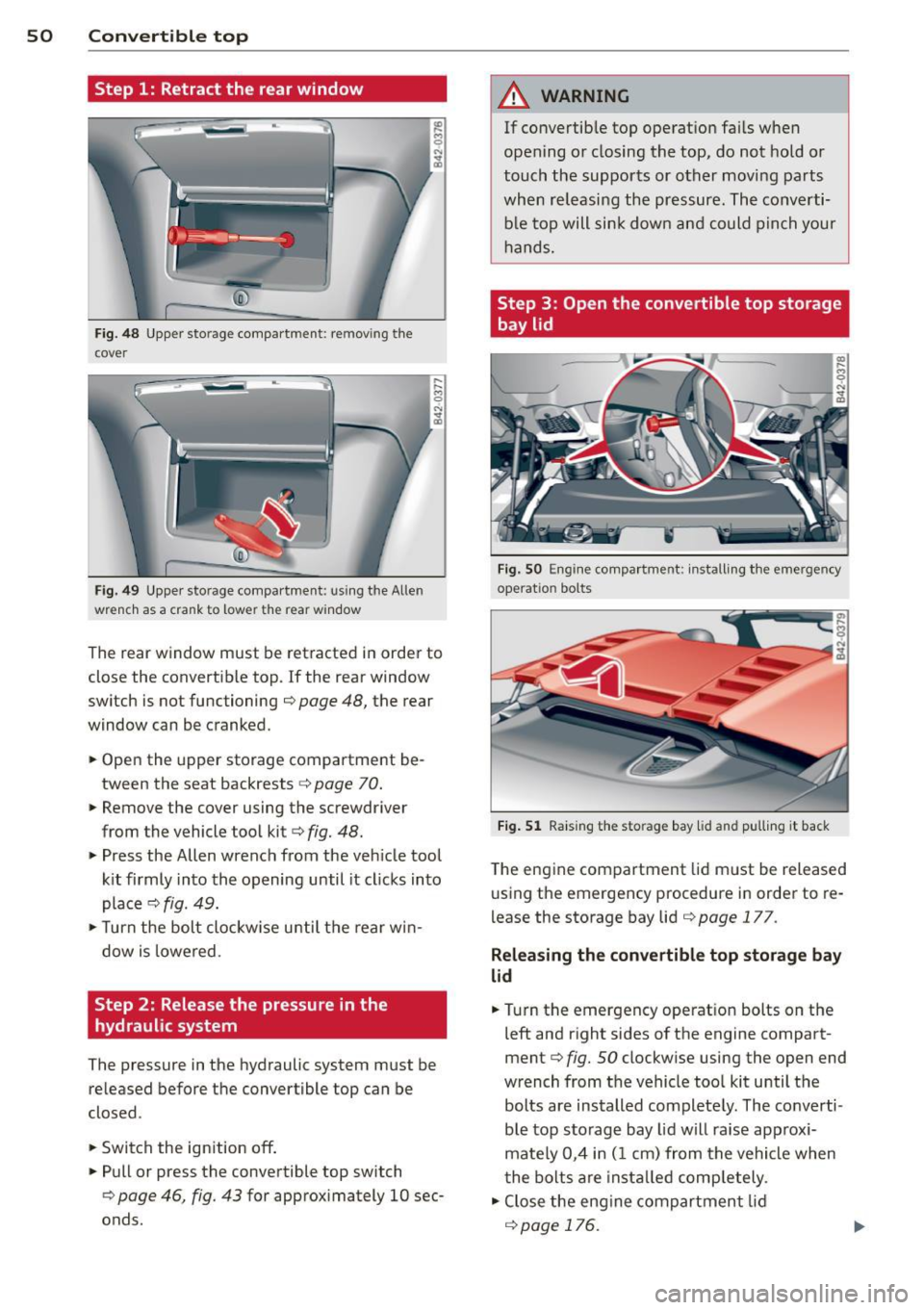
Fig. 48 Upper storage compartme nt: re mov ing the
cover
F ig. 49 Upper sto rage compartment: using the Allen
wrench as a crank to lower the rear win dow
M 0 N ... a,
... ... M 0
The rear window must be retracted in order to
close the convertible top. If the rear window
switch is not functioning ¢
page 48, the rear
window can be cranked .
.. Open the upper storage compartment be
tween the seat backrests ¢
page 70 .
.. Remove the cover using the screwdriver
from the vehicle tool kit¢
fig. 48.
• Press the Allen wrench from the veh icle tool
kit firmly into the opening until it cl icks into
place ¢
fig. 49.
> Turn the bolt clockw ise u ntil the rear win
dow is lowered .
Step 2: Release the pressure in the
hydraulic system
The pressure in the hydraulic system must be
re leased before the convertible top can be
closed.
.. Switch the ignition off .
.. Pull or press the convertible top switch
¢
page 46, fig. 43 for approximately 10 sec
onds.
A WARNING
-
If convertib le top operation fails when
opening or closing the top, do not hold or
touch the supports or other moving parts
when releasing the pressure. The converti
ble top will sink down and could pinch your
hands.
Step 3 : Open the convertible top storage
bay lid
Fig. SO E ng ine compartme nt: install ing the eme rgency
ope rat io n bolts
Fig. 51 Raising the sto rage bay lid and pulling it back
The engine compartment lid must be released
using the emergency procedure in order to re
l ease the storage bay lid ¢
page 177.
Releasing the convertible top storage bay
lid
.. Turn the emergency operat ion bolts on the
left and right sides of the engine compart
ment¢
fig. SO clockw ise using the open end
wrench from the vehicle too l kit until the
bolts are installed completely . The co nverti
ble top sto rage bay lid will raise app rox i
mate ly 0,4 in (1 cm) from the vehicle when
t he bolts are install ed comp letely .
• Close the engine compartment lid
r=;, page 176.
Page 54 of 244
52 Convertible top
• Pull the convertible top all the way out in
the direction indicated @. Position the fins
upward at the same time.
• Press the convert ible top as far forward to
ward the windshield frame as possible
c>fig . 55.
Have a second person assist when positioning
the convertible top. That person should stand
on the oppos ite side of the veh icle and per
form the same steps.
A WARNING
-When positioning the conve rtible top,
avoid contact with the supports or other
moving parts. Otherw ise you could pinch
yo ur hands.
- When pressing the convert ible top down
onto the windshield frame, make sure
that you do not pinch yourself or anyone
else.
Step 6: Secure the convertible top
-
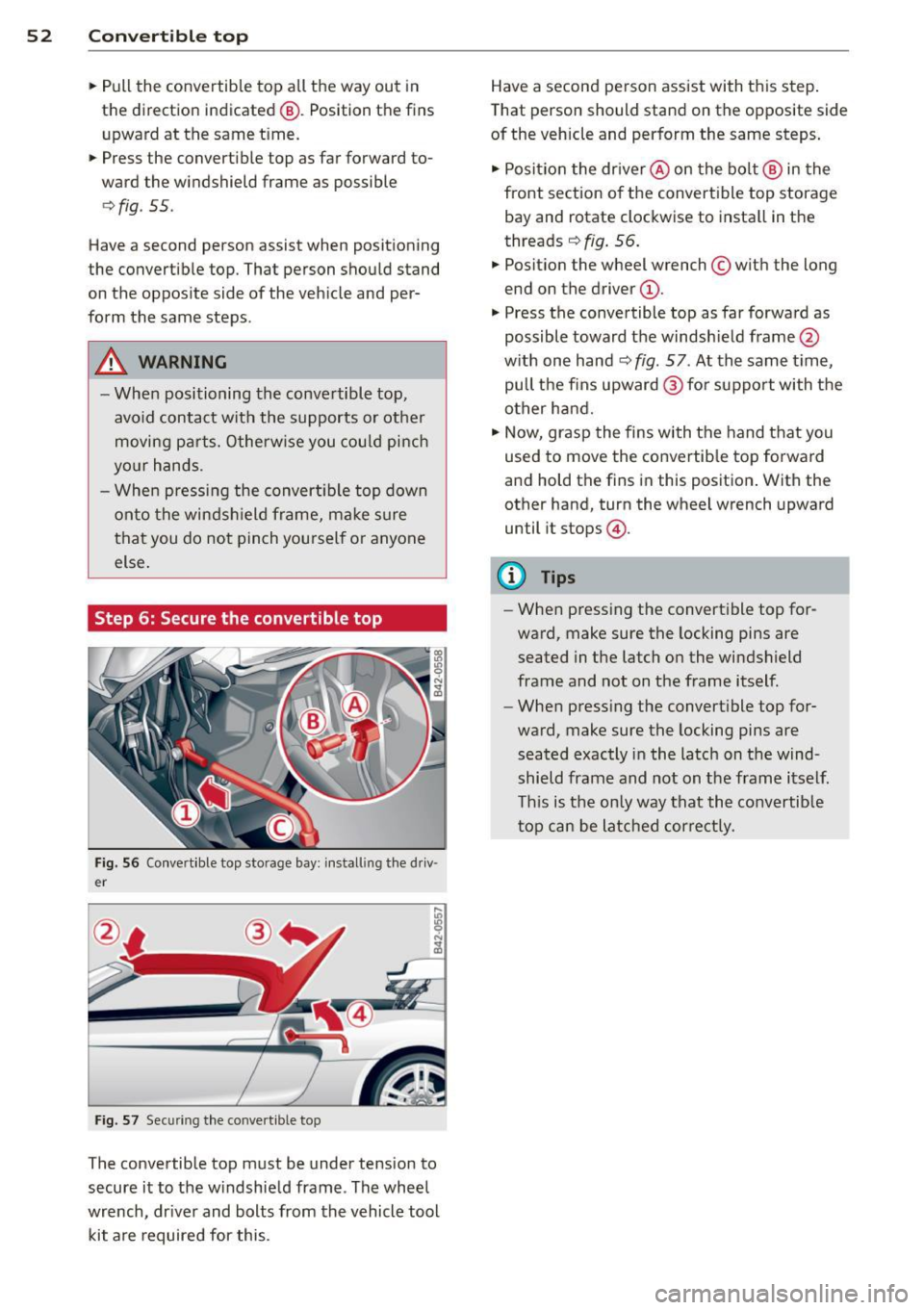
Fig. 56 Co nve rtible top storage bay: install ing the driv
e r
Fig. 57 Securing the conve rt ible top
The convertible top must be under tension to
secure it to the windshield frame . The wheel
wrench, dr iver and bolts from the vehicle tool
kit are required for this. Have a second person assist with this step
.
Tha t person should stand on the opposite side
of the vehicle and perform the same steps.
• Posit ion the driver @ on the bolt @ in the
front section of the convert ible top storage
bay and rotate clockwise to install in the
threads
c> fig. 56.
• Posit ion the wheel wrench © with the long
end on the driver @.
• Press the convertible top as far forward as
possible toward the windsh ield frame @
with one hand
c> fig. 57 . At the same time,
pull the fins upward @ for support with the
other hand.
• Now, grasp the fins with the hand that you
used to move the convertib le top forward
and hold the fins in this position . With the
other hand, turn the wheel wrench upward
until it stops @.
(0 Tips
-When pressing the convertible top for
ward, make sure the locking pins are
seated in the latch on the windshield
frame and not on the frame itself.
- When pressing the convert ible top for
ward, make sure the locking pins are
seated exactly in the latch on the wind
shield frame and not on the frame itself
This is the only way that the convertib le
top can be latched correctly .
Page 55 of 244
Step 7: Lock the convertible top
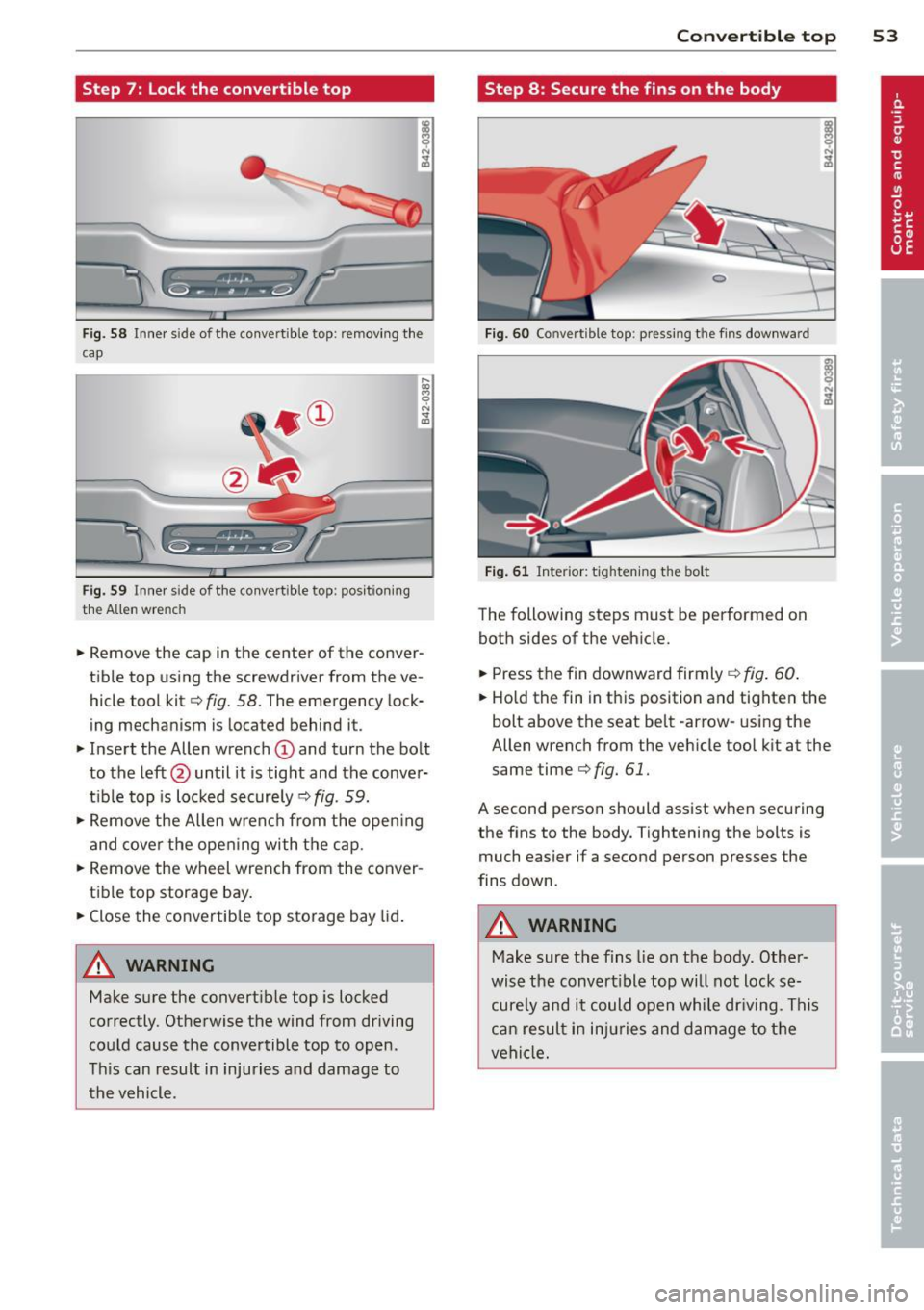
Fig. 58 Inner s ide of the conve rtible top: remov ing the
cap
Fig. 59 Inner s ide of the co nvertible top : pos ition ing
the Allen wrench
.. Remove the cap in the center of the conver
tib le top using the screwdriver from the ve
hicle tool kit¢
fig. 58. The emergency lock
ing mechanism is located behind it.
.. Insert the Allen wrench
(D and turn the bolt
to the left@ until it is tight and the conver
t ibl e top is locked securely ¢
fig. 59.
.,. Remove the Allen w rench from the open ing
and cover the opening with the cap.
.,. Remove the wheel wrench from the conver
tible top storage bay .
.. Close the convertible top storage bay lid.
A WARNING
Make sure the convert ible top is locked
correctly. Otherwise the wind from driving
could cause the convertible top to open.
This can result in injuries and damage to
the vehicle.
-
Convertible top 53
Step 8 : Secure the fins on the body
Fig . 60 Co nvert ible top: pressing t he fins downward
Fig. 61 Interior: t ighten ing the bolt
The following steps must be performed on
both sides of the vehicle .
.. Press the fin downward firmly
¢fig . 60.
.. Ho ld the fin in this position and tighten the
bolt above the seat belt -arrow-using the
Allen wrench from the veh icle tool k it at the
same time¢
fig. 61.
A second person should assist when securing
the fins to the body. Tightening the bolts is
much easier if a second person presses the
fins down.
A WARNING
-Make sure the fins lie on the body . Other-
wise the convert ible top will not lock se
cure ly and it could open while dr iving. This
can resul t in injuries and damage to the
vehicle.
-
Page 56 of 244
54 Convertible top
Step 9: Extend the rear window
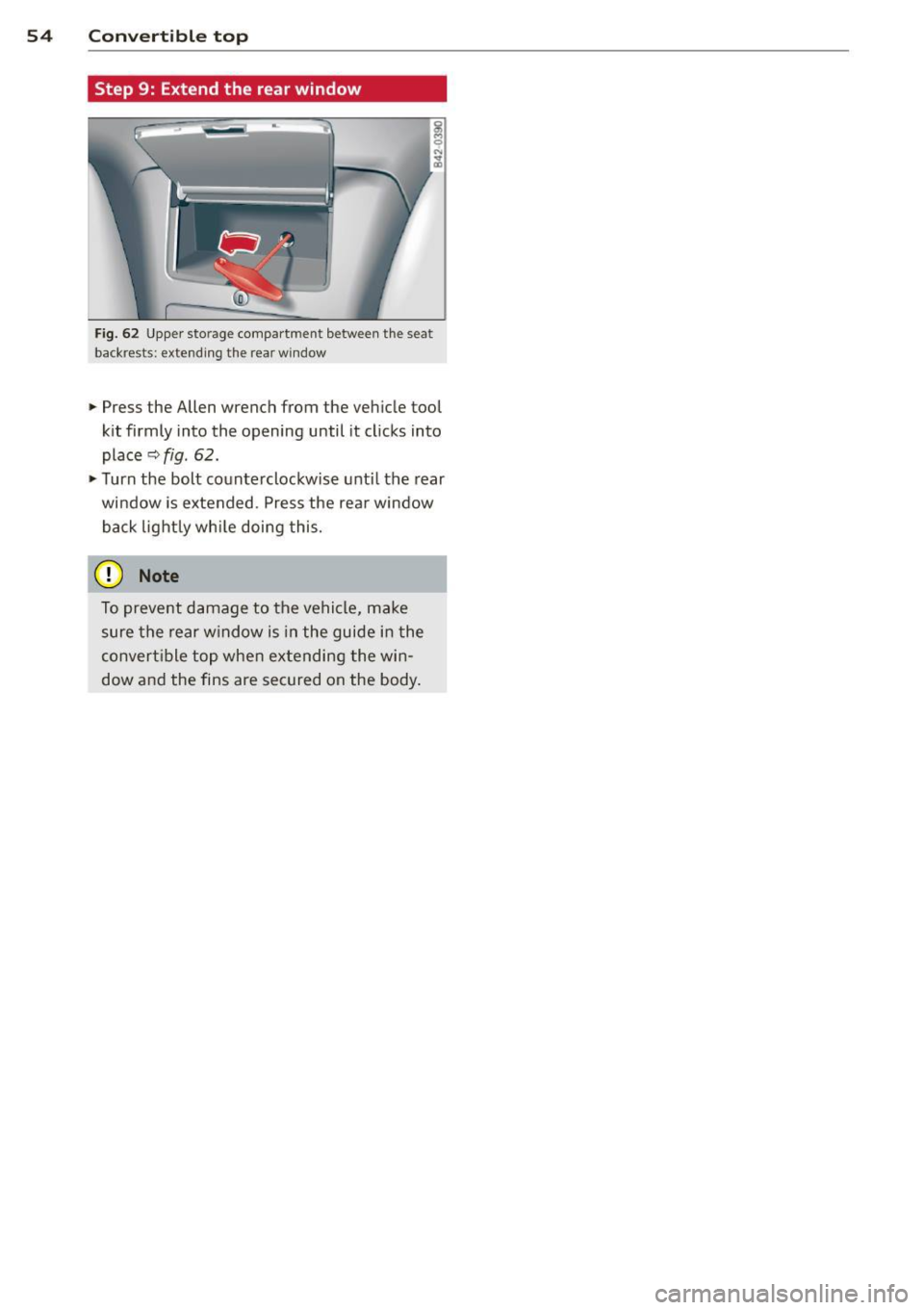
Fig. 62 Upper storage compartment between the seat
backrests: extending the rear window
~ Press the Allen wrench from the vehicle tool
kit firmly into the opening until it clicks into
place
~ fig. 62.
~ Turn the bolt counterclockwise until the rear
window is extended. Press the rear window
back lightly while doing this.
0 Note
To prevent damage to the vehicle, make
sure the rear window is in the guide in the
convertible top when extending the win
dow and the fins are secured on the body.
Page 57 of 244
Clear vision Lights
Switching the headlights on/off
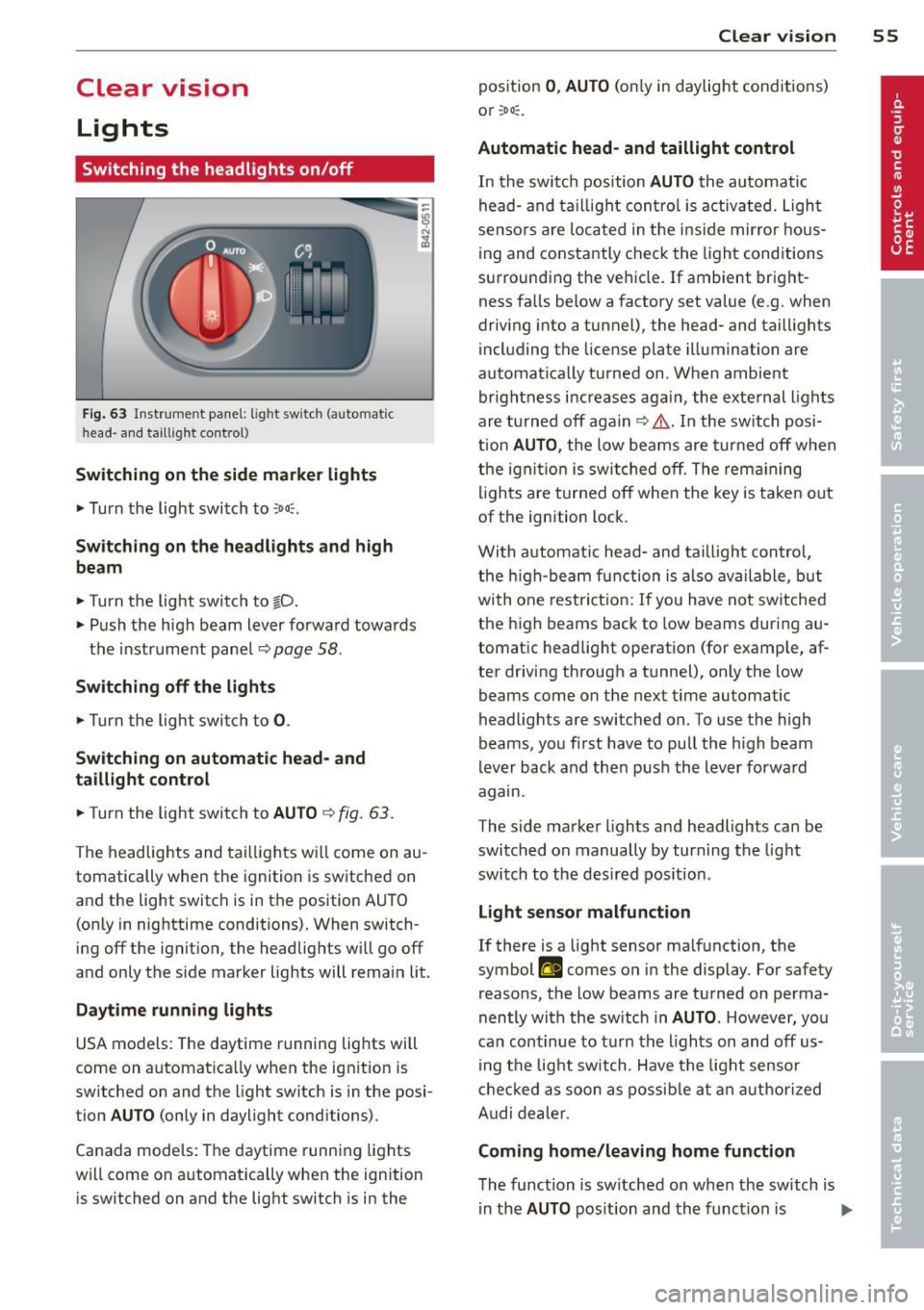
Fig. 63 In str ume nt pa ne l: lig ht sw itc h (auto mat ic
head· a nd ta ill ig ht control)
Switching on the side marke r lights
... Turn the light switch to :oo::.
Switching on the headlights and high
beam
... Turn the light switch to §D.
.,. Push the h igh beam lever forwa rd towa rds
t h e instrument panel~
page 58 .
Sw itching off the lights
.,. Turn the light switch to 0 .
Sw itching on automatic head- and
taillight control
.,. Turn the light switch to AUTO ~ fig. 63 .
The headlig hts and tai lligh ts w ill come on au
tomatically when the ignition is sw itche d on
and the light switch is in the position AU TO
(on ly in nig httime conditions). When switch·
ing off the ignit io n, the headlig hts wi ll go off
and only the side marker lights will remai n lit.
Daytime running lights
USA models: The daytime r unning lig hts will
come on a utomat ica lly when the ig nition is
sw itched on and the light switch is in the posi·
tion
AUTO (only in daylight conditions).
Canada models : Th e daytime runni ng lights
will come on a utomat ically when the ignition
is switched on and the light switch is in the
Clear vi sion 55
position 0 , AUTO (on ly in daylight conditions)
or ;oo :.
Automatic head- and taillight control
In the swi tch position AUTO the au tomati c
he ad- and t aillight con tro l is activ ated. Ligh t
senso rs ar e loca ted in t he i nside mir ro r h ous
ing and co nstantly chec k the light cond itions
su rroundi ng the vehicle. If ambient bright
ness fa lls below a factory set value (e .g. when
dr iv ing into a tunnel), the head- and tail lights
i ncl uding the license plate illuminati on are
automat ica lly t urned on . When ambient
brightness i ncreases aga in, the exte rnal ligh ts
ar e turned off aga in
c> &. . In the switch posi
t ion
AUTO , the low beams are tur ned off when
th e ign ition is swi tched o ff. Th e rem aining
li gh ts are turned off when the key is ta ke n out
of the ignition lock.
W it h a utomat ic head- and taill igh t con trol,
t he h igh-beam fu nction is also ava ilable , bu t
with one rest ric t ion : If you have not sw itche d
the h igh beams back to low beams during a u
tomat ic head light operat ion (for examp le, af
ter driving through a tunnel), on ly the low
beams come on the next time automatic
headlig hts are switched on. To use the high
beams, yo u fi rst have to pull the h igh beam
lever back and then push the lever forwa rd
agam .
The side ma rke r lights a nd headlights ca n be
sw itc hed on manually by turn ing the light
swi tc h to the des ired pos ition .
Light sensor malfunction
If there is a light sensor ma lfunction, the
symbol
II comes on in the display . For safety
reasons, the low beams are tu rned on perma
nently with t he sw itch in
AUTO . However, you
can con tinue to tu rn the lights on and off us
in g t he light switch . Have t he ligh t sensor
c h eck ed as soon a s possib le a t an au thorized
A udi dealer.
Coming home/leaving home function
The function is sw itched on when the sw itch is
i n the
AUTO pos ition and th e funct ion is liJJ,,
Page 58 of 244
56 Clear vision
shown as active in the driver information
system.
The
coming home function illuminates the
area around the vehicle when the ignition is
switched off and the driver's door is opened.
The length of time the lights remain on can be
set in the menu display
(Lights> Exterior
lights> coming home) .
The leaving home function illuminates the
area around the vehicle when unlocking it.
.&_ WARNING
- Never use daytime running lights to see
where you are going. They are not bright enough and will not let you see far
enough ahead for safety, especially at dusk or when it is dark. Be aware of
changes in outside light conditions when
you are driving and respond by switching
on your low beams.
- Automatic head- and taillight control is
only intended to assist the driver. This
feature does not relieve the driver of his
responsibility to check the headlights
and to turn them on manually according
to the current light and visibility condi
tions. For example, fog and rain cannot be detected by the light sensors. Conse
quently, always switch the headlights on
under these weather conditions and
when driving in the dark.
- Crashes can happen when you cannot see
the road ahead and when you cannot be
seen by other motorists.
-Always turn on the headlights so that you can see ahead and so that others can see your car from the back.
(D Tips
- Always observe the specific local regula
tions for your area when to use your
lights .
- Turn on low beams as evening ap
proaches or in conditions of poor visibili
ty.
- Do not attach stickers to the windshield
in front of the sensors as this can disable the automatic head- and
taillight control
and the automatic glare-dimming of the
rearview mirror(s)*.
- If you
remove the ignition from the igni
tion lock while the headlights are still
on, a buzzer will sound as long as the
driver's door is open to remind you to
turn off the lights.
- In the AUTO mode, the low beams are
turned off when the ignition is turned
off. The remaining lights are turned off
when the key is taken out of the ignition .
- In cool or damp weather conditions the
headlights may fog
over temporarily on
the inside.
- The critical factor is the temperature
difference between the interior and the
exterior of the headlight lens.
- With the main beams switched on, the
light-emitting area will be free of con
densation after a short time, however
the edges of the glass may still be fog
ged.
- This physical phenomenon has no ef
fect on the life of your vehicle's light
ing system.
Instrument panel illumination
The illumination of the instruments, displays
and the center console can be adjusted.
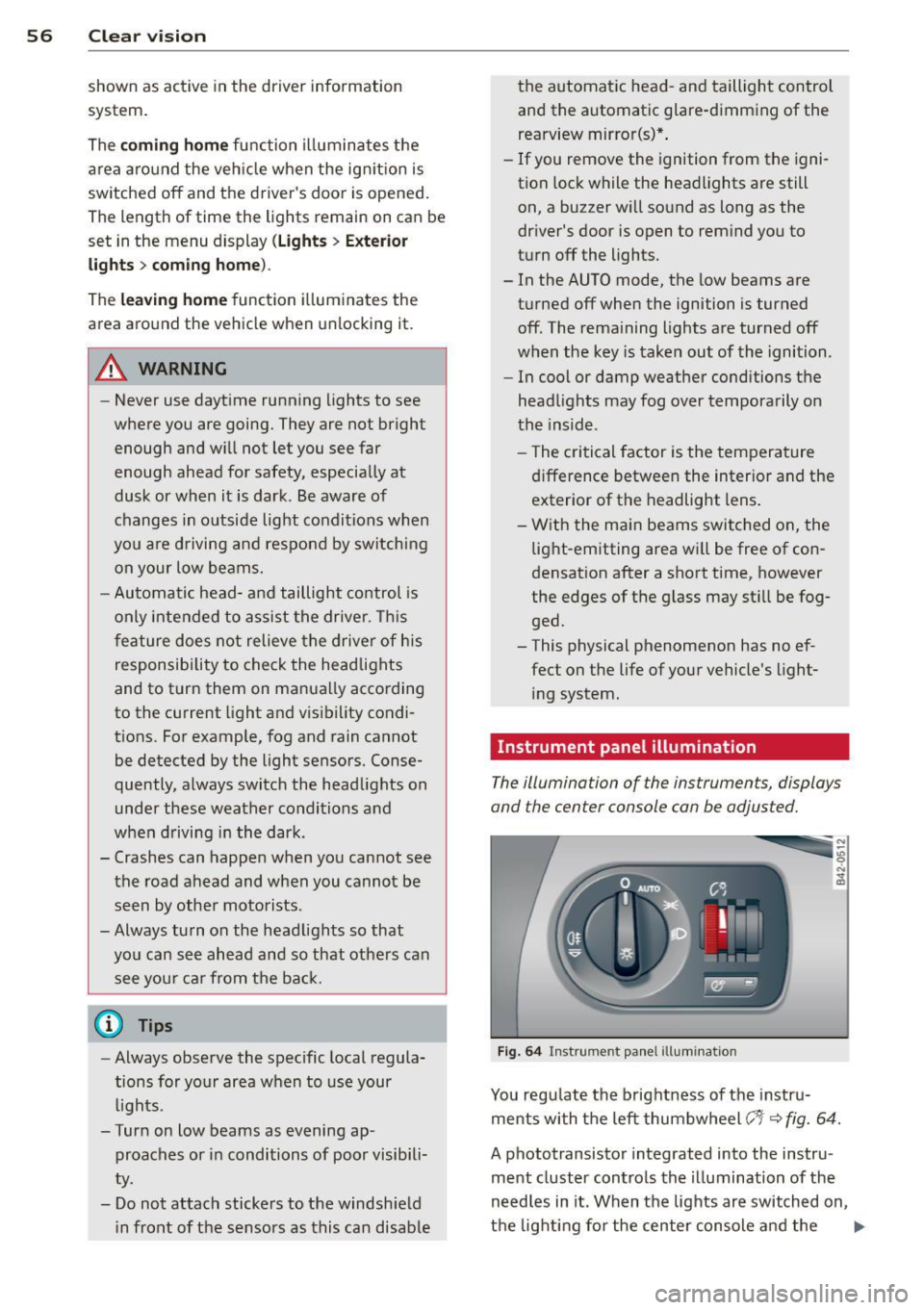
Fig. 64 Instrument panel illumination
You regulate the brightness of the instru
ments with the left thumbwheel
(-'1· ~ fig. 64.
A phototransistor integrated into the instru
ment cluster controls the illumination of the
needles in it. When the lights are switched on,
the lighting for the center console and the
llll>
Page 60 of 244
58 Clear vis ion
Turn signals and high beam lever
The lever is used to operate the turn signals
and the high beam as well as the headlight
flasher .
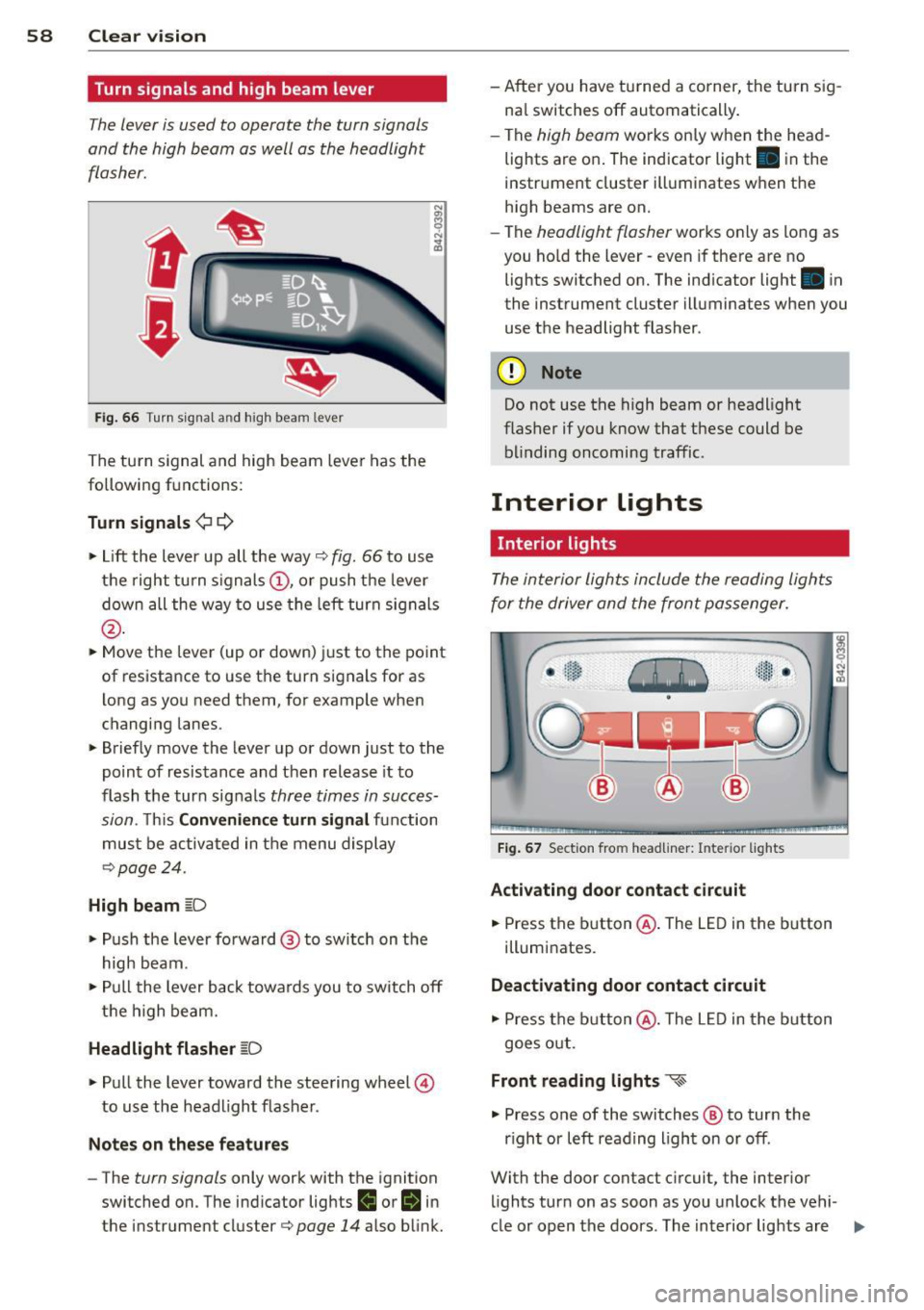
Fig. 66 Turn s igna l and high beam lever
The turn s ignal and high beam leve r has the
following functions:
Turn signals ¢ c::>
"" Lift the lever up all the way¢ fig. 66 to use
the right turn signals @, or push the lever
down all the way to use the left turn signals
@ .
""Move the lever (up or down) just to the point
of resistance to use the turn signals for as
l ong as you need them, for example when
changing lanes.
"" Briefly move the lever up or down just to the
po int of resistance and then release it to
flash the turn signals
three times in succes
sion.
T his Convenience turn signal function
must be activated in the menu display
¢ page 24.
High beam [D
"" Push the lever forward @ to switch on the
high beam.
"" Pull the lever back towards you to switch off
the high beam.
Headlight flasher [D
"" Pull the lever toward the steering wheel @
to use the headlight flasher.
Notes on these features
- The turn signals only work with the ignition
switched on. The indicator lights
II or II in
t he instrument cluster¢
page 14 also blink. - After you have turned a corner, the turn sig
na l switches off automatically .
- The
high beam works only when the head
lights are on . The indicator light. in the
instrument cluster illuminates when the
high beams are on.
- The
headlight flasher works on ly as long as
you ho ld the lever -even if there a re no
lights switched on. The indicator light . in
the instrument cluster illuminates when you
use the headlight flasher.
(D Note
Do not use the high beam or headlight
flasher if you know that these could be
blinding oncoming traffic.
Interior Lights
Interior light s
The interior lights include the reading lights
for the driver and the front passenger.
Fig. 67 Sect ion from headliner: Interior lights
Activating door contact circuit
.,. Press the button@. The LED in the button
illumi nates.
Deactivating door contact circuit
"" Press the button @. The LED in the button
goes out.
Front reading lights ~
"" Press one of the switches @ to turn the
r ight or left reading l ight on or off.
With the door contact circuit, the interior
lights tur n on as soon as you unlock the vehi-
cle or open the doors. The interior lights are
Ill>
Page 72 of 244
70 Seats and st o ra ge
Storage
"
General
A WARNING
- Always remove objects from the instru-
ment pane l. Any items not put away
cou ld slide around inside the vehicle
whi le driving or when accelerating or
when applying the brakes or when driv
ing around a corner.
- When you are drivi ng make sure that
anything you may have placed in the cen
ter console or othe r storage locations
cannot fa ll out into the footwells. In case
of sudden braking you would not be able
to brake, depress the clutch or acceler ate.
Glove compartment
The glove compartment is illuminated and
can be locked .
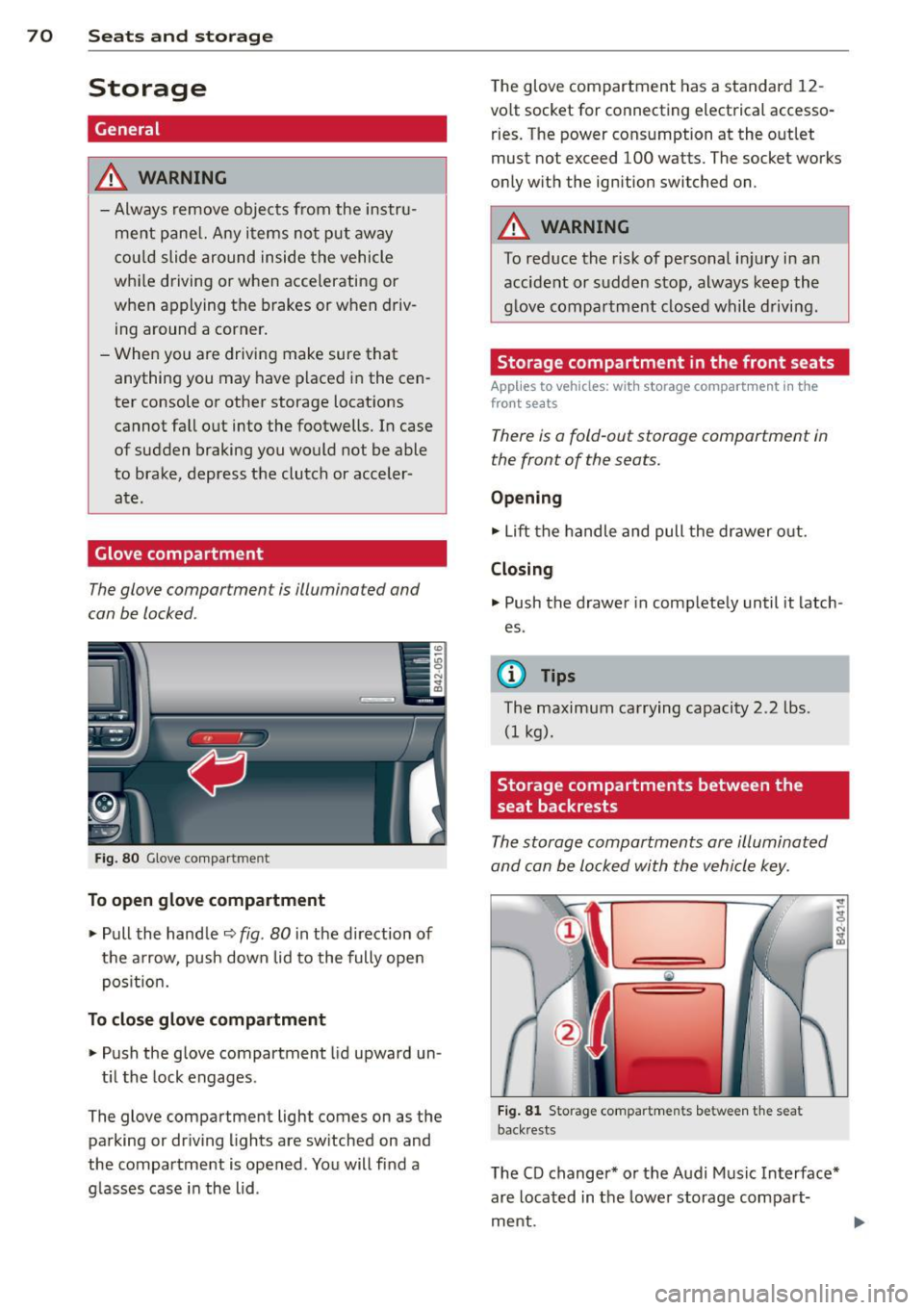
Fig. 8 0 G love co mpa rtm ent
To open glove compartment
.,. Pull the handle ¢ fig . 80 in the direction of
the arrow, push down lid to the fully open
pos it ion.
To close glove compartment
.,. Push the glove compartment lid upward un -
t il t he lock engages .
The glove compartment light comes on as the
parking or driving l ights are sw itched on and
the compartment is opened . You will fi nd a
g lasses case in the lid . The glove compartment has a standard
12
-
volt socket for connecting electrical accesso
ries. The power cons umption at the o utlet
must not exceed 100 watts. The socket works
only w ith the ignition switched on.
A WARNING
--
To reduce the risk of pe rsonal inju ry i n an
accident or sudde n stop, always keep the
g love compartme nt closed while driving .
Storage compartment in the front seats
Applies to veh icles: w ith storage compartment in the
front seats
There is a fold-out storage compartment in
the front of the seats.
Opening
.,. Lift the handle and pull the drawer o ut.
Closing
.,. Push the drawer in complete ly until it latch
es .
© Tips
The maximum carrying capacity 2.2 lbs .
(I kg).
Storage compartments between the
seat backrests
The storage compartments are illuminated
and can be locked with the vehicle key.
Fi g. 81 Storage compartments between t he seat
back rests
The CD changer* or the Audi Music In terface*
are located in the lowe r storage compart
ment.
Page 79 of 244
On the road
Steering
Adjusting the steering wheel column
The steering wheel position can be continu
ously adjusted in height and distance.
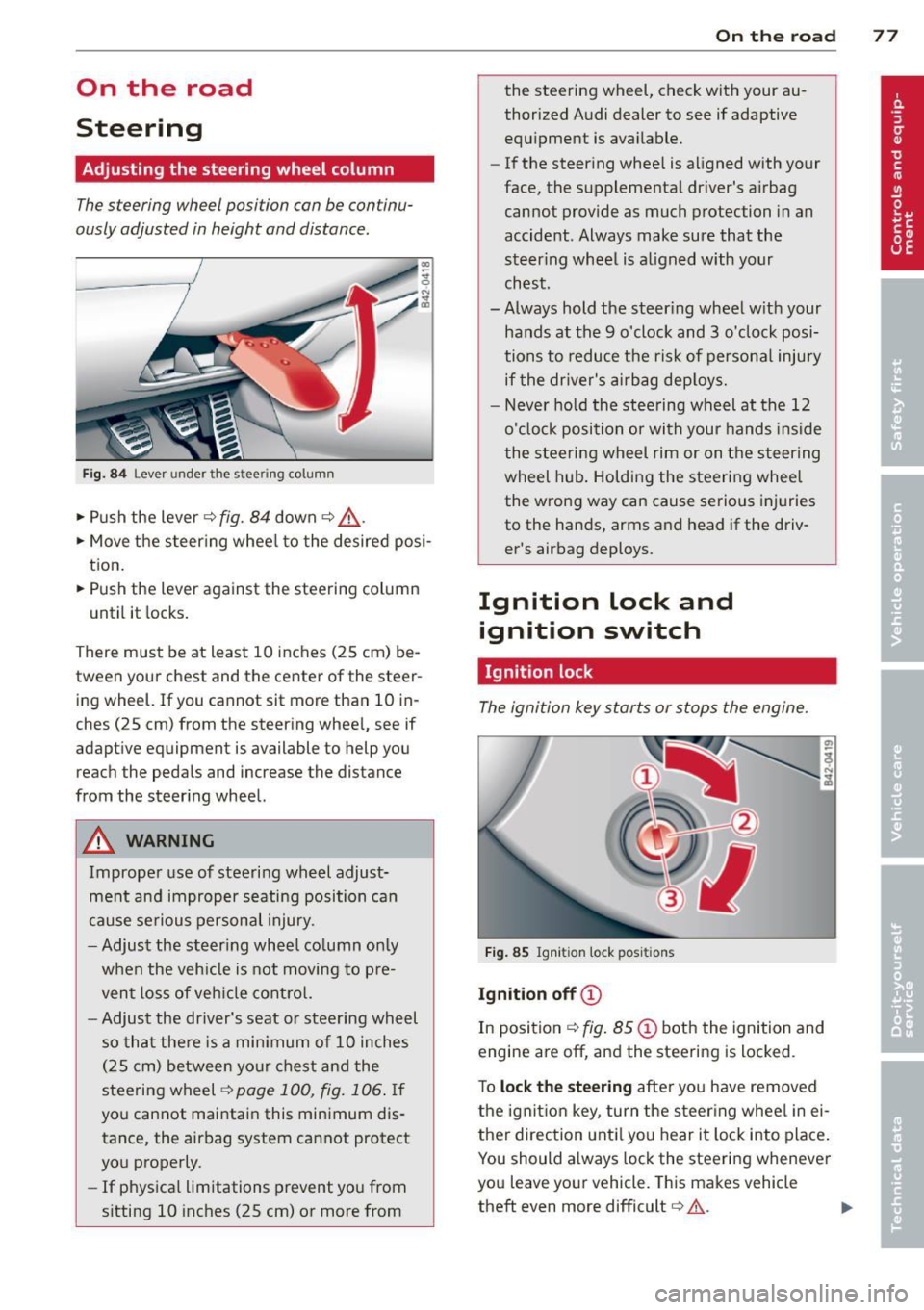
Fig. 84 Lever under the stee ring column
• Push the lever ¢ fig. 84 down ¢ &.
• Move the steer ing whee l to the desired posi
tion.
• Push the lever against the steering column
until it locks.
There must be at least 10 inches (25 cm) be
tween your chest and the center of the steer
ing wheel. If you cannot sit more than 10 in
ches (25 cm) from the steering wheel, see if
adaptive equipment is available to help you
reach the pedals and increase the distance
from the steering wheel.
A WARNING
Improper use of steering wheel adjust
ment and improper seating position can
cause serious personal injury .
- Adjust the steering whee l column only
when the veh icle is not moving to pre
vent loss of veh icle control.
-
-Adjust the driver's seat or steering wheel
so that there is a minimum of 10 inches
(25 cm) between your chest and the
steering wheel
¢ page 100, fig. 106. If
you cannot maintain this minimum dis
tance, the airbag system cannot protect
you properly.
- If physica l limitations prevent you from
sitting 10 inches (25 cm) or more from
On the road 77
the steering wheel, check with your au
thorized Audi dealer to see if adaptive
equipment is available.
- If the steering wheel is aligned with your
face, the supplemental driver's airbag cannot provide as much protection in an
accident . Always make sure that the
steer ing wheel is aligned with your
chest.
- Always hold the steer ing wheel w ith your
hands at the 9 o'clock and 3 o'clock posi
tions to reduce the risk of personal injury
if the driver's airbag deploys.
- Never hold the steering wheel at the 12
o'clock position or with your hands inside
the steering wheel rim or on the steering
wheel hub . Holding the steering wheel
the wrong way can cause serious injuries
to the hands, arms and head if the driv
er's airbag deploys.
Ignition lock and ignition switch
Ignition lock
The ignition key starts or stops the engine.
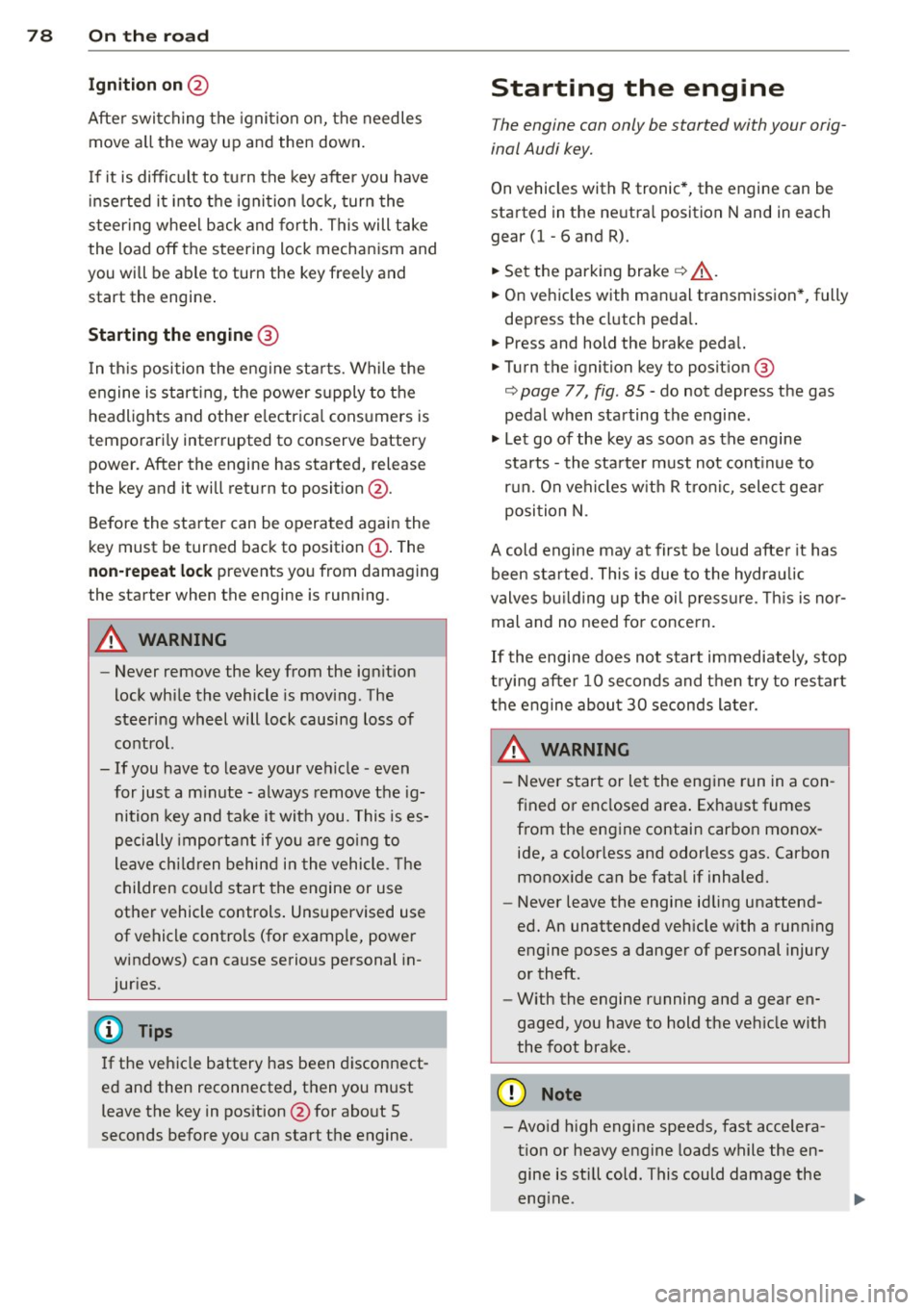
Fig. 85 Igniti on lock posit ions
Ignition off©
In position ¢ fig. 85@ both the ignition and
engine are
off, and the steering is locked .
To
lock the steering after you have removed
the ignition key, turn the steer ing wheel in ei
ther direction until you hear it lock into place.
You should always lock the steering whenever
you leave your vehicle. This makes vehicle
theft even more difficult
c::> .&. .
Page 80 of 244
78 On the road
Ignition on @
Afte r switching the ignition on, the needles
move a ll the way up and then down .
I f it is difficult to tu rn the key afte r you have
i nserted it into the ignition lock, turn the
steering wheel back and forth. This will take
the load off the steering lock mechan ism and
you will be able to turn the key freely and start the engine .
Starting the engine @
In th is position the engine sta rts. While the
engine is start ing, the power s upply to the
headlights and other e lectr ica l cons umers is
tempo rari ly interrupted to conserve battery
power. After the engine has started, release
the key and it will return to posit ion @.
Before the starter can be operated again the
key must be turned back to position@. The
non-repeat lock prevents you from damaging
the starter when the engine is runn ing .
A WARNING
-Never remove the key from the ign ition
lock whi le the vehicle is moving. The
steeri ng wheel will lock causing loss of
contro l.
- If you have to leave your vehicle - even
for just a m inute - always remove t he ig
nition key and ta ke it with you. This is es
pecially important if you a re going to
leave ch ildren behind in the vehicle. The
children co uld star t t he engine or use
other vehicle controls . Unsupervised use
of vehicle controls (for examp le, power
windows) can cause serious personal in
jur ies.
(D Tips
If the veh icle battery has been discon nect
ed and then reconnected, then you must leave the key in pos ition @for abo ut 5
seconds before you can start t he engine.
-
Starting the engine
The engine can only be started with your orig
inal Audi key.
On vehicles with R tronic *, the engine can be
started in the ne utra l position N and in each
gear (1 - 6 and R).
.. Se t the park ing brake ¢,&. .
.. On ve hicles with ma nual transmission *, fully
depress the cl utch peda l.
.. Press and hold the brake peda l.
.. Turn the ignition key to posit ion @
¢ page 77, fig . 85 - do not depress the gas
pedal when starting the engine .
.. Let go of the key as soo n as the engine
starts - the sta rter must not cont inue to
r u n. On veh icles w it h R t ro nic , sele ct ge ar
posi tion N.
A cold engine may at first be loud afte r it has
been started. This is due to the hydrau lic
valves b uilding up the oil p ress ure. This is no r
mal and no need fo r conce rn .
If th e engine does not start imm ediately, stop
t ry ing after 10 seconds and t hen t ry to res tart
t h e engine abou t 30 seconds later.
A WARNING
-
- Never star t or le t the eng ine run in a con
f ined o r enclosed area . Exha ust fumes
from the en gine contain carbon monox
ide, a co lorless and odorless gas. Carbon
monox ide ca n be fatal if inhaled.
- Never leave the engine id ling unattend
ed. An unattended veh icle w ith a run ning
e ngine poses a danger of personal injury
or theft.
- With the engine r unning and a gear en
gaged, you have to hold the ve hicle w it h
the foot brak e.
(D Note
-Avo id h igh engine speeds, fast accelera
tion or heavy engine loads while the en
gine is still cold. This could damage the
eng ine.