steering AUDI R8 SPYDER 2012 User Guide
[x] Cancel search | Manufacturer: AUDI, Model Year: 2012, Model line: R8 SPYDER, Model: AUDI R8 SPYDER 2012Pages: 236, PDF Size: 59.24 MB
Page 80 of 236
78 Transmission
@ Tips
-When accelerating using the Launch
Control program, all vehicle parts are
subject to heavy loads. This can result in
increased wear.
- The Launch Control Program only func tions when the parking brake is released
and the vehicle speed is less than 3 mph
(5 km/h).
R tronic
Description
Applies to vehicles: with R tro nic
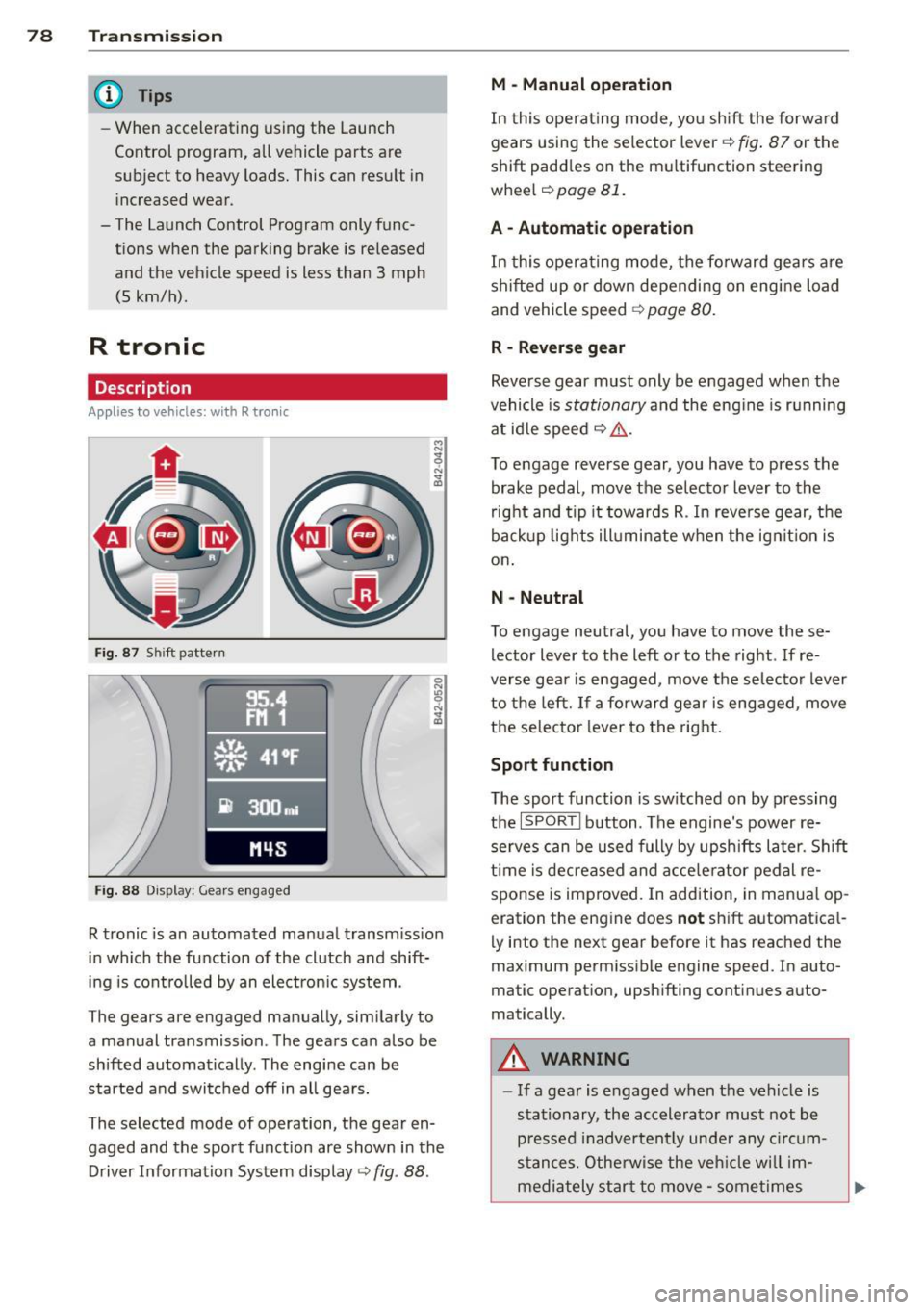
Fig. 87 Shi ft pattern
Fig. 88 Disp lay: Gea rs engaged
R tronic is an automated manual transmission
in which the function of the clutch and shift
ing is controlled by an electron ic system .
The gears are engaged manually, sim ilarly to
a manual transmission . The gears can also be
shifted automatically . The engine can be
started and switched off in all gears.
The selected mode of operation, the gear en
gaged and the sport function are shown in the
Driver Information System display
Q fig . 88 .
M -Manual operation
In this operat ing mode, you shift the forward
gears using the selector lever
Q fig. 87 or the
shift paddles on the mu ltifunction steering
whee l
Q page 81.
A - Automatic operation
In this opera ting mode, the forward gears are
shifted up or down depending on engine load
and vehicle speed
Q page 80.
R -Reverse gear
Reverse gear must only be engaged when the
vehicle is
stationary and the eng ine is running
at idle speed
¢ ,&. .
To engage reverse gear, you have to press the
brake pedal,
move the selector lever to the
right and tip it to wards R . In reverse gear, the
backup lights illuminate when the ignit ion is
on .
N -Neutral
To engage neutral, you have to move these
lector lever to the left or to the right.
If re
verse gear is engaged,
move the selector lever
to the left.
If a forward gear is engaged , move
the selector lever to the right.
Sport function
The sport function is sw itched on by pressing
the
I SPOR T I button. The engine's power re
serves can be used fully by upshifts later. Shift
time is decreased and accelerator pedal re
sponse is improved. In addition, in manual op
eration the engine does
not shift automatica l
ly into the next gear before it has reached the
maximum permissible engine speed. In auto
matic operation, upsh ifting cont inues auto
matically.
A WARNING
-- If a gear is engaged when the vehicle is
stationary, the accelerato r must not be
p ressed inadvertently under any circum
stances. Otherwise the vehicle w ill im
mediately star t to
move -sometimes
Page 82 of 236
80 Transmi ssion
(0 Note
If you must stop on an incline, always hold
the vehicle in place w ith the foot brake to
prevent it from roll ing back. Never hold
the vehicle on an incline w ith a slipping
clutch. The clutch was overloaded if
Clutch
overheat ing! If possib le pl ea se st op ve hi
cle appears in the Driver Information Sys
t em disp lay.
Automatic operation
Ap plies to ve hicles : wit h R tro nic
The forward gears are shifted up or down au
tomatically.
Startin g from a stop
11-Press and ho ld the brake pedal.
11-Tap the se lector lever towards A .
... Re lease the brake pedal and acce lerate
¢ ,& in Manual operation on page 79 .
Under certain circumstances (driving in the
mounta ins for example), it can be beneficia l
to switch tempo rarily to the manual shift pro
g ram ¢
page 79in order to adjust th e gear ra
tios to driv ing cond itions
manually.
Kick-down
A ppl ies to vehicles : wit h R tro nic
When you depress the accelera to r pedal be
yond the resistance po int, R tron ic downsh ifts
into a lower gear, depending on vehicle speed
and engine rpm. The ups hift into the next
h igher gear takes place once the max imum
specified engine speed is reached. Exception:
You have activated the sport funct ion .
A WARNING
Please note that the drive wheels can spin
if kick-down is used on a smooth slippery
road -there is a risk of skidding.
Launch Control Program
App lies to veh icles : w it h R tro nic
The Launch Control Program enables maxi
mum acceleration .
Requirement: The engine must be at operat
ing temperature and the steering wheel must
not be turned .
... With the engine running, press the
I!! but
ton one time. The ESC ind icator light
I in
the Driver Information System d isplay illu
m inates and the message
ESP sport - Warn
ing! R estr icted stability
appears .
... Press the b rake pedal w it h your l eft foot
and hold i t down.
11-Eng age a gear.
11-Press the I SPORT I button on the selector
lever cover .
... Press the accelerator peda l wit h your right
foot sim ultaneously until the engine has
reached a constant speed .
... Remove your left foot from the brake¢,& .
A WARNING ,-
-Always adapt your dr iving to the traffic
f low.
- Onl y use Launch Control when road and
traffic cond itions allow it and ot her dr iv
ers will not be endange red o r annoyed by
your driving and the vehicle's ac celera
t ion .
- Please note that t he d riving wheels ca n
sp in and the vehicle can br eak away
when ESC is swi tched off, especially
when the roa d is s lippery.
- Once the s tarting procedure is comple te,
you sho uld sw itch ESC on again by press
i n g the
I!] switch.
(D Tips
When a ccele rat ing using the Lau nch Con
t rol program, all vehicle parts are s ubje ct
to heavy loads . This can result in increase d
wear .
-
Page 83 of 236
Steering wheel with shift paddles
Applies to vehicles: with R tro nic
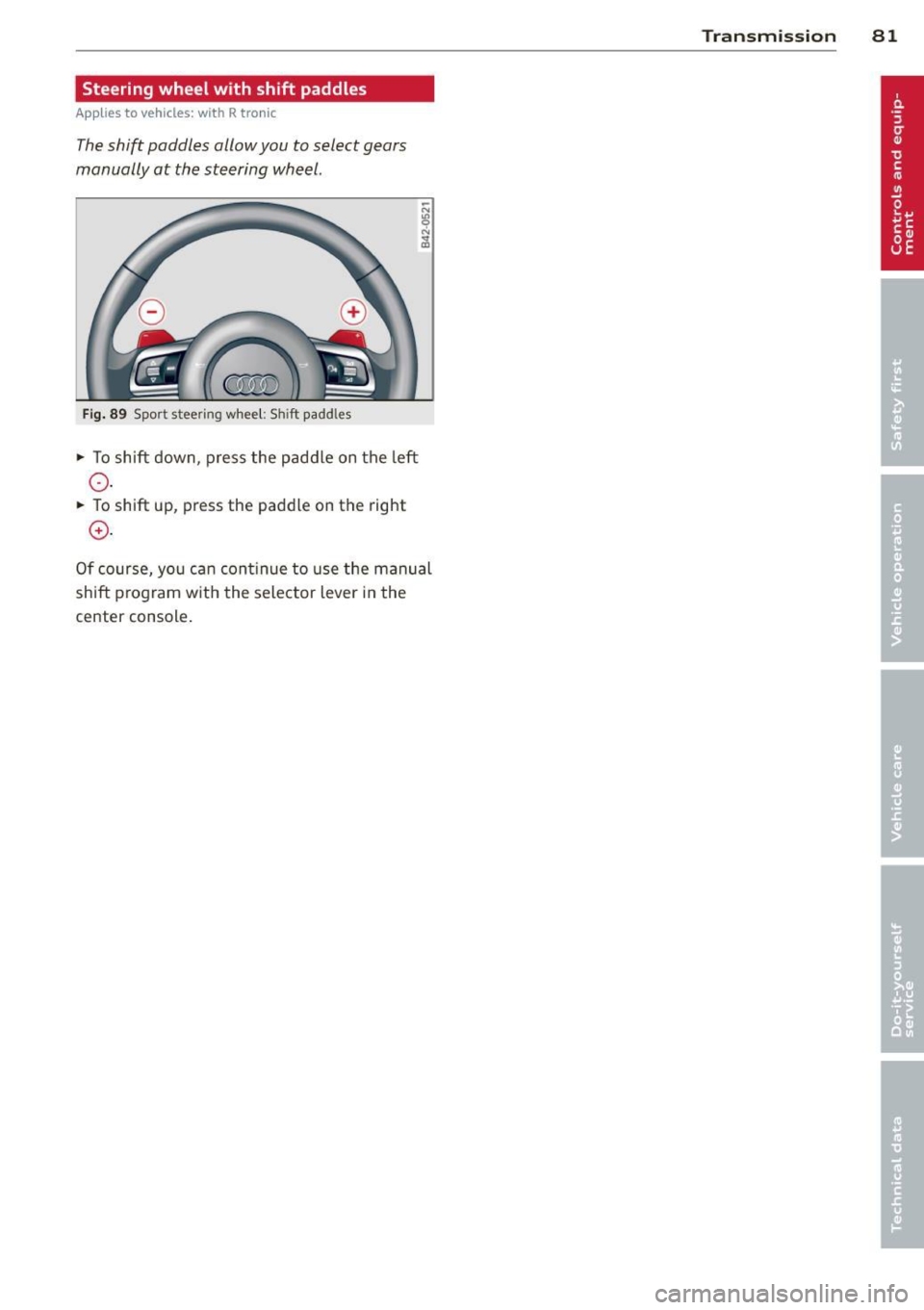
The shift paddles allow you to select gears
manually at the steering wheel.
Fi g. 89 Spo rt steering wheel: Sh ift paddles
.,. To shift down, press the p ad d le on t he le ft
0 .
.,. To shift up, press the paddle on the right
0 .
Of course, yo u ca n con tinue to use the manual
shift p rog ram w it h the selector lever in the
center console .
Transmission 81
Page 87 of 236
Reverse parking
Applies to vehicles: with parking system advanced
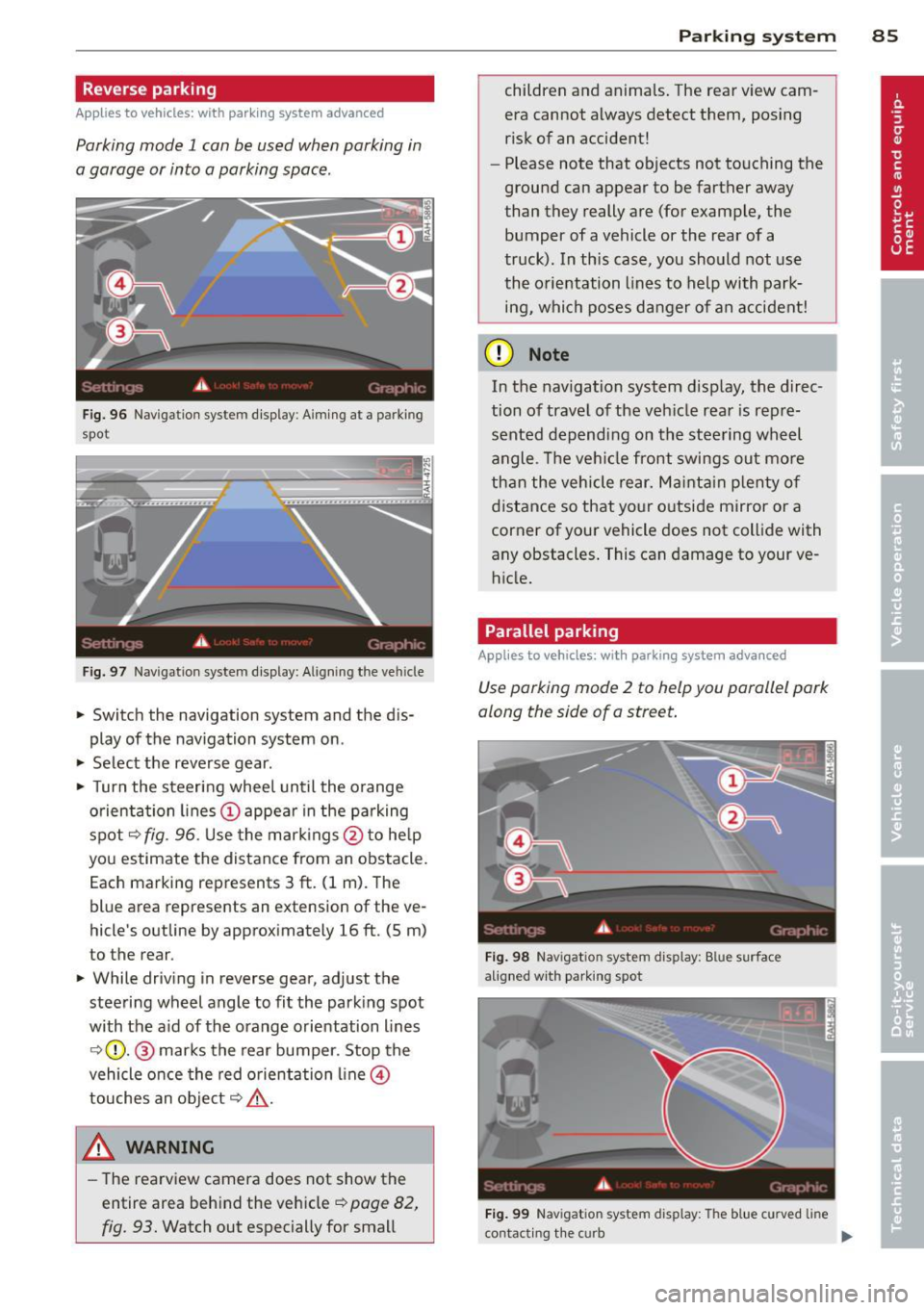
Parking mode 1 can be used when parking in
a garage or into a parking space.
Fig. 96 Navigation system display: Aiming at a parking
spot
Fig. 97 Navigation system display: Al ign ing the veh icle
~ Switc h the navigation system and the dis
play of the navigation system on.
~ Select the reverse gear.
~ Turn the steering wheel until the orange
orientation lines(!) appear in the parking
spot
9 fig. 96. Use the markings @to help
you estimate the distance from an obstacle.
Each marking represents 3
ft. (1 m). The
blue area represents an extension of the ve
hicle's outline by approximately 16
ft. (5 m)
to the rear.
~ While driving in reverse gear, adjust the
steering wheel angle to fit the parking spot
with the a id of the orange orientation lines
9(D. @ marks the rear bumper. Stop the
vehicle once the red orientation line©
touches an object
9 ,&. .
A WARNING
-The rearview camera does not show the
entire area behind the vehicle~
page 82,
fig. 93. Watch out especially for small
Parking system 85
children and animals. The rear view cam
era cannot always detect them, posing
risk of an accident!
- Please note that objects not touching the
ground can appear to be farther away
than they really are (for example, the
bumper of a vehicle or the rear of a
truck). In this case, you should not use
the orientation lines to help with park
ing, which poses danger of an accident!
(D Note
In the navigation system display, the direc
tion of travel of the vehicle rear is repre
sented depending on the steering wheel
angle. The vehicle front swings out more
than the vehicle rear. Maintain plenty of
distance so that your outside mirror or a
corner of your vehicle does not collide with
any obstacles. This can damage to your ve hicle.
Parallel parking
Applies to vehicles: with parking system advanced
Use parking mode 2 to help you parallel park
along the side of a street.
Fig. 98 Navigat ion system display: Blue surface
a ligne d with parking spot
Fig. 99 Navigat ion system display: The blue curved line
contacting the curb
IJi,,-
Page 88 of 236
86 Parking system
The following steps app ly only when there is
no obstacle such as a wall near the parking
spot. Otherwise, please read the informat ion
prov ided in the "Parking Next to Obstacles"
section.
.. Activate the turn signal.
.. Position your vehicle parallel to the edge of
the street, approximately 3 ft. (1 m) from a parked vehicle .
.. Switch the navigation system and the nav i
gat ion system d isplay on.
.. Se lect rev erse gear . T he parking aid turns
on and pa rking mode 1 appea rs on the dis
play.
.. Press the cont ro l button 1 on the nav iga
tion system ¢
fig. 98. Parking mode 2 ap
pears .
.. Back up and align your vehicle so the b lue
area @ borders on the rear end of the vehi
cle or on the parking spot line. The blue area
represents an extension of the ve hicle's out
line by approximately 16 ft (5 meters) to the
r ear. The long side of the blue area shou ld
be o n the curb. The entire blue area must fit
i n to the par king spot .
.. Wi th the veh icle stopped, turn the steer ing
wheel to the right as far as it wi ll go .
.. Back into the parking spot unti l the blue
curve to uches the curb¢
fig. 99. Stop the
vehicle .
.. With the veh icle stopped, turn the steer ing
whee l to the left as fa r as it wi ll go .
.. Co nti nu e to back into the pa rk ing spot until
the vehicle is par ked para llel to the curb. @
ma rks the rear bumper. Stop the vehicle
when the red orientation line@ borders an
obje ct ¢ .&,. . Keep an eye on the fron t of
yo ur vehicle while doing this
c> (D.
Parking next to obstacles
When the re is an obsta cle (suc h as a wall)
next to the pa rking spot, choose a spot w ith
mo re space on the sides. Pos ition the long
side of the blue area so t hat there is sufficient
space from the c urb. The area must not be on
the c urb. Yo u wi ll also need to start turning
the steering wheel much ear lier. There should
be a suffic ient amount of space between the c
ur b and the blue curve, and the b lue curve
c> fig. 99 must not touch the curb.
A WARNING
--The rearview came ra does not show the
entire area behind the vehicle¢
page 82,
fig. 93. Watch out especially for small
children and anima ls . The rear view cam
era can not always detect them, posing
ris k of an accident!
- Please note that objects not touching the ground can appear to be farther away
than they really a re (fo r example, the
bumper of a vehicle or the rear of a
t ruck). In th is case, you should not use
the orientation lines to help wi th par k
ing, which poses dan ger of an accident!
(D Note
In the navigation system disp lay, the direc
tion o f tra ve l o f th e veh icle re ar is rep re
sented depend ing on the steering wheel
angle. The vehicle front swings out mo re
than the vehicle rear . Ma inta in p lenty of
distance so that your o utside mirror or a
corner of you r vehicle does not coll ide with
any obstacles . This can damage to your ve
hicle .
@ Tips
The left o r right orientation lines and su r
faces will be disp layed, depending on t he
turn s ignal being used .
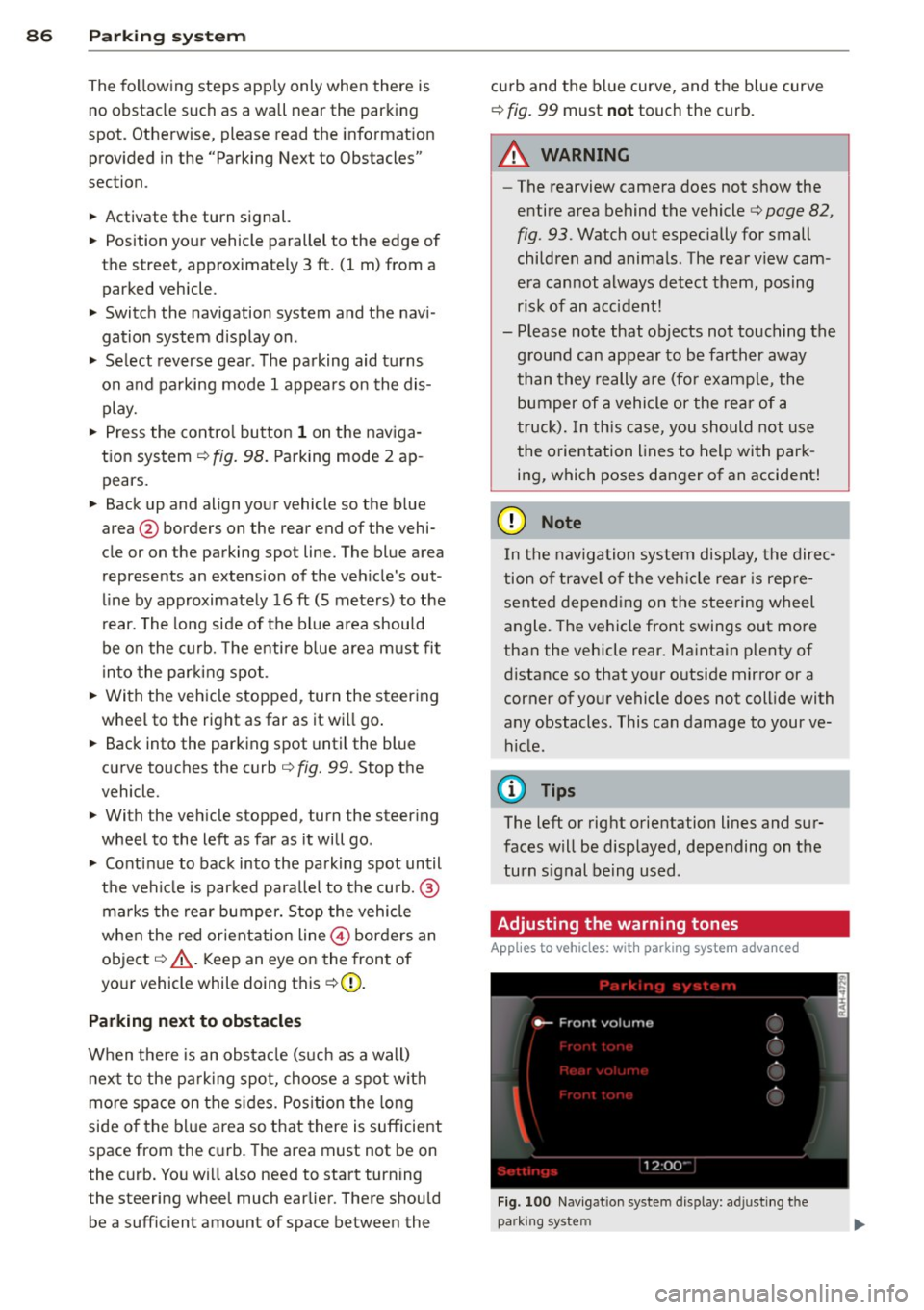
Adjusting the warning tones
Applies to vehicles: with parking system advanced
Fi g. 100 N av igation syste m dis pl ay: a djustin g t he
park ing syst em
Page 93 of 236
Driving Safely
General notes
Safe driving habits
Please remember -safety first!
This chapter contains important information,
tips, instructions and warnings that you need
to read and observe for your own safety, the
safety of your passengers and others . We have
summarized here what you need to know
about safety belts, airbags, child restraints as
well as child safety. Your safety is for us
priori
ty number 1.
Always observe the information
and warnings in this section - for your own
safety as well as for that of your passengers.
The information in this section applies to all
model versions of your vehicle . Some of the
features described in this sections may be
standard equipment on some models, or may
be optional equipment on others. If you are
not sure, ask your authorized Audi dealer.
A WARNING
- Make certain that you follow the instruc
tions and heed the WARNINGS in this
Manual. It is in your interest and in the
interest of your passengers.
- Always keep the complete owner's litera
ture in your Audi when you lend or sell
your vehicle so that this important infor
mation will always be available to the
driver and passengers.
- Always keep the owner's literature handy
so that you can find it easily if you have
questions.
Safety equipment
The safety features are part of the occupant
restraint system and work together to help
reduce the risk of injury in a wide variety of
accident situations .
Your safety and the safety of your passengers
should not be left to chance. Advances in
technology have made a variety of features
available to help reduce the risk of injury in an
Driving Safely 91
accident. The following is a listing of just a
few of the safety features in your Audi:
- sophisticated safety belts for driver and all
passenger seating positions,
- safety belt pretensioners ,
- front airbags,
- knee airbags,
- side airbags in the seats
- adjustable head restraints,
- adjustable steering column.
These individual safety features can work to
gether as a system to help protect you and
your passengers in a wide range of accidents.
These features cannot work as a system if
they are not always properly adjusted and
properly used!
Safety is everybody's responsibility!
Important things to do before driving
Safety is everybody's job! Vehicle and occu
pant safety always depends on the informed and careful driver.
For your safety and the safety of your passen
gers,
before driving always:
~ Make sure that all lights and signals are op
erating correctly .
~ Make sure that the tire pressure is correct.
~ Make sure that all windows are clean and
afford good visibility to the outside.
~ Secure all luggage and other items carefully
c::>page 62.
~ Make sure that nothing can interfere with
the pedals.
~ Adjust front seat, head restraint and mir
rors correctly for your height .
~ Instruct passengers to adjust the head re
straints according to their height .
~ Make sure to use the right child restraint
correctly to protect children¢
page 130,
Child Safety.
~ Sit properly in your seat and make sure that
your passengers do the same¢
page 59,
Seats and storage. .,..
•
•
Page 94 of 236
92 Driving Safel y
• Fasten your safety belt and wear it proper ly.
Also instruct your passengers to fasten their
safety belts proper ly
¢ page 101.
What impairs driving safety?
Safe driving is directly related to the condi
tion of the vehicle, the driver as well as the
driver's ability to concentrate on the rood
without being distracted.
The driver is responsible for the safety of the
vehicle and all of its occupants. If your ability
to drive is impaired, safety risks for everybody
in the vehicle increase and you also become a
hazard to everyone else on the road
¢ .&, .
Therefore:
• Do not let yourself be distracted by passen
gers or by using a cellular telephone.
• NEVER drive when your dr iving ability is im
paired (by medicat ions, alcohol, drugs, etc.) .
• Observe all traffic laws, rules of the road
and speed limits and plain common sense .
• ALWAYS adjust your speed to road, traff ic
and weather condit ions.
• Take frequent breaks on long trips . Do not
drive for more than two hours at a stretch .
• Do NOT drive when you are tired , under
pressure or when you are stressed.
A WARNING , .
Impaired driving safety increases the risk
of serious personal injury and death when
ever a vehicle is being used .
Proper occupant
seating positions
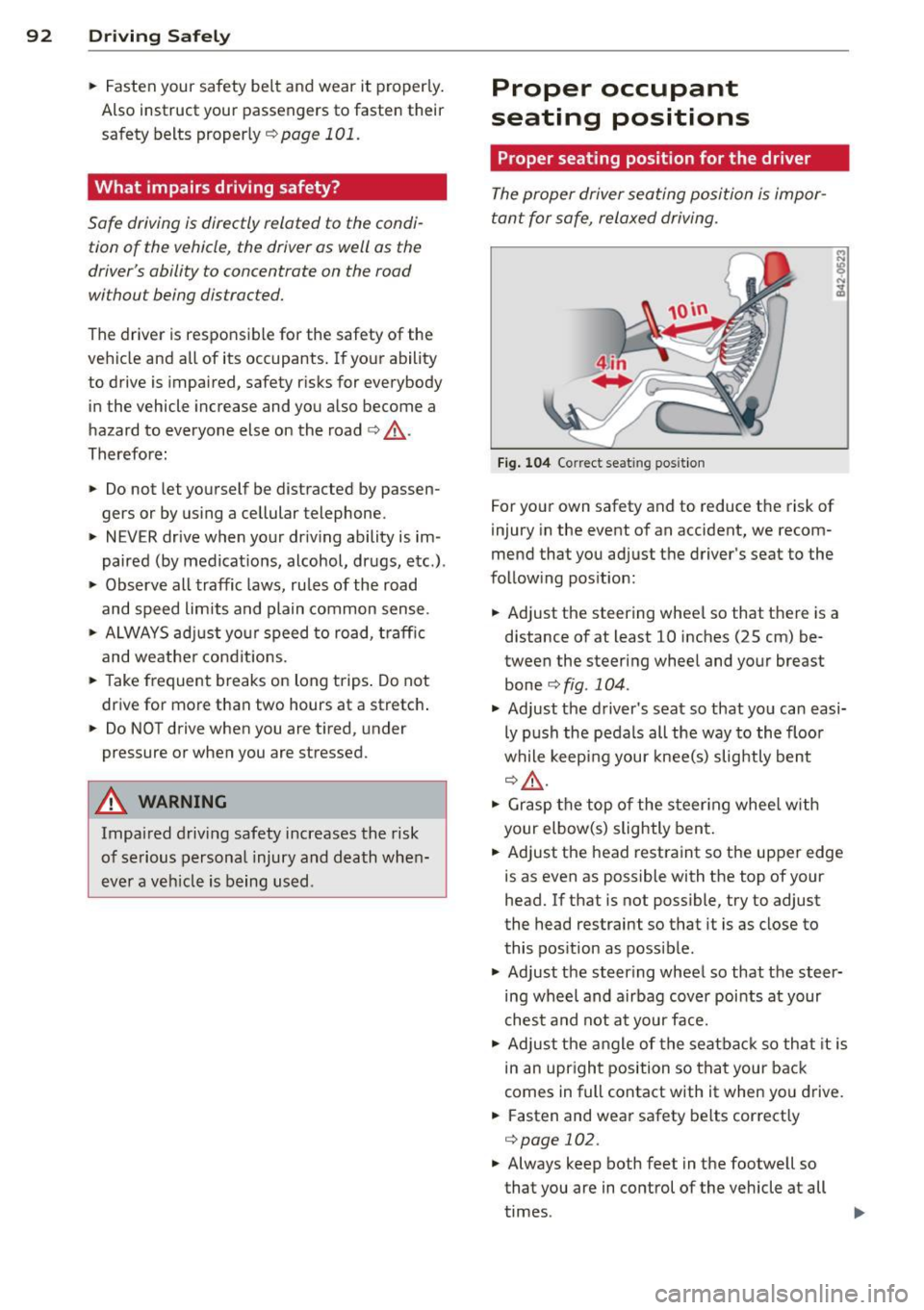
Proper seating position for the driver
The proper driver seating position is impor
tant for safe, relaxed driving.
Fig. 104 Correct seat ing posit ion
For your own safety and to reduce the risk of
injury in the event of an accident, we recom
mend that you adjust the driver's seat to the
following position:
• Adjust the steering wheel so that there is a
distance of at least 10 inches (25 cm) be
tween the steering wheel and your breast
bone¢
fig . 104 .
• Adjust the driver's seat so that you can easi
ly push the pedals all the way to the floor
while keeping your knee(s) slightly bent
¢.&, .
• Grasp the top of the steer ing whee l with
your elbow(s) slightly bent.
• Adjust the head restraint so the upper edge
is as even as possible with the top of your
head. If that is not possible, try to adjust
the head restraint so that it is as close to
this position as possible .
• Adjust the steering wheel so that the steer
ing wheel and airbag cover points at your
chest and not at your face.
• Adjust the angle of the seatback so that it is
in an upright position so that your back
comes in full contact with it when yo u drive.
• Fasten and wear safety be lts correctly
¢ page 102.
• Always keep both feet in the footwell so
that you are in control of the vehicle at all
times .
Page 95 of 236
For detailed information on how to adjust the
dr iver's seat, see
¢ page 59, Seats and stor
age.
A WARNING
Drivers who are unbelted, out of position
or too close to the airbag can be seriously
injured by an airbag as it deploys. To help
reduce the risk of serious personal injury:
- Always adjust the driver's seat and the
steering wheel so that there are at least
10 inches (25 cm) between your breast
bone and the steering wheel.
- Always adjust the driver's seat and the
steering wheel so that there are at least
4 inches (10 cm) between the knees and
the lower part of the instrument panel.
- Always hold the steering wheel on the
outside of the steering wheel rim with
your hands at the 9 o'clock and 3 o'clock positions to help reduce the risk of per
sonal injury if the driver's airbag inflates.
- Never hold the steering wheel at the
12 o'clock position or with your hands at
other positions inside the steering wheel
rim or on the steering wheel hub. Hold
ing the steering wheel the wrong way
can cause serious injuries to the hands,
arms and head if the driver's airbag in
flates
- Pointing the steering wheel toward your
face decreases the ability of the supple
mental driver's airbag to protect you in a
collision .
- Always sit in an upright position and nev
er lean against or place any part of your
body too close to the area where the air
bags are located.
- Before driving, always adjust the front
seats and head restraints properly and
make sure that all passengers are prop
erly restrained.
- Never adjust the seats while the vehicle
is moving. Your seat may move unexpect
edly and you could lose control of the ve
hicle.
- Never drive with the backrest reclined or
tilted far back! The farther the backrests
Driving Safely 93
are tilted back, the greater the risk of in
jury due to incorrect positioning of the
safety belt and improper seating posi
tion .
- Children must always ride in child seats
¢ page 130. Special precautions apply
when installing a child seat on the front
passenger seat
¢ page 109.
Proper seating position for the front
passenger
The proper front passenger seating position
is important for safe, relaxed driving.
For your own safety and to reduce the risk of
injury in the event of an accident, we recom
mend that you adjust the seat for the front
passenger to the following position :
"' Adjust the angle of the seatback so that it is
in an upright position and your back comes
in full contact with it whenever the vehicle is
moving.
"' Adjust the head restraint so the upper edge
is as even as possible with the top of your
head. If that is not possible, try to adjust
the head restraint so that it is as close to
this position as possible
¢ page 94.
"' Keep both feet flat on the floor in front of
the front passenger seat .
"' Fasten and wear safety belts correctly
¢ page 104.
For detailed information on how to adjust the
front passenger's seat, see
¢ page 59, Seats
and storage.
A WARNING
Front seat passengers who are unbelted,
out of position or too close to the airbag
can be seriously injured or killed by the air
bag as it deploys. To help reduce the risk of
serious personal injury:
- Passengers must always sit in an upright
position and never lean against or place
any part of their body too close to the
area where the airbags are located.
•
•
Page 106 of 236
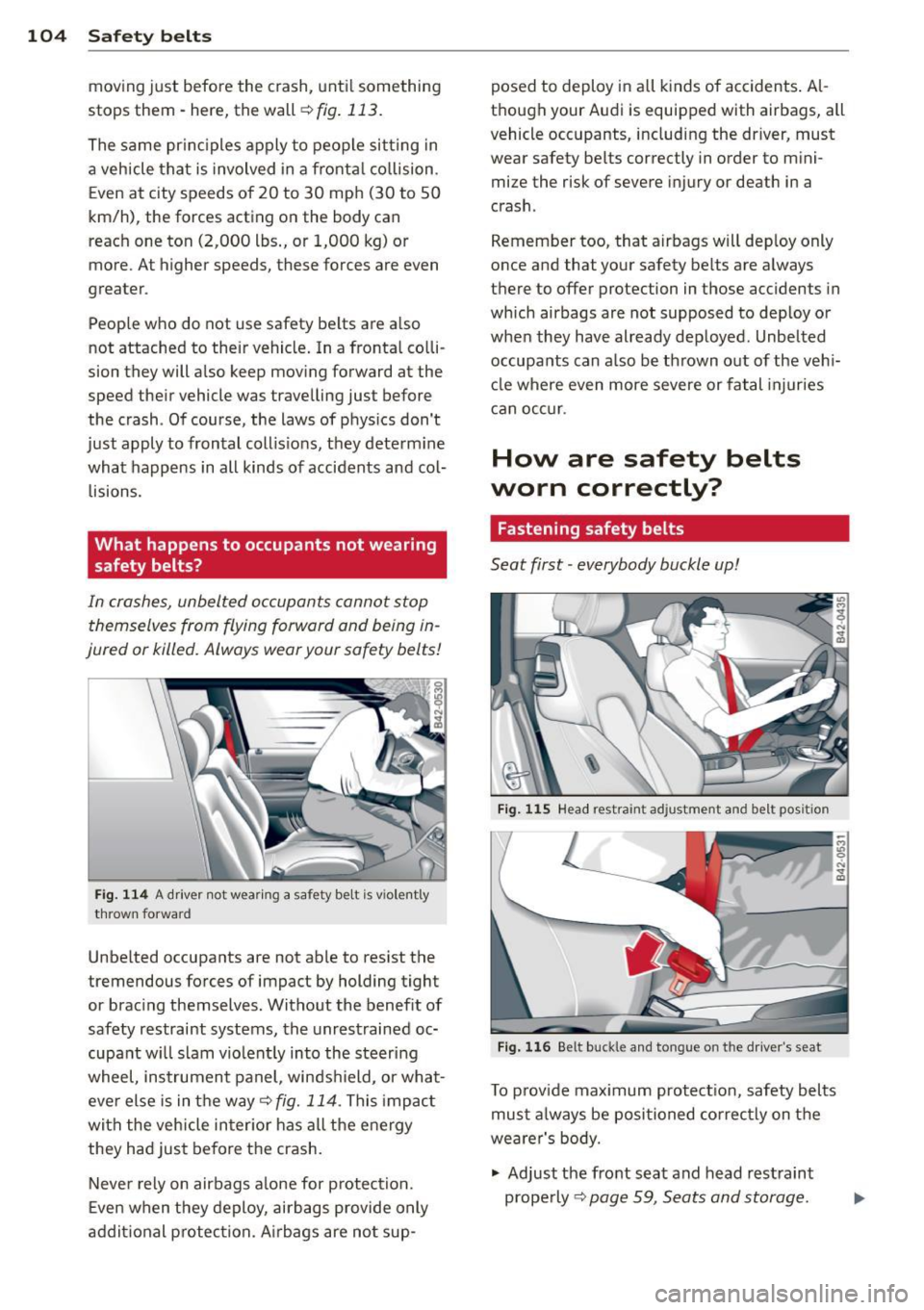
104 Safet y belt s
moving just before the crash, unti l something
stops them· here, the wall
r::!;> fig. 113.
The same pr inc iples apply to people sitting in
a veh icle that is involved in a fronta l co llision .
Even at city speeds of 20 to 30 mph (30 to 50
km/h), the forces acting on the body can
reach one ton (2,000 lbs., or 1,000 kg) or
more. At higher speeds, these forces are even
greater .
People who do not use safety be lts are a lso
not attached to their vehicle. In a fronta l co lli
sion they will also keep mov ing forward at the
speed their vehicle was trave lling just before
the crash . Of course, the laws of physics don't
just apply to frontal coll is io ns, they determ ine
what happens in all kinds of accidents and col·
lisions.
What happens to occupants not wearing
safety belts?
In crashes, unbelted occupants cannot stop themselves from flying forward and being in
jured or killed. Always wear your safety belts!
Fi g. 114 A driver not wear ing a safety belt is violently
t h rown forward
Unbe lted occupants are not able to res ist the
tremendous fo rces of impact by holding tight
or brac ing themselves. Without the benef it of
safety restraint systems, the unrestrained oc·
cupant w ill slam vio lent ly into the steering
wheel, instrument panel, winds hield, or what
eve r else is in the way¢
fig. 114. This impac t
with the veh icle inter ior has all the energy
they had just befo re the crash.
Neve r rely on airbags a lone for p rotection.
E ven when they deploy, airbags provide only
a d dit ional p rotec tion. A irbags are no t sup- posed to deploy
in all k inds of accidents . Al
though your Audi is equipped with airbags, all
vehicle occupants, includ ing the driver, must
wear safety belts correctly in order to mini
mize the risk of severe injury or death in a
crash .
Remember too, that airbags will dep loy only
o nce and that your safety belts are always
there to offer protection in those accidents in
which airbags are not supposed to dep loy or
when they have already dep loyed. Unbelted
occupa nts can a lso be th rown out of the veh i
cl e where even more severe or fatal injuries
ca n occ ur.
How are safety belts
worn correctly?
Fastening safety belts
Seat first · everybody buckle up!
Fig . 115 Head restraint adjustment and belt position
Fig. 116 Be lt buck le an d tongue on the dri ver's seat
To p rov ide max imum protect ion, safety belts
mus t always be posi tioned co rrec tly on the
wea rer's body.
.. Adjust the fro nt seat and head rest raint
p rope rly
r::!;> page 59, Seats and storage.
Page 111 of 236
Airbag system Important things to know
Importance of wearing safety belts and
sitting properly
Airbags are only supplemental restraints. For
airbags to do their job , occupants must al
ways wear their safety belts properly and be
in a proper seating position.
For your safety and the safety of your passen
gers, before driving off, always:
"" Adjust the driver's seat and steering wheel
properly
q page 92,
"" Adjust the front passenger's seat properly
¢page 93,
"" Wear safety be lts properly ¢ page 102,
"" Always use the proper child restraint to pro-
tect children properlyq
page 130.
In a collision, airbags must inflate within the
blink of an eye and with considerable force.
The supplemental airbags can cause injuries
if
the driver or the front seat passenger is not
seated properly . Therefore in order to help the
a ir bag to do its job, it is important, both as a
driver and as a passenge r to s it properly at all
times.
By keeping room between your body and the
steer ing whee l and the front of the passenger
compartment, the airbag can inflate fully and
comp letely and provide supplemental protec
tion in certain frontal collisions
q page 92,
Proper occupant seating positions. For details
on the operation of the seat adjustment con
trols
q page 60.
It's especially important that children are
properly restrained
q page 130.
There is a lot that the driver and the passen
gers can and must do to help the individual
safety features installed in your Aud i work to
gether as a system.
Proper seating pos ition is important so that
the front airbag on the driver side can do its
job. If you have a physical impairment or con-
Airbag system 109
dition that prevents you from sitting properly
on the driver s eat with the safety belt properly
fastened and reaching the peda ls, or if you
have concerns with regard to the function or
operation o f the airbag system, please con
tact your authorized Audi dealer or qualified
workshop , or call Audi Customer Relations at
1-800-822-2834 for possible modification to
your vehicle.
When the airbag system dep loys, a gas gener
ator will f ill the a irbags, break open the pad
ded covers, and inflate between the steer ing
whee l and the driver and between the instru
ment panel and the front passenger. The air
bags will deflate immediately after deploy
ment so that the front occupants can see
through the windshie ld again without inter
ruption .
A ll of th is takes place in the blink of an eye, so
fast that many people don't even realize that
the airbags have deployed. The airbags a lso
inflate with a great dea l of force and nothing
should be in their way when they deploy.
Front airbags in comb ination with properly
worn safety belts slow down and lim it the oc
cupant's forward movement . Together they
help to prevent the driver and front seat pas
senger from hitting parts of the inside of the
vehicle while reducing the forces acting on the
occupant during the crash. In this way they
help to reduce the risk of injury to the head
and upper body in the crash. Airbags do not
protect the arms or the lower parts of the
body.
Both front airbags wi ll not inflate in all fronta l
collisions . The triggering of the airbag system
depends on the vehicle de ce lerat ion rate
caused by the collision and regis te red by the
elec tron ic control uni t. If th is rate is below
the reference value programmed into the con
trol unit, the airbags will not be trigge red ,
even though the car may be badly damaged as
a result of the collision . Ve hicl e damage, re
pair costs or even the lack of ve hicle dama ge
is not necessarily an indication of whether an
airbag should inflate or not . •
•
...