tow AUDI R8 SPYDER 2012 User Guide
[x] Cancel search | Manufacturer: AUDI, Model Year: 2012, Model line: R8 SPYDER, Model: AUDI R8 SPYDER 2012Pages: 236, PDF Size: 59.24 MB
Page 74 of 236
7 2 On the road
-The eng ine cann ot be started by pushing
or towing the vehicle.
@ For the sake of the env ironment
To avo id unnecessary engine wea r and to
red uce exhaust emissions, do not let your
vehicle stand and warm up . Be ready to
drive off immediately after starting your
veh icle.
Stopping the engine
On vehicles with R tronic*, the engine can be
turned off in the neutral position N and in
each gear (1 -6 and R).
.,. Turn the ign ition key to position ©
¢ page 70, fig. 82.
A WARNING
-Never turn off the eng ine unti l the vehi
cle has come to a complete stop.
- The brake booster and servotronic on ly
work when the engine is running. With
the ignition turned off, you have to apply
more force when stee ring or braking.
S ince you cannot steer and stop no rma l
ly, this can lead t o acciden ts and ser io us
injuries.
- If the engine has bee n under heavy load
fo r an ext ended period of time, heat
builds up i n the engi ne compa rtme nt af
ter the eng ine is sw itched off -there is a
risk of damaging the engine . Allow the
engine to continue to run at idle for a
sho rt time or drive until it has cooled
down before you turn it off¢
page 151.
- If the engine has been under heavy load
for an extended pe riod of time, it can be
come extreme ly hot. You should not park
your vehicle over easily combustible ob
j ects o r areas (e.g. g rass or leaves). There
i s a r isk of start ing a f ire.
(D Tips
After the engine has been switched off, the
radiator fan can continue to run for up to
10 minutes -even with the ignition switch
ed off. It can also sw itch on again after
some time if the coolant tempe rature rises
as the result of heat b uild up or if the en
g ine compartment is heated by the sun 's
r ays and the eng ine is hot.
Parking brake
Parking brake
When the parking brake is set, it prevents the
vehicle from rolling away unintentionally .
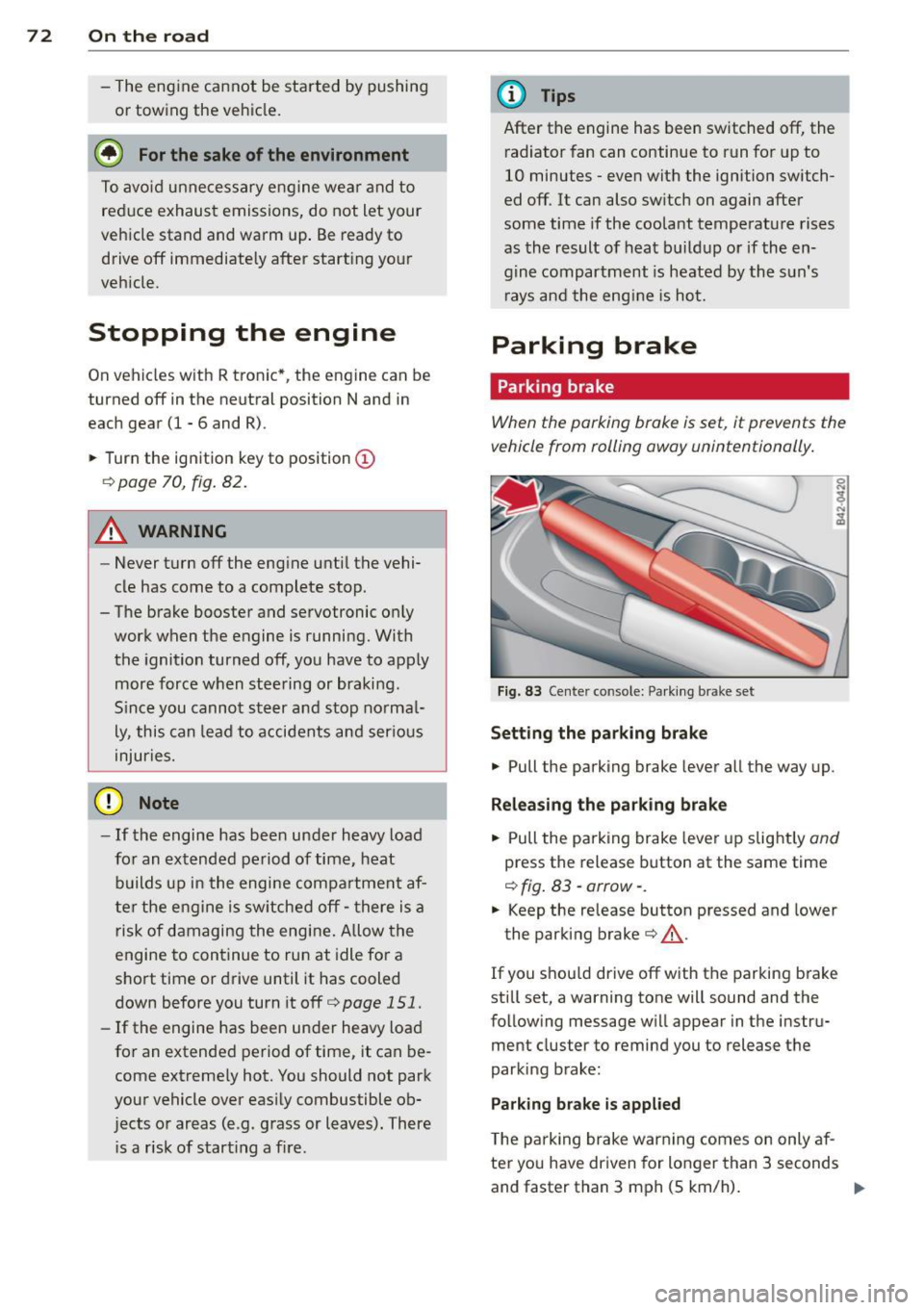
Fig. 83 Center console: Pa rk in g brake set
Setting the parking brake
.,. Pull the parking brake lever a ll the way up.
Releasing the park ing brake
.,. Pull the pa rking brake lever up slight ly and
press the release button at the same time
¢ fig . 83 -arrow- .
.,. Keep the release button pressed and lower
the parking brake¢&_.
If you s hou ld drive off with the parking b rake
st ill set, a warning tone will sound and the
following message wi ll appear in the instru
ment cluster to remind you to release the
parking brake:
Parking brake is applied
T he p arking brake war ning comes on only af
ter yo u have dr iven for longer than 3 seconds
and faster than 3 mph (5 km/h) . .,.
Page 76 of 236
7 4 On the road
Cruise control
Introduction
The cruise control system keeps the speed
constant.
The cruise control system makes it possible to
drive at a constant speed over 20 mph (US
model) or 30 km/h (Canadian model) . This is
true only to the extent that engine power or
engine braking effect allow . Using the system
takes the strain off the "gas pedal foot" - es
pecially on long trips.
In the control mode, the indicator light in the
instrument cluster is lit
aijj(1)~1~ (US model);II
(Canadian model).
The cruise control system automatically
switches itself off immediately under the fol
lowing conditions:
- Pressing the brake pedal.
- Pressing the clutch pedal.
A WARNING
-Always pay attention to traffic even when
the cruise control system is switched on.
You are always responsible for your speed and the distance between your ve
hicle and other vehicles.
- For safety reasons, the cruise control sys
tem should not be used in the city, in
stop-and-go traffic, on twisting roads
and when road conditions are poor (such
as ice, fog, gravel, heavy rain and hydro
planing) -risk of accident.
- Turn off the cruise control system tem
porarily when entering turn lanes, high
way exit lanes or in construction zones.
- Please note that inadvertently "resting"
your foot on the accelerator pedal causes
the cruise control system not to brake.
This is because the cruise control system
is overridden by the driver's acceleration.
(D Note
On manual transmission vehicles: If you
shift into neutral with the cruise control system switched on, always depress the
clutch
pedal! Otherwise the engine will
race and could be damaged as a result.
(D Tips
When driving on steep downward grades,
the cruise control system cannot keep the
speed constant. The vehicle's own weight increases the speed. Shift into a lower gear
in plenty of time or brake the vehicle with
the foot brake.
Saving the speed
The desired speed must be saved.
®-
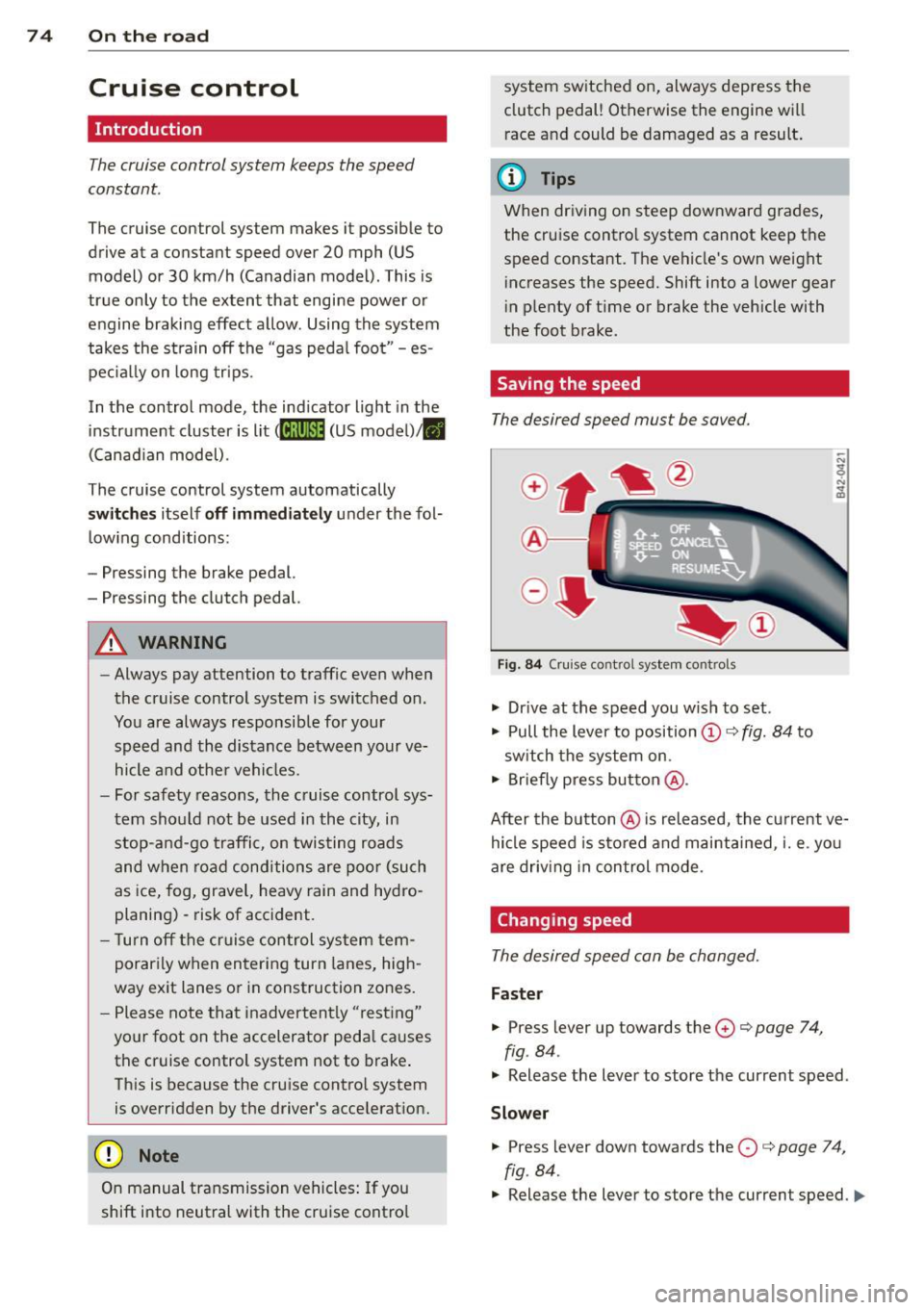
Fig. 84 Cruise control system cont rols
.,. Drive at the speed you wish to set.
.,. Pull the lever to position@¢
fig. 84 to
switch the system on.
.,. Briefly press button @.
After the button @is released, the current ve
hicle speed is stored and maintained,
i. e. you
are driving in control mode .
Changing speed
The desired speed can be changed.
Faster
.,. Press lever up towards the 0 ¢ page 7 4,
fig . 84 .
.,. Release the lever to store the current speed .
Slower
.. Press lever down towards the O ¢ page 74,
fig . 84.
.,. Release the lever to store the current speed. IJ,,,
Page 77 of 236
You can also increase your speed by pressing
the accelerator pedal. After you release the
accelerator peda l, the system automat ically
adjusts back down to the speed you previously
set .
However, if you exceed this speed by 5 mph
(10 km/h) for longer than 5 m inutes, the stor
ed speed will be deleted. You will have to re
save it.
Briefly p ressing lever
The desired speed is increased by about 2 mph
(2 km/h) by briefly pressing the lever upwards
towards
c:::> page 74, fig. 84 0 -
The desired speed is decreased by about 2
mph (2 km/h) by briefly pressing the lever
downwards towards
c:::> page 7 4, fig. 84 0-
Switching control mode off temporarily
.. Step on the brake pedal, or
.. Depress the clutch pedal all the way, or
.. Press the lever towards @ (not latched)
c::>page 74, fig . 84 .
When the system is turned off temporarily,
the speed stored at the time is retained.
To resume the stored speed, release the brake
or clutch pedal and pull the lever to pos ition
(D .
If no desired speed was stored when the sys
tem was temporari ly switched off, you can
store a new desired speed as follows: Drive at
the desired speed and briefly press button
c::> page 74, fig. 84@ (SET) .
A WARNING
You should only return to the saved speed
if it is not too fast for the current traffic
conditions -risk of an accident!
Deactivating
.. Press lever into position @(latched)
c::>page 74, fig. 84.
On the road 75
The saved speed value is de leted when the ig
nition is switched off.
a) Tips
Sw itch the cruise control system off com
pletely at the end of each trip. When you
start the next trip, the desired speed can
be set simply from the basic setting
c::>page 74.
Audi magnetic ride
Damping can be adjusted to the driver's pref
erence and it adapts automatically to the cur
rent driving situation .
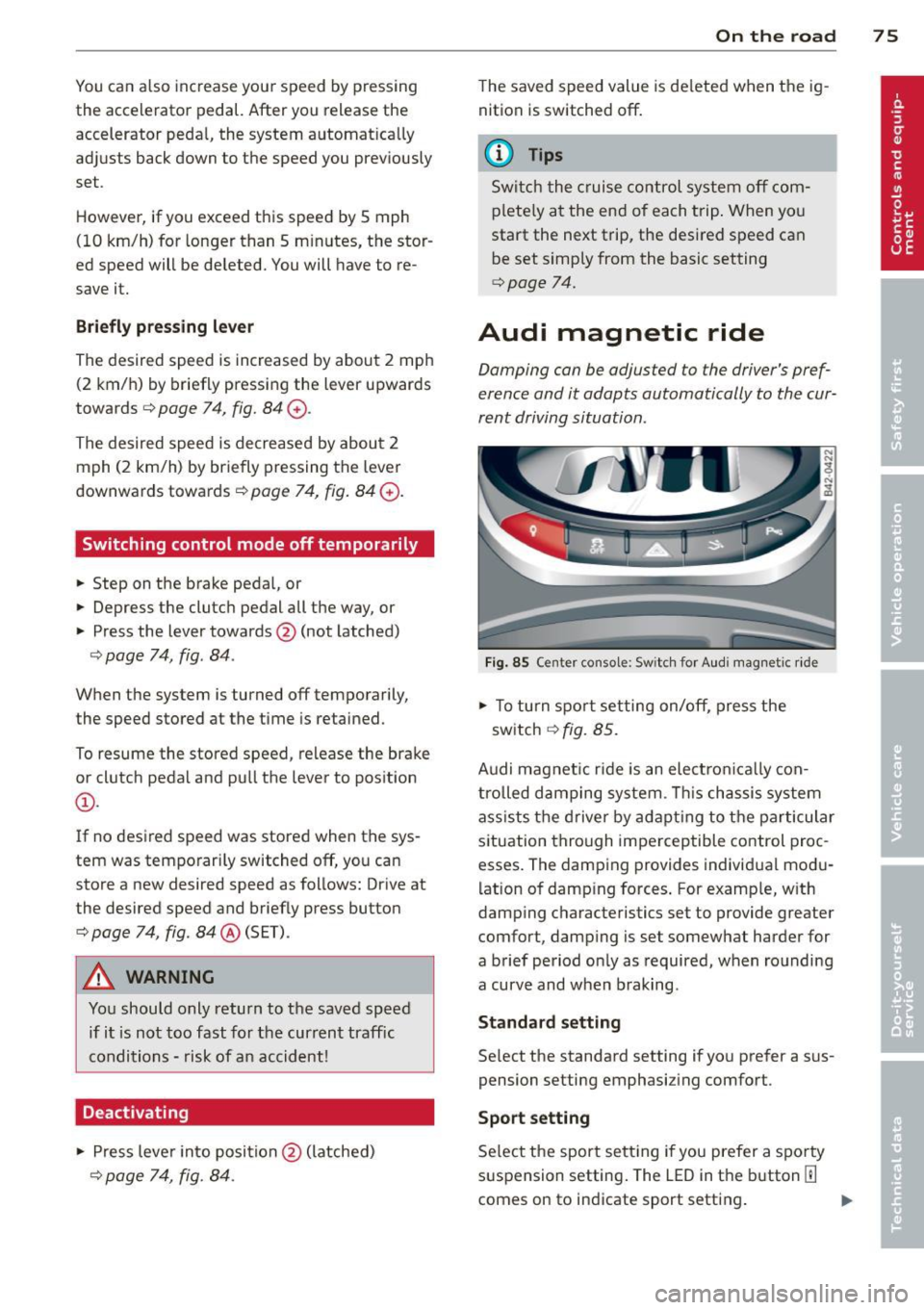
Fig. 85 Center console: Switch for Aud i magnetic ride
.. To turn sport setting on/off, press the
switch
c:::> fig. 85.
Audi magnet ic r ide is an elect ronically con
trolled damping system. This chassis system
ass ists the driver by adapting to the particular
situation through imperceptible control proc
esses. The damping provides individual modu
lation of damp ing forces . For examp le, with
damping characteristics set to provide greater
comfort, damping is set somewhat harder for
a brief period on ly as required, when rounding
a curve and when braking.
Standard setting
Select the standard setting if you prefer a sus
pension setting emphasizing comfort .
Sport setting
Select the sport sett ing if you prefer a spo rty
suspension setting. The LED in the button[!]
comes on to indicate sport setting .
Page 82 of 236
80 Transmi ssion
(0 Note
If you must stop on an incline, always hold
the vehicle in place w ith the foot brake to
prevent it from roll ing back. Never hold
the vehicle on an incline w ith a slipping
clutch. The clutch was overloaded if
Clutch
overheat ing! If possib le pl ea se st op ve hi
cle appears in the Driver Information Sys
t em disp lay.
Automatic operation
Ap plies to ve hicles : wit h R tro nic
The forward gears are shifted up or down au
tomatically.
Startin g from a stop
11-Press and ho ld the brake pedal.
11-Tap the se lector lever towards A .
... Re lease the brake pedal and acce lerate
¢ ,& in Manual operation on page 79 .
Under certain circumstances (driving in the
mounta ins for example), it can be beneficia l
to switch tempo rarily to the manual shift pro
g ram ¢
page 79in order to adjust th e gear ra
tios to driv ing cond itions
manually.
Kick-down
A ppl ies to vehicles : wit h R tro nic
When you depress the accelera to r pedal be
yond the resistance po int, R tron ic downsh ifts
into a lower gear, depending on vehicle speed
and engine rpm. The ups hift into the next
h igher gear takes place once the max imum
specified engine speed is reached. Exception:
You have activated the sport funct ion .
A WARNING
Please note that the drive wheels can spin
if kick-down is used on a smooth slippery
road -there is a risk of skidding.
Launch Control Program
App lies to veh icles : w it h R tro nic
The Launch Control Program enables maxi
mum acceleration .
Requirement: The engine must be at operat
ing temperature and the steering wheel must
not be turned .
... With the engine running, press the
I!! but
ton one time. The ESC ind icator light
I in
the Driver Information System d isplay illu
m inates and the message
ESP sport - Warn
ing! R estr icted stability
appears .
... Press the b rake pedal w it h your l eft foot
and hold i t down.
11-Eng age a gear.
11-Press the I SPORT I button on the selector
lever cover .
... Press the accelerator peda l wit h your right
foot sim ultaneously until the engine has
reached a constant speed .
... Remove your left foot from the brake¢,& .
A WARNING ,-
-Always adapt your dr iving to the traffic
f low.
- Onl y use Launch Control when road and
traffic cond itions allow it and ot her dr iv
ers will not be endange red o r annoyed by
your driving and the vehicle's ac celera
t ion .
- Please note that t he d riving wheels ca n
sp in and the vehicle can br eak away
when ESC is swi tched off, especially
when the roa d is s lippery.
- Once the s tarting procedure is comple te,
you sho uld sw itch ESC on again by press
i n g the
I!] switch.
(D Tips
When a ccele rat ing using the Lau nch Con
t rol program, all vehicle parts are s ubje ct
to heavy loads . This can result in increase d
wear .
-
Page 85 of 236
Rear vi ew camer a coverage area
The rearview camera shows you the a rea be
hind your vehicle in the navigation system dis
p lay. This area roughly corresponds to the
area in¢
fig . 92 and (!) ¢fig. 93 . Orientation
lines and colored surfaces are projected in the
area shown, which can help you with parking
and maneuvering. Objects that are located in
an area that is not captured by the camera @
¢
fig. 93 and that are closer to the bumper
will not appear on the nav igation system dis
p lay.
We recommend that you practice park ing with
the rearview camera in a traffic-free location
or pa rking lot to become familiar w ith the sys
tem, the o rientation l ines, and their function.
There should be sufficient light and good
weather conditions when doing so.
I n the nav igat io n system disp lay, objects or
veh icles appear closer or fu rther away if:
Objects or vehicles appear closer or farther
away in the navigation system if:
- you are driving in reverse gear from a level
surface onto an incline, or a downward
slope,
- you are driving in reverse gear toward pro-
truding objects.
The accuracy of the orientation lines and blue
surfaces dimin ishes if:
- the rearview camera does not provide a reli able image, for examp le, in poor visibility
cond itions or if the lens is dirty,
- the image on the screen is not visible due to
sun g lare and reflect ion .
Caring f or the re arvi ew cam era len s
The rearview camera is located i n the center
of the vehicle above the rear license plate bra cket. In o rder for the rearview camera to
f u nction properly, the came ra lens must be
kept clean and free of snow and ice .
- Dampen the lens with a househo ld alcoho l
based glass cleane r, and clean the lens with
a dry cloth.
Par king system 83
- Remove snow with a hand br ush and ice
preferably with a de-icing spray ¢(D .
A WARNING
-The parking system cannot replace the
driver's attention. The driver alone is re
sponsib le for parking and similar driving
maneuvers.
- Sensors have blind spots in wh ich objects
can not be detected. Pay spec ia l attent ion
to small children and an imals because
the sensors cannot always detect them.
- Always keep your eyes on the vehicle's
sur ro undings, us ing the rearv iew mirro r
as well.
- Do not allow yourself to be distracted from traffic by the rearv iew camera pic
tures in the navigat ion system display.
- If the position and the installation angle
of the camera has changed, for example,
after a rear end collision, do not conti nue
to use the system for safety reasons.
Have it checked by an au thori zed A ud i
dea ler or other q ualified workshop .
(D Note
-Low obstacles a lready s ignaled by a
wa rni ng can disappear from the system's
detect ion range as they are app roached
and wi ll not continue to be signaled. Ob
jects such as barrier chains, trailer d raw
bars, narrow painted vertica l poles or
fences may not be detected by the sys tem, posing risk of damage.
- Never use warm or hot water to remove snow or ice from the rearv iew camera
lens because the lens could crack.
- Never use products that are abrasive when clean ing the lens.
-
Page 95 of 236
For detailed information on how to adjust the
dr iver's seat, see
¢ page 59, Seats and stor
age.
A WARNING
Drivers who are unbelted, out of position
or too close to the airbag can be seriously
injured by an airbag as it deploys. To help
reduce the risk of serious personal injury:
- Always adjust the driver's seat and the
steering wheel so that there are at least
10 inches (25 cm) between your breast
bone and the steering wheel.
- Always adjust the driver's seat and the
steering wheel so that there are at least
4 inches (10 cm) between the knees and
the lower part of the instrument panel.
- Always hold the steering wheel on the
outside of the steering wheel rim with
your hands at the 9 o'clock and 3 o'clock positions to help reduce the risk of per
sonal injury if the driver's airbag inflates.
- Never hold the steering wheel at the
12 o'clock position or with your hands at
other positions inside the steering wheel
rim or on the steering wheel hub. Hold
ing the steering wheel the wrong way
can cause serious injuries to the hands,
arms and head if the driver's airbag in
flates
- Pointing the steering wheel toward your
face decreases the ability of the supple
mental driver's airbag to protect you in a
collision .
- Always sit in an upright position and nev
er lean against or place any part of your
body too close to the area where the air
bags are located.
- Before driving, always adjust the front
seats and head restraints properly and
make sure that all passengers are prop
erly restrained.
- Never adjust the seats while the vehicle
is moving. Your seat may move unexpect
edly and you could lose control of the ve
hicle.
- Never drive with the backrest reclined or
tilted far back! The farther the backrests
Driving Safely 93
are tilted back, the greater the risk of in
jury due to incorrect positioning of the
safety belt and improper seating posi
tion .
- Children must always ride in child seats
¢ page 130. Special precautions apply
when installing a child seat on the front
passenger seat
¢ page 109.
Proper seating position for the front
passenger
The proper front passenger seating position
is important for safe, relaxed driving.
For your own safety and to reduce the risk of
injury in the event of an accident, we recom
mend that you adjust the seat for the front
passenger to the following position :
"' Adjust the angle of the seatback so that it is
in an upright position and your back comes
in full contact with it whenever the vehicle is
moving.
"' Adjust the head restraint so the upper edge
is as even as possible with the top of your
head. If that is not possible, try to adjust
the head restraint so that it is as close to
this position as possible
¢ page 94.
"' Keep both feet flat on the floor in front of
the front passenger seat .
"' Fasten and wear safety belts correctly
¢ page 104.
For detailed information on how to adjust the
front passenger's seat, see
¢ page 59, Seats
and storage.
A WARNING
Front seat passengers who are unbelted,
out of position or too close to the airbag
can be seriously injured or killed by the air
bag as it deploys. To help reduce the risk of
serious personal injury:
- Passengers must always sit in an upright
position and never lean against or place
any part of their body too close to the
area where the airbags are located.
•
•
Page 98 of 236
96 Driving Safely
Pedal area
The pedals must always be free to move and
must never be interfered with by a floor mat
or any other object.
• Make sure tha t all pedals move freely with
out interference.
• Make sure that nothing prevents all pedals
from returning to their original positions.
Only use floor mats that leave the pedal area
free and can be secured with floor mat fasten
ers.
If a brake circuit fails, increased brake pedal
travel is required to bring the vehicle to a full
stop .
A WARNING ,_
Pedals that cannot move freely can cause
loss of vehicle control and increase the risk
of serious injury.
- Never place any objects in the driver's
footwell. An object could get into the
pedal area and interfere with pedal func
tion. In case of sudden braking or an ac
cident, you would not be able to brake or
accelerate!
-Always make sure that nothing can fall or move into the driver's footwell.
Floor mats on the driver side
Always use floor mats that can be securely attached to the floor mat fasteners and do
not interfere with the free movement of the
pedals.
• Make sure that the floor mats are properly
secured and cannot move and interfere with
the pedals
q .&_ .
Use only floor mats that leave the pedal area
unobstructed and that are firmly secured so
that they cannot slip out of position. You can
obtain suitable floor mats from your author
ized Audi dealer .
A WARNING
Pedals that cannot move freely can result
in a loss of vehicle control and increase the
risk of serious personal injury.
- Always make sure that floor mats are
properly secured .
- Never place or install floor mats or other
floor coverings in the vehicle that cannot be properly secured in place to prevent
them from slipping and interfering with
the pedals or the ability to control the
vehicle.
- Never place or install floor mats or other
floor coverings on top of already instal
led floor mats. Additional floor mats and
other coverings will reduce the size of
the pedal area and interfere with the pedals.
- Always properly reinstall and secure floor
mats that have been taken out for clean
ing.
- Always make sure that objects cannot
fall into the driver footwell while the ve
hicle is moving. Objects can become
trapped under the brake pedal and accel
erator pedal causing a loss of vehicle
control.
Stowing luggage
Loading the luggage compartment
All luggage and other objects must be prop erly stowed and secured in the luggage com
partment.
Loose items in the luggage compartment can
shift suddenly, changing vehicle handling
characteristics. Loose items can also increase
the risk of serious personal injury in a sudden
vehicle maneuver or in a collision.
In a collision, the laws of physics mean that
even smaller items that are loose in the vehi
cle will become heavy missiles that can cause
serious injury. Items in the vehicle possess en
ergy which vary with vehicle speed and the
weight of the item. Vehicle speed is the most
significant factor.
Page 108 of 236
106 Safety belts
-A loose-fitting safety belt can cause seri
ous injuries by shifting its position on
your body from the strong bones to more
vulnerable, soft tissue and cause serious injury .
- Always read and heed all WARNINGS and
other important information
c::> page 102.
Pregnant women must also be properly
restrained
The best way to protect the fetus is to make
sure that expectant mothers always wear
safety belts correctly -throughout the preg
nancy.
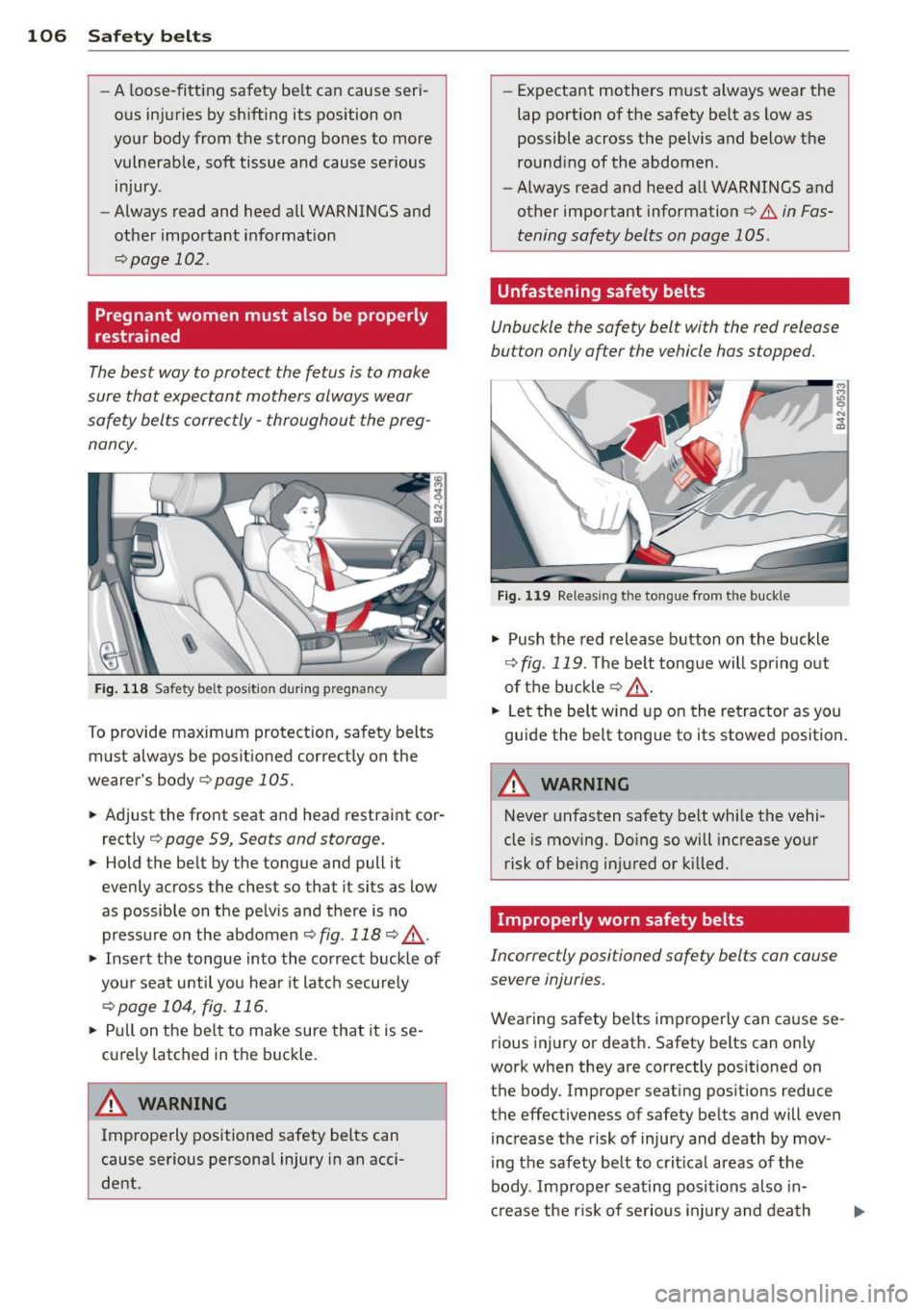
Fig. 118 Safe ty belt pos it io n durin g pregnancy
To provide maximum protection, safety belts
must always be positioned correctly on the
wearer's body
c::> page 1 OS.
.. Adjust the front sea t and head restraint cor
rectly
¢ pag e 59, Seats and storage.
.. Hold the belt by the tongue and pull it
evenly across the che st so tha t it sits as low
as possible on the pelvis and there is no
pressure on the abdomen
c::> fig . 118 c::> .&_ .
.. Insert the tongue into the correct buckle of
your seat until you hear it latch securely
¢page 104, fig . 116.
.. Pull on the belt to make sure that it is se
curely latched in the buckle .
A WARNING
Improperly positioned safety belts can
cause serious personal injury in an acci
dent. -
Expectant mothers must always wear the
lap portion of the safety belt as low as
possible across the pelvis and below the
rounding of the abdomen .
- Always read and heed all WARNINGS and
other important information
c::> & in Fas
tening safety belts on page 1 OS.
· Unfastening safety belts
Unbuckle the safety belt with the red release
bu tton only after the vehicle has stopped.
Fig. 119 Re leas ing the tong ue from the bu ckle
.. Push the red release button on the buckle
c::> fig. 119 . The belt tongue will spring out
of the buckle
c::> .&_ .
.. Let the belt wind up on the retractor as you
guide the belt tongue to its stowed position.
A WARNING
-Never unfasten safety belt while the vehi-
cle is moving . Doing so will increase your
risk of being injured or killed.
Improperly worn safety belts
Incorrectly positioned safety belts can cause
severe injuries.
Wearing safety belts improperly can cause se rious injury or death . Safety belts can only
work when they are correctly positioned on
the body. Improper seating positions reduce
the effectiveness of safety belts and will
even
increase the risk of injury and death by mov
ing the safety belt to crit ical areas of the
body . Improper seating positions also in
crease the risk of serious injury and death
Page 119 of 236
-Never remove the upholstery from the
front passenger seat.
- Never disassemble or remove parts from
the seat or disconnect wires from it.
- Never carry sharp objects in your pockets
or place them on the seat. If the weight
sensing mat in the passenger seat is
punctured it cannot work properly.
- Never carry things on your lap or carry
objects on the passenger seat. Such
items can increase the weight registered
by the weight-sensing mat and send the
wrong information to the airbag control
unit.
- Never store items under the front pas
senger seat. Parts of the Advanced Air
bag System under the passenger seat
could be damaged, preventing them and
the airbag system from working proper ly.
- Never place seat covers or replacement
upholstery that have not been specifical
ly approved by Audi on the front seats.
- Seat covers can prevent the Advanced
Airbag System from recognizing child re
straints or occupants on the front pas
senger seat and prevent the side airbag
in the seat backrest from deploying prop
erly.
- Never use cushions, pillows, blankets or
similar items on the front passenger
seat. The additional padding will prevent
the weight-sensing mat in the seat from
accurately registering the child restraint
or person on the seat and prevent the
Advanced Airbag System from function ing properly.
- If you must use a child restraint on the
front passenger seat and the child re
straint manufacturer 's instructions re
quire the use of a towel, foam cushion or
something else to properly position the
child restraint, make certain that the
PASSENGER AIR BAG OFF light comes
on and stays on whenever the child re
straint is installed on the front passen
ger seat .
Airbag system 117
-If the PASSENGER AIR BAG OFF light
does not come on and stay on, the inflat
ing airbag will hit the child safety seat or
infant carrier with great force and will
smash the child safety seat and child
against the backrest, door or roof. Have
the airbag system inspected immediately by your authorized Audi dealer .
How the Advanced Airbag System
components work together
The front Advanced Airbag System and the
side airbags supplement the protection of
fered by the front three-point safety belts
with pretensioners and load limiters and the
adjustable head restraints to help reduce the
risk of injury in a wide range of accident and
crash situations. Be sure to read the impor
tant information about safety and heed the
WARNINGS in this chapter.
Deployment of the Adv a need Airbag System
and the activation of the safety belt preten
sioners depend on the deceleration measured
by the crash sensors and registered by the
electronic control unit. Crash severity depends
on speed and deceleration as well as the mass
and stiffness of the vehicle or object involved
in the crash.
When the electronic control unit registers a
low severity crash and the safety belt is being
used, the airbag will not deploy. If the safety
belt is not being used, the first stage deploys,
followed by the second stage after a much lat
er time in the crash sequence.
If the electronic control unit registers a crash
of medium severity, the first stage of the air
bag deploys followed by the second stage at a
much later time in the crash sequence - re
gardless of whether the safety belt is being
used or not . In higher severity crashes as reg
istered by the electronic control unit, both the
first and second stages deploy almost at the
same time .
On the passenger side, regardless of safety
belt use, the airbag will be turned off if the
weight on the passenger seat is less than the
IJII,-
•
•
Page 143 of 236
A loose chi ld safety seat can fly around
dur ing a sudden stop or in a crash.
- Always make sure the seat backrest to
wh ich the child restraint is installed is in
an upr ight position . Otherwise, the seat
back with the child safety seat attached
to it could fly forward in the event of an
acc ident or other emergency situat ion.
- Always read and heed all WARNINGS
whenever using a child rest rain ed in ave
hicle is being used
~page 130. Spec ial
precautions apply when installing a ch ild
sa fety sea t on the fron t passenge r sea t
~ page 111, Child restrain ts on the fron t
seat -some impor tant things to know.
Deactivating the convertible locking
retractor
The convertible locking retractor for child re
straints will be deactivated automatically
when the belt is wound all the way back into the retractor.
~ P ress the red button on the safety be lt
buck le . The belt tongue will pop out of the
buck le.
~ G ui de the safety belt all the way back into
i ts stowed posit ion.
A lways let the safety belt retract comp lete ly
into its stowed posit ion. The safety belt can
now be used as an ord inary safety belt with
out the convert ible lock ing retractor for chi ld
restra ints .
If the convert ible locking retractor s hou ld be
activated inadvertently, the safety belt must be unfastened and guided completely back in
to its stowed position to deactivate th is fea
ture . If the convertib le loc king retractor is not
deactivated, the safe ty belt will g radua lly be
come tighter and uncomfo rt a b le to wear .
A WARNING
Imprope rly insta lled child sa fe ty seats in
crease the risk of ser ious personal inju ry
and death in a collision .
Child Safet y 141
-Never unfasten the safety belt to deacti
vate the convertible locking retracto r for
child restraints while the vehicle is mov
ing. You would not be restrained and
could be serious ly inju red in an accide nt.
- Always read a nd heed a ll WARNI NGS
wheneve r us ing a child restrained in ave
hicle is being used
Q page 130 . Special
prec autions app ly wh en insta lling a child
safety sea t on the fro nt passe nger seat
Q page 111, Child restraints on the fron t
seat -some important things to know.
Additional Information
Sources of information about child
restraints and their use
T he re a re a number of sources of additiona l
in forma tion a bout child re st ra in t se lec tion, in
stalla tion and use:
N HTSA advises that the best ch ild safety seat
i s the one t hat fits you r ch ild and fits in you r
vehicle, and that yo u will u se correc tly and
c onsistently.
Try before you buy!
U .S National Highway Traffic Safety Admin
istration
Tel.: 1-888-327-4236 (TTY: 1 -800 -424 -9153)
www . n htsa .gov
National SAFE KIDS Campaign
Tel.: (202) 662-0600
www .safe kids .org
Safety BeltSafe U.S.A
Tel.: (800) 7 45-SAFE (English)
Tel.: (800) 747-SANO (Span is h)
www .carseat .org
T ransport Canada Information Centre
Tel.: 1 (800) 333-03 71 or call
1 (613) 998-8616 if you are in the Ottawa
area
www .tc .gc.ca/ roadsafe ty
Audi Customer Relations
Tel.: (800) 822-2834 •
•