fuel AUDI R8 SPYDER 2014 User Guide
[x] Cancel search | Manufacturer: AUDI, Model Year: 2014, Model line: R8 SPYDER, Model: AUDI R8 SPYDER 2014Pages: 244, PDF Size: 61.06 MB
Page 25 of 244

Set Clock¢ page 24
Tire pressure ¢page206
Computer
c::> page 2 4
Speed warning
c::> page 73
Langu age
c::> page 24
Units (distance, fuel consump-
tion, temperature)
c::> page 24
Lap timer
c::> page 25
Lights
c::> page 46
Wiper (service posit ion)
c::> page 53
Doors (unlocking and locking
mode, for e xample Auto-lock)
c::> page 30, c::> page 30
Check Service c::> page 24
Chassis number
c::> page 223
Keys
Menu off The menu display is hidden and
. the lap timer appears .
Navigating the menu
Use the rocker switch on the windshield wiper
lever and the
I RESET I button to ope rote the
menu and carry out inquiries and selections.
~-- @
Fig. 12 W iper leve r: Co ntrols for the menu d isplay
F ig . 13 D isplay: Start menu
Driver in formation system 23
I Reset I button @ and rocker switch @
c::> fig. 12 fu nctions:
To open the menu
~ Press the I Reset I but to n @ unti l the me nu
disp lay
c::> fig . 13 appears
Selections and settings
~ Press the rocker switch @to reac h a menu
display. The switch is operated the same as
th e display (up/down) .
Entering and confirming
~ Press the I RESET I button @.
Returning to the Start menu
~ Press the I RESET I button longer than 2 sec
onds to return from any menu level to the
Start menu .
U sing the rocker swi tc h, you can selec t the
men us in the display or change settings. A
cu rsor appea rs on the left in front of th e se
lected values.
By press ing the
! RESET I button, you act ivate
the se lec tion you made or confirm the va lues
yo u set.
Sele cted functions are identified wit h
a check mark or are carried out directly .
Mean ings of the symbols i n the display:
Selec
tion bar
>
./
D
Selected funct io n Mea ning
Cursor
C heck ma rk
Box Curren
t Selec
tion
Selected or
Function active
Not selected
Tr ian gle pointi ng Previou s page
up
Triangle pointing IINext page
down
Page 28 of 244
26 Driver information system
Displaying intermediate time and pausing
timing
• To display an intermediate time, press the
l ower section of the w iper switch @. T he in
termediate time appears in line
CD and is
marked with*.
• To pause tim ing, press the lower section of
the wiper switch @again.
• To continue timing, press the upper section
of the w iper switch @.
If t iming is paused, you can conti nue it later
even if you switch the ign it ion off.
Evaluating times and continuing or
resetting timing
You can evaluate the fastest, slowest and
average lap times.
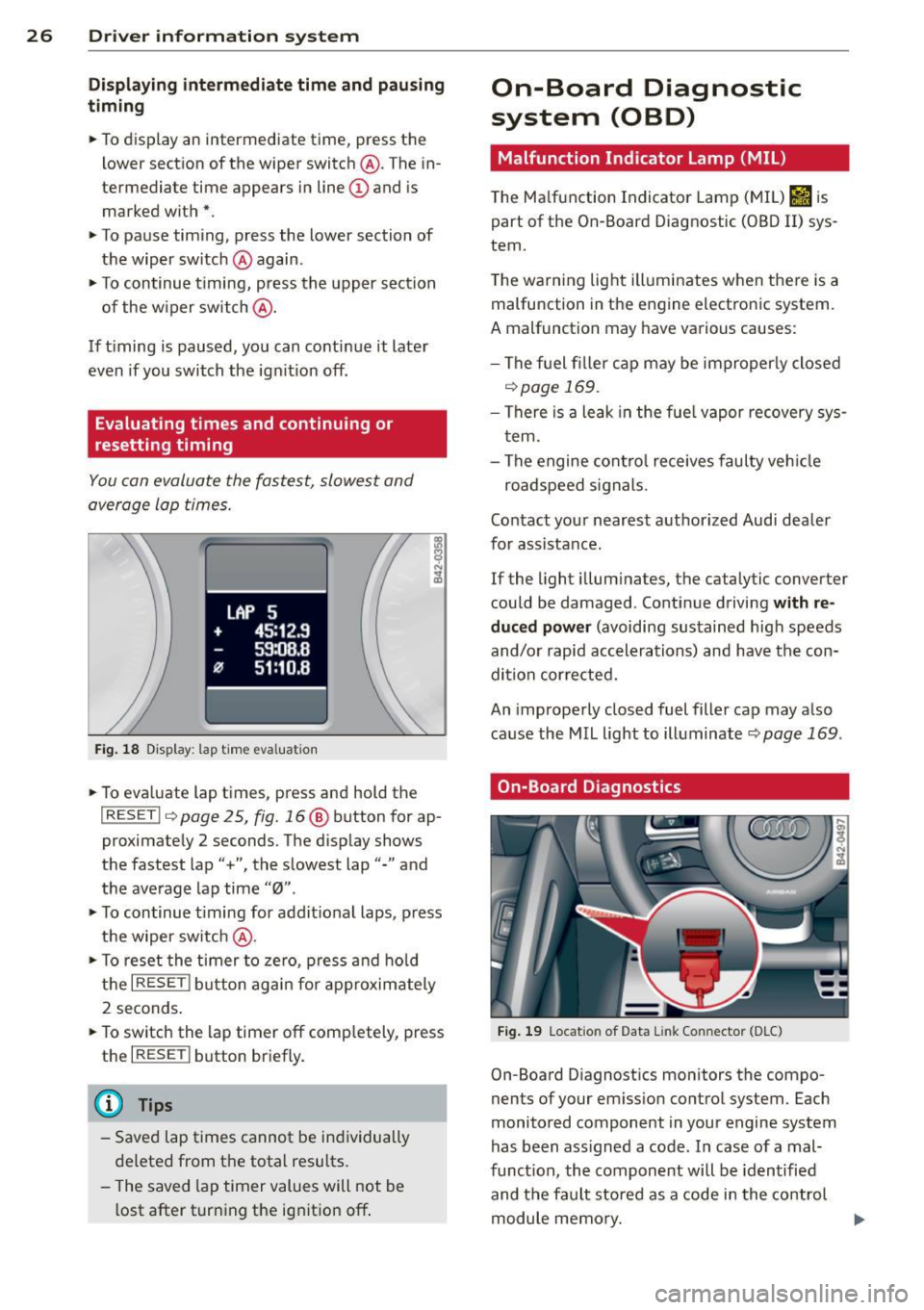
Fig. 18 Display : lap time eva luation
• To eva luate lap times, press and hold the
I RESET I 9 page 2 5, fig. 16 @ button for ap
proximate ly 2 seconds. The display shows
the fastest lap"+", the s lowest lap"-" and
the average lap time
"0" .
• To continue t iming for addit ional laps , press
the wiper switch @.
• To reset the timer to zero, press and hold
the
I RESE T! button again for approximately
2 seconds .
• To switch the lap timer off comp letely, press
the
I RESET ! button briefly.
(D Tips
-Saved lap times cannot be individually
deleted from the total results.
- The saved lap timer values will not be
l ost after turning the ignition off .
On-Board Diagnostic
system (OBD)
Malfunction Indicator Lamp (MIL)
The Ma lfunction Indicator Lamp (MIL) &iJ is
part of the On -Board Diagnostic (OBO II) sys
tem.
T he wa rning light ill uminates when the re is a
malfunction in the engine electronic system.
A malfunction may have various causes :
- The f uel filler cap may be improperly closed
,=;,page 169.
-There is a leak in the fuel vapor recovery sys
tem.
- The engine control receives faulty vehicle
roadspeed signals.
Contact your nearest authorized Audi dealer
for assistance.
If the light illuminates, the catalytic converter
could be damaged . Continue driving
with re
duced power
(avoiding sustained high speeds
and/or rapid accelerations) and have the con
di tion cor rected.
An improperly closed fuel filler cap may also
cause the MIL light to illuminate
r=;, page 169 .
On-Board Diagnostics
Fig. 19 Locat io n of Data Li nk Conn ecto r (D LC)
On-Board D iagnostics monitors the compo
nen ts of your emission control system . Each
monitored component in your engine system
has been ass igned a code . In case of a mal
funct ion, the component will be identified
and the fault stored as a code in the control
module memory.
Page 68 of 244
66 Warm and cold
Defrost~
The w indshi eld and sid e windo ws ore defrost
e d or clear ed o f cond ensation as quickly as
possibl e.
• To turn on t he defogger/defroster , press t he
~ button <=> page 63, fig . 71 .
• To turn the d efogger/d efroste r off, press the
~ button again, o r th e IA UT OI butto n.
Temperatu re is co ntrolled automatically . The
maximum a mou nt of air flows ma in ly fr om
ve nts 1 <=>
pag e 65.
A sma ll amount of ai r flows from vents 2 - if
they are open <=>
page 65.
Pressing the ~ button switches off recircu la
ti on mode.
Automatic operation ~
Standard operating mode at all times of the
year .
Turning on automatic operation
• Set t he te mp erature you w ant.
• Press the
!AUTO ! button <=> page 63, fig. 71 .
Automatic opera tion e nsur es constant tem
pe ra tur es in the i nterio r a nd dehum idifies the
a ir i nside t he vehi cle. Ai r tem perature, vo l
ume, and dist ribution are controlled a utomat
ica lly to reach o r maintain the desired interio r
temperature as q uic kly as possib le. Fluct ua
ti ons in exterior temperature and the effects
of temperatu re from the position of the sun
are compensated fo r automat ica lly.
Manual air recirculation mode~
The recirculation mod e prevents polluted out
side air from entering the vehicle interior.
Switching on air recir culation
• Press the button I;]<=> page 63, fig. 71,
<=>A .
Switching off air recirculation
• Pres s the button ~ again , o r
• Press the
!AU TO ! bu tton, or •
Press the~ button .
In recir culation mode, air is drawn from t he
vehicle interi or, filtered, and re circula ted . We
re commend that yo u se lec t rec irculat io n
mode
briefly <=>.&. under the fo llowing condi
t ions:
When driving thro ugh a tunne l or in a t raff ic
jam so that exha ust fumes and odors canno t
enter the vehicle inte rior.
A WARNING
You sho uld not use the recirculation m ode
for an extended period s ince no fresh air is
drawn in, and with the air co ndit ioning
switched off t he windows can fog up - t his
i nc reases the r is k of an accident!
A/C operation ~
Switching on A/C
• Press the IA/Cl button <=> page 63 , fig . 71 .
Switching A /C off
• Press the IA/Cl button again.
T he cooli ng sys tem is swi tched on d uring A/C
opera tion -the heat ing and ven tilat ion sys tem
is contro lled automatically.
@ Tips
If th e L ED in the sw itch stays o n aft er A/C
opera tion has been switched off( = sw itch
i ng the A/C off) , there is a fault i n an air
conditioning component. P lease cons ult
an a uthorized Audi dealer when there is an
operating problem.
Using the climate controls economically
E conomical use of the climate controls helps
to save fuel.
When climate control is wo rking in cooling
mode, engine pe rformance is reduced and
f uel consumpt ion is affected. To keep the time
the a ir cond ition ing is on as short as poss ible,
you should do the following: .,,_
Page 69 of 244
~ If you would like to save fuel, switch the air
conditio ning off.
~ If you open the w indows wh ile driving,
switch the air conditioning off.
~ If the vehicle is extremely hot due to the
heat of the sun, briefly open doo rs and win
dows .
@ For the sake of the environment
When you save fuel, you reduce em iss ions
from the vehicle.
Rear window defogger
The rear window defogger clears the rear win
dow of cond ensation .
~ Press the~ button ¢ page 63, fig . 71 to
turn the rear window defogge r on and off.
The rear w indow defogger works only when
the engine is ru nning. The indicator light in
the button illuminates when the rear w indow
defogger is tu rned on .
The window between the cockpit and engine
compa rtment is also cleared with the rear
w indow .
The rear w indow defogger is switched
off au
tomatically after approx. 10 minutes.
@ For the sake of the environment
As soon as the rea r win dow is clear, yo u
should switch the rear window defogger
off . The reduced power cons umption has a
be neficial effect on fuel consumption.
Heated seats
App lies to vehicles: with heated seats
The seat cushion and the seatback of the
front seats can be heated electrically.
~ Press the heated seats b utton I-J + I
c:> page 63, fig. 71 to set the level of heati ng
desired.
The range of controls goes from 1 to 3. The
heat sett ing selected is shown by LEDs above
the button.
Warm and c old 67
A WARNING
Individuals wit h reduced sensitivity to pai n
or temperature cou ld deve lop bur ns when
us ing the seat heat ing funct ion. To red uce
the r is k of injury, these ind ividuals should
not use seat heating.
Q) Note
To avoid damage to the heat ing e lements
i n the seats, do not kneel o n the sea ts or
p lace heavy loads o n a small area of the
seat.
Page 79 of 244
Transmission Manual transmission
Gearshift lever
App lies to vehicles: with manual transmission
The clutch pedal must be depressed all the
way before you can start the engine.
The manual transmission in your Audi is
equipped with an
interlock-feature.
• Depress the clutch pedal all the way.
• Start the engine with the gearshift lever in
Neutral and the clutch pedal depressed.
(D Note
Always depress the clutch pedal fully when
changing gears . Do not hold the vehicle on
a hill with the clutch pedal partially de
pressed. This may cause premature clutch
wear or damage .
@ Tips
-Resting your hand on the gearshift lever
knob while driving will cause premature
wear in the transmission.
- The back-up lights go on when you shift
into Reverse w ith the ignition on.
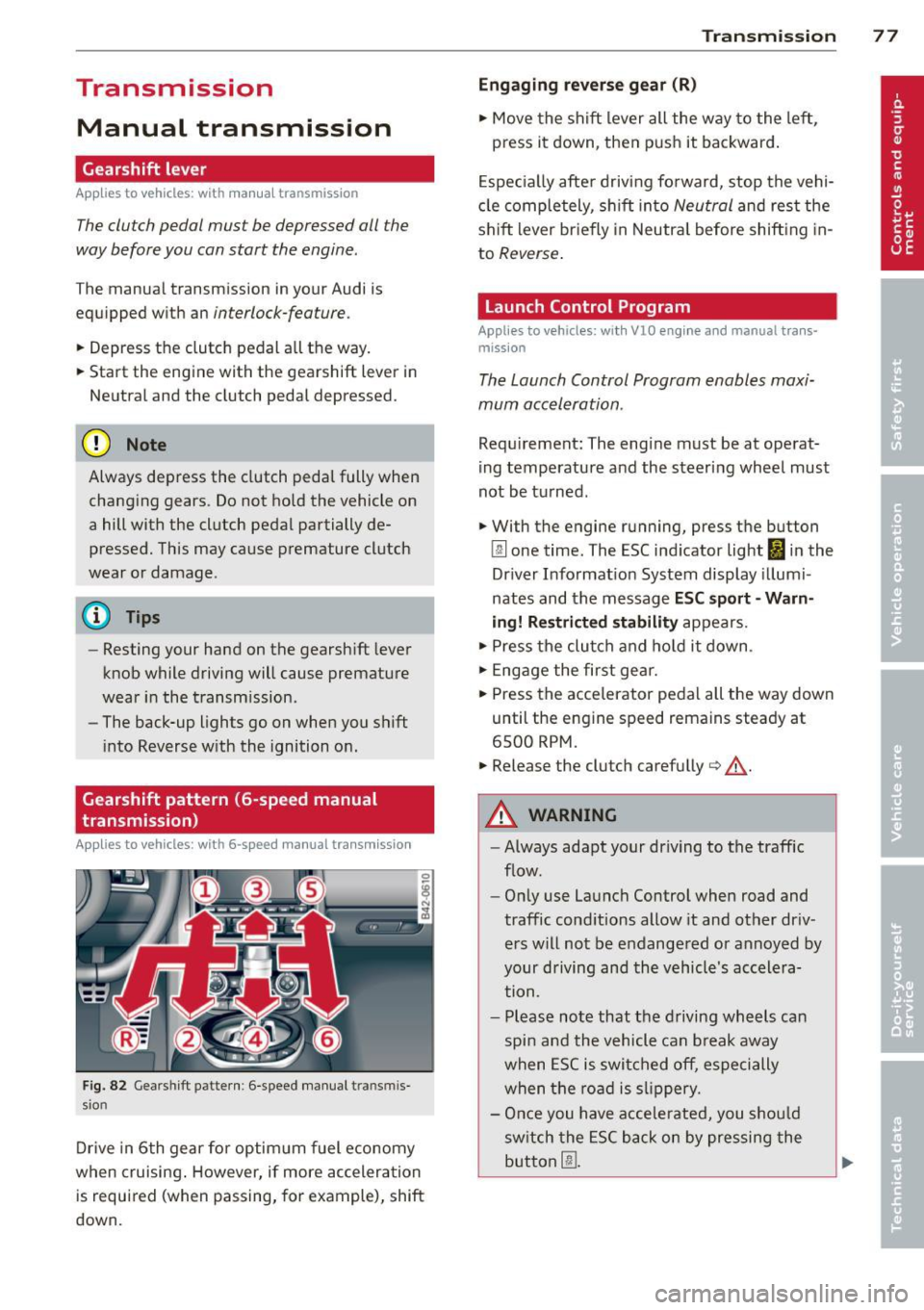
Gearshift pattern (6-speed manual
transmission)
Applies to vehicles: with 6-speed manual transmission
Fig. 82 Gears hift patte rn: 6 -speed manual tran smis
sion
Drive in 6th gear for optim um fuel economy
when cruising . However, if more acceleration
is required (when passing, for example), shift
down.
Transmission 77
Engaging reverse gear (R)
• Move the shift lever all the way to the left,
press it down , then push it backward.
Especially after driving forward, stop the vehi
cle completely, sh ift into
Neutral and rest the
shift lever br iefly in Neutra l before shift ing in
to
Reverse .
Launch Control Program
Applies to vehicles: with VlO eng ine and manual t ra ns·
miss ion
The Launch Control Program enables maxi
mum acceleration .
Requirement: The engine must be at operat
ing temperature and the steering wheel must
not be turned .
• With the engine running, press the button
[g] one time. The ESC indicator light I in the
Driver Informat ion System display illumi
nates and the message
ESC sport - Warn
ing! Restricted stability
appears.
• Press the clutch and hold it down .
• Engage the first gear.
• Press the accelerator pedal all the way down
until the engine speed remains steady at
6500 RPM.
• Release the clutch carefully¢.&, .
A WARNING
-Always adapt your dr iving to the traffic
flow.
- Only use Launch Control when road and
traffic conditions allow it and other dr iv
ers will not be endangered or annoyed by
your driving and the vehicle's accelera
tion .
- Please note that the driving wheels can
spin and the vehicle can break away
when ESC is switched off, especially
when the road is slippery.
- Once you have accelerated, you sho uld
sw itch the ESC back on by pressing the
button @.
Page 155 of 244
Driving and
environment
Break-in period
A new vehicle must be broken in, and the
break-in period should be 1,500 miles (2,500
km) . Do not use full acceleration for the first
600 m iles (1,000 km) and do not exceed the
maximum engine speed of 6,000 rpm You
must also not use full accelerat ion between
600 and 1,200 mi les (1,000 to 2,000 km).
Fr om 1,200 to 1,500 miles (2,000 to 2,500
km), you can gradua lly increase maximum en
gine speed to 8,250 rpm for brief periods.
During the first hours of operation, there is
greater friction in the engine and the trans
mission than later when all the moving parts
have broken in.
The way you drive during the first 1,500 miles
(2,500 km) affects engine quality. If you drive
at moderate eng ine speeds thereafter, partic
ularly when the engine is cold, you reduce en
gine wear and increase the potential mileage
of the engine.
Do not drive at RPMs that are too
low. Shift
down when the engine is no longer running
"smoothly". Extreme ly high RPMs are gov
erned automatically.
Avoid damaging the
vehicle
When you are driving on poor roads, or over
curbs, steep ramps, etc., make certain that
low-lying parts such as spoilers and exhaus t
system parts do not bottom out and get dam
aged.
This is especially true for vehicles with low
slung chassis (sports chassis) and fully loaded
veh icles.
Driving and environment 153
Driving through water
on roads
Note the following to avoid vehicle damage
when driving through water, for example on
flooded roads:
- The water must not be any higher than the
bottom of the vehicle body.
- Do not drive faster than walking speed .
A WARNING
After driving through water, mud, slush,
etc ., the brakes may be slow to take effect
because of wet brake rotors and pads . Dry
the brakes first by braking carefully to re
store the full braking effect.
(D Note
Vehicle components such as the eng ine,
transmission, suspension or electrical sys
tem can be severe ly damaged by dr iv ing
th rough water.
(D Tips
- Check the depth of the water before d riv
ing through it.
- Do not stop the vehicle, drive in reverse
or switch the engine off when driving
through water.
- Keep in mind that oncoming vehicles
may create waves that ra ise the water
level and make it too deep for your vehi
cle to drive through safely.
- Avo id driving through salt water because
it can cause corrosion.
Catalytic converter
It is very important that your emission con
trol system (catalytic converter) is function
ing properly to ensure that your vehicle is run
ning in on environmentally sound manner .
.,. Always use lead-free gasoline ~ page 167,
Fuel supply .
.,. Never run the tank down all the way to emp-
~. ~
•
•
Page 156 of 244
154 Driving and en vironm ent
• Never put too much motor oil in your engine
¢ page 180, Adding engine oil
The cata lytic converter is an efficient "clean
up" device built into the exhaust system of
the vehicle. The catalytic converter burns
many of the pollutants in the exhaust gas be
fore they are released into the atmosphere.
The exclusive use of unleaded fue l is critically
important for the life of the cata lytic convert
er and proper functioning of the engine.
A WARNING
- Do not park or operate the veh icle in
areas where the hot exhaust system may
come in contact with dry grass, brush,
fuel sp ill or other material which can
cause a fi re.
- Do not apply additional undercoating or
rustproofing on or near the exhaust
man ifold, exhaust p ipes, catalytic con
verte r o r heat shie lds . D uring d riving, the
substance used for undercoating cou ld
overheat and cause a fire.
([) Note
- Be aware that just one tank f illing with
le aded fuel will already seriously de
grade the performance of the catalytic
converter.
- Do not exceed the correct engine oil leve l
¢page 180 .
-Do not drive until the fuel tank becomes
completely empty. The eng ine could mis
fire. Unburned f uel could a lso get into
the exhaust system and this could cause
the catalytic converter to overheat.
- Do not turn
off the ignition while the ve
hicle is moving .
- Do not continue to operate your vehicle
under these conditions, as otherwise fuel
can reach the catalytic converter. This
could result in overheat ing of the con
verter, requ iring its replacement.
- To assure efficient operation of the Emis sion Control System: -
Have your vehicle maintained properly
and in accordance with the service rec
ommendat ions in yo ur Warranty
&
Maintenance book let.
- Lack of proper maintenance as we ll as
improper use of the vehicle will impair
the function of the emission contro l
system and could lead to damage.
@ For the sake of the env ironment
Even when the Emission Control System is
operating proper ly, the exhaust gas can
have a sulfur-like exhaust gas smell under
some operat ing states . This depends on
the sulfur content of the fuel being used .
Using a different brand of fue l may help,
or fil ling the tank with lead-free super
grade gasoline.
Shutting down vehicle
If you would like your vehicle to remain inop
erative for a longer per iod of t ime, contact an
Audi or othe r specialized dealer. They can ad
vise you on necessary precautions e.g . corro
sion prevention, maintenance and storage.
Pay attention to additional informat ion con
cerning the battery. Refer to<=>
page 184.
Operation and
maintenance
Fuel economy, env ironmental impact, and
wear on your eng ine, brakes and tires largely
depend on three facto rs:
-your personal driving style
- operating conditions
- technical limitat ions
By having your veh icle regu larly se rviced by an
authorized Audi dea ler helps to ensure that it
runs properly and economica lly. The condition
of your vehicle not only affects its safety and ability to hold its va lue, it also affects
fu el
cons umpt ion.
The amount of oi l used is re lated to engine
l oad and speed.
Page 157 of 244
It is normal for the oil consumption of a new
engine to reach its lowest value after a certain
mileage has been driven.
You must drive your vehicle about 3,000 miles
(5,000 kilometers) before you can properly
assess oi l consumption.
This also applies to fuel consumption and en
g ine output.
(y Note
-Have your vehicle maintained properly
and in accordance with the service rec
ommendations in your Warranty
& Main
tenance booklet. Lack of proper mainte
nance as well as improper use of the ve
hicle will impair the function of the
emission control system and could lead
to damage.
- Do not alter or remove any component of the Emission Control System unless ap
proved by the manufacturer.
- Do not alter or remove any dev ice, such
as heat shields, switches, ignition wires,
valves, which are designed to protect
your vehicle's Emission Control System
and other important vehicle compo
nents.
(D Tips
The consumpt ion estimates as published
by the ENVIRONMENTAL PROTECTION
AGENCY (EPA) and Transport Canada may
not correspond to your actua l consump
tion on the road, which will vary depend
ing upon vehicle load and speed, road and
weather conditions, trip length, etc.
Trailer towing
General information
Your Audi RB Spyder is not designed to tow a
trailer.
Towing a trai ler with your Audi RB Spyder is
not recommended and can cause damage to
the car . Damaged caused by towing a trailer is
not covered by your Aud i Warranty .
Driving and environment 155
•
•
Page 158 of 244
156 Cleaning and protection
Cleaning and protect ion
General information
Regular core preserves vehicle value .
Regular and correct care will contribute to
maintaining the beauty and value of your
Audi. Furthermore, good care may be a condi
tion for substant iat ing a warranty claim
should corrosion damage or pa int defects oc
cur.
Your authorized Audi R8 dealer has a variety
of
dedicated vehicle-care products. Please
make sure you apply them correctly .
.8, WARNING
-Cleaning agents may be poisonous. Keep
them out of the reach of children.
- Heed all caution labels.
- Always read directions on the container
before using any product . Follow the di
rect ions carefu lly.
- Most chemical cleaners are concentrated
and have to be diluted.
- Use spot removing fluids only in well
ventilated areas.
- Do not use gasoline, kerosene, d iesel
fuel, nail pol ish remover or other volatile
fluids. They may be toxic, flammable or
haza rdous in other ways. Do not wash,
wax or dry the vehicle with the ignit ion
on or the engine running.
- Do not clean the undersides of chassis,
fenders, wheel covers, etc. without pro
tecting your hands and arms. You may cut yourse lf on sharp-edged metal parts.
- Moisture and ice on brakes may impair
braking efficiency¢
page 146, General
information .
Test the brakes carefully
each time you wash the vehicle.
@ For the sake of the environment
Select only environmentally friend ly clean
ing products . Leftover cleaning products
should not disposed of in the household
waste.
Care of exterior
Washing your vehicle
T he longer i nsect remains, bird dropp ings,
tree res in , road and indust rial dust, tar, soot
part icles, road salt, and other aggressive de
posits remain on the vehicle surface, the more
lasting their destructive effect will be . High
temperatures, for example from intense sun
li ght, intens ify the corrosive effect.
After the end of winter road salting, the un
derside of the vehicle should be thoroughly
washed .
Automatic car washes
Before going through an automatic car wash,
yo u should take the usual precautions (closing
the windows). If your vehicle has special ac cessories -e.g . spoilers, radio antenna -it is
best to speak to the operator of the car wash
c:> (D .
Only use car washes where the vehicle re
mains stationary and the cleaning equipment
moves aro und the vehicle while washing and
drying . It is not possib le to use car washes
where the vehicle is moved forward on a con
veyer
c:> ,& .
It is preferab le to wash your vehicle in a
brush less carwash .
Washing with a power washer
When washing yo ur vehicle with a power
washer, be sure to follow the operating in
structions for the power washer . This applies
particularly to the
pressure and the spraying
distance.
Maintain sufficient distance from
soft materials such as rubber hoses, sound
deaden ing mater ial, and the parking aid sen
sors* that are located in the front or rear
bumper .
Do not use washers with
a rotating jet or a
nozzle spraying
a high pressure jet of water in
any case. ..,.
Page 159 of 244
Hand washing
When washing your veh icle by hand, fi rst soft
en the dirt with copious amounts of water and rinse it
off as b est you can.
Then clean the veh icle using a soft
s ponge , an
auto gl ove or a low -press ure wa sh bru sh .
Work from the top down -sta rting with the
roof . Use a
s h ampoo only for very stubborn
dirt.
Rinse the sponge or auto glove thorough ly at
fr equent intervals.
C lea n the wheels, doo r sill s and simi lar a reas
last . Use a separate sponge fo r th is.
_&. WARNING
- Car washes with conveyors can damage
the vehicle tires , which could cause the
ti re to lose pressure sudden ly while driv
ing and put you at risk for an accident.
Do not use car washes with conveyors.
- Switch
off the ignit ion when you wash
yo ur vehicle to avo id an accident.
- Protect yo ur hands and arms from sharp
metal edges when you clean the under
body, the ins ide of the whee l wells or the
wheel covers to avoid cutting yourself .
- When washing your vehicle in the winter:
Moist ure and ice in the brake system can
affect the brakes.
- Never wash tires with a jet that sprays
water in a direct stream . T hi s could cause
invisible damage to the tires and weaken
them, even if the spray is from a relative
ly long distance and for a short time.
Damaged and wea kened tires can fail
and cause a ccidents and pe rsonal inj ury.
0 Note
- Never dr ive your veh icle through any au
tomatic car wash that fails to p rov ide e i
the r suff icient clearance for your veh icle
or sufficient tra ck wid th fo r your tires .
Ris k of expensive damage to the veh icle's
u nderbody, tires, and rims!
- As descr ibed in you r Warra nty
& M ainte
nance booklet , damage or malf unct ion
Cleaning and protec tion 157
due to m isuse o f the vehicle or fai lure to
operate the vehicle in acco rdance with
the inst ruct ions of th is Owner's Manua l
wi ll not be covered under warranty.
- Fold the exte rior mirrors flat -there is a
r isk of damag ing the exterior m irrors .
Power folding exterior mirrors must not
be folded in or out by hand . Use the pow
er function!
- Do not wash the vehicle in d irect sun
light . You may damage the paint.
- Do not use sponges designed to remove
insects, rough k itchen sponges , or s imi
lar products . You risk damag ing the
pai nt s urface.
- Do not wash the vehicle using cleani ng
products that contain alcohol when the
e ng ine is ho t. This increases the risk of
damage to plast ic components, such as
c rack ing .
- You should remove deb ris (such as in
sects) from the headlight lenses on a
regu lar bas is, for example when re fuel
ing your vehicle. Never clean the head
lights with a dry cloth or sponge. Use a
wet cloth o r sponge . It is best to use
soapy water.
- Never clean t ires using a nozz le that
sprays water in a direct stream. Damage
can occur even with a relatively long
spraying distance and for a very short
t ime.
- To avoid damaging your veh icle, always
make sure that there is sufficient dis
tance between the spray head and soft
materials like rubbe r hoses, plast ic parts
and sound-deadening materials. Never
aim the spray head a t the same point for
a long time. This also app lies to cleani ng
head lights and pa inted b umpers . Re
member : the closer the nozz le is to the
surface of the material, the greater the
stress on the materia l.
@ For the sake of the environment
Wash yo ur vehicle on ly at spec ia lly de
signed facilities . They can prevent any dirty
water contaminated by oil from entering
Iii>-
•
•