tow AUDI R8 SPYDER 2014 User Guide
[x] Cancel search | Manufacturer: AUDI, Model Year: 2014, Model line: R8 SPYDER, Model: AUDI R8 SPYDER 2014Pages: 244, PDF Size: 61.06 MB
Page 72 of 244
70 On the road
(D Note
-Avoid hig h engine speeds, fast accelera
tion or heavy engine loads while the en
gine is still cold. Th is could damage the
engine.
- The engine cannot be started by pushing or towing the vehicle.
@) For the sake of the environment
To avoid unnecessary engine wear and to
reduce exhaust emissions, do not let your
veh icle stand and warm up. Be ready to
drive off immediately after starting your
veh icle.
Stopping the engine
On vehicles w ith S tronic*, the engine can be
turned off in the neutral position N and in
each gear (1 -7 and R).
~ Turn the ign ition key to position ©
r:::>page 68, fig . 74 .
_& WARNING
- Never turn off the engine until the vehi
cle has come to a complete stop.
- Th e brake booster and servotronic on ly
work when the engine is running. With
the ignition turned off, you have to apply
more force when steering or braking .
Since you cannot steer and stop norma l
ly, this can lead to accidents and serious
injuries.
(D Note
- If the engine has been under heavy load
for an extended period of time, heat
builds up in the engine compartment af
ter the engine is switched off -there is a
risk of damaging the engine. Allow the
engine to continue to run at idle for a
short time or drive until it has cooled
down before you turn it off¢
page 75.
- If the engine has been under heavy load
for an extended period of time, it can be
come extremely hot. You should not park your vehicle over easily combustib
le ob
jects or areas (e .g. grass or leaves). There
is a risk of starting a fire.
(D Tips
After the engine has been switched off, the
radiator fan can continue to run for up to
10 minutes -even with the ignition switch
ed off. It can also sw itch on again after
some time if the coolant temperature rises
as the result of heat buildup or if the en
gine compartment is heated by the sun's
rays and the engine is hot.
Parking brake
Parking brake
When the parking brake is set, it prevents the
vehicle from rolling away unintentionally
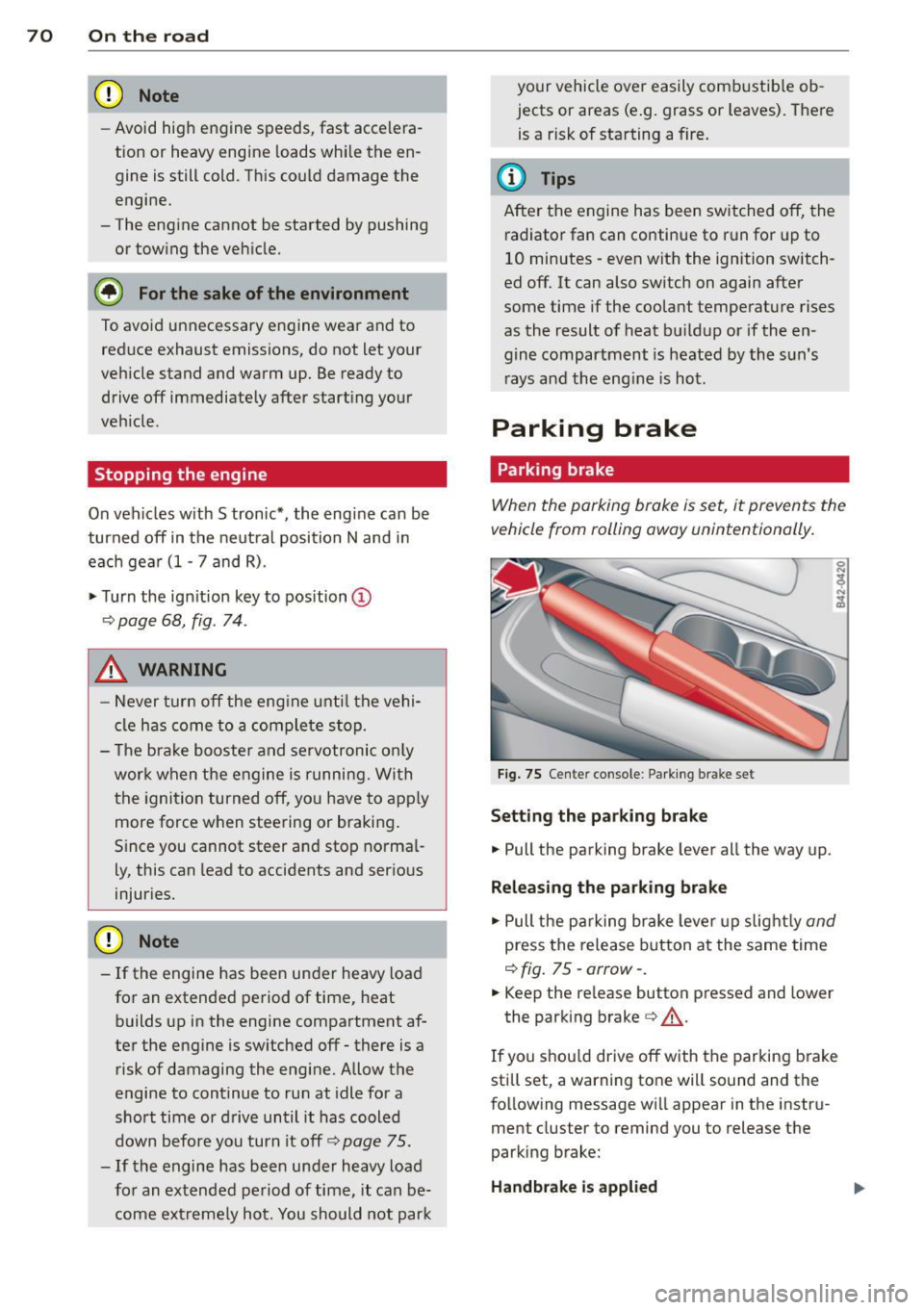
Fig. 75 Center co nsole : Parking brake set
Sett ing the parking brake
~ Pull the parking brake lever all the way up.
Releasing the parking brake
~ Pull the parking brake lever up slight ly and
press the release button at the same time
r:::>fig. 75-arrow- .
~ Keep the release button pressed and lower
the park ing brake ¢,& .
If you shou ld drive off with the parking brake
still set, a warning tone will sound and the
following message will appear in the instru
ment cluster to remind you to release the
parking brake:
Handbrake is applied
Page 76 of 244
74 On the road
8_ WARNING
-Always pay attention to traffic even when
the cruise control is switched on. You are
always responsible for your speed and
the distance between your vehicle and
other vehicles.
- For safety reasons, the cruise control
should not be used in the city, in stop
and-go traffic, on twisting roads and
when road conditions are poor (such as
ice, fog, gravel, heavy rain and hydro
planing) -risk of accident.
- Turn
off the cruise control temporarily
when entering turn lanes, highway exit
lanes or in construction zones.
- Please note that inadvertently "resting"
your foot on the accelerator pedal causes
the cruise control not to brake. This is
because the cruise control is overridden
by the driver's acceleration.
@ Tips
- Vehicles with manual transmission: You
can attain the set speed only if the cur
rently engaged gear allows it and the en
gine is not stressed. Shifting to a higher
or lower gear promptly will allow the en
gine to run smoothly .
- The cruise control cannot maintain a
constant speed when driving downhill.
The vehicle will accelerate under its own
weight. Downshift to a lower gear or use
the brakes to slow down.
Changing speed
.,. Press lever in the 0 or 0 direction
¢ page 73, fig. 79 to increase or decrease
your speed.
.,. Release the lever to save that speed.
You can also press the accelerator pedal down
to increase your speed, e.g. if you want to
pass someone. The speed you saved earlier
will resume as soon as you release the acceler ator pedal.
If, however, you exceed your saved speed by
S mph (10 km/h) for longer than 5 minutes,
the cruise control will turn
off temporarily.
The symbol will go out but the saved speed
will be retained .
Presetting your speed
You can preset your desired speed while the
vehicle is not moving.
.,. Turn on the ignition.
.,. Pull lever into position@~
page 73,
fig. 79.
.,. Press the lever in the 0 or 0 direction to
increase or decrease your speed.
.,. Release the lever to save that speed .
This function makes it possible, for example,
to save the speed you want before driving on
the highway. Once on the highway, activate
the cruise control by pulling the lever toward
CD-
Switching the system off
Temporary deactivation
.,. Press the brake pedal , or
.,. Keep the clutch pedal pressed down longer,
or
.,. Press the lever into position @ (not clicked
into place)
~ page 73, fig. 79 , or
.,. Drive for longer than S minutes at more
than 5 mph (10 km/h) above the stored
speed.
Switching off completely
.,. Press lever into position @(clicked into
place), or
.,. Switch the ignition
off.
The system retains the saved speed if you de
activate the cruise control temporarily. To re
sume the saved speed, release the brake or
clutch pedal and pull the lever to position
(D .
Switching the ignition off erases the saved
speed.
Page 80 of 244
78 Transmission
@ Tips
-When accelerating using the Launch
Control program, all vehicle parts are
subject to heavy loads. This can result in
increased wear.
- The Launch Control Program only func
tions when the parking brake is released
and the vehicle speed is less than
3 mph
(5 km/h).
S tronic®
Description
Applies to vehicles: with S tronic
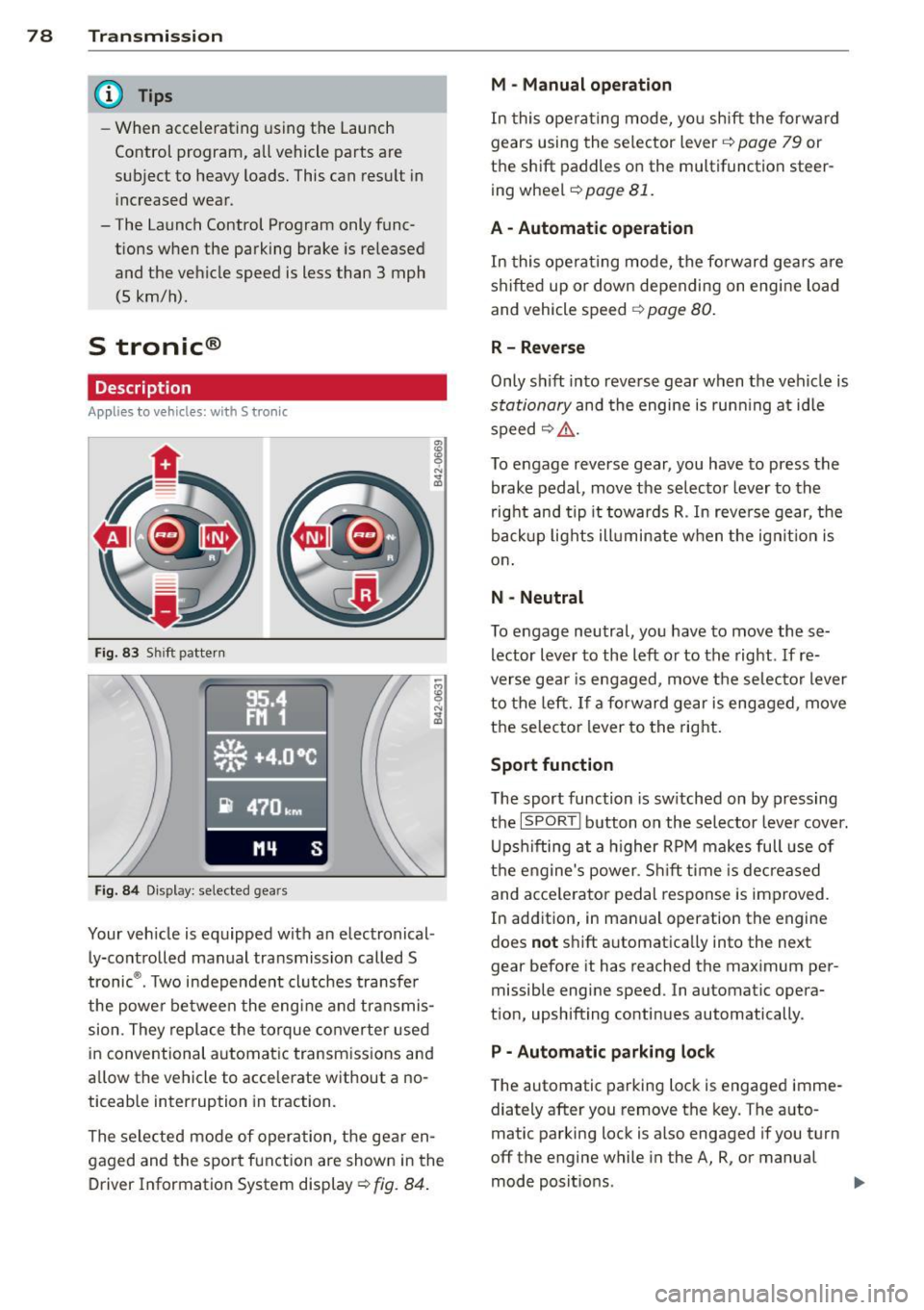
Fig. 83 Shift pattern
Fig. 84 Display: selected gears
Your vehicle is equipped with an electronical
ly-controlled manual transmission called S
tronic ®. Two independent clutches transfer
the powe r between the engine and transmis
sion. They replace the torque converter used
in conventional automatic transmissions and
allow the vehicle to accelerate without a no
ticeable interruption in traction.
The selected mode of operation, the gear en
gaged and the sport function are shown in the
Driver Information System display ¢
fig. 84.
M -Manual operation
In this operating mode, you shift the forward
gears using the selector lever ¢
page 79 or
the shift paddles on the multifunction steer
ing wheel¢
page 81.
A - Automatic operation
In this opera ting mode, the forward gears are
shifted up or down depending on engine load
and vehicle speed ¢
page 80.
R- Reverse
Only shift into reverse gear when the vehicle is
stationary and the engine is running at idle
speed~ ,&..
To engage reverse gear, you have to press the
brake pedal, move the selector lever to the
right and tip it towards R . In reverse gear, the
backup lights illuminate when the ignit ion is
on .
N -Neutral
To engage neutral, you have to move these
lector lever to the left or to the right.
If re
verse gear is engaged, move the selector lever
to the left.
If a forward gear is engaged, move
the selector lever to the right.
Sport function
The sport function is sw itched on by pressing
the
I SPOR T I button on the selector lever cover.
Upshifting at a higher RPM makes full use of
the engine's power. Shift time is decreased
and acce le rator pedal response is improved.
In addition, in manual operation the engine
does
not shift automatically into the next
gear before it has reached the maximum per
missible engine speed. In automatic opera
tion, upshifting continues automatically.
P - Automatic parking lock
The automatic parking lock is engaged imme
diately after you remove the key. The auto
matic parking lock is also engaged if you turn
off the engine while in the A, R, or manual
mode positions. .,..
Page 82 of 244
80 Transmi ssion
-Do not accelerate when you shift gears
with the vehicle stationary and the en
gine running.
- Before driving down a steep slope, re
duce your speed and shift into a lower
gear with S tron ic.
- Do not ride the brakes or press the brake pedal too often or too long. Constant
braking causes the brakes to overheat
and substantially reduces brak ing per
formance, inc reases braking distance or
c auses comp lete failure of t he b rake sys
tem.
0 Note
If you must stop on an incline, always hold
t he vehicle in place w it h the foot bra ke to
p revent it from roll ing ba ck. Do not t ry to
preven t the vehicle from r oll ing bac k when
t he ge ar is engaged by increasing speed,
as t his may damage the clutch .
Automatic mode
Applies to vehicles: with 5 tronic
The transmission shifts up and down auto
matically when in the driving gears.
Starting from a stop
.. Press and hold the brake peda l.
.. Tap the se lector lever towards A.
.. Re lease the brake pedal and press the accel
era to r peda l¢
A in Manual mode on
page
79 .
Unde r certain circumstances (d riving in the
mo unt ains fo r example), it can be beneficia l
to switch tempo rari ly to the manua l shift pro
gram ¢
page 79 in order to adjust the gear ra
tios to driving conditions
manually .
Kick-down
Applies to vehicles: with S tronic
When you depress the acce lerator pedal be
yond the resistance po int, S tronic downshifts
i n to a lower gear , depending on vehicle speed
l) Market- sp ec ifi c
and engine rpm . It shifts up into the next
higher g ear once the maximum specified en
gine RPM is reached. Except ion: you have acti
vated the sport func tion .
A WARNING
Please note that the whee ls cou ld spin on
slick or slippe ry roads when kick-down is
active .
Launch control program
Applies to vehicles: wit h S tronic
The Launch Con trol Program enables maxi
mum acceleration .
Requirement: The eng ine must be at operat
ing temperature and the steering wheel must
not be turned.
.. With th e engine running, press the
(fill
!ESC OFF!1l
button one time. The I ind ica
tor light and the message
ESC Spo rt -Cau
tion! Lim ited stabil ity!
appears in the driver
information system display .
.. Press the brake pedal with your left foot a nd
hold it down .
.. Engage a gea r.
.. Press the
I SPOR T! button on the selecto r lev
er cover .
.. Press the accelerator peda l at the same time
with your right foot unti l the engine has
reached a constant speed .
.. Remove your left foot from the brake¢,&. .
A WARNING
--Always adapt your dr iving to the traff ic
f low.
- Onl y use t he Launch contro l program
when road and t raff ic conditions a llow it
a nd other d rivers w ill not be e ndangered
or both ered by your dr iving and the vehi
cle 's ac celera tion.
- Pl ease note that the d riving wheels ca n
sp in a nd the vehicle can b reak away
-
Page 84 of 244
![AUDI R8 SPYDER 2014 User Guide 82 Transmission [O] Risk of rolling! P not possible. Plea se set
the parking brake
- T he pa rking lock was released using the
eme rgency release
r=;, page 82. Or
- T he pa rking](/img/6/57641/w960_57641-83.png "AUDI R8 SPYDER 2014 User Guide 82 Transmission [O] Risk of rolling! P not possible. Plea se set
the parking brake
- T he pa rking lock was released using the
eme rgency release
r=;, page 82. Or
- T he pa rking")
82 Transmission [O] Risk of rolling! P not possible. Plea se set
the parking brake
- T he pa rking lock was released using the
eme rgency release
r=;, page 82. Or
- T he pa rking lock can no longer be engaged.
Drive to your authorized Audi dealer or
qualified repair facility immediately to have
the malfunction corrected.
• Transmission: System malfunction ! Stop
the vehicle
Do not cont inue driving. Turn off the ignition
and contact your nearest authorized Audi
dealer for assistance.
There is a serious system malfunction . Con
tinuing to drive could result in subsequent
damage.
0 Note
If S tronic has switched to emergency op
eration mode, you should have the mal
function corrected as soon as possible.
Parking lock emergency release
Appl ies to vehicles: with S tronic
The parking lock must be released using the
emergency release before towing the vehicle .
Fig. 86 Engine compartment: emergency release
Fig. 87 Engine compa rtment: pa rking lock emergency
r e lease
The emergency release is located in the en
gine compartment.
Releasing the parking lock using the
emergency release
.,. Turn the engine off.
.,. Set the parking brake to prevent the vehicle
from rolling unintentionally.
.,. Remove the removable plastic key from the
luggage compartment and extend the key to
its full length .
.,. Remove the cover over the emergency re
lease mechanism .
.,. Insert the plastic key into the emergency re
lease mechanism and turn it all the way to
the right
r=;, fig. 87.
Resetting the parking lock
.,. Tu rn the key all the way to the left .
.,. Install the cover.
The
[O] indicator light appears in the instru
ment cluster if the park ing lock was released
from P using the emergency release. The mes
sage
Risk of rolling! P not possible. Please
set the parking brake
also appears .
.&_ WARNING
- Only activate the emergency release
while on a level surface or a slight slope.
-If you release the parking lock using the
emergency release, secure you r vehicle
wit h the parking brake. The vehicle can
roll away if it is not secured and cause a
crash.
Page 87 of 244

Rear vi ew camer a coverage area
The rearview camera shows you the a rea be
hind your vehicle in the navigation system dis
p lay. This area roughly corresponds to the
area in¢
fig . 90 and (!)¢ fig. 91. Orientation
lines and colored surfaces are projected in the
area shown, which can help you with parking
and maneuvering. Objects that are located in
an area that is not captured by the camera @
¢
fig. 91 and that are closer to the bumper
will not appear on the nav igation system dis
p lay.
We recommend that you practice park ing with
the rearview camera in a traffic-free location
or pa rking lot to become familiar w ith the sys
tem, the o rientation l ines, and their function.
There should be sufficient light and good
weather conditions when doing so.
I n the nav igat io n system disp lay, objects or
veh icles appear closer or fu rther away if:
Objects or vehicles appear closer or farther
away in the navigation system if:
- you are driving in reverse gear from a level
surface onto an incline, or a downward
slope,
- you are driving in reverse gear toward pro-
truding objects.
The accuracy of the orientation lines and blue
surfaces dimin ishes if:
- the rearview camera does not provide a reli able image, for examp le, in poor visibility
cond itions or if the lens is dirty,
- the image on the screen is not visible due to
sun g lare and reflect ion .
Caring f or the re arvi ew cam era len s
The rearview camera is located i n the center
of the vehicle above the rear license plate bra cket. In o rder for the rearview camera to
f u nction properly, the came ra lens must be
kept clean and free of snow and ice .
- Dampen the lens with a househo ld alcoho l
based glass cleane r, and clean the lens with
a dry cloth.
Par king system 85
- Remove snow with a hand br ush and ice
preferably with a de-icing spray ¢(D .
A WARNING
-The parking system cannot replace the
driver's attention. The driver alone is re
sponsib le for parking and similar driving
maneuvers.
- Sensors have blind spots in wh ich objects
can not be detected. Pay spec ia l attent ion
to small children and an imals because
the sensors cannot always detect them.
- Always keep your eyes on the vehicle's
sur ro undings, us ing the rearv iew mirro r
as well.
- Do not allow yourself to be distracted from traffic by the rearv iew camera pic
tures in the navigat ion system display.
- If the position and the installation angle
of the camera has changed, for example,
after a rear end collision, do not conti nue
to use the system for safety reasons.
Have it checked by an au thori zed A ud i
dea ler or other q ualified workshop .
(D Note
-Low obstacles a lready s ignaled by a
wa rni ng can disappear from the system's
detect ion range as they are app roached
and wi ll not continue to be signaled. Ob
jects such as barrier chains, trailer d raw
bars, narrow painted vertica l poles or
fences may not be detected by the sys tem, posing risk of damage.
- Never use warm or hot water to remove snow or ice from the rearv iew camera
lens because the lens could crack.
- Never use products that are abrasive when clean ing the lens.
-
Page 97 of 244
For detailed information on how to adjust the
driver's seat, see ¢
page 5 7, General recom
mendations.
A WARNING
Drivers who are unbelted, out of position
or too close to the airbag can be seriously
injured by an airbag as it deploys. To help
reduce the risk of serious personal injury:
- Always adjust the driver's seat and the
steering wheel so that there are at least
10 inches (25 cm) between your breast
bone and the steering wheel.
- Always adjust the driver's seat and the
steering wheel so that there are at least
4 inches (10 cm) between the knees and
the lower part of the instrument panel.
- Always hold the steering wheel on the
outside of the steering wheel rim with
your hands at the 9 o'clock and 3 o'clock
positions to help reduce the risk of per
sonal injury if the driver's airbag inflates.
- Never hold the steering wheel at the
12 o'clock position or with your hands at
other positions inside the steering wheel
rim or on the steering wheel hub. Hold
ing the steering wheel the wrong way
can cause serious injuries to the hands,
arms and head if the driver's airbag in
flates
- Pointing the steering wheel toward your
face decreases the ability of the supple mental driver's airbag to protect you in a
collision.
-Always sit in an upright position and nev
er lean against or place any part of your
body too close to the area where the air
bags are located.
- Before driving, always adjust the front
seats and head restraints properly and
make sure that all passengers are prop
erly restrained.
- Never adjust the seats while the vehicle
is moving. Your seat may move unexpect
edly and you could lose control of the ve
hicle.
- Never drive with the backrest reclined or
tilted far back! The farther the backrests
Driving Safely 95
are tilted back, the greater the risk of in
jury due to incorrect positioning of the
safety belt and improper seating posi
tion .
- Children must always ride in child seats
¢
page 132 . Special precautions apply
when installing a child seat on the front
passenger seat¢
page 111.
Proper seating position for the front
passenger
The proper front passenger seating position
is important for safe, relaxed driving.
For your own safety and to reduce the risk of
injury in the event of an accident, we recom
mend that you adjust the seat for the front
passenger to the following position:
"'Adjust the angle of the seatback so that it is
in an upright position and your back comes
in full contact with it whenever the vehicle is
moving.
"'Adjust the head restraint so the upper edge
is as even as possible with the top of your
head. If that is not possible, try to adjust
the head restraint
so that it is as close to
this position as possible ¢
page 96.
"' Keep both feet flat on the floor in front of
the front passenger seat.
"' Fasten and wear safety belts correctly .
For detailed information on how to adjust the
front passenger's seat, see ¢
page 5 7, Gener
al recommendations .
A WARNING
Front seat passengers who are unbelted,
out of position or too close to the airbag
can be seriously injured or killed by the air
bag as it deploys. To help reduce the risk of
serious personal injury:
- Passengers must always sit in an upright
position and never lean against or place
any part of their body too close to the
area where the airbags are located.
-
•
•
Page 100 of 244
98 Driving Safely
Pedal area
Pedals
The pedals must always be free to move and
must never be interfered with by a floor mat
or any other object.
Make sure that all pedals move freely without
interference and that nothing prevents them
from returning to their original positions .
Only use floor mats that leave the peda l area
free and can be secured with floor mat fasten
ers.
If a brake circuit fails, increased brake peda l
travel is required to bring the vehicle to a full
stop.
A WARNING
Pedals that cannot move freely can cause
loss of vehicle control and increase the r isk
of serious injury.
- Never place any objects in the driver 's
footwell. An object could get into the
peda l area and interfere w ith pedal func
tion. In case of sudden braking or an ac
cident, you would not be ab le to bra ke or
accelerate!
- Always make su re that nothing can fall
or move into the driver's footwell.
Floor mats on the driver side
Always use floor mats that can be securely
attached to the floor mat fasteners and do
not interfere with the free movement of the
pedals.
... Make su re that the floor mats are properly
secured and cannot move and interfere with
the pedals~ .&_.
Use only floor mats that leave the pedal a rea
unobstructed and that are firmly secured so
that they cannot s lip out of position. You can
obtain suitable floor mats from your author
ized Audi Dealer.
Floor mat fasteners are installed in your Audi . Floor mats used in your vehicle must be at
tached to these fasteners . Properly securing
the floor mats will prevent them from sliding
into positions that could interfere with the
pedals or impair safe operat ion of your vehicle
in other ways.
A WARNING ,-
Pedals that cannot move freely can result
i n a loss of vehicle control and increase the
r isk of ser ious persona l injury.
- Always make sure that floor mats are
p roperly secured.
- Never place or install floor mats or other
f loor coverings in the vehicle that cannot
be prope rly secured in place to prevent
them from slipping and interfer ing wi th
the peda ls or the ability to contro l the
vehicle.
- Never pla ce or install floor mats or other
floor coverings on top of already instal
led floor mats . Additiona l floor mats and
other coverings will reduce the size of
the pedal area and interfere with the
pedals.
- Always properly reinsta ll and secure floor
mats that have been taken out for clean
ing.
- Always make sure that objects cannot
fall into the dr iver footwell while the ve
hicle is moving . Objects can become
trapped under the brake pedal and accel
erator pedal causing a loss of vehicle
control.
Stowing luggage
Loading the luggage compartment
All luggage and other objects must be prop erly stowed and secured in the luggage com
partment.
Loose items in the luggage compartment can
shift s udden ly, changing vehicle handling
characteristics. Loose items can a lso increase
the risk of serious persona l injury in a sudden
vehicle maneuver or in a co llision.
Page 110 of 244
108 Safet y belt s
Pregnant women must also be properly
restrained
The best way to protect the fetus is to make
sure that expectant mothers always wear
safety belts correctly -throughout the preg
nancy.
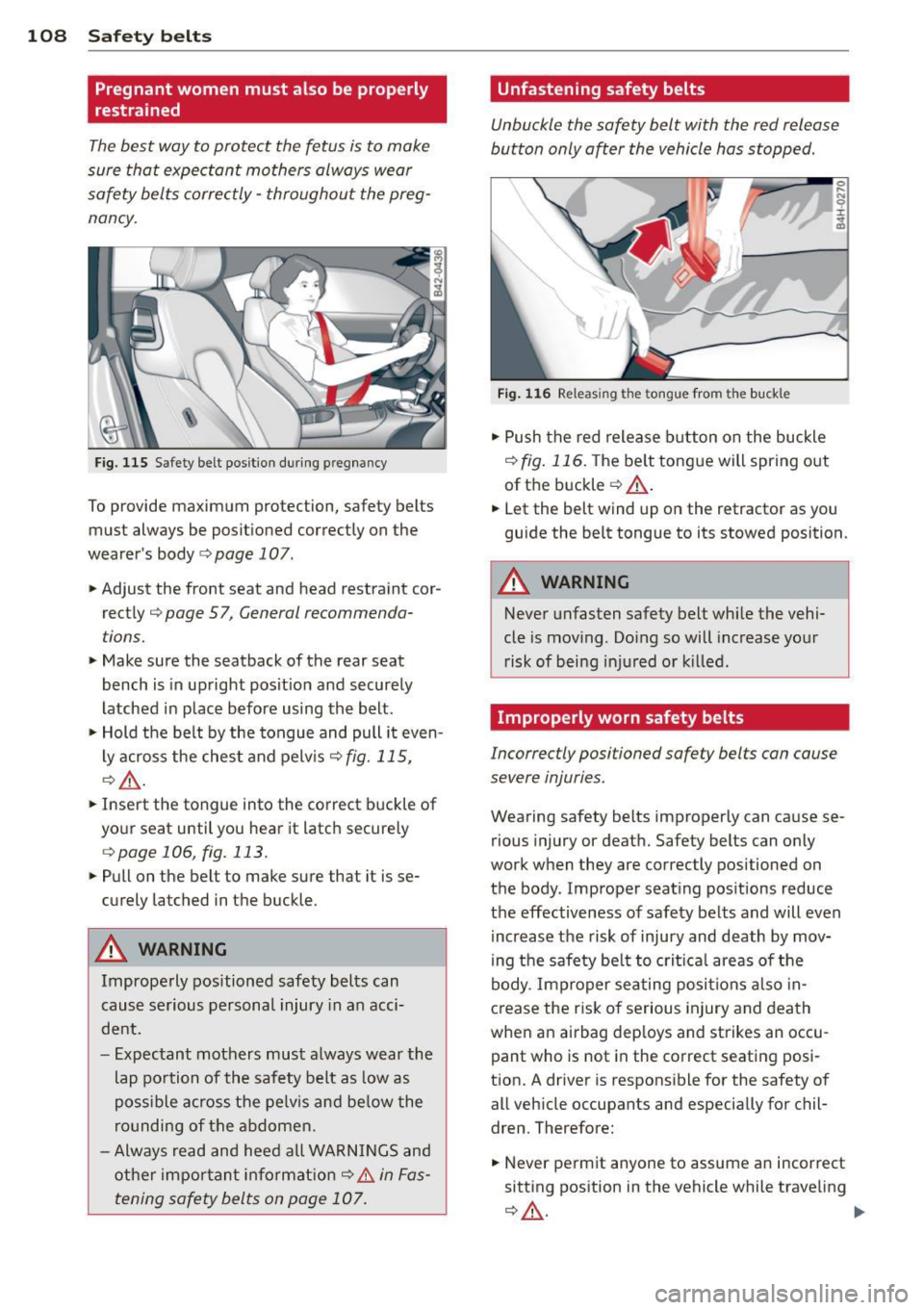
Fig . 115 Safety be lt pos it io n dur ing p regnancy
To provide maximum prote ction , safety belts
must always be po sitioned correctly on the
wearer's body
c> page 107 .
• Adjust the front seat and head restraint cor
rect ly
c> page 5 7 , General recommenda
tions.
• Make sure the seatback of the rear seat
bench is in up right posit io n and securely
latched in p lace before using the b elt .
• Hold the be lt by the tongue and pull it even
l y across the ches t and pelvis
c> fig. 115,
c>,& .
• Inse rt the tongue into the correct buckle of
yo ur seat until you hear it latc h securely
c> page 106 , fig . 113.
• Pullon the belt to make sure that it is se
curely latched in t he buckle .
A WARNING
Imprope rly positioned safety belts can
cause se rious personal injury in an acci
dent.
-
- E xpec tant mothers must a lways wear the
lap po rtion of the safety b elt as low as
poss ible ac ross the pe lv is and be low the
ro unding of the abdome n.
- Always read and heed all WARN INGS and
ot her impo rtan t info rma tion
c> .&. in Fas
tening safety belts on page 107.
Unfastening safety belts
Unbuckle the safety belt with the red release
button only a~er the vehicle has stopped .
,,
}_
Fig . 11 6 Releas ing the ton gu e from the buc kle
• Push the red release b utton on the buckle
c> fig . 116. T he be lt tongue will spring out
of t he b uckle
c> ,& .
N 0 ;c
a1i
• Let the belt wind up on the retractor as you
guide the belt tongue to its stowed position .
A WARNING
-
Never unfasten safety belt whi le the vehi-
cle is mov ing . Do ing so will increase yo ur
r isk of being i njured o r kill ed .
Improperly worn safety belts
Incorrectly positioned safety belts can cause
severe injuries.
Wearing safety belts improper ly can ca use se
rious injury or deat h. Safety belts can only
work when they are correc tly positioned on
the body . Improper seat ing positions reduce
the effectiveness of safety be lts and will even
increase the risk of inju ry and death by mov
ing the safety be lt to crit ical areas o f the
body . Imp roper seati ng po siti ons also in
crease the risk of serious injury and death
whe n an a irbag dep loys and strikes an occu
pant who is not in the co rrect seating posi
t ion. A driver is respons ible for the safety of
all veh icle occupants and especially for chil
dren . There fore:
• Never pe rm it anyone to assume an incorrect
sitt ing position in the vehicle while trave ling
c> ,& . ~
Page 121 of 244

restraints or occupants on the front pas
senger seat and prevent the side airbag
in the seat backrest from deploying prop
erly.
- Never use cushions, pillows, blankets or
similar items on the front passenger
seat. The add itional padd ing will prevent
the weight-sens ing mat in the seat from
accurately reg istering the ch ild restra int
or person on the seat and preve nt the
Advanced Airbag System from func tion
ing properly .
- If you must use a child restra int on the
front passenger seat and the ch ild re
straint manufacturer's instructions re
quire the use of a towel, foam cush ion or
something else to properly position the
child restraint, make certa in that the
PASSENGER AIR BAG OFF light comes
on and stays on whenever the child re
st ra int is installed on the front passen
ger seat .
- If the
PA SSE NGER AIR BAG OFF light
does not come on and stay on, have the
airbag system inspected by your Audi dealer.
How the Advanced Airbag System
components work together
The front Advanced Airbag System and the side airbags s upplement the protection of
fered by the front three-point safety be lts
with pretensioners and load limiters and the
adjustab le head restra ints to he lp reduce the
risk of injury in a wide range of acc ident and
crash situat ions . Be sure to read the impor
tant information about safety and heed the
WARNINGS in this chapter .
Deployment of the Advanced Airbag System
and the act ivat ion of the safety be lt preten
sioners depend on the dece le rat ion measured
by the c rash sensors and registered by the
e lectronic control un it . Crash severity depends
on speed and dece leration as well as the mass
and stiffness of the vehicle or object involved in the crash .
Airbag system 119
When the electronic control unit registers a
low severity cras h and the safety belt is being
used, the airbag will not dep loy. If the safety
belt is not being used, the first stage deploys,
followed by the second stage after a much lat er t ime in the crash sequence.
If the electron ic control unit registers a crash
of medium severity, the first stage of the air bag deploys followed by the second stage at a
much later time in the crash sequence -re
gardless of whether the safety belt is be ing
used or not . In higher sever ity crashes as reg
iste red by the elect roni c cont rol unit, bot h the
first and se cond s tages deploy almost at the
same t ime.
On the passenger side, regardless of safety
belt use, the airbag w ill be tu rned off if the
weight on the passenger sea t is less than the
amount programmed in the electronic control
u nit . The front airbag on the passenger side
will a lso be turned off if one of the child safe
ty seats that has been certified under Federal
Motor Vehicle Safety Standard 208 has been
recognized on the seat. The
PASS ENGER A IR
BAG OFF light comes on and stays on to tell
you when the front Adva nced A irbag on the
passenger side has been turned off
¢ page 112, Child restraints on the front seat
- some important things to know .
_&. WARNING ~
To reduce the risk of inj ury when an a irbag
inflates, always wear safety be lts properly.
- If you are unrestrained, leaning forward,
sitting sideways or o ut o f position in any
way, your risk of injury is m uch higher.
- You will a lso receive serious injuries and
could even be killed if yo u are up against
the airbag or too close to it when it in
f lates -even with an Advanced A irbag
¢page 111.
•
•