lights AUDI R8 SPYDER 2014 Owner's Manual
[x] Cancel search | Manufacturer: AUDI, Model Year: 2014, Model line: R8 SPYDER, Model: AUDI R8 SPYDER 2014Pages: 244, PDF Size: 61.06 MB
Page 53 of 244

Automatically dimming mirr ors*
• To d im the rearv iew mirror and both exterior
mirrors, press the @ button. The diode @
turns on. The rearview and exterior mirrors dim automat ically when light shines on
them, for example from headlights on ave hicle to the rear.
A WARNING
E lectrolyte flu id can leak from automatic
dimming m irrors if the glass is broken.
Electrolyte flu id can irritate skin, eyes and
respiratory system.
- Repeated or prolonged exposure to elec
tro lyte can cause irritation to the respira
tory system, espec ially among people
with asthma or other respiratory condi
tions . Get fresh air immediately by leav
ing the vehicle or, if that is not possible,
open windows and doors a ll the way.
- If electrolyte gets into the eyes, flush
them thoro ughly with large amounts of
clean water for at least 15 m inutes;
medica l attention is recommended.
- If electrolyte contacts sk in, flush affect
ed area with clean water for at least 15
minutes and then wash affected area
with soap and water; medical attention is recommended . Thoroughly wash af
fected clothing and shoes before reuse .
- If swallowed and person is conscious, rinse mouth w ith water for at least 15
minutes . Do not induce vom iting un less
instructed to do so by medical professio
nal. Get medical attention immediately.
(D Note
Liquid elect rolyte leaking from broken mir
ror glass will damage any p lastic surfaces
it comes i n contact w ith. Clean up spilled
elec trolyte immediately with clean water
and a sponge.
(D Tips
- Switch ing off the dimming func tion of
the i nside rear view m irror also deact i-
Clear vi sion 51
vates the automatic dimming function of
the exterior mirrors .
- T he automatic dimming mirrors do not
dim when the interior lighting is turned
on or the reverse gear is selected .
- Automatic d imm ing fo r the mirror on ly
operates properly if the light striking the
inside mirror is not hindered in any way.
, Sun visors
,.--~ --~-- -------.
Fig . 59 S un vi so r
The vanity mirrors in the sun visors are equip
ped with covers .
Wiper and washer
system
Windshield wiper
The windshield wiper lever controls both the
windshield wipers and the washer system.
Fig . 60 W iper le ver: win ds hiel d wiper le ver positio ns
The windshield wiper lever I:!) fig. 60 has th e
fo llowing positions:
Int ermittent wiping ~1 (acti vating r ain
s e n sor )*
• Move the lever up to position (!).
Page 55 of 244
is switched back on by moving the wind
shield wiper lever to any position.
- Worn or dirty windshield wiper blades
cause smearing, which can affect the op
eration of the light/rain sensor*. Check
the condition of your windshield wiper
blades regularly.
- The rain sensor is part of the interval
wiping system. Turning off the ignition
will also deactivate the rain sensor. To re
activate the sensor, switch off the inter
val wiping function, then switch it back
on again.
- Applies to vehicles with light/rain sen
sor: When the wipers are switched on
manually and in rain conditions, the au
tomatic headlights* turn on
c;> page 46,
Lights or off during the day when the
wipers are no longer operating. The au
tomatic headlights* function is available
in this case only when the light switch is
in the "AUTO" position
c;> page 46,
fig. 52.
-Make sure the washer fluid reservoir in
the engine compartment is topped off
before going on a long trip. Look up
c;> page 188 for checking and filling the
washer container.
- The wipers only operate with the hood
completely closed.
Service position
It is only possible to change wiper blades if
you move the wiper arms to the service posi
tion.
In order to use the windshield wipers, the
front lid must be completely closed.
Moving wiper blades to the service
position
.,. When there is a risk of frost, make sure that
the wiper blades are not frozen to the wind
shield .
.,. Switch the ignition on .
.,. Move the wiper lever to position
0
c;>page 51, fig. 60 .
Clear vision 53
.,. Press the I RESET ! button until the Display
type
menu appears in the Driver Informa
tion System display.
.,. Using the rocker switch and the
I RESET ! but
ton, select the
Set > Wipers > Front> Serv
ice position on
function. The windshield
wiper arms move to the service position.
Moving wiper blades to park position
.,. Make certain that the wiper arms are lying
against the windshield.
.,. Switch the ignition on and move the wiper
lever from position
O to 4 c;> page 51,
fig . 60. The wiper arms will move back to
the park position.
(D Note
Never drive your vehicle when the wind
shield wiper arms are in the service posi
tion and pulled away from the windshield.
When you drive faster than 4 mph (6 km/
h), the wiper arms automatically return to
the park position and could cause paint
damage to the front lid!
(D Tips
-You can also turn on the service position,
for example, if you want to protect the
windshield from icing by using a cover.
- The service position moves to
off auto
matically when you operate the wind
shield wiper lever, or speed exceeds
4 mph (6 km/h).
Cleaning windshield wiper blades
Clean the windshield wiper blades when they
begin to leave streaks .
.,. Place the windshield wiper arms in the serv
ice position. Refer to
c;> page 53.
.,. Use a soft cloth and glass cleaner to clean
the windshield wiper blades.
A WARNING
Dirty windshield wiper blades can impair
your view. This can lead to accidents.
Page 63 of 244
could slide around inside the vehicle
wh ile driving or when accelerating or
when applying the brakes or when driv
ing around a corner .
- When you are driving make sure that
anything you may have placed in the cen
ter console or other storage locations
cannot fa ll out into the footwells . In case
of sudden braking you would not be able
to brake, depress the clutch or acceler
ate.
- Any articles of cloth ing that you have
hung up must not interfere with the driv
er's v iew. The coat hooks are designed
only for lightweight clothing. Never hang
any clothing with hard, pointed or heavy
objects in the pockets on the coat hooks .
During sudden braking or in an accident -
especially if the airbag is deployed -
these objects could injure any passen
gers inside the veh icle .
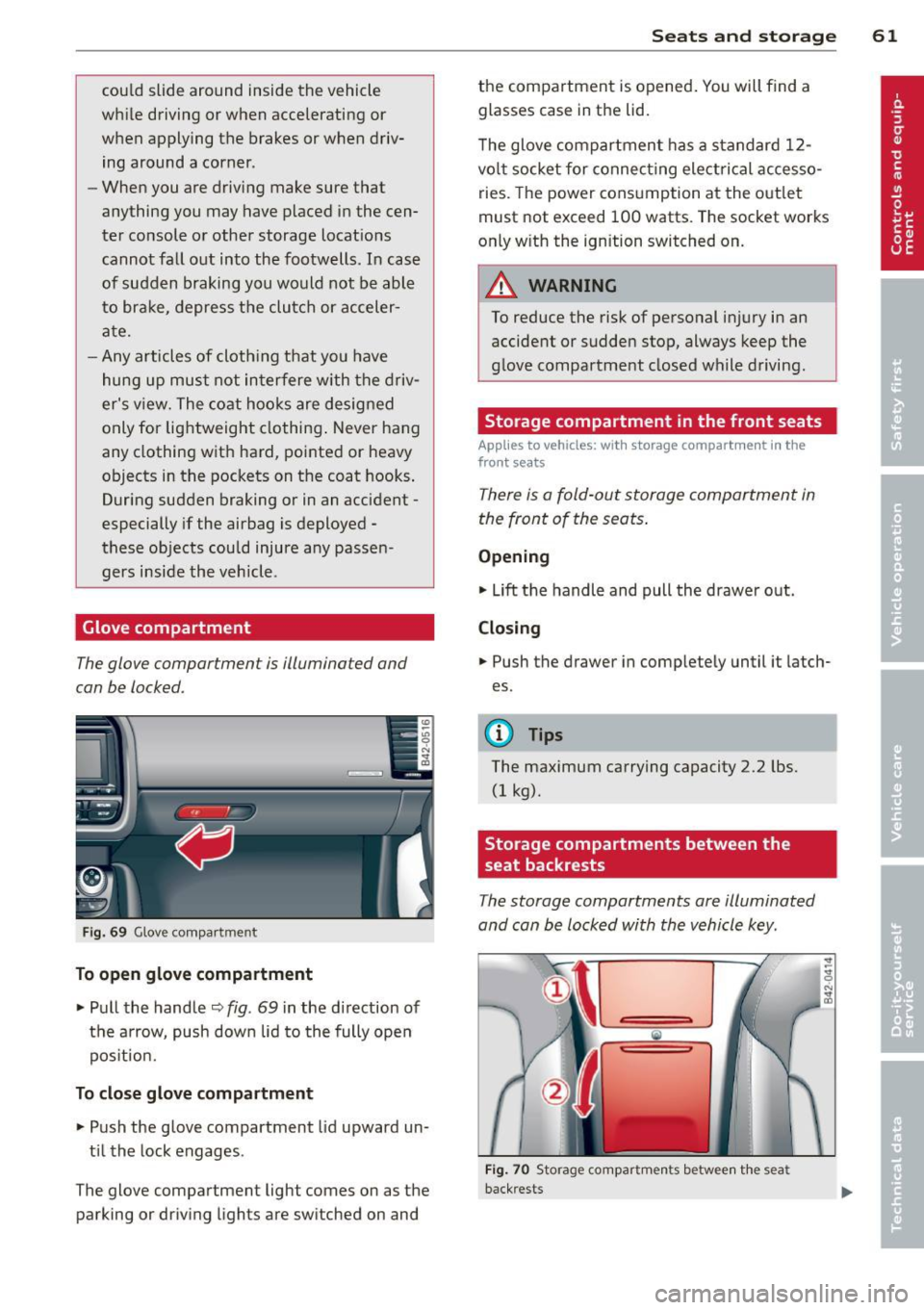
Glove compartment
The glove compartment is illuminated and
can be locked.
Fig. 69 Glove compar tme nt
To open glove compartment
• Pull the handle ~ fig . 69 in the direction of
the arrow, push down lid to the fully open
pos it ion .
To close glove compartment
• Push the glove compartment lid upward un
t il the lock engages .
The glove compartment light comes on as the parking or driving lights are switched on and
Seats and storage 61
the compartment is opened . You will find a
glasses case in the lid.
T he glove compartment has a standard
12-
volt socket for connecting electrical accesso
ries. The power consumption at the outlet
must not exceed 100 watts. The socket works
only w ith the ignition switched on.
_& WARNING
To reduce the risk of personal injury in an
accident or sudden stop, always keep the
g love compartment closed while driving.
Storage compartment in the front seats
Applies to vehicles: with storage compartment in the
front seats
There is a fold-out storage compartment in
the front of the seats .
Opening
• Lift the handle and pull the drawer out.
Closing
-
• Push the drawer in completely until it latch
es.
(D Tips
The maximum carrying capacity 2.2 lbs.
(1 kg).
Storage compartments between the
, seat backrests
The storage compartments are illuminated
and can be locked with the vehicle key.
F ig . 70 Storage compartments betwee n the seat
back rests
Page 71 of 244
you leave your vehicle. This makes vehicle
theft even more difficu lt
r=:, .&. .
Ign ition on @
After switch ing the ignition on, the needles
move all the way up and then down.
If it is difficult to turn the key after you have inserted it into the ignit ion lock, turn the
steer ing whee l back and forth. This will take
the load
off the steering lock mechan ism and
you will be able to turn the key freely and start the engine .
Starting the engine @
In th is position the engine starts. While the
engine is start ing, the power supply to the
headlights and other e lectr ica l cons umers is
temporari ly inter rupted to conserve battery
power. After the engine has started, release
the key and it will return to position @.
Before the starter can be operated again the
key must be turned back to position
(D . The
non-repeat lock prevents you from damaging
the starter when the engine is running.
A WARNING
- Never remove the key from the ign ition
lock while the vehicle is moving. The
steering wheel will lock causing loss of
control.
- If you have to leave your veh icle - even
for just a m inute - a lways remove the ig
nition key and take it with you. This is es
pecially important if you a re going to
leave ch ildren behind i n the vehicle. The
children co uld s tart the engine or use
other vehicle controls . Unsupervised use
of vehicle controls (for example, power
windows) can cause serious personal in
juries.
@ Tips
I f the veh icle bat tery has been d isconnect
ed and then reconnected, then you must
leave the key in pos ition @for abo ut 5
seconds before you can start the engine.
-
On th e ro ad 69
Starting and stopping
the engine
Starting the engine
The engine can only be started with your orig
inal Audi key.
On vehicles with S tron ic*, the e ngine can be
sta rted in the neut ra l position N and in each
gear (1 - 7 a nd R).
" Set the park ing brake
r=:, & .
"On veh icles with manual transmiss ion*, fully
dep ress the clutch peda l.
" Press and hold the brake peda l.
" Tur n the igni tion key to pos it ion @
r=:> page 68, fig . 74 -do not depress the gas
peda l when sta rting the engine .
... Let go of the key as soon as the engine
starts - the starter m ust not cont inue to
run. On vehicles w ith S tronic, select gear
position N.
A cold engine may at first be loud after it has
been started. This is due to the hydraulic
valves bu ild ing up the oil p ressure . Th is is nor
mal and no need for concern .
If the engine does not start immediately, stop
trying after 10 seconds and then try to restart
the engine about 30 seconds later .
A WARNING
- Never start or let the engine run in a con
fined or enclosed area. Exhaust fumes
from the eng ine contain carbon mono x
ide, a co lor less and odorles s gas. Carbon
monox ide can be fata l if inh aled.
- Never leave the engine id ling una ttend
ed. An unat tended ve hicle with a runn ing
engine poses a danger of personal injury
or theft .
- With the engine r unning and a gear en
gaged, you have to hold the veh icle w ith
the foot bra ke.
Page 79 of 244
Transmission Manual transmission
Gearshift lever
App lies to vehicles: with manual transmission
The clutch pedal must be depressed all the
way before you can start the engine.
The manual transmission in your Audi is
equipped with an
interlock-feature.
• Depress the clutch pedal all the way.
• Start the engine with the gearshift lever in
Neutral and the clutch pedal depressed.
(D Note
Always depress the clutch pedal fully when
changing gears . Do not hold the vehicle on
a hill with the clutch pedal partially de
pressed. This may cause premature clutch
wear or damage .
@ Tips
-Resting your hand on the gearshift lever
knob while driving will cause premature
wear in the transmission.
- The back-up lights go on when you shift
into Reverse w ith the ignition on.
Gearshift pattern (6-speed manual
transmission)
Applies to vehicles: with 6-speed manual transmission
Fig. 82 Gears hift patte rn: 6 -speed manual tran smis
sion
Drive in 6th gear for optim um fuel economy
when cruising . However, if more acceleration
is required (when passing, for example), shift
down.
Transmission 77
Engaging reverse gear (R)
• Move the shift lever all the way to the left,
press it down , then push it backward.
Especially after driving forward, stop the vehi
cle completely, sh ift into
Neutral and rest the
shift lever br iefly in Neutra l before shift ing in
to
Reverse .
Launch Control Program
Applies to vehicles: with VlO eng ine and manual t ra ns·
miss ion
The Launch Control Program enables maxi
mum acceleration .
Requirement: The engine must be at operat
ing temperature and the steering wheel must
not be turned .
• With the engine running, press the button
[g] one time. The ESC indicator light I in the
Driver Informat ion System display illumi
nates and the message
ESC sport - Warn
ing! Restricted stability
appears.
• Press the clutch and hold it down .
• Engage the first gear.
• Press the accelerator pedal all the way down
until the engine speed remains steady at
6500 RPM.
• Release the clutch carefully¢.&, .
A WARNING
-Always adapt your dr iving to the traffic
flow.
- Only use Launch Control when road and
traffic conditions allow it and other dr iv
ers will not be endangered or annoyed by
your driving and the vehicle's accelera
tion .
- Please note that the driving wheels can
spin and the vehicle can break away
when ESC is switched off, especially
when the road is slippery.
- Once you have accelerated, you sho uld
sw itch the ESC back on by pressing the
button @.
Page 80 of 244
78 Transmission
@ Tips
-When accelerating using the Launch
Control program, all vehicle parts are
subject to heavy loads. This can result in
increased wear.
- The Launch Control Program only func
tions when the parking brake is released
and the vehicle speed is less than
3 mph
(5 km/h).
S tronic®
Description
Applies to vehicles: with S tronic
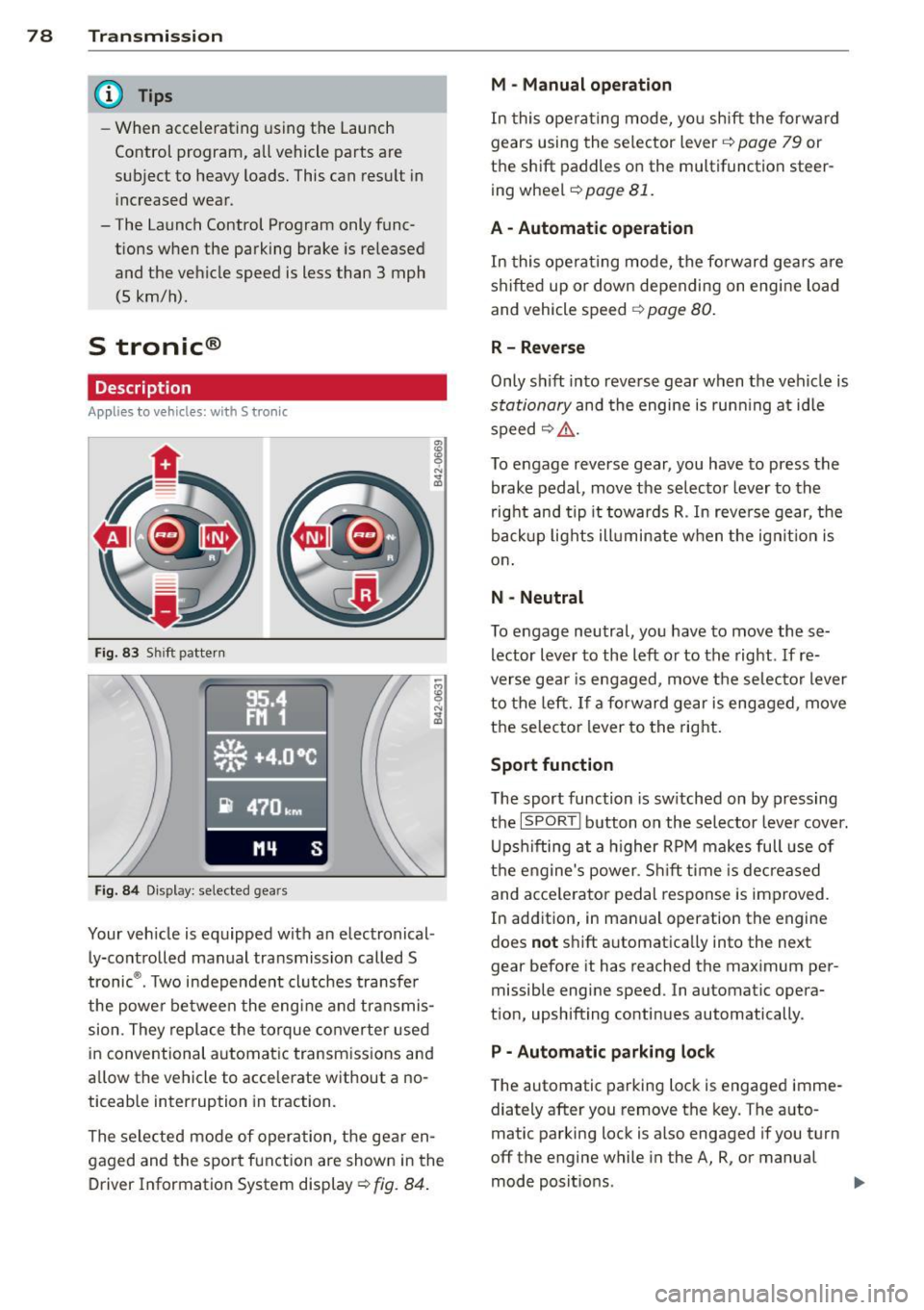
Fig. 83 Shift pattern
Fig. 84 Display: selected gears
Your vehicle is equipped with an electronical
ly-controlled manual transmission called S
tronic ®. Two independent clutches transfer
the powe r between the engine and transmis
sion. They replace the torque converter used
in conventional automatic transmissions and
allow the vehicle to accelerate without a no
ticeable interruption in traction.
The selected mode of operation, the gear en
gaged and the sport function are shown in the
Driver Information System display ¢
fig. 84.
M -Manual operation
In this operating mode, you shift the forward
gears using the selector lever ¢
page 79 or
the shift paddles on the multifunction steer
ing wheel¢
page 81.
A - Automatic operation
In this opera ting mode, the forward gears are
shifted up or down depending on engine load
and vehicle speed ¢
page 80.
R- Reverse
Only shift into reverse gear when the vehicle is
stationary and the engine is running at idle
speed~ ,&..
To engage reverse gear, you have to press the
brake pedal, move the selector lever to the
right and tip it towards R . In reverse gear, the
backup lights illuminate when the ignit ion is
on .
N -Neutral
To engage neutral, you have to move these
lector lever to the left or to the right.
If re
verse gear is engaged, move the selector lever
to the left.
If a forward gear is engaged, move
the selector lever to the right.
Sport function
The sport function is sw itched on by pressing
the
I SPOR T I button on the selector lever cover.
Upshifting at a higher RPM makes full use of
the engine's power. Shift time is decreased
and acce le rator pedal response is improved.
In addition, in manual operation the engine
does
not shift automatically into the next
gear before it has reached the maximum per
missible engine speed. In automatic opera
tion, upshifting continues automatically.
P - Automatic parking lock
The automatic parking lock is engaged imme
diately after you remove the key. The auto
matic parking lock is also engaged if you turn
off the engine while in the A, R, or manual
mode positions. .,..
Page 88 of 244

86 Parking system
Switching on /off
App lies to vehicles: with park ing system advanced
SPORT •
Fig. 92 Sectio n of the cente r conso le : Park assist
s w it c h
F ig. 93 Nav iga tio n sy ste m disp lay : v is u al dis ta n ce d is
p lay
Switching on
.,. Switch the navigation system and the nav i
gation system display on.
.,. Engage the reverse gear, or
.,. Press the
!"" I switch in the cente r co nsole
¢ fig. 92. A short confirmation tone so unds
and the indicato r light in the swi tc h lights
up.
Switching betwe en the rear v iew camera
and vi sual display
.,. Press the Gr aph ic control button
¢ page 87, fig. 94 to see t he visua l dis
play .
.,. Press the
Rear view contro l button to see
the rear view camera image
¢ fig. 93 .
Switching off
.,. Drive faster than 6 mph (10 km/h) , or
.,. Press the~ switch , or
.,. Sw itch off the ignition .
Segments in the visual display
T he red segmen ts in front o f and behind the
vehicle ¢
fig. 93 help you to determine the
distance between you and an obstacle. As
you r vehicle comes closer to the obstacle, the
segments move closer to the veh icle. The col
lis ion area has been reached when the next to
last segment is displayed. Do not continue
driv ing farther ¢
Ii::.. in General Information
on page
85 !
A WARNING
- T he navigation system d isp lay cannot
show, or c an not adequately show, cer
tain o bjec ts (s uch a s sma ll posts o r g ra
ting), recesses in the ground and p ro
trud ing parts on another ca r.
- Only use t he rearv iew came ra to assist
you if it shows a good, clear picture. For examp le, the image may be affected by
the sun shining into the lens, d irt on the
lens or if there is a defect .
(D Tips
-The sensors m ust be ke pt cl ean and free
of snow and ice for the park assist to op
erate .
- Yo u can change the vol ume and pitch of
the s ignals ¢
page 88 .
-What appea rs in the disp lay is time -de
layed.
-
Page 95 of 244
Driving Safely
General notes
Safe driving habits
Please remember -safety first!
This chapter contains important information,
tips, instructions and warnings that you need
to read and observe for your own safety, the
safety of your passengers and others . We have
summarized here what you need to know
about safety belts, airbags, child restraints as
well as child safety. Your safety is for us
priori
ty number 1.
Always observe the information
and warnings in this section - for your own
safety as well as for that of your passengers.
The information in this section applies to all
model versions of your vehicle . Some of the
features described in this section may be
standard equipment on some models, or may
be optional equipment on others. If you are
not sure, ask your authorized Audi dealer.
A WARNING
- Make certain that you follow the instruc
tions and heed the WARNINGS in this
Manual. It is in your interest and in the
interest of your passengers.
- Always keep the complete owner's litera
ture in your Audi when you lend or sell
your vehicle so that this important infor
mation will always be available to the
driver and passengers.
- Always keep the owner's literature handy
so that you can find it easily if you have
questions.
Safety equipment
The safety features are part of the occupant
restraint system and work together to help
reduce the risk of injury in a wide variety of
accident situations .
Your safety and the safety of your passengers
should not be left to chance. Advances in
technology have made a variety of features
available to help reduce the risk of injury in an
Driving Safely 93
accident. The following is a listing of just a
few of the safety features in your Audi:
- sophisticated safety belts for driver and all
passenger seating positions,
- safety belt pretensioners ,
- front airbags,
- knee airbags,
- side airbags in the seats
- adjustable head restraints,
- adjustable steering column.
These individual safety features can work to
gether as a system to help protect you and
your passengers in a wide range of accidents.
These features cannot work as a system if
they are not always properly adjusted and
properly used!
Safety is everybody's responsibility!
Important things to do before driving
Safety is everybody's job! Vehicle and occu
pant safety always depends on the informed and careful driver.
For your safety and the safety of your passen
gers,
before driving always:
~ Make sure that all lights and signals are op
erating correctly .
~ Make sure that the tire pressure is correct.
~ Make sure that all windows are clean and af
ford good visibility to the outside.
~ Secure all luggage and other items carefully
r=:> page 60.
~ Make sure that nothing can interfere with
the pedals.
~ Adjust front seat, head restraint and mirrors
correctly for your height .
~ Instruct passengers to adjust the head re
straints according to their height .
~ Make sure to use the right child restraint
correctly to protect children¢
page 132,
Child Safety.
~ Sit properly in your seat and make sure that
your passengers do the same¢
page 57,
General recommendations. .,..
•
•
Page 159 of 244
Hand washing
When washing your veh icle by hand, fi rst soft
en the dirt with copious amounts of water and rinse it
off as b est you can.
Then clean the veh icle using a soft
s ponge , an
auto gl ove or a low -press ure wa sh bru sh .
Work from the top down -sta rting with the
roof . Use a
s h ampoo only for very stubborn
dirt.
Rinse the sponge or auto glove thorough ly at
fr equent intervals.
C lea n the wheels, doo r sill s and simi lar a reas
last . Use a separate sponge fo r th is.
_&. WARNING
- Car washes with conveyors can damage
the vehicle tires , which could cause the
ti re to lose pressure sudden ly while driv
ing and put you at risk for an accident.
Do not use car washes with conveyors.
- Switch
off the ignit ion when you wash
yo ur vehicle to avo id an accident.
- Protect yo ur hands and arms from sharp
metal edges when you clean the under
body, the ins ide of the whee l wells or the
wheel covers to avoid cutting yourself .
- When washing your vehicle in the winter:
Moist ure and ice in the brake system can
affect the brakes.
- Never wash tires with a jet that sprays
water in a direct stream . T hi s could cause
invisible damage to the tires and weaken
them, even if the spray is from a relative
ly long distance and for a short time.
Damaged and wea kened tires can fail
and cause a ccidents and pe rsonal inj ury.
0 Note
- Never dr ive your veh icle through any au
tomatic car wash that fails to p rov ide e i
the r suff icient clearance for your veh icle
or sufficient tra ck wid th fo r your tires .
Ris k of expensive damage to the veh icle's
u nderbody, tires, and rims!
- As descr ibed in you r Warra nty
& M ainte
nance booklet , damage or malf unct ion
Cleaning and protec tion 157
due to m isuse o f the vehicle or fai lure to
operate the vehicle in acco rdance with
the inst ruct ions of th is Owner's Manua l
wi ll not be covered under warranty.
- Fold the exte rior mirrors flat -there is a
r isk of damag ing the exterior m irrors .
Power folding exterior mirrors must not
be folded in or out by hand . Use the pow
er function!
- Do not wash the vehicle in d irect sun
light . You may damage the paint.
- Do not use sponges designed to remove
insects, rough k itchen sponges , or s imi
lar products . You risk damag ing the
pai nt s urface.
- Do not wash the vehicle using cleani ng
products that contain alcohol when the
e ng ine is ho t. This increases the risk of
damage to plast ic components, such as
c rack ing .
- You should remove deb ris (such as in
sects) from the headlight lenses on a
regu lar bas is, for example when re fuel
ing your vehicle. Never clean the head
lights with a dry cloth or sponge. Use a
wet cloth o r sponge . It is best to use
soapy water.
- Never clean t ires using a nozz le that
sprays water in a direct stream. Damage
can occur even with a relatively long
spraying distance and for a very short
t ime.
- To avoid damaging your veh icle, always
make sure that there is sufficient dis
tance between the spray head and soft
materials like rubbe r hoses, plast ic parts
and sound-deadening materials. Never
aim the spray head a t the same point for
a long time. This also app lies to cleani ng
head lights and pa inted b umpers . Re
member : the closer the nozz le is to the
surface of the material, the greater the
stress on the materia l.
@ For the sake of the environment
Wash yo ur vehicle on ly at spec ia lly de
signed facilities . They can prevent any dirty
water contaminated by oil from entering
Iii>-
•
•
Page 180 of 244
1 78 Che cking and filling
authorized Audi dealer will have to deny war
ranty cov erage un less you present to the dea l
er proof in the form of Serv ice o r Repair Or
ders tha t all sched uled maintena nce was per
f ormed in a t imely manner .
Engine oil consumption
T he engine in your vehicle depends on an ade
quate amoun t of oil to lubricate and cool all
of its moving par ts.
In order to provide effective l ubrication and
cooling of internal engine components, a ll in
ternal comb ustion eng ines consume a certa in
amount of o il. O il consumption var ies from
engine to eng ine and may c hange significa ntly
over the life of the eng ine . T ypically, eng ines
with a specifie d break-in per iod (see
c::> p oge 153) consume more oil during the
b reak-in per io d t han they co nsume after oil
consumption has sta bilized.
Unde r no rma l conditions, the rate of oil con
sum ption depends on the qu ality and vi scosity
of the oi l, the R PM ( revo lutions per m inute) at
which t he engine is ope rated, the ambient
temperature and road cond itio ns. Furthe r fac
tors are the amount of o il d ilution from water
condensation or fuel residue and the ox ida
ti on level of the oi l. As any engine is subject to
wear as mileage bu ilds up , the oil consump
tion may increase over t ime until replacement
of worn componen ts may become necessary.
W ith all these variables com ing into play, no
standa rd rate of o il consumption can be es
tablished or specif ied . T he re is no alternative
to regular and frequent checking of the oil lev
e l, see
Note .
If the ye llow eng ine o il level warning symbol
i n t he inst rument cluster
1\1 lights up, you
should check the o il l evel as soon as possibl e
c::> page 178. Top off the oil at you r earliest
conven ie nc e
c::>page 180.
_& WARNING
Before yo u check any thin g in t he engine
compartment , always read and hee d all
-
WAR NIN GS c::> & in Working in the engine
compartment on page 173.
(D Note
D riving wit h an insufficient o il level is like
l y to cause severe dama ge to the e ngine.
(D Tips
- The oil pressure warning display. is
not an indicator of the oil level. Do not
rely on it. Instead, check the oil level in
your engine at regular intervals , pref
erably each time you refuel, and always
before going on a long trip .
- If
you have t he impression yo ur engine
cons umes excessive amounts of o il, we
recommend that you consu lt your Aud i
deale r to have the cause of your concer n
prope rly diagnosed . K eep in m ind that
th e accu rat e meas urement of o il con
s u m ptio n re quires grea t care and may
t a ke some time. Y our Audi de aler h as i n
st ru ctio ns abou t how to measure oil con
sumption acc urately .
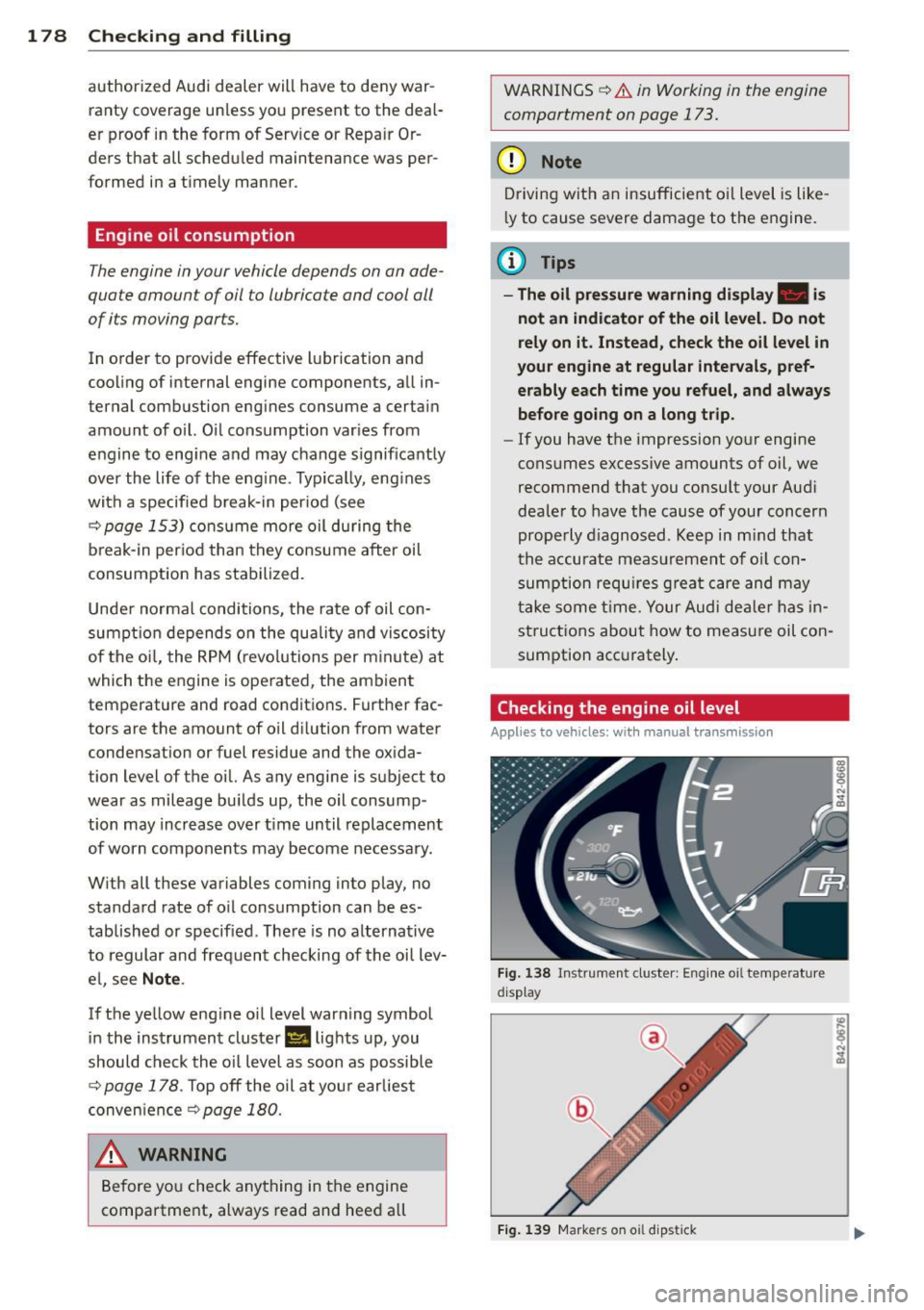
Checking the engine oil level
Applies to vehicles: with manual transmiss ion
Fig . 1 38 In st ru men t cl uste r: E ng in e oi l te m pe ratu re
d isp lay
Fig. 139 M arkers on o il dip stick