manual transmission AUDI R8 SPYDER 2014 Owners Manual
[x] Cancel search | Manufacturer: AUDI, Model Year: 2014, Model line: R8 SPYDER, Model: AUDI R8 SPYDER 2014Pages: 244, PDF Size: 61.06 MB
Page 4 of 244
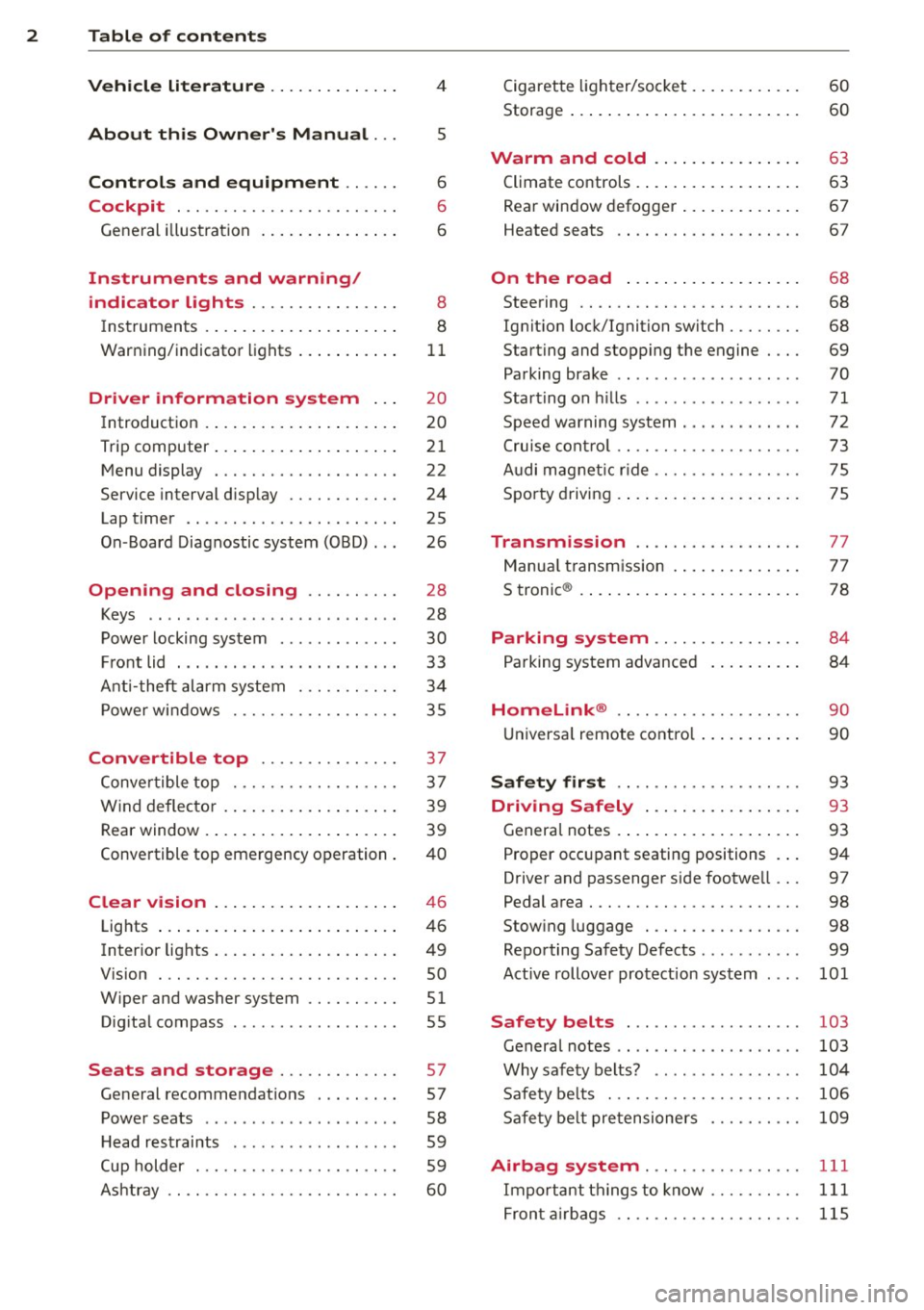
2 Table of contents Vehicle literature .. .. .. .. .. ... .
4
About this Owner's Manual . . . 5
Controls and equipment .. ... .
Cockpit ................ .... .. . .
General illus tration .... ... .. .. ... .
Instruments and warning/
indicator lights ........ .. .. .. . .
Ins truments . .. .. ..... ... .. .. ... .
War ning/ indi cator lights ... .. ... .. .
Driver information system .. .
Introduct ion . .. .. ..... ... .. .. ... .
Trip computer .. .. ..... ... .. .. ... .
M enu display . ........... .... ... .
Service interval d isp lay .... .. .. .. . .
Lap timer .. ........ ..... .. ..... .
On -Board Diagnostic system (OBD) .. .
Opening and closing .... .. .. . .
Keys .. .. .. ... .... .... .. .. .. .. . .
P owe r locking system ......... .. . .
Fr ont lid . .. ... ....... ... .... ... . 6
6
6
8
8
11
20
20
2
1
22
24
25
26
28
28
30
33
Anti-theft alarm system . . . . . . . . . . . 34
P owe r wi ndows .......... .. .. .. . .
Convertible top ......... .. ... .
Conve rtible top ........ .. .. .. .. . .
W ind deflecto r .. ...... ... .. .. ... .
Rear window . .. .. ..... ... .. .. ... .
Conve rtible top emergency operation .
Clear vision .. .. ..... ... .. .. ... .
Lights ...... .. .. ..... ... .. .. ... .
Inter ior lights .. . ...... ... .. .. ... .
V1s1on . .. ................. .. ... .
W iper and washer system .. .. .. ... .
D ig ita l compass . .......... ... .. . .
Seats and storage ....... .. .. . .
General recommendat ions . .... .. . .
P owe r seats .............. ... .. . .
H ead restraints .... .... .. .. .. .. . .
Cup holder . ............. .. .. .. . .
Ashtray ...... ........... ....... .
35
37
3 7
39
39
4 0
4 6
46
49
so
51
55
57 57
58
59
5 9
60
C igarette lighter/soc ket . ..... .... . .
Storage ... .... .. .. ... ..... ... .. . 60
60
Warm and cold . . . . . . . . . . . . . . . . 63
Climate controls . .... .. ..... .... . .
Rea r window defogger ... .... ... .. .
Heated seats .. .. ... .......... .. .
On the road ... ... .. ..... .... . .
Steering .. .. .. .. .. ........... .. .
Ig nit ion lock/Ignition switch ....... .
Starting and stopping t he engine . .. .
Parking brake .. .. ..... ......... . .
Start ing on hills .. ............... .
Speed warning system ... .... ... .. .
C ru ise cont ro l ................. .. .
Audi mag net ic r ide ............. .. .
S po rty driving .... .. ... ..... ... .. .
Transmission ............... .. .
Manua l transm ission . ... .... ... .. .
S tronic ® .. .... .. .. ... ..... ... .. .
Parking system ............... .
Pa rking sys tem advanced
63
67
67
68
68
68
69
70
71
72
73
7S
75
77
7 7
78
8 4
84
Homelink ® . . . . . . . . . . . . . . . . . . . . 9 0
U niversa l remote control . . . . . . . . . . . 90
Safety first . . . . . . . . . . . . . . . . . . . . 93
Driving Safely . . . . . . . . . . . . . . . . . 93
Genera l notes . . . . . . . . . . . . . . . . . . . . 93
Pro per occ upant seating positions . . . 94
Driver and passenger side footwe ll . . . 97
Pedal area . . . . . . . . . . . . . . . . . . . . . . . 98
Stow ing luggage . . . . . . . . . . . . . . . . . 98
Repo rting Safety Defects . . . . . . . . . . . 99
Active rollove r pro tect ion system
101
Safety belts . . . . . . . . . . . . . . . . . . . 103
Genera l notes . . . . . . . . . . . . . . . . . . . . 103
Why safety belts? . . . . . . . . . . . . . . . . 10 4
Safe ty be lts . . . . . . . . . . . . . . . . . . . . . 106
Sa fe ty be lt pretensioners . . . . . . . . . . 109
Airbag system.............. .. . 111
Impo rtant th ings to know . . . . . . . . . . 111
F ron t air bags . . . . . . . . . . . . . . . . . . . . llS
Page 9 of 244
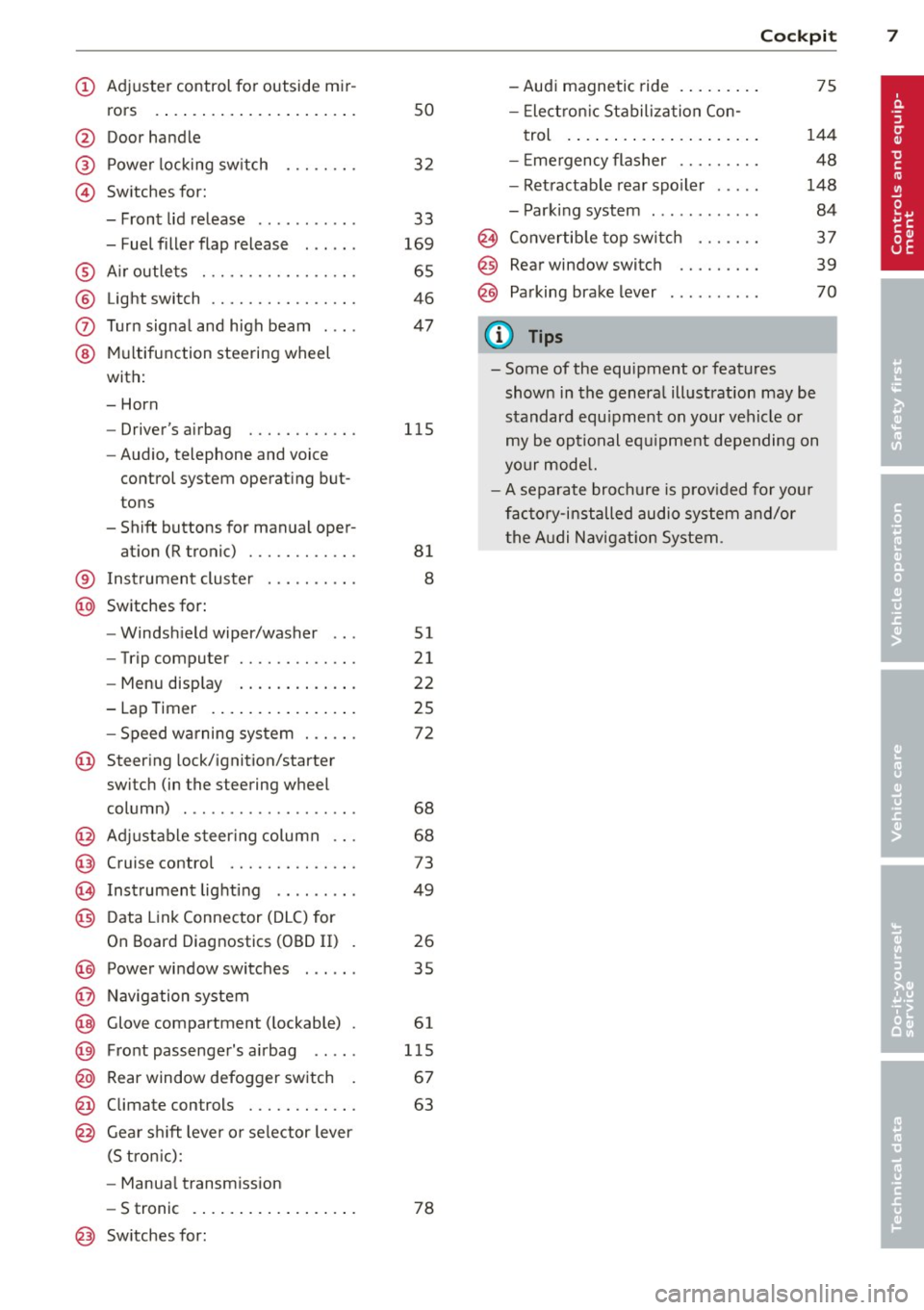
(!) Adjuster control for outside mir-rors .... ..... .......... .. .
@ Door handle
@ Power locking switch
© Switches for:
- Front lid release .......... .
- Fuel filler flap release . .. .. .
® Air outlets ............ .... .
® Light switch ............... .
(J) Turn signal and high beam ... .
@ Multifunction steering wheel
with:
- Horn
- Driver's airbag ........... .
- Audio, telephone and voice
control system operating but
tons
- Shift buttons for manual oper-
at ion (R tronic) ........... .
® Instrument cluster
@ Switches for:
so
32
33
169
65
46
47
115
81
8
- Windshield wiper/washer 51
- Trip computer . . . . . . . . . . . . . 21
- Menu display . . . . . . . . . . . . . 22
- Lap Timer . . . . . . . . . . . . . . . . 25
- Speed warning system . . . . . . 72
@ Steering lock/ignition/starter
switch (in the steering wheel
column) . . . . . . . . . . . . . . . . . . . 68
@ Adjustable steering column . . . 68
@ Cruise control . . . . . . . . . . . . . . 73
@ Instrument lighting . . . . . . . . . 49
@) Data Link Connector (DLC) for
On Board Diagnostics (OBD II) 26
@) Power window switches . . . . . . 35
@ Navigation system
@ Glove compartment (lockable) 61
@ Front passenger's airbag . . . . . 115
@ Rear window defogger switch 67
@ Climate controls . . . . . . . . . . . . 63
@ Gear shift lever or selector lever
(5 tronic):
- Manual transmission
- 5 tronic . . . . . . . . . . . . . . . . . . 78
@ Switches for:
Cockpit 7
-Audi magnetic ride ........ . 75
-Electronic Stabilization Con-
trol . . . . . . . . . . . . . . . . . . . . . 144
- Emergency flasher . . . . . . . . . 48
- Retractable rear spoiler . . . . . 148
- Parking system . . . . . . . . . . . . 84
@ Convertible top switch . . . . . . . 37
@ Rear window switch . . . . . . . . . 39
@ Parking brake lever . . . . . . . . . . 70
(D Tips
-Some of the equipment or features
shown in the general illustration may be
standard equipment on your vehicle or
my be optional equipment depending on
your model.
- A separate brochure is provided for your
factory-installed audio system and/or
the Audi Navigation System .
Page 76 of 244
74 On the road
8_ WARNING
-Always pay attention to traffic even when
the cruise control is switched on. You are
always responsible for your speed and
the distance between your vehicle and
other vehicles.
- For safety reasons, the cruise control
should not be used in the city, in stop
and-go traffic, on twisting roads and
when road conditions are poor (such as
ice, fog, gravel, heavy rain and hydro
planing) -risk of accident.
- Turn
off the cruise control temporarily
when entering turn lanes, highway exit
lanes or in construction zones.
- Please note that inadvertently "resting"
your foot on the accelerator pedal causes
the cruise control not to brake. This is
because the cruise control is overridden
by the driver's acceleration.
@ Tips
- Vehicles with manual transmission: You
can attain the set speed only if the cur
rently engaged gear allows it and the en
gine is not stressed. Shifting to a higher
or lower gear promptly will allow the en
gine to run smoothly .
- The cruise control cannot maintain a
constant speed when driving downhill.
The vehicle will accelerate under its own
weight. Downshift to a lower gear or use
the brakes to slow down.
Changing speed
.,. Press lever in the 0 or 0 direction
¢ page 73, fig. 79 to increase or decrease
your speed.
.,. Release the lever to save that speed.
You can also press the accelerator pedal down
to increase your speed, e.g. if you want to
pass someone. The speed you saved earlier
will resume as soon as you release the acceler ator pedal.
If, however, you exceed your saved speed by
S mph (10 km/h) for longer than 5 minutes,
the cruise control will turn
off temporarily.
The symbol will go out but the saved speed
will be retained .
Presetting your speed
You can preset your desired speed while the
vehicle is not moving.
.,. Turn on the ignition.
.,. Pull lever into position@~
page 73,
fig. 79.
.,. Press the lever in the 0 or 0 direction to
increase or decrease your speed.
.,. Release the lever to save that speed .
This function makes it possible, for example,
to save the speed you want before driving on
the highway. Once on the highway, activate
the cruise control by pulling the lever toward
CD-
Switching the system off
Temporary deactivation
.,. Press the brake pedal , or
.,. Keep the clutch pedal pressed down longer,
or
.,. Press the lever into position @ (not clicked
into place)
~ page 73, fig. 79 , or
.,. Drive for longer than S minutes at more
than 5 mph (10 km/h) above the stored
speed.
Switching off completely
.,. Press lever into position @(clicked into
place), or
.,. Switch the ignition
off.
The system retains the saved speed if you de
activate the cruise control temporarily. To re
sume the saved speed, release the brake or
clutch pedal and pull the lever to position
(D .
Switching the ignition off erases the saved
speed.
Page 79 of 244
Transmission Manual transmission
Gearshift lever
App lies to vehicles: with manual transmission
The clutch pedal must be depressed all the
way before you can start the engine.
The manual transmission in your Audi is
equipped with an
interlock-feature.
• Depress the clutch pedal all the way.
• Start the engine with the gearshift lever in
Neutral and the clutch pedal depressed.
(D Note
Always depress the clutch pedal fully when
changing gears . Do not hold the vehicle on
a hill with the clutch pedal partially de
pressed. This may cause premature clutch
wear or damage .
@ Tips
-Resting your hand on the gearshift lever
knob while driving will cause premature
wear in the transmission.
- The back-up lights go on when you shift
into Reverse w ith the ignition on.
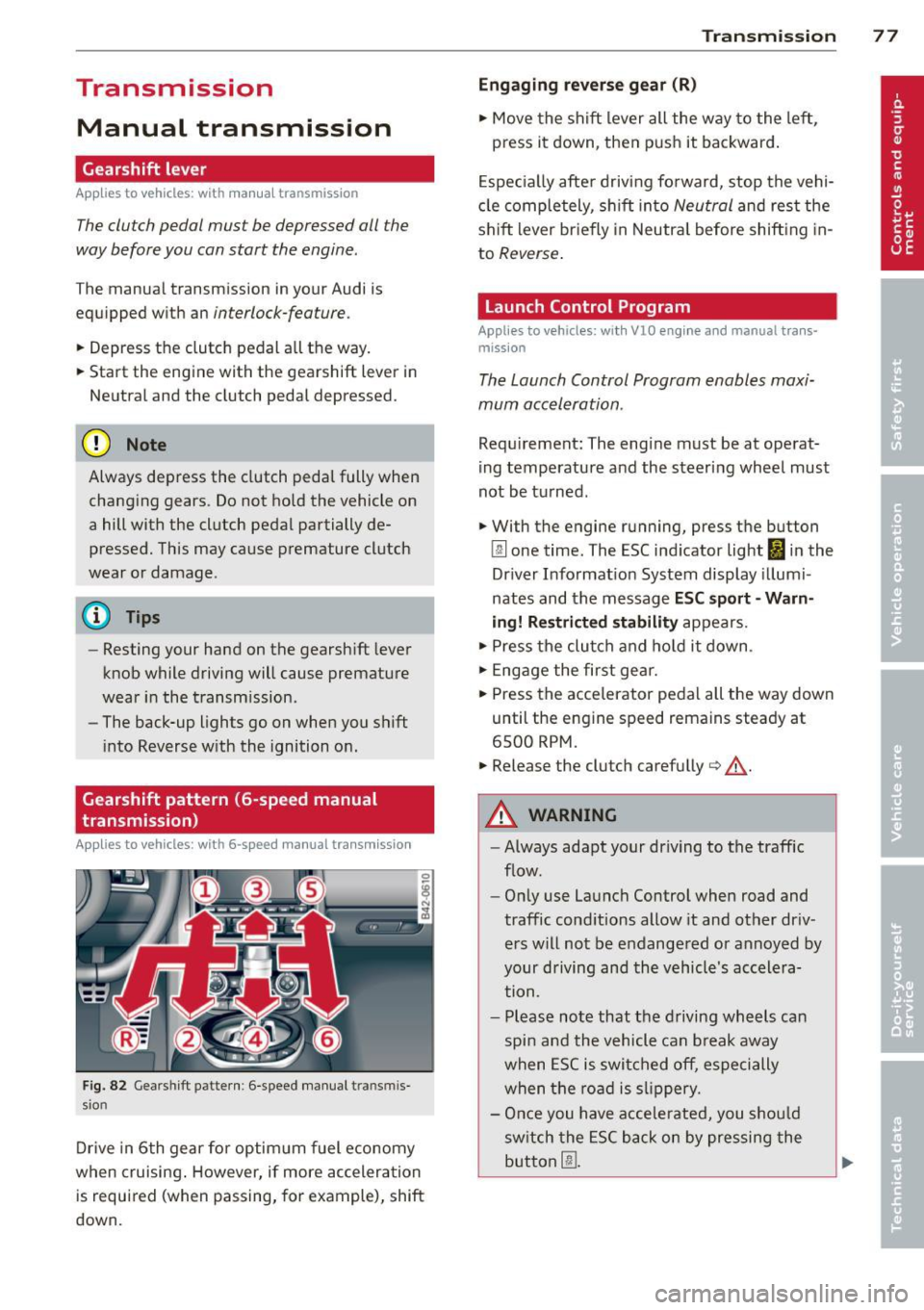
Gearshift pattern (6-speed manual
transmission)
Applies to vehicles: with 6-speed manual transmission
Fig. 82 Gears hift patte rn: 6 -speed manual tran smis
sion
Drive in 6th gear for optim um fuel economy
when cruising . However, if more acceleration
is required (when passing, for example), shift
down.
Transmission 77
Engaging reverse gear (R)
• Move the shift lever all the way to the left,
press it down , then push it backward.
Especially after driving forward, stop the vehi
cle completely, sh ift into
Neutral and rest the
shift lever br iefly in Neutra l before shift ing in
to
Reverse .
Launch Control Program
Applies to vehicles: with VlO eng ine and manual t ra ns·
miss ion
The Launch Control Program enables maxi
mum acceleration .
Requirement: The engine must be at operat
ing temperature and the steering wheel must
not be turned .
• With the engine running, press the button
[g] one time. The ESC indicator light I in the
Driver Informat ion System display illumi
nates and the message
ESC sport - Warn
ing! Restricted stability
appears.
• Press the clutch and hold it down .
• Engage the first gear.
• Press the accelerator pedal all the way down
until the engine speed remains steady at
6500 RPM.
• Release the clutch carefully¢.&, .
A WARNING
-Always adapt your dr iving to the traffic
flow.
- Only use Launch Control when road and
traffic conditions allow it and other dr iv
ers will not be endangered or annoyed by
your driving and the vehicle's accelera
tion .
- Please note that the driving wheels can
spin and the vehicle can break away
when ESC is switched off, especially
when the road is slippery.
- Once you have accelerated, you sho uld
sw itch the ESC back on by pressing the
button @.
Page 80 of 244
78 Transmission
@ Tips
-When accelerating using the Launch
Control program, all vehicle parts are
subject to heavy loads. This can result in
increased wear.
- The Launch Control Program only func
tions when the parking brake is released
and the vehicle speed is less than
3 mph
(5 km/h).
S tronic®
Description
Applies to vehicles: with S tronic
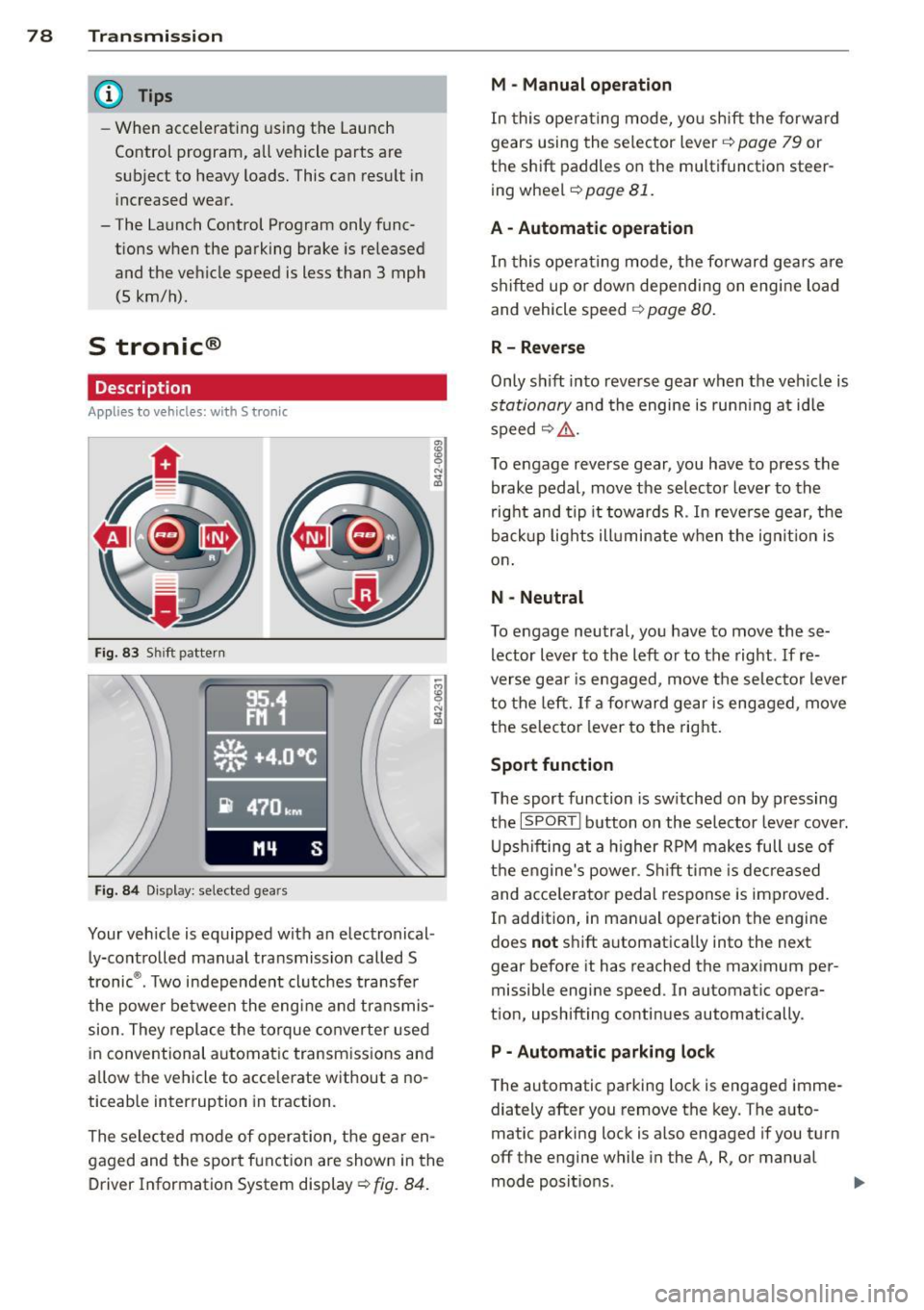
Fig. 83 Shift pattern
Fig. 84 Display: selected gears
Your vehicle is equipped with an electronical
ly-controlled manual transmission called S
tronic ®. Two independent clutches transfer
the powe r between the engine and transmis
sion. They replace the torque converter used
in conventional automatic transmissions and
allow the vehicle to accelerate without a no
ticeable interruption in traction.
The selected mode of operation, the gear en
gaged and the sport function are shown in the
Driver Information System display ¢
fig. 84.
M -Manual operation
In this operating mode, you shift the forward
gears using the selector lever ¢
page 79 or
the shift paddles on the multifunction steer
ing wheel¢
page 81.
A - Automatic operation
In this opera ting mode, the forward gears are
shifted up or down depending on engine load
and vehicle speed ¢
page 80.
R- Reverse
Only shift into reverse gear when the vehicle is
stationary and the engine is running at idle
speed~ ,&..
To engage reverse gear, you have to press the
brake pedal, move the selector lever to the
right and tip it towards R . In reverse gear, the
backup lights illuminate when the ignit ion is
on .
N -Neutral
To engage neutral, you have to move these
lector lever to the left or to the right.
If re
verse gear is engaged, move the selector lever
to the left.
If a forward gear is engaged, move
the selector lever to the right.
Sport function
The sport function is sw itched on by pressing
the
I SPOR T I button on the selector lever cover.
Upshifting at a higher RPM makes full use of
the engine's power. Shift time is decreased
and acce le rator pedal response is improved.
In addition, in manual operation the engine
does
not shift automatically into the next
gear before it has reached the maximum per
missible engine speed. In automatic opera
tion, upshifting continues automatically.
P - Automatic parking lock
The automatic parking lock is engaged imme
diately after you remove the key. The auto
matic parking lock is also engaged if you turn
off the engine while in the A, R, or manual
mode positions. .,..
Page 82 of 244
80 Transmi ssion
-Do not accelerate when you shift gears
with the vehicle stationary and the en
gine running.
- Before driving down a steep slope, re
duce your speed and shift into a lower
gear with S tron ic.
- Do not ride the brakes or press the brake pedal too often or too long. Constant
braking causes the brakes to overheat
and substantially reduces brak ing per
formance, inc reases braking distance or
c auses comp lete failure of t he b rake sys
tem.
0 Note
If you must stop on an incline, always hold
t he vehicle in place w it h the foot bra ke to
p revent it from roll ing ba ck. Do not t ry to
preven t the vehicle from r oll ing bac k when
t he ge ar is engaged by increasing speed,
as t his may damage the clutch .
Automatic mode
Applies to vehicles: with 5 tronic
The transmission shifts up and down auto
matically when in the driving gears.
Starting from a stop
.. Press and hold the brake peda l.
.. Tap the se lector lever towards A.
.. Re lease the brake pedal and press the accel
era to r peda l¢
A in Manual mode on
page
79 .
Unde r certain circumstances (d riving in the
mo unt ains fo r example), it can be beneficia l
to switch tempo rari ly to the manua l shift pro
gram ¢
page 79 in order to adjust the gear ra
tios to driving conditions
manually .
Kick-down
Applies to vehicles: with S tronic
When you depress the acce lerator pedal be
yond the resistance po int, S tronic downshifts
i n to a lower gear , depending on vehicle speed
l) Market- sp ec ifi c
and engine rpm . It shifts up into the next
higher g ear once the maximum specified en
gine RPM is reached. Except ion: you have acti
vated the sport func tion .
A WARNING
Please note that the whee ls cou ld spin on
slick or slippe ry roads when kick-down is
active .
Launch control program
Applies to vehicles: wit h S tronic
The Launch Con trol Program enables maxi
mum acceleration .
Requirement: The eng ine must be at operat
ing temperature and the steering wheel must
not be turned.
.. With th e engine running, press the
(fill
!ESC OFF!1l
button one time. The I ind ica
tor light and the message
ESC Spo rt -Cau
tion! Lim ited stabil ity!
appears in the driver
information system display .
.. Press the brake pedal with your left foot a nd
hold it down .
.. Engage a gea r.
.. Press the
I SPOR T! button on the selecto r lev
er cover .
.. Press the accelerator peda l at the same time
with your right foot unti l the engine has
reached a constant speed .
.. Remove your left foot from the brake¢,&. .
A WARNING
--Always adapt your dr iving to the traff ic
f low.
- Onl y use t he Launch contro l program
when road and t raff ic conditions a llow it
a nd other d rivers w ill not be e ndangered
or both ered by your dr iving and the vehi
cle 's ac celera tion.
- Pl ease note that the d riving wheels ca n
sp in a nd the vehicle can b reak away
-
Page 83 of 244
when ESC is switched off, especially
when the road is slippery.
- Once you have accelerated, you should
switch the ESC back on by pressing the
[fil
button.
(D Tips
- The transmission temperature may in
crease significantly after using the Launch Control Program. If that hap
pens, the program may not be available
for a few minutes. It will be available again after a cool-down period.
- When accelerating using the Launch
Control program, all vehicle parts are
subject to heavy loads. This can result in
increased wear.
Steering wheel with shift paddles
Applies to vehicles: with S tronic
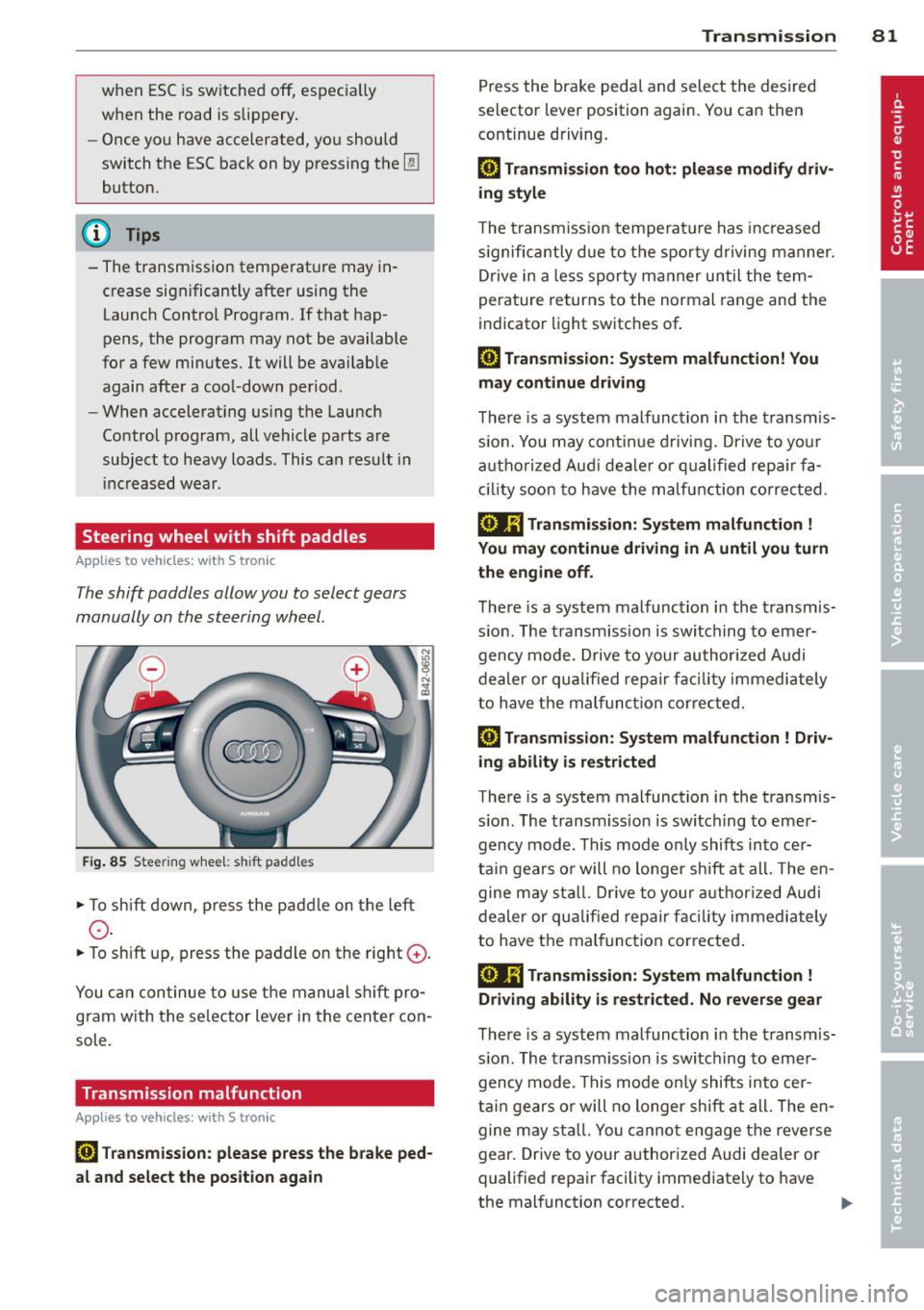
The shift paddles allow you to select gears
manually on the steering wheel .
Fig . 85 Steering wheel: shift paddles
~ To shift down, press the paddle on the left
0 -
~ To shift up, press the paddle on the right G).
You can continue to use the manual sh ift pro
gram with the selector lever in the center con
sole.
Transmission malfunction
Applies to vehicles: with S tronic
[O] Transmission: please press the brake ped
al and select the position again Transmission 81
Press the brake pedal and select the desired
selector lever position again. You can then
continue driving.
[O] Transmission too hot: please modify driv·
ing style
The transmission temperature has increased
significantly due to the sporty driving manner.
Drive in a less sporty manner until the tem
perature returns to the normal range and the
indicator light switches of.
[O] Transmission: System malfunction! You
may continue driving
There is a system malfunction in the transmis s ion. You may continue driving. Drive to your
authorized Audi dealer or qualified repair fa
c ili ty soon to have the malfunction corrected.
Bii·Transmission: System malfunction !
You may continue driving in A until you turn
the engine off.
There is a system malfunction in the transmis
sion. The transmission is switching to emer
gency mode . Drive to your authorized Audi
dealer or qualified repair facility immediately
to have the malfunction corrected.
[O] Transmission: System malfunction ! Driv
ing ability is restricted
There is a system malfunction in the transmis
s ion . The transmission is switching to emer
gency mode . This mode only shifts into cer
tain gears or will no longer shift at all. The en
gine may stall. Drive to your authorized Audi
dealer or qualified repair facility immediately
to have the malfunction corrected .
[oJ;t Transmission: System malfunction !
Driving ability is restricted. No reverse gear
There is a system malfunction in the transmis
sion. The transmission is switching to emer
gency mode . This mode only shifts into cer
ta in gears or will no longer shift at all. The en
gine may stall. You cannot engage the reverse
gear. Drive to your authorized Audi dealer or
qualified repair facility immediately to have
the malfunction corrected.
Page 175 of 244
WARNINGS. The engine compartment of any
vehicle is a hazardous area!
c::> &.
A WARNING
To help avoid injury, before you check any
thing under the engine compartment lid:
- Switch off the engine.
- Remove the ignition key.
- Apply the parking brake.
- Move selector lever of S tronic to "N"
(Neutral); put manual transmission in
Neutral.
- Always let the engine cool down. Hot
components will burn skin on contact.
- To reduce the risk of being burned, never
open the engine compartment lid if you
see or hear steam or coolant escaping
from the engine compartment. Wait un
til no steam or coolant can be seen or heard before carefully opening the en
gine compartment lid .
- Keep children away from the engine com
partment .
-Never spill fluids on hot engine compo
nents. They can cause a fire.
- Never open the coolant reservoir cap when the engine is still warm. The coolant system is pressurized and hot cool
ant could spray out.
- Protect your face, hands and arm from
steam or hot engine coolant by placing a
thick rag over the cap when you open the
coolant reservoir .
- Do not remove the engine cover under
any circumstances. This increases the
risk of burns.
- If work on the fuel system or the electri
cal system is necessary:
- Always disconnect the battery.
- Never smoke or work near heaters or
open flames. Fluids in the engine com
partment could start a fire.
- Keep an approved fire extinguisher im
mediately available.
- To avoid electrical shock and personal in
jury while the engine is running or being
started, never touch:
Checking and filling 173
- Ignition cables
- Other components of the high voltage electronic ignition system.
- If you must perform a check or repair
with the engine running:
- First, fully apply the parking brake,
move selector lever of S tronic to "N"
(Neutral); put manual transmission in
Neutral.
- Always use extreme caution to prevent
clothing, jewelry, or long hair from get
ting caught in the radiator fan, V-belts
or other moving parts, or from contact ing hot parts. Tie back hair before
starting, and wear no clothing that will hang or droop into the engine.
- Minimize exposure to emission and chemical hazards
c::> .&. .
A WARNING
California Proposition 65 Warning:
- Engine exhaust, some of its constituents,
and certain vehicle components contain
or emit chemicals known to the State of
California to cause cancer and birth de
fects and reproductive harm. In addition, certain fluids contained in vehicles and
certain products of component wear con
tain or emit chemicals known to the
State of California to cause cancer and birth defects or other reproductive harm.
- Battery posts, terminals and related ac
cessories contain lead and lead com
pounds, chemicals known to the State of
California to cause cancer and reproduc
tive harms. Wash hands after handling.
@ Note
When adding fluids, always make sure that
they are poured into the proper container
or filler opening, otherwise serious dam
age to vehicle systems will occur.
@ For the sake of the environment
To detect leaks in time, inspect the vehicle
floor pan from underneath regularly. If
you see spots from oil or other vehicle
IJI>
•
•
Page 176 of 244
17 4 Che cking and filling
fluids, have your vehicle inspected by an
authorized Audi dealer.
Closing the engine compartment lid
.. Make sure that the rear spo iler is retracted
¢ page 148.
.. Pull the engine compa rtment lid dow n until
the p ress ure from the struts is reduced .
.. Pr ess the eng ine compartment lid closed
¢ &_ .
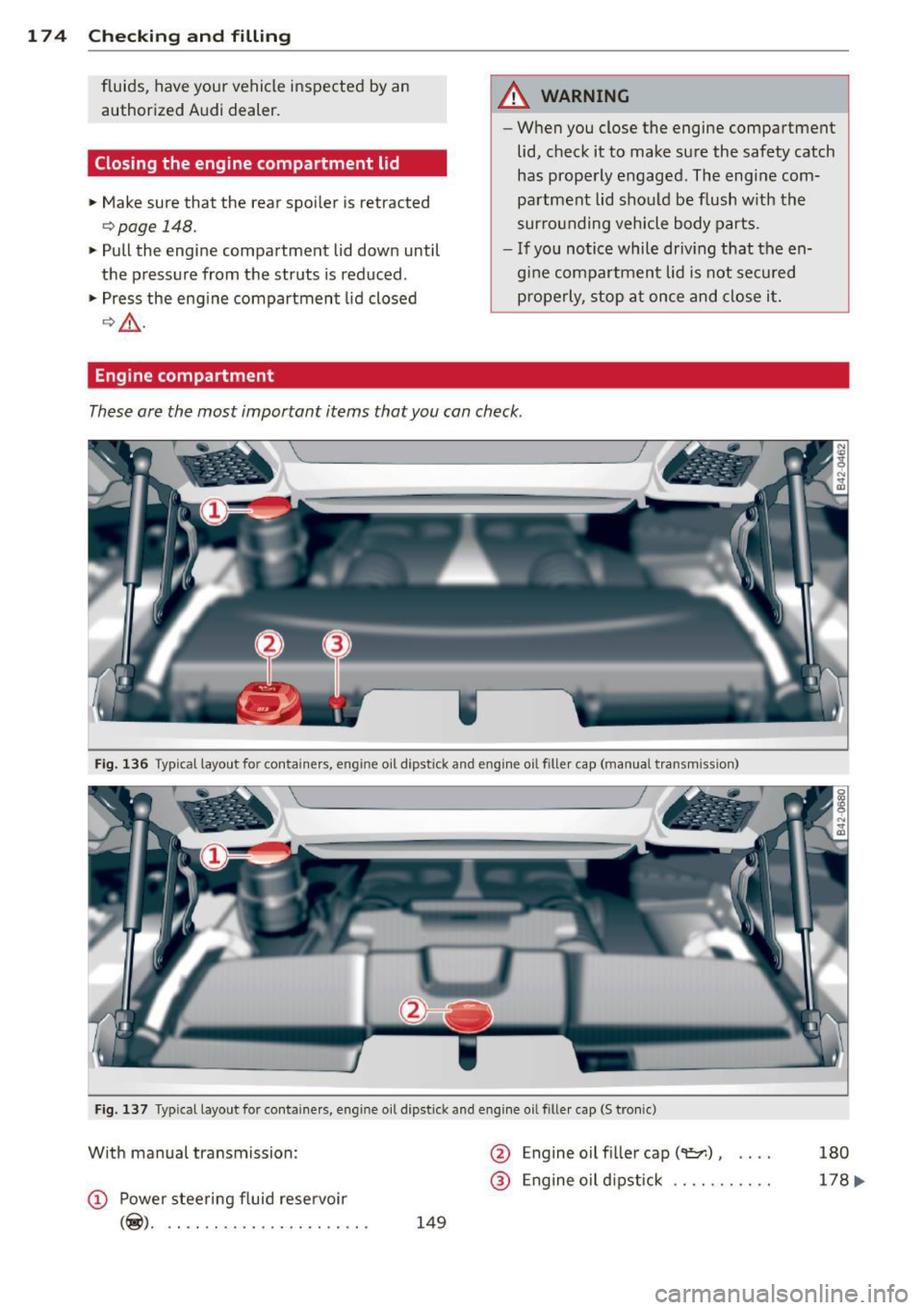
Eng ine compartment
A WARNING
-- W hen you close the engine compartment
lid, chec k it to make su re the safety catch
has prope rly engaged . The engine com
pa rtment lid s ho ul d be flush w ith the
sur ro un ding vehicle body parts .
- If you notice while driv ing t hat the en
g in e compartmen t lid is not secu red
p roperly, sto p at once and cl ose it .
These ore the most important items that you con check .
Fig . 136 Ty pica l layout fo r co ntai ners , e ngin e o il dipst ick and engin e o il fille r cap (man ual t ra n sm iss io n)
F ig . 1 37 Typ ica l layout fo r co ntain ers, e ngin e o il d ipstic k and e ng in e o il fill er cap (S t ro nic )
W ith manual transmission: @ Engine oil f iller cap(~) ,
(D Power steering f luid rese rvoir
@ E ngine o il d ipst ick ...... .... .
(@) ... .... .... ....... .. .. . 14 9
180
178 ....
Page 182 of 244
180 Checking and filling
Adding engine oil "1::::1:
Appl ies to vehicles: with manual transmission
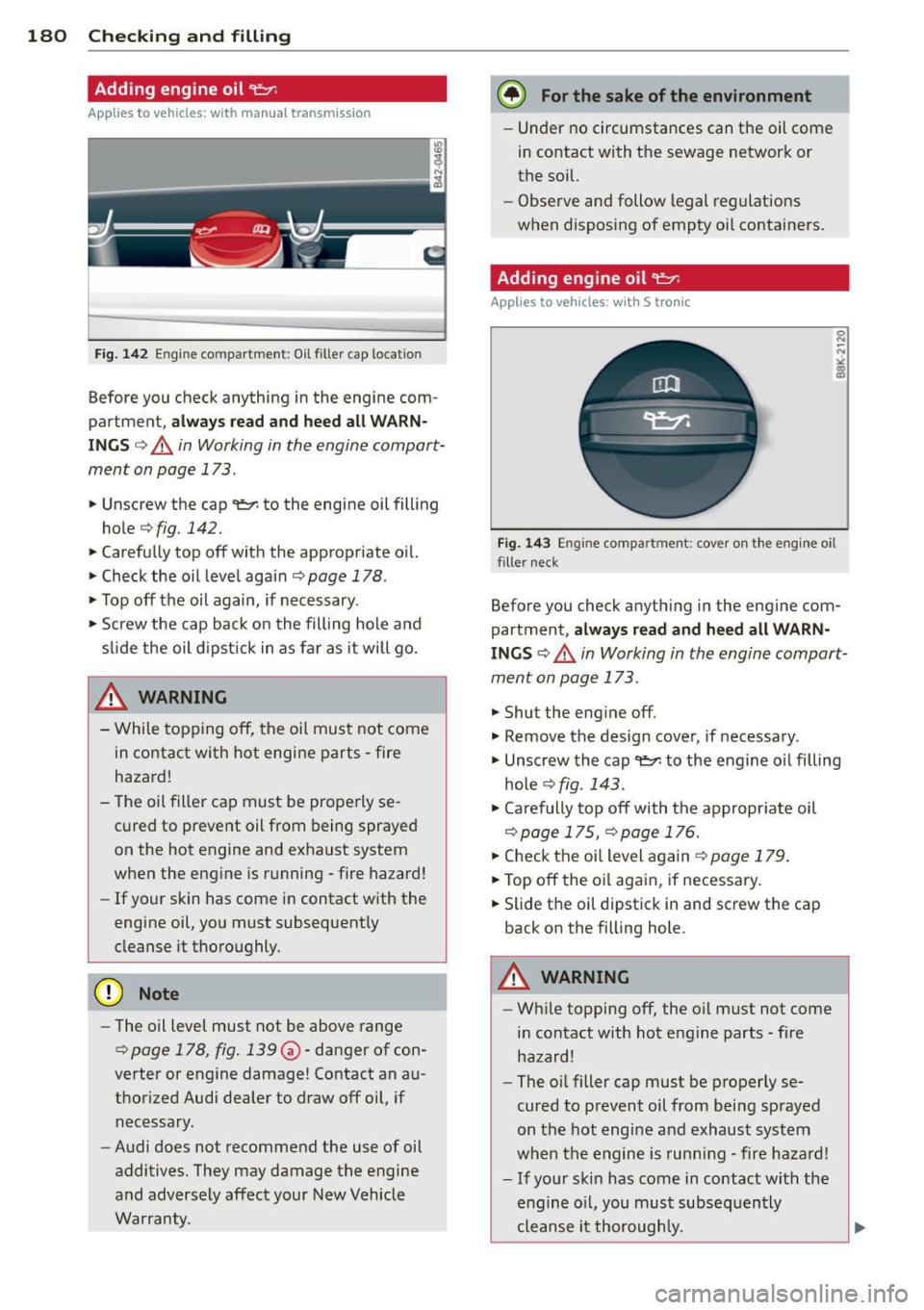
Fig. 142 Engine compartment : Oil filler cap locat io n
Before you check anything in the engine com
partment,
al ways r ead and h eed all WARN
INGS ¢ A in Working in the engine compart
ment on page 173 .
.. Unscrew the cap~ to the engine oil filling
hole¢
fig. 142 .
,. Carefully top off with the appropriate oil.
.. Check the oil level aga in ¢
page 178 .
,. Top off t he oil again, if necessary .
,. Screw the cap back on the filling hole and
s li de the oil d ipst ick in as far as it will go .
& WARNING
-While topping off, the oil mus t not come
in contact with hot engine parts -fire
hazard!
- The oil fil ler cap must be prope rly se
c u red to prevent oil from being sprayed
on the hot engine and exhaust system
when the eng ine is running - fire hazard!
- If your skin has come in contact w ith the
engine oil, you must subsequent ly
cleanse it thoro ughly.
(D Note
- The oil level must not be above range
c:> page 178, fig. 139 0 -danger of con
verter or engine damage ! Contact an au
thorized Audi dealer to draw off oil, if
necessa ry.
- Audi does not recommend the use of oil
additives. They may damage the engine
and adversely affect your New Vehicle
Warranty .
@) For the sake of the environment
-Under no circumstances can the oil come
in contact with the sewage network or
the soil.
- Observe and follow legal regulat ions
when disposing of empty oil containers.
Adding engin e oil "1::::1:
Applies to vehicles: with S tronic
Fig . 14 3 En gi ne compartment : cover on t he eng ine oi l
filler neck
Before you check anything in the engine com
partment,
always r ead and heed all WARN
INGS c:> A in Working in the engine compart
ment on page 173 .
,. Shut the eng ine off.
,. Remove the design cover, if necessary .
,. Unscrew the cap
't=7: to the engine o il filling
hole
c:> fig . 143.
,. Carefully top off with the appropr iate oil
c:> page 175, c:> page 176.
,. Check the oi l level aga in c:> page 1 79 .
.. Top off the oil again, if necessary.
.. Slide the oil dipstick in and screw the cap
back on the filling hole.
& WARNING
'-
- W hile topping off, the o il must not come
in contact with hot engine parts - f ire
hazard!
- The oi l filler cap must be p roperly se
cured to prevent oil from bei ng sprayed
on the hot engi ne and exhaust system
when the engine is runn ing - fire haza rd !
- If you r skin has com e in contact with the
engine o il, you must subsequently
cleanse i t thoroughly. ..,.