brake AUDI R8 SPYDER 2015 Owner's Manual
[x] Cancel search | Manufacturer: AUDI, Model Year: 2015, Model line: R8 SPYDER, Model: AUDI R8 SPYDER 2015Pages: 232, PDF Size: 58.36 MB
Page 78 of 232
Transmi ssio n
rotation of the whee ls, then the time wi ll in
crease a ccording ly .
A WARNING
- If a gear is engaged when the vehicle is sta
tionary, the acce lerator must not be pressed
inadvertently under any circumstances. Oth
erwise the vehicle will immed iately start to
move - sometimes even if the park ing brake
is f irmly applied.
- Before you or other persons open the engine compartment l id and work on a running en
gine, select neutral pos it ion
N and firmly
apply the handbra ke. Always read and fol
low the app licab le warn ings¢
page 155,
Working in the engine compartment.
@ Tips
- If you accidenta lly shifted into N w hile d riv
i ng, you can engage a gear in the normal
way using the selecto r lever.
- An indicator light i s displayed if a malfunc
tion occurs while in S tronic. Refer to
~page 78.
Manual mode
App lies to veh icles: w ith 5 tro nic
S tronic allows the driver to shift gears man ua lly.
Starting from a stop
.,. Press and ho ld the brake pedal.
.. Move the selecto r leve r to the left.
.. Tap the se lec tor lever forwa rd
0 -
.. Re lease the brake pedal and press the accelera -
tor pedal ¢ .&,. .
Shifting
.,. To shift up, tap the selector lever fo rward 0 -
.,. To shift down, t ap the sele ctor lever to the re ar
o.
Stopp ing temporarily
.,. Press the brake pedal to prevent the vehicle
from moving, for examp le at traff ic lights .
Par king
.. Press and ho ld the brake pedal¢.&,. .
76
.. Activate the parking brake .
.. Turn off the ignition and remove the key .
Stopping on an incline
.,. Always keep the vehicle stat ionary using the
foot brake to prevent it from " rolling back"
¢ .&,. . D o not try to p revent the vehicle from
"ro lling back" when a gear is engaged by in
creasing engine speed.
.. Activate the parking brake.
Starting on a hill
.. With a gear engaged, remove your foot from
the brake, accelerate and slowly release the
parking brake.
When acce lera ting, S tronic sh ifts i nto the nex t
gear in gea rs 1, 2, 3, 4, 5 and 6 shor tly befo re
the maximum permissib le engine speed is
r eached.
If you have se lec ted a lower gear than the current
one, S tron ic w ill shift down only when the engine
will not be ove r-revved.
You can switch to a utomat ic operation at any
time
¢ page 77.
A WARNING
-
- Never leave your vehicle with the engine
ru nning while in gear. If you must leave yo ur
vehicle with the engine r unning, set the
parking brake firmly and engage neutral
N .
- With the engine r unning and a gear engag
ed, you have to ho ld the vehicle with the
foot brake .
- Do not accelerate when you sh ift gears with
the vehicle stationary and the engine run ning.
- Before driving down a steep slope, reduce
your speed and sh ift into a lower gear with S
tronic.
- Do not ride the bra kes or press the bra ke
pedal too often or too long. Constant brak
ing causes the brakes to overheat and sub
stantially reduces brak ing performance, in
creases braking d istance or causes comp lete
fa ilu re of the brake system. ..,.
Page 79 of 232
..... N
r-N "': ..... \!) ..,.,
N ..,., .....
(D Note
If you must stop on an incline, always hold
the vehicle in p lace with the foot brake to pre
vent it from rolling back. Do not try to prevent the vehicle from rolling back when the gear is
engaged by increasing speed, as this may
damage the clutch.
Automatic mode
Applies to vehicles: with S tronic
St arting fro m a stop
"' Press and hold the brake pedal.
"' Tap the se lector lever towards A.
"' Re lease the brake pedal and press the accelera-
tor pedal
¢ ,&. in Manual mode on page 76.
Under certain circumstances (driving in the
mounta ins for example), it can be beneficia l to
switch temporarily to the manual shift program
¢
page 76 in order to adjust the gear ratios to
driving conditions
manually.
Kick-down
Applies to vehicles: with S tronic
When you depress the accelerator pedal beyond
the resistance point, S tronic downsh ifts into a
lower gear, depending on vehicle speed and en
g ine rpm. It shifts up into the next higher gear
once the maximum specified engine RPM is reached . Exception: you have activated the sport
function.
.&, WARNING
Please note that the wheels could spin on
slic k or slippery roads when kick-down is ac
tive.
l) Market -spec ifi c
-
Tra nsm issio n
Launch control program
Applies to vehicles: with S tronic
The Launch Control Program enables maximum
acceleration.
Requirement: The engine must be at operat ing
temperature and the steering wheel must not be
turned.
"' With the engine running, press the
I!]!
!ESC OFFjll button one time . The Ill indicator
light and the message
ESC S port - Cau tion!
Limi ted stabil ity! appears in the driver infor
mation system display.
"' Press the brake pedal with your left foot and
hold it down.
"' Engage a gear.
"' Press the
I SPORT ! button on the selecto r lever
cover.
"' Press the accelerator pedal at the same time
with your right foot unti l the engine has
reached a constant speed.
"' Remove your left foot from the brake¢.&_ .
A WARNING
--
- Always adapt your dr iving to the traffic flow.
- Only use the Launch control program when
road and traffic cond itions allow it and oth
er drivers will not be endangered or both
ered by your driving and the vehicle's accel
eration.
- Please note that the driving wheels can spin
and the vehicle can b reak away when ESC is
sw itched off, espec ial ly when the road is
slippery .
- Once you have accelerated, you sho uld
sw itch the ESC back on by pressing the
[fil
but ton.
(D Tips
- The tra nsmission temperature may increase
signif icant ly afte r using the Launch Contro l
Program. If that happens, the program may
not be availab le for a few minutes . It wi ll be
available again after a cool-down period .
77
Page 80 of 232
Transmission
-When acce le rat ing using the Launch Cont ro l
program, all vehicle pa rts are subject to
heavy loads. T his can result in increased
wear.
Steering wheel with shift paddles
App lies to veh icles: with S tron ic
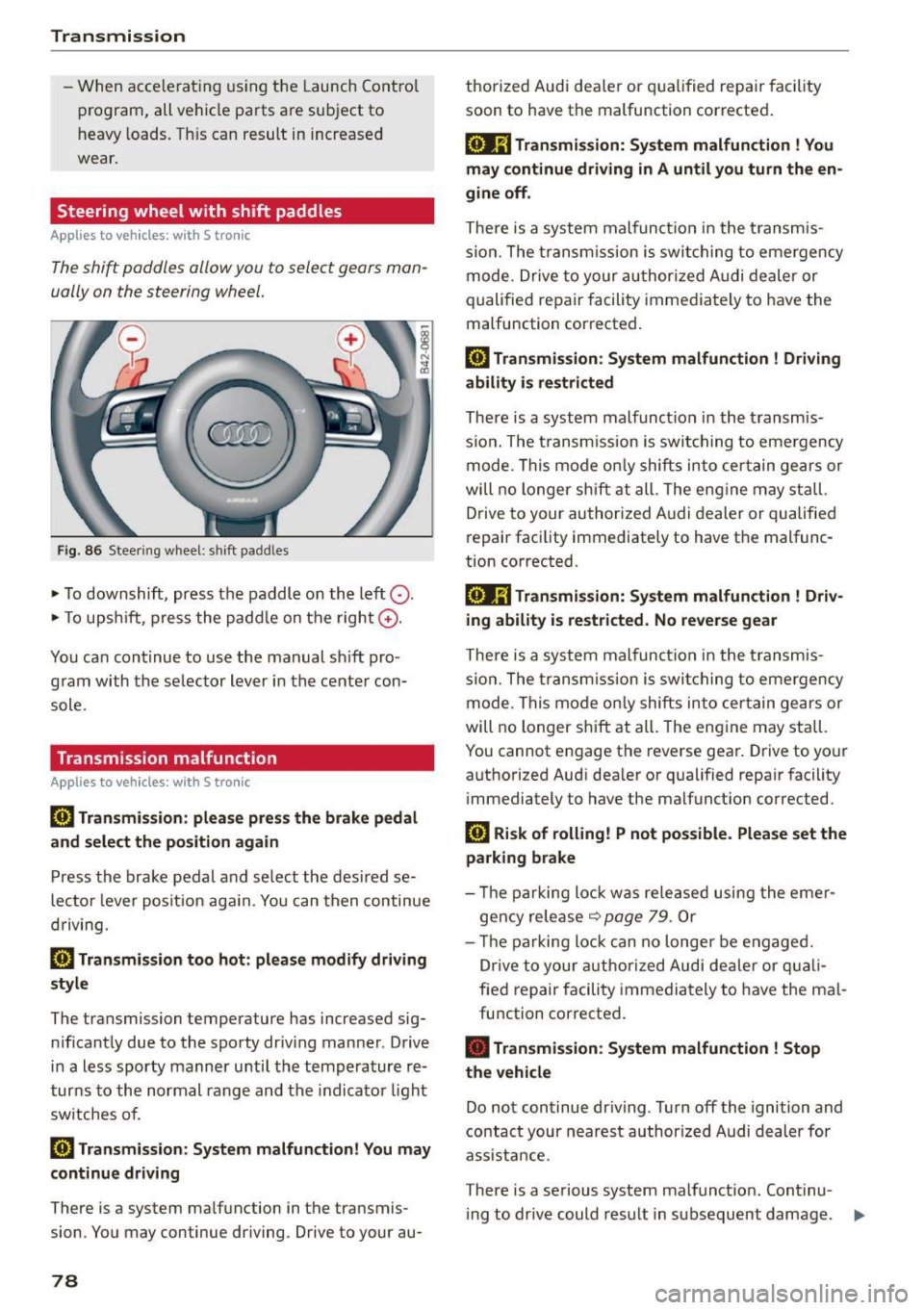
The shift paddles allow you to select gears man
ually on the steering wheel.
F ig . 8 6 Steer ing w heel: shi ft padd les
• To downshift, press t he paddle on the left 0 -
• To upsh ift, p ress the padd le on the right G) .
You ca n continue to use the manual s hift pro
g ram with the se lector lever in the cente r con
sole.
Transmission malfunction
Applies to vehicles : with S tro nic
l'§J Transmis sion : please press the brake pedal
and select the position again
Press th e brake pedal a nd se lect the desi red se
lec to r l eve r pos it io n aga in. Yo u can then continue
d riving.
[O] Transmission too hot: please modify driving
style
The transmission temperature has increased sig n ificant ly due to the spo rty dr iv ing man ner . Drive
i n a less sporty manner u nti l t h e temperature re
t ur ns to the normal rang e and the indicator light
sw itches of.
[i1 Transmi ssion : System malfunction! You may
continue driving
There is a system ma lfunction in the transmis
sion . You may continue driving. Drive to your au-
78
thorized Audi dea ler or q ua lif ied repa ir facility
soon to have the malfunction corrected .
[o.Jij Transmission: Sy stem malfunction ! You
may continue driving in A until you turn the en
gine off .
There is a system malfunc tion i n the trans mis
s io n. The tran sm iss ion i s swi tchi ng to eme rgency
mode. Drive to your author ized A udi dealer or
q ualified repair facili ty imme diate ly to have the
malfunction corrected.
l'§J Transmission : System malfunction ! Driving
ability is restricted
There is a system malfunct ion in the t ransmis
s io n. The t ransm iss ion is swit ching to eme rgency
m ode. Thi s mo de onl y shifts in to ce rtain ge ars or
will no l onger shi ft at all. The eng ine may st all.
D rive to your au thori zed A udi dealer or qualified
repair fac ility immediately to have t he malfunc
tion corrected.
[oJ;j Transmission: System malfunction ! Driv
ing ability is restricted. No reverse gear
There is a system malfun ction i n the trans mis
s ion . The tran sm iss ion i s swi tchi ng t o em ergency
mode. T his mode o nly shifts in to cer tain gears or
will no longer shift at all . The eng ine may stall.
You cannot e ngage the reverse gea r. Drive to yo ur
aut ho rized Aud i dea ler or q ualified repa ir facility
i mmediately t o have the malfunct ion corrected.
[i1 Risk of rolling! P not pos sible. Please set the
parking brake
- Th e parking lo ck was re le ase d using the eme r
gency rele ase
~ page 7 9 . O r
- Th e parking lo ck can no l onge r be engage d.
Dr ive t o your authoriz ed Audi de aler or q uali
fie d repair f acili ty immedia tely to have the ma l
fu nction cor rected.
• Transmission : System malfunction ! Stop
the vehicle
Do no t con tinue dr iving . Tur n off the ignition and
contact your nea rest author ized Audi d eal er for
ass ista nce.
There is a serious system malfunct ion. Continu -
i ng to dr ive could result in s ubsequent damage. .,.
Page 81 of 232
.... N
l'
N "1: .... I.O
"' N
"' ....
(D Note
If S tronic has switched to emergency opera
tion mode, you should have the malfunction corrected as soon as possible.
Parking lock emergency release
App lies to vehicles: with S tro nic
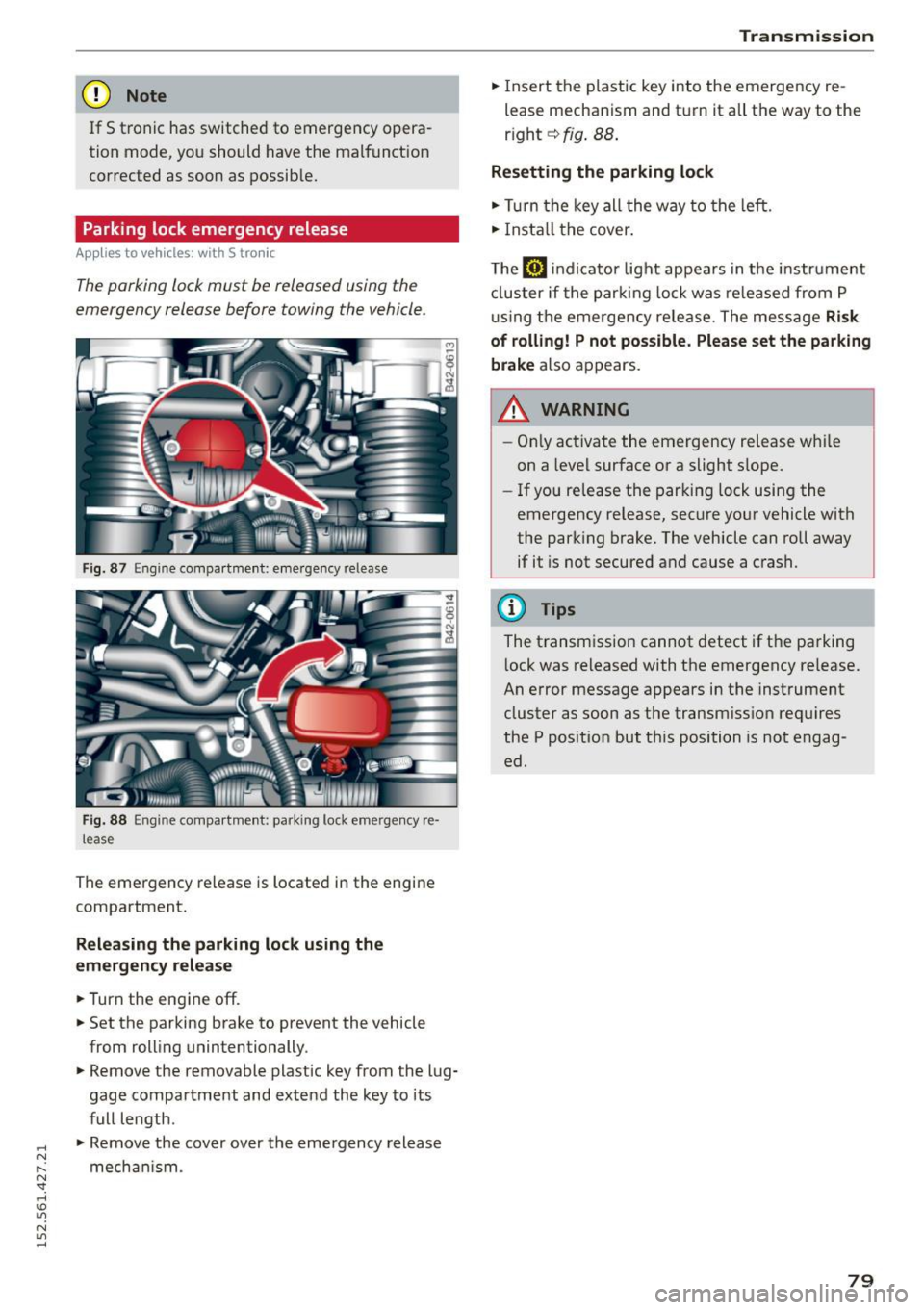
The parking lock must be released using the
emergency release before towing the vehicle.
F ig. 87 Engine compart men t: emergency release
Fig. 88 Engine compa rtment: parking lock emergency re·
lease
The emergency release is located in the engine
compartment.
Releasing the parking lock using the
emergency release
.,. Turn the engine off .
.,. Set the parking brake to prevent the vehicle
from rolling unintentionally .
.,. Remove the removable plastic key from the lug
gage compartment and extend the key to its
full length .
.,. Remove the cover over the emergency release
mechan ism .
Tran smission
.,. Insert the plastic key into the emergency re
lease mechanism and turn it all the way to the
r ight ~
fig. 88.
Resetting the parking lock
.,. Turn the key all the way to the left.
.,. Install the cover.
The
[il indicator light appears in the instrument
cluster if the parking lock was released from
P
using the emergency release. The message Risk
of rolling! P not possible. Please set the parking
brake
also appears.
,&_ WARNING
- Only activate the emergency release whi le
on a level surface or a slight s lope.
- If you release the parking lock using the
emergency release, secure your vehicle with
the parking brake. The vehicle can roll away if it is not secured and cause a crash.
(D Tips
The transmission cannot detect if the parking
l ock was released with the emergency re lease.
An error message appears in the instrument
cluster as soon as the transmiss ion requires
the
P position but th is position is not engag
ed.
79
Page 92 of 232
Driving Sa fel y
-never rest you r feet on the seat cushion or back
of the seat
- never ride in the footwell
- never ride in the cargo area
_& WARNING
Imprope r seating positions increase the risk
o f serious personal injury and death whenever
a vehicle is being used .
- Sitting incor rectly places occ upants at risk
of being critically in jured if the airbags de
ploy and str ike them.
- Be fore you start dr iv ing, seat yourself prop
erly and always maintain this seating posi
t ion during the trip . Before each trip, in
struct your passengers to seat themselves
properly and to maintain this seating posi
t ion during the trip
c> page 56 , General rec
ommendations .
Driver and passenger
side footwell
Important safety instructions
_& WARNING
Always make su re that the knee a irbag can in
flate wi thout interferen ce. Ob je cts betwee n
yourself and the airbag can increase the risk
of injury in an accident by interfering with the
way the airbag deploys or by being pushed in
to you as the airbag deploys.
- No persons (chi ld ren) or animals should ride
in the footwe ll in front of the passenger
seat. If the airbag dep loys, this can res ult in
serious or fatal in ju ries.
- No objects of any kind shou ld be carried in
the footwell area in front of the driver's or passenger's seat. Bulky objects (shopp ing
bags, for example) can hamper or p revent
proper deployment of the airbag . Small ob
jects can be th rown t hrough the ve hicle if
the ai rbag deploys and injure you o r you r
passengers.
90
Pedal area
' Pedals
T he pedals must always be free to move and
must never be interfered with by a floor mat or
any other object.
Make sure that all peda ls move free ly without in
terference and that nothing prevents them from
r et urning to the ir origi nal positions .
Only use floor mats that leave the pedal area free
and can be secured with floor mat fas teners.
If a brake circ uit fai ls, increased brake pedal trav
el is required to bring the vehicle to a full stop .
_& WARNING
Pedals that cannot move freely can cause loss
of vehicle control and increase the risk of ser i
ous injury .
- Never p lace any objects in the driver's foot
wel l. An object could get into the pedal area
and i nterfere with pedal function. In case of
sudden b raking o r an accident, you would
not be able to b rake or ac celerate!
- Always ma ke sure that no thing can fall or
move into the d river's footwel l.
Floor mats on the driver side
Always use floor mats that can be securely at
tached to the floor mat fasteners and do not in
terfere with the free movement of the pedals.
.. Make sure that the floor mats are properly se
cured and cannot move and interfere with the
pedals
c> ,&. .
Use only floor mats that leave the pedal area un
obstructed a nd that are firmly secured so that
they cannot s lip out of position . You can obta in
su itab le floor mats from your authorized Audi
Dealer .
Floor mat fasteners are insta lled in your Audi.
Floor mats used in yo ur vehicle must be attached
to these fasteners. Properly sec uring the floor ..,_
Page 93 of 232
..... N
r-N "': ..... \!) ..,.,
N ..,., .....
mats wi ll prevent them from sliding into posi
tions that cou ld interfere wit h the peda ls or im
pa ir safe operation of your veh icle in other ways .
A WARNING
Pedals that cannot move freely can result in a
loss of vehicle control and increase the r isk of
ser ious personal injury.
- Always make sure that floor mats are prop
erly secured .
- Never place or insta ll floor mats or other
floor coverings in the veh icle that cannot be
properly secured in place to prevent them
from slipping and interfering w ith the ped
als or the ability to control the veh icle.
- Never place or install floor mats or other
floor coverings on top of already installed
floo r mats. Add itiona l floo r mats and other
cove rings w ill reduce the si ze of the pedal
area and interfere w ith the ped als.
- Always properly reinstall and se cu re f loor
m ats that have been taken ou t for clean ing .
- Always make sure that objects cannot fall
into the dr iver footwell while the vehicle is
moving. Objects can become tr apped under
the brake pedal and accelerator peda l caus
ing a loss of vehicle contro l.
Stowing luggage
Loading the luggage compartment
All luggage and other objects must be properly
stowed and secured in the luggage compart
ment .
Loose items in the luggage compartment can
shift suddenly, changing vehicle handling charac
ter istics. Loose items can also increase the risk of
serious personal injury in a sudden veh icle ma
neuver or in a coll is ion.
In a collis ion, the laws of p hys ics mean that even
smal ler items that are loose in the vehicle will
become heavy miss iles that can cause ser ious in
jury . Items in the vehicle possess energy which
va ry w ith vehicle speed and the we ight of the
item. Vehicle speed is the mos t significant fa ctor.
Dr iving Sa fel y
For example, in a frontal collision at a speed o f
30 mp h (48 km/h) , the forces acting o n a 10-lb
(4 .5 kg) object are about 20 t imes the norma l
weight of the item. This means that the weight of the item would sudden ly be about
200 lbs . (90 kg) . You can imagine the injuries
that a 200 lbs. (90 kg) item flyi ng freely throug h
the passeng er compartment co uld cause in a col
li sion like this.
A WARNING
Imp roperly store d luggage or other items c an
fly through the vehicle causing serio us pe r
sonal injury in the event of hard braking or an
accident . To help reduce the risk of ser ious
personal injury:
- Always put o bjects, fo r example, luggage o r
other heavy items in the luggage compart
ment.
A WARNING
Heavy loads w ill influence the way yo ur vehi
cle hand les . To help reduce the r isk of a loss
of contro l leading to serious pe rsonal injury:
- Always keep in mind when transporting
heavy objects , that a change in the center of
grav ity can also cause changes in vehicle
handling .
- Never exceed the Gross Axle We ight Rating
or the G ross Vehicle We ight Rating specified
on the safety compliance stic ker on the left
door jamb. Exceeding pe rm issib le weight
s ta nd ards c an cause the veh icle to slide and
h a ndle differently.
- Please observe informa tion on safe dr iving
~page 86.
A WARNING
Always make sure that the doo rs, all windows
and the front lid a re secure ly close d and
l ocke d to reduce the r isk of injury when the
vehicle is not be ing used .
- Afte r closing the front lid, always make sure
that it is proper ly closed and locked .
- Never leave your vehicle una ttended espe
cially with the f ront lid left open . A child
-
91
Page 136 of 232
Intelligent technology
Intelligent technology
Notice about data
recorded by vehicle
control modules
Your vehicle is not equipped with an Event Data
Reco rder (EDR) , insta lled by some manufactu rers
for the express pu rpose of captur ing data fo r re
trieval after an accident or crash event. ED R 's are
sometimes called "crash recorders" .
Some state laws restrict the retr ieval or down
loading of da ta stored by EDR's that were instal
led in a vehicle for the express p urpose of retriev
ing data after an accident or crash event without
the owner's consent.
Al though you r vehicle is not eq uipped w ith an
E DR, it is equipped with a number of electronic
control modu les for vario us vehicle systems such
as, for example, engine function, emission con
trol, as we ll as for the airbags and safety belts.
These electronic control modules also record ve
hicle-related data during norma l vehicle opera
tion for diagnostic and repair purposes . The re
cording capacity of the electronic contro l mod
ules is lim ited to data (no sound is recorded) and
only a small amount of data is actually recorded
over a very l imited per iod of t ime and stored
when a system fault or other condition is sensed by a control unit. Some of the data then stored
may re late to veh icle speed, direction, braking as
well as restraint system use and performance in
the event of a crash o r other cond ition . Stored
data can only be read and downloaded with spe
cial equipment.
Electronic Stabilization
Control (ESC)
Description
ESC helps to improve road holding and vehicle
dynamics to help reduce the probability of sk id
d ing and loss of veh icle contro l.
It works only
when the engine is runn ing. ESC detects certain
d ifficult driving situations, including when the ve
h icle is beginn ing to spin (yaw) out of control and
he lps you to get the veh icle back under control by
134
selective ly braking the wheels, and/or reducing
engine power and providing steering assistance
to help ho ld the veh icle on the driver's intended
course. The ind icator light
GJ in the instrument
cluster blinks when ESC is taking act ion to help
you contro l the vehicle .
ESC has limitations. It is important to remember
that ESC cannot overcome the laws of physics. It
will not always be able to help out under all con
dit ions you may come up against. For example,
ESC may not always be able to help you master
s ituations where there is a sudden change in the
coefficient of fric tion of the road surface. When
there is a sect ion of dry road that is suddenly cov
ered with water, slush or snow, ESC cannot per
f orm the same way it would on the dry surface . If
the vehicle hydrop lanes (rides on a cushion of wa
ter instead of the road surface), ESC will not be
able to help you steer the vehicle because contact
with the pavement has been interrupted and the
vehicle cannot be braked or steered . During fast
corner ing, particularly on wind ing roads, ESC
cannot always dea l as effectively with difficult
driv ing situations as at lower speeds .
Always adjust your speed and driving style to road, traffic and weather condit ions . ESC cannot
overr ide the veh icle's phys ica l limits, increase the
available traction, or keep a vehicle on the road if
road departure is a result of driver inattention.
Instead, ESC improves the possibility of keeping
the vehicle under control and on the road during
extreme maneuvers by using the driver's steering
inputs to help keep the vehicle going in the in
tended direction. If you are traveling at a speed
that causes you to run off the road before ESC
can prov ide any assistance, you may not experi
ence the benefits of ESC.
ESC includes and/or works together with the an
ti-lock brake system (ABS), brake assist sys tem
and anti -slip regulation (ASR) . ESC is sw itched on
all the t ime . In certai n situations when you need
less tract ion, you ca n sw itch off ESC by p ress ing
the button
l!l . Be sure to sw itch ESC on again
when you no longe r need less traction. .,..
Page 137 of 232
.... N
l'
N "1: .... I.O
"' N
"' ....
Anti-loc k br aking sy stem (ABS )
ABS prevents the wheels from locking up when
brak ing . T he vehicle can st ill be stee red even dur
ing hard braking. App ly steady pressure to the
brake peda l. Do not pump the peda l. A pulsing in
the brake pedal indicates that the system is help
ing you to brake the vehicle.
Brake assist sy ste m
The brake assist system can decrease braking dis
tance. It increases braking power when the dr iver
presses the brake pedal quick ly in emergency sit
uations. You must press and ho ld the brake pedal
until the situation is over.
Anti -slip regulation (ASR )
ASR reduces engine power when the drive whee ls
begin to spin and adapts the force to the road
conditions. This makes it easier to start, acceler
ate and dr ive up h ills.
Electronic diff erential lock (EDL )
The EDL brakes wheels that are spinning and
transfers the drive power to the other drive wheel or wheels if the vehicle is equipped w ith all-whee l
drive*. This function is available up to about 60
mph (100 km/h) .
I n extreme cases , EDL automatically switches off
to help keep the brake on the braked wheel from
overheating . EDL wi ll switch on again automati
cally when conditions have returned to normal.
A WARNING
- ESC, ABS, ASR and EDL cannot overcome the
laws of phys ics. Th is is especially important
on slippery or wet roads. If the syst ems be
gin act ing to stab ilize your vehicle, you
sho uld immediately cha nge your speed to
match the roa d and traffic con ditions. Do
not let the increased safety provided by
these systems tempt you to take risks . Do
ing so wi ll increase the risk of a loss of vehi
cle contro l, collis ion and serio us personal in
juries .
- Always adapt your speed to road, traffic and
weather cond it ions. The risk of losing con
tro l of the veh icle increases when driving
Int ellig ent t echnolo gy
too fast, especially through curves and on
slippery or wet roads, and when dr iving too
close to vehicles up ahead. ESC, ABS, the
brake assist system, EDL and ASR cannot
prevent coll is ions .
- Always accelerate with special care on even,
smooth surfaces such as those that are wet
or covered with ice and snow. The drive
wheels can spin even with these assistance sys tems that cannot always help to reduce
the risk of loss of veh icle control.
(D Tips
- ABS and ASR only wo rk correctly when all
four wheels are eq uipped with ident ical
tire s. Different tire s izes can lead to a reduc
t ion i n engine power.
- Yo u may hear noises when the systems de
sc ribed a re wo rking.
- If the ind icator light GJ or II (USA mod
els) ;tiJ (Canada models) appea rs, there
may be a malfunction~
page 15,
~ page 15.
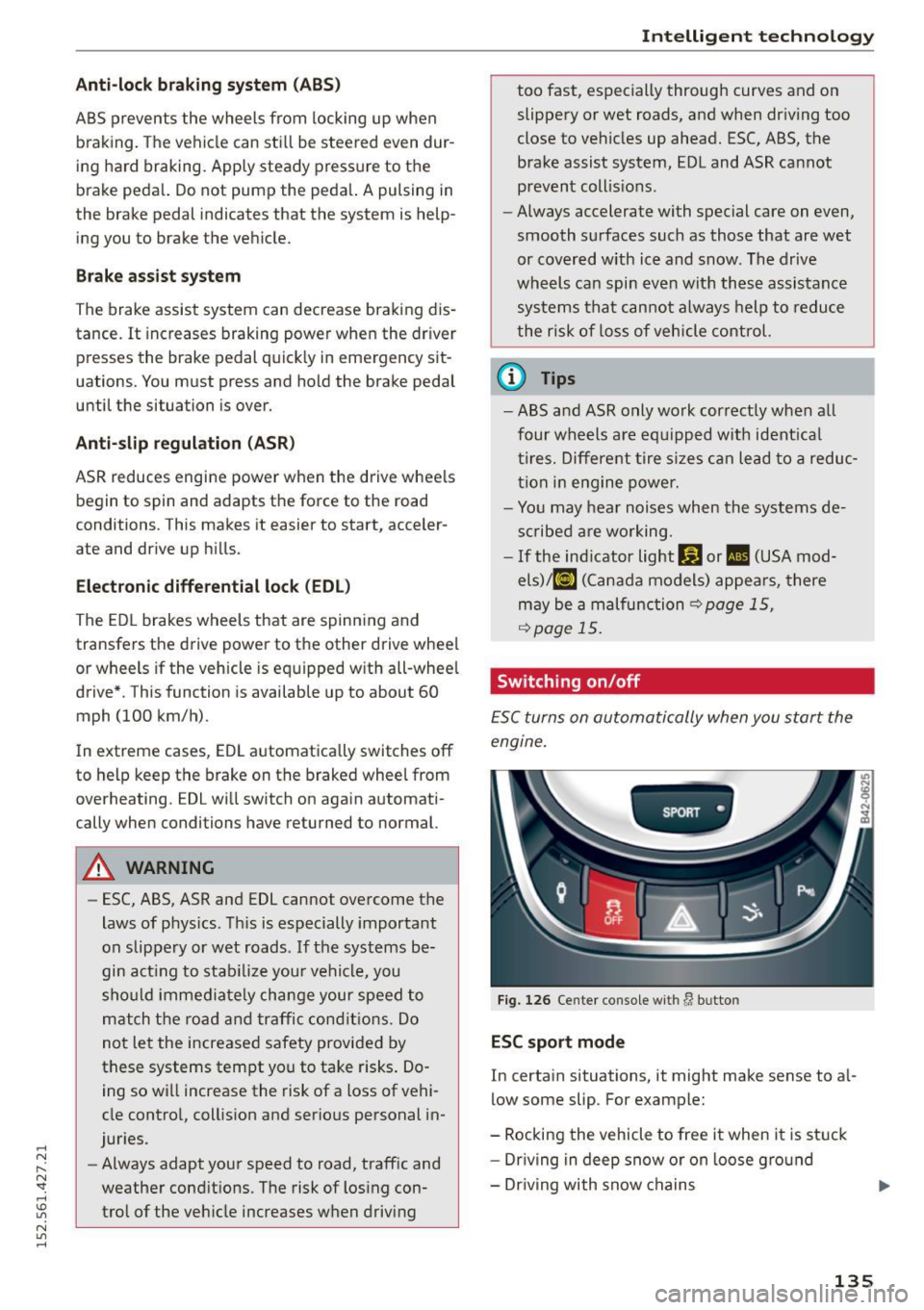
Switching on/off
ESC turns on automatically when you start the
engine.
SPORT •
Fig . 12 6 Cente r co nsole wit h lJ bu tto n
ESC sport mode
In certain situations, it might make sense to a l
low some slip. For example:
- Rocking the vehicle to free it when it is st uck
- Driving in deep snow or on loose gro und
- Dr iving with snow chains
135
Page 138 of 232
Intelligent technology
Press the I!! button briefly¢ fig. 126 . The II in
dicator light turns on and Sport control Warn
ing! Restricted st abilit y appears in the driver in
formation system d isplay. Driving stability is lim
ited in sport mode.
Sw itch ing ESC off
Press and hold the
l!I button for three seconds .
The ESC indicator light
fl turns on and Stabil i
z atio n prog ram off appears in the display. ASR is
also switched off when ESC is sw itched off.
Sw itch ing on
Press the
l!J button again. The message Stabili
zation progr am on appears briefly in the disp lay .
_& WARNING
You should only sw itch the ESC off if your dr iv
ing ability and the traffic s ituation allow. This
could increase the risk of slipp ing.
- The stabilizing function is limited in ESC
sport mode. The driving wheels could spin and the vehicle could swerve, especially on
slick or slippery road surfaces.
- There is no vehicle stabilization when ESC is
switched off.
(D Tips
If there is a malfunction in the retractable
rear spo iler* or the A udi magnetic ride*, it
may not be possible to activate ESC sport
mode or normal mode may act ivate aga in au
tomatically.
Braking
What affects braking efficiency?
New brake pad s
During the f irst 250 miles (400 km), new brake
pads do not possess the ir full braking effect, they
have to be "broken in" first¢.&. . The break- in pe
riod can be considerab ly longer for vehicles w ith
ceramic b rake roto rs*. You can compensate for
this s light ly reduced b ra ki ng power by push ing
ha rder on the b rake peda l. Avoid heavy braking
loads during the bre ak-in period.
136
Operating conditions and driving habits
The bra kes on today's automobiles a re s till sub
j ect to wear, depend ing largely on operating con
ditions and driving habits ¢& . On vehicles that
a re either driven most ly in stop-and-go city traf
fic or are driven hard, the brake pads should be
checked by your authorized Aud i dealer more of
te n tha n specified in the Warranty
& Maint e
nance bookl et. Failure to have you r brake pads
i nspected can resu lt in reduced b rake pe rform
ance.
On steep slopes, you shou ld use the braking ef
fect of the engine . This way, you prevent un nec
essary wear on the brake system . If you must use
you r brakes, do not hold the bra kes down cont in
u o usly. Pump the brakes at in tervals.
Operating noise
Noises may occur when braki ng depending on the
speed, braking force and outs ide cond it ions such
as tempera ture and hum idity.
Due to the nature of the materia ls used i n ceram
i c brake rotors*, noises may become more appa
r ent at low speeds.
Effect of water and road salt
In certa in situations, for examp le after driv ing
through water , in heavy rain, after overnight con
densation or after washing your car, the braking
effect can be reduced by moisture or ice on the
brake rotors and brake pads . The brakes must be
dr ied fi rst w ith a few careful b rake app lications.
At higher speeds and with the windsh ield wipers
turned on, the brake pads press against the brake r otors for a short amount of time. This occurs at
r egular intervals without the dr iver not ic ing and
provides fo r be tter brake response time under
wet cond it ions.
The effect iveness of the brakes ca n be red uced
when the v ehicle is d riv en on a salt-cove red road
and the b rakes are no t used. Likewise, you clean
off a ccumula ted salt coating from b rake d iscs
and pads with a few ca utious app lications of the
brake ¢& .
D ue to the ir sur fa ce character istics, cerami c
brake ro tors * absorb moistu re in such co ndi tions . ..,.
Page 139 of 232
..... N
r-N "': ..... \!) 1.1'1
N 1.1'1 .....
This can cause a temporary reduction in braking
force compared to dry brakes. You can compen
sate for this by pressing the brake pedal harder.
Cor ro sion
There may be a tendency for dirt to bui ld up on
the brake pads and corrosion to fo rm on the discs
if the car is not driven regularly or only for short
trips with little use of the brakes.
If the b rakes are not used frequently, or if corro
sion has formed on the discs, it is advisab le to
clean off the pads and discs by braking firmly a
few times from a moderately high speed
c:> &. .
Faults in the brake sy stem
If you should notice a sudden increase in brake
pedal travel, then one of the two brake circuits
may have fai led
c:> .&, .
Low brak e flu id le vel
Malfunct ions can occur in the brake system if the
brake fluid level is too low. The brake flu id leve l is
monitored e lectronically.
Br ake power assis t un it
T he brake power assist unit increases the pres
sure that you generate with the brake pedal.
It
works only when the eng ine is running .
Brak e lining wear sta tu s
Brake lining wear may be checked by visual in
spection of the condition of the brake pads
through the openings in the wheel. If necessary,
the wheel may be removed for this inspection
c:> page 203 .
.8, WARNING
-New brake pads don't have the best stop
ping power and must be "broken-in" during
the init ial 250 mi les ( 400 km) of normal city
driving. The break -in period can be consider
ably longer for vehicles with ceramic brake
rotors *. You can compensate for this by
pressing the brake pedal more firmly. This
also applies later when new pads are instal
led .
- You should perform brak ing maneuvers for
the purpose of clean ing the brake system
Int elli ge nt te chn olo gy
only if road conditions permit. Other road
users must not be put at r isk -you may
cause an accident!
- Before descending a steep grade, reduce
speed and sh ift transmission into a lower
gear or lower dr iving range. Do not ride the
brakes or hold the pedal down too long or
too often. This could cause the bra kes to get
hot and dimin ish braking effic iency .
- Do not "ride the brakes" by rest ing your foot
on the pedal when you do not intend to
brake. This may cause the brakes to over
heat, premat ure wear and increased stop
ping distance.
- Under certain cl imatic and operat ing condi
tions such as passing thro ugh water, dr iv ing
in heavy rain or after washing the vehicle,
the effectiveness of the brakes can be re
duced . In winter, ice can accumulate on the
brake pads, lin ings, discs and drums. Care
fully apply brakes for a test. Brakes will dry and ice coatings will be cleaned off after a
few careful brake applications.
- Driving for an extended period of t ime on
salt-covered roads without using your brakes can also affect braking efficiency .
Clean off accum ulated salt coating from
b rake discs and pads with a few cautious
brake applications.
- If you damage the front spoiler, or if you in
stall a different spoiler, be su re the air flow
to the front brakes is not obstructed . O ther
wise the brake system could overheat reduc
ing the effectiveness of the entire brake sys
tem .
- Fai lure of one brake circuit will impai r the
braking capability resu lting in an increased
stopping distance . Avoid driving the vehicle
and have it towed to the nearest Aud i dea ler
or qualif ied workshop.
- Never let the vehicle roll to a stop with the
engine shut off.
- If the brake booster is not working, for ex
ample when towing your veh icle, or because
the brake booster has somehow been dam
aged, the brake pedal must be pressed con
siderably harder to make up for the lack of booster assistance.
1 37