light AUDI R8 SPYDER 2015 Owner's Guide
[x] Cancel search | Manufacturer: AUDI, Model Year: 2015, Model line: R8 SPYDER, Model: AUDI R8 SPYDER 2015Pages: 232, PDF Size: 58.36 MB
Page 51 of 232
.... N
l'
N "1: .... I.O
"' N
"' ....
With the door contact circuit, the interior lights
turn on as soon as you unlock the veh icl e or open
the doors . The interior lights are also turned on
when the ignition key is removed . The lights turn
off about 30 seconds afte r the doors are closed .
When the veh icle is locked or when the ignition is
turned o n, the inter ior lights are turned off .
When a door is open , the interior lights are
turned off after about 10 m inutes to preven t bat
tery draining .
T he brightness of the lights is controlled a uto
mat ica lly by a d immer when they a re sw itched
on/off.
Instrument panel illumination
T he illumination of the instruments, displays
and the center console can be adjusted .
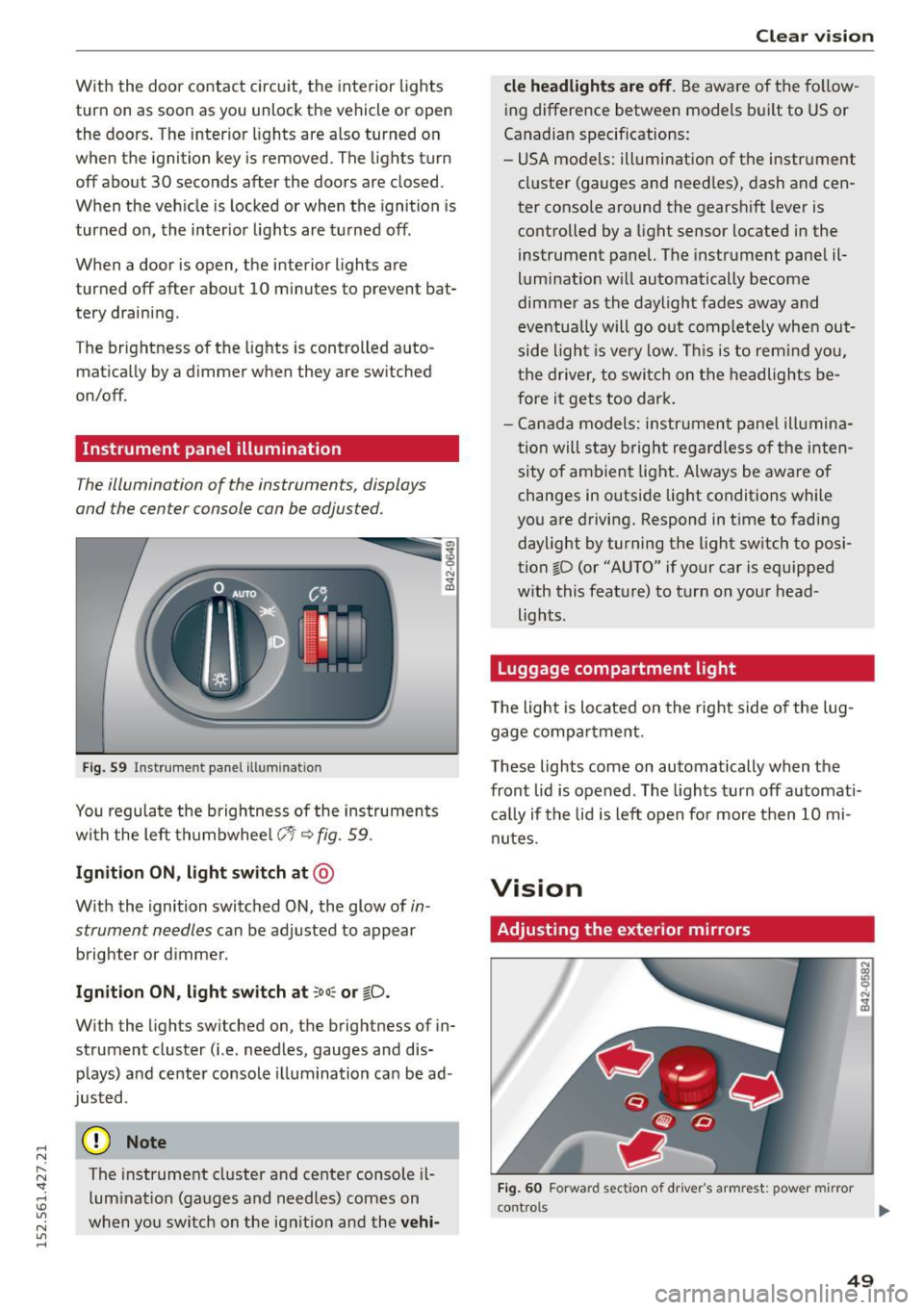
Fig . 59 In strument pa nel ill uminatio n
You regulate the brightnes s of the ins truments
with the left th umbwhee l
C:1 i::;,fig. 59.
Ign ition ON , light switch at @
With the ignition switched ON, the glow of in
strument needles
can be adjusted to appear
brighter or d immer .
Ignition ON , light switch at :oo~ or tD .
With the lights sw itched on, the brightness of in
strument cluster (i.e. needles, gauges and dis
plays) a nd center console il lum ination ca n be ad
justed .
(D Note
The instrument cluster and center console il
lum inat io n (gauges and needles) comes on
when you sw itch on the ig nitio n and the
ve hi-
Cle ar vi sion
cle headlight s are off . Be aware of the fo llow
ing difference between models b uilt to US or
Canadian specif ications:
- USA models: ill umination of the i nstr ument
cl uster (gauges and need les) , dash and cen
ter console around the gearsh ift lever is
controlled by a light sensor located in the
instrument panel. The instrume nt pane l il
lum ination w ill automatically become
dimme r as the daylight fades away and
eventua lly will go out comp letely when out
side light is very low . Thi s is to rem ind you,
t he driver, to switch on t he headlights be
fore it gets too dark .
- Cana da model s: instrument panel illumina
t ion will s tay bright regar dless o f the inten
si ty of ambien t light . Always be aware o f
changes in outside lig ht conditions while
you are driving. Respond in t ime to fading
daylight by turning the light sw itch to posi
tion ~D (or "AUTO" if your car is equipped
w ith this feat ure) to turn on your head
lights .
Luggage compartment light
The light is located on the right side of the lug
gage compa rtment .
These lights come on automatically when the
front lid is opened . The lights turn off automati
c a lly if the lid is left o pen fo r more then 10 mi
nutes .
Vision
Adjusting the exterior mirrors
Fig. 60 Forward sect io n of driver 's armrest: pow er mirr or
con trol s ...
49
Page 52 of 232
Clear vision
Turn the knob to the desired position :
Q/P -In this position, you can adjust the driv
er's and front passenger 's exterior mirrors by
turning the knob in the desired direction .
(@ -The mirrors are heated depending on the
outside temperature.
8 - The exterior mirrors fold in*
You are well-advised to fold the exterior mirrors in when maneuvering in tight spaces or when
leaving the car parked close to other vehicles.
A WARNING
-
- Curved (i .e. convex) mirror surfaces in
crease your field of view . Remember that
vehicles or other objects will appear smaller
and farther away than when seen in a flat
mirror. If you use this mirror to est ima te
distances of following vehicles when chang
ing lanes, you could estimate incorrectly
and cause an accident.
- If th e mirror housing is moved unintent ion
a lly (for example, wh ile parking your vehi
cle), then you must first fold the mirror
electrically. Do not readjust the mirror hous
ing manually. You could damage the motor
which controls the mirror.
- If you wash the vehicle in an automatic car
wash, you must fold the exterior mirrors in
to reduce the risk of damage to the mirrors.
Never fold power folding exterior mirrors*
by hand . Only fold them in and out using
the power controls.
(D Tips
If there should be a malfunction in the elec
trical system, you can still adjust the exter ior
m irrors by pressing the edge of the mirror .
50
Dimming the mirrors
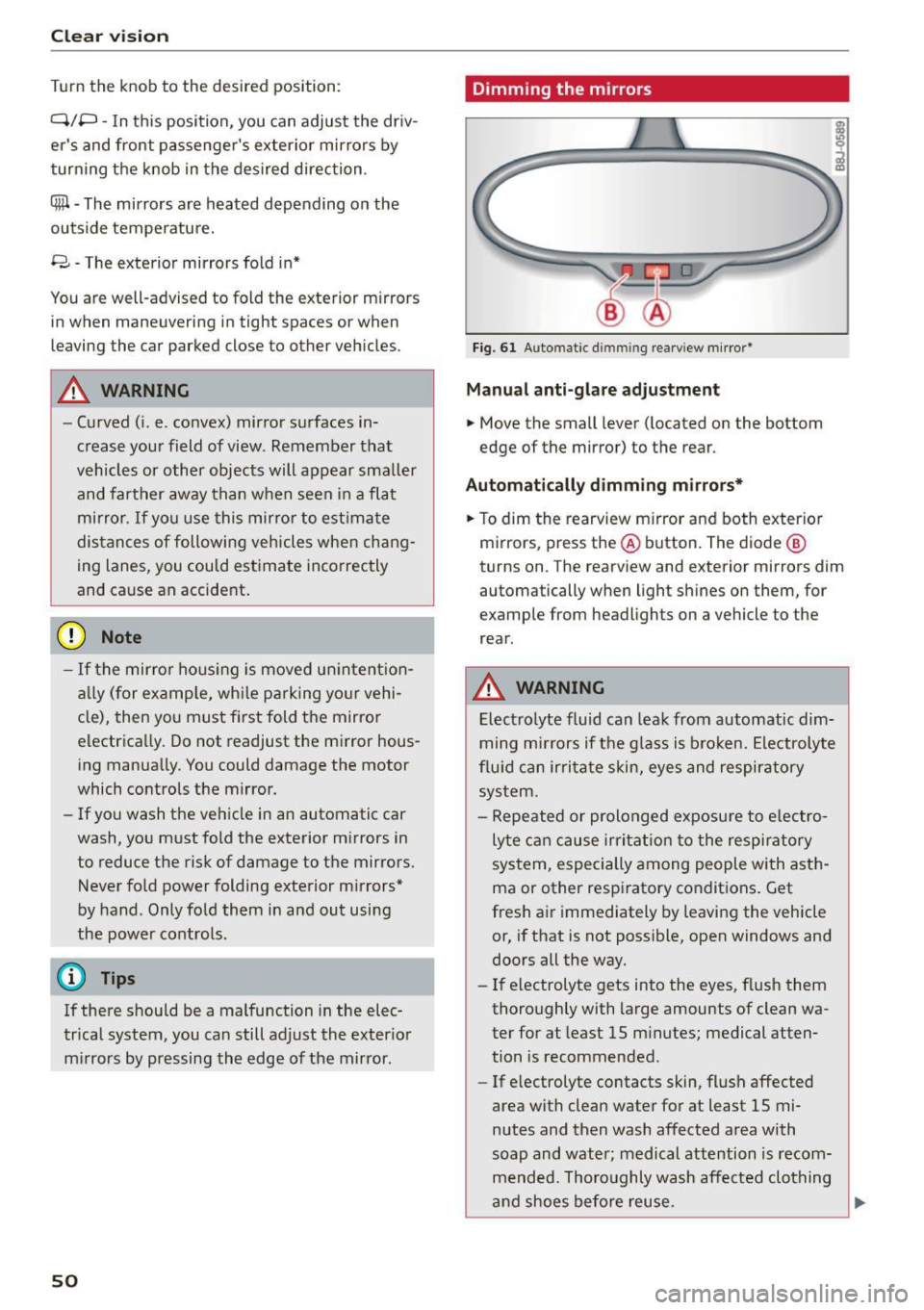
Fig. 61 Auto matic d immin g rearv iew mirror*
Manual anti-glare adjustment
.. Move the small lever (located on the bottom
edge of the mirror) to the rear .
Automatically dimming mirrors*
.. To dim the rearview m irror and both exterior
mirrors, press the@ button. The diode @
turns on . The rearview and exterior mirrors dim
automatically when light shines on them, for
example from headlights on a vehicle to the
rear.
A WARNING
Electrolyte fluid can leak from automatic dim
ming mirrors if the glass is broken. Electrolyte
fluid can irritate skin, eyes and respiratory
system.
- Repeated or prolonged exposure to electro
lyte can cause irritat ion to the respiratory
system, especially among people with asth
ma or other respiratory conditions. Get
fresh air immediately by leaving the vehicle
or, if that is not possible, open windows and
doors all the way.
- If electrolyte gets into the eyes, flush them
thoroughly with large amounts of clean wa
ter for at least 15 minutes; medical atten
tion is recommended .
- If electrolyte contacts skin, flush affected
area with clean water for at least 15 mi
nutes and then wash affected area with
soap and water; medical attention is recom
mended. Thoroughly wash affected clothing
and shoes before reuse.
Page 54 of 232
Clear vision
in the interval wipe position and then come back
a while later and drive off, the rain sensor will re
activate itself after the vehicle speed has exceed
ed 4 mph (6 km/h).
The rain sensor* is only activated with the wiper
lever set to position(!). When it starts to rain,
the rain sensor will automatically activate the in
termittent wiping mode.
To reduce the sensitivity of the sensor, move
switch @ down. To increase the sensitivity, move
the switch up. The higher you adjust the sensitivi
ty, the faster the sensor will react when it senses moisture on the windshield. The pauses between
wiper turns depend not only on the sensitivity setting, but on the vehicle speed as well.
During brief stops, e.g . at a red light, wiper mo
tion will automatically be reduced to the next
lower speed . Wipers already turning at low speed
change to intermittent wiping.
When the ignition is turned on, the washer jets
are heated.
A WARNING
- Wiper blades are crucial for safe driving! On
ly when they are in good condition are they
able to clear the windows properly to pro
vide uncompromising visibility. Worn or
damaged wiper blades are a safety hazard
¢ page 53, Replacing windshield wiper
blades!
- The light/rain sensor* is only designed to as
sist and support the driver. It remains en
tirely the driver's responsibility to monitor outside weather conditions and to manually
activate the wipers as soon as rain or drizzle
reduces visibility through the windshield .
- The windshield must not be treated with
water-repellent materials. They can increase
glare under poor visibility conditions such as
wetness, darkness, or when the sun is low
on the horizon . In addition, they can cause
the windshield wipers to chatter.
(D Note
In freezing or near freezing conditions:
52
- Always check that the wiper blades are not
frozen to the glass before you turn the wip
ers on. Loosen a wiper blade which is frozen
in place before operating the wipers to pre
vent damage to the wiper blade or the wiper
motor .
- Do not use the wipers to clear a frosted win
dow. Using the wipers as a convenient ice
scraper will destroy the wiper blades .
- Before you take your vehicle to an automatic
car wash, make sure you have the wind
shield wiper system switched off (lever in position
0), otherwise the windshield wiper
system could get damaged in the car wash if
it should suddenly come on.
(D Tips
- The windshield wipers are switched off
when the ignition is turned off. Activate the
windshield wipers after the ignition is
switched back on by moving the windshield
wiper lever to any position.
- Worn or dirty windshield wiper blades cause
smearing, which can affect the operation of
the light/rain sensor*. Check the condition
of your windshield wiper blades regularly.
- The rain sensor is part of the interval wiping
system. Turning off the ignition will also de
activate the rain sensor . To reactivate the
sensor, switch off the interval wiping func
tion, then switch it back on again.
- Applies to vehicles with light/rain sensor:
When the wipers are switched on manually
and in rain conditions, the automatic head
lights* turn on <=>
page 46, Lights or off dur
ing the day when the wipers are no longer
operating. The automatic headlights* func
tion is available in this case only when the
light switch is in the "AUTO" position
<=>
page 46, fig. 55.
- Make sure the washer fluid reservoir in the
engine compartment is topped off before
going on a long trip. Look up<=>
page 168
for checking and filling the washer contain
er.
- The wipers only operate with the hood com
pletely closed.
Page 58 of 232
Seat s and storage
Seats and storage
General recommen
dations
Why is your seat adjustment so important?
The safety belts and the airbag system can only
provide maximum protection if the front seats are correctly adjusted.
There are var ious ways of adjust ing the front
seats to provide safe and comfortable suppo rt
for the driver and the front passenger. Adjust
your seat properly so that :
- you can easily and quick ly reach all the switches
and controls in the instrument panel
- your body is prope rly supported thus reduc ing
physical stress and fatigue
- the safety belts and a irbag system can offer
maximum p rotection
<> page 102.
In the following sections, you will see exactly
how you can best ad just your seats .
There are special regulat ions and inst ructions for
installing a c hild safety seat on the front pas
senger 's seat . Always heed the informat ion re
garding child safety prov ided in<>
page 122 ,
Child Safety.
_& WARNING
Incorrect seating position of the drive r and all
other passenge rs can resu lt in serious pe rson
al injury.
- Always keep your feet on the floor when the
vehicle is in m otion -neve r put your feet on
top of the instrument pane l, out of the win
dow or on top of the sea t cushion! This ap
plies es pecially to the passenge rs . If you r
seat ing pos ition is incorrect you increase the
risk of injury in the case of sudden bra king
or an accident. If the airbag inflates and the
seat ing pos ition is incorrect this cou ld result
in persona l injury o r even dea th .
- It is important for both the driver and front
passenge r to keep a distance of at least
10 inches (25 cm) between themselves and
t h e steering wheel and/or instrument panel.
If you're sitting any closer than th is, t he a ir-
56
bag system cannot p rotect you properly. In
addit ion to this, the front seats and head re
straints must be adjusted to your body he ight so that they can g ive you maximum
protection.
- Always try to keep as much distance as pos
sible between yourself and the steer ing
wheel or instrument pane l.
- Do not adjust the driver's or front passeng
er's seat while the veh icle is moving . Your
seat may move unexpected ly, causing sud
den loss of vehicle control and persona l in
jury.
If you adju st your seat while the vehicle
is moving, you are out of position .
Driver's seat
The correct seat position is important for safe
and rela xed driving .
We recommend that you adjust the dr iver's seat
i n the following manner:
.,. Adjust the seat in fore and aft direction so t hat
you ca n eas ily push the pedals to the floor
wh ile keep ing your knee slightly bent¢.&.
in
Why is your seat adjustment so important? on
page 56.
.,. Adjust the se atb ack so tha t when yo u sit wi th
your back agains t the sea tback, you ca n still
grasp the top of the steering whee l.
.,. Posit ion the head restraint according to the oc
cupant's he ight ¢
page 58. For maximum
protect ion, the top of the head restraint should
be at least at eye level, preferably higher and
idea lly level with the top of the head
¢ page 89, fig . 101 .
_& WARNING
Neve r place any objects in the dr iver's foo t
well. An object could ge t into t he pedal are a
a nd in te rfere wi th pedal fun ct ion . In case o f
sud den braking or an acc ident, you wou ld not
be ab le to b rake or accele rate!
-
Page 61 of 232
.... N
l'
N "1: rl I.O
"' N
"' ....
and damage your vehicle's electronic
equipment or stain the upholstery, etc.
Ashtray
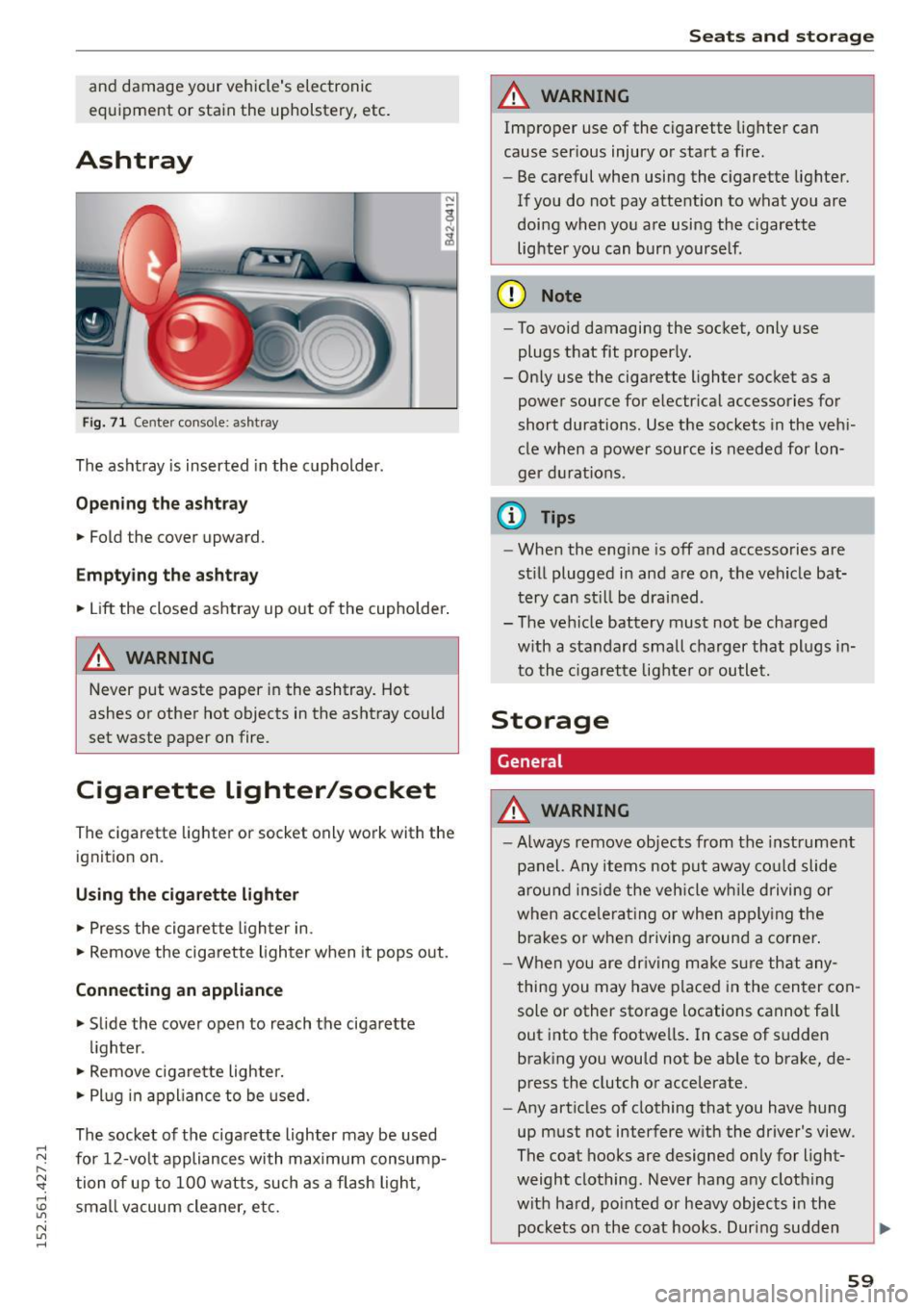
F ig . 71 Cen te r co nsole: ash tray
The ashtray is inserted in the cupholder.
Opening the a shtra y
• Fold the cover upward.
Emptying the ashtray
• Lift the closed ashtray up out of the cupholder .
A WARNING
-
Never put waste paper in the ashtray. Hot
ashes or other hot objects in the ashtray could
set waste paper on fire.
Cigarette lighter/socket
The cigarett e lighter o r socket only work with the
ignit ion on.
Using the cigar ett e lig hter
• Press the cigarette lighter in .
• Remove the cigarette ligh ter when it pops out.
Conn ecting an appliance
• Slide the cover open to reach the cigarette
lighter .
• Remove cigare tte lighte r.
• Pl ug in appliance to be used.
The socket of the cigarette lighter may be used
for 12-volt appliances with maximum consump· tion of up to 100 watts , such as a flash light,
small vacuum cleaner, etc.
Seats and storage
A WARNING
-Improper use of the cigarette lighter can
cause ser ious injury o r start a f ire.
- Be careful when using the c igarette Lighter.
If you do not pay attention to what you are
doing when you are using the cigarette
lighter you can bur n yourse lf .
(D Note
- To avoid damaging the socket, only use
plugs that fit proper ly.
- Only use the cigarette lighter socket as a power source for e lectr ical accessories for
short durations. Use the sockets in the veh i
cle when a power source is needed for lon·
ger d urat ions .
(i} Tips
-When the eng ine is off and accessories are
st ill plugged in and are on, the vehicle bat·
tery can st il l be drained .
- The vehicle battery must not be charged
with a standard small charger that plugs in
to the c igarette lighte r or outlet.
Storage
General
A WARNING
=
- Always remove objects from the instrument
panel. Any items not put away co uld slide
around ins ide the veh icle w hile driving or
when accele rating o r when app ly ing the
brakes or when driving around a corner .
- When you are dr iv ing make s ure that any
thing you may have placed in the center con
sole or other storage locations cannot fa ll
out into the footwe lls. I n case of sudden
braking you would not be ab le to brake, de
press the clutch or accelerate.
- Any articles of clothing that you have hung
up must not interfere with the driver's view .
The coat hooks are designed only for light·
weight clothing . Never hang any clothing
with ha rd, po inted or heavy objects i n the
pockets on the coat hooks. Dur ing sudden ..,.
59
Page 62 of 232
Seats and storag e
braking or in an accident -especially if the
airbag is dep loyed -these objects could in
jure any passengers ins ide the vehicle.
Glove compartment
The glove comportment is illuminated and con
be locked.
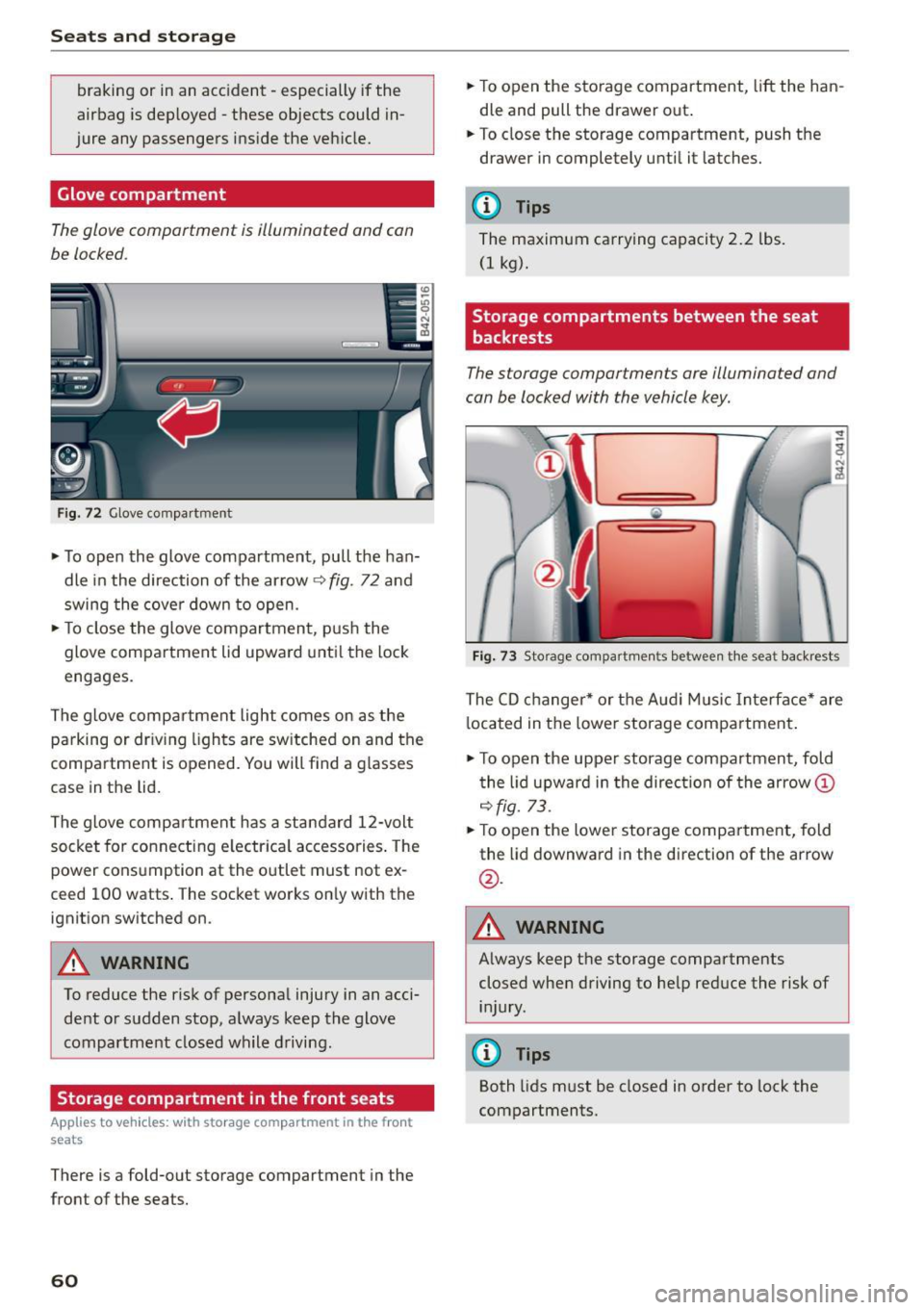
F ig. 72 Glove compartment
.,. To open the glove compartment, pull the han
dle in the direction of the arrow
9 fig. 72 and
swing the cove r down to open .
.,. To close the glove compartment, p us h the
glove compartment lid upward unti l the lock
engages.
The glove compartment light comes on as the parking or dr iving lights are switched on and the
compartment is opened. You will find a g lasses
case in the lid.
The glove compartment has a standard 12-volt socket for co nnecting e lectrica l accessories . The
power cons umption at the outlet must not ex
ceed 100 watts . The socket works on ly with the
ignition switched on.
A WARNING
To reduce the risk of personal injury in an acci
dent o r sudden stop, a lways keep the glove
compartment closed wh ile driving .
Storage compartment in the front seats
Applies to veh icles: w ith storage compartment in the front
seats
There is a fold-out storage compartment in the
front of the seats.
60
.,. To open the storage compartment, lift the han
dle and pull the drawer out .
.,. To close the storage compartment, push the
drawer in completely until it latches.
(D Tips
The maximum carrying capacity 2.2 lbs.
(1 kg).
Storage compartments between the seat
backrests
The storage comportments ore illuminated and
con be locked with the vehicle key.
Fi g. 73 Storage compart men ts betwee n th e seat backrests
The CD changer * or t he A ud i M usic Interface* are
l ocated in the lowe r storage compartment .
.,. To open the upper storage compartment, fold
t he lid upward in the direc tion of the arrow@
9fig. 73 .
.,. To open the lower storage compartment, fold
the lid downward in the direction of the arrow
@ .
A WARNING -
Always keep t he storage compartments
closed when driving to help reduce the risk of i n jury.
(D Tips
Both lids m ust be closed in order to lock the
compartments.
Page 66 of 232
Warm and cold
Rear window defogger
The r ear window d efogger clears th e re ar win
dow of cond ensation .
.,. Press the~ button c:;, page 61, fig . 74 to turn
the rear window defogger on and off.
The rear w indow defogger works only when the
engine is running. The indicator light in the but
ton illuminates when the rear window defogger
is turned on .
The window between the cockpit and engine
compartment is also cleared with the rear w in
dow.
The rear window defogger is switched off auto
mat ica lly after approx. 10 minutes.
@ For the sake of the environment
As soon as the rea r window is clear, yo u
should switch the rear window defogger off .
The reduced power consumpt ion has a benef i
cial effect on f uel consumption.
Heated seats
A pp lies to veh icles: w ith heated seats
The seat cushion and the seatback of the front
seats can be heated electrically.
.,. Press the heated sea ts b utton I-J + I c:;, page 61,
fig . 74
to set the level of heat ing des ired.
T he range o f control s goes from 1 to 3. The he at
set ting selected is shown by LEDs above the but
ton.
_& WARNING
Individua ls with reduced sensitivity to pain o r
tempe rat ure could develop burns when us ing
the seat heating function. To reduce the risk
o f i njury, these ind iv iduals s hould n ot use seat
heating.
@ Note
To avo id damage to the heating elements in
the seats, do not kneel on the seats o r place
heavy loads on a small a rea of the seat.
64
Automatic operation ~
Standard operating mode at all times of the
year .
Turning on automat ic oper ation
.,. Set the temperat ure you want .
.,. Press the
IAUTO I button c:;, page 61, fig. 74.
Automat ic operation ensures constant tempera
tures in the interior and dehumidifies the air in
s ide the veh icle. Air temperature, vo lume, and
distribution are controlled automatically to reach
or maintain the desired interio r temperature as
quic kly as possible. Fluc tuat io ns in exterio r tem
perature and the effects of temperature from the
pos it ion of t he sun are compe nsated for auto
matically.
Manual air recirculation mode~
The recirculation mode prevents polluted outside
air from entering the vehicle in te rior.
Switching on air recirculation
.,. Press the button~ c:;, page 61, fig. 74, c:;, _&.
Switching off air recirculation
.,. Press the button ~ again, or
.,. Press the
IAUTO I button, or
.,. Press the~ button .
I n recircu lation mode, air is drawn from the ve hi
cle inter io r, fil tered, an d recirc ulated . We recom
mend that you select recirculation mode
briefly
c:;, .&. under the following conditions:
When driving thro ugh a tunne l or in a traffic jam
so that exhaust f umes and odo rs ca nnot enter
the ve hicle interio r.
A WARNING
You sho uld not use the recirculation mode for
a n extended period si nce no fresh air is drawn
i n , and with th e air conditioning sw itched off
the w indows c an fo g up - th is increases the
risk of an ac cident!
Page 70 of 232
On the road
- The engine cannot be started by pushing or
towing the vehicle .
@I For the sake of the environment
To avoid unnecessary eng ine wear and to re
duce exhaust emissions , do not let your vehi
cle stand and warm up. Be ready to drive
off
immediately after starting your vehicle.
Stopping the engine
On vehicle s wi th S tron ic*, the engine can be
turned
off in the neutral position N and in each
gear (1 -7 and R) .
.. Tu rn the ignition key to posit ion (!) co
page 66,
fig. 77 .
A WARNING
- Never turn off the engine until the vehicle
has come to a complete stop .
- The brake booster and servotronic only work
when the eng ine is running . W ith the igni
t ion turned
off , you have to apply more force
when steering or braking. Since you cannot
steer and stop normally , this can lead to ac
c idents and serious injuries .
(D Note
-If the engine has been under heavy load for
an extended period of time, heat builds up
i n the eng ine compartment after the engine
i s switched
off -there is a r isk of damag ing
the engine . A llow the engine to continue to
run at id le for a short time or drive until it
has coo led down before you turn it off
q page 73.
-If the engine has been under heavy load for
an extended period of time, it can become
extremely hot . You should not park your ve
hicle over easily combustible objects or
areas (e .g . grass or leaves) . There is a risk of
starting a fire .
{!) Tips
After the engine has been switched off, the ra
diator fan can continue to run for up to 10 m i
nutes - even w ith the ignition switched
off . It
68
can also switch on again after some time if
the coo lant temperature rises as the result of
heat bu ildup or if the engine compartment is
heated by the sun's rays and the engine is hot .
Parking brake
Parking brake
When the parking brake is set, it prevents the ve
hicle from rolling away unintentionally.
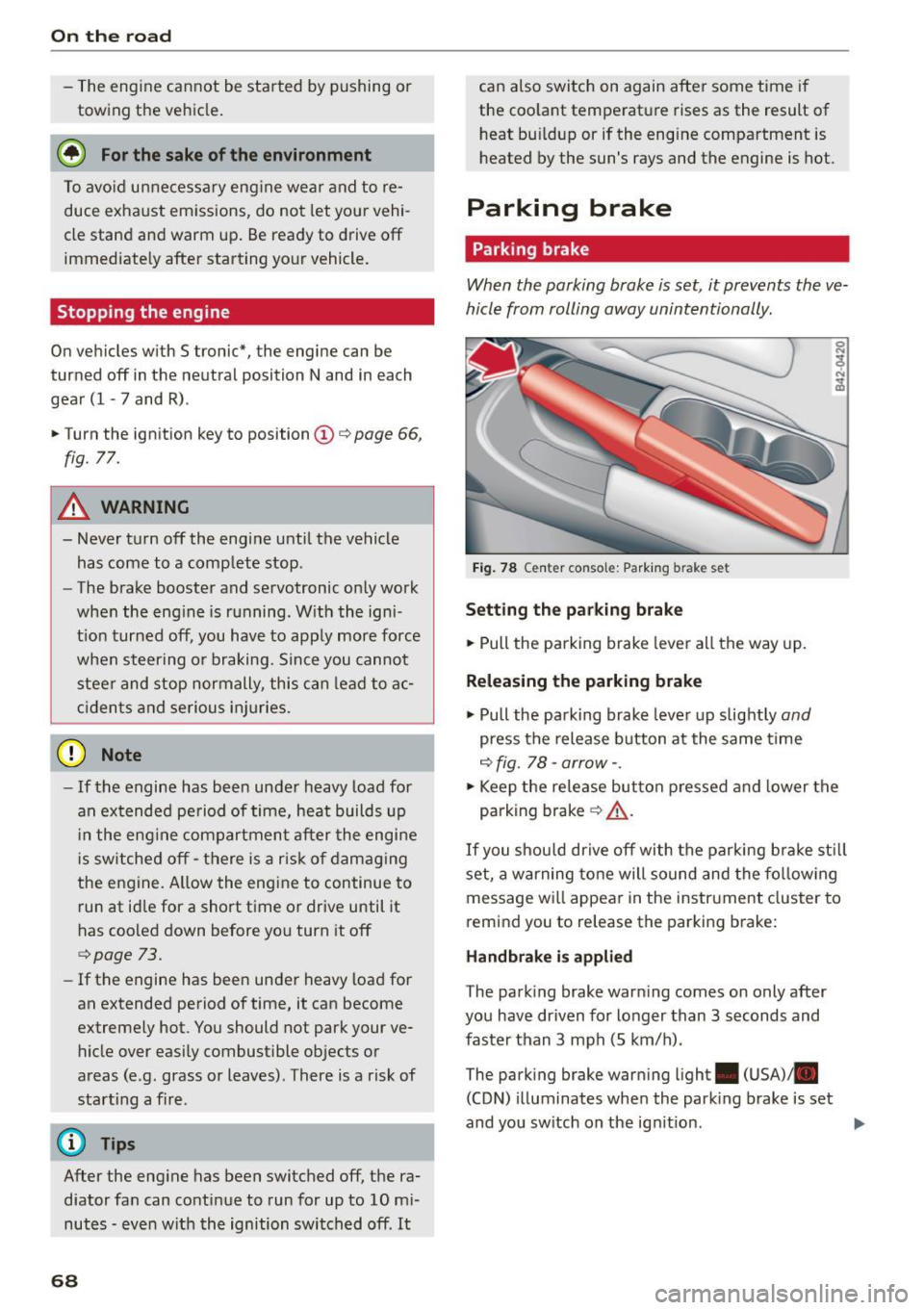
Fig . 78 C ente r co nsol e: Park ing bra ke set
S etting th e pa rking brak e
.. Pull th e parking brake lever all the way up.
Releasing the p arkin g brake
.. Pull the parking brake lever up slightly and
press the release button at the same time
c::> fig . 78 -arrow- .
.. Keep the release button pressed and lower the
parking brak e
q &_.
If you shou ld drive off with the parking bra ke st ill
set, a warning tone will sound and the fo llow ing
message wi ll appear in the instrument cluster to
r e mind you to release the parking brake:
H and brake i s appli ed
T he park ing brake warn ing comes on only after
you have driven for longer than 3 seconds and
faster than 3 mph (5 km/h) .
The parking brake warning ligh t. (USA)/ .
(CON) illuminates whe n the park ing brake is set
and you sw itch on the ign it ion .
Page 73 of 232
.... N
l'
N "1: .... I.O
"' N
"' ....
To store maximum speed
•Turnoff the ignit ion.
• Briefly press the button in the instrument clus
ter
9 page 70, fig. 79. The odometer and the
digital clock are now illuminated.
• Press the button for at least 2 seconds. The cur
rently stored maximum speed appears in the
display
or the crossed out symbol for warning
threshold 2, if no maximum speed was set pre
viously.
• Press the function selector sw itch in the wiper
lever @r=>
fig. 80 up or down to change the set
val ue. Values run up or down in steps of 6 mph
(10 km/h).
To delete maximum speed
•Turnoff the ignition .
• Briefly press the button in the instrument clus
ter
9 page 70, fig. 79 . The odometer and the
digital clock are now illum inated.
• Press the button for at least 2 seconds. The cur
rently stored maximum speed appears in the
display.
• Press the
iRESETI button in the wiper lever @
r:=> fig. 80 until the crossed out speed warning
symbol for warning threshold 2 appears in the
display.
A few seconds after the adjustment is completed,
the illumination for the odometer and the digital
clock w ill go out.
@ Tips
This warning threshold can also be controlled
through the trip computer
r=> page 23, Navi
gating the menu.
On the road
Cruise control
Switching the system on
The cruise control system makes it possible to
drive at a constant speed starting at 20 mph (30kmlh).
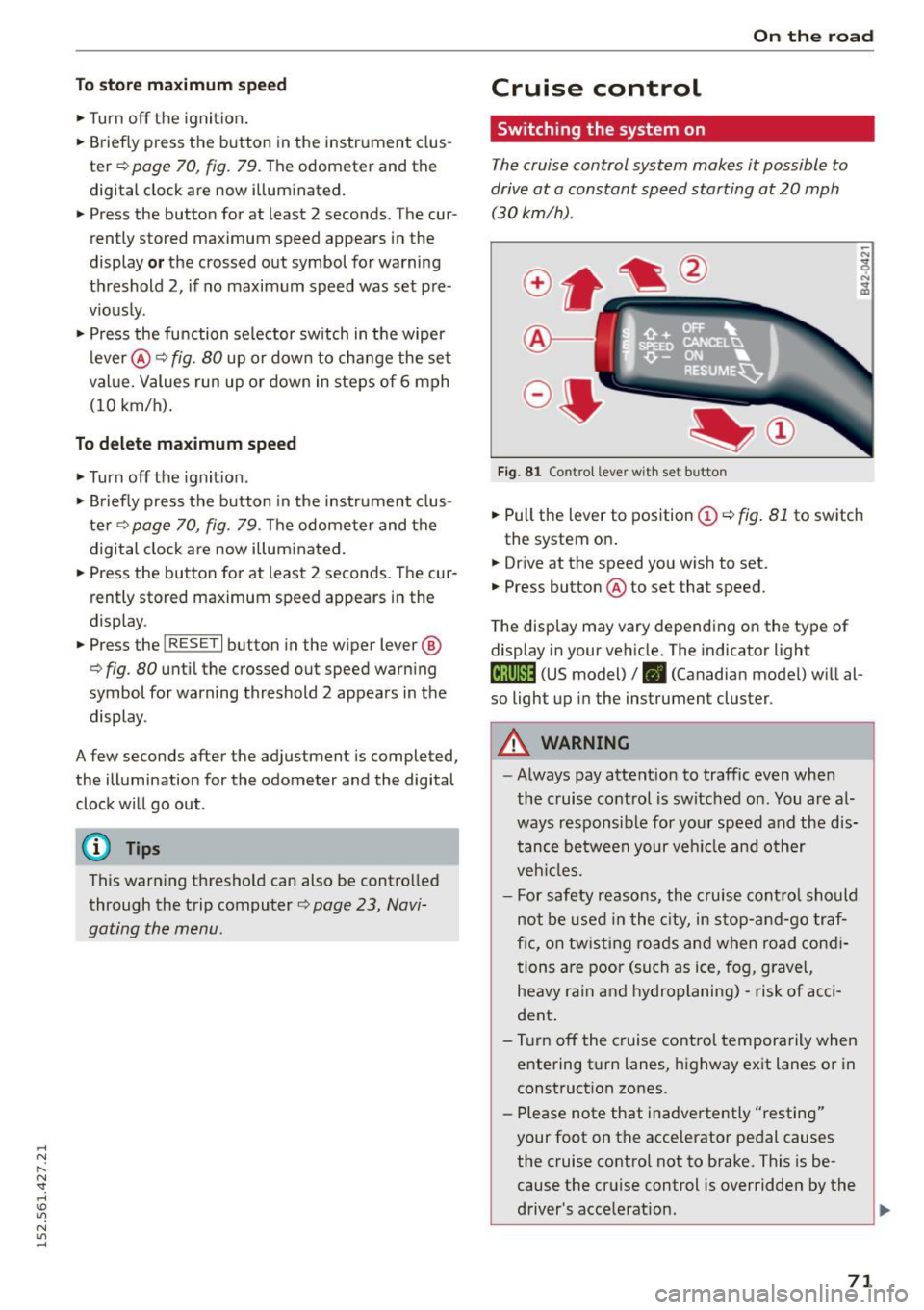
Fig. 81 Contro l lever with set button
• Pull the lever to position (Dr=> fig . 81 to switch
the system on .
• Drive at the speed you wish to set.
• Press button @to set that speed.
The display may vary depending on the type of
display in your vehicle. The indicator light
(lj;jl)~i~ (US model)/ . (Canadian model) will al
so light up in the instrument cluster.
A WARNING
--
-Always pay attention to traffic even when
the cruise control is switched on. You are al
ways responsible for your speed and the dis
tance between your veh icle and other
veh icles.
- For safety reasons, the cruise control should
not be used in the city, in stop-and -go traf
fic, on twisting roads and when road condi
tions are poor (such as ice, fog, gravel,
heavy rain and hydroplaning) -risk of acci
dent .
- T urn off the cruise control temporarily when
entering turn lanes, highway exit lanes or in
construction zones.
- Please note that inadvertently "resting"
your foot on the accelerator pedal causes
the cruise control not to brake. This is be
cause the cruise control is overridden by the
driver's acce lerat ion.
71
Page 75 of 232
throug h im perce ptib le contro l processes . The
damping provides individua l modulation of
damping forces. For example, with damping
characterist ics set to prov ide greater comfort,
damping is set somewhat harder for a brief peri
od only as requ ired, when round ing a curve and
when braking .
Standard setting
Select the standard sett ing if you prefer a sus
pension setting emphasi zing comfort.
Sport s etting
Select the sport setting if you prefe r a spor ty sus
pension setting. The LED in the button
[l] comes
on to indicate sport setting .
@ Tips
The warning/indicato r ligh t R in the instr u
ment cluster comes on in the event of a mal
function. Drive to the closest a uthorized Audi
dea ler as soon as possible and have the mal
function repaired.
Sporty driving
Warming up and cooling down
B y care fully warming up and cooling down you r
veh icle, you can he lp ensure tha t it is not over
stressed unnecessarily du ring sporty driving.
W hen warming up , the veh icle is driven a t a max
i mum eng ine speed of 6 000 R PM
(Vl O engine) or
70 00 RPM (V8 engine) in order to raise the en
g ine oi l tempe ratu re to a minimum of 140 °F
(60 °() . The tires also only reach the ir full road
h olding capability once they have warmed up.
The cooling fan can continue to run in you r vehi
cle after the engine is switched off . However,
d riving the vehicle to cool it down is part icu larly
important. During sporty driving, the engine and
brakes, the exhaust system, and the transmission
all become extremely hot . Before you park the
ve hicle, you should dr ive it for a few m iles/kilo-
~ mete rs a t light load in the low rpm range to al-
~ low i t to cool down. "': ,...., \!) 1.1'1
N 1.1'1 ,....,
On th e road
Driving on a track
Befo re you take your veh icle o ut on a track, en
s u re th at i t is in perfe ct condi tion. Fo r ex ample ,
yo u should chec k the tire trea d an d the bra ke
pads . It is bes t to inc rease tire pressu re by about
0 .3 bar.
W hen dr iving on a track , oil consump tion may be
somewhat higher than in "norma l" ope rat ion
¢ page 159 .
You should definitely inspec t your ve hicle afte r
s u bje cting it to seve re condi tions. Are the br ake
pads OK? Is there any thing unusua l about the
t ir es, including the inner and outer sidewalls (e .g.
tread , blistering)? A re the air intakes free of
l eaves and tire dust? Is the o il level OK?
Your a uth orized Audi dea ler or q ua lified wor k
sho p will be happy to underta ke an inspection be
fore and after use on the race track .
A WARNING ._
Some race tracks (e.g. steeply banked turns)
may affect the response of t he ESC.
(D Tips
- Review the t rack requ irements and condi
tions befo re you sta rt driv ing.
- W hen d riven on a race track, all vehicle
parts are severe ly stressed. This can result
in increased wear .
73