light AUDI R8 SPYDER 2015 Owner's Manual
[x] Cancel search | Manufacturer: AUDI, Model Year: 2015, Model line: R8 SPYDER, Model: AUDI R8 SPYDER 2015Pages: 232, PDF Size: 58.36 MB
Page 33 of 232
.... N
l'
N "1: .... I.O
"' N
"' ....
on the vehicle to make sure it is properly
l ocked.
- Do not use the remote control if you are in
side the car, otherwise you may unintention
ally lock the vehicle, and then you would set
off the ant i-theft a larm when you try to
start the engine or open a door . In case this
happens anyhow, push the unlock button©.
- Use the panic funct ion only if you are in an
emergency situa tion.
Resetting the remote control
The remote control must be reset if the vehicle
does no t unlock .
.. Press the unlock button 0 on the remote con
trol.
.. Manually unlock the driver's door lock with the
mechan ical key wi thin 30 se cond s.
.. Press e ither the lock-
{fl or the unlock CD button
to comple te the reset sequence .
Operating locks with the key
To lock and unlock the vehicle from the outside ,
turn the key in the lock of the driver's door .
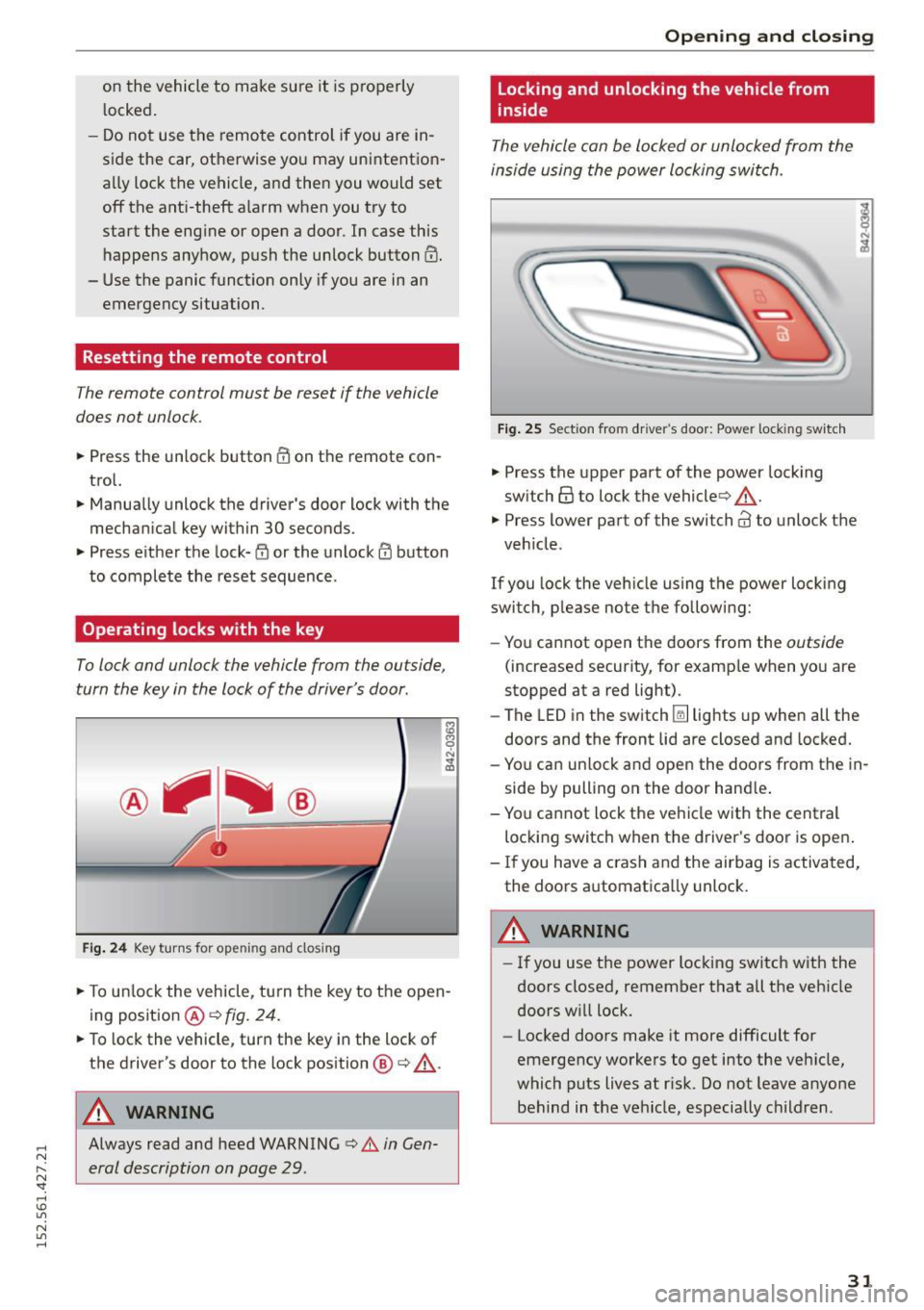
Fig. 24 Key turn s for op ening and closin g
.. To un lock the vehicle, tu rn t he key to the open
ing position @¢
fig. 24 .
.. To lock the vehicle , turn the key in the lock of
the driver's door to the lock position @
c:> .&_.
A WARNING
Always read and heed WARNING c> A in Gen
eral description on page 29 .
Opening and clo sing
Locking and unlocking the vehicle from
inside
The vehicle can be locked or unlocked from the
inside using the power locking swi tch .
Fig . 2 5 Sect ion fro m drive r's door : Powe r loc king switc h
.. Press the upper part of the powe r lock ing
sw itch@ to lock the vehicle ¢,&. .
.,. Press lower part o f the sw itch@ to unlo ck the
veh icle .
If you lock the veh icle using the power locking
switch, p lease no te t he following:
- You cannot open the doors from the
outside
(increased security, for examp le when you are
stopped at a red light) .
- The LED in the switch~ lights up when all the
doors and the front lid a re closed and locked.
- Yo u can un lock and open the doors from the in
side by pulling on the door hand le .
- You ca nnot lock the ve hicle w it h the central
locking switch when the d river's door is open .
- If you have a crash and the airbag is activated,
the doors a utomatically unlock.
A WARNING
-
- If you use the power loc king switch with the
doors closed, remember that all the veh icle
doors w ill lock.
- Locked doors make it more difficult for
emergency workers to get into the veh icle,
which puts lives at r isk. Do not leave anyone
behind in the vehicle, especially children .
31
Page 37 of 232
.... N
l'
N "1: .... I.O
"' N
"' ....
the ignition is switched off. Only when ei
ther of the front doors are opened are the power windows switched off.
- Be careful when closing the windows. Check
to see that no one is in the way, or serious injury could result!
- Always remove the ignition key whenever
you leave your vehicle .
- If you lock your vehicle from the outside, no
one, especially children, should remain in
the vehicle.
- Do not stick anything on the windows or the windshield that may interfere with the driv
er's field of vision.
(D Tips
- When the doors are opened, the windows
are automatically lowered 0.4 in (10 mm).
Reactivating the system after battery
disconnection
If the vehicle bat tery is disconnected and then
reconnected, the automati c closing and opening
function will not work until it is reactivated .
... Pull and hold the power window switch until
the window is completely closed .
.,. Release the switch and pull it again for one sec
ond .
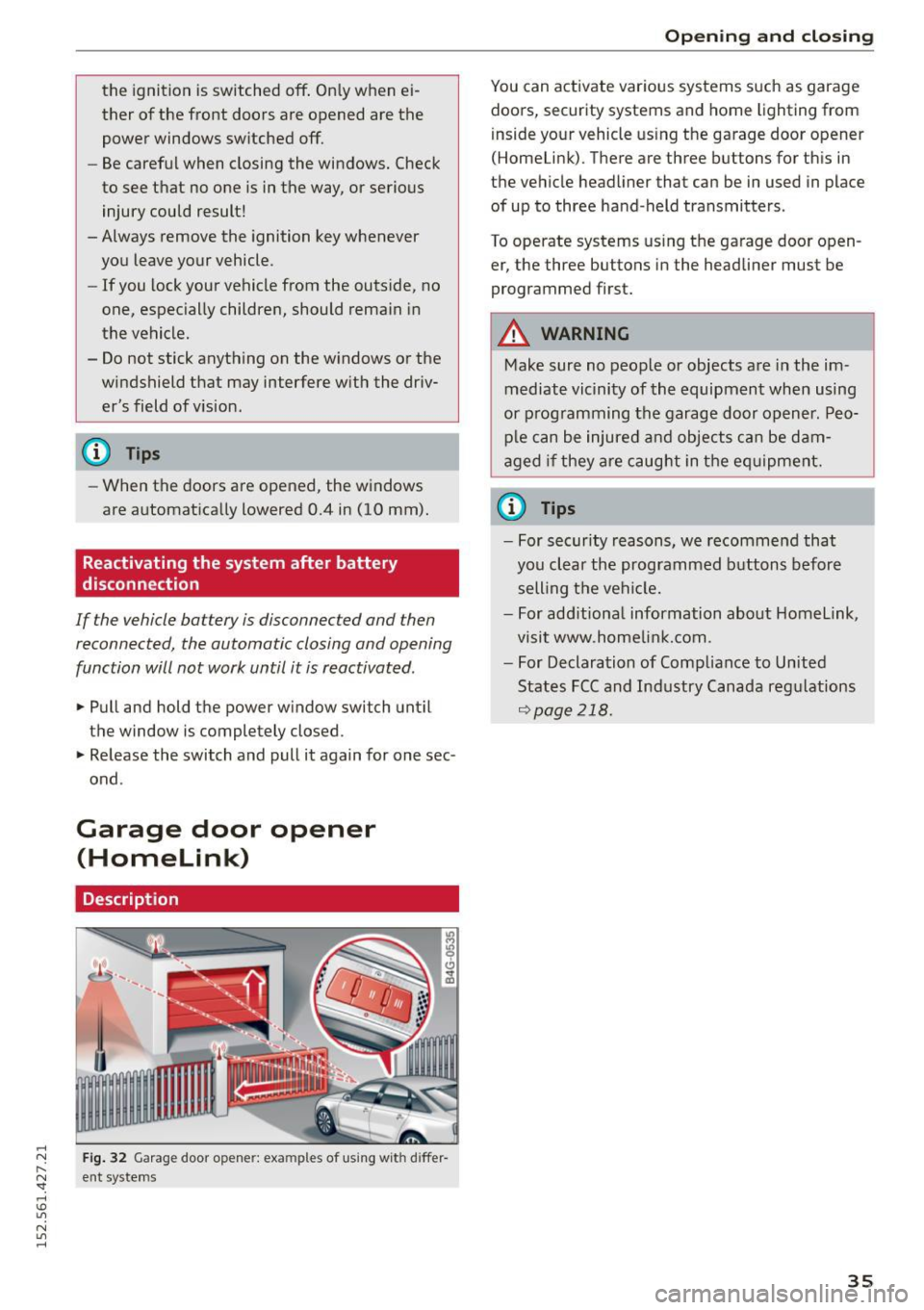
Garage door opener
(Homelink)
Description
Fig. 32 Garage door opene r: exa mples of using wit h diffe r
ent sy stems
Opening and closing
You can activate various systems such as garage
doors, security systems and home lighting from
inside your vehicle using the garage door opener
(Homelink) . There are three buttons for this in
the vehicle headliner that can be in used in place of up to three hand -held transmitters .
To operate systems using the garage door open er, the th ree buttons in the headliner must be
programmed first.
A WARNING
=
Make sure no people or objects are in the im-
mediate vicinity of the equipment when using
or programming the garage door opener. Peo
ple can be injured and objects can be dam
aged if they are caught in the equipment.
@ Tips
-For security reasons, we recommend that
you clear the programmed buttons before
selling the vehicle.
- For additional information about Homelink ,
visit www .homelink.com.
- For Declaration of Compliance to United
States FCC and Industry Canada regulations
Qpage 218.
35
Page 38 of 232
Opening and closing
Programming the Homelink transmitter
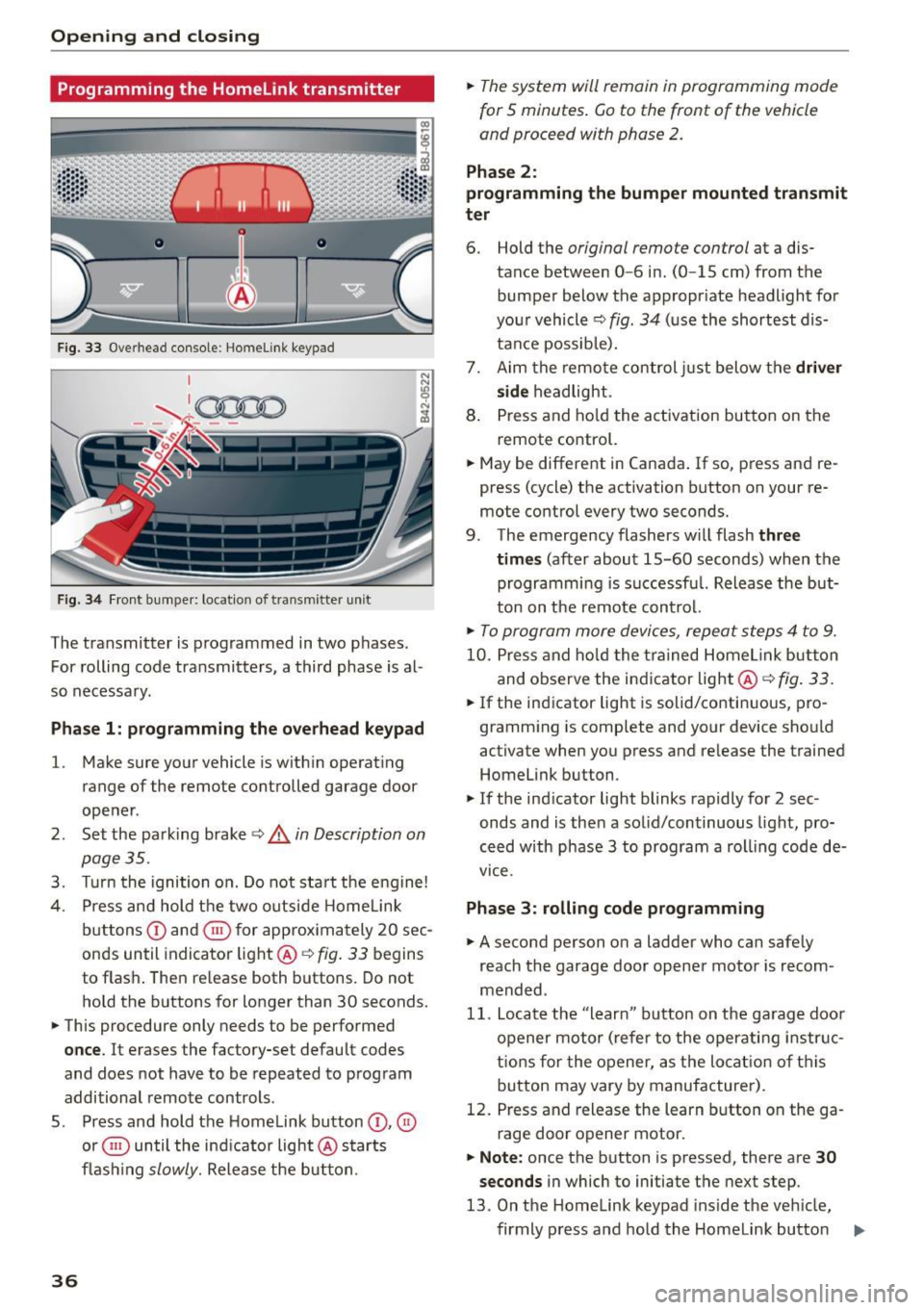
Fig. 33 Overhead console: Homelink keypad
Fig . 34 Fr ont bumper: loca tion of transmitter unit
The transmitter is programmed in two phases.
For rolling code transmitters, a third phase is al
so necessa ry .
Pha se 1: programming the ove rhead keypad
l.
Make sure you r vehicle is w ith in operat ing
range of the remote controlled garage door
ope ner .
2 . Set the park ing brake ~
& in Description on
page 35 .
3. Turn the ignition o n. Do not sta rt the e ngine!
4. Press and hold t he two outside Home Link
b uttons
(D and ® for approx im ately 20 sec
onds until indicator light @~
fig. 33 begins
to flas h. The n re lease both buttons. Do not
hold the buttons for longer than 30 seconds.
.,. This procedure only needs to be perfo rmed
once . It erases the factory-set default codes
and does not have to be repeated to prog ram
additional remote controls .
5 . Press and hold the Homelink button
(D , ®
or ® until the ind ic a tor light @ starts
fl ash ing
slowly. Release the bu tton.
36
.,. The system will remain in programming mode
for
5 minutes . Go to the front of the vehicle
and proceed with phase 2 .
Phase 2:
programming the bumper mounted tran smit
ter
6. Hold the original remote control at a dis
tance between
0-6 in . (0 -15 cm) from the
bumper below the appropr iate headlight for
you r vehicle ~
fig. 34 (u se the shortest dis
tance possib le).
7. Aim the remote control just below the
driver
side
h eadlight.
8 . Press and ho ld the activation but to n on the
remote co ntrol.
.,. May be different in Canada .
If so, press and re
press (cycle) the activation button on your re
mote control every two seconds.
9 . The emergency flashers w ill flash
three
times
(after about 15-60 seconds) when the
programmi ng is s uccessf ul. Release the but
ton on t he remote con trol.
.,. To program more device s, repe at st ep s 4 to 9.
10 . Pr ess and ho ld the trained Home link button
and o bserve the ind icator light@~
fig. 33.
.,. If the ind icator light is solid/co nti nu ous, pro
gramm ing is complete and yo ur device sho uld
activate when you press and re lease the trained
Homelink button .
.,. If the indicator light blinks rapidly for 2 sec
onds and is the n a so lid/continuous light, pro
ce ed w ith phase 3 to program a roll ing code de
vice .
Phase 3: rolling code programming
.,. A second person o n a ladder wh o ca n safe ly
reach the garage door opener motor is recom
mended .
11. Locate the "learn" button on the ga rag e doo r
o pener mo tor ( refer to the oper ati ng in str uc
t ions for the opener, as the lo cat io n of th is
b utton may vary by manufacturer) .
12 . Pres s and release the learn b utton on the ga
rage door o pener motor.
.,. Note: once the b utton is pressed, there are 30
seconds
in which to initiate th e next step.
13 . On t he Home link keypad ins ide the ve hicle,
firmly p ress and hold the Homelink butto n
IJ,,
Page 39 of 232
..... N
r-N "': ..... \!) 1.1'1
N 1.1'1 .....
previously programmed in phases 1 and 2 for
two seconds and release. Repeat this se
quence
twice.
"'Some vehicles may require the press/hold/re
lease sequence up to three times to complete
the training process .
"' HomeLink should now activate your rolling
code equipped device.
If the 5 minute time limit is exceeded, the emer
gency flashers will flash one time
to indicate
that the process has been terminated . In this
case, repeat steps 4 through 9.
If the emergency flashers do not flash
three
times (after about 15-60 seconds), programming
was not successful. In this case, repeat steps 4
through 9.
Remote control units for garage door openers in
Canada are set to stop transmitting radio fre
quency signals after two seconds . This time may
not be sufficient for the Homelink system to
learn the radio frequency signal. Perform all oth
er steps as described above.
Operating the Homelink transmitter
The Homelink transmitter works in the same
manner as the original handheld remote control
that came with the system.
"'Press the appropriate programmed button
Q),
0 or @ ¢ page 36, fig. 33 to activate the de
sired remote control function ¢
A. in Descrip
tion on page 35.
Reprogramming a single button
A Homelink button can be reprogrammed indi
vidually without affecting the other button allo
cations.
Programming the overhead keypad
"'Press the appropriate Homelink button until
the indicator light begins flashing slowly.
Programming the bumper mounted transmit
ter
l. Hold the original remote control at a dis
tance between
0-5 in . (0-13 cm) from the
Opening and closing
bumper below the appropriate headlight for
your vehicle (use the shortest distance possi ble).
2. Aim the remote control just below the
driver
side
headlight.
3. Press and hold the activation button on the remote control.
4. The emergency flashers will flash
three
times
(after about 15-60 seconds) when the
programming is successful. Now release the
button on the remote control.
.. If the device utilizes a rolling code, please fol
low phase 3 of ¢
page 36, Programming the
Homelink transmitter
for rolling code pro
gramming.
This procedure will cause the existing program ming on the Homelink button to be erased!
Erasing the programming of the Home link
transmitter
When you erase the programming, the program
ming on all three of the transmitter channels
with be lost!
"' Perform steps 1 to 4 as described on
¢ page 36, Phase 1: programming the over
head keypad .
When completed, the Home link system will be in
the programming mode and is then ready to
learn the codes for remote controlled devices .
(D Tips
-Programmed buttons cannot be erased indi
vidually .
- For security reasons you are advised to erase
the programming of the Homelink system
before you sell your vehicle .
37
Page 40 of 232
Convertible top
Convertible top
Convertible top
General information
The fabr ic conv ert ible top opens and closes auto
matica lly. W hen it is open, it is sto red in t he con
ver tible top storage bay. The convert ible top may
be opened or closed at speeds up to 31 mph
(SO km/h).
T he conve rtible top is wind- and wate rproof un
de r n orma l conditions. Some mois ture may co l
lec t in the vehicle interior, but on ly unde r ex
tremely adverse weathe r co ndit ions such as tor
rentia l rain . That is normal and no cause for con
cern.
F ollow t he clean ing and maintenance instr uc
tions ~
page 145 to ensu re the convertib le to p
remains wind- an d waterproof. A lso note the fol
lowing points:
- Only stow the convertib le top when i t is clean
and dry. Gra ins of sand or coa rse dirt particles
can cause abrasions on the convertible top
when stowed that can lead to damage to the
fabric over time. Stowing the convertible top
whe n it is damp can cause marks or pe rmanent
mildew spots to form .
- Do not leave the convertible top open for sever
al weeks or the c reases in it may become discol
ored . Th i s is especially tr ue if the top was stow
ed when damp .
- Remove ice and snow befo re ope ning the con
vertib le top . Do not use any sharp edged ob
jects to remove ice and snow or t he conve rtible
t op co ul d be scra tch ed o r dam aged . T he rear
window may be cleare d wi th a stand ard i ce
scra per.
- T he fab ric in the co nver tib le top lose s elasticity
in su b-zero tem pera tures . We recommend not
opening or closi ng the convertib le top when the
temperature is below 32 °F (0 QC). T he conver
tible top will not open when the temperature is
S °F (-15 QC) or below.
38
Opening /closing the convertible top
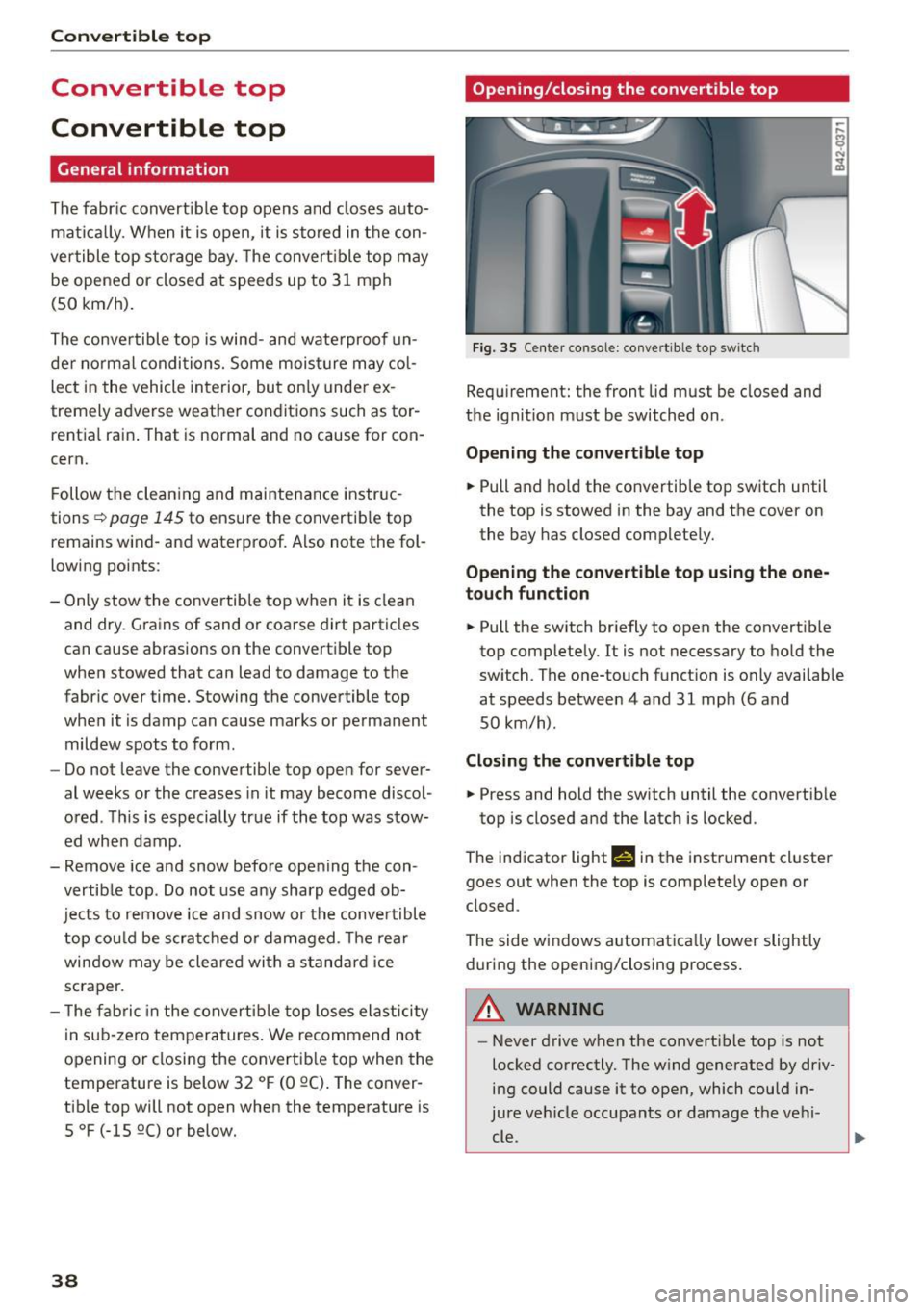
Fi g. 35 Cente r console : co nve rtible top sw itc h
Req uirement: the front lid must be closed and
t h e ign it io n m ust be switched on.
Opening the convertible top
.,. Pull and ho ld the co nvertib le top switch until
the top is stowed in the bay and the cover on
the bay has closed complete ly.
Opening the convertible top using the one
touch function
.,. Pull the sw itch br iefly to open the convertib le
top comp lete ly. It is not necessary to ho ld the
sw itch . The one-touch funct ion is only avai lab le
at speeds between 4 and 31 mph (6 and
SO km/h) .
Closing the convertible top
.,. Press and hold the sw itch until the convertib le
top is closed a nd the latch is locked.
The ind icator lighr
fi in the instrument cl uster
goes out when the top is comp lete ly open or
closed .
The side windows a utomatica lly lower slightly
during the opening/closing process.
A WARNING
- Never drive when the convert ible top is not
locked correctly. The w ind generated by driv
ing could cause it to open, which could in
jure v ehicle occupants or damage t he ve hi-
c~ . ~
Page 42 of 232
Convertible top
Wind deflector
The wind deflector reduces turbulence in the pas
senger compartment and makes driving more
comfortable.
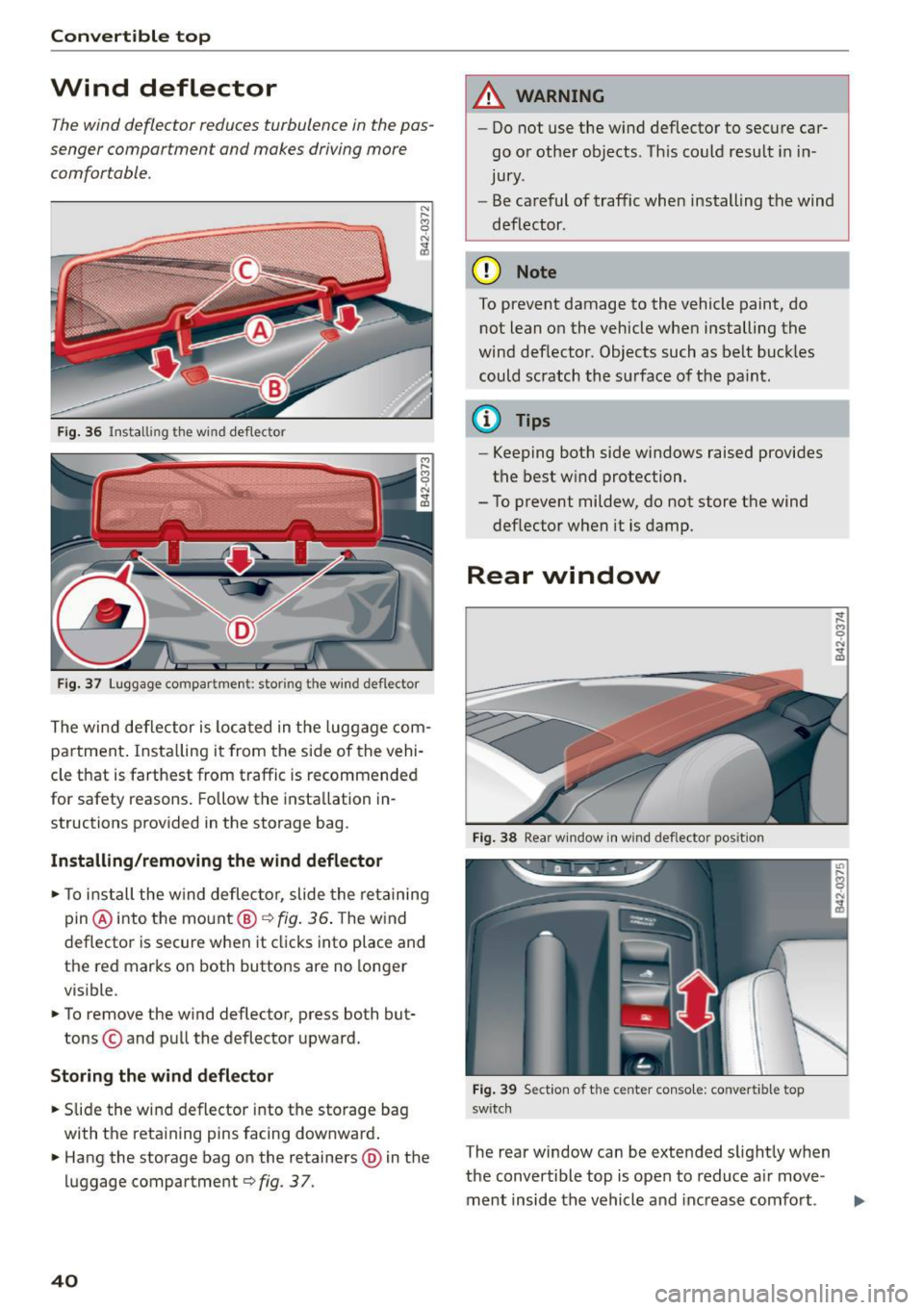
F ig. 36 Install ing the wi nd de flector
Fig. 37 Luggage compartment: stori ng t he w ind deflector
The wind deflector is loca ted in the luggage com
pa rtment . Insta lling it from the side of the vehi
cle that is farthest from traffic is recommended
for safety reasons. Follow the insta llation in
structions provided in the storage bag.
Install ing /re moving th e wind d efl ector
.. To install the wind deflec tor, slide the re taining
pin @into the mount@<=>
fig. 36 . The wind
deflector is secure when it clicks into place and
the red marks on both buttons are no longer
visible .
.. To
remove the wind deflector, press both but
tons © and pull the deflector upward.
Stori ng the wind defl ect or
.. Slide the wind deflector into the storage bag
with the retaining pins facing downward .
.. Hang the storage bag on the retainers @in the
luggage compartment <=>
fig. 3 7.
40
A WARNING
- Do not use the w ind deflector to secure car
go or other objects . Th is could resu lt in in
jury .
- Be ca reful of traffic when install ing the wind
deflector.
(D Note
To prevent damage to the vehicle paint, do not lean on the vehicle when installing the
wind deflector. Objects such as belt buckles
could scratch the surface of the pa int .
@ Tips
-Keeping both side windows raised provides
the best w ind protection .
- To prevent mildew, do not store the wind deflector when it is damp.
Rear window
Fig . 38 Rea r w indow in w ind de flector pos ition
Fig . 39 Section of t he ce nter conso le : co nvert ibl e top
sw it c h
The rear window can be extended slightly when
the convertible top is open to reduce a ir
move
ment inside the vehicle and increase comfort .
Page 47 of 232
.... N
l'
N "1: .... I.O
"' N
"' ....
,&_ WARNING
-
Make sure the convertible top is locked cor
rectly. Otherwise the wind from driving could
cause the convertible top to open. This can re
sult in injuries and damage to the vehicle.
Step 7: Secure the fins on the body
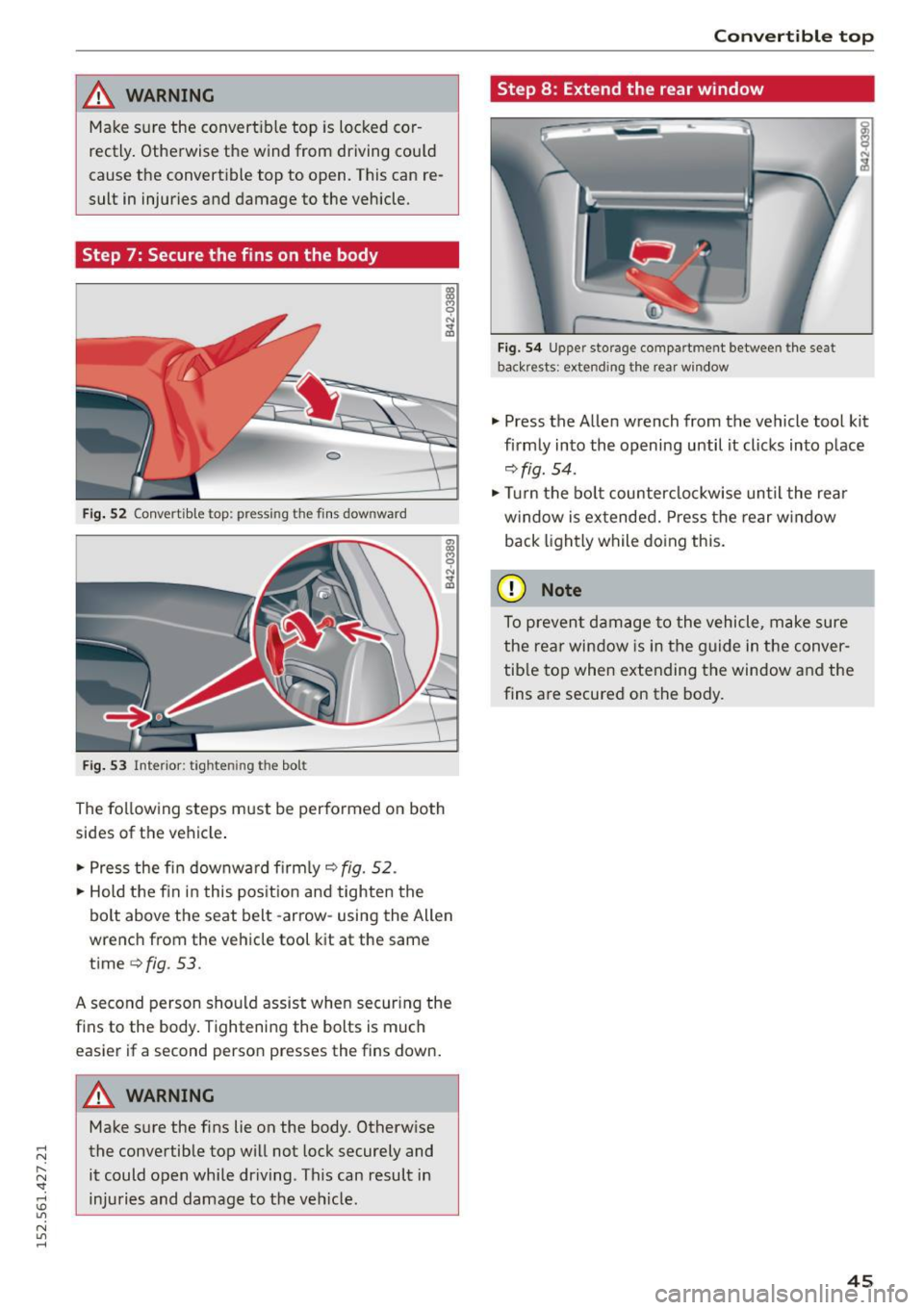
Fig. 52 Convertib le top: pressing the fi ns downward
Fig. 53 Interior: tightening the bolt
The following steps must be performed on both
sides of the vehicle.
"'Press the fin downward firmly
9 fig. 52.
"'Hold the fin in this position and tighten the
bolt above the seat belt -arrow-using the Allen
wrench from the vehicle tool kit at the same
time
¢fig. 53.
A second person should assist when securing the fins to the body. Tightening the bolts is much
easier if a second person presses the fins down.
A WARNING
Make sure the fins lie on the body. Otherwise
the convertible top will not lock securely and
it could open while driving. This can result in
injuries and damage to the vehicle .
Convertible top
Step 8: Extend the rear window
Fig. 54 Upper storage compartment between the seat
backrests: extending the rear window
"' Press the Allen wrench from the vehicle tool kit
firmly into the opening until it clicks into place
9fig. 54.
"'Turn the bolt counterclockwise until the rear
window is extended. Press the rear window
back lightly while doing this.
(D Note
To prevent damage to the vehicle, make sure
the rear window is in the guide in the conver
tible top when extending the window and the
fins are secured on the body.
45
Page 48 of 232
Clear vision
Clear vision Lights
Switching the headlights on/off
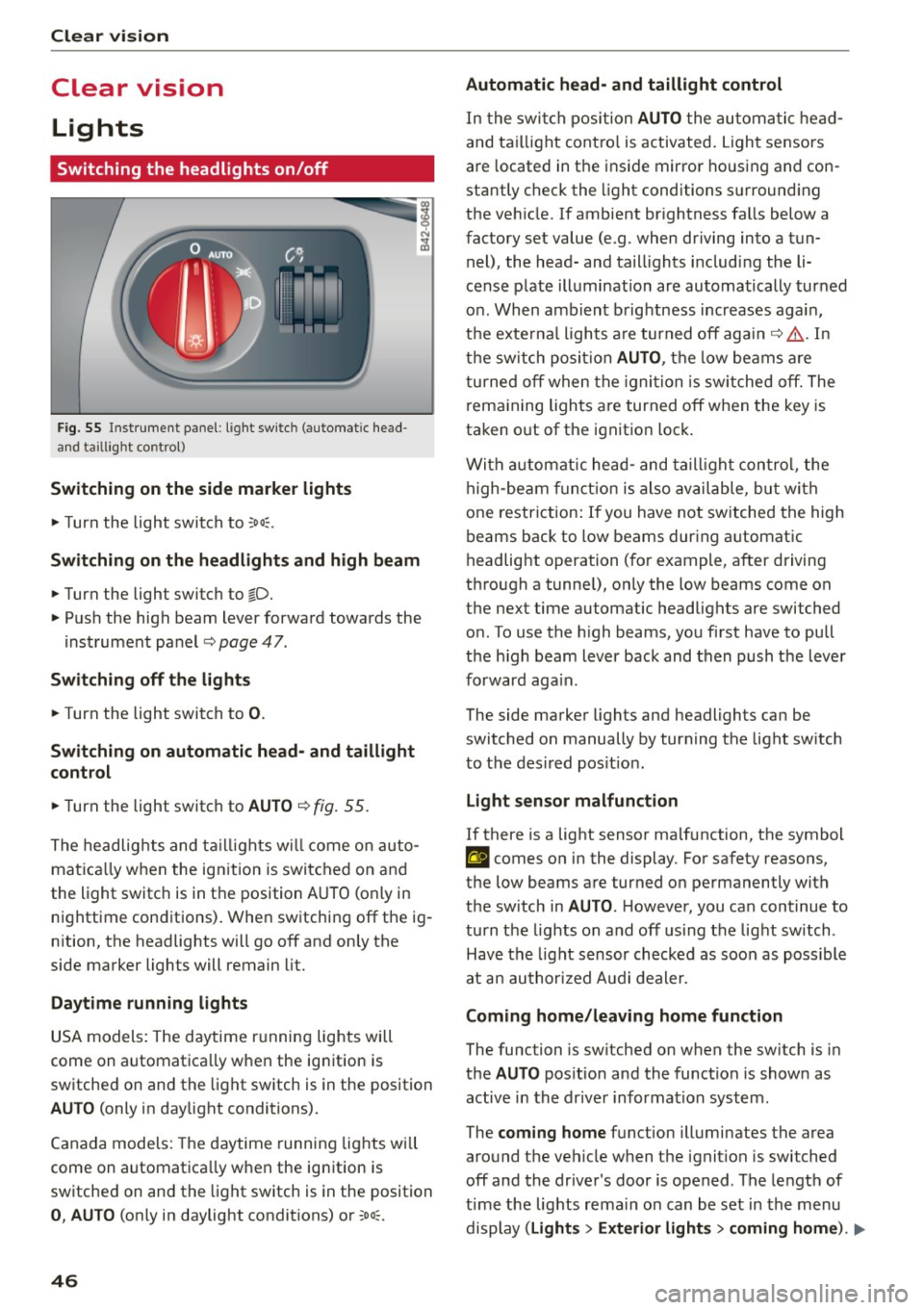
F ig. 55 Inst rument pane l: ligh t switch (automatic head
and taill ig ht control)
Switching on the side marker lights
"'T urn the light switch to :oo:.
Switching on the headlights and high beam
"'Turn the light switch to io.
"'Push the high beam lever forward towards the
instrument panel~
page 47.
Switching off the lights
"'Turn the light switch to 0.
Switching on automatic head- and taillight
control
"'Turn the light switch to AUTO ~ fig. 55.
The headlights and taillights will come on auto
matica lly when the ignition is switched on and
the light switch is in the position AUTO (on ly in
nighttime conditions). When switching
off the ig
nition, the headlights will go
off and only the
side marker lights will remain lit.
Daytime running lights
USA models: The daytime running lights will
come on automatica lly when the ign ition is
sw itched on and the light switch is in the position
AUTO (only in daylight conditions).
Canada models: The daytime running lights will
come on automatica lly when the ign ition is
sw itched on and the light switch is in the position
0, AUTO (only in daylight condit ions) or :oo;.
46
Automatic head- and taillight control
In the switch position AUTO the automatic head
and taillight contro l is activated . Light sensors
are located in the ins ide mirror housing and con
stantly check the light conditions surrounding
the vehicle. If ambient brightness falls below a
factory set value (e.g. when driving into a tun
nel), the head- and taill ights including the li
cense plate illumination are automatically turned
on . When ambient brightness increases again,
the externa l lights are turned
off again~,& . In
the switch position
AUTO , the low beams are
turned
off when the ignition is switched off. The
remaining lights are turned
off when the key is
taken o ut of the ignition lock .
With automatic head-and taillight control, the
high-beam function is also available, but with
one restriction: If you have not switched the high
beams back to low beams during automatic
headlight operation (for example, after driving
through a tunne l), only the low beams come on
the next time automatic headlights are switched
on . To use the high beams, you first have to pull
the h igh beam lever back and then push the lever
forward again.
The side marker lights and headlights can be
switched on manually by turn ing the light sw itch
to the des ired pos it ion .
Light sensor malfunction
If there is a light sensor ma lfunction, the symbol
El comes on in the display. For safety reasons,
the low beams are turned on permanently with
the sw itch in
AUTO. H owever, you can continue to
turn the lights on and
off using the light sw itch.
Have the light sensor checked as soon as possible
at an authorized Audi dealer .
Coming home/leaving home function
The function is sw itched on when the sw itch is in
the
AUTO pos ition and the function is shown as
active in the driver information system.
The
coming home function illuminates the area
around t he vehicle when the igni tion is switched
off and the driver's door is opened. The length of
time the lights rema in on can be set in the menu
display
( Lights > Exterior lights > coming home ). IJJ,,
Page 49 of 232
.... N
l'
N "1: .... I.O
"' N
"' ....
The leavin g home function i lluminates the area
around the vehicle when un locking it .
A WARNING
-Never use daytime running lights to see
where you are going. They are not bright enough and w ill not let you see far enough
ahead for safety, especially at dusk or when it is dark . Be aware of changes in outside
light cond itions when you are dr iv ing and re·
spond by switching on your low beams.
- Automatic head· and taillight control is only
intended to assist the d river. This feature
does not relieve the driver of his responsibi l
ity to check t he headlights a nd to turn t hem
on manually according to the cur rent lig ht
and visibility conditions. For example, fog
and rain cannot be detected by the light
sensors. Consequent ly, always switch the
headlights on under these weather cond i·
tions and when dr iv ing in the da rk.
- Crashes can happen when yo u cannot see
the road ahead and when you cannot be
seen by other motorists.
- Always turn on the headlights so that you
can see ahead and so that others can see
your car from the back.
- Please observe lega l regulations when using
the light ing systems described .
@ Tips
-Always observe the specific local regulations
for your area when to use your lights.
- Turn on low beams as evening app roaches
or in conditions of poor visib ility.
- Do not attach stickers to the windshie ld in
front of the sensors as this can disab le the
automat ic head- and taill ight control and
the automatic glare-dimming of the rear·
v iew mirror(s) *.
- If you remove the ignit ion from the ign it ion
lock while the headlights are still on, a buz
zer w ill sound as long as the dr iver's door is
open to remind you to t urn off the lights .
- In the AUTO mode, the low beams are
turned off when the ignition is t urned off.
The remaining lights ar e turned off when
t h e key is taken ou t of the ignition.
Cle ar vi sion
-In cool or damp weather conditions the
head lights may fog
over temporarily on the
inside .
- The c ritical factor is the temperature dif
ference between the inter io r and the exte·
rior of the hea dlight lens .
- W ith the mai n beams switched on, the
lig ht-em itting area w ill be free of conden
sation after a short time, however the
e d ges of the glass may still be fogged.
- This physical phenomeno n has no effect
on the life of your veh icle's lighti ng sys
tem .
Turn signals and high beam lever
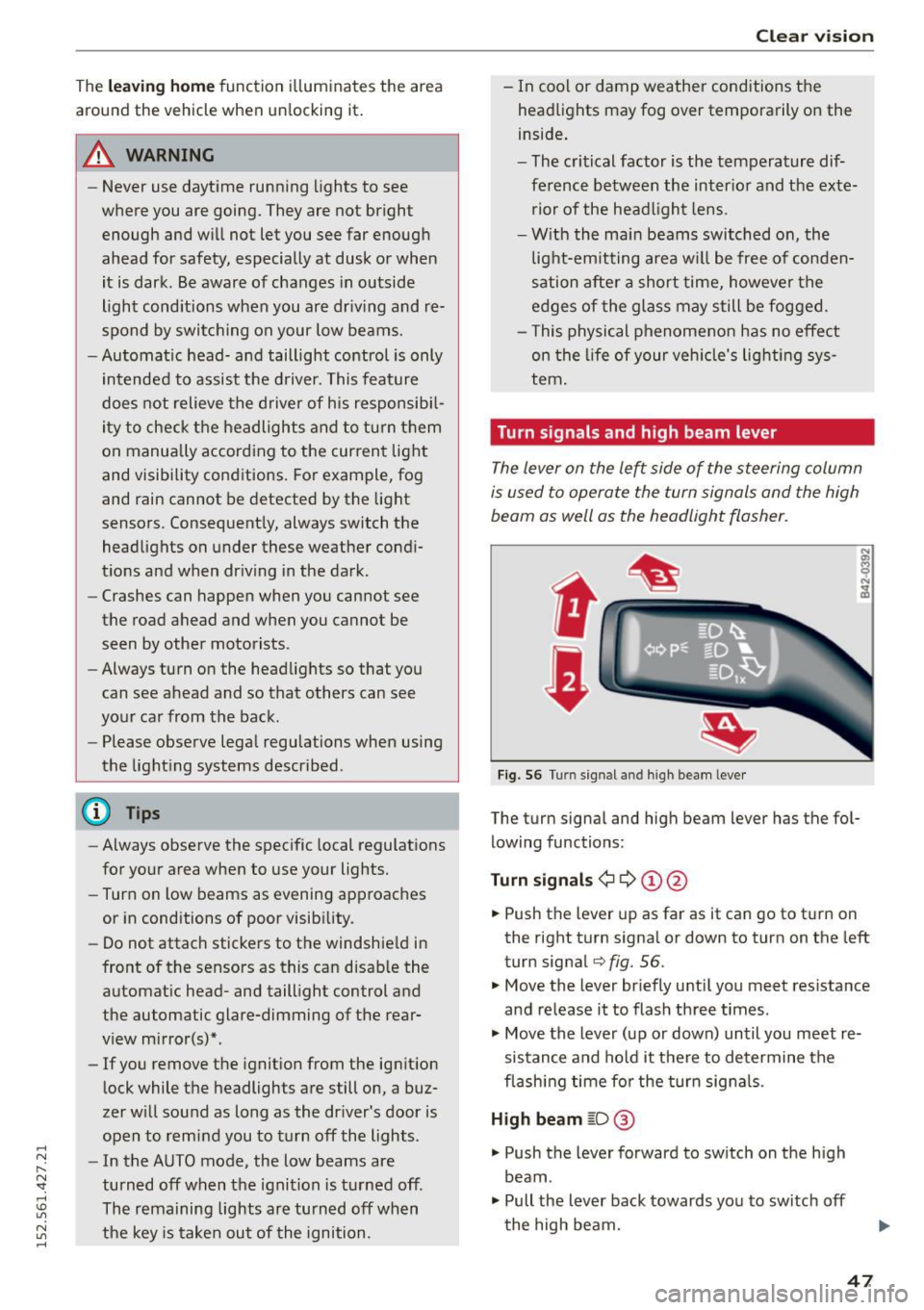
The lever on the left side of the steering column
is used to operate the turn signals and the high
beam as well as the headlight flasher.
t
t
Fig . 56 Turn signal and high bea m leve r
The turn signa l and high beam lever has the fo l
lowing functions :
Turn signal s¢¢ ©@
.,. Push the lever up as far as it can go to t urn on
the right turn signa l or down to turn on the left
turn signal
q fig. 56.
.,. Move the lever br iefly u ntil you meet res istance
and re lease it to flash three times.
.,. Move the lever (up or down) until you meet re
sistance and hold it there to determine the
flash ing time fo r the turn signa ls .
High beam ~D @
.,. Push the lever forward to sw itch on the h igh
beam.
.,. Pull the lever back towards yo u to switch off
the high beam.
47
Page 50 of 232
Clear vision
Headlight flasher ~D ©
.. Pull the lever toward the stee ring wheel to use
the headlight flasher.
Notes on these features
- The turn signals only work with the ignit ion
switched on. The ind icator lights
M or Ip] in
the instr ument cluster
q page 11 also b lin k.
- After you have turned a corner, the tur n signal
switches off automat ica lly.
- The
high beam works only when the headlights
a re on. The ind icator light
II i n the instrument
cluster illuminates when the high beams are
o n.
- The
headlight flasher wo rks only as long as you
ho ld the lever - even if the re are no lights
turned on. The indicator light
II in the instru
ment cluster illum inates when yo u use the
headlight flasher .
A WARNING
Do not use the high beam or headlight flasher
if you know that these could b lind oncom ing
traffic.
Emergency flasher
The emergency flasher makes other motorists
aware that you or your vehicle are in an emer
gency situation.
SPORT •
Fig . 57 Cente r co nso le : em erge ncy flasher sw itc h
• Press the switch~ q fig. 5 7 to switch the
emergency flasher on or off.
When the emergency flasher is on, a ll four turn
sig nals blink at the same time. The tu rn s ignal in
d icator lights
B II in the instrumen t cl uste r, as
well as t he lig ht in the emergency f lasher switch
48
~ b link likewise. The emergency flas hers also
work when the ignition is turned off .
The emergency flasher will automatically switch
on if you a re in an acciden t w here the a irbag has
deployed .
{I) Tips
You should sw itch on the emerge ncy flashe r
when:
- you a re the las t veh icle standing in a t raff ic
jam so th at any other vehicle s com ing can
see you, or when
- yo ur vehicle has b roken dow n or y ou are in
an eme rgency s itu ation, or whe n
- yo ur vehicle is be ing towed by a tow tru ck or
i f yo u a re towin g ano th er vehicle behind
yo u.
Interior Lights
Interior lights
The interior lights include the reading lights for
the driver and the front passenger .
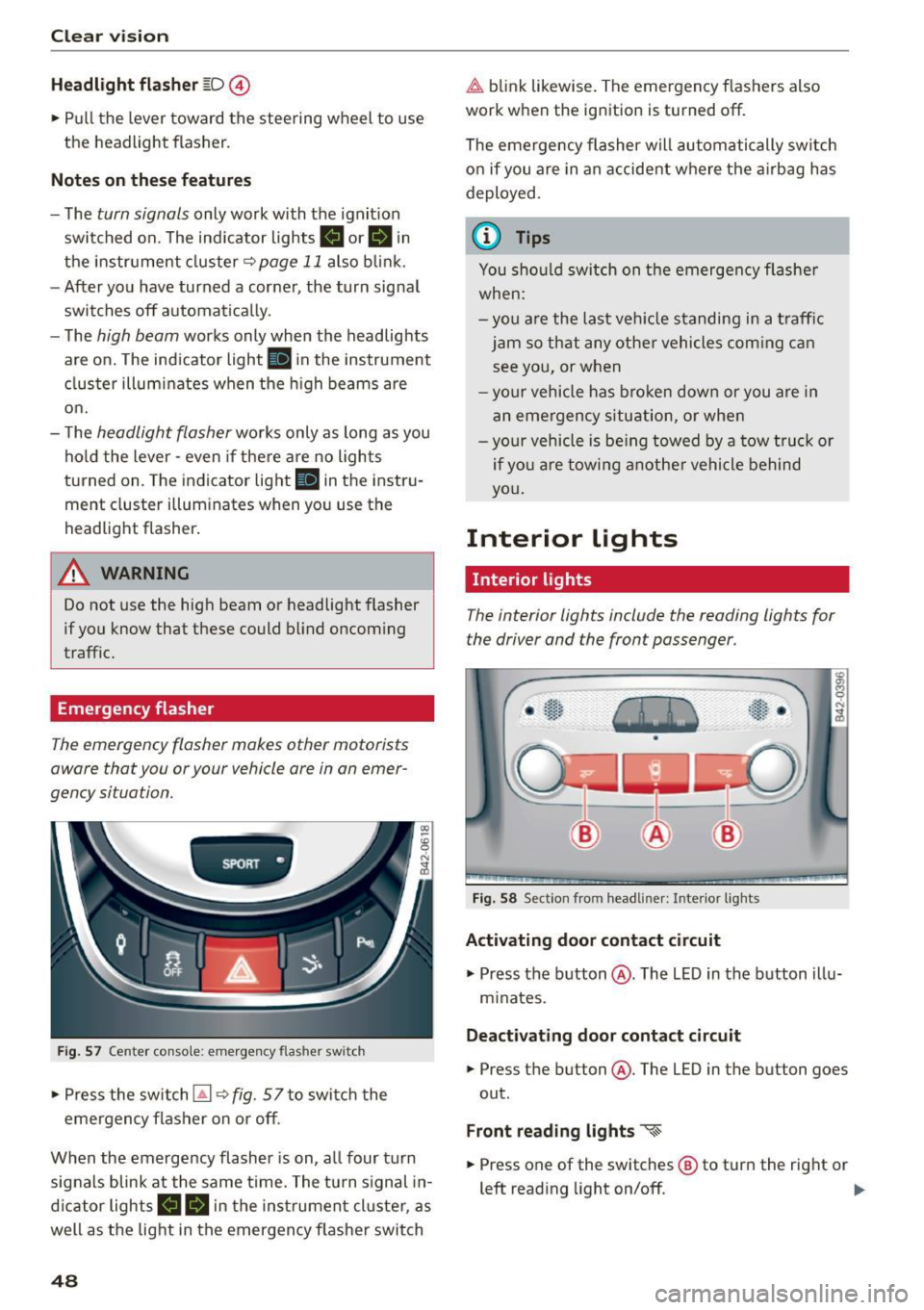
Fig. 58 Sect ion from headliner: Interior lights
Activating door contact circuit
• Press the button @. The LED in the b utton illu
m inates.
Deact ivating door cont act circuit
• Press th e button @. The LED in the button goes
out .
Front r eading light s «~
.. Press one of the switches® to turn the right or
left reading light on/off. ..,.