ECO mode AUDI R8 SPYDER 2015 Owners Manual
[x] Cancel search | Manufacturer: AUDI, Model Year: 2015, Model line: R8 SPYDER, Model: AUDI R8 SPYDER 2015Pages: 232, PDF Size: 58.36 MB
Page 12 of 232
Instrum ent s a nd w arn ing /indi cator lights
-Never open the engine compartment lid if
you see or hear steam, or if you see engine coolant dripping from the engine compart
ment. You could burn yourself. Let the en
gine cool off first until you can no longer see
or hear steam or coo lant escaping .
CD Note
- Mount ing additional lights or accessories in
front of the a ir inlets reduces the cooling ef
fect of the rad iator. At h igh outside temper
atures or high engine load, the engine could
ove rheat.
- The front spo ile r has been designed to prop
erly distribute the cooling air when the veh i
cle is mov ing. If the spo iler is damaged, this
could reduce the cooling effect and the en
gine could then overheat. Ask your author
ized Audi dealer for assistance.
Fuel gauge
The fuel gauge works only when the ignition is
on. When the needle reaches the red area, the
warning light in the instrument cluster will illu
minate
c:> page 17 Ill Time to ref uel!
CD Note
Never run the tank completely dry! An irregu
lar supply of fuel can cause engine m isfiring
and fuel could enter into the exhaust system .
The catalytic converter cou ld then overheat
and be damaged.
10
Speedometer with odometer
The speedometer shows you the vehicle speed,
and the odometer shows you how many miles
(kilometers) you have driven.
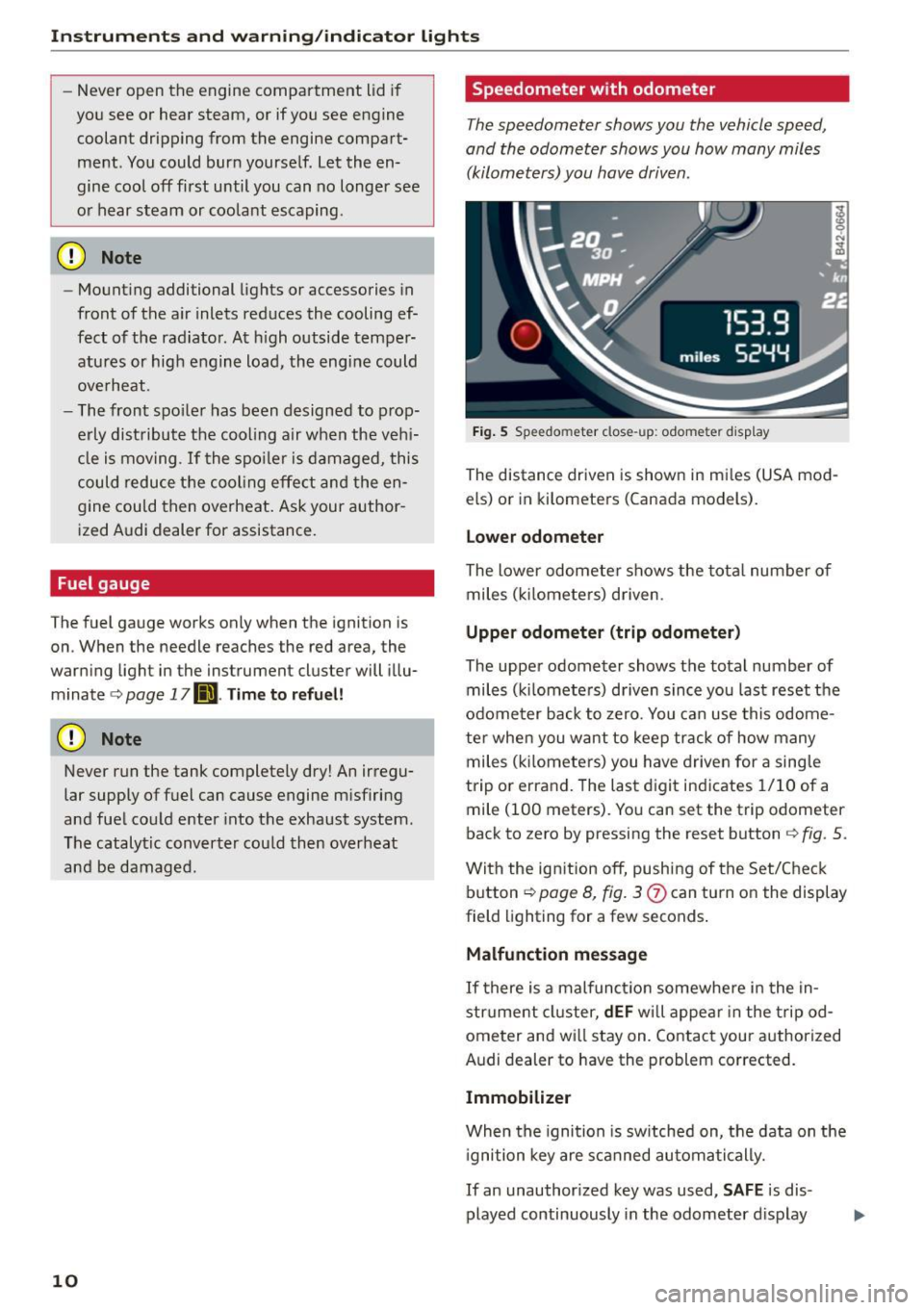
Fig. 5 Speedo meter close-up: odometer disp lay
The distance driven is shown in mi les (USA mod
els) or in kilometers (Canada models).
Lower odomet er
The lower odometer shows the tota l number of
miles ( kilometers) driven .
Upper odometer (trip odometer )
The upper odometer shows the total number of miles (k ilometers) driven since you last reset the
odome ter back to zero. You can use this odome
te r when you want to keep track of how many
miles (k ilomete rs) you have driven for a sing le
trip or errand. The last digit ind icates 1/10 of a
mile (100 meters). You can set the trip odometer
back to zero by pressing the reset button
c:> fig . 5 .
With the ig nition off, push ing of the Set/Check
button
c:> page 8, fig. 3
Malfunction messag e
If there is a malfunction somewhere in the in
strument cluster,
dEF wi ll appea r in the tripod
ometer and wi ll stay on. Contact your authorized
Audi dealer to have the problem corrected.
Immobilizer
When the ignition is sw itched on, the data on the
i gnition key are s canned automatically.
If an unauthor ized key was used,
S AF E is dis
played continuously in the odometer d isplay
Page 13 of 232
..... N
r-N "': ..... \!) 1.1'1
N 1.1'1 .....
Instruments and warning/indicator lights
field. The vehicle cannot be operated
c:;, page28.
Voltmeter display
The vo ltmeter shows the voltage in the vehicle
electrical system. If the reading drops below 12
volts w ith the engine running, you should have
the power supply (battery and generator) in
spected by an authorized Aud i dealer .
(D Tips
Voltage can drop below 8 volts when you start
the engine.
Warning/indicator lights
Descript ion
The indicator lights in the instrument cluster
blink or turn on. They indicate functions or mal
functions
c:;, ,&. .
Messages may appear with some indicator lights.
The messages turn
off after a short time. To dis
play a message aga in, press the Set/Check but
ton
c:;, page 8, fig. 3 (J) . If there is more than one
malfunction, the indicator lights will turn on one
after the other for approximately two seconds
each .
Some indicators lights in the display can turn on
in several colors.
A WARNING
- Failure to heed warning lights and other im
portant vehicle information may result in
serious persona l injury or vehicle damage.
- Whenever stalled or stopped for repa ir,
move the vehicle a safe distance off the
road, stop the engine, and turn on the emer
gency flasher
c:;, page 48.
-The engine compartment of any motor vehi
cle is a potentially hazardous area. Before
you check anything in the engine compart
ment, stop the engine and let it cool down.
Always exercise extreme caution when work
ing under the hood
c:> page 155, Working in
the engine compartment
Overview
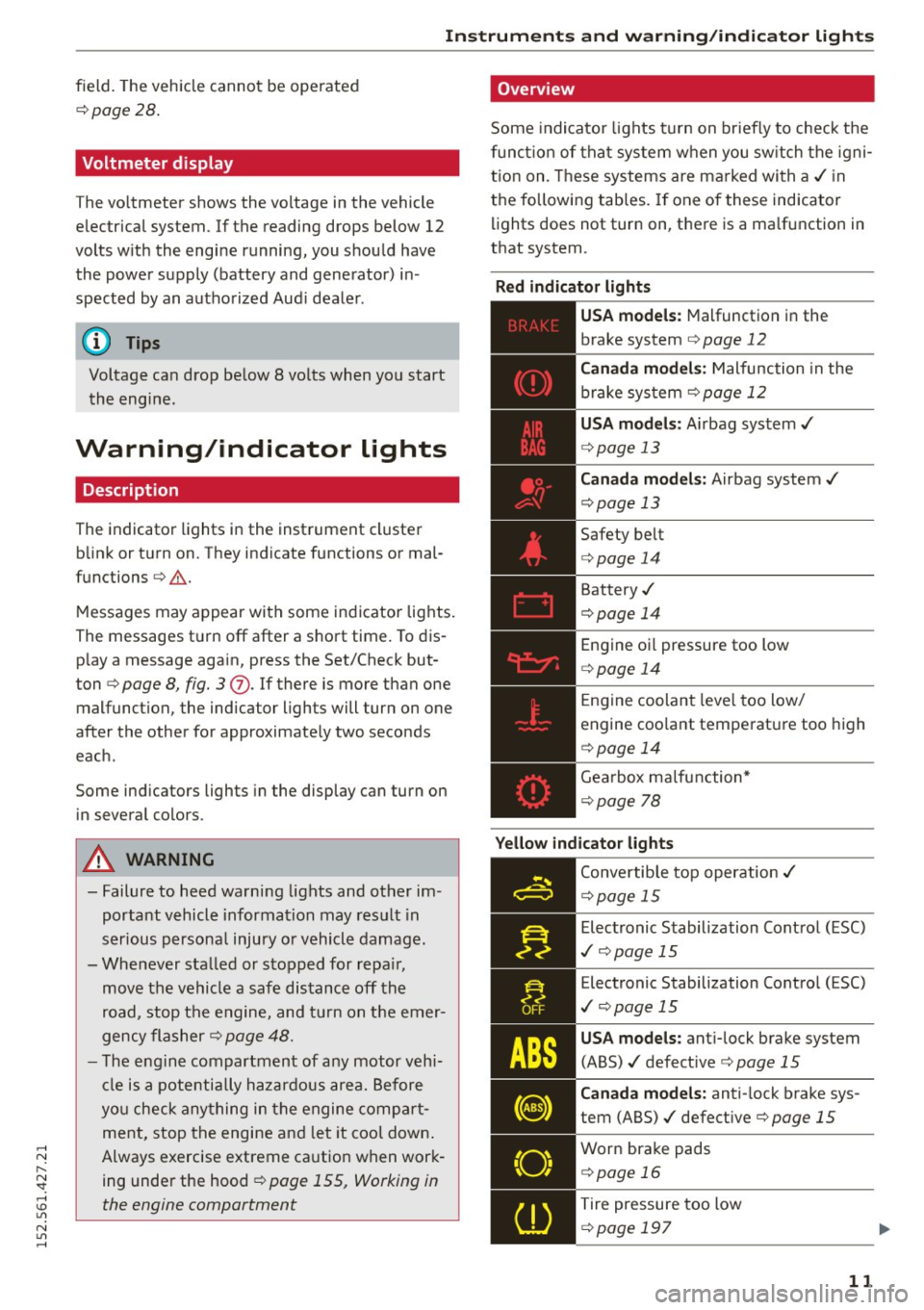
Some indicator lights turn on briefly to check the
function of that system when you sw itch the igni
tion on. These systems are marked with a,/ in
the following tables. If one of these indicator
lights does not turn on, there is a ma lfunction in
that system.
Red indicator lights
---------------
US A models: Malfunction in the
brake system
c:;, page 12
Canada models: Malfunction in the
brake system
¢ page 12
USA models : Airbag system,/
c:> page 13
Canada models: Airbag system,/
c:>page 13
Safety belt
c:>page 14
Battery,/
c:>page 14
Engine oi l pressure too low
c:> page 14
Engine coolant leve l too low/
engine coo lant temperature too high
c:>page 14
Gearbox malfunction*
c:>page 78
Yellow indicator lights
Convertible top operation ,/
c:>page 15
Electronic Stabilization Control (ESC)
,I c:;,page 15
Electronic Stabilization Control (ESC)
,I c:;, page 15
USA models: ant i-lock brake system
(ABS) ,/ defect ive
c:;, page 15
Canada models: anti-lock brake sys
tem (ABS),/ defective
c:;, page 15
Worn brake pads
c:> page 16
Tire pressure too low
c:>page 197
11
Page 15 of 232
..... N
r-N "': ..... \!) 1.1'1
N 1.1'1 .....
Instrument s and warning /indicator ligh ts
the electrical system . In thi s case, conta ct your
Audi de ale r.
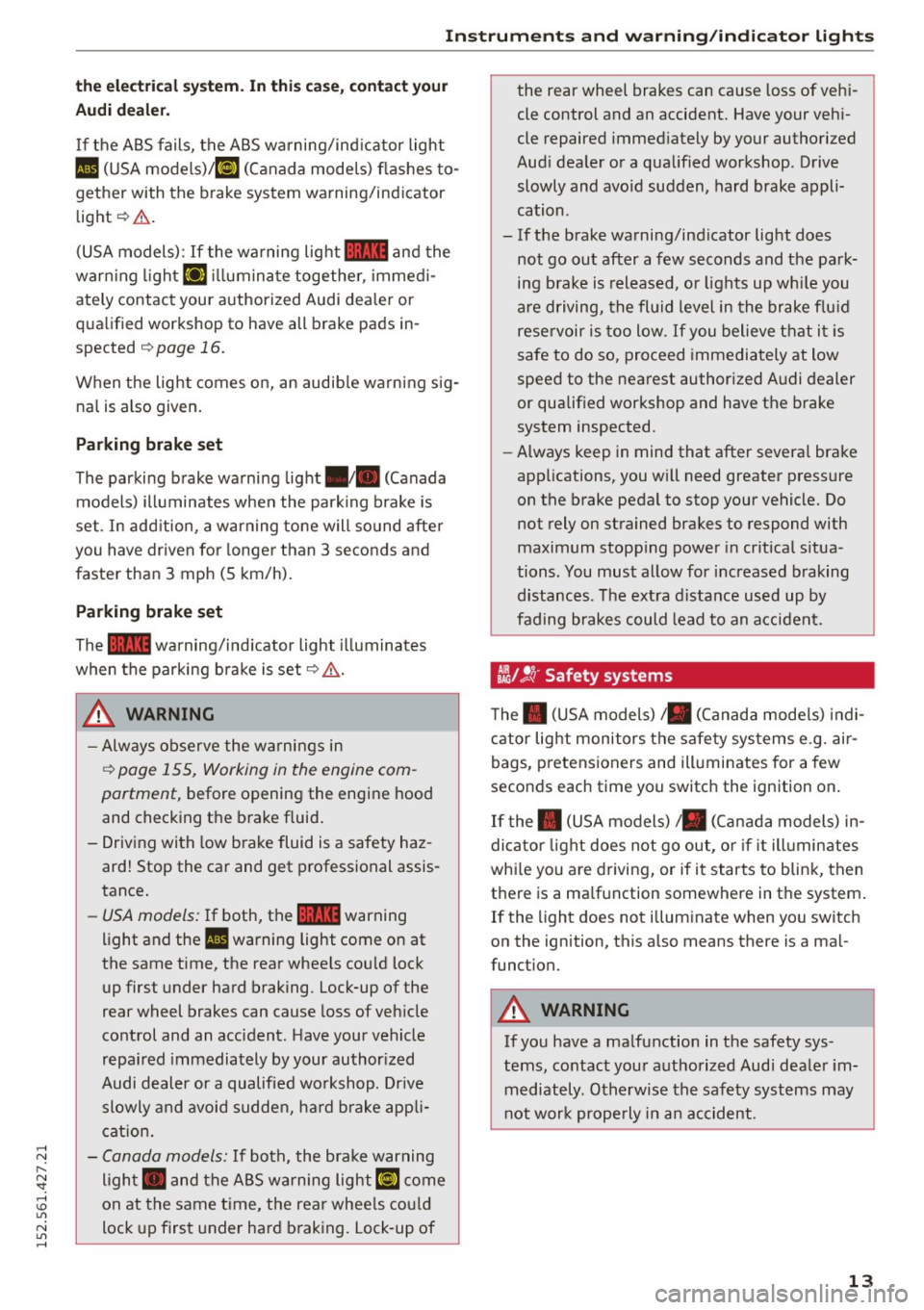
If the ABS fails, the ABS warning/ind icator light
II (USA mode ls)/ ii] (Canada mode ls) flashes to
gether with the brake system warning/indicator
light¢ &.
(USA models):
If the wa rning light~ and the
warn ing light
riJ ill umina te together, immed i
ately contact your authorized Audi dea ler or
qua lified workshop to have all brake pads in
spected ¢
page 16.
When the light comes on, an audib le warn ing sig
na l is also given .
Parking brake set
The parking brake warning light./. (Canada
models) illuminates when the park ing brake is
set. In add ition, a warning tone will so und afte r
you have driven for longer than 3 seconds and
faster than
3 mph (5 km/h).
P ar king brake set
The ~ warning/ind icator light illuminates
when the parking brake is set¢,&. .
_& WARNING
-Always observe the w arnings in
¢ page 155, Working in the engine com
partment, before opening the engine hood
and checking the b rake fluid .
- Driving with low brake fluid is a safety haz
ard! Stop the car and get professional assis
tance.
- USA models: If both, the~ warning
light and the
II warning light come on at
the same time, the rear whee ls cou ld lock
up first under hard braking. lock-up of the
rear wheel brakes can cause loss of veh icle
control and an accident. Have your vehicle
repai red immediately by your author ized
Audi dealer or a qualified wo rkshop. Dr ive
slowly and avoid sudden, ha rd b rake appli
cat ion .
- Canada models: If both, the brake warning
ligh t. and the ABS warning light
ii] come
on at the same time, the rear whee ls co uld
lock up first under har d braking. lock -up of the rear wheel brakes can cause
loss of vehi
cle control and an accident. Have your veh i
cle repaired immed iately by your authorized
Aud i deale r or a qua lified workshop. Drive
slowly and avo id sudden, hard brake appli
cation.
- If the brake warning/ind icator light does
not go out after a few seconds and the pa rk
ing brake is released, or lights up wh ile you
are driving, the fl uid level in the brake flu id
reservoir is too low.
If you believe that it is
safe to do so, proceed immedia tely at low
speed to the nearest authorized A udi dealer
or qualified workshop and have the brake
system inspected.
- Always keep in mind that after severa l brake
applications, you will need greater press ure
on the brake pedal to stop your vehicle. Do not rely on strained brakes to respond with
maximum stopp ing power in cr itical s itua
tions . You must allow for increased braking
distances. The ext ra d istance used up by
fading brakes could lead to an accident.
tli1 !'! r Safety systems
T he . (USA models), . (Canada mode ls) indi
cator lig ht monitors the safety sys tems e.g. air
bags, pretensioners and ill uminates for a few
seconds each time you switc h the ignition on .
If the . (USA models)/ . (Canada models) in
dicator light does not go ou t, o r if i t illumin ates
whi le you a re d riving, or if it starts to blink, then
t h ere is a ma lfunction somewhere in the system .
If the light does not illum inate when yo u switch
on the ignition, this also means there is a ma l
funct ion.
_& WARNING
-If you have a ma lfunction in the safety sys-
tems, contact you r authorized Audi dea le r i m
mediately. Otherwise the safety systems may
not wor k properly in an accident.
13
Page 17 of 232
..... N
r-N "': ..... \!) 1.1'1
N 1.1'1 .....
Instrument s and warning /indicator ligh ts
high, or the coolant level is too low. In addition
to the symbo l, the following message also ap
pears in the disp lay:
S w itc h off en gin e and ch ec k coo lant l ev e l
.. Pull off the road and stop the vehicle .
.. Turn off the engine .
.. Check coolant level~
page 162.
.. Add coolant if ne cessary ~ page 163 .
.. Continue d riving only after the engine coolant
warning/indicator light goes out .
.. Contact your authorized Audi dea ler for ass is-
tance if necessary.
I f the engine coolant level is correct, then the ra
diator fan may be the cause of the malfunction.
If the generator wa rning/ind icator light shou ld
a lso i lluminate
~ page 14, then the fan belt may
be damaged .
A WARNING
-If your vehicle should break down for me
chanical or other reasons, park at a safe dis
tance from moving traffic, turn off the en
gine and turn on the hazard warning lights
~ page 48, Emergency flasher.
- Never open the engine compartment lid if
you see or hear steam or coo lant escaping
from the engine compartment - you risk be
ing scalded . Wa it until you can no longer
see or hear steam or coolant escaping .
- The engine compartment of any veh icle is a
dange rous area. Before you perform any
wor k in the engine compa rtment, t urn off
the engine and allow it to coo l. Follow the
warning stic kers
~ page 155, Working in
the engine compartment .
(D Note
Do not co nti nu e d riving if the. symbo l ill u
m inates. There is a mal function in the engine
cooling system -you could damage your en
gine .
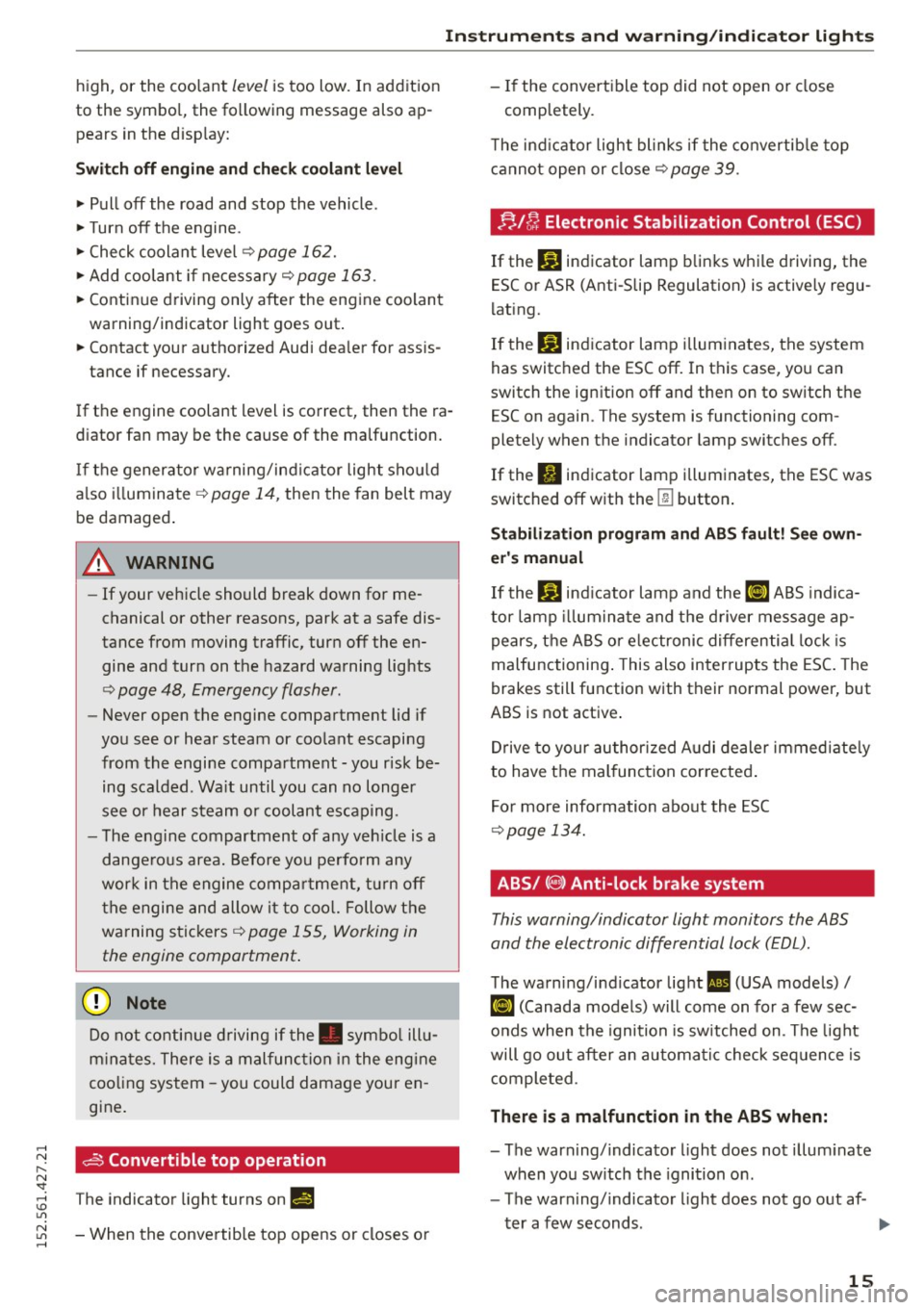
dS Convertible top operation
The ind icator light tu rns on II!
- When the convertib le top opens or closes or -
If the convert ible top did not open or close
comp letely .
T he ind icator light blinks if the convertib le top
cannot open or close
~ page 39.
;;./ !'r, Electronic Stabilization Control (ESC)
Ifthc DJ indicator lamp blinks while driving, the
ESC or ASR (Anti-Slip Regulation) is actively regu
lating.
If the
DJ indicator lamp illum inates, the system
has switched the ESC off. In this case, you can
switch the ignition off and then on to switch the
ESC on aga in. The system is functioning com
ple tely when the indicator lamp switches off.
If the
II indicator lamp illuminates, the ESC was
switched off with the
[ru button .
Stabilizati on progr am and ABS fault! S ee ow n
e r's manual
If the Bl ind icator lamp and the [i] ABS indica
tor lamp illum inate and the d river message ap
pears, the ABS or e lectronic differentia l lock is
malfunctioning . This also interrupts the ESC. The
brakes still function with their normal power, but
ABS is not active .
Drive to your authorized A udi dealer immed iate ly
to have the mal func tion corrected .
Fo r more information about the ESC
~ page 134.
ABS/ (0 ) Anti-lock brake system
This warning/indicator light monitors the ABS
and the electronic differential lock (EDL).
The warning/indicator light Ill (USA models)/
¢ ~)
will go out after an automa tic check sequence is
completed.
There is a malfunction in the ABS when:
- The warning/indicator light does not illum inate
when you sw itch the ignition on .
- The warning/indicator light does not go out af -
ter a few seconds . ..,
15
Page 20 of 232
Instruments and warning/indicator lights
A WARNING
- Light bulbs are pressurized and cou ld ex
plode while they are being changed causing
serious persona l injury.
-
- Work with due care when handling the high
vo ltage section of gas discharge (xenon)
lamps. Fa iling to do so could result in death
or serious injury!
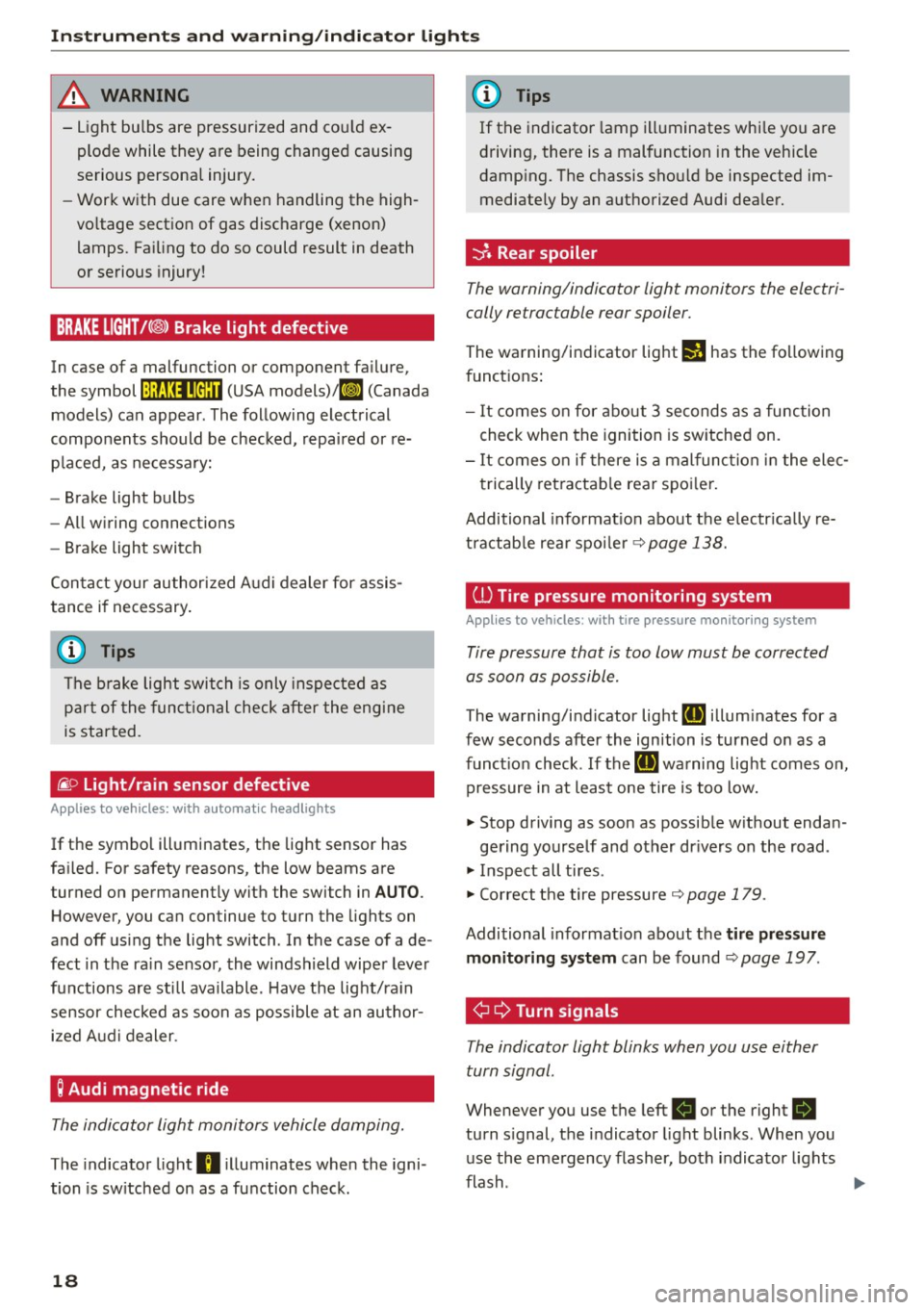
BRAKE LIGHT!< ®> Brake light defective
In case of a malfunction or component failure,
the symbol
!:ljf:Ul•@:U (USA models)/ ll] (Canada
models) can appear. The following electrical
components should be checked, repaired or re
p laced, as necessary:
- Brake light bulbs
- All wiring connections
- Brake light switch
Con tact your authorized Audi dealer for assis
tance if necessary.
(D Tips
The brake light switch is only inspected as
part of the functional check after the engine
is started.
/i. O
Light/rain sensor defective
Applies to veh icles: w ith automatic headlights
If the symbol illuminates, the light sensor has
fai led. For safety reasons, the low beams are
turned on permanently with the switch in
AUTO.
However, you ca n continue to turn the lights on
and off using the light switch . In the case of a de
fect in the ra in sensor, the windshield wiper lever
functions are still available . Have the light/ra in
sensor checked as soon as possible at an author ized Audi dealer.
; Audi magnetic ride
The indicator light monitors vehicle damping.
The indicator light B illuminates when the igni
tion is sw itched on as a function check.
18
(D Tips
If the indicator lamp illuminates whi le you are
driving, there is a malfunction in the vehicle
damping. The chassis should be inspected im
mediately by an authorized Audi dealer.
-::}. Rear spoiler
The warning/indicator light monitors the electri
cally retractable rear spoiler.
The warning/indicator light I! has the fo llowing
funct ions :
- It comes on for about 3 seconds as a function
check when the ignition is switched on.
- It comes on if there is a malfunction in the elec
trically retractable rear spoiler.
Additional informat ion about the e lectr ically re
tractable rear spoiler
~ page 138.
ill Tire pressure monitoring system
Applies to vehicles: with tire pressure monitoring system
Tire pressure that is too low must be corrected
as soon as possible.
The warning/indicator light [IJ illum inates for a
few seconds after the ignition is turned on as a
function check. If the
[IJ warning light comes on,
pressure in at least one tire is too low.
.. Stop driving as soon as possible w ithout endan -
gering yourself and other dr ivers on the road .
.. Inspect all tires .
.. Correct the tire pressure ~
page 179.
Additional informat ion about the tire pr essure
monitoring system
can be found~ page 197 .
¢ Q Turn signals
The indicator light blinks when you use either
turn signal .
Whenever you use the left B or the right R
turn signal, the indicator light blinks. When you
use the emergency flasher, both indicator lights
flash .
Iii>
Page 23 of 232
.... N
l'
N "1: .... I.O
"' N
"' ....
Trip computer
Introduction
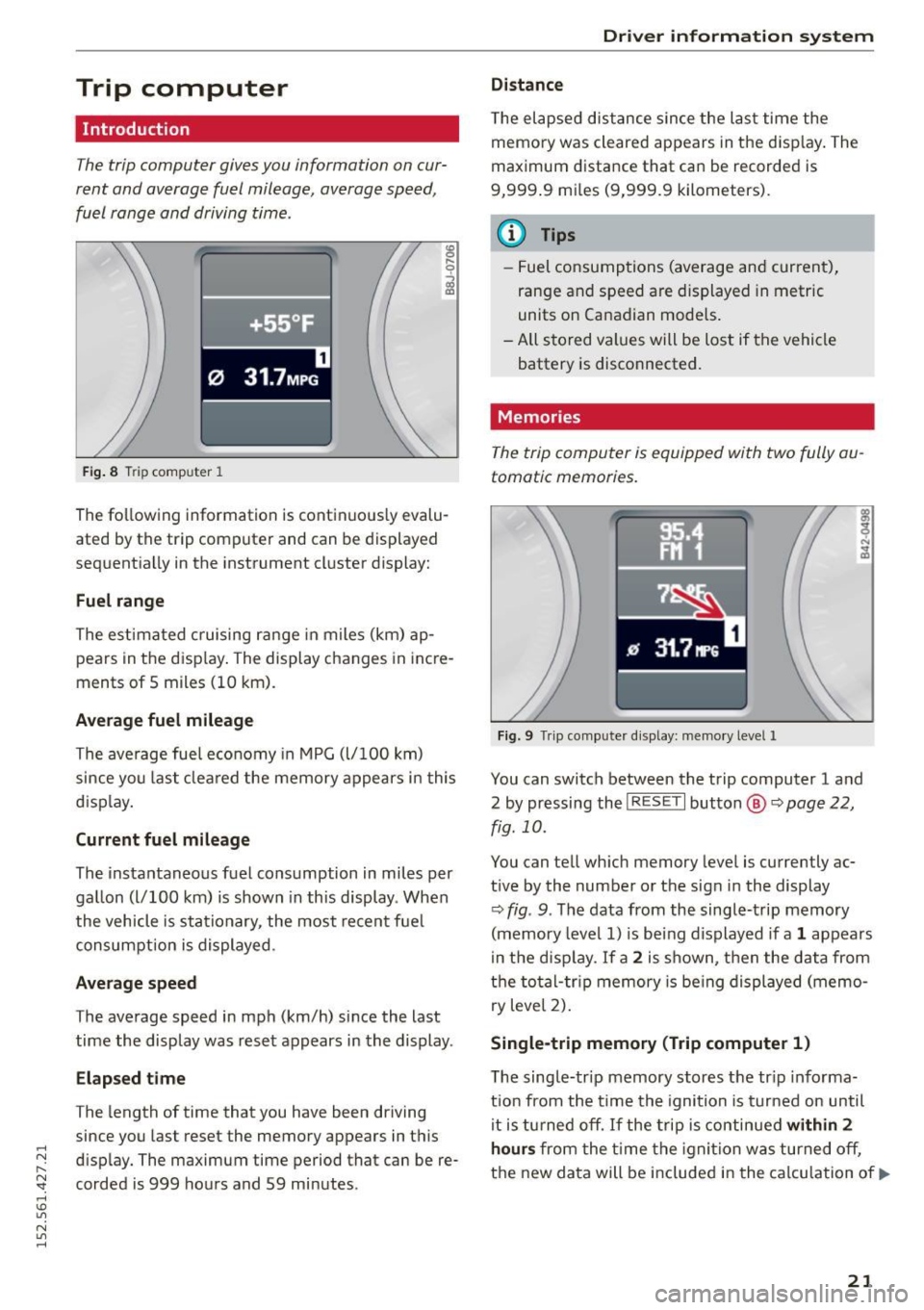
The trip computer gives you information on cur
rent and average fuel mileage, average speed ,
fuel range and driving time.
Fig. 8 T ri p comp uter 1 ,....
0
;;i ID
The following
information is continuously evalu
ated by the trip computer and can be displayed
sequentially in the instrument cluster display:
Fuel range
The estimated cruising range in m iles (km) ap
pears in the disp lay. The display changes in incre
ments of 5 miles (10 km) .
Average fuel mileage
The average fuel economy in MPG (l/100 km)
since you last cleared the memory appears in this
d isplay.
Current fuel mileage
The instantaneous fuel consumption in miles per
gallon (l/100 km) is shown in this display . When
the vehicle is stationary , the most recent fuel
consumption is displayed.
Average speed
The average speed in mph (km/h) since the last
time the display was reset appears in the display .
Elapsed time
The length of time that you have been driving
since you last reset the memory appears in this
disp lay. The maximum time period that can be re
corded is 999 hours and 59 minutes .
Driver information system
Distance
The elapsed distance since the last time the
memory was cleared appears in the disp lay. The
maximum distance that can be recorded is
9,999 .9 mi les (9,999.9 kilometers).
(D Tips
- Fuel consumptions (average and current),
range and speed are displayed in metric
units on Canadian models .
- All stored values will be lost if the vehicle battery is disconnected.
Memories
The trip computer is equipped with two fully au
tomatic memories.
Fig. 9 Trip computer d is play: memo ry level 1
You can switch between the trip computer 1 and
2 by pressing the
! R ESET I button @ ~page 22,
fig. 10.
You can tell which memory level is currently ac
t ive by the number or the sign in the display
Q fig . 9. The data from the single-trip memory
(memory level 1) is being displayed if a
1 appears
in the disp lay.
If a 2 is shown, then the data from
the total-tr ip memory is being displayed (memo
ry level 2).
Single -trip memory (Trip computer 1)
T he single-trip memory stores the tr ip informa
tion from the time the ignition is turned on until
it is turned off. If the trip is continued
within 2
hours from the time the ignition was turned off,
the new data will be included in the calculation of.,.
21
Page 25 of 232
.... N
l'
N "1: rl I.O
"' N
"' ....
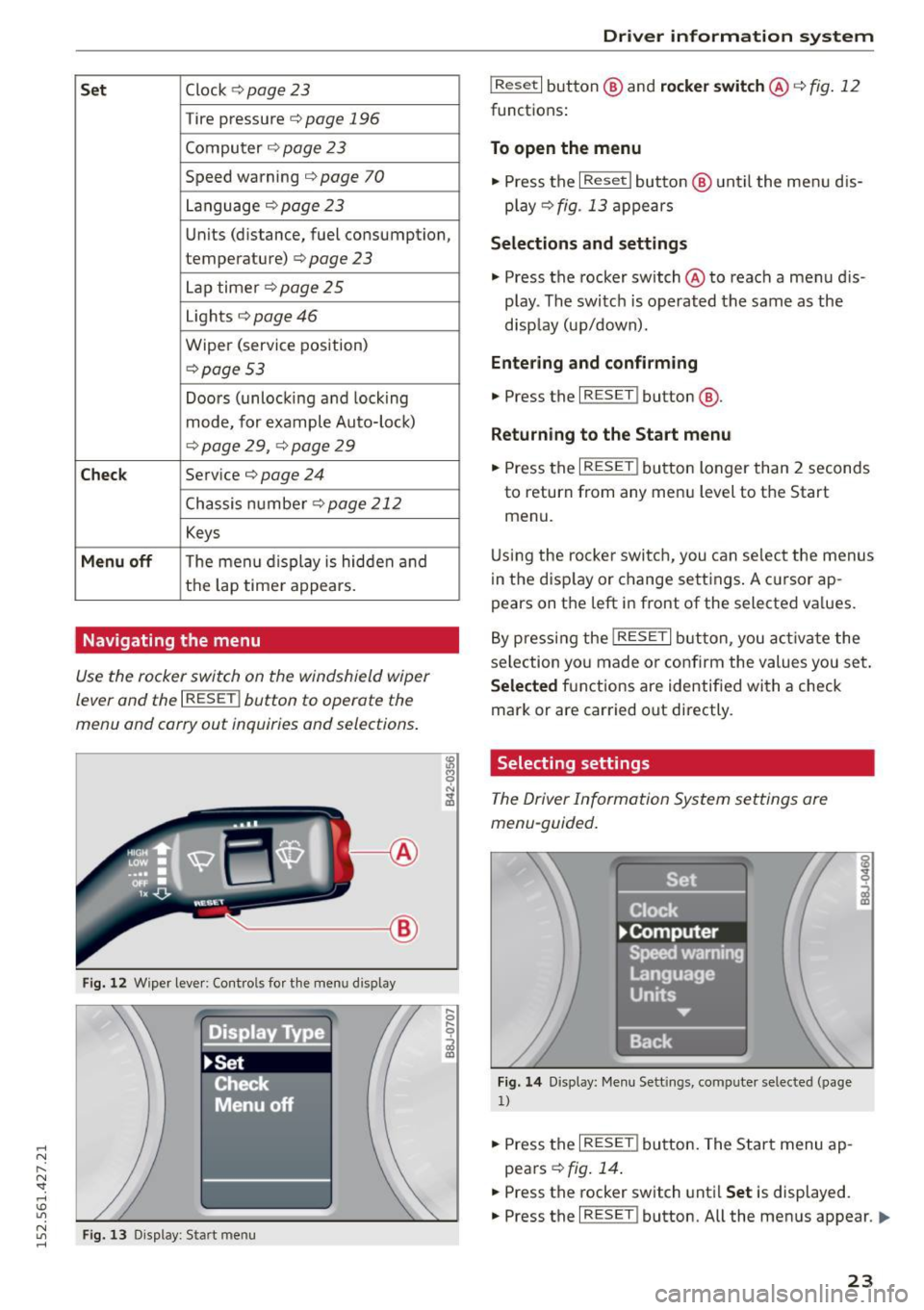
Set Clock ¢ page 23
Tire pressure c::> page 196
Computer c::> page 2 3
Speed warning c::> page 70
Language c::>page23
Units (distance, fuel consumption,
temperature)
c::> page 23
Lap timer c::> page 25
Lights c::> page 46
Wiper (service position)
c::>page 53
Doors (unlocking and locking
mode, for example Auto-loc k)
c::> page 29, ¢ page 29
Chec k Service c::> page 24
Chassis number c::>page 212
Keys
Menu off The menu display is hidden and
the lap time r appears.
Navigating the menu
Use the rocker switch on the windshield wiper
lever and the
I RESET ! button to operate the
menu and carry out inquiries and selections.
-----®
Fig. 12 Wiper lever: Cont rols fo r th e menu d isplay
Fi g. 13 Display: Start menu
Dr iver inform atio n sy stem
I Reset I button @ and rocker switch @ c::> fig. 12
functions:
To open the menu
• Press the I Reset I button @ until the menu d is
play
c::> fig . 13 appears
Selection s and settings
• Press the rocker switch @ to reach a menu dis
play . The switc h is operated the same as the
disp lay (up/down).
Entering and confirming
• Press the I RESET ! button@.
Returning to the Start menu
.. Press the I RESET ! button longer than 2 seconds
to return from any menu level to the Start
menu.
U sing the rocke r switch, you can select the menus
in the disp lay or change settings . A c ursor ap
pears on the left in front of the selected va lues.
By pressing the
! RESET I button, you activa te the
selection yo u made or confirm the values you set .
Selected fu nctions are identified with a check
mark or are car ried out directly.
Selecting settings
The Driver Information System settings are
menu-guided.
Fi g. 14 Display: Me nu Sett ings, computer selected (page
1)
.. Press the I RESET ! button. The Start menu ap
pears
c::> fig . 14 .
.. Press the rocker switch until Set is displayed.
.. Press the
I RESET ! button. All the menus appear. Ill-
23
Page 26 of 232
Driver information system
• Press the rocker switch until the desired line is
highlighted (cursor)~
fig. 14.
• Press the !R ESE T I button.
• If necessary, scroll by se lecting and activating
the symbol for "Next page" or "Previous page".
When you have selected the Computer menu and
activated it by p ressing the
! RESET I button, two
computer levels appear (computer 1 and comput
er 2) . Now you have to select the level you want
using the rocker switch and activate it with the
I RESET I button .
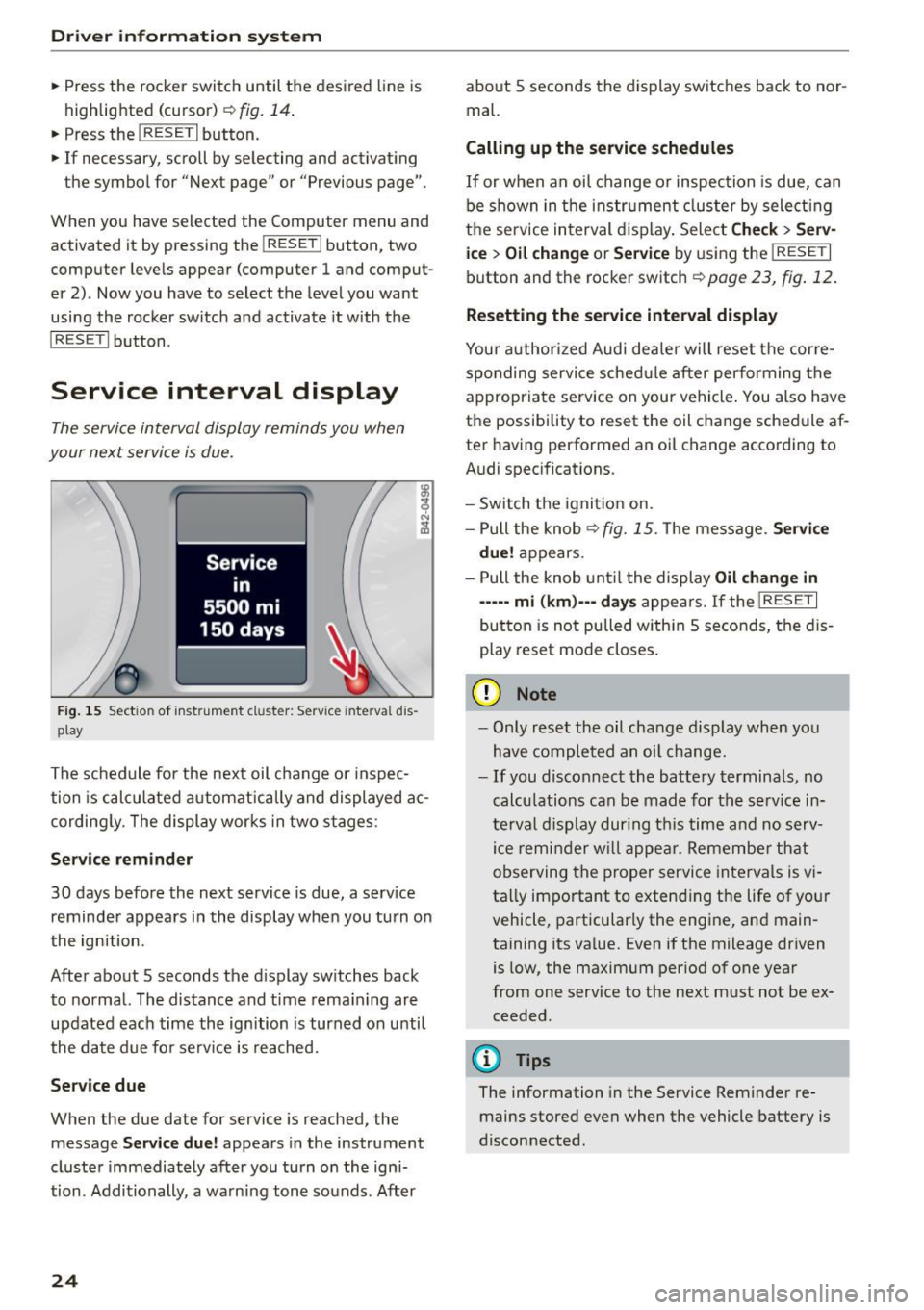
Service interval display
The service interval display reminds you when
your next service is due.
Fig. 15 Sectio n of inst rument cl uster: Serv ice in terva l dis
pl ay
The schedule for the next oil change or inspec
tion is calculated automatically and displayed ac
cording ly. The display works in two stages:
Service reminder
30 days before the next service is due, a serv ice
reminder appears in the display when you turn on
the ignition.
After about 5 seconds the display sw itches back
to normal. The distance and time remaining are
updated each time the ignition is turned on unti l
the date due for serv ice is reached.
Service due
When the due date for service is reached , the
mes sage
Service due! appears in the instrument
cluster immediately after you turn on the igni
tion . Additionally, a warning tone sounds. After
24
about 5 seconds the display switches back to nor
mal.
Calling up the service schedules
If or when an oil change or inspection is due, can
be shown in the instrument cluster by select ing
the se rvice interval display. Select
Check> Serv
ice
> Oil change or Service by using the I RESET I
button and the rocker switch ¢ page 23, fig. 12.
Resetting the service interval display
Your authorized Audi dealer will reset the corre
sponding service schedule after performing the
appropriate service on your vehicle . You also have
the possibility to reset the oil change schedule af
ter having performed an oi l change according to
Audi specifications.
- Switch the ignition on.
- Pull the knob<>
fig. 15. The message. Service
due!
appears.
- Pull the knob until the display
Oil change in
-----mi (km)---days appears. If the I RESE T I
button is not pulled with in 5 seconds, the dis
play reset mode closes.
(D Note
-Only reset the oil change display when you
have completed an oil change.
-If you disconnect the battery terminals, no
calculations can be made for the service in
terval display during this time and no serv
ice reminder will appear. Remember that
observing the proper service intervals is vi
tally important to extend ing the life of your
vehicle, particularly the engine, and main
taining its va lue. Even if the mileage driven
is low, the maximum per iod of one year
from one service to the next must not be ex
ceeded.
@ Tips
The information in the Service Reminder re
mains stored even when the vehicle battery is
disconnected .
Page 31 of 232
..... N
r-N "': ..... \!) 1.1'1
N 1.1'1 .....
Power locking system
General description
The power locking system locks or unlocks all
doors simultaneously.
The power lock ing system i n your veh icle incorpo
rates the follow ing funct ions:
- Central lock ing function
- Remote contro l feature ¢ page 28.
- Ant i-Theft Alarm Sys tem ¢ page 33.
All the doors and the front lid are loc ked by the
centra l locking system when you lock the vehicle.
The unlocking and lock ing mode* can be changed
i n the dr iver information system
¢ page 22.
Unlocking the vehicle
You can un lock the vehicle from outside either by
usi ng the remote co ntrol
or by insert ing and
turning the key in the driver's door lock. When
you
unlock your vehicle:
- The anti -theft alarm system is deactivated
briefly.
- The veh icle inter ior lights ill uminate for app rox
imately 30 seconds .
- All t urn signa l lights will flas h twice when the
ca r is un locked .
- After unloc king the veh icle, you have 30 sec
onds to open a door or the front lid. After 30 seco nds, the vehicle automatically locks and
the anti-theft a larm system activates again.
The fron t lid can be locked or un locked e ither by
usi ng the remote contro l
or by inserting and
turning t he key in the driver's door lock . Unlock
ing the vehicle with the remote control~ will
only unlock the front lid, to open it, the lid han
d le needs to be pressed.
Loc king the vehicle
You ca n lock the vehicle from o utside eithe r by
using the remote co ntro l
or by insert ing and
turning the key in the drivers's door lock. When
you
lock the vehicle:
- All doors and the front lid are locked.
- All turn sign al ligh ts will flash once whe n the
car is locked .
Opening and closing
-The ant i-theft a larm system is ac tivated. The
horn of the anti-theft a la rm system will soun d
and the anti-theft alarm system read iness
light, located in the center of the instrument
pane l be low the windshield on the right side of
the air vent, will start to bli nk.
- The vehicle in terior lights turn
off.
Automatic locking*
The automatic locking feature loc ks a ll the vehi
cle doors and the front lid when you dr ive faste r
t h an 9 mph (15 km/h).
You can unlock t he veh icle from the i nsi de by:
- remov ing the key from the ignition switc h (the
ve hicle w ill automat ica lly unloc k itself) or
- pressing the unlock pa rt of th e power lock
sw itch
ccri o r
pull ing the door handle (to open the door).
If you wish, yo u can have an a utho rized Aud i
dealer convert your powe r doo r lock system to
automat ic locking.
Unintentionally locking yourself out
T he vehicle does not lock with t he centra l locking
swi tch ¢page 31 if the dr ive r's door is open.
D o no t lock your ve hicle w ith the
remote master
key u ntil all doors an d the front lid a re closed. In
t hi s way you avo id loc king yo ursel f out ac ciden
ta lly.
A WARNING
-
- W hen you loc k yo ur vehicle from o utside,
nobody- espec ia lly children -shou ld remain
inside the vehicle. Remember, when you
lock the vehicle from the outside the win
dows cannot be ope ned from the inside.
- W hen you leave the veh icle, always remove
the ignition key and take it with you. This
will prevent passengers (children, for exam
p le) from accidenta lly bei ng locke d in th e
veh icle should they accide ntally press the
power l ocking sw itc h in one of the doo rs .
- Do not leave ch il dr en inside t he vehicle un
s upe rvise d. In a n em erge ncy it would be im
p o ssible to open the door s fro m the outs id e
wit ho ut t he key.
~
29
Page 38 of 232
Opening and closing
Programming the Homelink transmitter
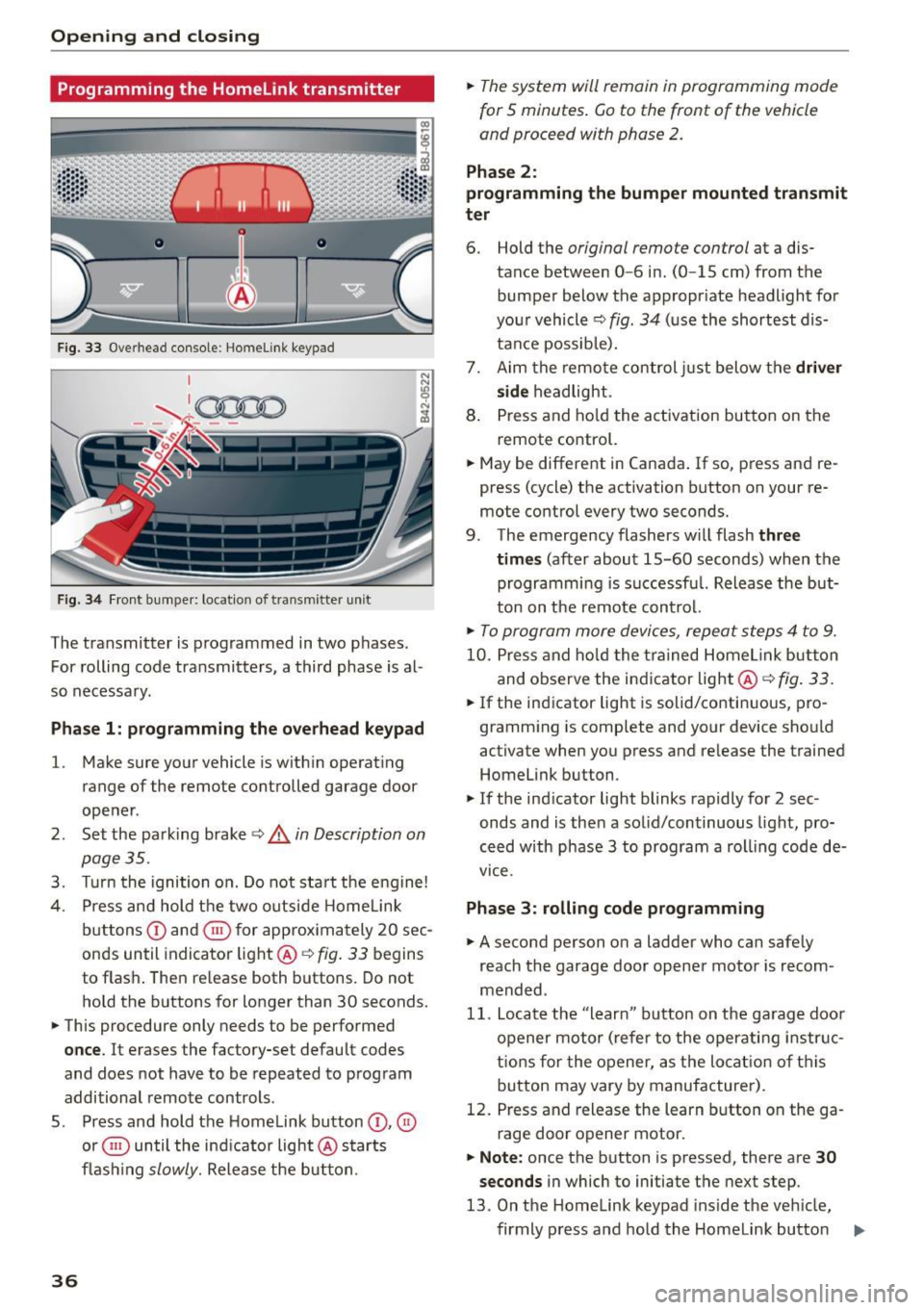
Fig. 33 Overhead console: Homelink keypad
Fig . 34 Fr ont bumper: loca tion of transmitter unit
The transmitter is programmed in two phases.
For rolling code transmitters, a third phase is al
so necessa ry .
Pha se 1: programming the ove rhead keypad
l.
Make sure you r vehicle is w ith in operat ing
range of the remote controlled garage door
ope ner .
2 . Set the park ing brake ~
& in Description on
page 35 .
3. Turn the ignition o n. Do not sta rt the e ngine!
4. Press and hold t he two outside Home Link
b uttons
(D and ® for approx im ately 20 sec
onds until indicator light @~
fig. 33 begins
to flas h. The n re lease both buttons. Do not
hold the buttons for longer than 30 seconds.
.,. This procedure only needs to be perfo rmed
once . It erases the factory-set default codes
and does not have to be repeated to prog ram
additional remote controls .
5 . Press and hold the Homelink button
(D , ®
or ® until the ind ic a tor light @ starts
fl ash ing
slowly. Release the bu tton.
36
.,. The system will remain in programming mode
for
5 minutes . Go to the front of the vehicle
and proceed with phase 2 .
Phase 2:
programming the bumper mounted tran smit
ter
6. Hold the original remote control at a dis
tance between
0-6 in . (0 -15 cm) from the
bumper below the appropr iate headlight for
you r vehicle ~
fig. 34 (u se the shortest dis
tance possib le).
7. Aim the remote control just below the
driver
side
h eadlight.
8 . Press and ho ld the activation but to n on the
remote co ntrol.
.,. May be different in Canada .
If so, press and re
press (cycle) the activation button on your re
mote control every two seconds.
9 . The emergency flashers w ill flash
three
times
(after about 15-60 seconds) when the
programmi ng is s uccessf ul. Release the but
ton on t he remote con trol.
.,. To program more device s, repe at st ep s 4 to 9.
10 . Pr ess and ho ld the trained Home link button
and o bserve the ind icator light@~
fig. 33.
.,. If the ind icator light is solid/co nti nu ous, pro
gramm ing is complete and yo ur device sho uld
activate when you press and re lease the trained
Homelink button .
.,. If the indicator light blinks rapidly for 2 sec
onds and is the n a so lid/continuous light, pro
ce ed w ith phase 3 to program a roll ing code de
vice .
Phase 3: rolling code programming
.,. A second person o n a ladder wh o ca n safe ly
reach the garage door opener motor is recom
mended .
11. Locate the "learn" button on the ga rag e doo r
o pener mo tor ( refer to the oper ati ng in str uc
t ions for the opener, as the lo cat io n of th is
b utton may vary by manufacturer) .
12 . Pres s and release the learn b utton on the ga
rage door o pener motor.
.,. Note: once the b utton is pressed, there are 30
seconds
in which to initiate th e next step.
13 . On t he Home link keypad ins ide the ve hicle,
firmly p ress and hold the Homelink butto n
IJ,,