check AUDI RS5 CABRIOLET 2013 User Guide
[x] Cancel search | Manufacturer: AUDI, Model Year: 2013, Model line: RS5 CABRIOLET, Model: AUDI RS5 CABRIOLET 2013Pages: 286, PDF Size: 71 MB
Page 24 of 286

22 Instruments and warning/indicator lights
A WARNING
- light bu lbs are pressurized and could ex
plode while they are being changed caus
ing ser ious p erso na l inju ry .
- Work w ith due care when handling the
high -voltage section of gas discha rge
(xenon) lights . Fa ilu re to do so could re
sult in death or se rious injury.
(D Tips
Have the bulb replaced or the connection
re pa ired by yo ur autho rized Aud i Service
de partment.
~(D Headlight range control
El Headlight range control defective !
If the symbol El illum inates , the dynam ic
h eadl ight range cont rol is no long er wo rking
p rope rly . Have the system checked and re
pa ired a t your author ized Audi dealer.
§0
Adaptive Light
Appl ies to vehicles: with adaptive ligh t
m;J Audi adaptive light: defective
If the indicator lig ht turns on and t his mes
sage appears, the re is a ma lfu nction in the
a d apt ive light sys tem . Th e headlights s till
f u nc tion.
Go to an a utho rized dea le rship to have the
h eadlights or the cont ro l unit fo r the adapt ive
light rep aired.
@.D Light/rain sensor
App lies to vehicles: with light/rain senso r
t'£;I Automatic headlight s/ automatic wipers
defective
I f t he in di cator lig ht tu rns on and t his mes
s a ge appears, the lig ht/r ain se nsor is no t
function ing cor rectly.
For safety reasons the low beams are tu rned
on permanent ly w ith the swi tch in
AUTO .
However, you can con tinue to tu rn the ligh ts
on an d off usin g the light swi tc h. You can still control a
ll functions that are independent of
the ra in sensor through the windshield wipe r
l ever.
C o nta ct you r auth orized Aud i dea ler as soon
as possib le to have the problem co rrec ted.
H Sport differential
Appl ies to vehicles: wit h Aud i drive se lect and spo rt dif·
ferential
Sport differential : System fault!
T he re is a malfunction with t he sport d iffe ren
tia l.
Drive to y our authorized A udi dealer immedi
ate ly to have the malfu nction corrected .
Sport differential : Overheating
T he transm iss ion tempera ture ha s in cr eased
s ignificantly due to the sporty d riving manner .
Drive in a less sporty ma nner until the tem
perature returns to the normal range and the
indicator light switches of.
A WARNING
Contact your author ized Audi dealer or a
q ualified wor kshop if the spo rt differential
i s faul ty or malfunct io ning . T he repair
must be perfor med by t rain ed perso nnel
usi ng the co rrect oil in order to ensure
s a fety .
~ Ignition lock
I!) Ignition lo ck defe ctive
-
The re is a malfunction in the e lect ronic igni
t io n lock . P lease go to a n author ized Audi
de aler or o ther qua lifie d wo rkshop to have t he
malfu nction rep aire d.
¢¢ Turn signals
Whenever yo u use the left H or the right B
turn s ignal , the indicato r light blin ks. When
you use the emergency f lashe rs, both indica -
tor lights flash . .,.
Page 26 of 286

24 Drive r in form ation d ispl ay
Driver information
display
Introduction
The Driver information disp lay inside the in
strument cluster provides you, the driver ,
with important information.
Fig . 7 In strum en t cl ust er: center dis pl ay
Fi g. 8 W iper leve r: co ntr ols fo r the menu displa y
Cent er d ispla y
With the ignition on, the display in the Dr iver
I nformation System shows the fol low ing in
format ion :
- CD* inserted or Radio* station set
- Outside temperature* : At temperatures be-
low 41 °F ( +S °C), a snowflake symbol ap
pears in front of the temperature display
c::> .&_ .
- Warning if one of the doors , front lid or en-
gine compartment lid is not closed .
Additional fun cti ons
You can open the following function s in the
Driver Information System display by pressing
the
! R ESE T I button c::> fig. 8 one or more times:
Digital speedometer*
Tire pressure monitoring *
~page240
Trip computer
Service interval display
Speed warning
Gearshift selector positions
Automatic transmission
Adapt ive cruise control*
Lap timer
c::> page25
c::> page 27
c::> page 81
c:> page 92
Eng ine oil temperature indica-c:> page 28
tor
Auto Check Control
Some functions and veh icle components are
scanned for their operating status when you
switch the ignition on and whi le you are driv
i ng . Malfunctions or required service proce
dures are s ignaled audib ly and ind icated by
red and yellow illuminated symbols and re
minders in the disp lay.
A WARNING
- Never rely exclusively on the outside
temperature display to determine if a road surface is icy or not. Keep in m ind
that road surfaces, especially br idges
and overpasses, could be ice covered and
slippery even at an outside temperature
above 4 1 °F (+ S
0
() .
-Always remember , even if the "snow
f lake" symbo l (ice warning) does not ap
pear in the d isp lay, black ice co uld be on
the road .
- Always reduce your speed a nd d rive with
specia l care in cold weathe r cond itions
when the chance of encountering icy
road surfaces increases.
© Tips
If the vehicle is stationa ry, or if you are
driving at a very low speed, the tempera
tu re shown in the display mig ht be s light ly
higher than the actua l outside tempera
ture . This is caused by the heat being radi
ated from the engine.
Page 29 of 286
@ Tips
This function is not available on all
vehicles.
Service interval display
The service interval display reminds you when
your next service is due.
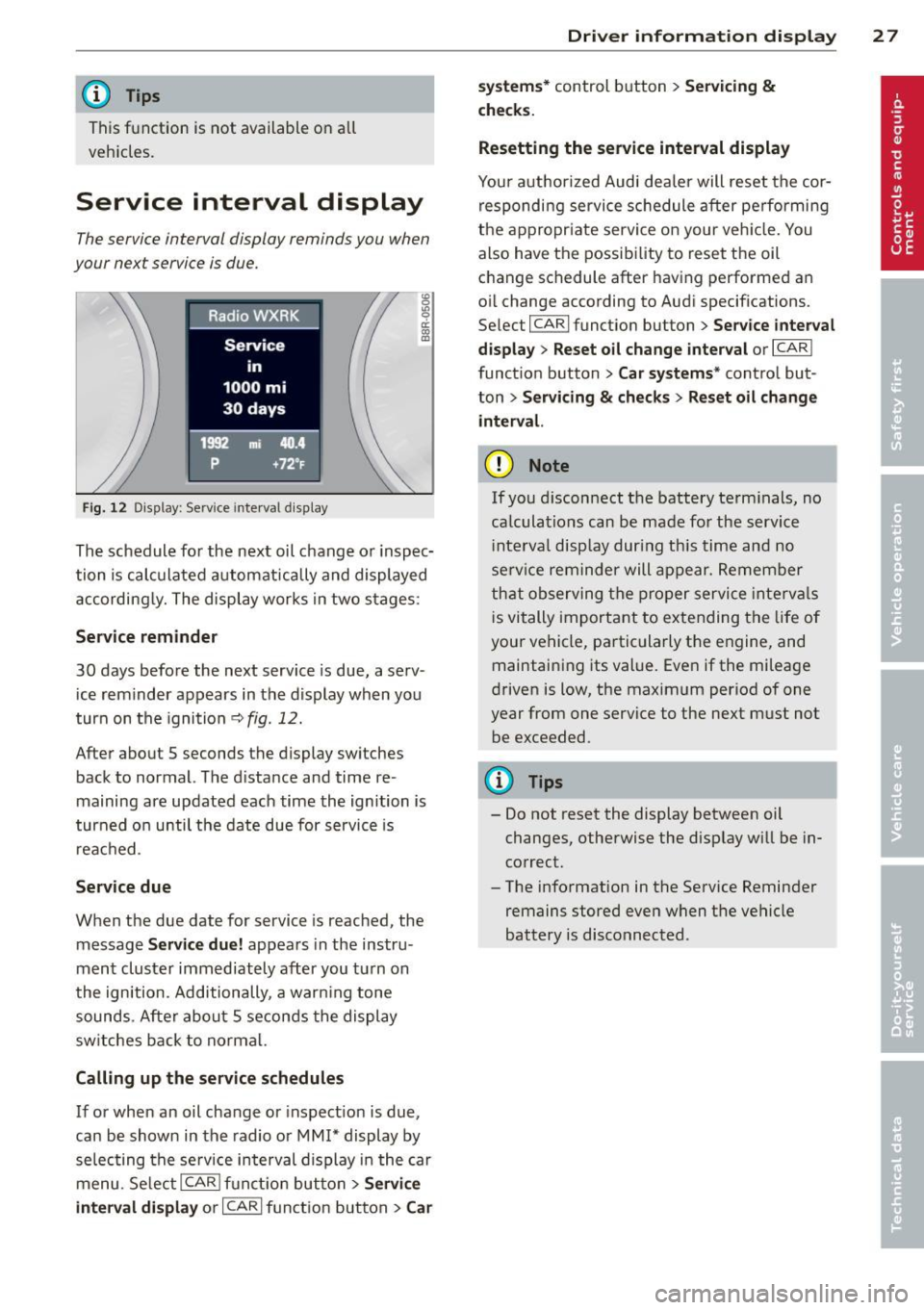
Fig. 12 Dis play: Serv ice interva l di splay
The schedule fo r the next oil change or inspec
tion is calculated automatically and displayed accordingly. The display works in two stages:
Service rem inder
30 days before the next service is due, a serv
ice rem inder appears in the display when you
turn on the ignition
<> fig. 12.
After about 5 seconds the display switches
back to normal. The d istance and time re
maining are updated each time the ignition is
turned o n until the date due for service is
r eached .
Service due
When the due date for service is reached, the
message
Servic e due! appears in the instru
ment cluster immediately after you turn on
the ign ition . Additionally, a warn ing tone
sounds . After about 5 seconds the display
sw itches back to normal.
Call ing up the service schedules
If or when an oil change or inspect ion is due,
can be shown in the radio or MM!* display by
selecting the se rvice in terval display i n the car
menu . Se lectlCARlf unct ion button>
S ervi ce
in te rva l di spla y
or ICAR I funct ion button > Car
Dri ver inform ation di spl ay 2 7
sys tem s* control button > Servicin g &
check s.
Resetting the service interval displa y
Your authorized Audi dealer will reset the cor
responding service sc hedule after pe rforming
the appropr iate service on your veh icle. You
also have the possibility to reset the oil
change schedule after having performed an
oi l change according to Audi specifications.
Se lec t I CAR I function button >
Se rvi ce interval
di spla y
> Reset oil change inter val or I CAR I
funct ion button >
C ar sy ste m s* control but
ton >
S ervicing & check s > Reset oil change
interva l.
(D Note
If you disconnect t he battery te rm inals, no
ca lculat ions can be made fo r the service
i nte rva l disp lay dur ing th is time and no
se rv ice rem inder will appear. Remember
th at observing the p roper service inte rva ls
i s vitally important to extending the life of
your vehicle, partic ularly the engine, and
maintaining its value. Even if the mileage
driven is low, the maximum period of one
year from one service to the next must not
be exceeded .
(!) Tips
-Do not reset the display between oil
changes, otherwise the disp lay will be in
correct.
- The information in the Service Reminder
remains stored even when the vehicle
battery is disconnected .
Page 35 of 286

keys. Unguarded access to the keys pro
vides children the opportunity to start
the engine and/or activate veh icle sys
tems such as the power windows etc. Un supervised operation of any vehicle sys
tem by ch ildren can result in serious in
jury.
- Do not remove the key from the ignition
lock until the vehicle has come to a com
plete stop. Otherw ise the steering col
umn lock cou ld suddenly engage -caus
ing the risk of an accident.
(D Tips
- The operation of the remote contro l key
can be temporarily disrupted by interfer
ence from transmit ters in the vici nity of
the vehicle working in the same frequen
cy range (e .g . a ce ll phone, radio equip
ment).
- Fo r security reasons, replacement keys
are on ly available from Audi dea lers .
- For Decla rat ion of Compliance to United
States FCC and Industry Canada regula
tions
¢ page 267.
Removing the mechanical key
Fi g. 19 Remote master key: remov ing the mechanical
key
.,. Press the release button @ c:> fig. 19.
.,. Pull the mechanica l key ® out of the master
key.
Using the mechan ical key, you can:
- lock and unlock* the glove compartment on
t h e passenger's side
c:> page 67 .
Op enin g an d clos ing 33
- lock and unlock the vehicle manually
i:> page 36 if this should not be possible
w ith the master key.
- use the ignition key emergency release
¢page 34.
Check light and battery in the master
key
Fig . 20 Remote master key: removing the battery hold
er
Check li ght in the mast er key
The check light @ i::> fig. 20 in the master key
provides information about different condi
tions.
.,. The check light turns on br iefly once when a
button is pressed, and during an "inquiry"
by the convenience key system.
.,. If the check light does not come on, the bat
tery is dead and has to be rep laced. In addi
tion, when the batte ry is dead
the m indica
tor light appears in the inst rument cl uste r
disp lay as well as the message
Ple ase
ch ange ke y battery .
Master key battery replacement
.,. Remove the mechan ica l key c:>page 33 .
.,. Press the release b utton @ c:> fig. 20on the
bat tery ho lder and at the same time pull the
battery ho lder out of the master key in the
direction of the arrow .
.,. Insta ll the new battery CR 2032 with the
"+ " sign facing down .
.,. Push the battery holder carefully into the
master key.
.,. Install the mechanical key.
Page 42 of 286
40 Opening and clo sing
Convenience opening/closing
The windows can be opened and closed with
the mechanical key or the emergency key.
@
' ~-~
® '
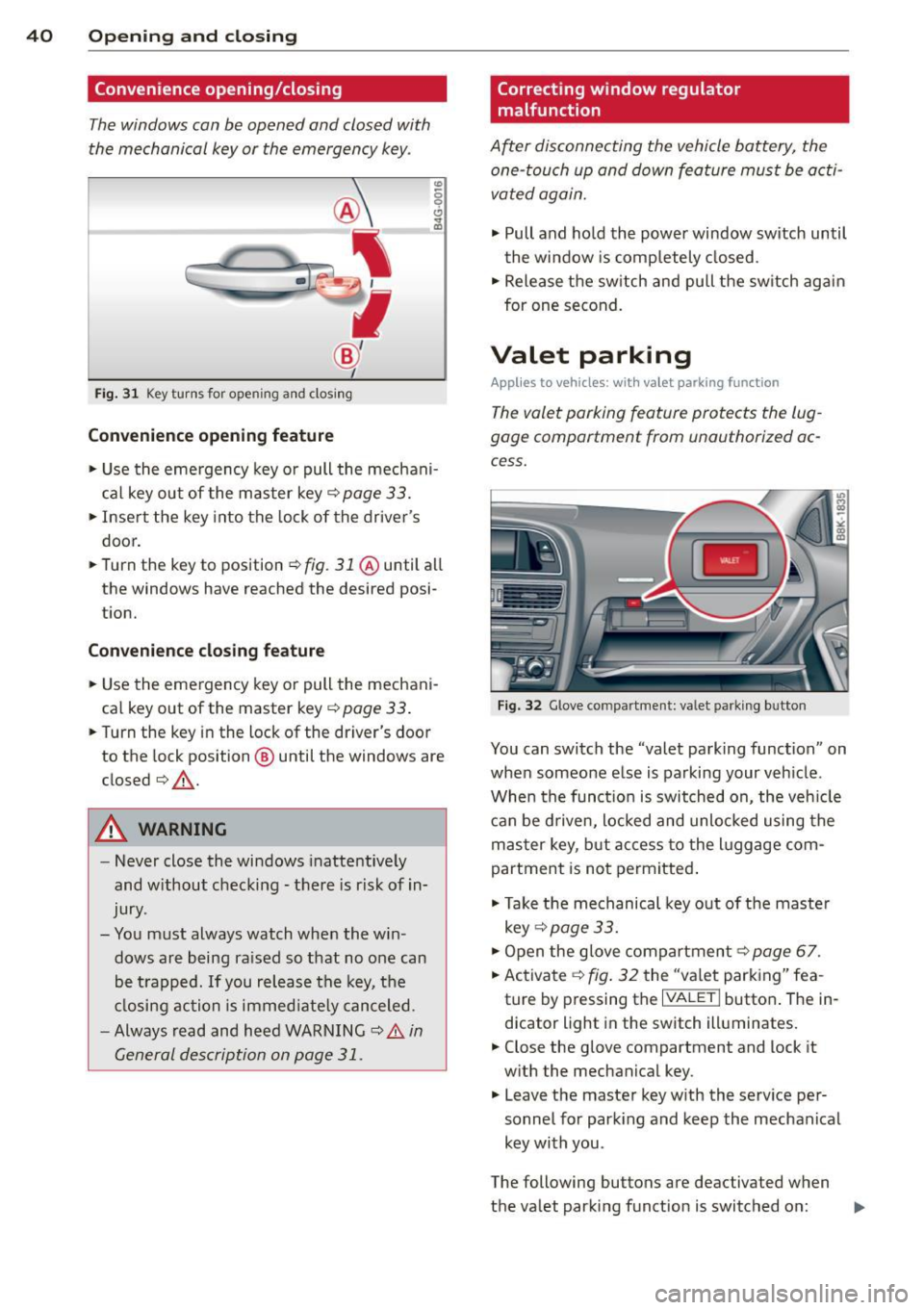
Fig . 31 Key turns for open ing an d clos ing
Conv eni ence open ing fe ature
"' 0 0 0
" m
• Use the eme rgency key or pull the mechani
cal key out of the master key¢
page 33.
• Inse rt the key into the lock of the driver's
door.
• Turn the key to position~
fig. 31 @until all
the windows have reached the desired posi
t ion.
Con venience clo sing f eature
• Use the emergency key or pull the mechani
cal key out of the master key¢
page 33 .
• Turn the key in the lock of the dr iver's door
to the lock position @ until the windows are
closed¢ &.
A WARNING
-Never close the windows inattentive ly
and w ithout checking -there is risk of in
jury.
- You must always watch when the win dows are being ra ised so that no one can
be t rapped. If you release the key, the
closing action is immed iate ly canceled.
- Always read and heed WARNING ¢
A in
General description on page 31.
Correcting window regulator
malfunction
After disconnecting the vehicle battery, the
one-touch up and down feature must be activated again.
• Pull and ho ld the power window switch until
the window is completely closed.
• Release the sw itch and pull the switch again
for one second.
Valet parking
App lies to vehicles: wit h va le t parking function
The valet parking feature protects the lug
gage compartment from unauthorized ac
cess.
F ig . 32 Glove compartme nt: valet parking button
You can switch the "valet parking function" on
when someone else is parking your veh icle .
When the funct io n is switched on, the veh icle
can be d riven, locked and unlocked using the
master key, but access to the l uggage com
partment is not permitted .
• Take the mechanical key out of the maste r
key ¢
page 33.
• Open the glove compartment¢ page 67.
• Activate ¢
fig. 32 the "va let parking" fea
ture by p ressing the
I VALET I button . The in
dicator light in the switch illuminates.
• Close the glove compartment and lock it
w ith the mechanical key .
• Leave the master key w ith the serv ice pe r
sonnel for park ing and keep the mechanical
key with you .
The following buttons are deactivated when
the valet parking function is switched on: ..,_
Page 45 of 286
correct the cause of the mal function as
soon as possible.
- If park ing the veh icle w ith the power top
open, remember that the ve hicle interior
will not be protected from the weather
or from unauthorized entry. Closing the
power top before leaving the vehicle is
r ecommended. If you leave items in the
vehicle, lock them in the trunk .
"' Power top operation
The indicator light monitors the power top.
The l'JI indicator light illuminates for approxi
mate ly 2 seconds when the ignit ion sw itches
on to check the function and then goes out
again . T he indicator light also:
- illuminates when the power top opens or
closes.
- blinks if the power top switch is operated
but the conditions for opening or closing the
power top are not met. A warning message
also appears in the instrument cluster dis
play
c::> page 43, Error message in the in
strument cluster display .
-if the power top d id not open or close com
pletely.
(D Tips
The indicator light stays on if the power
top was opened manually.
Error message in the instrument cluster
display
An error message appears if the power top
cannot open or close .
Several conditions must be met for the power
top to open or close automat ically .
An error message in the instrument cluster
d isp lay ind icates if one of the condit ions is not
met or there is a malfunct ion.
Power top: please close rear lid
The luggage compartment lid must be closed
when the power top is opening or closing . This
error message appears in the instrument cl us-
Power top 43
ter display if the luggage compa rtment lid is
not closed .
Storage bay not lowered. Please remove
obstruction
The power top sto rage bay must lower when
the power top is opening . This error message
appears in the instrument cluster display if
the storage bay is not lowered. If the storage
bay does not lower automat ically because of
objects in the luggage compartment, remove
the objects that are in the way from the stor
age bay area . Otherwise, you can operate the
power top storage bay manually
c::> page 45.
Power top : cannot be used
This error message appears if the convertible
cannot open or close automatically because of
safety reasons or if there is a malfunct ion . The
follow ing causes are possible:
- Vehicle speed too high: Power top opera
tion is deactivated and an error message ap
pears if the veh icle speed is too high. Re
duce the vehicle speed and ope rate the
sw itch again to open or close the powe r top.
- Battery voltage too low: The power top can
not be ope rated if the battery voltage is too
low. This ens ures the re will be enough bat
t ery vol tage le ft to sta rt the vehicle. The
power top can be operated again after the
eng ine is started .
-Rollover protection active: If the power top
is operated continuously for an extended pe
riod of time, rollover protection will activate
to prevent damage to the hydra ulic unit.
This protective funct ion prevents the power
top from opening or close for approx imately
15 to 30 minutes. It w ill function again af
ter that
c::> & .
-Malfunction: Failure of system components
is one possib le cause for malfunction . If this
happens, you can a lso ope rate the powe r
top by hand
c::> page 47.
Power top not secure
This message appears with a warning tone if
the power top is not
completely closed or
open and the vehicle speed is above 50 km/h.
ll-
Page 60 of 286

58 Clear vis ion
Cleanin g the headlights* . The headlight wash
er system* op erates on ly when the headlights
a re on. If you move the lever to pos ition
® ·
the head lights are washed in intervals.
A WARNING
- The ra in sensor is only intended to assist
the driver . The dr iver is still responsible
for manually sw itching the w ipers on ac
co rding to the vis ibility conditions .
- The windshie ld may not be treated w it h
water-repe lling windshie ld coat ing
age nts. Unfavorable conditions, such as
wetness , darkness, low sun, can res ult in
incre ase d gla re. Wiper b lade ch atter is
also possible .
- P roperly fu nctioning windshie ld w iper
blades are required for a clear view and
sa fe dr iving
¢ page 58, Replacing
windshield wiper blades.
(D Note
- In the c ase of fro st, check whether the
winds hield wiper blad es are frozen to
the windshie ld. Switching on the wind
s h ield wipers can damage the wiper
blades!
- Prior to using a car wash, the win dshield
wipe r system must be switched
off (lever
i n position @). This helps to prevent un
i ntent ional sw itchi ng on and damage to
t h e windshie ld w iper system .
- The w indshield wipers are switched
off
when the ignition is turned off . Activate
the windshie ld w ipers afte r the ignit ion
i s sw itched back on by mov ing t he wind
s h ield wiper leve r to any pos it io n.
- Worn or dirty windsh ie ld w iper blades
r esult in streaking . T h is can affect the
r ain senso r* function . Ch eck your wind
s h ield wiper blades regularly.
- The was her fluid nozzles of the wind
s h ield washer system are heated at low
temper atures w hen the ignit ion i s on.
- When stop ping temporarily , (e.g. at a
traff ic light) the se t speed of the wi nd- shield wipers is automatically
reduced by
one s peed.
Replacing windshield wiper blades
Wiper blad es in good condition help k eep th e
windshield clear.
Fi g. 6 5 Re mov ing w indsh ie ld wipe r bl ade
Wiper service posit ion /blade replacement
position
.. Switch the windshie ld w ipers off (position
@ ¢page 57, fig.
64) .
.. Select: !CARI function button> Windshi eld
wiper s> Service po sition > on .
Or
.. Select: !CARI function butto n> Car syst em s*
contro l button > Servicing & checks > Wiper
service po sition > On.
The windshield wipers
move into the service pos ition .
Removing the wiper blade
.,. Lift the windsh ie ld wiper arm up from the
w indshie ld.
.. Press the locking knob
(D ¢ fig. 65 on the
wiper blade . Ho ld the wipe r blade firmly .
.. Remove the wipe r blade in the direction of
the arrow .
Attaching the wiper blade
.. Insta ll the new w iper blade in the ret ainer
on t he wiper a rm @ unt il yo u hear i t click in
to p lace on the wiper arm.
.. Place the wiper arm back on the windshield.
.. To bring the w ipers back into the or igina l
position, press the windshield wiper lever .
Or
.. Select : !CARI function button> Windshield
wipers > Service position > off .
Or
Page 61 of 286
.. Select: ICAR I function button> Car syste ms*
control button > Servicing & checks > Wiper
serv ice po sition
> Off.
A WARNING
- If the windshield wipers smear the wind
shield, clean the wiper blades with wind
shield washer fluid .
If the wiper blades
are extremely dirty, you can also clean
them with a soft sponge or cloth.
- For your safety, you should replace the
wiper blades once or twice a year . See
your authorized Audi dealer for replace ment blades.
(D Note
- The windshield wiper blades must only
be replaced when in the service position!
Otherwise, you risk damaging the paint
on the hood or the windshield wiper mo
tor.
- You should not move your vehicle or
press the windshield wiper lever when
the wiper arms are folded away from the
windshield. The windshield wipers would
move back into their original position
and could damage the hood and wind
shield.
- To help prevent damage to the wiper sys
tem, always loosen blades which are fro
zen to the windshield before operating
wipers.
- To help prevent damage to wiper blades,
do not use gasoline, kerosene, paint
thinner, or other solvents on or near the
wiper blades.
- To help prevent damage to the wiper arms or other components, do not at
tempt to move the wipers by hand.
@ Tips
- Commercial hot waxes applied by auto matic car washes affect the how easily
the glass surface can be cleaned.
- You can also use the service position, for example, if you want to protect the
windshield from icing by using a cover .
Clear vision 59
Digital compass
Switching the compass on and off
Applies to vehicles: with digital compass
The compass direction is shown in the rear
view mirror.
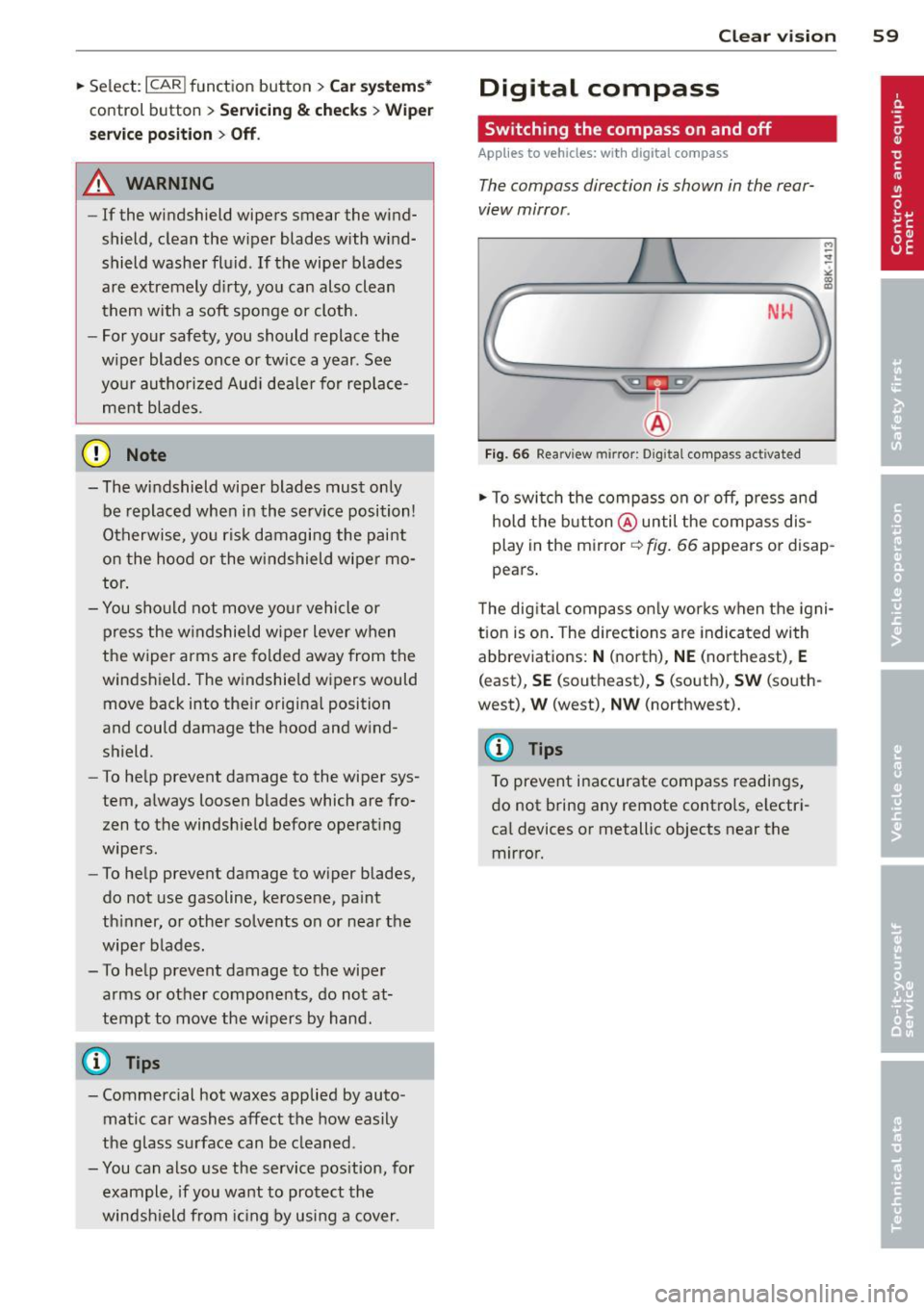
NW
Fig. 66 Rearview mirror: Digital compass ac tivated
.. To switch the compass on or off, press and
hold the button @until the compass dis
play in the mirror~
fig. 66 appears or disap
pears.
The digital compass only works when the igni
tion is on . The directions are indicated with
abbreviations:
N (north), NE (northeast), E
(east), SE (southeast), S (south) , SW (south
west),
W (west), NW (northwest).
(D Tips
To prevent inaccurate compass readings,
do not bring any remote controls, electri
cal devices or metallic objects near the mirror.
Page 64 of 286

62 Seats and storage
close to this position as possible
¢page 64.
A WARNING
Never place any objects in the driver's foot
well. An object could get into the pedal area and interfere with pedal function. In
case of sudden braking or an accident, you
would not be able to brake or accelerate .
Front passenger's seat
Always move the front passenger seat into
the rearmost position .
To avoid contact with the airbag while it is de
ploying, do not sit any closer to the instru
ment panel than necessary and always wear
the three-point safety belt provided adjusted correctly . We recommend that you adjust the
passenger's seat in the following manner:
• Bring the backrest up to an (almost) upright
position. Do not ride with the seat reclined .
• Applies to vehicles with adjustable head re
straints: Adjust the head restraint so the up
per edge is as even as possible with the top
of your head . If that is not possible, try to
adjust the head restraint so that it is as
close to this position as possible
¢ page 64.
• Place your feet on the floor in front of the
passenger's seat.
Front seats
Power seat adjustment
Fig. 68 Front seats: powe r seat adjustment
Controls
@ -Adjusting the lumbar support* : press the
button in the corresponding position ¢ .&, .
@ -Moving the seat up/down: press the but
ton up/down ¢ .&, .
@ -Moving the seat forward/back : press the
button forward/back ¢.&, .
©-Adjusting the backrest angle: press the
button forward/back ¢.&. .
©-Raising/lowering * the head restraints:
press the button up/down¢.&. .
@ -Lengthening/shortening the upper thigh
support* : lift the handle. A spring moves the
front seat cushion forward ¢ .&. .
A WARNING
--
-Never adjust the driver's or front pas
senger's seat while the vehicle is moving.
If you do this while the vehicle is moving,
you will be out of position . Always adjust
the driver's or front passenger's seat
when the vehicle is not mov ing.
- Be careful when adjusting the seat
height . Check to see that no one is in the
way, or serious injury could result!
- Because the seats can be electrically ad
justed with the ignition off or with the
ignition key removed, never leave chil
dren unattended in the vehicle. Unsuper
vised use of the electric seat adjust
ments may cause serious injury.
- To reduce the risk of injury in the case of
sudden braking or accident, front pas
sengers must never ride in a moving ve
hicle with the backrest reclined. Safety
belts and the airbag system only offer maximum protection when the backrest
is upright and the safety belts are prop
erly positioned on the body. The more
the backrest is reclined, the greater the
risk of personal injury from an incorrect
seating position and improperly posi
tioned safety belts.
Page 76 of 286

7 4 On the road
On the road
Steering
Manually adjustable steering wheel
The steering wheel position is fully adjustable
up and down and forward and bock .
Fig. 87 Lever under the steering column
F irst, adjust the driver's seat correctly .
• Pull the lever
r:> fig . 87 <=> &_ .
• Move the steer ing whee l to the desired posi
t ion.
• Push the lever against the steering column
until it locks.
There must be at least 10 inches (25 cm) be
tween you r chest and the center of the steer
i ng wheel. If you cannot sit more than 10 in
ches (25 cm) from the steering whee l, see if
adaptive equipment is available to help you
reach the pedals and increase the distance
from the steering wheel.
F or detai led information on how to adjust the
driver's seat, see
r:> page 62.
A WARNING
Improper use of steeri ng wheel adjust
ment and improper seating position can
cause serious personal injury.
- Adjust the steering whee l co lumn on ly
when the veh icle is not moving to pre
vent loss of veh icle control.
- Adjust the driver's seat or steering wheel
so that there is a minimum of 10 inches
(25 cm) between your chest and the
steering wheel
¢ page 119, fig . 134 . If
yo u cannot mainta in this min imum dis- tance, the airbag system cannot protect
you proper ly.
- If physical limitations prevent you from
sitting 10 inches (25 cm) or more from
the steering wheel, check with your au
thorized Audi dealer to see if adaptive
equ ipment is ava ilable .
- If the steer ing wheel is aligned with your
face, the supplementa l driver's a irbag
cannot provide as much protection in an
accident . Always make sure that the
steer ing wheel is aligned with your
chest.
- Always hold the steering wheel w ith your
hands at the 9 o'clock and 3 o'clock posi
tions to reduce the risk of persona l injury
if the driver's airbag dep loys .
- Never hold the stee ring wheel at the 12
o'clock position or with your hands inside
the steeri ng wheel rim or on the steering
wheel hub . Holding the steering wheel
the wrong way can cause se rious injuries
to the hands, arms and head if the driv
er's airbag deploys.
Ignition lock
Starting engine with the key
Applies to vehicles : w ith ign ition lock
The ignition is switched on and the engine
started with the ignition key .
Fig. 88 Ignit ion key
Sta rting th e engine
• Insert the key into the ignition lock .
• Step on the brake pedal and move the selec-
tor lever to the P or N pos ition. ..,..