display AUDI RS5 CABRIOLET 2013 User Guide
[x] Cancel search | Manufacturer: AUDI, Model Year: 2013, Model line: RS5 CABRIOLET, Model: AUDI RS5 CABRIOLET 2013Pages: 286, PDF Size: 71 MB
Page 30 of 286

28 Driver information d isplay
Engine oil temperature
indicator
Fig . 13 Dis play: e ngine oil temperat ure indica tor
.. With the ign it ion switched on, press the
IRESET lbutton
¢ page 26, fig. 11 repeated
ly until the engine oil temperature indicator
is shown.
If the engine oil temperature is be low 140 ° F
(60 °C) , the G!#JI symbol followed by three hy
phens"- --" and the °C unit is shown .
At an engine oil temperature above
140 °F
(60 °() the engine has reached its operating
temperature . The engine oil temperature may
be higher if there is heavy engine load and
high temperatures outside. This is not a cause
for concern as long as the. ¢
page 17 or
the
II ¢ page 21 warning light in the display
does not flash .
Lap timer
Introduction
You can record and eva luate lap times with
the lap timer in the display¢
page 28,
fig. 15. The time is measured in minutes, sec
onds and
1/10 seconds. The hours are also
shown when the lap time exceeds 60 minutes .
The maximum individual measurement is
99
hours. A max imum of 99 laps may be record
ed.
& WARNING
-
Please devote your fu ll att ent ion to driv
ing. As the driver, you have comp lete re
sponsibility for safety in traffic. Only use
the funct ions in such a way that you always maintain complete control over your vehi
cle in all traffic situations.
(D Tips
When the lap timer stopwatch is runn ing,
you can call up the trip computer informa tion with the I RESET I button .
Calling up the lap timer and timing
Fig. 14 Controls
Fig. 15 Display : Lap timer
Calling up the lap timer
.. Press the I RESET ! button ~ fig . 14 @ until
the lap timer¢
fig. 15 appears.
Timing laps
.. To start timing, press the upper section of
the wiper switch @. The time measurement
is shown in line@¢
fig. 15.
.. To stop t iming, press the upper section of
the wiper switch @ again. This also starts
timing the next round. The prev ious timing
always moves one line down, first into line
@, and then into lines @and @. The lap
number that corresponds to the timing is
disp layed in front of the individual timings. ..,.
Page 31 of 286
Displaying intermediate time and pausing
timing
• To disp lay an intermediate time, press the
lower section of the wiper switch ®· The
timing continues to run in the background.
• To pause timing, press the lower section of
the wiper switch ® again .
• To continue t iming, press the upper section
of the wiper switch @.
If timing is paused, you can continue it later
even if you switch the ign it ion off.
Evaluating times and continuing or
resetting timing
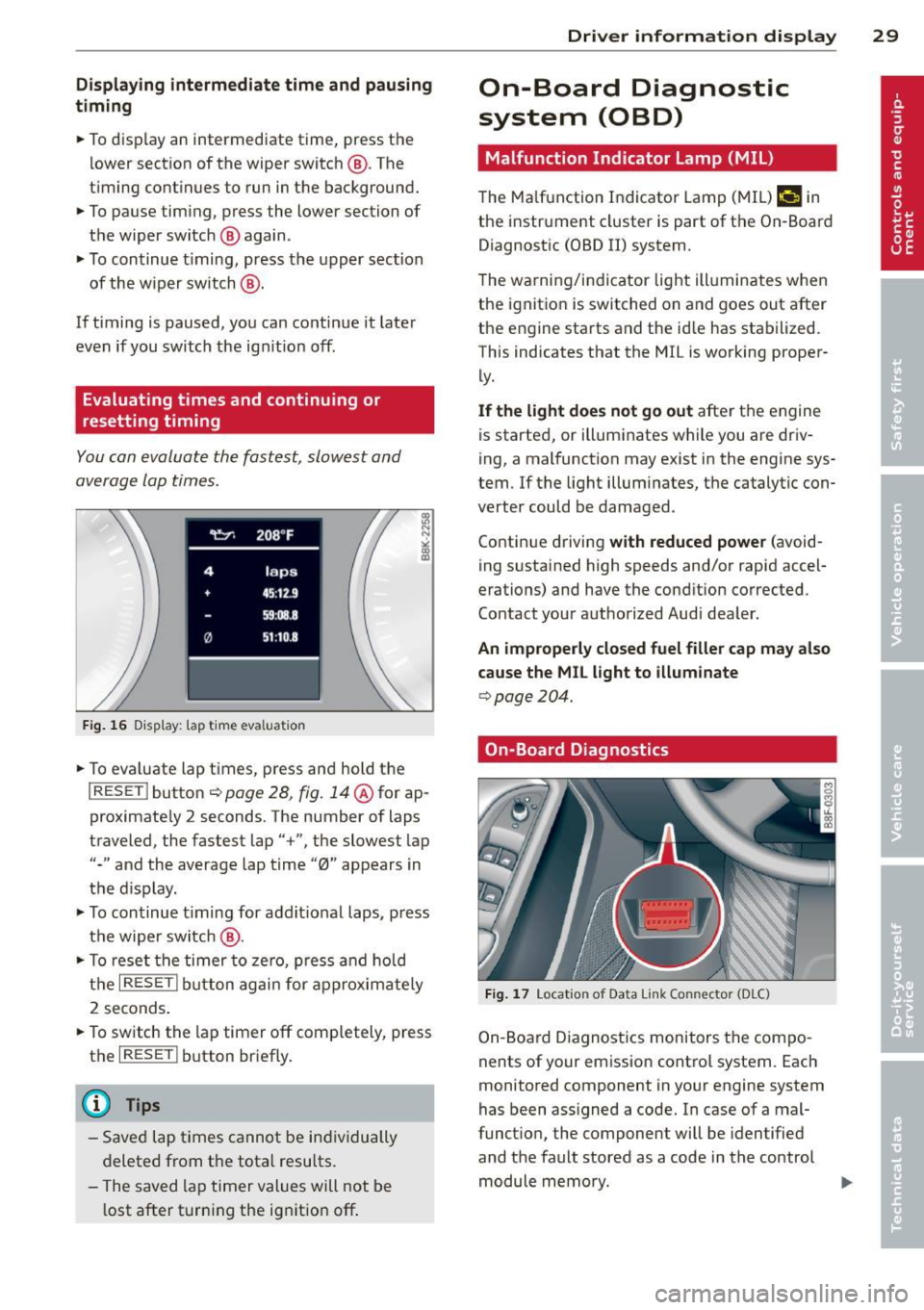
You can evaluate the fastest, slowest and
average lap times.
Fig. 16 Display : lap t ime eva luat ion
• To eva luate lap times, press and hold the
I RESE T I button ¢ page 28, fig. 14@for ap
proximate ly 2 seconds. The number of laps
traveled, the fastest lap"+", the slowest lap
"-" and the average lap time "0" appears in
the display .
• To continue timing for additional laps, press
the wiper switch @.
• To reset the timer to zero, press and hold
the
I RESET ! button again for approximately
2 seconds .
• To switch the lap timer off completely, press
the
I RESE T I button briefly.
(D Tips
-Saved lap times cannot be individually
deleted from the total resu lts.
- The saved lap timer values will not be
l ost after turning the ignition off .
Driver information display 29
On-Board Diagnostic
system (OBD)
Malfunction Indicator Lamp (MIL)
The Malfunction Indicator Lamp (MIL)¢• in
the instrument cluster is part of the On-Board
Diagnostic (OBD II) system .
T he warning/indicator light illuminates when
the ignition is switched on and goes out after
the engine starts and the id le has stabilized.
This indicates that the MIL is working proper
ly.
If the light does not go out after the engine
is started, or illuminates while you are driv
ing, a malfunction may exist in the engine sys
tem .
If the light illuminates, the catalytic con
verter could be damaged .
Continue driving
with reduced power (avoid
ing sustained high speeds and/or rapid accel
erations) and have the condition corrected.
Contact your authorized Audi dealer.
An improperly closed fuel filler cap may also
cause the MIL light to illuminate
¢ page 204.
On-Board Diagnostics
Fig. 17 Locat io n of Data Link Co nn ector (D LC)
On-Board Diagnostics monitors the compo
nents of your emission contro l system. Each
monitored component in your engine system
has been assigned a code. In case of a mal
funct ion , the component will be identified
and the fault stored as a code in the control module memory.
Page 32 of 286
30 Driver in formation d isplay
The MIL light may a lso illuminate if there is a
l eak in the on-board fue l vapor recovery sys
tem .
If the light illuminates after a ref ueling,
stop the veh icle and make sure the fue l filler
cap is properly closed
¢ page 204.
In order to make an accurate diagnosis, the
stored data can only be displayed using spe
cial diagnostic eq uipment (gener ic scan tool
for OBD).
In order to connect the special diagnostic
eq uipment, push the p lug into the Data L ink
Connector (DLC). The DLC is located to the
rig ht of the hood release
¢ fig. 17.
Your authorized A udi dealer or qualified work
shop can interpret the code and perform the necessary repa ir.
A WARNING
Do not use the diagnostic connector for
personal use. Incorrect usage can cause
malf unctions, which can increase the risk
of a coll is ion!
-
Page 43 of 286
-1<=>1 button on the master key
- Handle in the rear lid
When the valet parking feature is act ivated,
the message
Val et par king activat ed appears
i n the ins trument cluster display when you
switch the ignition on. Opening and clo
sin g 41
Page 45 of 286
correct the cause of the mal function as
soon as possible.
- If park ing the veh icle w ith the power top
open, remember that the ve hicle interior
will not be protected from the weather
or from unauthorized entry. Closing the
power top before leaving the vehicle is
r ecommended. If you leave items in the
vehicle, lock them in the trunk .
"' Power top operation
The indicator light monitors the power top.
The l'JI indicator light illuminates for approxi
mate ly 2 seconds when the ignit ion sw itches
on to check the function and then goes out
again . T he indicator light also:
- illuminates when the power top opens or
closes.
- blinks if the power top switch is operated
but the conditions for opening or closing the
power top are not met. A warning message
also appears in the instrument cluster dis
play
c::> page 43, Error message in the in
strument cluster display .
-if the power top d id not open or close com
pletely.
(D Tips
The indicator light stays on if the power
top was opened manually.
Error message in the instrument cluster
display
An error message appears if the power top
cannot open or close .
Several conditions must be met for the power
top to open or close automat ically .
An error message in the instrument cluster
d isp lay ind icates if one of the condit ions is not
met or there is a malfunct ion.
Power top: please close rear lid
The luggage compartment lid must be closed
when the power top is opening or closing . This
error message appears in the instrument cl us-
Power top 43
ter display if the luggage compa rtment lid is
not closed .
Storage bay not lowered. Please remove
obstruction
The power top sto rage bay must lower when
the power top is opening . This error message
appears in the instrument cluster display if
the storage bay is not lowered. If the storage
bay does not lower automat ically because of
objects in the luggage compartment, remove
the objects that are in the way from the stor
age bay area . Otherwise, you can operate the
power top storage bay manually
c::> page 45.
Power top : cannot be used
This error message appears if the convertible
cannot open or close automatically because of
safety reasons or if there is a malfunct ion . The
follow ing causes are possible:
- Vehicle speed too high: Power top opera
tion is deactivated and an error message ap
pears if the veh icle speed is too high. Re
duce the vehicle speed and ope rate the
sw itch again to open or close the powe r top.
- Battery voltage too low: The power top can
not be ope rated if the battery voltage is too
low. This ens ures the re will be enough bat
t ery vol tage le ft to sta rt the vehicle. The
power top can be operated again after the
eng ine is started .
-Rollover protection active: If the power top
is operated continuously for an extended pe
riod of time, rollover protection will activate
to prevent damage to the hydra ulic unit.
This protective funct ion prevents the power
top from opening or close for approx imately
15 to 30 minutes. It w ill function again af
ter that
c::> & .
-Malfunction: Failure of system components
is one possib le cause for malfunction . If this
happens, you can a lso ope rate the powe r
top by hand
c::> page 47.
Power top not secure
This message appears with a warning tone if
the power top is not
completely closed or
open and the vehicle speed is above 50 km/h.
ll-
Page 56 of 286

54 Clear vis ion
The lea ving home function i lluminates the
area around the vehicle when unlocking it.
This funct ion can be switched on and
off.
The c o ming ho me and leav ing h ome func
tions on ly operate when it is dark and the
light switch is in the AUTO position
r::!) page 52, fig. 55 .
Auto headlight s*
When the light switch is in the AUTO
r::!) page 52 position, the sw itch-on po int of the
lights can be changed in the automatic driving
light function.
Daytime running lights
USA m odels: You can switch the dayt ime run
ni ng lights
on and o ff .
Canada mod els: The function cannot be
turned off .
It is activated automat ica lly each
time the ign ition is switched on.
Travel mod e*
The headlight beam is asymmetrical. This pro
vides stronger illum ination on the s ide of the
road on wh ich you are driving . If you a re driv
ing i n a count ry that d rives on the opposite
side of the road from you r own country, th is
will cause glare for oncoming dr ivers. To pre
vent glare :
- Trave l mode must be selected in vehicles
with Xenon headlights*.
- In vehicles with halogen head lights, certain
areas of the head light lenses must be cov
ered w ith wate rproof adhesive covers tha t
p revent light from passing through. For
more information, p lease see your author
i zed Audi dea ler or author ized repair fac ility .
@ Tips
When trave l mode is activated, a display in
the driver information system indicates
this each time you switch the ignitio n on.
Emergency flashers
Fi g. 5 7 Center co nsole : em ergency flashe r sw itch
The emergency flashers makes other moto
rists aware that you or your vehicle are in an
emergency situation .
... Press the switch~
r::!) fig. 57 to turn the
emergency flashers on or
off.
When the emergency flashers are on, all four
turn s ignals b link at the same time. The turn
s ignal indicator lights
H II in the instrument
cluster, as well as the l ight in the emergency
flasher switch ~ blink likewise.
You can indicate a lane change or a t urn when
the emergency flashers are switched on by us
ing t he turn signal lever. The emergency flash
ers stop temporarily .
T he emergency flashers also work when the
ignition is turned off .
T he emergency flashers wi ll tu rn on automat i
ca lly if yo u are in an accident where the airbag
has deployed.
(D Tips
You sho uld turn on the emergency flas hers
when:
- yo u are the last veh icle standing in a t ra f
fic jam so that any other vehicles corning can see you, o r whe n
- yo ur vehicle has bro ken down or you are
in an emergency s ituation, or when
- yo ur vehicle is be ing towed by a tow
t ruck or if you are towing ano ther vehicle
beh ind you .
Page 57 of 286

Interior lights
Front/rear interior lights
Fig. 58 Front headliner: inter ior lighti ng controls
Fig.
59 Rear headlin er: rear reading lights
@ Interior lights
Press the button @. The LED in the button il
l uminates .
If the LED illuminates, the interior lights turn
on automatically when you unlock the vehicle,
open a door or remove the ignition key. The in
terior lights turn off several seconds after
your close the doors, when you lock the vehi
cle or when you turn the ignition on. When a
door is open, the light turns off after a few
minutes.
@ Front/rear reading lights
To turn a reading light on/off, press the but
ton ~¢
fig. 58 or¢ fig. 59.
Clear vision 55
Instrument illumination
The basic brightness of the illumination for
the instruments, the center console and the
display can be adjusted.
Fig. 60 Instrument illumination
.,. Press the knob to release it .
.. Turn the knob toward"-" or"+" to reduce or
increase the brightness .
.,. Press the knob again to return it to its origi
nal position.
(D Tips
The instrument illumination (for dials and
needles) lights on when the ignition is
switched on and the vehicle lights are
turned off. As the daylight fades, the illu
mination of the dials likewise dims auto
matically and will go out completely when
the outside light is
very low. This feature is
meant to remind you to switch on the
headlights when outside light conditions
become poor.
Vision
Adjusting the exterior mirrors
Fig. 61 Forward sect ion of dr iver 's armrest: power mir
r or cont rols
Page 62 of 286
60 Clear vis ion
Adjusting the magnetic zone
A ppl ies to vehicles: with digital compass
The magnetic zone must be adjusted correctly
for the compass to read accurately .
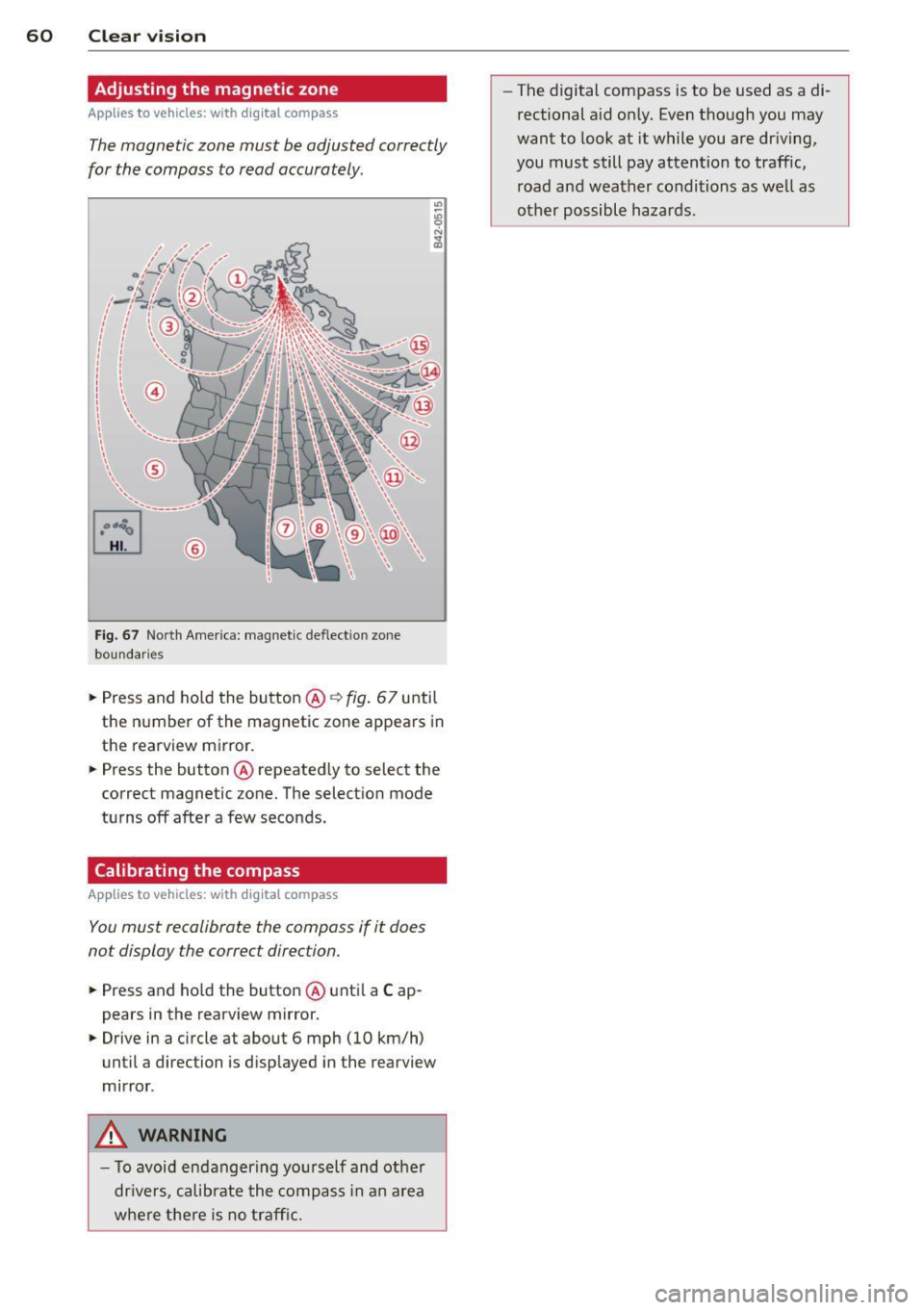
Fig. 67 North Amer ica: magnet ic deflect ion zo ne
bo undar ies
• Press and ho ld the button @¢ fig. 67 until
the n umber of the magnetic zone appears in
the rearview m irror.
• Press the button @ repeated ly to select the
correct magnetic zone. The select ion mode
tu rns off afte r a few seconds.
Calibrating the compass
A ppl ies to veh icles : with d ig ital compass
You must recalibrate the compass if it does
not display the correct direction.
• Press and ho ld the button @ until a Cap
pears in the rearview mirror.
• Drive in a c ircle at about 6 mph (10 km/h)
until a direction is d isp layed in the rearview
mirror .
.&, WARNING
- To avoid endangering yo urself and other
dr ivers, calibrate the compass in a n area
where the re is no traff ic. -
The digital compass is to be used as a di
rectional aid on ly. Even though you may
want to look at it while you are dr iving,
you must still pay attention to traffic, road and weather conditions as we ll as
other possible hazards.
Page 72 of 286

70 Warm and cold
Operation
We recommend pressing the IAUTOI button and setting the temperature to 72 °F (22 °C) .
Fig. 83 Automat ic cl imate control system: control
Fig. 84 3-zo ne de luxe automatic cl imate contro l' : contro ls
Press the buttons to turn the funct ions on or
off. Use the d ials to adjust the temperature,
the blower speed and the a ir distribution . The
LED in a button will light up when the func
tion is switched on. The settings are disp layed
for a few seconds in the radio or MMI* display.
In vehicles with a 3 -zone deluxe automat ic cl i
mate control systems*, the dr iver and front
passenger side can be adjusted separately .
The settings are also displayed in the climate
control sys tem display.
IOFF I Switching the climate control
system on/off
The IOFFI button switches the climate control
sys tem on or off . It also switches on when you press the knob. Airflow from outside
is
blocked when the climate control system is
switched off .
IAC I Switching cooling mode on/off
The air is not coo led and humidity is not re
moved when cooling mode is switched off .
This can cause fog on the windows. Cooling
mode switches off automatically when the
outside temperature is below ze ro .
1- 1 Switching recirculation mode on/off
In recircu lation mode, the air inside the vehi
cle is c irculated and filtered. This prevents the
unfiltered air outside the vehicle from enter
ing the vehicle interior . We recommend
Page 73 of 286
switching recirculation mode on when driving
through a tunnel or when sitting in traffic
c::>_& .
The IAU TOI button or I@ F RONT I button
switches recircu lation mode off .
IAUTO I Switching automatic mode on
Automatic mode mainta ins a constant tem
peratu re in side the vehi cle. Air temperature,
airflow and air distribution are controlled au
tomatically.
Adjusting the temperature
Temperatures between 60 °F (+16 °C) and
84
°F (+ 28 °C) can be set . Outside of this
range,
LO or HI will appear in the climate con
trol system display. At both of these settings,
the climate control system runs continuously
at maximum cooling or heating power. There
is no temperature regu lation.
~ Adjusting the airflow
You can adjust the airflow manually to suit
your needs . To have the airflow regulated au
tomatically, press the IAUTO ! button.
~Adjusting the air distribution
You can manually select the vents where the
a ir will flow. To have the air d istr ibution regu
lat ed automatically, press the
IAUTOI button.
~ Adjusting seat heating*
Pressing the button switches the seat heating
on at the highest sett ing (level 3). The LEDs
indicate the temperature leve l. To reduce the
temperature, press the button again. To
switch the seat heating off , press the button
repeatedly until the LE D turns off.
After 10 minutes, the seat heating automati
cally switches from level 3 to level 2.
[ill Adjusting seat ventilation*
Pressing the button switches the seat ventila
tion on at the highest setting (level 3) . The
LE Ds ind icate the ventilat ion level. To reduce
the ventilation leve l, press the button aga in.
To switch the seat ventilat ion off, press the
button repeatedly until the LED turns off.
Warm and cold 71
l F RON T I Switch the defroster on/off
The w indshield and side windows are defrost
ed or cleared of condensation as quickly as
possible . The maximum amount of air flows
main ly from the vents below the windshield.
Recirc ulation mode switches off. The tempera
ture should be set to 72
°F (22 °() or higher.
The temperature is controlled automatically.
The
! AUTO I button switches the defroster off.
lliil R EAR ! Switching rear window heater
on/off
The rear window heater on ly operates when
the engine is running .
It switches off auto
matically after a few minutes, depending on
the outside temperature.
To prevent the rear window heater from
switching off automatically, press and hold
the
l oo REARI button for more than 2 seconds.
This remains stored until the ign ition is
switched off .
Air vents
You can open and close the center and rear air
vents using the thumbwheels . The levers ad
just the direction of the airflow from the
vents.
In vehicles with a 3-zone deluxe automatic cli
mate control system*, you can adjust the air
temperature in the rear by turn ing the thumb
whee l toward the red side to make it warmer
or toward the b lue side to make it cooler .
A WARNING
-Do not use the recirculation for extended
periods of time. The windows could fog
up since no fresh air can enter the vehi
cle. If the windows fog up, press the air
recircu lation button again immediately
to switch off the air recirc ulation func
tion or se lect defrost.
- Individuals with reduced sensitivity to
pain or temperature could develop burns
when using the seat heating function. To
reduce the risk of injury, these indiv idu
als should not use seat heating.