display AUDI RS5 CABRIOLET 2013 Owner's Manual
[x] Cancel search | Manufacturer: AUDI, Model Year: 2013, Model line: RS5 CABRIOLET, Model: AUDI RS5 CABRIOLET 2013Pages: 286, PDF Size: 71 MB
Page 82 of 286
80 On the road
(0 Note
If the . symbol i n the display or the
1111 (USA models) ;II (Canada mo dels)
ind icator light in the instr ument cluster
flashes, there is a malfunction in the brake
system. By press ing the
ISETI button, you
can br ing up a driver message which ex
p lains the malfunction in more detail. If
the dr ive r message
Parking brake! ap
pears, there is an operating malfunction in
t he par king brake which you should have
repaired immediately by an a uthorized
Aud i dea le r or other q ualified workshop
¢page 15.
@ Tips
-You can apply the pa rking brake at any
time - even with the ignition switched
off. The ignit ion must be t urned on in or
der to release the parking brake.
- Occas iona l noises when the parking
brake is applied and re leased are norma l
and are not a cause for concern.
- When the vehicle is parked, the parking
brake goes through a se lf-test cycle at
regular intervals. Any assoc iated noises
are normal.
Parking
Parking
> Press the brake pedal to stop the vehicle .
> Pull the button @¢page 79, fig . 92 to set
t h e pa rking brake.
> Move t he selec to r lever to P.
> Turn the eng ine off¢ A.
In addition on inclines and grad es
> Turn the steer ing whee l so that your vehicle
will ro ll against the curb in case it should
sta rt to move .
.&_ WARNING
-Whe n you leave your veh icle -even if on
ly briefly - a lways remove the ign ition
key . This applies part icu larly when chil
dren remain in t he vehicle . Otherwise the children could start the eng
ine, release
the park ing brake or operate electrical
equ ipment (e.g. power windows). There
is the risk of an acc ident.
- When the veh icle is locked, no one - par
ticularly not children should rema in in
the vehicle . Locked doors make it more
difficul t for emergency wo rke rs to get in
to the vehicle - putting lives at r isk.
Starting from rest
The starting assist function ensures that the
parking brake is released automatically upon starting.
Stopping and applying par king brake
> Pull the switch @¢ page 79, fig. 92 to ap-
ply the parking brake.
Sta rting and automatically relea sing the
parking b rake
> When you sta rt to dr ive as usual, the park
ing brake is automat ically released and your
veh icle beg ins to move.
When stopping at a traffic signal or stopping in city traffic on vehicles with an a utomatic
transmission, the parking brake can be ap
plied . The vehicle does not have to be held
with the footbrake . T he parking brake elimi
nates the tende ncy to creep w ith a dr ive range
engaged. As soo n as yo u drive
off as usu a l,
the parking bra ke is re leased automatically
and the vehicle starts to move .
Starting on slopes
When starting on inclines, the sta rting assist
preve nts t he veh icle from u nintent ionally roll
i ng back. The br aking for ce of the park ing
brake is no t re leased unt il suff icien t driving
f orce has been built up at the w heels.
(D Tips
Fo r saf ety reaso ns, the pa rking br ake is re
l eased a utom atically on ly when t he d riv
er's safety belt is engaged in the buckle.
Page 83 of 286
Emergency braking
In the event that the conventional brake system fails or locks .
11-In an emergency, pull the switch @
r:::;, page 79, fig. 92 and cont inue to p ull it to
slow your veh icle down with the park ing
brake.
11-As soon as you release the sw itch @ or ac-
c e le rate, the braking p rocess stops.
If you pull t he sw itch @and hold it above a
speed of about 5 mph (8 km/h), the emergen
cy braking fu nction is in itiated. The vehicle is
b raked at a ll four wheels by activating the hy
d ra ulic brake system. The b rake performance
is simi lar to making an emergency stop
r:::;, &. .
In o rder not to activate the emergency brak
i ng by m istake, an a udible warning tone (b uz
zer) sounds when the switc h @ is pu lled . As
soon as the switch @is released, or the accel
erator pedal is depressed, emergency brak ing
stops.
A WARNING
Emergency braking should only be used i n
an emergency, when the normal foot brake
has failed or the brake pedal is obstructed.
Using the parking bra ke to perform emer
gency braking will slow you r vehicle down
as if you had made a fu ll brake applicat ion.
The laws o f physics cannot be s uspended
even w ith ESC and its associated compo
nents (ABS, ASR, EDS). In corne rs and
when road or weather conditions a re bad,
a full brake application can cause the vehi
cle to skid or the rear end to break away -
r isking an accident.
Speed warning system
Overview
The speed warning system helps you to keep
your driving speed below a set speed limit.
The speed warning system warns if the driver
exceeds a prev iously stored maximum speed .
A wa rning tone wi ll sound as soon as the vehi-
On th e ro ad 81
cle speed exceeds the set speed by about
3 mph (3 km/h). At the same time, a warning
symbol appears in the display. The symbo l's
appearance might be different in some mod
els.
The speed warning system has two warning
th resholds that funct ion independent ly of
each other and that have somewhat different purposes:
Speed warning 1
You can use speed warning 1 to set the maxi
mum speed while you are driving. This setting
will remain in effect unti l yo u turn off the ign i
tion, assuming that you have not changed or reset the setting.
The . (USA mode ls)
I. (Canada mode ls)
speed warning symbo l in the warning 1 dis
play appears when you exceed the maximum
speed . It goes out when the speed falls be low
the sto red maximum speed .
The speed warn ing symbol will also go out if
the speed
exceeds the stored maximum speed
by more than about 25 mph (40 km/h) for at
least 10 seconds . The stored max imum speed
is deleted.
Speed w arning 2
Storing warning 2 is recommended if yo u al
ways
want to be reminded of a certain speed,
for example whe n you are trave ling in a coun
try that has a general maximum speed limit,
o r i f you do not want to exceed a specified
speed for w inte r tir es.
The . (USA models) /. (Canada models)
speed warning 2 symbol appears in the dis
play when yo u exceed the stored speed limit.
Unlik e warning 1, it will not go out unt il the
vehicle speed dro ps below the s to red speed
li mi t.
Setting speed warn ing 2
¢ page 82.
(!) Tips
Even though your vehicle is equ ipped w ith
a speed war ning system, you sho uld still
Page 84 of 286
82 On the road
watch the speedometer to make sure you
are not driving faster than the speed limit.
Speed warning 1: setting a speed limit
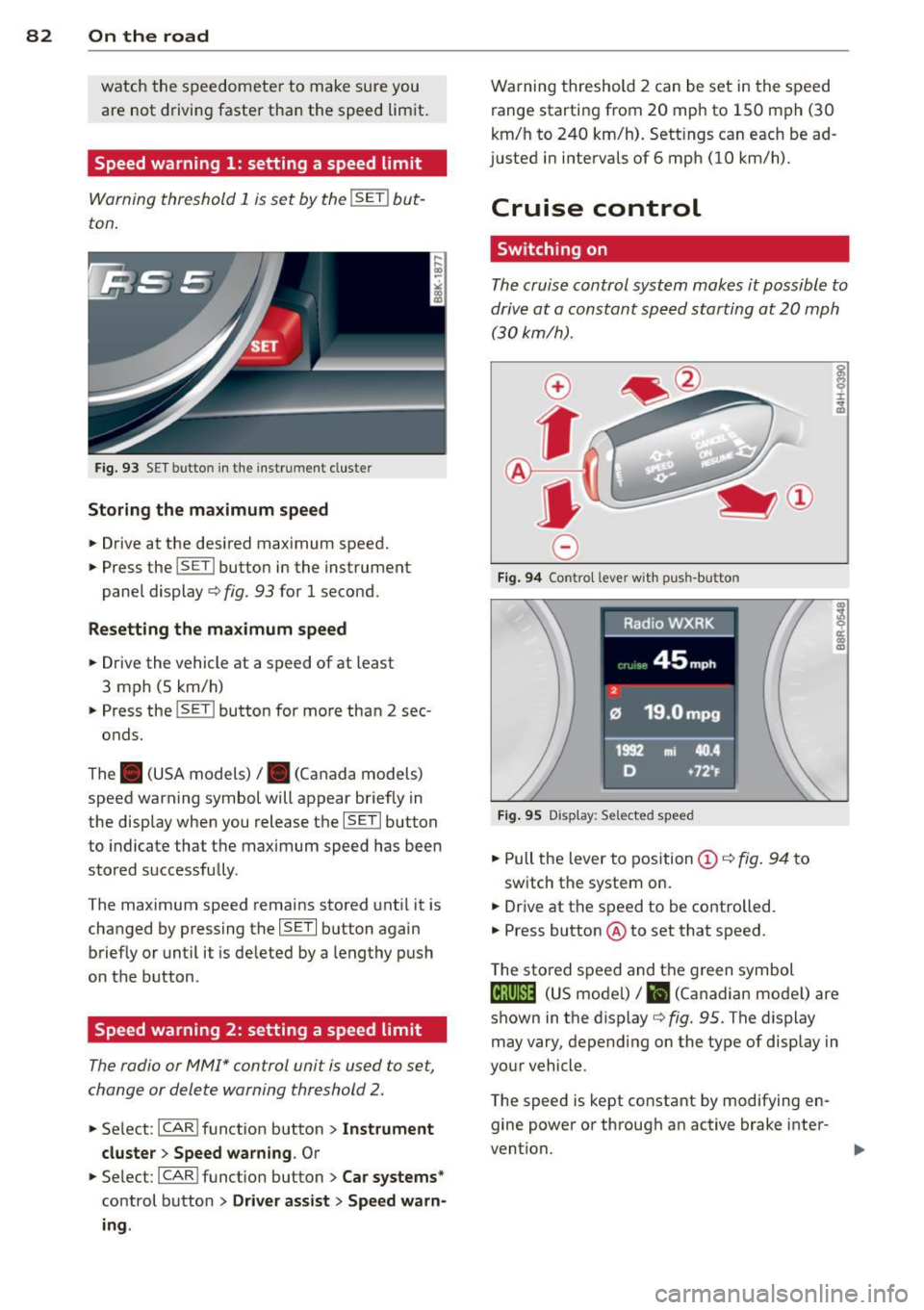
Warning threshold 1 is set by the ISE T! but
ton.
Fig. 93 SE T butto n in the instrument cluste r
Storing the maximum speed
.. Drive at the desired maximum speed .
.. Press the ISET ! button in the instrument
panel display ¢
fig. 93 for 1 second.
Resetting the maximum speed
.. Drive the vehicle at a speed of at least
3 mph (5 km/h)
.. Press the ISET ! button for more than 2 sec-
onds.
The . (USA models)/ . (Canada models)
speed warning symbol will appear briefly in
the display when you release the !SET! button
to indicate that the maximum speed has been
stored successfully .
The maximum speed remains stored until it is
changed by pressing the !SE T! button again
briefly or until it is de leted by a lengthy push
on the button .
Speed warning 2: setting a speed limit
The radio or MMI* control unit is used to set,
change or delete warning threshold 2.
.. Se lect : ICAR ! function button> Instrument
cluster > Speed warning.
Or
.. Select : ICAR !function button> Car systems *
control button > Driver assist > Speed warn
ing .
Warning threshold 2 can be set in the speed
range starting from 20 mph to 150 mph (30
km/h to 240 km/h). Settings can each be ad
justed in intervals of 6 mph (10 km/h).
Cruise control
Switching on
The cruise control system makes it possible to
drive at a constant speed starting at
20 mph
(30kmlh).
0
f
~
0
Fig. 94 Co ntro l leve r wit h pus h-butto n
Fig. 95 Display : Se lected speed
.. Pull the lever to position (D ¢ fig. 94 to
switch the system on.
.. Drive at the speed to be controlled.
.. Press button @ to set that speed .
T he stored speed and t he green symbol
ci!;\l)~i~ (US mode l)/ i'I (Canadian mode l) are
shown in the display ¢
fig. 95 . The display
may vary , depending on the type of display in
your vehicle.
The speed is kept constant by modifying en
gine power or through an active brake inter
vention.
...
Page 85 of 286

A WARNING ,~
- Always pay attention to the traffic
around you whe n the cruise contr ol is in
o peration . You are always responsi ble for
your s peed and the distance between
yo ur vehicle and other vehicles.
- For reasons of safety, cruise contro l
should not be used in the city, in stop
and-go traff ic, on twisting roads and
when road conditions are poor (su ch as
ice, fog, grave l, heavy rain and hydro
planing) -risk of accident.
- T urn off the cru ise control tempo rar ily
when entering turn lanes, highway exit
lanes or in construction zones.
- Please note that inadvertent ly "rest ing"
yo ur foot on the accelerator peda l causes
the cruise control not to brake. Th is is
because the cr uise control is overridden
by the driver's acce lerat ion.
- If a brake system malfunction such as
overheat ing occurs when the cruise con
tro l system is sw itched on, the braking
function in the system may be switched
off. The other cruise control f unctions re
main active as long as the i nd icator light
lij jUJ~i4 (US models) lli,'I (Canad ian mod
els) is on.
(D Tips
The brake lights illuminate as soon as the
bra kes apply automat ica lly.
Changing speed
.,. To increase/dec rea se the speed in incre
ments, tap the lever in the
0 10 d irection
~ page 82, fig. 94.
.,. To increase/dec rease the speed quickly, hold
the lever in the
0 10 direction unti l the de
s ired speed is displayed.
You can also press the accelerato r peda l down
to increase your speed, e .g. if yo u want to
pass someone. The speed yo u saved earlier
will resume as soon as you let off of the accel
erator pedal.
On th e ro ad 83
If, however, you exceed yo ur saved speed by
6 mph (10 km/h) for longer than 5 minutes,
the cr uise contro l wi ll be t urned off tempora
rily. The green symbol in the disp lay t urns
white. The saved speed remains the same.
Presetting your speed
You can preset your desired speed while the
vehicle is not moving.
.,. Switch on the ignition.
.,. Pull lever into position
(D ¢ page 82,
fig . 94.
.,. Press the lever in the 0 or O direction to
increase or decrease your speed .
.,. Release the lever to save that speed .
This function makes it possib le, for examp le,
to save the speed you want before dr iving on
the highway. Once on the highway, act ivate
the cr uise control by pulling the leve r toward
(D .
Switching off
Temporary deactivat ion
.,. Press the b rake pedal, or
.,. Press the lever in to posi tion @(n ot clicked
into place)
¢ page 82, fig . 94, or
.,. Drive fo r longer than 5 min utes at more
than 6 mph (10 km/h) above the stored
speed.
Switching off completely
.,. Press lever into position @(clicked into
place), or
.,. Switch the ignit ion off .
T he speed you saved will be retai ned if the
c ruise control has been swi tched off tempora
rily. To resume the saved speed, let up on the
brake and p ull the lever to position
(D .
Swi tc hi ng the igni tion off e rases the saved
speed.
Page 87 of 286

Transmission S tronic ®
Introduction
The automat ic transm iss ion is controlled elec
tronically. The transmiss ion ups hifts or down
shifts automatically depend ing on which drive
program is se lected.
When a
modera te driving sty le is used, the
tra nsmission se lec ts the most econom ica l
driving mode.
It w ill then change up early and
de lay the downshifts to g ive better f uel econ
omy .
The transmis sion swit ches to a sporty mode
after a k ick-down o r when the driver uses a
s porty dri ving sty le characterized by quick ac
celerator peda l movements, heavy accelera
tion, frequent changes in speed and traveling
at the maximum speed.
I f desired, the drive r can a lso se lect the gears
manually ( tiptronic mode ) ~ page 89.
The S tronic ® is a dual-clutch transmission.
P owe r is transfe rred using two clutches that
work independently from one anothe r. They
rep lace the torq ue converter used in conven
tional automatic transmiss ions and allow the
vehicle to accelerate without a noticeable in
terruption in traction.
Selector lever positions
F ig. 96 Display in the instrument cluster: se lector lever
in pos itio n P
The selector lever position engaged appears
n ext to the selector leve r as well as in the in
strument cluster display.
Tran sm iss ion 85
P -Park
In this se lector lever posi tion the transm is
s ion is mechanica lly locked. Engage P on ly
when the vehicle is
completely stopped~&.
in Driving the automatic transmission on
page 87.
T o shift in or out of pos it ion P, yo u must first
press and ho ld the brake pedal and then press
the re lease button in the selector leve r hand le
whi le moving the selector lever to or from P.
You can shift out of this position only with the ignition o n.
R - Reverse
Se lect R on ly when the veh icle is at a full stop
and t he engine is running at idle speed~.&. in
Driving the automatic transmission on
page 87.
Before you move the se lector lever to R, press
both the re lease button in the hand le o f the
selector lever
and the brake pedal at the same
time.
When the ignition is on, the backup lights illu
minate when the selecto r lever is moved into
R.
N -Neutral
The transmiss ion is in neu tral in this pos ition .
S hift to t his position fo r standing with the
brakes app lied
~ .&. in Driving the automatic
transmission on page 87.
When the vehicle is stat iona ry or a t speeds
below 1 mph (2 km/h), yo u must always app ly
the footbrake before and whi le mov ing the
l ever o ut of
N.
D/S - Normal posit ion for driving forward
In the D/S pos it ion, t he tr ansmission c an be
operated either in the norma l mode D or in
the sport mode S . To select the sport mode S,
pull the selector lever back briefly. P ulling the
l ever back again will se lect the norma l mode
D. The instr ument cluster disp lay shows the
selected driving mode. ..,_
Page 88 of 286

86 Transmis sion
In the norm al mode D, the transmission auto
matically selects the suitable gear ratio. It de
pends on engine load, vehicle speed and driv
ing style.
Select the
sport mode S for sporty driving.
The vehicle makes full use of the eng ine 's
power. Shifting may become noticeable when
accelerating.
When the vehicle is stationary or at speeds
below 1 mph (2 km/h), you must always apply
the foot brake before and while moving the lever to D/S out of N.
A WARNING
Read and follow all WARNINGS c> .&. in
Driving the automatic transmission on
page 87.
(D Note
-
Coasting downhill with the transmission in
N and the engine not running will result in
damage to the automatic transmission
and possibly the catalytic converter .
(D Tips
-On vehicles with drive select*, you can
adjust the sporty shift characteristics in
the
Dynamic driving mode.Swill appear
in the instrument cluster display instead
ofD.
- If you accidentally select N while driving,
take your foot off the accelerator pedal immediately and wait for the engine to
slow down to idle before selecting D/S.
-If there is a power failure, the selector
lever will not move out of the P position.
The emergency release can be used if
this happensc>poge
91.
Automatic Shift Lock {ASL)
The Automatic Shift Lock safeguards you
against accidentally shifting into a forward or
the reverse gear and causing the vehicle to
move unintentionally.
Fig. 97 Shift ga te : selecto r le ver lock positio ns and re
lease bu tto n highlighted
The selector lever lock is released as follows:
.. Turn the ignition on .
.,. Step on the brake pedal.
At the same time
press and hold the release button on the
side of the gear selector knob <=>
fig. 97 with
your thumb until you have moved the selec
tor lever to the desired position.
Automatic selector lever lock
The selector lever is locked in the P and N po
sitions when the ignition is turned on . You
must press the brake pedal and the release
button to select another position . As a re
minder to the driver , the following warning
appears in the instrument cluster display
when the selector is in P and N:
When stationary apply brake pedal while se
lecting gear
The Automatic Shift Lock only functions when
the veh icle is stationary or at speeds below
1 mph (2 km/h) .
At speeds above about 1 mph (2 km/h) the
Automatic Shift Lock is automatically deacti
vated in the N position .
A time delay element prevents the selector lever from locking when it is moved through
the N position (going from R to D/S) . The lock
ing element w ill lock the selector lever if the
Ill>
Page 91 of 286

conditions. Always be ready to apply the
brakes.
Manual shift program
Using the manual shift program you can
manually select gears.
Fig. 99 Ce nter console: shift ing t he gea rs manually
Fig. 100 Stee ring wheel: S hift b uttons
Gear selection with selector lever
The tiptronic mode can be selected either with
the vehicle stationary or on the move.
.. Push the selector lever to the right from 0/
5. An M appears in the instrument cluster
display as soon as the transmission has
shifted.
.. To upshift, push the selector lever forward
to the plus position
0 c:> fig. 99 .
.. To downshift, push the lever to the minus
position
0 -
Gear selection with paddle levers*
The shift buttons are activated when these
lector lever is in 0/5 or the t iptronic manual
shift program .
.. To upshift, touch the button on the right
0
c> fig . 100. Transmission 89
.. To downshift, touch the button on the left
0.
.. If you do not press a sh ift button within a
short time while in the 0/5 position, the
transmission will return to automatic mode.
To keep shifting using the shift buttons,
move the selector lever to the r ight out of
the 0/5 position .
When accelerating, the transmission does
not
automatically shift to the next gear shortly
before the maximum permitted engine RPM is
reached.
If you have selected a lower gear than the cur
rent one, the automatic transmission will shift
down only when the engine will not be over
revved.
With kick-down, the transmission shifts into a lower gear depend ing on speed and engine
RPM .
(D Tips
Tiptronic is inoperative when the transmis
sion is in the fail-safe mode .
, Kick-down
Kick-down enables maximum acceleration.
When you depress the accelerator pedal be
yond the resistance point, the automatic
transmission downshifts into a lower gear, de
pending on vehicle speed and engine speed .
The upshift into the next higher gear takes
place once the maximum specified engine
speed is reached .
.&_ WARNING
Please note that the whee ls can spin if
kick-down is used on a smooth s lippery
road -there is a risk of skidding.
-
Page 96 of 286
94 Audi adaptive cruise control and braking guard
Audi adaptive cruise
control
Description
Applies to vehicles: with Audi adap tive cruise co ntrol
Fig. 106 Detection range
What can Audi adaptive cruise control do?
The adaptive cruise control works in conjunc
tion with a radar sensor installed in the front
of the vehicle¢
page 92, fig. 103, which is
subject to designated system limits
¢
page 94. Stationary objects are disregard
ed .
On open roads w ith no traffic, adaptive cruise
control works like a regular c ruise control sys
tem. The stored speed is maintained. When
approaching a moving vehicle detected up
ahead, the adaptive cruise control system au
tomatically slows down to match that vehi
cle's speed and then maintains the distance
that the driver previously stored. As soon as
the system does not detect a vehicle up
ahead, adaptive cruise control accelerates back up to the stored speed.
Which functions can be controlled?
When you switch adaptive cruise contro l on,
you can set the current speed as the "control
speed"
¢ page 94, Switching on and off.
When driving, you can stop cruise control
¢
page 96 or change the speed ¢ page 95
at any time.
You can also set the distance to the object
ahead and set the adaptive cruise control driv ing program
¢page 96.
Switching on and off
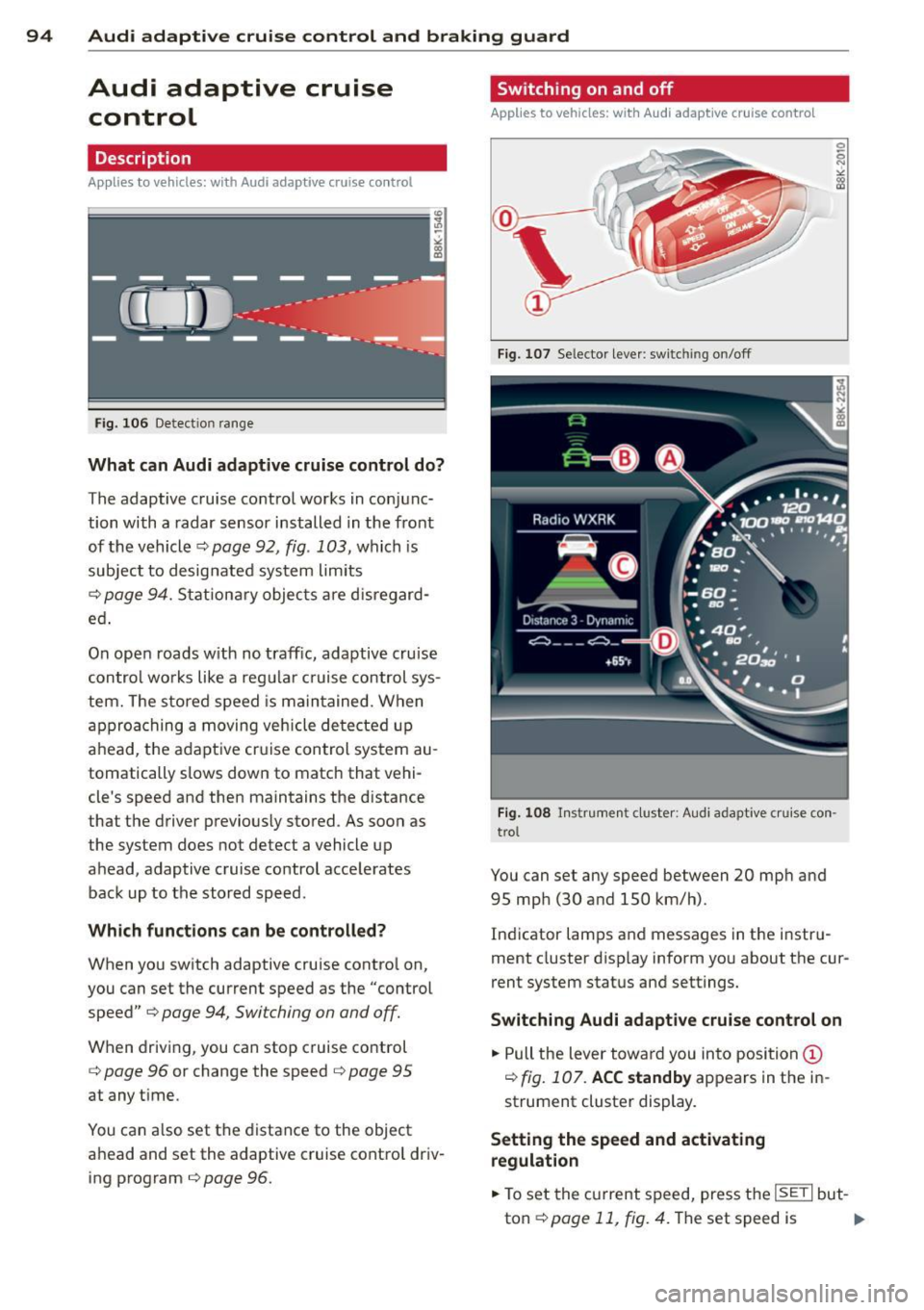
Applies to vehicles: with A udi adapt ive cruise contro l
Fig. 107 Selecto r lever: sw itching on/off
Fig. 108 Instrument cluster: Audi adaptive cruise con
trol
You can set any speed between 20 mph and
95 mph (30 and 150 km/h).
Indicator lamps and messages in the instru
ment cluster disp lay inform you about the cur
rent system status and settings.
Switching Audi adaptive cruise control on
.,. Pull the lever towa rd you into position@
¢
fig. 107. ACC standby appears in the in
strument cluster display.
Setting the speed and activating
regulation
.,. To set the current speed, press the ISETI but-
ton¢
page 11, fig. 4. The set speed is .,..
Page 97 of 286
Audi adaptive cruise control and braking guard 95
shown in the tachometer @and is also
shown briefly in the display @¢
fig. 108 .
Switching Audi adaptive cruise control off
~ Push the lever away from you into position
@ until it clicks into place. The message
ACC off appears.
@ Indicator lights
II-Adaptive cruise control is switched on . No
vehicles are detected up ahead. The stored
speed is ma intained.
I-A moving vehicle is detected up ahead .
The adaptive cruise control system regulates
the speed and distance to the moving vehicle
ahead and acce lerates/brakes automatica lly.
I -When automatic braking is not able to
keep enough distance to a previously detected
mov ing vehicle up ahead , you must take con
trol and brake ¢
page 9 7, Request for driver
intervention.
© Display
If adaptive cruise control is not shown in the
d isplay, you can call it up with the
I RES ET I
button ¢ page 24.
Based on the symbols in the d isplay, you can
determine if the system is maintaining a dis
tance to the vehicle ahead and what that dis
tance is.
No vehicle -No vehicle ahead was detected.
White vehicle -A vehicle ahead was detected .
Red vehicle -Prompt for the driver to take ac
tion
¢ page 97.
Both
arrows on the s cale © indicate the dis
tance to the vehicle ahead . No ar row appears
when the vehicle is on an open road and there
is no object ahead . If an object is detected
ahead, the arrow moves on the scale.
The green zone on the scale shows the stored
distance. For information on changing the
stored distance, refer to¢
page 96. If the
distance selected is too close or may soon be
come too close, th e arrows move into the red
zone on the scale .
A WARNING
Improper use of the adaptive cruise con
trol can cause collisions, other accidents
and serious personal injuries.
- Pressing the
!SET ! button when driv ing at
speeds below 20 mph (30 km/h), w ill au
tomatically accelerate the vehicle to
20 mph (30 km/h), which is the mini
mum speed that can be set.
@ Tips
-If you switch the ignit ion or the adaptive
cruise control off, the set speed is erased
from the system memory.
- The electronic stab ilizat ion control (ESC)
and the anti-slip-regulat ion (ASR) are au
tom atica lly turned on when the adaptive
cruise control is turned on. Both systems
cannot be turned off if the adaptive
cruise control is turned on . You cannot
switch the ESC to the sport mode when
adaptive cruise contro l is switched on.
Changing the speed
Applies to vehicles: wit h Audi adaptive cruise contro l
0
f
• 0
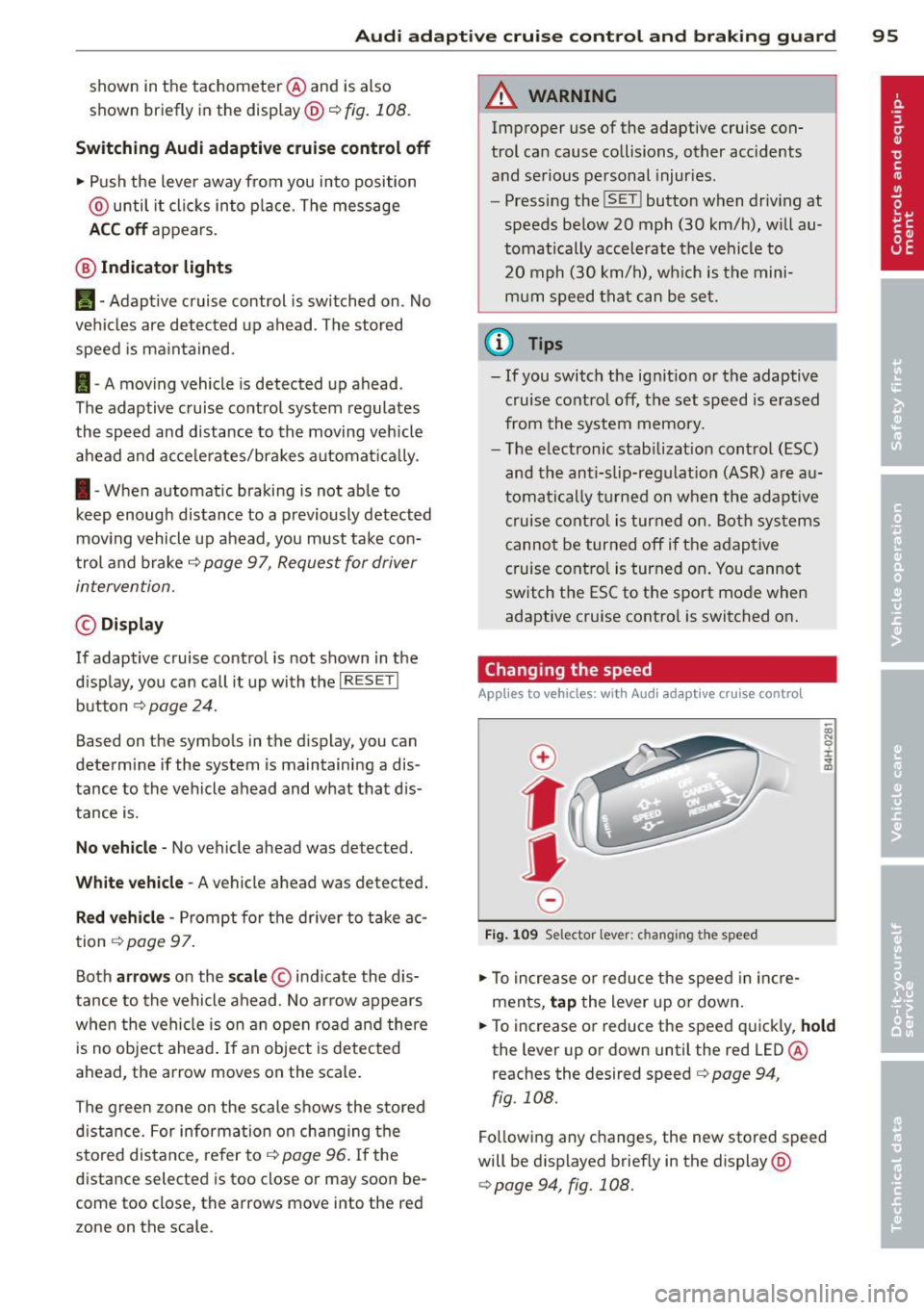
Fig . 1 09 Selector lev er: ch an gin g the speed
~ To increase or reduce the speed in incre
ments,
tap the lever up or down.
~ OI) N 0 ±
~
~ To increase or reduce the speed quickly, hold
the lever up or down unt il the red LED@
r eaches the desired speed
c> page 94 ,
fig . 108.
Fo llow ing any changes, the new stored speed
will be displayed brief ly in the display @
¢page 94, fig. 108.
Page 98 of 286
96 Audi adaptive cruise control and braking guard
Interrupting cruise control
Applies to vehicles: with Audi adaptive cruise control
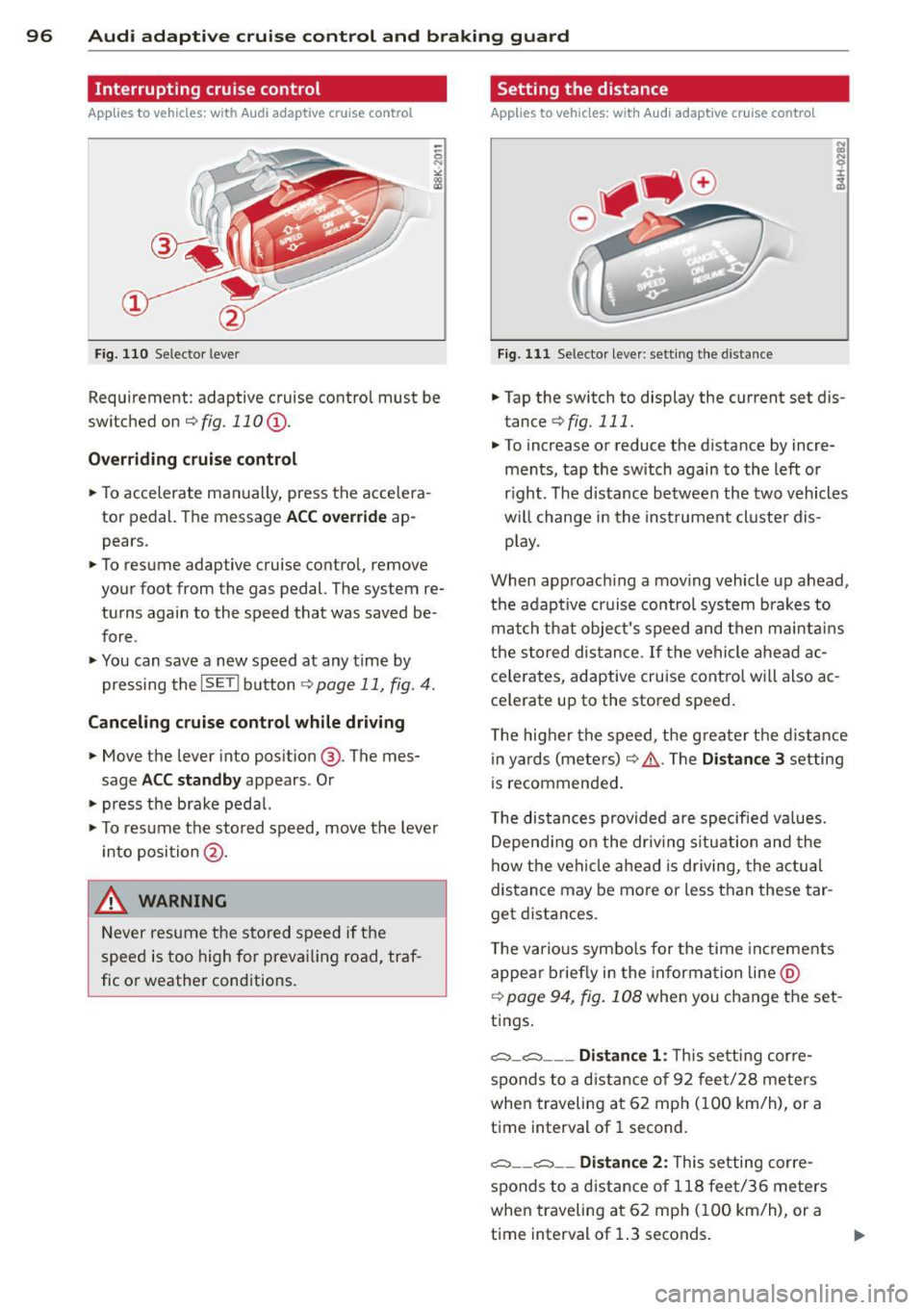
Fig. 110 Selector leve r
Requirement : adaptive cruise contro l must be
switched on
¢fig.110 (i).
Overriding cruise control
.. To accelerate ma nually, press the accelera
tor pedal. The message
ACC override ap
pears .
.. To resume adaptive cruise control, remove
your foot from the gas pedal. The system re
turns again to the speed that was saved be
fore .
.. You can save a new speed at any time by
pressing the
I SETI button ¢ page 11, fig. 4.
Canceling cruise control while driving
.. Move the lever into posit ion @. The mes
sage
ACC standby appears . Or
.. press the brake pedal.
.. To resume the stored speed, move the lever
into position @.
&_ WARNING
Never resume the stored speed if the
speed is too high for prevailing road, traf
fic or weather cond itions.
Setting the distance
Applies to vehicles: wit h Audi adapt ive cr uise contro l
Fig. 111 Selector lever : sett ing the distance
.. Tap the switch to display the current set dis
tance
¢ fig. 111 .
.. To increase or reduce the distance by incre
ments, tap the switch again to the left or
r ight. The distance between the two vehicles
w ill change in the instrument cluster dis
play .
When approach ing a moving vehicle up ahead,
the adaptive cruise control system brakes to
match that object's speed and then maintains
the stored dis tance. If the vehicle ahead ac
ce le rates, adaptive cruise control will also ac
ce lerate up to the stored speed.
T he higher the speed, the greater t he distance
in yards (meters)
c:::> /1.. Th e Distan ce 3 setting
is recommended .
T he distances provided are specified va lues .
Depending on the driv ing situation and the
how the veh icle ahead is driving, the actual
distance may be more or less than these tar
get distances.
T he various symbols for the time inc reme nts
appear briefly in the information line @
¢ page 94, fig. 108 when you change the set
tings.
c::::,_c::::, ___ Distance 1: Th is setting corre-
sponds to a distance of 92 feet/28 meters
when traveling at 62 mph (100 km/h), or a
time interval of 1 second.
c::::, __ c::::, __ Distance 2: This setting corre
sponds to a distance of 118 feet/36 meters
when traveling at 62 mph (100 km/h), or a
time interval of 1.3 seconds.